Claude Custom Connector for Remote MCP: Keys, Permissions and a Real Test
Claude's custom connector pages changed on Nov 24. Add EveryInfra's remote MCP with a key, lock down 3 paid tools, and see what a weekly brief costs.
On November 24, 2026, Anthropic updated both Claude help articles about custom connectors. The add flow now has a step where you review the authentication that Claude detects. Authentication has three choices: Sign in now, Sign in when needed and No sign in. API keys now go into a field called Request headers (Claude Help Center: Get started with custom connectors using remote MCP). On November 30, from 00:13 to 00:26 Singapore time (SGT), we read the tool list of the EveryInfra remote MCP server. The /mcp endpoint has 12 tools, and 11 of them carry readOnlyHint: true.
Three of those 11 tools cost money on each call: everyinfra_call_api, everyinfra_search and everyinfra_solve_captcha. The help center says Claude sorts connector tools by type, such as read-only and write/delete, but it does not say how. If the groups follow the annotations, these 3 paid tools land in the read-only group. So check each one by hand.
We then pulled one week of Reddit and YouTube talk about Football Manager 27 through MCP. The 7 paid calls for the brief cost $0.004586. With the 8-call plan, a weekly brief costs $0.0233 per product per month.
What a Claude custom connector is, and what changed on November 24
A custom connector is the place in Claude where you attach a remote MCP server. You give Claude an HTTPS address. Claude connects from Anthropic's cloud, reads the server's tools and calls them in chat. The help center says this is the same on the web, in Claude Desktop, in Cowork and in the mobile apps. All connections start from Anthropic's servers, not from your own network (Claude Help Center: Network requirements).
| Network rule from the help center | EveryInfra `/mcp` |
|---|---|
| The server must be reachable from the public internet | Yes, api.everyinfra.com is public |
| Only the standard port 443 works | Yes, the address has no port number |
| Anthropic publishes IP ranges for firewalls | Not needed for a public server |
| The connection starts in Anthropic's cloud | So your own network settings do not matter |
On November 30 we read the page data of both help articles. The lastUpdatedDate values were 2026-11-24T22:57:45Z and 2026-11-24T22:52:02Z. On October 22 we recorded the old steps in our guide to direct MCP in Claude after the Smithery shutdown. The changes since then are all in the authentication step.
The old flow had only an "Advanced settings" link for an OAuth Client ID and Secret. The new flow asks you to review what Claude detected. You then choose in three places (Claude Help Center: Use connectors).
Many tutorials online still show the old flow, so the Advanced settings link they point to may not match your screen. The table below lists the changes that matter for a server such as EveryInfra. Each row names the help article or post where the change appears.
| Date | What changed | Source | What to do for EveryInfra |
|---|---|---|---|
| 2026-11-24 | Three authentication choices; API keys move to Request headers | Help articles 11175166 and 11176164 | With a key, choose No sign in and add an Authorization header |
| 2026-11-24 | File transfers (beta) launch; custom connectors cannot use them | Help article 11175166, release notes | No effect: EveryInfra tools use text and JSON |
| 2026-11-24 | Skills over MCP in public beta; Tasks and Elicitation generally available | Claude article | A server can ask for confirmation before it charges |
| 2026-11-19 | "Always ask" is rolling out | Help article 13345190 | Set paid tools to Always ask |
| 2026-11-18 | Enterprise-managed auth: IdP-managed is generally available | Help article 15537633 | Works only with servers that support it |
Request headers still carry a beta label in the Claude docs. The text says "Request header authentication is in beta and available to a limited set of organizations". Without this field, your organization lacks the beta (Claude docs: Add an unlisted connector). In that case, use the OAuth endpoint /mcp/all.
Pick an endpoint: /mcp with a header, or /mcp/all with OAuth
The EveryInfra remote MCP server has two kinds of endpoints. The /mcp endpoint accepts only an API key in the header Authorization: Bearer <key>. We called a tool on it without a key on November 30 and saved a second copy at 01:55 SGT. The error said: "If your client cannot set headers, connect to /mcp/all and sign in to EveryInfra with OAuth when your app asks". The /mcp/all endpoint and single-platform endpoints, such as /mcp/reddit, support OAuth.
We read their protected resource metadata, the /.well-known/oauth-protected-resource document from RFC 9728. The authorization server is https://auth.everyinfra.com/oidc. For /mcp/all, the scopes are data:call search:call captcha:call ai:call account:read offline_access. For /mcp/reddit, the scopes are only data:call offline_access (EveryInfra metadata for /mcp/all; RFC 9728). So a Reddit-only token cannot call search, captcha or account tools.
With a header, everyone on the team uses the same key. The help center says "everyone who uses the connector reaches the service with that same credential, so use one limited to what members should access". All charges also go to the account that owns that key. With OAuth, each member signs in to EveryInfra once. Each person then uses their own account and wallet.
| Endpoint | Authentication | Choice in Claude | Tools (Nov 30) | Who pays | Best for |
|---|---|---|---|---|---|
/mcp | API key in a header | No sign in plus Request headers | 12 | The key's account | One person, or a team with one wallet |
/mcp/all | OAuth, or the same key | Sign in now or when needed | 24 with a key | Each member | Team plans; organizations without Request headers |
/mcp/reddit and other platforms | OAuth | Sign in now or when needed | Data tools for one platform | Each member | Teams that open one platform only |
We did not finish an OAuth sign-in inside Claude, so the two OAuth rows are a configuration example. A single-platform endpoint limits access on the server side. Even if every tool is set to allow in Claude, the token can call only one platform. Tool permissions in Claude block calls in the client. A single-platform endpoint blocks them in the server. You can use both layers together.
What happens the first time you connect with OAuth
A request to /mcp/all without a credential gets HTTP 401. The response header tells the client where to authorize. At 00:46 SGT on November 30, we sent an initialize call without a key. We sent it again at 01:03 and saved the response. Both had the same headers, shown here in part:
HTTP/2 401
www-authenticate: Bearer resource_metadata="https://api.everyinfra.com/.well-known/oauth-protected-resource/mcp/all", scope="data:call search:call captcha:call ai:call account:read offline_access"
The MCP authorization spec tells the client what to do next (MCP authorization spec 2025-06-18). It reads the document at resource_metadata and finds the authorization server. It adds a resource parameter to the request, as RFC 8707 describes, to tie the token to this address (RFC 8707). In Claude, you only choose Sign in when needed. On the first tool call, Claude opens the EveryInfra sign-in page. Claude then stores the token and sends it in the RFC 6750 Bearer format (RFC 6750).
| Scope | What it allows |
|---|---|
data:call | Data capabilities, such as reddit/comments |
search:call | Web search |
captcha:call | Captcha solving |
ai:call | The chat tool |
account:read | Balance and call records, read only |
offline_access | A new access token when the old one expires |
The list has no scope that writes to the account. Through OAuth, Claude can read the balance and call records. To change keys or settings, use the EveryInfra console. The recommended OAuth client, "Use Claude's published identity", relies on a Client ID Metadata Document that Anthropic hosts (IETF draft: OAuth Client ID Metadata Document).
Where the Claude Connectors menu is: step by step on a personal plan
The personal plans Free, Pro, Max and Ultra can all add custom connectors. Free plans can add only one (Claude Help Center 11176164). The entry point is Customize, then Connectors. Article 11175166 says "Click "+ Add" then "Add custom connector"". Article 11176164 says "Click "Add." Hover over "Custom," then select "Web."". The Claude docs say "The layout of the Add custom connector dialog varies by organization", so you can see either version.
A YouTube walkthrough from October 23 starts at the avatar in the lower left. It goes to Settings and then to Connectors under Customize. That page has two tabs, Yours and Discover.
The Add menu in the upper right has the option Add custom connector (Tech Help Daily video, 2026-10-23). The block below follows the November 24 help articles. The EveryInfra key is a real credential. Entering it in a third-party interface was outside the scope of this test, so the block is a configuration example.
Configuration example (Claude > Customize > Connectors > Add custom connector)
Name                     EveryInfra
Remote MCP server URL    https://api.everyinfra.com/mcp
  > Continue
Authentication           No sign in            # choose this when you use an API key
OAuth client             (hidden when you choose No sign in)
Request headers          Header name: authorization
                         Value:       Bearer ei_xxxxxxxxxxxxxxxx   # one space between Bearer and the key
                         Required:    yes
  > Add
Enter the address "exactly as the provider documents it, including any path". Without the /mcp path, the connection fails. When Claude can read the server settings, it marks the method it found as Detected. The EveryInfra /mcp endpoint does not publish OAuth metadata. So Claude can detect only the no-sign-in choice, and you add the header yourself. After that, turn on the connector from the "+" button in the chat box. Each chat has its own switch (Claude docs: Get started with connectors).
Your screen may have no Request headers field. In that case, use /mcp/all instead and choose Sign in when needed. Pick the recommended OAuth client, "Use Claude's published identity". On the first call, Claude shows the EveryInfra sign-in page. With this path, you never store a key in Claude. Each member also pays from their own account.
How to send the key: type Bearer in the Authorization header yourself
The Claude docs cover the value in a section called "Enter the full header value". The text says: "Claude sends the value exactly as you enter it. It doesn't add an authentication scheme or any other prefix". If the field holds only the key, Claude sends Authorization: ei_…, and EveryInfra replies with 401. The correct value is Bearer , one space and then the key. The same section lists more limits (Claude docs: Authenticate with request headers).
| Limit in the Claude docs | What it means for you |
|---|---|
| At most 4 headers | One authorization header is enough for EveryInfra |
| Allowed names include authorization, x-api-key, x-auth-token | Other names need a review by Anthropic first |
| The value goes out exactly as typed | Type Bearer before the key |
No Authorization header on an OAuth connection | Use either the header or OAuth, not both |
| No edits after you save | To change the key, delete and add the connector again |
| The value is hidden after you save | Keep the key in your own password store |
Before you add the connector, test the key in a terminal with the same header. The tools/list method is free. At 00:16 SGT on November 30, this command returned 12.
curl -s https://api.everyinfra.com/mcp \
  -H "Authorization: Bearer ${EVERYINFRA_API_KEY}" \
  -H "Content-Type: application/json" \
  -H "Accept: application/json, text/event-stream" \
  -d '{"jsonrpc":"2.0","id":1,"method":"tools/list"}' | jq '.result.tools | length'
You cannot change the authentication settings after you save. The docs say "You can't change authentication settings after you add a connector. That covers OAuth credentials and request headers". To change the key or the address, you delete the connector and add it again. Every member of the team must then connect again. For this reason, make a separate key for Claude. When you want to stop it, disable that key in the EveryInfra console.
You can also limit the key on the EveryInfra side. The text of the everyinfra_list_keys tool lists what each key can have. It covers product-line permissions, account read permissions, a per-minute limit, a source IP limit, a USD spend limit (spend_limit_usd) and an expiry date. Give the key only the data product line and a spend limit. The server then rejects calls outside that scope, even when the Claude settings are too loose.
Limit permissions per tool: which 3 of the 12 tools cost money
Claude gives each connector tool one of three permissions: Always allow, Needs approval or Blocked. You can set them per group or per tool, in the Tool permissions field on the connector page (Claude docs: Manage a connector). On Team and Enterprise plans, admins set them in organization settings. The help center says "The permissions will be categorized by type (for example, read-only tools, write/delete tools)". The help center does not say how it builds the groups. In an MCP tool definition, the only annotations that could drive them are hints such as readOnlyHint and destructiveHint.
The MCP spec defines readOnlyHint as "If true, the tool does not modify its environment". The same part also warns: "Clients should never make tool use decisions based on ToolAnnotations received from untrusted servers" (MCP spec schema: ToolAnnotations). At 00:16 SGT on November 30, we read tools/list on both endpoints with a key. A script counted the tools by annotation. The chart shows the result.
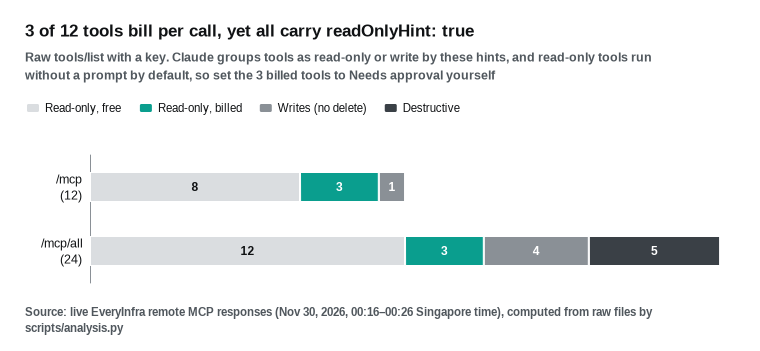
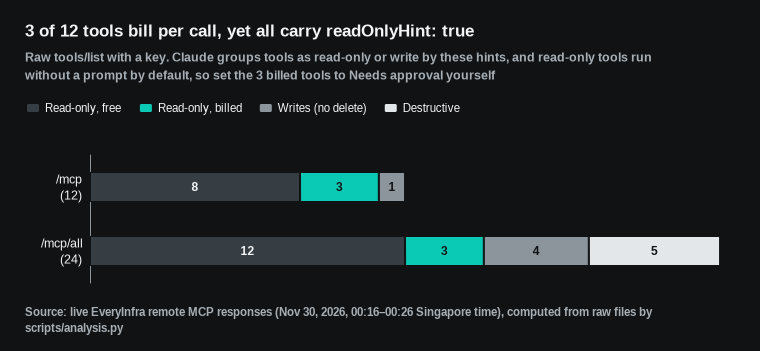
The read-only label on these 3 tools fits the MCP definition. One reddit/comments call changes nothing on Reddit. But the call does change your wallet balance, by $0.000792 each time. A screen that groups tools as read-only and write cannot show this. If Claude groups by readOnlyHint, an admin who allows only the read-only group also allows all 3 tools that spend money. We did not add this connector in Claude, so we did not see the real groups. Check each tool in Tool permissions before you allow a whole group.
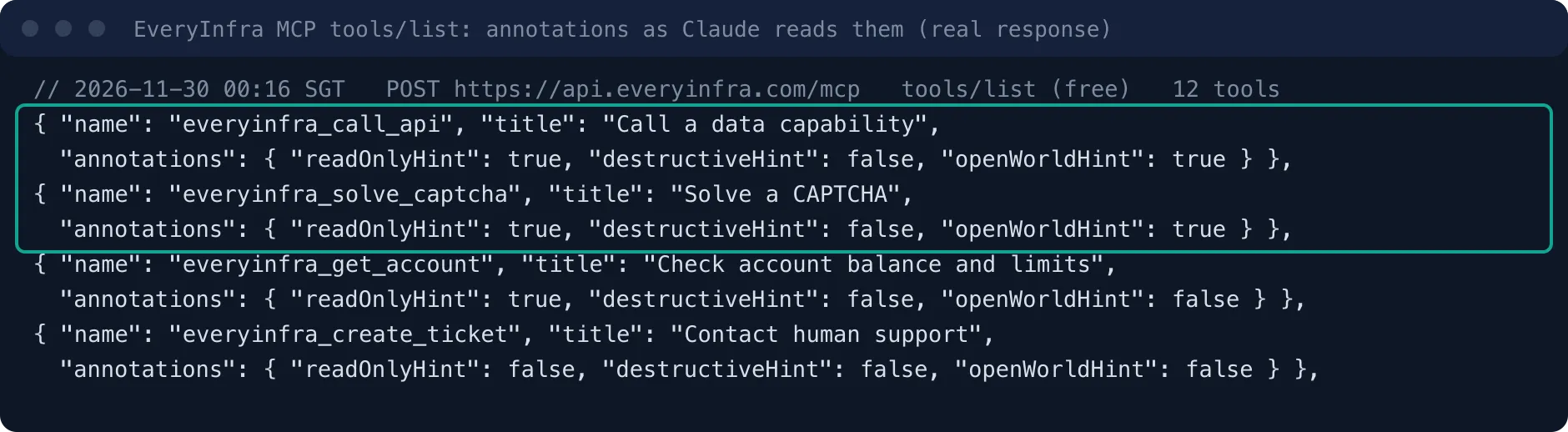
The table below shows our settings for one job: pull public comments and write a brief. It lists all 12 tools of /mcp. We judged each tool on three points: its cost, whether this job needs it and whether it can change the account.
| Tool | Annotation | Cost | Needed | Our setting |
|---|---|---|---|---|
everyinfra_list_capabilities | Read-only | Free | Yes | Always allow |
everyinfra_call_api | Read-only, open world | $0.000556 to $0.000792 per call here | Yes | Always ask |
everyinfra_get_job | Read-only | Free | For slow jobs | Always allow |
everyinfra_search | Read-only, open world | Per call | No | Blocked |
everyinfra_solve_captcha | Read-only, open world | Per solve | No | Blocked |
everyinfra_list_captcha_types | Read-only | Free | No | Blocked |
everyinfra_chat | Read-only | Free after a top-up | No | Blocked |
everyinfra_get_account | Read-only | Free | Optional | Always allow |
everyinfra_list_requests | Read-only | Free | Optional | Always allow |
everyinfra_get_topup_link | Read-only | Free, returns a payment link | No | Blocked |
everyinfra_create_ticket | Can write | Free | No | Blocked |
everyinfra_get_ticket | Read-only | Free | No | Blocked |
With these settings, Claude can use 4 free lookup tools without asking. Only everyinfra_call_api spends money, and you confirm each call. The /mcp/all endpoint adds 12 account tools, such as everyinfra_delete_key and everyinfra_set_webhook. A comment brief never needs them. For this reason we suggest /mcp over /mcp/all for one person.
Needs approval does not always ask in Auto mode
Only the table in the Cowork help article states this. The new Claude experience has three modes: Auto, Manual and Skip. Auto is becoming the default on Pro, Max, Ultra and Team. Manual is the default on Enterprise. In Auto, a tool set to Needs approval "Runs without asking you, unless an automated check flags the action as risky" (Claude Help Center: Get started with Claude Cowork, updated 2026-11-19). A data call that costs a fraction of a cent will rarely look risky to that check.
| Your setting | Manual mode | Auto mode | Skip mode |
|---|---|---|---|
| Always allow | Runs | Runs with no automated check (destructive tools excepted) | Runs |
| Needs approval | Asks you | Asks only when the check flags risk | Runs |
| Always ask | Asks you | Asks you | Asks you (a scheduled task may skip the tool) |
| Blocked | Refuses | Refuses | Refuses |
This table comes from the Cowork help article, and we did not test each cell. You have two ways to make Claude stop before every charge. Set everyinfra_call_api to Always ask, which is rolling out on all paid plans. Or switch the chat to Manual. The article also warns about the reverse case. One Always allow click for that tool, in a chat or on your phone, overrides Always ask.
Always ask also has a limit on its scope. The article says ""Always ask" applies only to the tool you choose". Claude may reach the same information with another tool and not ask. For EveryInfra, everyinfra_search can also find Reddit and YouTube content, and it also charges per call. If it stays on Always allow, the model can go around the check. Our table sets it to Blocked for this reason.
EveryInfra adds one more limit of its own. Each key has a per-minute request limit. The test key in this article allows 10 calls per minute. Extra calls get rate_limited, with no charge.
This limit only slows spending. At the highest price in this article, $0.000792, a nonstop loop makes 14,400 calls a day for about $11.40. Only the USD spend limit on the key sets a hard cap.
Team and Enterprise plans: who adds the connector, and how members use it
On Team plans, only the Owner and the Primary Owner can add custom connectors. On Enterprise plans, custom roles with the "Manage access to Libraries" permission can also add them. The path is Organization settings, Connectors, Add, Custom and then Web. Members then find the item with the "Custom" label in Customize, Connectors and click Connect (Claude Help Center 11175166, For Team and Enterprise plans). If the domain matches a directory service, Claude shows that service's name and icon. It still connects to the address you entered.
Admins limit tool permissions on the Tools tab of the connector, under Organization settings and Connectors. One step here often blocks people. The text says: "If you don't see any tools to set, connect the service to your own account first". The limits apply to the whole organization, and members cannot loosen them (Claude Help Center 11176164, Restrict actions). On Enterprise plans, the June 2026 release notes added connector permissions per custom role (Claude release notes).
When a role and the organization settings disagree, the stricter one wins. These rules apply only to members whose role is "Custom". Owners and Admins see something different when they test with their own accounts (Claude Help Center: Manage custom roles on Enterprise plans, updated 2026-11-24). So test with a member account before you announce the connector.
| Plan | Who adds custom connectors | Who sets tool permissions | Key with a header | Monthly price (read Nov 30) |
|---|---|---|---|---|
| Free | You, at most 1 | You | Your own | $0 |
| Pro | You | You | Your own | $20, or $17 a month on annual billing |
| Max / Ultra | You | You | Your own | $100 / $200 |
| Team | Owner, Primary Owner | Owner; members cannot loosen it | One for the organization | Standard seat $25 ($20 annual); Premium $125 ($100) |
| Enterprise | Owners and custom roles with Libraries access | Organization plus custom roles; stricter wins | One for the organization | $20 per seat plus usage at API rates, 20 seats minimum |
Prices come from the Claude pricing page. When a team connects EveryInfra with a header, every call charges the same key. The records cannot show who made each call. Three steps help. Give the key its own per-minute limit and a USD spend limit. Move members to OAuth on /mcp/all, so each person pays from their own account. Or make one connector per team, each with its own key.
Members cannot request this connector through the usual flow. The help center describes "Let users request connectors", where a member clicks Request on a directory page. Team plans turn it on by default, and Enterprise plans turn it off. A custom connector such as EveryInfra has no directory page, so there is nothing to click. The member must ask the Owner directly. Send the Owner the address and the header steps from this article.
Enterprise-managed auth lets an admin authorize once, and members connect on their first sign-in. The IdP-managed version is generally available, and the Claude-issued version is in beta (Claude Help Center: Auto-connect your organization's apps, updated 2026-11-18). The server must support the JWT bearer grant and identity assertion checks (Claude docs: Enterprise Managed Auth). The public EveryInfra docs do not list support for this today.
Mobile and desktop: where you add it, where you use it
You can add custom connectors only on the web and in the desktop app. After that, the connector follows your account. The help center says it "will be available to use the next time you log in to your account on Claude for iOS or Android". The table lists what each app supports (Claude docs: Where connectors work; Claude Code docs: Use MCP servers from claude.ai).
| App | Add a custom connector | Use it | Notes |
|---|---|---|---|
| claude.ai on the web | Yes | Yes | Also runs MCP Apps with interactive screens |
| Claude Desktop | Yes | Yes | Also runs local desktop extensions |
| iOS and Android | No | Yes | Remote connectors only |
| Claude Code | No (from claude.ai) | Yes | Needs a sign-in with a Claude account |
The desktop app has one point that people often mix up. The file claude_desktop_config.json sets up local MCP servers that use your computer's network. A custom connector is remote, and Anthropic's servers connect to it. Local servers do not work on claude.ai or in cloud Cowork sessions (Claude Help Center: Local MCP servers on Claude Desktop). If you put the EveryInfra address in that JSON file, your phone will not see it.
Permission settings also follow your account. On a phone, "Allow once" is the safer answer to a prompt, because Always allow overrides Always ask everywhere. With many connectors, open "+" in the chat, then Connectors and Tool access. Change Auto to On demand there. The help center suggests this with 10 or more connectors. Claude then searches for the tools it needs (Claude Help Center: Manage Claude's tool access).
The same server in the Claude API: open tools one by one
The MCP connector in the Messages API can attach a remote MCP server to your own program (Claude API docs: MCP connector). It has two parts. The mcp_servers array holds the address and the credential. The tools array holds an mcp_toolset that decides which tools are on. Set default_config to turn all tools off, and turn on only the ones you need in configs. The docs say that configs takes priority over default_config.
# Configuration example: Messages API with EveryInfra, 4 tools on (not tested)
response = client.beta.messages.create(
    model="claude-opus-5-5",
    max_tokens=4000,
    messages=[{"role": "user", "content": "Get this week's top 25 posts in r/footballmanagergames"}],
    mcp_servers=[{
        "type": "url",
        "url": "https://api.everyinfra.com/mcp",
        "name": "everyinfra",
        "authorization_token": os.environ["EVERYINFRA_API_KEY"],
    }],
    tools=[{
        "type": "mcp_toolset",
        "mcp_server_name": "everyinfra",
        "default_config": {"enabled": False},
        "configs": {
            "everyinfra_list_capabilities": {"enabled": True},
            "everyinfra_call_api": {"enabled": True},
            "everyinfra_get_job": {"enabled": True},
            "everyinfra_list_requests": {"enabled": True},
        },
    }],
    betas=["mcp-client-2025-11-20"],
)| Topic | claude.ai connector | Messages API connector |
|---|---|---|
| Per-tool control | Always allow, Needs approval, Always ask, Blocked | enabled true or false |
| Prompt before a paid call | Yes, with Always ask | No; your program must check spend |
| Elicitation from the server | Supported since November 24 | Not supported: "only tool calls are currently supported" |
| Pinned tool list | No | Yes, with the mcp-client-2026-09-15 beta header |
The docs describe authorization_token as an OAuth token. The EveryInfra /mcp endpoint reads a key from the Bearer header. We did not test a raw key in this field, so check it with a first tools/list call. To control spending in the API, track the running total of billing.charged_usd. You can also wrap data calls in your own function with a budget check. A pinned tool list keeps new server tools out of your program until you add them.
A real run: Football Manager 27, one week of Reddit and YouTube talk
We chose Football Manager 27 because it is new and the talk is focused. The game came out on November 10, 2026 (Steam store page). On November 23, the Sports Interactive community account on r/footballmanagergames announced patch 27.1.1 for that week. It cuts yellow cards and fixes a Steam Workshop backend bug (Sports Interactive's 27.1.1 preview post).
A publisher, a mod site or a football channel wants a weekly view. What did players complain about this week? Which new issues appeared under the YouTube reviews?
With the EveryInfra connector on, a prompt like this one is enough. This is a configuration example, and you can copy it as it is.
Use the EveryInfra connector to write a Football Manager 27 weekly brief (November 23 to 29):
1. Get this week's top 25 posts in r/footballmanagergames. Pull comments for the 3 posts with the most comments.
2. Search YouTube for "Football Manager 27 review". Take the first 3 videos. Pull only comments from November 23 on.
3. Sort the comments by topic. For each topic, give a count and 2 typical quotes with user names removed.
4. Before you call anything, tell me how many calls you plan and what they cost. Wait for my OK.
Step 4 is a checkpoint for you. With everyinfra_call_api on Always ask, Claude first reports the budget and then asks before each call. We did not run this prompt inside Claude. We sent the same tools/call requests that the model would send to the same MCP address. We kept the request body and the response of every call.
| Time (Nov 30, SGT) | Capability | Result | Time taken | charged_usd |
|---|---|---|---|---|
| 00:17:06 | reddit/search (Football Manager 27, newest) | 8 posts, none about FM27 | 6.7 s | 0.000792 |
| 00:17:12 | youtube/search (Football Manager 27 review) | 10 videos | 5.4 s | 0.000778 |
| 00:20:49 | reddit/subreddit_posts, youtube/comments | rate_limited (10 per minute) | 0.1 s | 0 |
| 00:21:44 | reddit/subreddit_posts (top, past_week) | 25 posts, Nov 23 to 28 | 13.5 s | 0.000556 |
| 00:22:06 | youtube/comments (patch reaction video) | 49 comments | 2.3 s | 0.000556 |
| 00:23:23 | reddit/comments ("match engine is fundamentally broken" post) | 100 comments | 41.1 s | 0.000792 |
| 00:24:11 | youtube/comments (review video, since Nov 23) | 6 comments | 35.8 s | 0.000556 |
| 00:24:54 | youtube/comments (parameter written as date_from) | unknown_param | 0.1 s | 0 |
| 00:25:33 | youtube/comments (GamingBolt review, since Nov 23) | 2 comments | 21.8 s | 0.000556 |
| 00:26:02 | youtube/comments (FM Show episode, since Nov 23) | 0 comments | 14.5 s | 0 |
Our first call used reddit/search for "Football Manager 27", sorted by newest. The 8 posts were match threads, eFootball account trades and a test call for a mobile game. None was about FM27.
The catalog explains the matching. With three or more words, at least three quarters must match, and common words such as "Football" and "27" match easily. Next we used reddit/subreddit_posts on r/footballmanagergames, and all 25 posts were on topic. So name the community in your prompt.
YouTube had a field problem. Without since, the posted_at field came back as relative text, such as "10 days ago". With that text, the model cannot filter "this week" in a reliable way. The catalog shows that youtube/comments has a since parameter in YYYY-MM-DD form. With it, the three videos returned 6, 2 and 0 comments. If your prompt says "only comments from November 23 on", the model adds the parameter.
One real round trip: what the model sends and what comes back
When the model uses the connector, Claude sends a standard MCP tools/call request. The tool name is everyinfra_call_api. The arguments hold the platform, the capability and its parameters. Below is the request from 00:23:23 and the start of its response. We copied both from our saved files and masked the author name.
{"jsonrpc":"2.0","id":1,"method":"tools/call","params":{"name":"everyinfra_call_api",
 "arguments":{"platform":"reddit","action":"comments",
  "params":{"url":"https://www.reddit.com/r/footballmanagergames/comments/1y7xae5/fm27_isnt_hard_the_match_engine_is_fundamentally/","limit":100}}}}

> HTTP 200, result.content[0].text (excerpt)
{"platform":"reddit","action":"comments","count":100,
 "billing":{"charged_usd":0.000792, ...},
 "results":[{"id":"…","text":"Man City don’t just finish 12th, they finish 12th while also having Mbappe and Olise lmao",
             "author_username":"***","like_count":80,
             "posted_at":"2026-11-28T22:18:25…+00:00", ...}, ...]}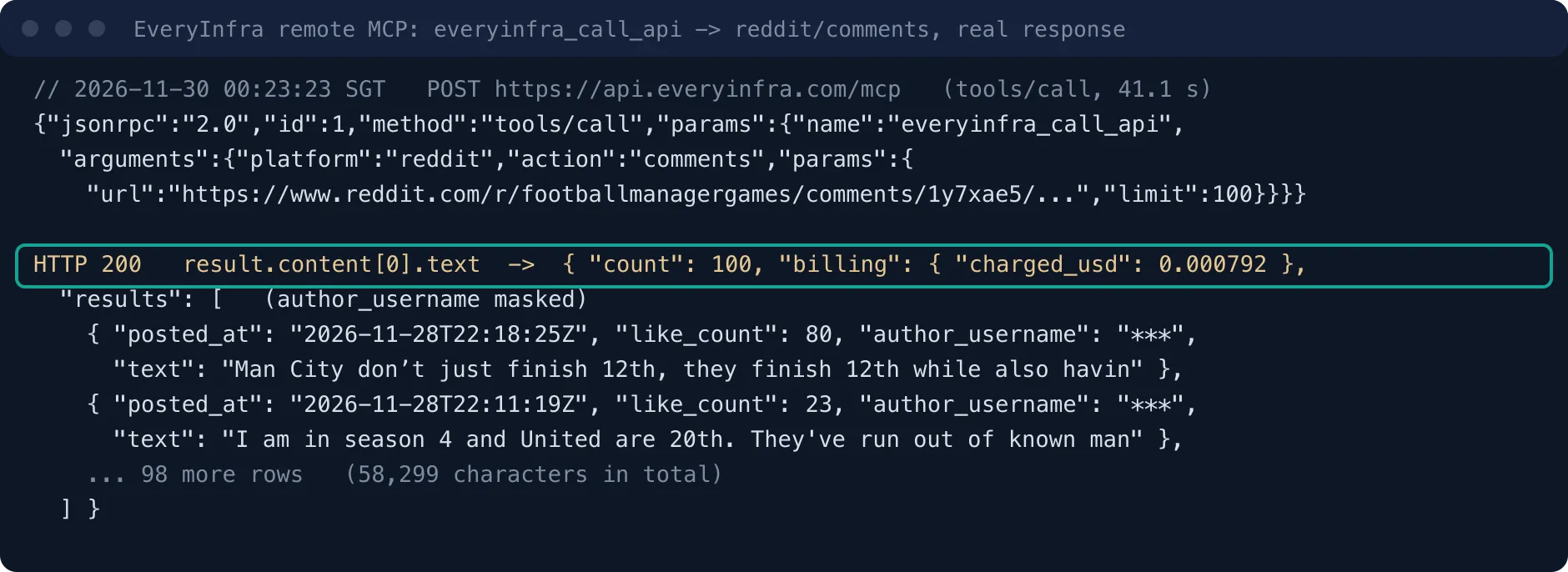
The catalog response_fields list has 8 fields for reddit/comments: id, text, author_username, like_count, community, url, posted_at and platform. In this response, none of the 100 comments had community, and the other 7 fields were all there. To group by community, take the name from the post URL in your request. The billing.charged_usd field holds the real charge, so the model can add up the total. This response had 58,299 characters, and all of it enters Claude's context. We measured every MCP response in this test.
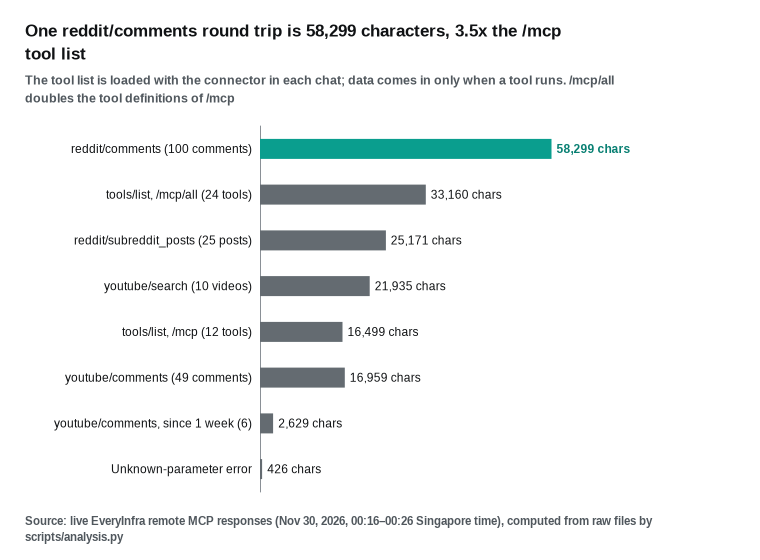
The 8 successful data calls returned 147,945 characters in total. The tool list also counts, because its definitions go into the chat. For /mcp that is 16,499 characters, and /mcp/all doubles it to 33,160 characters. For data work, this is one more reason to use /mcp. A Claude article from November 24 says "Tool search" saves more than 85% of that context (Claude article on Skills over MCP).
Sorting results: 30 hand-read comments against keyword rules
This week's top 25 posts in r/footballmanagergames had 1,884 comments in total. The three review videos had only 8 new comments from November 23 on, and 6 were in Indonesian. Most review videos came out around November 9, and a week later their comment sections were quiet. The Reddit talk kept growing. For a weekly brief, Reddit is the main source. YouTube is useful in the week when a new video comes out.
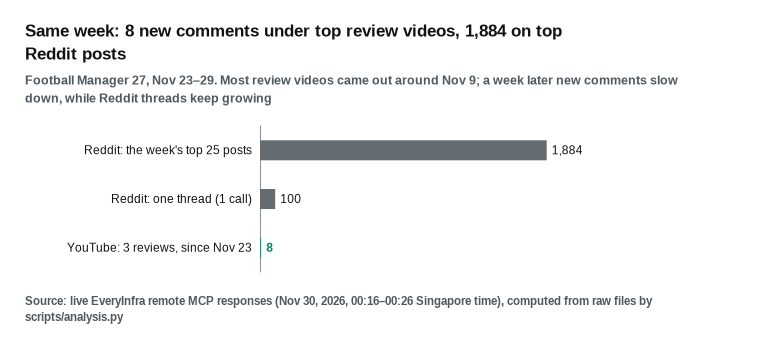
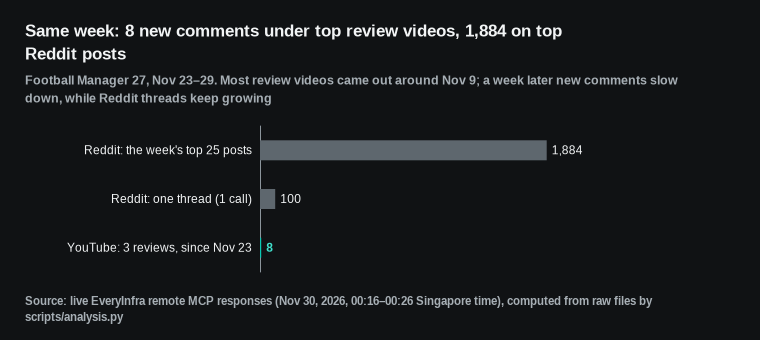
Claude should do the sorting. For a check from outside the model, we took every third comment on that post. We started at the 1st and stopped at the 88th, 30 in total. We named the main topic of each by hand. We also wrote English keyword rules, ran them on all 100 comments and compared the two. The chart shows the hand count.
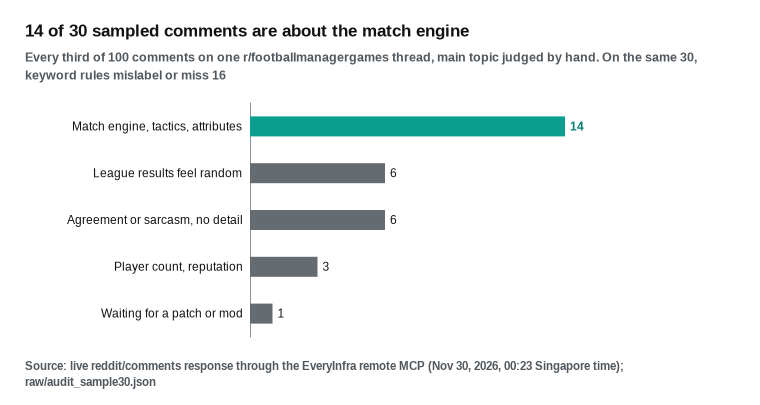
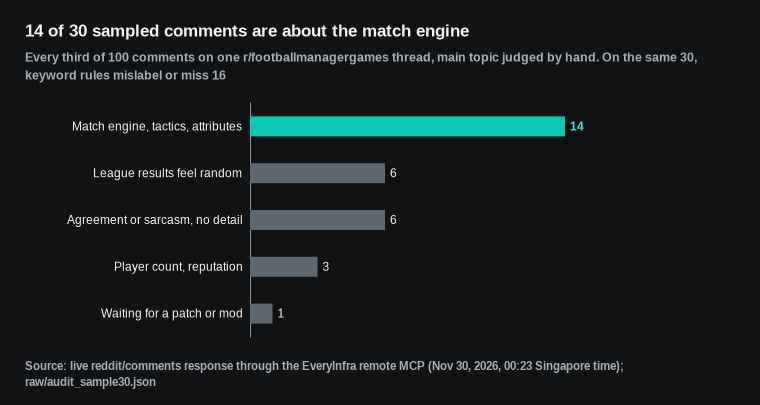
The keyword rules had a wrong label or a missing main topic on 16 of the 30 comments. "Unrealistic" contains "realistic", so the rules marked it positive. "Not fun anymore" contains "fun", so the rules marked that positive too. "Best FM ever" was sarcasm.
Comments about wing play or pace never said "match engine", so the rules missed them. The match engine share was close in both methods, 47 of 100 by rules and 14 of 30 by hand. But one label in two was wrong when we read them one by one.
So keyword rules cannot stand in for real labels. We did not ask Claude to label these 100 comments, so we have no number for how much better it does. When Claude labels them, check its labels against a hand sample of about 30 comments before you trust them. We saved the 30 comments with both sets of labels, so anyone can check them. The table shows what each topic was about. This is the part of a brief that product and community teams need most.
| Topic (hand count) | What the comments said |
|---|---|
| Match engine (14) | Defensive midfielders do not hold position; only the half-back role stays. Strikers score in instant results but rate near 6.3 when you watch. Attribute gaps are so small that 20 and 12 look the same. |
| League results (6) | Spurs won season one while Everton and Brighton dropped out. Crystal Palace won the title, the same in 5 other saves. One person saw only Metz in the Ligue 1 top three twice. |
| Agreement or sarcasm (6) | "Nothing wrong with 27" as a joke; short replies that agree with the post |
| Player numbers (3) | Is a lower player count than the last game the game's fault, or another big release that month? |
| Waiting (1) | Will start a new save after a mod comes out on December 4 |
For product and community teams, write the brief in three parts: engine issues, balance issues and mood, each with a count and a few quotes. The engine part goes to the developers. The balance part goes to the people who tune leagues and players. The mood part tells the community team how loud the thread is.
Failures with no charge: rate limits, wrong parameters, empty results
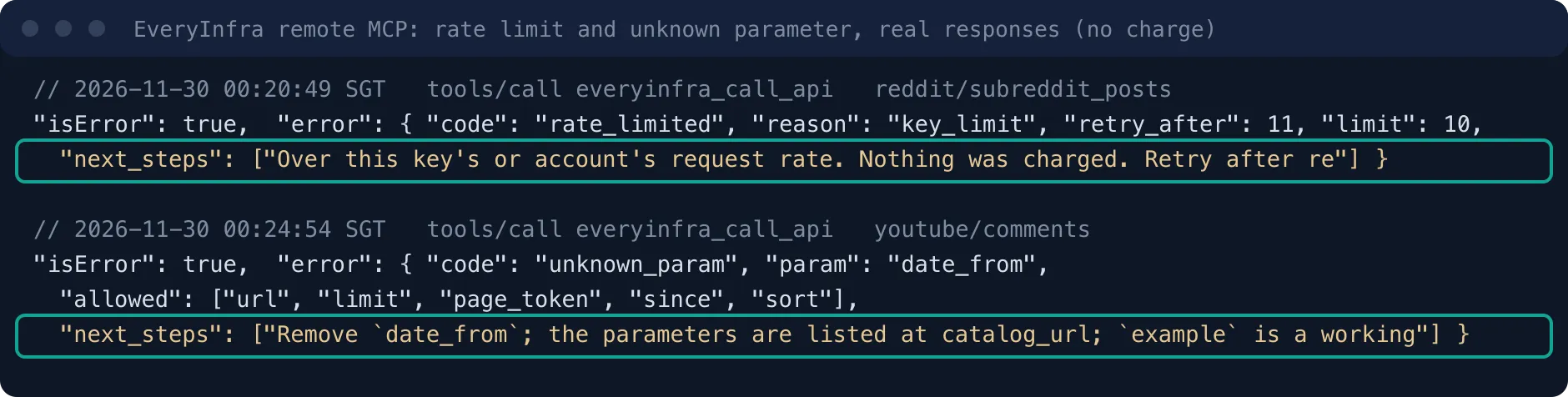
We hit three kinds of failure in this run. None of them cost money. Each response explains the problem in words that the model can act on.
| Case | Response | Charge | What the model should do |
|---|---|---|---|
| More than 10 calls in a minute | rate_limited, retry_after: 11 | 0 | Wait and retry; our retry after about a minute (55 seconds) worked |
Wrong parameter name (date_from) | unknown_param, with the 5 allowed names and an example | 0 | Change it to since |
| No comments in the date range | count: 0 | 0 | Pick another video or widen the dates |
| Normal response | count and billing.charged_usd | Catalog price | Add up the charges |
The rate limit hit when two calls went out in the same second, while other jobs used the same key. The MCP result has isError: true, so Claude knows that the call failed. The next_steps field says "Nothing was charged" and gives the retry time. For the wrong parameter, the allowed field lists all 5 valid names and adds a working example. Our guide to self-healing API errors explains these messages. The failure refund reconciliation guide shows how to check refunds.
Check what you spent: get_account and list_requests
After the brief, ask Claude to check the bill with two free tools. The table lists what each one returns, from the tool text in tools/list.
| Tool | What it returns | Needs |
|---|---|---|
everyinfra_get_account | Paid and bonus balance, per-minute limits, usage_24h with calls, failures and spend | Any key |
everyinfra_list_requests | Each call: request_id, capability, status, latency, rows, charge and amount; refund state by request_id | The requests:read permission |
A key with only the data product line cannot call everyinfra_list_requests by default. Keys with no product-line limit get the three read permissions by default. A key limited to product lines does not.
The account owner turns on requests:read in the console, under API Keys and then permissions. The key we suggested above has only the data product line. So it gets a permission error on this tool until you turn the permission on. This permission only reads, so the key still cannot change anything.
Add a billing prompt after the brief: "Call everyinfra_list_requests for today's calls, sum rows and charges by capability, and flag any paid call with 0 rows." The last part catches empty results. EveryInfra does not charge for them, so a paid call with 0 rows is one to check with support. Send its request_id to support, or file it with everyinfra_create_ticket. Our last call, on the FM Show video, returned 0 comments with a charged_usd of 0.
The cost: one weekly brief per product
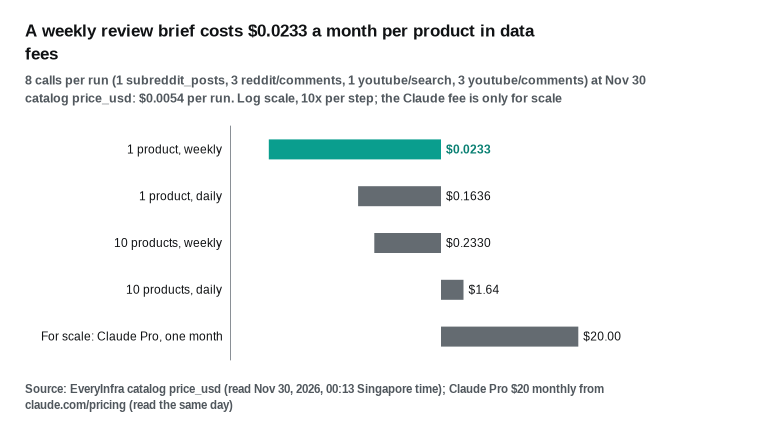
At the catalog price_usd values from 00:13 SGT on November 30, one brief uses 8 calls. That is 1 reddit/subreddit_posts ($0.000556), 3 reddit/comments ($0.000792 each), 1 youtube/search ($0.000778) and 3 youtube/comments ($0.000556 each). The total is $0.005378 per run. With 52 weeks over 12 months, one product costs $0.0233 a month.
| Plan | Calls per run | Cost per run | Per month |
|---|---|---|---|
| 1 product, once a week | 8 | $0.005378 | $0.0233 |
| 1 product, every day | 8 | $0.005378 | $0.1636 |
| 10 products, once a week | 80 | $0.05378 | $0.2330 |
| 10 products, every day | 80 | $0.05378 | $1.64 |
| This test (16 paid calls, 9 for video research) | 16 | n/a | $0.009812 paid |
Compare this with the Claude plan. One product once a week costs $0.0233, about 1/860 of Pro at $20 a month. Ten products every day cost $1.64, still less than a tenth of Pro.
The risk is elsewhere. In Auto mode, a model can retry again and again or page through dozens of comment pages. On the EveryInfra side, the per-minute limit and the spend limit set a ceiling. On the Claude side, Always ask is the checkpoint. With both in place, the spend limit caps the bill. Prices are on the pricing page, and the platform pages are Reddit data API and YouTube data API.
Of the 16 paid calls in this test, 9 were research on YouTube tutorial videos. That was 1 youtube/search and 8 youtube/transcript calls, $0.005226 in total. The other 7 calls were for the FM27 brief, $0.004586 in total. They include one reddit/search that we did not use. Also, reddit/comments ran for one post only.
Weekly runs: prompts in a scheduled task
A brief like this fits a Cowork scheduled task. The help center says scheduled tasks run in the cloud "with no device online". To make one, type /schedule in a Cowork task (Claude Help Center: Cowork). The problem is the confirmation. With Always ask, nobody is there to click Allow once. The help center says "Scheduled tasks may wait for your answer or finish without the tool".
| Option for a scheduled brief | Result |
|---|---|
Leave everyinfra_call_api on Always ask | The task waits, or it ends with no data |
| Set the task's approval mode to Manual and choose "Allow for all scheduled runs" | This one task runs; normal chats still ask |
| Set the tool to Always allow | Every chat runs it with no prompt; not our choice |
Before you allow the task, write limits into its prompt. Name the community, the number of videos, the pages per post and a call cap, such as 12. Even if all 12 calls cost as much as reddit/comments, one run costs about $0.0095.
Also set a USD spend limit on the key. The everyinfra_update_settings tool text says low-balance alerts use fixed tiers: $100, $50, $10, $5 and $1. You get one email the first time the balance drops below each tier. The per-minute limit holds a runaway task to about $11 a day at most, and the spend limit sets the hard cap. Ask Claude to list the rows and charge of each call at the end of the brief, so an empty step shows at once.
Three things YouTube tutorials leave out
We used youtube/search for "claude custom connector", and it returned 10 videos. We skipped number 4, which is about Power Platform, and number 10, which had the fewest views (173). We pulled transcripts for the other 8, with views as read at 00:17 SGT on November 30. A script counted key terms in the 59,742 characters of text. None mentions Request headers or Bearer (Tactiq; MaksimsSics; Anthropic; Kevin Stratvert; Tech Help Daily).
| Video (search rank) | Date | Views (Nov 30) | What it leaves out |
|---|---|---|---|
| Tactiq, "How to Add a Custom Connector in Claude" (1) | n/a | 5,165 | Shows the old Advanced settings flow |
| sumahtrix, ThreeStepGuide, AskMarcusTech tutorials (2, 3, 6) | n/a | 9,530 / 3,234 / 531 | No words about sign-in, keys or permissions |
| MaksimsSics, "MCPs & Connectors Full Guide" (5) | n/a | 9,699 | Pastes a key in the dialog; no Request headers |
| Anthropic, "Getting started with connectors in Claude.ai" (7) | 2025-12-11 | 378,258 | Keys, headers, per-tool settings for custom connectors |
| Kevin Stratvert, "Claude Connectors Tutorial for Beginners" (8) | 2026-06-18 | 88,625 | Custom connectors with keys; team setup |
| Tech Help Daily, "How to Add Custom Connectors in Claude" (9) | 2026-10-23 | 633 | It cancels at the authentication step |
First, only one of the 8 videos enters a key. While adding Firecrawl, MaksimsSics says "in the middle we have to provide our API key" and pastes the key into the add dialog. Request headers never come up. The Tactiq video shows the flow from before November 24: "Optionally, click Advanced settings to enter an Open Authorization Client ID and Open Authorization Client Secret".
The Tech Help Daily video covers the name and address. It then says "We'll cancel here instead" and clicks Cancel on the authentication page. This is the step where servers with API keys get stuck. The key section of this article fills that gap.
Second, no video explains default permissions clearly. While connecting Gmail, Kevin Stratvert says "by default, Claude has access to read-only tools". While adding make.com, MaksimsSics points at a hand icon and says "before claude is going to execute this it's going to ask for the approval". Neither case is a custom connector that uses a header key, like EveryInfra. We did not check the default for custom connectors, so trust what the Tool permissions field shows. If the read-only group runs by default, the 3 paid tools marked read-only run at once.
Third, none of the 8 videos covers the Team plan flow. Each time the word "organization" appears, it is on a third-party sign-in page. None shows Organization settings, members clicking Connect or the empty Tools tab. These steps are in the Team and Enterprise section of this article.
What we did not check, and traps to avoid
We did not add an EveryInfra connector in the Claude interface. That would mean entering a real key in a third-party interface, which was outside the scope of this test. All Claude-side steps come from help pages dated November 24 or later, and we label them as configuration examples. Each EveryInfra call, row count and charge in this article traces back to request and response files we saved on November 30.
Request headers are still in beta for some organizations only. Others can use OAuth on /mcp/all, or connect through Claude Code or the API. Custom connectors cannot use the file transfers that launched on November 24, and EveryInfra tools do not need them. You cannot edit the authentication after you save. To change a key, you delete and add the connector, and members connect again.
readOnlyHint is a hint that the server declares about itself. The MCP spec says clients should not trust it from unknown servers. Read tools/list first, find out what each tool does and what it costs, and set permissions tool by tool. The 3 paid EveryInfra tools are marked read-only, which the spec allows. A group setting can hide them, so read the tool text first. The second sentence of everyinfra_call_api and everyinfra_solve_captcha gives the price.
On the data side, reddit/search matches loosely, so posts by community are more precise. One reddit/comments call returns at most 100 comments, and each extra page is one more call.
This article covers only how to connect and limit a Claude custom connector. To compare servers, see social media data MCP servers compared. For ChatGPT, see ChatGPT Spaces for competitor social tracking. To save context in Claude Code, see Claude Code Code Mode. For whiteboard data, see Claude Whiteboards positioning maps.
Recent changes (October and November 2026)
| Date | Change | What it means for you |
|---|---|---|
| Nov 24 | Skills over MCP in public beta; Tasks and Elicitation generally available on Pro, Max and Ultra (Claude article) | A server can ask before it charges (MCP spec: Elicitation; MCP Tasks) |
| Nov 24 | File transfers for connectors (beta) (release notes; Manage file transfers) | Only directory connectors can send files for now |
| Nov 18 | Enterprise-managed auth article updated (Help Center 15537633) | Members of a supporting server connect on first sign-in |
| Nov 13 | Wide connector outage; the Claude status page recorded "degraded performance" (r/ClaudeAI thread, 2026-11-13) | Failures had nothing to do with servers; check the status page before you delete a connector |
The November 24 article also gives two numbers: more than 700 million monthly MCP SDK downloads and more than 10,000 MCP connectors for Claude. During the November 13 outage, many users in the Reddit thread reported "Failed to clear pre-existing credentials for this URL". If you delete a connector during an outage, you must enter the key again later, so check the status page first.
FAQ
Does a Claude custom connector work on the free plan?
Yes, but you can add only one. The help center says "Free users are limited to one custom connector". On Free, give that slot to /mcp. (Source: Help Center 11176164)
How do I enter a bearer token in a Claude custom connector?
Choose No sign in. Under Request headers, pick authorization and enter Bearer , one space and your key. Claude does not add Bearer for you. If you do not see Request headers, use OAuth. (Source: Claude docs: Enter the full header value)
Do I need to register my own client for Claude custom connector OAuth?
Usually not. The recommended choice, "Use Claude's published identity", uses a Client ID Metadata Document that Anthropic hosts. "Register automatically" uses dynamic client registration from RFC 7591. Choose your own client only when the server docs ask for it, with the callback https://claude.ai/api/mcp/auth_callback. (Sources: Help Center 11175166, RFC 7591)
What is the difference between Claude connectors and MCP?
MCP is the protocol. A connector is the place in Claude that uses it to reach an outside service. A custom connector is a remote MCP server that you add by address. Connectors work in Claude, Claude Desktop, Claude Code and the API. (Sources: Claude API docs: MCP connector, MCP launch post)
Claude connectors vs plugins: which one should I pick?
Connectors give Claude tools and data. A plugin is a package of skills, commands and connectors from the directory. Since November 24, MCP servers can also ship skills, so the line is moving. For EveryInfra data only, one custom connector is enough. (Sources: Claude article, Claude docs: Building connectors)
What do I do when a custom connector does not connect or times out?
Check that the address is public, uses port 443 and has the full path, such as /mcp. The connection starts in Anthropic's cloud, so access from your computer proves nothing. Company servers must allow Anthropic's IP ranges. Then check the status page. (Sources: Help Center 11176164, Anthropic IP addresses)
Can I change the address or key of a Claude custom connector after I add it?
No. To change them, delete the connector and add it again, and each member clicks Connect again. So make a separate key for Claude and disable it in the EveryInfra console when needed. (Source: Claude docs: Add a connector that isn't in the directory)
Can I use a Claude custom connector in Claude Code on the web?
The Claude docs say connectors from claude.ai work in Claude Code in the terminal and in cloud sessions. A GitHub issue from early 2026 asked for cloud session support, so go by the latest docs. (Sources: Claude docs, anthropics/claude-code issue #22726)
Get started
- Sign up in the quickstart. Make a key with only the data product line and a USD spend limit.
- Run
tools/listwith the curl command above. Check that it returns 12. - In Claude, add a custom connector with
https://api.everyinfra.com/mcp, No sign in and the headerauthorization: Bearer <key>. - On the connector page, set
everyinfra_call_apito Always ask. Set unused tools to Blocked. - For other clients, see remote MCP setup and the remote MCP server page. Look up capabilities in the capability market.
References
- Get started with custom connectors using remote MCP, Claude Help Center, updated 2026-11-24, https://support.claude.com/en/articles/11175166-get-started-with-custom-connectors-using-remote-mcp
- Use connectors to extend Claude's capabilities, Claude Help Center, updated 2026-11-24, https://support.claude.com/en/articles/11176164-use-connectors-to-extend-claude-s-capabilities
- Add a connector that isn't in the directory, Claude docs, read 2026-11-30, https://claude.com/docs/connectors/custom/add-unlisted
- Get started with connectors, Claude docs, read 2026-11-30, https://claude.com/docs/connectors/getting-started
- Get started with Claude Cowork, Claude Help Center, updated 2026-11-19, https://support.claude.com/en/articles/13345190-get-started-with-claude-cowork
- Release notes, Claude Help Center, updated 2026-11-24, https://support.claude.com/en/articles/12138966-release-notes
- Manage Claude's tool access, Claude Help Center, read 2026-11-30, https://support.claude.com/en/articles/13730515-manage-claude-s-tool-access
- Manage custom roles on Enterprise plans, Claude Help Center, updated 2026-11-24, https://support.claude.com/en/articles/13930452-manage-custom-roles-on-enterprise-plans
- Auto-connect your organization's apps to Claude, Claude Help Center, updated 2026-11-18, https://support.claude.com/en/articles/15537633-auto-connect-your-organization-s-apps-to-claude
- Manage file transfers on Team and Enterprise plans, Claude Help Center, updated 2026-11-24, https://support.claude.com/en/articles/18534325
- When to use desktop and web connectors, Claude Help Center, updated 2026-10-23, https://support.claude.com/en/articles/11725091-when-to-use-desktop-and-web-connectors
- How Claude suggests connected apps, Claude Help Center, read 2026-11-30, https://support.claude.com/en/articles/14730684-how-claude-suggests-connected-apps
- Getting started with local MCP servers on Claude Desktop, Claude Help Center, read 2026-11-30, https://support.claude.com/en/articles/10949351-getting-started-with-local-mcp-servers-on-claude-desktop
- Using research on Claude, Claude Help Center, read 2026-11-30, https://support.claude.com/en/articles/11088861-using-research-on-claude
- MCP servers can now ship skills, run tasks, and more with Claude, Anthropic, 2026-11-24, https://claude.com/resources/articles/skills-over-mcp-tasks-and-more
- Plans and pricing, Anthropic, read 2026-11-30, https://claude.com/pricing
- MCP connector, Claude API docs, read 2026-11-30, https://platform.claude.com/docs/en/agents-and-tools/mcp-connector
- IP addresses, Claude API docs, read 2026-11-30, https://platform.claude.com/docs/en/api/ip-addresses
- Building connectors, Claude docs, read 2026-11-30, https://claude.com/docs/connectors/building
- Enterprise Managed Auth for connectors, Claude docs, read 2026-11-30, https://claude.com/docs/connectors/building/enterprise-managed-auth
- Connect Claude Code to tools via MCP, Claude Code docs, read 2026-11-30, https://code.claude.com/docs/en/mcp
- Introducing the Model Context Protocol, Anthropic, 2024-11-25, https://www.anthropic.com/news/model-context-protocol
- MCP turns two, MCP blog, 2026-11, https://blog.modelcontextprotocol.io/posts/mcp-turns-two
- Tools, MCP spec 2025-06-18, https://modelcontextprotocol.io/specification/2025-06-18/server/tools
- Schema Reference (ToolAnnotations), MCP spec 2025-06-18, https://modelcontextprotocol.io/specification/2025-06-18/schema
- Authorization, MCP spec 2025-06-18, https://modelcontextprotocol.io/specification/2025-06-18/basic/authorization
- Tasks, MCP extension, read 2026-11-30, https://modelcontextprotocol.io/extensions/tasks/overview
- Elicitation, MCP spec 2026-07-28, https://modelcontextprotocol.io/specification/2026-07-28/client/elicitation
- RFC 9728 OAuth 2.0 Protected Resource Metadata, IETF, 2025-04, https://www.rfc-editor.org/rfc/rfc9728
- RFC 7591 OAuth 2.0 Dynamic Client Registration Protocol, IETF, 2015-07, https://www.rfc-editor.org/rfc/rfc7591
- RFC 8707 Resource Indicators for OAuth 2.0, IETF, 2020-02, https://www.rfc-editor.org/rfc/rfc8707
- RFC 6750 OAuth 2.0 Bearer Token Usage, IETF, 2012-10, https://www.rfc-editor.org/rfc/rfc6750
- OAuth Client ID Metadata Document (draft), IETF, read 2026-11-30, https://datatracker.ietf.org/doc/draft-ietf-oauth-client-id-metadata-document/
- EveryInfra capability catalog, EveryInfra, read 00:13 SGT 2026-11-30, https://api.everyinfra.com/api/v1/social/catalog
- EveryInfra protected resource metadata (/mcp/all), EveryInfra, read 2026-11-30, https://api.everyinfra.com/.well-known/oauth-protected-resource/mcp/all
- Getting started with connectors in Claude.ai, Anthropic (YouTube), 2025-12-11, https://www.youtube.com/watch?v=_jjSS0qGFbI
- Claude Connectors Tutorial for Beginners, Kevin Stratvert (YouTube), 2026-06-18, https://www.youtube.com/watch?v=FpRNId-jeTQ
- How to Add Custom Connectors in Claude (Full Setup Guide), Tech Help Daily (YouTube), 2026-10-23, https://www.youtube.com/watch?v=OnGe-hEw4BA
- FM27 isn't hard, the match engine is fundamentally broken, r/footballmanagergames, 2026-11-28, https://www.reddit.com/r/footballmanagergames/comments/1y7xae5/fm27_isnt_hard_the_match_engine_is_fundamentally/
- Preview of FM27 version 27.1.1, r/footballmanagergames, 2026-11-23, https://www.reddit.com/r/footballmanagergames/comments/1y3lzvl/preview_of_fm27_version_2711/
- Football Manager 27, Steam store page, read 2026-11-30, https://store.steampowered.com/app/4530370/Football_Manager_27/
- Unable to connect ANY connectors to Claude, r/ClaudeAI, 2026-11-13, https://www.reddit.com/r/ClaudeAI/comments/1xv8n0e/unable_to_connect_any_connectors_to_claude_anyone/
- Claude Status, Anthropic, read 2026-11-30, https://status.claude.com/
- Enable Custom MCP Connectors for Remote Sessions (issue #22726), GitHub anthropics/claude-code, read 2026-11-30, https://github.com/anthropics/claude-code/issues/22726
- How to Add a Custom Connector in Claude, Tactiq (YouTube), read 2026-11-30, https://www.youtube.com/watch?v=aifj_N5xdFU
- How to Connect Claude to Any App: MCPs & Connectors Full Guide (2026), MaksimsSics (YouTube), read 2026-11-30, https://www.youtube.com/watch?v=d3IQBlvFN3E
Reference BL-236