Social Media Data MCP Servers Compared (2026)
Seven hosted social media data MCP servers and three open-source Xiaohongshu MCPs, checked cell by cell: platforms, Chinese apps, auth, price, free credit.

We found seven hosted social media data MCP servers for Claude or Cursor: EveryInfra, Qovia, DataXAPI, okdata, TikHub, Apify and Bright Data. For Chinese apps such as Xiaohongshu (RedNote), Douyin, Weibo and Bilibili, the first five have ready endpoints. On Apify, you pick an Actor that a third-party developer built in its Store. The scrapers in the Bright Data README are mostly for non-Chinese platforms. Maybe you do not want to pay per call, and you accept a QR-code login with your own Xiaohongshu account. Then the open-source xiaohongshu-mcp runs on your own computer, but you manage the account and its risk controls yourself.
EveryInfra is our own service. Every EveryInfra number below comes from its public catalog and our own live calls on November 29, 2026. Every cell for the other six comes from their website, docs or README. Some cells come from a handshake that we sent to them with no key on the same day.
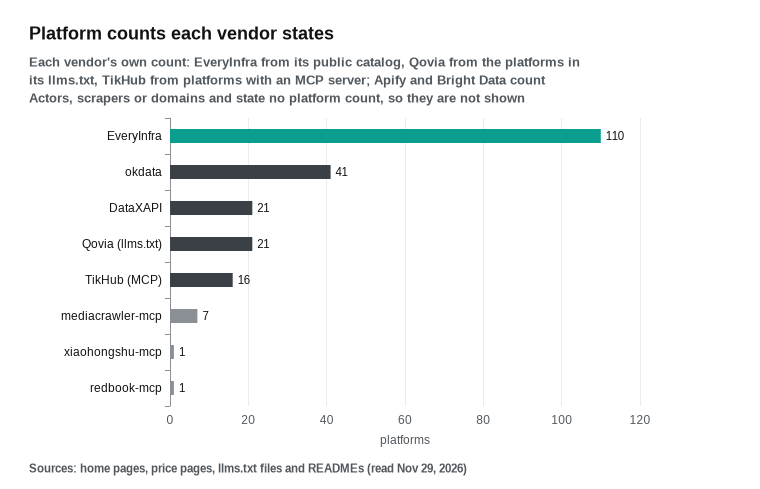
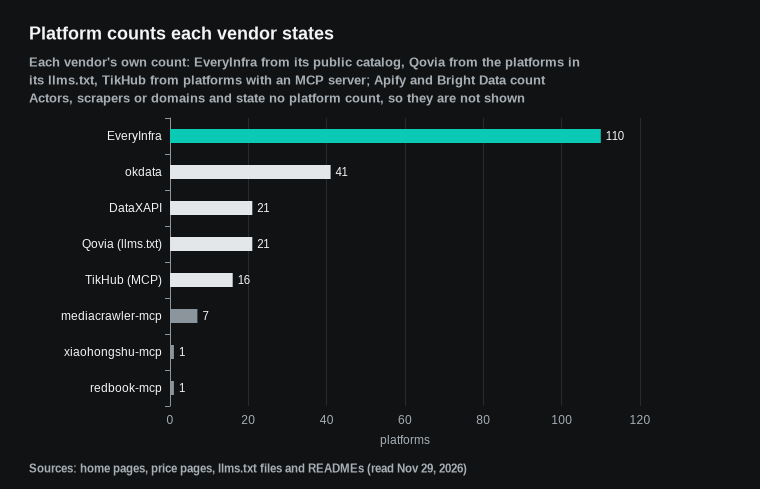
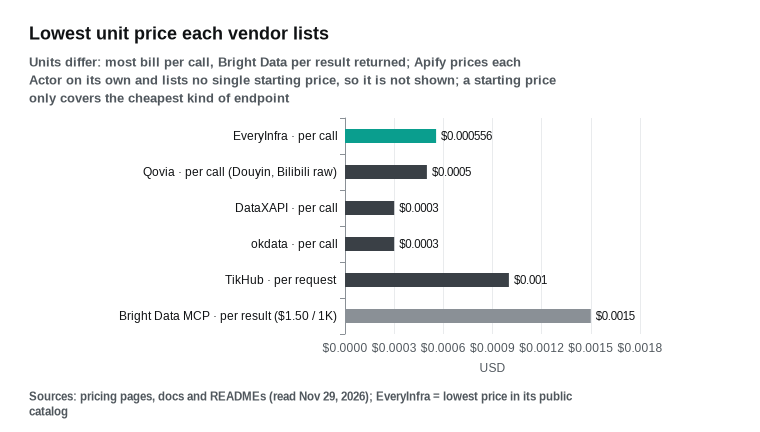
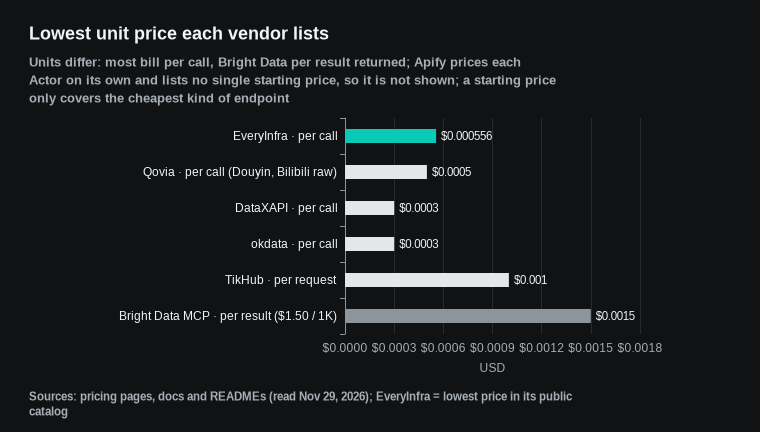
When we could not find a value, the cell says "not stated on the site". On price, one Xiaohongshu search for 20 notes costs $0.005 at Qovia, which is less than the $0.005556 that EveryInfra charged us. DataXAPI and okdata have the lowest starting price, $0.0003 per call. Apart from EveryInfra, okdata lists the most platforms, 41, while the EveryInfra catalog covers 110 platforms.
The seven hosted servers and three open-source projects in two tables
The two tables below are the short answer. The hosted group runs on someone else's servers, and you connect with a key or an OAuth sign-in. The open-source group runs on your own computer and reads data through your own platform account. We copy each vendor's own count of platforms. Some count platforms, some count endpoints or scrapers, and the cell says which unit applies.
| Service | Platforms covered | Chinese apps (Xiaohongshu, Douyin, Weibo, Bilibili, etc.) | Remote / local | Auth | Billing and starting price (USD) | Free credit |
|---|---|---|---|---|---|---|
| EveryInfra | 110 platforms, 718 capabilities | Yes: Xiaohongshu, Douyin, Weibo, Bilibili, Kuaishou, Zhihu, WeChat Official Accounts, WeChat Channels and more | Remote https://api.everyinfra.com/mcp | API key in the Authorization: Bearer header; /mcp/all also accepts an EveryInfra account sign-in | Per call, from $0.000556 | $1 after you star two GitHub repositories, valid for 24 hours |
| Qovia | 20+ platforms | Yes: Douyin, Xiaohongshu, Weibo, Bilibili, Zhihu, WeChat Official Accounts, WeChat Channels and more | Remote https://api.qovia.ai/mcp | Bearer key (starts with sk-qovia-); the docs also accept x-api-key | Per successful call; Douyin and Bilibili raw endpoints from $0.5 per 1,000, search $5 per 1,000 | 50 trial calls for new accounts |
| DataXAPI | 21 platforms, 254 endpoints | Yes: Douyin, Xiaohongshu, WeChat Official Accounts, WeChat Channels, Kuaishou, Bilibili, Weibo, Zhihu | Remote https://api.dataxapi.com/mcp; local npx -y @dataxapi/mcp | Bearer key (env var DATAXAPI_API_KEY); OAuth for ChatGPT and Claude | Per call, from $0.0003; failed calls are free | $0.10, up to 333 calls, no card |
| okdata | 41 platforms (21 in China, 20 worldwide), 373 endpoints | Yes: Xiaohongshu, Douyin, WeChat Official Accounts and more | Remote https://api.okdata.online/mcp; local npx -y @okdata/mcp | Bearer key (starts with okd_) | Per call, from $0.0003, no monthly fee | $0.20 on every new key, no card |
| TikHub | MCP for 16 platforms, 990+ tools | Yes: Douyin, Xiaohongshu, Bilibili, Weibo, Kuaishou, WeChat, Zhihu | Remote https://mcp.tikhub.io/{platform}/mcp; local through mcp-remote as stdio | Bearer | Per request, from $0.001 | $0.05 once per user, about 50 requests |
| Apify MCP | Not stated on the site (depends on the Actors in its Store) | Its Store has Xiaohongshu, Douyin, Weibo and Bilibili Actors from third-party developers | Remote https://mcp.apify.com; local npx @apify/actors-mcp-server | OAuth, or a Bearer API token | Each Actor sets its own price (per event or per usage); paid plans from $19 a month | $5 of usage a month on the Free plan |
| Bright Data MCP | 1,200+ pre-built scrapers; the price card says 100+ domains | Not in the README list; the site has MCP pages for Xiaohongshu, Weibo and Bilibili | Remote https://mcp.brightdata.com/mcp; local npx @brightdata/mcp | API token (the README puts it in the URL); its OAuth metadata declares the header | $1.50 per 1,000 results; browser $8 per GB | 5,000 requests a month, no card |
| Open-source project | Platforms covered | Chinese apps | Remote / local | Auth | Cost | Free credit |
|---|---|---|---|---|---|---|
| xpzouying/xiaohongshu-mcp | 1 (Xiaohongshu) | Yes | Local http://localhost:18060/mcp (Go binary or Docker) | QR-code login with your own Xiaohongshu account; cookies stay on your machine | Apache-2.0, free | Not applicable |
| adjfks/redbook-mcp | 1 (Xiaohongshu) | Yes | Local npx redbook-mcp@latest (Playwright browser) | QR-code login with your own account | ISC, free | Not applicable |
| CubericW/mediacrawler-mcp | 7 (Xiaohongshu, Weibo, Douyin, Bilibili, Kuaishou, Tieba, Zhihu) | Yes | Local (Python, runs MediaCrawler) | Reuses your logged-in Chrome, or a QR code | MIT; the README says the three Xiaohongshu tools need a separate Apify token and spend up to $2 per run by default | Not applicable |
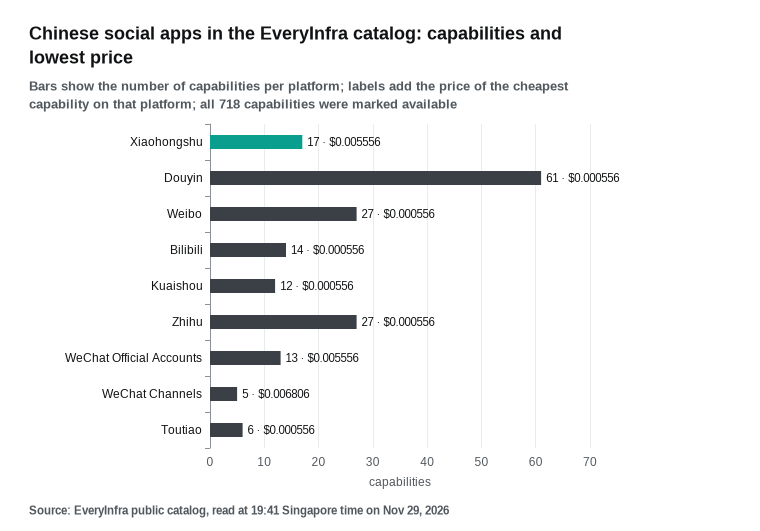
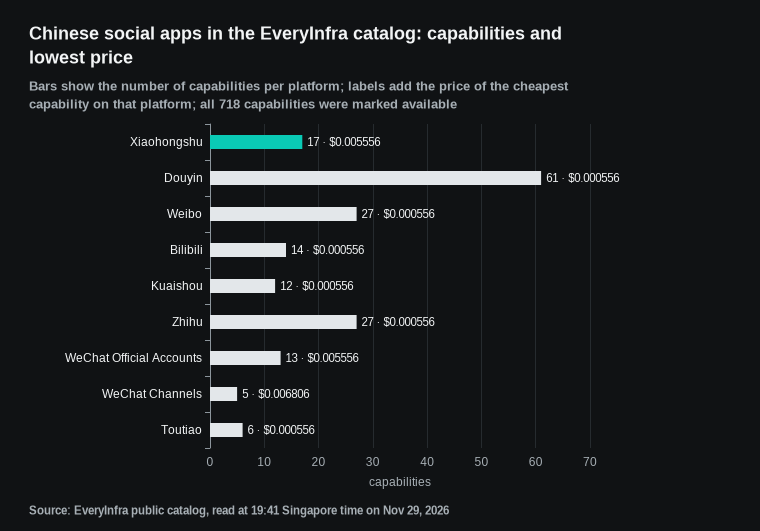
In the hosted group, the starting price and the platform count are the numbers each vendor puts on its home page or price page. They only tell you the cheapest kind of endpoint and the breadth of coverage. Prices for the same job differ much more, and a later section converts everything to one Xiaohongshu search. The 718 capabilities and 110 platforms in the EveryInfra row come from catalog?compact=1, which we read at 19:41 Singapore time. All 718 were marked available. The lowest price, $0.000556, applies to several kinds of capability such as Bilibili and Apple Maps, and Xiaohongshu capabilities start at $0.005556.
In the open-source group, "free" only means that the software costs nothing. These tools read the pages that your logged-in account can see. You need a Xiaohongshu account and a computer or server that stays on, and a person must clear any security check. In its section on platform rules, the xiaohongshu-mcp README says that one account cannot stay logged in on more than one web client. If you log in on the web somewhere else after you connect the MCP server, the MCP session gets logged out.
What each server shows you before you have a key
Before you pick an MCP server, check whether it shows its tool list before you sign up. The MCP 2025-06-18 specification says the client sends initialize first, the server replies with its capabilities, and then tools/list returns the tools. With the Streamable HTTP transport, the server can return an Mcp-Session-Id during the handshake, and later requests must send it back. At 19:46 Singapore time we sent both steps to all seven remote endpoints with no key at all, and we kept every raw response.
| Remote endpoint | initialize | tools/list | Tools | Session ID | Notes |
|---|---|---|---|---|---|
api.everyinfra.com/mcp | 200 | 200 | 12 | None | 0.13 s and 0.14 s; a key is needed only to call a tool |
api.qovia.ai/mcp | 200 | 200 | 4 | None | Server name qovia 0.1.0; tools search_endpoints, get_endpoint, call_endpoint, get_account |
api.dataxapi.com/mcp | 200 | 200 | 5 | Sent | Tools find, describe, call, read_more, account |
api.okdata.online/mcp | 200 | 200 | 5 | Sent | Same tool names as DataXAPI; the initialize instructions say 41 platforms |
mcp.tikhub.io/xiaohongshu/mcp | 401 | Not reached | 0 | Not reached | Returned WWW-Authenticate: Bearer realm="TikHub MCP" |
mcp.apify.com | 401 | Not reached | 0 | Not reached | Sign-in needed by default; with the no-account tools parameter in the URL it returned 200, 4 tools, server apify-mcp-server 0.23.0 |
mcp.brightdata.com/mcp | 401 | Not reached | 0 | Not reached | The response points to its OAuth protected resource metadata |
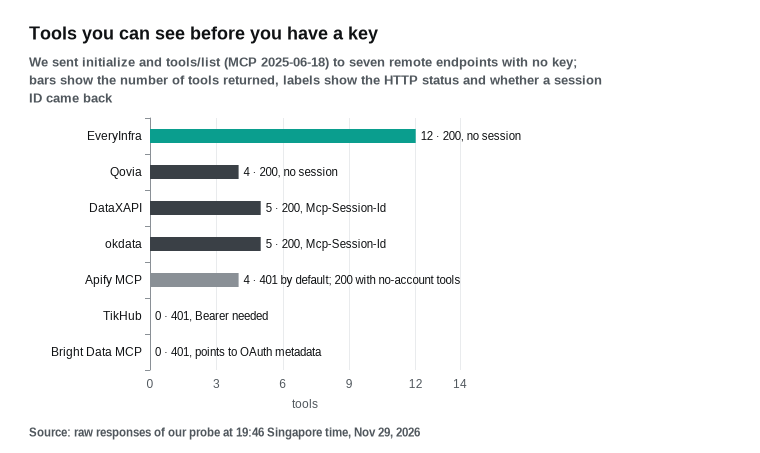
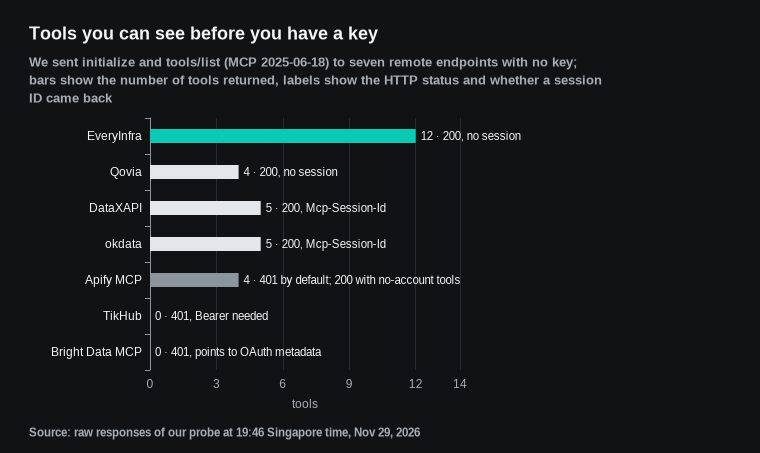
A tool list without a key lets your AI client see the tools and their parameters before you decide to sign up. EveryInfra, Qovia, DataXAPI and okdata all allow this. TikHub and Bright Data want authentication first, and Apify wants a sign-in unless the URL names a few no-account tools. Authentication first is not a problem in itself.
It only means that you must create an account before you can evaluate. With an open tool list, the person who chooses a vendor can paste the endpoint into a client. In a few seconds, they see the name, description and parameter schema of each tool, with no email and no sign-up.
The session ID matters when several users or processes call the same server. DataXAPI and okdata returned an Mcp-Session-Id on initialize, so under the specification every later request must include it. The DataXAPI MCP docs say the server has no sessions, but the handshake did return a session ID, so go by the actual response. Most MCP clients send it back on their own, so you do not have to handle it. EveryInfra and Qovia do not send a session ID. Every request stands alone, which suits serverless functions and scheduled scripts.
We also read the OAuth protected resource metadata of all seven (the /.well-known/oauth-protected-resource document from RFC 9728). Bright Data, DataXAPI, okdata, Qovia and Apify returned 200. Each document names an authorization server and says that tokens go only in the request header. EveryInfra has no such document for /mcp, because that endpoint takes only keys.
The document for /mcp/all names auth.everyinfra.com as its authorization server. TikHub returned 404, and it takes only Bearer keys. Clients that support OAuth, such as ChatGPT connectors and Claude custom connectors, let you approve once in a browser. You do not copy a key by hand.
Few tools or many tools: what it means for your AI client
The seven servers organize their tools in two ways. The first way is a few general tools that find an endpoint and then call it. Qovia gives 4 tools by default, DataXAPI and okdata give 5 (find, describe, call, read_more, account), and EveryInfra gives 12. The model first uses a lookup tool to find the endpoint and its parameters, and then sends the request through one shared call tool.
The second way is one tool per endpoint. TikHub splits its servers by platform, with more than 990 tools across 16 platforms. Qovia also expands each endpoint into its own tool when you add ?tools=all to the URL.
The difference is how much tool text the model must read in every turn. Many tools take up context, and the model has more chances to pick the wrong one. Few tools mean one more lookup step, but the model reads less in each turn. The TikHub split by platform helps here.
If you only need Xiaohongshu, add only the /xiaohongshu/mcp endpoint. Its MCP page also tells you to add only the platforms you use. Our advice is to start with the small default tool set. When you always use the same few endpoints, you can expand them into single tools and save the model one step.
Auth: what keys, OAuth and QR-code logins control
The seven hosted servers and three open-source projects use three kinds of auth, and each one works and fails in a different way. The first kind is an API key. You get a secret string from the console and send it in the Authorization: Bearer header on every request. EveryInfra, Qovia, DataXAPI, okdata and TikHub all support it.
It is the simplest method, and scripts, scheduled jobs, Claude Code and Cursor can all use it directly. The risk is that you must keep the key safe, and a config file in a code repository leaks it. All the config examples in this article read the key from an environment variable, never as plain text.
The second kind is OAuth. On the first connection, the client opens a browser, and you sign in to the vendor account and approve. Then the client gets an access token that expires. ChatGPT connectors and Claude custom connectors use this flow, so you never copy a key by hand.
The DataXAPI docs say ChatGPT and Claude can use OAuth. Apify recommends OAuth. Bright Data, okdata and Qovia publish OAuth protected resource metadata, and the EveryInfra /mcp/all endpoint also accepts an EveryInfra account sign-in. The MCP 2025-06-18 authorization specification says access tokens go in the request header and never in the URL, and OAuth clients do this for you.
The third kind is a QR-code login to the platform account, and only the open-source group uses it. xiaohongshu-mcp and redbook-mcp ask you to scan a QR code with the Xiaohongshu app, and mediacrawler-mcp reuses your logged-in Chrome by default. In this case the MCP server holds your Xiaohongshu login state. It can read what your account can see, and it can post and comment for you. For the same reason, the platform's security checks, rate limits and bans all land on that account. With the first two kinds, the account that you authenticate is your account at the vendor, and your Xiaohongshu account is not involved.
The same job at each vendor: one Xiaohongshu search
A starting price only covers the cheapest endpoint. For a fair comparison, take one job and price it everywhere. We chose a keyword search for Xiaohongshu notes, because it is the most common question about Chinese social media MCP servers. The table lists each vendor's own price for that endpoint, and each row matches its endpoint docs or price page.
| Service | Endpoint | Price | Results per call | Notes |
|---|---|---|---|---|
| Qovia | raw.xiaohongshu.search | $0.005 per call | 20 per page | Stated on its endpoint doc page |
| EveryInfra | xiaohongshu/search | $0.005556 per call | 20 in our test | Live charge at 19:42 Singapore time |
| TikHub | Xiaohongshu API | $0.01 per request | Not stated on the site | Its Xiaohongshu API page says there is no volume discount below 1 million requests a month |
| DataXAPI | Notes search | $0.02 per call | 20 per page | New accounts get 5 free calls on this endpoint |
| okdata | Notes search | $0.035 per call | Not stated on the site | 33 Xiaohongshu endpoints in total, from $0.02 |
| Apify | zen-studio/rednote-search-scraper | $0.00549 per result, plus an Actor start fee | Per result | About $0.16 for 20 results; $0.00599 per result on the Free plan |
| Bright Data | Not stated on the site | Not stated on the site | Not stated on the site | Has a Xiaohongshu MCP page, but no price |
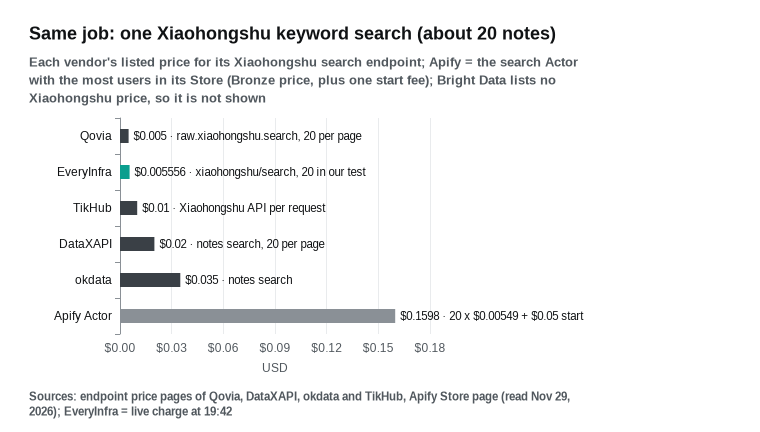
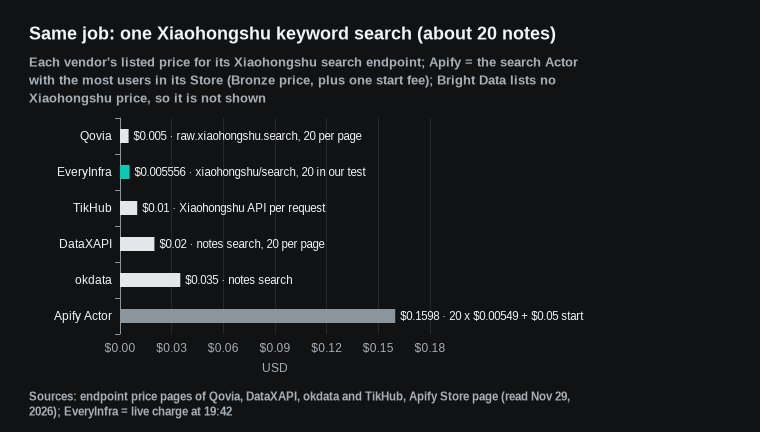
Qovia is the cheapest for this job, $0.000556 less than EveryInfra. At 1,000 searches a day, that is $16.68 a month. DataXAPI and okdata have the lowest starting price, but their Xiaohongshu search costs $0.02 and $0.035. A choice based only on the starting price would be wrong.
Their $0.0003 applies to the cheapest kind of endpoint on other platforms. The TikHub Xiaohongshu API page states the price per request, but the site does not say how many notes one request returns. When you compare it with endpoints that return 20 per page, count the results in your own test.
The Apify row uses the Xiaohongshu search Actor with the most users in its Store. On the Bronze plan it costs $0.00549 per result, plus a $0.05 Actor start fee per run, so 20 results cost about $0.16. The strength of Apify is that its Store often has several Actors for the same platform. Also, per-result pricing spreads the start fee when you pull a few hundred results in one run. For a single search of 20 notes, its price comes last. Bright Data has MCP pages for Xiaohongshu, Weibo and Bilibili, but it does not list prices for them, and we do not estimate one.
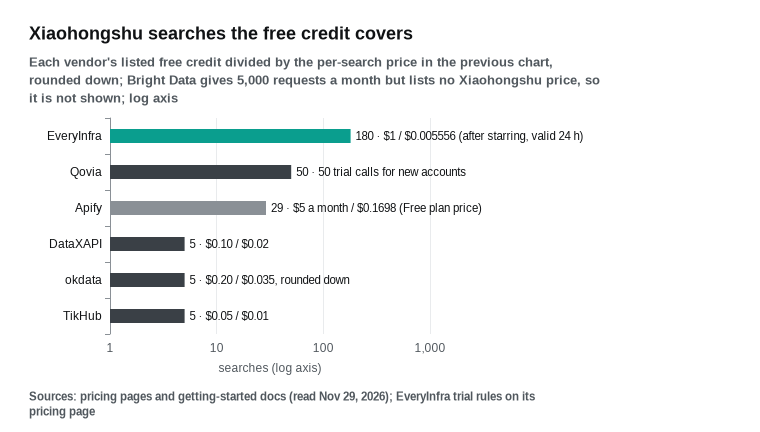
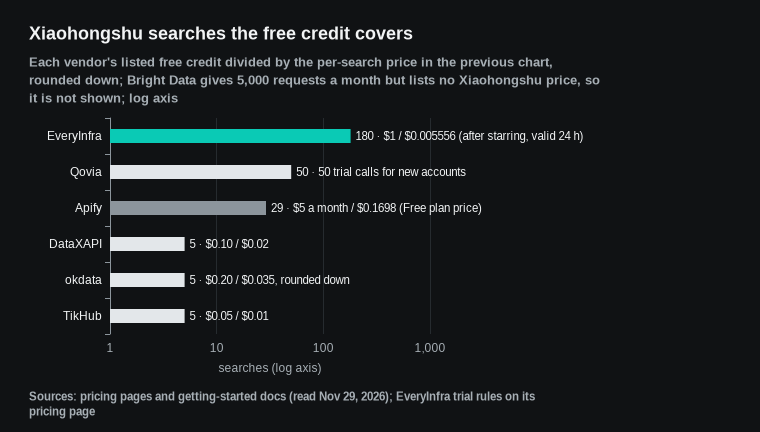
The next chart shows how many of these searches each free credit covers. The EveryInfra $1 trial credit requires you to star two repositories, everyinfra/everyinfra-agent-plugins and everyinfra/seo-skills. It is valid for 24 hours after you claim it and cannot pay for captcha solving. The Qovia 50 trial calls are a call count, so the endpoint price does not matter. The Apify $5 comes back every month, so over time it lasts longer than a one-time trial credit.
1,000 searches a day: the monthly bill
Now multiply the unit prices by a month. Assume 1,000 Xiaohongshu keyword searches a day at about 20 notes each, which is 30,000 searches a month. That is a normal volume for a small team that tracks brand mentions or competitor topics. At this size, the bills start to differ a lot. The table shows only API fees and leaves out any top-up fees.
| Service | Price per search | 30,000 a month | Difference from the lowest |
|---|---|---|---|
| Qovia | $0.005 | $150 | 0 |
| EveryInfra | $0.005556 | $166.68 | $16.68 |
| TikHub | $0.01 | $300 | $150 |
| DataXAPI | $0.02 | $600 | $450 |
| okdata | $0.035 | $1,050 | $900 |
| Apify Actor (start fee on every search) | About $0.1598 | About $4,794 | About $4,644 |
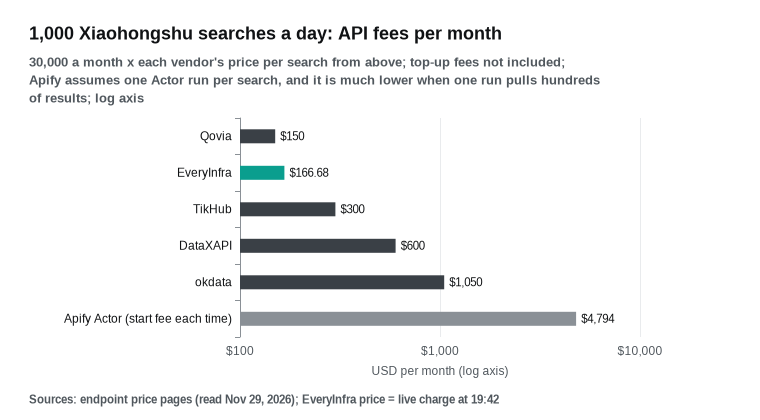
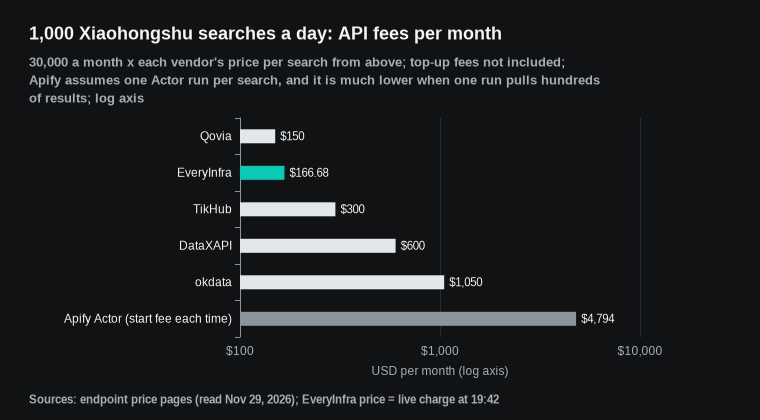
The Apify row needs a note. The Actor start fee applies to every run, and we assume one run for every search of 20 results. Thus the start fee is most of the cost. Maybe one run pulls a few hundred results, and you run it only a few times a day.
Then the average cost falls close to $0.00549 per result. Then 300,000 results cost about $1,647, and the gap is much smaller. The other vendors charge per call. If you take more pages in one search, you pay for more calls, and the math stays the same.
Failed calls, balance expiry and payment methods
Apart from the unit price, check three more things for pay-per-call services. Does a failed or empty call cost money? Does the balance you top up expire? Which payment methods can you use? Vendors describe these in different detail, and cells they do not cover say "not stated on the site".
| Service | Failed or empty calls | Balance expiry | Payment |
|---|---|---|---|
| EveryInfra | Failed and empty calls are free; multi-target requests refund per item | Paid balance does not expire | At least $10 per top-up, with the methods listed in the console |
| Qovia | Charges only successful requests | Not stated on the site | Card or Alipay (through Stripe, 4.4% plus $0.30), USDT (2% plus $0.30) |
| DataXAPI | Failed calls are free | Balance never expires | From $10 |
| okdata | Not stated on the site | Balance never expires, no monthly fee | The README says from $10 |
| TikHub | Not stated on the site | Not stated on the site | PayPal, Alipay (up to $250 a day), USDT |
| Apify | Follows each Actor's pricing rules | Free plan gives $5 a month | Monthly plans at $19, $199 and $999 |
| Bright Data | Charges per result returned | Not stated on the site | Pay as you go |
Qovia, DataXAPI and EveryInfra state most clearly that failures are free. This matters with AI clients. Models try parameters on their own, and a wrong value followed by a retry is normal. If wrong values also cost money, the bill grows above your estimate.
Our call with the wrong sort value above is an example: it returned an error with the allowed values and cost nothing. EveryInfra, DataXAPI and okdata keep the balance with no expiry, which suits work that comes in irregular batches. The Apify free credit comes every month, and unused credit does not carry over.
Each hosted server in detail
EveryInfra
EveryInfra is our data API. One key calls 718 capabilities on 110 platforms. The Chinese apps include Xiaohongshu (17 capabilities), Douyin (61), Weibo (27), Bilibili (14), Kuaishou (12) and Zhihu (27). They also include WeChat Official Accounts (13), WeChat Channels (5), Toutiao, Douban, Taobao, JD, Xianyu, Dewu and 1688. The remote MCP endpoint is https://api.everyinfra.com/mcp.
It uses Streamable HTTP with no sessions. Without a key you can initialize and list the 12 default tools, and to call a tool you send Authorization: Bearer in the header. All tool names start with everyinfra_. everyinfra_list_capabilities lists capabilities and parameters, everyinfra_call_api sends a request, and everyinfra_get_job gets the result of a slow task.
Billing is per call, and the public catalog shows each price. Xiaohongshu search and comments each cost $0.005556 per call, Weibo search $0.000806, and Bilibili search $0.000556. The lowest price in the catalog is $0.000556 and the highest is $0.28. Failed calls and empty results are free.
A wrong parameter returns 422 or invalid_value before any work, and the error lists the allowed values. The /mcp/all endpoint accepts a key or an EveryInfra account sign-in, which suits OAuth clients such as ChatGPT. There is also a separate endpoint for networks in mainland China, listed on the MCP server page.
The data comes back as JSON with one structure for all platforms. In our Xiaohongshu search, each note had id, url, title, text, like_count, collect_count, comment_count, share_count and posted_at. It also had the author's author_name and author_id, image and video URLs, and two flags for product notes and sponsored notes. The outer body also has billing, which shows the charge in USD and the balance after it.
From it, the model can work out how many more calls it can make. Its strength is that one key covers many platforms, with e-commerce, maps and search in the same catalog. Its weak points are that its Xiaohongshu search is not the cheapest here, and it has no local stdio package.
Qovia
The Qovia README says 20+ platforms and 100+ endpoints with structured JSON, and the hosted MCP endpoint is https://api.qovia.ai/mcp. Its llms.txt lists 21 platforms, and most of them are Chinese. Examples are Douyin, Kuaishou, Bilibili, Douyin Xingtu, Tieba, Zhihu, WeChat Official Accounts and Channels, and Xiaohongshu. The list also has Pugongying, Weibo, Toutiao, Taobao and Tmall, JD and Fliggy.
The MCP server has only 4 tools. search_endpoints finds an endpoint, get_endpoint shows its parameters, call_endpoint calls it, and get_account shows the balance. All endpoints are hidden by default, and ?tools=all in the URL expands each endpoint into its own tool.
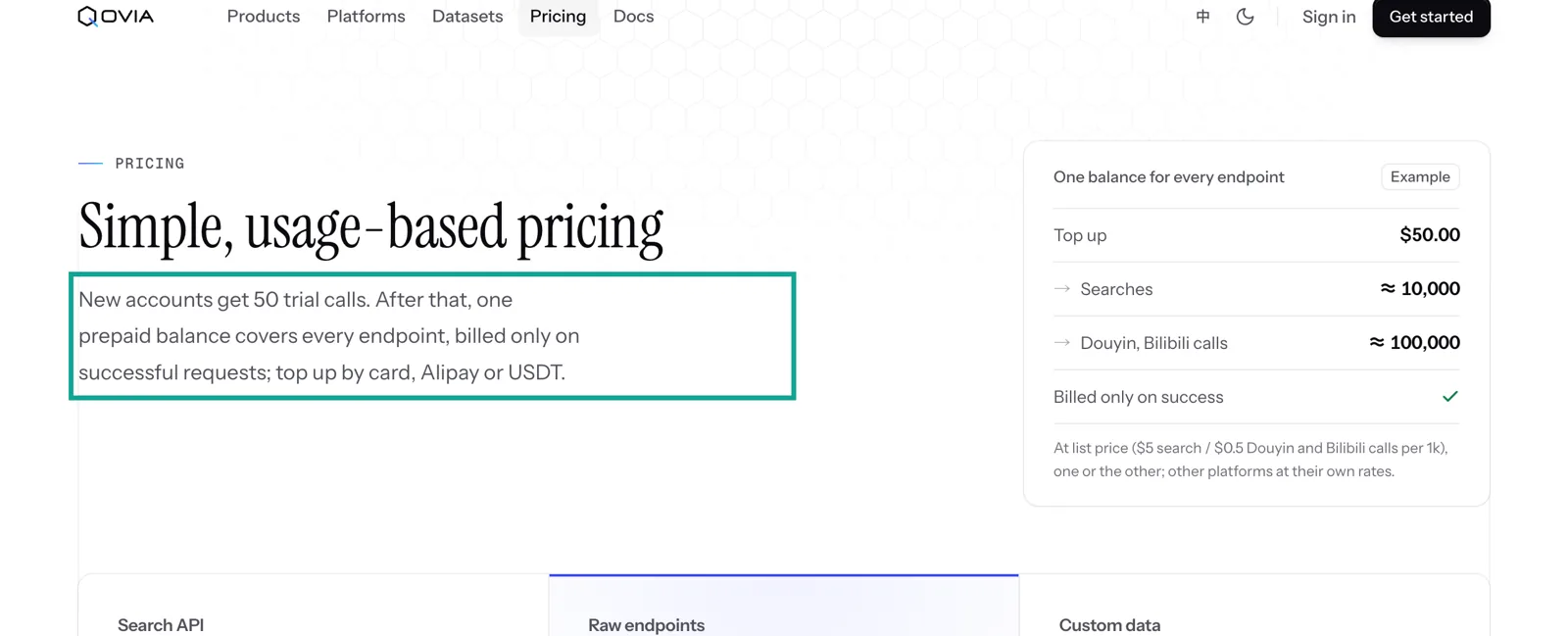
The Qovia pricing page says it charges only successful requests and has no monthly fee. You can top up by card or Alipay (through Stripe, 4.4% plus $0.30) or by USDT (2% plus $0.30). Douyin and Bilibili raw endpoints cost $0.5 per 1,000, the search API $5 per 1,000, and other platforms have their own rates. Its llms.txt gives $1.5 per 1,000 for raw endpoints, which does not match the pricing page. Check the pricing page and the endpoint docs before you buy.
Xiaohongshu search costs $0.005 for a page of 20, the cheapest price for this job in our comparison. The qovia/qovia-mcp repository was created on October 23, 2026 under the MIT license, and PyPI has a Python package with the same name. For clients that only take local stdio, such as Claude Desktop, its README connects through mcp-remote. For teams whose main volume is Xiaohongshu search and who want billing only on success, Qovia is a top choice.
DataXAPI
The DataXAPI pricing page says 21 platforms and 254 endpoints, from $0.0003 per call. New accounts get $0.10, which is up to 333 calls, with no card. Top-ups start at $10, failed calls are free, and the balance never expires. Its Chinese apps are Douyin, Xiaohongshu, WeChat Official Accounts, WeChat Channels, WeChat Search, Kuaishou, Bilibili, Weibo and Zhihu. Xiaohongshu notes search costs $0.02 for a page of 20, and new accounts get the first 5 calls on that endpoint free.
Its MCP docs give both a remote and a local setup. The remote endpoint is https://api.dataxapi.com/mcp. The key comes from the DATAXAPI_API_KEY environment variable and goes in the request header, and the docs say not to put it in the URL. ChatGPT and Claude can use OAuth (with PKCE and dynamic client registration). Locally, npx -y @dataxapi/mcp starts a stdio server, and npm received version 0.1.0 of this package on November 21, 2026. DataXAPI also has its own comparison page of social media data MCP servers, updated on November 4.
It lists xiaohongshu-mcp, yzfly/douyin-mcp-server, Bright Data, SocialCrawl, RedFox and DataXAPI, and its first column asks whether the option signs in with your account. That split matches our hosted and open-source groups. Its tool design is find for the endpoint, describe for the parameters, and call for the request, with read_more for long results. The model reads only 5 tool descriptions per turn, which saves context. With both remote and local setups, it fits the widest range of clients in this group.
okdata
The okdata home page shows four numbers: 41 platforms (21 in China, 20 worldwide), 373 endpoints, from $0.0003 per call, and $0.20 on every new key with no card. The balance never expires, and there is no monthly fee. The remote MCP endpoint is https://api.okdata.online/mcp, and the key starts with okd_ and goes in the Bearer header. For a local setup, use npx -y @okdata/mcp, published on November 13. Its MCP tool names are the same as the DataXAPI ones (find, describe, call, read_more, account), and you also find an endpoint before you call it.

okdata has 33 Xiaohongshu endpoints from $0.02, and notes search costs $0.035, the highest per-call price for this job in our comparison. Its strength is a wide platform list split between China and the rest of the world, with 21 of its 41 platforms in China. Its GitHub repository, okdataapi/okdata, was created on November 11. The README still says 29 platforms, 250+ endpoints and from $0.0001, which does not match the home page, so go by the home page.
TikHub
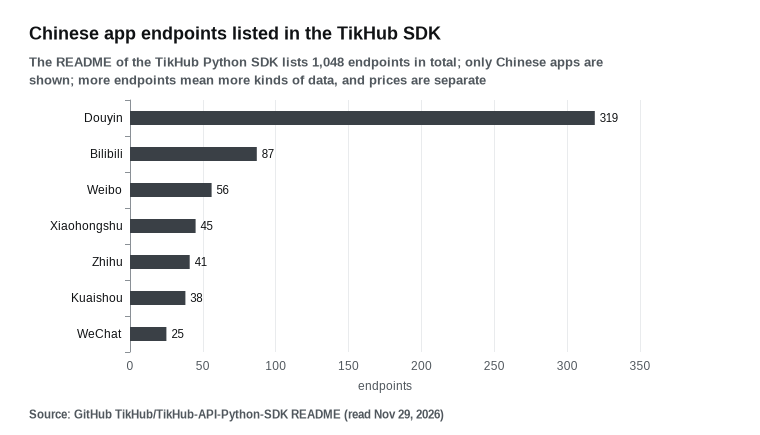
The TikHub MCP page says MCP servers for 16 platforms with more than 990 MCP tools. Each platform has its own endpoint in the form https://mcp.tikhub.io/{platform}/mcp, for example /xiaohongshu/mcp. It supports Streamable HTTP and SSE, and clients that need stdio can connect through mcp-remote. Auth is a Bearer key, and without a key we got 401. The README of its Python SDK lists 1,048 endpoints. These include 319 for Douyin, 45 for Xiaohongshu, 87 for Bilibili, 56 for Weibo, 38 for Kuaishou, 25 for WeChat and 41 for Zhihu.
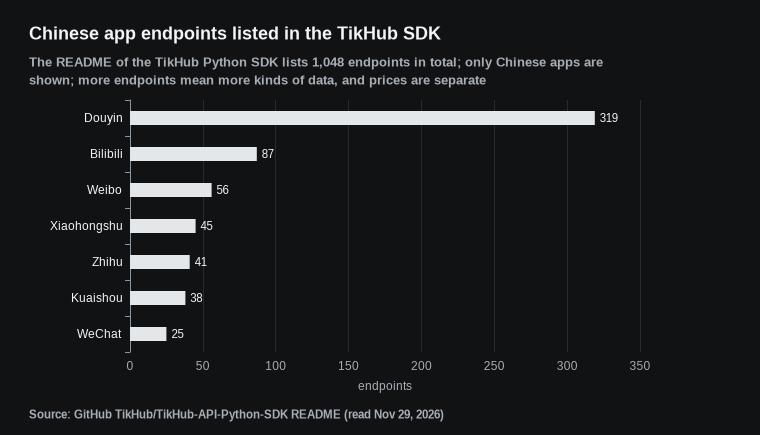
Billing is per request, from $0.001, with one balance for all 16 platforms. The Xiaohongshu API page says $0.01 per request, with no volume discount below 1 million requests a month. The getting-started page says every user gets $0.05 once, about 50 requests. Payment methods are PayPal, Alipay (up to $250 a day) and USDT. Its MCP page has a config for each client, such as Claude Desktop and Cursor. The Claude Desktop config uses mcp-remote to turn the remote endpoint into local stdio and passes the key as a header argument.
It has the most Douyin endpoints of any vendor here, so a team that works only on Douyin can look at it first. The split by platform also helps. Add only the one or two platforms you need. Then the model sees only those tools, not a thousand tool descriptions. We have a separate article, TikHub free credits explained, that works out what $0.05 can call.
Apify MCP
The Apify MCP server connects its Actors (the scraping programs on the Apify platform) and its docs to AI clients. The hosted endpoint is https://mcp.apify.com. Apify recommends OAuth, and you can also put an API token in the header. Locally, run npx @apify/actors-mcp-server with Node 22 or later and the APIFY_TOKEN environment variable. Without a sign-in, only a few no-account tools are open. They search Actors, read Actor details, search and read the Apify docs, and look up the Apify API docs.
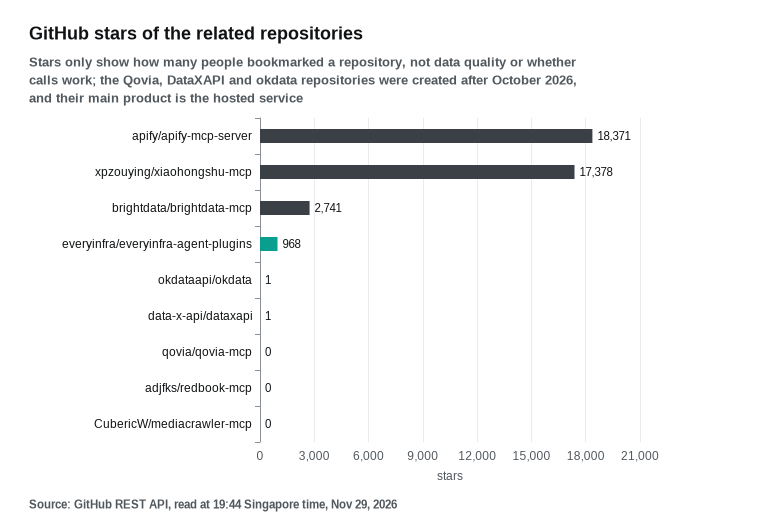
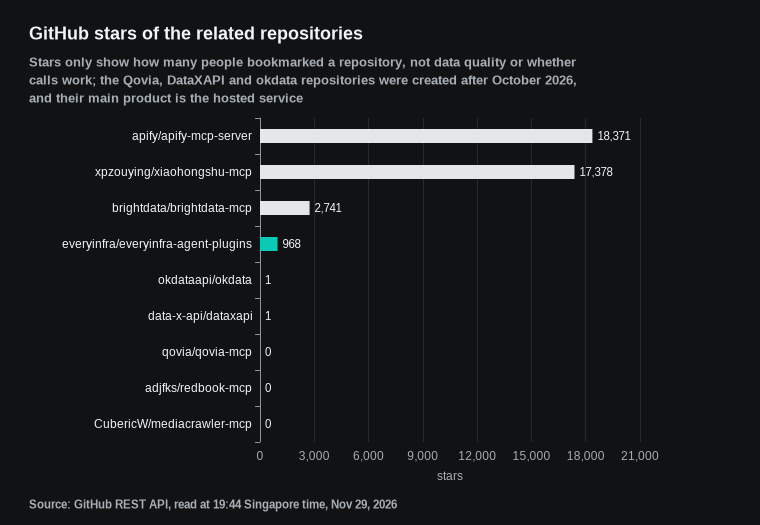
The apify/apify-mcp-server repository has 18,371 stars, the most in this comparison. Version 0.23.0, released on November 24, builds the tool output schema from the dataset schema that each Actor declares. It also adds one-click setup links for Claude and Cursor. Apify itself has no Xiaohongshu API. It relies on Actors that third-party developers publish in its Store. When we searched the Store API for xiaohongshu, all of the top 20 results were Xiaohongshu scrapers from third-party developers.
The one with the most users, zen-studio/rednote-search-scraper, had 11,420 users. The Free plan gives $5 of usage each month, Starter is $19 a month, Scale $199 a month and Business $999 a month. Each Actor has its own per-event or per-usage price. Its docs also describe a way for AI agents to pay per call for an Actor without an Apify account. The strength of Apify is its ecosystem: several developers maintain scrapers for the same platform, so if one breaks you can switch to another. The cost is that you must check the fields, price and stability of each Actor on its own.
Bright Data MCP
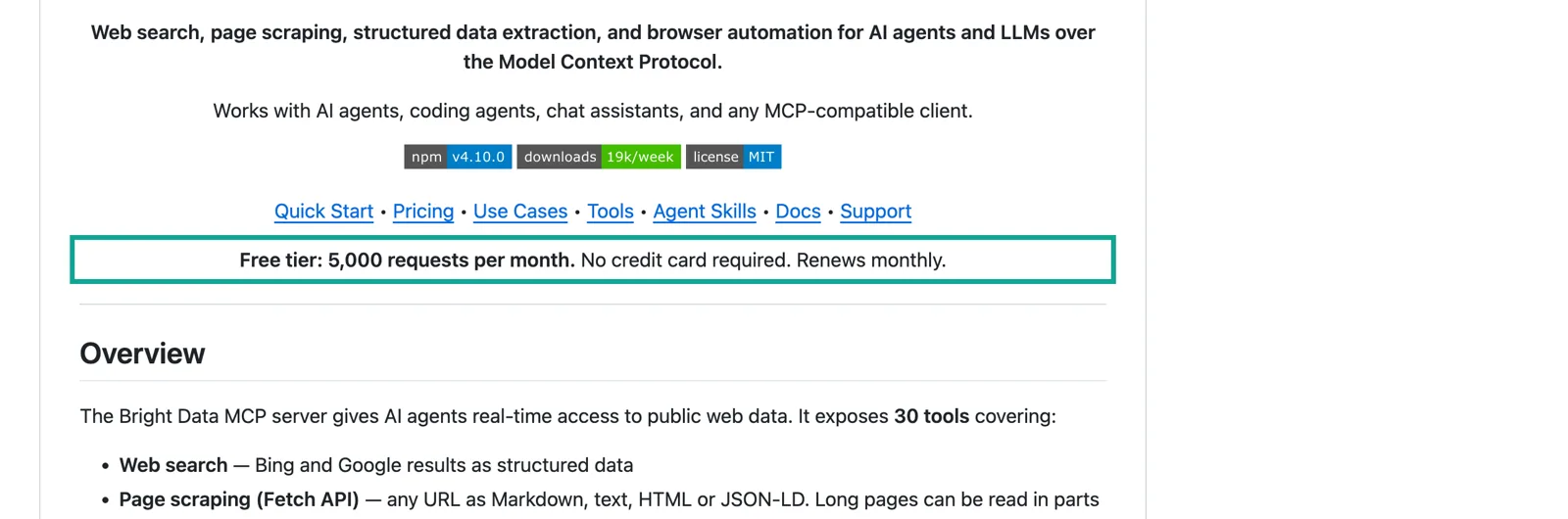
The README of the Bright Data MCP server lists 30 tools for web search, page scraping, structured data extraction and browser automation. It also lists more than 1,200 pre-built scrapers. Its examples include Amazon, LinkedIn, Instagram, TikTok, YouTube, X, Reddit and Facebook. Chinese apps are not in the README list, but the site has MCP pages for Xiaohongshu, Weibo and Bilibili, and the price card says "structured data from 100+ domains". The free tier is 5,000 requests a month with no card. After that it costs $1.50 per 1,000 results, and the browser costs $8 per GB.
There are two setups: the hosted endpoint https://mcp.brightdata.com/mcp, or local npx @brightdata/mcp with the API_TOKEN environment variable. The hosted example in the README puts the token in a URL parameter (?token=). The MCP 2025-06-18 authorization specification says access tokens must not go in the URI query string. Bright Data's own OAuth metadata says it takes tokens only in the header. With a client that supports OAuth, signing in is safer than adding the token to the URL.
The npm package changes often: v4.8.0 on November 10, v4.9.0 on November 23 with business_search, and v4.10.0 on November 26, which renamed scrape_as_markdown to web_fetch. We also have a Bright Data pricing guide. Its strength is non-Chinese platforms and the general web. The 5,000 free requests a month are the most in this group. Its 30 tools include browser automation for pages that need clicks or scrolling, which per-endpoint data APIs cannot do.
Open-source local options: your computer, your account
ChatGPT and Perplexity cited the three open-source projects below in answers about Xiaohongshu MCP servers. They share one condition: the data comes from the platform account that you log in with. The software is free, and you manage the account, the machine and the risk controls yourself. Their popularity differs a lot. xiaohongshu-mcp has more than seventeen thousand stars and a Bilibili video that walks through it, while the other two have 0 stars. AI answers probably cite them because their names match search terms such as Xiaohongshu MCP and redbook MCP.
xpzouying/xiaohongshu-mcp
This is the Xiaohongshu MCP server that Chinese developers mention most. It has 17,378 stars and 2,555 forks on GitHub, is written in Go, and uses the Apache-2.0 license. It runs an HTTP server on your machine at http://localhost:18060/mcp, as a binary or in Docker. On first use you call get_login_qrcode, scan the QR code with the Xiaohongshu app, and the cookies stay on your machine.
It has 13 tools. They check the login state, publish image and video posts, read the feed, search notes and read note details. They also post comments and replies, like, save, and read user profiles. To add it to Claude Code, run one line: claude mcp add --transport http xiaohongshu-mcp http://localhost:18060/mcp.
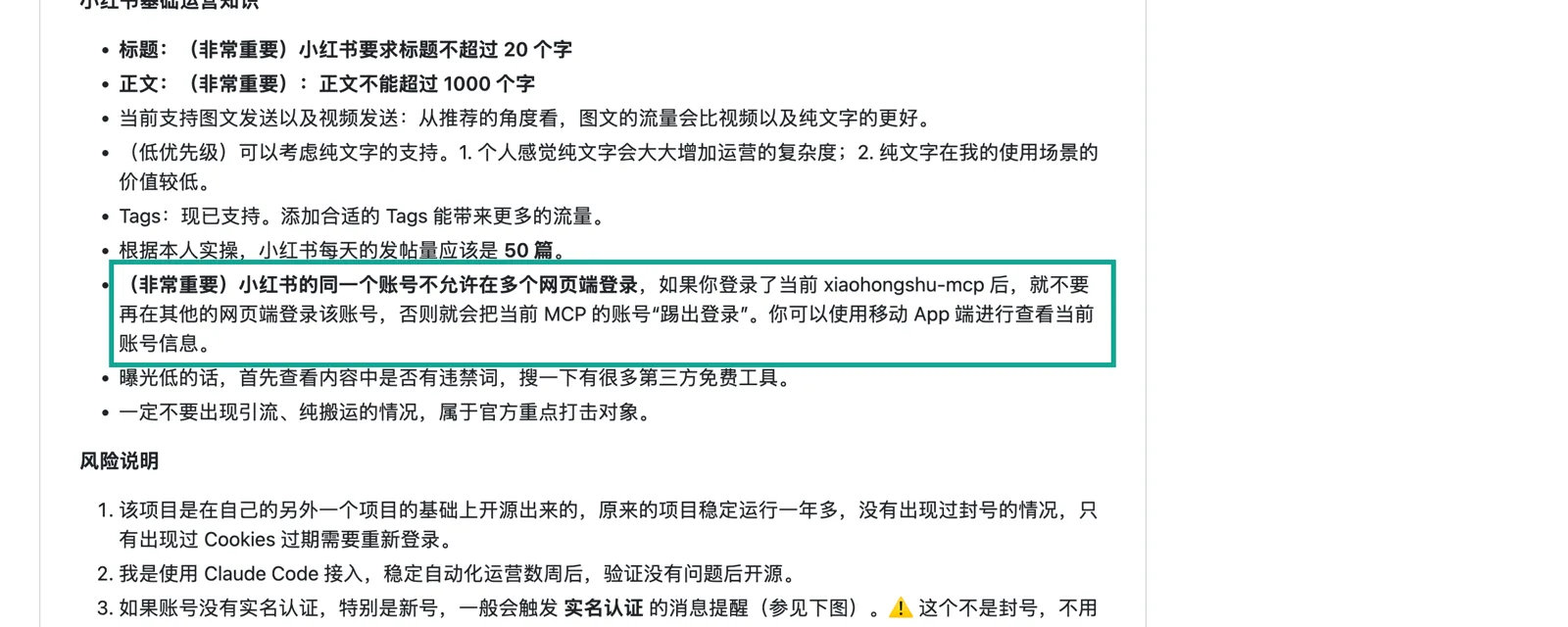
Its strength is that it can post, comment and interact, which no hosted data API does. For a creator who runs one account and posts a few times a day, it is a better fit than a paid API. The risk notes in the README say the original project ran for more than a year with no ban. Only expired cookies forced a new login. The issue tracker for November shows other reports. The table lists the issues opened after November 16, with their titles translated.
| Issue | Date | Status | Title (translated) |
|---|---|---|---|
| #930 | 2026-11-27 | Open | A security check after only 3 read calls; search_feeds goes to a verification page |
| #923 | 2026-11-22 | Open | Problem with the changed overseas Xiaohongshu domain |
| #919 | 2026-11-20 | Open | publish_content always reports that the creator center login expired |
| #918 | 2026-11-19 | Open | Isn't Xiaohongshu strict about AI with its risk controls? |
| #916 | 2026-11-16 | Open | A security limit after several pulls |
In the body of #918, the author says that the platform banned an account twice after an agent posted notes. These issues point to one fact. The open-source tools read and write through your real account, so the platform's security checks and risk controls land directly on it. If you only read data and do not want to risk your account, a hosted data API fits better. If you need to post and interact, follow the README: use a secondary account and keep the frequency low.
The platform tips in the README also give a few rules. Titles go up to 20 characters and body text up to 1,000 characters, and the author posts about 50 a day. The tips also warn against traffic diversion and pure reposting, which the platform acts on. These are the author's experience, not published Xiaohongshu rules, so check them yourself. The project released v2.7.6 on November 25, with a new option to mark a note as AI-generated.
adjfks/redbook-mcp
redbook-mcp is a Xiaohongshu MCP server written in TypeScript with Playwright. npx redbook-mcp@latest starts it on your machine, and on first use you scan a QR code with your own account. Its tools cover publishing, search, note details and interaction. The repository and the npm package both date from January 31, 2026, under the ISC license. On November 29 it had 0 stars and only one version, 0.1.0.
ChatGPT cited it in an answer about how to connect a Xiaohongshu MCP server. If you want a version that runs on Node alone, without Go or Docker, you can start from it, but plan to maintain it yourself. When the Xiaohongshu web pages change, browser-based tools must change too. Test login and search before you rely on a repository that has not changed in ten months.
CubericW/mediacrawler-mcp
mediacrawler-mcp wraps the open-source MediaCrawler scraper as an MCP server for 7 platforms: Xiaohongshu, Weibo, Douyin, Bilibili, Kuaishou, Tieba and Zhihu. Its tools are search_posts, get_post_detail, get_creator_posts, login_status, risk_status, list_platforms and diagnostics. By default it uses CDP mode to reuse your logged-in Chrome, and you can switch to a QR-code login. It has rate limits, a machine-wide queue and risk checks built in. The README begins with a warning: personal, low-frequency, research use only, because MediaCrawler uses a non-commercial learning license that forbids commercial use and large-scale scraping.
Xiaohongshu is the exception. The README says the three content tools for Xiaohongshu use a Xiaohongshu Actor on Apify. They need APIFY_TOKEN in the environment and spend up to $2 per run by default. The repository was created on November 7, has 0 stars, uses the MIT license, and contains no MediaCrawler code. For small research projects that need seven Chinese apps on one machine, it is a ready combination. For commercial work, read the MediaCrawler license first.
What users say on Xiaohongshu, Bilibili and Weibo (live test)
We used the EveryInfra MCP server in three rounds at 19:42, 19:49 and 19:56 Singapore time. We searched for notes, comments, videos and Weibo posts about Xiaohongshu MCP. The first goal was to check the price and timing in our own row. The second was to see what people who use these tools talk about. Below are the request format and the result of each call. The key stays in an environment variable.
# Call over MCP: tools/call -> everyinfra_call_api
curl -s https://api.everyinfra.com/mcp \
  -H "Authorization: Bearer $EVERYINFRA_API_KEY" \
  -H "Content-Type: application/json" \
  -H "Accept: application/json, text/event-stream" \
  -d '{"jsonrpc":"2.0","id":1,"method":"tools/call","params":{"name":"everyinfra_call_api",
       "arguments":{"platform":"xiaohongshu","action":"search","params":{"keyword":"MCP xiaohongshu","sort":"most_liked"}}}}'
# Returns 20 notes, billing.charged_usd = 0.005556| Singapore time | Capability | Result | Time | Charge |
|---|---|---|---|---|
| 19:42:12 | xiaohongshu/search, "MCP Xiaohongshu" sorted by likes | 20 notes | 13.5 s | $0.005556 |
| 19:49:13 | xiaohongshu/comments, the note "Moving Xiaohongshu MCP to a cloud server" | 15 comments | 2.75 s | $0.005556 |
| 19:49:16 | bilibili/search, "Xiaohongshu MCP" | 18 videos | 14.8 s | $0.000556 |
| 19:49:31 | xiaohongshu/search, sort set to hottest | invalid_value | 0.13 s | $0 |
| 19:56:29 | weibo/search, "Xiaohongshu MCP" | 20 posts | 12.26 s | $0.000806 |
The keyword in our real calls was written in Chinese; the tables show it in English.
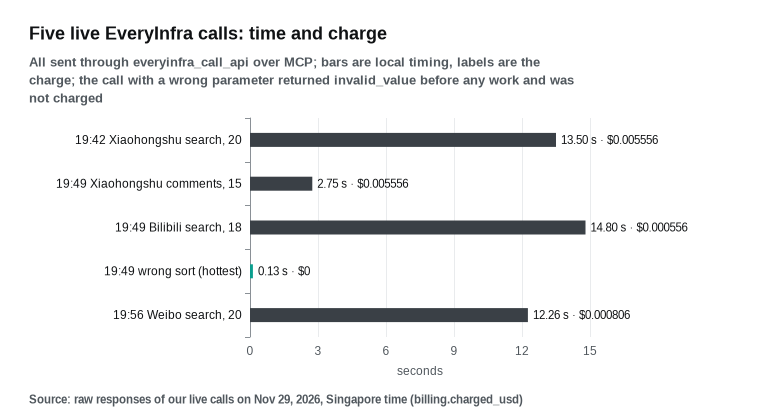
The five calls cost $0.012474 in total. For the wrong sort value, the error text was "sort must be one of: most_collected, most_commented, most_liked, newest, relevance (got 'hottest')", and nothing was charged. An AI client that reads this line can change the value to most_liked and send the call again. Searches took 12 to 15 seconds, and the comments call took 2.75 seconds. When a client chains several calls in one conversation, set the tool timeout to 60 seconds or more.
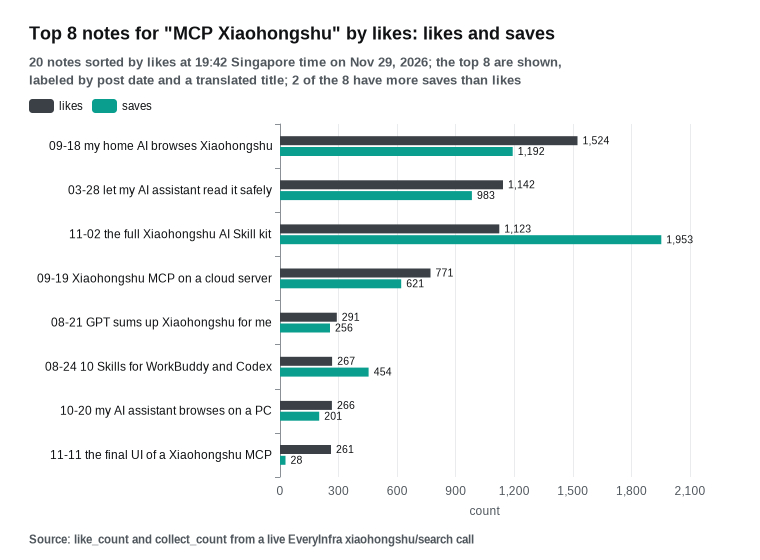
In the 20 Xiaohongshu notes sorted by likes, the top note was "How to let my home AI browse Xiaohongshu on its own (with script pitfalls)" from September 18, with 1,524 likes and 1,192 saves. Third was "From topic research to images: the full Xiaohongshu AI Skill kit" from November 2, with 1,123 likes and 1,953 saves. It has more saves than likes, so people store these tool lists to follow later. 13 of the 20 titles name Codex, WorkBuddy, GPT or an agent, or use a pet name for the writer's own AI assistant. The main users of Xiaohongshu MCP are individuals who let an AI assistant browse Xiaohongshu and organize content for them.
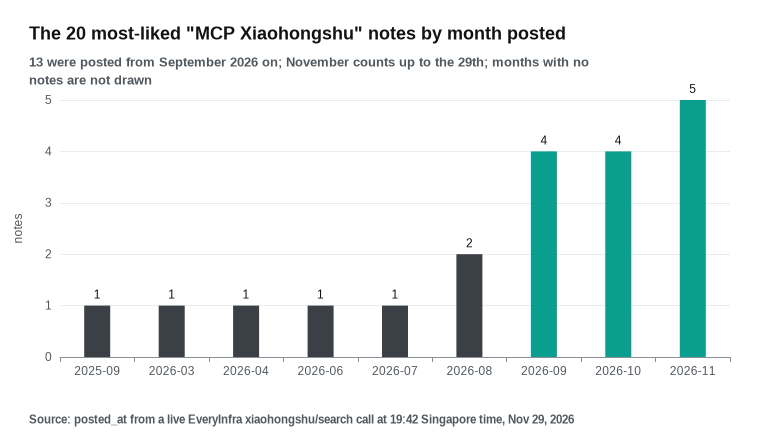
The 20 notes had 6,904 likes and 6,985 saves in total, and 8 of them had more saves than likes. By month, September and October 2026 had 4 notes each, and November had 5 by the 29th. The oldest was from September 2025, about how an image-generation MCP raised click rates on Xiaohongshu. The topic has grown over the last three months.
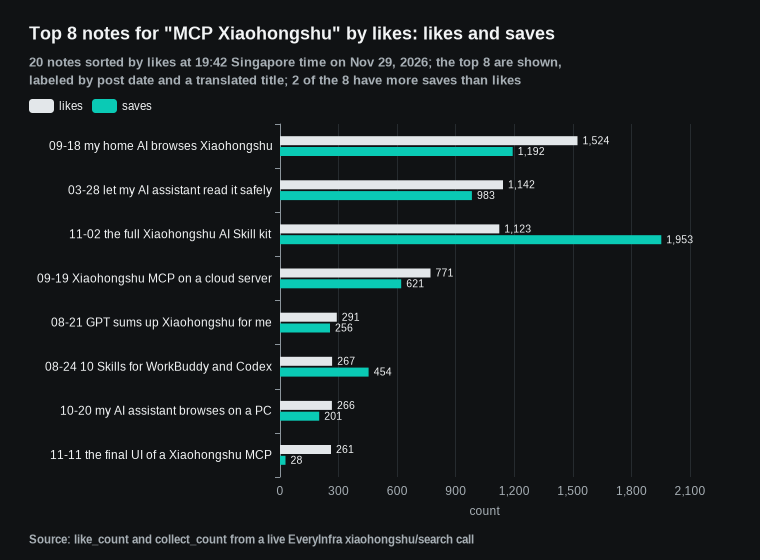
The fourth note, "Moving Xiaohongshu MCP to a cloud server" (September 19, 771 likes), is about running the open-source xiaohongshu-mcp on an always-on cloud server. Of its 15 comments, the one with the most replies (9) asks whether the platform blocks data center IP addresses of cloud servers. On November 7, someone wrote that a login on a cloud server is more stable. The local session dropped every time the screen locked. These two comments show the two problems that open-source users face. The login session must stay active, and the platform can block a data center IP.
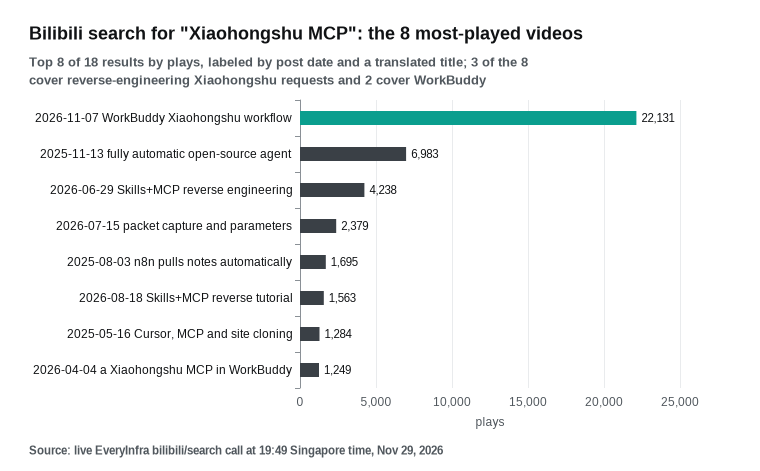
The Bilibili search for "Xiaohongshu MCP" returned 18 videos. The most played was a WorkBuddy Xiaohongshu workflow tutorial from November 7, with 22,131 plays. A video from November 18 walks through "the open-source project xiaohongshu-mcp with 17.2k stars" and had 628 plays, and 3 more cover reverse-engineering Xiaohongshu request parameters.
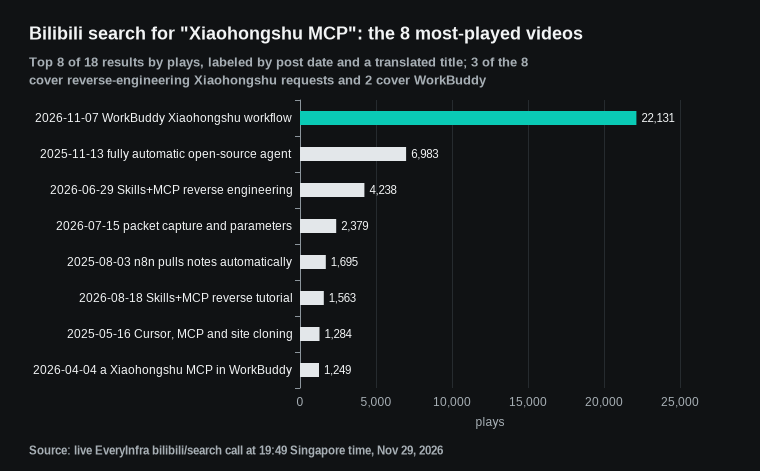
The Weibo search for "Xiaohongshu MCP" returned 20 posts, and 19 of them came from one clothing brand account whose product names contain the letters MCP. Only 1 was about connecting an AI assistant through MCP. When you search Weibo for a short acronym such as MCP, remove duplicate authors first. Then check that the posts are on topic.
How to choose by the job you need
To choose, first ask whether you need to read data or to act with an account, and then look at volume and platforms. The table gives a suggestion for common jobs. The "why" column only uses facts from each vendor's own pages.
| Job | Look first at | Why |
|---|---|---|
| Post, comment and like with your own Xiaohongshu account | xiaohongshu-mcp | No hosted data API writes; it has 13 tools, including publishing and interaction |
| Daily Xiaohongshu keyword searches at high volume, price first | Qovia | $0.005 per Xiaohongshu search, the lowest in this comparison |
| One key for Chinese and global platforms, plus e-commerce and maps | EveryInfra | 110 platforms, 718 capabilities, tool list without a key |
| A wide platform list, half China and half global | okdata | Its home page lists 41 platforms, 21 in China and 20 worldwide |
| Local stdio with no remote MCP server in between | DataXAPI or okdata | Both have a local package you start with npx |
| Douyin only, with many endpoints | TikHub | Its SDK README lists 319 Douyin endpoints |
| Global platforms, general web scraping, browser automation | Bright Data MCP | 30 tools, 5,000 free requests a month |
| A few hundred results per run, and you can choose Actors | Apify MCP | Several Actors per platform in its Store, priced per result |
| Small, non-commercial research on seven Chinese apps | mediacrawler-mcp | Reuses your logged-in Chrome; the MediaCrawler license forbids commercial use |
To only read data with no risk to your own account, choose from Qovia, EveryInfra, DataXAPI, okdata and TikHub. They differ mainly in unit price, platform breadth and setup. To get a monthly bill, multiply your daily calls by the prices of the two or three endpoints you use most. This is more accurate than the starting price.
To try one in your AI client first, pick one that lists tools without a key. Before you decide, use each free credit to run your real keywords. Check how many results come back and whether the fields are enough.
Add EveryInfra with one command
To add a remote MCP server in Claude Code, use claude mcp add --transport http. The key comes from an environment variable and stays out of the config file:
export EVERYINFRA_API_KEY="<your EveryInfra API key>"
claude mcp add --transport http everyinfra https://api.everyinfra.com/mcp \
  --scope user \
  --header 'Authorization: Bearer ${EVERYINFRA_API_KEY}'
claude mcp get everyinfra
In Cursor, put the remote URL and the header in the MCP config. ${env:...} reads the key from an environment variable:
{
  "mcpServers": {
    "everyinfra": {
      "url": "https://api.everyinfra.com/mcp",
      "headers": { "Authorization": "Bearer ${env:EVERYINFRA_API_KEY}" }
    }
  }
}
After you connect, you can ask: "Search Xiaohongshu for the 20 most-liked notes about MCP, pick the one with the most comments, pull its comments, and group them by question." At catalog prices, that is 1 search and 1 comments call, about $0.011112. Now take a job that runs every day. A brand team watches 10 keywords, searches Xiaohongshu once for each, and pulls the comments of the 3 most-liked notes for each keyword. That is 10 searches and 30 comments calls a day, 40 calls at $0.005556 each, about $0.22 a day or about $6.67 a month.
In a scheduled script that uses the HTTP API, the unit price is the same. In an AI client, the model can also group the comments by question and pick the ones to answer. That work happens in the client at no extra data API cost.
The parameters for each Xiaohongshu capability are on the Xiaohongshu scraper API page. Search and comments are on note search and note comments. For Bilibili and Weibo, see Bilibili video search, Weibo search and the Douyin scraper API. The setup for each client is on the MCP server page and the Xiaohongshu MCP page. To sign up and create a key, see the quickstart, and for prices see the pricing page.
When another option fits better
If most of your volume is Xiaohongshu search, Qovia costs $0.000556 less per call, and at high volume that difference is real money. It also lists its tools without a key, so it is as easy to evaluate as EveryInfra. For a list split evenly between China and the rest of the world, okdata lists 41 platforms, 21 in China. If you want a local stdio package and no remote MCP server in the path, DataXAPI and okdata both have npx packages. EveryInfra has only a remote endpoint.
If you only work on Douyin and want many endpoints, the TikHub SDK lists 319 Douyin endpoints. That is many more than the 61 in our catalog. For global platforms, general web scraping and browser automation, Bright Data gives 5,000 free requests a month and 30 tools. The Apify Store has thousands of Actors.
Both ecosystems are larger than ours. To post, comment and like with your own Xiaohongshu account, use an open-source tool such as xiaohongshu-mcp. Every hosted data API is read-only.
There is one more case: you already use one vendor's HTTP API. Then a switch for MCP does not pay off. These vendors charge the same for MCP and the HTTP API, and one key works for both. Add your current vendor's remote endpoint to your AI client, and the fields, prices and bills stay the same.
Switch only when your vendor lacks a platform you need. Also switch when the same job costs hundreds of dollars more each month. Before you switch, run the same keywords on both with the free credits. Then compare the result counts and fields.
Check it yourself: five steps to evaluate an MCP server
Every cell above is a number we read on November 29, and prices and platform counts change. Ten minutes of your own checks are more reliable than any comparison article. Step 1: send initialize and tools/list to the remote endpoint with no key. See whether it lists tools, how it names them, and whether it sends a session ID. If it lists them, give the list to your AI client. The client can tell you whether the parameters are enough.
# Handshake with no key: replace <endpoint> with the server you want to check
curl -s -X POST <endpoint> \
  -H "Content-Type: application/json" \
  -H "Accept: application/json, text/event-stream" \
  -H "MCP-Protocol-Version: 2025-06-18" \
  -d '{"jsonrpc":"2.0","id":1,"method":"initialize","params":{"protocolVersion":"2025-06-18","capabilities":{},"clientInfo":{"name":"check","version":"0.1"}}}' -i
# Check the status code and the Mcp-Session-Id header, then send {"jsonrpc":"2.0","id":2,"method":"tools/list"}
Step 2: find the price pages of the two or three endpoints you use most. Write down the unit price and the results per call. The starting price on the home page can be several times lower. Step 3: use the free credit to run your own real keywords. Count the results, check that the fields you need are there (likes, saves, comment counts, post time, author), and check whether empty results cost money.
Step 4: send one parameter with a wrong value on purpose. See whether the server rejects it before any work or charges anyway, and whether the error lists the allowed values. AI clients use that line to fix parameters on their own, and a clear message means fewer retries. Step 5: calculate the monthly bill as daily calls × unit price × 30, plus any top-up fees. At high volume, the same job can cost several times more at one vendor than at another. The table for 1,000 searches a day shows this.
What changed in November 2026
- November 11 and 13, 2026: okdata created the okdataapi/okdata repository on GitHub and then published @okdata/mcp 0.1.0 on npm.
- November 21, 2026: DataXAPI published @dataxapi/mcp 0.1.0 on npm for clients that only support stdio.
- November 23 and 26, 2026: Bright Data MCP released v4.9.0 (adds business_search) and v4.10.0 (renames scrape_as_markdown to web_fetch).
- November 24, 2026: apify-mcp-server released v0.23.0, which builds the tool output schema from the dataset schema that each Actor declares.
- November 25, 2026: xiaohongshu-mcp released v2.7.6. Of the issues opened from November 16 to 27, four report security checks, risk controls and expired creator center logins.
- November 28, 2026: mcp-remote, which turns a remote MCP server into local stdio, released 0.17.2. The TikHub and Qovia setup guides use it for Claude Desktop.
FAQ
Is there an MCP server for Chinese social media data?
Yes. Five hosted services, EveryInfra, Qovia, DataXAPI, okdata and TikHub, cover Xiaohongshu, Douyin, Weibo and Bilibili. You can call them from Claude or Cursor with one key. The Apify Store also has Actors for Chinese apps from third-party developers. The open-source options are xiaohongshu-mcp, redbook-mcp and mediacrawler-mcp, and they need a login with your own platform account.
How do I connect a Xiaohongshu MCP server to Claude or Cursor?
For a hosted server, add the remote endpoint. In Claude Code, run claude mcp add --transport http <name> <endpoint> --header 'Authorization: Bearer ${KEY}'. In Cursor, put the same values in url and headers in the MCP config. The section above on adding EveryInfra shows the full commands. For the open-source xiaohongshu-mcp, start the server on your machine, scan the QR code, and then run claude mcp add --transport http xiaohongshu-mcp http://localhost:18060/mcp. If Claude Desktop needs stdio, connect through mcp-remote.
Can a Xiaohongshu MCP server get my account banned?
A hosted data API does not use your account, so the risk does not fall on you. The open-source options use your own account. In xiaohongshu-mcp issue #918, the author says that the platform banned an account twice after an agent posted notes. Issue #930 reports a security check after only 3 read calls. The README advises a secondary account, a low posting frequency, and no logins on several web clients at the same time.
Which social media data MCP server is the cheapest?
It depends on the job. DataXAPI and okdata have the lowest starting price, $0.0003 per call. Qovia has the cheapest Xiaohongshu search, $0.005, and EveryInfra charges $0.005556. In Xiaohongshu searches per free credit, the EveryInfra $1 trial covers about 180 (claimed after starring, valid 24 hours), Qovia 50, and Apify about 29 a month.
Can I see the tools before I sign up?
Four servers show them: EveryInfra (12 tools), Qovia (4), and DataXAPI and okdata (5 each). Send initialize and tools/list with no key, and they reply. TikHub and Bright Data return 401. Apify asks for a sign-in by default and lists 4 tools only when the URL names its no-account tools.
What is the difference between an MCP server and a plain HTTP API?
The data is the same, and only the connection differs. An MCP server wraps the API as tools. Clients such as Claude and Cursor read the tool descriptions, then decide in the conversation which tool to call and how to fill the parameters. With a plain HTTP API, you write the code that sends the request. EveryInfra, Qovia, DataXAPI, okdata and TikHub offer both, at the same price. Use the HTTP API for scheduled scripts, and MCP for ad hoc lookups in a conversation.
References
- EveryInfra social data catalog (compact), read 2026-11-29, https://api.everyinfra.com/api/v1/social/catalog?compact=1
- EveryInfra remote MCP endpoint, read 2026-11-29, https://api.everyinfra.com/mcp
- EveryInfra /mcp/all protected resource metadata, read 2026-11-29, https://api.everyinfra.com/.well-known/oauth-protected-resource/mcp/all
- everyinfra/everyinfra-agent-plugins, GitHub, read 2026-11-29, https://github.com/everyinfra/everyinfra-agent-plugins
- Qovia pricing page, read 2026-11-29, https://www.qovia.ai/pricing
- Qovia MCP docs, read 2026-11-29, https://www.qovia.ai/docs/mcp
- Qovia raw.xiaohongshu.search endpoint docs, read 2026-11-29, https://www.qovia.ai/docs/api-reference/raw.xiaohongshu.search/
- qovia/qovia-mcp, GitHub, read 2026-11-29, https://github.com/qovia/qovia-mcp
- qovia, PyPI, read 2026-11-29, https://pypi.org/project/qovia/
- Qovia protected resource metadata, read 2026-11-29, https://api.qovia.ai/.well-known/oauth-protected-resource/mcp
- DataXAPI pricing page, read 2026-11-29, https://dataxapi.com/pricing/
- DataXAPI MCP docs, read 2026-11-29, https://dataxapi.com/docs/mcp/
- DataXAPI Xiaohongshu notes search endpoint, read 2026-11-29, https://dataxapi.com/apis/xiaohongshu/notes/search/
- DataXAPI comparison of social media data MCP servers, updated 2026-11-04, read 2026-11-29, https://dataxapi.com/compare/social-media-data-mcp-servers/
- data-x-api/dataxapi, GitHub, read 2026-11-29, https://github.com/data-x-api/dataxapi
- @dataxapi/mcp, npm, read 2026-11-29, https://www.npmjs.com/package/@dataxapi/mcp
- DataXAPI protected resource metadata, read 2026-11-29, https://api.dataxapi.com/.well-known/oauth-protected-resource/mcp
- okdata home page, read 2026-11-29, https://okdata.online/
- okdata Xiaohongshu endpoint list, read 2026-11-29, https://okdata.online/apis/xiaohongshu/
- okdataapi/okdata, GitHub, read 2026-11-29, https://github.com/okdataapi/okdata
- @okdata/mcp, npm, read 2026-11-29, https://www.npmjs.com/package/@okdata/mcp
- okdata protected resource metadata, read 2026-11-29, https://api.okdata.online/.well-known/oauth-protected-resource/mcp
- TikHub MCP page, read 2026-11-29, https://tikhub.io/mcp
- TikHub pricing page, read 2026-11-29, https://tikhub.io/pricing
- TikHub Xiaohongshu API page, read 2026-11-29, https://tikhub.io/xiaohongshu-api
- TikHub getting started, read 2026-11-29, https://tikhub.io/getting-started
- TikHub/TikHub-API-Python-SDK, GitHub, read 2026-11-29, https://github.com/TikHub/TikHub-API-Python-SDK
- Apify MCP docs, read 2026-11-29, https://docs.apify.com/platform/integrations/mcp
- apify/apify-mcp-server, GitHub, read 2026-11-29, https://github.com/apify/apify-mcp-server
- apify-mcp-server v0.23.0 release notes, GitHub, 2026-11-24, https://github.com/apify/apify-mcp-server/releases/tag/v0.23.0
- @apify/actors-mcp-server, npm, read 2026-11-29, https://www.npmjs.com/package/@apify/actors-mcp-server
- Apify pricing page, read 2026-11-29, https://apify.com/pricing
- zen-studio/rednote-search-scraper, Apify Store, read 2026-11-29, https://apify.com/zen-studio/rednote-search-scraper
- brightdata/brightdata-mcp, GitHub, read 2026-11-29, https://github.com/brightdata/brightdata-mcp
- brightdata-mcp v4.10.0 release notes, GitHub, 2026-11-26, https://github.com/brightdata/brightdata-mcp/releases/tag/v4.10.0
- brightdata-mcp v4.9.0 release notes, GitHub, 2026-11-23, https://github.com/brightdata/brightdata-mcp/releases/tag/v4.9.0
- brightdata-mcp v4.8.0 release notes, GitHub, 2026-11-10, https://github.com/brightdata/brightdata-mcp/releases/tag/v4.8.0
- @brightdata/mcp, npm, read 2026-11-29, https://www.npmjs.com/package/@brightdata/mcp
- Bright Data remote MCP quickstart, read 2026-11-29, https://docs.brightdata.com/products/mcp-server/remote/quickstart
- Bright Data Xiaohongshu MCP page, read 2026-11-29, https://brightdata.com/ai/mcp-server/xiaohongshu
- Bright Data protected resource metadata, read 2026-11-29, https://mcp.brightdata.com/.well-known/oauth-protected-resource/mcp
- xpzouying/xiaohongshu-mcp, GitHub, read 2026-11-29, https://github.com/xpzouying/xiaohongshu-mcp
- xiaohongshu-mcp v2.7.6 release notes, GitHub, 2026-11-25, https://github.com/xpzouying/xiaohongshu-mcp/releases/tag/v2.7.6
- xiaohongshu-mcp issue #930, GitHub, 2026-11-27, https://github.com/xpzouying/xiaohongshu-mcp/issues/930
- xiaohongshu-mcp issue #918, GitHub, 2026-11-19, https://github.com/xpzouying/xiaohongshu-mcp/issues/918
- xiaohongshu-mcp issue #916, GitHub, 2026-11-16, https://github.com/xpzouying/xiaohongshu-mcp/issues/916
- xiaohongshu-mcp issue #919, GitHub, 2026-11-20, https://github.com/xpzouying/xiaohongshu-mcp/issues/919
- xiaohongshu-mcp issue #923, GitHub, 2026-11-22, https://github.com/xpzouying/xiaohongshu-mcp/issues/923
- xpzouying/xiaohongshu-mcp image, Docker Hub, read 2026-11-29, https://hub.docker.com/r/xpzouying/xiaohongshu-mcp
- adjfks/redbook-mcp, GitHub, read 2026-11-29, https://github.com/adjfks/redbook-mcp
- redbook-mcp, npm, read 2026-11-29, https://www.npmjs.com/package/redbook-mcp
- CubericW/mediacrawler-mcp, GitHub, read 2026-11-29, https://github.com/CubericW/mediacrawler-mcp
- NanmiCoder/MediaCrawler, GitHub, read 2026-11-29, https://github.com/NanmiCoder/MediaCrawler
- mcp-remote, npm, version 0.17.2 released 2026-11-28, https://www.npmjs.com/package/mcp-remote
- MCP specification 2025-06-18: lifecycle, read 2026-11-29, https://modelcontextprotocol.io/specification/2025-06-18/basic/lifecycle
- MCP specification 2025-06-18: transports, read 2026-11-29, https://modelcontextprotocol.io/specification/2025-06-18/basic/transports
- MCP specification 2025-06-18: authorization, read 2026-11-29, https://modelcontextprotocol.io/specification/2025-06-18/basic/authorization
- MCP Registry, read 2026-11-29, https://registry.modelcontextprotocol.io/
- Claude Code MCP docs, read 2026-11-29, https://code.claude.com/docs/en/mcp
- Cursor MCP docs, read 2026-11-29, https://cursor.com/docs/context/mcp
- zackchewa/awesome-china-mcp, GitHub, read 2026-11-29, https://github.com/zackchewa/awesome-china-mcp
- TensorBlock awesome-mcp-servers list of social media and content platforms, GitHub, read 2026-11-29, https://github.com/TensorBlock/awesome-mcp-servers/blob/main/docs/social-media--content-platforms.md
Reference BL-233