Best Google Maps scraper: five tools ranked by cost per 1,000 places and per 1,000 reviews
Best Google Maps scraper ranking: Apify, Bright Data, ScraperAPI, ZenRows and EveryInfra by cost per 1,000 places and reviews, fields and failure billing.
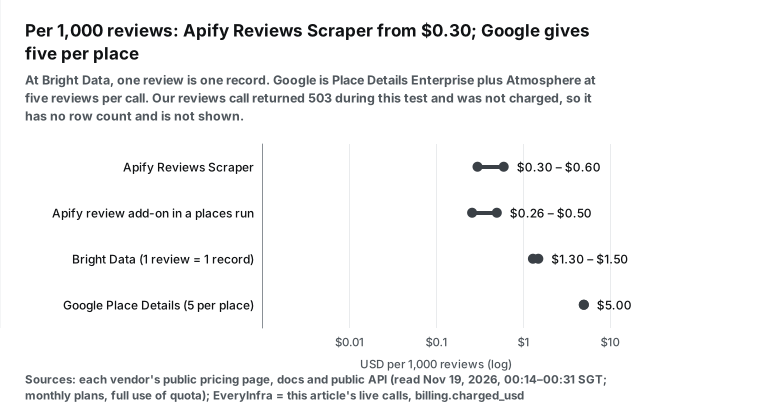
Per 1,000 places, Bright Data has the lowest public price on November 19, 2026, at $1.30 to $1.50. The Apify Google Maps Scraper costs $1.50 to $4.00, and Google Text Search costs $1.60 with full pages of 20. Per 1,000 reviews, the Apify Reviews Scraper is cheapest at $0.30 to $0.60, and Google gives at most five reviews per place.
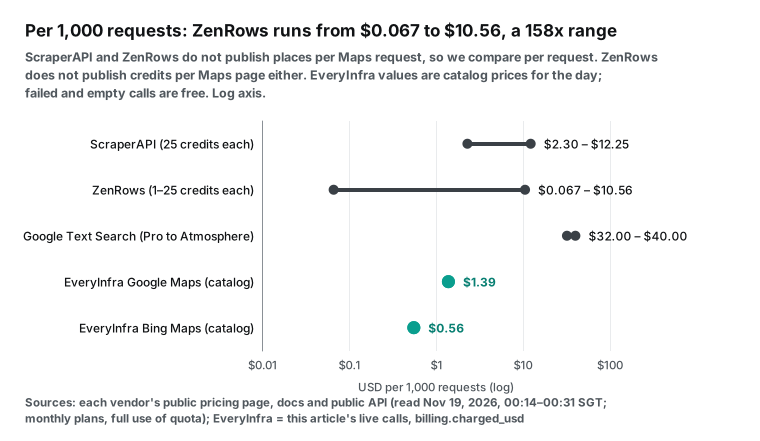
ScraperAPI and ZenRows bill credits per request and do not publish how many places one Maps request returns. In their public samples, one has no place_id and the other has null. Our own Google Maps API returned 503 during this test and charged nothing. So we have no measured cost per 1,000 places for it, and we show only its catalog price of $0.001389 per call.
How we ranked the tools
Every Google Maps tool sells a different unit. Apify sells events, such as one scraped place or one scraped review. Bright Data sells delivered records. ScraperAPI and ZenRows sell credits, and one Google Maps request costs a number of credits. EveryInfra sells requests, and one request returns one page of places or one page of reviews. Google sells Places API requests, and the price depends on the fields you ask for.
| Vendor | You pay for | Item count per charge | Empty result |
|---|---|---|---|
| Apify | Each scraped place or review (event) | 1 | No place events |
| Bright Data | Each delivered record | 1 | Not charged |
| ScraperAPI | Each request, 25 credits for Google | Not published | 200 with empty list is charged |
| ZenRows | Each request, 1–25 credits | Not published | Charged if 404 or 410 |
| Google Places API | Each request, by field group (SKU, a billing tier) | Up to 20 places or 5 reviews | Billed per request |
| EveryInfra | Each request (one page) | Up to 50 places or 100 reviews | Not charged |
A fair ranking needs one denominator. This article uses two. The first is the cost of 1,000 places in a search result list, with a place ID, a rating and a review count. The second is the cost of 1,000 reviews, with text, stars and a date.
We read every competitor price from a public pricing page, document or API. We read them on November 19, 2026, between 00:14 and 00:44 Singapore time (SGT). We did not open paid accounts with them, so a number that they do not publish shows as "not published" in our tables.
Our own prices come only from live calls that we made for this article. Each response has a billing.charged_usd field, and we compared it with the price_usd value in the public EveryInfra catalog. For a split of every Apify event, see our Apify Google Maps scraper alternative post. For the five-review limit of the official API and a Python export, see How to scrape Google Maps reviews.
Ranking: cost per 1,000 places and per 1,000 reviews
| Tool | Billing unit | Per 1,000 places (USD) | Per 1,000 reviews (USD) | Failed or empty result | Lowest paid entry | Free allowance | AI client access |
|---|---|---|---|---|---|---|---|
| Apify Google Maps Scraper and Reviews Scraper | Event: one place, one review | 1.50–4.00 (Business to Free) | 0.30–0.60 (Reviews Scraper) | Events count only scraped items; each run start costs $0.00005 | Starter $19/month | $5 platform credit each month | Remote MCP (mcp.apify.com) |
| Bright Data Google Maps Scraper API | Delivered record | 1.30–1.50 | 1.30–1.50 (one review is one record) | No charge for failed deliveries | Pay as you go, no monthly fee | 5,000 records each month | MCP, 5,000 free requests each month |
| ScraperAPI Google Maps Search | Credits, 25 per Google request | Places per request not published; 2.30–12.25 per 1,000 requests | No structured reviews endpoint | Charges for 200 and 404, and for requests you cancel within 70 seconds | Hobby $49/month | 5,000 trial credits for 7 days; 1,000 free credits each month | Remote MCP |
| ZenRows Google Maps scraper | Credits, 1–25 per request; Maps cost not published | 0.067–10.56 per 1,000 requests | One request reads the reviews shown on one place page | Failures are free; 404 and 410 count as success | Build $19/month | 5,000 credits each month | Remote MCP |
| Google Places API (New) | Request, priced by field SKU | 1.60 (Text Search Pro, 20 per page); 1.75 with rating and hours | 5.00 (five reviews per place at most) | Billed per request | Billing account | Pro 5,000 requests and Enterprise 1,000 requests each month | Maps Grounding Lite (the Google maps MCP service for AI tools) |
| EveryInfra | Request: one page, $0.001389 per call | 503 in this test, so no measured count; the catalog allows up to 50 per page, so the cost is at least 0.0278 | 503 in this test, not measured; the catalog allows up to 100 per page, so the cost is at least 0.0139 | Failed and empty calls are free (our 503 responses were not charged) | $1 trial; top-ups from $10, balance does not expire | $1 for starring two GitHub repos, valid 24 hours | Remote MCP, tools named everyinfra_* |
ScraperAPI and ZenRows bill per request and do not say how many places one Maps request returns. For that reason we show their cost per 1,000 requests only. For Google, we divide the Text Search price by 20. The Text Search documentation limits pageSize to 1–20 and one query to 60 results.
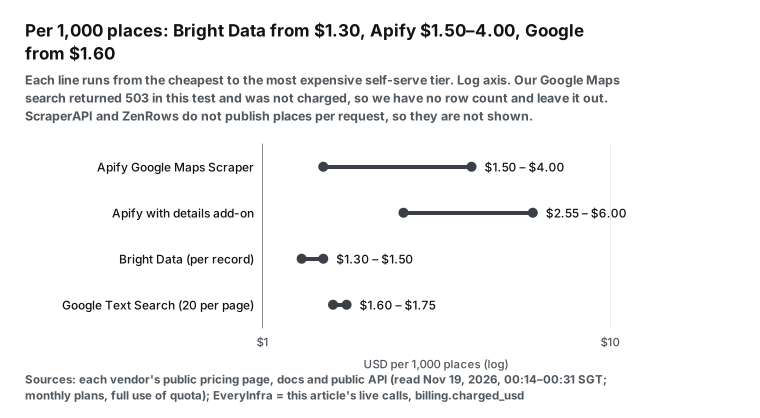
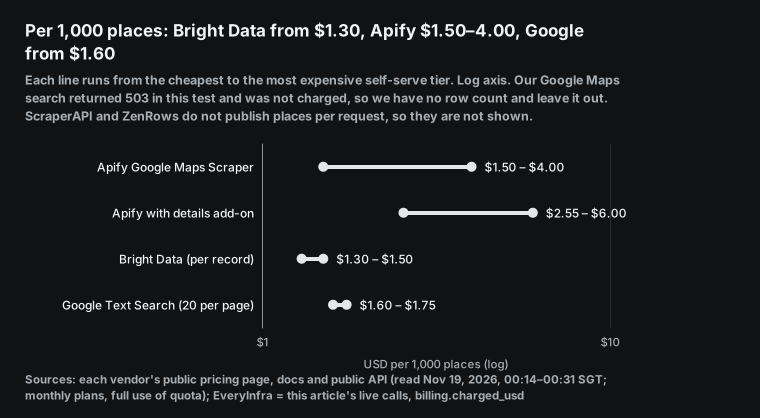
Per 1,000 places, the cheapest public price is the Bright Data Scale overage rate of $1.30. Next come Apify Business at $1.50 and a full Google Text Search Pro page at $1.60. With URL input, Apify adds the details add-on, and Business rises to $2.55. Per 1,000 reviews, the Apify Reviews Scraper is cheapest at $0.30 to $0.60. Bright Data counts each review as one record, so it costs two to five times more, and Google gives only five reviews per place.
Billing units: events, records, credits and requests
The unit decides which jobs are cheap. Apify and Bright Data charge for each item that you receive. A search that finds 30 dentists costs 30 items, and a search that finds none costs nothing for items. This makes a monthly budget easy to predict, because the bill grows with the number of places or reviews in your output.
ScraperAPI and ZenRows charge for each request, and the item count does not change the price. A Maps search page that returns 20 places costs the same as a page that returns 2 places. The risk is on your side. When a query is too narrow, you still pay for the request. When a page holds many places, the cost per place falls. Neither vendor publishes how many places one Google Maps request returns, so we cannot convert their price to a cost per place without a guess.
EveryInfra also charges per request, but each request has a clear page size. The catalog entry for Google Maps lists a default and a maximum limit for each capability. A search returns up to 50 places in one call, and a reviews call returns up to 100 reviews. The price is the same for every page size, so a full page gives the lowest cost per item.
A full page costs $0.0278 per 1,000 places and $0.0139 per 1,000 reviews. These two values are floors from the catalog maximum. A page with fewer items costs more per item. Our Google Maps calls returned 503 in this test, so we did not measure a real page size, and the charts leave these floors out. Empty results are free.
Google prices the Places API by field group. The usage and billing page says that a request is billed at the highest SKU that its field mask touches. If you add rating to a name-and-address request, the whole request moves from the Pro SKU to the Enterprise SKU. If you add reviews, it moves to Enterprise plus Atmosphere.
Apify Google Maps Scraper: $1.50 to $4.00 per 1,000 places, plus add-ons
The most used Google Maps tool on Apify Store is Google Maps Scraper, published by Compass and maintained by Apify. On November 19, 2026, its Store page showed 703,000 total users, 49,000 monthly active users and an average rating of 4.7 from 1,820 reviews. The public Apify API record for this tool is readable without a login. Its modifiedAt value was 2026-11-18T15:26:28Z, and its pricingInfos block lists six price tiers for each event.
Four tiers match the self-serve plans on the Apify pricing page. Free costs $0 and includes $5 of monthly credit. Starter costs $19 per month, Scale costs $199 and Business costs $999. The Store documentation says that each plan includes one discount tier. Apify moved this tool to pay-per-event billing in a help article dated March 18, 2025, with a base price of $4 per 1,000 places.
| Event (USD per 1,000) | Free | Starter | Scale | Business | Note |
|---|---|---|---|---|---|
| Place scraped | 4.00 | 3.00 | 2.00 | 1.50 | Main event: name, address, rating, opening hours |
| Add-on: extra place details | 2.00 | 2.00 | 1.50 | 1.05 | Also charged for direct URL or place ID input |
| Add-on: each filter used | 1.00 | 1.00 | 0.75 | 0.525 | Places × filter price × number of filters |
| Add-on: review scraped | 0.50 | 0.50 | 0.37 | 0.26 | Reviews inside a places run |
| Add-on: company contacts | 2.00 | 2.00 | 1.50 | 1.05 | Searches the business website for email and social links |
| Reviews Scraper: review scraped | 0.60 | 0.45 | 0.40 | 0.30 | Separate reviews tool, plus $0.00005 per run start |
We read all values at 00:14 SGT on November 19, 2026. They come from two public API records: Google Maps Scraper and Google Maps Reviews Scraper. The two Enterprise tiers cost $1.26 and $0.756 per 1,000 places, and $0.20 and $0.15 per 1,000 reviews.
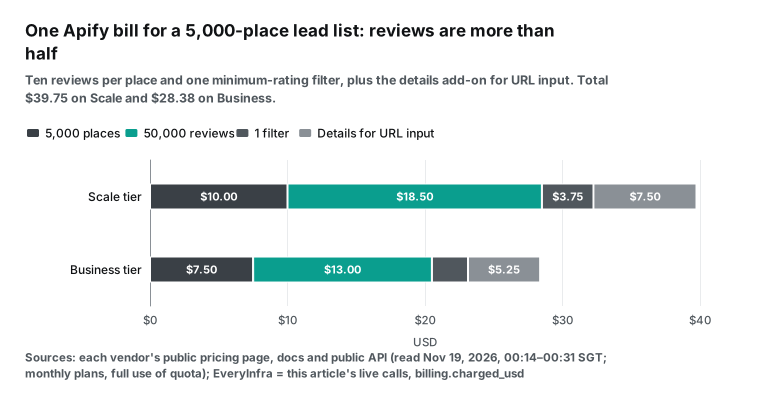
Here is a typical lead-list bill on the Scale plan. You scrape 5,000 places, take 10 reviews from each place and use one minimum-rating filter. The bill is 5,000 × $0.002 for places, plus 50,000 × $0.00037 for reviews, plus 5,000 × $0.00075 for the filter. That is $10.00 + $18.50 + $3.75 = $32.25, and reviews are more than half of it. If you start from a list of place URLs, add 5,000 × $0.0015 = $7.50 for the details add-on. The README section on direct place IDs says that this input is "charged extra".
Two more points from the README matter for planning. First, a search term without a location returns at most 120 places, because it opens a single map screen. With a location or a custom area, the tool splits the area and goes past that limit. Second, Google shows some details mostly to logged-in users.
Fields such as popular times and "People also search" are often empty. Apify runs a remote MCP server at https://mcp.apify.com. The Apify MCP documentation shows how to search and run Store tools from Claude or VS Code.
Bright Data Google Maps Scraper API: $1.30 to $1.50 per 1,000 records
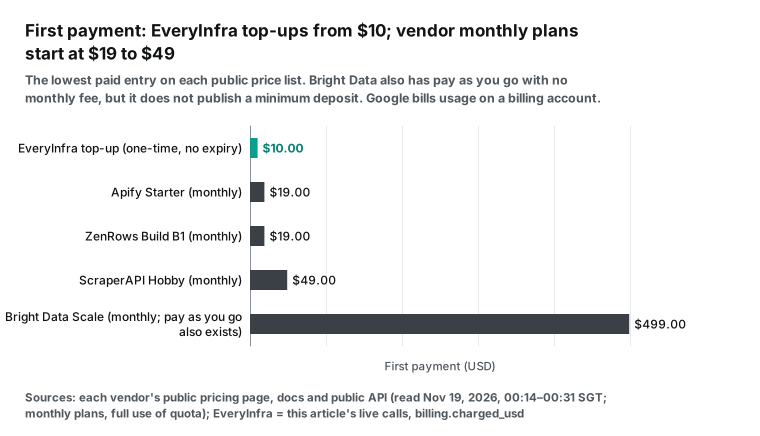
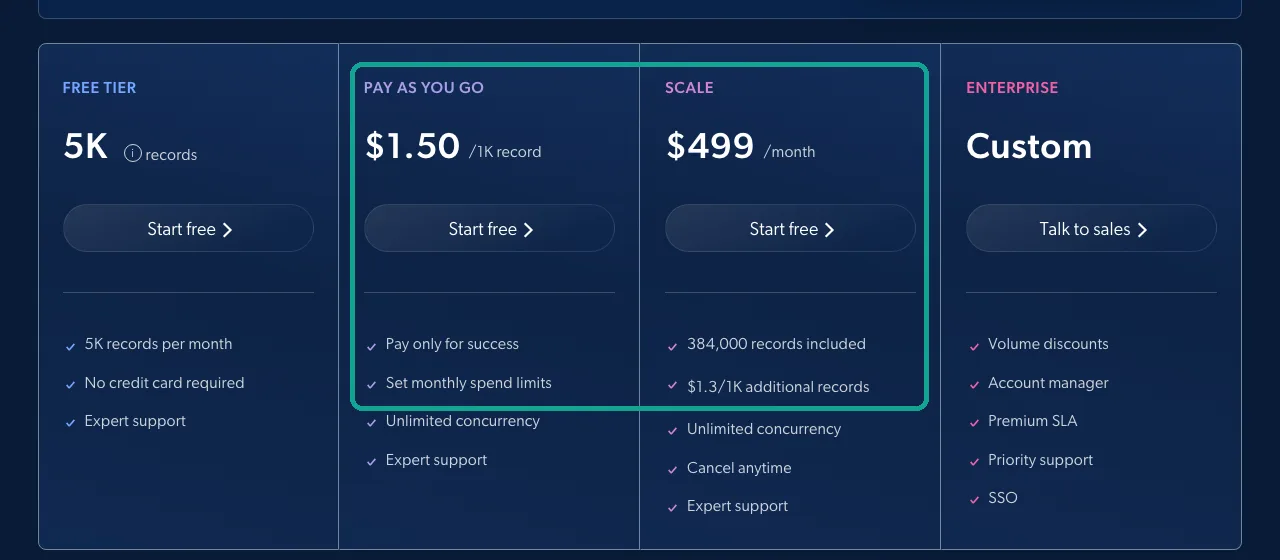
Bright Data sells Google Maps data per record. The Google Maps Scraper API page lists pay as you go at $1.50 per 1,000 records. The Scale plan costs $499 per month and includes 384,000 records, which is $1.30 per 1,000, and extra records also cost $1.30 per 1,000. The free plan gives 5,000 records each month without a credit card. We read the page and took a screenshot at 00:23 SGT on November 19, 2026. The page says that you pay only for successful deliveries.
The same page lists five ways to collect Google Maps data. You can collect full details by place URL or by place ID. You can discover places by location or by customer ID (CID). You can also collect reviews or photos.
One API call can submit up to 5,000 target URLs. Output formats are JSON, NDJSON and CSV, and delivery can go to a webhook or to cloud storage. The Bright Data Google Scraper API documentation says that a synchronous request waits up to one minute. After that, it returns HTTP 202 with a snapshot_id, and discovery requests by keyword, CID or area always run as asynchronous jobs.
The sample record on the page, with a timestamp of 2026-11-12, includes place_id, url, country, name, category, address and description. The field list at the top of the page also names phone, website, coordinates, opening hours, rating, review count, price level and photos. The Bright Data MCP server includes 5,000 free requests each month. The free tier documentation says that this allowance and the scraper allowance share one pool.
Bright Data costs about the same as the Apify Business tier for places. Pay as you go costs $1.50 per 1,000 records with no monthly fee.
The Scale plan costs $499 and includes 384,000 records. Pay as you go reaches $499 only at about 333,000 records per month ($499 ÷ $1.50 × 1,000), so below that volume pay as you go costs less. Reviews are a different story. Each review is one record, so 1,000 reviews also cost $1.30 to $1.50. That is two to five times the price of the Apify Reviews Scraper.
ScraperAPI Google Maps Search: 25 credits per request and no reviews endpoint
ScraperAPI has one structured Google Maps endpoint, https://api.scraperapi.com/structured/google/mapssearch. It needs query, latitude and longitude, and it returns parsed JSON, as the Google Maps Search API documentation shows. The ScraperAPI documentation index lists this endpoint and an async version for Google Maps. It lists no reviews endpoint.
Credit cost depends on the target domain. The credits documentation gives 1 credit for a normal request and 5 for e-commerce sites such as Amazon. Search engines such as Google and Bing cost 25, and LinkedIn costs 30. The 25-credit rule applies to all Google subdomains. ScraperAPI charges for status codes 200 and 404, and also for a request that you cancel within 70 seconds.
The ScraperAPI pricing page, read at 00:16 SGT, lists six monthly plans. Hobby costs $49 for 100,000 credits, Startup $149 for 1 million, Business $299 for 3 million and Scaling $475 for 5 million. Professional costs $975 for 10.5 million and Advanced costs $1,975 for 21.5 million. At 25 credits per Google request, 1,000 Maps requests cost $12.25 on Hobby, $3.725 on Startup and $2.49 on Business.
They cost $2.375 on Scaling, $2.32 on Professional and $2.30 on Advanced. The 7-day trial gives 5,000 credits, which is 200 Maps searches. After the trial, the free plan gives 1,000 credits per month, which is 40 searches.
The ScraperAPI Google Maps product page shows sample output. Each place has a name, an address array, stars, a rating count, a price level and a type. It also has coordinates, opening hours by weekday and images. The sample has no place_id field, and the review count field is named ratings.
Without a place ID, you must match places across cities and keywords by name and address. Our place_id deduplication post shows how that method fails for chain branches with the same name and for places that changed their name. ScraperAPI has a remote MCP server, and its March 2026 release notes list Claude Desktop, Claude Code and Cursor support.
ZenRows Google Maps scraper: 1 to 25 credits per request, Maps cost not published
ZenRows updated its Google Maps scraper page on October 20, 2026. The page tells you to send a Maps search URL or place URL to Fetch with Adaptive Stealth Mode, and then let Extract return fields. A search page gives place_results with name, category, rating, review count and price level. A place page gives place, hours, rating_summary, rating_distribution and the few reviews that the page shows. The separate reviews page says that one request reads one place.
The ZenRows pricing documentation gives 1 credit for a basic request, 5 with JavaScript rendering, 10 with premium proxies and 25 with both. Only successful requests cost credits, but 404 and 410 responses count as successful. Adaptive Stealth Mode adds options only when a page needs them, so one Maps request costs between 1 and 25 credits. The documentation does not say which level a Maps page usually needs.
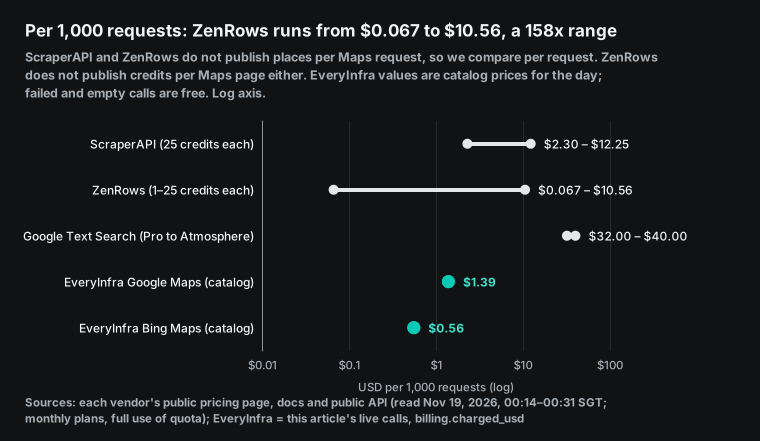
The cheapest plan is Build B1 at $19 per month for 45,000 credits. The largest is Scale S5 at $2,999 per month for 45 million credits. That is $0.067 to $0.422 per 1,000 credits. So 1,000 Google Maps requests cost from $0.067 (S5 at 1 credit each) to $10.56 (B1 at 25 credits each). That is a 158-fold range. The free plan gives 5,000 credits per month, which is 5,000 requests at 1 credit or 200 requests at 25 credits.
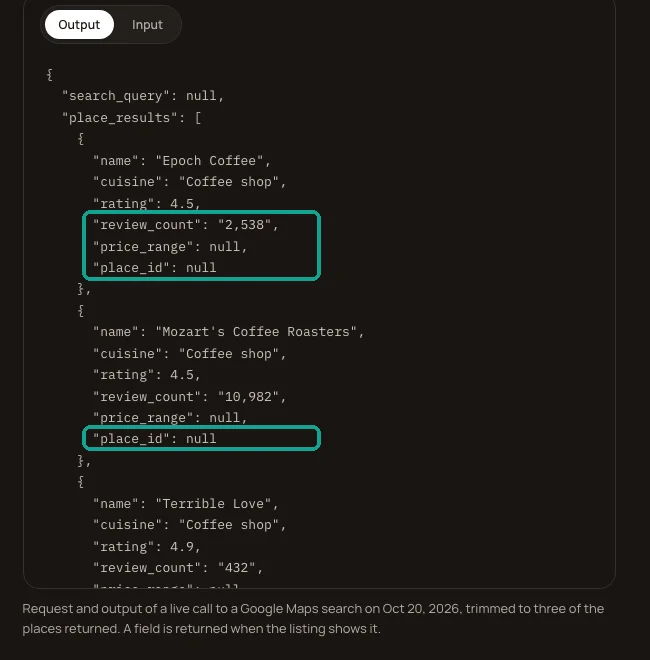
The ZenRows search sample needs two fixes before you can use it. All three place_id values are null, and review_count is a string with a comma, such as "2,538" and "10,982". The page itself tells you to remove the separator before you convert the value to an integer. ZenRows suggests a two-step flow: search the list, then search "name + address" to open each place page for phone, website and hours. The two steps are joined by name. The ZenRows MCP server runs at https://mcp.zenrows.com/mcp, according to the ZenRows MCP documentation.
Google Places API: the official reference, with five reviews per place
Places API (New) Text Search returns up to 20 places per page and up to 60 per query. The Text Search documentation gives these limits. Display name and address fall under the Pro SKU. Rating, rating count, regular opening hours and website fall under the Enterprise SKU.
Reviews fall under Enterprise plus Atmosphere. The Google Maps Platform price list gives the first paid tier. Text Search costs $32 per 1,000 requests on Pro, $35 on Enterprise and $40 on Enterprise plus Atmosphere.
Place Details costs $20 per 1,000 for Enterprise and $25 with Atmosphere. Pro includes 5,000 free requests each month and Enterprise includes 1,000.
Per 1,000 places, a name-and-address list costs $32 ÷ 20 = $1.60, and a list with rating and hours costs $35 ÷ 20 = $1.75. Both values assume full pages of 20. Reviews are the weak point. A Place object returns five reviews at most, as the Maps JavaScript API policies page states. With Place Details Enterprise plus Atmosphere, 1,000 reviews cost at least $25 ÷ 5 = $5.00, and you can never get review number six.
Read Section 3.2.3(a) of the Google Maps Platform Terms of Service before you plan storage. It says that customers must not export, extract or scrape Google Maps Content for use outside the Services. The Places API policies page gives examples: do not copy and save business names, addresses or user reviews. The place ID is exempt, and you can store it without a time limit. Google also offers Maps Grounding Lite for AI agents, as the MCP reference shows. The price list gives Maps Grounding Essentials at $7 per 1,000 requests.
Fields: place_id, rating, review text and opening hours
Price is half of the choice. The other half is whether the fields you get back are ready to use. Four fields matter most in a Google Maps dataset: the place ID, the rating with its review count, the review text and the opening hours. Sales teams also want phone, website and email. The table below uses only public documentation and public sample output. When a field is not in the documentation or the sample, the cell says so.
| Field | Apify Google Maps Scraper | Bright Data | ScraperAPI Maps Search | ZenRows | Google Places API (New) | EveryInfra |
|---|---|---|---|---|---|---|
| Place ID | Yes, placeId, plus cid and fid | Yes, place_id; can also collect by place ID or CID | Not in the sample output | null in the search sample | Yes, id; terms allow long-term storage | Catalog lists place_id (503 in this test, no response); the Bing Maps place_id key holds a Bing business ID |
| Rating and review count | totalScore, reviewsCount, five-star distribution | Rating, review count | rating, ratings | rating, review_count (string) | rating, userRatingCount (Enterprise SKU) | Catalog lists rating and review_count; Bing Maps returned them, and Bing shows Yelp as the rating source |
| Review text | Add-on or Reviews Scraper, with stars, date and owner reply | Separate reviews collection, one record per review | No structured endpoint | The few reviews on the place page | Five per place at most (Atmosphere SKU) | Catalog lists a reviews capability with text, stars, date and owner reply; Bing Maps has none |
| Opening hours | openingHours by weekday | Yes | By weekday | hours on the place page | regularOpeningHours (Enterprise SKU) | Not in search results; call profile per place. Bing Maps gives one hours_text line |
| Phone and website | Yes | Yes | No phone in the sample | Needs the place page | Enterprise SKU | Catalog lists them; Bing Maps returned them |
| Company contacts add-on, from the business website | Not listed | No | No | No | No; scrape the business website separately |
Sources for the vendor columns are the Apify README JSON sample and the Bright Data Google Maps page. The others are the ScraperAPI product page sample, the ZenRows Google Maps page sample and Google Place Data Fields. In the EveryInfra column, Google Maps uses the fields in the catalog, because our calls returned 503 and gave no response. Bing Maps uses the keys in our two live responses at 00:33 and 01:05.
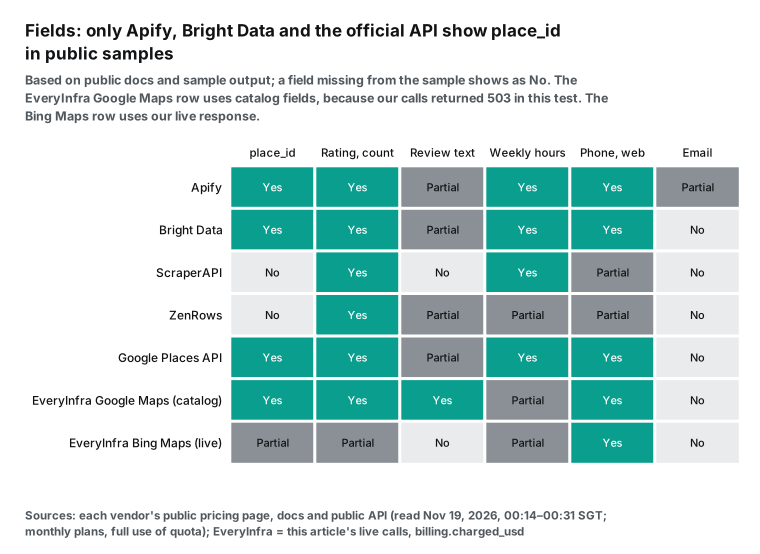
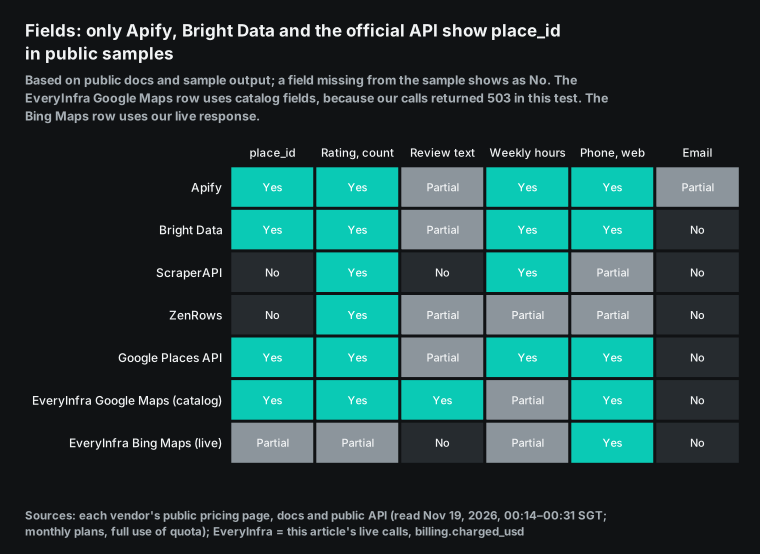
The place ID row decides whether you must write your own "is this the same place" rules. The Places API policies page says that the place ID is exempt from caching limits and that you can keep it forever. Google suggests that you store the ID and fetch fresh details when a user needs them. With a place ID in each row, a weekly refresh is simple. A new ID is a new business.
A missing ID can mean a closure or a name change. A changed rating or review count goes to a review queue. Without a place ID, you match by name and address. Two branches of one chain on the same street break that rule. So do "Ste 230" versus "Suite 230", and a name that gains "(moved)".
The opening hours row decides whether a lead list costs one charge or two. A search result card on Google Maps usually shows only name, rating, category and one status line such as "Open" or "Closes 4 PM". Hours by weekday live on the place detail page. The Apify base place event already includes opening hours, and the Bright Data record includes them too. ZenRows opens a place page for each business. Google asks you to request regularOpeningHours in the field mask, and that moves the whole request to the Enterprise SKU.
The email row is the same for every map tool: Google Maps does not show email addresses. At 2:12, the top YouTube video for "best google maps scraper" says that emails are not listed on Google Maps, so the tool checks the business websites. One reply in a Reddit r/CRM thread says that email needs a second scrape plus verification. It says that the real cost shows up at that step. The Apify contacts add-on does that second scrape, which is why it has its own price: $1.05 per 1,000 places on Business.
EveryInfra live calls: Google Maps returned 503, and Bing Maps returned 30 places twice
We made our live calls with a test key on November 19, 2026, between 00:14 and 01:36 SGT:
| Capability | Request | Result | Charged |
|---|---|---|---|
google_maps_reviews/search | Dentists in Chicago, limit 50; we also tried the catalog example (coffee) and "mode":"async" | 503 unavailable; still 503 after waiting retry_after (60 s), after async mode and with the catalog example | $0 |
google_maps_reviews/reviews | One place in Sydney, limit 100, newest first | 503, same as above | $0 |
google_maps_reviews/profile | Detail page of the same place | 503, same as above | $0 |
bing_maps/search | Dentists in Chicago at 00:33 and coffee shops in Seattle at 01:05, by coordinates, limit 30 | 200 both times, 30 places each | $0.000556 each |
duckduckgo_maps/search | Dentists in Chicago by coordinates | 503, not charged | $0 |
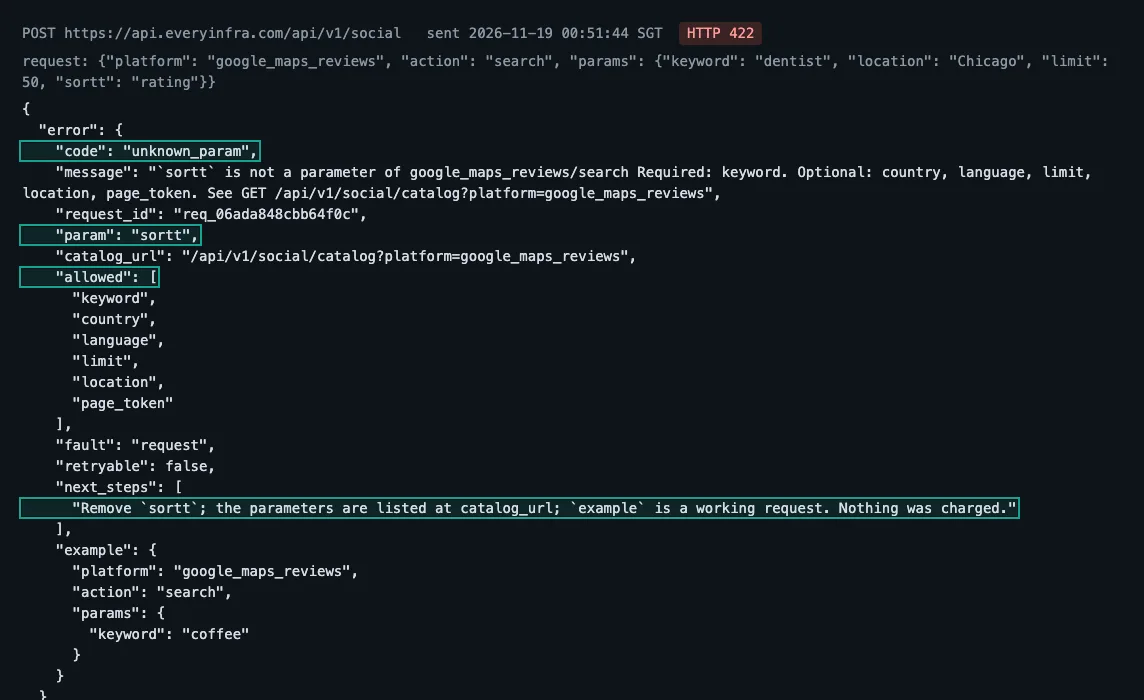
google_maps_reviews/search with a parameter that does not exist | sortt | 422 unknown_param, with the 6 accepted parameters | $0 |
youtube/search | "best google maps scraper", limit 10 | 200, 10 videos | $0.000778 |
During this test, all three Google Maps capabilities returned 503. The error.code was unavailable and the fault was service. In each response, billing.charged_usd was 0 and billing.reason was request_failed_refunded.
We waited retry_after (60 seconds) and sent the call again. We also tried "mode":"async" and the example request from the catalog. All gave the same result, and none cost money. One more call at 01:36, just before publication, also returned 503 and was not charged.
So this test gives no item count for Google Maps. Our charts and the ranking leave out its cost per 1,000 places and per 1,000 reviews, and we show only the catalog price. Before you commit, spend part of the $1 trial on your own query and check the count and charged_usd for that day.
Four fields in the 503 body can go straight into retry logic. retryable is true, so you can send the same request again. retry_after is 60, in seconds. max_retries is 2, which gives three attempts in total. The first line of next_steps is "Not charged", and it also says which failure this is and what to do next. In billing, charged is false and charged_usd is 0, and refund.status is succeeded. This is the billing part of the 01:36 response, without the balance and exchange-rate fields:
{
  "error": {"code": "unavailable", "fault": "service", "retryable": true,
            "retry_after": 60, "max_retries": 2},
  "billing": {"charged": false, "charged_usd": 0.0,
              "list_price_credits": 100, "reason": "request_failed_refunded"},
  "refund": {"status": "succeeded", "credits": 100}
}
list_price_credits is the amount that this call would cost at the catalog price ($0.001389). refund.credits has the same value, so the full amount came back in the same response. You do not need to reconcile it or ask for a refund.
In the same hour, Bing Maps returned 200 twice. At 00:33 it returned 30 dentists in Chicago in 4.5 seconds. At 01:05 it returned 30 coffee shops in Seattle in 4.7 seconds. Each call cost $0.000556.
Bing Maps is the Bing business list, not Google data, so it is not in the price charts or the ranking. We show it here on its own. This is the field coverage of the two responses:
| Field | Chicago dentists (30) | Seattle coffee shops (30) | Note |
|---|---|---|---|
place_id | 30 | 30 | Bing business ID (starts with YN); it does not match a Google place ID |
| Name, category, address, coordinates, website | 30 | 30 | 24 dentists have the category Dentist; 28 coffee shops have Cafe |
| Phone | 30 | 28 | |
| Rating and review count | 29 | 29 | One place in each call has no rating |
rating_source | Yelp for 29 | Yelp for 29 | The rating source that Bing shows |
| Rating values | 2.5 to 5, in steps of 0.5 | 3.5 to 4.5, in steps of 0.5 | The Yelp rating scale |
| Median review count | 63 (22 to 452) | 347 (36 to 2,630) | Same source as the rating |
hours_text | 30; 29 say "Closes ..." | 30; 29 say "Closes ..." | Today's closing time only, no weekly table |
| Review text | None | None |
In each call, one place has open_state set to Closed and 29 are Open. Bing shows Yelp as the rating source, and the ratings move in steps of 0.5. So you cannot compare these ratings and review counts directly with the values for the same place on Google Maps. Use Bing Maps to list the businesses in an area or to check whether a place is still open. It also gives a phone number and a website. It does not replace Google Maps ratings and reviews.
Three common jobs and what they cost
Unit prices change rank in real jobs. These three jobs use public prices, monthly plans and full use of the allowance. Each vendor shows its cheapest and its most expensive self-serve tier:
| Job | Apify | Bright Data | Google Places API | EveryInfra |
|---|---|---|---|---|
| Lead list of 5,000 places with weekly hours, one time | $7.50–20.00 (base event includes hours) | $6.50–7.50 | $8.75 (250 Text Search Enterprise calls; $0 inside the 1,000 free calls per month) | At catalog prices: 5,000 profile calls for hours ($6.95) plus at least 100 searches at up to 50 places ($0.14), so at least $7.08; not measured (503) |
| 20,000 reviews per month (100 for each of 200 stores) | $6.00–12.00 (Reviews Scraper) | $26.00–30.00 | Not possible: five reviews per place | At catalog prices: up to 100 reviews per page, so at least 200 calls and at least $0.28; not measured (503) |
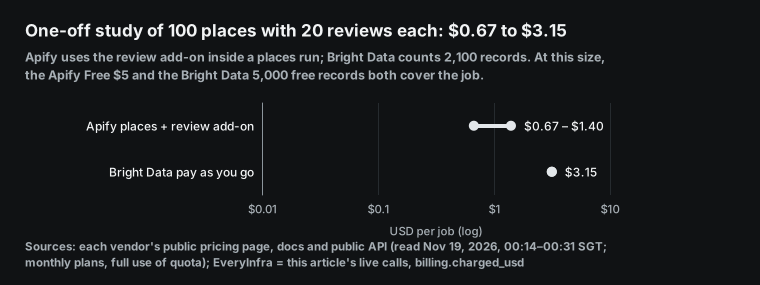
| One-off study of 100 places with 20 reviews each | $0.67–1.40 (review add-on) | $3.15 (2,100 records; inside the free tier) | Not possible: no 20 reviews | At catalog prices: at least 2 searches plus 100 reviews calls, so at least $0.14; not measured (503) |
ScraperAPI and ZenRows are not in this table. Neither publishes how many places one Maps request returns, and ScraperAPI has no reviews endpoint, so any number would be a guess. Their rules only give a floor. The cheapest ScraperAPI plan is Hobby at $49 per month. ZenRows charges 1 to 25 credits per place page, so 5,000 place pages need 5,000 to 125,000 credits. The upper value is more than the 45,000 credits of plan B1.
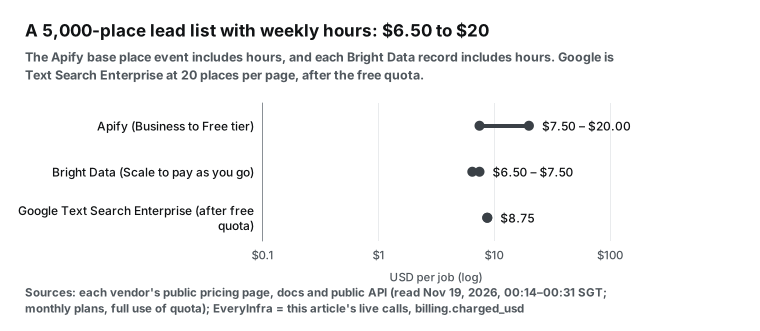
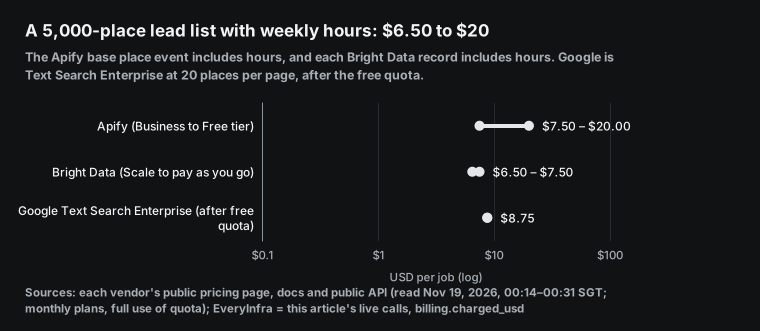
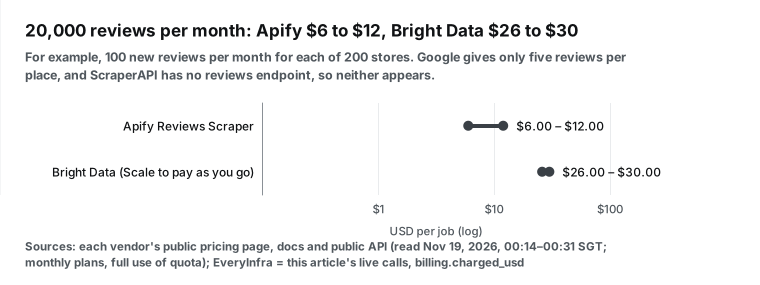
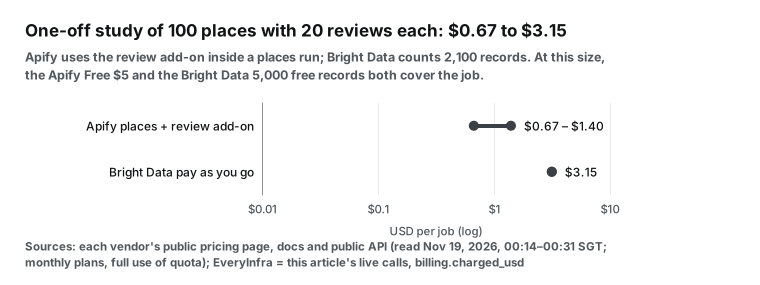
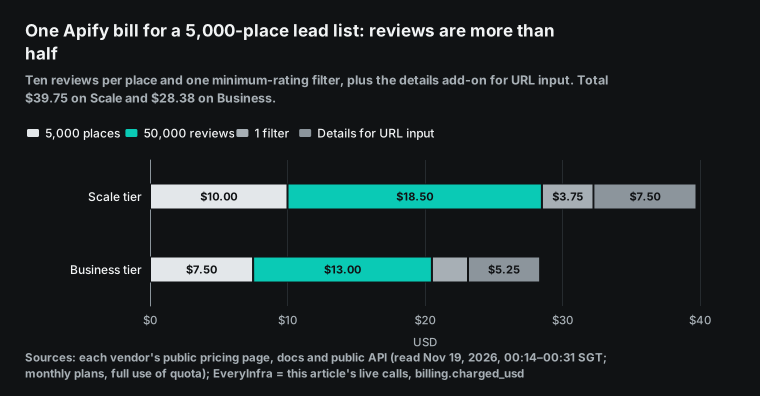
On an Apify bill, reviews often cost more than places. Take the same 5,000-place list with 10 reviews per place and one minimum-rating filter, and add the details add-on for URL input. The total is $39.75 on Scale, of which reviews are $18.50, and $28.38 on Business.
Failed and empty results: who charges and who does not
Failures are common on Google Maps. A narrow query finds nothing, a place URL is dead, a review page is rate limited or the page layout changes. Vendors define a failure in different ways, and they charge for it in different ways:
Bright Data is the clearest. You pay only for successful deliveries, and failed deliveries are free. Apify bills per scraped item, so a search with no results creates no place events. Each run still has a start event at $0.00005, and add-ons such as filters and details scale with the place count.
ScraperAPI charges for 200 and 404 responses, and also for a request that you cancel within 70 seconds. By that rule, a Maps search that returns 200 with an empty list costs 25 credits. ZenRows charges only for successful requests, but it counts 404 and 410 as successful, so a dead place URL still costs credits. Google bills Places API requests by SKU, as the usage and billing page explains.
The EveryInfra rule is on the pricing page and in the billing field of every response: failed and empty calls are free. You can reproduce what we saw in our own test. A Google Maps search returned HTTP 503, the response had billing.reason set to request_failed_refunded, and nothing was charged. The response told us to wait retry_after seconds (60) and send the same request again. During this test, the three Google Maps capabilities still returned 503 after retries, and none of those calls cost money. The call with a parameter that does not exist returned 422 and was also free.
Free allowances: how many places can you get without paying?
Free allowances use different units. To compare them, we convert each one into places per month, and we assume that you spend it all on Google Maps place lists.
| Free allowance | Unit | Places per month | Limit |
|---|---|---|---|
| Apify Free | $5 credit | 1,250 | No add-ons at that count |
| Bright Data | 5,000 records | 5,000 | Places and reviews share the pool |
| ScraperAPI | 1,000 credits (5,000 in the 7-day trial) | Not published (40 searches) | Places per search not published |
| ZenRows | 5,000 credits | Not published (200–5,000 requests) | Credits per Maps page not published |
| Google Text Search Pro | 5,000 requests | Up to 100,000 | Name, address and type only |
| Google Text Search Enterprise | 1,000 requests | Up to 20,000 | 60 per query; storage limits in the terms |
| EveryInfra trial | $1, valid 24 hours | 719 Google Maps searches at up to 50 places each; real count not measured in this test | Once, not monthly |
The Apify Free plan includes $5 of monthly credit, and Google Maps Scraper costs $4 per 1,000 places on the Free tier. That gives 1,250 places with no add-ons. Bright Data gives 5,000 free records per month, shared between places and reviews. The ScraperAPI trial gives 5,000 credits for 7 days, which is 200 Google Maps searches, and the free plan then gives 40 searches per month. ScraperAPI does not publish how many places one search returns. ZenRows gives 5,000 credits per month, which is 200 to 5,000 requests at 1 to 25 credits each.
Google gives 5,000 free Text Search Pro requests per month. At 20 places per page, that is up to 100,000 places with name, address and type. With rating and hours you need the Enterprise SKU, which gives 1,000 free requests per month, or up to 20,000 places.
The EveryInfra trial is $1, valid for 24 hours, after you star two GitHub repos. At $0.001389 per Google Maps search, $1 buys 719 search calls, at up to 50 places each. Google Maps returned 503 during this test, so we did not measure how many places one call returns. For that reason we do not convert the trial into places, and the chart below leaves it out. The trial is also a one-time allowance, not a monthly one like the others.
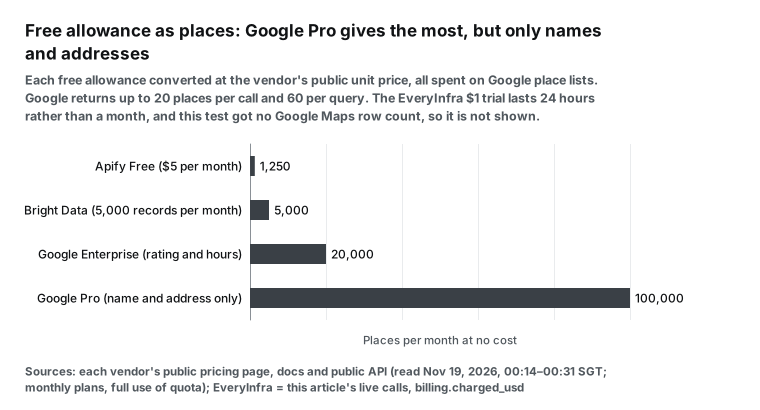
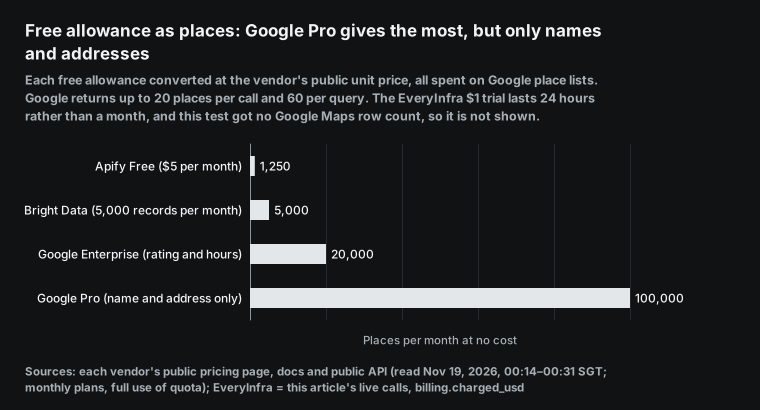
The Google free allowance looks the largest, but it has three limits. One query stops at 60 places, so 5,000 places need more than a hundred small queries. Reviews stop at five per place. The terms do not let you store business names, addresses or reviews for use outside Google services. The official API fits an app that shows one place to a user in real time. It does not fit a lead table that you keep in a CRM.
Use it from Claude or Cursor: MCP setup and one curl call
All five vendors run MCP servers for AI clients. The source code for the Apify, Bright Data, ScraperAPI and ZenRows servers is on GitHub, and Google offers Maps Grounding Lite. MCP (Model Context Protocol) is an open protocol that lets AI clients call outside tools, as modelcontextprotocol.io describes. The servers differ in how they split tools.
With the Apify server, the model first searches Store for a tool and then runs it. The ScraperAPI and ZenRows servers mostly take a URL and return the page or a parsed result. The EveryInfra server puts every capability behind one tool, everyinfra_call_api. The model calls everyinfra_list_capabilities to find google_maps_reviews/search and its parameters, and then calls it.
| Vendor | MCP endpoint or source | How the model uses it |
|---|---|---|
| Apify | https://mcp.apify.com | Search Store tools, then run one |
| Bright Data | brightdata-mcp | 30 tools: web search, structured scrapers, browser automation; 5,000 free requests per month |
| ScraperAPI | scraperapi-mcp | Send a URL, get page content or parsed data |
| ZenRows | https://mcp.zenrows.com/mcp | Fetch and extract web data |
| EveryInfra | https://api.everyinfra.com/mcp | List capabilities, then call google_maps_reviews/search |
This is the EveryInfra remote MCP setup for Claude and Cursor. Replace YOUR_API_KEY with a key from your console. The MCP server page has the full steps for each client.
{
  "mcpServers": {
    "everyinfra": {
      "url": "https://api.everyinfra.com/mcp",
      "headers": { "Authorization": "Bearer YOUR_API_KEY" }
    }
  }
}
After setup, you can ask Claude: "Find 50 dentists in Chicago, sort them by review count, and list place_id and rating." Claude then calls google_maps_reviews/search. Without MCP, one curl command does the same job. Keep the key in an environment variable, not in the script.
curl -s https://api.everyinfra.com/api/v1/social \
  -H "Authorization: Bearer $EVERYINFRA_API_KEY" \
  -H "Content-Type: application/json" \
  -d '{"platform":"google_maps_reviews","action":"search",
       "params":{"keyword":"dentist","location":"Chicago","limit":50}}' \
  | jq '{n: (.results|length), charged: .billing.charged_usd, first: .results[0]}'
In the response, results is the array of places and billing.charged_usd is the amount that this call cost. On a failure, that amount is 0 and billing.reason gives the cause. For slow calls, add "mode":"async" to the request body. You get a job ID at once, and you poll GET /api/v1/jobs/{job_id} for the result.
Parameter names and allowed values are in the catalog. If you send a parameter that does not exist, the API returns 422. The allowed list shows every parameter that the capability accepts, next_steps says what to change, and the call is not charged. The section on our live calls shows a screenshot of that raw response.
When another tool is the better choice
A ranking shows price and fields, but your job decides the tool. In these cases, EveryInfra is not the best pick.
| Your job | Better fit | Why |
|---|---|---|
| Lead sheet with emails and contacts, no code | Apify | Contacts and leads add-ons, CSV export |
| Every place in a state or country | Apify or Bright Data | Automatic area splitting, hosted async jobs |
| A few hundred places per month | Bright Data, Google or Apify free tiers | 5,000 records, 1,000 Enterprise calls or $5 per month |
| Live map and place details in your app | Google Maps Platform | Map components and terms written for display |
| Maps as a small part of a wider scraping budget | ScraperAPI or ZenRows | One account and one credit pool |
You need a lead sheet with emails, social profiles and named contacts in one run.
Apify has a company contacts add-on at $1.05 per 1,000 places on Business. It searches each business website for email and social links. It also has a leads enrichment add-on. For German, Austrian and Swiss businesses, it reads the Impressum page for owner names and VAT IDs, as the README explains. EveryInfra returns only the fields on the map, so you must scrape business websites yourself. If you want a CSV and no code, the Apify interface and export are faster.
You need every place in a state or a country, without manual area splits.
The Apify README says that the tool splits a large area into small map screens and goes past the 120-place limit. Bright Data accepts up to 5,000 target URLs per call and runs discovery by keyword or area as asynchronous jobs, as its documentation shows. An EveryInfra search returns one page per call, so you loop over cities or zip codes yourself. A model in Claude can run that loop, but for thousands of zip codes a hosted job on their side is less work.
You need a few hundred places once or twice a month.
Bright Data gives 5,000 free records each month. Google Places Enterprise gives 1,000 free requests, which is up to 20,000 places with rating and hours. The Apify $5 credit covers 1,250 places. For a small, steady volume these cost nothing. The EveryInfra trial lasts only 24 hours, and regular use starts with a $10 top-up.
Your app must show a map and place details to end users in real time.
Use Google Maps Platform for this. It gives map components, Place Details and clear attribution rules, and its terms are written for this use, as the policies page shows. Scraping tools fit offline analysis and data tables. They do not fit live display of Google Maps content to end users.
You already use ScraperAPI or ZenRows for other sites.
Maybe you need only a few dozen Maps searches per day, and most of your budget goes to other sites. Then one account and one credit pool is simpler. The cost is that you get no place ID, and you must open each place page for reviews.
What changed on Google Maps in the last 30 days
On November 16, 2026, Google added holiday features to Ask Maps on the Google blog. Gemini in Maps can now build multi-day trip plans. In the US it can find open appointment slots for nail salons, pet care and car repair, and it can call businesses for the user. It can also search your saved lists for places with a free table now.
On the same day, Ask Maps expanded to 30 countries in Europe, including Spain, Germany and the UK. It now covers more than 200 countries and territories (ppc.land). Google keeps adding chat entry points and new cards to the Maps page. Tools that parse the web page must update their parsers to keep up, so check the date of each tool's last update.
On November 10, 2026, Search Engine Roundtable reported a test of a new AI Overview local pack without action buttons, photos or reviews. An update on November 18, 2026 says that the old version may be coming back (seroundtable). Reviews now come and go on the search result page. For stable ratings and reviews, pull them from Google Maps itself.
On November 9, 2026, the Google Developers Blog announced that you can build Google Maps apps in AI Studio. The sandbox gives 100 free calls per day for each API and needs no credit card (ppc.land). That makes the official API easier to try for a prototype. The Maps JavaScript API policies page was also updated on November 9.
Vendors changed too. ZenRows updated its Google Maps scraper page and sample on October 20, 2026. Apify published a new version of Google Maps Scraper on November 18, 2026, according to modifiedAt in its public API record. Every product in this ranking changed within one month, so treat the prices and fields here as the state on November 19, 2026.
What the top three YouTube videos show
The top three YouTube results for "best google maps scraper" show steps that the pricing pages do not mention. We read the captions on each video page on November 19, 2026, at 01:38 SGT, and the times below are positions in each video. The first video was published on May 20, 2026. From 1:04 to 1:13 it says that the results of a Google Maps scrape depend entirely on what you search. So it expands one category into several related keywords before the run, and then stacks many cities and categories into one batch.
The second video was published on September 8, 2024. It splits searches into "category near city + state". From 0:55 to 1:03 the narrator says that one search for the whole state and many searches split by city differ like "500 results or like 5,000 results". From 3:18 to 3:27 he gives a real count: Edison, which he calls the most populous part of New Jersey, returns only 92 places. From 6:19 to 6:25 he says that five cities together give 887 unique leads. His free browser extension needs you to point at the "next" button and set a 3–5 second delay.
At 2:22 the extension freezes until he refreshes the page.
The third video was published on May 20, 2026. It runs the same query, plumbers in Irvine, through five tools. It compares result counts, fields and speed. It also checks whether every plan includes the API and whether an agent can use the tool (2:18 to 2:26).
Three of the five runs give numbers in the video. The first two tools are not in this ranking, so we do not name them:
| Tool in the video | Places returned | Submit to results | Note |
|---|---|---|---|
| First tool | 117 (5:15) | About 4 minutes (1:11 to 1:21) | Base data has no email; email is an add-on |
| Second tool | 226 (5:08) | Less than 3 minutes (5:05) | Email included |
| Apify Google Maps Scraper, maximum 300 | About 240 (8:10) | About 7 minutes (7:36 to 7:41) | About 100 places with email; the run cost $1.68 (8:35 to 8:42) |
One query gave 117, 226 and about 240 places in different tools. So compare tools by the cost of the items that you actually get back, not by the "per 1,000" line on a pricing page.
These points match the r/CRM thread, which had 83 comments when we read it at 01:38 SGT. One user says to search by zip code instead of city, because Maps shows only about 120 results per search. Another says that scheduled runs across many cities soon hit captchas and soft blocks, and that most home-made scripts fail at that step. A third suggests a filter on review count and on the date of the latest review. New businesses reply more often than listings with old reviews.
Three replies name the Apify Google Maps tool, because it bills per result and has a free tier to test. One reply says to run the same search through two or three tools and compare the output.
For tool choice, that gives three checks. Can you split queries by zip code or coordinates? Can the tool run on a schedule without blocks? Can you sort reviews by date and take only the newest?
FAQ
Is there a free Google Maps scraper API?
No hosted API is free for long-term use, but every vendor has a free allowance. Bright Data gives 5,000 records per month, and Apify gives $5 per month, about 1,250 places on the Free tier. ZenRows gives 5,000 credits per month.
ScraperAPI gives 1,000 credits per month, about 40 Maps searches. Google gives 5,000 Text Search Pro requests per month. The EveryInfra trial is $1 for 24 hours, which pays for 719 Google Maps searches. The open-source gosom/google-maps-scraper is MIT licensed and has no API fee, but you run the proxies, the captcha handling and the upkeep yourself.
Is the Apify Google Maps Scraper free?
The tool has no monthly fee of its own and bills per event. The Apify Free plan gives $5 of credit each month, and you can spend it on this tool. At $4 per 1,000 places on the Free tier, that is about 1,250 places per month. Add-ons reduce that number (Apify pricing, public price record). After that, you need Starter at $19 per month or a higher plan, and the unit price falls with each tier.
Is Google Maps scraping legal?
We do not give legal advice here, but two public texts are relevant. Section 3.2.3 of the Google Maps Platform Terms of Service is the first text. It says that API customers must not export, extract or scrape Google Maps Content for use outside the Services.
Its examples include business names, addresses and user reviews (Terms of Service, Places API policies). The Apify README says that scraping public data is generally legal, but you must respect personal data and intellectual property. Reviewer names and photos are personal data, and you need a legal basis to collect and use them (README). Your purpose, retention period and audience decide the answer, so ask your own counsel.
How does the official Places API differ from a Google Maps scraper?
The Places API is the official Google interface. Its fields and billing follow the documentation and stay stable. It stops at 60 places per query and five reviews per place. It costs $32 to $40 per 1,000 Text Search requests on the first paid tier.
Its terms do not let you store names, addresses or reviews for other uses (Text Search, price list). A Google Maps scraper reads what the public map page shows. It has no 60-place or five-review limit, and the cost per 1,000 places is usually lower. The trade-off is that a page layout change breaks the parser until the vendor fixes it. Our Google Places API alternative post compares the fields one by one.
Is there a good open-source Google Maps scraper on GitHub?
A common answer is gosom/google-maps-scraper. It is written in Go and MIT licensed. When we read it on November 19, 2026, at 01:37 SGT, it had 8,220 stars, and its last commit was on November 15, 2026.
The README gives a speed of about 120 places per minute, with a concurrency of 8 and a depth of 1. It offers a command line, a web UI and a REST API, and it can write CSV, JSON or PostgreSQL. It suits a team with its own servers that is ready to manage proxies. If you do not want that upkeep, a hosted API charges per call and handles blocks and layout changes for you.
Get started: test one city with $1
- Open the quickstart, sign up and create an API key. Star two GitHub repos to get the $1 trial, which lasts 24 hours.
- Open the data market and search for Google Maps, or go to the Google Maps reviews API page. It lists the parameters and fields of search, profile and reviews.
- Run one real query, such as a category plus a city or a zip code. Check the number of
results, the place IDs andbilling.charged_usd. For opening hours, callprofilefor a few of the places. - Run the same query in the other tool that you are testing. Compare counts, fields and cost.
- Try other map sources with the same key. The Bing Maps API, Yelp API and Tripadvisor API also bill per call.
Method and limits
Apify unit prices come from the pricingInfos block in its public API record, and we checked them against the Store page and the pricing page. Google prices come from the first paid tier of its price list.
Monthly prices assume full use of the monthly allowance. Annual plans cost less, and we left them out. Of the six Apify tiers, the ranking shows the four self-serve tiers, and the Apify section gives the two Enterprise tiers.
EveryInfra numbers come only from billing.charged_usd in our live responses, which we made with a test key. We compared them with the catalog price_usd for the same day. Bing Maps costs per 1,000 places use the number of items that each call returned. Any value from the catalog maximum is a floor, and we label it so.
Our Google Maps capabilities returned 503 during this test. For that reason, we show only the catalog price and the catalog floors for Google Maps. It is not in the ranking. Only Bing Maps and YouTube search returned data in the same hour. Bing Maps is not Google data, so it has its own table in the live-call section.
The YouTube points come from the captions on each video page, and the Reddit points come from the thread and its comments. We read both on November 19, 2026, at 01:38 SGT.
The method has three limits. First, prices change. The Apify version that we read is from November 18, 2026, and the ZenRows Maps page is from October 20, 2026. Check the source pages again before you buy. Second, the field table uses public samples.
A field that is missing from a sample can still exist, but we could not check it. Third, we did not compare failure rates or speed across vendors. Their success rates are self-reported, and we do not cite them. For our own failures, we describe only what you can reproduce: the status code, whether the call cost money and what happened on retry.
References
- Apify Google Maps Scraper, Store page and README, read November 19, 2026.
- Apify public API record for compass~crawler-google-places, pricingInfos, modifiedAt 2026-11-18.
- Apify Google Maps Reviews Scraper.
- Apify public API record for compass~google-maps-reviews-scraper.
- Apify pricing.
- Apify docs: Actors in Store and discount tiers.
- Apify docs: pay-per-event pricing.
- Apify Help: Google Maps Scraper moves to pay-per-event pricing, March 18, 2025.
- Apify docs: MCP integration.
- Apify API v2 documentation.
- Apify MCP server source.
- Google Maps Scraper changelog.
- Bright Data Google Maps Scraper API, read and captured November 19, 2026.
- Bright Data docs: Google Scraper API.
- Bright Data docs: MCP server.
- Bright Data docs: free tier.
- Bright Data MCP server source.
- ScraperAPI pricing.
- ScraperAPI docs: credits and request costs.
- ScraperAPI docs: Google Maps Search API.
- ScraperAPI docs index, llms.txt.
- ScraperAPI Google Maps product page and sample.
- ScraperAPI docs: MCP server.
- ScraperAPI release notes, March 2026.
- ScraperAPI MCP server source.
- ZenRows pricing.
- ZenRows docs: pricing.
- ZenRows docs: Adaptive Stealth Mode.
- ZenRows Google Maps scraper, updated October 20, 2026, captured November 19, 2026.
- ZenRows Google Maps reviews scraper.
- ZenRows docs: MCP.
- ZenRows MCP server source.
- Google Maps Platform price list.
- Google Maps Platform billing overview.
- Places API: Text Search (New).
- Places API: Place Details (New).
- Places API: Place Data Fields.
- Places API: choose fields.
- Places API: place IDs.
- Places API: policies and attributions.
- Places API: usage and billing.
- Maps JavaScript API policies, updated November 9, 2026.
- Google Maps Platform Terms of Service.
- Google Maps Platform Service Specific Terms.
- Maps Grounding Lite MCP reference.
- Google Developers Blog: build with Google Maps in AI Studio, November 9, 2026.
- Google blog: new Ask Maps features for the holidays, November 16, 2026.
- ppc.land: Ask Maps in 30-plus European countries, November 16, 2026.
- ppc.land: AI Studio builds Maps apps free for 100 calls a day per API.
- Search Engine Roundtable: AI Overview local pack drops action buttons, November 10, 2026.
- gosom/google-maps-scraper, MIT license.
- Model Context Protocol.
- Reddit r/CRM: Best Google Maps scraping tools for local business leads.
- Reddit r/apify: a reviewer-history scraper for Google Maps.
- YouTube: Best Google Maps Scraper for Lead Generation in 2026, May 20, 2026.
- YouTube: How To Scrape UNLIMITED Local Business Leads Using Google Maps for FREE, September 8, 2024.
- YouTube: Top Google Maps Scrapers for 2026 (RANKED), May 20, 2026.
- EveryInfra catalog, read November 19, 2026, 00:13 SGT.
- EveryInfra catalog: google_maps_reviews.
- EveryInfra OpenAPI.
- EveryInfra llms.txt.
Reference BL-191