Google Places API Alternative: What 1,000 Places With Reviews Cost on Google and on EveryInfra
Google Places API alternative tested: 1,000 places with reviews cost $2 to $25 on Google, $0 in the free cap. Our live run: $1.42, 100 reviews each.

For 1,000 places with details and reviews, Google Places API (New) lists a price from $2.00 to $25.00. The price depends on the route: Text Search or Place Details. If this is the only use on your billing account that month, 1,000 places stay inside the free cap, and Google charges $0. On November 9, 2026, our live run for the same 1,000 places cost $1.42 on EveryInfra, with 100 reviews for each place. Google returns 5 reviews per place at most.
This guide is for developers who use the Places API today, or who search for a "google places api alternative". We already have a long guide on three ways to collect Google Maps reviews in bulk. We also have a case study on a weekly Google review brief for dental clinics. This article does not repeat them. It answers one question: what changes if you move away from the official Places API (New)? We cover the bill, the field names, and the cases where you should stay on Google.
On the Google side, we only read public documents, price lists and terms. We opened and saved each page between 00:14 and 00:18 Singapore time (SGT) on November 9, 2026. We did not call Google with an API key. On our side, every number comes from live calls made the same day, between 00:19 and 00:30 SGT. Each number in this article traces back to a raw response that we kept.

The short answer: which google places api alternative fits your volume
Here is the conclusion first. Places API users fall into three groups. Some show place details to users inside an app. Some collect places and reviews in bulk for analysis. Some give an AI agent a place lookup tool.
Each group should pick a different option. The table below shows the cheaper side by monthly volume and by need for reviews.
Prices are the public Google prices and our catalog prices, read on November 9, 2026. The Google column subtracts the monthly free cap. It assumes that this is the only use on the billing account.
| Your use | Cheapest Google route | Google per month | EveryInfra per month | Cheaper side |
|---|---|---|---|---|
| 1,000 places a month, up to 5 reviews each | Text Search with reviews, 50 requests | $0 | $1.42 | |
| 10,000 places a month, up to 5 reviews each | Text Search with reviews, 500 requests | $0 | $14.17 | |
| 100,000 places a month, with reviews | Text Search with reviews, 5,000 requests | $160.00 | $141.68 | EveryInfra |
| 1,000,000 places a month, with reviews | Text Search with reviews, 50,000 requests | $1,960.00 | $1,416.78 | EveryInfra |
| 100,000 places a month, rating, phone and website only | Text Search Enterprise, 5,000 requests | $140.00 | $2.78 | EveryInfra |
| 100 or more reviews per place, newest first | Not possible (5 per place, by relevance) | — | $0.001389 per place | Only EveryInfra |
| Place cards on a Google map for your users | Places UI Kit or Place Details | Depends on use | Not available |
The Google free cap is real. For small volume, and for places that you show to users, there is no reason to move. Moving saves money in two cases. The first case is a large batch of places where you need ratings and contact data, but no reviews. We return 50 places per call, which is $0.0278 per 1,000 places, about two orders of magnitude below Google.
The second case is when you need more than 5 reviews, or the newest reviews. The Google API cannot do this by design. More money does not change it. The sections below take each number in this table apart.
How Google Places API (New) pricing works: the field mask picks the SKU
The billing unit of Places API (New) is not "one place". It is "one request". The price depends on the fields that you put in the X-Goog-FieldMask header. The Places (New) SKU details page states the rule plainly. If the fields in your mask come from several SKUs, Google bills the whole request at the highest of those SKUs.
Here is an example. You want only the name and the address, but you also add rating. The request moves from the Pro tier to the Enterprise tier. Add reviews, and it moves to the top tier, Enterprise + Atmosphere. We captured the original text on November 9, 2026. The page footer shows a last update of November 4, 2026.
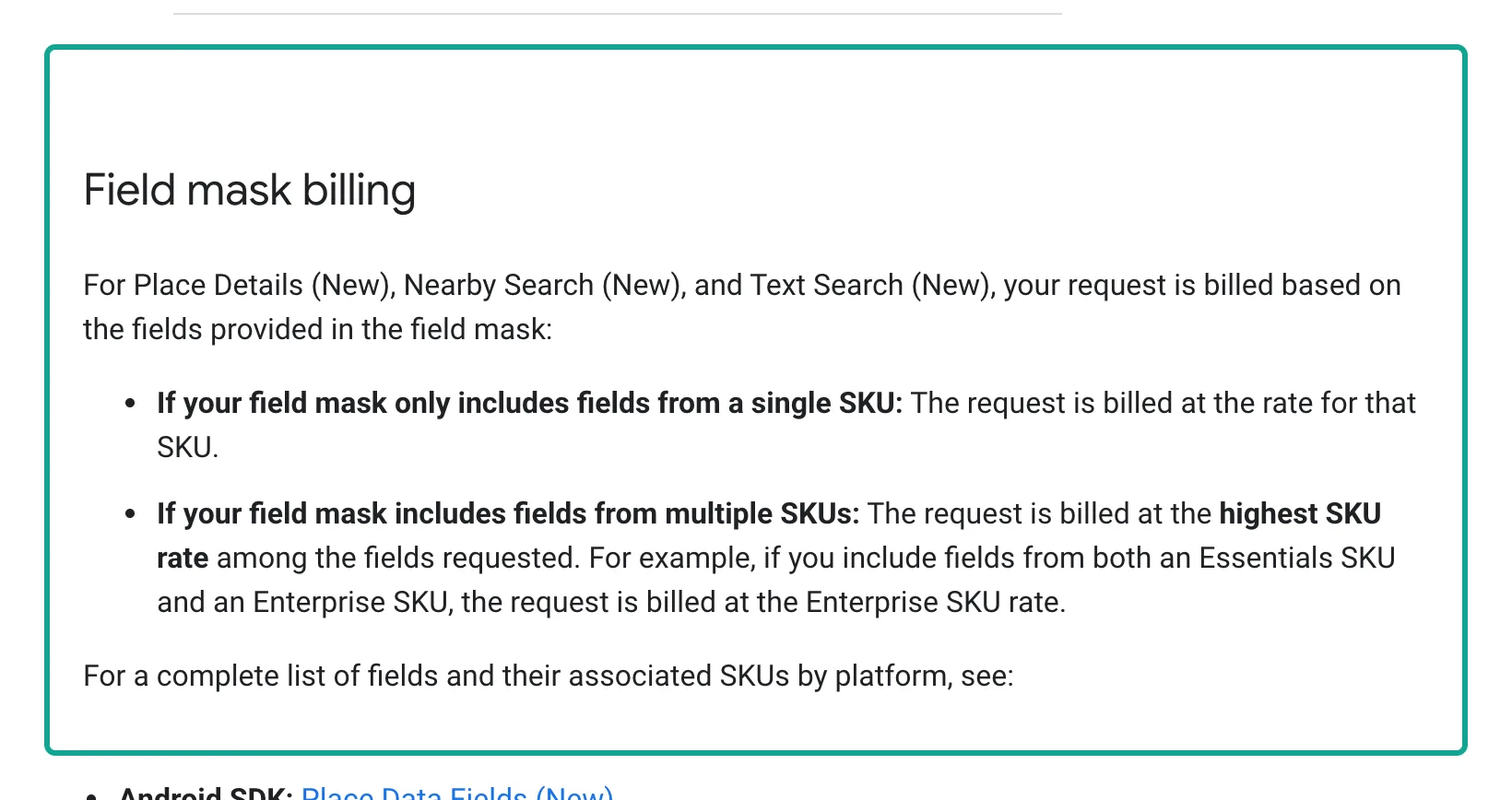
Put this rule next to the price list, and you can see why reviews cost more. The Place Details (New) guide has a section about ratings and reviews. rating and userRatingCount trigger the Place Details Enterprise SKU. reviews and reviewSummary trigger the Enterprise + Atmosphere SKU, which returns up to five user reviews.
Google gives its own cost tip in that section. If you need only the star rating and the review count, do not ask for reviews. Then the request stays at the Enterprise tier. The table below lists the SKUs that this article uses. The unit is per 1,000 requests, from the first volume band of the price list (after the free cap, up to 100,000 requests a month).
| SKU | Typical fields | Free each month | Per 1,000 requests | Places per request |
|---|---|---|---|---|
| Text Search Essentials (IDs Only) | places.id, places.name | Unlimited | $0 | 20 |
| Text Search Pro | Display name, address, location, types | 5,000 | $32.00 | 20 |
| Text Search Enterprise | Rating, review count, phone, website, hours | 1,000 | $35.00 | 20 |
| Text Search Enterprise + Atmosphere | reviews, reviewSummary and more | 1,000 | $40.00 | 20 |
| Place Details Essentials (IDs Only) | id, photo metadata | Unlimited | $0 | 1 |
| Place Details Pro | Display name, business status, map link | 5,000 | $17.00 | 1 |
| Place Details Enterprise | Rating, phone, website, hours | 1,000 | $20.00 | 1 |
| Place Details Enterprise + Atmosphere | reviews, reviewSummary and more | 1,000 | $25.00 | 1 |
| Place Details Photos | Place photos | 1,000 | $7.00 | 1 |
The last column drives every calculation in this article. Text Search (New) returns at most 20 places per page. The Text Search guide says that pageSize defaults to 20, and a value above 20 still returns 20. Across pages, one query returns at most 60 places. Place Details looks up one place per request.
So at the same Enterprise + Atmosphere tier, Text Search gives up to 20,000 places for $40, while Place Details gives 1,000 places for $25. Per place, the Text Search route is 12.5 times cheaper. Many tutorials teach "search for place IDs first, then call Place Details for each one". For reviews, that is the most expensive route.
The free cap changed on March 1, 2025. Google's March 2025 changes page explains it. The monthly $200 credit ended. Each core SKU now has a fixed free volume each month: 10,000 calls for Essentials, 5,000 for Pro and 1,000 for Enterprise. The cap is per SKU and per billing account, not per project. All projects on one billing account share it.
A user on r/googlecloud asked whether 10,000 free requests a month is really free. The replies warn that billing reports lag the usage dashboard by a few hours. They suggest a hard quota before you test.
The same 1,000 places: four Google routes and our list price
Now apply those prices to 1,000 places. Google has four common routes. We have three combinations. The table uses list prices before any free cap, so that the unit cost at high volume is clear. Google requests assume 20 places per page. Our search returns up to 50 places per call (catalog max_limit is 50), and our review call returns up to 100 reviews.
| Route | Requests | List price | After free cap | Reviews per place |
|---|---|---|---|---|
Google: Text Search IDs only, then Place Details with reviews for each | 50 + 1,000 | $25.00 | $0 | 5 |
| Google: Place Details for each, no reviews | 1,000 | $20.00 | $0 | 0 |
Google: Text Search with places.reviews in the mask | 50 | $2.00 | $0 | 5 |
| Google: Text Search Enterprise, no reviews | 50 | $1.75 | $0 | 0 |
EveryInfra: 20 × google_maps_reviews/search + 1,000 × google_maps_reviews/reviews | 1,020 | $1.42 | No free cap | 100 (up to 400 with pages) |
EveryInfra: add 1 × google_maps_reviews/profile per place | 2,020 | $2.81 | No free cap | 100 |
EveryInfra: places only, 20 × google_maps_reviews/search | 20 | $0.0278 | No free cap | 0 |
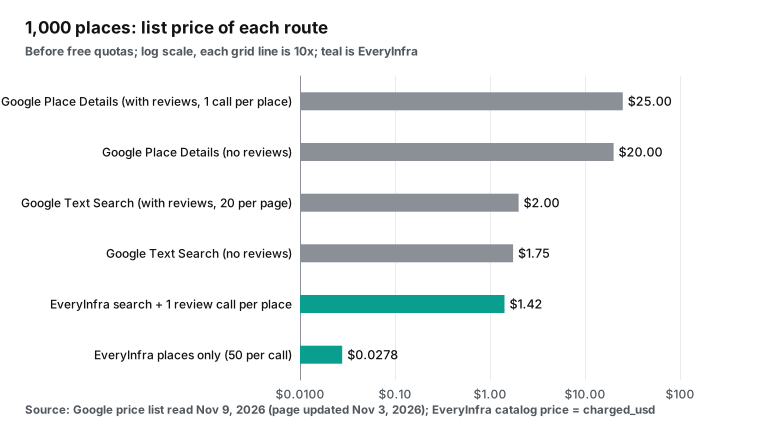
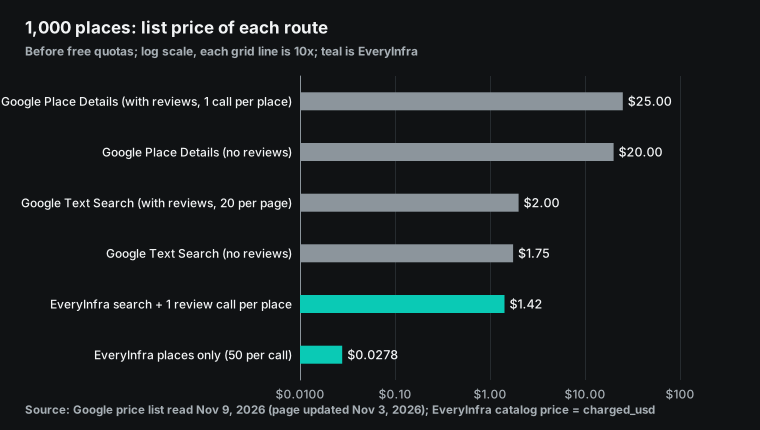
Look at the two middle bars. Many people think that Google reviews cost $25 per 1,000 places. But if you put places.reviews in a Text Search field mask, the price drops to $2.00 per 1,000 places. That is close to our $1.42. Two differences remain. First, Google still gives 5 reviews per place, picked by relevance, while our $1.42 includes 100 reviews per place.
Second, one Text Search query returns at most 60 places. To reach 1,000 places, you need at least 17 different queries or locations. If the queries overlap, you need more requests. The same is true for our search, which returns up to 120 rows per query (see below).
Per 1,000 reviews, the gap is wider. The Place Details route pays $0.025 for 5 reviews, which is $5.00 per 1,000 reviews. The Text Search route pays $0.04 for 20 places × 5 reviews, which is $0.40 per 1,000. We charge $0.001389 for 100 reviews, which is $0.0139 per 1,000. That is about 29 times below the cheapest Google route.
If you need place details without reviews, Google Text Search Enterprise costs $1.75 per 1,000 places. Our google_maps_reviews/search costs $0.0278 per 1,000 places, about 63 times less. Both ratios compare list price with list price. They ignore the Google free cap. The next section adds it.
The free cap: up to how many places a month Google costs $0
A unit price comparison is not fair to Google. Each Google SKU has a monthly free cap, and we do not have one. The table below shows the monthly bill by number of places. On the Google side, it subtracts the free cap and uses the volume bands of the price list (the unit price drops above 100,000 requests). It assumes that this SKU is the only use on the billing account. Our side is the catalog price times the number of calls.
| Places per month | Google Text Search with reviews | Google Place Details with reviews | Google Text Search, no reviews | EveryInfra search + reviews | EveryInfra places only |
|---|---|---|---|---|---|
| 1,000 | $0 | $0 | $0 | $1.42 | $0.0278 |
| 10,000 | $0 | $225.00 | $0 | $14.17 | $0.2778 |
| 50,000 | $60.00 | $1,225.00 | $52.50 | $70.84 | $1.39 |
| 100,000 | $160.00 | $2,475.00 | $140.00 | $141.68 | $2.78 |
| 500,000 | $960.00 | $10,475.00 | $840.00 | $708.39 | $13.89 |
| 1,000,000 | $1,960.00 | $17,975.00 | $1,715.00 | $1,416.78 | $27.78 |
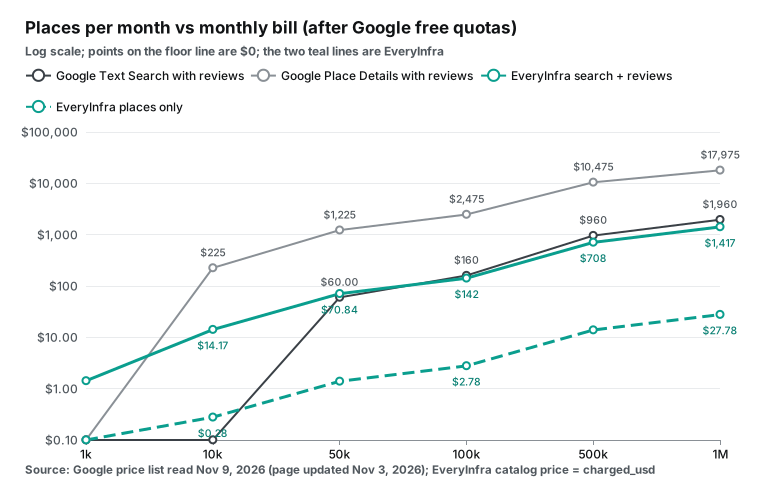
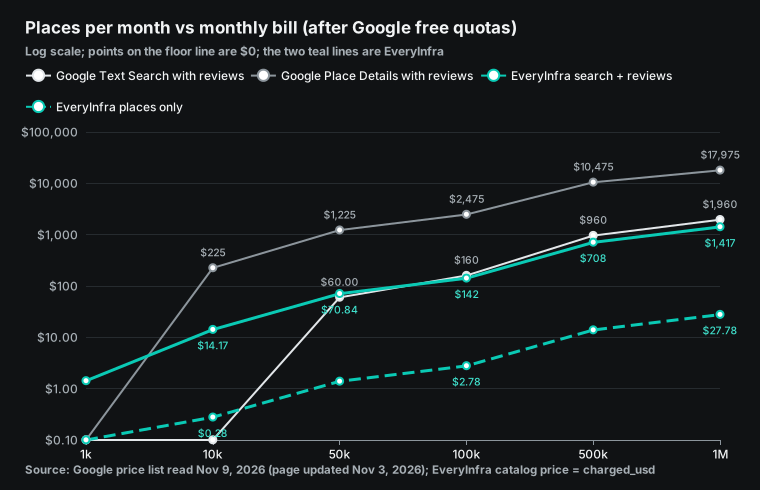
There are two crossover points. With reviews, the first 1,000 Text Search requests (20,000 places) are free, and each place after that costs $0.002. Each place costs us $0.0014168 (one review call plus 1/50 of a search call).
The two lines cross at about 68,585 places a month. Below that, Google is cheaper. Above it, we are cheaper. At 1 million places a month, Google costs $1,960 and we cost $1,416.78.
For place details only, the Google free cap covers about 20,000 places a month. Above about 20,323 places, we are cheaper, and the gap grows with volume. At 100,000 places a month, Google costs $140 and we cost $2.78.
Three limits apply to this section. First, the Google free cap is shared by all projects on the billing account, per SKU. If your account also uses Place Details, map loads or Autocomplete, the crossover moves left.
Second, we have no monthly free cap. We have a one-time $1 trial: star two GitHub repositories, then claim it in the console. It lasts 24 hours. For a very small project, Google is the right choice.
Third, the Google prices above are the global list. Billing accounts in India use a separate India price list. There, Place Details Enterprise + Atmosphere has 7,000 free calls a month, then $7.50 per 1,000. Text Search Enterprise + Atmosphere has 7,000 free calls, then $12.00 per 1,000. Readers in India should redo the crossover with that list.
The 5-review limit: what it means across 150 medical places
In the Place resource reference, the reviews field is "List of reviews about this place, sorted by relevance. A maximum of 5 reviews can be returned." Our question is about real places. In one batch, what share of all reviews do 5 reviews cover?
Between 00:19 and 00:22 SGT on November 9, 2026, we searched three cities, each with one public health category, 50 places per city. We added up review_count from the search results to get the total number of reviews. Then we compared "5 per place" with "one call of up to 100 per place".
| City and category | Places | Total reviews | Median reviews per place | Visible with 5 per place | Visible with 1 call (100) per place |
|---|---|---|---|---|---|
| Singapore, clinic | 50 | 25,368 | 146.5 | 235, 0.93% | 3,689, 14.54% |
| Chicago, urgent care | 50 | 40,322 | 606.5 | 250, 0.62% | 4,674, 11.59% |
| Madrid, farmacia | 50 | 8,833 | 137 | 250, 2.83% | 4,510, 51.06% |
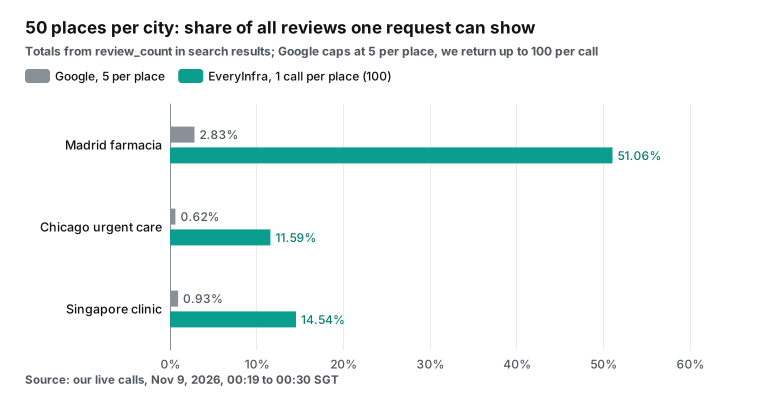
Chicago urgent care centers have the most reviews: a median of 606.5 per place, and 3,235 for the top place. With the 5-review limit, you see 0.62% of all reviews. Madrid pharmacies have fewer reviews: a median of 137 and a maximum of 463. One call of 100 per place shows more than half. Singapore clinics sit between the two.
Why does this share matter? Suppose your question is "how do patients rate urgent care in this part of Chicago" or "which pharmacy gets complaints about long lines this month". Five reviews per place are not a statistical sample. They are a display summary.
Our review endpoint has limits too. The catalog says that google_maps_reviews/reviews returns up to 100 reviews per call. You page with page_token. A sync call goes to 200 reviews, and async mode goes to 400. Each page is one charged call.
So for a clinic with 3,235 reviews, we can return the newest 400, about 12%. We cannot return all of them. For most analysis, the newest few hundred reviews are more useful than the full history, because they show the service as it is now.
Before the details, here is a summary of the three live tests. All times are November 9, 2026, SGT, and every charge is from billing.charged_usd in the raw response.
| Test | Time (SGT) | Endpoint | Rows | Seconds | Charge |
|---|---|---|---|---|---|
| Singapore clinic search | 00:19:31 | google_maps_reviews/search | 50 | 10.06 | $0.001389 |
| Chicago urgent care search | 00:21:48 | google_maps_reviews/search | 50 | 10.46 | $0.001389 |
| Madrid pharmacy search | 00:22:05 | google_maps_reviews/search | 50 | 11.12 | $0.001389 |
| Chicago clinic, newest reviews, page 1 | 00:24:24 | google_maps_reviews/reviews | 100 | 5.45 | $0.001389 |
| Chicago clinic, page 2 | 00:27:28 | google_maps_reviews/reviews | 100 | 6.97 | $0.001389 |
| Madrid pharmacy, Spanish reviews | 00:24:50 | google_maps_reviews/reviews | 100 | 12.81 | $0.001389 |
Small pharmacy, since with no new reviews | 00:25:10 | google_maps_reviews/reviews | 0 | 36.76 | $0 |
Test 1: Singapore clinics, 50 places in one search
We sent the first test at 00:19:31 SGT on November 9, 2026. The endpoint was google_maps_reviews/search, with keyword=clinic, location=Singapore, country=sg and limit=50. After 10.06 seconds, it returned 50 rows with 50 unique place_id values. The charge was $0.001389, the same as the catalog price.
Of the 50 rows, 47 had a rating, 49 had a phone number, 41 had a website and 49 had a postal code. The main category was Medical clinic for 32 rows, Medical Center for 3 and Medical group for 4. The median rating was 4.4.
curl -s https://api.everyinfra.com/api/v1/social \
  -H "Authorization: Bearer $EVERYINFRA_API_KEY" \
  -H "Content-Type: application/json" \
  -d '{"platform":"google_maps_reviews","action":"search",
       "params":{"keyword":"clinic","location":"Singapore","country":"sg","limit":50}}'
The data was not fully clean, and we report that. The first row was an astrology service. Its categories included acupuncture and Ayurvedic clinic, but its address was in Chennai, India. Three rows, including that one, had the same coordinates: 1.352083, 103.819836. That point is the center of Singapore. These places have no exact map position, so the result uses the city center.
One more row was a tutoring service.
A broad word such as clinic pulls in any place with "clinic" in the name or category. For public health analysis, filter by an allowlist of category values. Mark rows with the same coordinates for review. Google Text Search also ranks by relevance. We did not test with a Google key, so we do not know if Google mixes in the same noise.
Each search row has up to 19 fields. The main ones are place_id, name, category, address, lat, lng, phone, website, rating and review_count.
On Google, these fields belong to two tiers. Name, address, location and types are Pro. Rating, review count, phone and website are Enterprise. To get all of them in one request, you pay Text Search Enterprise at $35 per 1,000. Our $0.001389 for 50 rows is $0.0278 per 1,000 places.
Test 2: Chicago urgent care, 200 reviews over two pages
The second test was in Chicago. At 00:21:48 SGT, we searched for urgent care. All 50 rows were inside the Chicago area. The main category was Urgent care center for 47 rows, and all 50 had a phone number and a website. The charge was $0.001389.
The place with the most reviews was CLEAR Immediate Care, with 3,235 reviews and a 4.6 rating. At 00:23:27 SGT, we called google_maps_reviews/profile for it. After 13.68 seconds, we got 25 fields. They included weekly hours, neighborhood, Plus Code and a temporary closure flag. The charge was $0.001389.
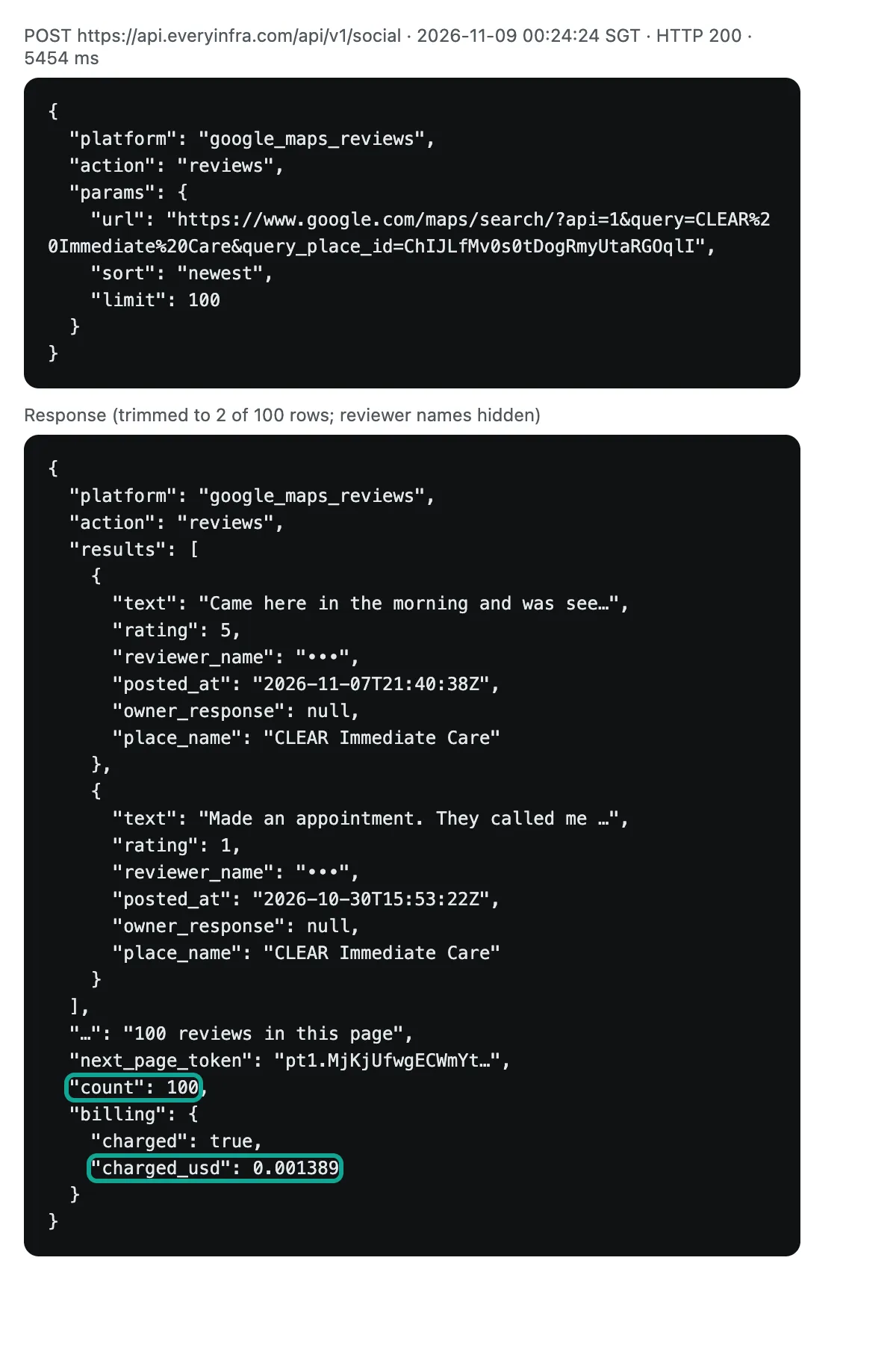
At 00:24:24 SGT, we called google_maps_reviews/reviews with newest first and 100 reviews. After 5.45 seconds, we got 100 rows for $0.001389. At 00:27:28 SGT, we used next_page_token from the first page to get the second page. After 6.97 seconds, we got 100 more rows.
We removed duplicates by review id, and 200 unique reviews remained. The screenshot below shows the first page. We kept 2 reviews, cut the text and hid reviewer names. The teal boxes mark the count and the charge.
{"platform": "google_maps_reviews", "action": "reviews",
 "params": {"url": "https://www.google.com/maps/search/?api=1&query=CLEAR%20Immediate%20Care&query_place_id=ChIJLfMv0s0tDogRmyUtaRGOqlI",
            "sort": "newest", "limit": 100, "page_token": "<next_page_token from the previous page>"}}
Of these 100 newest reviews, 25 had 1 star and 68 had 5 stars. The other 7 had 2 to 4 stars. The average was 3.85 stars, but the place shows a 4.6 rating on the map. 60 reviews had text, 10 had an owner reply and 26 came from Local Guides. The newest review was from November 7, 2026.
For this place, the Places API returns at most 5 "most relevant" reviews. You cannot see the signal that 28 of the last 100 visitors gave 1 or 2 stars. The first page was also not strictly in time order: a few older reviews sat between newer ones. Our Google Maps reviews guide tested this in detail. The fix is simple: sort by posted_at after you receive the data.
Test 3: Madrid pharmacies, Spanish reviews and an empty-result refund
The third test was in Madrid. At 00:22:05 SGT, we searched farmacia with language=es. All 50 rows had Farmacia as the main category. 49 had a phone number, 37 had a website, and the median rating was 4.0. The charge was $0.001389.
This batch had one odd row too. An online pharmacy had no address, and its coordinates were 35.67 N, 6.81 W. That point is in Morocco, hundreds of kilometers from Madrid. A simple check of coordinates against the city area removes it.
At 00:24:50 SGT, we requested the newest 100 Spanish reviews of a 24-hour pharmacy (FARMACIA MAYOR 13, 463 reviews, 3.7 rating), with lang=es. After 12.81 seconds, we got 100 rows. 29 had 1 or 2 stars and 55 had 5 stars. 71 had text, 32 had a pharmacy reply and 62 came from Local Guides. The newest was from October 31, 2026.
At 00:25:10 SGT, we called a small pharmacy with 39 reviews and set since=2026-11-08, which asks only for reviews after the previous day. After 36.76 seconds, we got 0 rows. The response said refund.status: succeeded, and we paid nothing.
No charge for an empty result is a clear difference from Google. In the Google SKU details, each SKU's billing event is a "successful request". The page does not say whether a request with 0 places counts as successful. Our catalog and our pricing page state that failed or empty results are not charged, and this test matched.
We also tested a bad link. At 00:26:53 SGT, we called the review endpoint with a query_place_id that does not exist. After 23.68 seconds, we got 0 rows and reason: empty_result_refunded. Again, we paid nothing.
100 reviews tell a different story than 5
We split the 100 reviews of each place by stars and compared them with "the top 5 by relevance". This shows which way the 5 Google reviews lean. For the Singapore clinic, we requested 100 reviews by relevance. 98 had 5 stars, 1 had 1 star and 1 had 4 stars. 89 had a clinic reply, and the top 5 were all 5 stars. In the newest 100 for Chicago and Madrid, 1- and 2-star reviews were 28% and 29%.
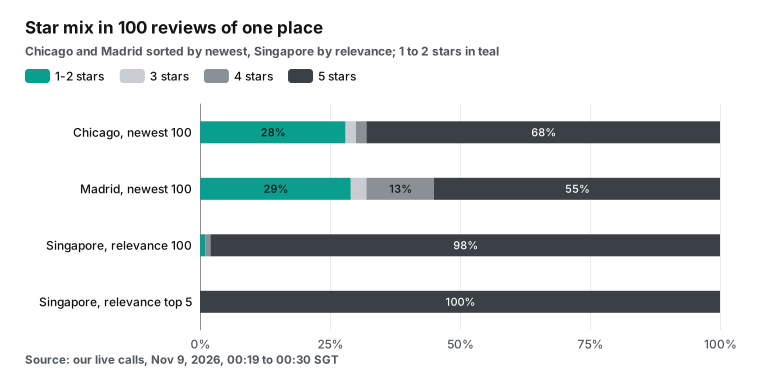
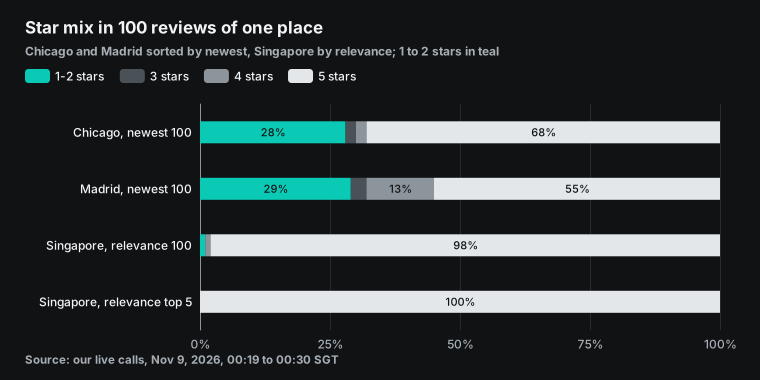
This does not prove that Google relevance picks good reviews on purpose. We have three places, and Google does not publish its ranking rules. Here is what we can say. Top-ranked reviews are often long, have likes and have an owner reply. For this Singapore clinic, they were all 5 stars. To see "what people complain about this week", you must sort by time.
The reviews field in Places API (New) has only one order, relevance, and you cannot change it. The legacy Place Details endpoint has a reviews_sort=newest parameter. The legacy documentation still lists it. But the limit is still 5 reviews, and the legacy API is now in Legacy status. Google does not recommend it for new projects.
Field mapping: Places API fields and our field names
Field names often take the most time in a move. The left column of the table below is the Places API (New) field (Text Search adds the places. prefix). The middle column is the SKU it triggers. The right columns show our field and the endpoint. Where we have no match, the table says "None".
| Places API (New) field | SKU it triggers | EveryInfra field | Endpoint |
|---|---|---|---|
id | IDs Only (free) | place_id (the same Google place ID) | search, profile, reviews |
displayName | Pro | name | search, profile |
formattedAddress | Pro | address, plus city, state, postal_code, country_code | search, profile |
location | Pro | lat, lng | search, profile |
primaryType, types | Pro | category, categories | search, profile |
businessStatus | Pro | permanently_closed, temporarily_closed | profile (search has the first only) |
googleMapsUri | Pro | url (map link with query_place_id) | search, profile |
plusCode | Pro | plus_code | profile |
rating, userRatingCount | Enterprise | rating, review_count, rating_scale | search, profile |
nationalPhoneNumber, internationalPhoneNumber | Enterprise | phone (one field, as shown on the map) | search, profile |
websiteUri | Enterprise | website | search, profile |
regularOpeningHours | Enterprise | opening_hours (time ranges by weekday) | profile |
priceLevel, priceRange | Enterprise | price (often empty) | search, profile |
reviews[].text, originalText | Enterprise + Atmosphere | text (original only, no translation) | reviews |
reviews[].rating, publishTime | Enterprise + Atmosphere | rating, posted_at | reviews |
reviews[].authorAttribution | Enterprise + Atmosphere | reviewer_name, reviewer_id, reviewer_review_count, is_local_guide | reviews |
reviews[].visitDate | Enterprise + Atmosphere | None | — |
| None | — | owner_response, owner_response_at (owner reply) | reviews |
| None | — | like_count, image_urls (review photos) | reviews |
reviewSummary, generativeSummary | Enterprise + Atmosphere | None (make your own AI summary) | — |
photos | Pro / Photos | image_url (one cover image) | search, profile |
Amenity fields such as paymentOptions, parkingOptions, servesBeer | Enterprise + Atmosphere | None | — |
Our side has extra review fields that Google does not return. They are the owner reply and its time, the reviewer's review count, the Local Guide flag, the like count and review photos. These help with reputation analysis.
Google has three groups of fields that we do not have. The first is machine translation of reviews (text and originalText are separate). The second is the visit month, visitDate, and the review summaries that Google generates. The third is a large set of amenity fields for restaurants, parking, payment and more. If your product filters on amenities, for example "restaurants with outdoor seating that allow dogs", the Places API is the better data source.
Pages and result limits: 60 and 120
Neither side gives unlimited places per query. Google Text Search (New) returns at most 60 places per query (3 pages × 20). Our catalog says that google_maps_reviews/search returns up to 120 rows per query. Sync calls go up to row 60. Beyond that, you must use async mode.
At 00:23:20 SGT, we asked for page 2 of the Chicago search (rows 51 to 100) in sync mode. After 0.12 seconds, we got a 422 with the code async_required. It told us to use "mode":"async". There was no charge.
At 00:29:41 SGT, we sent the same request in async mode. After 2.31 seconds, we got a job_id. About 42 seconds later, at 00:30:23 SGT, we read the result. That read took 0.15 seconds and cost $0. So for deep pages in bulk, submit a batch of jobs first, then read all the results about a minute later.
Only 1 of the 50 rows on page 2 was also on page 1, so the two pages gave 99 unique places. But the share of Urgent care center fell from 94% on page 1 to 66% on page 2.
This shows two things. First, deeper pages drift away from the query. To cover a city, use more category words and more neighborhoods or postal codes, then remove duplicates by place_id. Our place ID deduplication guide explains how to merge branches of a chain and places that moved.
Second, an async request is charged when you submit it ($0.001389). You read the result at GET /api/v1/jobs/{job_id}, and that read is free. If the job fails, the same charge is refunded.
Place IDs change: refresh them on both sides
Many teams treat a place ID as a permanent primary key. That is not safe. The Google Place IDs page says that one place can have several place IDs, and that place IDs can change over time. A business can close or move. A database update can also change the ID. Then the old ID returns NOT_FOUND, and the place may have a new ID.
Google recommends a refresh for IDs older than 12 months. The refresh is a Place Details request with only the id field. It uses the Essentials IDs Only SKU, so it is free.
The effect is different on each side. On Google, a refresh is free, so you can check every stored ID each month. It costs only requests and quota. On our side, place_id is the same Google place ID, but we have no separate free refresh call. To check one ID, you must call google_maps_reviews/profile or the review endpoint.
The good news: a dead ID costs nothing on our side. In the bad-link test at 00:26:53 SGT, we sent a query_place_id that does not exist. We got 0 rows, reason: empty_result_refunded, and a charge of $0. The bad news: the call took 23.68 seconds before it confirmed the empty result. We did not time a Google NOT_FOUND, so we make no comparison. This check is fine in a background batch job, but it is too slow for a page where a user waits.
So we suggest a split. Keep the Google place ID as the key in your database. Keep the ID refresh on Google, with free IDs Only requests every month or quarter. Merge any record that gets a new ID. Move the bulk review and detail collection to us.
Also watch the rows with coordinates at the city center, such as the 3 rows in Singapore. We did not test whether these IDs change more often. We suggest that you flag them when you store them, so that a person can check them later.
Failures, empty results and errors: what costs money
Of our 21 requests, 13 were charged and 8 cost $0. Seven of the free requests are errors or empty results in the table below. The eighth was the read of an async result with GET /api/v1/jobs/{job_id} at 00:30:23. That read is not a failure, so it is not in the table. The table also has one charged row, the random-letters search, for comparison. All times are November 9, 2026, SGT.
| Time (SGT) | Case | HTTP | What we returned | Charge |
|---|---|---|---|---|
| 00:19:17 | No API key | 401 | Not authenticated, no parameter details | $0 |
| 00:19:20 | Google parameters textQuery, fieldMask, pageSize | 422 | missing_param: asks for keyword, says that fieldMask is not a parameter here, and gives a working example | $0 |
| 00:19:25 | Review sort set to the legacy value most_relevant | 422 | invalid_value: lists newest and relevance, and suggests relevance | $0 |
| 00:22:23 | Random letters plus "clinic" as the keyword | 200 | 20 clinics (matched on "clinic"), charged as normal | $0.001389 |
| 00:23:20 | Sync request for rows 51 to 100 | 422 | async_required | $0 |
| 00:25:10 | No new reviews after since | 200 | 0 rows, refund.status: succeeded | $0 |
| 00:26:53 | Place ID that does not exist | 200 | 0 rows, empty_result_refunded | $0 |
| 00:27:42 | limit=100 in an async search | 422 | limit must be 1 to 50 | $0 |
The random-letters row needs a note. We wanted to test an empty result. Instead, the endpoint matched the word "clinic", returned 20 real clinics and charged as normal. So a bad keyword does not always give an empty result. Do not judge a query by "did it return rows". Check that name and category match what you expect. Google Text Search also matches loosely. Its pages do not say how such a request is billed, but under the "successful request" rule, it is likely billed.
The four 422 responses have two fields that help during a move: retryable and next_steps. For the copied Google parameters, next_steps asks for keyword, says that fieldMask is not a parameter here, and says that nothing was charged. The bad sort value also returned the lists allowed and did_you_mean. All four had retryable: false. A request with a bad parameter gets a 422 each time that you send it. So let your migration script read retryable, and do not retry parameter errors with backoff.
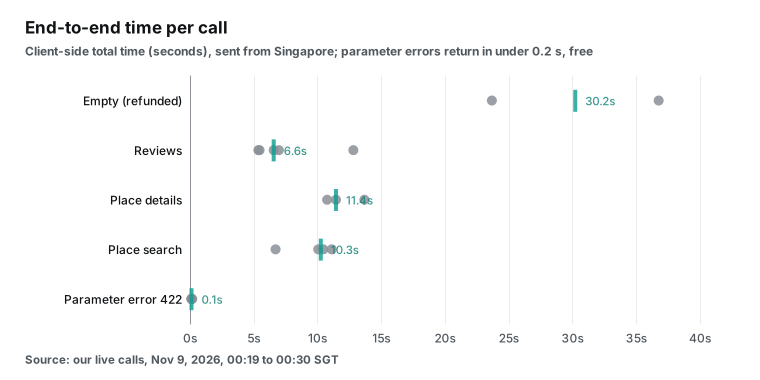
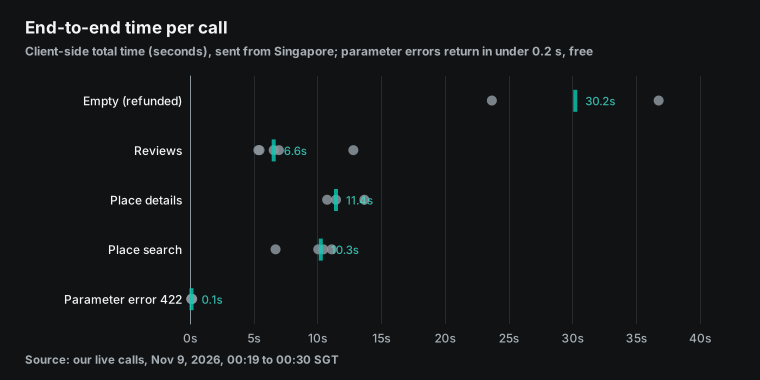
Speed matters too, and we are slower. A search or a details call took 10 to 14 seconds. A review call took 5 to 13 seconds. Empty results were the slowest (24 and 37 seconds), because the endpoint confirms that there is no data before it refunds.
We did not time Google, because we did not call it with a key. So we make no comparison here. Our own numbers are 5 to 14 seconds per call, and 24 to 37 seconds for an empty result. Our endpoints fit background batch jobs, not a screen where a user taps and waits.
Stop a runaway bill: a budget alert does not stop usage
The most common complaint about the Places API is not the unit price. It is the runaway bill. On r/webdevelopment, a developer posted a request for help with the title "I got a bill of $6k using Google Places API". In a reply, the poster said that a loop in the code was a possible cause. One reply said that Google typically waives 50% at most. Another reply gave four steps. Open a billing support ticket. Find the endpoint that caused the spike in the API metrics, which is often Autocomplete or Place Details. Set daily quotas and budget alerts at once. Add debounce and caching to search boxes and front ends.
An older r/webdev thread, from before the March 2025 change, asked if the price leaves room for any product. The poster said that testing and development alone used $75 of the $200 monthly credit. Another developer got an email from Google about the new prices. The new estimated cost was "unbearable", so that developer moved to open map data. Another reply quoted the terms: you must not pre-fetch, index, store or cache any Content, except under the limited conditions in the terms.
A budget alert does not stop Google services. The budgets page says that a budget with alerts does not cap Google Cloud or Google Maps Platform usage or cost. It only sends a notice. The control that stops usage is the API quota. Google's capping API usage page shows how to set limits per day and per minute. Places API (New) quotas apply per API method and per project, so set Text Search and Place Details limits separately.
We use a prepaid balance and charge per call. When the balance is too low, the API returns a 402 with quota_exhausted. You cannot run up a debt. The worst case is that you use the money that you added.
| Control | Google Places API | EveryInfra |
|---|---|---|
| Budget alert | Sends a notice, does not stop usage | Not needed, prepaid |
| Hard stop | Quota per API method, per day or minute | Balance reaches zero, HTTP 402 |
| Debt possible | Yes, billed after use | No |
| Risk to plan for | A high bill | A stopped job |
This suits small teams that do not want to watch a bill. It also means that you must keep enough balance, or a scheduled job stops at night. Each model has a cost. Pick the one that matches your bigger fear: a high bill or a stopped job.
Code change: one Python function, before and after
Below is a typical Places API (New) call. It runs Text Search for one category and asks for rating, phone, website and reviews in the field mask. We wrote it from the Google documentation as a configuration example. We did not run it with a Google key.
# Before: Google Places API (New) Text Search (configuration example, not run)
import os, requests

def google_places(query: str, page_token: str | None = None):
    body = {"textQuery": query, "pageSize": 20}
    if page_token:
        body["pageToken"] = page_token
    r = requests.post(
        "https://places.googleapis.com/v1/places:searchText",
        json=body,
        headers={
            "X-Goog-Api-Key": os.environ["GOOGLE_MAPS_API_KEY"],
            # places.reviews moves the whole request to Text Search Enterprise + Atmosphere
            "X-Goog-FieldMask": "places.id,places.displayName,places.formattedAddress,"
                                "places.rating,places.userRatingCount,places.nationalPhoneNumber,"
                                "places.websiteUri,places.reviews,nextPageToken",
        },
        timeout=30,
    )
    r.raise_for_status()
    return r.json()
On our side, search and reviews are two endpoints. Search returns 50 places with basic fields. Then you call reviews only for the places that you care about. Rename fields with the mapping table above. We ran the code below while writing this article, with the same parameters as our tests.
# After: EveryInfra
import os, requests
API = "https://api.everyinfra.com/api/v1/social"
HEAD = {"Authorization": f"Bearer {os.environ['EVERYINFRA_API_KEY']}"}

def call(action: str, params: dict) -> dict:
    r = requests.post(API, headers=HEAD, timeout=120,
                      json={"platform": "google_maps_reviews", "action": action, "params": params})
    r.raise_for_status()          # 401/422 are not charged; raise them
    return r.json()

def places(keyword: str, city: str, country: str, limit: int = 50) -> list[dict]:
    return call("search", {"keyword": keyword, "location": city, "country": country, "limit": limit})["results"]

def reviews(place_url: str, since: str | None = None, pages: int = 1) -> list[dict]:
    out, token = [], None
    for _ in range(pages):            # sync mode: up to two pages (200 reviews)
        p = {"url": place_url, "sort": "newest", "limit": 100}
        if since: p["since"] = since
        if token: p["page_token"] = token
        j = call("reviews", p)
        out += j["results"]
        token = j.get("next_page_token")
        if not token: break
    return sorted(out, key=lambda x: x.get("posted_at") or "", reverse=True)
Watch three points. First, the review endpoint needs the map link of the place, not a bare place ID. The url field in search results already includes query_place_id, so pass it as is. Second, sort accepts only newest and relevance. The legacy Places value most_relevant returns a 422.
Third, every response has billing.charged_usd. Write it to your logs. At month end, sum it by id, as our failure and refund reconciliation guide shows.
AI agents: Google's MCP server and ours
Google now has its own MCP server. Maps Experience agent tools (formerly Maps Grounding Lite) is a remote service that supports the Model Context Protocol. Its tools search places, get weather, compute routes and resolve place names and map links to place IDs. It has two SKUs. Essentials returns up to 5 places per search, with no review content. Pro returns up to 10 places with "review highlights", but only for allowlisted customers through sales.
The price list shows Maps Grounding Essentials with 10,000 free calls a month, then $7.00 per 1,000. Another path is Grounding with Google Maps in the Gemini API. For Gemini 3 and later models, it has 5,000 shared free calls a month, then $14 per 1,000.
| Google Maps Experience agent tools (Essentials) | Grounding with Google Maps | EveryInfra MCP | |
|---|---|---|---|
| Where | Google's MCP server | Only inside Gemini models | https://api.everyinfra.com/mcp |
| Places per search | Up to 5 | Set by the model | Up to 50 |
| Review text | No | No raw text, a cited answer | Up to 100 per call |
| Free each month | 10,000 calls | 5,000 calls (Gemini 3 and later) | None, $1 one-time trial |
| After that, per 1,000 | $7.00 | $14.00 | $0.001389 per call, $1.389 per 1,000 |
| Model choice | Any MCP client | Gemini only | Any MCP client |
Our MCP address is https://api.everyinfra.com/mcp. At 00:23 SGT on November 9, 2026, we called tools/list without a key and got 12 tools. For map reviews, the tool is everyinfra_call_api. Its arguments are the same platform, action and params as the REST body. For a client that supports remote MCP, such as Claude Code, the configuration looks like this:
{
  "mcpServers": {
    "everyinfra": {
      "type": "http",
      "url": "https://api.everyinfra.com/mcp",
      "headers": { "Authorization": "Bearer ${EVERYINFRA_API_KEY}" }
    }
  }
}
At 00:30:30 SGT, we called everyinfra_call_api over MCP for the 5 newest Spanish reviews of the Madrid pharmacy (limit=5). After 5.36 seconds, we got 5 rows for $0.001389, the same price as REST. Note that we charge per call. Five reviews and 100 reviews cost the same. So when an agent requests reviews, set limit to 100.
The two MCP servers have different goals. The Google tools help a model answer a question. They return a summary and place IDs that you can show on a Google map.
Our tool helps a model get raw data. It returns full pages of reviews, so the model can count and classify them. Our MCP server page lists the setup for each client. The protocol itself is in the MCP specification.
When the official Places API is the better choice
The prices and tests above favor bulk data jobs. In the cases below, we suggest that you stay on the Google Places API, or at least keep part of it. The table gives the short version, and the paragraphs after it give the details.
| Case | Why Google wins | What we lack |
|---|---|---|
| Volume inside the free cap | About 20,000 places a month cost $0 on Google | No monthly free cap, only a $1 trial |
| Live display to users | Ready components such as the Places UI Kit | Our calls take 5 to 14 seconds |
| Autocomplete, address checks, Nearby Search | Google has these endpoints | We have none of them |
| Routes, geocoding, map markers | One place ID works across Google APIs | Same place ID, but no routes or maps |
| Clear license terms | Your rights are in the Google terms | You check public data use yourself |
| Long-term place database | Free ID refresh with the IDs Only SKU | An ID check costs a call and 20+ seconds |
The free cap section above gives the break-even points for small volume, so we do not repeat them here.
Live display is the second case. Our calls take 5 to 14 seconds (we did not time Google), and Google has ready components such as the Places UI Kit. A Google Maps Platform blog post from October 27, 2026 adds more. The iOS Places UI Kit now shows popular times and live crowd levels. Google built its API for live display and map selection.
Third, we have no Autocomplete (New) for search boxes, no address validation and no Nearby Search by radius. We also have no amenity filters, no full-size place photos and no AI review summaries. If you search for a "google places autocomplete api alternative", this article does not help you.
On licensing, the Google Terms of Service set what you can do with its API. With public data from us, you must check your own use against local law and platform terms. Our reviews guide lists some points to watch. We do not give legal advice.
Google's terms: what you can store and how to display it
Many teams leave the Places API because of its terms, not its price. The terms do not allow what they want to do. The Google Places API policies page (updated November 6, 2026) is clear in its "Caching and scraping restrictions" item. We captured the text:
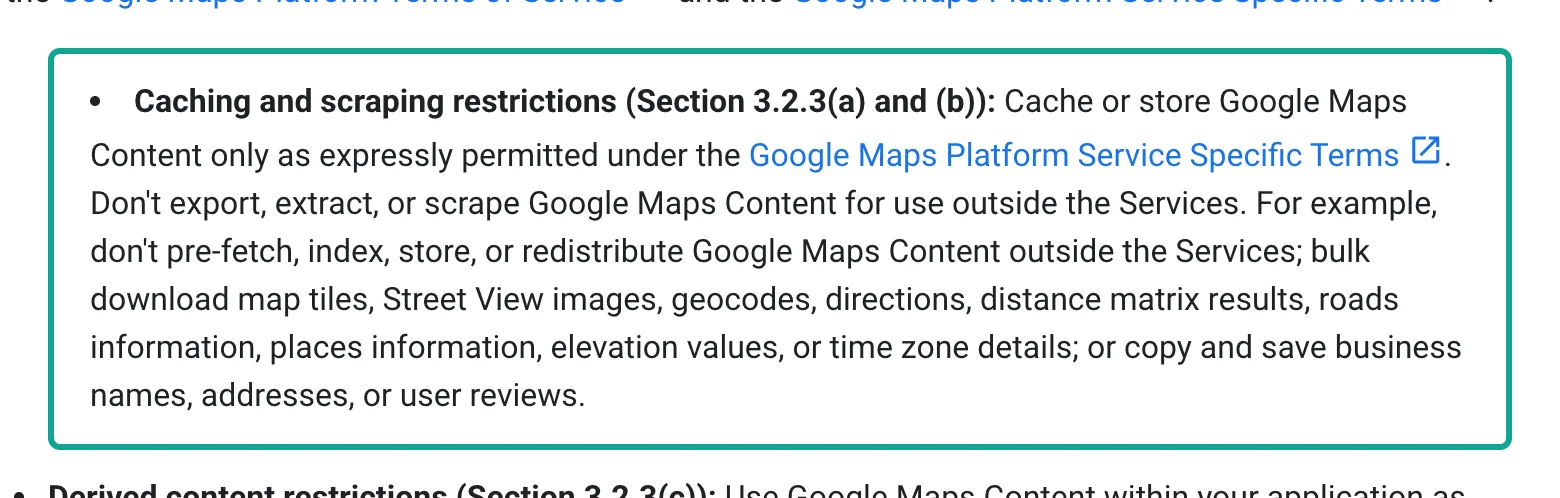
The terms allow you to store only two things. The place ID has no caching limit, so you can store it with no end date. The Place IDs page suggests a free refresh after 12 months. Latitude and longitude can be cached for up to 30 days in a row, then you must delete them. This rule is in section 14.3 of the Service Specific Terms, revised on October 28, 2026.
Section 14.2 of the same terms says that you must not use Places API content with a non-Google map. When you display content, the policies page asks for Google Maps attribution, and reviews need author attribution and a link.
So suppose your need is "store a set of clinics and their reviews in a database and run analysis each week". The Places API terms do not support that use, whatever the price. On the other hand, suppose you show one place's rating and 5 reviews in your app, next to a Google map. Then the Places API is fully compliant and the easiest choice.
Teams in Europe have one more set of terms. The Google EEA FAQ says that from July 8, 2025, projects with a billing address in the European Economic Area use separate EEA terms. In new projects, content from Places API (New) and the legacy API cannot show on any map, Google maps included. To show place content on a map, use the Places UI Kit. The EEA terms also remove three limits, including "do not use with a non-Google map".
Move checklist: six steps
If the numbers say "move", here is the order that we suggest. In the animation, a teal box moves through six steps. Step 5, a one-week parallel run on the same place IDs, matters most.
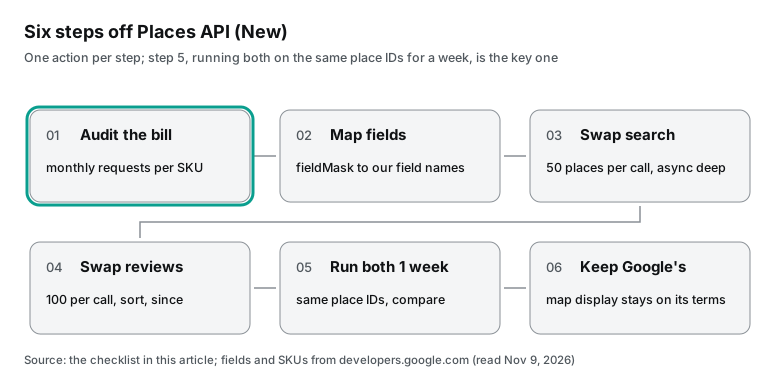
| Step | What to do | Tool or field |
|---|---|---|
| 1 | List monthly requests by SKU for the past three months. Focus on the two Enterprise tiers. | Maps usage reports |
| 2 | Replace the field mask with our field names. List fields with no match. | Field mapping table above |
| 3 | Move bulk search, 50 places per call. Combine category words and neighborhoods. Remove duplicates. | google_maps_reviews/search, place_id |
| 4 | Move reviews. Use since for daily monitoring. No new reviews means no charge. | google_maps_reviews/reviews |
| 5 | Run both sides for one week on the same place IDs. Compare rating, review count and status. | Your own diff script |
| 6 | Keep on Google every part that users see on a map. | Google display terms |
Step 5 matters most. Check by hand each place where rating or review count differs a lot. Most teams end up with both sides: Google for the user interface, and us for background analysis.
Recent changes (October to November 2026)
Google changed several pages in the 30 days before this article. The table lists the changes that affect a move. All Google prices here use the November 3, 2026 version of the global price list. Check the update date before you use a price from an older article.
| Date | Change | What it means for you |
|---|---|---|
| Nov 4, 2026 | SKU details page lists Maps Experience agent tools; Resolution API uses the free IDs Only SKU | Resolving a name to a place ID through Google MCP is free; place data is not |
| Oct 28, 2026 | Service Specific Terms revised; Places caching rules unchanged | Long-term storage of places and reviews is still outside the terms |
| Oct 27, 2026 | Places UI Kit Pro on iOS generally available, with popular times and live crowds | More reason to stay on Google for in-app display |
| Oct 22, 2026 | Maps Demo Key updated: no credit card, daily limits, no reviews or photos | You cannot test reviews for free with a demo key |
The Demo Key change is the one that most readers miss. The key pauses usage for the day when you reach the daily limit, with no charge. But the page says that user-generated content, which means photos and reviews, is not available with a demo key. So a free review test still needs a billing account on Google.
Get started: move places and reviews in three steps
Step 1: sign up in the quickstart and get an API key. New accounts can star the everyinfra/everyinfra-agent-plugins and everyinfra/seo-skills repositories on GitHub. Then they can claim a $1 trial in the console, valid for 24 hours. Step 2: run the curl example from this article for your most used category and city. Check results and billing.charged_usd.
Step 3: replace your code with the Python functions above, or add the MCP configuration to your agent. The Google Maps reviews API page gives an overview. Each endpoint has its own page: place search, place details and reviews. For "the top 20 places by review count" in a category and city, google_maps_reviews/business_listings returns 20 places for $0.015361.
To compare the same places with another review site, see the Yelp API. You can test every endpoint in the marketplace.
FAQ
Is Google Places API free?
Partly. Since March 1, 2025, each core SKU has a free monthly volume. It is 10,000 calls for Essentials, 5,000 for Pro, and 1,000 for the two Enterprise tiers. After that, the price list applies.
Text Search and Place Details with IDs only are free with no limit. There is also a demo key with no credit card, but it does not return reviews.
How do I get more than 5 reviews from the Google Places API?
You cannot. The reviews field in Places API (New) returns at most 5 reviews, sorted by relevance, with no page parameter. The legacy reviews_sort=newest only changes the order, and the limit stays at 5. For more reviews, you need another data source, such as google_maps_reviews/reviews in this article: 100 per call, up to 400 with pages.
Can the Google Places API sort reviews by date?
Not in the new API, which has only relevance order. Legacy Place Details has reviews_sort=newest, but the legacy API is in Legacy status. Our review endpoint supports sort with newest and relevance, plus since to get reviews after a date.
How much does the Google Places reviews API cost?
With the reviews field, Place Details uses Enterprise + Atmosphere at $25 per 1,000 requests. Text Search uses the same tier at $40 per 1,000 (up to 20 places per request). The first 1,000 requests each month are free. In India, the prices are $7.50 and $12.00, with 7,000 free requests a month. Per 1,000 reviews, the Place Details route costs $5.00 and the Text Search route costs $0.40.
Is there a free Google Places API alternative?
We did not find one that is fully free and returns Google Maps reviews in bulk. For small volume, the Google free cap is the best free option. Open place datasets give names and coordinates for free, but no Google Maps ratings or reviews. We have only a one-time $1 trial, then pay per call.
Why did my Places API bill suddenly go up?
The most common cause is a top-tier field (such as reviews) in the field mask, which bills the whole request at that tier. The next cause is a front end without debounce, which calls Autocomplete or Place Details again and again. In the Reddit thread about a $6k bill, replies said to find the endpoint in the API metrics first, then set a daily quota. A Google budget alert does not stop usage. A quota does.
Method and limits
All Google numbers in this article come from official pages read on November 9, 2026. We did not call the Google API. So "Text Search with reviews returns 20 places with 5 reviews each" is the best case from the documentation. Your bill shows the real number of reviews per place and how Google bills empty results. The monthly bill assumes that the whole free cap goes to one SKU. It does not include contract prices or subscription plans for large Google customers.
Our side is a sample of 21 requests on one day, in three cities, with one category each. The star mix covers these three places only, not the whole category. We measured speed once per call, from Singapore. Other regions and times can differ.
We also did not test some things. Google Nearby Search (by coordinates and radius), place photos and Autocomplete have no match on our side, so we did not compare them. For google_maps_reviews/business_listings, which returns the top 20 places by review count, we quote the catalog price only, with no live call. All three samples are medical categories. Restaurants and hotels have more reviews and more photos. There, 5 reviews show an even smaller share, and one call of 100 covers less too. Test a small batch in your own main category before you decide.
References
- Google Maps Platform core services pricing list, Google for Developers, updated 2026-11-03, read 2026-11-09.
- Places (New) SKU details, Google for Developers, updated 2026-11-04, read 2026-11-09.
- Place Details (New), Google for Developers, updated 2026-11-03, read 2026-11-09.
- REST Resource: places, Google for Developers, updated 2026-10-27, read 2026-11-09.
- Text Search (New), Google for Developers, updated 2026-11-03, read 2026-11-09.
- Nearby Search (New), Google for Developers, updated 2026-11-03, read 2026-11-09.
- Place Data Fields, Google for Developers, updated 2026-11-03, read 2026-11-09.
- Places API usage and billing, Google for Developers, updated 2026-11-03, read 2026-11-09.
- Policies and attributions for Places API, Google for Developers, updated 2026-11-06, read 2026-11-09.
- Place IDs, Google for Developers, updated 2026-11-03, read 2026-11-09.
- Google Maps Platform Service Specific Terms, Google, revised 2026-10-28, read 2026-11-09.
- Google Maps Platform Terms of Service, Google, revised 2026-08-26, read 2026-11-09.
- Google Maps Platform March 2025 changes, Google for Developers, updated 2026-11-03, read 2026-11-09.
- Billing and pricing FAQ, Google for Developers, updated 2026-11-03, read 2026-11-09.
- Billing and pricing overview, Google for Developers, updated 2026-11-03, read 2026-11-09.
- Pricing categories, Google for Developers, updated 2026-11-03, read 2026-11-09.
- Pay-as-you-go pricing, Google for Developers, updated 2026-11-03, read 2026-11-09.
- Google Maps Platform core services pricing list, India, Google for Developers, updated 2026-11-03, read 2026-11-09.
- Place Details (Legacy), Google for Developers, updated 2026-11-03, read 2026-11-09.
- Migrate to Places API, Google for Developers, updated 2026-11-03, read 2026-11-09.
- Places API (New) release notes, Google for Developers, updated 2026-11-03, read 2026-11-09.
- Choose fields to return, Google for Developers, updated 2026-11-03, read 2026-11-09.
- Place Photos, Google for Developers, updated 2026-11-03, read 2026-11-09.
- Autocomplete, Google for Developers, updated 2026-11-03, read 2026-11-09.
- Places UI Kit overview, Google for Developers, updated 2026-11-03, read 2026-11-09.
- Places Aggregate API overview, Google for Developers, updated 2026-11-03, read 2026-11-09.
- Place Types, Google for Developers, updated 2026-11-03, read 2026-11-09.
- Places API (New) overview, Google for Developers, updated 2026-11-03, read 2026-11-09.
- Maps Experience agent tools, Google for Developers, updated 2026-11-03, read 2026-11-09.
- Resolution API, Google for Developers, updated 2026-11-03, read 2026-11-09.
- Google Maps Platform Code Assist toolkit, Google for Developers, updated 2026-11-03, read 2026-11-09.
- Grounding with Google Maps, Google AI for Developers, read 2026-11-09.
- Gemini Developer API pricing, Google AI for Developers, read 2026-11-09.
- Maps Demo Key, Google for Developers, updated 2026-10-22, read 2026-11-09.
- Get a Maps Demo Key with no credit card, Google Maps Platform, read 2026-11-09.
- Important changes for EEA customers: FAQ, Google for Developers, updated 2026-11-03, read 2026-11-09.
- Create, edit, or delete budgets and budget alerts, Google Cloud, updated 2026-11-04, read 2026-11-09.
- Capping API usage, Google Cloud, updated 2026-10-26, read 2026-11-09.
- Reporting and monitoring, Google for Developers, updated 2026-10-27, read 2026-11-09.
- Drive confident place decisions with immersive maps, live crowd signals, and responsive map styling, Google Maps Platform blog, 2026-10-27, read 2026-11-09.
- Moving from the Google Earth desktop app to the web, Google Maps Platform blog, 2026-10-29, read 2026-11-09.
- Neurun makes sure no fan gets lost in the crowd using Google Maps Platform, Google Maps Platform blog, 2026-10-20, read 2026-11-09.
- Powering the next era of agentic experiences: announcing new grounding capabilities, Google Maps Platform blog, 2026-04-22, read 2026-11-09.
- Model Context Protocol specification 2025-11-25, Model Context Protocol, read 2026-11-09.
- PLEASE HELP!!!! I got a bill of $6k using Google Places API, Reddit r/webdevelopment, read 2026-11-09.
- New to Google Maps Places New API: Is 10k Requests per month really free?, Reddit r/googlecloud, read 2026-11-09.
- Google Maps & Places API pricing. Not to beat a dead horse, Reddit r/webdev, read 2026-11-09.
- Google Maps API Pricing Change After March 1, 2025, Reddit r/googlecloud, read 2026-11-09.
- Open Source Google Maps API Alternative, YouTube, 2024-06-26, transcript read 2026-11-09.
- Google Maps API Is INSANE: Build Real-World Apps with Places API, YouTube, 2026-09-15, transcript read 2026-11-09.
- EveryInfra data catalog, EveryInfra, read 2026-11-09 00:14 SGT.
Reference BL-120