Apify Instagram Scraper Alternative: Price per 1,000 Tested
Apify Instagram Scraper pricing vs 26 live EveryInfra calls: posts cost about $0.003 per 1,000 here, $1.50–$2.70 there. Profiles differ only about 3–5x.
Apify Instagram Scraper pricing for 1,000 posts is $1.50 on the Business tier and $2.70 on the Free tier. On October 26, 2026, one EveryInfra instagram/user_posts request cost $0.000556 and returned 200 posts, which is $0.00278 per 1,000. That gap of several hundred times is real, but only for data that comes back as a page of many rows. For profiles and single post details, both services charge per target, and EveryInfra is only 1.8 to 4.9 times cheaper.
In this article, "price per 1,000" means the amount actually charged for a request, divided by the rows that request returned, times 1,000. It tells you what 1,000 results cost. It does not tell you what 1,000 requests cost. Apify charges per result and EveryInfra charges per request, so we must convert both to one unit before we compare. We divide by rows returned, not by the limit we asked for, so a short page makes our price look higher, never lower.


The summary table: five Instagram data types, price per 1,000
The table puts the five data types side by side. On the Apify side, we use public prices only. The main Instagram Scraper charges one flat price per result for every data type. Apify also offers a set of dedicated Instagram actors with their own prices.
We read all of them from the pricingInfos field in Apify's public API. We read it on October 26, 2026, at 13:31 SGT, with no account (Instagram Scraper metadata). On the EveryInfra side, every number is from our own live calls. The amount comes from billing.charged_usd or the console call log, and the row count comes from the results array.
| Data | EveryInfra capability | Calls / rows / charged | EveryInfra per 1,000 | Apify per 1,000 (Free → Business) | Gap |
|---|---|---|---|---|---|
| Profiles | instagram/profile | 5 / 5 / $0.002780 | $0.556 | Profile Scraper $2.60 → $1.60 | 2.9–4.7x |
| Posts | instagram/user_posts | 3 / 495 / $0.001668 | $0.0034 | Instagram Scraper $2.70 → $1.50 | 445–801x |
| Post details | instagram/post | 1 / 11 / $0.006111 | $0.556 | Post Scraper $1.70 → $1.00 | 1.8–3.1x |
| Reels by hashtag | instagram/hashtag (results_type=reels) | 2 / 60 / $0.001112 | $0.0185 | Reel Scraper $2.60 → $1.00 | 54–140x |
| Reels by keyword | instagram/reels_search | 1 / 92 / $0.007194 | $0.0782 | Reel Scraper $2.60 → $1.00 | 12.8–33x |
| Comments | instagram/comments | 3 / 45 / $0.001668 | $0.0371 | Comments Scraper $2.60 → $1.90 | 51–70x |
| Followers | instagram/followers_list | 2 / 92 / $0.001112 | $0.0121 | Followers and Following Scraper $2.00 → $1.15 | 95–166x |
Each gap is the Apify price divided by our price. The low end uses Apify's Business tier and the high end uses its Free tier. Two points matter when you read this table. First, the largest gaps are all on capabilities that return a page of rows per request.
Our price per request is fixed, so one row and 200 rows both cost $0.000556. Second, profiles and post details are charged per target on EveryInfra. A post request with 11 links is charged 11 times, and profile reads one account per call. These rows work like Apify's per-result model, so the gap falls to 2–5 times.
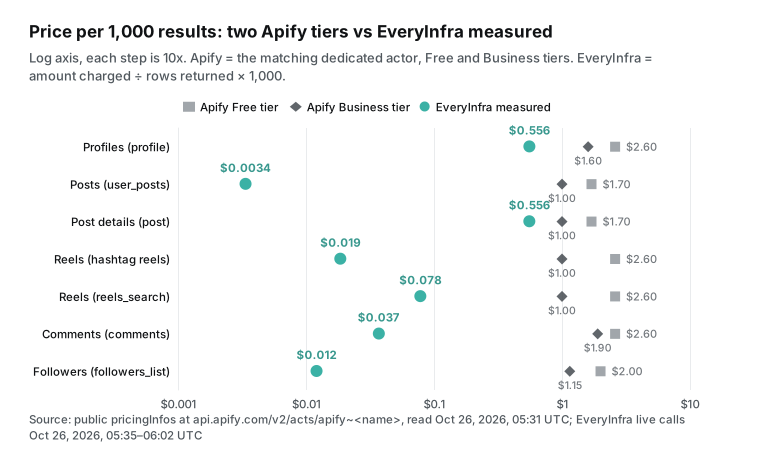
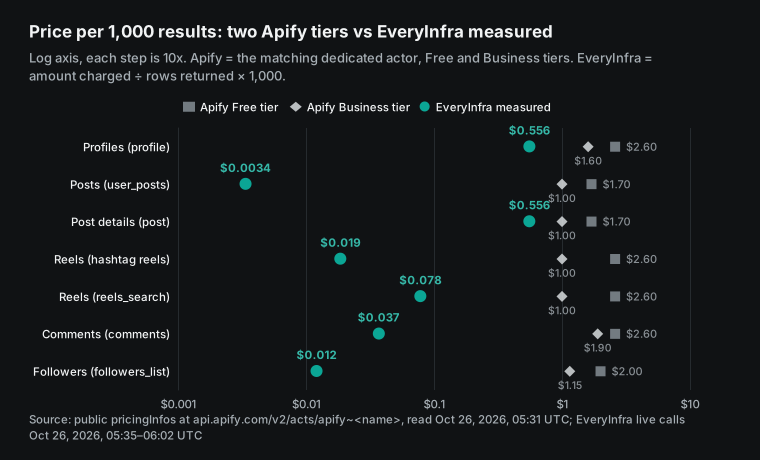
Our markers spread from $0.003 to $0.56, because the number of rows per request changes from one capability to the next. This also shows the limit of the headline number. If your job is "give me 100,000 profiles," our price is $0.556 per 1,000. Apify Profile Scraper Business is $1.60. So the gap is about 2.9 times, not several hundred.
Apify Instagram Scraper pricing, explained
Apify Instagram Scraper uses pay-per-event pricing. The Store page says one result equals one scraped item: a post, a reel, a comment, a profile, a hashtag or a place. It lists $2.70 per 1,000 on the Free plan, $2.30 on Starter, $1.90 on Scale and $1.50 on Business. The public API returned the same four prices, plus two enterprise tiers: PLATINUM at $0.90 and DIAMOND at $0.50. This price set started on February 20, 2026, according to the startedAt field in pricingInfos. Apify's documentation maps the paid plans to store discount tiers: Starter is Bronze, Scale is Silver and Business is Gold (Actors in Store).
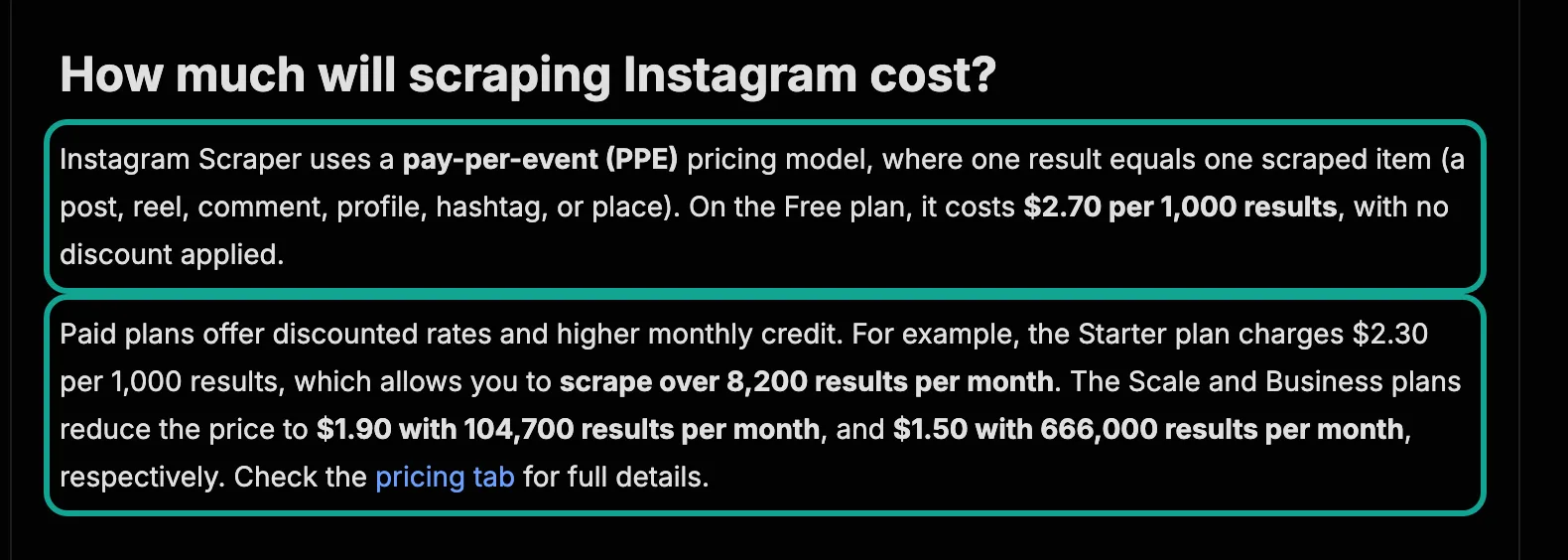
The "over 8,200 results per month" figure comes from the plan fee. The Starter plan costs $19 a month, and $19 at $2.30 per 1,000 is about 8,260 results. Scale costs $199 for 104,700 results, and Business costs $999 for 666,000 results. The Apify pricing page shows each plan as prepaid usage: $5 on Free, $19 on Starter, $199 on Scale and $999 on Business.
Extra usage goes on the next invoice. The same page says that unused prepaid usage does not roll over. It also says that a Free account is blocked until the next monthly cycle when the $5 runs out. The help article Reaching platform limits, updated on September 4, 2026, confirms that the Free plan cannot raise its limit above the free $5.
The dedicated actors have different prices. All values below come from the public metadata we read on October 26, 2026, in US dollars per 1,000 events.
| Apify actor | Main event | Free | Starter | Scale | Business | Extra events |
|---|---|---|---|---|---|---|
| Instagram Scraper | Result | $2.70 | $2.30 | $1.90 | $1.50 | None |
| Instagram Profile Scraper | Profile | $2.60 | $2.30 | $2.00 | $1.60 | About account add-on $7.00 → $4.00 |
| Instagram Post Scraper | Post | $1.70 | $1.50 | $1.30 | $1.00 | Post details $1.00 → $0.60, music data $7.00 → $4.00 |
| Instagram Reel Scraper | Reel | $2.60 | $2.30 | $1.40 | $1.00 | $0.001 per run start, shares $7.00 → $4.00, transcript $0.048 → $0.027 per minute, video $0.02 → $0.01 per MB |
| Instagram Comments Scraper | Comment | $2.60 | $2.30 | $2.10 | $1.90 | None |
| Followers and Following Scraper | Profile | $2.00 | $1.75 | $1.40 | $1.15 | None |
| Instagram Hashtag Scraper | Result | $2.60 | $2.30 | $2.10 | $1.90 | None |
One change in this table is recent. The Instagram Post Scraper price set started on October 7, 2026, according to startedAt in the Post Scraper metadata. It is $0.50 to $1.00 cheaper per post than the main scraper. However, it now charges "post details" as a separate event.
A detailed post therefore costs two events: $2.70 in total on Free and $1.60 on Business, which is close to the main scraper. Apify also warns that some pay-per-event actors charge platform usage on top (Actors in Store). We checked the seven actors above, and all seven show PAY_PER_EVENT with no separate usage charge.
How much of each event does Apify keep? Its developer documentation says the developer receives 80% of event revenue, minus platform costs (Pay-per-event pricing model). Each actor in the public metadata shows apifyMarginPercentage: 0.2. In other words, one fifth of each result price goes to the platform and the rest to the developer who wrote the actor.
How EveryInfra charges: per request, not per row
EveryInfra charges per request. The capability catalog we read on October 26, 2026, lists 15 Instagram capabilities. Ten cost $0.000556 per call. reels costs $0.001194 (paused on the test day), user_search costs $0.004806, reels_search $0.007194, tagged_posts $0.007444 and similar_profiles $0.008806 per call. user_posts returns 30 rows by default and up to 200.
comments returns 50 by default and up to 100. followers_list returns 50 by default and up to 500. None of these catalog entries carry a "charged per block of rows" note, so one call is one price at any limit. Multi-target capabilities are the exception: post takes a urls array and is charged per link.


On the account side, EveryInfra has no monthly fee. The pricing page says top-ups start at $10 and wallet balance does not expire. A new account can claim a $1 trial credit for a GitHub star, valid for 24 hours. Failed requests such as bad parameters or failed authentication are not charged. Our test key allowed 10 requests per minute per key and 60 per account, which are the default values from the /api/v1/account endpoint.
Larger top-ups raise these limits. Compared with Apify, there are two structural differences. Apify's prepaid usage expires every month, and our balance does not. Apify charges per result and we charge per request, so the rows per request decide our price per 1,000.

How we count
Apify prices come only from public material: the pricingInfos field in Apify's public API (see the Get Actor API docs for how to read it) and the Store page text. We did not register, pay or use an Apify key. Our price per 1,000 comes only from live calls, and the denominator is rows returned, not limit. A call with 0 rows stays out of the denominator, and we record its charge and refund separately.
Every gap shows both ends, Apify Business and Apify Free, and a gap below 3 times still goes into the body and the summary table. For every limit we check the rows that came back, and we call a call "filled" only at 90% or more of the requested rows. We sent six failure or empty-result probes, and any charge that should have been refunded but was not is reported here. Each capability ran at least twice at different times, and we call a price "stable" only if the two runs differ by 20% or less.
We fixed these rules at 13:40 SGT on October 26, 2026, before any live call. The results in short: comments, followers and the natgeo posts did not fill their limit. A username that does not exist was charged, twice (fixed on October 26; see below). Because natgeo returned only 95 posts, the price per 1,000 for posts differed by more than 20% across the three calls, so we give a range, not one number.
The results appear in the sections below, but here is the short version. Three capabilities did not fill their limit: comments, followers and the natgeo posts call. One failure probe was charged and not refunded: a username that does not exist. This was fixed on October 26, and our retest was not charged. The posts price differed by more than 20% between accounts, so we report a range for posts, not one number.
Test 1: profiles, charged per account, only 3–5 times cheaper
Between 13:35 and 13:44 SGT on October 26, 2026, we read five brand and institution profiles: nasa, natgeo, nike, realmadrid and djiglobal. Each request read one account and cost $0.000556. The five calls cost $0.00278, which is $0.556 per 1,000 profiles. The fields matched the catalog response_fields: followers, following, post count, verified flag, business flag, bio links, HD avatar, highlight count and a recent_posts array.
The values were plausible. NASA showed 104,378,884 followers and 4,979 posts. Nike showed 290,902,811 followers. Real Madrid showed 22,000 posts.
| Account | Read at (SGT) | Followers | Following | Posts | Charged |
|---|---|---|---|---|---|
| nasa | 13:35:35 | 104,378,884 | 90 | 4,979 | $0.000556 |
| natgeo | 13:37:00 | 268,283,672 | 195 | 32,000 | $0.000556 |
| nike | 13:43:31 | 290,902,811 | 266 | 1,675 | $0.000556 |
| realmadrid | 13:43:49 | 181,935,701 | 66 | 22,000 | $0.000556 |
| djiglobal | 13:44:03 | 6,798,738 | 398 | 5,445 | $0.000556 |
Against Apify Instagram Profile Scraper, which charges $2.60 on Free and $1.60 on Business per 1,000 profiles, we are 2.9 to 4.7 times cheaper. Against the main Instagram Scraper in details mode, at $1.50–$2.70 per result, we are 2.7 to 4.9 times cheaper. This is the least dramatic number in the article. When both sides charge one unit per account, the gap is a few times, not a few hundred. Apify Profile Scraper also sells an "About account" add-on with the join date and country, at $7.00 per 1,000 on Free. Our profile does not return those two fields.
One limit in the profile response needs a clear warning. The 12 items in NASA's recent_posts all show 0 for like_count and comment_count, and every posted_at value is a date at 00:00. So this array is a preview. It is useful to see what kind of content an account posts, and 4 of NASA's 12 were videos. It is not useful for engagement rates. For engagement, use user_posts in the next test.
Test 2: posts with user_posts, 200 per call, the source of the big gap
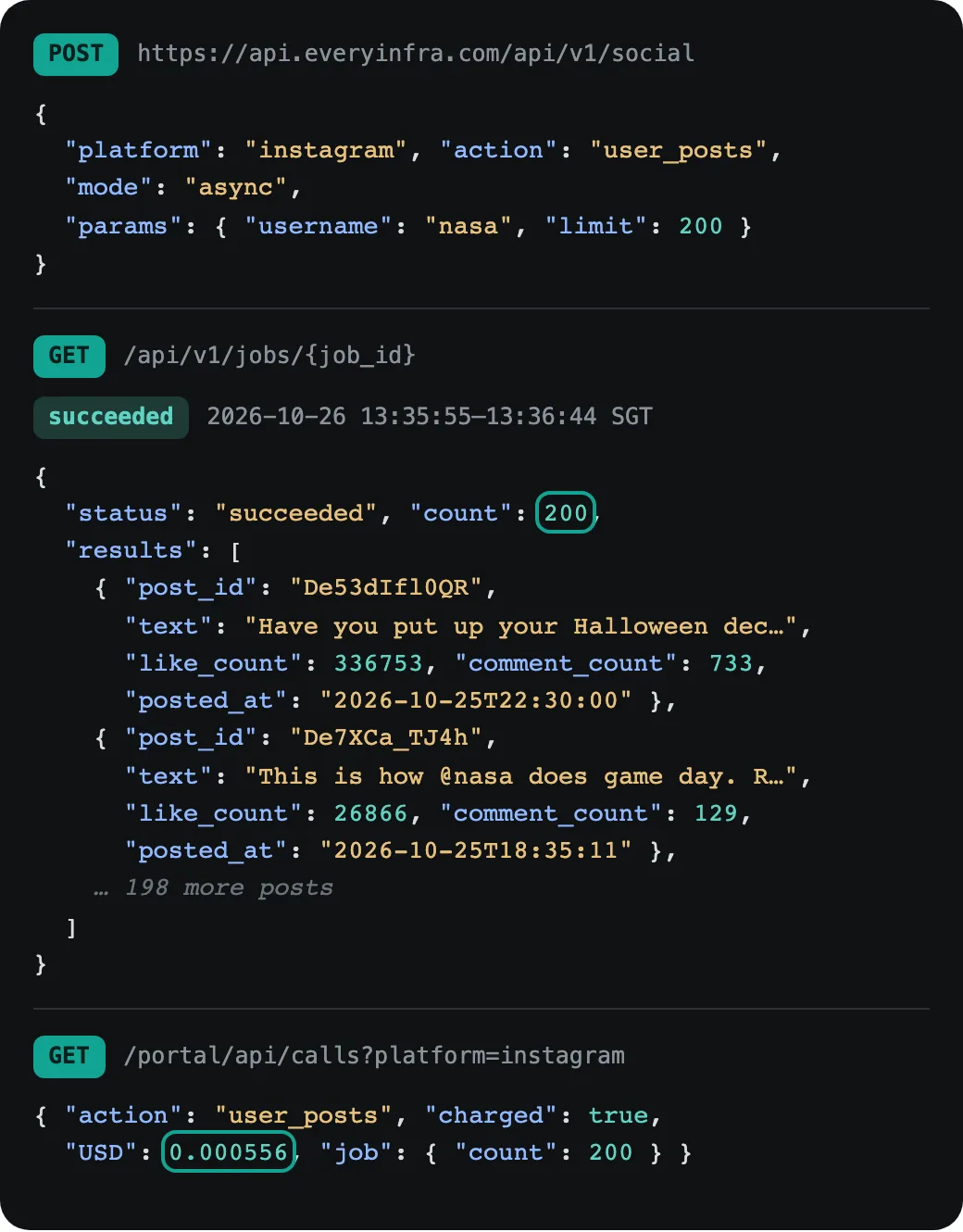
At 13:35:55 SGT on October 26, 2026, we sent an async instagram/user_posts request with username=nasa and limit=200. The job finished at 13:36:44 SGT with 200 rows, and the 200 post_id values were all unique. The console call log showed one charge of $0.000556. The async job did not cost more because it returned more rows.
Every row had likes, comments, caption, time, author and image link, with a 100% fill rate. That is $0.00278 per 1,000 posts. Apify Instagram Scraper is $1.50 on Business and $2.70 on Free, which is 540 to 971 times more.
The second account did not fill the page. At 13:41:46 SGT we sent the same request for natgeo with limit=200 and received 95 rows for the same $0.000556, which is $0.00585 per 1,000. The 95 posts cover September 28, 2026, to October 25, 2026, about four weeks. National Geographic posts often, and its profile shows 32,000 posts.
The API did not say why the page stopped at 95, and we do not guess. We record this call as "not filled" and price it on 95 rows. Even at this worse rate, we are 256 times cheaper than Apify Business.
The two accounts also show how much time one call covers. NASA's 200 posts run from May 7 to October 25, about 1.17 posts a day, so one call covers 171 days. natgeo posts about 3.5 times a day, so even a full 200 rows would cover only about 57 days, and these 95 rows covered 27. For competitor monitoring, use the account's posting rate to decide how often to read. An account like natgeo adds about 24 posts a week, far below the 200-row cap, so one read a week is enough: 4 to 5 calls a month, about $0.0024. For an account like NASA, one read a month misses nothing.
To test stability, we sent the same nasa request again 25 minutes later, at 14:00:42 SGT. The second job also returned 200 rows for $0.000556, with the same 200 post_id values, so the price per 1,000 was again $0.00278. By the rule above, that is stable. The counts themselves moved.
In 100 of the 200 rows, the like count had changed. The October 25 full-moon post went from 336,753 to 347,872 likes and from 733 to 751 comments. Instagram engagement numbers are a snapshot of the moment you read them, so store the read time with every row.
Which posts changed? Group them by age and the pattern is clear. All 12 posts from the last 7 days changed, with a median gain of 128 likes and a top gain of 11,119. Of the 33 posts aged 7 to 30 days, 24 changed, with a median gain of only 13.5. Of the 73 posts aged 30 to 90 days, 33 changed, with a median gain of 1. Of the 82 older posts, 31 changed, and the median change was minus 1. In all, 31 of the 200 posts had fewer likes than 25 minutes earlier.
| Post age at the first read | Posts | Like count changed | Median change (changed posts) | Largest gain |
|---|---|---|---|---|
| Last 7 days | 12 | 12 | +128.5 | +11,119 |
| 7 to 30 days | 33 | 24 | +13.5 | +354 |
| 30 to 90 days | 73 | 33 | +1 | +10 |
| Over 90 days | 82 | 31 | −1 | +38 |
If you track engagement, only the last 30 days of posts need frequent re-reads. Posts older than a month move by a few likes up or down. For an account that posts about once a day, like NASA, the default limit of 30 covers a month, so one call a day is enough.
Across all three user_posts calls we received 495 rows for $0.001668. That is $0.0034 per 1,000 posts, which is 445 to 801 times below Apify Instagram Scraper's $1.50–$2.70.
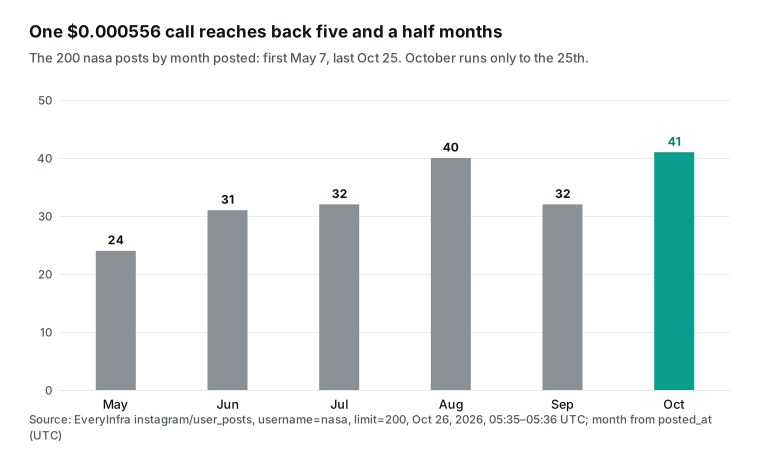
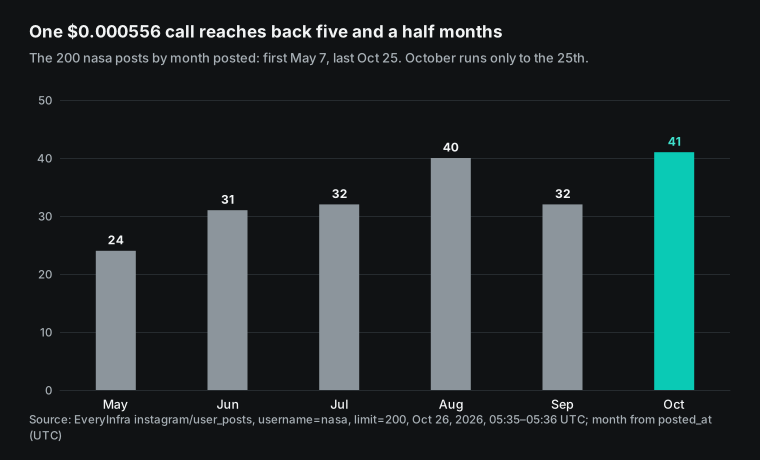
The chart shows when those 200 posts were published. The oldest is from May 7, 2026, and the newest from October 25, 2026, so one call covers five and a half months. For competitor monitoring, this means one request reads half a year of an account's feed. After that, a daily read of the newest 30 posts, the default limit, keeps the record current. On Apify, the same 200 posts are 200 result events: $0.30 on Business and $0.54 on Free.
There is one more finding that we must report: in the 13:35 call, media_type in user_posts was wrong. All 200 rows had media_type set to image. At the same moment, profile showed 4 videos among NASA's 12 recent posts, for example DeTUk4sDSp- and De7XCa_TJ4h, and user_posts labeled them image too. We reported this to our engineering team, and it was fixed on October 26. At 16:01 SGT we called user_posts for NASA again with limit=12: 4 of the 12 rows came back as video and 8 as image, which matches profile. For data pulled before the fix, use video_url to find videos: 56 of the 200 rows have one, including all 4 known videos. At 13:43 SGT we also read 11 of the posts by link with instagram/post, and all 4 videos came back as video.
Splitting by video_url shows something that media_type hides. NASA's 56 posts with a video link had a median of 96,512 likes, while the other 144 had 255,039, so the video posts got less than 40% as many likes. Median comments were close: 919 against 1,007. The 11-link post request was charged as 11 targets, $0.006111 in total, or $0.556 per 1,000. Against Apify Post Scraper at $1.00–$1.70, that is only 1.8 to 3.1 times cheaper. Like profiles, it belongs to the per-target group.
Test 3: Reels, paused by account, available by hashtag and keyword
Reels were the only data we could not read by account. The catalog marked instagram/reels, which reads Reels by username at $0.001194, as available=false on the test day. We sent one request anyway at 13:38:07 SGT. It returned 503 with the code unavailable, the reason temporarily_unavailable, a retry_after of 900 seconds, and a billing.charged_usd of 0.
So the capability refuses calls while it is paused, and it does not charge for them. To pull Reels in bulk by account today, use Apify Instagram Reel Scraper. Another way is to read post links with user_posts and then check each link with post.
Reels by hashtag and by keyword do work. At 13:39:47 SGT we called instagram/hashtag with hashtag=coffee, results_type=reels and limit=100, and received 30 Reels for $0.000556. At 14:01:34 SGT we repeated it with travel and again received 30 rows for $0.000556. The two calls give 60 rows, or $0.0185 per 1,000. At 13:40:19 SGT we called instagram/reels_search for the keyword coffee with limit=200. It returned 92 Reels for $0.007194, or $0.0782 per 1,000.
| Call | Time (SGT) | limit | Rows | Charged | Per 1,000 |
|---|---|---|---|---|---|
reels for nasa (paused) | 13:38:07 | default | 0, 503 | $0 | n/a |
hashtag coffee, reels | 13:39:47 | 100 | 30 | $0.000556 | $0.0185 |
hashtag travel, reels | 14:01:34 | 100 | 30 | $0.000556 | $0.0185 |
reels_search coffee | 13:40:19 | 200 | 92 | $0.007194 | $0.0782 |
reels_search costs more per call, but each row includes play fields such as play_count and duration_sec, which help you pick high-view videos. Apify Reel Scraper costs $2.60 on Free and $1.00 on Business per 1,000, plus $0.001 per run start. By hashtag we are 54 to 140 times cheaper, and by keyword 12.8 to 33 times cheaper.
Apify Reel Scraper sells some things that we do not, and we state them plainly. It sells share counts as an add-on, at $7.00 per 1,000 on Free. It sells transcripts from $0.048 per minute, and video file downloads from $0.02 per MB. It also pulls all Reels from one account. The catalog lists transcript and music as reels_search fields, but none of our 92 rows had a value in either field. For transcripts and music today, use Apify.
What the 92 rows did have was play counts and duration. Plays ranged from 267,000 to 194 million, with a median of 3.52 million, and 78 rows passed one million. The median length was 21.6 seconds. The videos were posted from July 28 to October 25. So keyword search returns Reels from the last three months that have already found an audience. That is useful for finding proven formats, not for spotting new videos before they take off.
Test 4: comments, 15 per call, cheap per row but few rows
Comments show most clearly that limit is a ceiling. We called instagram/comments on three posts. The first was NASA's October 25 post, with 733 comments and limit=100. The second was NASA's most-commented post, with 12,782 comments and limit=50. The third was the most-commented natgeo post, with 4,093 comments and limit=50.
The calls ran at 13:37:47, 13:39:10 and 13:44:20 SGT. All three returned exactly 15 comments and cost $0.000556 each. In total, 45 comments cost $0.001668, or $0.0371 per 1,000. That is 51 to 70 times below Apify Comments Scraper at $1.90–$2.60.
| Post | Comments on the post | limit | Rows returned | Share of all comments |
|---|---|---|---|---|
| nasa, October 25 full moon | 733 | 100 | 15 | 2.0% |
| nasa, most-commented | 12,782 | 50 | 15 | 0.12% |
| natgeo, most-commented | 4,093 | 50 | 15 | 0.37% |
The low price is per row, not per capability. For a post with 12,782 comments, one call gave us 15, about 0.12%. This is an Instagram limit: each post shows only about 15 comments publicly, so a larger limit does not return more. On the Apify side, the Instagram Scraper FAQ says that Free plan users get one page of comments per post, about 15 comments. Paid plans have no such limit and can sort by newest and include replies (Instagram Scraper).
If your task is to export every comment on one viral post for a sentiment study, an Apify paid plan fits better. Maybe your task is to check the newest screen of comments on 500 posts each day for negative signals. Then 15 per call is enough, and our price is $0.278 a day.
It also matters which 15 comments you get. On NASA's October 25 post, all 15 were written in the 20 minutes before our call, from 13:19 to 13:37 SGT. On the natgeo post, the 15 fell between 01:41 and 11:27 SGT that day. Of all 45 comments, 43 had 0 likes, and only one commenter was a verified account. So comments returns the newest screen, not the top comments by likes. That works for "is anyone angry right now", but not for finding the most representative opinions.
Test 5: followers, 40 to 50 per call, empty results refunded
The catalog lists instagram/followers_list with a default of 50 and a maximum of 500. At 13:37:58 SGT we asked for NASA's followers with limit=500 and received 49 accounts. At 13:38:49 SGT we asked for natgeo's followers with limit=200 and received 43. Each call cost $0.000556, so 92 accounts cost $0.001112, or $0.0121 per 1,000.
Apify Followers and Following Scraper charges $1.15–$2.00, so we are 95 to 166 times cheaper. That Apify actor was created on June 30, 2026. Its current price started on August 6, 2026, and it had 1,117 users in the last 30 days.
Again, the limit must be clear. NASA has 104 million followers, so 49 is a tiny slice. This is also an Instagram limit: for verified accounts and some business accounts, only the first page of the follower list is public, with no cursor for the next page. NASA and natgeo are both verified. Public accounts that are not verified return more. So you cannot export all followers of a large verified account. Following lists are different.
NASA follows only 90 accounts, and our following_list call at 13:39:27 SGT returned all 90. In a third probe at 13:44:50 SGT, we sent an async followers request for realmadrid. The job succeeded with 0 rows, and its refund_state was refunded, so the charge came back.
Who is on that page is worth a look. Of NASA's 49 followers, 21 were private accounts; of natgeo's 43, 10 were private. That is 31 of 92, about one third, and none was verified. For audience analysis, a private account gives you only a username and an avatar, so only about two thirds of the sample can be studied further. To estimate how many followers are active real users, split out the private ones by is_private first.
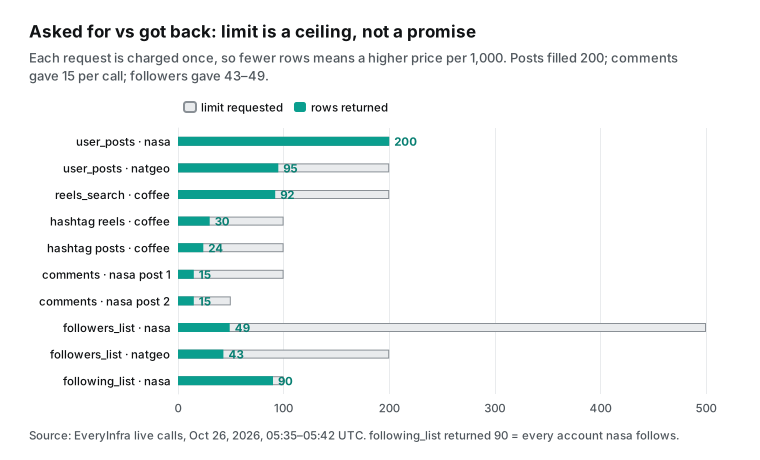
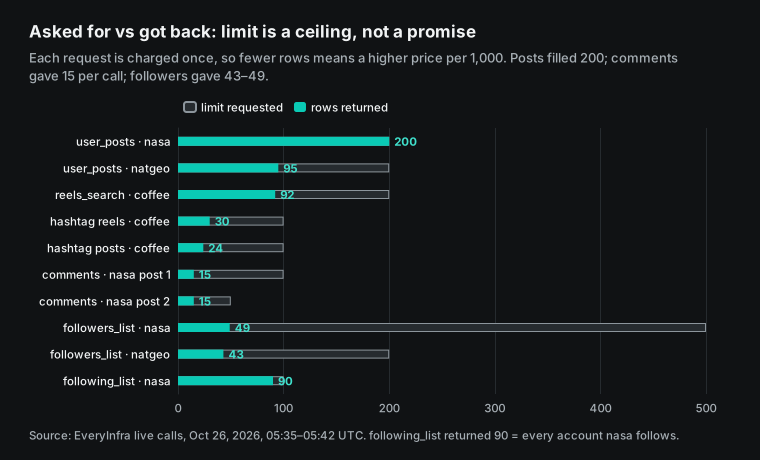
The chart puts all the row counts together. Only user_posts filled its limit, and most other capabilities returned about one page. This does not change the rule of one charge per call, but it does change the price per 1,000. That is why every gap in this article uses rows returned, not limit. If we divided by limit, comments would look like $0.0056 per 1,000, and that would be wrong.
Do failures and empty results cost money? Our six probes
We sent six kinds of abnormal requests on purpose. The table shows what happened.
| Case | Time (SGT) | Response | Charged |
|---|---|---|---|
| No API key | 13:35:31 | 401 missing_key, and the message says nothing was charged | $0 |
Wrong parameter name (results_limit) | 13:38:32 | 422 unknown_param, with the allowed parameters username and limit and a working example | $0 |
Paused capability (reels) | 13:38:07 | 503 unavailable, retry_after 900 seconds | $0 |
| More than 10 calls per minute | 13:38:56 | 429 rate_limited | $0 |
| Followers job with 0 rows (async) | 13:44:50 | Job succeeded, count 0, refund_state is refunded | Refunded |
Username that does not exist (profile), two names | 13:38:07 and 14:02:12 | 200, and results holds only the username we sent | $0.000556 each, not refunded (before the fix) |
| Username that does not exist, retest after the fix (random name) | 16:00:53 | 200, results is empty, billing.reason is empty_result_refunded | $0 |
We must report the last row as a problem. Under EveryInfra's rules, an empty result should be refunded. Here the response body was not empty. It held a username field, but that field only echoed our input and contained no account data.
The gateway treated it as a success and charged it. We tried again 24 minutes later with another name that does not exist, and got the same result, so it is not a one-off. We gave the request IDs of both calls to our engineering team, and it was fixed on October 26. At 16:00:53 SGT we retested with a random username that does not exist. The call returned 200 with empty results, billing.charged was false and the reason was empty_result_refunded, so nothing was charged.
On the Apify side, pay-per-event means you pay for results written to the dataset. A failed run writes no result, so in principle it adds no result charge. Apify also lets you set a maximum charge per run, and the actor stops at that limit (Pay-per-event pricing model). Real use can still go wrong.
One Reddit user wrote that an actor did not always respect the item limit. It fetched thousands of extra items and charged for them, and the complaint had no result (r/automation thread). That post was about a YouTube actor, not the Instagram Scraper. We use it only as an example of the main risk of per-result pricing: row counts that run out of control.
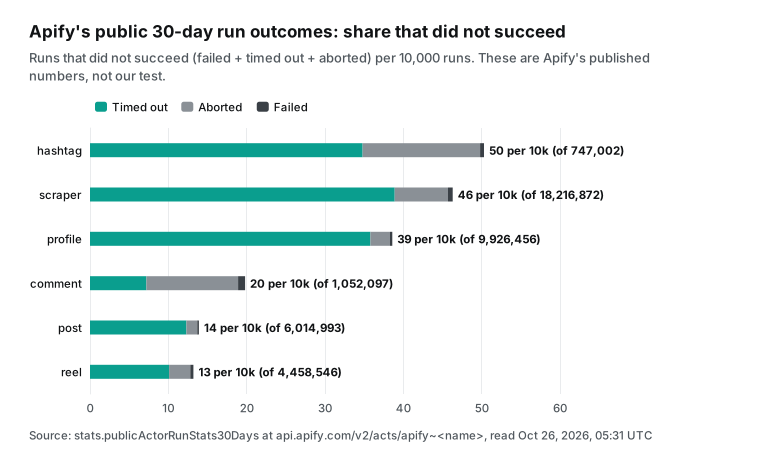
Apify publishes 30-day run outcomes for each actor in its public metadata, and the chart shows our calculation from those numbers. The meaning of the failed, timed-out and aborted states is in the Apify runs docs. The main Instagram Scraper ran 18,216,872 times in 30 days. Of these runs, 1,117 failed, 70,933 timed out and 12,424 were aborted, so 0.46% did not succeed, and timeouts make up most of that. This tells us two things.
Usage is very high, with 58,198 users in 30 days. About 46 runs in every 10,000 do not succeed, so a scheduled daily workflow should include a retry. These are Apify's published numbers, not our measurement. They cannot be compared directly with the success rate of our 26 calls.
How we checked these numbers
Price comparisons often go wrong when "the request succeeded" is read as "the data is usable." So we checked every live call with the same steps, and we keep the raw responses and scripts on file. First, we accept the amount from only two places. For sync calls we use billing.charged_usd in the response. Async job responses have no amount, so we looked up each request ID in the console call log. We checked all three user_posts jobs and both async followers jobs this way.
Second, we count rows from the real length of the results array, and then remove duplicates by post_id or account ID. Both nasa runs gave 200 unique rows, and natgeo gave 95. Third, we check that fields hold values, not just keys. In the 200 nasa rows, caption, likes, comments, time, author and image had a 100% fill rate. Views and location are in the catalog, but this call did not return them, and the video link had a value in only 56 rows. The field table below says so.
Fourth, we cross-check one data set with another capability. profile shows NASA has 4,979 posts, so 200 posts are about 4%. "Five and a half months" therefore means recent history, not the full archive. natgeo has 32,000 posts, and 95 cover only four weeks.
Fifth, we read Apify prices only from public metadata and compared them with the Store page. The page shows $2.70, $2.30, $1.90 and $1.50, and the API tiers FREE, BRONZE, SILVER and GOLD hold the same four values. We also recalculated the page's 8,200, 104,700 and 666,000 results from fee divided by price, and all three match within 1%.
The monthly bill: from 1,000 to 1 million posts
To compare one month, the Apify cost must include the plan fee. The Free plan includes $5 of usage and then stops. Starter at $19, Scale at $199 and Business at $999 are prepaid, unused usage expires, and extra usage is billed at that tier's price. We use the cheapest Apify plan for each volume and our measured posts price for EveryInfra. We do not add proxy, storage or transfer costs.
| Posts per month | Cheapest Apify plan | Apify monthly cost | EveryInfra monthly cost |
|---|---|---|---|
| 1,000 | Free (uses $2.70 of the free usage) | $2.70 | $0.0034 |
| 10,000 | Starter | $23.00 | $0.034 |
| 100,000 | Scale | $199.00 | $0.34 |
| 500,000 | Scale | $950.00 | $1.69 |
| 1,000,000 | Business | $1,500.00 | $3.37 |
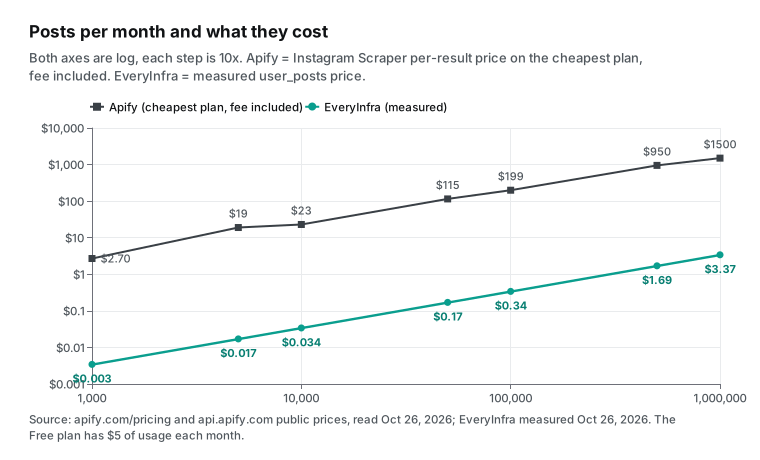
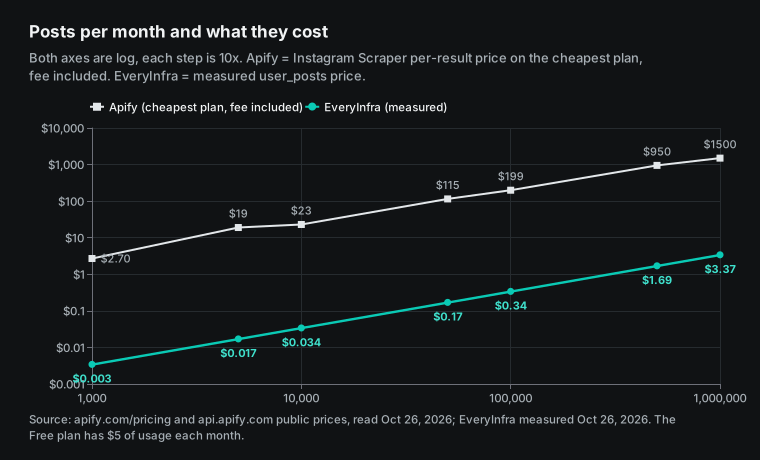
The EveryInfra column is small because user_posts returns up to 200 posts per call. Two cautions apply. First, real work rarely needs posts alone. If you also need the profile of each account, profiles cost $0.556 per 1,000.
Take 1,000 accounts, with a daily profile read and the latest 30 posts. That is 30,000 profile calls and 30,000 posts calls a month, or about $33.36. The same job on Apify is 30,000 profiles and 900,000 posts, about $1,398 on Business, and far beyond the Free plan. Second, one of our three calls returned only 95 rows, so the true price per 1,000 posts moves between $0.003 and $0.006. The table uses the pooled value from three calls: 495 rows for $0.001668.
Three common US marketing jobs show the same pattern. Influencer vetting: read the profile and the latest 30 posts of 500 candidates. That is 1,000 calls, $0.556. On Apify it is 500 profiles and 15,000 posts, $23.30 on Business and $41.80 on Free, which is beyond the $5 Free usage.
Brand listening: read posts and Reels under three branded hashtags each day, plus one screen of comments on 20 top posts. That is 26 calls a day, or about $0.43 a month. If every page fills, it is about 14,400 Apify results a month, or about $21.60 at the Instagram Scraper Business price of $1.50.
Competitor content review: read the latest 200 posts from 50 competitor accounts every week. That is 200 calls a month, or $0.11 on EveryInfra, and 40,000 Apify results, or $60 on Business. The smallest gap of the three is influencer vetting, because half of its calls are per-target profile reads.
| Job | EveryInfra calls a month | EveryInfra cost | Apify results a month | Apify Business cost |
|---|---|---|---|---|
| Influencer vetting, 500 creators, once | 1,000 | $0.556 | 15,500 | $23.30 |
| Brand listening, 3 hashtags plus 20 comment screens a day | 780 | $0.43 | 14,400 | $21.60 |
| Competitor review, 50 accounts × 200 posts a week | 200 | $0.11 | 40,000 | $60.00 |
When per-result pricing is cheaper
The two pricing formulas show where the break-even point is. On Apify, the cost per 1,000 equals the tier price, whatever the rows per run (Reel Scraper adds $0.001 per run). On EveryInfra, the cost per 1,000 equals the price per call divided by rows per call, times 1,000. Where these are equal, you get the minimum rows per call at which we stop being more expensive. For user_posts at $0.000556 against Apify Instagram Scraper Business at $1.50, break-even is 0.37 rows per call, so a single row is already cheaper.
For reels_search at $0.007194 against Reel Scraper Business at $1.00, break-even is 7.2 rows per call, and we measured 92. For similar_profiles at $0.008806 against Profile Scraper Business at $1.60, break-even is 5.5 accounts per call, and the catalog default is 20.
| EveryInfra capability | Price per call | Apify actor, Business tier | Break-even rows per call | Rows we measured |
|---|---|---|---|---|
user_posts | $0.000556 | Instagram Scraper, $1.50 | 0.37 | 95–200 |
comments | $0.000556 | Comments Scraper, $1.90 | 0.29 | 15 |
followers_list | $0.000556 | Followers and Following Scraper, $1.15 | 0.48 | 43–49 |
reels_search | $0.007194 | Reel Scraper, $1.00 | 7.2 | 92 |
similar_profiles | $0.008806 | Profile Scraper, $1.60 | 5.5 | not tested |
The real exception is Apify's enterprise tiers. The public metadata also lists PLATINUM at $0.90 and DIAMOND at $0.50 per 1,000 for Instagram Scraper. Profile Scraper DIAMOND is $0.50 and Post Scraper DIAMOND is $0.40.
These tiers are not on the public plan table, and Apify's documentation only says enterprise customers can get extra discounts (Actors in Store). Apify's pricing and costs docs state that PLATINUM and DIAMOND are for Enterprise customers only. If you are an Apify enterprise customer on DIAMOND, the per-target rows flip. 1,000 profiles cost $0.50 on Apify and $0.556 with us. 1,000 post details cost $0.40 on Apify Post Scraper and $0.556 with us.
In other words, for "one target, one charge" work, a large customer can pay 10% to 28% less on Apify than with us. For page-style data such as posts, Reels lists, comments and followers, we stay cheaper even against DIAMOND. For posts, DIAMOND is $0.50 per 1,000 and our measured price is $0.0034, about 148 times less.
Another easy-to-miss cost is rows you do not use. With per-request pricing, extra rows are free, but if you need only the newest post per account, you still pay $0.000556 per call. Your cost per useful row is then $0.556 per 1,000, the same as a profile read and only 2.7 times below Apify Business. Per-result pricing has the opposite trade-off.
You pay only for what you receive, but large limits add up fast. Apify's resultsLimit applies per URL. If you set 200 for each of 500 accounts, one run can produce up to 100,000 result events, which is $150 on Business.
So plan the volume differently for each model. For per-result pricing, decide the maximum rows you need. For per-request pricing, decide the minimum number of calls you need.
Getting started: sign-up, trial, MCP and automation
The Apify Store page lists eight steps. You create an account and open Instagram Scraper. You pick the content type, paste URLs and set the results limit per URL. You can add a date filter. Then you start the run and download the dataset (Instagram Scraper).
The Free plan needs no credit card. Apify's strength is the complete interface. It has a visual input form, schedules, webhooks and export to JSON, CSV, Excel and XML. It also has ready integrations with Zapier, Make, n8n and Google Sheets (n8n integration). It also has a Python client and a full API v2.
| Item | Apify Instagram Scraper | EveryInfra |
|---|---|---|
| Billing unit | Per result (event) | Per request; multi-link calls per link |
| Monthly fee | Free $0 (with $5 usage) / $19 / $199 / $999 | None |
| Lowest paid entry | Starter plan, $19 a month | $10 top-up |
| Credit expiry | Unused usage expires each cycle | Does not expire |
| Free credit | $5 a month, no card | $1 for a GitHub star, valid 24 hours |
| Failures and empty results | No result, no result charge; max charge per run | 401, 422, 429 and 503 free; empty results refunded; a missing account was charged before a fix on October 26; the retest was free |
| MCP | mcp.apify.com, OAuth or token | api.everyinfra.com/mcp, Bearer key |
| No-code | Console, schedules, Zapier, Make, n8n node | Console playground; n8n through the HTTP Request node |
| Coverage gaps | Places, mentions, hashtag stats, transcripts, video download | 15 Instagram capabilities, plus similar profiles and account search |
EveryInfra takes three steps. Get an API key from the quickstart docs. Run one call in the console playground, for example with the one-click trial on the user_posts page, which reads nasa's posts by default. Then put the same request in your code or AI client.
There is no visual input form and no scheduler. For automation, you use your own script, or the generic HTTP Request node in n8n. This is a real Apify advantage, and the section on when Apify fits better comes back to it.
Instagram scraper API: use it from code and AI clients
All capabilities in this test are on the Instagram scraper API page. Each one also has its own page. For content, see user posts, profile and single post. For reactions and discovery, see comments, followers list, hashtag and Reels keyword search. Below is the request from Test 2. Change username to read another account.
curl -s https://api.everyinfra.com/api/v1/social \
  -H "Authorization: Bearer ${EVERYINFRA_API_KEY}" \
  -H "Content-Type: application/json" \
  -d '{
    "platform": "instagram",
    "action": "user_posts",
    "mode": "async",
    "params": { "username": "nasa", "limit": 200 }
  }'
# Returns 202 and a job_id; then GET https://api.everyinfra.com/api/v1/jobs/<job_id>
The user_posts fields map one to one to the catalog response_fields. In the 200 nasa rows, the keys view_count, location, hashtags and top_comments did not appear, and video_url had a value in 56 rows.
| Field | Meaning | In the 200 nasa rows |
|---|---|---|
post_id / id / url | Shortcode, numeric ID, post link | Present in all 200, 200 unique |
text | Caption | Present in all 200 |
media_type | Media type | All image in the 13:35 call; fixed on October 26, and the 16:01 retest had 4 video rows out of 12 |
like_count / comment_count | Likes and comments | Present in all 200, likes from 21,732 to 2,754,686 |
posted_at | Post time (UTC) | May 7 to October 25, 2026 |
author_username / author_name / author_id | Author | Present in all 200 |
image_url / width / height | Cover image and size | Present in all 200 |
video_url | Video link | Present in 56 rows, including all 4 known videos; use it to find videos |
view_count / location / hashtags / top_comments / is_comments_disabled / author_follower_count | Views, place, hashtags, top comments and more | Not returned in this call |
To use the same data in an AI client, add the EveryInfra MCP server to its configuration. The protocol is in the Model Context Protocol specification. The client setup is in the MCP docs and the remote MCP setup guide.
{
  "mcpServers": {
    "everyinfra": {
      "url": "https://api.everyinfra.com/mcp",
      "headers": { "Authorization": "Bearer ${env:EVERYINFRA_API_KEY}" }
    }
  }
}
Then you can ask: "Use EveryInfra to read the latest 200 Instagram posts from nasa and count posts and average likes by month." Apify has its own MCP server at mcp.apify.com. It supports OAuth sign-in, and tools=apify/instagram-scraper loads only the Instagram Scraper tool (Apify MCP server, source on GitHub). Both work in much the same way inside an AI client. The difference is still billing. When a model pulls more pages through MCP, Apify adds cost per row and we add cost per call. For Cursor, see our guide to Instagram, TikTok and Amazon data in Cursor with MCP.
Can the official Instagram API replace both?
Many readers first ask why they should not use Meta's own API. The answer is that its reach is narrow. The Instagram Platform API mainly serves professional accounts you manage: publishing, reading your own comments and reading your own insights. To read other accounts, you have only Business Discovery. It covers public data of other business and creator accounts. To find posts by hashtag, you use Hashtag Search, which allows at most 30 unique hashtags per account in a rolling 7-day window.
The official API gives no follower lists of ordinary users and no full comment threads on other people's posts. The Basic Display API for personal accounts ended on December 4, 2024 (Meta developer blog, September 4, 2024). The latest entry in the Instagram Platform changelog is also about your own account: on October 20, 2026, Meta added /ordered_comments, which returns comments in display order only for ad media. If your task is to read other people's public data, the official API helps very little, which is why services like Apify and EveryInfra exist.
| Need | Official Instagram API | Apify Instagram Scraper | EveryInfra |
|---|---|---|---|
| Your own account's posts and insights | Yes | Public part only | Public part only |
| Other business or creator profiles | Business Discovery | Yes | Yes |
| Personal account profiles | No | Public ones | Public ones |
| Posts by hashtag | 30 unique hashtags per 7 days | Yes | Yes |
| Follower lists | No | Yes, per account | One page per call |
| Comments on other accounts' posts | No | Yes, more on paid plans | 15 per call |
When Apify is the better choice
Here are seven points, each one a fact you can check. First, you need Instagram place data, such as coordinates, addresses and posts at a place. Or you need hashtag volume, related-tag tiers or mentions of a brand. Apify Instagram Scraper lists these as output types, and our 15 capabilities have no place or hashtag-stats data.
Second, you need Reels in bulk by account, or Reel share counts, transcripts or video files. Our reels capability was paused on the test day, and Apify Reel Scraper sells these add-ons. Third, you need a large number of comments or nested replies on one post. Apify paid plans have no one-page limit, and we return the roughly 15 comments that Instagram shows publicly per post.
Fourth, you need every follower of a large account. Apify's Followers and Following Scraper charges per account, and for large verified accounts Instagram shows only the first page of followers, 40 to 50 per call. Fifth, you do not write code and want a web form, schedules and Zapier or Make. Apify's Console and integrations are more complete than ours.
Sixth, your workflow already runs on Apify and uses many actors beyond Instagram. Apify Store has thousands of actors, and moving has its own cost. Seventh, you are an Apify enterprise customer on the DIAMOND tier. For per-target profiles and post details, Apify charges $0.40–$0.50 per 1,000. That is 10% to 28% below our $0.556, so there is no reason to move that work.
The reverse also holds. Maybe most of your volume is posts, Reels under hashtags or keywords, recent comments and basic profiles, called from code or an AI client. Then our measured prices are a few times to several hundred times lower on that data.
Compliance: public data, private accounts and platform terms
First, private accounts. We read only public data. The profile response has an is_private field, and we do not read posts or follower lists of private accounts. The Apify FAQ also says that, in general, you cannot scrape private profiles. The one exception is a private account tagged as a collaborator on a public post. Instagram then treats that post as public (Instagram Scraper).
Next, terms and court cases. The Instagram Terms of Use do not allow automated access or collection without permission. Meta described its approach in How We Combat Scraping, and developers on the official API must follow the Meta Platform Terms. In January 2024, the federal court in Northern California held in Meta v. Bright Data that logged-off scraping of public data did not breach Meta's terms (docket).
On April 18, 2022, the Ninth Circuit held in hiQ v. LinkedIn that reading public web pages is not access "without authorization" under the Computer Fraud and Abuse Act (opinion). These rulings reflect US courts on specific facts. They are not a general permission.
Personal data is a separate layer. Public personal data is still covered by laws such as the GDPR. In Test 5, one third of the followers on the two pages were private accounts, and the rest were mostly ordinary people, so this is the data that needs the most care. We do not give legal advice. We suggest three habits. Collect only the fields your task needs. Remove usernames from follower data before you store it. Keep the time and source of every request.
Recent changes (September–October 2026)
| Date | Change | What it means for you |
|---|---|---|
| October 23, 2026 | Reuters reported that Meta moved its new commercial terms from October 30 to November 20, and a US senator questioned the scraping clause (Reuters) | Meta's rules on who may scrape what are changing; business account owners should read the new terms before November 20 |
| October 20, 2026 | Instagram Platform added /ordered_comments, which returns ad media comments in display order (changelog) | The official API still covers only your own accounts and ads; comments on other accounts still need a third party |
| October 17, 2026 | Meta removed the AI-training wording from its commercial terms (TechCrunch; first reported by Nieman Lab on October 15, 2026; terms at Meta Commercial Terms and the update note) | Meta's commercial terms are still changing, and the scraping wording may change again; read the current text before you sign up or integrate |
| October 7, 2026 | Apify Instagram Post Scraper started new prices: $1.00–$1.70 per post, plus $0.60–$1.00 for post details (public metadata) | One result can now be several paid events; add the extra events when you compare |
For buyers, the most direct item here is the Post Scraper one. Apify is splitting one result into several paid events, so the list price per result is no longer enough. Add the extra events, plan fees and expired credit to see the true cost.
Next steps: from one trial call to a daily job
If you use Apify Instagram Scraper today and want to test per-request pricing, here is the short path. Get a key from the quickstart. Run user_posts once in the playground on the account you read most (one-click trial). Compare the rows and the charge with your Apify run for the same account. Then move the steps that return many rows per call, and keep profiles, places and full comment threads where they are.
If you work across platforms, see the TikTok scraper API and the Threads scraper API, which use the same billing. For one schema across platforms, read the unified data API guide. For creator vetting, read creator data due diligence. For multi-platform monitoring, read multiplatform reputation monitoring. Our full comparison pages are at alternatives.
FAQ
Is Apify Instagram Scraper free?
Partly. This question comes from the Google suggestion "is apify instagram scraper free." The Apify Free plan gives $5 of platform usage each month with no credit card. At the Free tier price of $2.70 per 1,000, that is about 1,850 results. The credit expires each month, and the account stops when it runs out (Apify pricing). The same $5 on EveryInfra is about 9,000 requests, which is over a million posts at 200 per user_posts call. EveryInfra has no monthly free credit, only the $1 GitHub-star trial.
Is Apify Instagram Scraper legal?
This question comes from the suggestion "is apify instagram scraper legal." Apify's answer is that it collects only public data and does not access private content. It adds that public data can still be personal data under the GDPR.
Our view is in the compliance section above. US courts gave two rulings that favor public-data scraping: one in a Meta scraping lawsuit, and hiQ v. LinkedIn. Instagram's terms still forbid automated collection without permission, and privacy laws still apply. This is not legal advice.
How does Apify Instagram Scraper work?
This question comes from the suggestion "how does apify instagram scraper work." According to its Store page, Instagram Scraper is a program (an actor) that runs on the Apify cloud. You give it Instagram links or a search term, pick one content type, and set a results limit per link. It reads what a logged-out visitor can see, writes the results to a dataset, and charges per result written. One run produces one content type, so posts and comments need two runs. EveryInfra has one capability per data type, returns one JSON shape, and charges per request.
Can you scrape private Instagram accounts?
No. This question comes from the suggestion "can you scrape private instagram." Both Apify and EveryInfra read only public data. profile returns is_private, and for a private account you get only the public profile fields. The one exception Apify mentions is a private account that appears as a collaborator on a public post.
Can Apify scrape Instagram followers, and what does it cost?
Yes. This question comes from the suggestion "apify instagram follower scraper." Apify launched a Followers and Following Scraper in June 2026. It costs $0.00115–$0.002 per account, which is $1.15–$2.00 per 1,000. Our followers_list costs $0.000556 per call and returned 43–49 accounts per call, about $0.012 per 1,000. NASA and natgeo are verified, and Instagram shows only the first page of followers for verified accounts, so you cannot export all followers of such an account. Public accounts that are not verified return more.
Do I pay only for the actor, or also for an Apify plan?
This question comes from a Reddit r/apify thread. The poster used a LinkedIn profile actor ($4 per 1,000) and read only 8 to 10 profiles a day. A $29 Starter plan felt like too much (thread; the Starter price we read on October 26, 2026, was $19). The question was about LinkedIn, but the same billing rules apply to Instagram actors. The answer is that pay-per-event charges come out of your plan's prepaid usage, and the Free plan's $5 also works. For small volumes, you do not need a paid plan. Another thread asked for the most cost-efficient Instagram actor, and replies noted that prices vary widely and that the last update date matters (thread).
How do I call an Instagram scraper API?
This question comes from the suggestion "apify instagram scraper api." On Apify, you start an actor run and then read its dataset, with Python and Node.js clients. On EveryInfra, you send one POST request, as in the curl example above. For slow calls, add "mode":"async" and read the result by job_id. Both services work with MCP.
References
- Instagram Scraper (Store page with "How much will scraping Instagram cost?" and FAQ), Apify, read October 26, 2026. https://apify.com/apify/instagram-scraper
- Apify pricing (plans, compute units, proxies, storage), Apify, read October 26, 2026. https://apify.com/pricing
- Instagram Scraper public metadata (pricingInfos, stats), Apify API, read 13:31 SGT on October 26, 2026. https://api.apify.com/v2/acts/apify~instagram-scraper
- Instagram Post Scraper public metadata (prices from October 7, 2026), Apify API. https://api.apify.com/v2/acts/apify~instagram-post-scraper
- Instagram Profile Scraper, Apify. https://apify.com/apify/instagram-profile-scraper
- Instagram Post Scraper, Apify. https://apify.com/apify/instagram-post-scraper
- Instagram Reel Scraper, Apify. https://apify.com/apify/instagram-reel-scraper
- Instagram Comments Scraper, Apify. https://apify.com/apify/instagram-comment-scraper
- Instagram Followers and Following Scraper, Apify. https://apify.com/apify/instagram-followers-following-scraper
- Instagram Hashtag Scraper, Apify. https://apify.com/apify/instagram-hashtag-scraper
- Actors in Store (pay per event, pay per usage, store discounts), Apify docs. https://docs.apify.com/platform/actors/running/actors-in-store
- Pay-per-event pricing model (80% developer share, actor-start event), Apify docs. https://docs.apify.com/platform/actors/publishing/monetize/pay-per-event
- Apify MCP server, Apify docs. https://docs.apify.com/mcp
- n8n integration, Apify docs. https://docs.apify.com/platform/integrations/n8n
- Apify API v2 reference, Apify docs. https://docs.apify.com/api/v2
- Reaching platform limits, Apify Help Center, September 4, 2026. https://help.apify.com/en/articles/11079614-reaching-platform-limits
- apify-mcp-server source, GitHub. https://github.com/apify/apify-mcp-server
- apify-client-python source, GitHub. https://github.com/apify/apify-client-python
- Changelog for Instagram Platform (entries of September 28, October 5 and October 20, 2026), Meta for Developers. https://developers.facebook.com/documentation/instagram-platform/changelog
- Hashtag Search (30 unique hashtags per 7 days), Meta for Developers. https://developers.facebook.com/documentation/instagram-platform/instagram-api-with-facebook-login/hashtag-search
- Business Discovery, Meta for Developers. https://developers.facebook.com/docs/instagram-platform/instagram-api-with-facebook-login/business-discovery
- Update on Instagram Basic Display API, Meta for Developers, September 4, 2024. https://developers.facebook.com/blog/post/2024/09/04/update-on-instagram-basic-display-api/
- Meta Platform Terms, Meta for Developers. https://developers.facebook.com/terms/
- Instagram Terms of Use, Instagram Help Center. https://help.instagram.com/581066165581870
- How We Combat Scraping, Meta, April 15, 2021. https://about.fb.com/news/2021/04/how-we-combat-scraping/
- Meta Commercial Terms, Meta. https://www.facebook.com/legal/commercial_terms
- Commercial terms update note, Meta Business Help Center. https://www.facebook.com/business/help/2481113349080785
- Meta Platforms, Inc. v. Bright Data Ltd., 3:23-cv-00077, docket, CourtListener. https://www.courtlistener.com/docket/66706470/meta-platforms-inc-v-bright-data-ltd/
- hiQ Labs v. LinkedIn, US Court of Appeals for the Ninth Circuit, April 18, 2022. https://cdn.ca9.uscourts.gov/datastore/opinions/2022/04/18/17-16783.pdf
- Regulation (EU) 2016/679 (GDPR), Official Journal of the EU. https://eur-lex.europa.eu/eli/reg/2016/679/oj
- Model Context Protocol specification, version 2025-06-18. https://modelcontextprotocol.io/specification/2025-06-18
- HTTP Request node, n8n docs. https://docs.n8n.io/integrations/builtin/core-nodes/n8n-nodes-base.httprequest/
- EveryInfra capability catalog (price_usd, response_fields), read October 26, 2026. https://api.everyinfra.com/api/v1/social/catalog
- "Meta's new commercial terms will allow the scraping of news sites, legal experts say," Nieman Lab, October 15, 2026. https://www.niemanlab.org/2026/10/metas-new-commercial-terms-will-allow-the-scraping-of-news-sites-legal-experts-say/
- "Meta removes language that raised scraping and AI training concerns," TechCrunch, October 17, 2026. https://techcrunch.com/2026/10/17/meta-removes-language-that-raised-scraping-and-ai-training-concerns/
- "Senator says planned Meta commercial terms update could harm US businesses," Reuters, October 23, 2026. https://www.reuters.com/world/senator-says-planned-meta-commercial-terms-update-could-harm-us-businesses-2026-10-23/
- "Best Cost-Efficient Apify Actor for Instagram and X Profile Search?", Reddit r/apify. https://www.reddit.com/r/apify/comments/1s81nhe/best_costefficient_apify_actor_for_instagram_and/
- "Confusion on Apify Pricing!", Reddit r/apify. https://www.reddit.com/r/apify/comments/1sxx2qu/confusion_on_apify_pricing/
- "Reviews after getting into web scrape tools", Reddit r/automation. https://www.reddit.com/r/automation/comments/1sgmbyq/reviews_after_getting_into_web_scrape_tools_apify/
- Get Actor, Apify API docs. https://docs.apify.com/api/v2/actor-get
- Actor pricing and costs (PLATINUM and DIAMOND are Enterprise only), Apify docs. https://docs.apify.com/platform/actors/publishing/monetize/pricing-and-costs
- Runs and builds (run states), Apify docs. https://docs.apify.com/platform/actors/running/runs-and-builds
Reference BL-47