Give Scalekit AgentKit agents public web and social data with an MCP connector
Scalekit AgentKit agents read public data over MCP for $0.002501 per prospect; a wrong key returns HTTP 200, and MCP data calls have no idempotency key.

Your Scalekit AgentKit agent already works inside each user's CRM, Slack and Gmail. To read the public web and social media, it needs one more MCP connector.
On 10 November 2026 we called the EveryInfra remote MCP server and REST API with one test key, 31 times in three rounds. One prospect's "last 20 posts on X + LinkedIn company page + one web search" cost $0.002501, so 1,000 prospects cost $2.50 in data fees. The live calls also showed the three places where a setup is most likely to go wrong. EveryInfra accepts the key only as Authorization: Bearer <key>. A wrong key or a missing parameter comes back as HTTP 200 with isError: true, which Scalekit's docs map to 400 INVALID_ARGUMENT, not to "reauthorize". And a read-only session token filters tools by readOnlyHint. On November 10 the data tool, everyinfra_call_api, carried readOnlyHint: false, so the token hid it. Since 2026-11-21 it is marked read-only (readOnlyHint: true, destructiveHint: false), so by Scalekit's documented rule the token no longer hides it, and the paid tools stay in the agent's hands. We have not tested this in Scalekit.
In this guide, an "AgentKit agent" is a program that you write and deploy. It uses the Scalekit Python or Node.js SDK to get the tools a user has authorized, and it gives those tools to a model. Scalekit handles each user's authorization, stores their credentials and forwards the calls. Your code passes only "which user" and "which tool", and it never touches the user's tokens or keys (What is AgentKit, read 2026-11-10).
EveryInfra has one job in this setup. It turns public web pages, social profiles, posts, comments and product pages into a tool for the agent. Each call has a price, and failures are free. Scalekit and EveryInfra connect through one rule: every request carries Authorization: Bearer <key>.
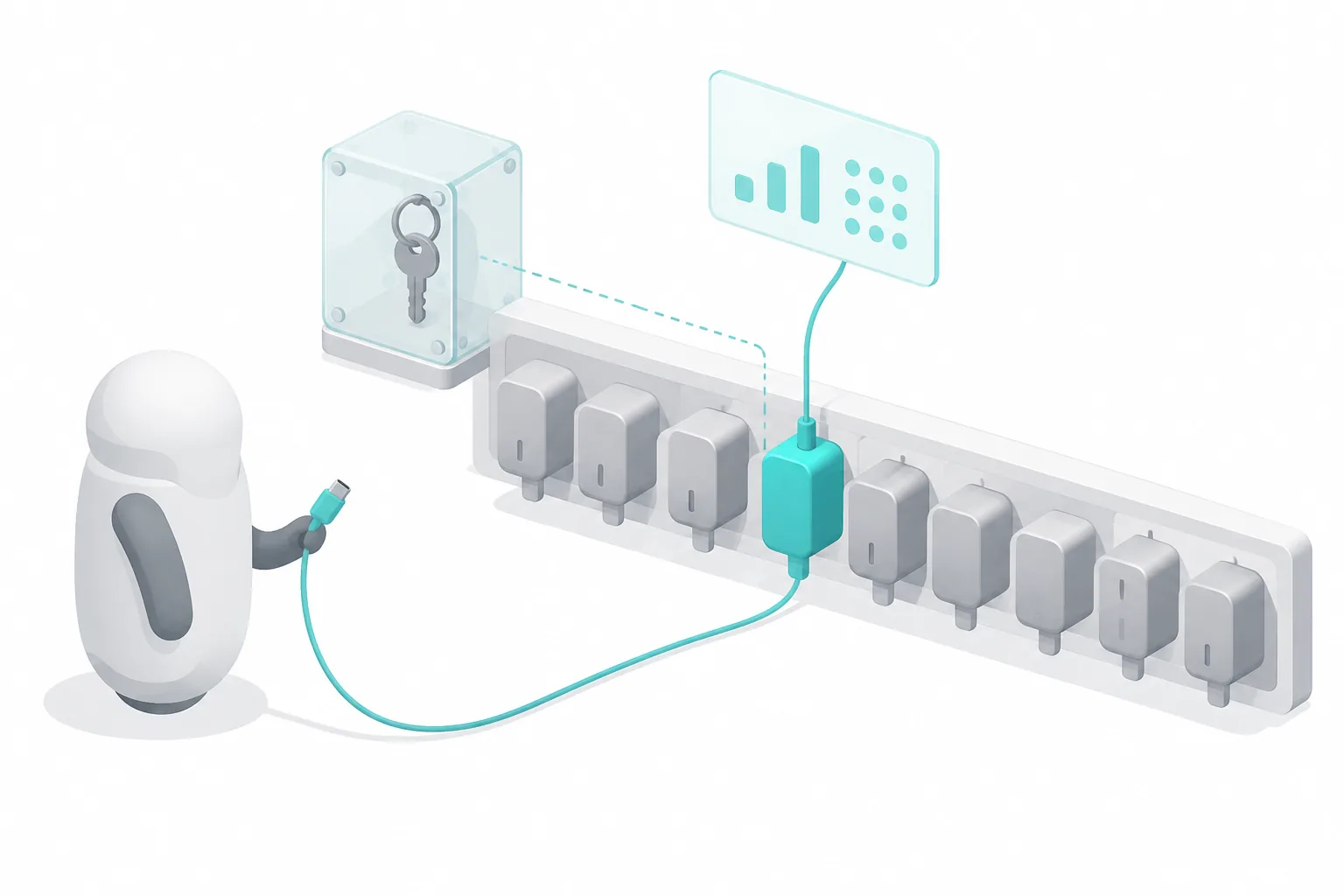
The scenario: a Scalekit AgentKit agent that already works in CRM, Slack and Gmail
You are building a sales research agent. Its users are sales reps at a B2B company. Each rep has connected their own HubSpot and Slack through a Scalekit authorization link.
Every day the agent gets a list of prospects. For each prospect, it must do three things. It reads recent posts on X, reads the LinkedIn company page and searches for recent product launches. Then it writes a short brief under the company record in HubSpot and pings the rep in Slack. HubSpot and Slack are the user's own apps, and the Scalekit catalog already has connectors for them.
The HubSpot connector has 457 tools (198 read, 179 write, 80 destructive) and the Slack connector has 96 tools (HubSpot connector and Slack connector, both read 2026-11-10). What is missing is the data for the first three tasks. That data is not in any account the user owns. It is public web and social content.
Public data has no user authorization to ask for, so it suits a pay-per-call data API that returns structured results to the agent. Scalekit's model fits this into the same flow: an EveryInfra key is also a kind of user credential. It sits in a connected account, and Scalekit adds it when the agent calls a tool.
We use Supabase as the demo prospect. It is an active public company, and its X account and LinkedIn page are organization accounts that we can name. The table lists the tools one research round uses. HubSpot and Slack come from the Scalekit catalog; the first three rows are the EveryInfra capabilities this guide connects.
| Task | Connector | Tool or capability | Where the data lives |
|---|---|---|---|
| Read the prospect's recent posts on X | EveryInfra | twitter/user_posts | Public social media |
| Read the LinkedIn company page | EveryInfra | linkedin/company_profile | Public social media |
| Search for recent launches | EveryInfra | web/search | Public web |
| Find the company in HubSpot | HubSpot (catalog) | hubspot_companies_search | The user's own CRM |
| Write the brief into HubSpot | HubSpot (catalog) | hubspot_note_log | The user's own CRM |
| Ping the rep in Slack | Slack (catalog) | slack_send_message | The user's own Slack |
The catalog prices of the three EveryInfra capabilities are $0.000556, $0.000556 and $0.001389 per call (capability catalog, read 2026-11-10 at 02:19 Singapore time). The product pages are X data API, LinkedIn data API and web search API. The parameters and fields of each capability are on the twitter/user_posts, linkedin/company_profile and web/search pages.
Criteria we wrote down before calling anything
Before the live calls, we split "this setup works" into five criteria that a call can confirm or reject, and we wrote them down first. The point of writing them first is to fix the failure condition in advance. If the EveryInfra MCP server needed sessions, Scalekit could not connect to it. Then Option A would fail, and the whole guide would need a rewrite.
| # | Criterion | Pass condition | Result |
|---|---|---|---|
| 1 | The remote MCP server is stateless | initialize returns no Mcp-Session-Id; tools can be called without a prior initialize | Pass: no session ID in the response headers; every curl was an independent request |
| 2 | Tools are visible without a key | initialize and tools/list on the default endpoint return 200 | Pass: 12 tools; tools/list on /mcp/all needs a key (401) |
| 3 | A Bearer key can call a tool and gets billed | everyinfra_call_api succeeds and returns charged_usd | Pass: $0.000556 per call |
| 4 | An agent can read the errors | Wrong key and missing parameter return a machine-readable code | Pass: invalid_key and missing_param, both stating that nothing was charged |
| 5 | Failures and empty results are free | charged_usd is 0 | Pass: all 5 failed or empty calls cost $0 |
We also set one technical target before the calls. MCP round trips (initialize, tools/list and tools/call for sync capabilities) must have a median of 2 seconds or less. The result is mixed. The free protocol requests had a median of 0.12 seconds and web/search had 1.98 seconds, so both pass. linkedin/company_profile had 6.11 seconds and twitter/user_posts had 9.47 seconds, so both fail.
We measured all of these with direct calls to EveryInfra, without the Scalekit hop. The time goes almost entirely to the live fetch. The protocol itself is fast. The sections below explain it.
Two ways to connect: MCP connector or REST proxy
Scalekit's custom connector docs split calls into two kinds. A REST API connector is called through the API proxy with actions.request(). An MCP connector lists its tools first and is called with execute_tool. Both kinds share the same connections, connected accounts and user authorization (Call your connector, read 2026-11-10). EveryInfra works with both. The figure shows the path of a request.


Both options return exactly the same data. The difference is who decides which capability to call and with what parameters. With MCP, the agent sees a general tool, everyinfra_call_api. The model fills in platform, action and params itself. The benefit is that one connection covers the 573 capabilities in the catalog (538 of them were available when we read the catalog on 2026-11-11).
With REST, you wrap one capability in a narrow tool in your own code. The model can fill in only the one or two parameters that you expose. The benefit is that the model cannot pick the wrong capability, and the budget is easier to control. The table puts the two side by side.
| Option A: MCP connector | Option B: REST connector | |
|---|---|---|
| How you create it in Scalekit | The EveryInfra MCP connector in the catalog (provider EVERYINFRAMCP), or a custom MCP connector (is_mcp: true) | A custom REST connector (proxy_url set to https://api.everyinfra.com) |
| How your code calls it | execute_tool, with the tool name from list_scoped_tools | actions.request(method="POST", path="/api/v1/social") |
| What the model sees | Full descriptions of 12 tools, including everyinfra_call_api | Narrow tools you write yourself, such as "read a company's recent posts on X" |
| How many capabilities | All 106 platforms and 573 capabilities in the catalog | As many as you wrap |
| How errors come back | HTTP 200 with isError: true; Scalekit maps it to INVALID_ARGUMENT | The HTTP status comes back unchanged (422, 503 and so on); Python gets a requests response |
| Best for | Exploratory tasks where the agent finds the capability itself | Fixed production flows where you control the cost of every step |
The Scalekit behavior in this table comes from its docs. We have no Scalekit account and did not run anything in its dashboard. The EveryInfra behavior comes from the live calls in this guide.
Option A: use the AgentKit connector from the catalog
According to the setup guide Scalekit sent us on 2026-11-11, the connector in the AgentKit catalog is called EveryInfra MCP, and its provider identifier is EVERYINFRAMCP. That identifier is fixed. The connector exposes the 12 tools on https://api.everyinfra.com/mcp; the account tools on https://api.everyinfra.com/mcp/all are not in the catalog. Users authorize with an API key, and Scalekit sends the key to EveryInfra on every request as Authorization: Bearer <key>.
The benefit of a catalog connector is that you do not write a connector definition; you create a connection and use it. The steps below follow that setup guide and Scalekit's public docs. They are a configuration example (written from Scalekit's docs and setup guide; not run in a Scalekit dashboard for this guide). Scalekit's EveryInfra connector docs page (EveryInfra MCP connector, read on 2026-11-12) is live. Its 12 tool names match this guide. If the two differ later, follow that page.
- Create an API key in the EveryInfra console just for Scalekit. Expected result: a string that starts with the key prefix, shown once. Why a separate key: Scalekit stores it in a connected account. If you must disable it later, your other programs keep working.
- In the Scalekit dashboard, open AgentKit > Connections > Create Connection (the button may say Add connection). Find EveryInfra MCP, click Create, enter a connection name and save. The name is not fixed: you choose it. This guide uses
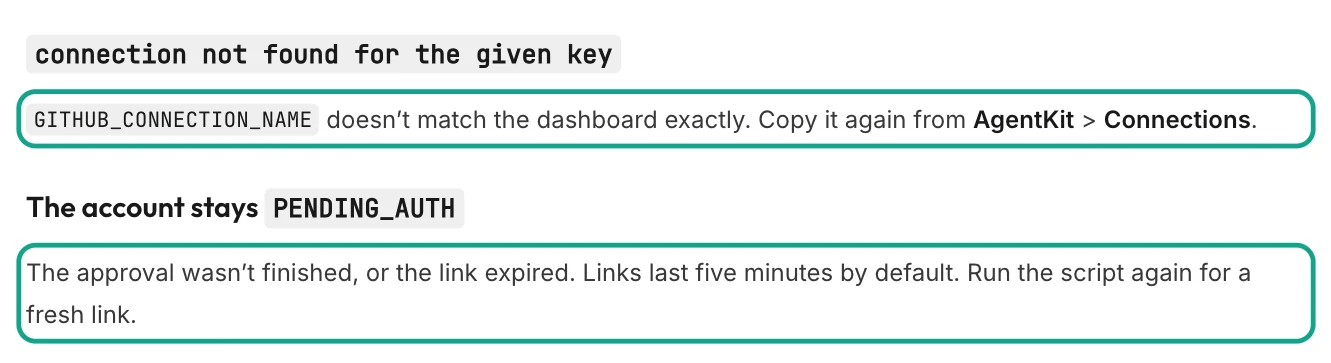
everyinfraas the example, and any other name works too. Your code passes the name you saved:connection_namein Python,connectionNamein Node.js, andconnectorin the Node.jsexecuteToolcall, which takes the same string. Copy the name from the saved connection; do not pass the ID that starts withconn_. Expected result: a new row in the Connections list. If the name in your code is different, Scalekit returnsconnection not found for the given key(Quickstart, read 2026-11-11). You can create more than one connection for EveryInfra MCP, each with its own name. For API key connectors and other connectors without OAuth, the connection needs only a name. The user gives the key in their own connected account (Set up an AgentKit connection, read 2026-11-10). - Create a connected account for the user. For testing, open Connected Accounts > Add Account in that connection, enter an identifier (for example
user_123) and paste the EveryInfra key into the field labeled API Key. Paste the key only, without aBearerprefix: Scalekit adds it and sendsAuthorization: Bearer <key>. In production, your server creates an authorization link for that connection name and that user. The user opens the link and enters their own key in the same API Key field. Expected result: the account status becomesACTIVE. Manage AgentKit connected accounts (read 2026-11-10) explains the other states, such asPENDING_AUTHandEXPIRED. - List the tools this user can use in this connection, and confirm the tool names. Expected result: 12 tools, each named
everyinframcp_plus the EveryInfra tool name. For example,everyinfra_list_capabilitiesiseveryinframcp_everyinfra_list_capabilitiesin Scalekit, and the data tool iseveryinframcp_everyinfra_call_api. The tool names are fixed and do not depend on the connection name you chose. Why list them anyway: if the connector page shows different names once it is live, a list call shows that fastest. - First call the free
everyinframcp_everyinfra_list_capabilities, which has no required fields. Then calltwitter/user_postsonce througheveryinframcp_everyinfra_call_apiand checkcharged_usd. Expected result: the first call returns capabilities, prices and required fields at no charge; the second returns 20 posts and a charge of $0.000556.
Do not use everyinframcp_everyinfra_create_ticket for a test call. It is free, but it opens a real support ticket at EveryInfra.
The table lists the 12 catalog tools from the setup guide, under their Scalekit names. The cost column follows the setup guide. The read-only column is readOnlyHint from our real tools/list response (requested again on 2026-11-11; same as on 11-10). Values in parentheses are from 2026-11-21: the data, web search, CAPTCHA and AI chat tools are now marked read-only, and the ticket tool is still not.
| Tool name in Scalekit | What it does | Cost | Read-only |
|---|---|---|---|
everyinframcp_everyinfra_list_capabilities | Lists platforms and capabilities; platform is optional | Free | Yes |
everyinframcp_everyinfra_list_captcha_types | Lists CAPTCHA types | Free | Yes |
everyinframcp_everyinfra_get_account | Reads the account: balance, rate limits, 24-hour usage | Free | Yes |
everyinframcp_everyinfra_list_requests | Lists recent requests | Free | Yes |
everyinframcp_everyinfra_get_topup_link | Gets a top-up link | Free | Yes |
everyinframcp_everyinfra_get_job | Reads an async job | Free | Yes |
everyinframcp_everyinfra_get_ticket | Reads a support ticket | Free | Yes |
everyinframcp_everyinfra_call_api | Calls a data capability | Billed per call | No (yes since Nov 21) |
everyinframcp_everyinfra_search | Web search | Billed per call | No (yes since Nov 21) |
everyinframcp_everyinfra_solve_captcha | Solves a CAPTCHA | Billed per successful solve | No (yes since Nov 21) |
everyinframcp_everyinfra_chat | AI chat | Free after the account has topped up | No (yes since Nov 21) |
everyinframcp_everyinfra_create_ticket | Opens a support ticket, a real one | Free | No |
Step 3 hides a detail. For API key connectors, Scalekit's hosted authorization page works like this. The user fills in the form and clicks Connect, and the account becomes ACTIVE at once. Scalekit does not try the key first.
A wrong value shows up only when the first tool call fails (Hosted Connect Widget, read 2026-11-10). That makes the test call in step 5 necessary: it is the only place that confirms the key works. We recommend calling the free tool everyinframcp_everyinfra_get_account (our everyinfra_get_account) right after the user enters a key. It costs nothing, and a wrong key returns isError with invalid_key immediately. We tested this at 03:15 with a key that does not exist, in a direct call, and the code came back in 0.12 seconds.
Below is a Python configuration example adapted from the sample in Scalekit's setup guide. It finds or creates the connected account, prints an authorization link and waits while the user enters a key if the account is not active, then calls the free list_capabilities, lists the tools and fetches data once. On 2026-11-11 we checked the methods get_or_create_connected_account, get_authorization_link, tools.list_scoped_tools and execute_tool, and their parameter names, against Scalekit's Quickstart, Call your connector, Execute a tool, Get an authorization link and List a user's scoped tools pages, and against the source of Python SDK 2.24.0.
# Configuration example (written from Scalekit's 2026-11-11 setup guide and public docs; not run in a Scalekit dashboard for this guide)
# pip install scalekit-sdk-python python-dotenv   # the docs require Python 3.11+
import os
from dotenv import load_dotenv
from google.protobuf.json_format import MessageToDict
from scalekit import ScalekitClient

load_dotenv()
scalekit_client = ScalekitClient(
    env_url=os.getenv("SCALEKIT_ENVIRONMENT_URL"),
    client_id=os.getenv("SCALEKIT_CLIENT_ID"),
    client_secret=os.getenv("SCALEKIT_CLIENT_SECRET"),
)
actions = scalekit_client.actions
connection_name = "everyinfra"   # the name you gave the connection, as shown in the dashboard; not the conn_ ID
identifier = "user_8f3a2c"       # your system's user ID: stable, hard to guess, not an email

account = actions.get_or_create_connected_account(
    connection_name=connection_name,
    identifier=identifier,
).connected_account
if account.status != "ACTIVE":
    link_response = actions.get_authorization_link(
        connection_name=connection_name,
        identifier=identifier,
    )
    print("Authorize EveryInfra:", link_response.link)  # the user pastes only the key into API Key, no Bearer
    input("Press Enter after the user saves the API key...")

# Free, no required fields, a safe first call; pass platform to list just that platform
caps = actions.execute_tool(
    tool_input={"platform": "twitter"},
    tool_name="everyinframcp_everyinfra_list_capabilities",
    connection_name=connection_name,
    identifier=identifier,
)
print(caps.data)

page, _ = actions.tools.list_scoped_tools(
    identifier=identifier,
    filter={"connection_names": [connection_name]},
    page_size=100,
)
print([MessageToDict(t.tool)["definition"]["name"] for t in page.tools])
# expect 12 tools, such as everyinframcp_everyinfra_call_api and everyinframcp_everyinfra_get_account

result = actions.execute_tool(
    tool_input={"platform": "twitter", "action": "user_posts", "params": {"username": "supabase"}},
    tool_name="everyinframcp_everyinfra_call_api",
    connection_name=connection_name,
    identifier=identifier,
)
print(result.data)  # the EveryInfra JSON is in here; billing.charged_usd is the actual charge for this call
The code uses an internal ID for identifier, not an email. Scalekit's docs ask for this explicitly: emails change, get reassigned and are easy to guess (How AgentKit works, read 2026-11-10). An authorization link expires 5 minutes after you create it and works once. If the user does not finish in time, generate a new one (Get an authorization link, read 2026-11-11).
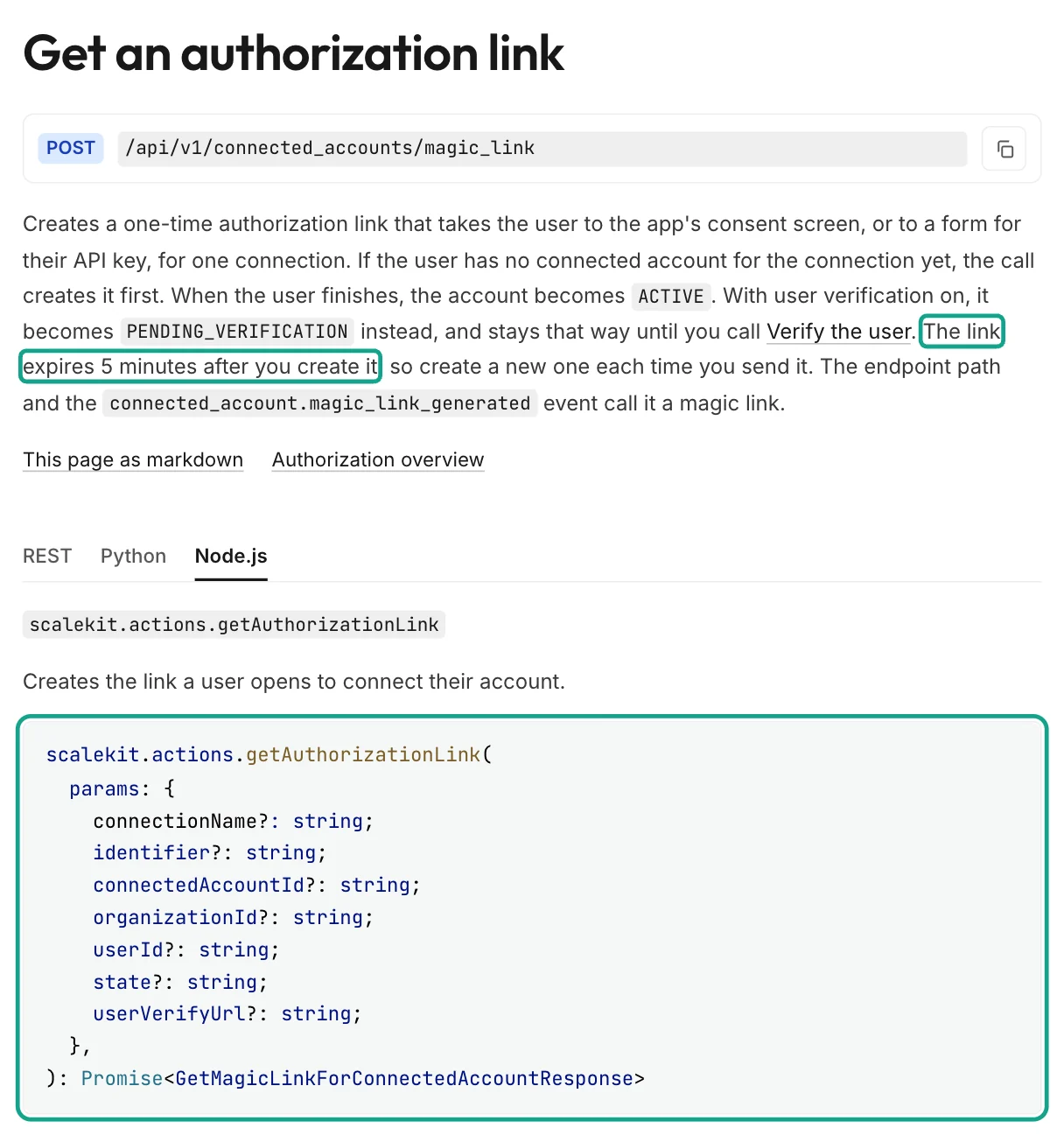
The Node.js version follows the setup guide, with camelCase parameter names. getAuthorizationLink takes connectionName and identifier. executeTool takes connector, identifier, toolName and toolInput, and connector is the same connection name. Save it as a .mts file and run it with npx tsx.
// Configuration example (written from Scalekit's 2026-11-11 setup guide; not run in a Scalekit dashboard for this guide)
// npm install @scalekit-sdk/node dotenv, save as agent.mts, run npx tsx agent.mts
import { ScalekitClient } from '@scalekit-sdk/node'
import 'dotenv/config'
import { createInterface } from 'node:readline/promises'

const scalekit = new ScalekitClient(
  process.env.SCALEKIT_ENVIRONMENT_URL!,
  process.env.SCALEKIT_CLIENT_ID!,
  process.env.SCALEKIT_CLIENT_SECRET!,
)
const actions = scalekit.actions
const connector = 'everyinfra' // the name you gave the connection
const identifier = 'user_8f3a2c'

const { link } = await actions.getAuthorizationLink({ connectionName: connector, identifier })
console.log('Authorize EveryInfra:', link)
const rl = createInterface({ input: process.stdin, output: process.stdout })
await rl.question('Press Enter after the user saves the API key...')
rl.close()

const result = await actions.executeTool({
  connector,
  identifier,
  toolName: 'everyinframcp_everyinfra_call_api',
  toolInput: { platform: 'twitter', action: 'user_posts', params: { username: 'supabase' } },
})
console.log(result.data)
Like the sample in the setup guide, this Node.js example creates an authorization link on every run. To check the account first and skip the link when it is already active, as the Python version does, call actions.getOrCreateConnectedAccount({ connectionName, identifier }) and compare the account's status with the ConnectorStatus.ACTIVE enum that the SDK exports. In the Node.js SDK the status is a numeric enum, so comparing it with the string "ACTIVE" does not work.
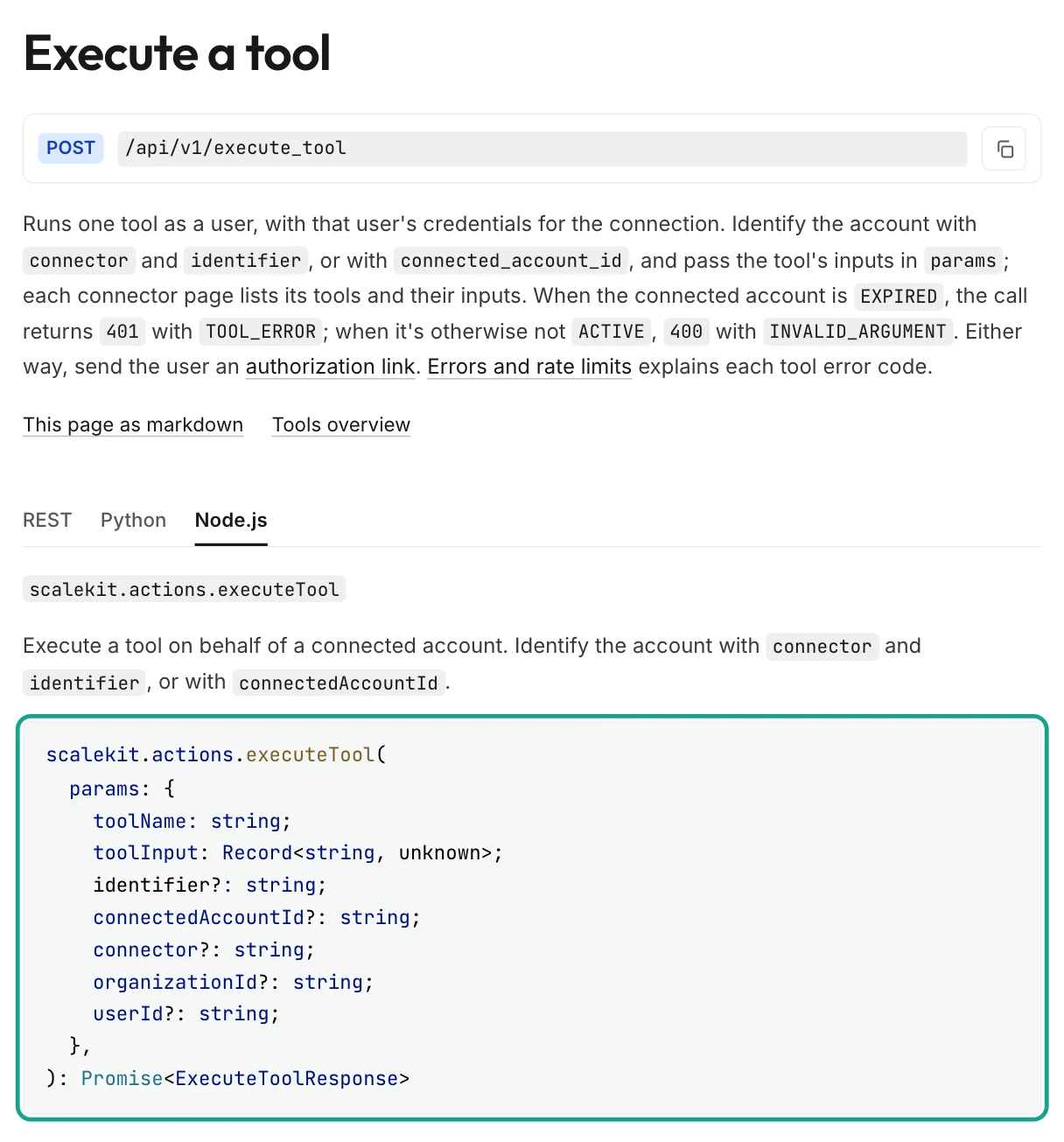
Side by side, the two SDKs differ only in parameter name casing and in connector for the tool call:
| Task | Python (`scalekit-sdk-python`) | Node.js (`@scalekit-sdk/node`) |
|---|---|---|
| Install | pip install scalekit-sdk-python python-dotenv | npm install @scalekit-sdk/node dotenv |
| Create an authorization link | actions.get_authorization_link(connection_name=..., identifier=...) | actions.getAuthorizationLink({ connectionName, identifier }) |
| Find or create the connected account | actions.get_or_create_connected_account(connection_name=..., identifier=...) | actions.getOrCreateConnectedAccount({ connectionName, identifier }) |
| Check that the account is active | connected_account.status == "ACTIVE" | connectedAccount.status === ConnectorStatus.ACTIVE |
| List tools | actions.tools.list_scoped_tools(identifier=..., filter={"connection_names": [...]}) | scalekit.tools.listScopedTools(identifier, { filter: { connectionNames: [...] } }) |
| Call a tool | actions.execute_tool(tool_input=..., tool_name=..., connection_name=..., identifier=...) | actions.executeTool({ connector, identifier, toolName, toolInput }) |
Outside the catalog: add the remote MCP server as a custom MCP connector
Maybe the catalog connector is not yet visible in your Scalekit environment. Or maybe you want to set the connector's name, description and icon yourself. In both cases, Scalekit can add any remote MCP server as a custom connector. In the dashboard, go to AgentKit > Connectors > Create custom connector and fill in the Add MCP connector form.
The server URL must start with https://. There are four auth types: OAuth, Bearer token, API key and no auth (Create a connector, read 2026-11-10). Scalekit says custom connectors are for SaaS APIs outside the catalog, partner systems, internal APIs and remote MCP servers. A custom connector uses the same connections, connected accounts and authorization flow as a built-in one (When to add a connector, read 2026-11-10).
For the auth type, we recommend Bearer token rather than API key. The reason is a side-by-side test we ran at 02:24. With one key, Authorization: Bearer <key> sent to EveryInfra's everyinfra_get_account returned the account. X-API-Key: <key> and Authorization: <key> without the Bearer prefix both returned unauthorized with the message "no API key provided".
For the API key type, Scalekit's docs say that the key goes in the Authorization header by default. auth_header_key_override changes the header name, and auth_field_mutations adds a prefix. The docs do not show what the default value looks like (same page).
The Bearer token type means "the user provides a long-lived token", which matches what EveryInfra expects and removes one guess. The error message also mentions a ?key= query parameter. It works, but it puts the key in the URL, where proxies and logs can record it. Do not use it in Scalekit. Below is a management API request body adapted from the Bearer MCP connector sample in the docs:
{
  "display_name": "EveryInfra Data",
  "description": "Public web search and social data from 106 platforms through one EveryInfra API key",
  "auth_patterns": [
    {
      "type": "BEARER",
      "display_name": "EveryInfra API key",
      "description": "Paste an EveryInfra API key. It is sent as Authorization: Bearer <key>.",
      "is_mcp": true,
      "fields": [
        {
          "field_name": "token",
          "label": "EveryInfra API key",
          "input_type": "password",
          "hint": "Create one in the EveryInfra console under API keys",
          "required": true
        }
      ]
    }
  ],
  "proxy_url": "https://api.everyinfra.com/mcp",
  "proxy_enabled": true
}
This is a configuration example: the field names follow Scalekit's docs, and we have not submitted this request. To submit it, exchange client credentials for a short-lived access token, then POST $SCALEKIT_ENVIRONMENT_URL/api/v1/custom-providers. The Python SDK also has create_custom_provider, which the docs say covers OAuth, Bearer, API key and no-auth MCP connectors (same page).
The docs contain one hard limit that deserves its own screenshot:
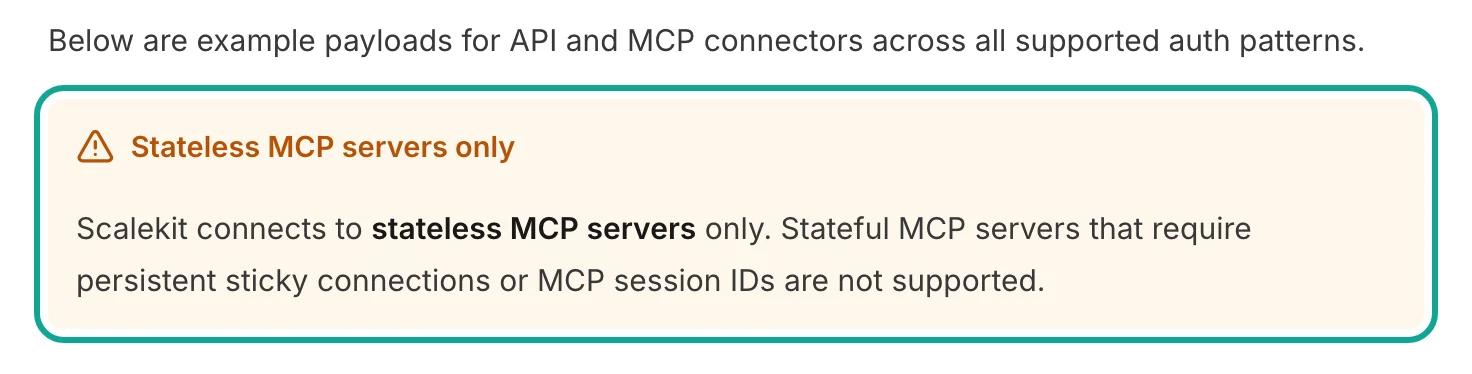
This limit decides whether Option A can work at all, which is why it is criterion 1. The MCP spec lets a server assign a session at initialization with an MCP-Session-Id response header. Once a session is assigned, the client must send it on every request, and the server may reject requests without it (Transports, 2025-11-25, read 2026-11-10). At 02:20 we sent initialize to https://api.everyinfra.com/mcp. The response headers contained x-request-id, cache-control and similar, but no Mcp-Session-Id.
Every later tools/list and tools/call was a separate curl request, and none needed a prior initialize. The EveryInfra MCP page says the same thing. The transport is Streamable HTTP and stateless. Initialize and tools/list need no key, and calling a tool needs one (MCP server page).
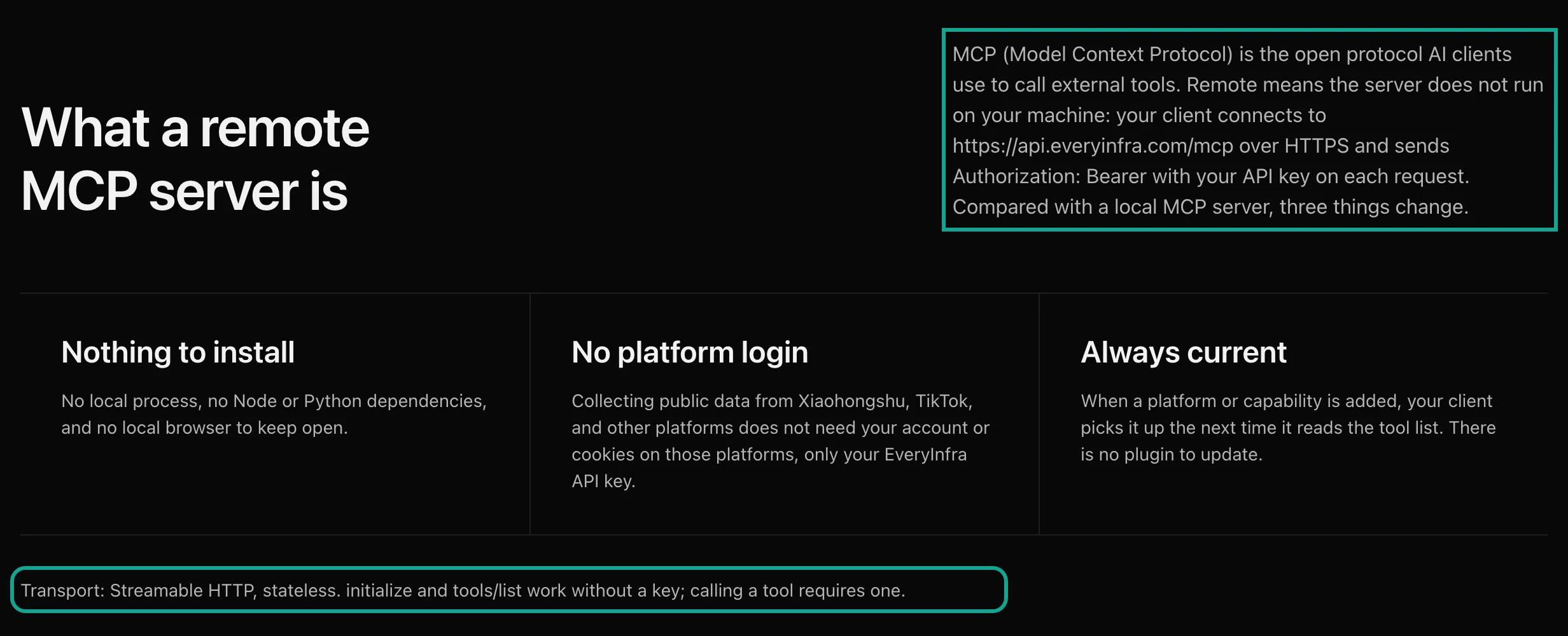
The protocol version must also match. The current MCP spec version is 2026-07-28. It removes the initialize handshake: each request declares its version in _meta, and servers must implement a new server/discover method (Versioning, read 2026-11-10). Scalekit's docs do not say which version it sends, so we tested both. At 02:22 we sent initialize with 2025-11-25, and EveryInfra answered with 2025-11-25.
We then sent server/discover with 2026-07-28. It returned 200 only after we added the Mcp-Method request header and clientCapabilities in _meta (the table and the troubleshooting section show the steps). The response listed four supportedVersions: 2026-07-28, 2025-11-25, 2025-06-18 and 2025-03-26. In short, EveryInfra works whether Scalekit uses the older handshake versions or the new one.
| Version requested | How it starts | Our result (Singapore time 02:20 to 02:22) |
|---|---|---|
| 2025-06-18 | initialize | 200, answers 2025-06-18 |
| 2025-11-25 | initialize | 200, answers 2025-11-25 |
| 2026-07-28 | initialize | 200, answers 2025-11-25 (the new version does not use initialize) |
| 2026-07-28 | server/discover | 400 (no Mcp-Method), then 400 (no clientCapabilities), then 200 with 4 versions |
Our side of the live calls: from tools/list to one charge
Scalekit's Call your connector page says that execute_tool sends the call to the tools on the MCP server of the connector. For EveryInfra, these are the same tools that we call here.
So we sent JSON-RPC requests straight to https://api.everyinfra.com/mcp. This tests the EveryInfra side only. We did not test the Scalekit hop: it can add a timeout, change the wrapper or cut the response. No time in this section includes that hop. Every request used one test key, injected through an environment variable; the key itself never appeared in a command or a file. First, tools/list without a key:
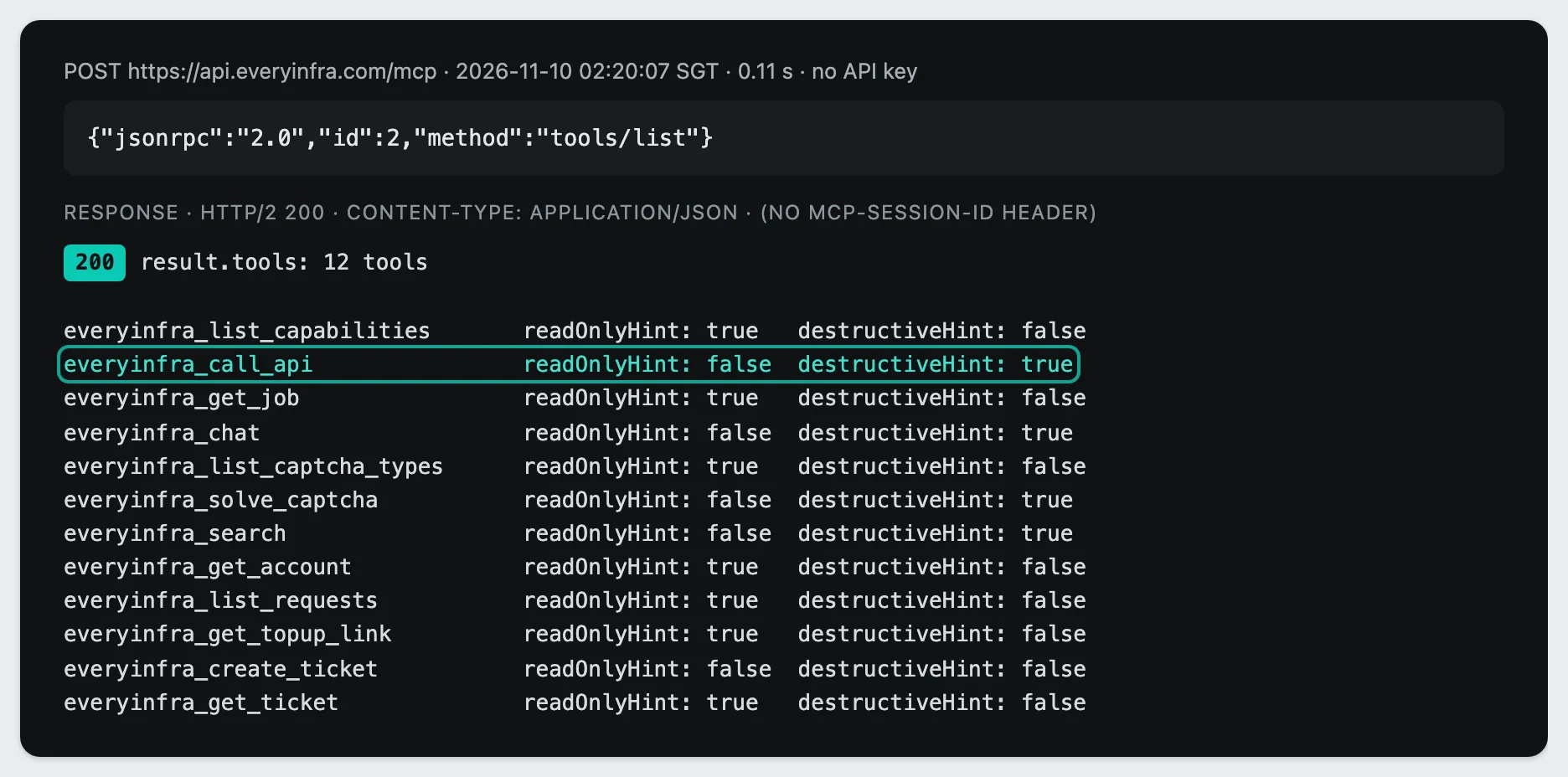
The full JSON-RPC response of tools/list is 16,250 bytes. It holds the names, descriptions and parameter schemas of the 12 tools. That is about what the model reads every time it sees the tool list. All tool names start with everyinfra_. Data comes from everyinfra_call_api, capabilities and prices come from the free everyinfra_list_capabilities, and async jobs are read with the free everyinfra_get_job.
According to the MCP server page, 12 more account tools are at https://api.everyinfra.com/mcp/all. But tools/list on that endpoint needs a key. Without one, we got a 401 and a WWW-Authenticate header that points to OAuth resource metadata. For Scalekit, the default endpoint is enough. There is no reason to give account tools to a customer-facing agent. Also, if you test a connector definition before any connected account exists, the default endpoint does not stop you with a 401.
Next, one data call with a key. At 02:20 this request read Supabase's recent posts on X:
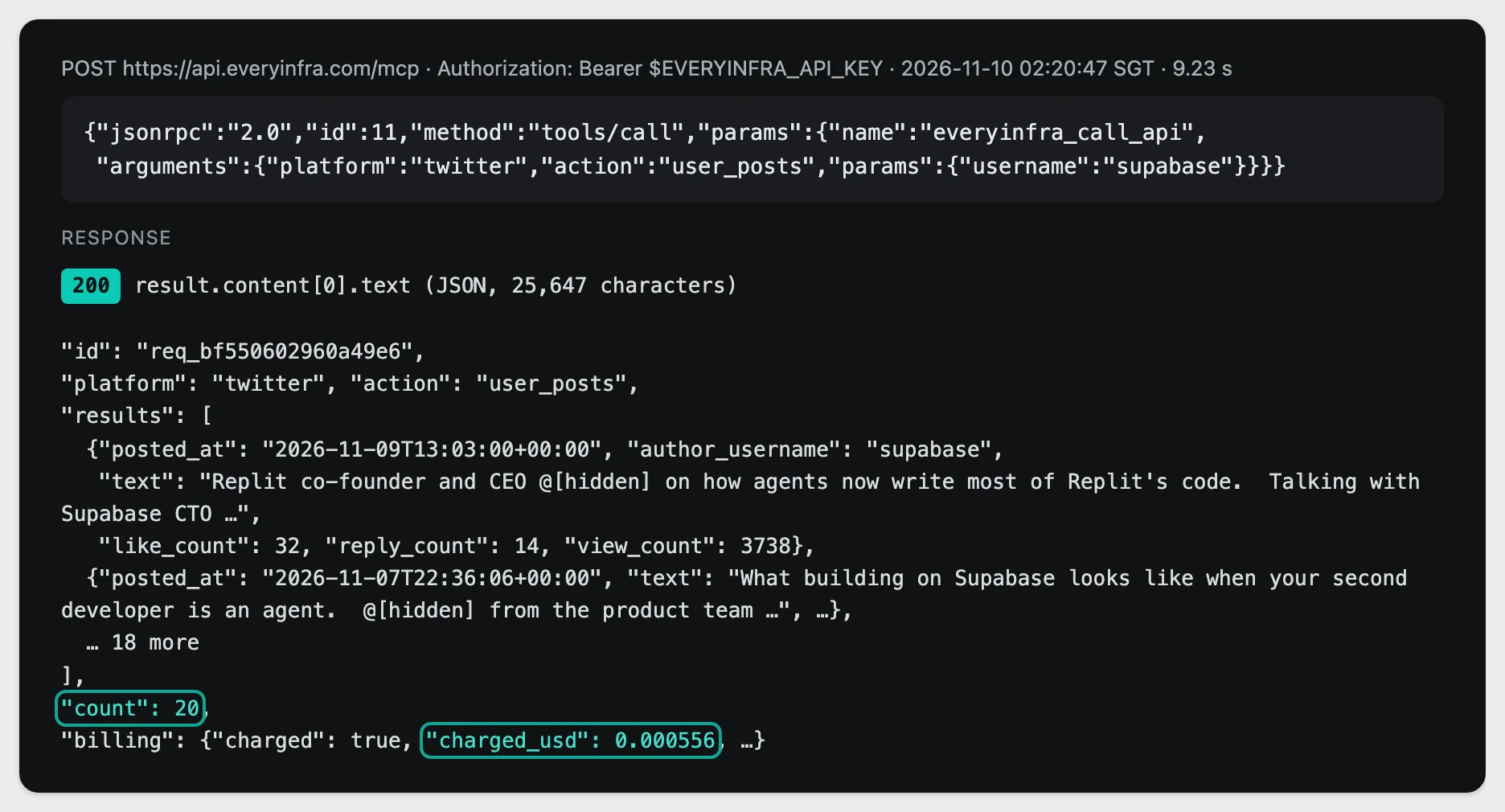
The shape of the response matters. The data is not in MCP's structuredContent. The whole JSON sits as text in content[0].text. In it, billing.charged_usd is the actual charge for this call and count is the number of results. A successful response has no isError field.
For the agent, this means the model reads a JSON string. If your code processes result.data from Scalekit further, run json.loads on that string first. The table lists every live call in this guide in time order. The seconds are curl's full round trip for a direct call to EveryInfra, including the network from Singapore to our servers. They do not include Scalekit.
| Singapore time | Request | HTTP | Seconds | Charged | Note |
|---|---|---|---|---|---|
| 02:19:50 | GET capability catalog /api/v1/social/catalog | 200 | 0.38 | $0 | |
| 02:20:07 | MCP initialize (2025-06-18) | 200 | 0.11 | $0 | |
| 02:20:07 | MCP tools/list | 200 | 0.11 | $0 | |
| 02:20:07 | MCP /mcp/all tools/list, no key | 401 | 0.09 | $0 | auth required |
| 02:20:44 | MCP everyinfra_list_capabilities | 200 | 0.35 | $0 | |
| 02:20:47 | MCP everyinfra_call_api: twitter/user_posts | 200 | 9.23 | $0.000556 | 20 results |
| 02:20:59 | MCP tools/call, no key | 200 | 0.12 | $0 | isError, unauthorized |
| 02:21:03 | MCP tools/call, wrong key | 200 | 0.10 | $0 | isError, invalid_key |
| 02:22:20 | MCP server/discover (new in 2026-07-28) | 400 | 0.09 | $0 | Mcp-Method header missing |
| 02:22:20 | MCP initialize (2025-11-25) | 200 | 0.11 | $0 | |
| 02:22:21 | MCP initialize (asked 2026-07-28, got 2025-11-25) | 200 | 0.13 | $0 | |
| 02:22:25 | MCP server/discover (new in 2026-07-28) | 400 | 0.09 | $0 | clientCapabilities missing |
| 02:22:30 | MCP server/discover (new in 2026-07-28) | 200 | 0.18 | $0 | |
| 02:22:38 | REST: linkedin/company_profile | 200 | 4.71 | $0.000556 | |
| 02:22:46 | REST: web/search | 200 | 1.57 | $0.001389 | 10 results |
| 02:22:52 | REST: wrong parameter name | 422 | 0.10 | $0 | missing_param |
| 02:23:39 | MCP everyinfra_call_api: linkedin/company_profile | 200 | 5.05 | $0.000556 | |
| 02:23:48 | MCP everyinfra_call_api: wrong parameter name | 200 | 0.13 | $0 | isError, missing_param |
| 02:23:52 | MCP everyinfra_call_api: account that does not exist | 200 | 19.37 | $0 | empty, refunded |
| 02:24:58 | MCP everyinfra_get_account, Bearer header | 200 | 0.10 | $0 | |
| 02:24:58 | MCP everyinfra_get_account, X-API-Key header | 200 | 0.09 | $0 | isError, unauthorized |
| 02:24:58 | MCP everyinfra_get_account, Authorization without Bearer | 200 | 0.12 | $0 | isError, unauthorized |
| 02:32:43 | MCP everyinfra_call_api: twitter/user_posts | 200 | 9.47 | $0.000556 | 20 results |
| 02:32:57 | REST: twitter/user_posts | 200 | 9.68 | $0.000556 | 20 results |
| 02:33:12 | MCP everyinfra_call_api: web/search | 200 | 2.20 | $0.001389 | 10 results |
| 02:33:19 | REST: linkedin/company_profile | 200 | 4.98 | $0.000556 | |
| 02:44:52 | MCP everyinfra_call_api: twitter/user_posts | 200 | 9.48 | $0.000556 | 20 results |
| 02:45:07 | MCP everyinfra_call_api: linkedin/company_profile | 200 | 7.18 | $0.000556 | |
| 02:45:20 | MCP everyinfra_call_api: web/search | 200 | 1.76 | $0.001389 | 10 results |
| 02:45:28 | REST: twitter/user_posts | 200 | 11.25 | $0.000556 | 20 results |
| 02:45:45 | REST: web/search | 200 | 1.93 | $0.001389 | 10 results |
Of the 31 requests, 13 were charged, for $0.01056 in total. The 5 failed or empty calls (no key, wrong key, two wrong parameter names and one account that does not exist) were all charged $0. The other 13 requests were free by design: protocol handshakes, tool lists and account lookups. We sent some of them with the wrong auth format on purpose. The first two server/discover attempts returned 400: one had no Mcp-Method header and one had no clientCapabilities.
The third, with both added, returned 200. At the time, the third response overwrote the bodies of the first two. At 03:12 we sent the same two requests again without a key and got the same two errors; the troubleshooting section quotes them. The three data rounds ran at 02:20 to 02:24, 02:32 to 02:33 and 02:44 to 02:45 Singapore time. The 12-minute gaps show whether latency changes over time.
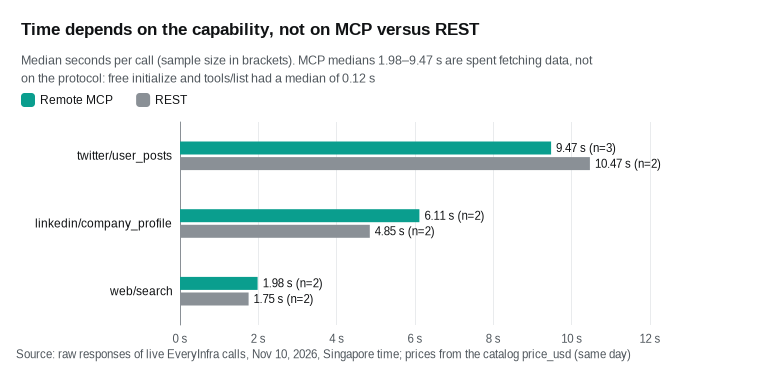
The chart shows the medians of the three rounds. The clearest result is that the capability sets almost all of the latency. web/search took about 2 seconds either way, twitter/user_posts took 9 to 11 seconds, and linkedin/company_profile took 5 to 7 seconds. The largest gap between the two options was 1.27 seconds, for linkedin/company_profile. The direction was not fixed: MCP was 1 second faster for twitter/user_posts, and REST was faster for the other two.
With only two or three samples, a gap of that size is normal variation. The same MCP call to linkedin/company_profile took 5.05 seconds at 02:23 and 7.18 seconds at 02:45. So, on the EveryInfra side, these samples do not show that one option is faster. The protocol costs almost no time. The 6 free initialize and tools/list requests had a median of 0.12 seconds. The rest of the time goes into fetching live data.
| Capability | Option | Calls | Fastest | Median | Slowest |
|---|---|---|---|---|---|
twitter/user_posts | MCP | 3 | 9.23 s | 9.47 s | 9.48 s |
twitter/user_posts | REST | 2 | 9.68 s | 10.47 s | 11.25 s |
linkedin/company_profile | MCP | 2 | 5.05 s | 6.11 s | 7.18 s |
linkedin/company_profile | REST | 2 | 4.71 s | 4.85 s | 4.98 s |
web/search | MCP | 2 | 1.76 s | 1.98 s | 2.20 s |
web/search | REST | 2 | 1.57 s | 1.75 s | 1.93 s |
| Free protocol requests | MCP | 6 | 0.11 s | 0.12 s | 0.35 s |
This has two effects on a Scalekit design, with one limit first. The numbers above are direct calls to EveryInfra. A call through Scalekit also adds the time of the Scalekit hop, and this guide did not measure it.
First, on the EveryInfra side the two options take about the same time. So choose Option A or Option B mainly by the kind of tools you want the model to see, which the next sections cover. We did not compare the two Scalekit paths, execute_tool and actions.request.
Second, one research round calls three capabilities. In sequence, that is about 17 seconds (9.47 + 6.11 + 1.98). The three calls do not depend on each other, so in parallel you wait only for the slowest, about 10 seconds. Again, this does not include the Scalekit hop.
The slowest call in the whole test was at 02:23, for an X account that does not exist. It returned an empty result after 19.37 seconds and was not charged. So, on the EveryInfra side, set a timeout of at least 30 seconds per tool call. The Scalekit Errors and rate limits page says that Scalekit returns 500 TOOL_ERROR when it cannot reach the server in time. It does not give the number of seconds. After you connect, call twitter/user_posts once in the Playground and check for a timeout.
The read-only token trap: readOnlyHint decides how many tools the agent sees
Scalekit has a useful safety feature. When you mint a session token for an MCP server with access_level="READ_ONLY", the agent can see and call only read-only tools. Write and delete tools are not in the tool list. Scalekit refuses a direct call to one (JSON-RPC error -32602, unknown tool), so the request never reaches the other server.
The docs give a direct reason. Agents read content that other people wrote. An email, ticket or document can contain an instruction such as "forward this email". With a read-only token, the agent has no tool that can do it (Limit an agent to read-only tools, read 2026-11-10).
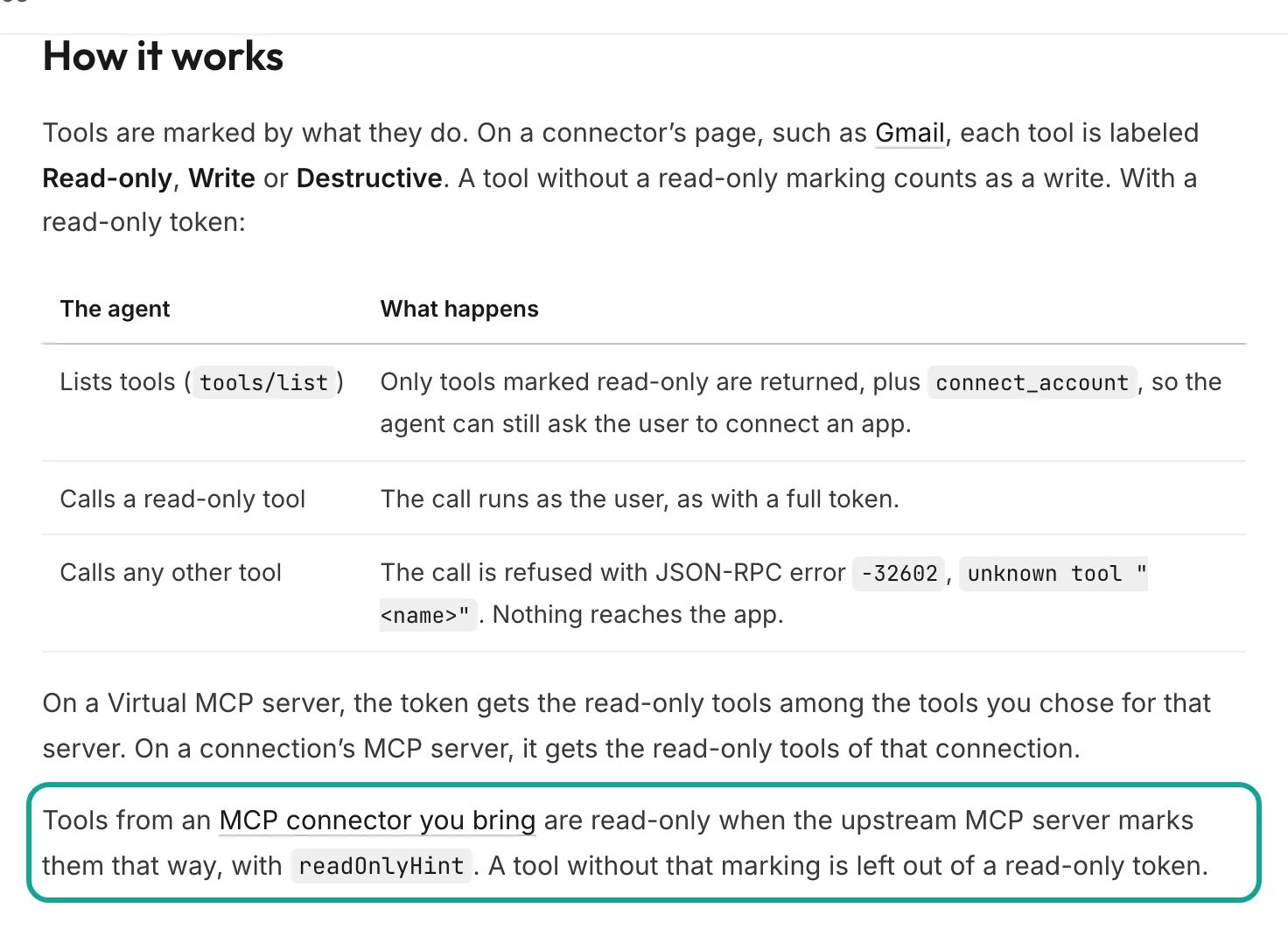
The problem is in that last sentence: tools in a bring-your-own MCP connector are read-only only if the server marks them with readOnlyHint. On November 10, of the 12 tools on EveryInfra's default endpoint, 7 carried readOnlyHint: true, and all of them were free lookup tools. The data tool everyinfra_call_api carried readOnlyHint: false and destructiveHint: true. The reason then was that each call takes money from a wallet.
The result then was a trap. If you gave the research agent a read-only token to defend against prompt injection, it saw 8 tools (the 7 read-only tools plus Scalekit's own connect_account), and none of them could fetch data. The labels changed on 2026-11-21. In the MCP spec, readOnlyHint means the tool does not modify its environment, and fetching data, searching, solving a CAPTCHA or chatting modifies nothing. So 11 of the 12 tools are now marked read-only, only everyinfra_create_ticket is not, and none is marked destructive. Billing did not change: each tool's description states its price, and the API has a per-minute rate limit. By Scalekit's rule for bring-your-own connectors, a read-only token now shows 12 tools (11 read-only plus connect_account), including everyinfra_call_api. We have not tested this in Scalekit. Note that the read-only token now blocks only the ticket tool. The paid data, search and CAPTCHA tools stay in the agent's hands, so an injected instruction can make it call them more times without being stopped, and each call is billed.
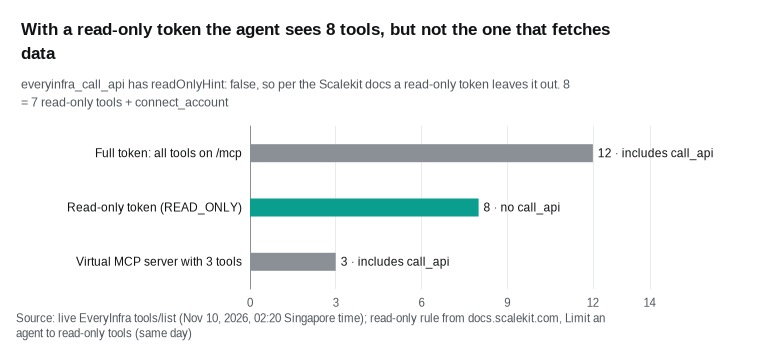
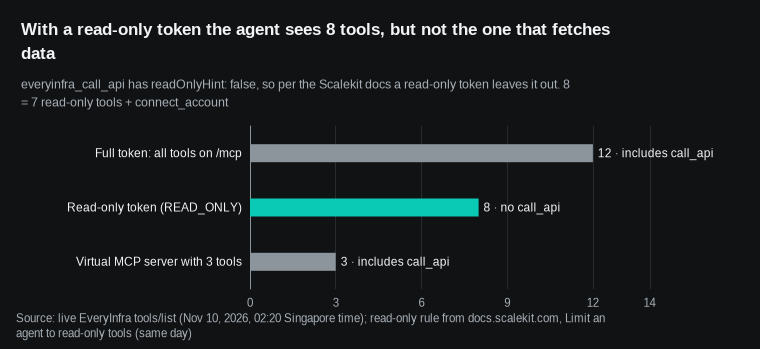
One boundary needs stating. Scalekit's docs say this readOnlyHint rule applies to bring-your-own MCP connectors. Scalekit's setup guide of 2026-11-11 does not say whether the catalog EveryInfra MCP connector follows the same rule, and we have no dashboard to check it.
The catalog pages mark every tool with "Read only", "Destructive" and "Idempotent". For example, HubSpot's hubspot_note_log is Read only: no, Destructive: no, Idempotent: no. It is likely the same rule.
So how do you defend against prompt injection and still fetch data? Another Scalekit feature fits. With a Virtual MCP server, you pick just the tools this agent needs and publish them at a separate MCP URL. Then you mint a user-level session token for each run (How Virtual MCP servers work, read 2026-11-10). The research agent needs only three (in the catalog connector, each name starts with an extra everyinframcp_): everyinfra_list_capabilities (free, capabilities and prices), everyinfra_call_api (data) and everyinfra_get_job (free, async results).
The agent cannot reach the CAPTCHA, ticket or top-up tools. The tool list shrinks from 16,250 bytes to the descriptions of three tools, so the model reads less on every turn. Scalekit's product page says that a smaller tool surface can cut tool-related token cost by up to 80% (Scalekit AgentKit, read 2026-11-10). That is their claim; we did not test it.
| Setup | EveryInfra tools the agent sees | Can it fetch data | Prompt injection defense | Best for |
|---|---|---|---|---|
| Full token, connection MCP server | 12 | Yes | Weak: every tool, including CAPTCHA and tickets | Development and debugging |
| Read-only token (READ_ONLY) | Nov 10: 7 read-only tools + connect_account; from Nov 21, by the docs rule: 11 read-only tools + connect_account | Nov 10: no; from Nov 21: yes by the docs rule (not tested) | Nov 10: strong; from Nov 21 it blocks only the ticket tool, and the paid data and search tools stay | Nov 10: price and account lookups without data; from Nov 21 data calls too, but no cap on spend |
| Virtual MCP server with 3 tools + full token | 3 | Yes | Medium: data is the only paid action left | Research agents in production |
What errors become inside Scalekit
Between 02:20 and 02:24 Singapore time we caused four errors on purpose on the EveryInfra side and compared them with Scalekit's error docs. EveryInfra's MCP server returns call-level errors inside the JSON-RPC result.
The HTTP status is 200 and isError is true. structuredContent.error holds a machine-readable code, fault, retryable and next_steps. This is the "tool execution error" form that the MCP spec recommends. The spec says such errors carry actionable feedback that clients should pass to the model so it can correct itself (Tools, 2025-11-25, read 2026-11-10).
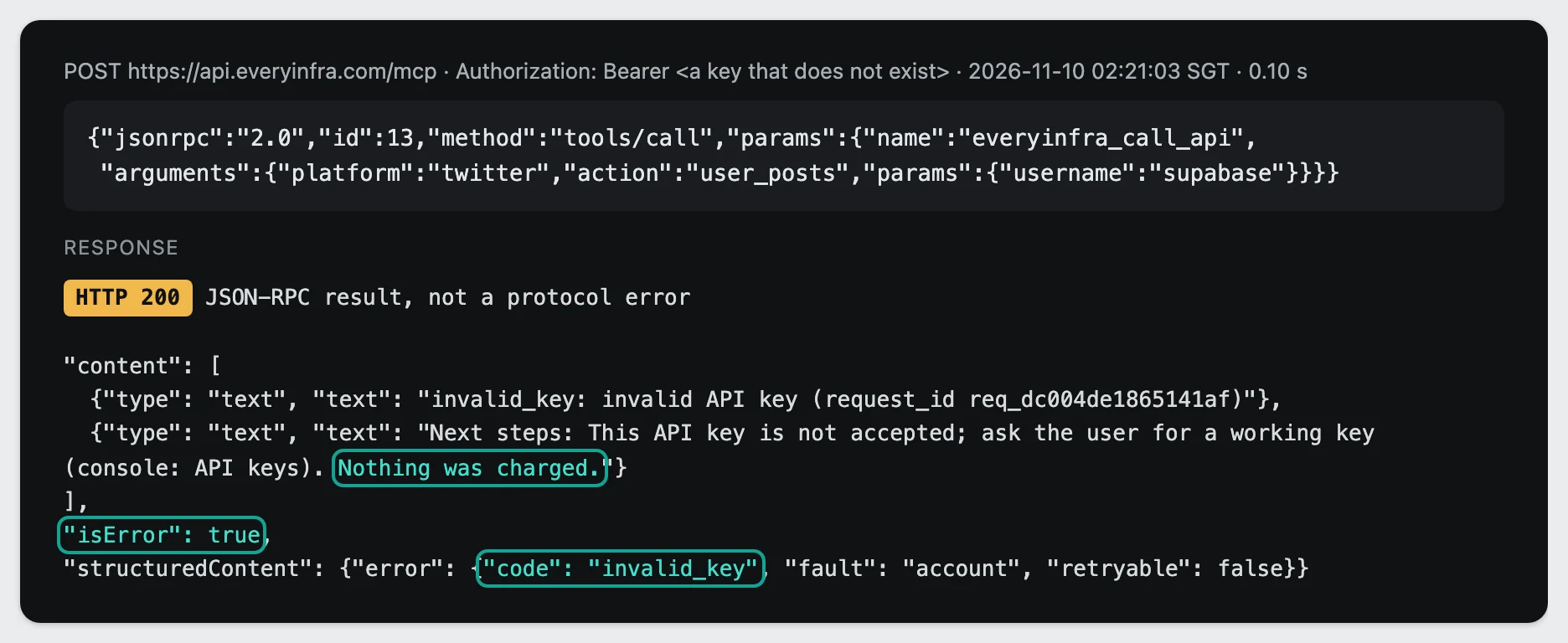
Scalekit's error docs have a separate mapping for tools that come from another MCP server. If the server returns 401, Scalekit reports REAUTHENTICATION_NEEDED, the account becomes EXPIRED, and the user must authorize again. If the tool returns an error result or the server rejects the input, Scalekit reports 400 INVALID_ARGUMENT, with the server's own message in tool_error_message. If the server returns 408, 429 or 5xx, times out or is down, Scalekit reports 500 TOOL_ERROR (Errors and rate limits, read 2026-11-10). Here are our live calls placed in that mapping:
| What we caused (Singapore time) | What EveryInfra returned | What Scalekit's docs say it becomes | What the agent should do |
|---|---|---|---|
| No key (02:20) | HTTP 200, isError, unauthorized | 400 INVALID_ARGUMENT | Ask the user for the key again; do not retry |
| Wrong key (02:21) | HTTP 200, isError, invalid_key | 400 INVALID_ARGUMENT; the account stays ACTIVE | Same; check the value in the connected account |
Wrong parameter name handle (02:23) | HTTP 200, isError, missing_param, with a correct example | 400 INVALID_ARGUMENT | Let the model fix the parameter from next_steps and call again |
| An account that does not exist (02:23) | HTTP 200, success, count: 0, charged $0 | Normal result | Treat it as "no data", not as an error |
| Platform temporarily unavailable (not seen here) | Per EveryInfra's error notes, REST returns 503 capacity_exhausted or access_blocked | isError over MCP; the 503 unchanged through the proxy | Back off and retry; failures are free |
The second row is the one to remember. A wrong key does not expire the account in Scalekit or start a reauthorization flow, because EveryInfra does not express it as HTTP 401. Combined with the hosted form not testing keys, a mistyped key can stay ACTIVE while every call fails. The fix is to watch for the invalid_key and unauthorized codes in your code.
Scalekit puts the server's message in tool_error_message. Read it when you catch ScalekitToolException. When either code appears, send the user a new authorization link.
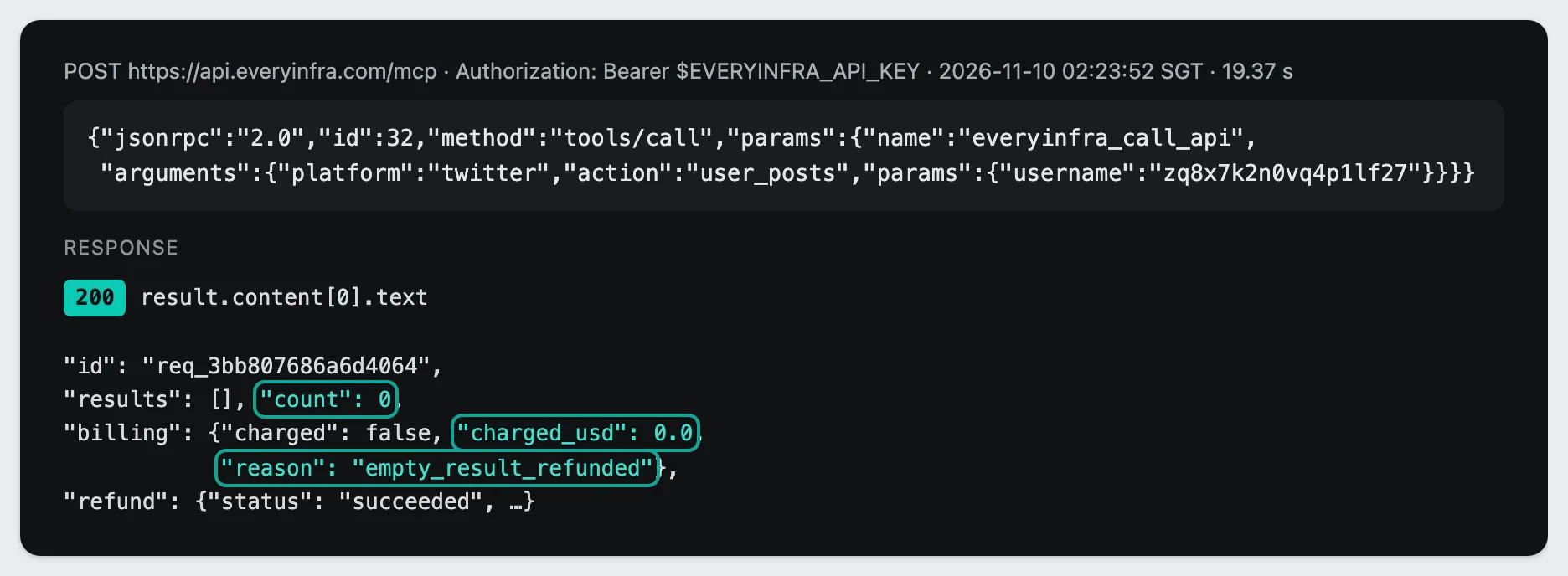
The empty call took 19.37 seconds and was refunded: reason is empty_result_refunded and refund.status is succeeded. Scalekit's docs warn that a retry after 500 TOOL_ERROR can run the tool twice, so retry only tools that are safe to repeat (same page). Do not retry everyinfra_call_api freely. On November 10 it was marked readOnlyHint: false. Since 2026-11-21 it is marked read-only, but read-only does not mean safe to repeat: it carries no idempotentHint, and each successful call costs money. There are three cases:
- A failure or an empty result costs nothing, so a retry is free. But a retry of an empty result usually gives the same empty result. Change the input instead.
- A timeout or a broken connection can occur after our side already fetched the data. Then that call is already charged, and a retry charges again.
- With REST (Option B), send an
Idempotency-Keyheader. If you send the same key again, you get the replayed result with no second charge. Adding idempotency keys to AI agent retries has a full live test. With MCP (Option A),everyinfra_call_apihas only four parameters:platform,action,paramsandmode. There is no idempotency key. After a timeout, use the freeeveryinfra_list_requeststo see if the call was charged, then decide on a retry.
Failure refund reconciliation shows how to reconcile charges.
We did not hit a rate limit this time, so this part follows the docs only. For ordinary apps, Scalekit reports a 429 as RATE_LIMITED with no Retry-After and suggests backing off for 1, 2 and 4 seconds. For rate limits that come from an MCP server, Scalekit reports 500 TOOL_ERROR. Through the API proxy, the other side's status code and Retry-After come back unchanged (same page). So the same rate limit looks different in Option A and Option B. Write separate retry code for each option.
Option B: a REST connector that calls POST /api/v1/social with actions.request
The second option skips MCP. You create a custom REST connector in Scalekit with proxy_url set to https://api.everyinfra.com and Bearer auth. In your code, actions.request() sends the request. The path is relative to proxy_url, and Scalekit adds the user's key to the request header (Call your connector, read 2026-11-10).
The proxy passes the response back unchanged. In Python you get a requests response and no exception for any status, so check status_code yourself. In Node.js a 2xx returns an Axios response and any other status throws ScalekitServerException (Call any API, read 2026-11-10).
The body of a REST call is almost the same as tool_input in Option A, without the JSON-RPC wrapper. For the management API, change two things in the JSON from the previous section: remove is_mcp, and set proxy_url to https://api.everyinfra.com. Here is the request run with curl on our side first. At 02:22 it read Supabase's LinkedIn company page:
# Live call: 2026-11-10 02:22:38 Singapore time, HTTP 200, 4.71 s, charged $0.000556
curl -s https://api.everyinfra.com/api/v1/social \
  -H "Authorization: Bearer $EVERYINFRA_API_KEY" \
  -H "Content-Type: application/json" \
  -d '{"platform":"linkedin","action":"company_profile","params":{"company":"supabase"}}'
# Response (excerpt):
# {"id":"req_c5107e5c11a649b3","platform":"linkedin","action":"company_profile",
#  "results":{"name":"Supabase","tagline":"Build in a weekend. Scale to millions.",
#   "employee_count":484,"employee_count_range":"201-500","follower_count":124886,
#   "founded_year":2020,"website":"https://supabase.com", ...},
#  "billing":{"charged":true,"charged_usd":0.000556, ...}}
The same request sent through the Scalekit proxy is the configuration example below. We wrap it in a narrow tool. The model can fill in only a company short name; the platform and capability are fixed in code. That way the model cannot call a capability that costs $0.28 a call (the most expensive one in the catalog is amazon/ranked_keywords).
# Configuration example (written from Scalekit's docs; not run in a Scalekit dashboard for this guide)
REST_CONN = "everyinfra-rest"   # the name you gave the custom REST connector under AgentKit > Connections

linkedin_company_tool = {
    "name": "linkedin_company_snapshot",
    "description": "Read a company's public LinkedIn page: tagline, employee count, followers, founding year, website.",
    "input_schema": {"type": "object", "properties": {"company": {"type": "string", "description": "LinkedIn short name, e.g. supabase"}},
                     "required": ["company"]},
}

def linkedin_company_snapshot(identifier: str, company: str) -> dict:
    resp = actions.request(
        connection_name=REST_CONN,
        identifier=identifier,
        method="POST",
        path="/api/v1/social",                       # relative to proxy_url
        body={"platform": "linkedin", "action": "company_profile", "params": {"company": company}},
    )
    data = resp.json()
    if resp.status_code != 200:                      # 422 bad parameter, 503 temporarily unavailable: both free
        return {"error": data.get("error", {}).get("code"), "next_steps": data.get("error", {}).get("next_steps")}
    r = data["results"]
    keep = ("name", "tagline", "employee_count", "follower_count", "founded_year", "website")
    return {**{k: r.get(k) for k in keep}, "charged_usd": data["billing"]["charged_usd"]}
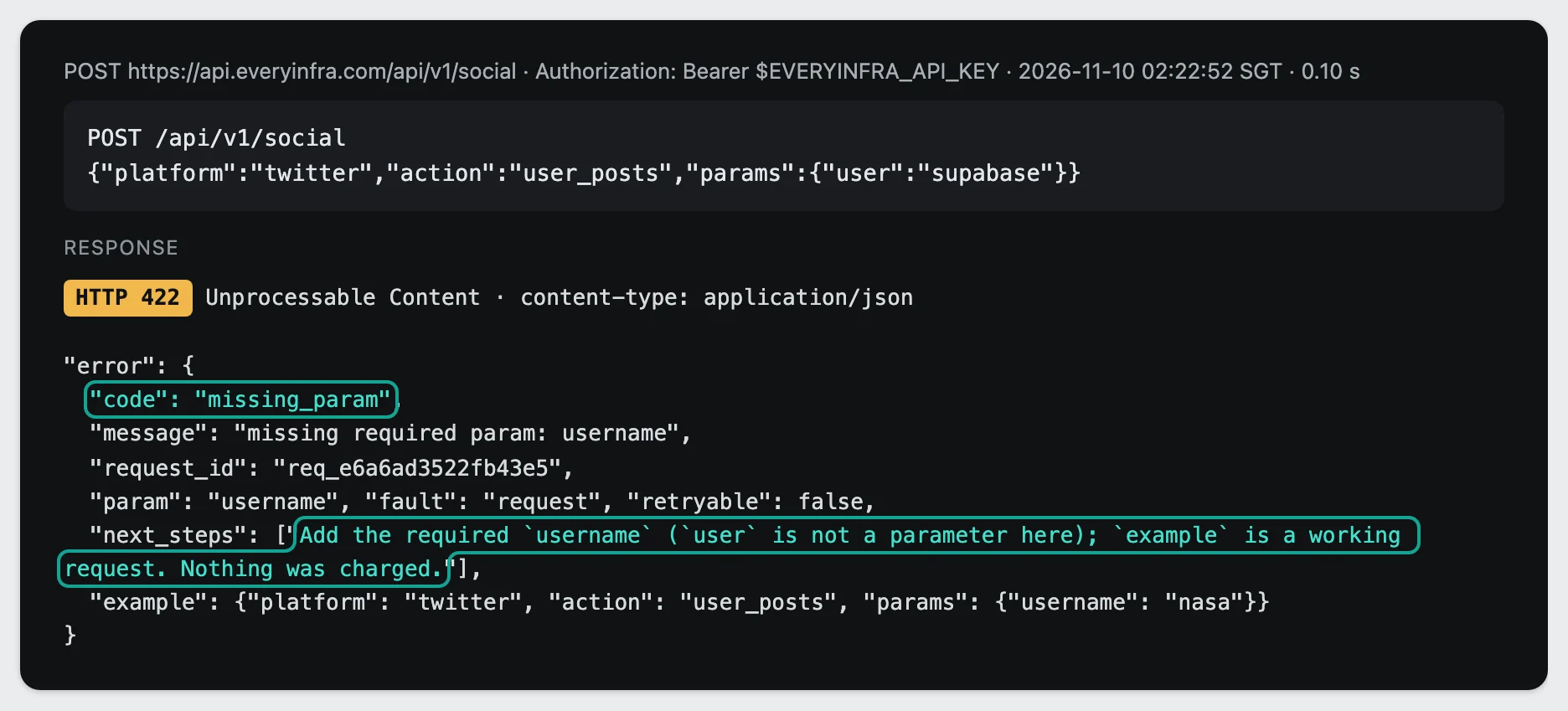
REST errors use standard HTTP statuses. At 02:22 we wrote username as user on purpose and got HTTP 422 with code set to missing_param. The next_steps said that user is not a parameter here and that the required username is missing. It also said that nothing was charged, and it included a working example request.
Scalekit's docs say that the proxy passes this 422 back unchanged. Your tool function can give next_steps straight to the model, and the model can fix the call on the next turn. That is more direct than Option A, where the error passes through an INVALID_ARGUMENT wrapper.
A full example: a research agent reads public posts and writes to the CRM
Now put both options into one agent. The configuration example below shows the full order of one research round. It gets three pieces of public data from EveryInfra, then writes one note through the catalog HubSpot connector. The parameters of hubspot_note_log come from Scalekit's HubSpot connector page. It needs hs_note_body and an hs_timestamp in ISO 8601, and it is marked as not safe to retry (HubSpot connector, read 2026-11-10).
# Configuration example (written from Scalekit's docs; not run in a Scalekit dashboard for this guide)
import json
from datetime import datetime, timezone

EI = "everyinfra"   # the name you gave the EveryInfra MCP connection
EI_TOOL = "everyinframcp_everyinfra_call_api"
HS = "hubspot"   # the HubSpot connection the user has authorized

def ei(user, platform, action, params):
    out = actions.execute_tool(tool_name=EI_TOOL, identifier=user, connection_name=EI,
                               tool_input={"platform": platform, "action": action, "params": params})
    return out.data   # EveryInfra JSON with results, count and billing.charged_usd

def research(user, x_handle, li_company, query):
    posts = ei(user, "twitter", "user_posts", {"username": x_handle})
    company = ei(user, "linkedin", "company_profile", {"company": li_company})
    pages = ei(user, "web", "search", {"keyword": query, "country": "us", "language": "en"})
    note = build_note(posts, company, pages)          # your own formatting code, or a model call
    actions.execute_tool(tool_name="hubspot_note_log", identifier=user, connection_name=HS,
                         tool_input={"hs_note_body": note, "hs_timestamp": datetime.now(timezone.utc).isoformat()})
    return note
Two things in this code are deliberate. First, hubspot_note_log is not safe to retry, so it runs last, only after all three data calls succeed. Data calls are free when they fail and you can retry them. A CRM write is different, because a retry writes two identical notes. Second, build_note is your code, not a Scalekit or EveryInfra feature.
We built the note below from the three real responses. We used a short Python script with fixed rules and no model call, so you can check every number. To attach the note to the company record in HubSpot, first find the company ID with hubspot_companies_search and its query parameter. Then link the two with hubspot_association_create; the parameters are on the same page. This is the deliverable of the guide, a prospect brief written into the CRM:
Supabase · public profile brief (2026-11-10)

- Company: "Build in a weekend. Scale to millions."; 484 employees on LinkedIn (range 201-500), 124,886 followers, founded 2020, https://supabase.com
- Last 20 posts on X: 2026-11-03 to 2026-11-09; 7 reposts, 13 original posts and replies
- 3 most viewed original posts:
  - 2026-11-04 · 49,089 views · to fix a bug you have to think like a bug… https://x.com/supabase/status/2118004095495668016
  - 2026-11-05 · 24,142 views · "yea i'm a programmer, how'd you know"? … https://x.com/supabase/status/2118366485932335515
  - 2026-11-06 · 14,994 views · (a short link only) https://x.com/supabase/status/2118705279491780710
- Top 3 web results for "Supabase MCP server announcement":
  - Give your Supabase app its own MCP server https://supabase.com/blog/give-your-supabase-app-its-own-mcp-server
  - Announcing the Supabase Remote MCP Server https://supabase.com/blog/remote-mcp-server
  - Supabase from code, and an MCP server for your app https://supabase.com/blog/select-2026-build-anything

Generated by the agent from public data returned by EveryInfra; data fee $0.002501 (3 calls).
The 20 posts are from 2026-11-03 to 2026-11-09, and the most viewed one is from 2026-11-04. This note has one problem. Ranking posts by views to find "the posts worth reading" picks two jokes and a bare link. For sales research, the useful posts are the ones about the product, such as "Give your Supabase app its own MCP server", and those do not make the top three by views. Of the 20 posts, 4 contain external links, 7 are reposts and 2 are replies.
A better rule is to drop reposts first. Then prefer posts with a links field and a product name in the text. Or give the model all 13 posts that are not reposts (11 original posts and 2 replies). The web search was the most accurate part: all three top results were MCP-related posts from Supabase's own blog.
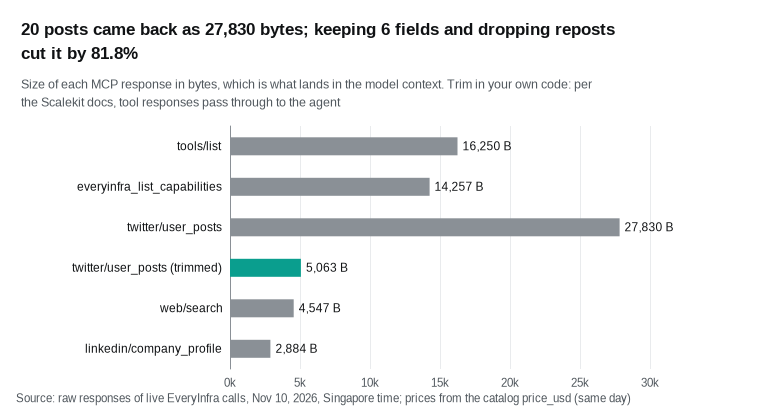
If the model reads all 13 original posts and replies, the cost is mostly context. One twitter/user_posts response over MCP is 27,830 bytes, because each post carries 27 to 31 fields, including the author's avatar, banner, follower count and media. The catalog lists 38 fields; the 20 posts in this response used 35 of them. Scalekit's docs say that tool responses pass through to the agent and are not stored (What is AgentKit). So you must trim them in your code.
Before result.data reaches the model, drop the 7 reposts and keep six fields per post: url, text, posted_at, like_count, reply_count and view_count. The same information then takes 5,063 bytes, 81.8% less. In Option B this step is more natural, because you already choose the fields in your own tool function.
The cost: how much one prospect costs
The money falls into three parts: EveryInfra data fees, model fees and Scalekit fees. This guide measures only the first, because it is the only one we can measure exactly. One prospect calls three capabilities once each, and every price comes from the catalog's price_usd.
| Capability | Catalog price | Charged in our live calls | Returned | Per 1,000 prospects |
|---|---|---|---|---|
twitter/user_posts | $0.000556 | $0.000556 (MCP at 02:20, 02:32, 02:44; REST at 02:32, 02:45) | 20 posts | $0.556 |
linkedin/company_profile | $0.000556 | $0.000556 (MCP at 02:23, 02:45; REST at 02:22, 02:33) | 1 company object | $0.556 |
web/search | $0.001389 | $0.001389 (MCP at 02:33, 02:45; REST at 02:22, 02:45) | 10 results | $1.389 |
| Total | $0.002501 | $2.501 |
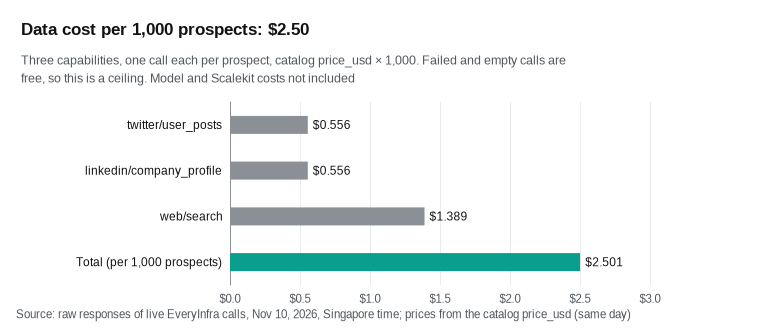
$2.50 is an upper bound, not an average, because failures and empty results are free. All 5 failed or empty calls in this guide cost $0. The call for an account that does not exist was held first and then refunded automatically. The cheapest tier in the catalog is $0.000556 per call, and 116 capabilities have that price. That is $0.56 per 1,000 requests; all prices and billing rules are on the pricing page.
On the Scalekit side, its pricing page (read 2026-11-10) says the free plan includes 10,000 tool calls a month. The Growth plan lists custom connectors and the API proxy. It includes 100,000 tool calls a month and charges $0.50 per 1,000 tool calls above that. So Option A with the catalog connector can start on the free plan. A custom MCP connector, or the REST proxy in Option B, needs a plan that includes them.
In Scalekit, one prospect is 3 data calls plus 1 HubSpot write. Assume that all 4 count as tool calls (the pricing page does not say how proxy requests count). Then the Growth overage is about $2.00 per 1,000 prospects, in the same range as our data fee. Model fees depend on the model and how much context it reads. The trimming in the previous section cuts them directly.
Field reference: the fields used in the brief
The field names and meanings below come from the catalog's response_fields and field notes. We checked each one against the real responses in this guide. The catalog lists 38 fields for twitter/user_posts, and each post in this test returned 27 to 31 of them. This table lists only the ones the brief uses.
| Capability | Field | Meaning | Value in this guide |
|---|---|---|---|
twitter/user_posts | posted_at | Post time (UTC) | Latest post 2026-11-09T13:03:00+00:00 |
twitter/user_posts | view_count, like_count, reply_count | Views, likes, replies | Latest post: 3,738, 32 and 14 at 02:20; views were 3,786 at 02:32 |
twitter/user_posts | is_repost, is_reply | Whether it is a repost or a reply | 7 reposts and 2 replies out of 20 |
twitter/user_posts | links | External links in the text, fully expanded | 4 posts have them |
linkedin/company_profile | employee_count, employee_count_range | Employee count; the range LinkedIn shows, which is more stable | 484; 201-500 |
linkedin/company_profile | follower_count, founded_year | Followers, founding year | 124,886; 2020 |
web/search | title, url, rank, published_at | Title, link, position, publish time (may be missing) | 10 results; 9 have published_at, in mixed formats |
Two points in this table need a warning. First, count fields are values at the moment of reading. The same post had 3,738 views at 02:20 and 3,786 twelve minutes later. So any number that goes into a CRM needs its read time, which is why the brief's title line has a date.
Second, published_at in web/search is the raw text from the search results page. This time 9 of the 10 results had a value, in two formats. Some are dates such as Oct 22, 2026, and some are relative times such as 3 days ago and 1 year ago. One had no value. If your agent must judge "recent", convert relative times to dates with the call time. Or use google_news/search with its time_window parameter (catalog price $0.000792).
Troubleshooting: four problems we actually hit
| Problem | What you see | Cause | Fix |
|---|---|---|---|
server/discover refused | HTTP 400, -32020, then -32602 (checked again at 03:12) | The 2026-07-28 spec needs the Mcp-Method header and clientCapabilities in _meta | Add both, or initialize with 2025-11-25 |
| Key rejected although it is valid | unauthorized on every call | The key was sent as X-API-Key or without Bearer | Use the Bearer auth type |
| tools/list returns 401 | 401 with a WWW-Authenticate header | /mcp/all needs a key even for tools/list | Use the default /mcp endpoint |
| A call takes about 19 seconds | count: 0, charged $0, refunded | The account does not exist; an empty result came back slower than a normal one | Do not retry it as a network error; change the input or report "no data" |
The first problem was the protocol version. The other three problems appear earlier in this guide, so only this one gets a full explanation here. We sent server/discover under the 2026-07-28 spec. The first attempt returned HTTP 400 with error code -32020 and the message "Header mismatch: Mcp-Method header is required". With the header added, the second attempt still returned 400, with error code -32602. Its message said that io.modelcontextprotocol/clientCapabilities in params._meta must be an object, and to use {} for none.
At the time, the third attempt overwrote these two bodies. At 03:12 we sent the same requests again without a key and got the same codes and messages.
The new spec moves client capabilities from initialize into the _meta of every request, so even a request that only asks "what does this server support" must carry them. The third attempt added io.modelcontextprotocol/clientCapabilities: {} and client info to _meta, and returned 200. Both errors named the missing item, so one fix was enough.
You may write your own MCP client outside Scalekit to test EveryInfra. Then initialize with 2025-11-25 is the simplest path. With the new spec, add these two things.
How to check it yourself: every charge can be looked up
You can check what the agent spent without opening the Scalekit dashboard. Two free tools in EveryInfra's MCP server exist for this. everyinfra_get_account returns the balance, this month's top-ups and the rate limits. It also returns the calls, successes, failures and spend of the last 24 hours, for the account and for this key. everyinfra_list_requests lists call records, newest first: request ID, capability, status code, latency, rows returned, whether it was charged and the amount. Pass the request_id of a call to see the final state of its charge: charged, refunded or partly refunded.
| Tool | What it returns | What you check with it | Read-only |
|---|---|---|---|
everyinfra_get_account | Balance, top-ups, rate limits, 24-hour calls and spend, for the account and for this key | Whether the agent's spend matches your own total | Yes |
everyinfra_list_requests | Call records with capability, status, latency, rows, charge and amount | The final state of one charge: charged, refunded or partly refunded | Yes |
billing in every paid response | charged_usd and balance_after_usd | Each charge against the change in balance | Not a tool |
Both tools carry readOnlyHint: true, so the agent can see them even with a read-only session token. But for a reconciliation, use each paid response. Its billing holds charged_usd and the balance after the charge, balance_after_usd. Put the calls from 02:20 to 02:24 in time order, and the balance matches each charge:
| Singapore time | Call | `balance_after_usd` | Change |
|---|---|---|---|
| 02:20:47 | MCP, X posts | $9,980.946222 | |
| 02:22:38 | REST, LinkedIn page | $9,980.945667 | −$0.000555 (price $0.000556; the gap is rounding at six decimals) |
| 02:22:46 | REST, web search | $9,980.944278 | −$0.001389 |
| 02:23:39 | MCP, LinkedIn page | $9,980.943722 | −$0.000556 |
| 02:23:52 | MCP, account that does not exist | $9,980.943722 | $0 (the hold was refunded) |
| 02:24:58 | everyinfra_get_account, total balance | $9,980.943722 |
After that, the numbers stop matching. At 02:32:43 an X posts call cost $0.000556, but the balance was $0.006111 lower than at 02:24. The extra $0.005555 did not come from this guide. At 02:32:57 the same extra $0.005555 appeared again.
The cause is that other programs used our test key at the same time. For the same reason, usage_24h cannot be compared with the $0.01056 total of our 13 calls. That is why the next paragraph recommends a separate key. When only one agent uses a key, call everyinfra_get_account at the end of each research round. Compare usage_24h.spent_usd with your own total of charged_usd. If the gap is larger than the price of one call, raise an alert.
list_requests needs the "requests:read" permission on the key. According to the tool's description, keys without a product-line limit have the three read permissions by default. For a key with a product-line limit, the account owner turns the permission on in the console, under API Keys permissions. We recommend a separate key for Scalekit with a name that states its purpose. Then the "this key" figure in get_account is the full spend of the Scalekit setup, not mixed with your other programs.
Compared with other ways to do this
An agent does not have to go through Scalekit to read public data. This table lists only differences we can confirm:
| Approach | Who holds the user's key | Tools the model sees | Best for |
|---|---|---|---|
| EveryInfra MCP connector from the Scalekit catalog (Option A) | Scalekit, encrypted, one per user | 12, or a few picked through a Virtual MCP server | Teams already using Scalekit for other app authorizations |
| Scalekit custom MCP connector | Same | Same; you maintain the connector definition | When the catalog connector's settings do not fit your needs |
| Scalekit custom REST connector (Option B) | Same | The few tools you define in code | Narrowing tools to one or two parameters |
| Connecting the remote MCP server directly in an AI client | The user, in the client settings | 12 | One person using it, with no need to separate keys per user |
The first three rows share "one key per user". Your product has many users, and each pays with their own EveryInfra account. Scalekit uses the right key for each user, and no key is in your code. The last row suits individuals and small teams, with all calls on one account; the setup is in the remote MCP setup guide.
When this setup is not the right fit
First, when you need data from the user's own account. EveryInfra reads only public data: public profiles, public posts, public comments and public product pages. Messages in a rep's own LinkedIn inbox are not on this path, and neither are posts in a private group. For those, use the Scalekit catalog connector for that app, with the user's authorization.
Second, when you need real-time push. EveryInfra fetches on request; there is no "notify me when this account posts". Scalekit's Triggers are for events in the user's own apps and do not cover public social media. Near-real-time monitoring means polling on a schedule, and the more often you poll, the more it costs.
Third, when a single request takes a long time. twitter/user_posts takes over 9 seconds per call, and an account that does not exist takes 19 seconds. Some capabilities in the catalog are async: pass mode: "async", then read the result with everyinfra_get_job. Your agent framework may use a short timeout per tool call. Check it before you decide which capabilities run async.
| Need | Does this setup cover it | What to use instead |
|---|---|---|
| Messages or private groups in the user's own account | No: EveryInfra reads public data only | The catalog connector for that app, with the user's authorization |
| A push when an account posts | No: data is fetched on request | Scheduled polling; Scalekit Triggers cover the user's own apps only |
| Many slow capabilities in one turn | Partly: some calls take 9 to 19 seconds | mode: "async" with everyinfra_get_job, or parallel calls |
One more limit concerns scope. Everything on the Scalekit side of this guide comes from its public docs, its notice of 2026-11-10 and the setup guide it sent on 2026-11-11. How you name the connection, the tool name prefix and the API Key field of the connected account follow that setup guide. The setup guide does not say whether read-only tokens judge the catalog connector by readOnlyHint, and we have no dashboard to check it.
Recent changes
- 2026-11-12: Scalekit's EveryInfra MCP connector docs page is live. The 12 tool names on it match this guide. For readers: if tool names change later, follow that page.
- 2026-11-11: Scalekit sent a setup guide for the EveryInfra MCP connector. The provider identifier is
EVERYINFRAMCP, tool names areeveryinframcp_plus our tool names, and the connected account has one API Key field. The connector docs page is publishing soon. For readers: the steps and code in this guide follow that setup guide; pass the connection name you saved. - 2026-11-10: According to Scalekit's notice that day, the AgentKit catalog added an EveryInfra MCP connector authorized with an API key. For readers: you no longer need to write a connector definition; create a connection and use it.
- 2026-11-06: Scalekit's Python SDK
scalekit-sdk-pythonreleased 2.24.0 (PyPI, read 2026-11-10). The latest Node.js SDK,@scalekit-sdk/node2.21.0, came out on 2026-10-28 (npm, read 2026-11-10). For readers: upgrade the SDK before you write code from the docs, and trust the current docs for method names. - 2026-10-01: Scalekit launched scope selection, which lets users leave optional scopes unchecked during authorization (Scalekit product update, read 2026-11-10). For readers: this affects OAuth connectors only; EveryInfra's API key authorization has no scopes.
FAQ
What is the difference between an MCP connector and calling the API directly? (Source: Google autocomplete "mcp connector vs api", read 2026-11-10)
The difference is who describes the tools. With an MCP connector, the EveryInfra server tells the agent which tools exist and what parameters they take. With a direct API call (Option B here), you define narrow tools in your code. The table in the "Two ways to connect" section compares them.
Our direct calls to EveryInfra showed similar latency for MCP and REST. We did not measure the latency through a Scalekit connector. So choose mainly by how much tool surface you want the model to see.
What does MCP connector mean? (Source: Google autocomplete "mcp connector meaning", read 2026-11-10)
In Scalekit AgentKit, a connector is the integration definition of a third-party app: how it authenticates, which tools it has and where requests go. An MCP connector is one kind, whose tools come from a remote MCP server rather than from tool definitions Scalekit writes. Per Scalekit's custom connector docs, that server must be stateless (When to add a connector, read 2026-11-10). A connection is the configuration you create for that connector in your environment, and a connected account is one user's authorized account under that configuration.
Is there an MCP connector for LinkedIn? (Source: Google autocomplete "mcp connector for linkedin", read 2026-11-10)
Separate "read the user's own LinkedIn" from "read public LinkedIn". The first needs the user's authorization, for example to post as them, and belongs to LinkedIn's official API and the matching connector. The second is the scenario in this guide. The EveryInfra catalog has 11 LinkedIn capabilities, all available, including company pages, company posts, public personal profiles and jobs. Prices go from $0.000556 to $0.004 per call (catalog read 2026-11-10). Through the EveryInfra MCP connector in Scalekit, an agent reaches them with everyinframcp_everyinfra_call_api and platform: "linkedin".
Scalekit says MCP uses more tokens than CLI. Is an MCP connector still worth it? (Source: Google autocomplete "scalekit mcp vs cli", read 2026-11-10)
Scalekit published a benchmark on GitHub. In a single run of 5 GitHub tasks with Claude Sonnet 4, MCP used 1.3 to 80 times more tokens than CLI. The main reason is that every request carries the tool definitions (mcp-vs-cli-benchmark, read 2026-11-10). To keep this cost low with EveryInfra, pick only 3 tools or trim responses in your code. The read-only token section and the full example show how.
Are OpenAI AgentKit and Scalekit AgentKit the same thing? (Source: Google autocomplete "openai agentkit connector registry", read 2026-11-10)
No, they only share a name. The AgentKit that OpenAI announced on 2025-10-06 includes Agent Builder, Connector Registry and ChatKit. According to an update OpenAI added to the same page on 2026-06-03, Agent Builder and Evals will no longer be available from 2026-11-30, and OpenAI recommends the Agents SDK for workflows that should continue as code (Introducing AgentKit, read 2026-11-10). Scalekit AgentKit is a product of a different company that lets agents call third-party apps as each user. This guide covers the latter, and Scalekit's docs also include an example page for the OpenAI Agents SDK.
How does a Scalekit MCP server connect to EveryInfra? (Source: Google autocomplete "scalekit mcp server", read 2026-11-10)
In two ways. Every connection has its own MCP server at <environment URL>/mcp/v3/connections/<connection name>, which exposes all the tools of that connection. You can also create a Virtual MCP server that picks a few tools from several connections (Use a connection's MCP server, read 2026-11-10).
Both use session tokens that last from 60 seconds to 24 hours, one hour by default. The client does not need to call initialize first, and the server sends no Mcp-Session-Id (Connect any MCP client, read 2026-11-10). After you create the EveryInfra connection, an MCP client connects to its URL with a session token for one user. The client then calls the tools with that user's EveryInfra key.
Related reading
- EveryInfra quickstart: sign up, get a key and send your first request.
- Remote MCP setup guide: connect EveryInfra MCP directly in Claude, Cursor and other clients, without Scalekit.
- Failure refund reconciliation: how to check every charge and refund; the empty-result refund in this guide follows these rules.
- A daily public data report with n8n: the same capabilities in a scheduled workflow.
- LinkedIn account research with MCP in Copilot Studio: the same scenario on another agent platform.
- Adding idempotency keys to AI agent retries: the details behind the retry problem in the errors section.
- The MCP 2026 spec and production readiness: background on why the 2026-07-28 spec removed initialize.
References
- What is AgentKit, Scalekit Docs, read 2026-11-10, <https://docs.scalekit.com/agentkit/overview/>
- How AgentKit works, Scalekit Docs, read 2026-11-10, <https://docs.scalekit.com/agentkit/concepts/>
- Quickstart, Scalekit Docs, read 2026-11-10, <https://docs.scalekit.com/agentkit/quickstart/>
- Set up a connection, Scalekit Docs, read 2026-11-10, <https://docs.scalekit.com/agentkit/connections/>
- Manage connected accounts, Scalekit Docs, read 2026-11-10, <https://docs.scalekit.com/agentkit/connected-accounts/>
- Hosted Connect Widget, Scalekit Docs, read 2026-11-10, <https://docs.scalekit.com/agentkit/hosted-connect-widget/>
- Authorize a user, Scalekit Docs, read 2026-11-10, <https://docs.scalekit.com/agentkit/tools/authorize/>
- Call any API (actions.request), Scalekit Docs, read 2026-11-10, <https://docs.scalekit.com/agentkit/tools/custom-tools/>
- When to add a connector, Scalekit Docs, read 2026-11-10, <https://docs.scalekit.com/agentkit/bring-your-own-connector/overview/>
- Create a connector, Scalekit Docs, read 2026-11-10, <https://docs.scalekit.com/agentkit/bring-your-own-connector/create-connector/>
- Call your connector, Scalekit Docs, read 2026-11-10, <https://docs.scalekit.com/agentkit/bring-your-own-connector/making-tool-calls/>
- How Virtual MCP servers work, Scalekit Docs, read 2026-11-10, <https://docs.scalekit.com/agentkit/mcp/overview/>
- Use a connection's MCP server, Scalekit Docs, read 2026-11-10, <https://docs.scalekit.com/agentkit/mcp/connection-mcp-servers/>
- Limit an agent to read-only tools, Scalekit Docs, read 2026-11-10, <https://docs.scalekit.com/agentkit/mcp/read-only-tokens/>
- Connect any MCP client, Scalekit Docs, read 2026-11-10, <https://docs.scalekit.com/agentkit/mcp/connect-any-client/>
- Errors and rate limits, Scalekit Docs, read 2026-11-10, <https://docs.scalekit.com/agentkit/reference/errors/>
- Connect AI agents to the Airops MCP server, Scalekit Docs, read 2026-11-10, <https://docs.scalekit.com/agentkit/connectors/airopsmcp/>
- Connect AI agents to HubSpot, Scalekit Docs, read 2026-11-10, <https://docs.scalekit.com/agentkit/connectors/hubspot/>
- Connect AI agents to Slack, Scalekit Docs, read 2026-11-10, <https://docs.scalekit.com/agentkit/connectors/slack/>
- AgentKit product page, Scalekit, read 2026-11-10, <https://www.scalekit.com/agentkit>
- AgentKit Pricing, Scalekit, read 2026-11-10, <https://www.scalekit.com/pricing>
- Scope Selection, Scalekit product update, 2026-10-01, <https://www.scalekit.com/product-updates/user-scope-selection>
- scalekit-sdk-python release history, PyPI, read 2026-11-10, <https://pypi.org/project/scalekit-sdk-python/>
- @scalekit-sdk/node release history, npm, read 2026-11-10, <https://www.npmjs.com/package/@scalekit-sdk/node>
- Versioning, Model Context Protocol, read 2026-11-10, <https://modelcontextprotocol.io/specification/versioning>
- Transports (2025-11-25), Model Context Protocol, read 2026-11-10, <https://modelcontextprotocol.io/specification/2025-11-25/basic/transports>
- Tools (2025-11-25), Model Context Protocol, read 2026-11-10, <https://modelcontextprotocol.io/specification/2025-11-25/server/tools>
- Introducing AgentKit, OpenAI, 2025-10-06 (updated 2026-06-03), <https://openai.com/index/introducing-agentkit/>
- mcp-vs-cli-benchmark, Scalekit GitHub, read 2026-11-10, <https://github.com/scalekit-inc/mcp-vs-cli-benchmark>
- Capability catalog, EveryInfra API, read 2026-11-10 at 02:19 Singapore time, <https://api.everyinfra.com/api/v1/social/catalog>
- Remote MCP endpoint (raw tools/list response), EveryInfra, read 2026-11-10, <https://api.everyinfra.com/mcp>
- Remote MCP server page, EveryInfra, read 2026-11-10, <https://everyinfra.com/en/mcp-server>
- Execute a tool (API reference), Scalekit Docs, read 2026-11-11, <https://docs.scalekit.com/agentkit/reference/tools/execute-a-tool/>
- Get an authorization link (API reference), Scalekit Docs, read 2026-11-11, <https://docs.scalekit.com/agentkit/reference/authorization/get-an-authorization-link/>
- List a user's scoped tools (API reference), Scalekit Docs, read 2026-11-11, <https://docs.scalekit.com/agentkit/reference/tools/list-scoped-tools/>
Reference LF-27