Tencent Hy4 function calling with live Weibo, Bilibili and Douyin data: schemas, types and tokens
Hy4 weights are not out yet, so self-hosting means Hy4 preview. With its template and tokenizer: 3 tools add 506 tokens; 10 raw Douyin rows cost 12,902.

Tencent released Hy4 on November 4, 2026. But when we checked Hugging Face early on November 11 (Singapore time), the only weights for download were still Hy4 preview, uploaded on August 27. So to run Hy4 on your own GPUs with live social data today, you run the preview. The final model is only available through hosted APIs.
We did not run the model, so the model side is a configuration example. What we tested live is our data API: 18 calls at three times on November 11. We used the chat template and tokenizer from Hy4 preview to count the tokens of a full tool-call round trip. Three tool definitions add 506 prompt tokens. Ten Douyin search results cost 12,902 tokens as raw JSON.
When we keep only the fields the model needs, they cost 1,110 tokens (8.6%). The bug most teams will hit is about types. The vLLM parser for Hy4 converts each argument by the type in your tool schema. So a limit without "type": "integer" reaches your code as the string "10", and our API answers with a 422 at no charge.
This article answers one practical question. You run an open-weight model yourself, or you plan to. Maybe data must stay inside your network, you want control of cost, or you want to fine-tune it. Now you want it to answer questions like "what is trending on Chinese social media today, and how do the videos about it look?" The model does not know what happened today.
So you give it a set of tools. It asks for data when it needs it, your code fetches the data, and the result goes back into the chat. For each step below, we say what we measured or called live and what is a configuration example based on public documentation.
First, the versions: tencent hy4, Hy4 preview and "open source"
Before we wrote anything, we checked the versions, because reports online mix them up. Tencent's press release from November 4 announces the final Hy4 with new vision and computer-use features. It says Tencent "plans to release model weights and system cards in the coming days". The Hy research page from the same day says the same. On November 11 at about 00:20 Singapore time we asked the public Hugging Face API for Tencent models with "Hy4" in the name.
It returned two: tencent/Hy4-preview and tencent/Hy4-preview-FP8. Both were created on August 27 and last changed on August 28. The page tencent/Hy4 returned 404.
We checked again on November 12, 2026 at 01:10 Singapore time, before publication. The result was the same: only the two preview repositories. The models API returned 401 for tencent/Hy4, which is its answer for a repository that does not exist or is not public. So today, "open weights" is true only for the preview.
The preview facts come from the model card and the GitHub repository. It is a Mixture-of-Experts model with 770B total parameters and 49B active per token. It has 78 layers; each MoE layer has 256 routed experts, of which each token uses 8, plus one shared expert. A separate 10B multi-token prediction layer helps with speculative decoding.
The context window is 1M tokens and the license is Apache 2.0. We added up the file sizes from the Hugging Face file list. The BF16 weights are 131 shards and 1,560.0 GB. The FP8 weights are 130 shards and 813.8 GB. Every deployment command in Tencent's guides uses tensor parallelism across 8 GPUs. That number drives the self-hosting cost later in this article.
For the final model, the way in today is a hosted API. We read the OpenRouter models API on November 11 at 00:16 Singapore time. The entry tencent/hy4 was created on November 4. It lists a context of 1,048,576 tokens and Tencent as the only provider.
It also lists fp4 quantization, at most 65,536 output tokens, and tools as a supported parameter. Prices there were $0.417 per million input tokens and $1.2505 per million output tokens. Tencent's press release gives a list price of about $0.90 and $2.70. It says Tencent Cloud TokenHub bills Hy4 at half price until December 31, 2026.
| Version | Date | Weights | How to call it | Tool calling |
|---|---|---|---|---|
| Hy4 preview | Uploaded Aug 27, 2026; updated Aug 28 | Public, Apache 2.0; BF16 1,560.0 GB, FP8 813.8 GB | Self-host with vLLM or SGLang; hosted copies exist | Yes; template and parser are public |
| Hy4 (final) | Nov 4, 2026 | "In the coming days"; not found on Nov 11 | Tencent Cloud TokenHub, OpenRouter, WorkBuddy | Hosted APIs accept tools |
| Hy4 Flash | Press release: "scheduled for release soon" | Unknown | Not live | Unknown |
This table sets the rules for the rest of the article. The protocol details, the template, the tokenizer and the parser all come from public preview files. So we can check them line by line on our own machine. For the final model, we can only quote what the hosted providers publish. When Tencent releases the final weights, the token counts here must be measured again if the template changes. We list that in the limits section.
Why an open-weight model needs live social data
An open-weight model knows nothing after its training cutoff. The Hy4 research page says Tencent improved "time-sensitive retrieval, multi-source synthesis, and factual consistency verification", and it reports a lower hallucination rate. But these gains assume that someone gives the model fresh material. Inside Tencent's own products, search and connectors in WorkBuddy and Yuanbao do that job. Your self-hosted copy has none of them. Ask it what is trending on Weibo right now and it can only guess, or say that it does not know.
Tencent's hallucination numbers differ between the press release and the research page. Both are internal tests. We did not reproduce them, so cite the source if you quote them.
Tool calling solves the "fresh material" part. The model does not go online. It writes a structured request such as "call weibo_trending with limit 20". Your code reads that request, calls the real data API, and puts the result back into the chat as a tool message.
The model then continues. This split keeps the data side in your hands. You decide which endpoint to call, which key to send, which fields to drop, and how many calls per minute to allow. The model only decides when it needs data and what to ask for.

We picked three data sources because they show three common data shapes. Weibo hot search is a short table: each row has a rank, a title and a heat score. Bilibili video search returns a list of videos with many fields, but each row is short. Douyin video search returns rows that carry author profiles, hashtags, music, and video URLs at several bitrates, so each row is long.
For readers outside China: Weibo is the main public microblog. Bilibili is a video site with a young, enthusiast audience and on-screen comments. Douyin is the Chinese version of the short-video app many people know as TikTok. The overview pages are Weibo, Bilibili and Douyin. The three shapes put very different pressure on the model's context, as the measurements below show.
What hy4 function calling looks like on the wire
Most developers meet hy4 function calling through an OpenAI-compatible API. You send a tools array and get tool_calls back, as in OpenAI's function calling guide. But that JSON is not what the model writes. We downloaded the preview's chat_template.jinja, which defines the text the model reads and writes. The tool list goes at the top of the system message inside <tools></tools>, one JSON object per line.
To make calls, the model first writes <tool_calls:opensource>. Each call is <tool_call:opensource> plus the function name, then pairs of <arg_key> and <arg_value> tags, then the closing tags. Here is a segment we rendered with that template on our own machine. The tool response is the real, trimmed Weibo result from round 1:
<tool_calls:opensource><tool_call:opensource>weibo_trending<arg_key:opensource>limit</arg_key:opensource><arg_value:opensource>20</arg_value:opensource></tool_call:opensource></tool_calls:opensource><|hy_end:opensource|><|hy_start:opensource|>tool<|hy_middle:opensource|><tool_response:opensource>[{"rank":1,"title":"金鸡奖获奖名单","hot_value":1323824,"category":"电影"},{"rank":2,"title":"拼多多送货上门新规11月13日生效","hot_value":856784, ...(The first two titles are "Golden Rooster Awards winners list" in the film category and "Pinduoduo home delivery rule takes effect November 13".)
This format has three direct effects. First, at the model level every argument value is text: 20 and "20" look the same. The server-side parser must turn values back into numbers by reading your tool schema, so the types in the schema matter. Second, when the template writes your tool definitions into the prompt, it drops two keys, strict and defer_loading. We checked: the word "strict" does not appear in our rendered prompt, so the model never sees whether you asked for strict mode.
The additionalProperties key stays. Third, when tools are present, preserved_thinking defaults to true, so earlier reasoning stays in later prompts. The default reasoning mode is high; you can turn it off with reasoning_effort: "no_think". Both settings change your token bill.
The serving framework turns the tag text back into tool_calls. The vLLM recipe for Hy4 uses --tool-call-parser hy_v4 --reasoning-parser hy_v4 --enable-auto-tool-choice. The SGLang cookbook uses --tool-call-parser auto. We read hy_v4_tool_parser.py on the vLLM main branch. Its _parse_value function looks up the type of each argument in your schema.
It tries boolean, then integer, then number, then JSON, and only then falls back to a string. The last functional fix to this file was PR #61542, merged on October 31, 2026. It stops the parser from removing whitespace in argument names. If your vLLM build is older than that, tools with spaces in argument names break.
# Config example (from the vLLM Hy4 recipe; we did not run it): 8 GPUs, FP8, tool calling on
vllm serve tencent/Hy4-preview-FP8 \
  --tensor-parallel-size 8 \
  --speculative-config '{"num_speculative_tokens":3,"method":"mtp"}' \
  --attention-backend FLASHMLA_SPARSE \
  --tool-call-parser hy_v4 --reasoning-parser hy_v4 \
  --enable-auto-tool-choice \
  --tool-strict-level function \
  --served-model-name hy4-preview --port 8000
The last flag, --tool-strict-level function, is not in Tencent's guide. vLLM added it on September 18, 2026 in PR #56268. The PR description gives a useful number. Across 9,500 requests to one production deployment, no request set tool_choice. All 17,476 tool definitions had strict set to false, because common SDKs and agent frameworks send that by default.
So the server could not constrain the call format, and when the model wrote broken tags, no parser could recover them. The flag has three levels. auto keeps the old behavior: only tools marked strict are constrained. function constrains the call envelope and the function name.
parameter also pins every argument to its schema. When you self-host, this switch is yours. On a hosted API, the provider decides.
The tool-use scores Tencent publishes
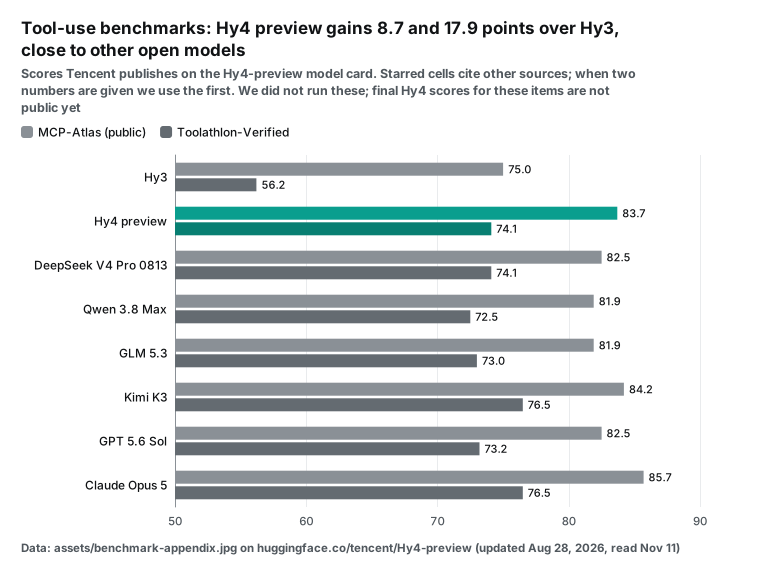
We cannot test on our own machine whether the model calls a tool at the right time or fills the arguments correctly. What we can cite is the appendix of the preview model card. Two rows relate most directly to tool use: MCP-Atlas (public) and Toolathlon-Verified. Hy4 preview scores 83.7 and 74.1.
The previous generation, Hy3, scores 75.0 and 56.2. In the same table, GLM 5.3 has 81.9 and 73.0, Kimi K3 has 84.2 and 76.5, and Claude Opus 5 has 85.7 and 76.5. The table marks the other vendors' numbers with a star, which means Tencent quotes them from another source. The Toolathlon tasks and scoring are in its GitHub repository. Hugging Face explains how it lists such scores in its evaluation results guide.
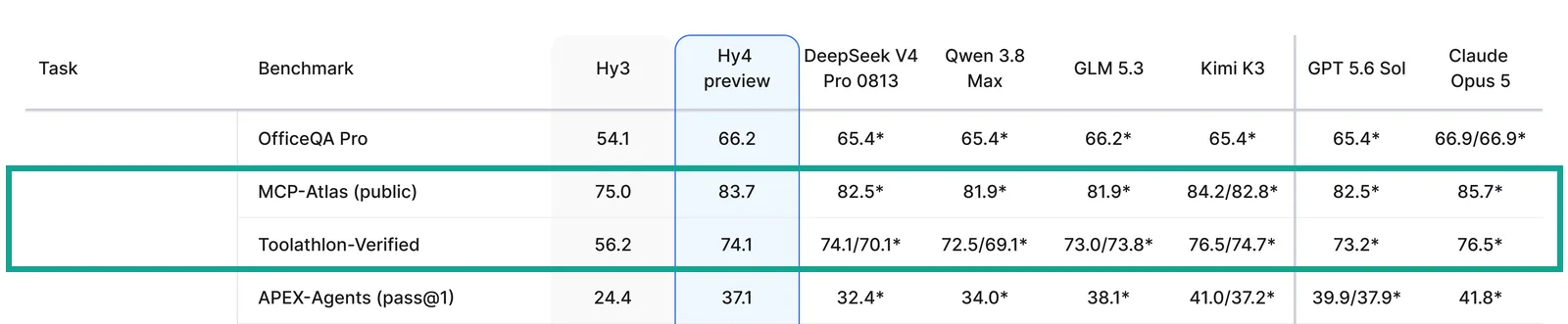
These numbers tell us two things, with two limits. From Hy3 to Hy4 preview, tool-use scores rose a lot; Toolathlon went up 17.9 points. Among open models of the same generation, Hy4 preview sits in the upper middle, not at the top. First limit: these are preview scores. We did not find these two rows for the final model on the research page; the system card should settle that.
Second limit: the tools in these tests are mostly general file, web and code tools. A specific call such as "search Bilibili by keyword" is not the same task. So we do not guess how often the model calls the wrong thing. We measure what happens when it does.
Tool design: one generic tool or one tool per capability
When a data API offers hundreds of capabilities, the first idea is often a single generic tool. Its arguments are a platform, an action and a params object, and the model fills them in. We wrote that design and the alternative, one tool per capability, and measured how many tokens each adds to the prompt. We rendered each with the preview template and counted with its tokenizer. The baseline is the same system message and user question with no tools: 71 tokens.
[
  {"type": "function", "function": {
    "name": "weibo_trending",
    "description": "Weibo hot search list right now: rank, title, hot_value, category, label.",
    "parameters": {"type": "object", "additionalProperties": false, "required": [],
      "properties": {"limit": {"type": "integer", "minimum": 1, "maximum": 200}}},
    "strict": true}},
  {"type": "function", "function": {
    "name": "bilibili_search",
    "description": "Search Bilibili videos by keyword. Returns title, url, posted_at, view/like/comment/danmaku counts.",
    "parameters": {"type": "object", "additionalProperties": false, "required": ["keyword"],
      "properties": {"keyword": {"type": "string"},
        "sort": {"type": "string", "enum": ["most_commented", "most_liked", "most_viewed", "newest", "relevance"]},
        "limit": {"type": "integer", "minimum": 1, "maximum": 50}}},
    "strict": true}},
  {"type": "function", "function": {
    "name": "douyin_search",
    "description": "Search Douyin videos by keyword. Returns text, url, posted_at, like/comment/share counts, author.",
    "parameters": {"type": "object", "additionalProperties": false, "required": ["keyword"],
      "properties": {"keyword": {"type": "string"},
        "publish_time": {"type": "string", "enum": ["half_year", "one_day", "one_week", "unlimited"]},
        "sort": {"type": "string", "enum": ["most_liked", "newest", "relevance"]},
        "limit": {"type": "integer", "minimum": 1, "maximum": 50}}},
    "strict": true}}
]
We copied the enum values for these three tools from our public catalog. The catalog also gives a description of each parameter (in Chinese), the default row count and the maximum. Here are the four designs.
| Design | Tools | Tool JSON bytes | Tokens added to the prompt |
|---|---|---|---|
1 generic tool, params as a nested object | 1 | 525 | 256 |
| 3 dedicated tools, flat arguments, short English text | 3 | 1,415 | 506 |
| 3 dedicated tools, catalog descriptions pasted in | 3 | 3,237 | 939 |
| 10 dedicated tools, flat arguments, short English text | 10 | 3,675 | 1,090 |
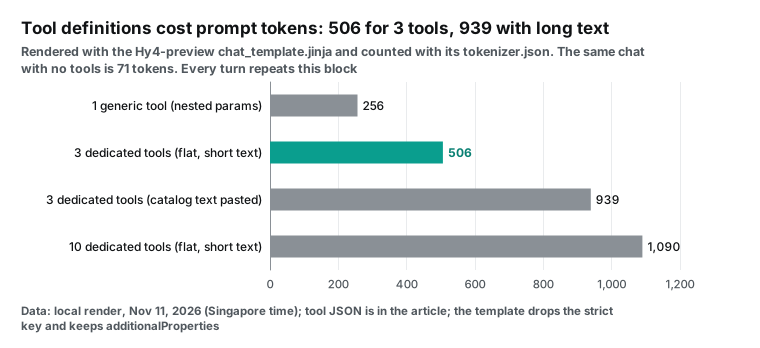
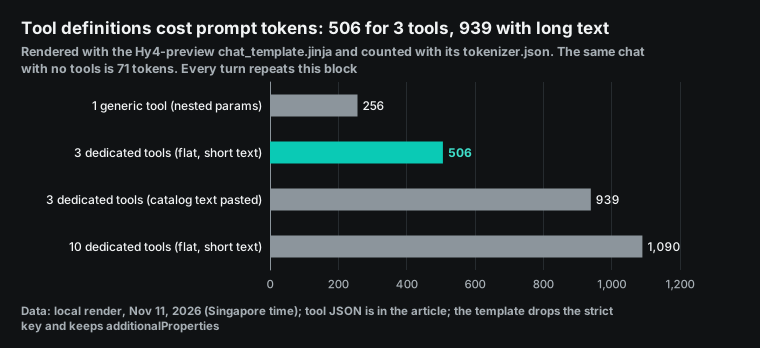
The generic tool uses the fewest tokens, but it moves the hard part to the model. The model must remember hundreds of platform and action names, and the argument names and allowed values for each. When it gets one wrong, it learns only from our 422 response. The type problem from the last section also matters more here. params is an object, and in the tag format the model writes it as JSON text.
The vLLM parser turns that text back into an object only if your schema says "type": "object". Dedicated tools cost 250 to 300 more tokens. In return, every argument has a type, an enum and limits, so both the parser and the server-side constraints can do their work. Pasting the long catalog descriptions almost doubles the cost.
Most of the extra text is detail for humans, such as how long a page token stays valid. The model does not need that to decide. We suggest one short sentence per tool and keeping the details in your executor.
Remember that you pay this cost on every turn. The tool list lives in the system message, so the model reads it again each time you call it. A task like "check trends, then search two platforms" needs at least three turns, so the tool definitions are billed three times. With 10 tools, that is 1,090 tokens per turn.
At OpenRouter's input price of $0.417 per million tokens, three turns cost about $0.0014. That is small for one task. If your agent runs thousands of tasks a day, it is not small.
Argument types: without "integer", 10 becomes "10"
This is the most practical finding in this article, and you can check all of it without running the model. We copied the value-conversion functions out of the vLLM parser unchanged and ran them on our machine. We fed them the same text, 10, and changed only how the tool schema declares limit. Then we sent the results to our real API.
| How the schema declares limit | Value the parser returns | Result from EveryInfra |
|---|---|---|
{"type": "integer"} | 10 (integer) | Normal response |
{"type": "string"} | "10" (string) | 422: limit must be an integer from 1 to 50 (got '10'); no charge |
| No type | "10" (string) | Same 422 |
| Argument not in the schema | "10" (string) | Same 422 |
Generic tool, params declared as object | Object | Normal response |
Generic tool, params with no type | One long string | 422: params: Input should be a valid dictionary; no charge |
Both 422 responses in the table are live calls from November 11, 2026, at 00:22 Singapore time. The screenshot below shows the first one. When an argument is wrong, our API names the argument, says what it expects and what you sent, and adds "Nothing was charged" in next_steps. That text is written for a model to read.
Pass it back unchanged as a tool message and most models fix the argument and call again. But that costs one more turn of reasoning and one more prompt, and Hy4 has deep reasoning on by default. The cheaper fix is to declare every type in the schema and to convert types once in your executor. If a value is a string of digits and the schema says integer, convert it before you send it.
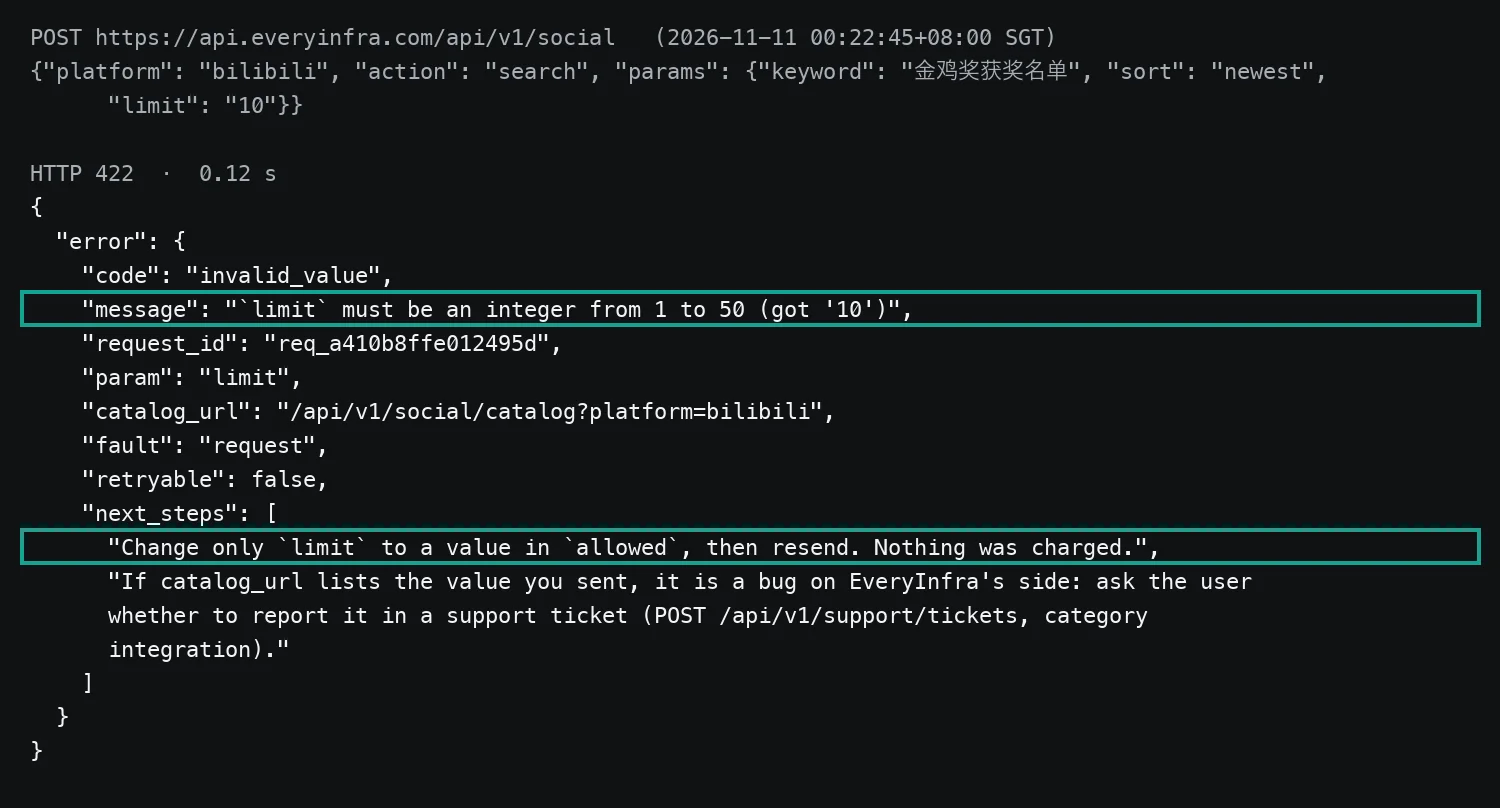
In the same session we also sent a Bilibili search with sort set to hot, which does not exist (00:20 Singapore time). The answer was again a 422. It listed every allowed value and the two closest matches, most_liked and most_viewed, and again there was no charge. For an agent, an error that says how to fix it is far more useful than a bare "Bad Request". For your bill, a failed request costs nothing on the data side, so letting the model retry only costs model tokens.
The executor side of a full round trip: hand-written calls, real responses
Here is one full round trip, seen from the executor. The user asks: "What is number one on Weibo hot search right now? Find 10 related videos on Bilibili and 10 on Douyin. Tell me where the discussion is fresher."
The model side is a configuration example. We did not run Hy4, and we wrote the model's calls by hand for this question. The three calls to our API are live calls from early November 11, and every response and charge comes from the raw responses.


In turn one, the model reads the question and the tool list and calls weibo_trending(limit=20). Our executor turns that into an EveryInfra request. We sent it at 00:19:46 Singapore time. It returned 20 trends in 0.81 seconds and charged $0.000556. Number one was "Golden Rooster Awards winners list" with a heat score of 1,323,824, in the film category.
The Golden Rooster Awards are China's main film awards, and the ceremony was on the evening of November 10. Number two was a new Pinduoduo home-delivery rule. In turn two, the model uses the top trend as the search phrase. It makes two calls at once: bilibili_search and douyin_search, with publish_time=one_day on Douyin. Bilibili returned 10 rows at 00:21:05 in 1.7 seconds for $0.000556. Douyin returned 10 rows at 00:21:20 in 5.97 seconds for $0.008333.
Our test key allows 10 requests per minute. Our fast calls hit that limit twice and got two 429 responses. Each 429 said to retry after 6 seconds and that nothing was charged. The errors section below has the details.
# Executor: turn the model's tool_calls into EveryInfra requests, trim, return to the model.
# Model side is a config example (OpenAI-compatible client to your own vLLM);
# the EveryInfra side matches the live calls in this article.
import json, os, requests
from openai import OpenAI

llm = OpenAI(base_url="http://127.0.0.1:8000/v1", api_key="EMPTY")
EI = "https://api.everyinfra.com/api/v1/social"
HEAD = {"Authorization": f"Bearer {os.environ['EVERYINFRA_API_KEY']}"}
ROUTE = {"weibo_trending": ("weibo", "trending"),
         "bilibili_search": ("bilibili", "search"),
         "douyin_search": ("douyin", "search")}
KEEP = {"weibo_trending": ["rank", "title", "hot_value", "category"],
        "bilibili_search": ["title", "url", "posted_at", "view_count", "comment_count", "danmaku_count"],
        "douyin_search": ["text", "url", "posted_at", "like_count", "comment_count", "author_name"]}

def run_tool(name, args, schema):
    if name not in ROUTE:                       # allowlist: never send invented tool names
        return {"error": f"unknown tool {name}"}
    for k, v in list(args.items()):             # repair types from the schema: "10" -> 10
        if schema.get(k, {}).get("type") == "integer" and isinstance(v, str) and v.isdigit():
            args[k] = int(v)
    platform, action = ROUTE[name]
    r = requests.post(EI, headers=HEAD, timeout=90,
                      json={"platform": platform, "action": action, "params": args})
    body = r.json()
    if r.status_code != 200:                    # pass 422 back; the model can read next_steps
        return body.get("error", body)
    rows = [{k: row.get(k) for k in KEEP[name] if row.get(k) is not None}
            for row in body.get("results", [])]
    for row in rows:
        if "text" in row:
            row["text"] = row["text"][:80]
    return {"count": len(rows), "results": rows, "charged_usd": body["billing"]["charged_usd"]}
We do not write the model's final answer for it. What we know is what it would see. The 10 Bilibili rows came in relevance order. Most were posted on November 9 and 10, and the oldest on October 19, 2026 (a video about the nominations). Only 1 of 10 was less than 24 hours old. Most were predictions made before the ceremony.
The 10 Douyin rows, filtered to the last 24 hours, were all posted after the ceremony on the evening of November 10. Most authors were media accounts such as Sohu Entertainment, Xiamen Radio and Television, 1905 Movie Network and CCTV Arts. The newest post was 0.6 hours old. So the right answer to "where is the discussion fresher" depends on the sort order you pass to Bilibili. That is why the sort enum belongs in the tool schema.
How we counted tokens without running the model
Every token count in this article is measured, not estimated. We used Hy4 preview's own files on our machine, and you can do the same. Step one: download chat_template.jinja (14,674 bytes) and tokenizer.json (about 9.4 MB) from Hugging Face. You need no weights. Step two: load the template in a Jinja sandbox. Add the two helpers that Transformers gives when it renders templates: raise_exception and a tojson filter that accepts ensure_ascii.
The Transformers chat template guide describes these conventions. Step three: pass the system message, the user question, the tools, the model's calls and the tool responses in OpenAI message format. The template returns the exact text the model reads. Then count it with the tokenizers library.
| Step | File or tool | Size or version | What it gives you |
|---|---|---|---|
| 1 | chat_template.jinja | 14,674 bytes | The exact prompt text for tools, calls and tool responses |
| 2 | tokenizer.json | About 9.4 MB | Token counts that match the model |
| 3 | Jinja sandbox + tojson + raise_exception | jinja2, tokenizers via uv | Renders the template the same way Transformers does |
| 4 | OpenAI-format messages | Real round-1 responses | Prompt sizes per turn, raw and trimmed |
This method has two advantages. The count matches the prompt that the serving framework sends, because vLLM and SGLang use the same template. And you can run controlled tests: change one field or add one tool and see the change at once, with no GPUs. The limits are clear too. The tokenizer counts input only.
How much reasoning the model writes and how long its calls are, you learn only by running it. And if a hosted API uses a different template from the public file, your bill will differ. In our run on November 11, 2026, the baseline chat with no tools was 71 tokens. Use that number to check that your rendering matches ours.
Trim tool results before the model sees them
Passing the raw API response to the model is the easiest path and the most expensive one. We counted the three round-1 responses with the Hy4 tokenizer, then kept only the fields that the model needs for this question.
| Capability | Rows | Raw bytes | Raw tokens | Trimmed tokens | Share kept |
|---|---|---|---|---|---|
weibo/trending | 20 | 7,276 | 3,287 | 545 | 16.6% |
bilibili/search | 10 | 8,949 | 3,227 | 842 | 26.1% |
douyin/search | 10 | 29,001 | 12,902 | 1,110 | 8.6% |
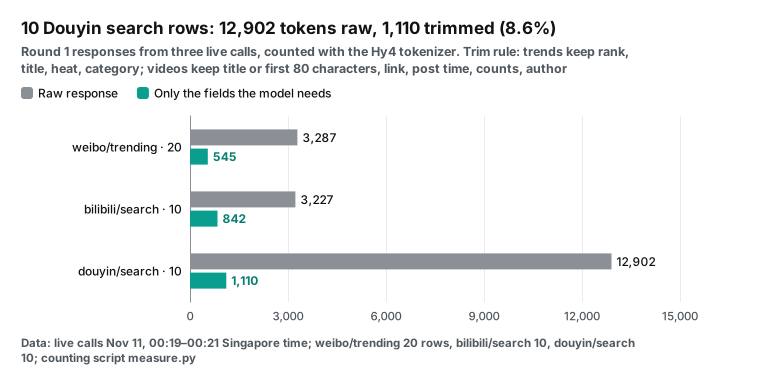
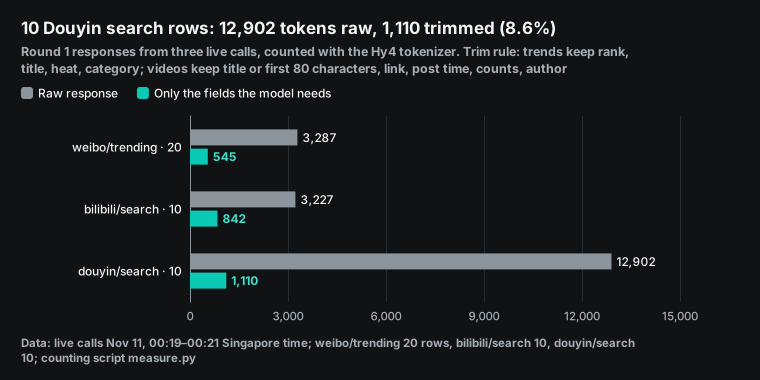
Douyin is the large one because of its fields. In the catalog, douyin/search lists 55 response_fields. Besides text, counts and author, they include video URLs at several bitrates and download links. They also include a cover and an animated cover, music data, hashtag IDs, the author's avatar and follower count. These fields help with analysis.
They do not help the model decide which platform is fresher, and they bury the useful title and time in long URLs. The Weibo response is short, but each row carries a percent-encoded search link. Each Chinese character becomes nine characters such as %E9%87%91, and the tokenizer can only cut them into small pieces. So 20 raw rows already cost 3,287 tokens.
When we render the whole three-turn chat, the gap is clearer. With raw results, the turn-three prompt is 20,096 tokens; trimmed, it is 3,177. Summed over the three turns, the totals are 24,565 and 4,904. Hy4 has a 1M context, so the raw version fits. But a longer prompt means slower reasoning, a later first token, and a higher bill on any per-token API.
Set the trim rule per task. For a trend summary, keep titles, times and counts. If the model must cite posts, keep the links. If you want comment sentiment, use a comment endpoint and keep the text. Our rule is in the executor code above, and you can change it.
Three points in time: trends move; can Bilibili and Douyin keep up?
Tool calling matters because the data is live, so we did not stop after one run. We ran the same flow at three points on Nov 11, 2026 (Singapore time 00:19, 00:42 and 18:39). Each round reads the Weibo top 20, takes the #1 trend as it is, and sends that phrase to Bilibili search and Douyin search. We wrote the freshness rule before the first call: a result is fresh when it was posted less than 24 hours before the request.
After round 3 we also repeated the round-1 phrase ("Golden Rooster Awards winners list"). This repeat shows if a low score comes from a new topic or from the search itself. We kept every raw response, and the table and chart below count directly from those files.
| Time (SGT) | #1 Weibo trend (heat) | Top 20 shared with round 1 | Bilibili relevance, fresh | Bilibili newest, fresh | Douyin last 24 h, fresh | Charged |
|---|---|---|---|---|---|---|
| 00:19 | Golden Rooster winners list (1,323,824) | 20 / 20 | 1 / 10 | not run | 10 / 10 | $0.009445 |
| 00:42 | Golden Rooster winners list (1,035,614) | 17 / 20 | 1 / 10 | 5 / 10 | 10 / 10 | $0.010001 |
| 18:39 | Down jacket at the mall is 1,000 yuan cheaper online (1,105,701) | 0 / 20 | 2 / 10 | 0 / 10 | 6 / 6 | $0.010001 |
| 18:40, round-1 phrase | — | — | not run | 8 / 10 | 10 / 10 | $0.008889 |
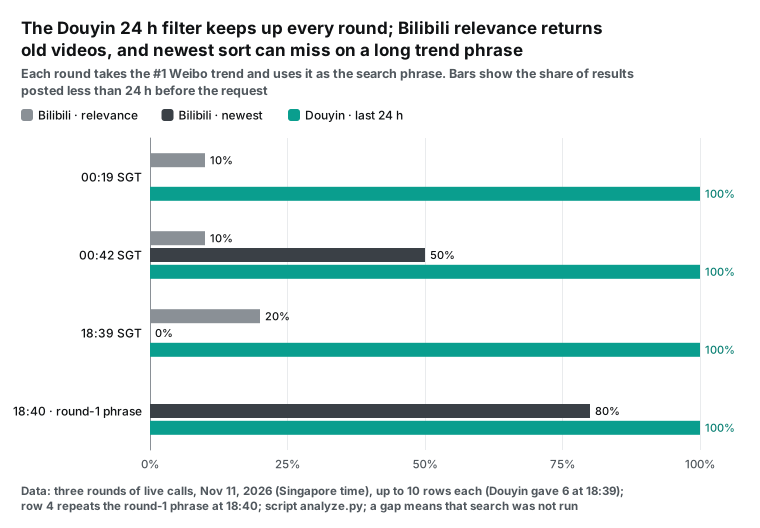
First, the trend list. Rounds 1 and 2 are 23 minutes apart. The #1 trend did not change, its heat fell from 1,323,824 to 1,035,614, and 17 of the top 20 stayed. At 18:39, none of the round-1 top 20 was left, and a shopping topic was #1.
So, inside half an hour you get almost the same list. Your executor can cache it for 10 to 30 minutes and skip one tool call. Half a day later the list is new, so read it again. The trend call took 0.48 to 0.90 seconds, the fastest of the three capabilities.
Next, Bilibili. Relevance sort gave mostly old videos in every round. At 00:19 only 1 of 10 results was fresh, and the oldest one was a 22-day-old video about the nominations. At 18:39 the phrase was the down-jacket topic.
Two results were less than an hour old, but the oldest was almost five years old. Newest sort behaved in two ways. With a short noun phrase it worked: 5 of 10 at 00:42, and 8 of 10 at 18:40 with the round-1 phrase. There, the newest was only 3.3 hours old. With a full sentence it failed: at 18:39 the newest of its 10 results was 16 days old.
Those videos only shared the words "mall" and "down jacket". The two videos under an hour old from relevance sort were not in the newest list at all. We do not know why Bilibili ranks them this way, so we only report what we saw.
Douyin with publish_time=one_day was reliable in all four runs: every result was fresh, and at 00:19 the newest was 0.6 hours old. But at 18:39 it gave 6 results, not 10. A topic that just entered the list has few videos yet. The call still cost $0.008333, because the catalog prices Douyin search per request, not per row. Only failed and empty calls are free. Douyin took 5.9 to 8.3 seconds and Bilibili 1.5 to 8.1 seconds, so set the executor timeout to 30 seconds or more.
Round 2 also showed a problem that a model must handle. In the 10 Douyin results, two posts named different winners of the award for best leading man. A verified media account posted at 21:43 Beijing time and named Tony Leung Ka-fai, the same name as a Weibo trend that night. A small personal account without verification (about 54,000 followers) posted at 18:07, three and a half hours earlier, and named a different performer.
If the executor drops the author and the time, the model reads two texts of equal weight. That is why our trim rule keeps author_name and posted_at. For fact checks, also keep author_is_verified and author_follower_count, so the model can weigh source and time, not volume.
| What we saw | What to put in the executor or tool text |
|---|---|
| 17 of the top 20 trends stayed after 23 minutes; 0 stayed after 18 hours | Cache trends for 10 to 30 minutes; read them again on a new day |
| Trend titles are often full sentences | Tell the model to cut the trend to 2 to 4 key words before it searches, or run both sorts and merge by posted_at |
| Bilibili relevance sort returns mostly old videos | Send sort=newest for "latest news" questions and keep posted_at |
| Douyin 24 h filter can return fewer than 10 rows and is billed per request | Do not search again to fill the count; a short list is a sign of a new topic |
| Two posts give opposite facts about one event | Keep author and time in the trim; add verification and follower count for fact checks |
| Douyin 5.9–8.3 s, Bilibili up to 8.1 s | Use a timeout of 30 s or more; run the two searches at the same time when one does not need the other |
The three rounds plus the repeat made 13 successful calls for $0.038336 in total. The two 429 responses and the three 422 responses cost nothing. At this rate, a monitor that runs every 30 minutes (48 rounds a day) costs about 48 × $0.0100 ≈ $0.48 a day in data calls. If you cache the trend list and search only when the #1 trend changes, it costs less.
Five more jobs for your executor
The executor above is about thirty lines. In production it needs five more things, and each one maps to something we saw in our tests. First, an allowlist. Models sometimes invent a tool name or misspell an argument.
The executor accepts only tool names it knows and returns an error for anything else. Never build a request from a platform and action name that the model wrote. This is one more reason to avoid the generic tool: it hands the allowlist to the model.
Second, type repair. Even with full types in the schema, a server may run without strict mode and a model may quote a number. The executor converts digit strings to integers and JSON-like strings to objects, by the schema, and saves one 422 and one turn. vLLM's tool_strict_level.py defines the three constraint levels; on the server they use structural tags from XGrammar. With the parameter level on, arguments follow the schema and your repair step becomes a safety net.
Third, rate limits and retries. On a 429, our API returns retry_after, and the executor waits that long. Do not show the 429 to the model, or it may try other arguments and make the problem worse. The test key in this article allows 10 calls per minute. Fourth, trimming, as above.
Fifth, cost tracking. Every response includes charged_usd. Add it to the metadata of the chat turn, next to the model's token usage. Then you know the real cost of each answer. Requests or the OpenAI Python client both work; our API needs only a JSON body and a Bearer header.
| Job | What we saw | Where it lives |
|---|---|---|
| Allowlist of tool names | The generic tool lets the model choose any platform and action | ROUTE dict in the executor |
| Type repair | limit as "10" gets a 422 at no charge | Loop over the schema before the request |
| Wait on 429 | Two 429s with retry_after 6 s on the test key | Sleep, then resend the same body |
| Trim fields | 10 Douyin rows: 12,902 tokens raw, 1,110 trimmed | KEEP dict |
| Track cost | Every 200 response carries charged_usd | Return value of run_tool |
Before launch: replay model calls on your own deployment
We did not run Hy4. So you must check on your own deployment whether the model calls tools correctly. The method is simple. Pick 20 to 30 real questions from your product. Include three kinds. Some questions need a tool. Some are chat and need no tool. Some need two tools in sequence.
Also include some questions with typos, casual wording or mixed Chinese and English. Real users ask that way. When a tool description is too narrow, these questions are the most likely to get no call or the wrong call.
Run each question 3 times with the same sampling settings. Save the model's tool_calls as they are. Then judge each one with the same rules as your executor. Write the pass and fail rules before the run, and do not change them after you see the results.
| Check | Pass rule | If it fails, look at |
|---|---|---|
| Valid tool name | The name is in the executor's ROUTE | Tool descriptions that are too similar or too long |
| Valid arguments | jsonschema validates arguments against the tool parameters | Missing types; --tool-strict-level parameter on the server |
| No call when none is needed | Chat questions give empty tool_calls | A tool_choice set to required |
| Two steps connect | The turn-two keyword comes from the turn-one result | The previous tool message is missing from the next turn |
| Self-repair after an error | After our 422 goes back, the next arguments pass validation | The executor trimmed away next_steps |
Most of the replay cost is your own GPU time. You do not need live data calls on every run. Save real responses like the ones in this article as fixed samples, and feed them back from turn two on. Then every run gets the same input, so you can compare versions fairly.
For an end-to-end test, make a few live calls. One round of three calls costs about $0.0094 at the catalog prices in this article. You can replay the same questions on the hosted final model and compare it with the preview on your own tools. Until the final weights are public, this is the most direct way to decide whether to switch.
Record four rates on each replay. The first is valid tool names. The second is arguments that pass validation. The third is calls made when no call was needed. The fourth is errors fixed within one turn after a 422.
Compare these four numbers between the preview and the final model, and before and after each change to a tool description. One or two chats do not show whether a change really helped.
The bill: model input, data calls and self-hosting
Start with one round trip. The data side uses catalog prices: weibo/trending $0.000556, bilibili/search $0.000556 and douyin/search $0.008333. Together that is $0.009445, which is also the sum of charged_usd in our live responses. On the model side, we can only price input. The prompts of the three turns add up to 24,565 tokens with raw results and 4,904 tokens trimmed.
At the Hy4 input price that OpenRouter listed on November 11 at 00:16 Singapore time, $0.417 per million tokens, that is about $0.0102 and $0.0020. At the price in Tencent's press release, about $0.90 per million, it is about $0.0221 and $0.0044. We did not measure model output, including the reasoning that is on by default, so it is not in these numbers. Add it from your own logs.
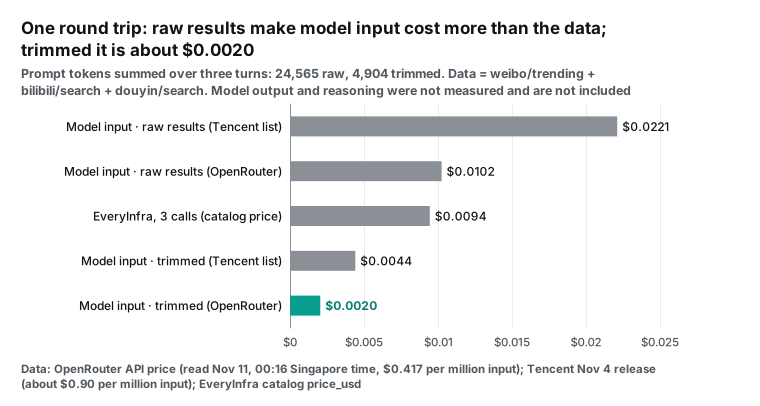
Look at the middle bar. With raw results, the model's input cost for reading the data is higher than the cost of the data itself. With trimmed results, model input drops to about one fifth of the data cost. So in this kind of task, the main saving is not a cheaper data source. It is the dozen lines of trim code in your executor.
Now scale the task to once an hour for 30 days. Data costs about $6.80. Model input at the OpenRouter price costs about $1.47 trimmed and about $7.38 raw.
| Item | Unit price (when read) | One round | Hourly for 30 days |
|---|---|---|---|
| EveryInfra data (3 calls) | Catalog price_usd (read Nov 11, 00:16 SGT; unchanged on Nov 12) | $0.009445 | $6.80 |
| Hy4 input, trimmed (OpenRouter) | $0.417 per million tokens (Nov 11, 00:16 SGT) | $0.0020 | $1.47 |
| Hy4 input, raw (OpenRouter) | Same | $0.0102 | $7.38 |
| Hy4 input, trimmed (Tencent list) | About $0.90 per million tokens (Nov 4 release) | $0.0044 | $3.18 |
| Self-hosting on 8 H200 GPUs (on demand) | Runpod, $5.29 per GPU-hour (read Nov 11) | — | $30,470 |
The Tencent price in the table is the list price. Tencent Cloud updated its model pricing page on November 10, 2026. It says Hy4 inference costs 50% of list price until December 31. When the offer ends, the hosted price doubles. Include that when you compare hosted and self-hosted cost.
The self-hosting row needs its own explanation. The FP8 weights of Hy4 preview are 813.8 GB, and the guides use 8-way tensor parallelism. An NVIDIA H200 has 141 GB of memory, so 8 of them have 1,128 GB; what is left after the weights holds the KV cache. The Runpod pricing page lists $5.29 per H200 per hour on demand. At that price, 8 GPUs cost $42.32 an hour, or about $30,470 for 30 days.
The same money buys about 73 billion input tokens on OpenRouter. For an hourly trend check, self-hosting makes no sense on cost. Its value is elsewhere. Data stays in your data center, and you can fine-tune. You control output constraints with server flags such as --tool-strict-level, and no provider rate-limits you. If you already have an idle 8-GPU machine, the data calls become the main cash cost of this job: a few dollars a month.
Errors, rate limits and charges
In a tool-calling loop, errors are normal. So you need to know which errors cost money and which ones the model can handle. This table lists every error we saw. All times are November 11, 2026, Singapore time.
| Time | What happened | HTTP | What the response said | Charge |
|---|---|---|---|---|
| 00:19:54, 00:19:57 | Test key over 10 requests per minute | 429 | rate_limited, retry_after 6 s, Nothing was charged | $0 |
| 00:20:01 | sort set to hot, which does not exist | 422 | All allowed values; did_you_mean most_liked, most_viewed | $0 |
| 00:22:45 | limit sent as the string "10" | 422 | must be an integer from 1 to 50 (got '10') | $0 |
| 00:22:52 | params sent as one string | 422 | params: Input should be a valid dictionary | $0 |
Handle 429 in the executor, not in the model: wait for retry_after and send the same request again. The model does not need to know. Send 422 back to the model, because only the model knows what it wanted to ask. Our error responses include fault: request means the request itself is wrong and must change; account means an account-level limit. They also include retryable, which tells you whether an unchanged retry makes sense. For slower capabilities such as Douyin search, the catalog gives synchronous requests an 85-second budget. If you need longer, add "mode": "async" to the body, get a job ID and poll it. The setup steps and API keys are in the quickstart, and prices are on the pricing page.
Limits and things to watch
First, we did not test model behavior. We did not run Hy4, so every statement about which calls the model makes is a configuration example. Whether it calls tools at the right time, and whether it invents arguments, you must judge from Tencent's published scores and your own replays. Second, our token counts use the preview template and tokenizer.
If the final weights come with a changed template, for example a new tool list format or new rules for keeping reasoning, measure again. We cannot see the template behind hosted APIs. Third, we report no model latency, because we did not run the model; the seconds in this article are our API's response times only.
Fourth, data scope. Trending lists and video search results are content that the platforms show in public. Our API does not log in and does not touch private content. Weibo, Bilibili and Douyin each have their own developer platforms (Weibo, Bilibili, Douyin). They suit authorized data for your own accounts. The use case here is reading public content across accounts.
Fifth, Douyin search costs about 15 times more per call than the other two; it is 88% of the data cost in one round. On a tight budget, check Weibo and Bilibili first and call Douyin only when the topic is worth it.
Further reading
Related articles: GLM 5.3 scripts for Zhihu and Weibo, Qwen-Agent with remote MCP. Also: DeepSeek V4.1 Flash review tagging and the Douyin API Python tutorial. If your model already has an MCP-capable client, connect it to our remote MCP server.
Frequently asked questions
Where can I find a hy4 function calling example?
Tencent's model card and repository show plain chat examples only; there is no full tool-calling example. For the format, read the chat_template.jinja file and the vLLM tool calling docs. The tool JSON and executor code in this article work as an example, and the request format is the same as OpenAI function calling.
What usually causes a hy4 function calling error?
From the source code and our live calls, three causes are most common. One: the server runs without --enable-auto-tool-choice and --tool-call-parser hy_v4, so the raw tags appear in the answer text. Two: the schema leaves out argument types, so integers and objects come out as strings and the data API returns 422. Three: the vLLM build is older than October 31, 2026, so argument names with whitespace are changed. Check the third against PR #61542.
How do I call the tencent hy4 api, and how is it different from self-hosting?
Hosted options are Tencent Cloud TokenHub, which is OpenAI-compatible, and OpenRouter. Both accept tools and serve the final Hy4. Self-hosting today means the preview weights. You control the template, the parser and strict mode, and you need 8 GPUs to start.
Can I run a model this large locally?
Discussion #10 on the Hy4-preview Hugging Face page asks this. The user notes that Qwen and GLM now have versions under 300B that run on one machine. Hy4 is much larger.
From our size count, the FP8 weights are 813.8 GB, which needs at least 8 GPUs with 141 GB each. Community members posted low-bit GGUF builds in the same discussion area (threads #8 and #9; see the GGUF format docs). But there is no published data on their quality or tool-call stability. If you only need the model to check trends, a hosted API plus our data API is a more realistic start.
References
- Tencent Launches Hy4, Joining the Ranks of the World's Leading Open-Source AI Models, Tencent, 2026-11-04, https://www.tencent.com/tencent-launches-hy4-joining-the-ranks-of-the-worlds-leading-open-source-ai-models/
- Introducing Hy4, Tencent Hy, 2026-11-04, https://hy.tencent.ai/research/hy4
- tencent/Hy4-preview model card, Hugging Face, updated 2026-08-28, https://huggingface.co/tencent/Hy4-preview
- tencent/Hy4-preview-FP8, Hugging Face, updated 2026-08-28, https://huggingface.co/tencent/Hy4-preview-FP8
- Tencent-Hunyuan/Hy4-preview, GitHub, https://github.com/Tencent-Hunyuan/Hy4-preview
- Hy4-preview chat_template.jinja, Hugging Face, https://huggingface.co/tencent/Hy4-preview/blob/main/chat_template.jinja
- tencent/Hy4-preview usage guide, vLLM Recipes, https://recipes.vllm.ai/tencent/Hy4-preview
- Hy4-Preview cookbook, SGLang, https://lmsysorg.mintlify.app/cookbook/autoregressive/Tencent/Hy4-Preview
- hy_v4_tool_parser.py, vLLM, last commit 2026-11-08, https://github.com/vllm-project/vllm/blob/main/vllm/tool_parsers/hy_v4_tool_parser.py
- Preserve whitespace in HYV4 argument names (#61542), vLLM, 2026-10-31, https://github.com/vllm-project/vllm/pull/61542
- Add --tool-strict-level (#56268), vLLM, 2026-09-18, https://github.com/vllm-project/vllm/pull/56268
- tool_strict_level.py, vLLM, https://github.com/vllm-project/vllm/blob/main/vllm/tool_parsers/tool_strict_level.py
- Tool Calling, vLLM docs, https://docs.vllm.ai/en/latest/features/tool_calling.html
- Structured Outputs, vLLM docs, https://docs.vllm.ai/en/latest/features/structured_outputs.html
- Reasoning Outputs, vLLM docs, https://docs.vllm.ai/en/latest/features/reasoning_outputs.html
- OpenAI-Compatible Server, vLLM docs, https://docs.vllm.ai/en/latest/serving/openai_compatible_server.html
- Tool Parser, SGLang docs, https://docs.sglang.io/advanced_features/tool_parser.html
- Function calling, OpenAI platform docs, https://platform.openai.com/docs/guides/function-calling
- Structured outputs, OpenAI platform docs, https://platform.openai.com/docs/guides/structured-outputs
- Tool & Function Calling, OpenRouter docs, https://openrouter.ai/docs/guides/features/tool-calling
- OpenRouter Quickstart, OpenRouter docs, https://openrouter.ai/docs/quickstart
- Models API (tencent/hy4 price and parameters), OpenRouter, read 2026-11-11 00:16 SGT, https://openrouter.ai/api/v1/models
- Hy4 release article, Tencent Cloud Developer Community, 2026-11-04, https://developer.cloud.tencent.com/article/2776227
- Model pricing, Tencent Cloud, updated 2026-11-10, https://www.tencentcloud.com/document/product/1300/78937
- Chat templates, Hugging Face Transformers docs, https://huggingface.co/docs/transformers/main/en/chat_templating
- Tokenizers docs, Hugging Face, https://huggingface.co/docs/tokenizers/index
- Evaluation results, Hugging Face Hub docs, https://huggingface.co/docs/hub/eval-results
- GGUF, Hugging Face Hub docs, https://huggingface.co/docs/hub/gguf
- Toolathlon, HKUST NLP, GitHub, https://github.com/hkust-nlp/Toolathlon
- DeepSeek Sparse Attention, arXiv 2512.02556, https://arxiv.org/abs/2512.02556
- IndexCache, arXiv 2603.12201, https://arxiv.org/abs/2603.12201
- Apache License 2.0, Apache Software Foundation, https://www.apache.org/licenses/LICENSE-2.0
- Jinja, Pallets, GitHub, https://github.com/pallets/jinja
- XGrammar docs, https://xgrammar.mlc.ai/docs/
- Requests docs, https://requests.readthedocs.io/en/latest/
- openai-python, OpenAI, GitHub, https://github.com/openai/openai-python
- NVIDIA H200 Tensor Core GPU, NVIDIA, https://www.nvidia.com/en-us/data-center/h200/
- GPU Cloud Pricing, Runpod, read 2026-11-11, https://www.runpod.io/pricing
- Discussion #10 on tencent/Hy4-preview, Hugging Face, 2026-08-29, https://huggingface.co/tencent/Hy4-preview/discussions/10
- Tencent says its Hy4 joins 'top-tier' of open-source AI models, Nikkei Asia, 2026-11-04, https://asia.nikkei.com/business/technology/artificial-intelligence/tencent-says-its-hy4-joins-top-tier-of-open-source-ai-models
- Tools (MCP specification), Model Context Protocol, https://modelcontextprotocol.io/specification/2025-06-18/server/tools
- Weibo Open Platform API docs, Sina Weibo, https://open.weibo.com/wiki/API
- Bilibili Open Platform, Bilibili, https://openhome.bilibili.com/
- Douyin Open Platform, Douyin, https://developer.open-douyin.com/
- EveryInfra social data catalog, EveryInfra, read 2026-11-11 00:16 SGT, https://api.everyinfra.com/api/v1/social/catalog
- Tencent Hy4 Is INSANE: Is THIS the BEST Open Model Yet?, YouTube, 2026-11-06, https://www.youtube.com/watch?v=GBjDU9Ct0VQ
- jsonschema documentation, Python, https://python-jsonschema.readthedocs.io/en/stable/
Reference BL-130