Residential Proxy vs Data API: When You Need Each, With a 1024Proxy Setup
IP databases flag cloud exits as data center. We tested 88 IPs and 5 search pages from a home line to show when to add 1024Proxy and when to call an API.
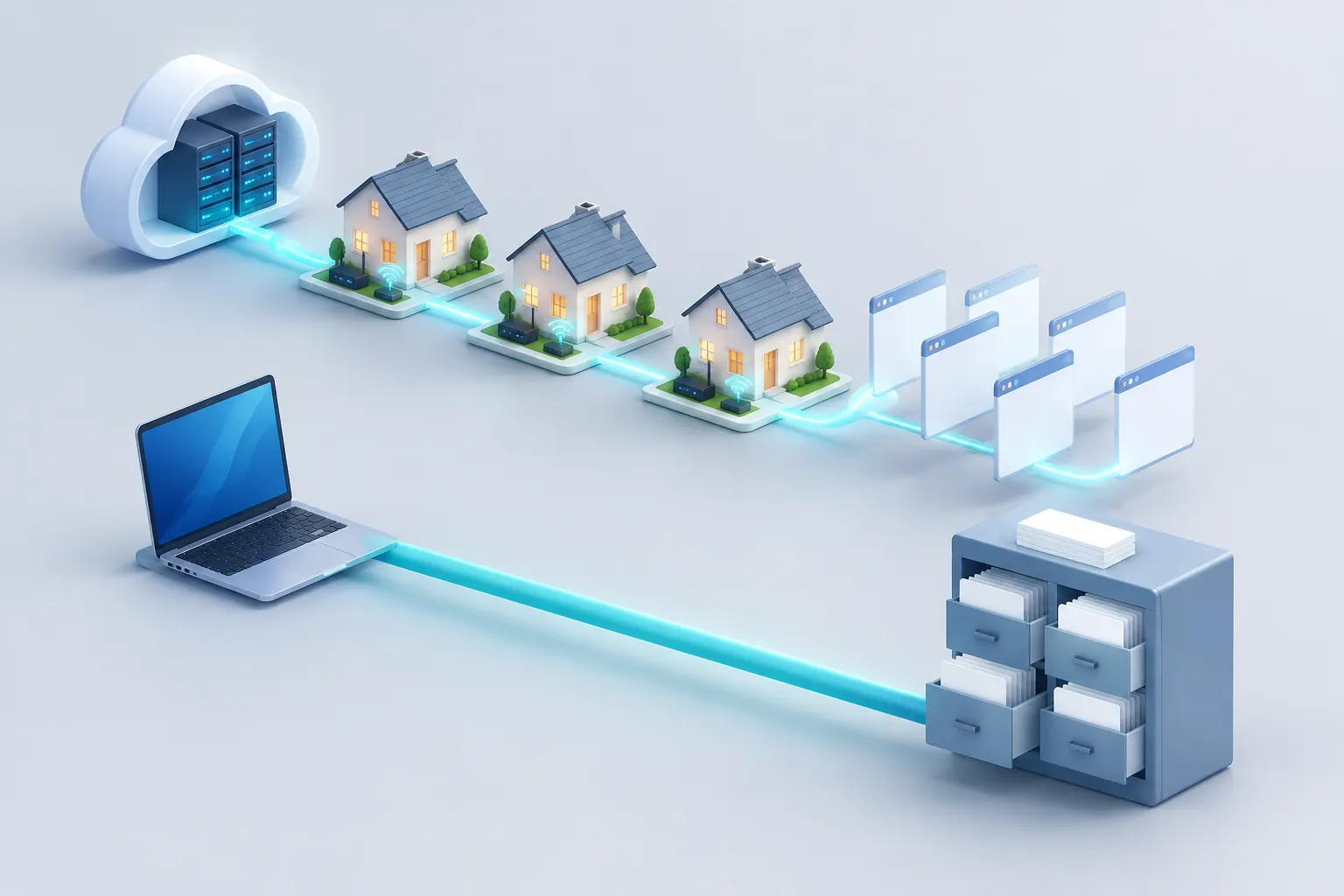
A cloud server is easy to recognize by its exit IP. At 00:23 Singapore time on November 9, 2026, we took 40 addresses from the public IP lists of 10 cloud companies. We checked them in two IP databases. One or both databases flagged 39 of the 40 as data center or VPN addresses. We also took 42 addresses from home broadband ISPs, and only 1 of them got a data center flag.
This is the problem that a residential IP service such as 1024Proxy solves. It moves the exit of your own scraper to a home broadband line. But the exit is only the first gate. At 00:24 on the same day, we used a Singapore home line that no data center database flags. We opened the search pages of 5 platforms in headless Chrome, and only YouTube showed results.
Reddit showed a human check. Amazon returned HTTP 503. Shopee asked for a login, and the TikTok result area showed an error. At 00:18 and 00:19, from the same machine, we called the EveryInfra search capability for the same 5 platforms. All 5 calls returned 10 to 20 structured rows, for a total charge of $0.010307.
We first published this article on November 7, 2026. On November 9 we checked the 1024Proxy prices and help pages again, and we added four new tests.
The first test shows how IP databases label exits. The second measures the traffic of one page load on a residential exit. The third shows how to write proxy credentials without errors. The fourth finds the HTTP clients that send data API calls into a proxy by mistake.
The main point did not change. A residential proxy handles the requests that you send to target sites. A data API handles structured data from the platforms in its catalog.
EveryInfra gives AI tools and developers one data API. You send POST https://api.everyinfra.com/api/v1/social with a platform, an action and params, and you get public data from many platforms. At 00:17 Singapore time on November 9, 2026, the free capability catalog listed 106 platforms and 573 capabilities. Of these, 571 were available, up from 570 in our November 7 draft.
Many teams also have sites outside any catalog, admin panels that need a login, and scrapers that they wrote. They often run this code on cloud servers, and after some time, target sites start to limit the requests. This article first shows where the limits come from. Then it shows how to connect a residential proxy and how to estimate the traffic bill. At the end, it shows which tasks do not need a proxy at all.
How we set the test rules before we started
We wrote four rules before we ran any test, so that the results could not change the rules. First, a claim about IP labels needs at least 40 cloud addresses and 20 broadband addresses, checked in at least two IP databases. Second, a page counts as a success only when search results appear on the page. HTTP 200 does not count, because human check pages and login walls also return 200.
Third, traffic cost uses only measured bytes multiplied by the 1024Proxy list price, with no estimates and no industry averages. Fourth, a client "uses the proxy" only when our local mock proxy logs a connection to api.everyinfra.com:443. We did not infer this from documentation. These rules also mark the limits of this article. We do not have a 1024Proxy account, so we did not test through its residential exits.
The page weights come from one load per page, which is a small sample. The IP labels come from two free databases only. Each result below states the conditions under which it holds. You can use the same rules on your own target pages and get numbers that fit your own case.
1. The usual problem: your scraper exits from a data center IP
A service on a cloud server sends all of its outbound requests from the cloud company's IP addresses. Each block of IP addresses on the internet belongs to an autonomous system (AS).
Each AS has a number, the ASN. One network operator runs each AS with one routing policy (ARIN: Autonomous System Numbers, RFC 1930). An ASN only tells you who runs the block. It does not say "data center" or "home". IP databases add those labels.
For example, the IPinfo ASN data guide gives each ASN a type field, with values such as isp, business, hosting and education. The ip-api.com JSON API documentation has a hosting field for hosting, colocation and data center addresses. The commercial MaxMind Anonymous IP database has both is_hosting_provider and is_residential_proxy. So the exits of residential proxies are also something that databases label.
Our first draft checked only three IPs, which only show what a label looks like, so this time we used 88 addresses. For the cloud side, we used the lists that each company publishes. The first is the AWS ip-ranges.json (guide). It was generated on November 8, 2026, and it has 1,906 IPv4 prefixes for EC2. The second is the Google Cloud cloud.json (guide), also generated on November 8. We also used the Oracle Cloud public_ip_ranges.json (guide, updated on October 28, 2026).
DigitalOcean publishes a geolocation file, and Linode (part of Akamai) publishes a geofeed in the RFC 8805 format. We did not find equally clean public lists for Azure, Hetzner, OVHcloud, Alibaba Cloud and Tencent Cloud. For these five, we used the RIPEstat announced-prefixes API to get the prefixes that their ASNs announced on November 8.
For the broadband side, we also used RIPEstat. We took 14 fixed-line ISPs. In the US and the UK, these are Comcast, Charter, BT and Virgin Media. In Europe and Asia, these are Deutsche Telekom, Orange, NTT OCN, KT and Telkom Indonesia. In Latin America, these are Claro Brazil and Telmex.
In Singapore, these are Singtel, StarHub and M1. We added two mobile carriers, T-Mobile US and Jio. This mix gives US and European readers the ISPs that their own users are most likely to sit behind.
The sampling used a fixed random seed. For each company, we picked random prefixes and then one random host address inside each prefix. We took 4 addresses per cloud company and 3 per ISP or carrier, 88 in total. At 00:23 Singapore time on November 9, we sent all 88 addresses to the ip-api.com batch endpoint, which takes up to 100 per call. We then sent them to the v2 endpoint of proxycheck.io, which gives 100 free lookups per day without sign-up.
A random address is not always in use. Databases often label such addresses by the whole block or the whole ASN. So these numbers tell you what type the block has in the database. They do not tell you what one machine is doing right now.
| Sample group | Count | ip-api `hosting=true` | proxycheck: VPN or data center | proxycheck: Residential | proxycheck: Business |
|---|---|---|---|---|---|
| Cloud company IP lists (10 companies) | 40 | 30 (75%) | 38 (95%) | 0 | 2 |
| Fixed-line ISPs (14 companies) | 42 | 1 (2.4%) | 0 | 15 (36%) | 26 (62%) |
| Mobile carriers (2 companies) | 6 | 1 | 0 | 0 | 1 (5 more labeled Wireless) |
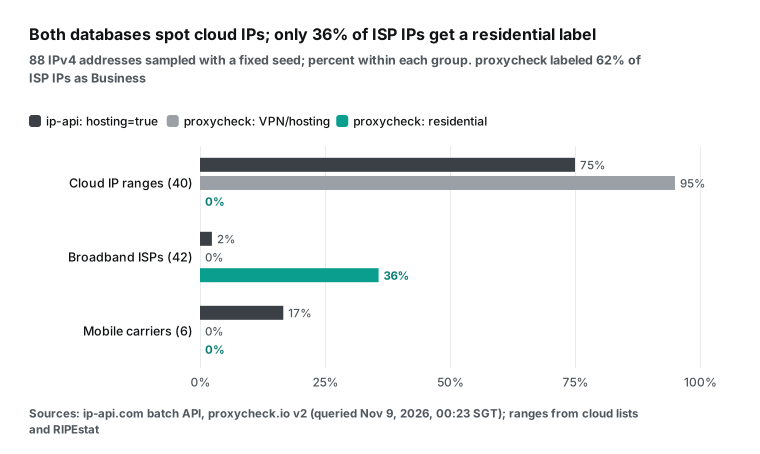
You can read this table in two ways. First, cloud addresses are hard to hide. At least one of the two databases flagged 39 of 40, or 97.5%. The only address that neither database flagged came from the AWS list. Second, "not a data center" does not mean "residential". Of the 42 broadband addresses, proxycheck labeled only 15 as Residential and 26 as Business.
Large ISPs sell both home broadband and business lines. When a block goes to business customers, the database labels it Business. The labels also differ inside one company. The table shows how proxycheck labeled the 3 addresses from each ISP (its type field).
| proxycheck labels (3 per ISP) | ISPs |
|---|---|
| All 3 Residential | StarHub |
| 2 Residential, 1 Business | Singtel, Virgin Media, Orange, Telmex, Telkom Indonesia |
| 1 Residential, 2 Business | Comcast (ip-api flagged 1 of these as hosting), BT |
| No Residential | Charter, Deutsche Telekom, NTT OCN, KT and Claro: 3 Business each. M1: 2 Business, 1 Wireless |
The two databases also answer different questions. ip-api has only three yes-or-no fields, hosting, proxy and mobile, and no residential field. It set hosting=false for 41 of the 42 broadband addresses. proxycheck gives each address only one type value. So our sample shows only this: about one third of ISP addresses got a Residential label from proxycheck, and most got Business. You cannot guess the label from the ISP name. When you buy an ISP or residential IP, check it in two databases when you get it.
The 1024Proxy dual-ISP residential IP guide from October 29, 2026 also tells you to check an IP in a database after you get it. Its pricing page also has an FAQ, which we saved at 02:44 Singapore time on November 9, 2026. It says that IPinfo is the reference when the region of an IP does not match some checking sites. So different answers from different databases are normal. Before you buy, ask which database the company uses as the reference.
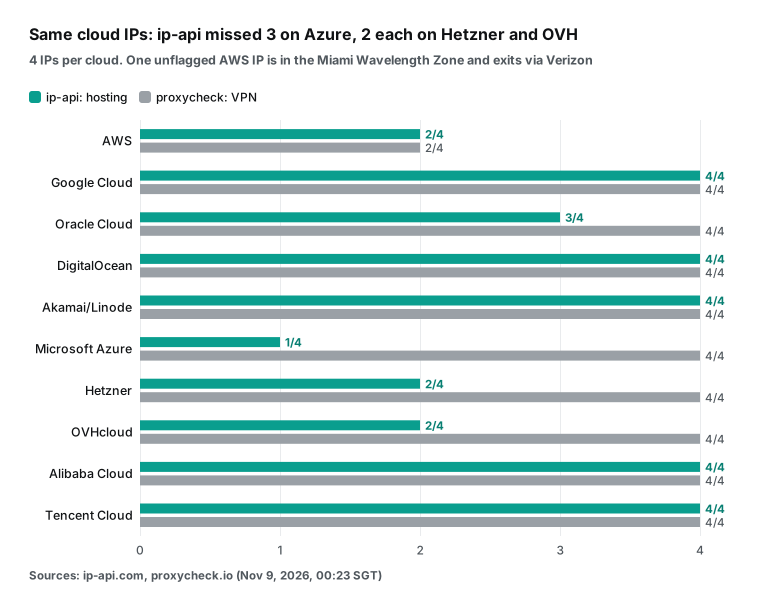
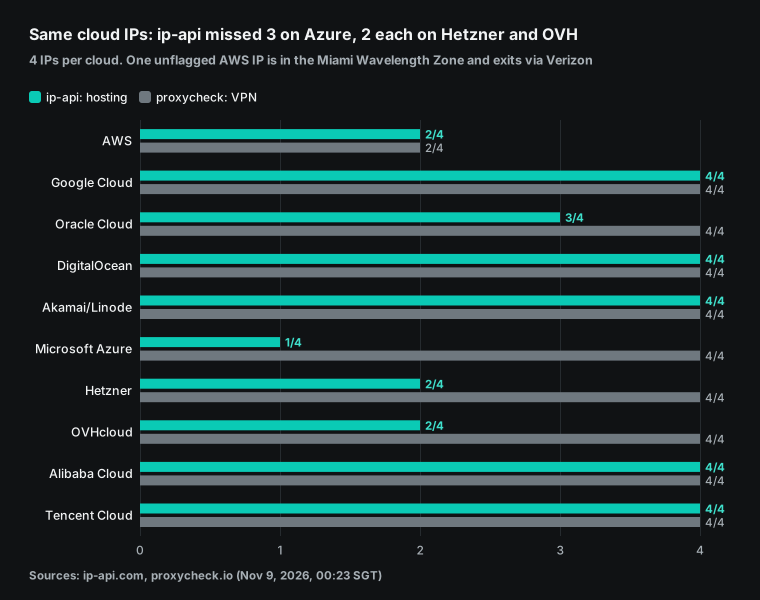
The difference is clearer by company. ip-api missed 3 Azure addresses and 2 each from Hetzner and OVHcloud, but proxycheck flagged all 4 for all three companies. On the AWS side, both databases flagged only 2, for different reasons. One address belongs to the us-gov-west-1 region, and proxycheck labeled it Business. Another address, in 155.146.80.0/20, belongs to us-east-1-wl1-mia-wlz-1 in the AWS list, which is the Miami Wavelength Zone.
AWS Wavelength puts compute inside a telecom carrier's network and uses carrier IP addresses. In RIPEstat, Verizon Business (AS6167) announces this block, and ip-api labeled it mobile=true.
ip-api missed one more AWS address: 35.55.10.109. The AWS list puts 35.55.10.0/24 under EC2 in the Sydney region (ap-southeast-2). ip-api returned the ASN AS16509 Amazon.com, Inc. for it, but hosting was false. proxycheck labeled it VPN.
So ip-api does not set hosting for a full ASN at once, and it can miss a small block inside a cloud ASN. This is why you compare two databases. The rule "a cloud server always gets a data center flag" has exceptions. Exceptions that both databases miss are rare, and a normal EC2 instance cannot pick them.
The table shows the 4 AWS samples one by one, so you can see where each database missed.
| Address | Region in the AWS list | ip-api (ASN, `hosting`) | proxycheck |
|---|---|---|---|
| 3.32.158.126 | us-gov-west-1 | AS8987, true | Business |
| 155.146.82.54 | Miami Wavelength Zone (us-east-1-wl1-mia-wlz-1) | AS6167 Verizon Business, false (mobile=true) | Business |
| 35.55.10.109 | Sydney (ap-southeast-2) | AS16509, false | VPN |
| 54.180.190.35 | Seoul (ap-northeast-2) | AS16509, true | VPN |
What can a site do with these labels? CDN and cloud firewall documentation is direct about it. Cloudflare IP Access rules can allow, block or challenge visitors by IP, ASN or country. Cloudflare custom rules have an ip.src.asnum field for the ASN. AWS WAF has an ASN match rule, and the Google Cloud Armor rules language has origin.asn.
Cloudflare also gives each request a bot score, and site owners can filter traffic by that score. So in high-volume or long-running jobs, requests from data center IPs get more CAPTCHA challenges. They can also get 403 Forbidden, or 429 Too Many Requests when they come too fast. This happens at the network exit, and it is not a bug in your scraper code.
This also has a limit. The same site also looks at request rate, cookies and browser behavior. If you change only the IP and nothing else, the site can still limit you. The test in the next section measures this.
2. The fix: give your scraper a residential exit IP
To get your scraper through more easily, move its exit IP to a real home broadband line. This is a residential IP. Its ASN belongs to a local broadband ISP, so in the target site's database it looks more like a normal user. 1024Proxy gives the same advice in its own dual-ISP guide from October 29, 2026. After you get an IP, check its ASN and residential label in a database such as IPinfo.
That is the same check that we used in section 1. The October 14, 2026 1024Proxy post on how to check IP reputation adds a useful warning. A clean reputation check does not always mean that your work goes well. Sites also look at request rate, browsing behavior, account state and device data. Our page test below puts numbers on this warning.
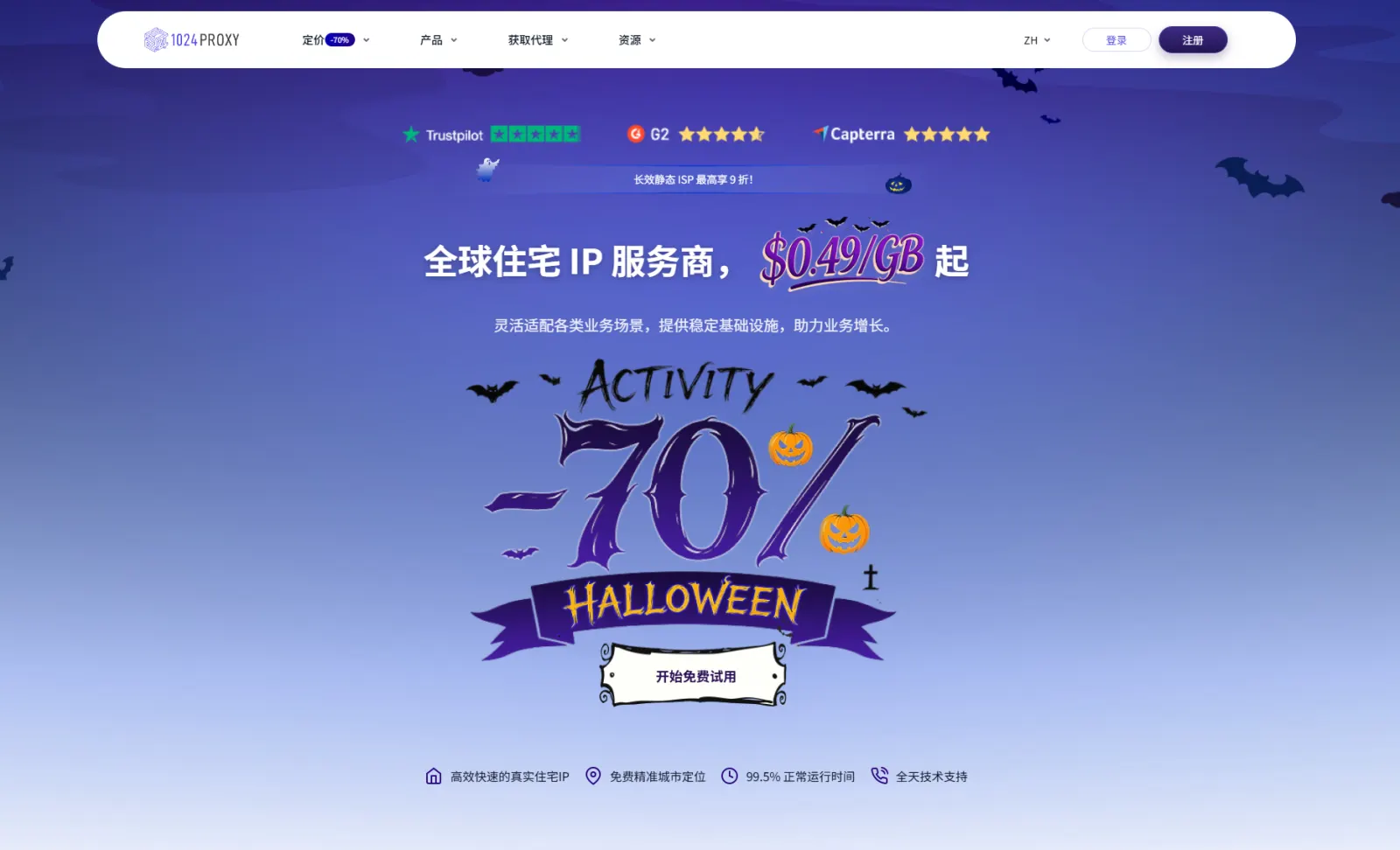
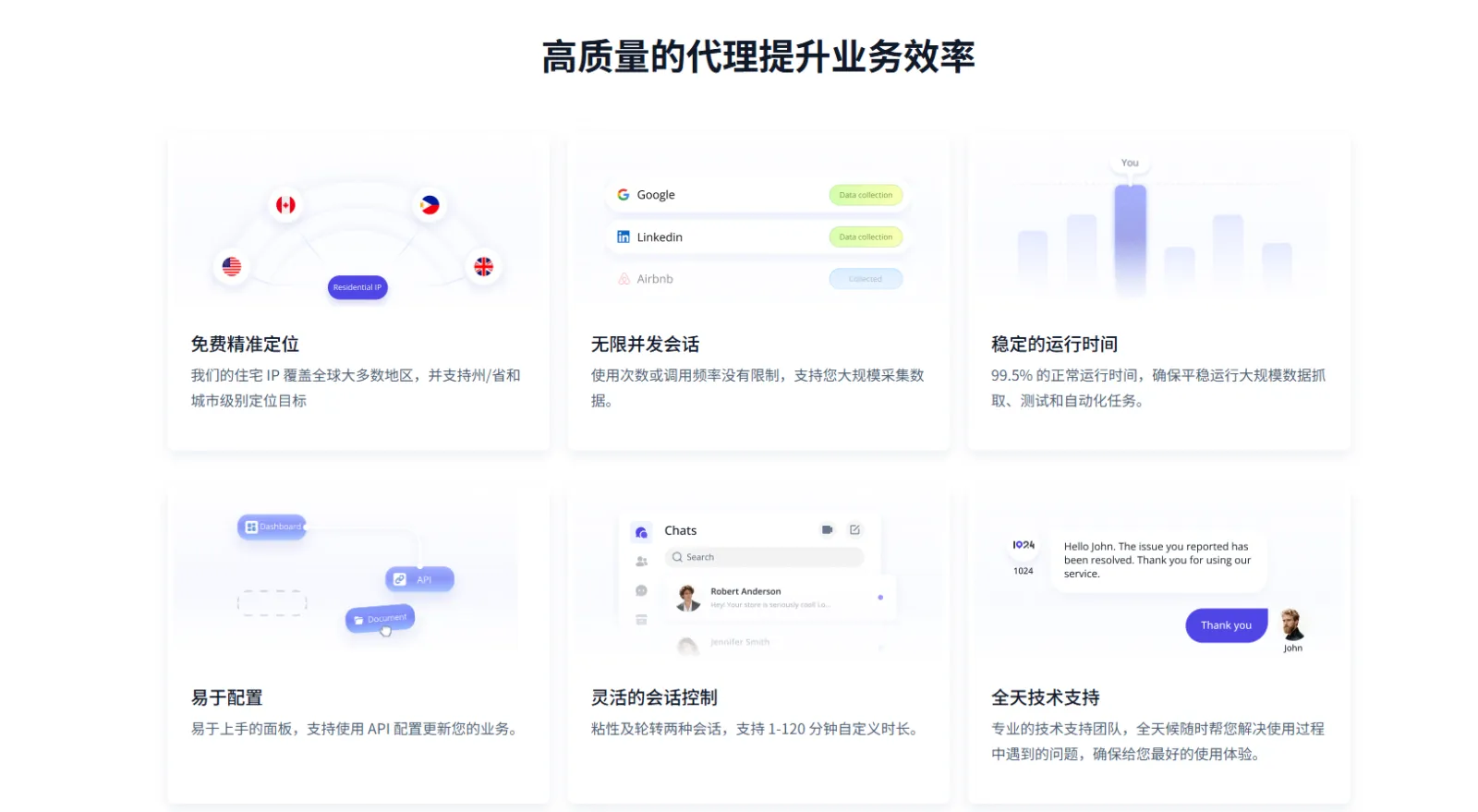
The company behind 1024Proxy is GUANG XUN YONG YAO LIMITED, founded in 2024 (about us). It has three product types for three types of scraping work. Below we show which type fits which job. We checked each feature and price against the official pages again on November 9. We also saved the raw HTML of those pages at 02:44 Singapore time, so you can compare later price changes.
Public pages: rotating residential traffic. A residential exit fixes the data center label from section 1. We did not test whether a residential exit also gives fewer CAPTCHAs. We also did not compare its success rate with a data center exit. The next subsection shows that on a residential exit, only 1 of 5 pages showed results. So do not expect a higher success rate by default.
The 1024Proxy rotating residential traffic product lets you target by country, state or province, city and ISP, with no extra charge for targeting. Sessions can be sticky (the same IP for 1 to 120 minutes) or rotating (a new IP per request). The protocols are HTTP(S) and SOCKS5 (rotating residential traffic page). The home page claims 99.5% uptime, which is the company's own claim, and we did not test it. The session control guide puts scraping, search engine result collection and price monitoring under rotating sessions. It also advises you to control the request rate and copy a real visit pattern.
Accounts and stores that stay logged in: static ISP. Some jobs must stay logged in for a long time. Examples are a store back office or a social media account. These jobs need an exit that stays the same for days or months. A rotating residential sticky session lasts at most 120 minutes, which is not enough. The 1024Proxy static ISP product gives dedicated native IPs with no traffic limit, for 7, 30 or 90 days (static ISP page).
On November 9, that page listed prices per IP by country in two groups, "home native" and "home broadcast". In the home native group, the US, Germany and the UK were $3.9 per IP (list price $4.9), and Singapore was $5.8 per IP. A "US dual Comcast" option was $5.5 per IP. In the home broadcast group, Singapore and Germany were $2.9 per IP. The page does not say which validity period each price is for, so check the checkout page before you buy.
A fixed exit costs more because you buy each IP: 10 US home native IPs at the listed $3.9 cost $39. By the method in section 4, the 1 TB rotating tier for $490 covers about 3 million HTML-only loads of the YouTube search page. So buy static IPs only for jobs that need a fixed identity.
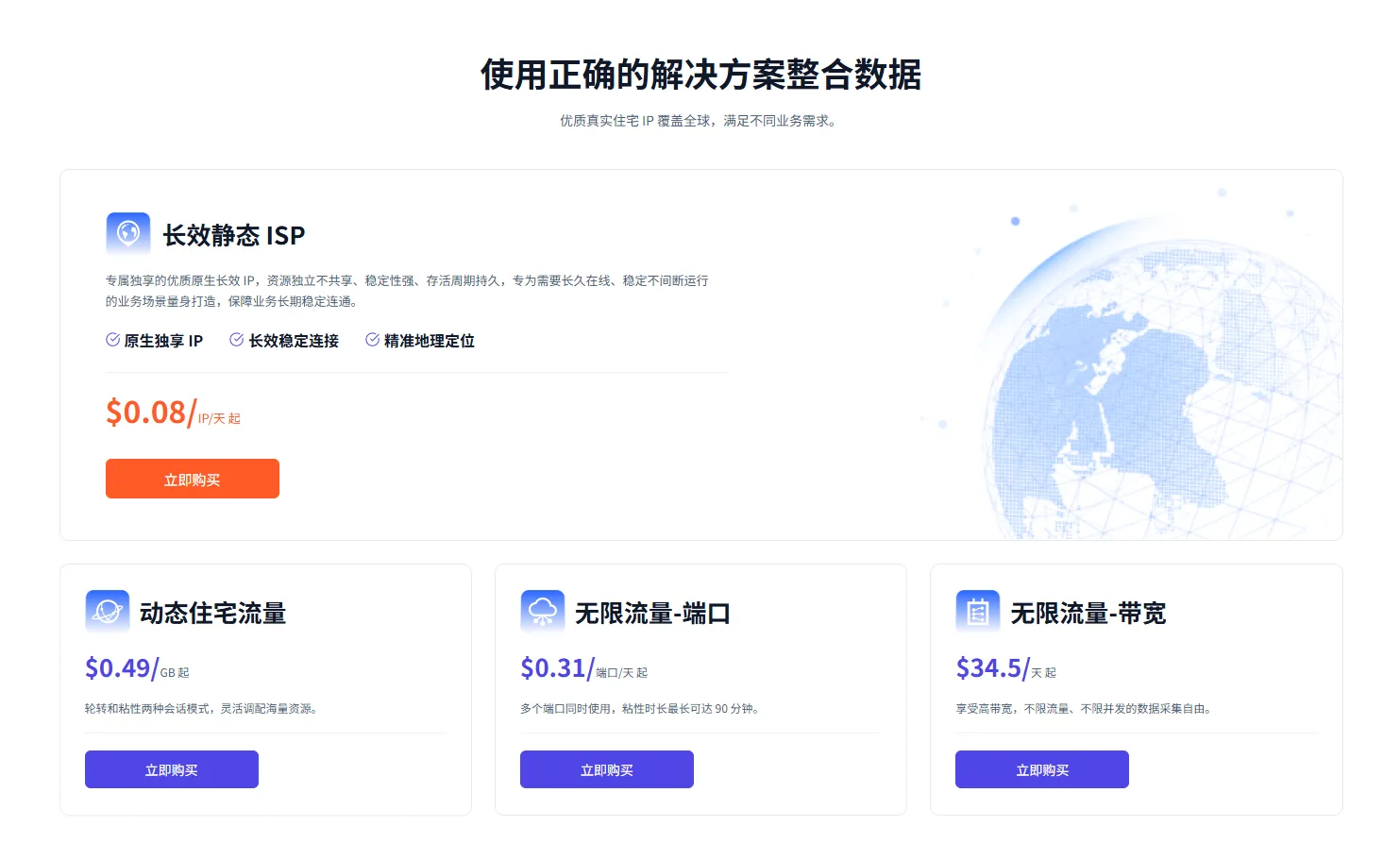
The "from $0.08 per IP per day" on the home page card is the lowest price per day. The session control guide also says that rotating residential sticky sessions last at most 120 minutes. For longer work, choose the static ISP product, and renew it in the dashboard before it expires (static ISP login guide).
Large files, audio and video: unlimited traffic. With per-GB billing, a larger download means a larger bill. Unlimited traffic plans bill by port or by bandwidth instead. They fit jobs with large downloads and a total size that is hard to estimate.
1024Proxy has two such plans. "Unlimited traffic by port" starts at 2 ports for 3 days for $5.00, about $0.83 per port per day. The 101–999 port tier is 101 ports for 3 days for $127.26, or $0.42 per port per day. The page says the IP rotates automatically every 3 to 30 minutes, and it lists brand protection and text and image downloads as uses.
"Unlimited traffic by bandwidth" is 100 Mbps for 30 days for $1,035 ($34.50 per day), 200 Mbps for $1,709.10 and 400 Mbps for $3,005.10. It has no traffic limit and no concurrency limit (unlimited traffic page). The "unit price" column in the static text of that page does not match the totals. For example, the 2–15 port tier shows a unit price of $0.56. We divided each total by ports and days, and the results matched the $0.83 and $0.42 from our November 7 draft.
The FAQ on the pricing page gives one more number that affects the choice. Each port in a port plan has 6 Mbps of bandwidth, and a bandwidth plan uses a dedicated server. At a full 6 Mbps, one port moves at most about 64.8 GB per day. So the number of ports sets your concurrency and throughput limit. It is not truly unlimited. The table lists the tiers of both unlimited plans (totals for 3 days and 30 days, saved on November 9).
| Plan | Tier | Total | Per unit |
|---|---|---|---|
| Unlimited by port, 3 days | 2–15 ports (at 2 ports) | $5.00 | About $0.83 per port per day |
| Unlimited by port, 3 days | 16–40 ports | $32.00 | — |
| Unlimited by port, 3 days | 41–100 ports | $68.06 | — |
| Unlimited by port, 3 days | 101–999 ports (at 101 ports) | $127.26 | About $0.42 per port per day |
| Unlimited by bandwidth, 30 days | 100 / 200 / 300 / 400 Mbps | $1,035 / $1,709.10 / $2,429.10 / $3,005.10 | $34.50 / $56.97 / $80.97 / $100.17 per day |
Our first draft did not cover one more product: "rotating residential IP", billed per IP (SOCKS5 pricing page). It covers more than 195 countries and regions, with no traffic limit while you use the IPs. The enterprise tier supports CDK key distribution. The tiers are below (saved at 02:44 Singapore time on November 9).
| Tier | Total | Per IP |
|---|---|---|
| 20 IPs | $3.00 | $0.15 |
| 100 IPs | $12.00 | $0.12 |
| 500 IPs | $30.00 | $0.06 |
| 10,000 IPs | $390.00 | $0.039 |
| 30,000 IPs | $900.00 | $0.03 |
| 80,000 IPs | $2,160.00 | $0.027 |
The price per IP falls as the tier grows. At 80,000 IPs, each IP costs less than one fifth of the 20-IP price, but only if you really use that many different exits.
The home page also lists two offers for new users. You can ask support for 1 GB of trial traffic, and there is a $0.99 starter plan in the first 7 days after sign-up. The table below lists the starting price and billing unit of each of the five products. These are list prices in USD as shown on the 1024Proxy website on November 9, 2026.
| Product | List price on November 9 | Billing unit | Best fit for data jobs |
|---|---|---|---|
| Rotating residential traffic | 2–100 GB $1.20/GB, 200 GB $0.70/GB, 1 TB $0.49/GB | Per GB, no expiry | Rotating scrapes of public pages, local pages by city |
| Rotating residential IP | 20 IPs at $0.15 each, 80,000 at $0.027 each | Per IP, no traffic limit while in use | Many different exits with light use per exit |
| Static ISP | From $0.08 per IP per day, per-IP price by country, such as US $3.9 | Per IP and period (7/30/90 days) | Stores and accounts that stay logged in on one fixed exit |
| Unlimited traffic by port | 2 ports for 3 days $5.00, 101 ports for 3 days $127.26 | Per port and per day | Listed uses: brand protection, text and image downloads |
| Unlimited traffic by bandwidth | 100 Mbps for 30 days $1,035 | Per bandwidth, 30, 7 or 1 days | Large audio and video downloads |
A residential exit is necessary, but it is not enough
To see how far a residential exit goes on its own, we ran a small test from 00:24 to 00:25 Singapore time on November 9. The exit was our Singapore home broadband line. ip-api returned ASN AS4817 with hosting, proxy and mobile all false. To a database, it is a normal residential line, which makes it an ideal stand-in for a residential proxy exit.
We opened the keyword search pages of 5 platforms in two ways. The first way used curl to download only the HTML. The second way used headless Chrome for a full page load. Each page got a new browser context and no cache, and we waited 8 seconds after the load finished. The browser test had two levels: a full page, and a page with images, media and fonts blocked.
We added up bytes with encodedDataLength from the Chrome DevTools Protocol. This is the number of bytes on the wire, which is the number that a per-GB proxy bill uses. The table shows what each method got back.
| Platform search page | curl, HTML only | Results found in the HTML | Browser, full page | What the browser showed |
|---|---|---|---|---|
| TikTok "residential proxy" | 200, 96.0 KB | 0 | 5.15 MB, 225 requests | Result area said "Something went wrong" |
| YouTube "residential proxy" | 200, 328.7 KB | 43 video IDs | 4.24 MB, 150 requests | Search results appeared |
| Reddit "residential proxy" | 200, 9.7 KB | 0 (page shell) | 542.9 KB, 7 requests | "Prove your humanity" check page |
| Amazon "usb c cable" | 200, 229.5 KB | 30 ASINs | 78.2 KB | HTTP 503 "Sorry! Something went wrong!" |
| Shopee Indonesia "usb c cable" | 200, 25.6 KB | 0 | 4.20 MB, 189 requests | Sent to /verify/traffic/error, login required |
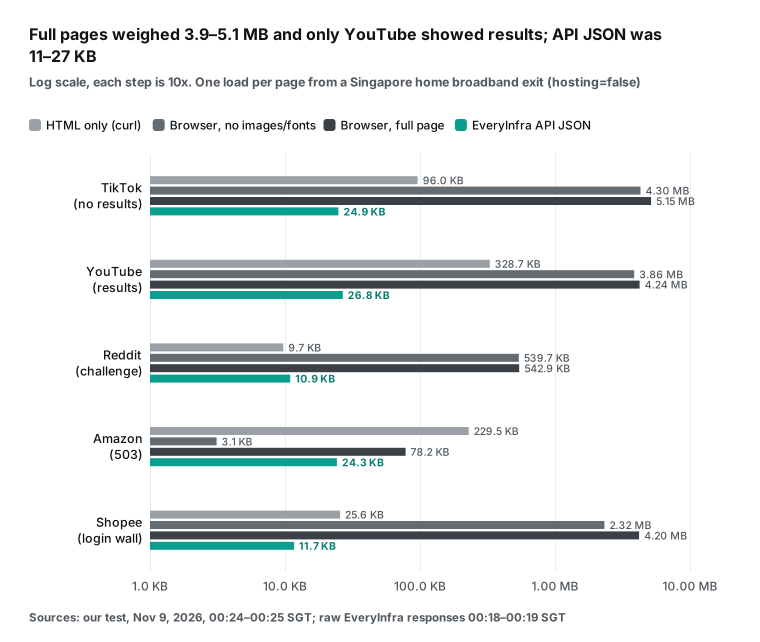
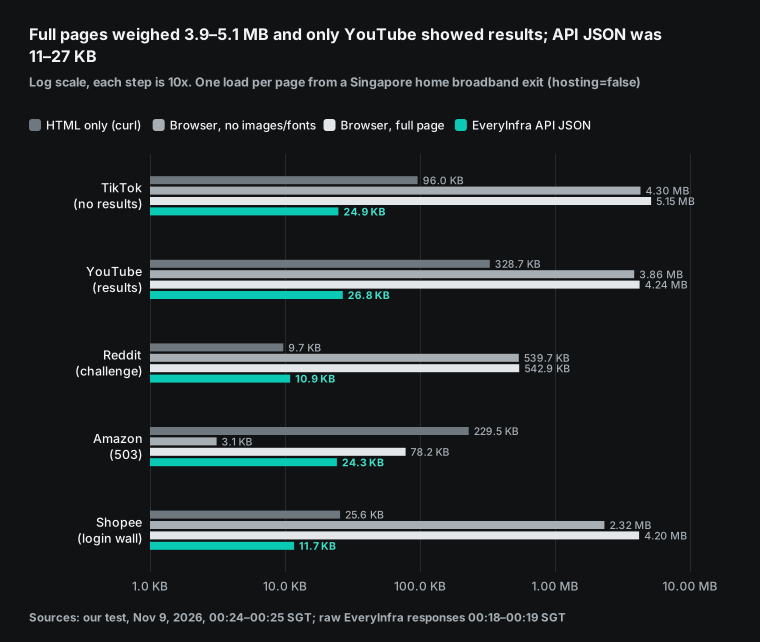
Of the five pages, the browser method got results only on YouTube. The curl method found usable data in two HTML files: 43 video IDs on YouTube and 30 ASINs on Amazon. But Amazon returned 503 to the headless browser, so it treats headless browsers and plain HTTP clients in different ways. All four failures happened on a residential exit. So the cause is not the IP type. The cause is the browser fingerprint, the login state and the request pattern.
This matches the 1024Proxy warning that a clean reputation check can still fail. It also matches the advice in the session control guide to control the request rate.
The test has clear limits. We loaded each page once. Our exit is in Singapore, but the default TikTok and Amazon sites are in the US. Another country exit, saved cookies or a browser with a visible window can all change the result. The test proves only that a residential IP alone is not enough. It does not prove that any one platform always blocks you.
3. Setup: extraction API or username and password
1024Proxy gives you two ways to get proxies: API mode and username and password login. In the site menu under "get proxies", login mode covers rotating residential, unlimited bandwidth, static ISP and unlimited ports. API mode covers rotating residential and unlimited bandwidth. The steps below follow its help center. We changed every code sample so that it opens only your own target site. These proxies are for your own scraper, not for EveryInfra calls.
The protocol guide lists HTTP, HTTPS and SOCKS5. An HTTPS proxy uses the CONNECT tunnel from RFC 9110. The proxy only forwards encrypted bytes and cannot read the page content. This matters for privacy, and it also explains why the proxy bill counts bytes only and knows nothing about the pages.
Option 1: extraction API (for frequent IP changes)
The 1024Proxy API guide says that API mode gets IPs in bulk through link parameters. Teams use it for jobs that change IPs often, such as data scraping. Step 1 is to add your server's public IP to the allowlist in the dashboard. The IP allowlist guide says that only public IPs are allowed. Update the list when your exit IP changes. After that, API calls need no username or password.
Step 2 is to buy a rotating residential traffic plan. Step 3 is to set the parameters in API mode in the dashboard. You set the country or region region, the line separator format (n is \n, rn is \r\n), and the session type, sticky or rotating. A sticky session adds a length parameter time, which the guide says is 10 or 15 minutes in API mode. You also set the data format type (txt or json) and the count num. Last, copy the generated API link into your code.
The allowlist step has a trap that is easy to miss. After a cloud server restarts, its public IP can change. If you change IPs and forget the allowlist, extraction calls fail. For a machine that runs for a long time, attach a fixed elastic IP.
This is a configuration example. We do not have a 1024Proxy account, so we could not run a real extraction link. At 00:26 Singapore time on November 9, 2026, we used a local mock endpoint to test again the line-split problem from our first draft. With format=rn, split('\n') left a trailing \r on two of three addresses, which breaks the proxy URL. splitlines() split both formats correctly. The mock endpoint returned documentation addresses from RFC 5737, not real proxies.
# Configuration example: call a 1024Proxy API-mode extraction link in Python
import requests

# The link from "API mode" in the dashboard, with region, num, type, format and so on
api_url = "YOUR_1024PROXY_API_LINK"

try:
    resp = requests.get(api_url, timeout=10)
    resp.raise_for_status()
    # With type=txt there is one proxy per line. splitlines() handles both \n and \r\n
    proxy_list = [line.strip() for line in resp.text.splitlines() if line.strip()]
    print("Proxy:", proxy_list[0] if proxy_list else "none")
except Exception as e:
    print(f"Could not get a proxy: {e}")
In allowlist mode, you use each extracted proxy as an IP and a port. The exact format is in the "response example" in the dashboard, and so are the field names for json. We did not see a real sample, so we do not guess the field names here.
Option 2: username and password (for long, stable connections)
For stable connections such as a static ISP, use username and password login. The static ISP login guide has three steps. First, in the dashboard under login authentication and account management, choose static ISP and add a sub-account. This product does not make one by default. Second, filter the IP list by country, region and city, choose the number of days, and extract. Third, choose an output format in the usage list.
The rotating residential login guide lists four formats. One of them is Hostname:Port:Username:Password. The sample in our first draft used the host gateway.1024proxy.com. At 19:53 Singapore time on November 7, 2026, dig +short returned nothing for that host.
The sample in the 1024Proxy location guide uses us.1024proxy.io:3000. The login guide says that the dashboard gives entry hosts in the US and Hong Kong. So the code below uses a YOUR_PROXY_HOST placeholder. Fill in the value from your dashboard.
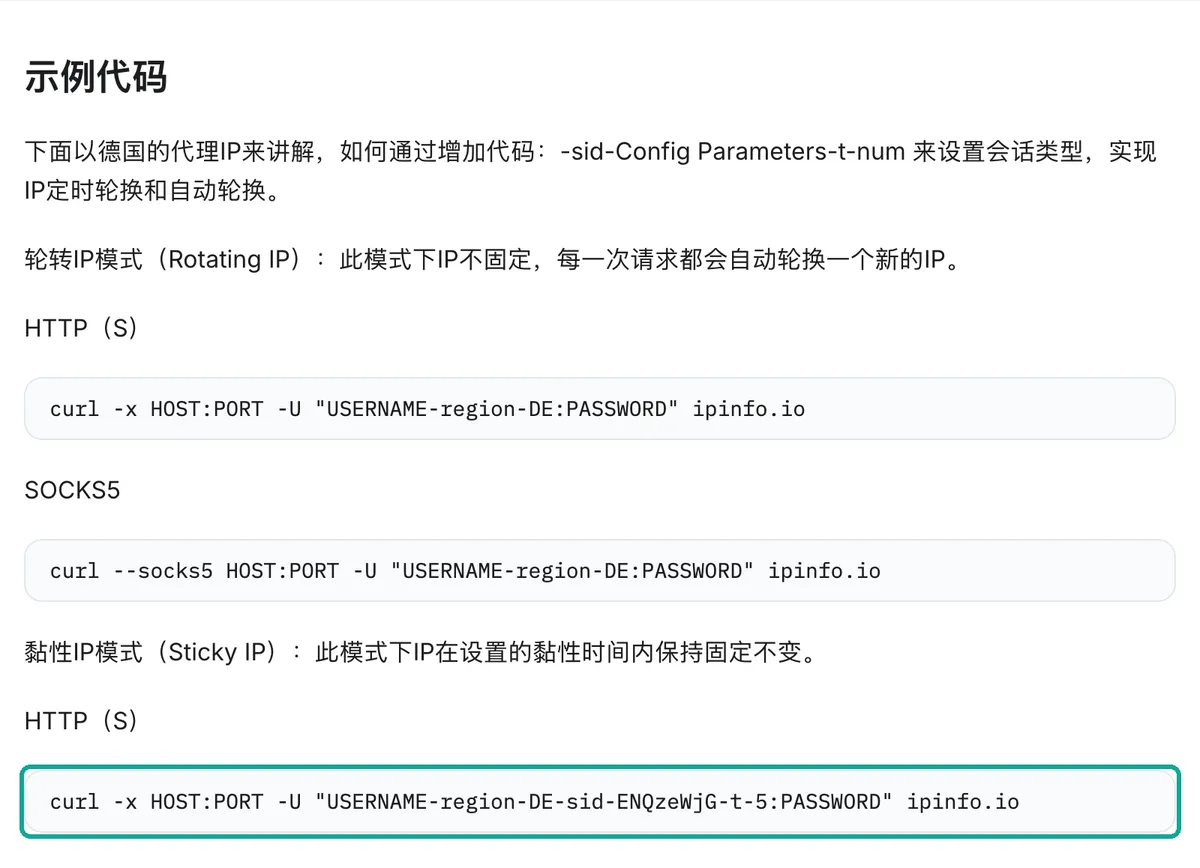
Login mode has one more feature that our first draft did not cover. You put location and session options inside the username. The location guide adds -region-US-st-Louisiana-city-New Orleans after the username, to narrow by country, state and city. You can also add -asn-AS11272 to choose an ISP by its ASN.
The session guide then adds -sid-<session name>-t-<minutes>. The same session name keeps the same IP for that time. Without this part, each request gets a new IP.
The screenshot below shows the guide text, and a teal box marks the sticky session line. The help pages do not show an update date for each guide. Check the dashboard for the current parameter format.
With location options in the username, the username can contain a space, as in the city name New Orleans. The password from the dashboard can contain characters such as @ or :. In a proxy URL, these characters need percent-encoding under RFC 3986 section 3.2.1. Without it, the URL splits in the wrong place.
We tested this with a local mock proxy from 00:25 to 00:26 Singapore time on November 9. The mock proxy expected the username u-region-US-st-Louisiana-city-New Orleans-sid-ab12-t-5 and the password p@ss:w0rd, with Basic authentication from RFC 7617. The table shows each method and its result.
| Method (Singapore time, 2026-11-09) | Target | Result |
|---|---|---|
| Python requests 2.34.2, raw credentials in the URL (00:25) | HTTP and HTTPS | Both 200, full username in the proxy log |
requests, credentials encoded with quote(..., safe='') (00:25) | HTTP and HTTPS | Both 200 |
| requests, correct encoding but wrong password (00:25) | HTTP | 407 Proxy Authentication Required |
| requests, correct encoding but wrong password (00:25) | HTTPS | ProxyError, proxy log shows 407 |
curl 8.7.1, raw credentials in the -x URL (00:26) | HTTPS | Failed, exit code 5 (could not resolve the proxy) |
curl, credentials in the -U flag (00:26) | HTTPS | 200 |
curl, encoded credentials in the -x URL (00:26) | HTTPS | 200 |
requests accepts the raw form because it splits the credentials at the last @ in the URL. curl does not accept it, and the same string fails at once. For code that works in every tool, the sample below encodes the credentials. The proxies dictionary format follows the Requests documentation.
# Example: use a 1024Proxy login proxy in Python to open your own target site
import requests
from urllib.parse import quote

# Replace with the proxy details from your 1024Proxy dashboard (host:port:user:password)
proxy_host = "YOUR_PROXY_HOST"
proxy_port = "YOUR_PORT"
# Location and session options go in the username: country-state-city-session name-minutes
proxy_user = "YOUR_USERNAME-region-US-st-Louisiana-city-New Orleans-sid-shop01-t-30"
proxy_pass = "YOUR_PASSWORD"

auth = f"{quote(proxy_user, safe='')}:{quote(proxy_pass, safe='')}"
proxies = {
    "http": f"http://{auth}@{proxy_host}:{proxy_port}",
    "https": f"http://{auth}@{proxy_host}:{proxy_port}",
}

session = requests.Session()
session.trust_env = False  # use only the proxies above, ignore HTTP(S)_PROXY on the machine

try:
    # The target is your own page: a site outside the catalog, an admin panel and so on
    resp = session.get("YOUR_TARGET_URL", proxies=proxies, timeout=30)
    print(resp.status_code)
except requests.exceptions.ProxyError as e:
    print(f"Proxy connection failed. Check host, port, username and password: {e}")
except Exception as e:
    print(f"Request failed: {e}")
When you see an error, check the four values and the encoding first. Do not blame the target site first. A 407 on an HTTP target means that the request failed at the proxy. A ProxyError on an HTTPS target means the same thing. In both cases, the request never reached the target site.
4. What proxy traffic costs, from measured bytes
Rotating residential traffic is billed per GB, so the cost depends on how many bytes each request downloads. The bytes from section 2 let us do the math. The traffic cost per 1,000 loads is the bytes per load times 1,000 times the price per GB. We use 1 GB = 1,000,000,000 bytes. With 2 to the power of 30 bytes, the cost is about 6.9% lower.
The prices are the three tiers of 1024Proxy rotating residential traffic on November 9. For EveryInfra, we use the catalog price_usd times 1,000. Proxy traffic is only one part of the cost of your own scraper. It leaves out servers, parsing, storage and retries, so this table shows a floor, not a total.
| Platform | Full browser page, per 1,000 ($0.49–1.20/GB) | HTML only, per 1,000 ($0.49–1.20/GB) | EveryInfra per 1,000 (catalog price) | Who got data this time |
|---|---|---|---|---|
| TikTok search | $2.52–6.18 | $0.047–0.115 | $0.556 (tiktok/search) | Only the API |
| YouTube search | $2.08–5.08 | $0.161–0.394 | $0.556 (youtube/search) | All three methods |
| Reddit search | $0.27–0.65 | $0.005–0.012 | $0.556 (reddit/search) | Only the API |
| Amazon search | $0.038–0.094 | $0.112–0.275 | $2.236 (amazon/search) | curl and the API |
| Shopee search | $2.06–5.04 | $0.013–0.031 | $6.403 (shopee/search) | Only the API |
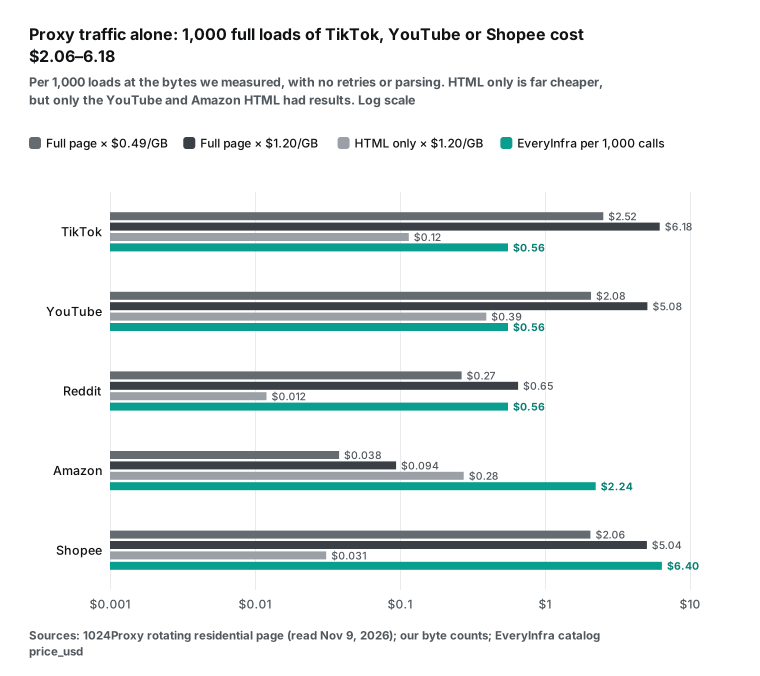
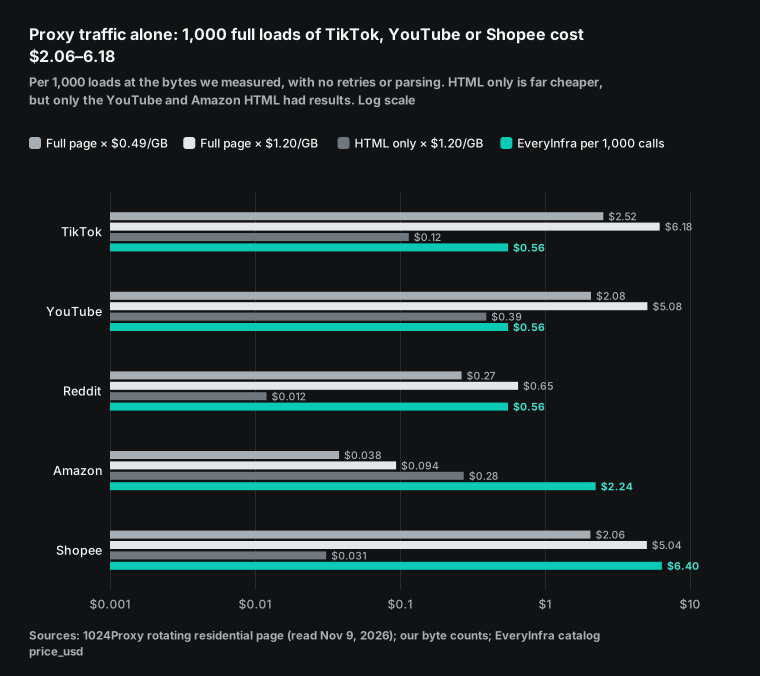
Read this table in two halves. In the full browser column, the three fully loaded pages (TikTok, YouTube and Shopee) cost $2.06 to $6.18 per 1,000 loads in traffic alone. That is 4 to 11 times the $0.556 of EveryInfra search, and only YouTube showed results. The Reddit and Amazon numbers are low because those pages stopped at a check page or a 503. That traffic is cheap, but it brought back no data.
The HTML-only column is much cheaper. YouTube costs only $0.161 to $0.394 per 1,000, and Amazon only $0.112 to $0.275. That is one order of magnitude below EveryInfra amazon/search at $2.236. Some pages are like these two: the HTML carries the data, and the platform does not block plain HTTP requests. For such pages, your own scraper with a residential proxy really is cheaper in traffic. This is where a service like 1024Proxy is strongest.
Our earlier post on how proxy traffic is billed measured 40 Amazon product pages and points the same way.
Many people think of another way to save traffic: tell the browser not to load images, video and fonts. We tested this level in the same run, and it saved less than we expected. The TikTok search page went from 5.15 MB to 4.30 MB, a saving of only 16.5%. YouTube went from 4.24 MB to 3.86 MB, a saving of only 8.9%. Reddit barely changed (542.9 KB to 539.7 KB), because the check page has no images.
Shopee saved the most. It went from 4.20 MB to 2.32 MB, a saving of 44.7%, and the request count fell from 189 to 144. Most of the weight on these pages is JavaScript bundles and API data, not images. The table below converts these loads to cost at the three 1024Proxy rates. All three are still more than 2 times the $0.556 of EveryInfra search.
| Platform search page | Full page | Images, media and fonts blocked | Saving | Blocked load, per 1,000 ($0.49–1.20/GB) |
|---|---|---|---|---|
| TikTok | 5.15 MB, 225 requests | 4.30 MB, 216 requests | 16.5% | $2.11–5.16 |
| YouTube | 4.24 MB, 150 requests | 3.86 MB, 131 requests | 8.9% | $1.89–4.63 |
| Reddit (check page) | 542.9 KB, 7 requests | 539.7 KB, 7 requests | 0.6% | $0.26–0.65 |
| Shopee Indonesia | 4.20 MB, 189 requests | 2.32 MB, 144 requests | 44.7% | $1.14–2.79 |
So for pages that need a browser, blocking images is not the main saving. The main saving comes from skipping the browser and finding the request behind the page that returns JSON. If you find it, your cost drops to the level of the HTML-only column. If you cannot find it, the traffic bill stays high.
Failures also use traffic. The next chart adds the success rate. Take the YouTube search page with HTML only, at 328,703 bytes per load. The traffic cost per 1,000 pages that show results equals the cost per load divided by the success rate. At 100% success, the three tiers give $0.161, $0.230 and $0.394, all below the API.
At the smallest tier ($1.20/GB), the traffic cost passes the $0.556 of EveryInfra when success falls below 71%. At the 1 TB tier, it passes only below 29%. EveryInfra does not charge for failures or empty results, so its line is flat.
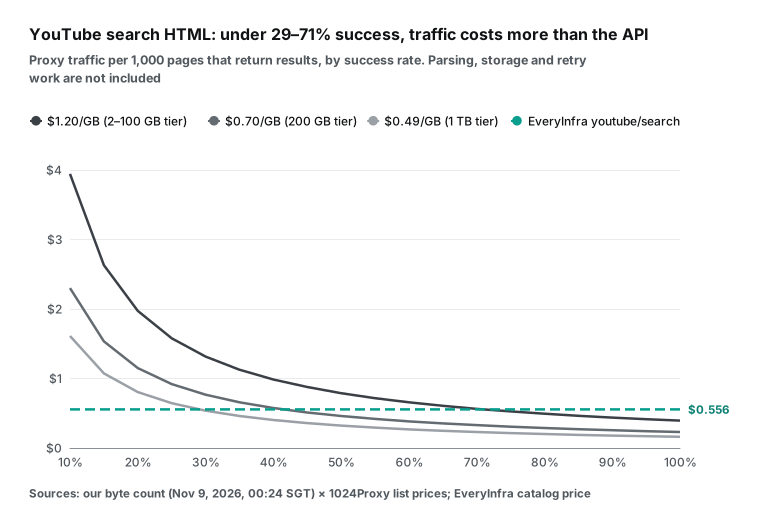
This curve draws a line for your own scraper. For a given page, if you can keep the success rate above the crossing point, your own scraper wins on traffic. If you stay below it, or if the page needs a browser to show data, it does not pay. To measure the success rate, run one or two hundred loads on your target page with the 1 GB trial. Count a load as a success only when results appear on the page, not when you get HTTP 200. Section 2 shows why.
5. A trap on shared machines: HTTPS_PROXY pulls your data API calls into the proxy
Our first draft found a trap that is easy to fall into. Suppose that your server sets the HTTPS_PROXY variable for a scraper. Then Python requests also sends EveryInfra calls through that proxy by default. You pay for residential traffic that you did not need, and you add one more hop of latency.
This time we tested 14 common client setups at 00:25 Singapore time on November 9. We set HTTP_PROXY, HTTPS_PROXY and their lowercase forms, all pointing at a local mock proxy. Each client called the free catalog endpoint https://api.everyinfra.com/api/v1/social/catalog?platform=tiktok&compact=1. Then we checked whether the mock proxy log showed a CONNECT to api.everyinfra.com:443. All 14 requests returned 200. The only difference was whether they went through the proxy.
| Client and setup | Through the proxy | Source |
|---|---|---|
| Python requests 2.34.2, default | Yes | Requests docs: environment variables |
requests, proxies={} | Yes | An empty dictionary does not turn off proxies from the environment |
requests, Session.trust_env = False | No | Ignores environment variables |
requests, with NO_PROXY=api.everyinfra.com | No | Skips the proxy for that domain |
| httpx 0.28.1, default | Yes | httpx environment variables |
httpx, Client(trust_env=False) | No | Same source |
| aiohttp 3.14.5, default | No | aiohttp docs: trust_env is off by default |
aiohttp, ClientSession(trust_env=True) | Yes | Same source |
| Python urllib.request, default | Yes | getproxies() reads environment variables |
| curl 8.7.1, default | Yes | curl manual: environment |
curl, with --noproxy '*' | No | Same source |
| Node.js 26.11.1 built-in fetch, default | No | Does not read environment variables by default |
Node.js fetch, with NODE_USE_ENV_PROXY=1 | Yes | Node.js CLI docs |
| Go 1.27.2 net/http, default client | Yes | ProxyFromEnvironment |
Of the 14 setups, 8 went through the proxy. The most surprising one is proxies={}. Many people think that an empty dictionary means "no proxy for this call". In our test, it still read the environment variables. When a scraper and a data API run on one machine, you have three safe choices.
First, give the EveryInfra client its own session that ignores the environment (trust_env=False in requests or httpx). Second, add NO_PROXY=api.everyinfra.com to the environment, which works for every client that reads that variable. Third, do not set global proxy variables at all, and pass the proxy only in your scraper code. The third choice is the clearest, and it is the hardest for a new team member to break.
Why does proxies={} fail? The cause is the merge order in requests. Before a request, the session merges your arguments with the environment. When trust_env is true, it reads proxies from the environment and fills in each scheme that your dictionary does not have. An empty dictionary has no https key, so the environment value fills the gap.
To turn the proxy off for real, pass {"http": None, "https": None}, or turn off trust_env. At 01:49 Singapore time on November 9, we tested this with requests 2.34.2. We pointed HTTPS_PROXY at a local port with no service. With proxies={}, the request raised ProxyError, so it did try that proxy. With both keys set to None, the same catalog request returned 200.
Before you go live, you can check one machine with one line: requests.utils.get_environ_proxies("https://api.everyinfra.com"). An empty dictionary means that the domain will not go through a proxy. The built-in urllib.request.getproxies() lists every proxy setting in the current environment. Check containers and scheduled jobs with extra care. They often inherit environment variables from an image or a system config, and the person who wrote the code may not know.
6. What to check before you buy residential proxies
The residential proxy business had a lot of news in the last two months, and it affects buyers. On November 2, 2026, the Google Threat Intelligence team said that it worked with other companies to take down the XCPE backdoor and botnet. It involved more than 1.3 million Android TV boxes with malware that shipped on them. These devices joined residential proxy networks as exits without their owners knowing (Google Cloud blog).
On July 2 of the same year, Google posted about action against another large residential proxy network. It said that the network lost millions of devices, and that many residential proxy brands resell the same network (Google Cloud blog). On November 4, 2026, the security company Layer3 Intel posted a test report (Layer3 Intel). Between October 5 and November 3, it exited from the White House network (AS2650) 236 times. These exits used 6 addresses and 28 residential proxy services.
On November 5, Krebs on Security and The Register covered the story. On November 9 we called reddit/search for "residential proxy". Of the 10 rows, the first one was the r/technology post about this story, with 6,550 upvotes. So the story is already one of the first things that people see on the topic.
| Date (2026) | Source | What happened |
|---|---|---|
| 2026-07-02 | Google Cloud Threat Intelligence | Action against a large residential proxy network, millions of devices removed |
| 2026-11-02 | Google Cloud Threat Intelligence | XCPE backdoor and botnet taken down, more than 1.3 million Android TV boxes |
| 2026-11-04 | Layer3 Intel | 236 exits from the White House network (AS2650) through 28 residential proxy services |
| 2026-11-05 | Krebs on Security, The Register | Press coverage of the White House exits |
| 2026-11-09 | reddit/search call | The r/technology post on the story ranked first for "residential proxy", 6,550 upvotes |
For teams that buy residential proxies, these events mean three things. First, the source of an exit IP decides whose traffic you share it with. If a network includes infected devices, the same exit can carry credential stuffing and ad fraud. The score that a site gives that IP then also hits you. Second, sites and security companies get better at spotting residential proxy exits. Databases such as MaxMind already have an is_residential_proxy field, so the idea that "a residential IP looks like a normal user" gets weaker.
Third, a takedown can remove many exits from a network overnight. A job that depends on one proxy company needs a backup plan. So whichever company you choose, ask three questions before you buy. Where do the IPs come from, and did the device owners clearly agree to share bandwidth? Does the company check customer identity, and which uses does it forbid? What are the refund and replacement rules after a takedown or an outage?
The 1024Proxy terms of service forbid illegal activity, malware and harm to third-party computers or services. For refunds, see the FAQ on its pricing page, saved on November 9. Paid services get no refund unless the problem is IP quality. Some plans have a free trial from support. So measure your success rate with trial traffic first. This is more practical than buying and asking for a refund.
A static IP that expires goes back to the pool. After a cool-down, someone else can take it, and then you cannot renew it. Renew early if you need an IP for a long time. We did not find a page on the 1024Proxy website about how it gets its IPs. Ask support before you buy, and keep a copy of the answer. This is a normal step for any vendor in this market, not a special test for one company.
7. When you do not need your own proxy
The sections above are about your own scraper and your own exits. Sometimes you need structured data from a platform in the EveryInfra catalog. Examples are TikTok video search, YouTube video search, Reddit post search, Amazon product search, and Shopee products and shops. In that case, call the data API directly with no proxy.
Your request goes to api.everyinfra.com, and EveryInfra handles access to the target platform. Failed calls and empty results are not charged (billing section of the docs). From 00:18 to 00:19 Singapore time on November 9, 2026, we called the same 5 platforms from section 2, from Singapore. Below are the exact code and the results.
import os
import requests

session = requests.Session()
session.trust_env = False  # ignore HTTP(S)_PROXY: this call goes direct, not through a proxy

for platform, keyword in [("tiktok", "residential proxy"), ("youtube", "residential proxy"),
                          ("reddit", "residential proxy"), ("amazon", "usb c cable"),
                          ("shopee", "usb c cable")]:
    resp = session.post(
        "https://api.everyinfra.com/api/v1/social",
        headers={"Authorization": f"Bearer {os.environ['EVERYINFRA_API_KEY']}"},
        json={"platform": platform, "action": "search", "params": {"keyword": keyword}},
        timeout=120,
    )
    data = resp.json()
print(platform, resp.status_code, data.get("count"), data.get("billing", {}).get("charged_usd"))| Time (2026-11-09, Singapore) | Capability | HTTP | Rows | Response size | Time taken | Charge |
|---|---|---|---|---|---|---|
| 00:18:09 | tiktok/search, residential proxy | 200 | 10 | 24.9 KB | 3.7 s | $0.000556 |
| 00:18:13 | youtube/search, residential proxy | 200 | 10 | 26.8 KB | 7.5 s | $0.000556 |
| 00:18:20 | reddit/search, residential proxy | 200 | 10 | 10.9 KB | 4.7 s | $0.000556 |
| 00:18:30 | amazon/search, usb c cable | 200 | 10 | 24.3 KB | 38.2 s | $0.002236 |
| 00:19:09 | shopee/search, usb c cable | 200 | 20 (Indonesia site, IDR prices) | 11.7 KB | 9.9 s | $0.006403 |
| 00:19:18 | youtube/search, parameter named query | 422 missing_param | — | — | 0.1 s | none |
| 00:19:19 | youtube/search, no key | 401 missing_key | — | — | 0.1 s | none |
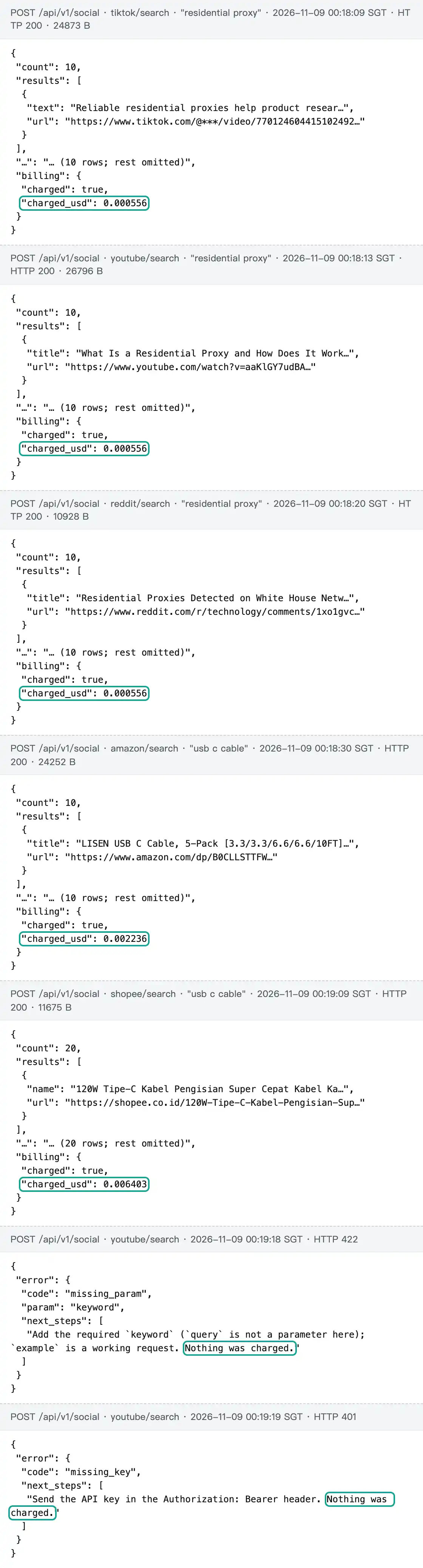
The 5 successful calls cost $0.010307 in total, and both errors said "Nothing was charged". Compare this with section 2.
For the same keyword, the TikTok, YouTube and Shopee search pages that loaded fully were 4.2 to 5.2 MB each. The API returns 11 to 27 KB of JSON, which is 158 to 359 times less. Reddit stopped at a human check and Amazon at a 503. Those pages were small, but they gave no data.
Each API row is about 0.6 to 2.7 KB with fixed field names. For example, youtube/search has view_count, posted_at and search_rank. reddit/search has community, like_count and comment_count. These match the response_fields in the catalog one by one.
The Amazon call took 38 seconds, the slowest of the sync calls. The catalog says that any capability accepts "mode":"async" in the request body. You get a job_id at once and poll for the result, which fits batch jobs. Look up capability names, required parameters and prices in the free catalog first, for example the Amazon and Shopee entries. shopee/search uses the Indonesia site by default, and the catalog lists the optional parameter for other sites.
Some useful pages: the quick start shows your first call.
Unit prices are on the pricing page and on each capability page. This article uses TikTok keyword search, Amazon product search and Shopee product search. Their pages list the parameters and response fields. For proxy types and an IPFoxy setup, see our earlier post on why web scraping needs proxy IPs. For the real cost of proxy traffic, see how proxy traffic is billed. To give your own scraper a residential exit, see the plans on the 1024Proxy website.
8. Summary
The 1024Proxy post on how AI gets internet data, from August 26, 2026, gives an order. Use a public dataset when a good one exists. Use an API when the source is stable and has a good interface. Scrape web pages only when these do not meet the need. The new tests put numbers on this order. Data center exits almost always get flagged in at least one of two databases, so when you scrape pages yourself, a residential exit is necessary.
But a residential exit only answers "who are you". It does not answer "do you look like a normal browser", and only 1 of 5 pages showed results in a browser. Some pages carry the data in the HTML. For these pages, your own scraper with a residential proxy can cost 10 times less in traffic than an API. But this is true only with a high enough success rate.
Take HTML-only loads of the YouTube search page as an example. On the 1 TB tier, the success rate must stay above about 29%. On the smallest tier, it must stay above about 71%. Below these rates, the traffic costs more than the API.
All these numbers depend on time and conditions. Another platform, another time of day or another exit country can change them. The safest way is to repeat these tests with your own target pages and the exits that you plan to buy. Count success by results on the page. Compute the cost per 1,000 successful pages from the traffic price. Then decide which requests go to a proxy and which go to an API.
FAQ
What is the difference between a residential proxy and an ISP proxy?
A residential proxy usually means an IP on a home broadband line, and rotating residential IPs change per request or per session. An ISP proxy (1024Proxy calls it "static ISP") is a fixed IP on an ISP network that stays the same for a long time, which suits logged-in accounts. Our sample also shows that an ISP address and a residential address are not the same thing in IP databases. Only 15 of 42 broadband ISP addresses got a Residential label. When you buy a static ISP IP, look up its label in a database after you get it.
Can I get a residential proxy free trial?
The 1024Proxy home page says that you can ask support for 1 GB of trial traffic (read on November 9, 2026). It also lists a $0.99 starter plan in the first 7 days after sign-up. We did not check whether the trial needs a card. With the bytes from section 4, 1 GB covers about 3,000 HTML-only loads of the YouTube search page, or about 230 full browser loads. That is enough to measure the success rate on your target page.
What is the difference between a residential proxy and a VPN?
A VPN usually sends all traffic from a device through one tunnel, and its exit is often in a data center. proxycheck labeled 38 of our 40 cloud addresses as VPN. A residential proxy forwards traffic per request from a home broadband exit, and you can choose the country, the city or even the ASN. For data collection, teams usually use a proxy and not a VPN, because they need control over the exit and over rotation.
Is a residential proxy better than a datacenter proxy?
Our sample shows the main reason that people pay more for residential exits. Two free databases flagged 39 of 40 cloud addresses, but only 1 of 42 broadband addresses got a data center flag. Datacenter proxies still have a place. They are cheaper and faster, and some sites do not filter by ASN at all. Test your target site with both before you commit to a large plan.
I need a static residential proxy. How do I choose one?
This is the title of a post on Reddit r/proxies from October 8, 2026 (original post, returned by reddit/search on November 9). First, check that your job really needs a fixed IP. Stores and accounts that stay logged in need one, but public page scraping works better with rotation. If you need one, choose by the country of your target market, because 1024Proxy lists the per-IP price by country. After you get the IP, look it up in ip-api or proxycheck for a data center or Business label. Then ask the three source questions from section 6.
Do I need a proxy to call the EveryInfra data API?
No. In fact, you need to keep the proxy away from it. Your request goes straight to api.everyinfra.com, and EveryInfra handles access to the target platform. Does the machine set HTTPS_PROXY for a scraper? Then follow the table in section 5. Turn off the environment variables, or add NO_PROXY. If you do not, these calls also count as proxy traffic.
References
- 1024Proxy home page (starting prices, feature cards, trial offers, checked 2026-11-09): https://1024proxy.com/?kwd=hyj-eyf
- 1024Proxy, rotating residential IP (SOCKS5) pricing page (195+ countries, priced per IP, read 2026-11-09): https://1024proxy.com/pricing/socks5
- 1024Proxy, rotating residential traffic page (tier prices, targeting, sessions, protocols, read 2026-11-09): https://1024proxy.com/subject/residential
- 1024Proxy, static ISP page (per-IP price by country, 7/30/90 days, read 2026-11-09): https://1024proxy.com/subject/static
- 1024Proxy, unlimited traffic page (port and bandwidth tiers, read 2026-11-09): https://1024proxy.com/subject/unlimited
- 1024Proxy, about us: https://1024proxy.com/about-us
- 1024Proxy, terms of service: https://1024proxy.com/terms/
- 1024Proxy blog, dual-ISP residential IP guide, 2026-10-29: https://1024proxy.com/blog/dual-isp-residential-ip-guide
- 1024Proxy blog, how to check IP reputation after you buy IPs, 2026-10-14: https://1024proxy.com/blog/how-to-check-ip-reputation/
- 1024Proxy blog, how AI gets internet data, 2026-08-26: https://1024proxy.com/blog/ai-web-data-collection-methods/
- 1024Proxy help center, overview: https://help.1024proxy.com/1024/1024proxy
- 1024Proxy help center, protocols: https://help.1024proxy.com/1024/1024proxy/dynamic-residential-traffic/network-protocol
- 1024Proxy help center, rotating residential traffic API: https://help.1024proxy.com/1024/1024proxy/dynamic-residential-traffic/api
- 1024Proxy help center, IP allowlist: https://help.1024proxy.com/1024/1024proxy/dynamic-residential-traffic/ip-whitelist
- 1024Proxy help center, session control: https://help.1024proxy.com/1024/1024proxy/dynamic-residential-traffic/session-management
- 1024Proxy help center, rotating residential login: https://help.1024proxy.com/1024/1024proxy/dynamic-residential-traffic/username-and-password-authentication
- 1024Proxy help center, static ISP login: https://help.1024proxy.com/1024/1024proxy/long-term-static-isp/username-password-authentication
- 1024Proxy help center, location settings: https://help.1024proxy.com/1024/1024proxy/dynamic-residential-traffic/location-configuration
- ARIN, Autonomous System Numbers: https://www.arin.net/resources/guide/asn/
- RFC 1930, Guidelines for creation, selection, and registration of an Autonomous System (AS), IETF, 1996: https://www.rfc-editor.org/rfc/rfc1930.html
- IPinfo, IP ASN API data (ASN
typefield): https://ipinfo.io/developers/ip-asn-api-data - ip-api.com, JSON API documentation (
hostingfield): https://ip-api.com/docs/api:json - ip-api.com, batch API documentation: https://ip-api.com/docs/api:batch
- proxycheck.io, API documentation (free tier): https://proxycheck.io/api/
- MaxMind, GeoIP Anonymous IP database fields: https://dev.maxmind.com/geoip/docs/databases/anonymous-ip/
- AWS, ip-ranges.json (generated 2026-11-08): https://ip-ranges.amazonaws.com/ip-ranges.json
- AWS documentation, AWS IP address ranges: https://docs.aws.amazon.com/vpc/latest/userguide/aws-ip-ranges.html
- AWS documentation, How AWS Wavelength works: https://docs.aws.amazon.com/wavelength/latest/developerguide/how-wavelengths-work.html
- Google Cloud, cloud.json (generated 2026-11-08): https://www.gstatic.com/ipranges/cloud.json
- Google Cloud documentation, Compute Engine FAQ (find IP ranges): https://cloud.google.com/compute/docs/faq#find_ip_range
- Oracle Cloud, public_ip_ranges.json (updated 2026-10-28): https://docs.oracle.com/en-us/iaas/tools/public_ip_ranges.json
- Oracle Cloud documentation, IP Address Ranges: https://docs.oracle.com/en-us/iaas/Content/General/Concepts/addressranges.htm
- DigitalOcean, IP geolocation file: https://digitalocean.com/geo/google.csv
- Akamai/Linode, geofeed: https://geoip.linode.com/
- RFC 8805, A Format for Self-Published IP Geolocation Feeds, IETF, 2020: https://www.rfc-editor.org/rfc/rfc8805.html
- RIPEstat documentation, announced-prefixes: https://stat.ripe.net/docs/data-api/api-endpoints/announced-prefixes
- Cloudflare WAF documentation, IP Access rules: https://developers.cloudflare.com/waf/tools/ip-access-rules/
- Cloudflare rules language, ip.src.asnum field: https://developers.cloudflare.com/ruleset-engine/rules-language/fields/reference/ip.src.asnum/
- Cloudflare documentation, Bot score: https://developers.cloudflare.com/bots/concepts/bot-score/
- AWS WAF documentation, ASN match rule statement: https://docs.aws.amazon.com/waf/latest/developerguide/waf-rule-statement-type-asn-match.html
- Google Cloud Armor documentation, rules language reference (origin.asn): https://cloud.google.com/armor/docs/rules-language-reference
- RFC 9110, HTTP Semantics, 403 Forbidden, IETF, 2022: https://www.rfc-editor.org/rfc/rfc9110.html#name-403-forbidden
- RFC 9110, HTTP Semantics, 407 Proxy Authentication Required, IETF, 2022: https://www.rfc-editor.org/rfc/rfc9110.html#name-407-proxy-authentication-re
- RFC 9110, HTTP Semantics, CONNECT, IETF, 2022: https://www.rfc-editor.org/rfc/rfc9110.html#name-connect
- RFC 6585 section 4, 429 Too Many Requests, IETF, 2012: https://www.rfc-editor.org/rfc/rfc6585.html#section-4
- RFC 5737, IPv4 Address Blocks Reserved for Documentation, IETF, 2010: https://www.rfc-editor.org/rfc/rfc5737.html
- RFC 3986 section 3.2.1, URI User Information, IETF, 2005: https://www.rfc-editor.org/rfc/rfc3986.html#section-3.2.1
- RFC 7617, The 'Basic' HTTP Authentication Scheme, IETF, 2015: https://www.rfc-editor.org/rfc/rfc7617.html
- Chrome DevTools Protocol, Network domain (encodedDataLength): https://chromedevtools.github.io/devtools-protocol/tot/Network/
- Requests documentation, Proxies: https://requests.readthedocs.io/en/latest/user/advanced/#proxies
- httpx documentation, Environment Variables: https://www.python-httpx.org/environment_variables/
- aiohttp documentation, Proxy support: https://docs.aiohttp.org/en/stable/client_advanced.html#proxy-support
- Python documentation, urllib.request.getproxies: https://docs.python.org/3/library/urllib.request.html#urllib.request.getproxies
- curl manual (environment variables): https://curl.se/docs/manpage.html
- Node.js documentation, NODE_USE_ENV_PROXY: https://nodejs.org/api/cli.html#node_use_env_proxy1
- Go documentation, net/http ProxyFromEnvironment: https://pkg.go.dev/net/http#ProxyFromEnvironment
- Google Cloud Threat Intelligence blog, Shutting the Door on the XCPE Botnet, 2026-11-02: https://cloud.google.com/blog/topics/threat-intelligence/shutting-the-door-on-the-xcpe-botnet
- Google Cloud Threat Intelligence blog, Google's Continued Disruption of Malicious Residential Proxy Networks, 2026-07-02: https://cloud.google.com/blog/topics/threat-intelligence/google-continued-disruption-residential-proxy-networks
- Layer3 Intel, Residential Proxies Detected on White House Network, 2026-11-04: https://layer3intel.com/blog/residential-proxies-white-house-network
- Krebs on Security, Want to Rent an Internet Address at the White House?, 2026-11-05: https://krebsonsecurity.com/2026/11/want-to-rent-an-internet-address-at-the-white-house/
- The Register, The White House is apparently a popular residential proxy exit spot, 2026-11-05: https://www.theregister.com/security/2026/11/05/the-white-house-is-apparently-a-popular-residential-proxy-exit-spot/5307969
- Reddit r/proxies, I need a static residential proxy, 2026-10-08: https://www.reddit.com/r/proxies/comments/1x0xj70/i_need_a_static_residential_proxy/
- EveryInfra capability catalog (all platforms, compact, read 2026-11-09 00:17 Singapore time): https://api.everyinfra.com/api/v1/social/catalog?compact=1
- EveryInfra capability catalog (TikTok): https://api.everyinfra.com/api/v1/social/catalog?platform=tiktok
- EveryInfra capability catalog (YouTube): https://api.everyinfra.com/api/v1/social/catalog?platform=youtube
- EveryInfra capability catalog (Reddit): https://api.everyinfra.com/api/v1/social/catalog?platform=reddit
- EveryInfra capability catalog (Amazon): https://api.everyinfra.com/api/v1/social/catalog?platform=amazon
- EveryInfra capability catalog (Shopee): https://api.everyinfra.com/api/v1/social/catalog?platform=shopee
Reference BL-107