OpenAI Agent Builder shut down: move a social data agent to the Agents SDK
Agent Builder shuts down on Nov 30, 2026. Move a Reddit and YouTube agent to the Agents SDK with MCP, approvals and streaming, from $11.78 a month.
OpenAI shuts down Agent Builder on November 30, 2026, and you can export workflow code only before that date (OpenAI deprecations page). We moved a Reddit and YouTube agent to Agents SDK 0.24.0 and found two problems that the migration docs do not mention. The name of the MCP read-only hint changes with the MCP Python SDK version. The default 5-second timeout shows a charged call as a failure. At 100 questions a day, the full cost starts at $11.78 a month on gpt-6-luna and goes up to $682.28 on gpt-6-astra.
This article answers one practical question. You built an agent in Agent Builder that answers "what do people say about this product?" Its MCP node pulls Reddit posts, YouTube videos and YouTube comments. How do you keep it running after November 30? OpenAI names two paths: the Agents SDK and ChatGPT Workspace Agents (Migrate from Agent Builder).
We cover the Agents SDK path and the plain Responses API path. Every OpenAI field name and default comes from developers.openai.com or the Agents SDK docs. We opened each page on November 8. We did not call an OpenAI model, so any part that needs the OpenAI service is a configuration example. Every EveryInfra number comes from a raw response of a live call.
Our tests ran on November 8, 2026, from 00:16 to 00:30 Singapore time. The approval pause, the rejection, the stream and the async job ran for real on our machine. Only the model was a scripted stand-in that ships with the SDK.
The two problems from the first paragraph are specific. An approval check that reads the spec name of the hint sends all 12 tools to approval under MCP Python SDK 2.3.0. Under 1.30.0, it sends 5. With the default timeout, a 100-comment call failed on our side at 5.0 seconds, but the server finished it and charged for it.
| Part of this article | Status | Evidence |
|---|---|---|
| Agent Builder dates and scope | Read from OpenAI pages on November 8 | Deprecations page, migration guide |
MCPServerStreamableHttp, approval pause, rejection, stream | Ran on our machine | Agents SDK 0.24.0 with a scripted model |
| EveryInfra calls and charges | Ran live, 17 charged calls | Raw responses, charged_usd |
HostedMCPTool and Responses API approvals | Configuration example | OpenAI docs only |
| Monthly cost | Calculated | Real response sizes and OpenAI list prices |

OpenAI Agent Builder shut down: what the OpenAI notice says
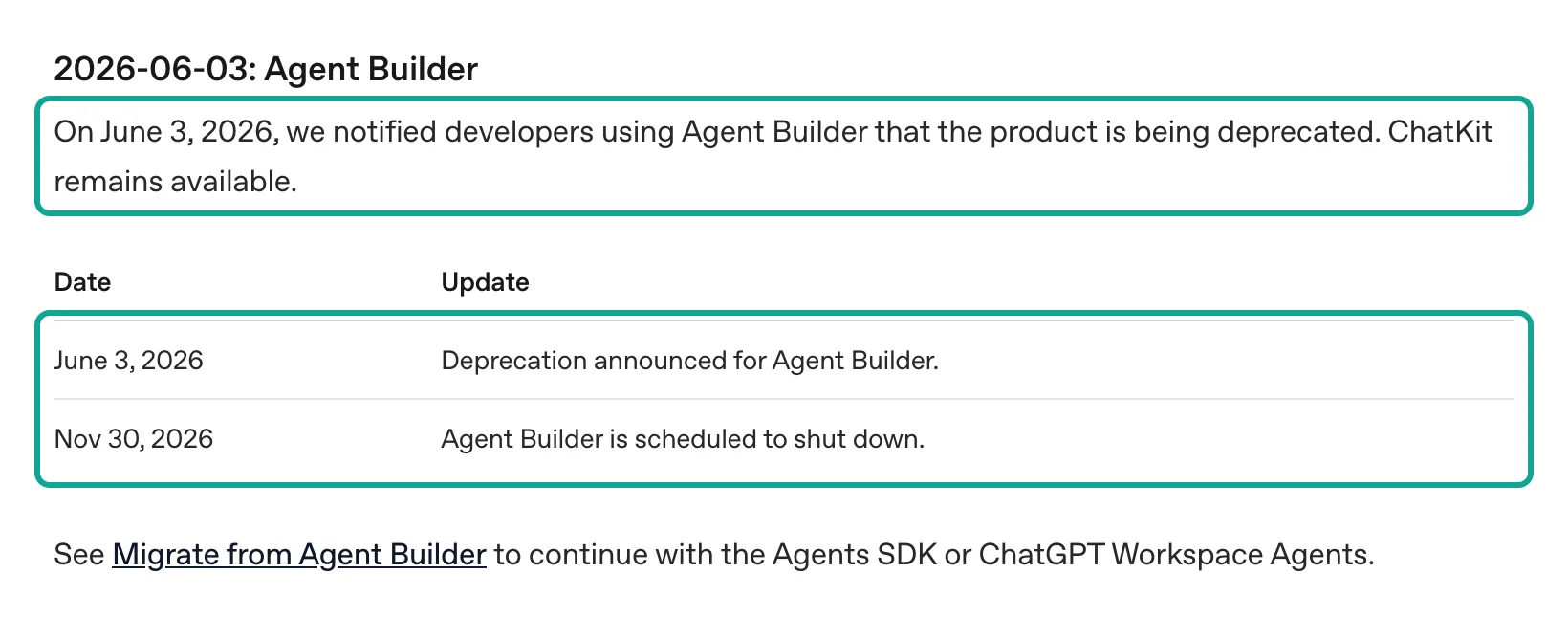
Pin the dates first, because the rest of the plan depends on them. The deprecations page has a section named "2026-06-03: Agent Builder." It says OpenAI notified Agent Builder users on June 3 that the product is deprecated. It also says that ChatKit remains available. Its table has two rows: the notice on June 3, 2026, and the shutdown on November 30, 2026 (OpenAI deprecations page).
The same page lists two more shutdowns on the same date. Reusable prompt objects and the v1/prompts API stop on November 30. Existing evals became read-only on October 31, and the Evals dashboard and API stop on November 30 (OpenAI deprecations page). The Agent Builder guide and the node reference show the same banner (Agent Builder guide; Node reference). Existing users can keep the product during the transition window. Then it shuts down, and ChatKit stays.
Read the three shutdowns together. A typical workflow keeps its instructions in a prompt object and its tests in Evals. All three parts stop on the same day. For prompt objects, OpenAI gives a clear path. Move the prompt text into your code and keep versions in git. Put static text first, so that prompt caching still works (Migrate from prompt objects).
For evals, OpenAI points to a cookbook that moves them to Promptfoo (Moving from OpenAI Evals to Promptfoo). On October 30, a forum member put all the dates in one checklist (OpenAI forum checklist). A reply in the older thread gives a useful warning. Do not move workflow prompts into prompt objects, or you will migrate twice (OpenAI forum deprecation thread).
| Date | Event | What it means for a social data agent | Source |
|---|---|---|---|
| 2026-06-03 | Agent Builder, prompt objects and Evals deprecated | The clock starts. Export code while the canvas opens. | Deprecations |
| 2026-10-15 | openai-agents 0.24.0 exposes MCP annotations on converted tools | You can write approval rules from tool hints. | PyPI; GitHub releases |
| 2026-10-31 | Existing evals become read-only | Export your test sets first. | Deprecations |
| 2026-11-30 | Agent Builder, v1/prompts and Evals shut down | The canvas, hosted workflows and prompt objects go away. | Deprecations |
| 2026-12-11 | Older GPT-5 and o3 snapshots shut down | Old model names in exported code break again. | Deprecations |
The last row is easy to miss. The exported code keeps the model name that you picked on the canvas. The deprecations page says gpt-5, gpt-5-mini, o3 and other snapshots stop on December 11, 2026. The replacements are gpt-5.6-sol and gpt-5.6-terra (OpenAI deprecations page). So code that you move on November 30 can break again eleven days later.
The same page gives a way to watch for this in code. The GET /v1/models response has an optional shutdown_date field. A date there means a shutdown is scheduled (OpenAI deprecations page). Put that check in a scheduled job during the migration.
What stops: the canvas, hosted workflows and the "recommended" ChatKit setup
"ChatKit remains available" is easy to read as "my ChatKit front end is safe." The ChatKit guide now describes two paths. The first runs ChatKit on your own server and connects it to any agent service, such as one built with the Agents SDK. The second is the existing Agent Builder-hosted setup. You can keep that hosted workflow only during the transition window (ChatKit guide). The advanced guide says new ChatKit apps should use your own server-side agent (Advanced integrations with ChatKit).
On June 4, a developer who runs ChatKit for several clients asked in the forum whether the "recommended" setup also stops. A reply said that ChatKit itself stays. But the recommended setup used a backend hosted from Agent Builder. So only the "advanced" setup with your own backend remains (OpenAI forum deprecation thread). That is a forum reading, not an OpenAI statement.
An early November analysis from Forkast makes a similar point. The documentation does not settle whether published workflow IDs keep running through ChatKit after November 30 (Forkast). Until OpenAI says more, plan as if the workflow ID stops working.
The export also has a deadline. The migration guide gives four steps. Open the workflow and select Code in the top navigation. Select Agents SDK. Then select TypeScript or Python and copy the export (Migrate from Agent Builder). The page also says the process does not convert the workflow graph. It does not guarantee that every behavior transfers.
The Workspace Agents path needs a ChatGPT Business, Enterprise or Edu workspace. The guide warns that workflows with strong determinism at their core may not move well to a workspace agent. A social data agent that makes three data calls in a fixed order is that kind of workflow. So we use the Agents SDK.
Three paths: Agents SDK, plain Responses API, or Workspace Agents
All three paths can call MCP tools. They differ in where the agent loop runs, who approves a call, and where the key goes. The table comes from the official docs. The last column is our view for an agent that answers a few hundred social questions a day.
| Path | Agent loop runs in | Who connects to MCP | How approval works | Good fit | Source |
|---|---|---|---|---|---|
Agents SDK + MCPServerStreamableHttp | Your process | Your process | require_approval, can be a function; resume from RunState | Teams that log, control spend and swap models | SDK MCP docs |
Agents SDK + HostedMCPTool | Your process | OpenAI | require_approval in tool_config plus on_approval_request | Public servers, less connection code | SDK MCP docs |
Responses API mcp tool | Your own loop | OpenAI | Default always; answer mcp_approval_request with mcp_approval_response | Teams that already have a loop | Responses MCP guide |
| ChatGPT Workspace Agents | ChatGPT | ChatGPT apps | Set in ChatGPT | Team agents in plain language | Migration guide |
On the Agents SDK path, pin openai-agents==0.24.0 from PyPI, uploaded on October 15, 2026 (PyPI: openai-agents). Do not install the 0.24.0-alpha.6 preview from GitHub. That preview ships only through GitHub Releases, and its notes list public API changes. For example, one-shot calls now use Agent.run(), and the extra Runner aliases are gone (openai-agents-python releases). Exported code uses Runner.run, so the wrong version can break the first run, and the export then looks broken when it is not. Step 3 of "Get started" lists the Python and Node.js versions.
OpenAI also has a hosted Agents API, where OpenAI runs the agent loop (Agents API overview). The migration guide does not list it as a destination, and this article does not use it. Our Agents API review agent shows its MCP setup.
Node by node: where each Agent Builder node goes in the Agents SDK
The export does not convert the graph, so each node needs a place in code. The left column lists every node in the node reference (Node reference). The right column is the matching SDK feature. The middle column is the usual job of that node in a social data agent.
| Agent Builder node | Usual job in a social data agent | Agents SDK equivalent |
|---|---|---|
Start (input_as_text) | Takes the user question | The input of Runner.run(agent, input) |
| Agent | Picks Reddit or YouTube, writes the answer | Agent(name, instructions, model, tools, mcp_servers) |
| MCP | Calls everyinfra_call_api | MCPServerStreamableHttp or HostedMCPTool |
| Human approval | Asks before a paid call | MCP require_approval, then result.interruptions and state.approve() or state.reject() |
| If/else, While (CEL) | Searches again with a new keyword when a result is empty | Plain Python or TypeScript |
| Guardrails | Blocks personal data or jailbreaks | Input, output and tool guardrails |
| (Chat history that the canvas keeps) | The user asks more than one question | An SDK session |
| Transform, Set state | Puts results into a fixed shape | output_type and the run context |
| File search | Searches your own files | FileSearchTool |
| Note | A comment on the canvas | A code comment |
Two rows need the most work: MCP and Human approval. On the canvas, the MCP node only needs a server and a token. In code, you decide who connects, which header carries the key, which tools are on, and how long to wait. The sections on the two MCP options and on the 5-second timeout cover these choices.
The Human approval node is one box on the canvas. In the SDK, it splits into three parts. The first is the approval rule in the tool setting. The second is the interruptions list in the run result. The third is a RunState that you can save and load (SDK human-in-the-loop docs). The sections on tool approval and on rejection cover these parts.
For the other rows, use the table as it is. If/else nodes use CEL expressions on the canvas (Node reference), and a plain if in code does the same job. A failed SDK guardrail raises a tripwire, and your code decides the next step (SDK guardrails docs). For a session, pass the same session when you resume after approval (SDK sessions docs).
Rewrite the Agent node instructions: put the hidden canvas rules into words
On the canvas, many rules live in the edges. An empty result goes to the other branch of an If/else node. A rejected approval goes back to the previous Agent node. In code, you can write the loop and the checks in Python. But the model still needs the rules that affect its choices, and those rules go into instructions.
The migration guide tells Workspace Agent users to review control flow, triggers, tools and permissions (Migrate from Agent Builder). The SDK path needs the same review. Here is the instruction text that we wrote from this test. Each line matches a case that we saw in a live call.
You answer questions about what people say online, using EveryInfra tools only.
1. Call everyinfra_call_api with platform "reddit", action "search", limit 10,
   and platform "youtube", action "search", limit 5, in the same turn.
2. "Agent Builder" is also a Microsoft Copilot product. Drop results that do not
   mention OpenAI before you count anything.
3. Call youtube/comments (limit 20, sort "newest") only for the first relevant video.
4. YouTube comment posted_at can be relative ("2 weeks ago"). Do not convert it
   into an exact date. Say "about 2 weeks ago".
5. If a tool returns 0 rows, say "no matching posts in the last month". Do not say
   "nobody talks about it".
6. If an error has retryable true, wait retry_after seconds once. Never call the
   same arguments twice after a timeout; use mode "async" for limit > 50.
7. Quote the post or video URL for every claim.| Rule | Live call that showed the need | What we saw |
|---|---|---|
| 2 | reddit/search and youtube/search, 00:16 Singapore time | Microsoft Copilot results under the same name |
| 4 | youtube/comments, 00:17 Singapore time | posted_at values such as "2 weeks ago" |
| 5 | Catalog note for reddit/search | Last month only, empty results refunded |
| 6 | Timeout test, 00:29 Singapore time | A charged call that the client saw as a failure |
Rule 5 comes from the catalog note for reddit/search. It searches only the last month and returns only posts that match the keyword. It also refunds an empty result (EveryInfra catalog: reddit). Rule 6 comes from our timeout test below. A second call with the same arguments would have cost a second fee.
These rules were spread across edges and node settings, so they are easy to lose. As numbered text, they also give you a regression test. Run the same real questions before and after each change. That replaces the Evals that stop on November 30.
The Agent Builder safety guide warns about prompt injection and data leaks in agent workflows (Safety in building agents). Social posts and comments are untrusted outside text. Rule 7 makes the model quote a link for each claim. A person can then check the claim, and the model does not treat comment text as an order.
Two ways to connect a remote MCP server
The SDK MCP docs open with a choice table. Use HostedMCPTool when you want the OpenAI Responses API to call a public MCP server for the model. Use MCPServerStreamableHttp to manage the network connection yourself (SDK MCP docs). The EveryInfra MCP address, https://api.everyinfra.com/mcp, is public, so both options work. They differ in where the request starts, who sees the key, and what you see when a call fails.


Start with the option that we ran: MCPServerStreamableHttp. This is the exact setting from our approval test at 00:18 Singapore time on November 8. Only the key changed to an environment variable name. The key goes in an Authorization: Bearer header. The SDK docs recommend a header because it works with both major versions of the MCP Python SDK (SDK MCP docs). The tool_filter keeps two tools. We set client_session_timeout_seconds to 120, for the reason in the timeout section below.
import os
from agents import Agent, Runner
from agents.mcp import MCPServerStreamableHttp, create_static_tool_filter

def read_only_hint(tool):
    ann = getattr(tool, "annotations", None)
    if ann is None:
        return None
    for name in ("read_only_hint", "readOnlyHint"):  # MCP Python SDK v2 / v1
        if hasattr(ann, name):
            return getattr(ann, name)
    return None

def needs_approval(run_context, agent, tool):
    return read_only_hint(tool) is not True  # free read-only tools pass

everyinfra = MCPServerStreamableHttp(
    name="everyinfra",
    params={
        "url": "https://api.everyinfra.com/mcp",
        "headers": {"Authorization": f"Bearer {os.environ['EVERYINFRA_API_KEY']}"},
        "timeout": 30,
        "sse_read_timeout": 120,
    },
    tool_filter=create_static_tool_filter(
        allowed_tool_names=["everyinfra_call_api", "everyinfra_get_job"]),
    require_approval=needs_approval,
    cache_tools_list=True,
    client_session_timeout_seconds=120,
)
Why only two tools? At 00:18 Singapore time, we listed the tools with this client. The EveryInfra MCP server has 12 tools, and their definitions are 16,275 bytes of JSON. With only everyinfra_call_api and everyinfra_get_job, the definitions are 2,449 bytes. OpenAI says one token is about 4 characters of English text (OpenAI help: tokens). That is about 4,069 tokens against 612 tokens.
Tool definitions go into the context on every turn. At three turns per question, the filter saves about 10,400 tokens per question. The other ten tools include chat, ticket and top-up tools, and a social research agent does not need them. A model cannot call a tool that it cannot see. The SDK also calls list_tools() on every run, and cache_tools_list removes that delay for a remote server (SDK MCP docs: caching).
Now the hosted option. HostedMCPTool gives the whole tool round trip to OpenAI. The SDK sends the server label and the setting to the Responses API. The model then lists and calls tools with no callback to your Python process.
The tool_config is the same JSON that you send to the REST API (SDK MCP docs: hosted tools). The code below is a configuration example. We did not run it with an OpenAI account.
from agents import Agent, HostedMCPTool, MCPToolApprovalRequest

def approve(request: MCPToolApprovalRequest):
    args = request.data.arguments or "{}"
    if '"limit":100' in args.replace(" ", ""):
        return {"approve": False, "reason": "Use limit 20 for a single question."}
    return {"approve": True}

agent = Agent(
    name="Social listening agent",
    model="gpt-6-luna",
    instructions="Answer with data from EveryInfra tools. Quote post URLs.",
    tools=[HostedMCPTool(
        tool_config={
            "type": "mcp",
            "server_label": "everyinfra",
            "server_url": "https://api.everyinfra.com/mcp",
            "headers": {"Authorization": "Bearer <EVERYINFRA_API_KEY>"},
            "allowed_tools": ["everyinfra_call_api", "everyinfra_get_job"],
            "require_approval": {
                "always": {"tool_names": ["everyinfra_call_api"]},
                "never": {"tool_names": ["everyinfra_get_job"]},
            },
        },
        on_approval_request=approve,
    )],
)
The Responses API reference describes the mcp tool fields (Responses API reference: create). headers is a map of optional HTTP headers for the MCP server. authorization is an OAuth access token for a remote MCP server. allowed_tools takes a list of names or a filter object with read_only and tool_names. An EveryInfra key is a Bearer API key, not an OAuth token. So the example puts it in headers.
The SDK repository has hosted samples for streaming, approvals and connectors in examples/hosted_mcp (openai-agents-python examples). Some servers must stay off the public internet. For them, OpenAI offers Secure MCP Tunnel, with a tunnel_id in place of server_url (Secure MCP Tunnel).
| Difference | `HostedMCPTool` | `MCPServerStreamableHttp` | Source |
|---|---|---|---|
| Who sends the key to the MCP server | OpenAI, on each request | Your process | Responses MCP guide |
| Client-side tool guardrails | Do not apply | Apply | SDK MCP docs |
| Approval default | Responses API: always | You set it | Responses API reference |
| What you see on a slow call | OpenAI streaming events | Your own timeout and errors | SDK MCP docs |
Look at the key first. The MCP guide says the Responses API does not store the authorization value. It does not show the value in the Response object either, so you send it on every request (Responses MCP guide). The guide does not say the same thing about headers, and we did not check it.
Guardrails are the second difference. The SDK docs say tool guardrails on a local MCP server object do not apply to HostedMCPTool. The reason is that the Responses API runs it as a hosted tool (SDK MCP docs).
Data handling is the third difference. OpenAI says the MCP tool works with Zero Data Retention and data residency. But data that goes to an MCP server follows that server's own rules. Some teams must clean or log every request before it reaches a data service. Those teams need the local option.
One full round trip: what the model sent and what EveryInfra returned
We did not call an OpenAI model on our machine. Agents SDK 0.24.0 ships agents.testing.ScriptedModel. Its source calls it a deterministic, provider-neutral model for testing agent workflows (openai-agents-python source: testing/model.py). Each step returns output that you write in advance. We told it to make two tool calls in parallel in the first turn. In the second turn, it wrote one sentence.
The model text was fixed. Everything else was real SDK code. That includes the tool list, the approval pause, the RunState save and the resume. It also includes the stream events, the MCP calls and the responses. These are the two calls from the first turn, as arguments of everyinfra_call_api.
[{"name":"everyinfra_call_api","arguments":{"platform":"reddit","action":"search","params":{"keyword":"Agents SDK","sort":"newest","limit":10}}},
 {"name":"everyinfra_call_api","arguments":{"platform":"youtube","action":"comments","params":{"url":"https://www.youtube.com/watch?v=ug0UziXU3-Q","sort":"newest","limit":50}}}]
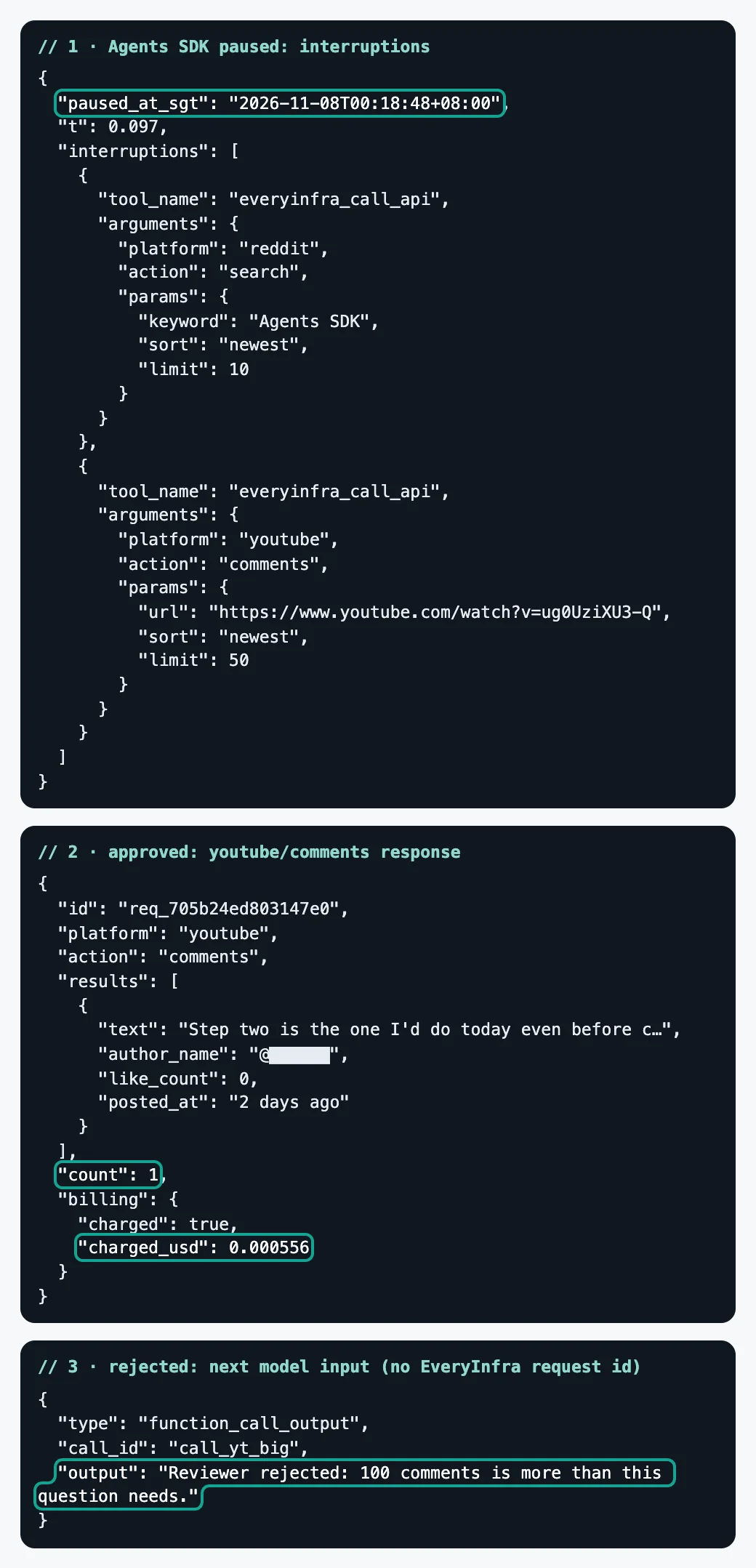
At 00:18:48 Singapore time on November 8, the run paused at 0.097 seconds. result.interruptions held both calls with their exact arguments. No request had gone to EveryInfra yet. We saved the paused state with state.to_string(), and it was 25,739 bytes.
You can store that record in a database while a person decides in an admin page. We approved both calls and resumed with Runner.run_streamed(agent, state). Both tool results arrived at 15.07 seconds.
| Call | Rows | MCP text size | `charged_usd` | Fields that came back |
|---|---|---|---|---|
reddit/search, keyword "Agents SDK" | 5 | 13,835 characters | 0.000556 | 10 fields: id, url, title, text, author_username, community, like_count, comment_count, posted_at, platform |
youtube/comments, one video | 1 | 1,689 characters | 0.000556 | 8 fields: id, text, author_name, like_count, reply_count, posted_at, is_reply, platform |
Both charges match the price_usd of the two capabilities in the catalog (EveryInfra catalog: reddit; EveryInfra catalog: youtube). We removed commenter names from the text and the screenshot.
The comment fields match the catalog for youtube/comments, with one note. The catalog lists 9 fields. The ninth, reply_to_id, comes only with replies. This comment was a top-level comment, so it did not have that field. In the 100 comments that we pulled at 00:17, the 2 replies had it.
The Reddit fields do not match the catalog in full. The catalog lists 15 fields for reddit/search. These 5 posts, and the 19 posts from our two searches at 00:16, had only 10. The fields flair, domain, external_link, thumbnail_url and image_urls did not come back.
The catalog field_note gives part of the reason. When the other sources are not available, a last-resort source answers. That source does not return flair, thumbnail_url or image_urls (EveryInfra catalog: reddit). The note does not name domain or external_link, but they were also missing in this test. If your instructions tell the model to sort posts by flair, the field can be empty. Tell the model what to do when a field is missing.
The single comment sits under a shutdown reminder video from November 2, 2026. It starts with "Step two is the one I'd do today even before choosing where to migrate" (YouTube video). The commenter then says what step two is. Click Code and copy the export. Then write the prompts, tools, guardrails and conditions down in plain text. The second half is the same job as our section on how to rewrite the Agent node instructions.
Each response also carries two blocks that the model does not need: billing and quota. They show the charge and the account balance. Together they add about five or six hundred bytes per call. That is small for one question, but a loop of hundreds of calls a day reads them again and again.
The SDK MCP server classes have a custom_data_extractor option that hands tool output data to your program (SDK MCP docs). A tool output guardrail could also drop the two fields before the model sees them. We did not run that guardrail, so treat it as a suggestion.
Tool approval: three defaults and one attribute name
In Agent Builder, Human approval is a node, and it works when you place it. In code, the default approval setting differs in three places. The Responses API reference gives require_approval a default of always (Responses API reference: create). The MCP guide says OpenAI asks for approval before any data goes to a remote MCP server (Responses MCP guide).
The JavaScript Agents SDK is different. Its hostedMcpTool option table gives requireApproval a default of 'never' (Agents SDK JS: MCP). The Python HostedMCPTool sends tool_config to the REST API as it is. So the Responses API default applies when you leave the field out (SDK MCP docs). The same workflow, exported to TypeScript, skips approval. Exported to Python, it asks for approval on every call.
| Where the agent runs | Default when you leave approval out | Source |
|---|---|---|
Responses API mcp tool | always | Responses API reference |
Python HostedMCPTool | always, from the REST default | SDK MCP docs |
JavaScript hostedMcpTool | 'never' | Agents SDK JS: MCP |
For local MCP servers, require_approval takes five forms (SDK MCP docs: approval policies). It can be "always" or "never", or True or False. It can be a map of tool names or a grouped object such as {"always": {"tool_names": [...]}}.
It can also be a function with the signature (run_context, agent, tool). The function gets the original MCP Tool, including tool.annotations. It does not get the arguments or the call ID. The docs add that annotations are hints, so trust them only when you trust the server.
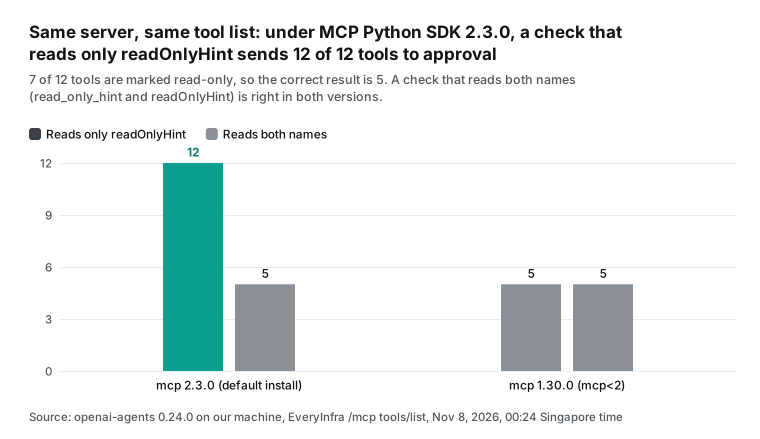
A rule based on annotations is a natural choice. The MCP specification defines annotations as optional properties that describe tool behavior (MCP specification: Tools). EveryInfra marks everyinfra_call_api with readOnlyHint: false and destructiveHint: true, because each call costs money. It marks everyinfra_get_job with readOnlyHint: true, because an async result is free to read. At 00:24 Singapore time, we read the raw tools/list JSON. Seven of the 12 tools had readOnlyHint: true, as the table shows.
| Tool | `readOnlyHint` | `destructiveHint` | Approval from the hint | Use for social questions |
|---|---|---|---|---|
everyinfra_call_api | false | true | Yes | Yes, every data call |
everyinfra_get_job | true | false | No | Yes, reads async results |
everyinfra_list_capabilities | true | false | No | Some, finds capabilities and parameters |
everyinfra_list_requests | true | false | No | Some, checks the real result after a timeout |
everyinfra_get_account | true | false | No | No |
everyinfra_get_topup_link | true | false | No | No |
everyinfra_list_captcha_types | true | false | No | No |
everyinfra_get_ticket | true | false | No | No |
everyinfra_search | false | true | Yes | No, web search |
everyinfra_chat | false | true | Yes | No |
everyinfra_solve_captcha | false | true | Yes | No |
everyinfra_create_ticket | false | false | Yes | No |
The table also shows why the filter keeps only two tools. Five tools need approval, and four of them have no use for social questions. If they stay on, the approval queue fills with calls that the model made by mistake.
everyinfra_create_ticket is a special case. It is not read-only, but it is not marked destructive either. A rule that sends every tool that is not read-only to approval stops it. That is correct, because a new ticket goes to a person.
Here is the trap. The raw JSON uses the camelCase spec name readOnlyHint. But Agents SDK 0.24.0 installs MCP Python SDK 2.3.0 today, and that version names the field read_only_hint. Our first approval function read tool.annotations.readOnlyHint. It treated a missing value as "not read-only." As a result, all 12 tools needed approval, even the free everyinfra_get_job.
To rule out our own error, we built a second environment with openai-agents==0.24.0 and mcp<2. It installed 1.30.0. In that version, the name is readOnlyHint again, and read_only_hint does not exist. The SDK docs say they support both major versions through mcp>=1.19.0,<3 (SDK MCP docs: MCP Python SDK v1 and v2). The docs do not say that annotation names follow the installed MCP package.
| Environment (same server, same `tools/list`) | `tool.annotations.readOnlyHint` | `tool.annotations.read_only_hint` | Tools sent to approval, spec name only | Tools sent to approval, both names |
|---|---|---|---|---|
| openai-agents 0.24.0 + mcp 2.3.0 (default install) | Missing | Present | 12 of 12 | 5 of 12 |
openai-agents 0.24.0 + mcp 1.30.0 (mcp<2) | Present | Missing | 5 of 12 | 5 of 12 |
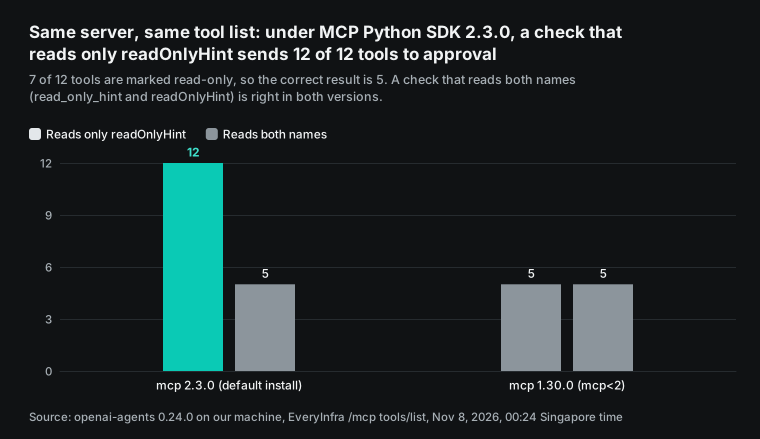
The direction of the error depends on your default. Our function sends a missing value to approval, so it fails safe. You see extra approval prompts, and an unattended job stops, but you do not spend more. Now take the opposite default, "missing means read-only." The other major version would then let every paid call through without approval.
The Responses API and HostedMCPTool path does not have this problem. There, OpenAI filters on the JSON field on its side. The JavaScript docs also say the object form of requireApproval can select tools by their read-only annotation (Agents SDK JS: MCP).
The fix is short. Read both names, as in the setting above. Then run list_tools() once before each deploy. Assert that the number of tools that need approval equals your expected value. Our expected value is 5. It comes from the raw server JSON, not from the approval function itself.
What happens after you reject a call
You also need proof that a rejection stops the call. At 00:19 Singapore time, the scripted model asked for 100 top comments from the official Agent Builder intro video. The run paused at approval again. This time we called state.reject() with a rejection_message and resumed. The message was "Reviewer rejected: 100 comments is more than this question needs." In the next model input, the output of that call was the rejection message. There was no EveryInfra request ID and no charge.
The SDK docs describe the rejection text (SDK human-in-the-loop docs: custom rejection messages). By default, a rejected call returns the standard text. RunConfig.tool_error_formatter changes the text for the whole run. rejection_message in state.reject() changes it for one call.
Write the message so the model can act on it. "Rejected" alone often makes the model try the same call again. "100 comments is more than this question needs" gives the model a reason to lower the limit. EveryInfra error responses follow the same idea. A wrong parameter returns 422 with the supported parameters, allowed values and a suggested fix. The response also states that nothing was charged.
One approval option needs care. state.approve(item, always_approve=True) approves later calls to the same tool. That decision is saved inside the RunState (SDK human-in-the-loop docs). For paid data calls, approve one call at a time. Or use a function that checks the arguments, for example one that blocks any limit above 20.
| Approval action | Sent to EveryInfra | Charged | What the model reads next | Our record |
|---|---|---|---|---|
| Approve one call | Yes | Yes, $0.000556 per call | The real JSON response | Paused at 00:18:48, results 15.07 s later |
Reject with rejection_message | No | No | The rejection message | 00:19:03 |
Approve with always_approve=True | Later calls to that tool do not pause | Yes | The real response | Not run, from the docs |
Streaming: what the stream shows during a pause, and 15 quiet seconds
The Agent Builder preview lights up each node as it runs, so users see progress. In the SDK, you build that progress from stream events. The SDK streaming docs describe two layers (SDK streaming docs). A raw_response_event wraps a raw Responses API event. A run_item_stream_event reports a finished item, with a fixed set of names. The MCP-related names are tool_called, tool_output, mcp_approval_requested, mcp_approval_response and mcp_list_tools.
When a tool needs approval, stream_events() ends, and the pending items appear in interruptions. You convert the result to a RunState, approve, and resume with Runner.run_streamed() (SDK streaming docs: streaming and approvals). We logged every event of the 00:18 run.
| Stage | Events | Time | What they were |
|---|---|---|---|
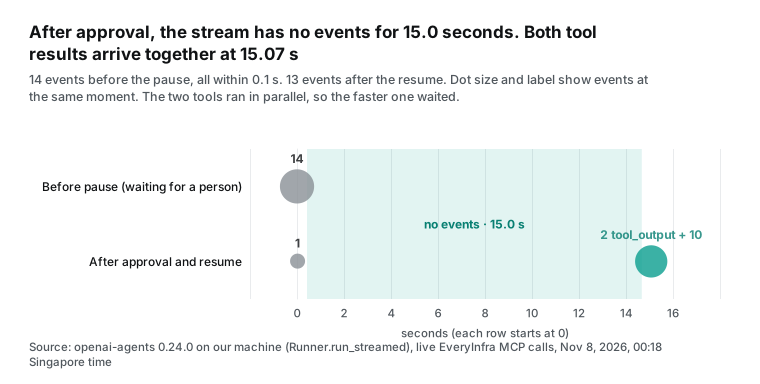
| Before the pause | 14 | 0 to 0.095 s | 1 agent_updated_stream_event, 11 raw events, 2 tool_called |
| Waiting for a person | 0 | Until approval | The stream has ended |
| After the resume, start | 1 | 0.024 s | One raw event |
| After the resume, tool results | 2 | 15.07 s | 2 tool_output, together |
| After the resume, answer | 10 | 15.07 s and later | 9 raw events and 1 message_output_created |
After a person clicks "approve," the stream is empty for 15 seconds. The two tools ran in parallel, and their results came back together. So the faster tool waited for the slower one.
How you fill those 15 seconds depends on the path. With a local MCP server, the SDK sends tool_called before the pause. Your UI can show "fetching Reddit and YouTube data" from tool_called until tool_output. With hosted MCP, the streaming reference lists 8 MCP events (Responses streaming events). Three are for response.mcp_list_tools, two are for response.mcp_call_arguments, and three are for response.mcp_call. Your front end can show progress from response.mcp_call.in_progress.
If you keep ChatKit as the front end, its server has a ProgressUpdateEvent. Long tools can use it to push progress to the UI (Advanced integrations with ChatKit). One more point is easy to miss. If your event consumer exits early, the background run can continue to call the model and the tools. To stop it, call result.cancel() and drain the stream (SDK streaming docs). With a data tool that charges per call, that warning is about your bill.
The default 5-second timeout: the client says "failed," the server already charged
This was the most costly finding of the test, even though it cost only $0.000556. The SDK docs say that client_session_timeout_seconds defaults to 5 seconds (SDK MCP docs). The default applies to MCPServerStdio, MCPServerSse and MCPServerStreamableHttp. Synchronous social data calls often take longer. From 00:19 to 00:21 Singapore time, we ran the fixed recipe from the cost section for two questions. Four of the 6 calls took more than 5 seconds.
| Question | Capability | `limit` | Rows | Seconds | With the default 5 s timeout |
|---|---|---|---|---|---|
| Notion AI | reddit/search | 10 | 7 | 4.70 | Just in time |
| Notion AI | youtube/search | 5 | 5 | 7.95 | Timeout |
| Notion AI | youtube/comments | 20 | 20 | 21.43 | Timeout |
| Cursor pricing | reddit/search | 10 | 1 | 4.93 | Just in time |
| Cursor pricing | youtube/search | 5 | 5 | 10.04 | Timeout |
| Cursor pricing | youtube/comments | 20 | 20 | 12.11 | Timeout |
During these 6 calls, the client waited longer than 5 seconds, so all 6 returned results. With the default, only the Reddit step of each question comes back. Both YouTube steps fail on your side, and the server still charges for them. Both reddit/search calls took 4.7 to 4.9 seconds, so a slightly slower network can push them over the limit too.
At 00:29:20 Singapore time, we called youtube/comments with the default timeout. The target was an Agent Builder course video from October 2025, with limit set to 100. The client raised MCPError: Request 'tools/call' timed out at 5.0 seconds. Forty-five seconds later, at 00:30:05, we called everyinfra_list_requests, a free read-only tool that shows the request log of this key.
The log showed a youtube.comments request with status 200 and latency_ms 28,442. It returned 100 items, with charged true and $0.000556. It finished at 00:29:48 Singapore time, or 28.4 seconds after the send. The log does not show parameters, so we matched the request by its send time and duration. Other jobs also used this test key in those minutes.
The result is clear. When the client stops waiting, the server does not cancel. The server got the data and charged for it, and your side saw only a timeout. Now add max_retry_attempts, which retries call_tool() automatically. The SDK or the model can then call again and pay again.
There are two fixes, and you can use both. First, set client_session_timeout_seconds above your slowest capability. We used 120 seconds. An EveryInfra synchronous call waits up to 85 seconds. The catalog async_mode note tells you to use async mode for slow tasks or large limits (EveryInfra catalog). Second, send known slow capabilities with mode: "async".
At 00:25 Singapore time, we sent an async youtube/comments call through MCP. After 2.53 seconds, we had status: running and a job_id. We then called everyinfra_get_job every 3 seconds. It returned running 6 times and finalizing 4 times. The 11th call returned succeeded, 38.58 seconds after the submit.
The everyinfra_get_job description says it is free and does not count against the per-minute limit. So polling adds no cost. The charge was $0.000556, once, at submit. For an agent, async mode turns one long wait into several short calls, each far under 5 seconds. Progress is also easier to show.
| Call style | What the client saw | Server result | Charge | Time (Singapore) |
|---|---|---|---|---|
| Sync, default 5 s timeout | MCPError timeout at 5.0 s | Done 28.4 s later, 100 rows | $0.000556 | 00:29:20 |
| Sync, 120 s timeout | Results at 15.07 s | 1 row (a different video, limit 50) | $0.000556 per call | 00:18:48 |
Async mode: async + polling | job_id at 2.53 s, results at 38.58 s | 2 rows | $0.000556 (polling free) | 00:25:01 |
Live test: what the agent finds for "how do developers feel about the shutdown?"
After the move, the agent must answer real questions. We tried the question that this agent should answer best. How do developers feel about the Agent Builder shutdown? At 00:16 Singapore time, we ran reddit/search twice.
| Query (Singapore time) | Sort | Rows | About OpenAI | About Microsoft Copilot | About the shutdown |
|---|---|---|---|---|---|
| "agent builder", 00:16:14 | Newest | 10 | 0 | 1 | 0 |
| "OpenAI Agent Builder", 00:16:31 | Relevance | 9 | 2 | 2 | 0 |
The first query returned 10 posts, all from the 8 hours before the search (17:01 on November 7 to 00:14 on November 8, Singapore time). None was about OpenAI. One compared Microsoft Copilot Studio with a Microsoft feature of the same name.
The second query returned 9 posts from October 20, 2026 to November 7, 2026. Only 2 were about OpenAI. One asked about the Agents API, and one was about a Kubernetes operator for OpenAI managed agents. None mentioned the shutdown.
The catalog note for reddit/search explains part of this. It searches only the last month and returns only posts that match the keyword. So fewer rows than limit can come back (EveryInfra catalog: reddit). The name "Agent Builder" is also ambiguous, because Microsoft has one too. Your instructions must tell the agent to keep only results that mention OpenAI.
YouTube gave a much clearer signal. At 00:16:36 Singapore time, youtube/search for "openai agent builder shut down" returned 20 videos. Eight were about the shutdown, published from September 3 to November 2, 2026, with 472 views in total. Six were Agent Builder tutorials from late 2025, including OpenAI's own intro video. Those six had 2,118,658 views, about 4,489 times the views of the shutdown videos. The last 6 were off topic, and one was a Microsoft Copilot Agent Builder tutorial.
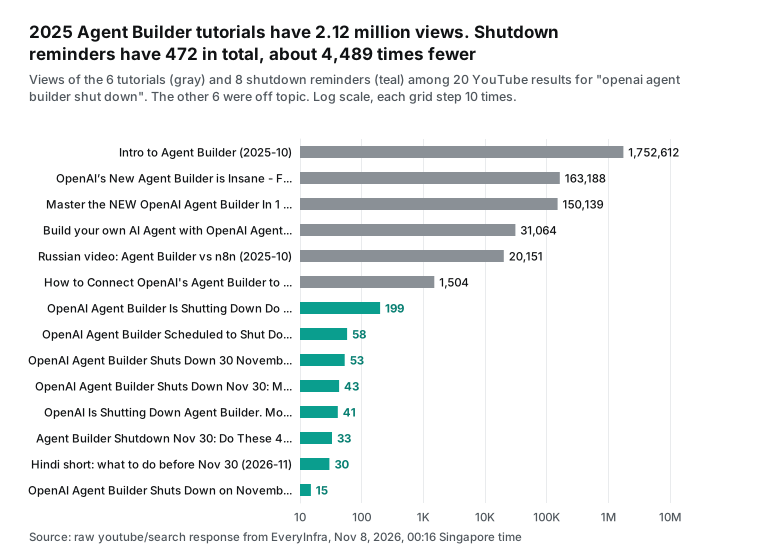
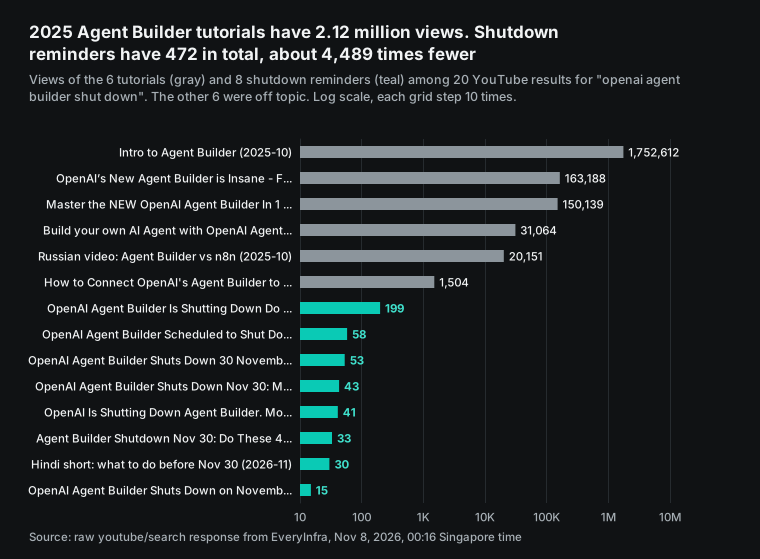
The gap suggests that many people who built workflows from these tutorials have not seen the shutdown news. The comments under OpenAI's intro video agree. At 00:17 Singapore time, youtube/comments returned the 100 newest comments.
| Measure, 100 newest comments on the intro video | Value |
|---|---|
| Unique comments | 81 |
| Exact repeats of another comment | 19 |
| Replies | 2 |
| Comments that mention the deprecation | 2 |
| Comments in the "10 months ago" bucket | 55 |
One deprecation comment, about 3 months old, says "Now is deprecated!" The other, about 2 weeks old, asks "Is this still a thing?" The 19 repeats look like spam. Also note that posted_at is a relative string such as "2 weeks ago," not a date. An agent that filters by date can only be as exact as that string.
This is where a data API helps in a migration. It does not replace Agent Builder. It tells you how many of your own users do not know that they must move. Do you maintain an Agent Builder template, course or plugin? Then run this recipe once a week. Track the shutdown videos and comments, and decide from the count whether to send one more reminder.
Our YouTube comments API page and Reddit search API page list every parameter. The same approach works with YouTube search and Reddit comments.
The cost: 100 questions a day for a month
The cost has two parts: the data API fee and the model fee. The data fee is simple. Each question uses a fixed recipe of 3 calls. The calls are reddit/search with 10 rows, youtube/search with 5 rows, and youtube/comments with 20 rows. The catalog price_usd of all three is 0.000556 per call, whatever the row count (EveryInfra catalog).
That is $0.001668 per question. At 100 questions a day for 30 days, the data fee is $5.004. Failed calls and empty results are refunded, so this is an upper limit.
The model fee depends on how much text comes back. From 00:19 to 00:21 Singapore time, we ran the recipe for two questions.
| Question | `reddit/search` | `youtube/search` | `youtube/comments` | Total bytes |
|---|---|---|---|---|
| "Notion AI" | 7 rows, 11,318 bytes | 5 rows, 16,689 bytes | 20 rows, 6,525 bytes | 34,532 |
| "Cursor pricing" | 1 row, 1,372 bytes | 8,411 bytes | 7,652 bytes | 17,435 |
| Average | 25,984 |
"Cursor pricing" got only 1 Reddit row, because the keyword match is strict. The average is 25,984 bytes per question, or about 6,496 tokens at 4 bytes per token.
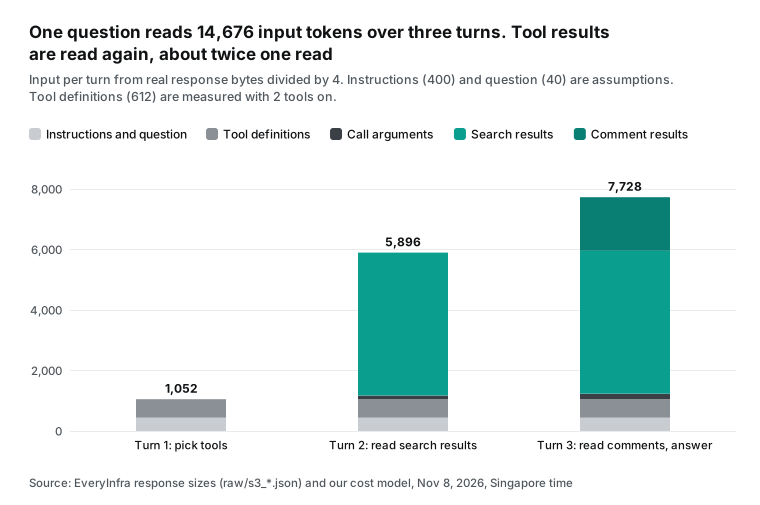
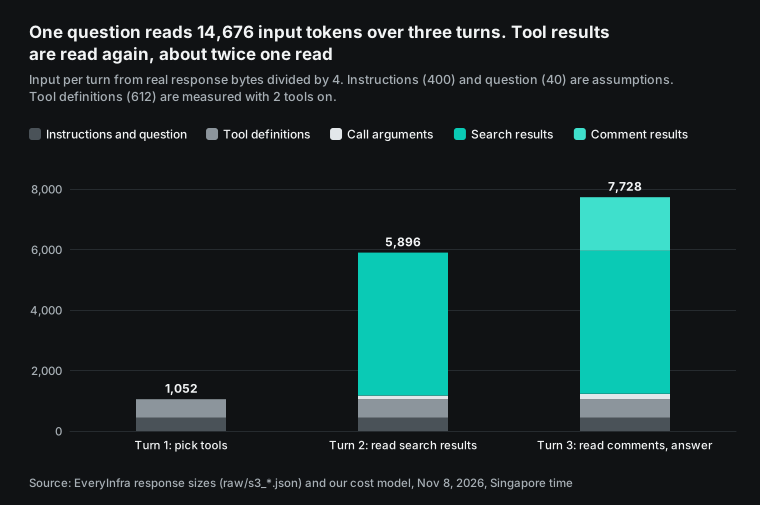
The agent loop reads the same text more than once, and that is the key. In turn 1, the model reads the instructions, the tool definitions and the question. That is about 1,052 tokens, with 400 for instructions and 40 for the question as assumptions. The 612 tokens for tool definitions are measured.
The model then makes two search calls. In turn 2, it reads all of that plus both search results, about 5,896 tokens, and makes the comments call. In turn 3, it reads everything again plus the comments, about 7,728 tokens, and writes the answer.
The three turns add up to 14,676 input tokens. That is about twice one read of the tool results. For output, we assume 60 tokens per call, 500 tokens for the answer and 300 reasoning tokens per turn. That is 1,580 output tokens per question. For 3,000 questions, the month needs about 44.03 million input tokens and 4.74 million output tokens.
Now apply the standard prices from the OpenAI pricing page on November 8 (OpenAI pricing). Per million tokens, input and output, they are gpt-6-luna $0.10 and $0.50, and gpt-6.1-terra $1.00 and $5.00. They are gpt-6.1-sol $2.00 and $10.00, and gpt-6-astra $10.00 and $50.00.
The MCP guide says you pay only for tokens, with no fee per tool call (Responses MCP guide). The Agents SDK is free and open source. The table leaves out prompt caching and the server that runs your SDK process. The pricing page also says that data residency endpoints add 10% for models released on or after March 5, 2026 (OpenAI pricing).
| Model | Model fee / month | Data fee / month | Total / month | Per question | Data share |
|---|---|---|---|---|---|
| gpt-6-luna | $6.77 | $5.00 | $11.78 | $0.00393 | 42.5% |
| gpt-6.1-terra | $67.73 | $5.00 | $72.73 | $0.02424 | 6.9% |
| gpt-6.1-sol | $135.46 | $5.00 | $140.46 | $0.04682 | 3.6% |
| gpt-6-astra | $677.28 | $5.00 | $682.28 | $0.22743 | 0.7% |
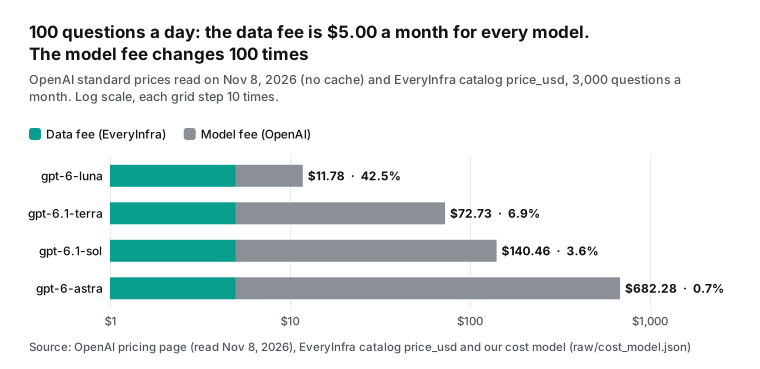
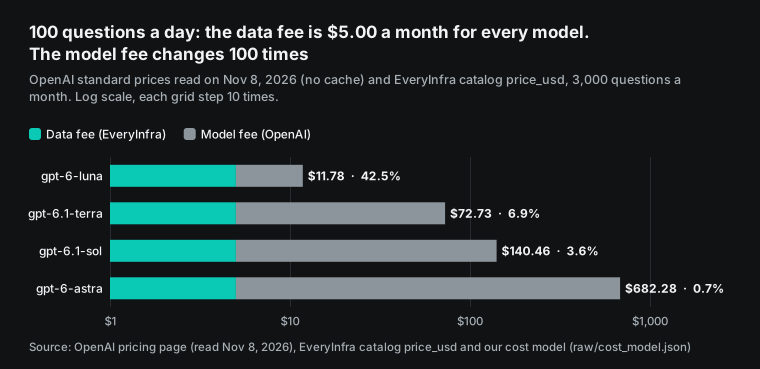
Read the table two ways. First, the model choice moves the bill far more than the data choice. The cheapest and the most expensive models differ exactly 100 times in unit price. The monthly total goes from $11.78 to $682.28. Second, on gpt-6-luna, the data fee is 42.5% of the total. At that point, fewer calls save money. Check the youtube/search results first and call comments only when you need them. Or lower limit from 20 to 10.
We also ran two sensitivity cases. If your answers return twice as much text, the four totals become $15.14, $106.39, $207.78 and $1,018.88. If reasoning grows from 300 to 1,000 tokens per turn, they become $14.93, $104.23, $203.46 and $997.28. We did not measure reasoning tokens, so that is the weakest assumption. Before launch, run your own real questions for a week and read the bill.
With the platforms' own APIs, money is not the main problem. Each YouTube Data API project gets 100 search.list calls a day by default, in a separate bucket (YouTube Data API quota calculator). Other methods share 10,000 units a day. The page was last updated on November 3, 2026. A commentThreads.list call costs 1 unit (commentThreads: list). So 100 questions a day, with one search each, uses the whole default search quota. Call 101, or any retry, fails.
The free Reddit Data API allows 100 queries per minute per OAuth client ID, averaged over 10 minutes (Reddit Data API Wiki). You must delete content that users deleted on Reddit. Reddit also recommends that you delete stored user data within 48 hours (Reddit Data API Terms). Those rules apply to agents too. If you keep fetched posts in a vector store, the delete duty comes with them.
| Same job | Enough for 100 questions a day? | What you set up | Source |
|---|---|---|---|
| YouTube Data API (default quota) | Exactly 100 searches, no margin | Google Cloud project, API key, quota request for more | Quota calculator |
| Reddit Data API (free tier) | Enough calls, 100 per minute | OAuth app, User-Agent in the required format | Reddit Data API Wiki |
| EveryInfra MCP | 3 calls per question, $0.001668 | One key. Our test key has its own limit of 10 calls per minute, not the default | EveryInfra catalog |
We hit a rate limit in this test. At 00:16:55 Singapore time, we sent two comment requests at the same time. Both returned 429 with retry_after 5 seconds, and next_steps said nothing was charged.
We sent them again 16 and 39 seconds later, and both worked. Our test key allows 10 calls per minute, and other jobs used it in those minutes. At 100 questions a day, the average is 0.2 questions a minute. You only reach the limit during a burst, and then you wait for retry_after.
Limits and things to watch
Export is not migration. The migration guide says the export does not convert the graph or guarantee the same behavior. We did not have a real Agent Builder export to compare line by line. The node table comes from the node reference and the SDK docs. When you get your own export, compare its output with the old workflow for typical inputs. Cover at least three cases: an empty result, a rate limit and a rejected approval.
The SDK also tries to send traces to OpenAI by default. On our machine, OPENAI_API_KEY was not set, so the SDK printed a "skipping trace export" message. The SDK tracing docs show how to turn tracing off or use your own trace processor (SDK tracing docs).
We did not run the OpenAI side. HostedMCPTool and the Responses API approval round trip need a real OpenAI account and model. Both are configuration examples here. In the Responses API, each approval covers one tool call. The reply uses previous_response_id to link the new request to the one that asked (Responses MCP guide).
Also, connector_id is deprecated for models released after September 1, 2026. Use server_url or tunnel_id instead. If your MCP node used an OpenAI built-in connector, a new model means a new connection method.
Hosting is now your cost. With Agent Builder and hosted ChatKit, you had no server to run. With the SDK, the process, the storage and the cold starts are yours.
In the forum thread, one developer ran a ChatKit backend in an AWS Lambda container. Twenty parallel health checks showed cold-start init times of 2.5 to 3.4 seconds. Another developer said an always-on virtual machine costs 15 to 30 USD a month (OpenAI forum deprecation thread). These are personal reports, not our tests. They show that hosting is in the same range as the data and model fees.
The data side has limits too. reddit/search searches only post titles and bodies from the last month, not comment text. The posted_at of youtube/comments can be relative. Some fields can be empty when the main source is not available. For example, youtube/comments can come back without like_count and reply_count, and reddit/search did not return flair or thumbnails in this test. The catalog field_note lists the missing fields for each capability (EveryInfra catalog). Put these limits in the instructions, so the model does not turn "no rows" into "nobody talks about it."
Recent changes
- 2026-10-14: OpenAI notifies GPT-4o and GPT-4.1 users of removal on January 14, 2027, with
gpt-6-lunaas the replacement (OpenAI deprecations page). DevPro Journal, citing The New Stack, says this notice gave only three months (DevPro Journal). - October 2026: The Agents API adds automatic review with
review: "auto_review"(OpenAI changelog). A model approves or denies tool requests at extra token cost. For you: on the SDK path, you write the rule yourself.
FAQ
Does OpenAI Agent Builder shut down automatically on November 30?
Yes. The deprecations page says Agent Builder is scheduled to shut down on November 30, 2026. The page defines "shut down" as "no longer accessible" (OpenAI deprecations page). You do not need to do anything for it to stop. Export your code before that date.
Does ChatKit stop working after Agent Builder?
ChatKit stays, but a workflow hosted in Agent Builder runs only during the transition window (ChatKit guide). New apps use the advanced setup with your own Agents SDK backend (Advanced integrations with ChatKit). OpenAI does not say whether published workflow IDs run after the shutdown. The forum and Forkast both treat it as open (Forkast).
What is the OpenAI Agent Builder replacement?
The migration guide lists two (Migrate from Agent Builder). The Agents SDK is for code. ChatGPT Workspace Agents are for plain-language team agents, and they need a Business, Enterprise or Edu workspace. A forum reply also suggests a thin wrapper of your own on the Responses API (OpenAI forum checklist).
How do I turn off hosted MCP tool approvals for some tools only?
Set require_approval to {"never": {"tool_names": [...]}} for listed tools only. Or set it to "never" for all tools (Responses MCP guide). In the Python SDK, an on_approval_request callback can also decide in code (SDK MCP docs). For paid data tools, skip approval only for the free read-only ones.
Get started
- Before November 30, open each workflow. Select Code, Agents SDK, then Python or TypeScript. Save the export to your repository.
- Export the prompt text from prompt objects and the test sets from Evals.
- Install
openai-agents==0.24.0from PyPI. It needs Python 3.10 or newer (PyPI). If the export is TypeScript, install@openai/agents, which needs Node.js 22 or newer (npm: @openai/agents). Do a first run with the Agents SDK quickstart. Then replace old model names with the replacements on the deprecations page. - Get a key from the EveryInfra quickstart and put it in the
EVERYINFRA_API_KEYenvironment variable. The remote MCP setup guide and the MCP server page show client settings. - Replace the MCP node with the
MCPServerStreamableHttpsetting above. Keep two tools, a 120-second timeout and an approval function that reads both names. - Run
list_tools()once and assert that 5 tools need approval. Then compare three real questions with the old workflow. - See the Reddit data API and the YouTube data API to pick capabilities and limits. Prices are on the pricing page, and you can try calls in the market.
References
- Deprecations, OpenAI, read 2026-11-08, <https://developers.openai.com/api/docs/deprecations>
- Migrate from Agent Builder, OpenAI, read 2026-11-08, <https://developers.openai.com/api/docs/guides/agent-builder/migrate-from-agent-builder>
- Agent Builder, OpenAI, read 2026-11-08, <https://developers.openai.com/api/docs/guides/agent-builder>
- Node reference, OpenAI, read 2026-11-08, <https://developers.openai.com/api/docs/guides/node-reference>
- Migrate from prompt objects, OpenAI, read 2026-11-08, <https://developers.openai.com/api/docs/guides/prompting/migrate-from-prompt-object>
- Moving from OpenAI Evals to Promptfoo, OpenAI Cookbook, read 2026-11-08, <https://developers.openai.com/cookbook/examples/evaluation/moving-from-openai-evals-to-promptfoo>
- Nov 30 shutdown checklist: Agent Builder, Evals, prompt objects, OpenAI Developer Community, 2026-10-30, <https://community.openai.com/t/nov-30-shutdown-checklist-agent-builder-evals-prompt-objects-evals-go-read-only-oct-31/1411075>
- Deprecation notice: Agent Builder, OpenAI Developer Community, from 2026-06, <https://community.openai.com/t/deprecation-notice-agent-builder/1382650>
- ChatKit, OpenAI, read 2026-11-08, <https://developers.openai.com/api/docs/guides/chatkit>
- Advanced integrations with ChatKit, OpenAI, read 2026-11-08, <https://developers.openai.com/api/docs/guides/custom-chatkit>
- OpenAI Agent Builder's Nov. 30 shutdown puts migration on a code-and-validation path, Forkast, 2026-11, <https://forkast.news/openai-agent-builders-nov-30-shutdown-puts-migration-on-a-code-and-validation-path/>
- Model context protocol (MCP), OpenAI Agents SDK (Python) docs, read 2026-11-08, <https://openai.github.io/openai-agents-python/mcp/>
- MCP servers (Responses API), OpenAI, read 2026-11-08, <https://developers.openai.com/api/docs/guides/tools-connectors-mcp>
- openai-agents 0.24.0, PyPI, 2026-10-15, <https://pypi.org/project/openai-agents/>
- Agents SDK quickstart, OpenAI, read 2026-11-08, <https://developers.openai.com/api/docs/guides/agents/quickstart>
- @openai/agents, npm, read 2026-11-08, <https://www.npmjs.com/package/@openai/agents>
- Releases, openai/openai-agents-python, GitHub, from 2026-10-15, <https://github.com/openai/openai-agents-python/releases>
- Agents API overview, OpenAI, read 2026-11-08, <https://developers.openai.com/api/docs/guides/agents-api/overview>
- Human-in-the-loop, OpenAI Agents SDK (Python) docs, read 2026-11-08, <https://openai.github.io/openai-agents-python/human_in_the_loop/>
- Guardrails, OpenAI Agents SDK (Python) docs, read 2026-11-08, <https://openai.github.io/openai-agents-python/guardrails/>
- Sessions, OpenAI Agents SDK (Python) docs, read 2026-11-08, <https://openai.github.io/openai-agents-python/sessions/>
- EveryInfra catalog: reddit, EveryInfra, read 2026-11-08 00:15 SGT, <https://api.everyinfra.com/api/v1/social/catalog?platform=reddit>
- Safety in building agents, OpenAI, read 2026-11-08, <https://developers.openai.com/api/docs/guides/agent-builder-safety>
- What are tokens and how to count them, OpenAI Help Center, read 2026-11-08, <https://help.openai.com/en/articles/4936856-what-are-tokens-and-how-to-count-them>
- Responses API reference: create a model response, OpenAI, read 2026-11-08, <https://developers.openai.com/api/reference/resources/responses/methods/create>
- examples/hosted_mcp, openai/openai-agents-python, GitHub, read 2026-11-08, <https://github.com/openai/openai-agents-python/tree/main/examples/hosted_mcp>
- Secure MCP Tunnel, OpenAI, read 2026-11-08, <https://developers.openai.com/api/docs/guides/secure-mcp-tunnels>
- src/agents/testing/model.py, openai/openai-agents-python, GitHub, read 2026-11-08, <https://github.com/openai/openai-agents-python/blob/main/src/agents/testing/model.py>
- EveryInfra catalog: youtube, EveryInfra, read 2026-11-08 00:15 SGT, <https://api.everyinfra.com/api/v1/social/catalog?platform=youtube>
- OpenAI Agent Builder Is Shutting Down Do This Before November 30, YouTube, 2026-11-02, <https://www.youtube.com/watch?v=ug0UziXU3-Q>
- Model Context Protocol (MCP), OpenAI Agents SDK (JavaScript) docs, read 2026-11-08, <https://openai.github.io/openai-agents-js/guides/mcp/>
- Tools, Model Context Protocol specification 2025-11-25, read 2026-11-08, <https://modelcontextprotocol.io/specification/2025-11-25/server/tools>
- Streaming, OpenAI Agents SDK (Python) docs, read 2026-11-08, <https://openai.github.io/openai-agents-python/streaming/>
- Responses streaming events, OpenAI API reference, read 2026-11-08, <https://developers.openai.com/api/reference/resources/responses/streaming-events>
- EveryInfra catalog (all capabilities, with async_mode), EveryInfra, read 2026-11-08 00:15 SGT, <https://api.everyinfra.com/api/v1/social/catalog>
- Pricing, OpenAI, read 2026-11-08, <https://developers.openai.com/api/docs/pricing>
- Quota Calculator, YouTube Data API, Google for Developers, updated 2026-11-03, <https://developers.google.com/youtube/v3/determine_quota_cost>
- CommentThreads: list, YouTube Data API, Google for Developers, read 2026-11-08, <https://developers.google.com/youtube/v3/docs/commentThreads/list>
- Reddit Data API Wiki, Reddit Help, read 2026-11-08, <https://support.reddithelp.com/hc/en-us/articles/16160319875092-Reddit-Data-API-Wiki>
- Data API Terms, Reddit, read 2026-11-08, <https://www.redditinc.com/policies/data-api-terms>
- Tracing, OpenAI Agents SDK (Python) docs, read 2026-11-08, <https://openai.github.io/openai-agents-python/tracing/>
- AI model deprecation is coming. Is your product ready?, DevPro Journal, 2026-11, <https://www.devprojournal.com/technology-trends/ai/ai-model-deprecation-is-coming-is-your-product-ready/>
- Changelog, OpenAI, read 2026-11-08, <https://developers.openai.com/api/docs/changelog>
Reference BL-108