Antigravity CLI Comment Monitoring: Setup and Real Data
Run a 24-hour YouTube and Bilibili comment patrol with Antigravity CLI. Real data: 100 comments covered 5 hours; one day costs $0.023 in API fees.
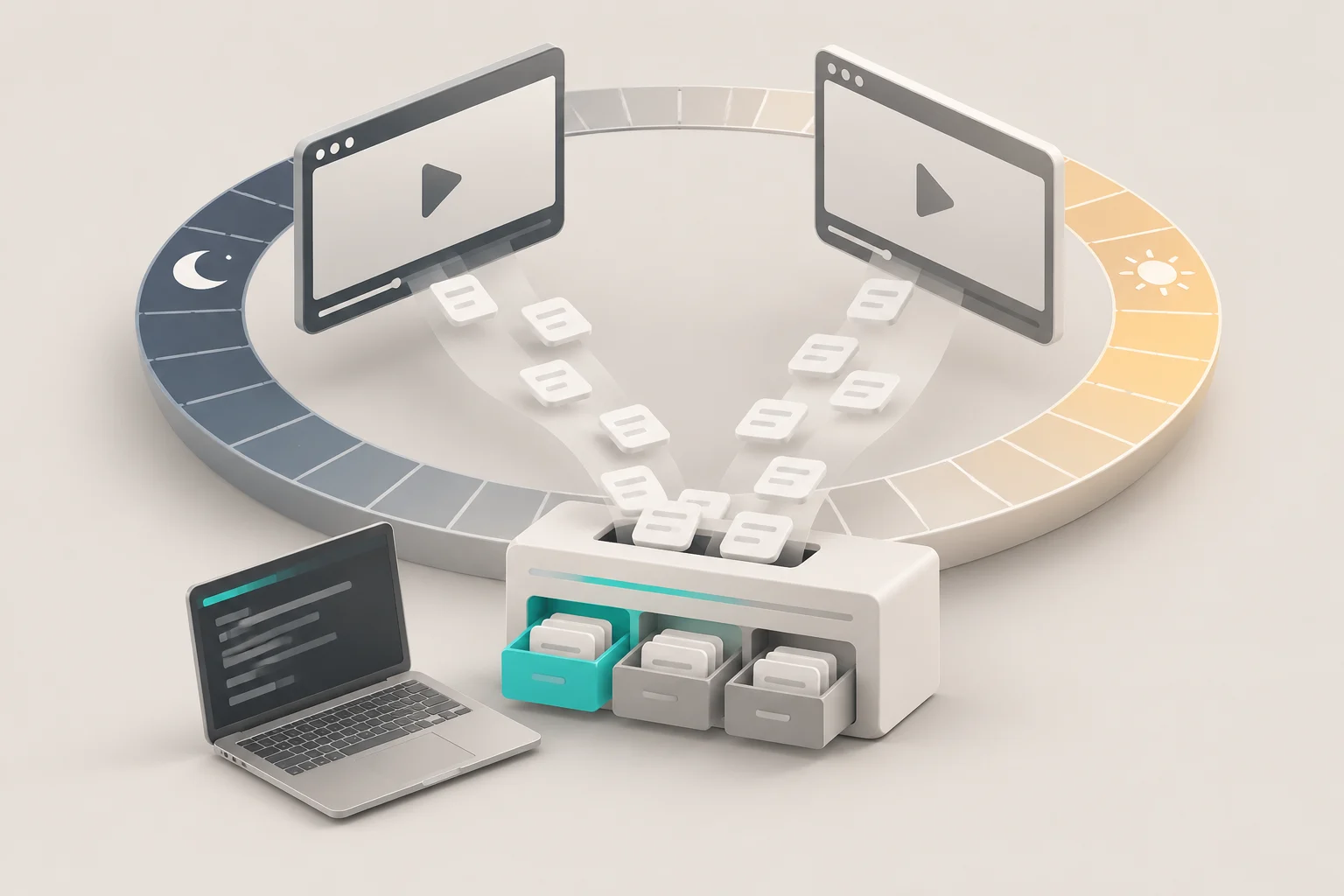
The first 24 hours after a video goes live decide the tone of its comment section. Three kinds of comments need a human soon: complaints, real questions, and comments that look cold if nobody answers. This guide builds a comment patrol with Antigravity CLI, the Google terminal agent that replaced Gemini CLI. The command is agy. Every few hours, a system timer starts agy -p, the agent pulls new comments, and it writes a short report.
Comment data comes from the EveryInfra remote MCP server. For YouTube we use youtube/comments and youtube/video. For Bilibili we use bilibili/comments, bilibili/danmaku and bilibili/video. We ran the data side for real on November 3, 2026, from 00:17 to 01:22 Singapore time (SGT).
We made three patrol rounds on two busy videos, with 20 paid calls and $0.01137 in total API fees. Antigravity CLI is not installed on our test machine. Thus every mcp_config.json, skill and timer script below is a configuration example based on the official documentation. We did not run agy ourselves.
Some numbers in this guide do not appear in any documentation. A YouTube video had 1,546 comments after 23.6 hours. The newest 100 comments, which is the maximum per call, covered only the last 5 hours. In the second round, 27 minutes later, only 9 of those 100 comments were new. On Bilibili, a video had 4,075 comments after less than 3 hours.
The comments endpoint returned 3, 10 and 3 hot comments in three rounds. A keyword pre-filter flagged 34 of 100 YouTube comments, but only 13 of them deserved the creator's time. At one round every 2 hours, a full day costs $0.023 in API fees. The model side costs about $0.103 at public Gemini 3.8 Flash API prices, and most of that is fixed prompt overhead.
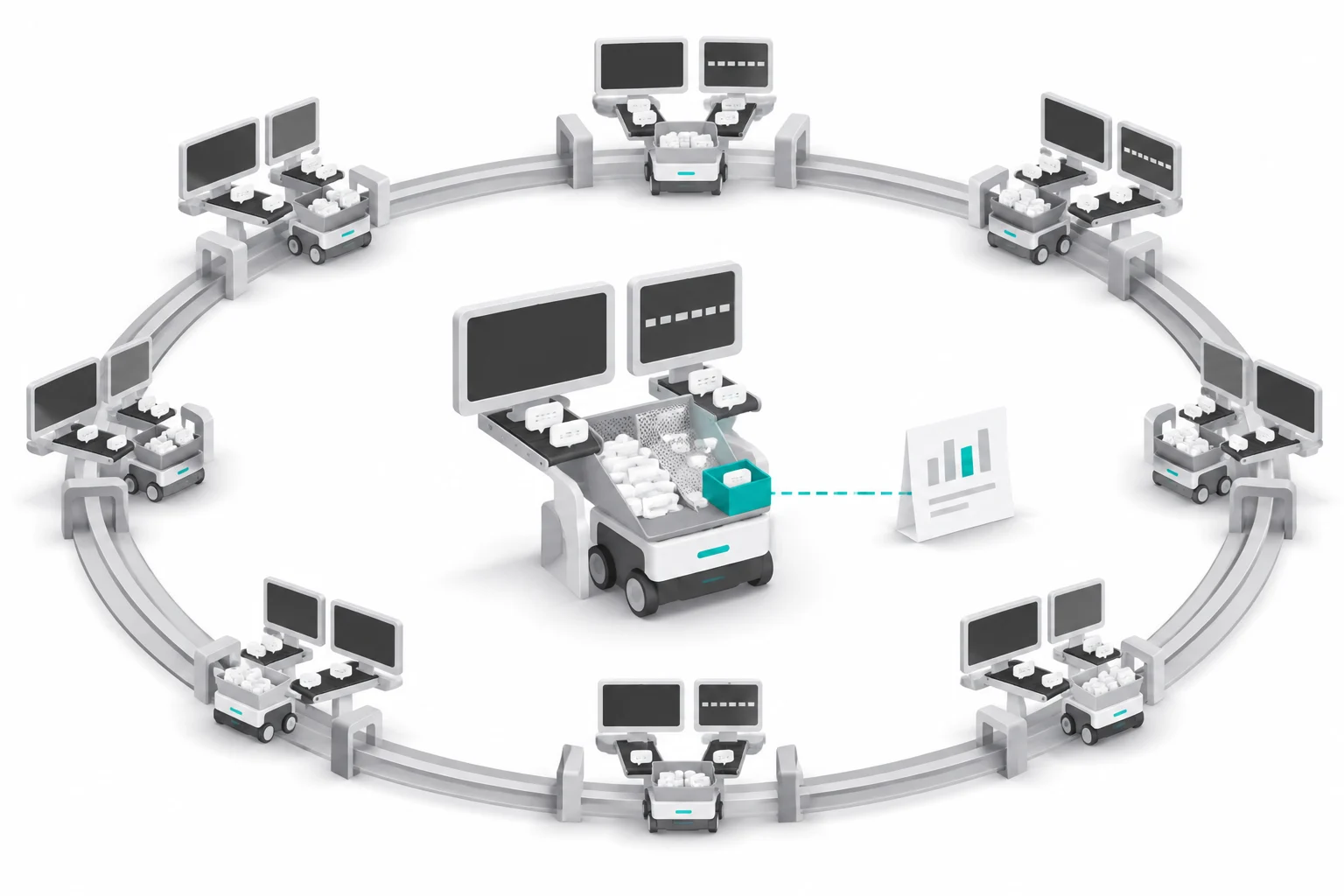
The job: what a 24-hour comment patrol must catch
Most comments under a new video need no action. Emoji, jokes, "first" and fan chatter make up the bulk. A patrol exists to find the small part that needs action and to show it on one screen. A social media manager should read the report on a phone in two minutes. Nobody should scroll through 1,500 comments in YouTube Studio to find three real problems.
We picked two videos in different states. The YouTube video is "GTA 6 on PC May be Coming Sooner than We Thought" from Linus Tech Tips (video page). It went live on November 2 at 00:45 SGT. At our first pull it was 23.6 hours old, with 794,104 views and 1,546 comments.
The Bilibili video is the first upload of the DeepSeek Harness account, posted on November 2 at 21:28 SGT (video page). At our first pull it was 2.9 hours old, with 225,698 views, 4,075 comments and 342 danmaku. One video sits at the end of the 24-hour window and one sits at the start.
| One report row | Source field | Note |
|---|---|---|
| Comment ID, platform, video | id from youtube/comments or bilibili/comments, plus video_id | Keep the ID, drop the user name |
| Text (cut to 200 characters) | text | Danmaku go in a separate column |
| Time window | YouTube gives "2 hours ago", Bilibili gives ISO time | Convert YouTube labels at pull time |
| Engagement | like_count, reply_count | New comments usually show 0 |
| Category | Script pre-filter plus model check | Complaint, question, needs reply, other |
| Severity and draft reply | Model output under a JSON schema | High-risk items get no draft and go to a human |


What Antigravity CLI is, and the four features this job needs
Many people who search for "antigravity cli" still think it is a new name for Gemini CLI. It is a different tool. On May 19, 2026, the Google Developers Blog announced the move from Gemini CLI to Antigravity CLI for individual users (Google Developers Blog). The new tool was available to everyone on that day.
From June 18, Gemini CLI and the Gemini Code Assist IDE extensions stopped serving Google AI Pro, Ultra and free users. Organizations with Gemini Code Assist enterprise licenses or paid API keys kept access. The same timeline appears in GitHub discussion #27274.
The blog post says the team rewrote the tool in Go and named the command agy. Agent Skills, hooks, subagents and extensions remain, but extensions are now called plugins. The CLI also shares one agent core with the Antigravity 2.0 desktop app. Two facts matter for this guide.
First, Antigravity CLI is closed source. The google-antigravity/antigravity-cli repository holds install notes, release notes and discussions, not code. So every behavior in this guide comes from official docs and release notes.
Second, the CLI changes fast. The GitHub releases API lists 20 releases from 1.3.0 on 2026-10-06 to 1.4.12 on 2026-10-30 UTC (1.4.12 release notes). Some steps in between: 1.4.0 on 2026-10-16, 1.4.4 on 2026-10-21, 1.4.8 on 2026-10-27 and 1.4.10 on 2026-10-29. That is a release every day or two.
| Version | Date (UTC) | Change that matters for a scheduled patrol |
|---|---|---|
| 1.2.9 | 2026-09-23 | Headless mode waits for background tasks until --print-timeout, at most 30 minutes |
| 1.2.10 | 2026-09-24 | A streamed answer that fails partway exits with code 3 |
| 1.3.4 | 2026-10-13 | An unknown --agent name exits with code 1 in headless mode |
| 1.3.6 | 2026-10-15 | Headless mode skips questions from subagents |
| 1.4.7 | 2026-10-24 | Less CPU in -p runs; MCP results up to 10 KB go straight to the agent |
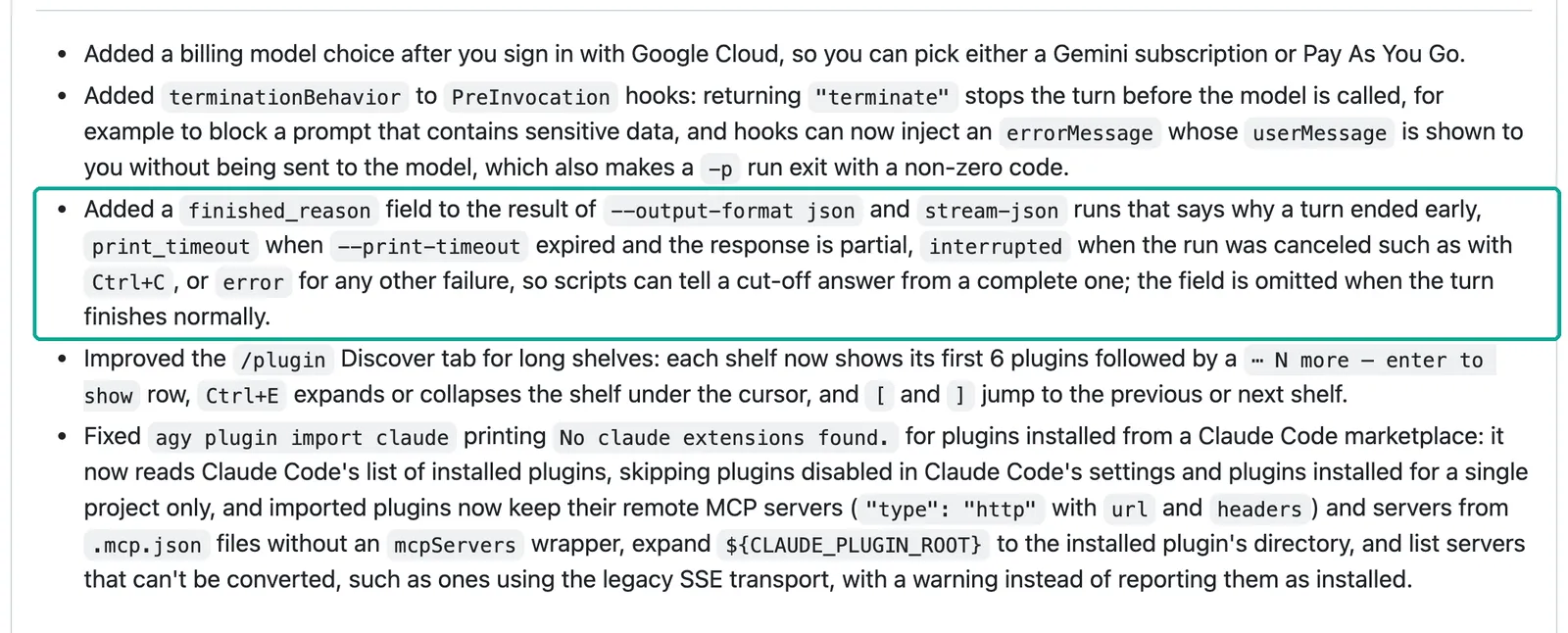
| 1.4.11 | 2026-10-30 | JSON output gains finished_reason |
Check your local agy --version against the docs before you copy any example below.
| Feature this job uses | What the docs say | Source (read on 2026-11-03) |
|---|---|---|
Headless mode agy -p | One prompt, print the result, exit. --output-format json returns an envelope with status and usage. --json-schema forces structured output | Headless mode |
| Remote MCP | Servers live in mcp_config.json. A remote server uses serverUrl plus headers. enabledTools exposes only some tools | MCP docs, migration guide |
| Agent Skills | Workspace skills go in .agents/skills/. Global skills go in ~/.gemini/skills/ or ~/.gemini/antigravity-cli/skills/ | Agent skills |
| Scheduling | /schedule lives in the current conversation. Sidecars run across sessions but are marked for the desktop app. The CLI can run from an OS timer | /schedule, Sidecars |
Antigravity CLI MCP config: where mcp_config.json lives and what goes in it
Antigravity CLI moves MCP servers out of the main settings file into mcp_config.json. The global file is ~/.gemini/config/mcp_config.json. A project file goes in .agents/mcp_config.json at the project root (migration guide, "MCP config formatting changes"). The address key for a remote server changed from url or httpUrl in Gemini CLI to serverUrl.
The MCP docs add that url also works. Authentication goes in custom headers. The enabledTools key is an allowlist, so the agent cannot see any other tool from that server. The timeoutSeconds key defaults to 300 seconds for connection and 180 seconds per tool call (MCP docs, "MCP configuration properties").
This is the example for the patrol project. Put it in .agents/mcp_config.json:
{
  "mcpServers": {
    "everyinfra": {
      "serverUrl": "https://api.everyinfra.com/mcp",
      "headers": { "Authorization": "Bearer <your EveryInfra API key>" },
      "enabledTools": ["everyinfra_call_api", "everyinfra_get_job", "everyinfra_list_capabilities"],
      "timeoutSeconds": 120
    }
  }
}
Each line is a choice. We keep only three tools in enabledTools. At 00:22 SGT on November 3, a tools/list call without a key showed 12 tools on the EveryInfra MCP server. Several of them, such as account lookup and support tickets, have nothing to do with a patrol. Extra tools take context and give the model one more wrong choice.
We set timeoutSeconds to 120 instead of 180. Our slowest synchronous call took 70.48 seconds: 50 YouTube comments sorted by popularity. For a call that can take more than 85 seconds, add "mode":"async" to the request and poll everyinfra_get_job. Polling is free. Do not keep raising the timeout.
The key is the line that needs the most care. The official remote example puts Bearer YOUR_API_TOKEN straight into headers. The docs do not say that headers expands ${ENV_VAR}. The old Gemini CLI docs did support $VAR_NAME and ${VAR_NAME} in headers (Gemini CLI MCP docs).
One Reddit user reports that Antigravity sends ${MY_VAR} as a literal string (r/google_antigravity thread). Until the docs say otherwise, assume no expansion. Either put the key in the global file and make it readable only by you, or keep the project file but add .agents/mcp_config.json to .gitignore. Never commit it.
The second file is permissions. The MCP docs say that an MCP tool without a rule defaults to "Ask", so each call waits for a person to approve it. Allow rules look like mcp(server/tool) or mcp(server/*) (MCP docs, permissions, permissions docs). Nobody approves anything in headless mode. So write the rules in advance in ~/.gemini/antigravity-cli/settings.json:
{
  "permissions": {
    "allow": [
      "mcp(everyinfra/everyinfra_call_api)",
      "mcp(everyinfra/everyinfra_get_job)",
      "mcp(everyinfra/everyinfra_list_capabilities)",
      "write_file(reports/)"
    ]
  }
}
We do not use mcp(everyinfra/*) and we do not use --dangerously-skip-permissions. An allowlist by name is safer than a wildcard. If the server adds a tool later, a rule by name does not cover it. Another Reddit user hit this exact step. The MCP server showed as connected, but the agent said it could not reach it.
The fix was an explicit allow in /permissions. That user also found the config written under ~/.gemini/antigravity-cli/ instead of ~/.gemini/config/ (r/google_antigravity, "Antigravity CLI MCP Servers Pain"). After setup, open the interactive CLI once. Run /mcp to check the server state, and then run /permissions to check the rules. Hand the job to a timer only after both checks pass.
One real round trip: what the agent sends and what comes back
We could not run agy, but the requests it sends to a remote MCP server are standard MCP messages. The client first sends tools/list for the tool catalog and then tools/call as needed. The MCP specification calls this transport Streamable HTTP. The client POSTs one JSON-RPC message, and the server answers with JSON or an SSE stream (MCP specification 2026-07-28, "Transports"). So we skip the client and send the same request to the EveryInfra MCP endpoint.
What we see is the raw reply that the server gives the agent. The CLI can still change what the agent reads. For example, the 1.4.7 release notes say that tool results over 10 KB go to a file. We did not test that layer.
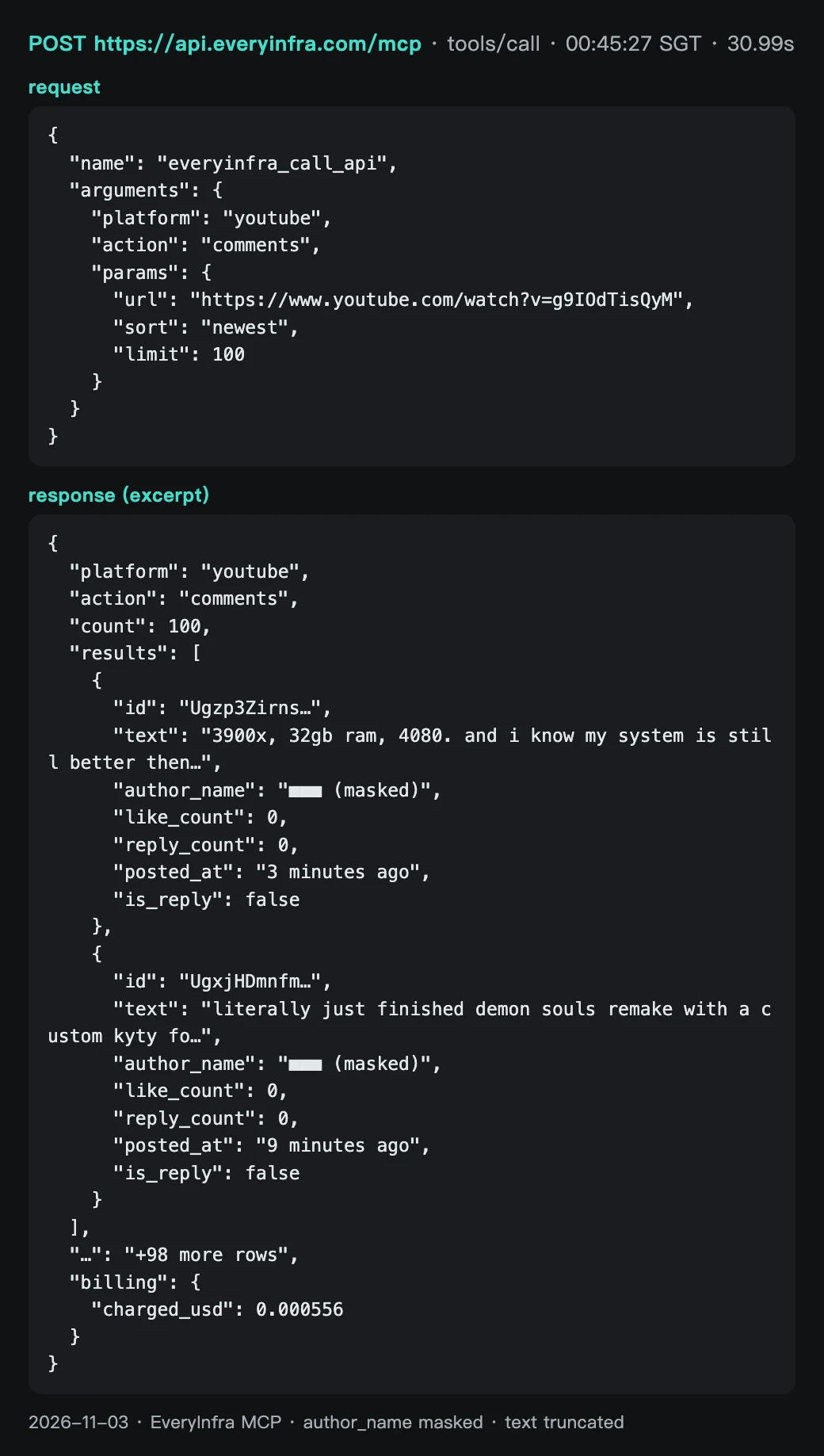
At 00:45:27 SGT on November 3, we sent this tools/call with a key. It asks for the 100 newest comments on the YouTube video:
{
  "jsonrpc": "2.0",
  "id": 7,
  "method": "tools/call",
  "params": {
    "name": "everyinfra_call_api",
    "arguments": {
      "platform": "youtube",
      "action": "comments",
      "params": {
        "url": "https://www.youtube.com/watch?v=g9IOdTisQyM",
        "sort": "newest",
        "limit": 100
      }
    }
  }
}
The server answered HTTP 200 after 30.99 seconds. MCP wraps the business result in result.content[0].text as a JSON string of 33,915 bytes. Inside are platform, action, count, results and billing. The count was 100 and billing.charged_usd was 0.000556. The first comment was 3 minutes old.
A viewer listed his own PC and said the show's "average gamer PC" was a bit too strong. The second comment was 9 minutes old and described finishing a game remake on an emulator. The screenshot below shows the real response with two rows. User names are masked and text is cut short.
Plan for this response size when you write the config file. Per the Antigravity CLI 1.4.7 release notes, on-demand MCP results up to 10 KB go straight to the agent. Larger results go to a file, and the agent must read that file in an extra step (1.4.7 release notes). One page of 100 comments is about 33 KB, so it always takes the file path.
For a patrol this is good. You want the raw response on disk anyway. The skill tells the agent to pass the file to dedupe.py instead of reading 33 KB of JSON into context.
You can also skip MCP and call the REST endpoint. Use this if your timer script fetches the data before it wakes agy. We used this path for rounds 1 and 3. The results array has the same shape as the one inside the MCP response:
curl -s https://api.everyinfra.com/api/v1/social \
  -H "Authorization: Bearer $EVERYINFRA_API_KEY" \
  -H "Content-Type: application/json" \
  -d '{"platform":"youtube","action":"comments","params":{"url":"https://www.youtube.com/watch?v=g9IOdTisQyM","sort":"newest","limit":100}}' \
  > youtube-$(date +%Y%m%d-%H%M).json
Our advice: start with MCP to see what a good report looks like. When it is stable, move fetch and dedupe into a script and leave only the judgment to the model. The pre-filter section explains why.
Errors are part of the round trip too. We sent bilibili/comments a sort parameter that it does not support. At 00:21:33 SGT we got HTTP 422 with unknown_param. The message listed the allowed parameters, url and limit, and ended with "Nothing was charged." A model can read this message and retry without the bad parameter.
A server failure looks different. In round 3 at 01:22:15 SGT, the danmaku call returned HTTP 503 with fault set to service, so the request itself was fine. The body set retryable to true and retry_after to 20 seconds. Its next_steps line said the call was not charged and that this was failure 1 of 3. We sent the same request 23 seconds later and got 200 with 100 danmaku, charged at $0.000556. A timer script should follow these fields: wait retry_after, stop at max_retries, and then write "Bilibili danmaku missing this round" in the report.
For other ways to connect a remote MCP server, see the MCP server guide and the Docs.
| This round trip | Measured value |
|---|---|
| Request time | 2026-11-03 00:45:27 SGT |
| Tool | everyinfra_call_api, platform=youtube, action=comments |
| Duration | 30.99 s (synchronous; anything under 85 s returns directly) |
| Response | HTTP 200, count 100, body 33,915 bytes |
| Charge | $0.000556 (billing.charged_usd) |
| Compared with round 1 | 91 of 100 rows seen before, 9 new |
YouTube comment monitoring: 100 comments per call, and how much time that covers
The patrol interval depends on one practical number. Will new comments between two rounds exceed what one call can return? The catalog lists youtube/comments with a default of 20 rows and a maximum of 100. Optional parameters are sort (newest or popular) and since (a date filter).
The fields are id, text, author_name, like_count, reply_count, posted_at, is_reply and reply_to_id. There is no page parameter. So 100 rows is everything one round can see.
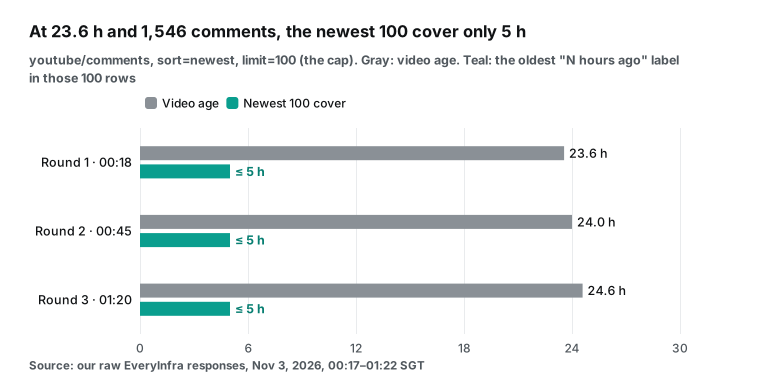
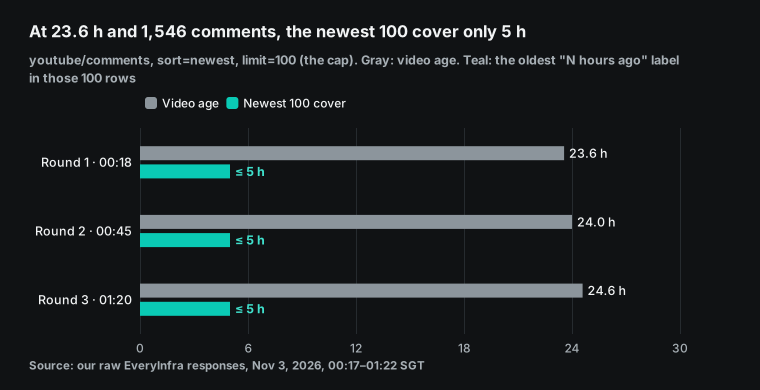
Round 1 ran at 00:18 SGT. The video was 23.6 hours old and had 1,546 comments. We asked for the 100 newest, and the call took 22.2 seconds. The newest row said "1 minute ago" and the oldest said "5 hours ago". At the end of day one, 100 rows covered only the last 5 hours.
Three rows were replies (is_reply true) and four had an "(edited)" suffix. Turn that around and the video still gained about 20 comments per hour between hour 18 and hour 23. With one round every 6 hours, some comments would fall between two pulls and never show up.
After the first day, comments kept arriving at a steady pace of about 20 to 45 per hour.
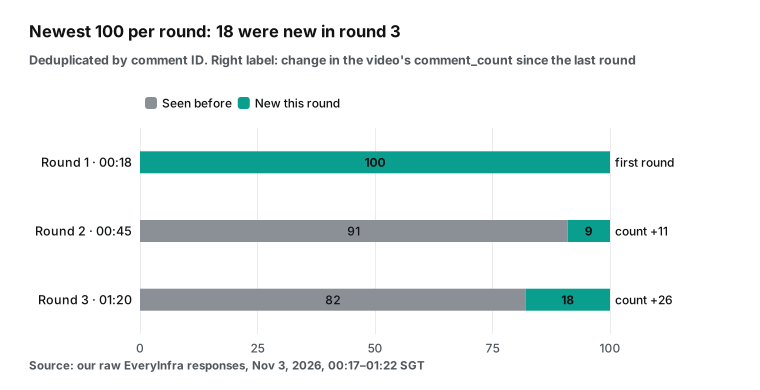
In round 2 at 00:45 SGT, 27 minutes after the round before, the video had 1,557 comments, 11 more. Of the newest 100, 9 were new and 91 were already seen. The 100 rows still covered only the last 5 hours.
In round 3 at 01:20 SGT, 35 minutes after the round before, the video had 1,583 comments, 26 more. Of the newest 100, 18 were new to both earlier rounds and 82 were seen before. Against round 2 alone, 19 were new and 81 overlapped. The 100 rows still covered only the last 5 hours.
New rows are fewer than the growth in the total. Replies explain part of the gap: round 1 had 3 replies among the newest 100, round 2 had none and round 3 had 1. Hidden or collapsed comments may explain the rest. Record both numbers each round, and flag any gap in the report.
The sort parameter is easy to overlook. At the same moment we also pulled 50 comments sorted by popularity. That call took 70.48 seconds, our slowest synchronous call. The popular 50 and the newest 100 had no rows in common.
In the popular set, 30 rows were replies. Their labels ran from "9 minutes ago" to "23 hours ago", and the top comment had 3,500 likes. The patrol's main task is to miss no new comment, so each round uses newest. Popular order answers a different question once a day: which comments set the tone right now?
The posted_at field is a relative label such as "N hours ago", not a timestamp. Your script must record the pull time and turn each label into a time window. Deduplicate by comment id only. Never use time for that.
| Field | Round 1 measurement | Use in the patrol |
|---|---|---|
id | 100 unique values, shaped like Ugz…AaABAg | The only dedupe key; store it in state/seen-<video ID>.json |
text | Full text; the longest row had 1,876 characters | Cut to 200 characters in the report; keep the full text locally |
posted_at | "1 minute ago" to "5 hours ago"; 4 rows say "(edited)" | Convert at pull time; an edited comment may have new content |
like_count, reply_count | Only 3 of the 100 newest rows had a like | New comments show no engagement yet; use popular order for that |
is_reply, reply_to_id | 3 replies | Read a reply with its parent, or you misread the tone |
author_name | Present | Use locally only; keep it out of the report |
Our advice for YouTube: run one round per hour for the first 6 hours, then one round every 2 hours. If a round finds exactly 100 new rows, write "this round may have missed comments" on the first line of the report. Then pull the next round earlier. This rule is already in the skill's decision tree below. For all fields and parameters, see the YouTube comments API. Comment and view totals come from the YouTube video API.
Bilibili: hot comments only, and danmaku as a second signal
The Bilibili sample is a fresh upload. The DeepSeek Harness account posted its first video on November 2 at 21:28 SGT. It runs 200 seconds. At our first bilibili/video pull at 00:20 SGT, the video was only 2.9 hours old. It already had 225,698 views, 22,070 likes, 4,075 comments and 342 danmaku. A video that explodes in its first hours is exactly when a patrol matters most.
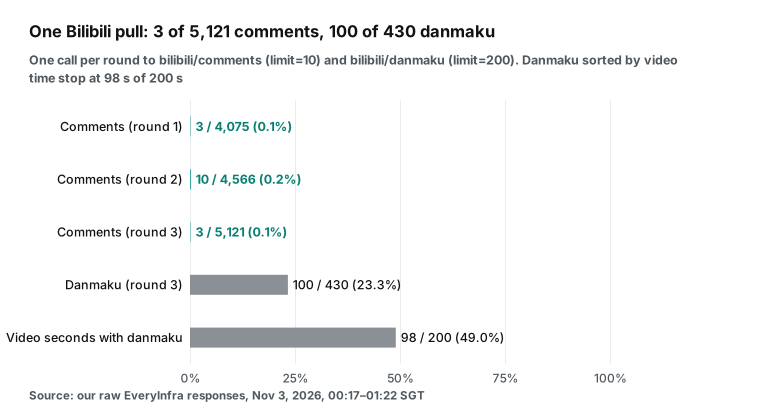
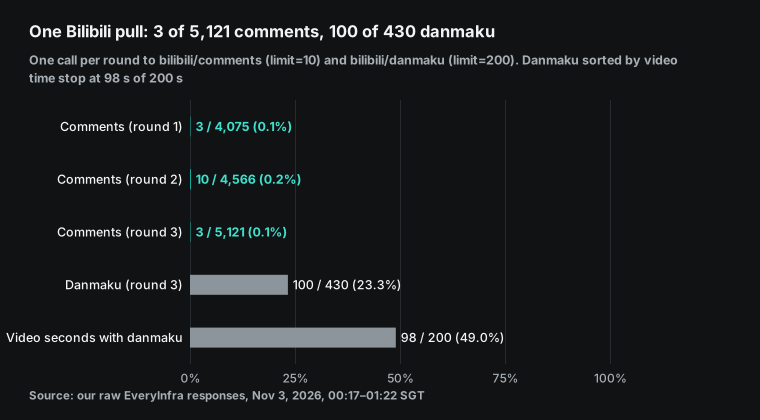
But bilibili/comments returned only 3 comments at 00:21 SGT, in 1.26 seconds. All three were hot comments, with 48 to 212 likes. They were posted between 3 and 131 minutes after the video went live. In round 2 at 00:46 SGT, the same request returned 10 comments, which is the maximum.
Seven of them were new to us, with likes from 23 to 1,100. In the same 25 minutes, the video's comment count rose from 4,075 to 4,566. That is 491 more comments, or over a thousand per hour. In round 3 at 01:22 SGT, with limit set to 10 again, it returned only 3, and we had seen all three before.
The catalog is clear about this endpoint. The default is 10, the maximum is 10, and a larger value gets capped. The only parameters are url and limit. We tried a sort parameter and got the 422 error described above, at no charge. So this endpoint cannot give you the newest comments in time order.
It gives you at most 10 of the hottest comments right now, and the count varies. That still has value, because hot comments set the first impression. A negative hot comment is a top-priority item. But it does not replace reading every new comment. The report must say "Bilibili: 10 hot comments seen of 4,566 total", so that no reader assumes full coverage.
Danmaku are a second signal. bilibili/danmaku defaults to 50 rows with a maximum of 200. We asked for 200 and got 100. They were sorted by video time from second 0 to second 98, so they covered only the first half of a 200-second video. Send times ran from 21:35 to 00:19 SGT.
Our keyword rule marked 29 of them as questions. But 15 of those 29 were cheering with question marks, along the lines of "Whale?! Is the whale really live?!" The real content was in a few others. Four danmaku asked about a "survival mode", one asked for a desktop app, and one asked whether following the account gives free tokens. A question mark is not a question, and in danmaku even less so.
| Danmaku (paraphrased) | Video second | Rule label | Our review |
|---|---|---|---|
| "Whale?! Is it really live?!" | 0 to 10 | Question | Cheering, no action |
| "Is there a survival mode?" | 76 | Question | Feature question, part of a theme |
| "I was just looking for a desktop app" | 8 | Question | Feature question |
| "Do followers get free tokens?" | 53 | Question | Half joke, half question |
| "Will you really finish work on time?" | 25 | Question | Joke about the countdown plugin |
The survival-mode theme then showed up in the round 2 hot comments too. A comment with 352 likes pointed out that the video never mentions survival mode. Four scattered danmaku and one hot comment point to the same thing. A good report merges them into one line: viewers keep asking about survival mode.
Round 2 danmaku were again 100 rows ending at second 98. Of those, 21 were new, and the danmaku total rose from 342 to 388. Round 3 again stopped at second 98, with 16 new rows and a total of 430. The endpoint returns the first 100 danmaku of the video's first half. A new danmaku shows up only if it lands in that part of the timeline.
| Capability | Catalog | What we got | Use in the patrol |
|---|---|---|---|
bilibili/video | 26 fields, including views, likes, comment and danmaku counts | One call in 35.3 s, all fields present | Every 4 rounds, track comment and danmaku growth |
bilibili/comments | Default 10, maximum 10; only url and limit | 3, 10 and 3 hot comments in three rounds; sort returns 422 at no charge | A hot-comment watch: report when hot comments change or turn negative |
bilibili/danmaku | Default 50, maximum 200 | Asked for 200, got 100, sorted by video time, stopped at second 98 in all three rounds | See where in the video viewers cheer or ask, and find the problem segment |
If you manage your own Bilibili account and need every comment, use the Creator Center. Or apply to the Bilibili Open Platform. That path needs developer registration, a qualification check and an app review (Bilibili Open Platform). It is much heavier than the YouTube Data API.
For competitor videos, or if you skip the open platform, accept the "hot comments plus danmaku" view and say so in the report. Parameter details are on the Bilibili comments API and Bilibili danmaku API pages. Platform overviews are on the YouTube API and Bilibili API pages.
The patrol as a skill: a skeleton for .agents/skills/comment-patrol/
In Antigravity, a skill is a folder with a SKILL.md file. Only description is required in its YAML header. If you omit name, the folder name is used. In each turn the agent sees only the names and descriptions of all skills. It reads the full text only when a skill looks relevant.
The docs call this progressive disclosure (Agent skills docs). The format follows the open Agent Skills standard (agentskills.io). Other tools that support it can use the same skill with small path changes. The docs also give two tips that fit a patrol well. Treat scripts as black boxes and let the agent run --help first. Write complex flows as decision trees.
.agents/
  mcp_config.json            # remote MCP config from above (keep out of Git)
  skills/
    comment-patrol/
      SKILL.md
      scripts/
        dedupe.py            # reads state/seen.json, keeps only new rows, turns "2 hours ago" into a window
        prefilter.py         # keyword pre-filter: question, negative, needs reply
      resources/
        report.schema.json   # output schema for --json-schema
state/
  seen-<video ID>.json       # comment IDs already seen, with first-seen time
reports/
<video ID>-<round>.md---
name: comment-patrol
description: Patrol YouTube and Bilibili comments in the 24 hours after a video goes live. Fetch new comments, dedupe, pre-filter, and flag complaints, questions and comments that need a reply. Use when the user asks for a comment patrol, post-launch monitoring, or a check of the comment section.
---
# Comment patrol
## Each round
1. Read `state/seen-<video ID>.json`. Create it in round 1.
2. Call everyinfra_call_api. Use only these capabilities:
- YouTube: platform=youtube, action=comments, params={url, sort: "newest", limit: 100}
- Bilibili: platform=bilibili, action=comments, params={url}; then action=danmaku, params={url, limit: 200}
- Every 4 rounds: youtube/video and bilibili/video, to record comment_count growth
3. Save each response as-is under `data/<round>/`. Run `python3 scripts/dedupe.py --help`, then use it to keep only new rows.
4. Run `scripts/prefilter.py`. Judge only rows it marks as question, negative or needs-reply, plus any theme you see repeated.
5. Output per `resources/report.schema.json`: category, severity, needs_reply, and a draft reply of at most two sentences. Never promise prices or dates.
## Decision tree
- New YouTube rows = 100 (the per-call cap): comments were missed between rounds. Write "this round may have missed comments" on line 1 and suggest a shorter interval.
- Zero new rows: do not call the model. Write "no new comments".
- Refunds, safety, legal or privacy: severity=high, no draft reply, hand to a human.
- Emoji only, "first", or similar: drop it.
## Never
- Never post a comment or reply from the account. This skill is read-only.
- Never put user names or profile links in the report. Use comment IDs only.Why put dedupe and the pre-filter in scripts instead of asking the model to count? First, cost. The raw response for 100 comments is about 8,075 tokens. In round 2, only 9 rows were new, about 505 tokens. Second, you can audit it.
A script applies fixed rules, and the same input gives the same output twice. Save the model for the step that needs language understanding. The report.schema.json idea comes from headless --json-schema. The flag accepts a schema file path. The parsed object then appears in the structured_output field of the output envelope (Headless mode, "Structured output with a schema"). Your timer script reads only that field and never parses a table out of free text.
Pre-filter: what keyword rules catch and what they miss
Before any model sees a comment, we ran fixed rules over the 100 YouTube comments from round 1. We wrote the rules at 00:29 SGT and did not change them after we saw more data. A question has a question mark, a Chinese question word, or a question word such as how, why, what, is or can at the start. It counts as negative if it hits a word list (bad, worst, disappointed, clickbait, scam, broken and similar).
It needs a reply if it is a question, or if it is negative with at least 10 likes. The rules flagged 28 questions and 8 negatives, 34 comments in total. On the 100 danmaku they flagged 29 questions and no negatives.
| Rule | Definition | Hits in 100 YouTube comments | Hits in 100 danmaku |
|---|---|---|---|
| Question | Question mark, a question word at the start, or a Chinese question word | 28 | 29 |
| Negative | A word from the negative list | 8 | 0 |
| Needs reply | A question, or negative with at least 10 likes | 28 | 29 |
| Any flag | Question or negative | 34 | 29 |
We then read all 34 flagged comments by hand. Our standard: the comment is about this video, and the creator needs to know it or answer it. Only 13 met it. Most of the other 21 were rhetorical questions and arguments.
"Who cares if it is made with AI?" has a question mark, but nobody needs to answer it. One comment called a guest's argument dumb and started with "What", so the rule took it for a question. The 13 useful ones fall into clear types. One viewer asked why the video was uploaded at 30 fps.
Two asked about a blur bar at 9:43. Another noted that the show promised to come back to a game test and never did. Others asked whether the video promotes piracy. These belong at the top of a patrol report.
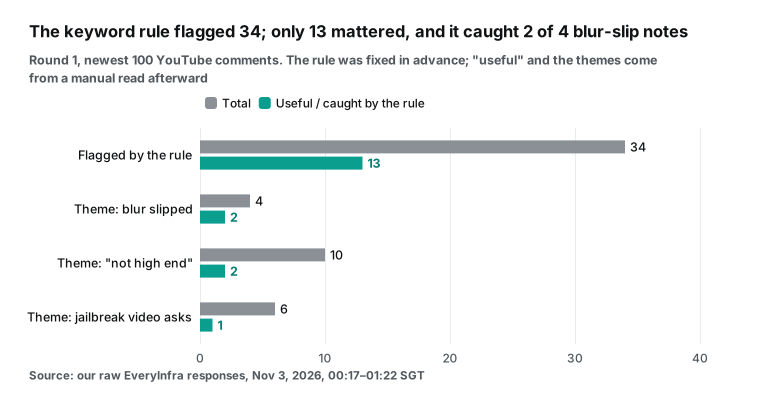
What the rules missed matters more. The 66 unflagged comments held at least three repeated themes. First, a blur slipped. Four comments said the blur over a game folder failed for a moment.
One of them asked the team to review the video. That is a production error the creator needs to fix now, but the rule caught only the 2 comments with question marks. Second, "this is not high end". The host said the test PC was "not super high end", and 10 comments pushed back.
The rule caught 2. Third, 6 comments asked for a PS5 jailbreak video, which is a topic lead. The rule caught 1.
We found these themes after we read the comments, so we do not score the rule with them. They show one thing. Keyword rules are good at separating obvious noise from obvious questions. A repeated opinion without question marks appears only when a model reads a group of comments and clusters them by theme.
| Comment (paraphrased, no user name) | Rule label | Our review | What the report should say |
|---|---|---|---|
| Why was this uploaded at 30 fps? | Question | Useful | Production issue; answer in a pinned comment |
| What is the blur bar at 9:43? | Question | Useful, part of the "blur slipped" theme | High priority: the video may show something it should not |
| The folder blur failed, please review the video | Not flagged | Useful, same theme | Merge with the row above, count +1 |
| If this is not high end, what is my PC? | Not flagged | Useful, "not high end" theme | One summary line: 10 comments push back on this line |
| Please make a PS5 jailbreak video | Not flagged | Topic lead | Goes in "viewers want", no reply needed |
| Who cares if it is made with AI?! | Question | Not useful (rhetorical) | Leave out of the report |
Here is what a round 2 report could look like. We built it by hand from the real responses of rounds 1 and 2. It shows the target output, not a model run:
| Priority | Platform | Item | Evidence | Action |
|---|---|---|---|---|
| High | YouTube | A folder blur failed for a moment | 4 comments in round 1; the rule caught 2 | Check the frames near 9:43; re-edit or pin a note |
| Medium | YouTube | Viewers dispute the "not high end" line | 10 comments in round 1, 2 more in round 2 | Pin a short note on the test PC |
| Medium | Bilibili | Viewers ask about "survival mode" | 4 danmaku plus 1 hot comment with 352 likes | Answer in a pinned comment |
| Low | YouTube | Viewers want a PS5 jailbreak video | 6 comments | Add to the topic list |
| Info | Both | Coverage this round | YouTube: 9 new rows vs. +11 total. Bilibili: 10 hot of 4,566 | Keep the 2-hour interval |
So the skill splits the work this way. The script dedupes, drops emoji-only and "first" comments, and adds a rule label to each row. The model gets "new comments this round plus rule labels". Its job is to overturn false alarms, merge comments on one theme into one counted line, and set a severity per theme.
The data sent to the model grows only a little, but it recovers the themes that the rules miss. Round 2 already showed why. Two of the 9 new YouTube comments argued again that the "average" test PC was too strong. Neither of them contained the words "high end".
Antigravity CLI cron: run agy -p from launchd, cron or systemd
Antigravity has two built-in ways to schedule work. Neither one fits a CLI user who wants a patrol every few hours on a server or a laptop. With /schedule, the agent uses a built-in schedule tool to set a timer or a five-field cron expression. When the time comes, the instruction returns to the agent as a high-priority notice. The docs state that the schedule belongs to the conversation that created it and ends with that conversation. For long-term jobs across sessions, the docs point to sidecars (/schedule docs).
A sidecar is a background process defined in ~/.gemini/config/sidecars/<name>/sidecar.json. With "builtin": "schedule", it can call agentapi new-conversation on a cron expression. But the top of that page lists only the Antigravity desktop app as supported. Sidecars are also off by default, and you enable each one in ~/.gemini/config/config.json (Sidecars docs). That leaves the operating system timer, which starts headless mode.
| Scheduler | Lifetime | Context per run | While the machine sleeps | Fit for this patrol |
|---|---|---|---|---|
/schedule (inside the CLI) | The current conversation only | Wakes with the full chat history | Does not run if the process is gone | Fine for watching the first two hours, not for 24 |
Sidecar + agentapi | Across sessions, managed by the app | A new conversation each time | Needs the desktop app running | Documented for the desktop app only |
macOS launchd + agy -p | System level, runs after login | New process, no state | StartCalendarInterval runs once on wake | Good, recommended on a Mac |
cron + agy -p | System level | New process, no state | Skips runs during sleep or shutdown, no catch-up | Fine on servers, misses rounds on laptops |
systemd timer + agy -p | System level | New process, no state | Persistent=true catches up after boot | Recommended on Linux servers |
The sleep column comes from the operating system docs. Apple says that cron jobs do not run while the machine sleeps and wait for the next scheduled time. A launchd job with StartCalendarInterval that misses its time during sleep runs when the machine wakes. Neither runs while the machine is off (Apple, "Scheduling Timed Jobs").
On Linux, the matching tool is the Persistent= option of a systemd timer (systemd.timer manual). For cron syntax and environment rules, see crontab(5). Cron uses /bin/sh by default and does not read your shell profile, so write the full path to agy.
This launchd example runs one round every 2 hours on macOS. Put the file in ~/Library/LaunchAgents/. Keep scripts and data out of the Desktop and Documents folders, or macOS privacy protection blocks them:
<?xml version="1.0" encoding="UTF-8"?>
<!DOCTYPE plist PUBLIC "-//Apple//DTD PLIST 1.0//EN" "http://www.apple.com/DTDs/PropertyList-1.0.dtd">
<plist version="1.0"><dict>
  <key>Label</key><string>com.example.comment-patrol</string>
  <key>ProgramArguments</key>
  <array><string>/Users/you/patrol/run.sh</string></array>
  <key>StartCalendarInterval</key>
  <array>
    <dict><key>Minute</key><integer>5</integer><key>Hour</key><integer>0</integer></dict>
    <dict><key>Minute</key><integer>5</integer><key>Hour</key><integer>2</integer></dict>
    <!-- the other 10 even hours follow the same pattern, 12 rounds in total -->
  </array>
  <key>StandardOutPath</key><string>/Users/you/patrol/logs/out.log</string>
  <key>StandardErrorPath</key><string>/Users/you/patrol/logs/err.log</string>
</dict></plist>
The run.sh script calls Antigravity, and three traps meet here:
#!/bin/bash
set -uo pipefail
cd /Users/you/patrol
out=$(/usr/local/bin/agy -p "Use the comment-patrol skill on the videos in videos.txt. This is round ${ROUND:-1}." \
  --output-format json \
  --json-schema .agents/skills/comment-patrol/resources/report.schema.json \
  --model gemini-3.8-flash-medium \
  --print-timeout 15m 2> logs/last-stderr.log)
status=$(echo "$out" | jq -r '.status')
reason=$(echo "$out" | jq -r '.finished_reason // "complete"')
if [ "$status" != "SUCCESS" ] || [ "$reason" != "complete" ]; then
  echo "$(date -u +%FT%TZ) patrol failed: $status $reason" >> logs/alerts.log; exit 1
fi
if grep -qi "permission\|denied" logs/last-stderr.log; then
  echo "$(date -u +%FT%TZ) a tool was soft-denied, check permissions.allow" >> logs/alerts.log; exit 1
fi
echo "$out" | jq '.structured_output' > "reports/$(date +%Y%m%d-%H%M).json"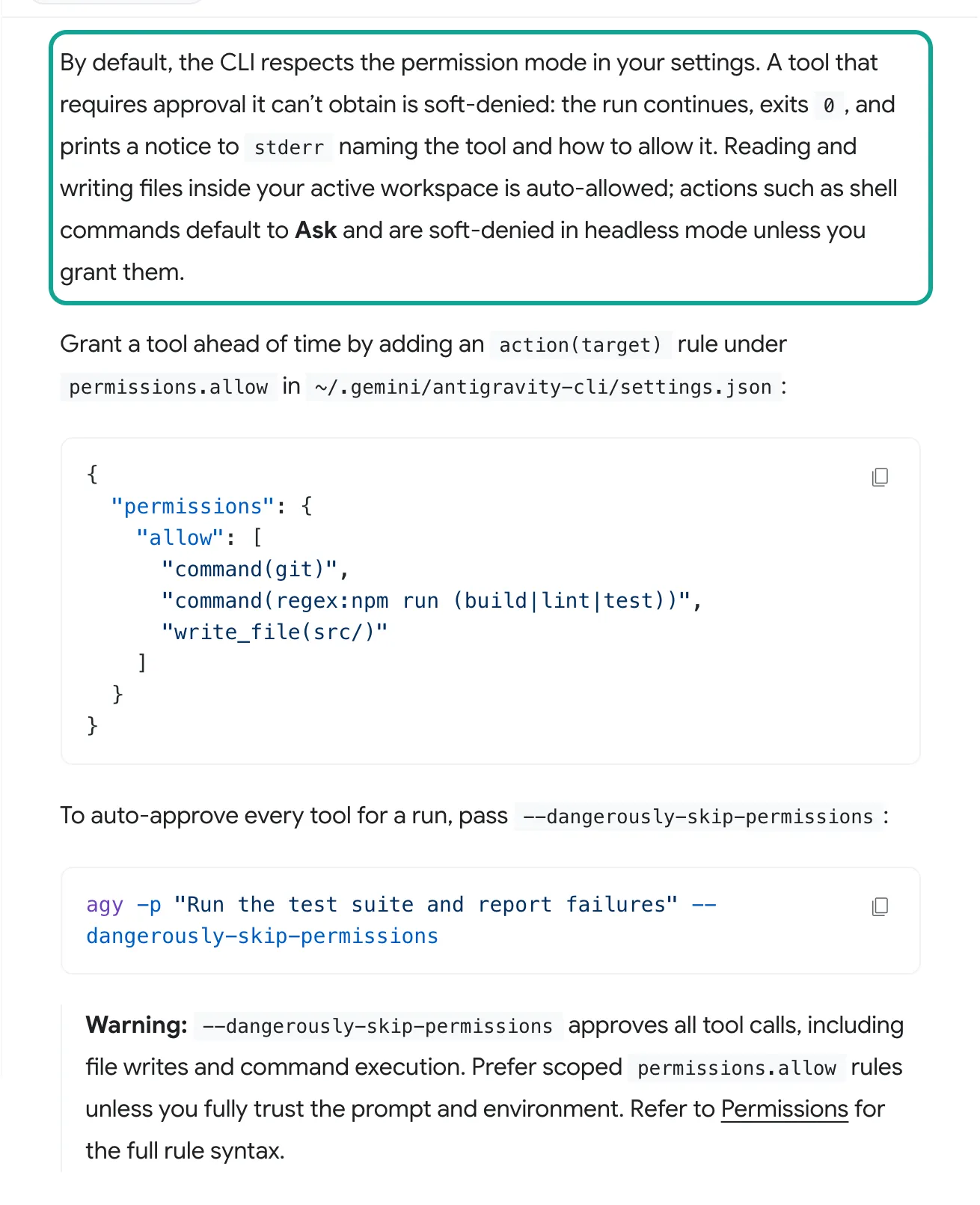
The first trap is the soft deny. The docs say there are no interactive prompts in headless mode. A tool that needs approval it cannot get is soft-denied. The run continues, the process exits with 0, and a notice goes to stderr (Headless mode, "Permissions in headless mode"). If your permissions.allow rules are wrong, every scheduled run "succeeds" and every report is empty.
So the script must read stderr too. The docs do not give the exact notice text. Our script matches keywords. Before you go live, remove one allow rule on purpose, read the real notice once, and adjust the match.
The second trap is login. Headless mode uses cached credentials, so run agy interactively once to log in. In an environment with no terminal and no login, it fails with "authentication required". The README says credentials live in the system keychain (GitHub README, "Authentication"). So the launchd job must run in the logged-in user's session. Use a LaunchAgent, not a LaunchDaemon.
The third trap is the timeout. --print-timeout defaults to 5 minutes. Two platforms, several calls and a model pass can take longer, so our example uses 15 minutes. Version 1.4.11, released on October 30, 2026 (UTC), added finished_reason to JSON output. It says print_timeout when the run was cut off.
The field is absent when the turn ends normally (1.4.11 release notes). Your script can now tell a full report from half a report. An older fix also matters here. Since 1.2.10 on September 24, 2026, a -p run that fails during a streamed answer exits with code 3. It no longer looks like a success (1.2.10 release notes).
Cost for 24 hours: API fees per call, model use per quota or token
Start with the data side. On November 3, 2026, the five capabilities in this guide each cost $0.000556 per call in the catalog: youtube/comments, youtube/video, bilibili/comments, bilibili/danmaku and bilibili/video. The catalog is public at GET https://api.everyinfra.com/api/v1/social/catalog and needs no key. Always check the price there on the day you run. One patrol round makes three core calls, which cost $0.001668 together: the 100 newest YouTube comments, Bilibili hot comments and Bilibili danmaku.
Every 4 rounds we add one detail call per video to track comment growth. Failed calls are free. Our 422 request above cost nothing. To reconcile charges by request ID, see failure refund reconciliation.
| Interval | Rounds in 24 h | API calls | API fees (list price) | Model side (estimate at Gemini 3.8 Flash API prices) |
|---|---|---|---|---|
| Every 1 h | 24 | 84 | $0.047 | $0.205 |
| Every 2 h | 12 | 42 | $0.023 | $0.103 |
| Every 3 h | 8 | 28 | $0.016 | $0.069 |
| Every 4 h | 6 | 22 | $0.012 | $0.051 |
| Every 6 h | 4 | 14 | $0.008 | $0.034 |
The model column is an estimate, and here is the method so you can use your own numbers. In the Antigravity headless docs, a one-line prompt shows input_tokens of 10,415 in JSON output. Of those, cache_read_tokens is 8,113, and output_tokens is 657 (Headless mode, "JSON output"). So every agy -p call carries about ten thousand tokens of system prompt and tool definitions.
Per round we assume this fixed input, with 8,113 tokens at the cache price. We add about 805 data tokens: 505 for the 9 new YouTube comments of round 2, plus about 300 for instructions and Bilibili rows. We add 1,500 output tokens.
Prices come from the Gemini API pricing page, updated on October 30, 2026. Gemini 3.8 Flash costs $0.75 per million input tokens, $3.75 per million output tokens and $0.075 per million cached tokens. The page says these prices hold until December 31, 2026, and double from January 1, 2027 (Gemini API pricing). We estimate data tokens as bytes divided by 4. The Gemini docs say a token is about 4 characters (Gemini API, "Understand and count tokens"). This works for English comments and runs low for Chinese text.
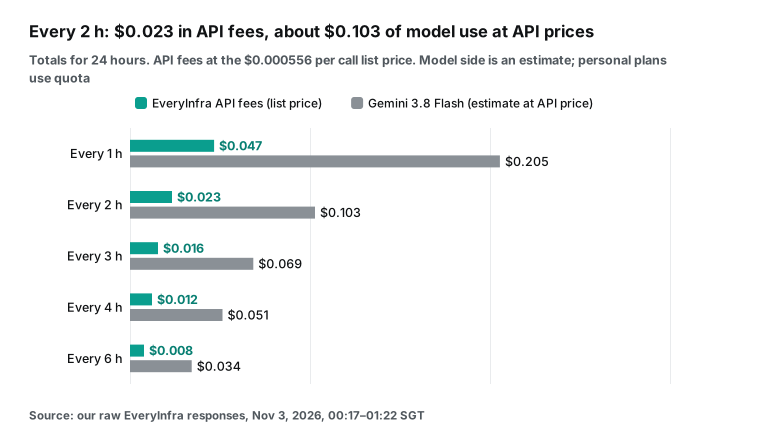
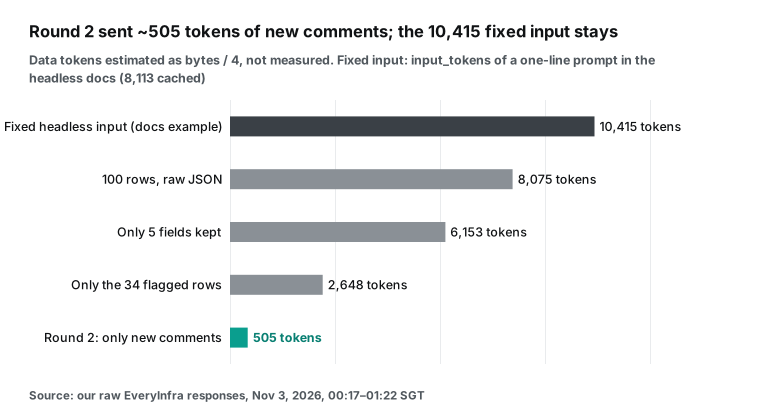
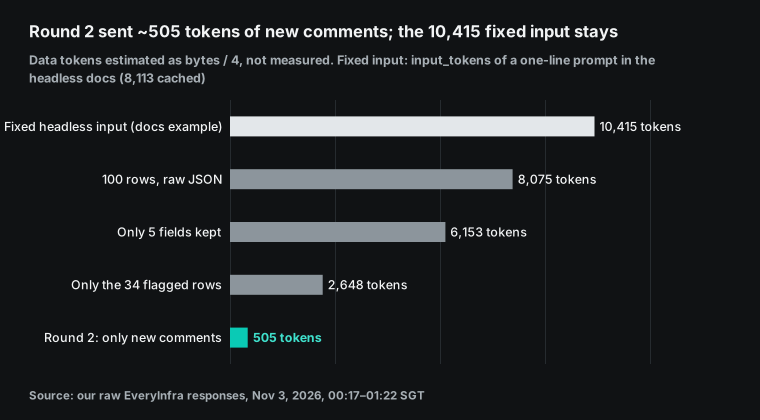
Read the two charts together. Money in this job does not go to data, and not mainly to comment tokens either. It goes to the fixed cost of waking agy each time. So save in this order.
First, lengthen the interval: one round every 2 hours costs half as much as one every hour. Second, skip the model in rounds with no new comments, as the skill's decision tree says. Only then trim fields per comment.
Also pin the patrol to the Flash tier with --model. The models doc says free and Plus users get only Gemini 3.8 Flash, and Gemini 4 Argon needs Pro or Ultra (Models docs). If your default model is Argon, the same patrol costs much more. On the same page, Gemini 4 Argon costs $2 per million input tokens and $10 per million output tokens until November 30, 2026. The price doubles from December 1.
Personal users do not pay this token bill directly. They spend plan quota. The Antigravity plans doc lists three tiers. The free tier has a weekly quota.
Pro refreshes every 5 hours and also has a weekly cap. Ultra is higher. Bring-your-own key is not supported (Plans docs). The plans blog post from May 19, 2026, says Pro costs $20 per month.
It adds a $100 Ultra tier and cuts the old $250 Ultra to $200. Flash and Pro models share one pool that drains at API prices. The $100 and $200 tiers give 5 and 20 times the Pro quota (Antigravity blog, May 19, 2026). Read the model column as "how much quota this patrol uses, in dollars".
YouTube also has a free path. commentThreads.list costs 1 quota unit per call, and the default quota is 10,000 units per day (commentThreads.list, quota calculator, updated 2026-10-15). An API key can read comments on public videos. Only held or likely-spam comments need OAuth from the video owner.
The cost is a Google Cloud project, your own quota and paging logic, and no Bilibili. When you want both platforms in one report without two integrations, pay-per-call is simpler. See pricing for the full list.
Antigravity CLI vs Gemini CLI: what to change when you migrate
If you ran a similar timer script with Gemini CLI, most changes are in config file locations and key names. Workspace rule files stay the same. The official import command agy plugin import gemini turns old extensions into plugins and writes their MCP definitions into mcp_config.json (migration guide, "Converting extensions to plugins"). The first run of agy also detects old config and offers a checklist.
But you still need to check MCP servers that you wrote directly into ~/.gemini/settings.json. Check trust settings too. We built this table by comparing both sets of official docs line by line:
| Item | Gemini CLI | Antigravity CLI | What to do |
|---|---|---|---|
| Command | gemini -p | agy -p (aliases --print, --prompt) | Change the command and full path in scripts |
| MCP config location | mcpServers in ~/.gemini/settings.json | ~/.gemini/config/mcp_config.json or .agents/mcp_config.json | Move it to the new file |
| Remote address key | url (SSE) or httpUrl (streamable HTTP) | serverUrl (url also works) | Rename the key |
| Env vars in headers | $VAR and ${VAR} supported | Not documented | Assume no support; keep the key in a protected file |
| Skip confirmation | Server-level trust: true | mcp(server/tool) rules in permissions.allow | Allow per tool |
| Tool allowlist | includeTools / excludeTools | enabledTools / disabledTools | Rename the keys |
| Timeout | timeout in ms, default 600,000 | timeoutSeconds, default 180 per call, 300 to connect | Change the unit |
| Project skills folder | .gemini/skills/ | .agents/skills/ | Move the folder |
| Rule files | GEMINI.md, AGENTS.md | Same | No change |
| Login | Paid Gemini API key allowed | Google account in the keychain for individuals; Google Cloud project for enterprises; no bring-your-own key | Confirm the login method before you run unattended on a server |
The last row matters most for scheduled jobs. The plans doc says you cannot bring your own key or endpoint to raise quota (Plans docs). Developers in the GitHub discussion complain that the new CLI no longer accepts an AI Studio API key (discussion #27274). The May announcement also says Gemini CLI still works with paid API keys and enterprise licenses. Maybe your patrol runs on a headless cloud server and you have only an API key. Then the easy path may be to stay on Gemini CLI. Move when the Antigravity docs explain unattended server login.
There is no official quota comparison. One Reddit user reports that Antigravity CLI uses quota faster. See the FAQ "which uses less quota" at the end.
But it fits a number in the official docs. In the headless JSON example, a one-line prompt already has 10,415 input tokens, 8,113 of them cached (Headless mode JSON example). Twelve rounds a day put about 120,000 tokens into fixed overhead alone. The cost section above includes this.
Model access is a third difference. Gemini 4 Argon arrived in the Antigravity app and CLI for Pro and Ultra users on October 13, 2026 (Antigravity blog). A forum thread from October 14, 2026, reports a problem for some business-tier Ultra users. They could not select Argon in the app or the CLI (Google AI developer forum). For a patrol this changes little, because Flash is enough. Still, check /model once after you migrate, and pin the model in your script.
Limits and what to watch
On the data side, four limits apply. First, comments that the platform holds for review are not visible. YouTube Help says that "Basic" or "Strict" settings hold comments in YouTube Studio for up to 60 days. They stay hidden until approved (YouTube Help, comment settings). Any third party, including us, sees only public comments. A channel owner who wants held comments must call the YouTube Data API with OAuth and moderationStatus=heldForReview (commentThreads.list docs).
Second, YouTube times are relative labels such as "2 hours ago", and 4 rows in round 1 also said "(edited)". A converted time is accurate only to the hour, and older comments carry more error. Third, Bilibili comments are hot comments only. We got 3 and then 10, against totals of 4,075 and 4,566. A full "every new comment" patrol is not possible on Bilibili, so track changes in hot comments and danmaku instead.
Fourth, YouTube added snippet.imageUrl to comment resources in its Data API revision history on September 30, 2026. GIF and image comments reach all users in November (YouTube Data API revision history). The youtube/comments field list has no image field. A comment with only an image shows as empty text.
Do not treat every empty text as noise. TechCrunch also reported on September 23, 2026, that YouTube is testing comment moderation that each creator can tune (TechCrunch). Expect the set of visible comments to shift as that test grows.
On the Antigravity side, the CLI is closed source and changes fast. This guide uses the docs as read on November 3, 2026, and the 1.4.12 release notes. The sidecar docs list only the desktop app. Headless mode depends on cached login, and the docs do not explain unattended login on a cloud server.
Personal plan quota drains by the work done, and the plans doc says quotas may change. Treat our cost numbers as estimates. Your /usage panel shows the real figures (/usage docs).
Finally, there are limits on use. The skill is read-only and posts nothing. EveryInfra reads public data and cannot post as your account. A person sends any draft reply from YouTube Studio or the Bilibili Creator Center. Keep only comment IDs and text in reports, never user names or profile links. Follow each platform's terms and the privacy law where you operate.
Labels are not perfect either. Our keyword rules flagged 34 comments, and only 13 of them deserved the creator's time. The rules also missed half of the "blur slipped" comments.
We did not test the model labels. Before you go live, label the same 100 comments by hand and compare them with the model output. A human always reads the "high" items. The model only cuts 100 comments down to about a dozen.
What changed recently
- On October 30, 2026 (UTC), Antigravity CLI 1.4.11 added
finished_reasonto--output-format json. On the same day, 1.4.12 fixed broken Markdown tables in long answers (1.4.11, 1.4.12). What it means for you: a timer script can now tell "report done" from "cut off by timeout". Use 1.4.11 or later. - On October 29, 2026, version 1.4.10 cut streaming terminal writes by about 70% and frees about 100 MB of memory after startup in the interactive UI. The notes say print and headless modes are unaffected by the memory change (1.4.10). What it means for you: many releases target the interactive UI. Read each note for headless items before you upgrade a timer job.
- On October 24, 2026, version 1.4.7 cut CPU use in headless
-pruns. It also raised the size of on-demand MCP results returned directly to the agent from 4 KB to 10 KB (1.4.7). What it means for you: 100 YouTube comments are about 33 KB, still over 10 KB. Compress new rows in a script first. - On October 13, 2026, Gemini 4 Argon came to the Antigravity app and CLI for Google AI Pro and Ultra users (Antigravity blog). On the same day, version 1.3.4 made an unknown
--agentname exit with code 1 in headless mode (1.3.4). What it means for you: Gemini 3.8 Flash is enough to sort comments, and a typo in your script now fails loudly. - The Gemini API pricing page was updated on October 30, 2026. It lists Gemini 3.8 Flash at $0.75 input and $3.75 output per million tokens until December 31. Prices double from January 1, 2027. Gemini 4 Argon is $2 and $10 until November 30, then doubles (Gemini API pricing). What it means for you: plan quota drains at API prices (May plans post). Google has not said whether new API prices change the drain rate. Watch
/usagefor a week after launch.
FAQ
Where does the Antigravity CLI MCP config go?
The global file is ~/.gemini/config/mcp_config.json. A project file is .agents/mcp_config.json at the project root, as the migration guide says. A Reddit user found the config written under ~/.gemini/antigravity-cli/ and had to copy it to ~/.gemini/config/ (r/google_antigravity thread). The fastest check after setup is /mcp. (Question from the Google suggestion "antigravity cli mcp config".)
Antigravity CLI vs Gemini CLI: which uses less quota?
There is no official comparison. One Reddit post with 35 upvotes says Antigravity CLI used up two Pro accounts in two hours of web coding. Gemini CLI used about 10% in four hours (one person's report, not a measurement). What we know: personal quota drains at API prices, Flash and Pro share one pool, and each headless call carries about 10,000 fixed input tokens. For short jobs like a patrol, let a script dedupe and pre-filter first. Send the model only a few hundred tokens of new comments, and pin --model to Flash. (Question from the suggestion "antigravity cli vs gemini cli quota" and the r/GeminiCLI thread.)
Can I use /schedule for an Antigravity CLI cron job?
It can check every few minutes while one conversation stays open. It cannot run a 24-hour job with nobody present. /schedule takes five-field cron expressions and MaxIterations, but it belongs to the current conversation. The docs suggest sidecars for long jobs, and sidecars list only the desktop app. CLI users get a steadier result from launchd, cron or systemd calling agy -p. (Question from the suggestions "antigravity cli cron job" and "antigravity cli cron expression".)
What is Antigravity CLI yolo mode, and should a timer use it?
The CLI reference has no flag named yolo. The closest are --dangerously-skip-permissions, which allows every tool, and the setting toolPermission: "always-proceed". A patrol needs only three MCP tools and one report folder. List them by name in permissions.allow instead. (Question from the suggestion "antigravity cli yolo mode". Flags are in the CLI reference.)
YouTube already has a comment moderation tool. Why build a patrol?
YouTube Studio moderation holds suspicious comments. It answers "what should stay hidden". A patrol answers "which public comments are questions, complaints or need a reply". It also puts YouTube and Bilibili in one report and works on competitor videos.
For your own channel, use both: Studio for held comments, the patrol for follow-up on public ones. (Question from the suggestion "youtube comment moderation tool". Settings are in YouTube Help.)
Can a Bilibili comment scraper get every comment on a video?
Not with bilibili/comments. The catalog says 10 per call at most, and a larger limit gets capped. In our test it returned 3 and then 10 hot comments while the video had over four thousand. It also rejects a sort parameter.
Only the video owner sees everything, in the Creator Center or through an approved open platform app. For a patrol, treat Bilibili as two signals: hot comments and danmaku. (Question from a Chinese search suggestion that means "Bilibili comment scraper".)
Getting started
- Get an API key from the quickstart. Read the free catalog first:
GET https://api.everyinfra.com/api/v1/social/catalog?platform=youtube. Do the same for?platform=bilibili. - On the YouTube API and Bilibili API pages, try the comments endpoint once with your own video URL.
- Write
.agents/mcp_config.jsonandpermissions.allowas shown above. Runagyonce interactively, and check/mcpand/permissions. - Put the skill in
.agents/skills/comment-patrol/. Runagy -pby hand once. Check thatstructured_outputmatches the schema and that stderr shows no denied tool. - Hand it to launchd, cron or systemd. Run every 2 hours on day one, watch for "may have missed comments" on line 1, and then adjust the interval.
The same approach works in other AI tools. For scheduled jobs in Claude Code, see Claude Code scheduled tasks for Reddit pain points. For another way to connect Gemini to a remote MCP server, see Gemini Deep Research API with remote MCP. For comment cleaning and labeling, see DeepSeek V4 and Claude Code for comment cleaning.
We read every external source in this guide on November 3, 2026 (SGT). Dates in the reference list are the publish or update dates shown on each page.
References
- Google Developers Blog: transitioning Gemini CLI to Antigravity CLI, May 19, 2026.
- gemini-cli GitHub discussion #27274.
- Antigravity CLI migration guide.
- Antigravity CLI reference.
- Antigravity CLI headless mode.
- Antigravity /schedule command.
- Antigravity sidecars.
- Antigravity MCP docs (CLI tab).
- Antigravity Agent skills docs (CLI tab).
- Antigravity permissions docs (CLI tab).
- Antigravity plans docs.
- Antigravity models docs.
- Antigravity CLI modes.
- Antigravity CLI /usage command.
- Antigravity changelog.
- google-antigravity/antigravity-cli repository.
- Antigravity CLI 1.4.12 release notes, October 30, 2026 (UTC).
- Antigravity CLI 1.4.11 release notes, October 30, 2026 (UTC).
- Antigravity CLI 1.4.10 release notes, October 29, 2026.
- Antigravity CLI 1.4.7 release notes, October 24, 2026.
- Antigravity CLI 1.3.4 release notes, October 13, 2026.
- Antigravity CLI 1.2.10 release notes, September 24, 2026.
- Antigravity CLI 1.2.9 release notes, September 23, 2026.
- Gemini CLI MCP docs.
- Antigravity blog: plan changes, May 19, 2026.
- Antigravity blog: Gemini 4 Argon, October 13, 2026.
- Antigravity blog: Gemini 3.8 Flash.
- Google blog: Gemini 4 Argon launch, September 30, 2026.
- Gemini API pricing.
- Gemini API: understand and count tokens.
- Google AI developer forum: business Ultra users cannot access Gemini 4 Argon in Antigravity, October 14, 2026.
- MCP specification 2026-07-28: Transports.
- Agent Skills open standard.
- YouTube Data API: commentThreads.list.
- YouTube Data API quota calculator.
- YouTube Data API revision history.
- YouTube Help: comment settings.
- TechCrunch: YouTube comment features, September 23, 2026.
- Bilibili Open Platform.
- Apple developer docs: Scheduling Timed Jobs.
- crontab(5) manual.
- systemd.timer manual.
- r/google_antigravity: "Antigravity CLI MCP Servers Pain".
- r/google_antigravity: env vars in the MCP config.
- r/GeminiCLI: why Antigravity CLI burns through quota.
- The New Stack: the Gemini CLI replacement, June 20, 2026.
- YouTube sample video.
- Bilibili sample video.
- EveryInfra catalog: YouTube.
- EveryInfra catalog: Bilibili.
Reference BL-72