Gemini Decisions API for batch review triage
Google shipped the Gemini Decisions API on 2026-11-11. We used it to triage 90 real reviews for follow-up; judging 1,000 costs about $0.04.

On 2026-11-17, between 00:19 and 00:23 Singapore time, we pulled 90 real public reviews. Three EveryInfra endpoints fed them. We took 20 reviews for a Chicago dental clinic on Google Maps. We took 30 for Uber on the App Store. We took 40 for Uber on Google Play.
Twenty-three of the 90 carry three stars or fewer, which is 25.6 percent. Those are the ones a human should follow up on. The bodies are tiny. The median is 52 bytes and the mean is 96 bytes. That is roughly ten to forty tokens each.
We then priced a batch like that against the Gemini Decisions API. Google shipped it on 2026-11-11. It costs $0.10 per million input tokens, and output tokens are free. Judging 1,000 reviews for "follow up, route, urgency" costs about $0.04 all in. Less than a tenth of the input cost is the review text.
More than nine tenths is the three judgment instructions you write.
Most reviews a business gets each day are five-star praise. Nobody needs to touch them. What eats support time is the small share of complaints and disputes.
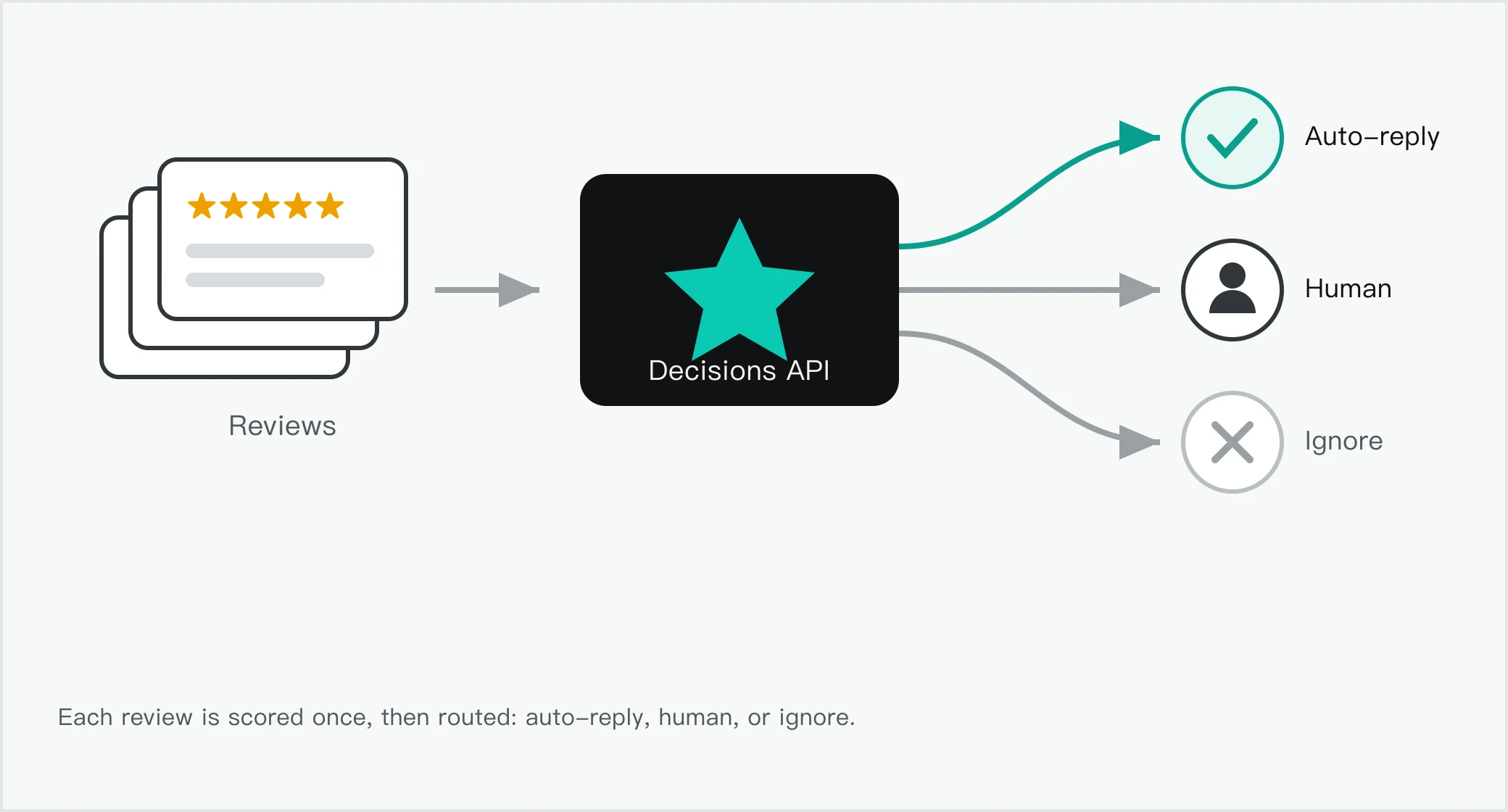
Handing that sorting job to a score-only interface is the first use case Google named at launch.
Why review follow-up is a closed-set judgment
Start with one real review. We pulled the App Store Uber batch at 00:20 Singapore time. One one-star review says the ride was cancelled and the rider was still charged. Support only sent a template reply. Another five-star review simply says "Great Ride." The judgment a support team needs is narrow.
Does this one need human follow-up? That is a yes/no. Does it belong to the refund, safety, or support queue? That is a multiple choice. How urgent is it?
That is a score. Each has a fixed set of options. The answers can feed an if branch directly. The model need not write a paragraph that a program then parses. Google calls these bounded choices.
Generative models are built to produce text for people to read. When your code needs a judgment to branch on, generating text and parsing it back adds latency and brittle logic (Decisions API docs).
Review triage sits squarely in that range. Whether a review needs follow-up depends on a few conditions. Is it a complaint? Does it mention safety or billing? Has the business already replied?
Each is a condition you can state in one sentence. You can write each condition as its own question. The model scores them separately. Your code then combines the scores with if statements and weights. That is what the documentation recommends.
Ask narrow, single-purpose questions, and compose the answers in code (best practices section). The other path asks one big model to read the review and output a JSON. That path has to generate and parse text. Review triage only needs a few scores.
The volume is often large. Our clinic, Downtown Dental - Loop, has 1,390 Google Maps reviews (Google Maps review endpoint). Add the apps a business may have on the App Store and Google Play. New reviews run from dozens to thousands a day. Having a person read each one is slow and costly.
Having a generative model write a paragraph per review puts the cost on the text it generates. The Decisions API removes the text step. It produces zero output tokens, so that part costs nothing (official pricing note). Review triage only wants a judgment. A judgment can be a score, not a paragraph that is parsed back into a judgment.
What the Gemini Decisions API is: three judgment types, one pass
Google shipped the Gemini Decisions API on Wednesday 2026-11-11 local time. A new model backs it, Gemini Decision 1 (gemini-decision-1). It is served through the Gemini API in Google AI Studio, as a v1beta endpoint. Felix Yu, a Principal Scientist at Google DeepMind, has the byline (Google blog post). It gives you judgment primitives for bounded choices.
Those include tool selection, policy checks, model routing, and context grading. One request carries a single input of up to 256K tokens. The input can mix text, images, audio, video, and PDFs. It can carry up to 1,000 independent questions. The model scores your options in a single forward pass.
It returns probabilities and confidence. End-to-end latency is 150-250 ms. Model compute itself has a median of 50-100 ms. The latency stays nearly flat from one question to a hundred (official docs).
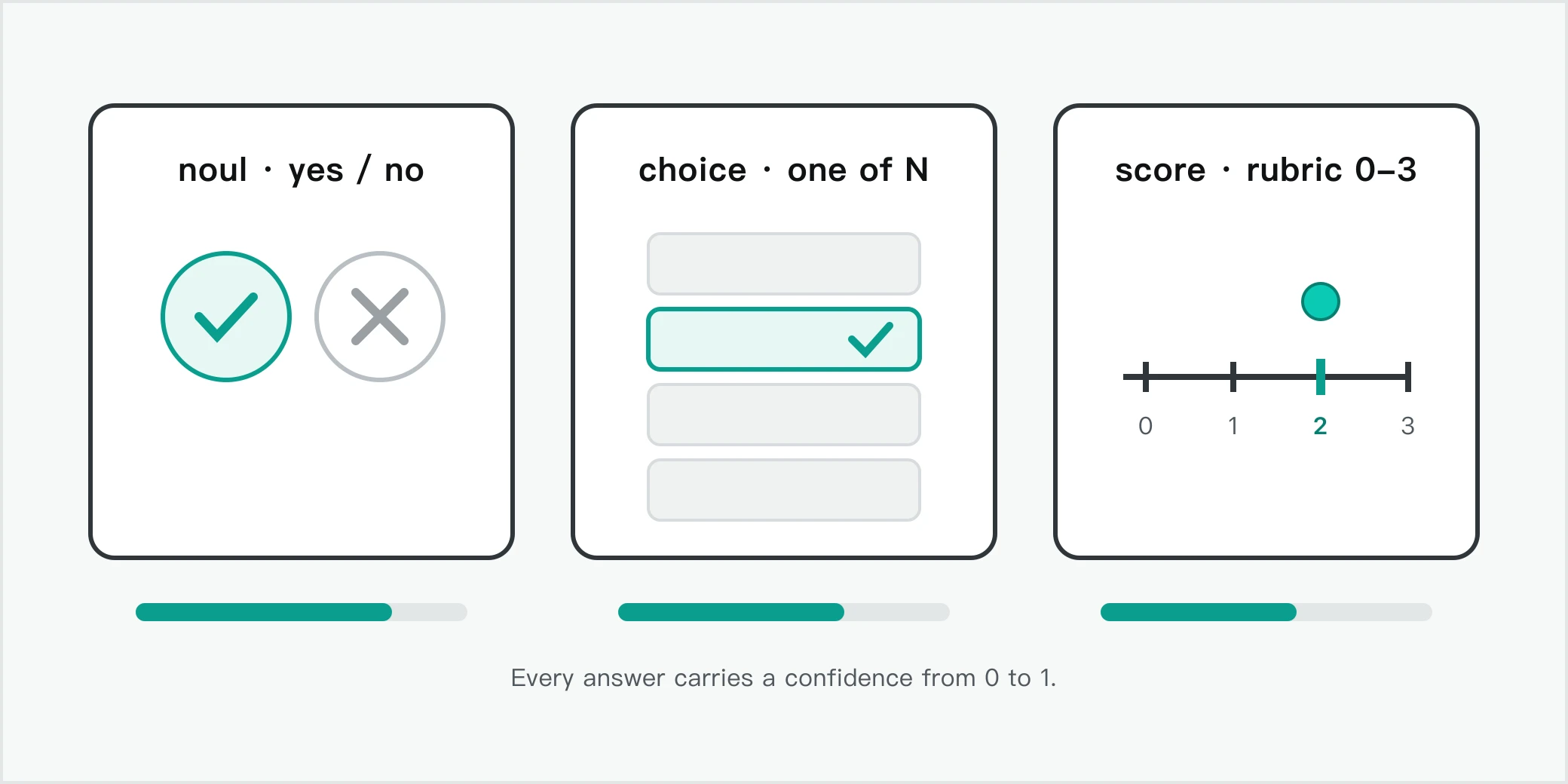
It puts the three judgment types in one request. The official question-type table spells them out. The first is noul, a yes/no judgment. It estimates the probability that a condition holds. You can add true_description and false_description to define each side (noul section).
The second is choice. It picks one of 2 to 255 options. It returns the winner and normalized probabilities for every candidate (choice section). The third is score. It grades the input against an ordered rubric that starts at 0.
It returns a continuous weighted score and the probability of each level (score section). Every answer carries a 0-to-1 confidence. Your code can send ambiguous judgments to a fallback or a human (confidence section).
| Question type | Purpose | Returns | Use in review triage |
|---|---|---|---|
noul (yes/no) | Check whether a condition holds | noul (0.01-0.99), confidence | Does this review need follow-up |
choice (multiple choice) | Pick one from a fixed list | choice, probabilities, confidence | Route to refund, safety, support, or none |
score (rubric) | Grade against an ordered rubric | score, probabilities, legend, confidence | Urgency 0 (none) to 3 (billing or safety) |
The billing model decides what it is good for. The Decisions API charges $0.10 per million input tokens. Output tokens cost $0. The shared input in one request is billed once. That holds no matter how many questions you ask.
Each extra question only adds its own instruction and criteria tokens (official blog). There are no output-token charges. There are no variable thinking-token bills. There are no separate audio-transcription or OCR fees. Google gives one comparison on a shared benchmark suite.
Gemini Decision 1 with the Decisions API is nearly five times cheaper than Gemini 3.5 Flash-Lite with the Interactions API. The gap comes from zero output billing and one shared input (Google blog). Those numbers are Google's own, and the suite was not published. This article treats them as one side's claim.
Google also lists four internal uses in the blog. Each is a latency-sensitive judgment. Gemini Notebook uses it as a real-time router. It classifies intent in milliseconds. Everyday latency drops by up to 40 percent.
The Stitch rapid-canvas experiment uses it to generate playable wireframes in seconds. CC from Google Labs uses it to pick one emoji from more than 200 options. Google Search uses it as a safety layer for MCP tools within its latency budget (Google blog). Review triage belongs to the same family. The options are fixed.
It has to be fast and cheap. The model page lists more recommended uses. They include request routing and policy checks across many rules at once. Candidate scoring against a rubric is another (Gemini Decision 1 model page).
Wiring the reviews in: three live calls
A judgment interface needs something to judge. The reviews come from EveryInfra's endpoints. We first read the free catalog at GET /api/v1/social/catalog (catalog address). It needs no key. We confirmed the parameters, price, and return fields of the three review capabilities.
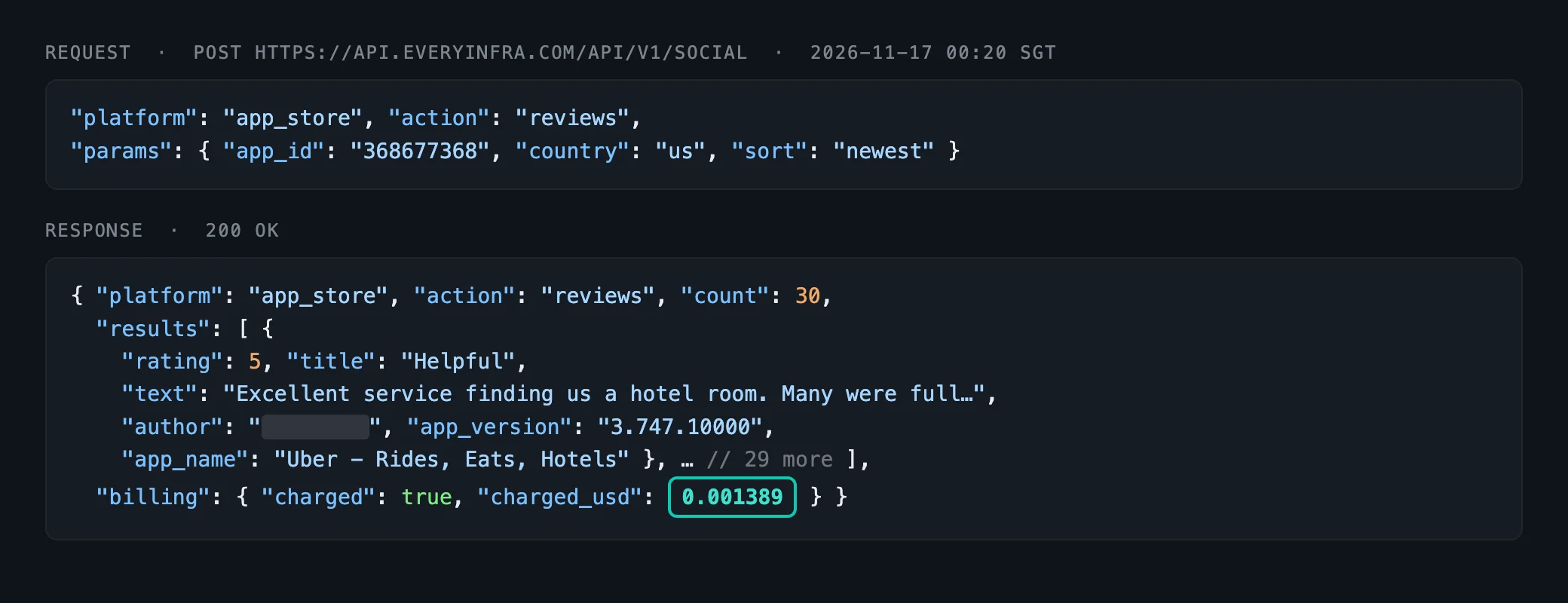
All three have a price_usd of 0.001389. That is $0.001389 per call. One call that returns a list still counts as one call. Google Maps reviews default to 20 per call and cap at 100. App Store reviews default to 30 and cap at 500.
Google Play reviews default to 40 and cap at 200 (Google Maps catalog, App Store catalog, Google Play catalog).
| Capability | Required param | How we used it | Price per call | Return fields we used |
|---|---|---|---|---|
google_maps_reviews/reviews | url | sort: newest, lang: en | $0.001389 | rating, text, reviewer_name, is_local_guide, owner_response, posted_at |
app_store/reviews | app_id | country: us, sort: newest | $0.001389 | rating, title, text, app_version, posted_at |
google_play/reviews | app_id | country: us, language: en, sort: newest | $0.001389 | score, title, text, reply_text, app_version, posted_at |
The four live calls and their charges are below. All five entries are billed, for $0.005556 in total.
| # | Time (SGT) | Capability | Key params | Returned | charged_usd |
|---|---|---|---|---|---|
| 1 | 00:19 | google_maps_reviews/search | dentist in Chicago | 15 places | 0.001389 |
| 2 | 00:19 | google_maps_reviews/reviews | Downtown Dental - Loop, newest | 20 reviews | 0.001389 |
| 3 | 00:20 | app_store/reviews | 368677368, newest | 30 reviews | 0.001389 |
| 4 | 00:23 | google_play/reviews | com.ubercab, newest | 40 reviews | 0.001389 |
The first source needs a place link. At 00:19 Singapore time we called google_maps_reviews/search. The keyword was dentist in Chicago. It returned 15 clinics (Google Maps review search capability). We picked the one with the most reviews, Downtown Dental - Loop (1,390 reviews, 4.7 stars).
We passed its full link with query_place_id to reviews. At the same 00:19 moment we pulled 20 newest reviews. There were 19 five-star and 1 one-star. All 20 had an owner response (owner_response). Six were from Google Local Guides.
The clinic's newest reviews are almost all praise. The single one-star is the one a human should read.
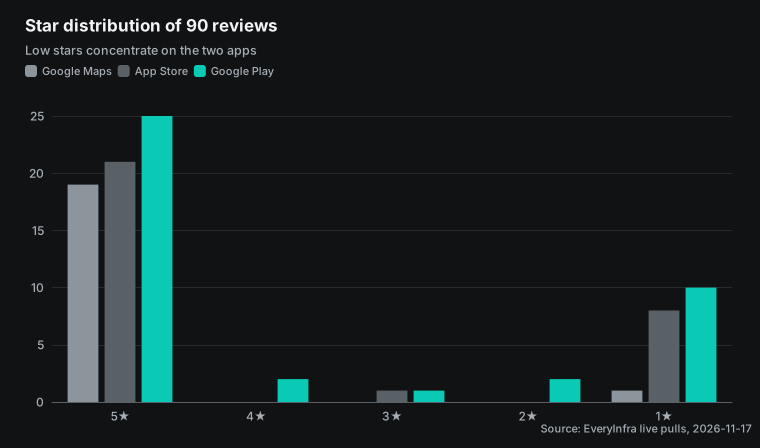
The second and third sources switch to app reviews. Apps tend to carry more negative reviews. At 00:20 Singapore time we called app_store/reviews. We used Uber's numeric ID 368677368, country: us, sort: newest. It returned 30 reviews: 21 five-star, 1 three-star, and 8 one-star.
All 8 one-star reviews complain about rides, charges, or support. At 00:23 Singapore time we called google_play/reviews. We used Uber's package name com.ubercab and language: en. It returned 40 reviews: 25 five-star, 2 four-star, 1 three-star, 2 two-star, and 10 one-star. That is 12 negative reviews at two stars or fewer.
The two capabilities are app_store/reviews and google_play/reviews.
Test one: 23 of 90 real reviews need follow-up
The star distribution across the three sources is below. The pool total of 23 at three stars or fewer is 1 from Google Maps, 9 from the App Store, and 13 from Google Play.
| Platform | 5★ | 4★ | 3★ | 2★ | 1★ | ≤3★ |
|---|---|---|---|---|---|---|
| Google Maps (20) | 19 | 0 | 0 | 0 | 1 | 1 |
| App Store (30) | 21 | 0 | 1 | 0 | 8 | 9 |
| Google Play (40) | 25 | 2 | 1 | 2 | 10 | 13 |
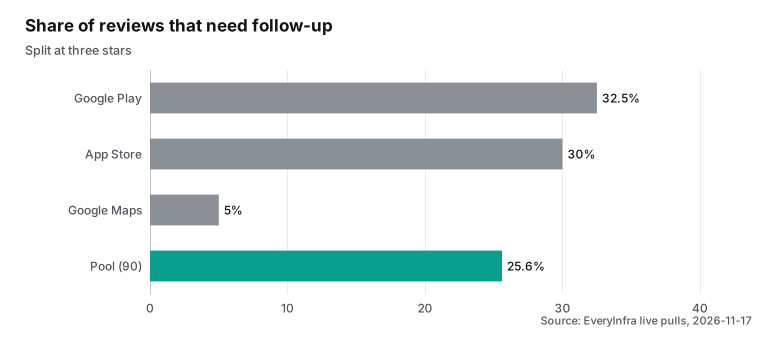
Taken together, the three sources give 90 reviews. By the simple rule "three stars or fewer needs follow-up," 23 need it. That is 25.6 percent.
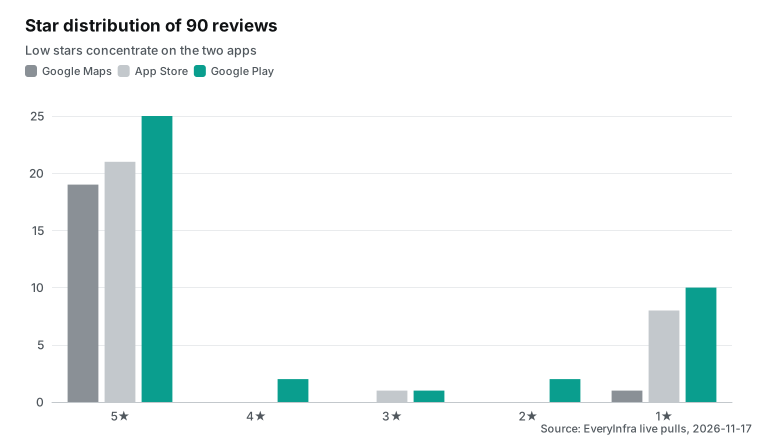
By platform, the clinic has only 1 review to follow up on (5 percent). The two apps carry far more. Eight of the 30 App Store reviews are two stars or fewer. Twelve of the 40 Google Play reviews are.
Where the negatives concentrate tells you which channel to watch first.
Stars are only a coarse filter. A five-star review can hide a problem. An example is "great, but parking is hard to find." A one-star can just be a user who ordered the wrong thing. What you want to judge is the content, not the number. That is the reason to feed the review to a judgment interface.
The model reads the body. It decides whether it is a complaint. It decides whether it touches safety or billing. It decides whether it needs a reply. Stars can serve as a cheap pre-filter.
They keep the obvious praise out of the judgment interface. They send only the uncertain ones in. That saves on the judgment cost too. The accounting below runs both ways: "judge everything" and "judge four stars and below only."
The limits of this sample should be clear. The 90 reviews are three single-page pulls. They are not the full history of these businesses. The Google Maps page is sorted newest. It caught a run of praise.
It does not represent the clinic's long-run complaint rate. A stable negative rate needs a bigger sample. You would page through more or use the catalog's mode: async. This article uses the 90 only to demonstrate the flow. It draws no conclusion about any one business.
How three real reviews sort: expected routing under the criteria
Here are three real reviews, walked through the expected routing. A person applied the rule, to show how the three questions should be designed. This article did not call Gemini. So it reports no model probabilities. The three are an App Store Uber one-star, a Google Maps clinic five-star, and a Google Play Uber one-star.
They are paraphrased, not quoted.
| Review (paraphrased) | `needs_followup` | `route_to` | `severity` |
|---|---|---|---|
| Ride cancelled, still charged, template reply (App Store one-star) | Yes | billing | 2 (service failure) |
| Praises the dentist and hygienist (Google Maps five-star) | No | no_action | 0 (not urgent) |
| App keeps crashing, will not open (Google Play one-star) | Yes | support_quality | 1-2 |
The criteria differ for the three reviews. One set of questions covers them all. needs_followup picks out the ones that need a person. route_to decides the queue. severity sets the priority.
The three questions score in parallel against the same input. They cannot see each other. So asking all three is barely slower than asking one (multiple-questions section). Write the criteria boundaries clearly when you design the questions. For example, "billing dispute, safety issue, or unresolved complaint" counts as follow-up.
"Praise, minor preference, or already resolved" counts as not. The model then locates the review between two descriptions. It does not guess from a vague question.
How to write criteria that judge well
Getting a review judged right rests less on model smarts. It rests more on how finely you split the task and how clearly you state it. The common mistake is to ask one big question whole, such as "is this review serious." Serious means different things to different businesses. For a restaurant, food safety is the most serious. For a ride-hailing app, driver behavior and billing are.
For an e-commerce seller, counterfeits and refunds are. The model cannot define serious for you. The criteria have to carry those business meanings. Describe each level with concrete sentences. Do not leave a vague word for the model to interpret.
The documentation frames this as asking narrow, single-purpose questions. It recommends atomic checks composed in code, not one question that hands you the final action (best practices section).
A few rules help you split questions. First, break a compound judgment into several single ones. Do not ask "does this need urgent handling." Ask separately: does it touch safety, does it touch billing, has the business replied. Then decide in code. Safety pins it to the top.
Billing with no reply goes to the refund queue. Each question is then easy to write criteria for. Each is easy to check on its own. Second, give yes/no questions two descriptions. noul allows true_description and false_description.
They separate the confusing cases up front. A "price is too high" complaint can be kept out of the defect queue. The line reads: a defect means the product is broken; price, size, shipping, and preference do not count. Third, give every rubric level a sentence, not just a number. The rubric starts at 0.
Level 0 is "not urgent." Level 1 is "minor issue." Level 2 is "billing or service failure." Level 3 is "safety or legal risk." The model locates the review between those sentences. More concrete descriptions give a steadier score.
The same 0-to-3 rubric keeps its levels across industries. What you rewrite is the sentence at each level. A dental clinic puts "wrong tooth pulled, post-op infection" at level 3. A ride-hailing app puts "driver harassment, dropped mid-trip" at level 3. An e-commerce seller puts "counterfeit goods, money and goods both lost" at level 3.
That sentence is where you feed business knowledge to the model. The model does not know what is most serious for your business.
Check the criteria against your own data once they are written. Do not trust the model's self-reported confidence alone. Feed in a batch of reviews that people have already labeled. See where the model differs from the human label. The classes that differ most are usually where the criteria are unclear.
One outlet's test had the model pass only about six in ten documents (Tech Times report). Numbers like that are a reminder. Run your evaluation on your own sample. Do not borrow a pass rate from another environment. Treat the criteria as a rule set you iterate on.
One full round trip: pull with EveryInfra, score with the Decisions API
Start with the real request on the EveryInfra side. The key is read only from an environment variable. It is never written to a file. The billing.charged_usd field is what this call cost.
curl -s https://api.everyinfra.com/api/v1/social \
  -H "Authorization: Bearer $EVERYINFRA_API_KEY" \
  -H "Content-Type: application/json" \
  -d '{"platform":"app_store","action":"reviews",
       "params":{"app_id":"368677368","country":"us","sort":"newest"}}'
This call returned 30 reviews. The billing.charged_usd was 0.001389. Each review is an object. Its fields include rating, title, text, app_version, and posted_at. You then take one body as the Decisions API input.
You ask three questions at once. The Python snippet below is adapted from the official documentation. The input is one real review: a one-star about a cancelled ride that was still charged.
from google import genai

client = genai.Client(http_options={"api_version": "v1beta"})

result = client.decisions.create(
    model="gemini-decision-1",
    input="Driver cancelled after 20 minutes and I was still charged a fee. "
          "Support only sent a template reply.",
    questions={
        "needs_followup": {
            "type": "noul",
            "instructions": "Does this review need a human follow-up?",
            "criteria": {
                "true_description": "Billing dispute, safety issue, or unresolved complaint.",
                "false_description": "Praise, minor preference, or already resolved.",
            },
        },
        "route_to": {
            "type": "choice",
            "instructions": "Which team should handle this review?",
            "criteria": {
                "billing": "Charge, refund, or payment problem.",
                "safety": "Driver behaviour or passenger safety.",
                "support_quality": "Slow or unhelpful support, or a broken app.",
                "no_action": "No action needed.",
            },
        },
        "severity": {
            "type": "score",
            "instructions": "Rate how urgent this review is.",
            "criteria": [
                "Not urgent.",
                "Minor issue.",
                "Billing or service failure.",
                "Safety or legal risk.",
            ],
        },
    },
)
The REST equivalent is a POST to https://generativelanguage.googleapis.com/v1beta/decisions. The key goes in an x-goog-api-key header (quickstart section). The response body is an answers object plus a usage object. In the docs sample, a noul answer looks like {"type":"noul","noul":0.99,"confidence":0.99}. The usage has total_output_tokens of 0 (official response sample).
For the three questions, the program gets three answers with probabilities. One is whether to follow up. One is the queue, with each queue's probability. One is the urgency score, with each level's probability. Your code combines them with if statements and thresholds.
This article did not call the Gemini side. The snippet is a configuration example from the official docs. Every number on the EveryInfra side comes from a live response.
Test two: reviews are short, so the cost lands on your questions
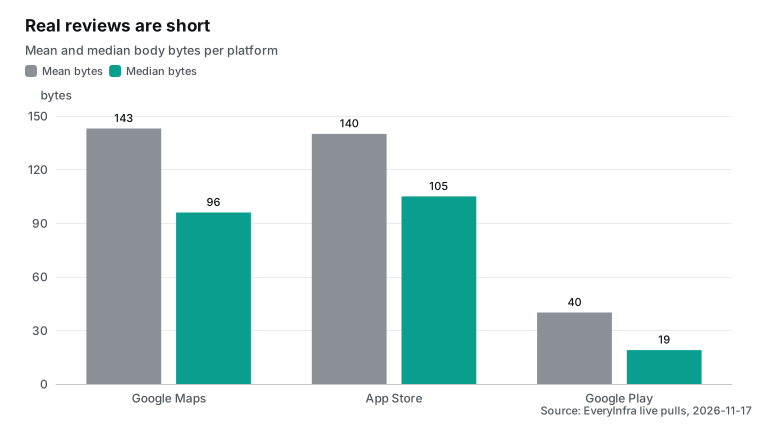
Measuring the real review sizes shows where the money goes. The mean body bytes are 143 (Google Maps), 140 (App Store), and 40 (Google Play). The medians are 96, 105, and 19 bytes. Google Play reviews are the shortest. Many are a single line, such as a short complaint or a one-word cheer. We used the four-bytes-per-token ratio from the Anthropic pricing page (pricing page, web fetch section).
A Google Maps review is about 36 tokens. A Google Play review is about 10.
| Platform | Reviews | Mean bytes | Median bytes | ~tokens (mean / 4) |
|---|---|---|---|---|
| Google Maps | 20 | 143 | 96 | 36 |
| App Store | 30 | 140 | 105 | 35 |
| Google Play | 40 | 40 | 19 | 10 |
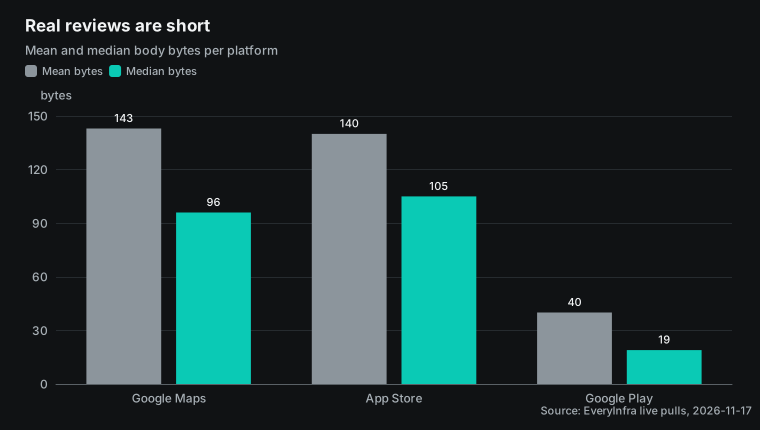
A judgment request also has the three questions' instructions and criteria. Count the three plus a small shared preamble as a fixed budget of about 320 tokens. That is estimated from the snippet above, not a measured bill. A Google Maps review request is then about 356 tokens. The review body is 36 of 356, roughly 10 percent.
A Google Play review request is about 330 tokens. The review body is 10 of 330, roughly 3 percent.
| Platform | Review tokens | Instruction tokens | Review share |
|---|---|---|---|
| Google Maps | 36 | 320 | 10% |
| App Store | 35 | 320 | 10% |
| Google Play | 10 | 320 | 3% |
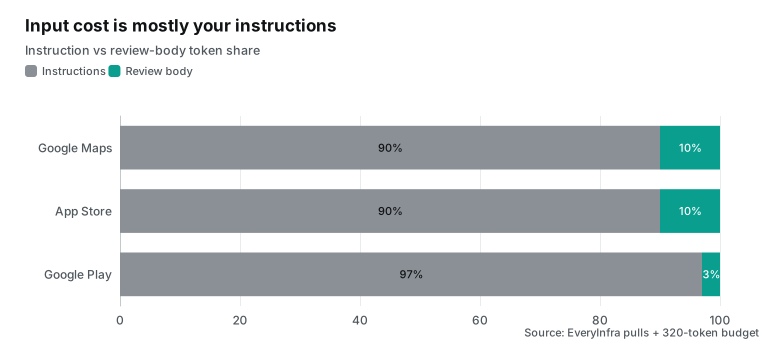
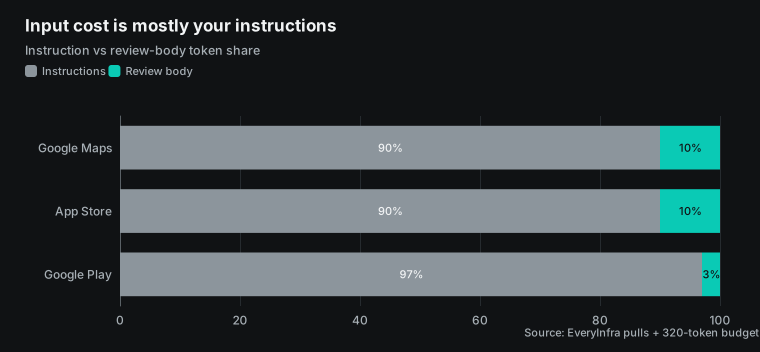
The review body is only single digits to a tenth of the input. Compressing reviews saves little. To save, work on the three instructions. Keep them short. Keep the criteria tight. Or keep the obvious praise out with a star pre-filter.
The fixed budget is only the average case. Real reviews have a long tail. The longest of these 20 Google Maps reviews is 876 bytes, about 219 tokens. That is nine times the 96-byte median, which is about 24 tokens. Such a long review pushes the request to about 539 tokens, not the average 356.
So a per-thousand cost from the average size is a midpoint. Merchants with longer complaints sit higher on the judgment side. Budget from your own channel's length distribution, not one average.
Another path judges several reviews in one request. The API allows up to 1,000 questions against one shared input. You pack several reviews into one input, with a few questions per review. The shared input is billed once. The questions only cost their own instructions.
That path needs you to assemble the input and point each question at the right review. It suits cases where one piece of material is asked many times. For the simple case, one review at a time is clearer. Batching has a ceiling too. One request holds up to 1,000 questions. Review triage asks three per review, so about 333 reviews fit at once.
The 256K shared input stays far from full. At the 96-byte median, 333 bodies are only about eight thousand tokens. So question count caps the batch, not input length.
Doing the math: what it costs to judge a thousand reviews
Put the two sides together per thousand reviews. The EveryInfra side depends only on the number of calls. By page size, 1,000 Google Maps reviews take about 10 calls. App Store takes about 2. Google Play takes about 5.
Each call is $0.001389. The Decisions API side is by input token. It is 1,000 reviews times the tokens per request, times $0.10 per million.
| Platform | Default / max per call | Calls per 1,000 | Data cost per 1,000 |
|---|---|---|---|
| Google Maps | 20 / 100 | 10 | $0.0139 |
| App Store | 30 / 500 | 2 | $0.0028 |
| Google Play | 40 / 200 | 5 | $0.0069 |
| Approach (1,000 reviews) | Decisions API scoring | EveryInfra pull | Total |
|---|---|---|---|
| Google Maps (about 356 tokens each) | about $0.0356 | 10 calls $0.0139 | about $0.0495 |
| App Store (about 355 tokens each) | about $0.0355 | 2 calls $0.0028 | about $0.0383 |
| Google Play (about 330 tokens each) | about $0.0330 | 5 calls $0.0069 | about $0.0399 |
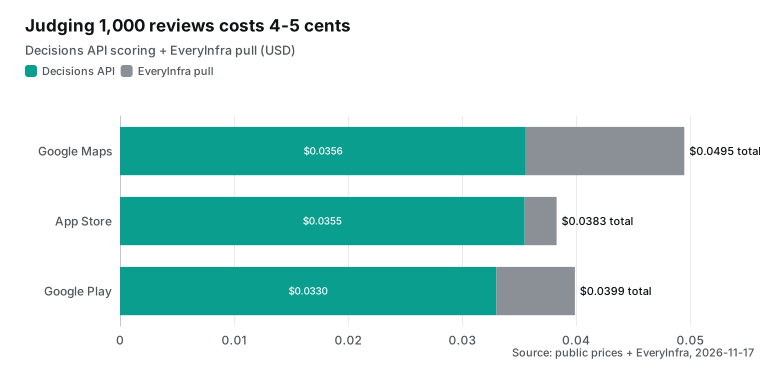
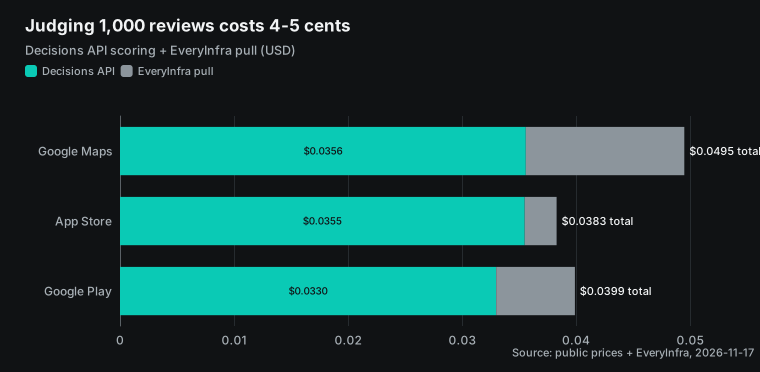
Use stars to keep five-star praise out, and judge four stars and below only. You then save more. By the distribution of our 90, that share is roughly 5 percent (Google Maps), about 30 percent (App Store), and 37.5 percent (Google Play). Fewer reviews go into the judgment interface. The Decisions API side falls proportionally.
The data side is unchanged. What a pre-filter saves equals the share it drops. By the distribution of our 90, about three quarters are five-star praise. A star pre-filter keeps those out of the judgment interface. The Decisions API call volume and spend fall to roughly a quarter of judge-all. The data cost does not move, since reviews still arrive a full page at a time.
Pre-filtering has a cost. You may miss a problem hidden in a five-star. So keep the rule loose. Let five-star reviews with "but" or "however" through.
The trade-off is in the table below.
| Approach | Share sent to judgment | Decisions cost (vs judge-all) | Risk |
|---|---|---|---|
| Judge everything | 100% | baseline | no misses, pays on praise |
| Judge four stars and below | 5%-37.5% by channel | falls proportionally | may miss a five-star problem |
The limits of this accounting should be clear. The fixed 320-token budget is an estimate. The real bill should follow usage.total_input_tokens. Longer or shorter instructions move each request by tens of tokens. The table does not count the free tier.
Google AI Studio offers a free tier for prototyping. The paid tier is what these prices apply to (Gemini API pricing page). The table also skips retries and page tokens. Seen another way, the two sides are the same order of magnitude. Pulling a thousand reviews costs a few cents.
Judging a thousand costs a few cents. Neither side is an order of magnitude more.
Compare this with classifying each review with a generative model. The difference is the output. A generative classifier emits a chunk of judgment text per review, even a short JSON. That output is billed by volume. At scale it becomes the main cost.
The Decisions API charges $0 for that output. That is the mechanism behind Google's five-times gap (Google blog). One outlet computed a larger multiple on a batch basis. Tech Times reported on 2026-11-13 that the shared input is billed once. So 20 checks on a 4,000-token record cost about $0.50 per thousand records, not $8.10.
That cuts the 20 checks to about one sixteenth (Tech Times report). The same piece notes the model passed only 63 percent of documents in its test. Price alone is not enough. Accuracy must be checked on your own data.
Google's near five times and Tech Times's about 16 times do not conflict. The gap depends on how many questions share one input. More questions spread that input's cost thinner. Google's comparison is near one or two judgments per input. Tech Times counts 20 judgments on a 4,000-token record.
Review triage is mostly three judgments per review. That is closer to the smaller multiple, so do not size your savings on 16x.
Confidence decides who handles it: auto, human, or ignore
Every answer carries a 0-to-1 confidence. That is the key to automating the sorting. The documentation suggests using confidence to decide whether a judgment runs or escalates. High confidence takes the branch. Low confidence goes to a fallback or a human (confidence section).
For review triage, a judgment lands by a simple rule. High follow-up probability and high confidence auto-creates a ticket and routes it. A middle probability or low confidence goes to human review. Low probability and high confidence is marked no-action, with no ticket.
| Judgment | Confidence | Action |
|---|---|---|
| High probability of follow-up | High | Auto-create ticket, route by route_to |
| Medium probability, or low confidence | Low | Send to human review |
| Low probability of follow-up | High | Mark no-action, no ticket |
This turns the human job from reading every review into reading only the uncertain ones. By the distribution of our 90, the obvious praise mostly lands in the low-probability, high-confidence cell. That is the 19 on Google Maps and the 46 across the two apps. They get no ticket. The human queue gets the 23 low-star reviews plus a few with low confidence. This echoes the documentation's advice of atomic checks composed in code. Do not have the model hand you a final action.
Have it give a few confident scores. Let your code set the action by thresholds (best practices section). Thresholds in code, not the model, let you adjust the automation boundary without changing the model. A workable starting point: auto-create a ticket only when needs_followup probability is at least 0.85 and confidence is at least 0.8. If either falls short, send it to the human queue. After launch, move these two numbers up or down against the human-review results.
Some reviews fall between two classes by nature. A one-star that complains about a charge and also says the driver drove dangerously splits route_to evenly between the refund and safety queues. Confidence then drops. However finely the criteria are written, these reviews exist. Using confidence to hand them to a person keeps the flow from forcing a call where the signal is mixed.
There is a second signal for uncertainty. A choice answer returns not just the winner but a normalized probability per candidate. If the top two sit close, say refund 0.46 and safety 0.44, treat it as ambiguous even when overall confidence looks fine. Confidence shows how sure the model is. The probability spread shows how far apart the options are. Using both is steadier than using one.
Two fields narrow the human queue further: Local Guide and owner response. Of the 20 Google Maps reviews, 6 were from Local Guides. All 20 already had an owner response. A praise review the business already replied to barely needs follow-up. Treat "is there an owner_response" as a pre-filter.
Or write it as a noul question, "has the business replied to this review." That trims the judgment interface's call volume again. These fields are in the response_fields of all three review capabilities (Google Maps catalog).
Three approaches side by side: people, generative models, scoring
Sorting reviews is usually done one of three ways. Each has its own fit. The first is all-human. Support reads each one. The upside is the most flexible judgment.
A person reads the tone and the subtext. The downside is slow and expensive. It does not scale as reviews grow. Different people also label to different standards. The second uses a generative model.
It writes a paragraph or a structured judgment per review. The upside is the judgment and a suggested reply in one step. The downside is every review generates and parses text. Output is billed by volume. At scale the output becomes the main cost.
The parsing tracks the model's output format. The third uses a scoring interface like the Decisions API. It only judges and never writes text. The action goes to code. The upside is cheap, fast, and stable output.
The downside is closed-set only. Writing replies and summaries needs a generative model elsewhere.
| Dimension | All-human | Generative classification | Scoring interface |
|---|---|---|---|
| Judgment flexibility | highest | high | limited to closed-set |
| Speed | slow | medium | fast (150-250 ms) |
| Cost growth with volume | linear and high | output dominates | input only, output $0 |
| Result shape | human judgment | text to parse | probability plus confidence |
| Fits | hard cases and appeals | judgment plus reply | high-volume classification |
The three are not mutually exclusive. A real pipeline usually layers them. Cheap rules pre-filter the obvious praise. The scoring interface classifies and prioritizes. People and a generative model handle only the uncertain ones and the replies.
Each layer handles only the part it is cheapest at. The next section breaks this layered flow into five concrete steps.
Limits: what closed-set judgment can and cannot do
The Decisions API only handles closed-set questions. It replaces classifiers and routers, not open-ended generation. Writing a reply to a customer still needs a generative interface. So does summarizing a week of trends. So does extracting a product-defect description (Interactions API overview).
A sensible split is clear. Judge and route with the Decisions API. Write replies with a generative model. Chain them in two steps.
Review language is another thing to watch. We passed language: en for Google Play reviews. The catalog notes that the language choice does not guarantee the original language of every returned review. In Google Play reviews, country also does not change which reviews come back. A 2026-10-25 test note in the catalog is explicit.
Under the same language, us and gb return the same reviews. To compare by country, change language (Google Play catalog). The 40 we pulled did include some Spanish. The Decisions API is natively multimodal and handles multilingual text. Writing the criteria in English usually judges fine.
But fine wording in one language adds uncertainty under mixed input. That is when you lean on confidence and push the uncertain ones to a person.
Pulling the data has its own gaps. The catalog carries a test note on Google Play reviews. For US English reviews, some requests return at most 100 per request. The reply_text, reply_at, language, url, and title fields may be absent (Google Play catalog). The 40 we pulled carried no owner reply (with_reply was 0).
This has a direct cost effect. The 20 Google Maps reviews all had an owner_response. You can drop a batch with the cheapest filter, "has the business replied." This Google Play page had no reply at all. That pre-filter is unusable here, so more reviews go straight into the judgment interface. The call volume on the judgment side rises to match.
When a field is missing, a pre-filter that depends on it needs a fallback. You can also switch to a field that channel does return. When the interface returns a 503 with no charge, retry per the docs. Failures and empty results are not billed. You can reconcile that in the billing object. Remember too that Google's latency and cost are from its own environment.
When the review volume is large and the criteria are complex, re-measure with usage and real timing first.
Building a daily review-triage pipeline
Put all of this together. You get a review-triage pipeline that runs itself. Step one is a scheduled pull of new reviews. For each business or app, pull one page sorted newest. Compare each review's posted time with the last pull.
Keep only the new ones. Page or use async mode for the busier channels. Step two is the pre-filter. Use stars and the owner-response field to drop the obvious praise. Step three is scoring.
Send each review with the three questions. Get back the three answers with probability and confidence. Step four is landing. By confidence and threshold, auto-create and route the high-confidence tickets. Send the low-confidence ones to a human queue.
Step five is the reply. A generative model drafts one from the ticket. A human confirms before sending.
In this pipeline, the low latency lets it run the moment a review arrives. It need not wait for a nightly batch. A new negative review is judged almost immediately. The pressing ones reach a person within seconds. For ride-hailing, food delivery, and hotels, faster follow-up raises the recovery rate. Adding a few judgment dimensions does not stretch the response, so the triage can grow more questions as the business needs them.
On cost, both sides are cheap and predictable. The pull is by call count. The judgment is by input token. Neither swings wildly with review length, because reviews are short. A business getting a few hundred new reviews a day gets ten to twenty thousand a month.
At the unit prices here, pulling plus judging is a few dollars. That is below the labor of a support agent reading them for half an hour. The interface fee is a rounding error. The real cost is getting the criteria right and setting the thresholds. Once those two are done, the spend stays low.
Take the dental clinic we pulled. Its reviews grow far slower, a few to a dozen a day, a few hundred a month. Judging plus pulling runs a few cents a month.
Volume is what lifts the cost. The unit price stays a rounding error. Apps like Uber, at thousands a day, are where pre-filtering and batching start to matter.
Make this emit a daily report. It says how many need follow-up and which queue each belongs to. To wire it to alerts and a ticket system, see our piece on app-review alerts.
Community material is keeping pace too. Around 2026-11-15, short videos began explaining the three question types (YouTube short). Read alongside the official docs, they help you write the criteria right faster.
FAQ
How is the Gemini Decisions API different from a normal Gemini chat API? It only scores closed-set questions and writes no answer text. You pass one input and a set of questions. It returns each question's probability and a 0-to-1 confidence. Output tokens are always 0. Your code can branch, sort, and route directly (official docs).
A chat API generates text for people to read. That fits writing replies and summaries.
How much does it cost to judge a thousand reviews? It is estimated from this article's real review sizes. All three sources land between $0.038 and $0.050 per thousand. That counts both the Decisions API scoring and the EveryInfra pull at public prices (Gemini pricing page, EveryInfra catalog). The real bill follows usage.total_input_tokens and billing.charged_usd. The estimate rests on reviews being short.
Images, audio, or full-page screenshots raise the input tokens and the judgment cost. Tune the resolution of multimodal inputs to control the token count.
Why is it cheaper than a generative model for classification? A generative classifier emits judgment text per review. Output is billed by volume and dominates at scale. The Decisions API charges $0 for output. It bills one shared input once across questions. Google's comparison is nearly five times cheaper than Gemini 3.5 Flash-Lite with the Interactions API (Google blog).
Where do the reviews come from, and which platforms are supported? This article pulled real public reviews from three capabilities. They are google_maps_reviews/reviews, app_store/reviews, and google_play/reviews, at $0.001389 each. The catalog carries many more review-bearing platforms. Examples are Yelp, TripAdvisor, Trustpilot, Amazon, Etsy, and Glassdoor. The judgment flow is the same.
Only the pull capability and parameters change. See the Google Maps endpoint, App Store endpoint, Google Play endpoint, and the full catalog.
What about low-confidence reviews? The documentation suggests routing by confidence. High confidence takes the branch automatically. Low confidence goes to a fallback or human review (confidence section). In review triage, pushing the low-confidence ones to a person is safer than full automation.
How many reviews can one request judge? One request carries up to 256K tokens of shared input and up to 1,000 questions (official docs). The simple approach is one review at a time. Packing several reviews into one input suits repeated judgment of the same material. When you run batches, pace the concurrency against your per-minute request cap. Back off and retry on the hints in the responses.
Should the judgment results be stored? Store each review's three results with the confidence in your own database. You can then review where the model and a person disagreed. You can also skip re-judging the same review for a while, which saves the repeat cost. Record the platform, capability, pull time, and original rating alongside each result.
Industry moves
- 2026-11-11: Google shipped the Gemini Decisions API and Gemini Decision 1. It is $0.10 per million input, output not billed, through the Gemini API in Google AI Studio (Google blog). For review triage it adds a cheap, input-billed option for closed-set judgment.
- 2026-11-11: several outlets reported the same day. SiliconANGLE said Google entered the "decision model" market. VentureBeat stressed up to 1,000 judgments on one piece of material per request (SiliconANGLE, VentureBeat). It confirms the decision model as its own interface class.
- 2026-11-12: Dataconomy reported the interface answers up to 1,000 questions about the same material in one call. It targets developers who need fast small judgments (Dataconomy). Asking the same material many times is where batching pays off.
- 2026-11-13: Tech Times computed about $0.50 per thousand records on a batch basis. That is roughly 16 times cheaper than a generative route. It noted the model passed only 63 percent of documents in its test (Tech Times). The price edge is clear, but verify accuracy on your own data.
- 2026-11-14: developer tutorials appeared. One video is "Gemini Decision 1: Practice In Python." It shows how to write the three question types (YouTube). Third-party onboarding is catching up.
- 2026-11-16: model routing became a parallel theme. devops.com reported that Gemini 4 Hydrogen turns model choice into a routing decision (devops.com). Pulling judgment out of generation into one fast score is becoming common.
- 2026-11-11: ecosystem integrations rolled out. Google listed OpenRouter, LangChain, Vercel, LiteLLM, Pydantic AI, Pipecat, LiveKit, and OpenCode, with the
google-genaiSDKs (Google blog, LangChain docs). For readers on these frameworks, wiring it in is not from scratch.
Getting started: three steps to wire reviews into judgment
- Pull the reviews. Per the quickstart, call
google_maps_reviews/reviews,app_store/reviews, orgoogle_play/reviewsover REST. Thebilling.charged_usdfield is what the call cost. Failures and empty results are not billed. Per-client MCP configuration is on the MCP server page. - Define the judgment. Turn "follow up, which queue, how urgent" into the three questions. Use
noul,choice, andscore, with clear criteria, per the Decisions API docs. - Land by confidence. High confidence auto-creates and routes a ticket. Low confidence goes to a person. Low probability with high confidence is no-action. To turn reviews into a daily product, see productizing review data and app review triage. Prices and quotas are on the pricing page.
References
- Google, "Gemini Decisions API: Fast multimodal decisions," 2026-11-11, https://blog.google/innovation-and-ai/technology/developers-tools/gemini-decisions-api/
- Google AI Studio, "Decisions API" documentation, 2026-11, https://aistudio.google.com/docs/decisions-api
- Google AI Studio, Decisions API "noul (yes/no)" section, https://aistudio.google.com/docs/decisions-api#noul
- Google AI Studio, Decisions API "choice" section, https://aistudio.google.com/docs/decisions-api#choice
- Google AI Studio, Decisions API "score" section, https://aistudio.google.com/docs/decisions-api#score
- Google AI Studio, Decisions API "confidence" section, https://aistudio.google.com/docs/decisions-api#confidence
- Google AI Studio, Decisions API "multiple questions" section, https://aistudio.google.com/docs/decisions-api#multiple-questions
- Google AI Studio, Decisions API "best practices" section, https://aistudio.google.com/docs/decisions-api#best-practices
- Google AI Studio, Decisions API "quickstart" section, https://aistudio.google.com/docs/decisions-api#quickstart
- Google AI Studio, "Gemini Decision 1" model page, 2026-11, https://aistudio.google.com/docs/models/gemini-decision-1
- Google AI Studio, "Interactions API overview," https://aistudio.google.com/docs/interactions-overview
- Google, "Gemini Developer API pricing," 2026-11, https://ai.google.dev/gemini-api/docs/pricing
- Google, "Gemini API rate limits," https://ai.google.dev/gemini-api/docs/rate-limits
- Google, "Gemini API quickstart," https://ai.google.dev/gemini-api/docs/quickstart
- Google, "Gemini API billing," https://ai.google.dev/gemini-api/docs/billing
- Google, "Gemini API models," https://ai.google.dev/gemini-api/docs/models
- EveryInfra, data capability catalog, read 2026-11-17, https://api.everyinfra.com/api/v1/social/catalog
- EveryInfra, Google Maps review catalog, https://api.everyinfra.com/api/v1/social/catalog?platform=google_maps_reviews
- EveryInfra, App Store review catalog, https://api.everyinfra.com/api/v1/social/catalog?platform=app_store
- EveryInfra, Google Play review catalog, https://api.everyinfra.com/api/v1/social/catalog?platform=google_play
- Model Context Protocol, Streamable HTTP transport specification, 2025-06-18, https://modelcontextprotocol.io/specification/2025-06-18/basic/transports
- Model Context Protocol, lifecycle specification, 2025-06-18, https://modelcontextprotocol.io/specification/2025-06-18/basic/lifecycle
- Claude Code, MCP documentation, https://code.claude.com/docs/en/mcp
- Claude Code, cost documentation, https://code.claude.com/docs/en/costs
- Anthropic, pricing page (bytes-to-token ratio), https://platform.claude.com/docs/en/about-claude/pricing
- GitHub,
googleapis/python-genai, https://github.com/googleapis/python-genai - GitHub,
googleapis/js-genai, https://github.com/googleapis/js-genai - LangChain, Google integration docs, https://docs.langchain.com/oss/python/integrations/providers/google
- LiteLLM, Gemini provider docs, https://docs.litellm.ai/docs/providers/gemini
- Pipecat, Google classifier docs, https://docs.pipecat.ai/api-reference/server/classifiers/google
- LiveKit, Google integration docs, https://docs.livekit.io/agents/integrations/google/
- Pydantic AI, Google model docs, https://pydantic.dev/docs/ai/models/google/
- OpenRouter,
google/gemini-decision-1, https://openrouter.ai/google/gemini-decision-1 - Vercel AI SDK, Google provider, https://ai-sdk.dev/providers/ai-sdk-providers/google
- OpenCode, https://opencode.ai/
- SiliconANGLE, "Google enters the decision model market with Gemini Decisions API," 2026-11-11, https://siliconangle.com/2026/11/11/google-enters-the-decision-market-with-gemini-decisions-api/
- VentureBeat, "Google's Gemini Decision 1 model scores up to 1,000 questions in one API call," 2026-11-11, https://venturebeat.com/technology/googles-gemini-decision-1-model-scores-up-to-1-000-questions-in-one-api-call
- Dataconomy, "Google Launches Gemini Decision 1 API For 1,000 Questions Per Call," 2026-11-12, https://dataconomy.com/2026/11/12/google-launches-gemini-decision-1-api-for-1000-questions/
- Tech Times, "Google Gemini Decisions API Cuts 20-Check Cost 16x...," 2026-11-13, https://www.techtimes.com/articles/330611/20261113/google-gemini-decisions-api-cuts-20-check-cost-16x-top-decision-model-passes-63-documents.htm
- MarkTechPost, "Google Launches Gemini Decisions API With Gemini Decision 1 at $0.10/M Tokens," 2026-11-11, https://www.marktechpost.com/2026/11/11/google-gemini-decisions-api-gemini-decision-1/
- Techzine, "Google introduces Gemini Decision 1 for AI decisions," 2026-11-11, https://www.techzine.eu/news/applications/145770/google-introduces-gemini-decision-1-for-ai-decisions/
- 36Kr, "Google Unveils Its First Decision-Making AI Model," 2026-11-11, https://eu.36kr.com/en/p/4066443558491008
- devops.com, "Google's Gemini 4 Hydrogen Turns Model Choice Into a Routing Decision," 2026-11-16, https://devops.com/googles-gemini-4-hydrogen-turns-model-choice-into-a-routing-decision
- YouTube, "Gemini Decision 1: Practice In Python," 2026-11-14, https://www.youtube.com/watch?v=rgBOfmtFWjQ
- YouTube, "Google's AI That Doesn't Write Text (Decisions API Tutorial)," 2026-11-13, https://www.youtube.com/watch?v=UwaJygCdFW8
- IETF, RFC 9110 "HTTP Semantics" (429 and Retry-After), https://www.rfc-editor.org/rfc/rfc9110
- Python documentation,
jsonstandard library, https://docs.python.org/3/library/json.html - Google AI Studio, Decisions API documentation index (llms.txt and coding agents), https://aistudio.google.com/docs/coding-agents
Reference BL-173