Sell YouTube Comment Topic Reports: A Tested Side Business
A tested plan for a small paid service built on a data API. Each month you send a mid-size YouTube creator a report on what viewers ask for in the comments of the creator's channel and four similar channels. We ran the calls on five public brand and institution channels, priced the data at about $0.05 per report, and measured how much of the work a person must still do.
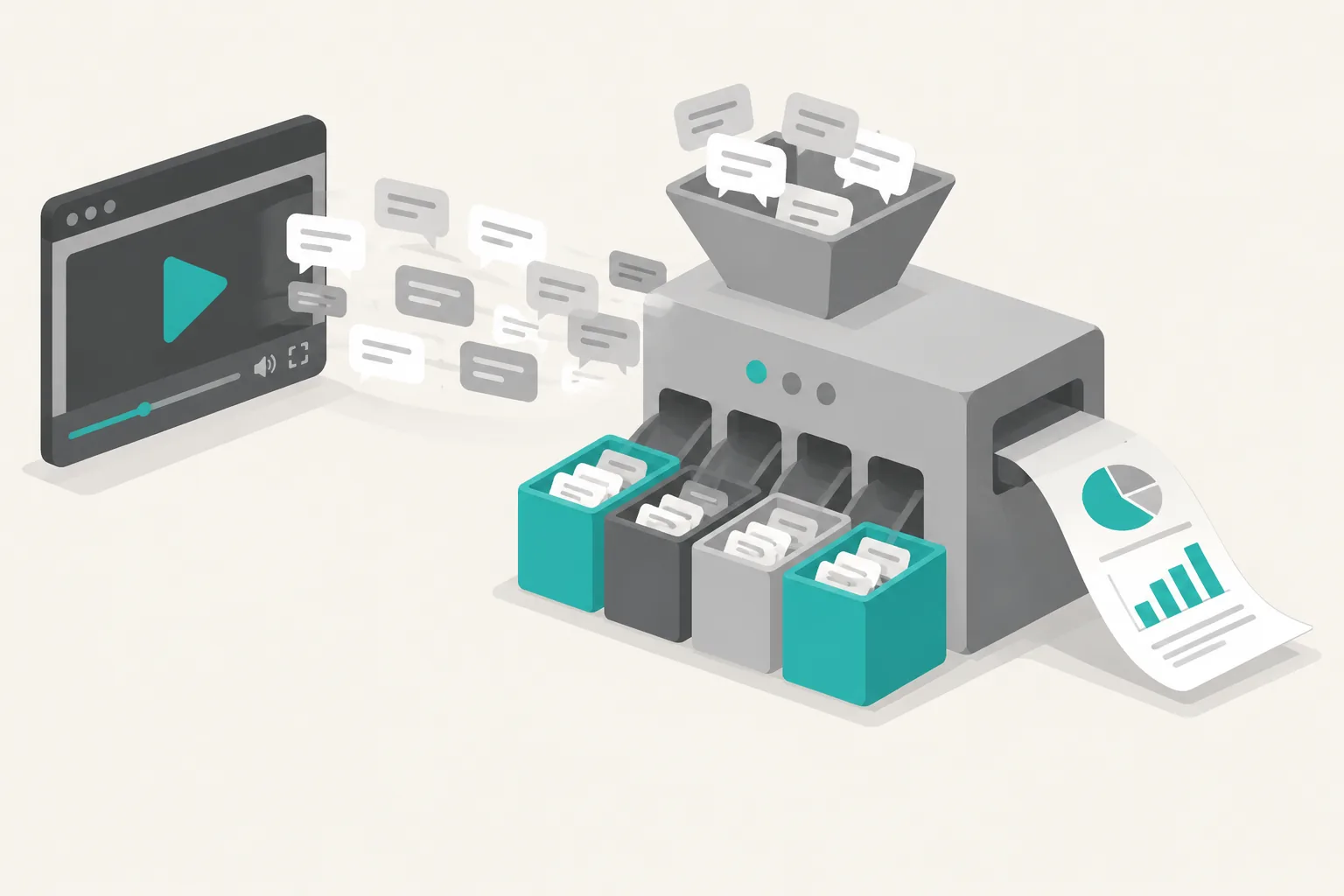
You can sell a monthly topic report to mid-size YouTube creators, but do not sell a comment summary. YouTube Studio already gives creators a free comment summary. Sell the questions that viewers of several similar channels ask again and again, and that nobody has answered in a video yet. Each finding must link back to the real comments.
On October 25, 2026, from 14:36 to 15:11 Singapore time (SGT, UTC+8), we tested this with EveryInfra on five public brand and institution channels. We made 53 paid calls for $0.029468 and got 921 comment rows and 83 live comments. From that test, one report for one client channel plus four similar channels costs about $0.05 of data. The real cost is the human check. Of the comments that simple keyword rules marked as questions, only 36% to 84% were requests that a next video can answer.
In this guide, a comment topic report is a monthly file for one creator. You collect the comments and replies under the last 30 days of videos on the creator's channel and on four similar channels. Simple rules mark the questions and requests. Then a person reads each marked comment, decides if it is a real request, and puts it in a topic group. The report ranks the three topics that are best for next month by count and by likes, with three source comment links for each. It tells the creator what viewers want, not how many views a video will get.


The sample: what the core page of a report shows
We did not use a personal creator channel as the sample, because we publish the sample here. We also removed every commenter's user name. All five channels are run by a brand or an institution, with 469,000 to 2,468,433 subscribers. Only Adafruit, Figma and Fermilab are in the "mid-size" band that this guide uses (100,000 to 1,000,000 subscribers). The other two are for comparison.
Before the calls, we wrote six criteria in our check file. Two of them have a pass line:
- Questions and requests are at least 10% of the unique top-level comments.
- One channel has at least three topic groups, each with at least three different real requests.
The results for each channel follow.
Test 1: Figma, a product tutorial channel where the comments are a list of requests
At 14:38 SGT we used the YouTube channel videos endpoint (youtube/user_posts) to list the recent videos of Figma (794,000 subscribers). For six of the videos we called the YouTube video details endpoint (youtube/video) and the YouTube Comments API (youtube/comments, sort: popular, limit: 100). The six videos had 241,270 views and 94 comments in total, which is 0.39 comments per 1,000 views. The comments endpoint returned 91 rows: 16 replies and 75 unique top-level comments.
Each call covered 83% to 100% of the comments on its video, so this is close to the full set.
Our rules marked 32 of the 75 comments as questions or requests (42.7%). After a human check, 27 were real requests (36.0%). So criterion 1 passes. Five topic groups have three or more real requests each, so criterion 2 passes:
- Connect to a real code base and native platforms: 6 requests, like-weighted score 36. Two examples: "How would you be able to point the agent to a specific section to produce a working prototype?" (about a huge code base) and "Does it generate Swift or Kotlin source?" Most of these are under the October 15 Code Layers video.
- AI credits and your own model: 6 requests, score 28. Viewers ask how many tokens one demo used and how to connect their own model. One viewer asks for more monthly AI credits for education seats.
- Design system guidelines: tutorials and best practices: 6 requests, score 18.
- Release dates and access: 5 requests, score 17. All of them say "I am on a paid plan and I do not see it. When can I use it?"
- Show format and sources: 3 requests, score 8.
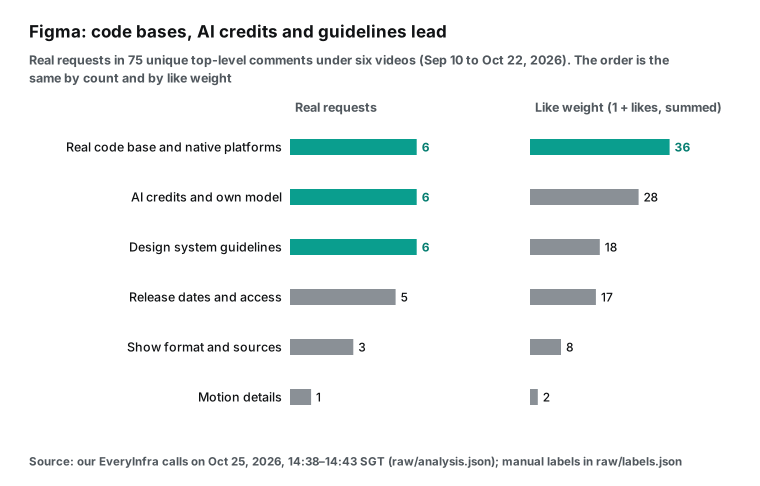
The ranking is the same by count and by like weight. For a product channel, this one page gives three topics for next month: "a full demo of Code Layers on a real project", "how AI credits are counted and how to use fewer", and "write a design system guideline from zero". One viewer already asked for the last one in plain words: "Please can you do a tutorial on how to easily create a design system using figma agent".
Test 2: Fermilab, a science channel where top comments contain almost no requests
Fermilab is the channel of the US Fermi National Accelerator Laboratory, with 831,000 subscribers. At 14:49–14:56 SGT we read three of its videos from the last two months. One of them, "How long until we find a theory of everything" (posted October 9), had 265,796 views and 772 comments. We read this video two times: once with popular and once with newest, 100 rows each. Only 15 top-level comments were in both sets. So the popular view and the newest view show almost two different groups of people.
The three videos gave 256 unique top-level comments. Our rules marked 45 (17.6%), which is above the 10% line. But the human check found only 16 real requests (6.3%), which is in the "weak" band.
The cause is that this comment section is mostly thanks and small talk. On the theory video, none of the ten comments with the most likes is a request. The first one is a joke that is not about the video (145 likes). Next come comments that say the host looks well and that it is good to see him again. The 16 real requests got 11 likes in total, which is 0.5% of the 2,165 likes on all top-level comments.
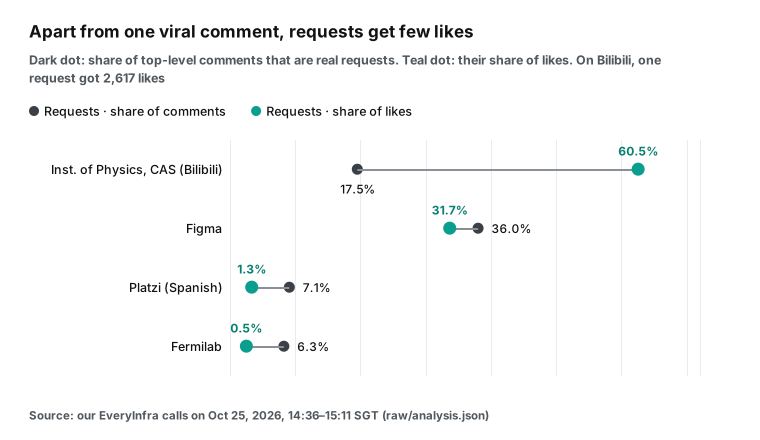
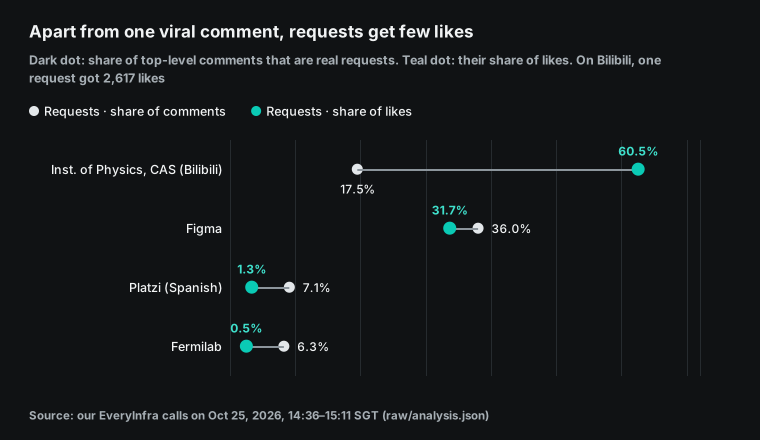
So if a report shows only "the ten comments with the most likes", the Fermilab page is empty. The requests are in the long tail, with few likes.
The requests are also spread out. Only two groups have three real requests: "the host's return and the upload rate", and "details and uses of the quantum sensor test". So criterion 2 fails.
But some topics come back again and again if you also count opinions and rhetorical questions: "how much energy, and how many years" (6 comments), "will AI make the search for a theory of everything shorter" (5), and "where did the antimatter go, and how do we tell" (2). Like weight also changes the order here. "Production feedback (music over the voice)" has only one request, but that comment has 5 likes, so it moves up to second place by weight. So for this channel, weight changes the ranking (criterion 3).
For a science channel, write the report in a different way. Do not write "what viewers want". Write "which idea viewers do not understand yet", and give the sample size. On the theory video, one call covers 13% of the comments, and two calls cover 26%. Criterion 5 says that you must label such a page as a sample.
Test 3: Adafruit, a counterexample
Adafruit sells electronic parts and has 469,000 subscribers. Its four recent videos that we read had 21,580 views and 18 comments. We found 14 unique top-level comments. Only one was a request: "Will the Learn Guide show how the knob is read in CircuitPython, with a rotary encoder?" A brand channel with mostly short demos and product clips does not give enough comments for a monthly report. Our recall check also found one missed request in this small set: "You should make a RP2350 version".
Our Spanish article covers the fourth channel, the Latin American online school Platzi, in detail. One result from it is useful here too. One Platzi video had 5,124,393 views but only 36 comments, which is 0.007 comments per 1,000 views. A large view count does not mean a useful comment section. Our Chinese article covers the fifth channel, on Bilibili, where live comments (danmaku) with time stamps gave more signal than the comment section.
Why a person must check the rules
Each "real request" number above comes from a human check. The rules, the labels and the script are in the raw files of this test (analysis.py, labels.json), so you can do the count again. The check showed two problems.
First, the precision of the rules is very different from channel to channel. The rules look for question marks and for words such as "how" and "can you". Of the marked comments, these shares were real requests: Figma 84.4%, Platzi 51.4%, the Bilibili channel 46.7% and Fermilab only 35.6%. A science comment section has many rhetorical questions, jokes and personal theories. One example: "How long till we have a theory of everything? It depends on how long the current batch of physicists are still employed." It has a question mark, but it is not a request.
Second, the rules miss requests. For each channel, we took up to 20 comments that the rules did not mark, with a fixed random seed. Then we counted the real requests in that sample. From these counts, the estimated recall of the rules is about 85% on Bilibili, 76% on Figma, 60% on Fermilab and only 35% on Platzi. Most missed requests are commands without a question mark, for example "You should make a RP2350 version" and "Make us a Figma Book Store already".
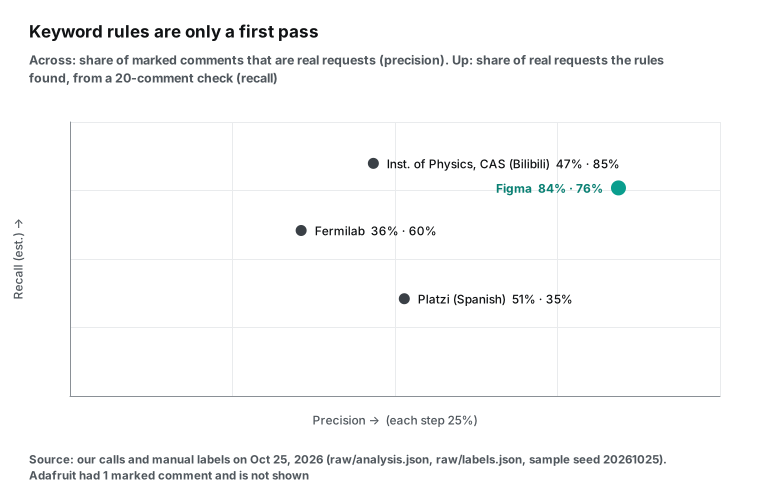
These two results set the shape of the business: the data costs almost nothing, but a person must read the comments. Researchers found this a long time ago. In 2013, Madden and two co-authors read 66,637 YouTube comments by hand. They built a scheme with 10 main types and 58 subtypes, and one type is questions and answers (Journal of Documentation). A 2017 thesis at Louisiana State University studied the comments on coding tutorial videos to help creators understand what their viewers need (LSU thesis). Both studies built the categories by hand first, and only then tried to automate.
What YouTube already gives creators for free
Before you set a price, look at what a creator can already get at no cost. This is the main competitor of this business.
Comment tools in YouTube Studio (we read the help pages on October 25):
- Comment summary. On the Studio comments page, "Get summary" uses AI to summarize how viewers reacted and to show feedback for future videos. Videos with too few comments do not show this option (YouTube Help: Review and reply to comments).
- Search comments by meaning. On the same page, an AI search accepts text such as "questions about my equipment". It also shows suggested topics such as "Excitement and enthusiasm" and "Negative feedback", and a "Find similar comments" action. The help page gives the limits: desktop Studio only, topic search covers only the last 90 days, and you cannot search by user.
- Comment topics. On videos with large comment sections, viewers of the mobile app can see AI "Topics". Creators cannot turn them off (YouTube Help: Explore comment topics).
- Ask Studio. The help page says that it can answer questions about "comments on your videos" and can suggest video ideas. It "only uses data from your channel and audience", and other creators cannot ask questions about your channel (YouTube Help: Ask Studio).
- Research. On September 23, at Made on YouTube, YouTube announced new Insights and Research pages that help creators "discover outlier videos to spark your next piece of content" (YouTube Blog; overview). A YouTube strategist who saw the test version reported a "watched by my viewers" filter (LinkedIn post, second-hand). A third party cannot get that data.
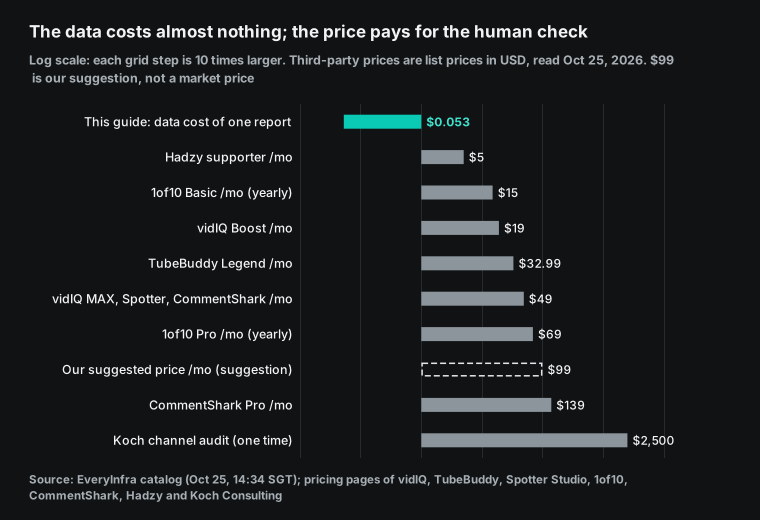
Public prices of third-party tools (read October 25, in USD):
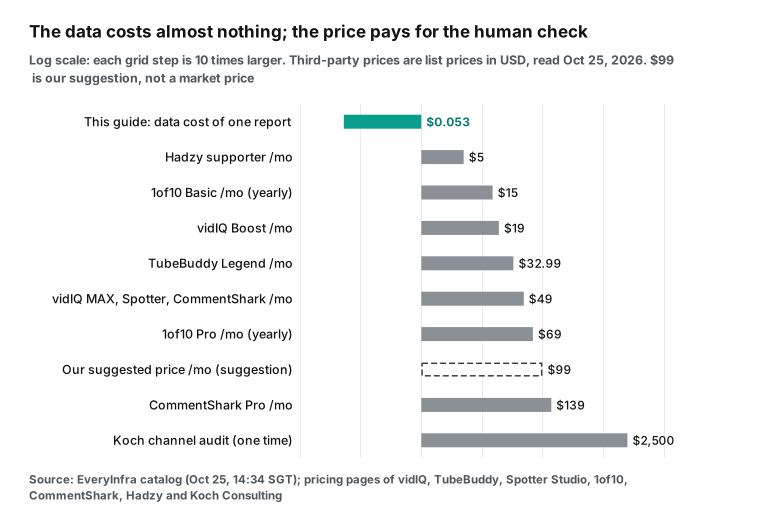
- vidIQ: Boost $19 per month or $199 per year; MAX $49 per month or $468 per year. These are US list prices, and "local pricing may vary" (pricing).
- TubeBuddy: Pro $4.50 per month, or $3.60 per month on a yearly plan (free plan page). Legend $32.99 per month, or $26.39 per month on a yearly plan (Legend page). The same page says that a channel with 50,000 or more subscribers counts as a business and cannot buy these individual plans. It must use the custom Enterprise plan.
- Spotter Studio: $49 per month, or $299 per year. It works only for English content and for creators in the US, Canada, the UK, Australia and the EU (pricing).
- 1of10: Basic $15 per month and Pro $69 per month, both billed yearly (pricing).
- CommentShark (comment automation): Starter $19, Creator $49 and Pro $139 per month. Its feature table includes sentiment analysis, AI tags and daily, weekly or monthly report emails (pricing).
- Hadzy (comment search and export): free, with an optional $5 per month supporter plan. Its own comparison page says: for your own channel, use YouTube Studio first. Hadzy covers "videos you do not own" and exports (comparison).
- Human consulting: the Koch Consulting channel audit for businesses is a fixed $2,500 (service page).
What this report cannot do: it does not know "who else my viewers watch". It has no audience retention curve, no held-for-review comments and no Studio data.
What it can do: it reads the comments of the client and of similar channels together. Each finding has a count, a like weight and links to the source comments, so the client can check it. It compares each month with the month before. If a creator only wants to know "what people say under my own videos", YouTube Studio is free and is enough. For that creator, this business does not work.
Who buys
We set the buyer as a channel with 100,000 to 1,000,000 subscribers, for three reasons:
- Tools fit this band badly. TubeBuddy does not sell its individual plans above 50,000 subscribers. Spotter works only in English. The free YouTube tools look only at your own channel.
- The comment volume in this band needs help, but a person can still read it. Figma (794,000 subscribers) had 94 comments on six videos. The creator can read them alone. Fermilab (831,000) had 772 comments on one video. Its top comments did not show the requests.
- These channels already earn money, and the entry bar is going up. Today, the YouTube Partner Program needs 1,000 subscribers. It also needs 4,000 watch hours in 12 months or 10 million Shorts views in 90 days (YouTube Help). On August 10, YouTube said that the program has more than 3 million creators. From February 1, 2027, new applicants need 8,000 hours or 20 million Shorts views (YouTube Blog). A channel above 100,000 subscribers has a budget and has pressure to choose the next video.
The channel type is more important than the subscriber count. In this sample, product and software tutorials come first (Figma, 36% real requests). Next are experiments and science (Bilibili 17.5%, Fermilab 6.3%). Then come opinion and commentary (Platzi 7.1%). Short demos come last (Adafruit, too few comments).
Data cost of one monthly report
We read the capability catalog on October 25 at 14:34 SGT (the pricing page is the final reference). Each YouTube capability that we used costs $0.000556 per call, and one comments call returns up to 100 rows. One monthly report covers one client channel plus four similar channels, with up to six videos per channel from the last 30 days:
- Each channel: 1
user_postscall + 6 videos × (1videocall + 1 popular comments call + 1 newest comments call) = 19 calls. - Five channels: 95 calls × $0.000556 = $0.05282.
- At setup, use the YouTube search endpoint to find similar channels. Three calls cost $0.0017.
Empty results and failed calls are free. In this test, the user_posts calls for Crehana, Khan Academy Español and Prusa returned 0 rows, and one Adafruit video returned 0 comments. All of these were refunded. To check a bill line by line, see failure refunds and reconciliation.
The real cost is time. In this test, each busy channel (Fermilab, Platzi) gave about 250 unique top-level comments, and the rules marked 14% to 18% of them. Five such channels give about 1,250 comments and 175 to 225 marked ones.
Add a recall check of 20 comments per channel, and a person must read about 300 comments per month. At 10 seconds per comment (our assumption, not a measurement), this is about 50 minutes. Writing the report takes about one more hour.
What to charge
We suggest $99 per channel per month. This includes four similar channels and a 30-minute call to explain the report. The first report is free. This is a suggestion, not market data. The reasons:
- It is more than self-serve tools. The main plans of vidIQ, Spotter, 1of10 and CommentShark cost $19 to $69 per month. They give data and AI suggestions, but they do not read each comment for you, and they do not read the comments of similar channels.
- It is much less than human consulting. A one-time channel audit costs about $2,500.
- The data cost does not change the margin. $0.053 is 0.05% of $99. With about two hours of work, the rate is about $45 to $50 per hour.
Delivery steps: one cycle per month


- Set the scope at sign-up. Write the client channel and the four similar channels into the contract. Find the similar channels with the search endpoint, filter them by subscriber count, and choose them with the client.
- List the videos. Use
youtube/user_postswithsince. Note: we sentsince: 2026-09-25, but Fermilab still returned a video from August 31. Also,posted_atwas a relative time such as "2w ago". So callyoutube/videofor each video and filter by its exact publish time. - Get the comments. Make one popular call and one newest call. On a video with many comments, one call covers only 13% to 26%, so label the result as a sample.
- Remove duplicates and clean. Remove duplicates by comment
id, and remove the channel's own replies. Keep the rows withis_replyset to true in a separate list: they show where the talk happens. On Platzi, 182 of 436 rows (41.7%) were replies. If you read only top-level comments, you miss that talk. - Check by hand. Ask only "can a next video answer this?" Praise, jokes and opinions do not count. Then read 20 unmarked comments to find misses, and put the recall in the report.
- Write the report. Give three topics. For each topic, give the count and the like weight. Add three source comment links without user names, and the cases where the topic does not apply.
Run the same data from code or an AI client
Get the popular comments of one video (the key is a placeholder):
curl -s https://api.everyinfra.com/api/v1/social \
  -H "Authorization: Bearer <API Key>" \
  -H "Content-Type: application/json" \
  -d '{"platform":"youtube","action":"comments","params":{"url":"https://www.youtube.com/watch?v=pLmLi-pJ604","sort":"popular","limit":100}}'
The fields that the report uses. We checked each one against response_fields in the catalog:
youtube/commentsreturns 9 fields:id(the key for duplicates),text,author_name(the user name; the report does not use it, so you can drop it when you store the rows),like_count(for the like weight),reply_count,posted_at(in this test, a relative time such as "8 days ago"),is_reply,reply_to_id(the ID of the parent comment) andplatform.youtube/videoandyoutube/user_postsshare 25 fields. The report usesid,title,view_count,comment_count(to calculate coverage),posted_at(an exact time in the video details),author_follower_count(subscribers) andis_comments_disabled.
In Claude Code, first create a key with the quickstart. Then add the remote MCP server:
claude mcp add --transport http everyinfra https://api.everyinfra.com/mcp \
  --header 'Authorization: Bearer ${EVERYINFRA_API_KEY}'
Then say: "Use everyinfra_call_api to get the popular and newest comments of each video from the last 30 days on these five channels. Remove duplicates by id and mark the questions and requests. List them in a table so I can check each one." Do not skip the last part.
Errors and charges. We saw all of these in this test, and none of them was charged:
- No key: 401
missing_key. - Wrong value (
sort: top): 422invalid_value, with the allowed valuesnewestandpopular. - Wrong parameter name (
sortt): 422unknown_param, withdid_you_mean: ["sort"]and the listurl,limit,since,sort. - More than 10 calls per minute: 429
rate_limited, withretry_after: 8. - A synchronous call longer than 85 seconds: 503
timeout, with advice to use"mode":"async". With async, the same Platzi video returned its 100 comments. - Empty result: 200,
charged: false, reasonempty_result_refunded.
To let a script or an AI fix its parameters after an error, see how to handle API errors. To see why YouTube comment replies can go missing, see two-level pagination and completeness checks. The YouTube Data API documentation also says that a comment thread "does not necessarily contain all replies" (YouTube Data API reference).
How to find the first clients
- Make 10 free one-topic samples. Choose 10 target channels and read the comments of their last two videos. This is about 7 calls per channel, or $0.004. Each sample gives one topic and three source comments. Send it to the creator. The total data cost is less than $0.05.
- Build the list from data. Use the search endpoint to get videos in one niche. Keep the channels with an
author_follower_countof 100,000 to 1,000,000. Then sort them by comments per 1,000 views. In this sample, this number goes from 0.007 (one Platzi video with 5.1 million views) to 2.90 (the Fermilab theory video), a difference of more than 400 times. Do not start with the channels that have few comments. - Use the public business contact. Use the business email in the channel description. Do not send mass messages in comments. In the US, a sales email must follow the CAN-SPAM Act. It must not have a false header or subject, and it must show that it is an ad. It must give a valid postal address and a way to opt out. You must honor an opt-out within 10 business days. Each email that breaks the law can cost up to $53,088 (FTC compliance guide).
- Work with editors and channel managers. They have regular clients, and they need a reason for each next topic. You can sell the report to them per copy, under their brand.
When this business does not work
- The client only wants to read their own comments. The YouTube Studio comment summary and AI search are free. Ask Studio also answers "what do my comments say".
- The channel has few comments, or the comments are mostly opinions. In this test, Adafruit had 14 top-level comments and one request. On Platzi, only 7.1% of comments were real requests. If a channel has fewer than 15 to 20 real requests per month, sell a quarterly report or a one-time audit.
- The client wants to know "who else my viewers watch". Only the platform has audience overlap data.
- Bots fill the comment section. On October 24, a Chinese tech outlet reported many AI accounts that post automatic comments on Bilibili tech videos (MyDrivers, via Sina Finance, second-hand). Remove such accounts before you count, or a whole topic group can be written by machines.
- GIF-only comments. Text rules cannot read a comment that has only a GIF. Count these comments separately.
- Platform terms and personal data. The YouTube Terms of Service do not allow access "using any automated means (such as robots, botnets or scrapers)", except for public search engines or with written permission. They also do not allow you to collect information that identifies a person, such as user names, without permission. Write only topics and counts in the report, and do not store user names. This is the minimum. Ask a lawyer in your country before you sell this. This guide is not legal advice.
Recent changes (September and October 2026)
- September 23: YouTube announced new Insights and Research pages, A/B tests and a test of AI comment moderation (YouTube Blog; Reuters; Tubefilter). For you: the platform is building idea tools into Studio. Your report must sell what the platform does not show: the comments of similar channels and a human check.
- October 8: YouTube confirmed a test ("Channel Search") that put creator data into the Studio of some brand channels. The test is for brand channels only (Tubefilter, second-hand, with a YouTube statement). For you: brands can see more data, so a "compare similar channels" tool from YouTube may come later.
- October 14: YouTube started a slow rollout of GIFs in comments (9to5Google, second-hand). For you: text rules miss GIF-only comments, so count them separately.
- October 20: the YouTube Culture & Trends team released a report on generative AI. Of the uploaders aged 14 to 44 in the survey, 72% use AI on videos or images (YouTube Blog). For you: creators already get AI topic ideas. Your report must be different: each finding links back to real comments.
- October 22: YouTube said that the dislike button moves into a menu only on a creator's own videos. The full dislike counts stay in Studio (9to5Google, with a YouTube statement). For you: more negative feedback is visible only inside Studio. Public comments are the only feedback that a third party can read.
- The Shorts bonus program is an invite-only pilot in specific regions. It pays a bonus for the number of Shorts per month and for valid views. It will grow in 2027 (YouTube Help: Shorts bonus program, read October 25). For you: invited creators must post a set number of Shorts each month, so they need topics faster.
Questions people ask
How do you know what your audience wants on YouTube? This is a top Google autocomplete phrase (from the search suggestions we pulled on October 25). Start with the free tools: the Studio comment summary and the AI comment search show your own comments. To see what viewers of similar channels ask, read their comments too, and check each marked comment by hand. In our test, only 36% to 84% of marked questions were real requests.
Is vidIQ worth it? This is also an autocomplete phrase for "vidiq vs tubebuddy". We did not test vidIQ, so we cannot rate it. Its public price is $19 to $49 per month, and it gives trends, ideas and an AI coach. It does not read the comments of other channels for you, one by one.
Can I turn off YouTube comment topics? "youtube disable comment topics" is an autocomplete phrase for "youtube comments topics". The YouTube help page says no: "At this time, you can't turn off comment topics." If you remove the comments under a topic, the topic goes away (YouTube Help).
Related reading
- Platform pages: YouTube Scraper API, Bilibili Scraper API
- Capability pages: YouTube Comments API, YouTube video details, YouTube channel videos
- Related guides: Data API side business: dental review briefs, creator data due diligence, how to turn review data into a paid product
References
- Figma, Design with Code Layers (YouTube video), 2026-10-15, https://www.youtube.com/watch?v=ukY9Dvwm7Gc
- Fermilab, How long until we find a theory of everything (YouTube video), 2026-10-09, https://www.youtube.com/watch?v=pLmLi-pJ604
- Madden, Ruthven, McMenemy (2013). A classification scheme for content analyses of YouTube video comments. Journal of Documentation 69(5), https://www.emerald.com/jd/article-abstract/69/5/693/204541
- Elizabeth Poché, Analyzing User Comments on YouTube Coding Tutorial Videos, master's thesis, Louisiana State University, 2017, https://repository.lsu.edu/cgi/viewcontent.cgi?article=5453&context=gradschool_theses
- YouTube Help, Review and reply to comments (computer), read 2026-10-25, https://support.google.com/youtubecreatorstudio/answer/9482367?hl=en
- YouTube Help, Explore comment topics, read 2026-10-25, https://support.google.com/youtube/answer/14239105?hl=en
- YouTube Help, Learn about Ask Studio in YouTube Studio, read 2026-10-25, https://support.google.com/youtube/answer/16291691?hl=en
- YouTube Blog, New tools to power your creation journey from start to finish, 2026-09-23, https://blog.youtube/news-and-events/made-on-youtube-new-tools-power-creation-journey/
- YouTube Blog, Innovation for the YouTube Era: What's new for viewers and creators, 2026-09-23, https://blog.youtube/news-and-events/innovation-youtube-era-made-on-viewers-creators/
- Mario Joos (LinkedIn), YouTube Studio launches its own experimental ideation tool, about July 2026, https://www.linkedin.com/posts/mariojooss_major-update-youtube-studio-launches-its-activity-7483621816926924800-pcFN
- vidIQ, Pricing & Plans, read 2026-10-25, https://vidiq.com/pricing/
- TubeBuddy, TubeBuddy Free, read 2026-10-25, https://www.tubebuddy.com/free/
- TubeBuddy, Legend, read 2026-10-25, https://www.tubebuddy.com/legend-2/
- Spotter Studio, Pricing, read 2026-10-25, https://www.spotterstudio.com/pricing
- 1of10, Pricing, read 2026-10-25, https://1of10.com/pricing
- CommentShark, Pricing, read 2026-10-25, https://www.commentshark.com/pricing
- Hadzy, Hadzy vs YouTube Studio AI Comment Search, read 2026-10-25, https://hadzy.com/compare/hadzy-vs-youtube-studio
- Koch Consulting, YouTube Channel Audit for Businesses, read 2026-10-25, https://kochconsulting.co/youtube-channel-audit
- YouTube Help, YouTube Partner Program overview and eligibility, read 2026-10-25, https://support.google.com/youtube/answer/72851?hl=en
- YouTube Blog, New opportunities to earn and changes to the YouTube Partner Program, 2026-08-10, https://blog.youtube/news-and-events/youtube-partner-program-updates-2027-new-opportunities-earn/
- EveryInfra, capability catalog
GET /api/v1/social/catalog, read 2026-10-25 14:34 SGT, https://api.everyinfra.com/api/v1/social/catalog - Google for Developers, CommentThreads (YouTube Data API), read 2026-10-25, https://developers.google.com/youtube/v3/docs/commentThreads
- US Federal Trade Commission, CAN-SPAM Act: A Compliance Guide for Business, read 2026-10-25, https://www.ftc.gov/business-guidance/resources/can-spam-act-compliance-guide-business
- MyDrivers (via Sina Finance), report on AI accounts in Bilibili comment sections (in Chinese), 2026-10-24, https://finance.sina.com.cn/stock/t/2026-10-24/doc-iniwhxps4912249.shtml
- YouTube, Terms of Service (version of 2023-12-15), read 2026-10-25, https://www.youtube.com/static?template=terms
- Reuters, YouTube unveils AI creator tools, shopping features at annual event, 2026-09-23, https://www.reuters.com/business/youtube-unveils-ai-creator-tools-shopping-features-annual-event-2026-09-23/
- Tubefilter, YouTube is using AI to tinker with everything, 2026-09-23, https://www.tubefilter.com/2026/09/23/made-on-youtube-2026-ai-personalization-creator-tools/
- Tubefilter, A YouTube test brought creator analytics directly into brands' YouTube Studio dashboards, 2026-10-08, https://www.tubefilter.com/2026/10/08/youtube-studio-creator-analytics-tool-discovery/
- 9to5Google, GIFs are showing up in YouTube, 2026-10-14, https://9to5google.com/2026/10/14/youtube-begins-rolling-out-gif-support/
- YouTube Blog, Inside YouTube's findings on generative video and personal creativity, 2026-10-20, https://blog.youtube/culture-and-trends/youtube-generative-ai-video-creativity-report/
- 9to5Google, YouTube says it isn't hiding the dislike button, 2026-10-22, https://9to5google.com/2026/10/22/youtube-dislike-button-ui-change-explanation/
- YouTube Help, YouTube Shorts bonus program, read 2026-10-25, https://support.google.com/youtube/answer/18336041?hl=en
Reference LF-24