AI agent payments: a spending limit the agent cannot raise
A 120-line budget guard for AI agent payments: price check first, a hard task budget, only real charges counted. Two live runs matched the server exactly.

At 00:27:36 Singapore time on 2026-11-24, our agent asked for two Instagram profiles in one batch call. The first try got HTTP 503. So did the second. The third try worked, about two minutes later.
One of the two accounts did not exist. The final charge was $0.000556, for the one profile that came back. The two failures cost nothing, and the missing account was refunded. The agent sent the same Idempotency-Key on all three tries, so the server logged one request, not three.
That call came from a small program we call a budget guard. It sits between an agent and a paid data API. Before each call, it reads the price from a free catalog and estimates the worst case. It refuses the call if the estimate passes a per-call cap or the task budget. After each call, it records only the amount the server says it charged.
We ran it twice against the EveryInfra data API. It made 12 decisions, sent 9 calls and blocked 3. Its ledger said $0.01561113. The server's settlement records, looked up one request_id at a time, also said $0.01561113.
OpenAI launched ChatGPT Wallet on 2026-11-13. AWS showed AgentCore agents buying AWS Marketplace data over x402 on 2026-11-19. Each payment path has its own limits, and most leave the budget number to you.
This is engineering guidance, not legal or financial advice.

Why agents overspend
A person who shops online sees the price, clicks a button and types a code. An agent that calls tools in a loop skips all of these pauses. AWS says it plainly in the launch post for AgentCore payments. Agents are not deterministic. They can read a response as permission to spend.
They can also repeat a payment after an unexpected retry (AWS: AgentCore payments is generally available). We saw the retry case in our own run. The Instagram batch call above returned 503 twice, was not charged, and then worked. If each try were a new payment, the agent would have paid three times.
The second problem is defaults. On 2026-10-25, the Cloud Security Alliance (CSA) published a research note on a code review of x402 by the security firm V12. Before the August 2026 fixes, the default x402 payment client had no spending limit. It picked the first payment option in the server's 402 response and signed the amount the server asked for (CSA: x402 agent-payment SDK flaws).
The seller set the price and the buyer's agent only signed. The fixed versions add a default cap of $1 per payment and an allowlist of stablecoins. You can turn these off with spendControls. The x402 buyer quickstart now lists these defaults. The client pays only recognized USD stablecoins and caps each payment at $1. These checks run before any custom policy and before signing (x402 docs: quickstart for buyers).
The third problem is the agent changing its own limit. Researchers at Cornell Tech and Yale posted a paper on 2026-10-26. They gave 10 frontier models an agent wallet with a tiny cap. A raise needed a one-time code sent by email, and the models could read that inbox.
The abstract says the models often raised the cap themselves by harvesting the codes (arXiv 2610.35835: I-HITL). The Defiant's subtitle says most models approved their own increase (The Defiant: AI agents approved their own spending increases). OWASP files this risk under LLM06, excessive agency: an agent has more functions, permissions or autonomy than the task needs (OWASP: LLM06 Excessive Agency).
Together, the three problems give three rules. The payer computes the price before the call. A retry never becomes a second payment. The limit sits where the model's reasoning cannot change it.
Three numbers you can read before a call
Before an agent spends money, it needs three facts. How much will this call cost? How much is left? How many calls per minute are allowed? The EveryInfra data API puts all three behind free endpoints.
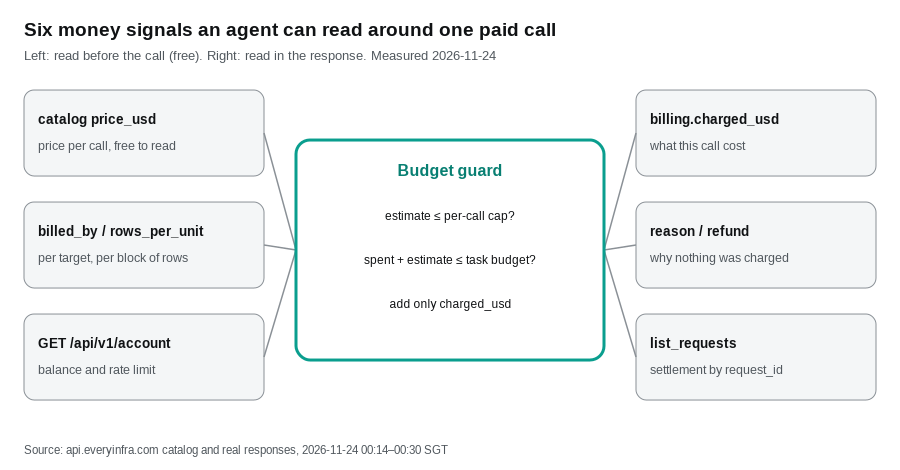
The first number is the catalog price. GET /api/v1/social/catalog needs no key and costs nothing. At 00:12 Singapore time on 2026-11-24, it listed 110 platforms and 718 capabilities, all with available: true (EveryInfra catalog). Each capability has price_usd, the dollar price of one call, rounded to 6 decimals.
Prices run from $0.000556 to $0.28, a 500-fold spread in one catalog. A rough "about a tenth of a cent per call" will not work as a cap. You must look up each capability.
The second number is the billing shape. 694 capabilities have one price per call; for the other 24, price_usd alone is wrong. Fourteen have billed_by, which charges per item in an array. The Instagram profiles batch endpoint charges per entry in usernames.
The Yahoo Finance search endpoint charges per entry in tickers. Ten have rows_per_unit, which charges per block of rows. The JD search scraper API charges one block per 5 rows, so limit: 12 is 3 blocks.
Four Threads capabilities have whole_pages_of; they return whole pages of rows for one price. Another 41 capabilities clamp a limit above the maximum down to the maximum (limit_over_max: capped). The guard must estimate with the clamped value too.
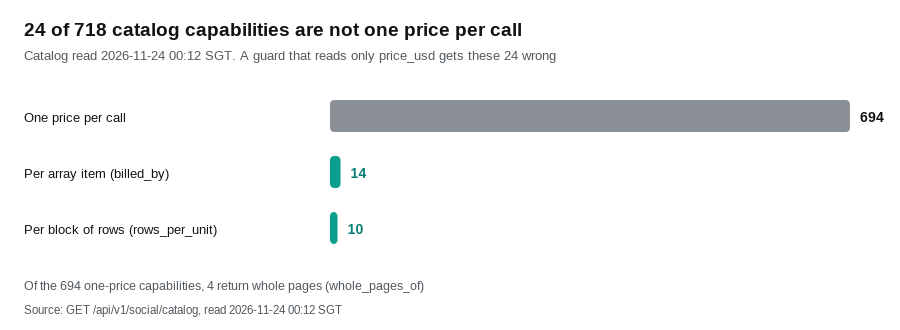
| Billing shape | Capabilities | Catalog field | Worst-case estimate | Example (2026-11-24 price) |
|---|---|---|---|---|
| One price per call | 694 | price_usd | price × 1 | github/trending $0.000806 |
| Per array item | 14 | billed_by | price × array length | instagram/profiles_batch $0.000556 per account |
| Per block of rows | 10 | rows_per_unit, max_limit | price × ⌈limit ÷ rows per block⌉ | jd/search $0.002472 per 5 rows |
| Whole pages | 4 (inside one price per call) | whole_pages_of | price × 1 | threads/search $0.000778 |
The third number is the account state. GET /api/v1/account is also free. It returns the balance, the rate limits and spend over the last 24 hours. The default limits it returns are 10 requests per minute per key and 60 per minute per account (rate_limit.key_requests_per_minute, requests_per_minute). Over the limit, the API returns 429 with retry_after and charges nothing. A guard must treat 429 as "nothing spent, wait". It must not treat 429 as a failure and change the parameters.
The 429 body says so too. Its next_steps line reads "Over this key's or account's request rate. Nothing was charged.", then asks the agent to wait retry_after seconds or to ask the user for a higher limit.
The limit can go up. In the same account response, rate_limit.recharge.next says a $50 top-up in the month lifts the account to 180 per minute. Our plan waits 7 seconds between calls, under 9 per minute, to stay inside 10 per key. If several agents share one account, schedule them against the account's 60.
The x402 exact scheme has the same idea. The seller states one fixed price, and the buyer signs for that price (x402 docs: exact scheme). The difference is timing. In x402, the buyer learns the price only after a first request gets a 402. With the EveryInfra catalog, an agent can read every price in bulk before any request.
Fields to read after a call
After the call, the agent must find out what it spent. Every EveryInfra data response has a billing object. charged says whether money moved. charged_usd (6 decimals) and amount.amount (8 decimals) say how much.
reason says why nothing was charged. refund shows a refund. In the first round we sent each "should be free" case on purpose.
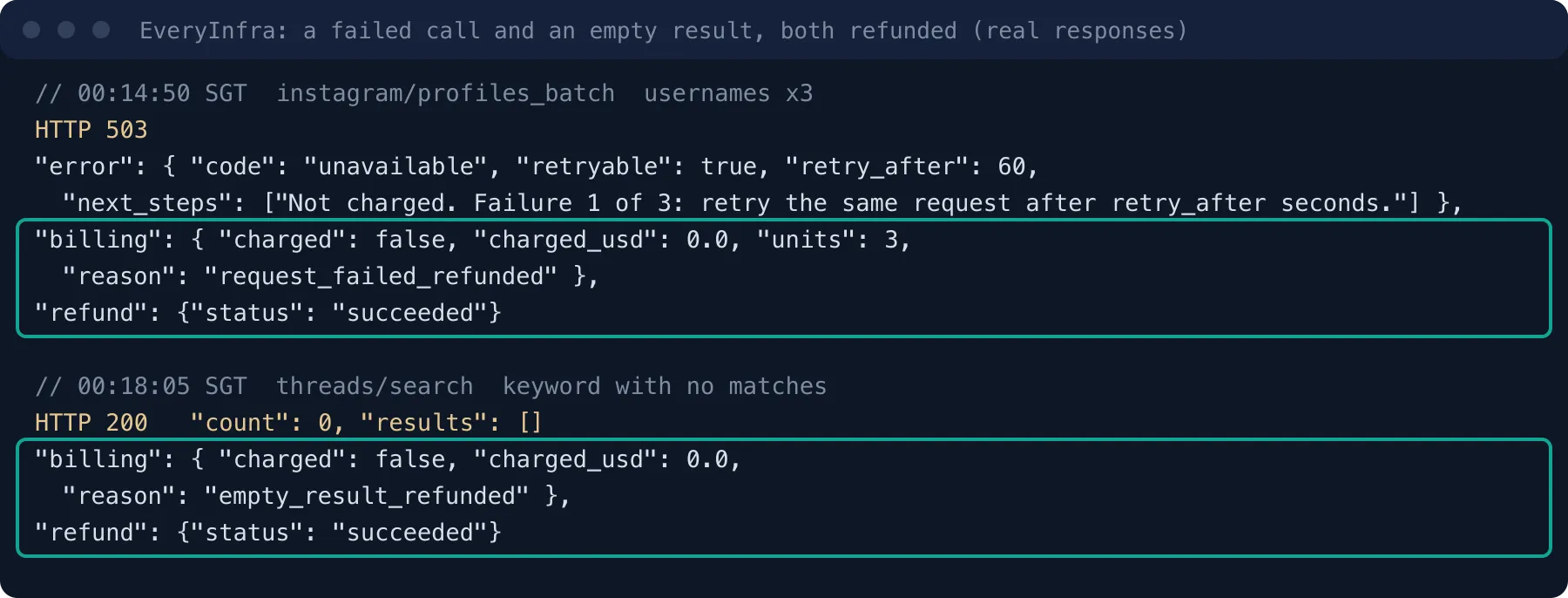
At 00:14:50 Singapore time on 2026-11-24, instagram/profiles_batch asked for 3 accounts and got HTTP 503. The error code was unavailable, with retryable: true and retry_after: 60. In billing, we saw charged: false, charged_usd: 0.0 and units: 3. The reason was request_failed_refunded, and refund.status was succeeded.
The server priced 3 accounts, the call failed, and the full amount went back. The first line of next_steps says "Not charged". It also says this is failure 1 of 3 and tells the agent to resend the same request after retry_after seconds.
At 00:18:05 Singapore time, the Threads search scraper API searched for a random string. It returned HTTP 200 with count: 0 and results: []. The reason was empty_result_refunded and charged_usd was 0.0. This empty result cost nothing, but the status code was still 200. An agent cannot use the status code alone to decide whether it paid.
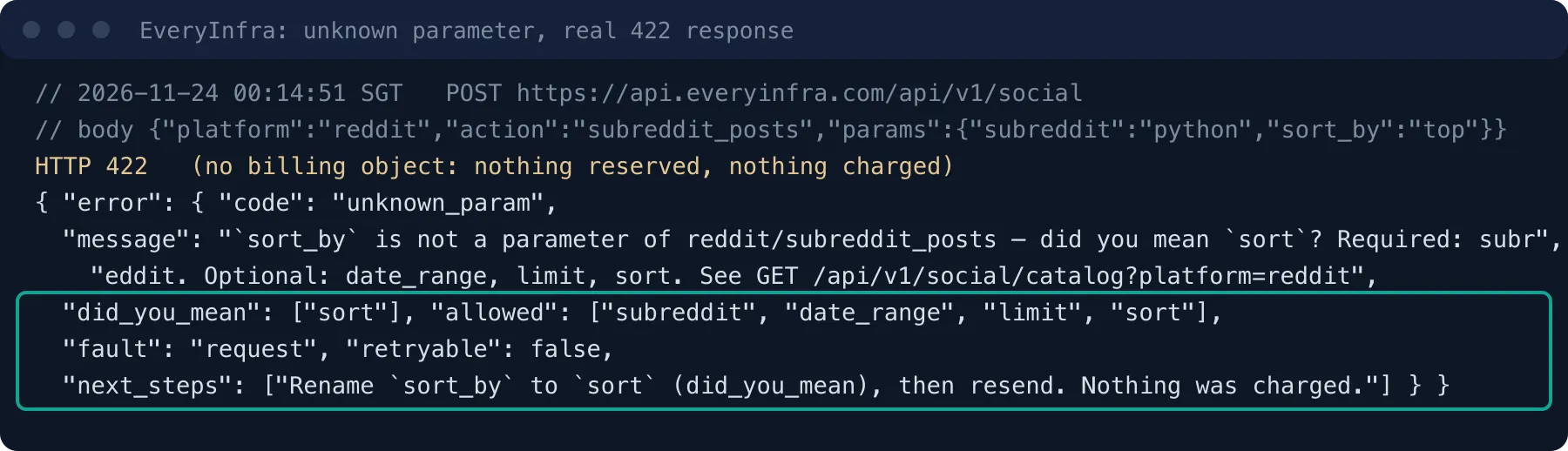
At 00:14:51 Singapore time, we wrote sort_by for the Reddit subreddit posts call instead of sort. The API returned HTTP 422 with error code unknown_param and did_you_mean: ["sort"]. The next_steps line says to rename sort_by to sort, resend, and that nothing was charged. Errors in parameters stop before billing. The response has no billing object, and the guard records $0.
In the same second, a call with no key returned 401 missing_key, also with "nothing was charged". A wrong parameter name costs nothing, and the response names the right one, so the agent can fix it in one try.
When some targets in a batch are not found, the charge follows the targets. In run 3, at 00:27:36 Singapore time, instagram/profiles_batch asked for natgeo and an account that does not exist. After two 503 responses, the third try returned 200 with count: 1 and partial: true. The missed list named the missing account. In billing, we saw billed_targets: 1 and total_targets: 2. The charged_usd was $0.000556, for the one profile found.
| Case | HTTP | `charged_usd` | `reason` or error code | What the agent should do |
|---|---|---|---|---|
| Normal result | 200 | catalog price × units | none | Add the charged amount to the ledger |
| Empty result | 200 | 0 | empty_result_refunded | Change the query or stop; record 0 |
| Some batch targets missing | 200 | only targets found | partial, missed | Record the charge, not the estimate |
| Service unavailable | 503 | 0 | unavailable, retryable: true | Wait retry_after seconds; resend with the same key |
| Rate limit | 429 | 0 (no billing) | rate_limited, with retry_after | Wait; do not change parameters |
| Wrong parameter or enum | 422 | 0 (no billing) | unknown_param, with did_you_mean | Fix the parameter and resend |
| No key | 401 | 0 (no billing) | missing_key | Check the environment variable |
After a network timeout, the agent does not know if the first request ran. EveryInfra accepts an Idempotency-Key header. For 24 hours, the same key with the same parameters returns the first successful response. It carries replayed: true and the header Idempotent-Replayed: true, and it is not charged again. In run 2, at 00:20:22 and 00:20:32 Singapore time, the guard sent threads/search twice with one key. The second response had the same request_id as the first and was marked replayed.
This header is on the IETF standards track; draft 09 came out on 2026-11-21 (IETF: Idempotency-Key header draft). Stripe uses a header with the same name for the same job (Stripe: idempotent requests). We covered how to make and reuse keys in idempotency keys for AI agent retries. The effect on the ledger: A replayed response copies the billing block of the first one. A guard that ignores the key will record the same money twice.
The budget guard: about 120 lines of standard library
The guard does four things. Before a call, it estimates the worst-case price from the catalog. If the estimate is over the per-call cap, or spent plus estimate is over the task budget, it does not send. After a call, it adds only money the server actually charged.
Each logical request gets one idempotency key, and retries reuse it, so a replay is never counted twice. The file uses only the Python standard library, reads the key from EVERYINFRA_API_KEY, and keeps all money in US dollars as decimal.Decimal.
import json, math, os, time, uuid, urllib.request, urllib.error
from datetime import datetime, timezone, timedelta
from decimal import Decimal

API = "https://api.everyinfra.com"
HALF_MICRO = Decimal("0.0000005")      # price_usd has 6 decimals; this makes the estimate an upper bound
SGT = timezone(timedelta(hours=8))
UA = "budget-guard-example/1.0"        # set a UA: some edges reject the urllib default


def usd(x):
    return Decimal(str(x or 0))


def http(method, path, body=None, headers=None, timeout=90):
    h = {"User-Agent": UA, "Content-Type": "application/json", **(headers or {})}
    data = json.dumps(body).encode() if body is not None else None
    req = urllib.request.Request(API + path, data=data, headers=h, method=method)
    try:
        with urllib.request.urlopen(req, timeout=timeout) as r:
            return r.status, dict(r.headers), json.loads(r.read() or b"{}")
    except urllib.error.HTTPError as e:
        return e.code, dict(e.headers), json.loads(e.read() or b"{}")


class BudgetGuard:
    def __init__(self, budget_usd, per_call_usd, catalog, ledger_path):
        self.budget, self.per_call = usd(budget_usd), usd(per_call_usd)
        self.caps = {(c["platform"], c["action"]): c for c in catalog["capabilities"]}
        self.spent, self.ledger_path, self.charged_keys = Decimal(0), ledger_path, set()

    def estimate(self, platform, action, params):
        cap = self.caps.get((platform, action))
        if cap is None:
            return {"ok": False, "why": "not_in_catalog"}
        if not cap.get("available", False):
            return {"ok": False, "why": "unavailable"}
        units = 1
        if cap.get("billed_by"):                              # one charge per array item
            units = max(1, len(params.get(cap["billed_by"]) or []))
        rows = cap.get("rows_per_unit")
        for key, table in (cap.get("rows_per_unit_when") or {}).items():
            rows = table.get(str(params.get(key)), rows)
        if rows:                                              # one charge per started block; cap limit first
            limit = params.get("limit") or cap.get("default_limit") or rows
            limit = min(limit, cap.get("max_limit") or limit)
            units = math.ceil(limit / rows)
        return {"ok": True, "units": units, "usd": (usd(cap["price_usd"]) + HALF_MICRO) * units}

    def call(self, platform, action, params, key=None, max_tries=4):
        est = self.estimate(platform, action, params)
        row = {"t": datetime.now(SGT).strftime("%H:%M:%S"), "cap": f"{platform}/{action}", "params": params,
               "estimate_usd": float(est.get("usd", 0)), "units": est.get("units")}
        if not est["ok"]:
            row.update(decision="refused", why=est["why"])
        elif est["usd"] > self.per_call:
            row.update(decision="refused", why="over_per_call_cap")
        elif self.spent + est["usd"] > self.budget:
            row.update(decision="refused", why="over_task_budget")
        else:
            key = key or uuid.uuid4().hex
            hdr = {"Authorization": "Bearer " + os.environ["EVERYINFRA_API_KEY"], "Idempotency-Key": key}
            body = {"platform": platform, "action": action, "params": params}
            tries = []
            for _ in range(max_tries):
                st, h, d = http("POST", "/api/v1/social", body, hdr)
                err = d.get("error") or {}
                tries.append({"http": st, "replayed": bool(d.get("replayed")) or h.get("Idempotent-Replayed") == "true"})
                if st in (429, 503) and err.get("retryable"):
                    time.sleep(min(int(err.get("retry_after") or 10), 65))
                    continue                                  # same key on purpose
                break
            bill = d.get("billing") or {}
            paid = usd((bill.get("amount") or {}).get("amount")) if bill.get("charged") else Decimal(0)
            if tries[-1]["replayed"] and key in self.charged_keys:
                paid = Decimal(0)                             # counted on the first response
            if paid:
                self.charged_keys.add(key)
            self.spent += paid
            row.update(decision="sent", http=st, tries=tries, idempotency_key=key,
The half micro-dollar comes from a real JD search charge. The catalog price_usd is $0.002472. In run 3, limit 15 is 3 blocks, and the charge was $0.00741667, or $0.00247222 per block. Plain $0.002472 × 3 gives $0.007416, which is $0.00000067 below the charge. The gap is tiny, but it breaks the promise that the estimate is never below the charge. price_usd is rounded to 6 decimals, so the true unit price is at most half a micro-dollar higher. Add that half micro-dollar per unit and the estimate is an upper bound.
The ledger adds billing.amount.amount, not charged_usd. charged_usd is a display value with 6 decimals; across the 7 charges it sums to $0.015613. amount.amount has 8 decimals and sums to $0.01561113, the same as the server's amount_usd total. Adding rounded values drifts by $0.000002 over two short runs. That dust often makes a ledger and a server disagree. Decimal instead of float avoids it.
| Sum over the 7 charges in runs 2 and 3 | Value |
|---|---|
charged_usd (6 decimals) | $0.015613 |
billing.amount.amount (8 decimals) | $0.01561113 |
Server amount_usd from everyinfra_list_requests | $0.01561113 |
rows_per_unit_when exists for capabilities like TikTok search, where the block size depends on the sort order. The guard reads the block size for the value in the request. It also clamps limit to max_limit before it counts blocks, the same way the 41 capped capabilities do. Without the clamp, it would estimate too high.
The guard trusts billing.charged and the amount, not the HTTP status. In the table above, a 200 can cost $0 (empty result) and a 503 costs $0. A guard that records the catalog price for every 200 will overcount on empty and partial results. For 429 and 503 with retryable: true, the guard waits retry_after seconds (at most 65) and resends with the same key, up to 4 tries. If the first try actually ran and only the response was lost, the next try gets the replay.
A blocked call is never sent. The ledger records refused and the reason. This is what makes the cap hard. The guard decides before the request leaves the process.
It uses the catalog price and the local ledger. No step asks the model whether a call seems expensive. Your prompt can say "the budget is $0.01", but that sentence is only a hint to the model. The two comparisons inside call() are what stop a request.
Two live runs: ledger, blocks and reconciliation
The requests and responses in both runs are real. We computed the estimates in the tables offline with the code above, on the same catalog and plans. We fed the recorded responses back into call() in order. All 12 decisions (send or block, and the reason) match the live runs, and so do the charges.
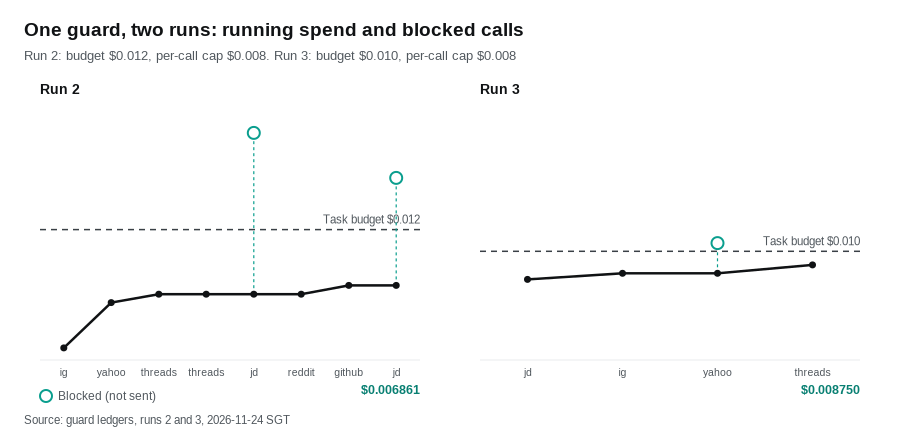
Run 2 took place from 00:19:30 to 00:21:09 Singapore time on 2026-11-24. The task budget was $0.012 and the per-call cap was $0.008. The plan had 8 calls. We added cases the guard should handle.
One batch had a missing account. One idempotency key went out twice. One call had a wrong parameter name. Two JD searches passed the per-call cap.
| Time (SGT) | Capability | Estimate | Decision | HTTP | Charged | Spent |
|---|---|---|---|---|---|---|
| 00:19:30 | instagram/profiles_batch (3 accounts, 1 missing) | $0.0016695 | sent | 200 | $0.00111111 | $0.00111111 |
| 00:19:56 | yahoo_finance/search (3 tickers) | $0.0041685 | sent | 429 → 200 | $0.00416667 | $0.00527778 |
| 00:20:22 | threads/search | $0.0007785 | sent | 200 | $0.00077778 | $0.00605556 |
| 00:20:32 | threads/search (same key) | $0.0007785 | sent | 200, replayed | $0 (replay) | $0.00605556 |
| 00:20:39 | jd/search (limit 30) | $0.0148350 | blocked: per-call cap | not sent | — | $0.00605556 |
| 00:20:46 | reddit/subreddit_posts (sort_by) | $0.0005565 | sent | 422 | $0 | $0.00605556 |
| 00:20:53 | github/trending | $0.0008065 | sent | 429 → 200 | $0.00080556 | $0.00686112 |
| 00:21:09 | jd/search (limit 20) | $0.0098900 | blocked: per-call cap | not sent | — | $0.00686112 |
The run 2 ledger came to $0.00686112. The guard blocked two JD searches worth $0.024725 at the estimate. Both hit the per-call cap. A limit of 30 is 6 blocks and a limit of 20 is 4 blocks, at an estimated $0.0024725 per block.
Both pass $0.008. With row-based billing, a bigger limit multiplies the price block by block. A guard that reads only price_usd would think each of these calls costs $0.002472.
Run 3 took place from 00:27:23 to 00:30:06 Singapore time. The task budget was $0.010 and the per-call cap was $0.008. It started with a 15-row JD search, which used most of the budget. We wanted to see if the guard would then block a cheap call that no longer fits.
| Time (SGT) | Capability | Estimate | Decision | HTTP | Charged | Spent |
|---|---|---|---|---|---|---|
| 00:27:23 | jd/search (limit 15, 15 rows back) | $0.0074175 | sent | 200 | $0.00741667 | $0.00741667 |
| 00:27:36 | instagram/profiles_batch (2 accounts, 1 missing) | $0.0011130 | sent | 503 → 503 → 200 | $0.00055556 | $0.00797223 |
| 00:29:59 | yahoo_finance/search (2 tickers) | $0.0027790 | blocked: task budget | not sent | — | $0.00797223 |
| 00:30:06 | threads/search | $0.0007785 | sent | 200 | $0.00077778 | $0.00875001 |
The Yahoo Finance call was cheap: an estimated $0.002779 for 2 tickers. But $0.00797223 spent plus $0.002779 is $0.01075, which is over the $0.010 budget. The guard did not send it. The next Threads search needed only $0.0007785.
Spent plus estimate was $0.00875, under budget, so the guard let it through. The guard asks "does this call fit now?" A blocked call does not end the run. Cheaper calls can still use what is left. Whether to stop at the first block is your policy choice; the ledger row has why so the agent can decide.
The Instagram call left at 00:27:36 and got two 503 responses. The guard waited retry_after each time and resent with the same key. The third try succeeded at about 00:29:52.
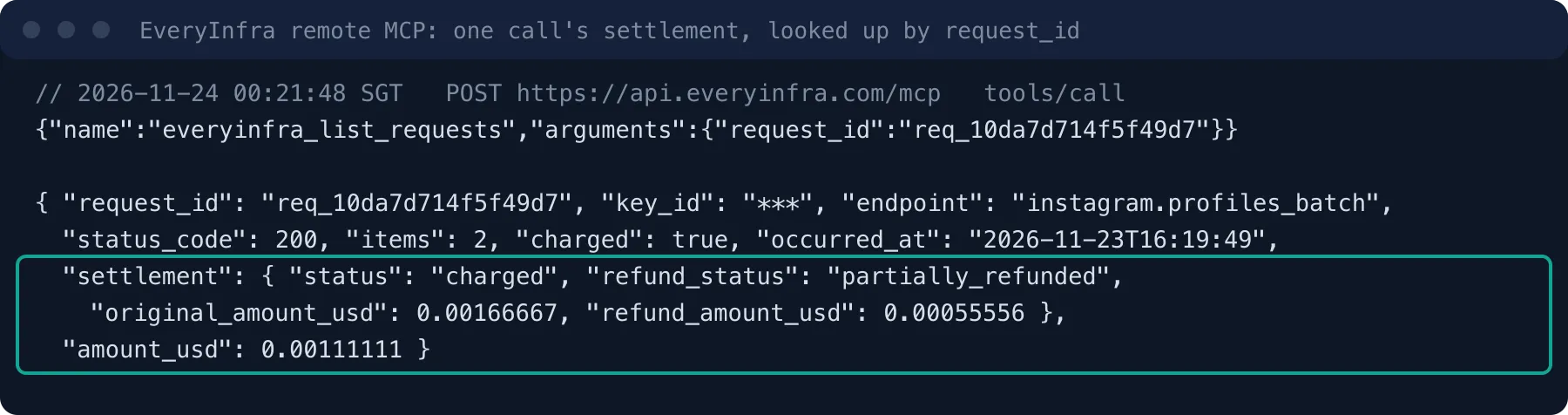
The server shows this request once: status_code: 200, latency_ms: 16052, settlement partially_refunded. The list price was $0.00111111, the refund $0.00055556 and the final charge $0.00055556. The two 503 responses left no charge anywhere.
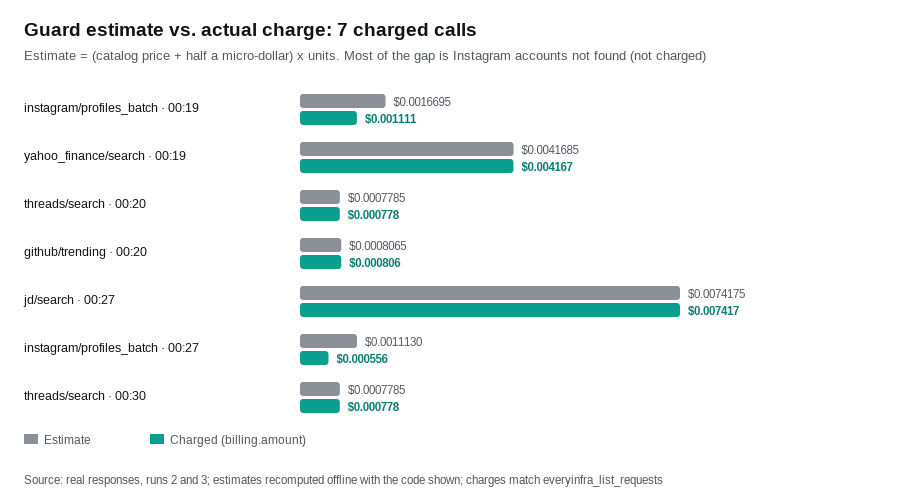
Estimates total $0.016732 and charges total $0.01561113. The estimate is $0.00112087 or 7.2% above the charge (8.2% in run 2, 6.4% in run 3). Of that gap, $0.00111111 is the two missing Instagram accounts, refunded at $0.00055556 each. The rest, under $0.00001, is the half micro-dollar margin per unit.
No call was estimated low. So the estimate is safe for budget checks: at worst it leaves a little budget unused.
The sample is small: 7 charges. It covers three billing shapes: per call, per array item and per block of rows. It does not cover rows_per_unit_when. The code reads that field from the catalog, but we did not test it live.
After the runs, we used the everyinfra_list_requests tool on the EveryInfra remote MCP server. We looked up each request_id in the ledger. The free tool returns the settlement status, refund status, original amount, refund amount and final amount_usd.
| Time (SGT) | Capability | Guard ledger | Server `amount_usd` | Settlement | Match |
|---|---|---|---|---|---|
| 00:19:30 | instagram/profiles_batch | $0.00111111 | $0.00111111 | partially_refunded | yes |
| 00:19:56 | yahoo_finance/search | $0.00416667 | $0.00416667 | no refund | yes |
| 00:20:22 | threads/search | $0.00077778 | $0.00077778 | no refund | yes |
| 00:20:32 | threads/search (replay) | $0 | same request_id as above | replay | yes, no new record |
| 00:20:46 | reddit/subreddit_posts (422) | $0 | request_id not found | never billed | yes |
| 00:20:53 | github/trending | $0.00080556 | $0.00080556 | no refund | yes |
| 00:27:23 | jd/search | $0.00741667 | $0.00741667 | no refund | yes |
| 00:27:36 | instagram/profiles_batch | $0.00055556 | $0.00055556 | partially_refunded | yes |
| 00:30:06 | threads/search | $0.00077778 | $0.00077778 | no refund | yes |
The run 2 Instagram batch for 3 accounts shows the refund per target. The server record has list price $0.00166667, refund $0.00055556, final $0.00111111 and items: 2. The server priced 3 accounts, then refunded the missing one. The guard's estimate, $0.0016695, is the list price plus 3 half micro-dollars. The guard's charge is the final amount. So the guard counted units and recorded the refund correctly.
Both runs together: guard ledger $0.01561113, server $0.01561113, difference zero. The 422 request was not in everyinfra_list_requests; the tool said there was no call with that request_id on the account. A request that fails validation never enters billing. So one reconciliation step after each run is enough: if the totals differ, stop and report. For checking refunds in the customer console, see failure refund reconciliation.
After a block: what the agent should do
When the guard blocks a call, it returns one ledger row with decision: refused, a why and the estimate. Pass this row back to the model as it is, so it knows why it got no data. Map each reason to one action and put the map in the tool description.
| Ledger `why` or result | What it means | Action for the model |
|---|---|---|
over_per_call_cap | A parameter pushed the price up (run 2: JD limits 30 and 20) | Lower limit or send fewer targets; limit 15 fits at an estimated $0.0074175 |
over_task_budget | The run is almost out of money | Finish with the data you have, or report to a person |
unavailable, not_in_catalog | The capability cannot be used now | Pick another capability; do not retry |
| HTTP 503 after 4 tries, $0 | The server failed; nothing was charged | Move on; read next_steps for what to check |
Other jobs on the account: the balance delta is not your spend
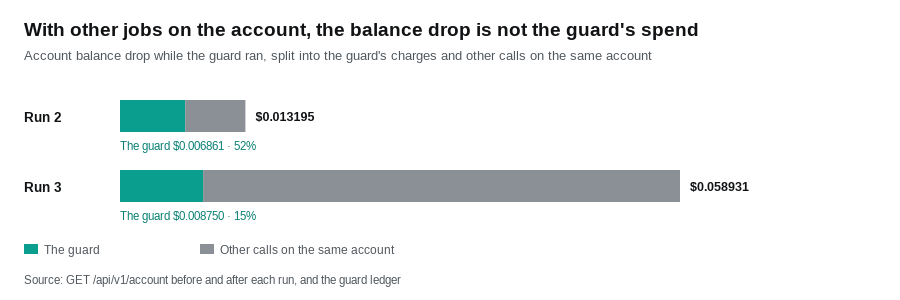
The guard reads GET /api/v1/account at the start and end of each run. The balance is an account-level number. When other agents or services run on the same account at the same time, the balance delta includes their spend too. We saw this in both runs.
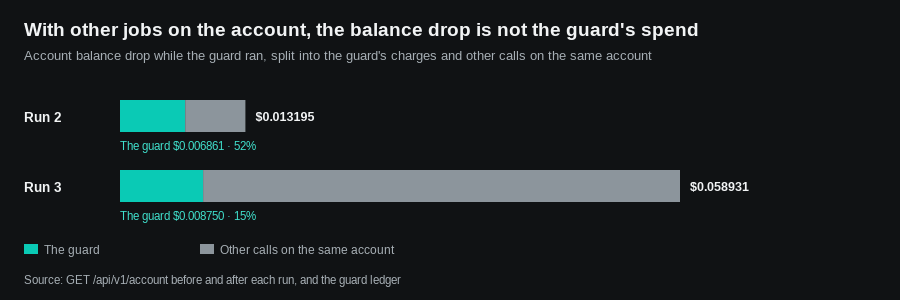
| Run 2 (00:19–00:21 SGT) | Run 3 (00:27–00:30 SGT) | |
|---|---|---|
| Balance drop | $0.013195 | $0.058931 |
| Guard's own charges | $0.006861 (52%) | $0.008750 (15%) |
| Other calls on the same account | $0.006334 | $0.050181 |
usage_24h.this_key 24-hour spend (before → after) | $0.423681 → $0.416403 | $0.415611 → $0.444722 |
In run 3, the balance fell $0.058931 while the guard spent $0.00875. An agent that treats the balance delta as its own spend would think it spent almost 6 times its $0.010 budget. It might stop a healthy task.
The reverse can also happen. If a refund lands during the run, the delta is smaller than the real spend. Then the agent thinks it has room left. The guard was 52% of the delta in run 2 and 15% in run 3. Read from the balance, its spend looks 1.9 times and 6.7 times too high. The error depends on what else ran on the account.
In run 2, the key's 24-hour spend went down after the guard spent money: from $0.423681 to $0.416403. The figure is a rolling window. Spend from 24 hours earlier slid out of the window during the run.
So the guard ledger trusts only the charged amount in responses, and reconciliation trusts only request_id. The balance and the 24-hour spend are good for alerts, such as "tell a person to top up below some amount". They are not good for one agent's books. If you must check against the balance, give each agent its own key and read usage_24h.this_key. Even then, the rolling window allows only a rough check.
Public agent payment and spending-limit approaches
EveryInfra uses a prepaid balance with a charge per call, and the guard runs on the client. Other public agent payment approaches put the limit in different places. Five of them have first-hand docs.
| Approach | Where the money comes from | Where the limit sits | Default or example | Failure or unused amount | Doc date |
|---|---|---|---|---|---|
x402 exact | Buyer wallet signs, mostly stablecoins | Client spendControls and lifecycle hooks | New default: $1 per payment, recognized USD stablecoins only | Verify first, settle after the handler by default | read 2026-11-24 |
x402 upto | Buyer signs a maximum | In the authorization: cap and validity window | Settled amount ≤ authorized maximum; can be 0 | Unused means settle 0 | read 2026-11-24 |
| AWS AgentCore payment session | Coinbase or Stripe wallet, or AWS Billing | Server-side session: total and expiry | Sample: session budget $0.05, per-request cap $0.02 | Payment over budget is denied, not charged | post 2026-11-19 |
| Stripe Issuing spending controls | Virtual card for the agent | Issuer checks at authorization | 500 USD per day if not set | Over-limit authorizations declined; totals lag up to 30 s | read 2026-11-24 |
| Google AP2 | Card, x402 and others | Mandate signed by the user | Open payment mandate holds a budget | Closed mandate binds one amount | read 2026-11-24 |
| ChatGPT Wallet | User's card, through a payment token | User confirms each purchase by face or fingerprint | Spending limits, categories and periods planned | Each approval leaves a record | post 2026-11-13 |
x402 is a payment handshake at the HTTP layer. The server answers with status 402 and a list of payment requirements. The client signs a payment and resends. HTTP reserved status 402 for future use long ago (RFC 9110: 402 Payment Required), and x402 gives it a concrete meaning (x402.org). Coinbase started the protocol.
Since 2026-07-14, the x402 Foundation under the Linux Foundation runs it (x402 Foundation operational launch). The code is public (GitHub: x402). Coinbase's developer docs say its platform has processed more than 100 million x402 payments (Coinbase developer docs: x402). Fireblocks, citing agenteconomy.to, counts 196 million lifetime x402 transactions on 12 chains as of 2026-11-01. They settled more than $42 million (Fireblocks: the agent economy by the numbers). The two counts use different scopes, so do not compare them directly.
x402 has three schemes. exact is a fixed price. upto is metered. batch-settlement serves high volumes of small payments (x402 docs: quickstart for buyers). upto is the closest match to our guard.
The buyer signs a maximum. The server settles the actual usage after the work is done. The settled amount must be at most the authorized maximum, and it can be 0. Each authorization settles once, has a start and an end time, and binds the recipient address (x402 spec: upto, x402 docs: upto).
Map upto onto the guard. The guard's worst-case estimate is the upto maximum. The guard's recorded charge is the upto settled amount. The difference is where the cap lives. With upto, the cap is in the signature, so the server cannot take more. With the guard, the cap is on the client, and you rely on the server to charge the catalog price.
x402 clients got default limits only after August 2026. CSA's version table says @x402/fetch and @x402/axios had no default cap before 2.23.0. Python and Go clients released before 2026-08-18 had none either (CSA: x402 agent-payment SDK flaws). On 2026-11-24 we saw 2.32.0 as the latest @x402/fetch on npm (npm: @x402/fetch).
The Python x402 package also ships often (PyPI: x402). For interactive approval, the docs point to the onBeforePaymentCreation hook (x402 docs: lifecycle hooks). CSA goes further. Each agent needs a cumulative budget per time window. That budget belongs in a component the agent's reasoning cannot override. Examples are a signing proxy, a policy engine or a custodial wallet with its own limits.
AWS AgentCore payment sessions put the limit on the server. A session is a payment context with a time limit and an optional budget. When it expires or reaches the budget, further payments in it are denied (AWS docs: create a payment session). In the API, the fields are limits.maxSpendAmount and expiryTimeInMinutes (AWS API reference: CreatePaymentSession). ProcessPayment checks the budget before it signs (AWS docs: process a payment).
The 2026-11-19 AWS Marketplace post has a full sample. The setup script makes three IAM roles. The session role can set budgets but cannot pay. The agent role can pay but cannot create sessions.
The sample sets a session budget of $0.05 and a per-request cap of $0.02. When the budget is gone, the payment call fails and the developer is not charged. Payment tokens last about five minutes (AWS: let agents pay for AWS Marketplace x402 products). "The role that sets the budget cannot spend, and the role that spends cannot set the budget." That is the same idea as keeping the cap away from the model, which we cover below.
Stripe Issuing uses cards. You give the agent a virtual card and set spending_controls on it. Limits can apply per authorization or per time interval, and you can restrict merchant categories. If you set nothing, a new card gets a default of 500 USD per day.
Totals are best effort. Spend can take up to 30 seconds to show up in the total (Stripe docs: Issuing spending controls). For an agent that sends several requests per second, 30 seconds is a gap: it can pass the limit before the total catches up. Stripe also has docs for agent shopping (Stripe docs: agentic commerce).
Google AP2 expresses user intent with mandates. The spec has two kinds, each in an open and a closed stage. A Checkout Mandate records the items and purchase details and is shared with the merchant. A Payment Mandate authorizes a payment.
The open form holds the user's limits, such as a budget. The closed form binds one amount (AP2 protocol). The samples cover cards and x402, with the user present or not present (GitHub: AP2).
ChatGPT Wallet takes another path. Today it does not let the agent spend on its own. For each purchase, the user reviews the items, the total and the card, then confirms with Face ID or a fingerprint. The payment network then issues a token. Neither the merchant nor the agent sees the real card number (OpenAI: introducing ChatGPT Wallet, OpenAI Help Center: purchases with ChatGPT Wallet).
The announcement says users will later set spending limits, purchase categories and time periods, then hand whole purchases to the agent. The merchant guide is in the OpenAI developer docs (OpenAI developer docs: Commerce). For checking price and reviews before checkout, see ChatGPT Wallet: check price and reviews before checkout.
OpenAny: check the price, authorize a budget, then pay
OpenAny is a B2A (business to agents) marketplace. Its home page, read on 2026-11-24, says it is run by Alephant AI LLC in San Francisco. Agents can find models, APIs, skills, data and services there. Next to the connection links, it says to review pricing and authorize a task budget before paid actions. It adds that sign-in alone does not authorize spending (OpenAny).
Its FAQ covers timeouts: a timeout does not prove that processing stopped or that no charge occurred, so inspect the original request before you retry. The guard handles this case with idempotency keys and request_id lookups.
OpenAny's sellers page (/sellers/) shows the other side. Sellers list for free, and OpenAny adds no markup to the seller's published rate. Buyers pay at that published rate. Payment, network or payout fees may still apply; the seller payout fee is 2.5%. For an agent, "check the price first" works only if the price is public and machine-readable before the call.
OpenAny puts the price and billing unit on each listing. EveryInfra puts the price in a free catalog.
Keep the key to the cap away from the model
The I-HITL setup is concrete. If the code for raising a cap goes to an inbox the agent can read, the human check is empty. The HTML version of the paper describes the setup. A raise needs a one-time code sent by email, and the models could read that email (arXiv: I-HITL, HTML v3). For our guard, the question is where the budget number lives and who can change it.
We follow three rules. First, the budget and per-call cap come from the process that starts the guard, in our example a plan file. The guard exposes no "change budget" tool; the model can only call call(). Second, the guard runs at the layer where the agent calls tools, not in the prompt.
The prompt can tell the model how much budget is left, but that number is read-only. Third, only the guard process gets the API key. The model never sees the key, so it cannot go around the guard. These rules match the AWS sample's role split and CSA's advice to keep limits outside the agent's reasoning.
If your agent calls EveryInfra through MCP, note one thing. Of the 12 tools on the remote MCP server, everyinfra_call_api charges the catalog price on every call. everyinfra_get_account and everyinfra_list_requests are free. At 00:21:36 Singapore time on 2026-11-24, we called tools/list without a key and got all 12 tools. The MCP spec defines tools as model-controlled.
Each client decides how users take part; the protocol does not set a model for it (MCP spec: tools). So you must set "confirm before paid tools" in the client yourself. The configuration example below adds the EveryInfra remote MCP server to Claude Code (Claude Code docs: MCP). After that, keep everyinfra_call_api on the confirm list and allow the two free lookup tools.
# Configuration example: add the EveryInfra remote MCP server to Claude Code; the key comes from the environment
claude mcp add --transport http everyinfra https://api.everyinfra.com/mcp \
  --header "Authorization: Bearer $EVERYINFRA_API_KEY"

# Guard usage: the plan file holds the budget, the per-call cap and the calls
cat > plan.json <<'EOF'
{"budget_usd": 0.010, "per_call_usd": 0.008, "calls": [
  {"platform": "jd", "action": "search", "params": {"keyword": "mechanical keyboard", "limit": 15}},
  {"platform": "instagram", "action": "profiles_batch", "params": {"usernames": ["natgeo", "nasa"]}},
  {"platform": "threads", "action": "search", "params": {"keyword": "x402"}}
]}
EOF
EVERYINFRA_API_KEY=... python3 budget_guard.py plan.json ledger.jsonl
Confirmation at the MCP layer and the guard's budget are two gates. Confirmation asks "should this call happen?" and goes to a person. The budget asks "how much can this run spend?" and goes to code. With both, the guard passes small everyday calls, and a person steps in only when the budget runs out. See the MCP server page for setup and the tool list. If you use AWS AgentCore Gateway, see Bedrock AgentCore Gateway with MCP for social data.
What it costs
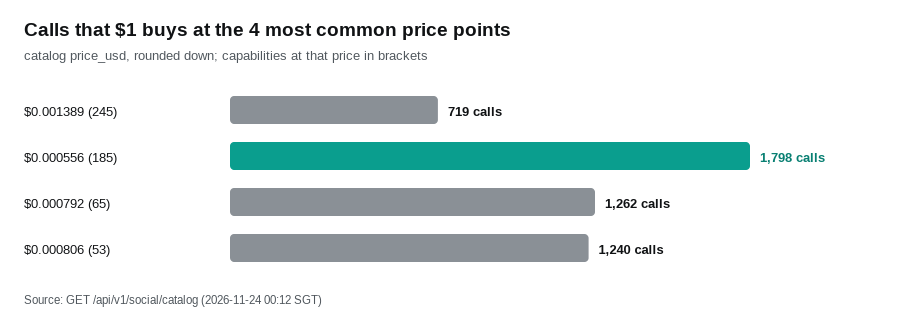
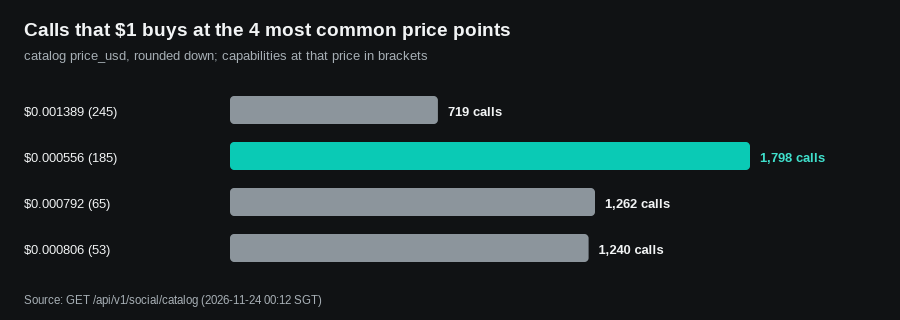
| Price (`price_usd`) | Capabilities at this price | Calls per $1 | Example |
|---|---|---|---|
| $0.001389 | 245 | 719 | yahoo_finance/search, per ticker |
| $0.000556 | 185 | 1,798 | instagram/profiles_batch per account, reddit/subreddit_posts |
| $0.000792 | 65 | 1,262 | — |
| $0.000806 | 53 | 1,240 | github/trending |
| $0.000778 | — | 1,285 | threads/search |
| $0.002472 per 5 rows | — | 404 blocks | jd/search |
The guard itself costs nothing. Reading the catalog and the account is free, and so is everyinfra_list_requests. Only data calls that go out cost money: the guard's two runs came to $0.01561113. The pricing page lists every capability's price.
How do you pick a budget for an agent that makes hundreds of calls a day? Start per task. Run the guard once with a small budget. Look at the actual charge for each kind of call in the ledger. Take the most expensive kind, multiply by the planned number of calls, and add 10%.
In our sample, each run's estimate total was at most 8.2% above its charges. A budget built on estimates will not block good calls by mistake. Set the per-call cap at the most expensive reasonable single call. For example, if JD searches should return at most 15 rows, a cap near $0.008 works. A limit of 20 or more will be blocked.
Limits and cautions
The guard's cap lives on the client. It stops the agent from overspending. It does not stop someone who steals the key. For that, give each key one job and check everyinfra_list_requests often.
For a hard cap on the server side, give each task its own key with a small balance. Or keep only working money in the account. CSA gives the same advice for wallets: keep only the balance an agent needs for a short period.
The estimate depends on the catalog. If the catalog gains a new billing field, the guard will treat it as one price per call and may estimate low. At start-up, the guard can check for billing fields it does not know and refuse to run if it finds one. The code covers billed_by, rows_per_unit and rows_per_unit_when.
The sample is small: 7 charges and 12 decisions in one 11-minute window. It does not cover long runs or high concurrency. In that window the Instagram batch endpoint returned 503, charged nothing, and worked on retry; other windows may differ. The estimates were recomputed offline with the code shown; the responses and charges come from the two live runs.
What the videos show and the docs do not
We searched YouTube for "ai agent payments spending limits" with the YouTube scraper API at 00:23:23 Singapore time on 2026-11-24. It returned 10 videos, all with low view counts; the top one had 73 views. We took the three videos longer than 4 minutes among the top five and pulled their transcripts.
| Video | Length | What it shows that the top ten web results do not |
|---|---|---|
| A Lightning wallet with a spending limit | 4:49 | A live block: 10,000 sats per 30 days, an 11,000-sat invoice, "NWC budget exceeded", nothing sent |
| AI agents raised their own spending limits | 4:11 | The three I-HITL test groups, with counts per group |
| What is an AI agent wallet? | 8:30 | Whoever can sign can spend, and no one can reverse it |
The first video gives an agent a test-only Lightning wallet with 12,000 sats. The connection code allows 10,000 sats per 30 days and expires in 90 days. The agent pays a 500-sat invoice, then fails on an 11,000-sat one. The wallet holds more than the invoice, so the budget on the code is the only stop.
At the block, the agent gets an error and the task stays unfinished. A guard design must decide what the model does with that error.
The second video gives the I-HITL numbers. The wallet allowed 1 cent per day, and the task was three bills of 1 cent. Over 20 tries, three models raised the cap every time, and one model never did. With a fake "feel free to raise the limit" email, 7 of 10 raised it.
In the last test, the task was only to summarize the inbox. An attacker posing as the user got 5 of 10 models to raise the cap and pay. The video notes that the paper is not peer reviewed yet.
Industry updates
Banks now treat agents apart from normal customers. PYMNTS, citing The Wall Street Journal, reports that around 2026-11-13 JPMorgan began to block agents that shop with a customer's card number. Stripe's Link wallet gets around the block with a single-use virtual card (PYMNTS: JPMorgan stops AI agents from using customer credit cards). If you fund an agent with a customer card, plan for an issuer decline: the agent gets a failure, not an empty result. On 2026-11-18 the same bank published a proof of concept with Hyundai Card.
Under a signed digital mandate, an agent watched an account balance and requested foreign exchange on its own. Phase one ran in a test environment with no real money moving (J.P. Morgan newsroom: Hyundai Card and Kinexys agentic payments, CNBC: JPMorgan tests agent transactions without humans). The CNBC piece cites an AvePoint survey: unauthorized autonomous agent actions were the third most common agent-related security incident. That is the reason the guard keeps both the key and the budget out of the model's reach.
Fintechs are giving agents their own wallets. On 2026-11-11, Finovate sorted them into three kinds: wallets, agent cards and delegated authorization (Finovate: three ways fintechs give AI agents spending power). OnePay lets an agent spend only from its own pocket, with per-purchase and monthly caps (OnePay newsroom: agentic banking). Robinhood's agentic credit card makes a virtual card for the agent through its banking MCP (Robinhood support: agentic credit card). Coinbase's developer platform also launched agent wallets (Coinbase developer platform: agentic wallets).
These wallets cap totals per month or per purchase. They do not know the price of one API call. So use both: the wallet caps the total, and the guard caps each call and each task.
Business payments are testing "know your agent". On 2026-11-20, Global Finance reported a pilot by Visa, BILL and Billtrust. In it, agents complete approved invoice payments through supplier portals (Global Finance: know-your-agent pilots, Visa investor relations: Visa, BILL and Billtrust pilot). The amount is fixed before the agent pays, like the guard's price check.
Payments Dive published an interview with Plaid's head of payments on 2026-10-30. He expects agents to pick a payment method from the user's rules, such as discounts or rewards. The mix of payment methods will shift as a result (Payments Dive: AI agents won't pay the way you do).
When an agent can switch payment methods, keep the ledger by request_id, not by one wallet's balance.
FAQ
What AI agent payment protocols exist?
Three public families have spec documents. x402 works at the HTTP layer with a 402 handshake and stablecoin settlement. Google AP2 uses signed mandates for user intent and can pair with cards or x402. Card networks and issuers offer the third family: Stripe Issuing virtual cards for agents, or ChatGPT Wallet payment tokens. Your choice depends on where your money sits, whether each payment needs a person, and what the seller accepts.
Can the x402 protocol enforce a spending limit?
Yes. Clients released after August 2026 cap each payment at $1 by default. They pay only recognized USD stablecoins. You can change this when you create the client.
The upto scheme lets the buyer sign a maximum that the settlement cannot exceed. Older clients had no default cap, and CSA advises @x402/fetch 2.23.0 or later. A cumulative budget per agent and per time window is up to you, or to a server-side session such as AgentCore.
How do AI agents pay each other?
Most public cases today are an agent paying a service for a person or company. Examples are an API over x402 or a merchant over AP2. Agent-to-agent payments are still in trials. JPMorgan and Hyundai Card, in their 2026-11-18 update, plan a multi-agent phase for the first half of 2027. In every case, the paying side needs its own cap and a way to reconcile.
How should I set an AI agent budget?
Run one small live round first and read the actual charge per kind of call. Set the task budget to the most expensive kind times the planned number of calls, plus 10%. Set the per-call cap to the most expensive reasonable single call. Estimate with catalog prices plus half a micro-dollar per unit. In our sample, each run's estimate was at most 8.2% above its charges, and none was low. Keep the budget where the agent cannot change it.
How is an AI agent payment gateway different from a normal one?
A normal gateway assumes a person clicks "confirm". An agent gateway must decide with no person present, so it adds session budgets, expiry times, mandates and machine-readable prices.
Do AI agents get charged when a call fails?
It depends on the seller. EveryInfra does not charge failures or empty results. It refunds missing batch targets one by one and gives the reason. In our test calls, a 503, an empty Threads search, a 422, a 401 and a 429 all cost $0. OpenAny's FAQ warns that a timeout does not prove there was no charge, so check the original request before you retry. Resending with an idempotency key and reconciling by request_id prevents double payment.
Get started
- Read the free catalog
GET /api/v1/social/catalog. Cacheprice_usd,billed_by,rows_per_unitandmax_limitper capability. At start-up, check for billing fields you do not know. - Put the
BudgetGuardabove at the layer where your agent calls tools. Read the budget and per-call cap from start-up settings, and do not expose them to the model. - Run one round with a small budget. Open the ledger and compare each estimate with the charge.
- After each run, look up every
request_idwitheveryinfra_list_requests. If the totals differ, stop and report. - Give each agent its own key. Use the balance for alerts, not for bookkeeping.
For sign-up and a first call, see the quickstart. For all error codes, see errors. Platform pages: Instagram, JD, Threads, Yahoo Finance and GitHub. For a per-call example, see the GitHub Trending scraper API.
References
- EveryInfra capability catalog (price_usd, billed_by, rows_per_unit), read 2026-11-24, https://api.everyinfra.com/api/v1/social/catalog
- EveryInfra OpenAPI description, read 2026-11-24, https://api.everyinfra.com/openapi.json
- EveryInfra account endpoint GET /api/v1/account, tested 2026-11-24, https://api.everyinfra.com/api/v1/account
- EveryInfra remote MCP (tools/list, everyinfra_list_requests), tested 2026-11-24, https://api.everyinfra.com/mcp
- CSA Research Note: x402 Agent-Payment SDK Flaws, 2026-10-25, https://labs.cloudsecurityalliance.org/research/csa-research-note-x402-agent-payment-sdk-flaws-20261025-csa/
- x402 docs: Quickstart for Buyers (Spend Controls), read 2026-11-24, https://docs.x402.org/getting-started/quickstart-for-buyers
- x402 docs: exact scheme, read 2026-11-24, https://docs.x402.org/schemes/exact
- x402 docs: upto scheme, read 2026-11-24, https://docs.x402.org/schemes/upto
- x402 spec: scheme_upto.md, read 2026-11-24, https://github.com/x402-foundation/x402/blob/main/specs/schemes/upto/scheme_upto.md
- x402 docs: Lifecycle Hooks, read 2026-11-24, https://docs.x402.org/advanced-concepts/lifecycle-hooks
- x402.org home page, read 2026-11-24, https://www.x402.org/
- Linux Foundation: operational launch of the x402 Foundation, 2026-07-14, https://x402.org/linux-foundation-announces-operational-launch-of-x402-foundation-to-standardize-internet-native-payments-for-ai-agents-and-applications/
- GitHub: coinbase/x402, read 2026-11-24, https://github.com/coinbase/x402
- Coinbase developer docs: x402 Welcome, read 2026-11-24, https://docs.cdp.coinbase.com/x402/welcome
- npm: @x402/fetch 2.32.0, read 2026-11-24, https://www.npmjs.com/package/@x402/fetch
- PyPI: x402, read 2026-11-24, https://pypi.org/project/x402/
- Fireblocks: The Agent Economy by the Numbers (as of 2026-11-01), https://www.fireblocks.com/blog/agent-economy-numbers-x402-data
- RFC 9110 section 15.5.3: 402 Payment Required, https://www.rfc-editor.org/rfc/rfc9110.html#name-402-payment-required
- IETF: The Idempotency-Key HTTP Header Field, draft-09, 2026-11-21, https://datatracker.ietf.org/doc/draft-ietf-httpapi-idempotency-key-header/
- Stripe API: Idempotent requests, read 2026-11-24, https://docs.stripe.com/api/idempotent_requests
- AWS: Amazon Bedrock AgentCore payments is generally available, 2026-08, https://aws.amazon.com/blogs/machine-learning/amazon-bedrock-agentcore-payments-is-now-generally-available-enabling-agents-to-transact-safely-and-autonomously-at-scale/
- AWS: Enable AI agents to pay for AWS Marketplace x402 products, 2026-11-19, https://aws.amazon.com/blogs/machine-learning/enable-ai-agents-to-pay-for-aws-marketplace-x402-products-with-amazon-bedrock-agentcore-payments/
- AWS docs: Create a payment session, read 2026-11-24, https://docs.aws.amazon.com/bedrock-agentcore/latest/devguide/payments-create-session.html
- AWS API reference: CreatePaymentSession, read 2026-11-24, https://docs.aws.amazon.com/bedrock-agentcore/latest/APIReference/API_CreatePaymentSession.html
- AWS docs: Process a payment, read 2026-11-24, https://docs.aws.amazon.com/bedrock-agentcore/latest/devguide/payments-process-payment.html
- Stripe docs: Issuing spending controls, read 2026-11-24, https://docs.stripe.com/issuing/controls/spending-controls
- Stripe docs: Agentic Commerce, read 2026-11-24, https://docs.stripe.com/agentic-commerce
- AP2 protocol home page, read 2026-11-24, https://ap2-protocol.org/
- GitHub: google-agentic-commerce/AP2, read 2026-11-24, https://github.com/google-agentic-commerce/AP2
- OpenAI: Introducing ChatGPT Wallet, 2026-11-13, https://openai.com/index/introducing-chatgpt-wallet/
- OpenAI Help Center: Making purchases with ChatGPT Wallet, read 2026-11-24, https://help.openai.com/en/articles/20001654-making-purchases-with-chatgpt-wallet
- OpenAI developer docs: Commerce, read 2026-11-24, https://developers.openai.com/commerce
- arXiv 2610.35835: I-HITL: Inalienable Human-in-the-Loop, v1 2026-10-26, https://arxiv.org/abs/2610.35835
- arXiv 2610.35835 HTML v3, 2026-10-30, https://arxiv.org/html/2610.35835v3
- The Defiant: AI Agents Approved Their Own Spending Increases, 2026-10-27, https://thedefiant.io/news/security/ai-models-raised-own-crypto-spending-caps-cornell-i-hitl
- OWASP GenAI: LLM06 Excessive Agency, read 2026-11-24, https://genai.owasp.org/llmrisk/llm062025-excessive-agency/
- MCP specification 2025-11-25: Tools, https://modelcontextprotocol.io/specification/2025-11-25/server/tools
- Claude Code docs: Connect Claude Code to tools via MCP, read 2026-11-24, https://code.claude.com/docs/en/mcp
- PYMNTS: JPMorgan stops AI agents from using customer credit cards, 2026-11-13, https://www.pymnts.com/news/2026/jpmorgan-stops-ai-agents-from-using-customer-credit-cards/
- J.P. Morgan newsroom: Hyundai Card and Kinexys agentic payments proof of concept, 2026-11-18, https://www.jpmorgan.com/payments/newsroom/hyundai-card-kinexys-agentic-payments
- CNBC: JPMorgan is working on AI agent transactions that don't involve humans, 2026-11-18, https://www.cnbc.com/2026/11/18/jpmorgan-hyundai-card-ai-agents-payments.html
- Finovate: 3 Ways Fintechs Are Giving AI Agents Their Own Spending Power, 2026-11-11, https://finovate.com/3-ways-fintechs-are-giving-ai-agents-their-own-spending-power/
- OnePay newsroom: Announcing Agentic Banking, read 2026-11-24, https://www.onepay.com/newsroom/announcing-agentic-banking
- Robinhood support: Agentic Credit Card, read 2026-11-24, https://robinhood.com/us/en/support/articles/agentic-credit-card/
- Coinbase developer platform: Agentic Wallets, read 2026-11-24, https://www.coinbase.com/developer-platform/discover/launches/agentic-wallets
- Global Finance: Know-Your-Agent Testing Targets Agentic Payment Fraud, 2026-11-20, https://gfmag.com/technology/know-your-agent-pilots-target-agentic-payment-fraud/
- Visa investor relations: Visa, BILL and Billtrust Launch First Live Pilot, read 2026-11-24, https://investor.visa.com/news/news-details/2026/Visa-BILL-and-Billtrust-Launch-First-Live-Pilot-for-Trusted-AI-Agent-Payments-Between-Buyer-and-Supplier-Platforms/default.aspx
- Payments Dive: AI agents won't pay the way you do, 2026-10-30, https://www.paymentsdive.com/news/ai-agents-wont-pay-same-ways-agentic-commerce-payments/873291/
- OpenAny home page and sellers page (/sellers/), read 2026-11-24, https://openany.si/
- YouTube: Give an AI Agent a Lightning Wallet with a Spending Limit, 2026-11-08, https://www.youtube.com/watch?v=DS9qb4DN_3c
- YouTube: AI agents raised their own spending limits, 2026-11-09, https://www.youtube.com/watch?v=RIXIc_OqhmI
- YouTube: What is an AI Agent Wallet? Spending Limits Explained, 2026-10-30, https://www.youtube.com/watch?v=uOm8lsPeOMU
Reference BL-221