Outreach MCP in ChatGPT: Add Public Company Data Before the Opener
Outreach put 20+ sales workflows into ChatGPT. We made 24 live calls for five companies: $0.0048 per company, and 47% of jobs found by name were wrong.

Outreach released Outreach Skills for ChatGPT on November 17, 2026 (Outreach blog, 2026-11-17). It is one plugin with more than 20 sales workflows and a live link to your Outreach data. It works in ChatGPT Business, Enterprise, Healthcare and Edu workspaces. The plugin reads your sequences, prospects, tasks and calls. It does not know the target company's LinkedIn posts this week, its open roles or what its customers say on G2.
We filled that gap for five companies on November 21, 2026, between 00:17 and 00:31 Singapore time (SGT). The companies were Airtable, Vercel, Zapier, Miro and Gusto. We used the EveryInfra remote MCP server and the REST API. The 24 data calls cost $0.023337 in total. They gave us 142 signals with a date or a link that a writer can put in an opener.
One result changed our method. A job search by company name returned 100 jobs, and only 53 of them belonged to the target company. All 20 results for "Zapier" were jobs at other companies. Then we used the job_search_url from the company profile as the search term. With that change, all 11 Airtable results were Airtable jobs.

What Outreach Skills for ChatGPT is: a plugin on November 17 and a press release on November 18
The Outreach blog post of November 17, 2026 calls Outreach Skills a "Plugin Extension" (Outreach blog, 2026-11-17). You install it once. It gives ChatGPT a secure link to Outreach, more than 20 ready-made revenue workflows, and views that show the results on screen. The press release on the next day puts it inside what Outreach calls a "headless architecture" (Outreach newsroom, 2026-11-18). In that design, the sequence, insight and pipeline layer is not tied to one interface. External agents can use it through the Outreach MCP Server.
The same release added new MCP Server tools. They edit existing records, show Kaia coaching cards, create sequences and create tasks. The release also announced MCP connectors from four partners: G2, Freshdesk, Vidyard and LeanData.
Four starter workflows come with the plugin. The one that matters before a sequence goes out is Prospecting. You ask ChatGPT to build a list for a company. It returns prospects, a reason to contact each person and a first email draft. Before it adds anyone to a sequence, it shows the details and waits for your confirmation (Outreach blog).
The other three workflows are Meeting prep, Pipeline review and a Watermelon report for customer success teams. The blog says the answers come from your own accounts, prospects, tasks, sequences and calls. It also says each answer points back to the records it used. That sentence marks the limit of the plugin. Data that is not in Outreach stays out of the answer. Examples are yesterday's product post, open roles and complaints on review sites.
ChatGPT uses two words here: skills and plugins. The OpenAI Help Center defines a skill as a reusable, shareable workflow (OpenAI Help Center, Skills in ChatGPT). A skill can hold instructions, examples and code, and ChatGPT calls it when it fits. A plugin can hold only skills, or it can also bring apps that connect to outside services.
Plugins work across Chat, Work and Codex in ChatGPT, and workspace settings control them (OpenAI Help Center, Plugins in ChatGPT). By this definition, Outreach Skills is a plugin with skills and an app. The skills hold the workflow steps. The app connects to the Outreach MCP Server to read and write data.
OpenAI released ChatGPT for Sales on the same day (OpenAI, 2026-11-17). It has an OpenAI Sales plugin and more than 30 new or improved partner plugins. The section on finding and reaching buyers combines third-party account signals with web research in ChatGPT. The goal is to see what changes at an account and find a reason to reach out. Then Outreach or Salesloft plans the outreach.
So in OpenAI's own sales flow, Outreach plans the contact, and the reason to contact comes from other data. EveryInfra public data fills that step: the company's posts, jobs and reviews.
| Item | What Outreach says | Source and read date |
|---|---|---|
| Release dates | Blog 2026-11-17, press release 2026-11-18 | outreach.ai, read 2026-11-21 |
| Form | Plugin Extension with an MCP connection, 20 skills and visual views | Outreach blog |
| ChatGPT plans | Plans with plugins: Business, Enterprise, Healthcare, Edu | Outreach blog FAQ |
| Outreach side | Use consumes Outreach Amplify credits; the MCP Server needs an active seat and Amplify | Outreach blog, help center |
| Reads | Accounts, prospects, tasks, sequences, calls (per user permissions) | Outreach blog |
| Writes | Edit records, create sequences and tasks, add to sequences; confirms first; no deletes in the workflows | Press release, blog |
| Who turns it on | A workspace admin enables the plugin; each user connects with an own Outreach login | Outreach blog |
What the Outreach side reads and writes: the MCP Server tool list
The Outreach help center overview of the MCP Server has more detail than the blog (Outreach Support, MCP Server Overview). Each user must have an active, licensed seat in the Outreach instance. The plan must include the Amplify add-on. An org admin turns the server on in "Administration > Organization > Org Info".
The same page has two optional switches. One lets MCP create records, and it is on by default. The other lets MCP delete records, and it is off by default.
Authentication uses OAuth under the MCP authorization specification. Each user signs in with an own Outreach login, and the server applies that user's Outreach permissions. The page says it does not support connections that carry only a client identity without a user. For Claude, Outreach recommends the listed Outreach connector in the Claude directory (Outreach Support, Use Outreach MCP with Claude). You add a custom connector only when you need more instances, such as a sandbox.
The developer portal lists 32 tools (Outreach Developer Portal). It supports tool annotations such as readOnlyHint and destructiveHint, dynamic client registration (RFC 7591) and OAuth 2.1 with PKCE.
The help center names the tools that matter before a sequence goes out. sequence_search finds sequences. sequence_state_search shows the state of a prospect in a sequence: active, bounced, replied, paused or finished. sequence_add_prospects adds people to a sequence and returns a batch ID that you poll for progress.
sequence_create makes a new sequence, and its default throttle adds at most 50 people a day. emails_search gets email content, and kaia_meeting_search finds calls and meetings by keyword, account or attendee. All these tools read and write data in the Outreach database.
Outreach also has the other direction: MCP Connectors (Outreach Support, MCP Connectors). Here Outreach is the client, and its AI assistant Omni calls other MCP servers. The help center lists five ways to authenticate: OAuth 2.1 dynamic registration, pre-registered OAuth, an org API key, a personal API key and no auth. A customer can publish its own MCP server as a private connector for its own instance. There is one hard limit: "only read-only tools are supported". At 00:22 on November 21 the EveryInfra data tool was not read-only, so this limit kept it out of Omni. From 08:29 the same day it is marked read-only, so by the text of this limit it is no longer blocked. It would still need marketplace review and admin approval, and we have no Outreach account to test it.
| Direction | Outreach role | Who calls whom | Tools | Limit |
|---|---|---|---|---|
| MCP Server | Server | ChatGPT, Claude and other clients call Outreach | 32 tools that read and write | Licensed seat plus Amplify; create on and delete off by default |
| MCP Connectors | Client | Omni calls other MCP servers | Read-only tools only | Each server needs a marketplace review and admin approval |
The security page adds one more rule (Outreach Support, MCP Security). When Outreach is the client, each MCP server must first go to the Outreach connector marketplace and pass a review. Nothing connects until an admin approves it. We opened the MCP category of the Outreach marketplace on November 21 (Outreach Marketplace). The page text that we read had only one card: the Outreach MCP Server itself. The partner connectors from the press release, such as G2 and Freshdesk, were not in that text.
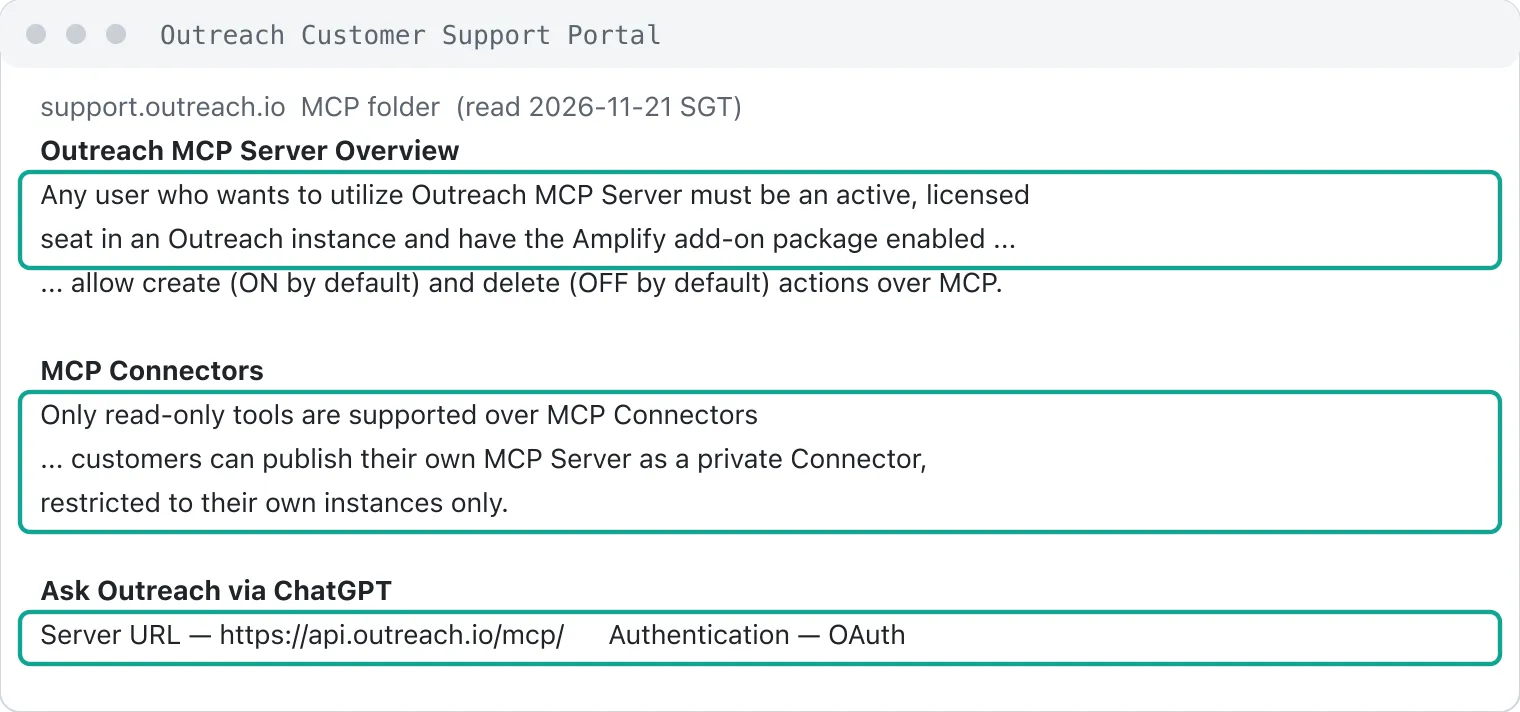
Why the opener needs public data: three things that are not in Outreach
We set one question before the first call. For a typical B2B software company, how many specific signals can a writer put in an opener from public sources? Each signal must have a date or a link that a reader can click. We counted three types of signal.
The first type is a company post on LinkedIn from the last 30 days. It shows which product the company pushes or which event it runs. The second type is a job at that company posted on LinkedIn in the last 30 days. Sales roles show a growing sales team, and security roles show work on security.
The third type is a G2 review from the last 90 days with a complaint word in the text. The words cover price, learning cost, speed and missing features. Such a review shows where the company's customers are unhappy. All three types are company-level public data, and none of them overlaps with the sequences, calls and emails in Outreach.
The five sample companies were Airtable, Vercel, Zapier, Miro and Gusto. All are US B2B software companies with public pages on LinkedIn and G2. Their size goes from a few hundred to a few thousand people. Their products are a table database, frontend hosting, automation, whiteboards and payroll. They fit the profile of a typical buyer of a sales tool such as Outreach. Their markets are also far apart, so we could see if the signals change by industry.
We have no Outreach account at any of these companies. We do not rate these companies. They are only a sample of "a list that gets a sequence on Monday".
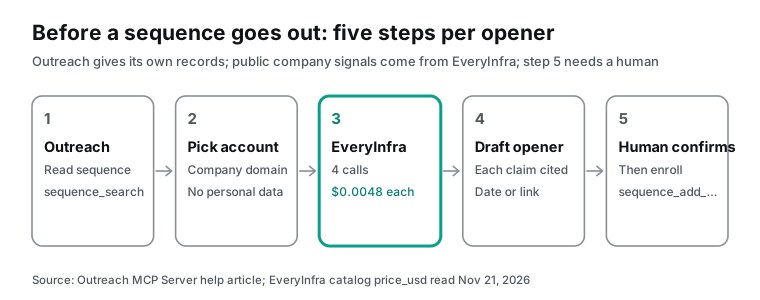
The full flow has five steps. In step 1, you stay in Outreach. Use sequence_search to find this week's sequence. Then use sequence_state_search or a list view to find the prospects who have not started. In step 2, you keep only the company. Take the company name and website domain from each prospect record. Do not pass personal titles, email addresses or phone numbers down the flow.
In step 3, you move to EveryInfra and make four calls per company. They return the company profile, recent company posts, open roles and G2 reviews. In step 4, ChatGPT writes one opener per company, and each fact in the opener must carry a date or a link.
In step 5, you go back to Outreach. A person reads each draft and then confirms that the prospects go into the sequence. The Outreach blog says the plugin waits for your confirmation before it adds people to a sequence. The OpenAI custom MCP documentation says write actions need a confirmation by default. With both checks in place, the last step does not happen automatically.
Add EveryInfra to ChatGPT: a configuration example for a custom MCP server
The path to add a custom MCP server in ChatGPT changed in autumn 2026. The old and new instructions are both still online. The current OpenAI Help Center text has these steps (OpenAI Help Center, Connecting custom MCP servers). On the Plugins page, click the plus sign and select Add custom MCP server. Enter a name and the server URL, set the authentication, accept the risk notice and select Create as a plugin. The page says that you do not need to turn on Developer Mode first.
The OpenAI developer documentation gives the same steps (OpenAI Developers, Add custom MCP server). It lists three authentication types: OAuth, no auth, and a mix of OAuth or no auth. The Outreach article "Ask Outreach via ChatGPT" still has the old path (Outreach Support). It tells you to turn on Developer Mode in settings, go to chatgpt.com/apps and click Create app. The server URL there is https://api.outreach.io/mcp/, with OAuth. Both paths lead to the same result. If the old article sends you to a button that is not there, use the OpenAI path.
Permissions depend on the plan. In a Business workspace, only admins and owners can create and publish a custom MCP plugin (OpenAI Help Center). Enterprise and Edu admins can give the role permission "Create plugins with MCPs" to named members. Before they publish, they can also select which actions the app may run.
Admins use the Plugins page of the Admin Console to decide which plugins members can install (OpenAI Help Center, Admin controls). Outreach Skills and your own EveryInfra plugin both live there.
A custom MCP server in ChatGPT cannot take a typed Bearer key. It accepts only OAuth or no auth. For this reason, EveryInfra in ChatGPT must use the OAuth endpoint https://api.everyinfra.com/mcp/all. The key-only endpoint /mcp stays for clients that can set headers, such as Claude Code and Cursor. At 00:22 SGT on 2026-11-21, we sent a request to the OAuth endpoint with no credentials. The table shows the three EveryInfra entry points and where each one fits:
| Endpoint | Authentication | Clients | Use in this flow |
|---|---|---|---|
https://api.everyinfra.com/mcp/all | OAuth, scopes in the 401 header | ChatGPT and other OAuth clients | Data calls inside the ChatGPT chat |
https://api.everyinfra.com/mcp | API key in a header | Claude Code, Cursor, scripts | The live tools/list and tools/call tests |
https://api.everyinfra.com/api/v1/social | API key in a header | curl and scripts | Weekly batch pulls |
The request without credentials returned 401. The response header said where to find the authorization server:
curl -s -D - -o /dev/null -X POST https://api.everyinfra.com/mcp/all \
  -H 'Content-Type: application/json' \
  -H 'Accept: application/json, text/event-stream' \
  -d '{"jsonrpc":"2.0","id":1,"method":"initialize","params":{"protocolVersion":"2025-11-25","capabilities":{},"clientInfo":{"name":"probe","version":"0"}}}'
# HTTP/2 401
# www-authenticate: Bearer resource_metadata="https://api.everyinfra.com/.well-known/oauth-protected-resource/mcp/all",
#   scope="data:call search:call captcha:call ai:call account:read offline_access"
The resource_metadata value points to a metadata file (EveryInfra protected resource metadata). The file uses the RFC 9728 format and lists the resource, the authorization server and the supported scopes (RFC 9728). ChatGPT reads this field to find the sign-in page. Version 2025-11-25 of the MCP authorization specification tells servers to work this way (MCP authorization specification).
When ChatGPT asks for a token, it sends a resource parameter that names the endpoint. This is the resource indicator from RFC 8707. An EveryInfra token is valid only for the endpoint that it was issued for.
The scope list includes offline_access, and ChatGPT needs it. Without a refresh token, ChatGPT can lose access when the first grant expires (OpenAI Help Center). The user must then sign in again.
With OAuth and no static credentials, ChatGPT registers itself as an OAuth client. It uses a Client ID Metadata Document (CIMD) or dynamic client registration (RFC 7591). The OpenAI plugin authentication guide asks servers to publish resource metadata at a well-known path (OpenAI Developers, Plugin authentication). It also asks each tool to declare securitySchemes, which say if the tool needs OAuth or allows anonymous calls. Here is a configuration example. We did not complete these steps in a live ChatGPT workspace.
| ChatGPT form field | Value | Note |
|---|---|---|
| Name | EveryInfra public data | Any name; you select it with @ in the chat |
| Server URL | https://api.everyinfra.com/mcp/all | The OAuth endpoint for all platforms; /mcp/linkedin covers LinkedIn only |
| Authentication | OAuth | No static credentials; ChatGPT uses dynamic registration or CIMD |
| Risk notice | Select "I understand and want to continue" | OpenAI asks for this per server |
| Tool switches | Keep only everyinfra_call_api, everyinfra_list_capabilities, everyinfra_get_job | Turn off captcha, AI chat and ticket tools in the app details |
| Publish | An admin publishes it to the workspace in the Admin Console | In Business, only admins and owners can publish |
The OpenAI page about connected apps shows the same entry point (OpenAI Help Center, Connected apps). Plugins is in settings. After you install a plugin, you connect your account when the prompt appears. In a chat, you pick it with @ or with the plus button. ChatGPT can ask for your approval before it reads data or takes an action.
This new path has no Developer Mode step and no Create app step from the old Outreach article.
When ChatGPT asks you to confirm a call: one tool annotation
At 00:22 SGT we sent one tools/list request to the EveryInfra /mcp endpoint. It is free, and it returned 12 tools. Each tool had the annotation fields from the MCP specification (MCP tools specification). The lookup tools have readOnlyHint=true. Examples are the capability list, the job status check and the account check.
The data tool everyinfra_call_api and the search tool everyinfra_search had readOnlyHint=false and destructiveHint=true. The reason at that time was that each call takes money from the wallet, and a charge is a side effect that the customer cannot undo. From 08:29 the same day both tools are marked read-only (readOnlyHint: true, destructiveHint: false). In the MCP specification, readOnlyHint means the tool does not change its environment, and data lookups and searches change nothing. Each call is still charged.
The Outreach developer documentation explains the same annotations (Outreach Developer Portal, Tool Annotations). readOnlyHint: true means the tool only reads, so a client can approve it automatically. destructiveHint: true means the tool can change data, so the client should ask the user. All 21 Outreach read tools are read-only. Tools that delete records or remove people from a sequence are marked destructive.
So with the 00:22 annotations, in one ChatGPT chat, an Outreach sequence lookup runs without a prompt, and an EveryInfra data call shows one. The difference comes from the annotation. From 08:29 the EveryInfra data tools are read-only too, so by the OpenAI docs below, neither should show a prompt. On the EveryInfra side, our test showed no prompt. We did not test the Outreach side.
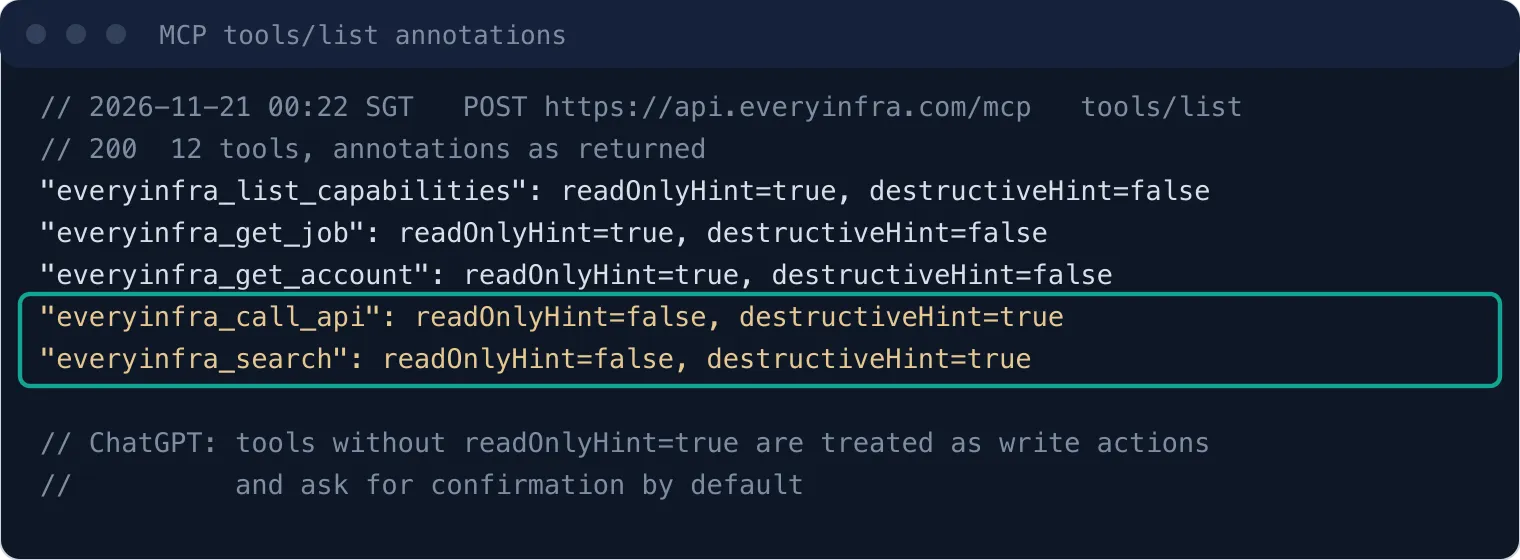
The OpenAI developer documentation states the rule (OpenAI Developers). ChatGPT respects the readOnlyHint annotation. It treats every tool without this mark as a write action, and write actions need user confirmation by default. For each tool, the user can choose to remember approve or deny for the rest of the chat. A new chat, or even a reload of the same chat, shows the prompt again.
Here is what that meant for this flow with the 00:22 annotations. To add data for 20 companies, ChatGPT calls everyinfra_call_api 80 times. Choose "remember" at the first prompt, and the next 79 calls in that chat run without a stop. A new chat starts again from the first prompt. From 08:29 the tool is marked read-only, so by this doc it no longer counts as a write action. None of the 80 calls stops for a prompt, so no prompt counts the calls for you, and each one is still charged. In our test after the change, single calls showed no prompt, but we did not run the full 80 calls. When an admin publishes the app, an Enterprise admin can also allow only some actions (OpenAI Help Center). That lets the admin turn off tools that this flow does not use, such as captcha and AI chat.
One live round trip: what the model sends and what EveryInfra returns
ChatGPT hides this part: the JSON-RPC exchange. At 00:31 SGT we sent the same tools/call request that ChatGPT sends, and asked for the Zapier LinkedIn company profile. The answer came back in 7.3 seconds, and the charge was $0.000556. This call used the key-only /mcp endpoint. The request body is the same as the one ChatGPT sends through the OAuth endpoint. Only the authentication is different.
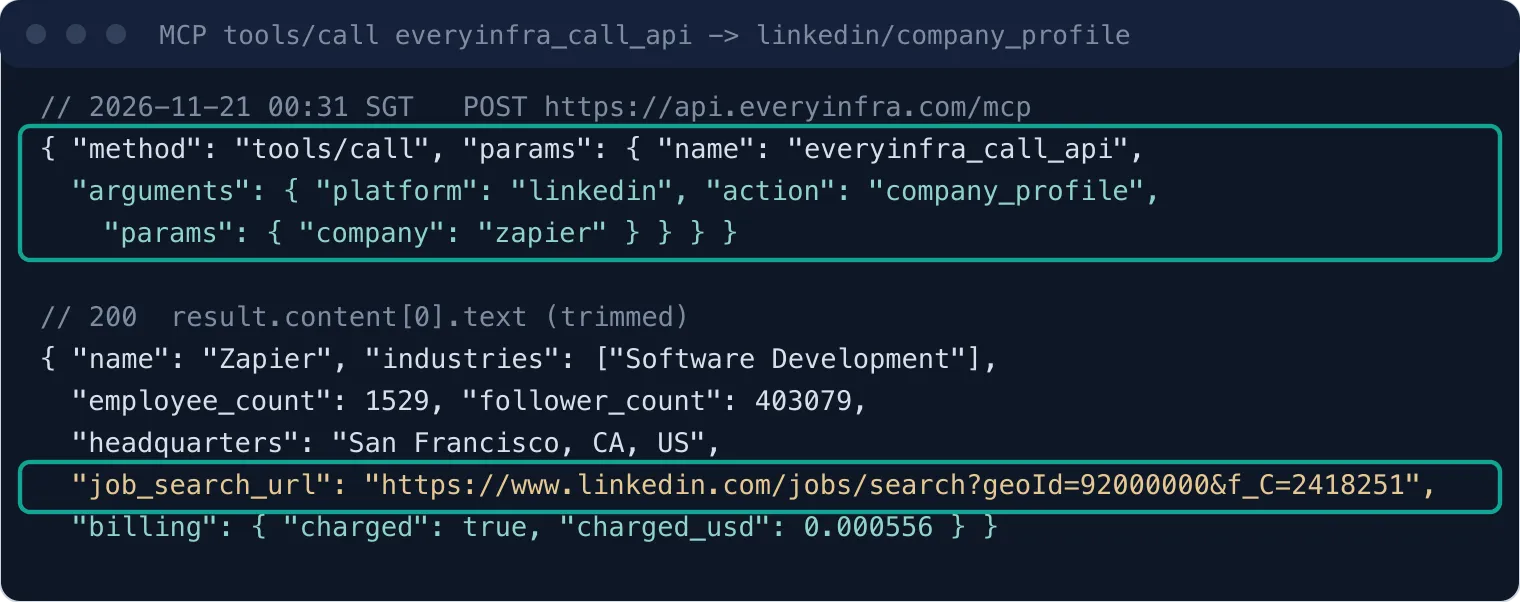
One field in the response became important later: job_search_url. It looks like https://www.linkedin.com/jobs/search?geoId=92000000&f_C=2418251. The number after f_C is the internal LinkedIn company ID. In the capability catalog, the keyword parameter of linkedin/jobs accepts "a job search term or a full job search URL" (EveryInfra capability catalog). So you can pass this URL to linkedin/jobs as it is and get only that company's jobs.
A search by company name gave only 53 own jobs in 100 results for the five companies. With this URL, you do not need to pick out the wrong ones.
The same calls also run from a script outside ChatGPT. A script fits better when you add data for a full week's list. It needs no confirmation and does not use chat context. This is the request format that we used. The key comes only from an environment variable:
export EVERYINFRA_API_KEY=...   # keep it in your environment only, never in the script or the chat
for company in airtable vercel zapier mirohq; do
  curl -s https://api.everyinfra.com/api/v1/social \
    -H "Authorization: Bearer $EVERYINFRA_API_KEY" \
    -H 'Content-Type: application/json' \
    -d "{\"platform\":\"linkedin\",\"action\":\"company_posts\",\"params\":{\"company\":\"$company\"}}" \
    > "posts_$company.json"
done
curl -s https://api.everyinfra.com/api/v1/social \
  -H "Authorization: Bearer $EVERYINFRA_API_KEY" -H 'Content-Type: application/json' \
  -d '{"platform":"g2","action":"reviews","params":{"url":"https://www.g2.com/products/zapier/reviews","sort":"newest"}}'
The parameters and response fields of the four capabilities come from the free catalog that we read at 00:16 SGT on 2026-11-21. These are the fields that an opener uses:
| Capability | Required parameter | Catalog price (USD) | Response fields for the opener |
|---|---|---|---|
linkedin/company_profile | company (page slug or URL) | 0.000556 | name, industries, employee_count, headquarters, job_search_url |
linkedin/company_posts | company | 0.002319 | text, url, posted_at, like_count, comment_count |
linkedin/jobs | keyword (search term or full job search URL) | 0.000556 | title, company_name, location, posted_at, url |
g2/reviews | url (G2 product page or slug), optional sort | 0.001389 | title, text, rating, posted_at, top_cons in the summary record |
linkedin/company_posts returns 10 posts by default and up to 50. linkedin/jobs returns 20 jobs by default. g2/reviews returns 20 reviews by default, and the first record is a summary. The summary has the overall rating, the review count and G2's own pros and cons tags with mention counts. The catalog field notes say that some requests come back without the summary (EveryInfra capability catalog).
All four calls are synchronous and priced per call, not per item. Empty results and failures cost nothing.
Five companies tested: 142 signals, and where each type falls short
The three rounds of calls ran between 00:17 and 00:31 SGT on 2026-11-21. Company posts came first, from 00:17 to 00:21. G2 reviews came next, from 00:24 to 00:25. Jobs, company profiles and video transcripts came last, from 00:26 to 00:31. We made 24 data calls: 21 were charged, and 3 returned empty results with an automatic refund. The total charge was $0.023337.
We counted signals with the rules that we wrote before the calls. The five companies gave 142 signals, and each one has a date or a link:
| Company | Company posts (last 30 days) | Own jobs, search by name (last 30 days, deduplicated) | Check with `job_search_url` | G2 complaint reviews (last 90 days) | Total | Top con in the G2 summary |
|---|---|---|---|---|---|---|
| Airtable | 10 | 7 | 11 | 15 | 32 | Learning Curve (261 mentions) |
| Vercel | 10 | 13 | Not checked | 14 | 37 | Expensive (4 mentions) |
| Zapier | 10 | 0 | Not checked | 18 | 28 | Expensive (183 mentions) |
| Miro | 10 | 5 | Not checked | 12 | 27 | Missing Features (1,419 mentions) |
| Gusto | 0 | 16 | Not checked | 2 | 18 | Missing Features (619 mentions) |
| Total | 40 | 41 | — | 61 | 142 | — |
The Total column counts jobs from the search by company name. With the 11 Airtable jobs from job_search_url, Airtable has 36 signals and the five companies have 146. The name search had the most noise for Zapier and Miro. We did not check these two with job_search_url, so their job counts can be too low.
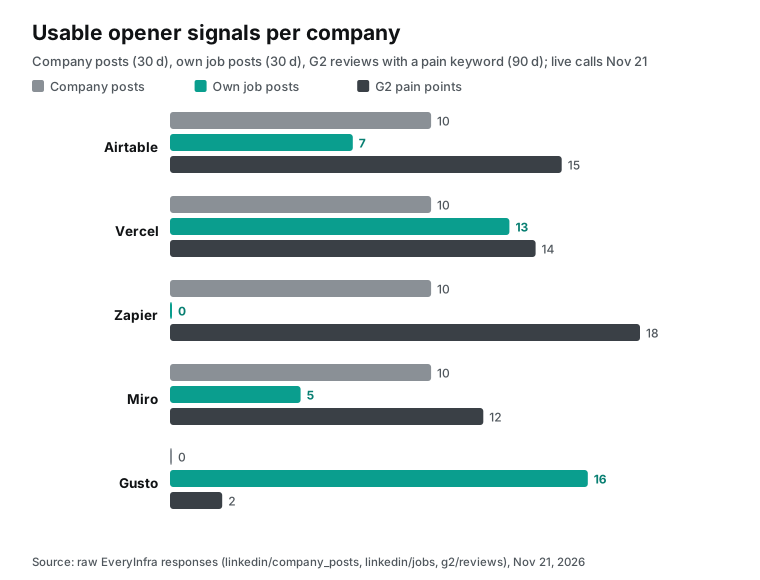
Four companies show 10 in the posts column. The reason is that linkedin/company_posts returns 10 posts by default, and all 10 recent posts of these four were inside 30 days. The newest posts came from 2026-11-18 to 2026-11-20. On November 18, 2026, Airtable announced that Airtable Canvas is generally available (Airtable post on LinkedIn, 2026-11-18). On November 19, 2026, Vercel posted about vercel board, a message board for people and agents. On November 20, 2026, Zapier posted three times about automation and AI. On November 18, Miro posted about cursor chat on the canvas.
The Zapier company page shows 1,529 employees and more than 400,000 followers (Zapier company page on LinkedIn). Most of its posts still get only a few dozen likes. So use company posts to find a topic. The like counts do not show how popular the topic is. With this many posts, posts from one week ago can already be old when the email goes out. Add the data one or two days before you send.
Gusto was the only company with no posts. We called once with the short name gusto at 00:20, and the result was empty with no charge. Just before 00:31 we called again with the full page URL https://www.linkedin.com/company/gusto/. The result was empty again, with no charge. Both responses had count: 0 and billing.reason set to empty_result_refunded.
Gusto's signals come mainly from jobs: 16 open roles after deduplication. Some titles name a product line, such as Principal Product Manager, Payroll Platform and Senior Staff Engineer, Tax Platform. For a seller of tax data or compliance tools, these titles are enough for an opener.
The spread in the jobs column comes from the search method. A search for "Zapier" returned 20 jobs, and none of them was a Zapier job. Zapier has 18 of the 61 signals in the G2 column. All of its latest 20 reviews came between 2026-11-10 and 2026-11-19. Four of them gave 3.5 stars or less (Zapier reviews on G2). One title says the learning curve is steep, and another says the tool feels expensive in the AI era.
Only 2 of Gusto's 20 reviews matched a complaint word. Its G2 summary still shows Missing Features 619 times and Poor Customer Support 548 times (Gusto reviews on G2). Miro's summary shows Missing Features 1,419 times, and 4 of its latest 20 reviews mention speed (Miro reviews on G2). Vercel has only 93 reviews on G2, and its top con, Expensive, has only 4 mentions (Vercel reviews on G2). That sample is too small for a conclusion.
Use both the latest 20 reviews and the summary when you write. The latest reviews show what people say this month. The summary tags show the most common problems over the years.
One more point needs care. We sent sort=newest for all five companies. For Zapier, Miro, Gusto and Vercel, the 20 reviews were from recent months. For Airtable, the oldest of the 20 reviews was from May 25, 2021 (Airtable reviews on G2).
The catalog calls this value "newest" and does not promise a strict date order. So filter by posted_at after you get the results, and do not cut the list by its order. 19 of the 20 Airtable reviews were inside 90 days, and the count left out the old one.
A job search by company name: almost half the results are wrong
The keyword parameter of linkedin/jobs is a job search term. In the first round we searched by company name, with United States as the location. Each search returned 20 jobs:
| Search term | Results | Jobs at the company | Share | Who the others are |
|---|---|---|---|---|
| Airtable | 20 | 7 | 35% | Jobs at Airbnb, Fluidstack, Autodesk and others that mention Airtable or have a similar name |
| Vercel | 20 | 20 | 100% | — |
| Zapier | 20 | 0 | 0% | Operations and admin jobs that ask for Zapier skills |
| Miro | 20 | 6 | 30% | Jobs at other companies |
| Gusto | 20 | 20 | 100% | — |
Airtable (with job_search_url) | 11 | 11 | 100% | — |
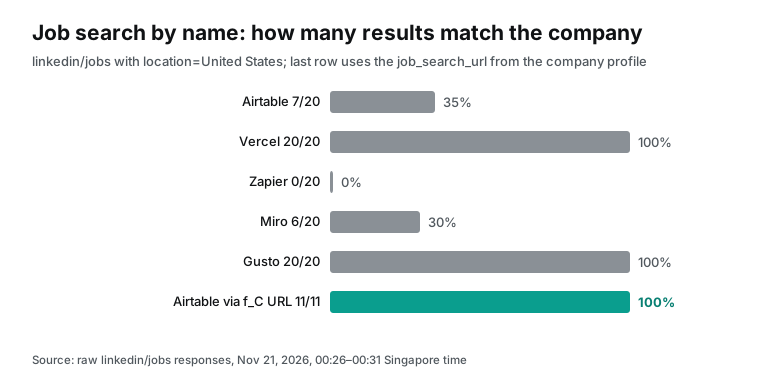
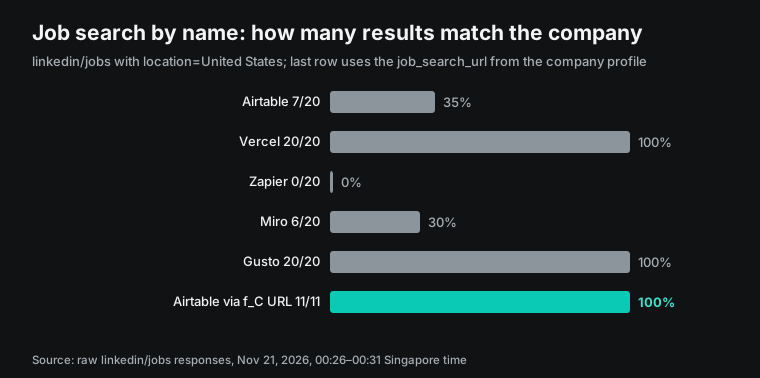
Across the five companies, 53 of 100 results belonged to the right company. The noise grows when the name looks like a common word or appears often in other companies' job ads. Zapier is a common skill requirement, so every result was a job that "uses Zapier". Airtable and Miro show the same problem. Few people list Vercel or Gusto as a skill, so their results were clean.
If you give such results to ChatGPT, the model can write a wrong line. An example is "I saw that you are hiring an Office Manager", when another company posted that job.
The fix is one more call. First call linkedin/company_profile. Its job_search_url carries the company's f_C ID. Then pass the full URL to linkedin/jobs as the keyword.
We did this for Airtable at 00:31 SGT. It returned 11 jobs, and all 11 had company_name set to Airtable. The oldest was posted on 2026-11-04 and the newest on 2026-11-19.
Of the 11 jobs, 9 are sales or customer success roles. They are 2 customer success managers, 1 renewals role, 1 BDR, 1 sales manager and 4 account executives at different levels. The other 2 are a solutions architect and a solutions consultant. Four of the 11 jobs are in London, and the rest are in the US.
This step costs $0.000556 more. In return, neither the model nor a person must pick out the company's own jobs. Even with this method, we still add one line to the model instructions: "use only jobs where company_name matches the target company". It is a second check.
The job signal has one more layer. At Airtable, 6 of the 7 own jobs are sales or customer success roles: account executive, BDR, renewals and sales manager. Vercel has 7 such roles out of 13, Miro has 4 out of 5, and Gusto has 0 out of 16. All of Gusto's roles are in product, engineering, finance and risk.
For a seller of sales tools, "you are growing your sales team" is a ready topic at the first three. For a seller of finance or risk tools, the Gusto roles are more useful. Ask the model to pick the signals that fit what you sell.
From signal to opener: one line for each company
After the data comes back, a person still decides how to write the opener. We wrote one line for each of the five companies with the data from 2026-11-21. We assumed that the sender sells sales training and sales operations tools. Each line uses one signal. After each line, we say which call gave the signal and what to check before you send.
Airtable: 9 of the 11 jobs from job_search_url are sales or customer success roles. They include Account Executive, Strategic, Sales Manager, Strategic Accounts and Renewals Associate. On 2026-11-18 it also announced that Canvas is generally available. A possible opener: "You launched Canvas and you are hiring strategic AEs and a renewals role. We have helped a few teams get new reps to explain a new product fast." The signals come from linkedin/jobs and linkedin/company_posts. Before you send, open the job links and check that the roles are still open.
Vercel: 13 own jobs, and 3 manager roles sit under Startup Sales. The three lines are Activations, Greenfield and Install Base. There is also a Sales Strategy & Operations, Enterprise role. A possible opener: "You split startup sales into new logos, activation and install base. Each line needs a different rhythm and pitch. We can send you how we onboard reps for each line." This line uses only job titles and names no person.
Zapier: the jobs column is 0 for the search by name, and we did not check it with job_search_url. The useful signals come from company posts and G2. All of the latest 20 reviews came between 2026-11-10 and 2026-11-19. Four gave 3.5 stars or less, and the summary shows Expensive 183 times. Use reviews with care in an opener for Zapier. "Your customers say you are too expensive" will annoy the reader.
A safer line turns the review into a problem for their sales team. An example: "Recent G2 reviews talk about price and the time to learn the tool. Your reps probably hear that at renewal. We have a set of practice drills for price objections." The signal comes from g2/reviews. Quote only the topic of the reviews, never the name or title of a reviewer.
Miro: 4 of the latest 20 reviews mention speed, and the summary shows Missing Features 1,419 times. Its jobs include Expression of Interest: Enterprise & Strategic Account Executive and Vice President Customer Success. Miro is building a pipeline of future AEs. An opener about "the first 90 days for a new AE" is closer to what the buyer cares about than the cons in the reviews.
Gusto: no company posts, only 2 G2 complaint reviews, and almost all signals in 16 own jobs, with 0 sales roles. If the sender sells sales tools, you can leave Gusto off this week's list and check it again next week. If the sender sells tax data or compliance tools, Principal Product Manager, Payroll Platform and Head of Gusto Controls are good starting points.
| Company | Signal in the opener | Call | Check before you send |
|---|---|---|---|
| Airtable | Strategic AE and renewals roles, Canvas launch on 2026-11-18 | linkedin/jobs, linkedin/company_posts | The roles are still open |
| Vercel | Three Startup Sales manager roles | linkedin/jobs | Use titles only, no person |
| Zapier | Price and learning-curve themes in reviews from 2026-11-10 to 2026-11-19 | g2/reviews | Quote the topic, not the reviewer |
| Miro | Expression of Interest AE roles | linkedin/jobs | The role is a talent pool, not one open seat |
| Gusto | Payroll Platform and Controls roles, for finance and compliance sellers only | linkedin/jobs | Skip it if you sell sales tools |
| What the sender sells | Signals to read first | Capability | Signals to skip |
|---|---|---|---|
| Sales training, sales operations | Number of open sales roles, new product posts | linkedin/jobs, linkedin/company_posts | Engineering roles |
| Developer tools, cloud services | Engineering and platform roles, technical posts | linkedin/jobs, linkedin/company_posts | Price complaints in reviews |
| Support and customer success tools | G2 summary tags such as Poor Customer Support | g2/reviews, trustpilot/reviews | Sales roles |
| Tax, compliance, risk | Finance, compliance and risk roles | linkedin/jobs | Marketing posts |
| Employer brand, hiring tools | Total open roles, employee reviews | linkedin/jobs, glassdoor/reviews | Product reviews |
Each company gets four calls, and the opener uses one signal. Keep the other signals for the second and third follow-up emails. An Outreach sequence has many steps by design, so spread the signals across the steps. The first email does not need all the data.
In ChatGPT, you can write this step as a fixed prompt. Save it as the opening instruction and reuse it each week with a new batch of companies:
Step 1. Use Outreach to list the prospects in sequence "<sequence name>" that have not received step 1.
Step 2. For each prospect's company, use EveryInfra to fetch:
        linkedin/company_profile, linkedin/company_posts (limit 10),
        linkedin/jobs (keyword = the company's job_search_url),
        g2/reviews (sort = newest).
Step 3. Keep only: posts from the last 30 days, jobs whose company_name matches,
        G2 reviews from the last 90 days. Drop reviewer names and titles.
Step 4. We sell <what you sell>. Pick ONE signal per company that fits what we sell.
        Write a 1-sentence opener that names the signal and its date or link.
Step 5. Show a table: company, signal, source link, opener. Do not edit Outreach yet.
Step 5 says "do not edit Outreach yet" for a reason. Outreach write tools ask for confirmation in ChatGPT each time. Let ChatGPT show a table first. A person reads and edits each row. After that, ChatGPT writes the openers into an Outreach custom field or task, and you confirm far fewer times.
Step 3 drops reviewer names and titles because the G2 response includes these fields. The model can use them in the email by accident. It is easier to remove them in the prompt than to delete them after the draft.
How long one company takes: four calls in a row in ChatGPT
We recorded the time from request to full response for each call, with the curl time_total value.
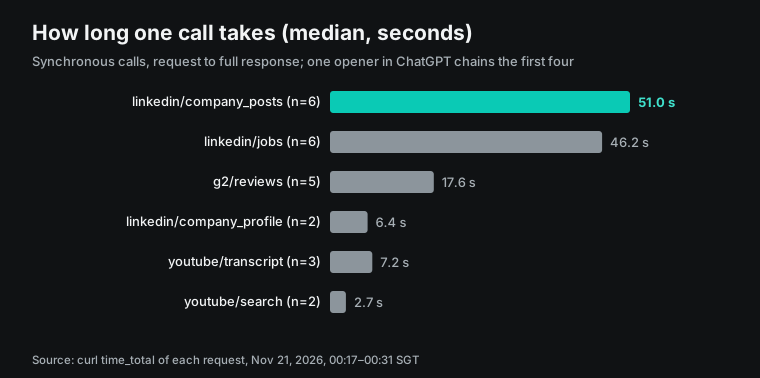
The slowest capability was company posts, with a median of 51.0 seconds over 6 calls. The fastest of these calls took 30.6 seconds and the slowest took 66.7 seconds. Jobs had a median of 46.2 seconds over 6 calls, from 15.3 to 61.7 seconds. G2 reviews had a median of 17.6 seconds over 5 calls, and one call took 34.9 seconds. The 2 company profile calls took 5.5 and 7.3 seconds, with a median of 6.4 seconds. The Airtable job search with job_search_url took only 15.3 seconds, the fastest of the 6 job calls.
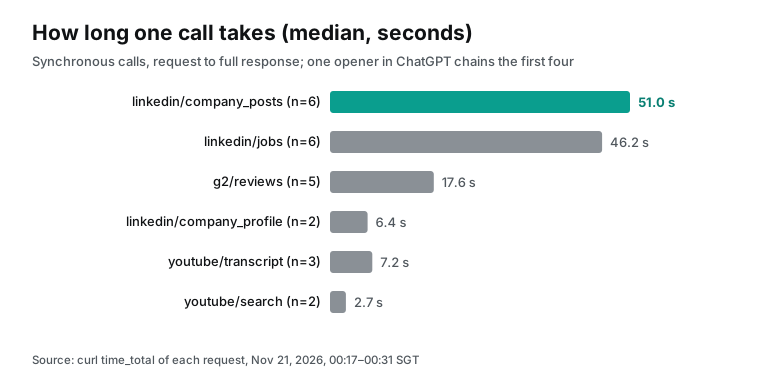
The four medians add up to about 121 seconds per company, about two minutes. If the model calls them one after the other for 5 companies in a chat, you wait about ten minutes. Parallel tool calls in ChatGPT depend on the model and the product, and we did not test them in ChatGPT.
So we suggest this split. Add data in ChatGPT for the three to five companies that come up during the day. Run the full weekly list with the curl script. Then give the finished table to ChatGPT for the openers. A script has one more benefit. Each capability in the catalog supports "mode": "async". A slow call can return a job_id first, and you get the result later without an open connection.
The cost of 100 prospects a week
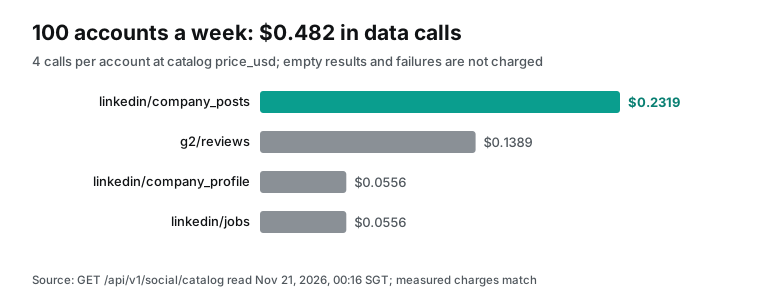
Each company takes 4 calls. At the catalog prices that we read at 00:16 SGT on 2026-11-21, the costs are $0.000556 for the company profile and $0.002319 for company posts. Jobs cost $0.000556, and G2 reviews cost $0.001389. That is $0.00482 per company.
In the live calls, each charge matched the catalog price exactly. Company posts had 4 charges at $0.002319, and G2 reviews had 5 charges at $0.001389. Jobs had 6 charges and company profiles had 2, each at $0.000556. The 3 empty results cost $0 (EveryInfra capability catalog).
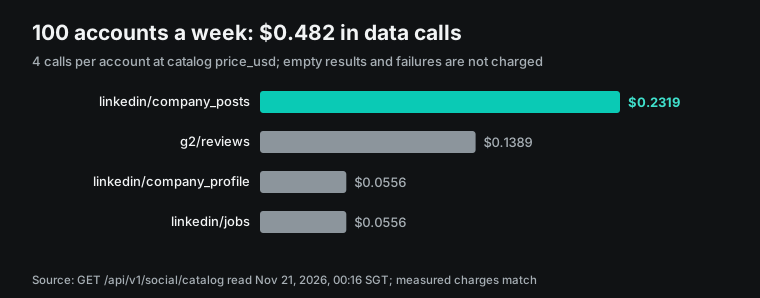
| Scale | Calls | API cost (USD) | Math |
|---|---|---|---|
| 1 company | 4 | 0.00482 | 0.000556 + 0.002319 + 0.000556 + 0.001389 |
| 100 companies a week | 400 | 0.482 | 0.00482 × 100 |
| Per month (52 weeks ÷ 12) | about 1,733 | 2.09 | 0.482 × 52 ÷ 12 |
| Per year | 20,800 | 25.06 | 0.482 × 52 |
| No G2 (the company is not on G2) | 300 a week | 0.343 a week | 0.003431 × 100 |
Compare this with the public prices on the other two sides. A ChatGPT Business Standard seat costs $25 per user per month, or $20 with annual billing (Business FAQ). A Premium seat costs $125, or $100 with annual billing (Business overview). It adds more Work and Codex use.
The Outreach pricing page shows no numbers (Outreach pricing, read 2026-11-21). It describes seats plus AI credits, and credits go down per action, such as one personal email or one search. For a price, you ask sales. Outreach MCP, both server and client, appears in the feature lists of the Amplify Core, Essentials and Plus tiers. A year of API cost, $25.06, is close to one ChatGPT seat for one month.
Three points need care. First, not every prospect is on G2. Small companies and non-software companies usually have no product page. A call with no G2 page returns an empty result at no charge, but mark the companies with a G2 page in the list first.
Second, call the company profile first for each company. That saves wasted calls on the wrong company. You also get the employee count and the head office, which help you decide if the email makes sense. Third, this cost covers only the EveryInfra API. The ChatGPT usage to read the results and the Outreach Amplify credits for each skill call are extra. Neither is public in enough detail to compute per call.
A weekly rhythm: when to pull data and what you can keep
Here is how we would place this flow in a week. On Monday, use Outreach in ChatGPT to find the prospects who start step 1 this week, and deduplicate by company. On Tuesday, pull the data and let ChatGPT make the table. On Wednesday, a person reads the table, edits the openers and writes them back to Outreach. On Thursday and Friday, the sequence sends as planned.
Pull the data one or two days before the send, because company posts change fast. Zapier posted three times in one day. Posts from Monday can be old by Thursday.
The four data types stay fresh for different times, so treat them apart:
| Data | Pull again | Reason |
|---|---|---|
Company profile: employees, followers, industry, job_search_url | Once a month; reuse the last result | It changes slowly |
| Company posts | Each week | Zapier posted three times in one day |
| Jobs | Each week | Roles close fast, and an opener that names a closed role is worse than none |
| G2 summary tags | Once a month | Totals over years move slowly |
| Latest G2 reviews | Each week | New reviews come in each week |
With this split, the company profile leaves the weekly bill. The weekly API cost per company goes from $0.00482 to $0.004264, so 100 companies cost $0.4264 a week. The saving is small. The larger gain is one less wait: the profile call has a median of 6.4 seconds, and four calls in a row lose one wait.
When the list has the same company more than once, pull data per company and write per person. An Outreach sequence often has two or three contacts at one company. If each person starts a new data pull, the cost and the wait double, and the content is the same. Write "deduplicate by company before you fetch" in step 2 of the prompt, so that ChatGPT merges the list before it calls. After the merge, the contacts at one company share one set of signals. Change the angle of the opener for each person's role. Talk about hiring to the sales leader and about process to the operations lead. Do not send the same signal in the same words to three people at one company.
What data this flow takes and what it leaves out
The EveryInfra catalog also has person-level capabilities, such as linkedin/person_profile and linkedin/person_posts (LinkedIn data API). This flow does not use them. For this choice, we read the text of the rules and guides below. Article 14 of the EU GDPR covers personal data that you did not collect from the person (GDPR text, EUR-Lex). The controller must tell the person the source and purpose of the data within a reasonable time.
Article 21 gives the person the right to object to direct marketing at any time. After an objection, the text says that the data is no longer processed for that purpose.
The UK Information Commissioner's Office has a B2B marketing guide (ICO, Business-to-business marketing). UK GDPR applies when you use personal data for marketing, even in a business context and even when the data is public. Companies are "corporate subscribers" and are outside the PECR email marketing rules. Sole traders and some partnerships count as individuals.
In the US, the Federal Trade Commission guide says that CAN-SPAM has no exception for B2B email (FTC, CAN-SPAM compliance guide). The penalty is up to $53,088 for each email that breaks the law. Each email needs true sender details, a subject line that does not mislead, a postal address and a way to opt out. The guide gives 10 business days to act on an opt-out, and the rule text is in 16 CFR Part 316.
The California Attorney General page on the CCPA lists the rights of California residents about personal data that businesses collect (California DOJ, CCPA). They include the right to know, the right to delete and the right to opt out. These rules cover who gets the email, how it is sent and whose personal data it uses. The flow is designed to take data at the company level only:
| Data | Does the flow take it? | Reason |
|---|---|---|
| Company profile (industry, size, head office, website) | Yes | Data about a legal entity, shown in public |
| Posts from the company account | Yes | Content the company published, with a date and a link |
| Jobs the company posted | Yes | Published by the company; filter by company_name |
| G2 review title, text, stars, date | Yes | Public reviews of a product; the flow does not pass author_name to the model or into the email |
| Personal profiles, personal posts, employee lists | No | Personal data, which GDPR Articles 14 and 21 and UK GDPR cover; recipient data is already in Outreach |
| Personal email, phone, home address | No | This flow does not fetch them or build them from public pages |
The G2 response has an author_name field. In Zapier's latest 20 reviews, 6 say "Verified User", and the rest show a first name and a last initial.
The flow removes this field before the data goes to the model. The opener says "your customers complain about the learning curve", and it does not need to know who complained. On the Outreach side, recipient data is your own CRM data. Outreach controls it with each user's permissions, and EveryInfra does not touch it. This section only explains the data choices in this flow. It is not legal advice. Check the text of the rules for your own case, or ask your legal team.
Limits and cautions
First, we have not tested whether EveryInfra can work as a private connector inside Outreach Omni. The Outreach help center says MCP Connectors support only read-only tools (Outreach Support). At 00:22, everyinfra_call_api had readOnlyHint=false because it charges money, so by the plain text of that page, Omni could not turn it on. From 08:29 the same day it is marked read-only, so that limit no longer blocks it, but marketplace review and admin approval still apply. We have no Outreach account and did not test it, so we report only the page text and our tool annotation. For now, connect both services to ChatGPT, and let ChatGPT join them.
Second, the Outreach help center still shows the old ChatGPT path with Developer Mode and Create app. The current OpenAI entry point is in Plugins and needs no Developer Mode. If you cannot find a button from the old article, use the OpenAI Help Center steps. The configuration example lists each field.
Third, Outreach Skills needs a ChatGPT plan with plugins: Business, Enterprise, Healthcare or Edu. A personal Plus account cannot install it. In Business, only admins and owners can create a custom MCP server, so members ask an admin.
Fourth, the confirmation prompt in ChatGPT needs thought. With the 00:22 annotations, someone could choose "remember approve" at the first prompt to save clicks, and after that each extra call by the model costs money again. From 08:29 the data tools are marked read-only, so by the OpenAI docs there may be no first prompt at all (our test after the change showed none). Then no prompt stops extra calls by the model, and each one is still charged. Write "at most 4 calls per company; do not pass the limit parameter to linkedin/company_posts" in the model instructions. Also set a USD spend limit on the EveryInfra API key. If the model repeats calls, each charge shows in the call history, and empty results and failures cost nothing.
Changes in the last 60 days
| Date | Change | What it means for you |
|---|---|---|
| 2026-10-01 | ChatGPT Business admins can manage plugins and the plugin directory in the Admin Console (release notes) | You approve Outreach Skills and your own EveryInfra plugin in one place |
| 2026-11-17 | OpenAI releases ChatGPT for Sales with a Sales plugin and 30+ partner plugins (OpenAI) | Outreach sits in the "plan your outreach" step; the reason to reach out comes from other data |
| 2026-11-17 | Outreach releases Outreach Skills for ChatGPT (Outreach blog) | 20+ workflows in ChatGPT, using Amplify credits |
| 2026-11-18 | Outreach press release: new MCP Server tools to edit records and create sequences and tasks, plus four connectors such as G2 (Outreach newsroom) | ChatGPT can now create sequences, so keep the confirmation step |
FAQ
What is the Outreach MCP server, and how is it different from Outreach Skills?
Source: Google suggestion "outreach mcp server", read 2026-11-21. The Outreach MCP Server is the public MCP server of Outreach at https://api.outreach.io/mcp/. Clients such as Claude, ChatGPT, Copilot and Gemini can connect to it. It needs an active Outreach seat and the Amplify add-on (Outreach Support).
Outreach Skills is the ChatGPT plugin from November 17. It includes this MCP connection plus 20 ready workflows and visual views. To look up Outreach data in a chat, the MCP Server is enough. To use ready workflows such as meeting prep and pipeline review, install Skills.
Can the Outreach MCP connector use EveryInfra?
Source: Google suggestion "outreach mcp connector", read 2026-11-21. Outreach MCP Connectors let customers publish their own MCP server as a private connector, but only read-only tools are supported (Outreach Support). At 00:22 on November 21 the EveryInfra data tool was not marked read-only, so by the page text Omni could not turn it on. From 08:29 the same day it is marked read-only, so that limit no longer blocks it, but marketplace review and admin approval still apply. We have no Outreach account and did not test it. A working method is to connect both services to ChatGPT.
Do I still need Developer Mode to add a custom MCP server in ChatGPT?
Source: the Outreach article "Ask Outreach via ChatGPT". It tells you to turn on Developer Mode, but the current OpenAI Help Center does not. By the current OpenAI text, you do not need it. In Plugins, select Add custom MCP server and accept the risk notice for each server (OpenAI Help Center). In a Business workspace, only admins and owners can create one.
Does ChatGPT still ask me to confirm EveryInfra calls?
Source: our tools/list test at 00:22 and the OpenAI developer documentation. ChatGPT treats every tool without readOnlyHint=true as a write action, and write actions need confirmation by default (OpenAI Developers). With the 00:22 annotations, the EveryInfra data tool was not marked read-only because each call costs money, and choosing "remember for this chat" at the first prompt let the next calls run without a stop. From 08:29 the same day it is marked read-only, so by these docs it no longer counts as a write action and does not ask by default. Each call is still charged. After the change we opened three new ChatGPT chats and called a paid tool once in each; none asked.
Is Outreach GPT the same as Outreach Skills?
Source: Google suggestion "outreach gpt", read 2026-11-21. In the Outreach pages that we read on 2026-11-21, no product has the name "Outreach GPT". Outreach has two things in ChatGPT. The first is the Outreach app in ChatGPT from June 3 (Outreach newsroom, 2026-06-03). The second is Outreach Skills from November 17, which adds workflows and views on top of it.
Get started
- Sign up for EveryInfra and get an API key. Follow the quickstart and call
linkedin/company_profileonce with curl. Check that the response hasjob_search_url. - Ask your ChatGPT workspace admin to add a custom MCP server in Plugins. Use
https://api.everyinfra.com/mcp/allwith OAuth, and keep only the three data tools on. The MCP server page lists the settings. - Ask the admin to enable the Outreach Skills plugin. Each person connects with an own Outreach login. Run Start here once.
- In a chat, @ Outreach first to get this week's sequence and company list. Then @ EveryInfra to add data in this order: company profile, company posts, jobs with
job_search_url, G2 reviews. Ask for a date or a link after each fact in the opener. - Read each draft. After you confirm, let Outreach add the people to the sequence.
For a proposal flow, read Responsive MCP account research. For email marketing, read ActiveCampaign MCP with review data. For local businesses, read Business profiles in ChatGPT. The full G2 review fields are on the G2 data API page.
References
- From question to action: Outreach Skills brings over 20 revenue workflows into ChatGPT, Outreach, 2026-11-17, read on 2026-11-21.
- Outreach's Headless Architecture Powers New Outreach Skills for ChatGPT as its Connector Suite for MCP Grows, Outreach, 2026-11-18, read on 2026-11-21.
- Skills in ChatGPT, OpenAI Help Center, read on 2026-11-21.
- Plugins in ChatGPT, OpenAI Help Center, read on 2026-11-21.
- Introducing ChatGPT for Sales, OpenAI, 2026-11-17, read on 2026-11-21.
- Outreach MCP Server Overview, Outreach Support, read on 2026-11-21.
- Use Outreach MCP tools with Claude, Outreach Support, read on 2026-11-21.
- Outreach MCP Server, Outreach Developer Portal, read on 2026-11-21.
- MCP Connectors, Outreach Support, 2026-11-12, read on 2026-11-21.
- MCP Security, Outreach Support, read on 2026-11-21.
- MCP Connectors category, Outreach Marketplace, read on 2026-11-21.
- Connecting custom MCP servers in ChatGPT, OpenAI Help Center, read on 2026-11-21.
- Add custom MCP server, OpenAI Developers, read on 2026-11-21.
- Ask Outreach via ChatGPT, Outreach Support, 2026-09-11, read on 2026-11-21.
- Admin controls, security, and compliance for plugins and apps, OpenAI Help Center, read on 2026-11-21.
- ChatGPT Business release notes, OpenAI Help Center, 2026-11-19, read on 2026-11-21.
- Protected resource metadata for /mcp/all, EveryInfra, read on 2026-11-21.
- RFC 9728: OAuth 2.0 Protected Resource Metadata, IETF, 2025-04, read on 2026-11-21.
- Authorization, specification version 2025-11-25, Model Context Protocol, 2025-11-25, read on 2026-11-21.
- RFC 8707: Resource Indicators for OAuth 2.0, IETF, 2020-02, read on 2026-11-21.
- RFC 7591: OAuth 2.0 Dynamic Client Registration Protocol, IETF, 2015-07, read on 2026-11-21.
- Authentication, Plugins, OpenAI Developers, read on 2026-11-21.
- Connected apps in ChatGPT, OpenAI Help Center, read on 2026-11-21.
- Tools, specification version 2025-11-25, Model Context Protocol, 2025-11-25, read on 2026-11-21.
- Tool Annotations, Outreach MCP Server, Outreach Developer Portal, read on 2026-11-21.
- Capability catalog (GET /api/v1/social/catalog), EveryInfra, read on 2026-11-21 at 00:16 SGT.
- Meet Airtable Canvas (company post), Airtable on LinkedIn, 2026-11-18, read on 2026-11-21.
- Zapier company page, LinkedIn, read on 2026-11-21.
- Zapier reviews, G2, read on 2026-11-21.
- Gusto reviews, G2, read on 2026-11-21.
- Miro reviews, G2, read on 2026-11-21.
- Vercel reviews, G2, read on 2026-11-21.
- Airtable reviews, G2, read on 2026-11-21.
- ChatGPT Business: General FAQ, OpenAI Help Center, read on 2026-11-21.
- ChatGPT Business overview, OpenAI Help Center, read on 2026-11-21.
- Outreach Pricing & Plans, Outreach, read on 2026-11-21.
- Regulation (EU) 2016/679 (GDPR), Articles 6, 14 and 21, EUR-Lex, 2016-04-27, read on 2026-11-21.
- Business-to-business marketing, UK Information Commissioner's Office, read on 2026-11-21.
- CAN-SPAM Act: A Compliance Guide for Business, US Federal Trade Commission, read on 2026-11-21.
- 16 CFR Part 316: CAN-SPAM Rule, eCFR, read on 2026-11-21.
- California Consumer Privacy Act (CCPA), California Department of Justice, read on 2026-11-21.
- Outreach Launches Revenue Orchestration Platform App in ChatGPT and MCP Server for Codex, Outreach, 2026-06-03, read on 2026-11-21.
Reference BL-202