GPT-6.1 Sol API structured outputs: review tagging cost estimate
Tag reviews with GPT-6.1 Sol strict JSON and the Batch API. Data pull: 412 live reviews. Model cost is an estimate at public prices: about $0.81 per 1,000.
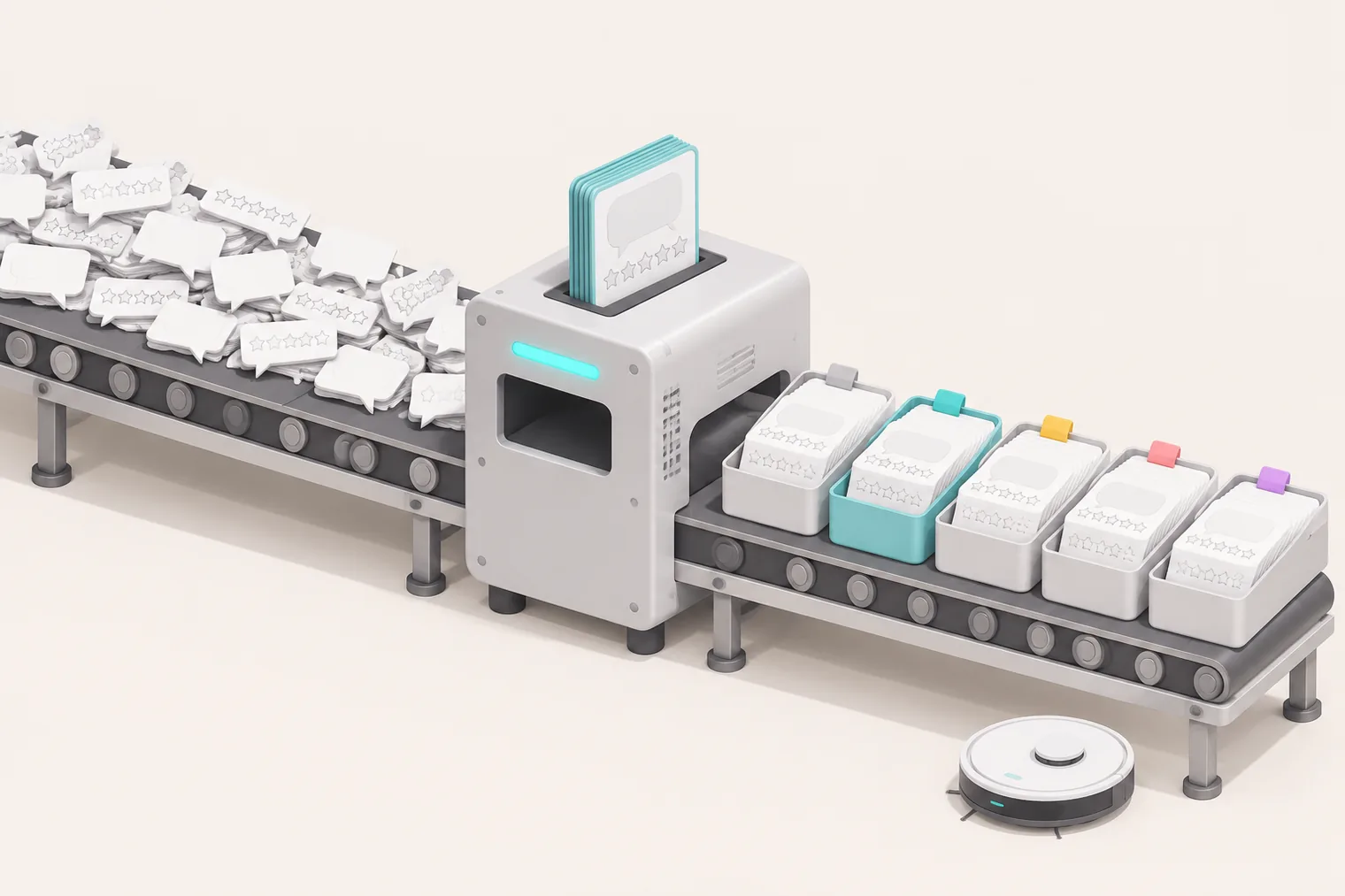
By our estimate, GPT-6.1 Sol can tag 1,000 reviews for less than one dollar. This assumes strict JSON Schema output, the Batch API and about 50 reasoning tokens per review. We did not run the model, so this is an estimate. The data is not the expensive part. The expensive part is how you pack the requests. On 2026-11-06, from 00:16 to 00:25 SGT, we made 7 live calls to the EveryInfra data API.
We got 400 Google Play reviews for two robot vacuum apps, Roborock and iRobot, plus 12 TikTok comments under one review video. We paid $0.003334 in total. From the real rows per call, the data fee per 1,000 reviews is $0.006945 for Google Play and $0.046704 for TikTok.
We do not have an OpenAI key on this machine. So the model side of this article is a configuration example plus an estimate. We count tokens with the public o200k_base encoding and use the public prices that we read on 2026-11-06. The main finding is simple.
If you send 1 review per request, the system prompt plus the schema is 967 tokens. That is 92% of all input tokens, and it is below the 1,024-token minimum for prompt caching. So you pay full price for the same instructions 1,000 times.
Now send 25 reviews per request and assume 50 reasoning tokens per review. The Batch model cost for 1,000 reviews then falls from about $1.74 to about $0.81. Without reasoning tokens, the floor would fall from $1.49 to $0.56. But Sol cannot go below low effort, so you cannot reach that floor.
This article answers one narrow question. You have a set of reviews. You want GPT-6.1 Sol to add four tags to each one: sentiment, issue category, competitor mention and one action item. Each tag must go straight into a spreadsheet, and you want to know the full cost. The reviews come from the EveryInfra data API.
The tagging uses the OpenAI Responses API and Batch API. Every EveryInfra number below comes from a raw response, and you can recompute it. Every OpenAI step is marked as a configuration example or a price estimate. We did not run this batch on OpenAI.
This table shows what we measured and what we estimated. Every number below maps back to one of these rows.
| Step | How we got it | Can you recompute it? |
|---|---|---|
| Review data (EveryInfra) | 7 live calls on 2026-11-06, raw responses saved | Yes, every number comes from a response |
| Token counts | o200k_base count of the real system prompt, schema and 412 reviews | Yes, but the Sol tokenizer is not public |
| Output tags | 12 example tags that a person wrote, not GPT-6.1 Sol output | Used only to estimate output length |
| Reasoning tokens | Not measured; we assume 0, 50 or 200 per review | No, you need a pilot run and its usage |
| Model cost | Public prices on 2026-11-06 times the rows above | Yes, with your own numbers |
| Tag accuracy | None | Check by hand after a pilot run |
What is the GPT-6.1 Sol API: release date, context and price
First, the facts about the model. The OpenAI API changelog has an entry for 2026-09-29. It says that OpenAI released GPT-6.1 Sol (gpt-6.1-sol) for complex coding and professional work. The price is lower than GPT-6 Astra.
For input up to 272K tokens, the standard price per 1M tokens is $2 input, $0.10 cached input, $2.50 cache write and $10 output. The same entry says that tool calling needs the Responses API. The launch post, Introducing GPT-6.1 Sol, says that Sol is close to GPT-6 Astra in capability. It also says that the standard input and output prices are one-fifth of Astra's prices.
The GPT-6.1 Sol model page, which we read on 2026-11-06, gives the specs that matter for tagging. The context window is 1,050,000 tokens. The maximum output is 128,000 tokens. The knowledge cutoff is 2026-04-30. The reasoning.effort values are low, medium (the default), high, xhigh and max. The feature list marks Structured outputs and Function calling as "Supported".
The model page also has four price rules for batch work. Cached input costs 5% of the input price. A cache write costs 1.25 times. Above 272K input tokens, the full request costs 2 times on input and 1.5 times on output. Batch and Flex cost 50% less.
| Item | What the source says | Source (read 2026-11-06) | What it means for tagging |
|---|---|---|---|
| API release | gpt-6.1-sol released 2026-09-29 | API changelog | 38 days old on the day we wrote this |
| Context and output | 1,050,000 context, 128,000 max output | Model page | Dozens of reviews fit in one request with room to spare |
| Reasoning effort | low, medium, high, xhigh, max, no none | Model page, GPT-6 guide | Every request makes reasoning tokens, billed as output |
| Standard price | $2 input, $0.10 cached, $10 output per 1M | Pricing page, changelog | About $2.99 per 1,000 reviews at minimum, synchronous |
| Batch price | $1 input, $0.05 cached, $5 output per 1M | Pricing page | Same requests at half price |
| Long-input surcharge | Above 272K input: 2x input, 1.5x output | Model page | Do not put too many reviews in one request |
| Chat Completions | Supported, but without tool calling | Model page, GPT-6 guide | This article uses the Responses API only |
The row that people miss most often is reasoning effort. The GPT-6 guide is direct about it. GPT-6 Astra and GPT-6.1 Sol do not support none. If your old requests use minimal, change them to low and compare the results. GPT-6.1 Terra, GPT-6 Sol and GPT-6 Luna do support none. The reasoning guide says that reasoning tokens count as output tokens.
For tagging, this matters. Each review adds hidden output at $10 per 1M tokens, or $5 in Batch. We cannot measure that amount without a real call. So the cost table shows reasoning as a separate assumption.
Here is the full Batch row. The pricing page puts Flex and Batch in the same price band. For gpt-6.1-sol, Batch is $1 input, $5 output and $0.05 cached input per 1M tokens. A 30-minute cache write is $1.25 and a 12-hour cache write is $2.50. All cost tables below use this band.
gpt 6.1 structured outputs: limits of json_schema strict mode
The OpenAI Structured Outputs guide states the promise at the top. The model output always matches the JSON Schema that you supply. It does not drop a required key, and it does not invent an enum value. In the Responses API, you set text.format to {"type":"json_schema","strict":true,"schema":…}. The guide also says that strict mode supports only a subset of JSON Schema. If your schema uses a keyword outside that subset, a request with strict: true fails.
A tagging schema runs thousands of times after you fix it. So we copied every rule from the guide that we could count or check. Then we wrote a small script that checks a schema against those rules. We did not rely on memory.
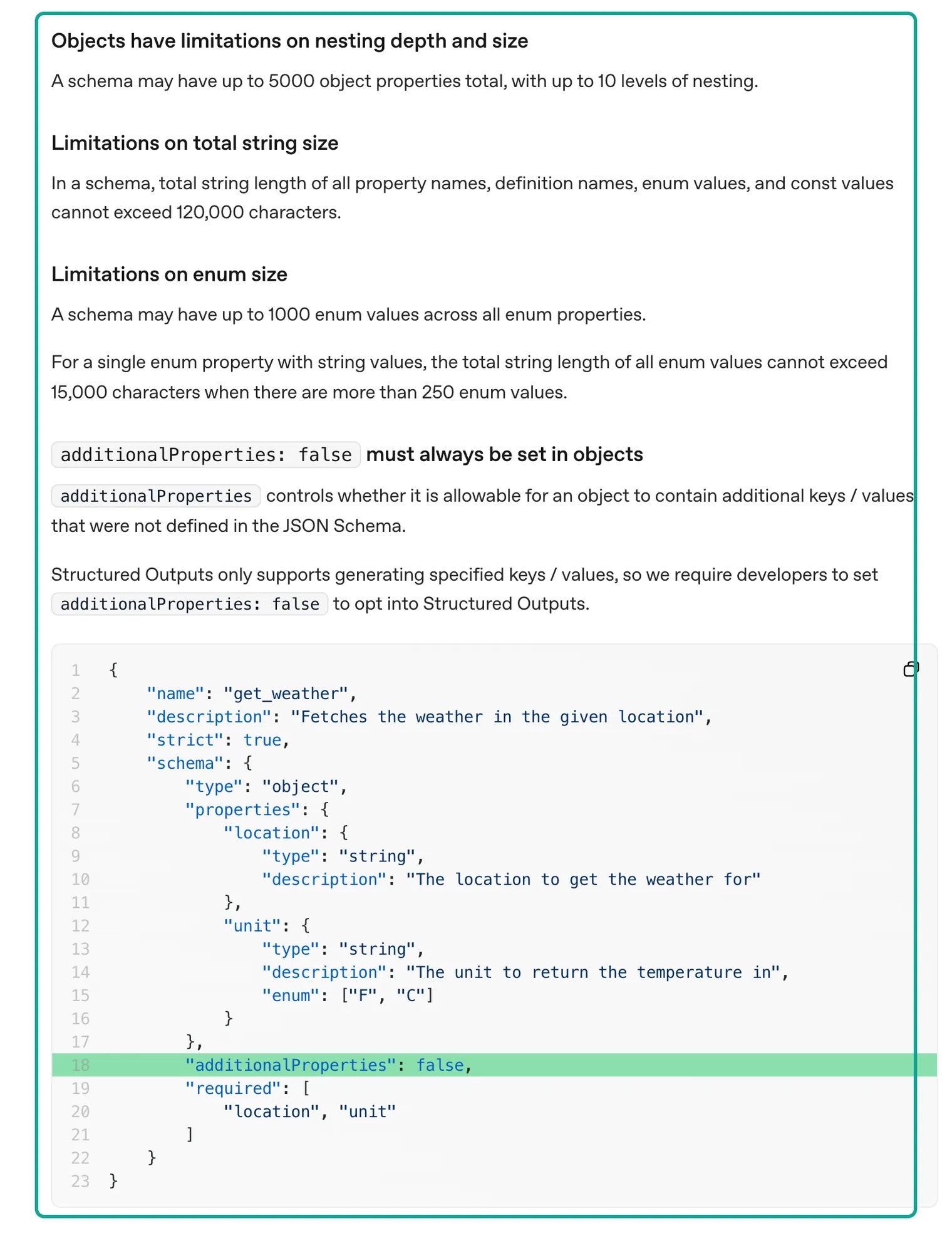
The four parts in the teal box are size limits. Outside the box, the guide has more hard rules on how to write the schema:
- The root must be an object. It cannot be
anyOf. - Every field of every object must be in
required. To make a field optional, give it a type such as["string","null"]. - The guide does not support
allOf,not,dependentRequired,dependentSchemas,if,thenorelse. - For strings, the guide lists only
patternandformat. Theformatkeyword accepts nine values:date-time,time,date,duration,email,hostname,ipv4,ipv6anduuid. - Arrays support
minItemsandmaxItems.$defsand recursive references are supported.
The guide also says that the first request with a new schema has extra processing latency. Later requests with the same schema do not.
| Rule (section in the guide) | Limit or requirement | Our tag schema | Broken test schema |
|---|---|---|---|
| Total object properties (Objects have limitations…) | ≤ 5000 | 9 | 8 |
| Nesting depth | ≤ 10 | 1 level | 1 level |
| Total enum values (Limitations on enum size) | ≤ 1000 | 31 | 31 |
| Characters in names and enum values (Limitations on total string size) | ≤ 120,000 | 416 | 408 |
additionalProperties: false | Required on every object | Yes | Root set to true, flagged |
All fields in required | Required | 9 of 9 | required lists a field that does not exist |
| Unsupported keywords | allOf, if, then and others | 0 | 3 |
| Keywords not on the supported list | Warning only | 0 | minLength, 1 |
The script reports 0 issues and 0 warnings for our single-review schema and for the 25-review schema. For the broken schema, it reports 5 issues and 1 warning. The broken schema is not random. It comes from a natural idea: "If mentions_competitor is true, competitors must have at least one item." In JSON Schema, you write that rule with allOf and if/then.
Strict mode does not support that. A schema cannot enforce this kind of rule between two fields. You must check it in code after the results come back. The section "What the schema cannot enforce" below shows how.
A note on minLength. The guide names minLength and maxLength as unsupported only for fine-tuned models, but its list of supported string keywords has only pattern and format. So our script gives a warning, and our schema does not use it. We put the 20-word limit for actions in description and in the prompt, then measure it in code.
Here is our single-review tag schema. It has nine fields. All fields are required. other_brand_name and action_item can be null.
{
  "name": "review_label",
  "strict": true,
  "schema": {
    "type": "object",
    "properties": {
      "item_id": {"type": "string", "description": "Copy the item_id of the input item."},
      "sentiment": {"type": "string", "enum": ["positive", "negative", "mixed", "neutral"]},
      "issue_categories": {"type": "array", "minItems": 1, "maxItems": 3,
        "items": {"type": "string", "enum": ["app_connectivity", "account_login", "mapping_navigation",
          "suction_cleaning", "mopping", "dock_self_empty", "battery_charging", "hardware_defect",
          "firmware_update", "customer_service_warranty", "price_value", "noise", "app_usability", "other", "none"]}},
      "mentions_competitor": {"type": "boolean"},
      "competitors": {"type": "array", "maxItems": 5,
        "items": {"type": "string", "enum": ["roborock", "irobot_roomba", "ecovacs_deebot", "dreame", "eufy",
          "shark", "narwal", "mova", "dyson", "samsung", "xiaomi", "other_brand"]}},
      "other_brand_name": {"type": ["string", "null"]},
      "action_item": {"type": ["string", "null"], "description": "One concrete action, 20 words or fewer, or null."},
      "evidence": {"type": "string", "description": "Up to 15 words copied from the text."},
      "language": {"type": "string", "description": "ISO 639-1 code."}
    },
    "required": ["item_id", "sentiment", "issue_categories", "mentions_competitor", "competitors",
                 "other_brand_name", "action_item", "evidence", "language"],
    "additionalProperties": false
  }
}
The 25-review version adds one outer layer. The root object has one field, a labels array. Each array item uses $ref to point to the same tag object in $defs. The guide says that $defs and $ref are supported. The nesting depth goes from 1 level to 2, which is far below the limit of 10.
The field order also matters. The guide says that the output follows the key order of the schema. So we put item_id first. We put action_item and evidence near the end, because the model must read the full review before it can write them. If an output is cut off, the ID and the sentiment are still there at the start.
How to design the tags: four questions, nine fields
Before you design tags, decide who will use them. The app team of a robot vacuum brand cares about lost Wi-Fi, failed logins and lost maps. The support team looks for warranty complaints. The product team wants to know which other brands users compare with.
So we built the tags from four questions. What is the tone? What kind of problem is it? Does it name another brand?
Can it become one concrete improvement? Issue category is a fixed enum of 15 values. Competitor is an enum of 12 values, with other_brand as a way out.
Issue category took the most time. First, we read the 412 reviews from our live calls. We sorted the real complaints into 13 groups. Then we added other and none. For example, many low-star iRobot reviews say "commands do not go through" or "cannot connect to the iRobot cloud".
Those go to app_connectivity. "No verification code" and "account link failed" go to account_login. Many Roborock reviews say "the map is broken after the update". That belongs to both firmware_update and mapping_navigation. So one review can have up to 3 categories.
The system prompt has one line of guidance for each category. That part is more than half of the prompt. It is also the main reason why the fixed prefix in the token count below is 645 tokens.
Sentiment has four values: positive, negative, mixed and neutral. The system prompt says: "Do not judge sentiment from the star rating alone." Stars and text often disagree. In the Roborock reviews, one 1-star review starts with "App is very good". Only later does it say that the map has a problem. One 3-star review praises the app in the first half.
In the second half, it says that the bottom buttons do not work on a Samsung foldable phone. The system prompt tags these as mixed. TikTok comments have no stars. A question like "Which one is best?" gets neutral.
action_item is the hardest tag to check, so it has the tightest limits: one English sentence of 20 words or fewer, or null. evidence must copy up to 15 words from the review, in the original language. With these two fields, a person can check a tag in a few seconds without reading the full review.
We wrote example outputs by hand for 12 real reviews with this schema. We use them to estimate output tokens. They also show what each field looks like. The table shows 4 of them.
Review text is cut, and author data is removed. These 12 examples are human-written. They are not GPT-6.1 Sol output.
| Source | Stars | Review excerpt | Sentiment | Issue categories | Competitors |
|---|---|---|---|---|---|
| Roborock app | 2 | "You ruined my robot after your last update! The map is all messed up…" | negative | firmware_update, mapping_navigation | none |
| Roborock app | 3 | "…it doesn't support the Samsung Z Fold 8's screen aspect ratio…" | mixed | app_usability | none (Samsung here is a phone) |
| iRobot app | 1 | "every 2nd vacuum I have a connection issue. I will never buy another Roomba" | negative | app_connectivity | none |
| TikTok comment | n/a | "How about the Dreame X60 Pro Ultra?…" | neutral | none | dreame |
Pull reviews with EveryInfra: one real round trip
To get the reviews, we used the EveryInfra data endpoint POST /api/v1/social. The request body names the platform, the action and the parameters. Before the first call, we read the free capability catalog at 00:15 SGT on 2026-11-06. We checked the price, parameters and response fields of each review capability:
google_play/reviewscosts $0.001389 per call. A synchronous call returns up to 200 rows. It acceptslanguageandsort.tiktok/commentscosts $0.000556 per call. It takes a video URL.amazon/reviewscosts $0.001389 per call. The catalog says that each Amazon site shows only the featured reviews on the product page, usually a dozen or so per product.trustpilot/reviewscosts $0.001389 per call.
Here is the full Google Play request:
curl -s https://api.everyinfra.com/api/v1/social \
  -H "Authorization: Bearer $EVERYINFRA_API_KEY" \
  -H "Content-Type: application/json" \
  -d '{"platform":"google_play","action":"reviews",
       "params":{"app_id":"com.roborock.smart","language":"en","sort":"newest","limit":200}}'
We sent this request at 00:20:08 SGT on 2026-11-06. It returned HTTP 200 in 9.45 seconds. count was 200. pagination.stop_reason was depth_limit, and has_more was false. The charge was $0.001389.
Each review has fields such as id, text, score, thumbs_up, reply_text, reply_at, app_version and posted_at. These match the response_fields list in the catalog. The response also has author name and avatar fields. Tagging does not need them, so we removed them before we built the model requests.
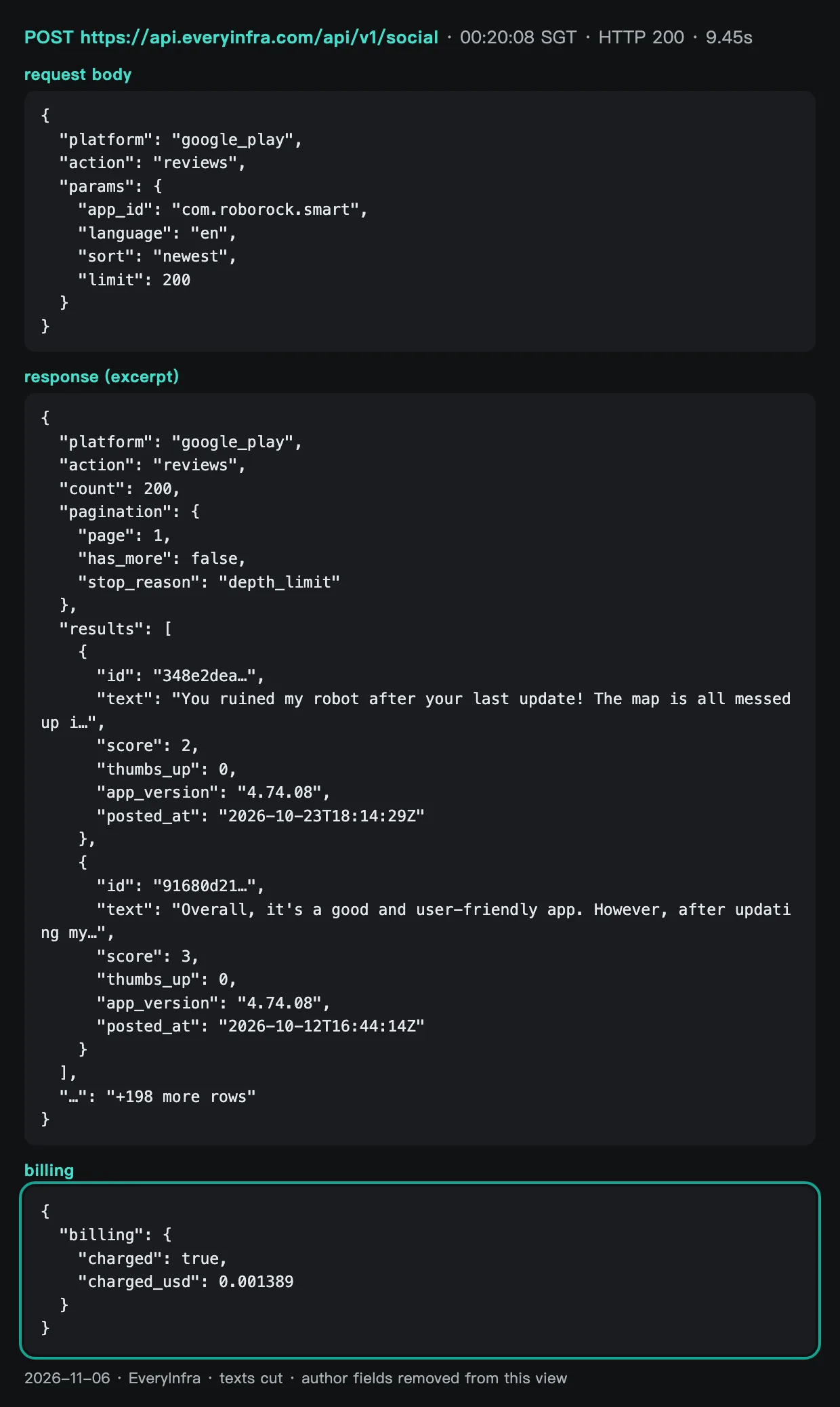
We made 7 calls in total, from 00:16:42 to 00:24:27 SGT. The table below lists each one. A synchronous tiktok/comments call took 90.21 seconds and returned HTTP 200 with 12 rows. Two synchronous calls, to amazon/reviews and to trustpilot/reviews with limit 200, ran past 85 seconds and returned a 503 timeout with no charge. The error text told us to use "mode":"async" or a smaller limit. Two async amazon/reviews jobs on two Roborock products succeeded with 0 rows, and the charge went back.
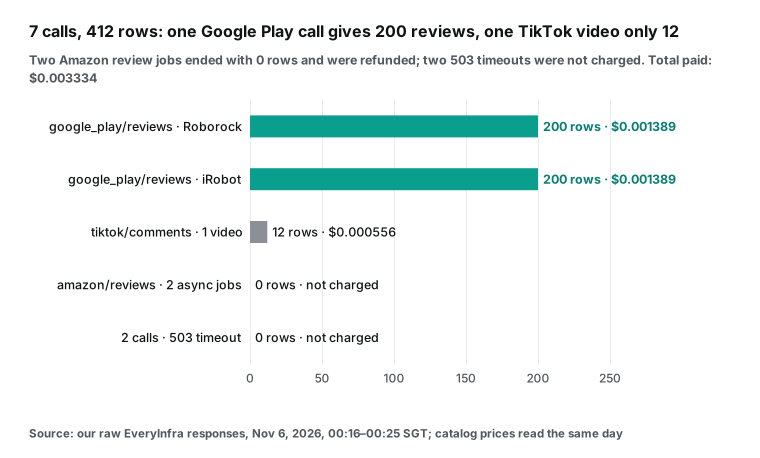
| Time (SGT) | Capability | Result | Time on our side | Rows | Charge |
|---|---|---|---|---|---|
| 00:16:42 | amazon/reviews sync | 503 timeout | 89.91 s | 0 | $0 |
| 00:18:21 → 00:19:57 | amazon/reviews async | Succeeded, 0 rows, refunded | Submit 2.08 s, done in about 96 s | 0 | $0 (charged, then refunded) |
| 00:18:26 | tiktok/comments sync | 200 | 90.21 s | 12 | $0.000556 |
| 00:20:08 | google_play/reviews Roborock | 200 | 9.45 s | 200 | $0.001389 |
| 00:20:25 | google_play/reviews iRobot | 200 | 9.24 s | 200 | $0.001389 |
| 00:20:34 → 00:24:18 | amazon/reviews async | Succeeded, 0 rows, refunded | Submit 2.04 s, done in about 224 s | 0 | $0 (charged, then refunded) |
| 00:24:27 | trustpilot/reviews sync | 503 timeout | 88.2 s | 0 | $0 |
One timing needs a note. The tiktok/comments call took 90.21 seconds, longer than the two 503 timeouts (89.91 s and 88.2 s), but it returned 200 with 12 rows. Both 503 error messages say "request timed out after 85s". So 85 seconds is the server-side wait limit. Our times start when we send the request and stop when we get the full response. So they include network time and queue time.
The response does not show a server-side time, so we cannot say how long the TikTok call took on the server. We can only say that it came close to the limit. The same request at a different time could return a 503. For batch pulls of slow capabilities such as TikTok comments, use async mode.
This table is a finding in itself. Only 3 of the 7 calls returned data. But the 4 calls without data cost nothing. The two 503 responses show charged_usd: 0 in the body. The two empty async jobs were charged at the call price when we sent them, and the charge went back when the jobs ended.
For a batch tagging job, a failed data pull costs time, not money. The real risk is different. Do not write "0 rows" into a report as "no negative reviews". We did not chase the two empty Amazon jobs. The section "Limits and things to watch" explains why.
What the 412 reviews look like
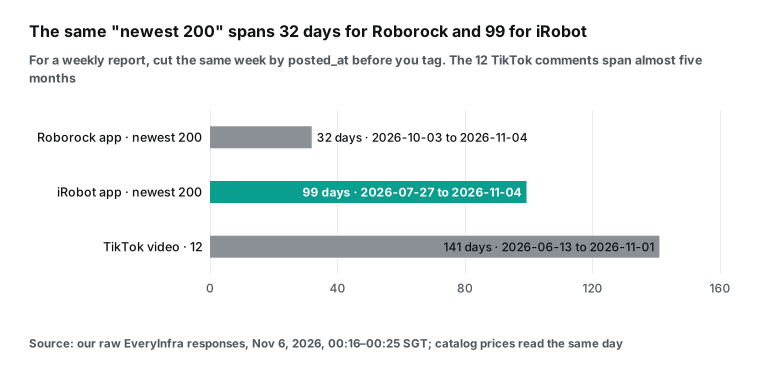
Before you send anything to a model, look at the data. Each app gave us its 200 newest English reviews. The counts are equal, but the time spans are not. The 200 Roborock reviews run from 2026-10-03 to 2026-11-04, which is 32 days.
The 200 iRobot reviews run from 2026-07-27 to 2026-11-04, which is 99 days. For the same $0.001389, the Roborock call shows the last month, and the iRobot call shows more than three months. If you build a weekly report from "the newest 200", the iRobot side will put July problems into this week.
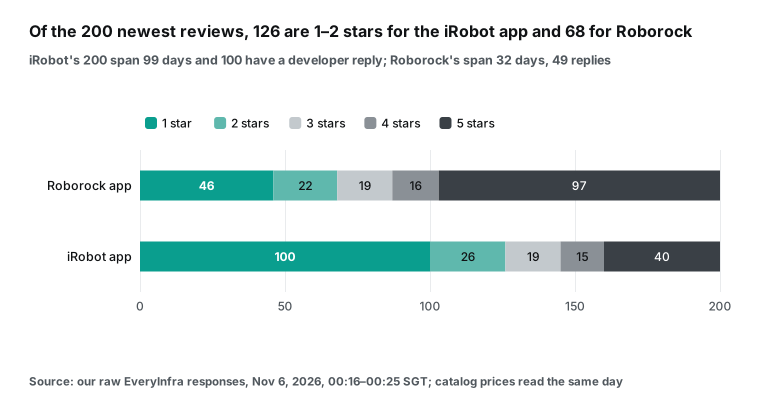
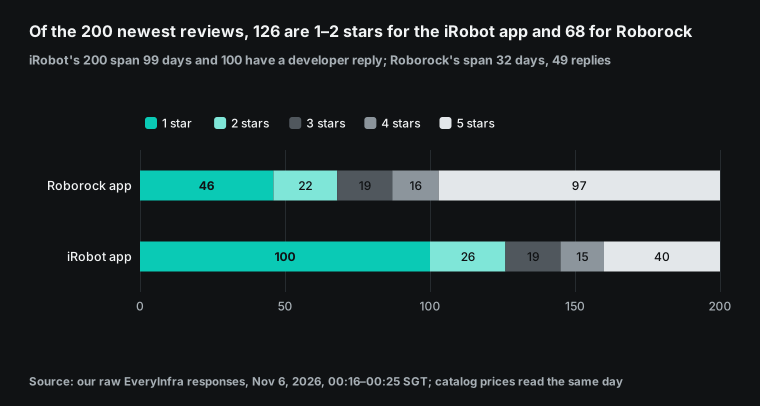
The star ratings differ even more. In the iRobot set, 100 reviews are 1-star and 26 are 2-star. That is 126 reviews, or 63%, at 1 or 2 stars. In the Roborock set, the number is 46 plus 22, which is 68 reviews, or 34%.
Developer replies also differ. In the iRobot set, 100 of 200 reviews have reply_text. In the Roborock set, 49 do.
These numbers describe only these 200 reviews, not the overall reputation of either product. We show them because they shape the tag results. Most of the iRobot set will land in negative and app_connectivity.
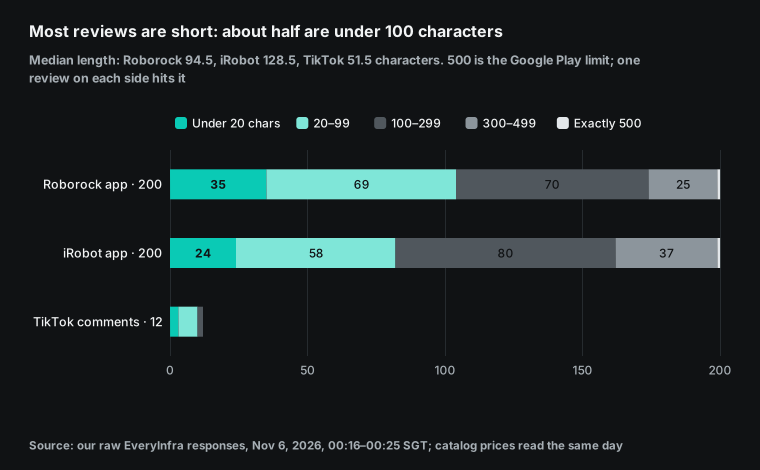
Review length drives the token count. The median length of a Google Play review is 94.5 characters for Roborock and 128.5 characters for iRobot. The longest review on each side is exactly 500 characters. That is the Google Play limit for a review.
A user in the Google Play help community asked about this 500-character limit. Reviews under 20 characters number 35 on the Roborock side and 24 on the iRobot side. Examples are "Great robovac great" and "iRobot is awful".
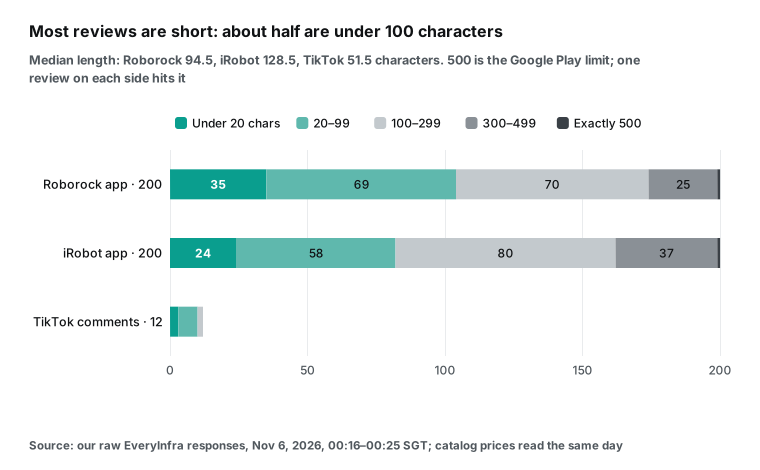
The 12 TikTok comments have a median length of 51.5 characters, and most are questions. They run from 2026-06-13 to 2026-11-01, which is almost five months. Comments under one video do not grow day by day. When the video stops trending, few people add new comments.
That is why one call returned only 12 rows. The point about short reviews is simple. A review can be just a few dozen tokens. If each one carries several hundred tokens of instructions, you pay mostly for the instructions.
One more small finding. We asked for language: "en", but the Roborock set still has reviews in Chinese and Slovak. The catalog says that language is the query language, not a promise for each review. So the schema has a language field, and evidence stays in the original language.
"Mentions a competitor": how far can a keyword rule go
Of the four tags, "mentions a competitor" looks like the best fit for a keyword rule. A rule costs no model fee. We tested this on the 412 reviews. We used a regular expression with 29 brand names from robot vacuums and home appliances.
We excluded the brand of the app itself. The rule matched 17 reviews. Then we read all 17 to decide if each one really mentions another robot vacuum brand.
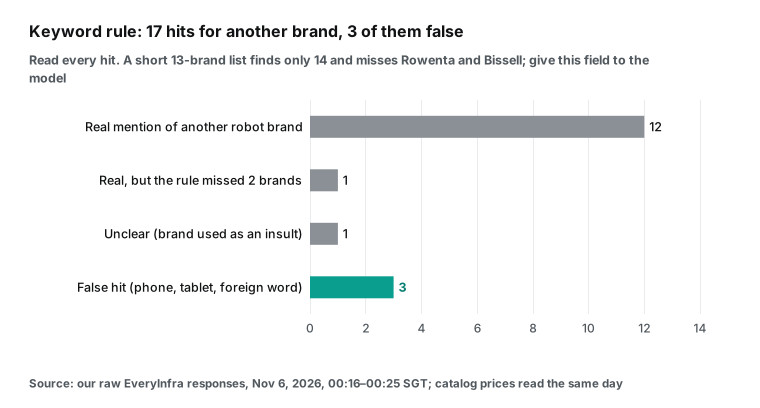
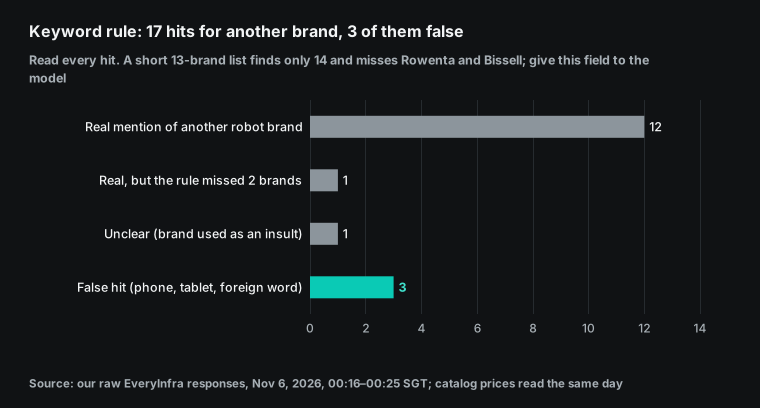
Thirteen of the 17 are real. In the Roborock app, 5 reviews compare it with iRobot, Roomba, Shark or Bissell. Four of them are 5-star, such as "a great upgrade from the iRobot". The fifth is 1-star and says that Roomba was better five years ago.
In the iRobot app, 5 reviews tell people to buy Roborock, Shark, Rowenta or Ecovacs instead. All 5 are 1-star or 2-star. The 3 TikTok matches ask about Dreame, Roborock and Mova models.
Three are false hits. One is about the screen ratio of a Samsung Z Fold 8 phone. One says that the app does not install on a Samsung tablet. One is the Slovak word "mi" (which means "me"), and the rule took it for Xiaomi.
The last one is unclear. The review calls the new "Explore" page in the app click bait and "typical xiaomi" marketing. It names a brand, but it does not compare robot vacuums.
The misses also matter. One 5-star review names "Sharks, Bissell's, iRomba's". The rule found only Bissell, because the plural and the typo did not match. A short list of the 13 most common brands finds only 14 reviews and loses Rowenta and Bissell.
The lesson is clear. A keyword rule is fine as a first filter. It is not good enough as a tag. False hits come from phones with the same brand name and from foreign words. Misses come from plurals, typos and brands that are not on the list.
That is why the schema uses a competitors enum plus other_brand, and why we give this column to the model. The mentions_competitor boolean can come straight from whether competitors is empty. We keep it only because it makes the sheet easy to filter. Later we show how to check that the two fields agree.
How to estimate tokens: the fixed prefix is 92%
Without an OpenAI key, we can only estimate the model cost. We show each step, so you can put in your own numbers. OpenAI has not published the tokenizer for GPT-6.1 Sol. We use the newest public encoding, o200k_base, from OpenAI's open-source tiktoken library, version 0.14.0 on PyPI.
The system prompt, the schema and the input format are real files. The reviews are the 412 rows from our live calls. Output tokens come from the average length of the 12 hand-written example tags. Reasoning tokens are a separate assumption.
Real billing follows the usage object in each Responses API reply. Before a full run, send 20 reviews as a pilot. Read input_tokens, output_tokens and output_tokens_details.reasoning_tokens. Then update the table below.
| Part | Tokens (o200k_base) | Note |
|---|---|---|
| System prompt (category guide and rules) | 645 | Sent with every request |
| Single-review tag schema | 322 | Counted as compact JSON. OpenAI decides how it is actually billed. |
| 25-review schema | 362 | One more labels array layer |
| Fixed prefix (single / 25-review) | 967 / 1,007 | Both are below the 1,024-token cache minimum |
| One review as input (with ID, source, stars) | Mean 81.1, median 73.5, max 205 | 412 real reviews |
| Review text alone | Mean 32.6 | More than half of the tokens go to the format lines |
| One tag as output | Mean 87.3 (65 to 107) | 12 hand-written examples |
Multiply these numbers by 1,000 reviews, and the difference is clear. With 1 review per request, 1,000 requests need about 1,056,100 input tokens. The fixed prefix is 967 tokens, plus 8 tokens for the message format, in each request. That is 975,000 tokens, or 92.3% of the input. With 25 reviews per request, you need only 40 requests.
The fixed prefix falls to 40,600 tokens, and total input falls to about 121,700 tokens. That is 88.5% less. The 81,100 tokens of review content are the same in both layouts. All the savings come from not sending the same instructions again and again.
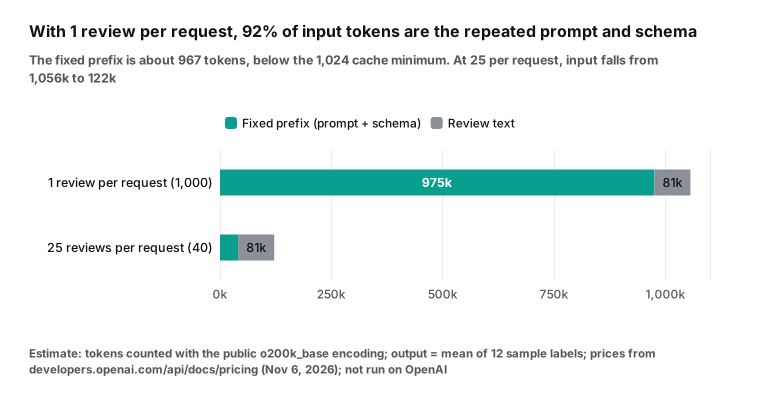
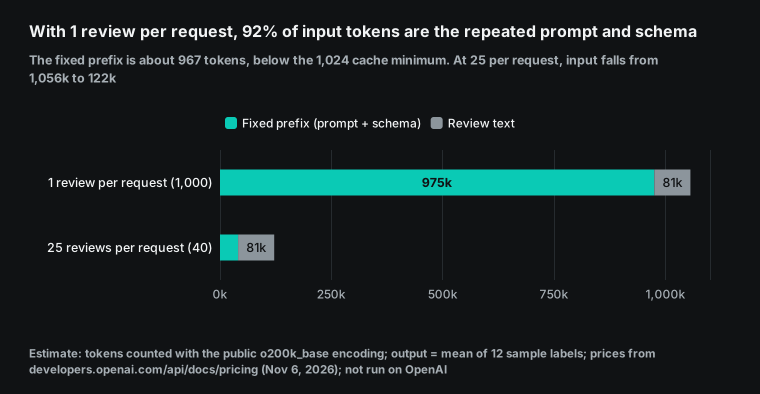
You may think: the prefix repeats, so the cache will handle it. The prompt caching guide says that for GPT-5.6 and later, the minimum cacheable prefix is 1,024 visible input tokens. Hidden system content that OpenAI adds does not count. For GPT-6.1 Sol, a cache read costs 0.05 times the normal input price. A 30-minute cache write costs 1.25 times, and a 12-hour write costs 2.5 times.
Our prefix is 967 tokens in o200k_base. That is 57 tokens short of the minimum. If OpenAI turns the schema into hidden system content, the visible part is only 645 tokens, even further from the minimum. Either way, this prefix cannot enter the cache. In other words, "1 review per request plus the cache" does not work at this prompt length.
If your prompt is already longer than 1,024 tokens, the cache can work. In a hypothetical case where the full prefix is read at the cache price, 1 review per request in Batch costs about $0.57 per 1,000. That is close to $0.56 for 25 per request, and it leaves out the first cache write. But 25 per request does not depend on cache hits, and you do not need to pad the prompt. So we build the Batch file with 25 reviews per request.
Batch API workflow: JSONL, upload, download
The Batch API guide is clear. You write each request as one line of a .jsonl file. Each line has a unique custom_id, a method, a url and a body. The body is the same as for the synchronous endpoint.
One file can use only one model. You upload the file with purpose set to batch. When you create the batch, completion_window can only be 24h today. The price is 50% lower than the synchronous endpoint, and Batch has its own, higher rate limits.
The guide also lists three limits that a tagging job will meet. One batch can have up to 50,000 requests, and the input file can be up to 200 MB. You can create up to 2,000 batches per hour. The output file does not keep the input order, so you must match results by custom_id.
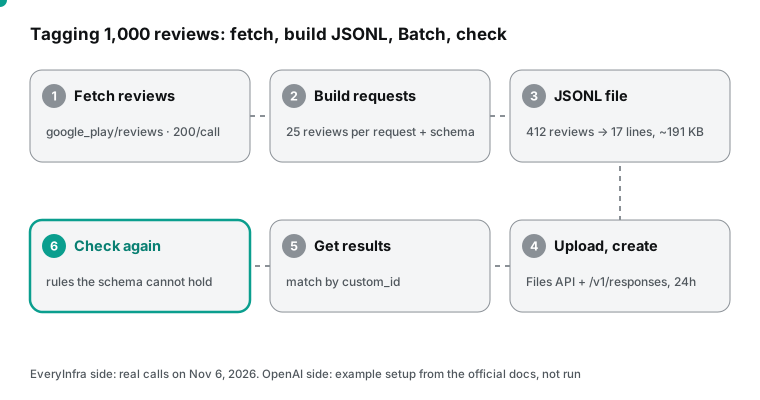
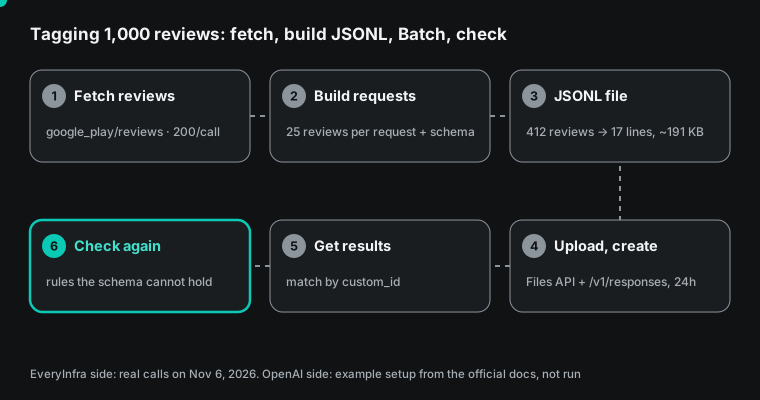
We built two Batch files from the 412 real reviews, to see the file sizes. The 1-review-per-request file has 412 lines and 2,018,830 bytes. That is about 4,900 bytes per line, because each line carries the full system prompt and schema. The 25-review file has 17 lines and 191,412 bytes, which is about 11,260 bytes per line.
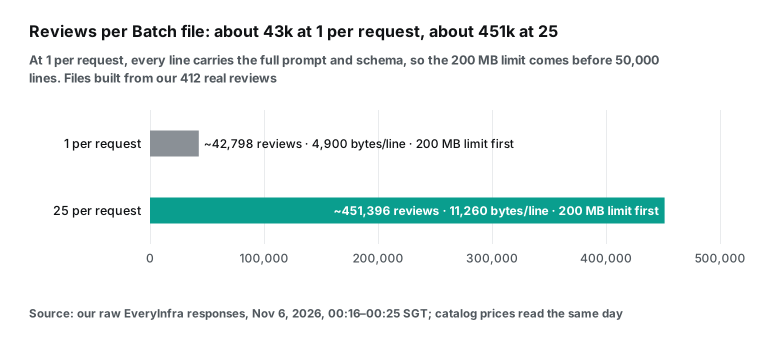
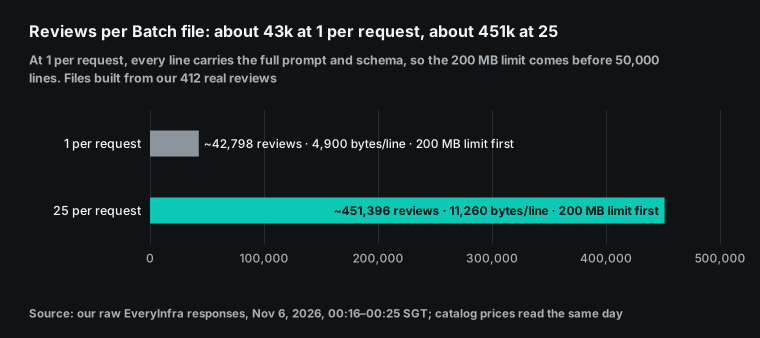
From the 200 MB limit, a 1-review-per-request file holds about 42,798 reviews. It hits the size limit before the 50,000-line limit. A 25-review file holds about 451,000 reviews by size, and 1,250,000 by line count. A run of 1,000 reviews is far below every limit. But for tens of thousands of reviews, the 1-per-request layout hits 200 MB sooner than you may expect.
If you skip Batch and use the synchronous endpoint, a large run can hit the tokens-per-minute limit. On 2026-10-06, OpenAI cut the usage tiers to three: Build, Launch and Grow (rate limits guide). The Sol model page gives the Build tier 1,000,000 tokens per minute. Batch has its own, higher limits, separate from the synchronous quota. Check your own limits page before a large run.
Below is the first line of the 25-review file, with line breaks added and the prompt and schema cut. After it is Python code for upload and batch creation. This is a configuration example from the docs. We did not run it on OpenAI.
# One JSONL line (cut):
# {"custom_id": "chunk-000", "method": "POST", "url": "/v1/responses",
#  "body": {"model": "gpt-6.1-sol", "reasoning": {"effort": "low"}, "max_output_tokens": 12000, "store": false,
#           "input": [{"role": "developer", "content": "You label customer reviews ..."},
#                     {"role": "user", "content": "item_id: 56a3b9f4-...\nsource: google_play/reviews app=com.roborock.smart\nrating: 5/5\ntext: ..."}],
#           "text": {"format": {"type": "json_schema", "name": "review_labels", "strict": true, "schema": {...}}}}}
from openai import OpenAI
client = OpenAI()  # reads OPENAI_API_KEY from the environment
f = client.files.create(file=open("x25.jsonl", "rb"), purpose="batch")
batch = client.batches.create(input_file_id=f.id, endpoint="/v1/responses", completion_window="24h",
                              metadata={"job": "review-tagging-2026-11-06"})
print(batch.id, batch.status)  # validating -> in_progress -> finalizing -> completed
Set max_output_tokens high enough. Twenty-five tags at about 87 tokens each come to about 2,200 tokens. Reasoning tokens come on top of that. We set 12,000.
If the value is too low, the structured output stops in the middle. The Structured Outputs guide covers this case. The response status is incomplete, and the reason is max_output_tokens. The JSON that you get is not complete, so treat it as a failure.
store: false tells OpenAI not to keep the response for later reference. But the Batch API FAQ says that zero data retention does not apply to the Batch API. The input, output and error files follow the retention rules of the Batch and Files services. If reviews contain personal data, remove it before you send them. When we built the requests, we removed the author name, the author avatar and the review URL. We kept only the review ID, source, stars and text.
When you download results, the status goes through validating, in_progress, finalizing and completed. A batch that does not finish within 24 hours becomes expired. You get the finished part and pay for it. The unfinished requests go to the error file with the code batch_expired. Output files are deleted 30 days after the batch ends, so download them in time.
The Batch API reference and the Files API reference list every field. If you want a low price but a synchronous reply, Flex processing uses Batch prices. The trade-off is slower replies and an occasional 429 "resource unavailable" error, which is not billed.
Cost per 1,000 reviews: data fee plus model fee
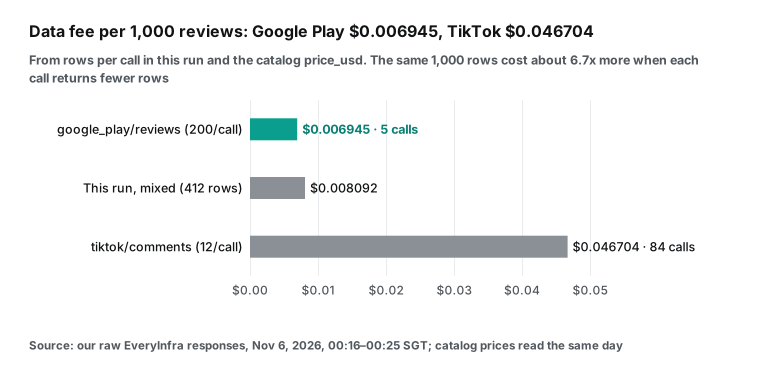
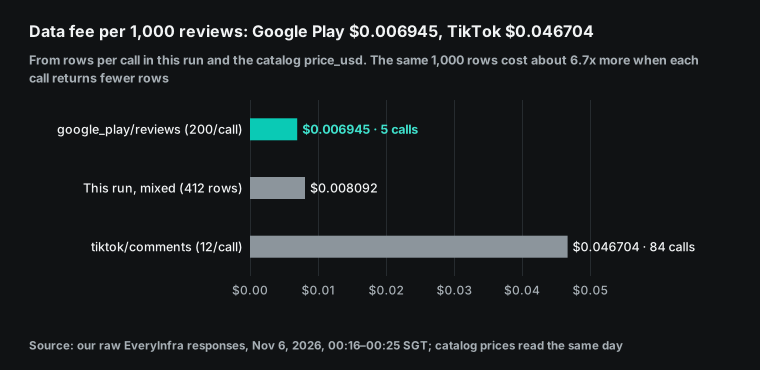
Now put the data fee and the tagging fee together. We compute the data fee from the rows per call that we saw and the catalog price. Google Play returns 200 rows per call, so 1,000 reviews need 5 calls, which is $0.006945. This TikTok video returned 12 rows per call, so 1,000 reviews need 84 calls, which is $0.046704. That is 6.7 times more. Our mixed set of 412 reviews cost $0.003334, which is $0.008092 per 1,000.
The TikTok number assumes 12 rows per video. A popular video returns more rows per call, and the data fee is then much lower. We show the number to make one point. The data fee per 1,000 reviews depends on how many rows each call returns, not only on the unit price.
We estimate the model fee from the public OpenAI prices on 2026-11-06 and the token counts above. We use three levels of reasoning tokens per review: 0, 50 and 200. Zero is a floor that Sol cannot reach, because its lowest setting is low. All values below are US dollars per 1,000 reviews. They do not include the EveryInfra data fee.
| Setup (per 1,000 reviews) | Reasoning 0 (floor) | Reasoning 50 per review (assumed) | Reasoning 200 per review (assumed) |
|---|---|---|---|
| Sol standard, 1 review per request | $2.99 | $3.49 | $4.99 |
| Sol Batch, 1 review per request | $1.49 | $1.74 | $2.49 |
| Sol Batch, 1 per request, prefix at cache price (hypothetical, prefix under 1,024) | $0.57 | $0.82 | $1.57 |
| Sol Batch, 25 reviews per request | $0.56 | $0.81 | $1.56 |
Terra Batch, 25 per request, none | $0.28 | n/a | n/a |
Luna Batch, 25 per request, none | $0.028 | n/a | n/a |
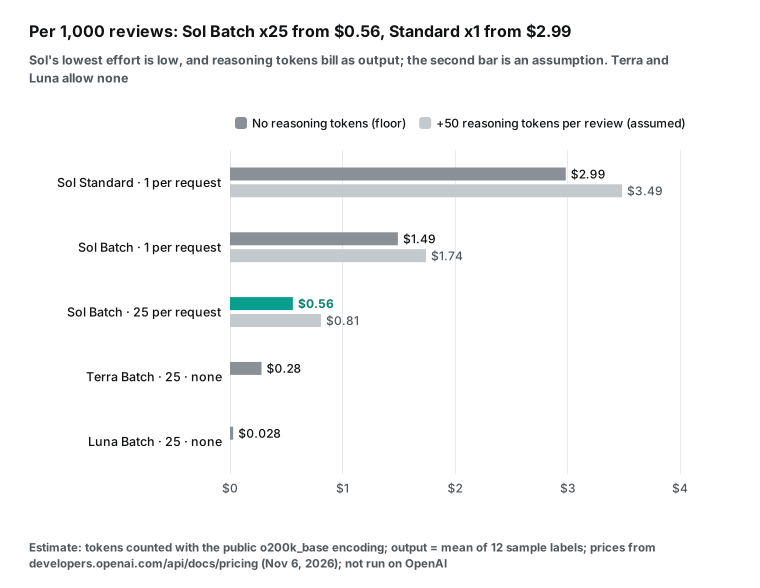
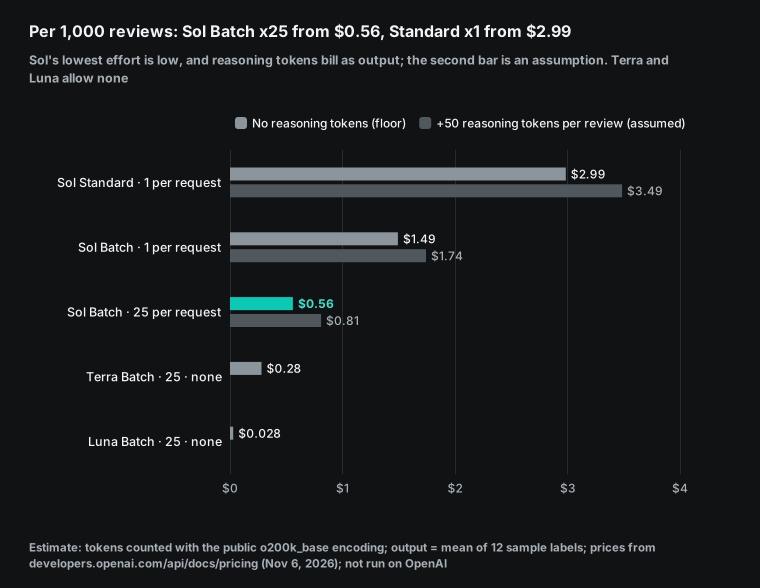
There are three ways to read this table. First, with the same model and the same prompt, a move from "standard, 1 per request" to "Batch, 25 per request" cuts the floor from $2.99 to $0.56. That is 5.3 times less.
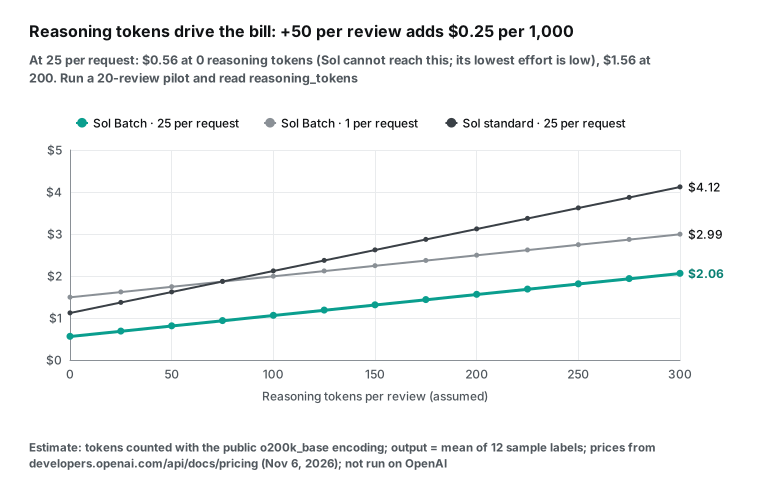
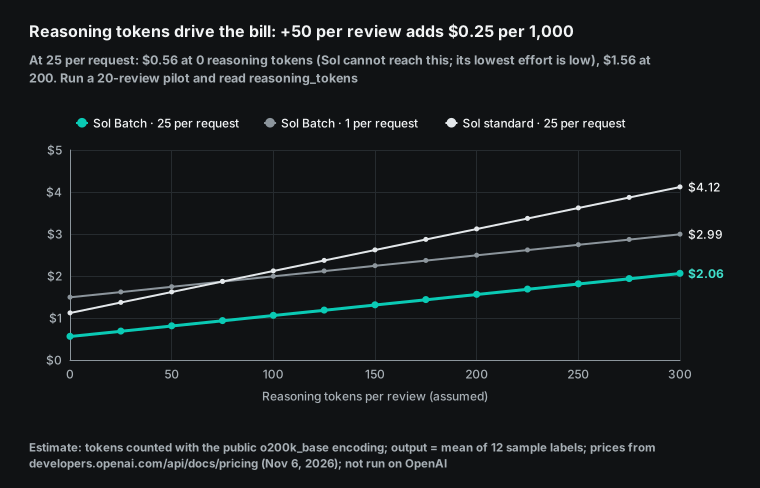
Second, at 25 per request, most of the money goes to output. Of the $0.56, output is $0.44, or about 78%. Each 50 extra reasoning tokens per review adds $0.25 (50 × 1,000 × $5 ÷ 1,000,000). So the final bill depends on how many reasoning tokens low makes on your reviews. Only a pilot run can measure that.
Third, the data fee is a small part of the total. Google Play at $0.006945 plus Sol Batch at 25 per request ($0.56) is about $0.566. The data fee is 1.2% of that. With the TikTok fee of $0.046704, it is still only 7.7%.
To use your own numbers, you need four values. P is the token count of the fixed prefix. x is the mean input tokens per review. y is the mean output tokens per tag.
r is the reasoning tokens per review. With k reviews per request at Batch price, the model fee per 1,000 reviews is about (1,000 ÷ k × P + 1,000 × x) × $1 ÷ 1,000,000, plus 1,000 × (y + r) × $5 ÷ 1,000,000. In this article, P is 967 or 1,007, x is 81.1, y is 87.3 and r is unknown.
If your reviews are longer, the x term grows and k matters less. Long e-commerce reviews can average three or four hundred tokens. If your prompt is longer, the P term grows and a larger k matters more. The formula leaves out the surcharge above 272K input tokens. At 25 per request, each request is just over 3,000 tokens, far from that line. If you plan to put thousands of reviews in one request, add the surcharge or split the request.
For scale, a 2023 paper by Gilardi and others, ChatGPT Outperforms Crowd-Workers for Text-Annotation Tasks, reported under $0.003 per annotation on 2,382 tweets. Our Sol Batch floor at 25 per request is about $0.00056 per review, or $0.00081 with 50 reasoning tokens.
One number is a measured result from a paper. The other is our estimate, and we did not run it on OpenAI. The tasks and models also differ. So use this only as a sense of scale. It does not show how much prices fell, and it says nothing about accuracy.
Sol, Terra, Luna and the Decisions API: when not to use Sol
The last two rows of the cost table are there on purpose. GPT-6.1 Terra came out on 2026-10-26. The launch post says that its standard price is 50% lower than GPT-6.1 Sol and that it suits high-volume document work. It supports none reasoning. Its Batch price is $0.50 input and $2.50 output. OpenAI calls GPT-6 Luna its efficient model for focused, high-volume tasks.
Luna also supports none. Its Batch price is $0.05 input and $0.25 output. With the same token estimate, Terra costs $0.28 per 1,000 reviews, and Luna costs $0.028. That is one half and one twentieth of the Sol floor. And neither has the unknown reasoning-token cost.
So when should you use Sol? First, when the tag needs reasoning, such as "Did the last firmware version cause this fault?", or when action_item must read like a product manager wrote it. Second, when a spot check of a Luna or Terra run shows many errors in some groups, such as mixed sentiment. Then rerun only that part on Sol. For tags you can read off the words, Sol's reasoning is wasted.
OpenAI also has a path made for classification. The Decisions API came out in beta on 2026-10-06 and became generally available on 2026-10-22. Today it supports only gpt-6-luna. It does not make the model write JSON. It returns typed answers to the questions you give it.
A predicate returns a probability from 0 to 1. A choice picks one of your options and gives a probability for each option. A score rates on a scale from 2 to 10 points. One request can hold up to 400 questions. OpenAI says that it is about 10 times faster than the Responses API.
The guide states the split. Use Decisions for probabilities, single choice or scores. Use Structured Outputs to generate an object that matches your schema. Sentiment, issue category and competitor mention can be Decisions questions with confidence values. action_item and evidence still need Structured Outputs.
| Option | Best for | Model cost per 1,000 (estimate) | Main limit |
|---|---|---|---|
| GPT-6.1 Sol + Structured Outputs + Batch | Tags that need reasoning, written actions, or a high-quality rerun of a small part | From $0.56, plus $0.25 per 50 reasoning tokens per review | Cannot turn off reasoning. Delivers within 24 hours. |
| GPT-6.1 Terra + Structured Outputs + Batch | High volume, clear fields, one written sentence | About $0.28 (none) | Weaker than Sol on hard judgment |
| GPT-6 Luna + Structured Outputs + Batch | Pure classification at very high volume | About $0.028 (none) | Spot-check the quality of written actions |
| Decisions API (Luna) | Sentiment, category and competitor mention with confidence | Not estimated here (Luna token price, and question count affects use) | No free text. Luna only. |
What the schema cannot enforce: checks after the results come back
Strict mode guarantees the shape. Every field is there, each type is right, and each enum value is valid. It does not guarantee that the content is right. It also does not stop two fields from contradicting each other.
We ran a small test with the Python jsonschema library. We changed the hand-written tag for the TikTok comment to competitors: ["dreame"] and mentions_competitor: false. The two fields clearly conflict, but the tag still passed schema validation.
The Structured Outputs guide also says that Structured Outputs can still contain mistakes. It suggests that you adjust the instructions, add examples or split the task. So when the results come back, run at least the check below:
def check(label, item):
    errs = []
    if label["mentions_competitor"] != bool(label["competitors"]):
        errs.append("mentions_competitor does not match competitors")
    if ("other_brand" in label["competitors"]) != (label["other_brand_name"] is not None):
        errs.append("other_brand does not match other_brand_name")
    if "none" in label["issue_categories"] and len(label["issue_categories"]) > 1:
        errs.append("none cannot appear with other categories")
    if label["action_item"] and len(label["action_item"].split()) > 20:
        errs.append("action_item is longer than 20 words")
    if label["evidence"] and label["evidence"].lower()[:30] not in item["text"].lower():
        errs.append("evidence is not a quote from the text")
    if label["item_id"] != item["id"]:
        errs.append("item_id does not match")
    return errs
Each check covers a rule that the schema cannot express. Two fields must be true together or false together. Some enum values exclude others. A word limit applies.
And a quote must come from the source. The last check is the most useful. It catches a "quote" that the model made up.
A 25-review request needs one more check. The labels array must have 25 items, and each item_id must match one input. The guide says that output follows the key order of the schema. It does not promise that array items come back in input order. Matching by ID is safer than matching by position.
Two more cases need their own handling. The first is a refusal. The guide says that when the model refuses for safety reasons, the content type is refusal, and it does not follow your schema. Some reviews contain abuse or extreme language. One iRobot review we read insults the developers with an offensive word. Be ready to catch refusal.
The second case is off-topic input. The guide suggests that the prompt say what to return for input that does not fit the task. Rule 8 of our system prompt does this: empty reviews, ads and unrelated text get neutral, none and no competitors.
Limits and things to watch
Amazon reviews did not come back this time. Both async jobs succeeded with 0 rows, and the fees went back. The catalog says that each Amazon site shows only the featured reviews on the product page, usually a dozen or so per product. At a dozen rows per call, the data fee is above $0.08 per 1,000 reviews, more than ten times Google Play. Test a few products before you set an Amazon budget. Our cost table does not include Amazon.
Synchronous calls have an 85-second time budget. This time, amazon/reviews and trustpilot/reviews (limit 200) both waited more than 85 seconds and returned a 503 timeout. They cost nothing. The response told us to use "mode":"async" or a smaller limit. The 85 seconds is measured on the server. Our tiktok/comments call took 90.21 seconds on our side and still returned 200, so it was also close to the limit.
For a batch data pull, use async mode for slow capabilities. A 202 comes back at once with a job_id. Then you poll poll_url. Our two async jobs took about 1 minute 36 seconds and 3 minutes 44 seconds from start to finish.
"Newest 200" is not a fixed time window. As shown above, the Roborock 200 span 32 days and the iRobot 200 span 99 days. For a week-over-week comparison, cut the same week by posted_at before you tag.
In synchronous mode, Google Play pagination goes 200 rows deep. For more depth, use async mode. The catalog pagination field shows the limit.
For your own app, the Google Reply to Reviews API returns only reviews from the last week. It returns up to 100 per page, with 200 GET requests per hour. Older reviews come from the Play Console CSV download. For a competitor's app, the Google API gives you nothing.
Are the reviews real? The US FTC final rule on fake reviews (August 2024) bans AI-generated fake reviews. Tags tell you what a review says, not if it is real. Look first at any odd cluster of 5-star or 1-star reviews.
Structured output may affect reasoning quality. The paper Let Me Speak Freely? (2024) found that strict formats such as JSON can lower reasoning performance. JSONSchemaBench (2025) tested six constrained decoding methods, including OpenAI's, on 10,000 real schemas and found large differences. Both tested older models. But they support one choice here: put action_item late in the schema. If one tag group scores low, try a free-form answer first, then convert it to JSON with a cheap model.
Check accuracy with people, not with the model. We did not run the batch on OpenAI, so we have no accuracy number. Here is what we suggest. Take the 20 pilot reviews plus 50 random reviews from the full run. Ask a person who knows the product to check each tag against the text. Count errors by category. Then decide which categories need a new prompt and which need a rerun on a different model.
We used the same method for the 17 keyword matches above. The survey of LLMs for data annotation has a section on how to assess annotations that a model makes. Human review is one method. A comparison with an existing human-labeled set is another.
How this differs from other review articles on this site
DeepSeek V4 in Claude Code for comment cleaning cleans 695 rows of video comments in an interactive session. Its cost depends on cache hits. Claude strict tool use with a data API makes the tool inputs strict. A Qwen Agent review analyst compares prices and reads reviews in one agent. Here, the strict part is the output format, the job is one offline batch, and the cost driver is request layout.
For a report inside ChatGPT, see GPT-6 Intelligent UI for social data reports.
Changes in the last 60 days
2026-09-29: GPT-6.1 Sol came to the API (changelog). Large structured jobs can now use a model close to the top model at one-fifth of the Astra price. But you cannot turn off its reasoning.
2026-10-06: the Decisions API came out in beta, and it became generally available on 2026-10-22 (Decisions guide). Single-choice tags now have a path with confidence values and no JSON, on Luna only.
2026-10-20: 12-hour prompt caching came to the API, with writes at 2.5 times the input price (prompt caching guide). It helps a job that runs several times a day with a prompt above 1,024 tokens. It does not help a short prefix.
2026-10-21: organizations and projects can limit service tiers in platform settings (changelog). What it means for you: your admin can allow only the default tier. Then requests for Flex or another non-default tier fail with a service tier error. Check the project settings before you run, not after a batch fails.
2026-10-26: GPT-6.1 Terra came out. Its standard price is half of Sol, and it supports none reasoning (Terra model page). What it means for you: there is now a middle option between Sol and Luna that can turn off reasoning. Many tagging jobs can try Terra first.
2026-10-28: ChatGPT subscribers can claim API credits. Eligible Pro and Business subscribers get up to $500 per month (credits guide). That easily covers pilot runs. Unused credits expire each month.
GPT-6.1 Sol and structured outputs FAQ
What is the gpt-6.1 sol api price?
The full price table is in the first section of this article. In short, the OpenAI pricing page gives $2 input and $10 output per 1M tokens at the standard price. Batch and Flex are half. Fast mode is 2 times the standard price and Ultrafast is 6 times; batch tagging does not need either one. Reasoning tokens are billed as output. (Source of the question: Google autocomplete, 2026-11-06.)
What is the gpt 6.1 sol api name, and how do I call it?
The model name is gpt-6.1-sol. Put it in the model field of a Responses API request (model page). Chat Completions also works, but without tool calling.
For tools, the migration guide suggests the Responses API. Set reasoning with reasoning.effort. The lowest value is low. (Source of the question: Google autocomplete, "gpt 6.1 sol api name".)
How do I write a gpt 6.1 structured outputs example?
The shortest form is to add text: {format: {type: "json_schema", name: "...", strict: true, schema: {...}}} to a Responses API request. Every object in the schema needs additionalProperties: false, and every field must be in required. In Python, you can also pass a Pydantic model to responses.parse in the SDK. The SDK builds the schema for you (openai-python helpers, Pydantic JSON Schema docs). You can copy and change the nine-field schema in this article. (Source of the question: Google autocomplete, "gpt 6.1 structured outputs example".)
Can I use openai batch api structured output together?
Yes. The Structured Outputs guide says that Structured Outputs and JSON mode both work with the Batch API. The body of each Batch line is the same as a synchronous request, so you keep text.format as is.
Watch three things. One file can use only one model. Set max_output_tokens high enough, so the JSON is not cut off. Match results by custom_id, not by line order. (Source of the question: Google autocomplete, "openai batch api structured output".)
Why is GPT-6.1 Sol at max effort so much slower than GPT-5.6 Sol?
This comes from a thread in the OpenAI developer community. With the same prompt, GPT-6.1 Sol at max made about 62,708 output tokens (52,552 reasoning) in 1,846 seconds. GPT-5.6 Sol made about 31,426 in 373 seconds. For tagging, do not use max. low is enough, and twice the reasoning tokens means twice the output fee.
Get started
- Create an API key in the EveryInfra quickstart. Read the free capability catalog. Check the price and response fields of
google_play/reviews,tiktok/commentsandamazon/reviews. - Pull one page from each source first. Try the Google Play reviews API and TikTok comments API playgrounds. See how many rows each call returns. Then compute the budget per 1,000 reviews. Add
"mode":"async"for slow capabilities. - Change the nine-field schema in this article to fit your own categories. Check it with a script against the strict-mode rules in the Structured Outputs guide.
- Run a synchronous pilot of 20 reviews on OpenAI. Read the input, output and reasoning tokens in
usage, and update the cost table. Then choose Sol, Terra or Luna. - Write the JSONL file with 25 reviews per request and use the Batch API. When the results come back, run the consistency check. Spot-check
evidenceagainst the source text. - To look up reviews ad hoc in Claude, Cursor or ChatGPT without code, connect the EveryInfra remote MCP server. For platform overviews, see the Google Play data API, TikTok data API and Amazon data API. For Amazon reviews, see the Amazon reviews API. For prices, see the pricing page.
References
- GPT-6.1 Sol Model, OpenAI developer docs, read 2026-11-06
- Introducing GPT-6.1 Sol, OpenAI, 2026-09-29
- API Changelog, OpenAI developer docs, read 2026-11-06
- Pricing, OpenAI developer docs, read 2026-11-06
- Structured model outputs, OpenAI developer docs, read 2026-11-06
- Batch API, OpenAI developer docs, read 2026-11-06
- Prompt caching, OpenAI developer docs, read 2026-11-06
- Using GPT-6 (latest model guide), OpenAI developer docs, read 2026-11-06
- Reasoning models, OpenAI developer docs, read 2026-11-06
- Decisions, OpenAI developer docs, read 2026-11-06
- GPT-6.1 Terra Model, OpenAI developer docs, read 2026-11-06
- GPT-6 Luna Model, OpenAI developer docs, read 2026-11-06
- Rate limits, OpenAI developer docs, read 2026-11-06
- Flex processing, OpenAI developer docs, read 2026-11-06
- Function calling, OpenAI developer docs, read 2026-11-06
- Batch API reference, OpenAI developer docs, read 2026-11-06
- Files API reference, OpenAI developer docs, read 2026-11-06
- Ultrafast mode, OpenAI developer docs, read 2026-11-06
- Error codes, OpenAI developer docs, read 2026-11-06
- Your data, OpenAI developer docs, read 2026-11-06
- API credits for ChatGPT subscribers, OpenAI developer docs, read 2026-11-06
- Migrate to the Responses API, OpenAI developer docs, read 2026-11-06
- Prompt cache diagnostics, OpenAI developer docs, read 2026-11-06
- GPT-6.1 Sol system card addendum, OpenAI Deployment Safety Hub, 2026-09-29
- Introducing GPT-6.1 Terra, OpenAI, 2026-10-26
- Batch API FAQ, OpenAI Help Center, read 2026-11-06
- tiktoken, OpenAI, GitHub
- openai-python helpers, OpenAI, GitHub
- tiktoken 0.14.0, PyPI
- jsonschema, PyPI
- JSON Schema (Pydantic docs), Pydantic
- JSON Schema Draft 2020-12, JSON Schema
- RFC 8259: The JSON Data Interchange Format, IETF, 2017-12
- Reply to Reviews, Google Play Developer API, read 2026-11-06
- Download and export monthly reports, Play Console Help, read 2026-11-06
- Why is there a 500 character limit on Google Play reviews?, Google Play Help Community, 2022-07-31
- Query Video Comments, TikTok for Developers, read 2026-11-06
- FTC Announces Final Rule Banning Fake Reviews and Testimonials, US Federal Trade Commission, 2024-08-14
- ChatGPT Outperforms Crowd-Workers for Text-Annotation Tasks, Gilardi et al., arXiv, 2023-03-27
- Let Me Speak Freely? A Study on the Impact of Format Restrictions on Performance of Large Language Models, Tam et al., arXiv, 2024-08-05
- JSONSchemaBench: A Rigorous Benchmark of Structured Outputs for Language Models, Geng et al., arXiv, 2025-01-18
- Large Language Models for Data Annotation and Synthesis: A Survey, Tan et al., arXiv, 2024-02-21
- Why is GPT-6.1 Sol MAX dramatically slower than GPT-5.6 Sol MAX using the same prompt?, OpenAI Developer Community, read 2026-11-06
- EveryInfra capability catalog, EveryInfra, read 2026-11-06 00:15 SGT
- Roborock (Google Play app page), Google Play, read 2026-11-06
- iRobot Home (Google Play app page), Google Play, read 2026-11-06
- Model Context Protocol Specification, MCP, 2025-06-18
- json — JSON encoder and decoder, Python docs
- JSON Lines, jsonlines.org
- Introduction to Structured Outputs (Cookbook), OpenAI Cookbook
Reference BL-95