Cloudflare Kitesurf: AI Browser or Structured API?
Cloudflare Kitesurf is open source. On 10 Amazon pages, full HTML ran 742K tokens and visible text 3.9K, while amazon/profile JSON used 641.

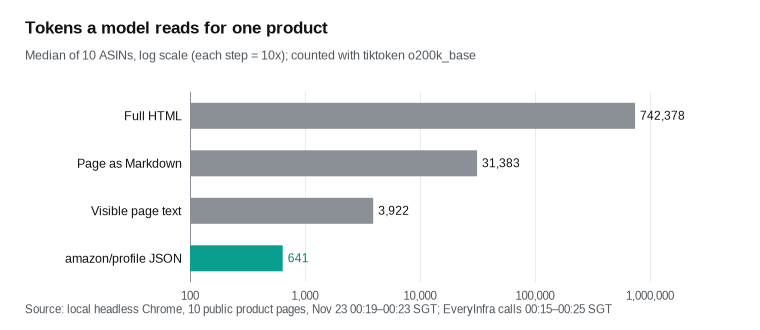
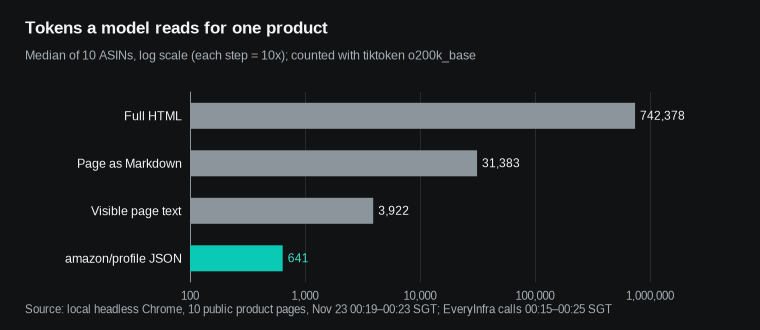
Cloudflare released Kitesurf, its browser for AI agents, under the Apache-2.0 license on November 13, 2026. Ten days later we ran the same 10 Amazon products through two paths. Between 00:14 and 00:52 SGT on November 23, a local headless browser opened each product page. The full HTML had a median of 742,378 tokens. Markdown cut that to 31,383, and visible text alone was 3,922.
The EveryInfra amazon/profile call returned 19 fields in a median of 641 tokens, at $0.001389 per call. The amazon/search call that gave us the sample returned the same 19 fields for each of its 10 results. Every value matched the per-item profile calls, and the whole search cost $0.002236.

What is Cloudflare Kitesurf?
Cloudflare first showed Kitesurf on August 6, 2026. The launch post explains the problem. Chromium was built for people, and one Chromium instance per agent costs a lot of memory and CPU. Agents do not need tabs, themes or extensions.
They care about tokens, context windows, concurrency and cost. So a small team built a browser engine that runs entirely on Cloudflare Workers. It took about 12 weeks from the first commit in May.
The engine reuses several open-source Rust projects. Blitz handles HTML, the DOM, layout and paint. Firefox's Stylo handles CSS. When a page needs eval, Kitesurf falls back to Boa, a JavaScript engine written in Rust and compiled to WebAssembly.
The September 28 update post added WebMCP, CSSOM, custom elements and a terminal client. The November 13 open-source post kept the promise from both earlier posts. The repository is public under Apache-2.0 (LICENSE), and the NOTICE file lists third-party licenses.
The README calls Kitesurf "an experimental browser engine that runs on Cloudflare Workers." It parses HTML, applies CSS, runs page JavaScript and takes screenshots. It needs no Chrome binary and no browser container. It speaks the Chrome DevTools Protocol (CDP), so Puppeteer and Playwright can connect to it. The list of tested sites in the docs has no e-commerce site.
Public pass counts for web standards do not match across sources. The launch post said about 215,000 WPT tests. The update post said 730,000 subtests. The Kitesurf docs page, modified November 13, says more than 235,000 subtests.
The kitesurf.dev WPT page run of November 19 shows 1,516,918 of 1,543,688 subtests, or 98.3%, with 56,800 test files skipped. The four numbers use different scopes. Web Platform Tests measure standards conformance, and the docs say that this does not equal correct rendering on every real site.
| Item | What the source says | Source and date |
|---|---|---|
| Open source and license | Open source since November 13, Apache 2.0 | Open-source post, 2026-11-13 |
| Where it runs | Entirely on Workers, no browser container | Launch post 2026-08-06, README |
| Protocol | CDP, works with Puppeteer and Playwright | README, Kitesurf docs |
| Hosted price | Free in beta, per-account limits | Kitesurf docs, modified 2026-11-13 |
| Self-hosting | Needs Workers Paid and Dynamic Workers | Open-source post, README |
| Not yet supported | Video, WebGL, bot checks that inspect real TLS fingerprints, long logged-in sessions with saved state | Kitesurf docs |
| Standards tests | 1,516,918 of 1,543,688 subtests (98.3%, 56,800 files skipped) | kitesurf.dev/wpt, 2026-11-19 |
Cloudflare's benchmark: HTML extraction against screenshots
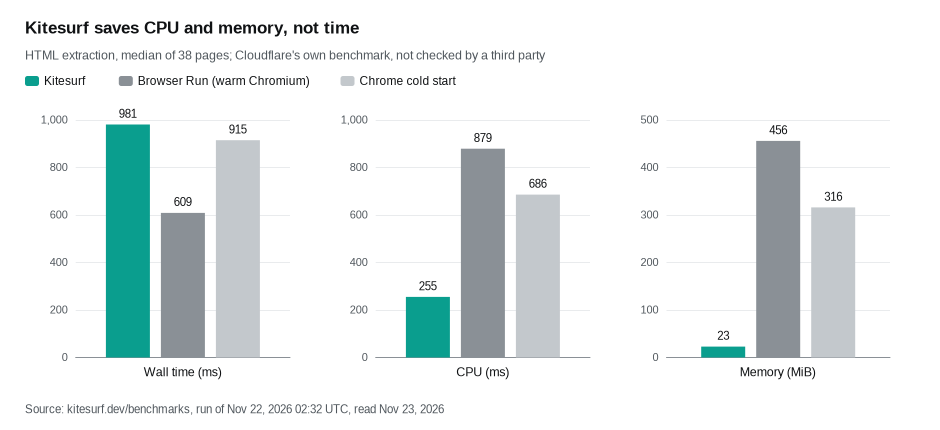
The kitesurf.dev benchmark page run of 02:32 UTC on November 22 covered 38 pages and reports medians. For HTML only, Kitesurf used 255 ms of CPU and 23 MiB of memory per page. With a screenshot, it used 390 ms and 45 MiB. So a task without screenshots saves about one third of the CPU and half of the memory.
We read the source and saw that PageRenderer, the part that draws the page, starts only on the first screenshot request. It draws with Linebender's Vello and writes PDFs with Krilla. A text-only task never creates it.
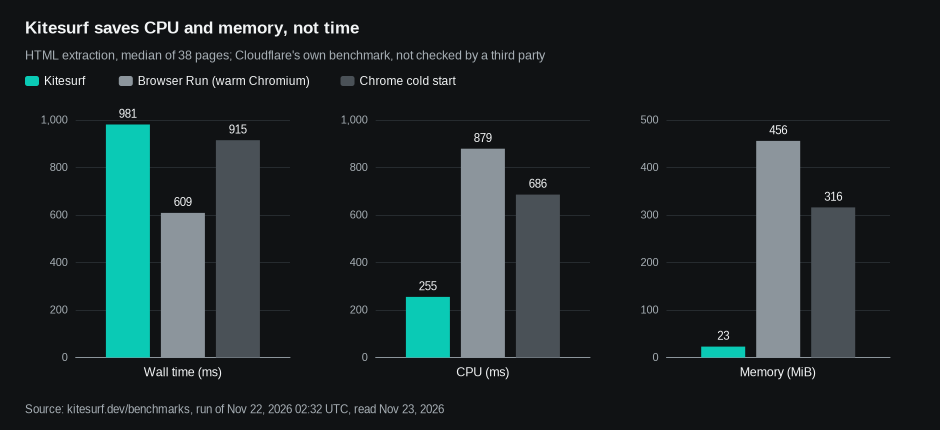
Against warm-pool Chromium in Browser Run, Kitesurf's HTML extraction uses about 29% of the CPU (879 ms) and about 1/20 of the memory (456 MiB). Wall time goes the other way: 981 ms for Kitesurf, 609 ms for warm Chromium and 915 ms for a cold Chrome start. Page JavaScript runs directly in the page's own Dynamic Worker where it can. Only code that compiles at runtime, such as eval or new Function, goes to the Boa interpreter, which the open-source post calls a last resort. Every network request from the page goes through one Worker called SandboxOutbound.
Hosted, self-hosted and local: three ways to run Kitesurf
The simplest path is Browser Run, which Cloudflare used to call Browser Rendering. Add browser=kitesurf to any Quick Action endpoint and Kitesurf replaces Chromium. In a Worker, pass browser: "kitesurf" to env.BROWSER.quickAction(). The CDP endpoint takes the same parameter.
For MCP clients, Cloudflare's example uses Google's chrome-devtools-mcp to connect to the Browser Run WebSocket. The MCP client docs have the full setup. The config below comes from Cloudflare's docs. We did not run it, because we have no Browser Run token on a Cloudflare account.
{
  "mcp": {
    "kitesurf": {
      "type": "local",
      "command": [
        "npx", "-y", "chrome-devtools-mcp@latest",
        "--wsEndpoint=wss://api.cloudflare.com/client/v4/accounts/<ACCOUNT_ID>/browser-run/devtools/browser?browser=kitesurf",
        "--wsHeaders={\"Authorization\":\"Bearer <API_TOKEN>\"}"
      ],
      "enabled": true
    }
  }
}
Self-hosting is new with the open-source release. The README says to run pnpm install --frozen-lockfile and then pnpm run deploy. You need Bazelisk, Node 22 or later, pnpm 9.15.4 and, on macOS, GNU tar. The first build compiles all Rust dependencies. The account needs Workers Paid, because Dynamic Workers exist only on paid plans. The README has two warning boxes.
First, the engine has no built-in authentication. A workers.dev address is public by default and easy to guess, so anyone who finds it can make outbound requests through your account. Put Cloudflare Access in front of it right after deploy. A safer order is to turn on Access for all Workers before you deploy.
The second warning is about local runs. Under wrangler dev or the Docker image, page scripts run in workerd, which is not a hardened sandbox. Do not open untrusted sites locally. The local build has one more useful note. With five parallel connections loading 940 pages, the process ran out of memory at about 300 pages without --expose-gc. With that flag, all 940 pages loaded and memory stayed under 4 GB.
Docker is the third path. Tagged releases push an image to ghcr.io/cloudflare/kitesurf. It suits end-to-end tests with Playwright or Puppeteer in CI, and it needs no Cloudflare account. The image sets KITESURF_NATIVE_EVAL=1 by default, so evaluate runs on V8. On Cloudflare, Boa runs it, which is slower. The README warns that a test can pass in the image and fail on Cloudflare.
Two details catch people in Worker code. The Browser Run binding accepts only "kitesurf" as the browser value. Any other engine name fails with Invalid input: expected "kitesurf". To use the default Chromium, leave the parameter out.
Also, local wrangler dev does not reach the real Browser Run by default. A call to env.BROWSER.quickAction() throws unless the binding sets "remote": true. Both points are in code comments in the Kitesurf docs.
Hosted limits come from the Browser Run limits page. A Workers Paid account can send 30 Quick Action requests per second. A request times out after 60 seconds by default. A Chromium CDP session can stay open for up to 20 minutes with keep_alive, but the WebMCP docs say Kitesurf does not accept keep_alive.
The free plan allows 3 concurrent browsers. Kitesurf has its own per-account limits, and Cloudflare does not publish the numbers. Test your own ceiling with light traffic before you plan a batch job.
Pricing: free in beta, or pay per page when you self-host
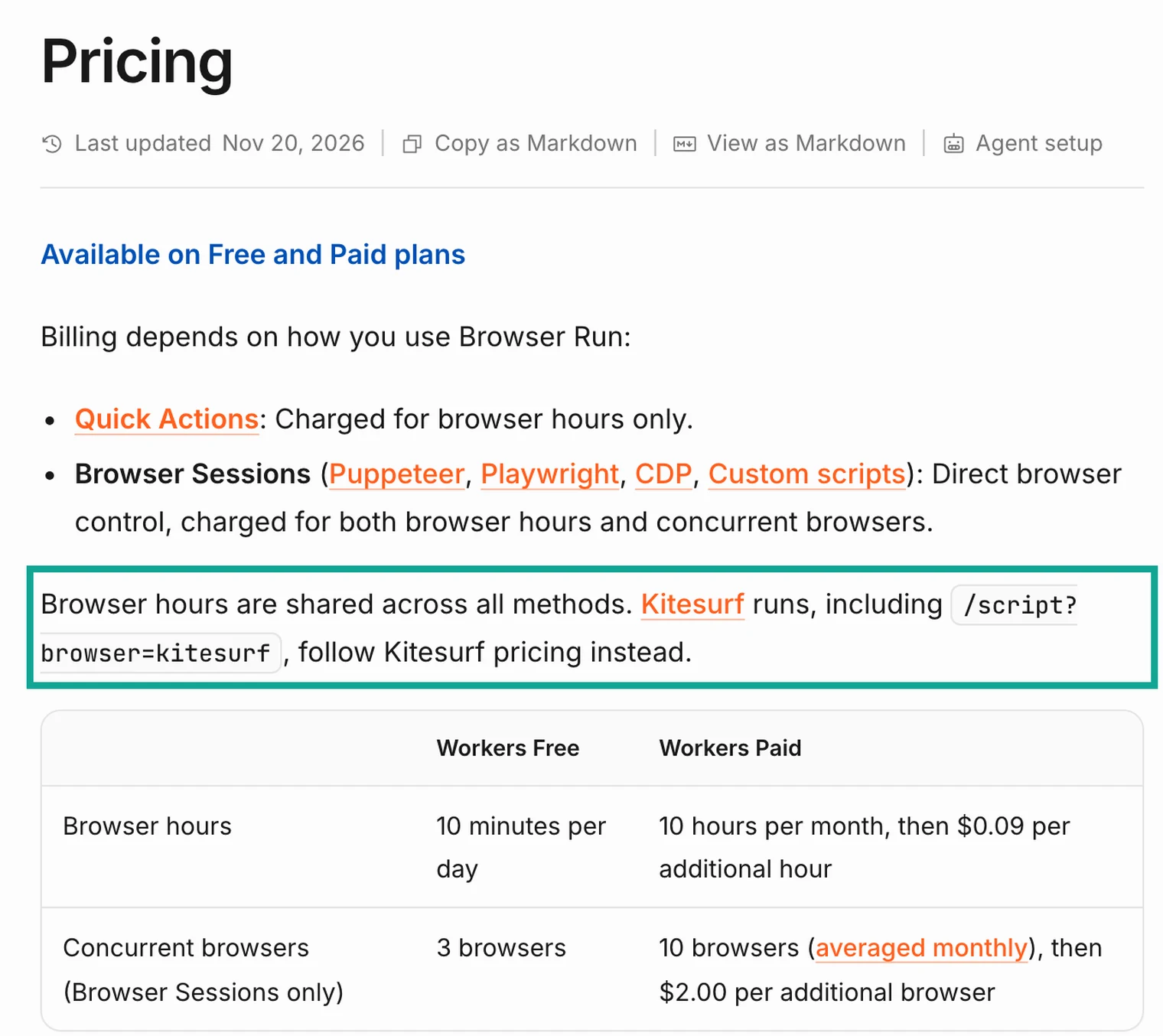
The Browser Run pricing page, modified November 20, has two models. Quick Actions bill on browser hours. Puppeteer, Playwright and CDP sessions bill on browser hours and on concurrent browsers. Workers Paid includes 10 browser hours per month, then $0.09 per hour. It includes 10 concurrent browsers as a monthly average, then $2.00 each.
The free plan gets 10 minutes per day. One sentence above the table matters here. Kitesurf runs, including /script?browser=kitesurf, follow Kitesurf pricing instead of this table. The Kitesurf page says that pricing is free in beta with per-account limits.
Two more rules help with estimates. A Quick Action that fails with a waitForTimeout error is not billed for browser time. Every response carries an X-Browser-Ms-Used header with the milliseconds used. Use that header to measure real cost on your own pages.
Self-hosting uses Dynamic Workers pricing. There are three meters. The first is Dynamic Workers created per day: 1,000 per month are included, then $0.002 each per day. Requests and CPU time follow Workers Standard pricing.
Each month includes 10 million requests and 30 million CPU milliseconds. After that, requests cost $0.30 per million and CPU costs $0.02 per million milliseconds. The price page says that a call to .load(code), or a call with no ID, counts as one Dynamic Worker per call.
We read the engine source to see how often that happens. Line 393 of page-script.ts calls env.LOADER.load(...) for every page. PageRenderer uses the same call when it starts. The wrangler.jsonc file binds this as worker_loaders. So after the first 1,000 a month, each page costs at least about $0.002, and a screenshot adds one more Worker.
CPU barely matters. The kitesurf.dev benchmark run of November 22 shows a median of 255 ms for HTML extraction across 38 pages. That is about $0.005 per 1,000 pages. Neither the open-source post nor the README states a per-page price. This is our estimate from the source and the price page, and it changes if Cloudflare changes either.
| Path | How the browser side bills | Browser cost per 1,000 pages (our estimate) |
|---|---|---|
| Kitesurf hosted in Browser Run | Free in beta, per-account limits | $0 |
| Self-hosted Kitesurf (Workers Paid) | One Dynamic Worker per page, $0.002 after 1,000 a month, plus CPU | About $2.005 |
| Browser Run default Chromium, Quick Action | Browser hours, $0.09 per hour after 10 hours a month | About $0.055 at 2.212 s per page |
Browser Run /json endpoint | Browser hours plus Workers AI (default Llama 3.3 70B, $0.293 per million input tokens) | Depends on page size |
EveryInfra amazon/profile | Per call, failures and empty results not charged | $1.389 |
How we tested: 10 ASINs, two paths
We wrote the pass criteria before the first call. On the API side, at least 8 of 10 ASINs had to return a title and a price, and failed items could not be charged. On the browser side, we measured load time, request count, bytes and model tokens by opening the same pages for real. We did not borrow averages from other tests. For cost, we did not decide in advance which path should win.
We did not run Kitesurf itself. Self-hosting needs a Workers Paid account, and the local build needs Bazel to compile the Rust core. Instead, a local headless Chrome opened the same public product pages to measure how heavy each page is. For Kitesurf-specific time and CPU, we used Cloudflare's public benchmark. So the token numbers below describe the page content, which any browser would see. The timing numbers hold only for Chrome.
The 10 ASINs came from one real search. At 00:14 SGT we called amazon/search with "usb c charger." It returned 10 results for $0.002236, and we used all 10 as the sample. B0C8HHV9DK and B0DRK1BRFD are two listings for the same Anker 20W charger, both with 32,468 ratings. We kept both. About 30 minutes later, in round 2, both listings showed 32,469 ratings, and all 10 prices matched round 1.
Seven of the 10 products are sold by AnkerDirect. Six have a list_price above price. For example, B0H7C6M916 sells at $15.99 against a list price of $25.99. All 10 are in stock, and is_amazon_choice is false for all 10. In bestseller ranks, B088NRLMPV is number 1 in USB Cables and B07DC5PPFV is number 2. The chargers rank from 4 to 47 in Cell Phone Wall Chargers, and both Anker 20W listings rank 4.
| Step | API side | Browser side |
|---|---|---|
| Time (SGT) | Round 1: 00:15–00:25. Round 2: 00:45–00:48. Round 3 over MCP: 00:52 | zh-CN locale 00:19–00:20, en-US locale 00:21–00:22 |
| Method | POST /api/v1/social, amazon/profile, one URL per call | Local headless Chrome over CDP, open amazon.com/dp/<ASIN>, wait for load plus 2 s, read DOM and visible text |
| Recorded | HTTP status, field count, size, latency, charged_usd | Load time, requests, bytes, HTML size, visible text |
| Token count | The results object, tiktoken o200k_base | Full HTML, Markdown and visible text, same encoder |
We counted tokens with OpenAI's open-source tiktoken, using the o200k_base encoding. Claude's tokenizer differs, so absolute counts will shift. All four forms use the same ruler, so the ratios hold. For Markdown, we stripped script, style and svg tags from the DOM and ran markdownify. Browser Run's /markdown endpoint will not match it exactly, but the order of size is close.
| Round (SGT, Nov 23, 2026) | Calls | Result | Charged |
|---|---|---|---|
| 00:14–00:25 | amazon/search once, amazon/profile 10 times | 19 fields each, title and USD price for all 10 ASINs | $0.002236 plus $0.001389 per profile |
| 00:45–00:48 | amazon/profile 11 times, amazon/reviews once | All 200, prices match round 1 | $0.001389 each |
| 00:52 | amazon/profile 3 times over MCP | All 200, 19 fields, prices match REST | $0.001389 each |
Test 1: amazon/profile returns 19 fields in 641 tokens
All 10 ASINs in round 1 returned data. Each call cost $0.001389, which matches price_usd in the catalog. All 10 had a title and a USD price, so the first criterion passed. Every response had the same 19 top-level fields, such as asin, title, brand, price, list_price, currency, rating, rating_count, in_stock, category, seller_name, images, features and bestseller_ranks. That came to 31 to 34 leaf values.
The results object was 1,794 to 3,025 characters, or 575 to 946 tokens, with a median of 641. Here is the request we sent, and a screenshot of one real response with the balance masked and 6 of 8 image URLs removed.
curl -s https://api.everyinfra.com/api/v1/social \
  -H "Authorization: Bearer $EVERYINFRA_API_KEY" \
  -H "Content-Type: application/json" \
  -d '{"platform":"amazon","action":"profile","params":{"url":"https://www.amazon.com/dp/B0C8HHV9DK"}}'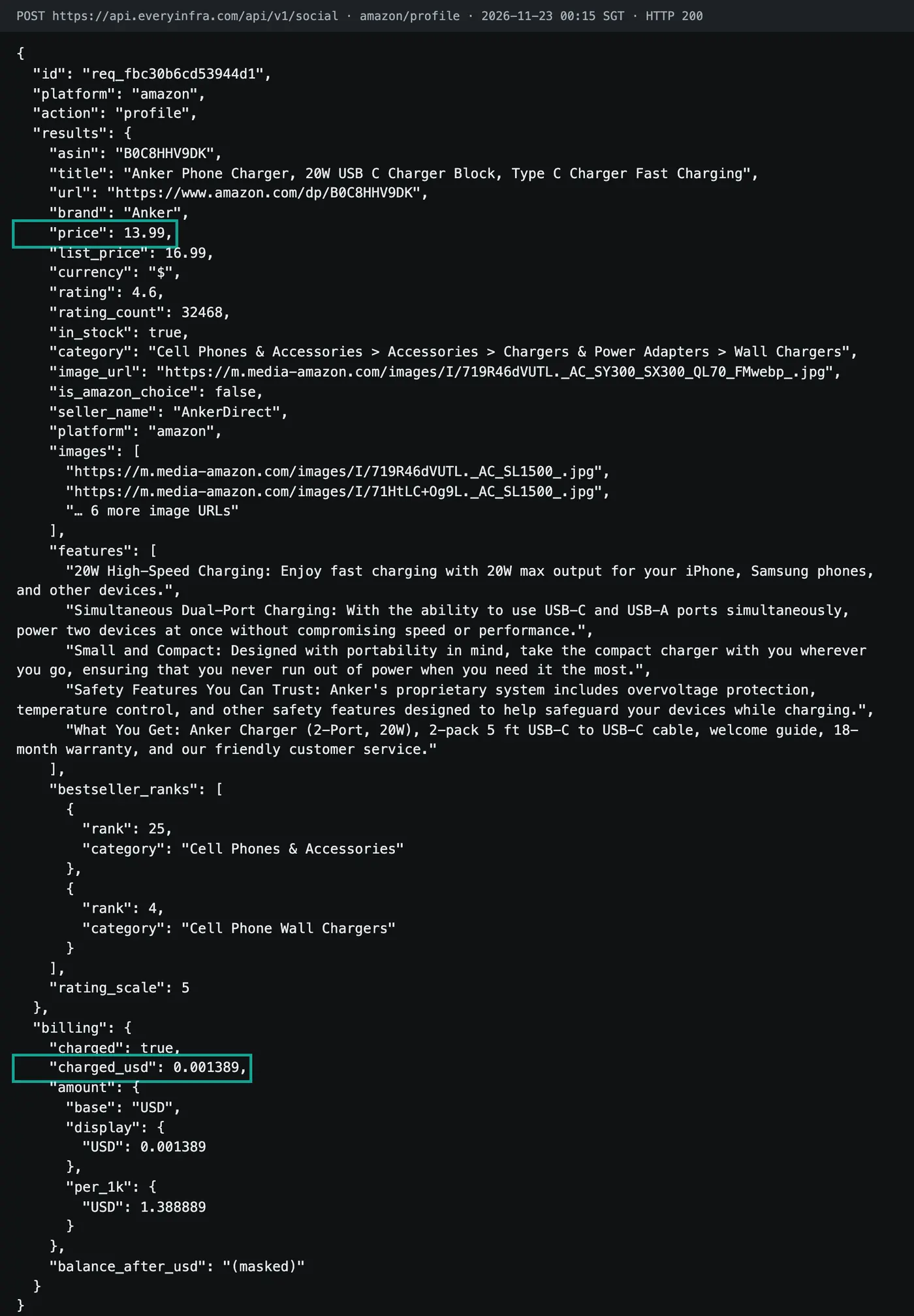
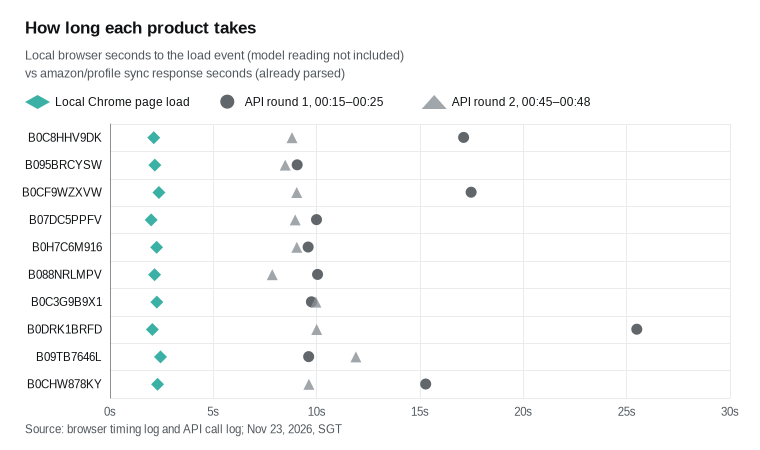
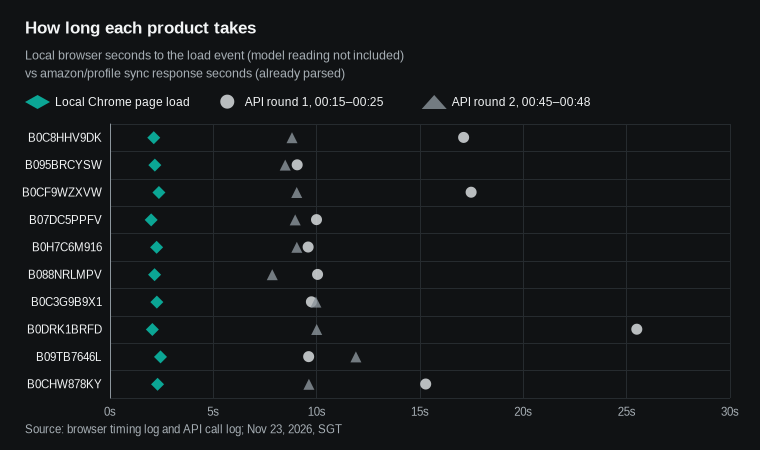
The median synchronous amazon/profile call took about 10.0 seconds in round 1 and about 9.0 seconds in round 2. The same pages reached the load event in a local browser in a median of 2.21 seconds. The browser side also needs time for the model to read the page and find the fields. We did not measure that part, so this data cannot tell which path is faster end to end. Both numbers are already above one second.
When a call is rate limited, the API returns HTTP 429. The body says "Nothing was charged" and gives a retry_after value in seconds. After a successful retry, only that retry is charged.
In round 2 we planned to use B000000000 as an ASIN that does not exist. It turned out to be a real Amazon page, with a Takis tortilla chip title and an unrelated brand and category. The API returned 15 fields from that page and charged $0.001389. Our local browser saw the same page, with 3,351 DOM nodes, about 45% fewer than the median charger page. Before you use a number as a "missing" ID in a failure test, open it in a browser once.
Search results and per-item profiles: the same 19 fields
Look again at the amazon/search call that gave us the sample. Each of its 10 results had 19 fields. We compared them field by field with the later amazon/profile calls. The field names and values were identical, down to the 5 or 6 feature bullets, the 6 to 8 image URLs and the bestseller ranks.
That one search cost $0.002236. The 10 profile calls cost $0.01389 in total, about 6.2 times more. In tiktoken, the search results came to 7,206 tokens, and the 10 profile responses added up to 7,205. That is about 721 tokens per item on average. The median of 641 is lower because 4 responses are above 800 tokens.
| `amazon/search`, 1 call | `amazon/profile`, 10 calls | |
|---|---|---|
| Items | 10 | 10 |
| Fields per item | 19 | 19 |
| Charged | $0.002236 | $0.01389 |
Tokens in results | 7,206 | 7,205 in total |
The catalog notes two limits. Some amazon.com search requests return at most 20 items, and fields such as brand, stock, category, description, seller, features, images and bestseller ranks are absent. With fast=true the price stays the same and the call usually returns in 10 to 20 seconds, but each row drops 8 fields. So search fits tasks where the products come from a search anyway, such as the top results for a keyword each day. To track a fixed list of ASINs, call amazon/profile per item.
Reviews: a logged-out browser cannot read review text
Round 2 also called amazon/reviews once for B0C8HHV9DK. It returned 10 reviews for $0.001389. Each review has 17 fields. They include review ID, title, text, star rating, posting date, verified purchase, Vine flag, variant (for example "Color: black, Size: 2pack & 2cable") and reviewer country.
Nine of the 10 reviews gave 5 stars and one gave 4 stars. All 10 were verified purchases, and none were Vine reviews. The posting dates run from August 21 to November 17, 2026. The text runs from 191 to 2,129 characters, and the whole response is 3,711 tokens.
Eight variants were black, one purple and one green, and all reviewers were in the United States. The catalog says that this capability returns the featured reviews on the product page. That is usually a dozen or so per product, not the full history.
In the same period, 9 of the 10 pages in our local browser showed no review text. The review area had a star chart, an AI-generated "Customers say" summary and the line "Sign in to see customer reviews." The tenth page was the one that redirected to amazon.sg. So a browser agent that must read reviews needs a logged-in session. The Kitesurf docs say it does not support long logged-in sessions yet.
The page also has content that the API does not return. All 10 pages had the "Customers say" summary. On B0C8HHV9DK, topic counts came after it. Examples are Quality 3.6K, Reliability 2.7K and Charging speed 1.6K. These are not in the 19 amazon/profile fields. To get them, you must read the page.
Test 2: the browser makes 221 to 256 requests per page
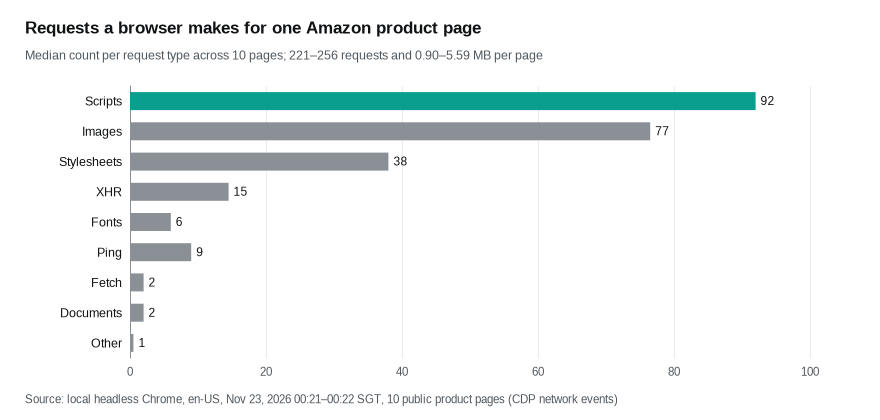
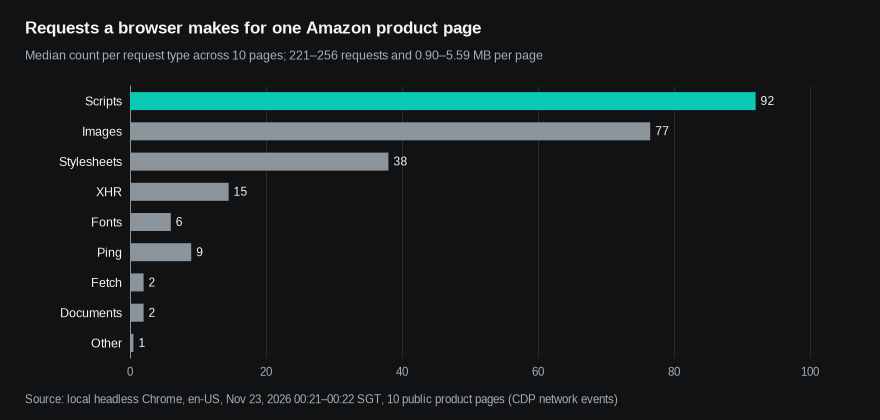
In the en-US run (00:21–00:22 SGT), all 10 pages returned 200. Time to the load event was 1.99 to 2.44 seconds, with a median of 2.21. Each page made 221 to 256 network requests, with 28.5 MB transferred across all 10 pages. There were 87 to 93 scripts, 34 to 38 stylesheets and 62 to 79 images. Transfer size was 0.90 to 5.59 MB, with a median of 2.78 MB.
The rendered HTML held 1.71 to 2.29 million characters. In tiktoken, that is 553,000 to 788,000 tokens, with a median of 742,378, across 5,411 to 7,202 DOM nodes. At $2 per million input tokens for Sonnet 5.5, one full HTML page costs about $1.48 to read. That is more than the API fee for 1,000 amazon/profile calls.
So agent browsers usually send visible text, an accessibility tree snapshot or Markdown. Markdown came to a median of 31,383 tokens. Visible text came to 3,922 tokens, from 9,878 to 16,341 characters. Against the API's 641 tokens, visible text is about 6.1 times larger, Markdown about 49 times and full HTML about 1,158 times.
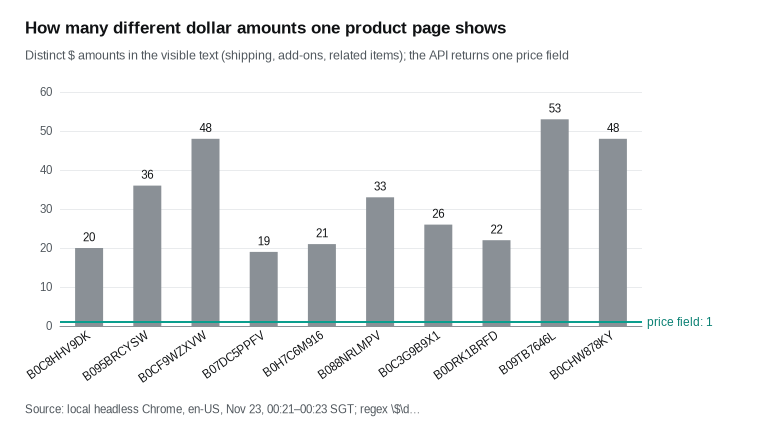
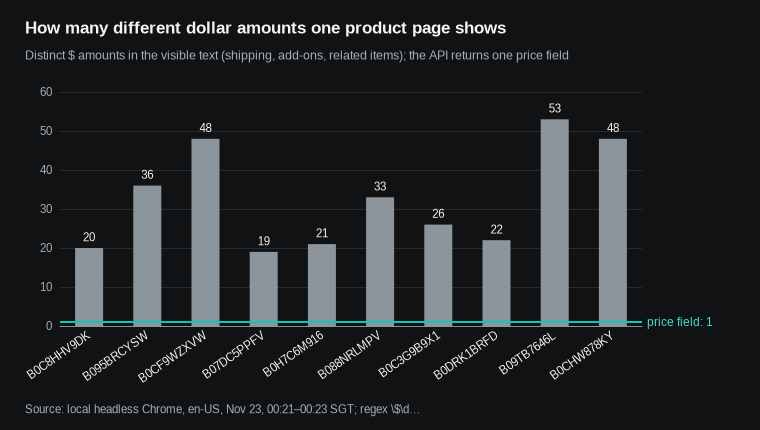
Visible text is the smallest of the three page forms we measured. But the model has to pick the right number out of many. We counted distinct dollar amounts in each page's visible text with a regular expression. The range was 19 to 53, with a median of 29.5.
They included add-on prices, shipping, related products, list prices and installment amounts. The API response has one price and one list_price, and the field names fix their meaning.
The first 1,050 or so characters of visible text are navigation and category menus. The last 490 or so are the footer. Nine pages also carried a delivery notice for Singapore. We did not measure how often a model picks the right main price from dozens of amounts. Before you use this path for price tracking, measure the error rate on pages with known prices.
Four page forms an agent can read
Agent browsers hand pages to models in four common forms, and we measured three. Full HTML is the largest. Markdown is what Browser Run's /markdown endpoint returns. It keeps headings, lists and links. On a page like Amazon's, it also keeps navigation, footers and recommendation blocks, which is why it reached 31,383 tokens.
Visible text is close to document.body.innerText. It is the smallest of the three, but it loses structure, and tables and price blocks turn into broken lines. The fourth form is an accessibility tree snapshot. The take_snapshot tool in chrome-devtools-mcp and Playwright's ARIA snapshot both use it. Each interactive element gets an ID, so the model can choose what to click next.
We did not measure this form. Its size depends on the number of buttons and links.
| Page form | Median tokens per product (our test) | Keeps structure | Typical source |
|---|---|---|---|
| Full HTML | 742,378 | Yes, plus all markup | Page.getContent, page source |
| Markdown | 31,383 | Headings, lists, links | Browser Run /markdown |
| Visible text | 3,922 | No | document.body.innerText |
| Accessibility tree | Not measured | Interactive elements with IDs | chrome-devtools-mcp take_snapshot, Playwright ARIA snapshot |
amazon/profile JSON | 641 | Fixed fields | EveryInfra API |
Browser Run also has a /json endpoint. You send a JSON Schema or a prompt. A Workers AI model reads the page and returns structured JSON. The docs name Llama 3.3 70B as the default. This moves "read the page and pick fields" to Cloudflare's side. The Workers AI price page, modified November 18, lists $0.293 per million input tokens and $2.253 per million output tokens for that model.
Assume it reads about as much as our visible text, about 3,900 tokens. Input then costs about $0.00115 per page, or $1.15 per 1,000 pages, plus browser time and output. We did not test whether /json finds the main price on Amazon pages. We also do not know whether it feeds the model HTML or text. Treat this as an order-of-size estimate. We left it out of the cost table.
Test 3: egress location and delivery address change the price on the page
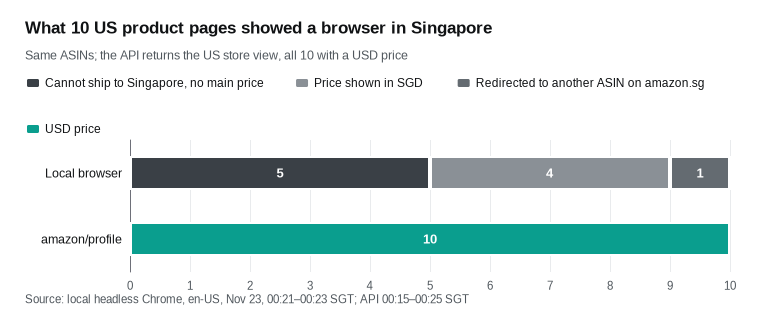
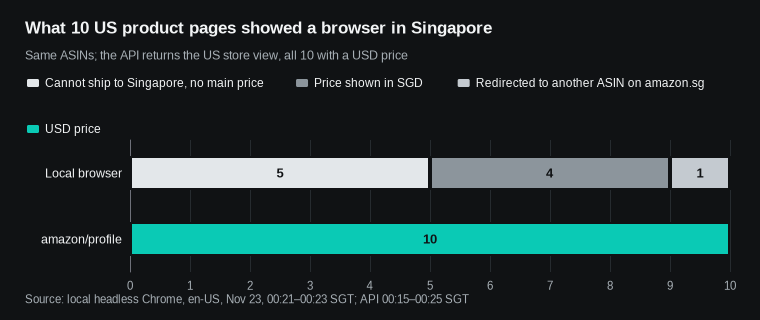
This gap comes from our test setup, not from any browser. Our machine is in Singapore, and the browser had no US delivery address or ZIP code. amazon/profile reads the US store from the amazon.com URL. The top of each page said "Deliver to Singapore," and a notice told visitors to change the delivery address to see items for other countries. We did not rerun the browser with a US egress and a US ZIP code.
In the en-US run, we read the main price from the page's price block, such as #corePrice_feature_div, and compared it with the API. Five of 10 pages had an empty price block. Their visible text said the item "cannot be shipped to your selected delivery location." Four pages showed Singapore dollars. B095BRCYSW showed S$10.78 against $14.90 from the US store, and B09TB7646L showed S$28.22 against $21.83.
The last page, B07DC5PPFV, redirected to a different ASIN on amazon.sg, B07DD5YHMH. The title changed from a 6 ft two-pack cable to a 3 ft nylon two-pack. It was no longer the same product. The API returned US store data in USD for all 10.
Three SGD pages show the same products as the API. On each, the SGD price is about 1.29 times the API's USD price. The pairs are S$27.35 and $21.16, S$28.22 and $21.83, and S$26.99 and $20.88. B095BRCYSW went the other way. S$10.78 was lower than the US price of $14.90, a ratio of about 0.72, and we did not look into why. Because the ratio is not fixed, one exchange rate cannot turn the SGD prices back into US store prices. To get US numbers, open the page again with a US address.
The zh-CN run (00:19–00:20 SGT) added another layer. Our Mac's system language is Chinese, so Chrome sent that Accept-Language. Amazon replaced 9 of 10 titles with machine-translated Chinese. The one exception was B07DC5PPFV, the page that redirected to amazon.sg. Median visible-text tokens rose from 3,922 to 4,333, about 10% more, while median full-HTML tokens fell from 742,378 to 640,443. The median time to the load event went from 2.21 to 2.53 seconds, and the slowest page took 7.56 seconds.
A browser agent reads "the page this browser sees, from this place, in this language, right now." The data center, the language header and the login state all change the result. Kitesurf runs on Cloudflare's global network. We found no public option to choose the egress location. For a task that must track US prices, test this first.
| ASIN | Main price seen from Singapore | API (US store) | What happened |
|---|---|---|---|
| B0C8HHV9DK | None | $13.99 | Cannot ship to Singapore |
| B095BRCYSW | S$10.78 | $14.90 | SGD price |
| B0CF9WZXVW | S$27.35 | $21.16 | SGD price |
| B07DC5PPFV | S$20.72 | $9.99 | Redirect to B07DD5YHMH on amazon.sg |
| B0H7C6M916 | None | $15.99 | Cannot ship to Singapore |
| B088NRLMPV | None | $9.99 | Cannot ship to Singapore |
| B0C3G9B9X1 | None | $29.99 | Cannot ship to Singapore |
| B0DRK1BRFD | None | $13.99 | Cannot ship to Singapore |
| B09TB7646L | S$28.22 | $21.83 | SGD price |
| B0CHW878KY | S$26.99 | $20.88 | SGD price |
When you deploy a browser agent to collect prices, egress location, language and delivery address are inputs. Record them with the results, and check currency and ASIN by hand on the first batch. If these three inputs change on another machine next week, the results will not match.
With a structured API, check which store it reads from. For amazon/profile, an amazon.com URL means the US store. The catalog says its lang parameter changes only the page language and does not switch the country store. amazon/search and amazon/reviews take a domain parameter for the country store, and amazon/reviews lists 11 supported stores.
How many of the 19 API fields appear in the page text
We searched for each amazon/profile value in the en-US visible text with an exact string match. The last category level, the first feature bullet and the rating, written as "4.6 out of 5," appeared on all 10 pages. The title and rating count appeared on 9 pages. The missing page is the amazon.sg redirect, which shows a different product.
The seller name appeared on only 4 pages, the 4 SGD pages that have a buy box. The list price appeared on 2 pages and the USD main price on none. The "Best Sellers Rank" section did not appear on any page. Seven pages did show "#1 Best Seller," but those are badges on recommended products, not this product's rank. A model that reads the page must tell the two apart.
In this setup, three fields that price and rank trackers use most, price, seller_name and bestseller_ranks, are not on the page at all. No model can pick them out of the text.
| API field | Pages where the page text has it (of 10) | Note |
|---|---|---|
| Last category level | 10 | In the breadcrumb |
| First feature bullet | 10 | Under "About this item" |
| Rating | 10 | Written as "4.6 out of 5" |
| Title, rating count | 9 | The missing page redirected to another product |
| Seller name | 4 | Only on SGD pages with a buy box |
| List price | 2 | In USD |
| USD main price | 0 | 5 no price, 4 SGD, 1 other product |
| Bestseller rank | 0 | No "Best Sellers Rank" section; 7 pages show "#1 Best Seller" badges on recommendations |
Cost: what 1,000 products cost on each path
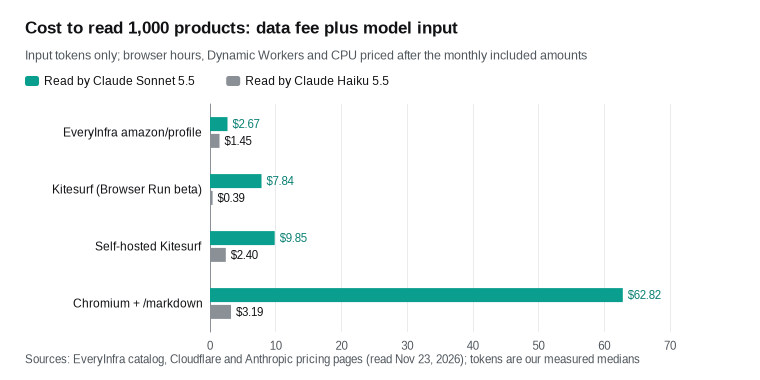
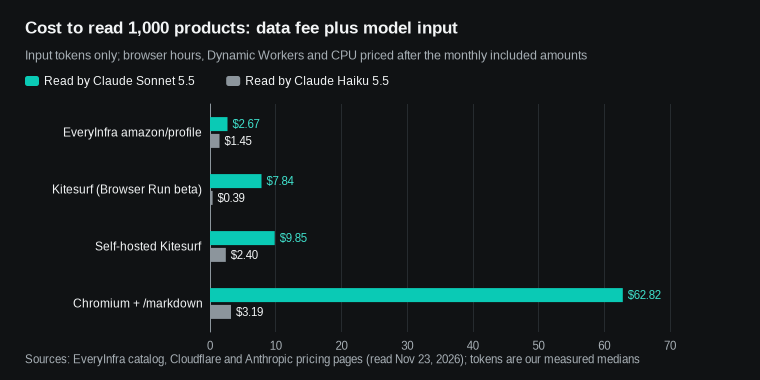
The bill has two parts: the cost to get the data (API fee or browser cost) and the cost for the model to read it. We left out output tokens, extra tool-call turns, retries and the $5 monthly Workers Paid base fee. Model prices come from Anthropic's pricing page as of November 23. Claude Sonnet 5.5 input is $2 per million tokens. Claude Haiku 5.5 input is $0.10 per million for prompts up to 100,000 tokens.
| Path | Data cost per 1,000 | Tokens per product | Total with Sonnet 5.5 | Total with Haiku 5.5 |
|---|---|---|---|---|
EveryInfra amazon/profile | $1.389 | 641 | $2.67 | $1.45 |
| Kitesurf, Browser Run beta, visible text | $0 | 3,922 | $7.84 | $0.39 |
| Self-hosted Kitesurf, visible text | About $2.005 | 3,922 | $9.85 | $2.40 |
Browser Run Chromium, /markdown | About $0.055 | 31,383 | $62.82 | $3.19 |
EveryInfra amazon/search, products come from a search (10 per call) | $0.224 | 721 | $1.67 | $0.30 |
With Sonnet 5.5, per-item amazon/profile costs about 2.9 times less than Kitesurf beta and about 23.5 times less than Chromium with Markdown. With Haiku 5.5, Kitesurf beta costs about $0.39 per 1,000 products, against $1.45 for amazon/profile. When the products come from a keyword search, amazon/search returns 10 full rows per call. It is the cheapest row in the table for both models. On money alone, the answer depends on your model, on where your product list comes from and on Kitesurf's price after the beta.
Two costs sit outside the table. When the browser egress is not in the target country, you must set up egress and a delivery address. The model must also pick one price from 19 to 53 amounts, and a person must check the wrong picks. We did not put numbers on either cost.
Let p be the model's input price in dollars per million tokens. The API path costs $0.001389 plus 641p per product. Kitesurf beta with visible text costs 3,922p. The two are equal at p of about $0.42.
Below about $0.42 per million input tokens, Kitesurf beta with visible text is cheaper on input alone. Above it, the API is cheaper. Self-hosted Kitesurf adds about $0.002 per page, which is more than the API call itself. So it costs more than the API at any model price. Three things move this line.
The first is Kitesurf's price after the beta. The second is the page form you send to the model, and Markdown drops the break-even to about $0.045. The third is the extra reasoning turns an agent takes per page. The search path costs $0.0002236 plus 721p per product. It equals Kitesurf beta's 3,922p at p of about $0.07, and Haiku 5.5's $0.10 is already above that.
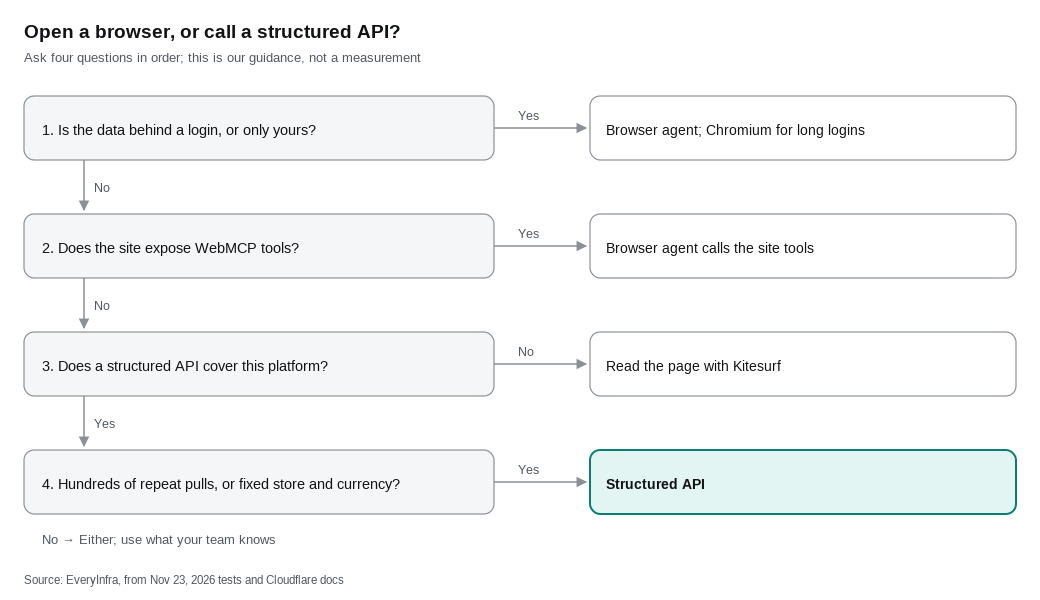
When to use a browser agent, and when to call an API
Browser agents fit places with no structured data to take. One is your own back office: a logged-in order system, an internal dashboard or a supplier portal. Another is a page the site itself opens to agents through WebMCP.
A third is the long tail of sites no API covers, such as a small supplier's price list or a local government notice board. These pages are many and all different. A model that reads them saves you from writing a parser for each. Kitesurf makes "one browser per agent" cheaper. In Cloudflare's benchmark, median memory for HTML extraction is 23 MiB, against 456 MiB for Browser Run's Chromium.
Structured APIs fit frequent tasks that pull the same fields across many items. Examples include tracking prices and ratings for hundreds of ASINs a day, comparing bestseller ranks or feeding product features to a selection model. These tasks need fields with fixed meaning, a fixed store and currency, and retries that do not charge twice.
Amazon has official APIs, but PA-API 5 is deprecated. The Creators API requires Associates membership and at least 10 qualifying sales in the past 30 days. A data team that does no affiliate sales cannot use it. The PA-API 5 page we read on November 23 says further calls return 403.
| Scenario | Better fit | Why (our data or the source) |
|---|---|---|
| Your own logged-in back office | Browser agent | Only you have access, and no outside API exists. Kitesurf docs say long logged-in sessions are not supported yet, so use Browser Run's default Chromium |
| Long-tail sites with no API | Browser agent, Kitesurf first | Layouts vary and parsers do not pay off. Kitesurf uses about 1/20 of Chromium's memory |
| Site exposes WebMCP | Browser agent | Call the site's own tools instead of guessing buttons |
| Daily prices and ratings for hundreds of fixed products | Structured API | 641 tokens against 3,922, and 10 of 10 fixed US store USD prices |
| Prices across several regions | Structured API, one call per store | A browser needs egress and a delivery address per region; the API sets the store by URL or domain |
| AI review summary and topic tags on the page | Browser agent | All 10 pages had a "Customers say" summary, which amazon/profile does not return |
| Review text | Structured API | 9 of 10 logged-out pages showed "Sign in to see customer reviews"; amazon/reviews returned 10 reviews with text |
| One-off research on a few pages | Either | At small volume the cost gap is a few cents |
A browser agent sends whole web pages to the model. Instructions hidden in a page end up in the model's input. OWASP ranks this indirect prompt injection as the top risk for LLM apps. Kitesurf treats every page load as untrusted input and sends all outbound traffic through SandboxOutbound.
That lowers the risk that page code harms the host. It does not stop page text from steering the model. A structured API returns fixed fields. Product titles and bullets can still carry text, but the surface the model reads is much smaller.
WebMCP: a door the site opens for agents
Kitesurf added WebMCP support in September. WebMCP is a proposal from the Chrome team, with docs updated on October 7, 2026. A site uses document.modelContext to declare tools on the page. Each tool has a name, a parameter schema and a handler. An agent on the page can list the tools and call them, so it does not have to guess which button means "add to cart."
The Browser Run WebMCP docs describe two backends. Chromium needs an experimental Lab session (lab=true), which Cloudflare says is not for production. Kitesurf has its own WebMCP implementation, so browser=kitesurf on the CDP URL is enough. Kitesurf also supports declarative form tools through the toolname and tooldescription form attributes. In chrome-devtools-mcp, add --category-experimental-webmcp to get the list_webmcp_tools and execute_webmcp_tool tools.
The same page lists Kitesurf's limits. It does not implement the WebMCP permissions policy or origin-based tool filtering. It does not expose tools from iframes or popups. Kitesurf sessions have no live view, so tools that wait for a person to click "confirm" cannot finish.
The docs use a hotel booking demo to show such a tool. For a site owner, declaring tools states what agents may do. For an agent user, the agent calls a function with a name and a parameter schema from the site, instead of guessing from button text.
Do not confuse WebMCP with server-side MCP. A server-side MCP endpoint, such as EveryInfra's https://api.everyinfra.com/mcp, follows the MCP specification. An agent calls it over HTTP with no browser at all. WebMCP tools exist only while the page is open, so a browser must load the page first. In the DOM of the 10 Amazon product pages we saved, we found no modelContext and no form with a toolname attribute.
Bot identity: sites can tell it is Browser Run
When a browser agent reads someone else's site, that site can see who is visiting. The Browser Run automatic request headers page lists headers you cannot remove. cf-brapi-request-id identifies the request. Signature-agent works with HTTP message signatures for Web Bot Auth, described in an IETF draft.
The receiving site can verify that the request really came from Cloudflare Browser Run. The FAQ says Cloudflare always classifies Browser Run traffic as bot traffic and lists bot detection IDs for it. Sites can allow or block it by those IDs. The Kitesurf docs add that it cannot pass checks that inspect real TLS fingerprints.
Site owners can use these headers and signatures to decide what agents may read, for example public docs only. For agent users, a browser agent makes a visible, identifiable public visit that a site can refuse. When a site blocks it, the agent gets no content. Check the site's terms yourself to see what use they allow. When the EveryInfra API cannot get a page, it returns HTTP 503 with no charge and does not hand back an empty result. In this test we opened only public product pages and met no challenge pages.
Use both paths in one MCP setup
One agent can hold both paths and let the model choose per task. In Claude Code, the Anthropic docs show claude mcp add --transport http <name> <url> for a remote MCP server, with --header for auth. Here is a sample setup. The Kitesurf part follows Cloudflare's docs, and we did not connect it to Browser Run ourselves.
# EveryInfra remote MCP: structured data
claude mcp add --transport http everyinfra https://api.everyinfra.com/mcp \
  --header "Authorization: Bearer $EVERYINFRA_API_KEY"
# Kitesurf hosted in Browser Run: the browser
claude mcp add kitesurf -- npx -y chrome-devtools-mcp@latest \
  "--wsEndpoint=wss://api.cloudflare.com/client/v4/accounts/$CF_ACCOUNT_ID/browser-run/devtools/browser?browser=kitesurf" \
  "--wsHeaders={\"Authorization\":\"Bearer $CF_BROWSER_RUN_TOKEN\"}"
We called the EveryInfra MCP endpoint for real. tools/list needs no key and returned 12 tools. Besides the data tool, they include everyinfra_list_capabilities for the catalog, everyinfra_get_job for async jobs, everyinfra_search for search and everyinfra_list_requests for call history. The data tool is everyinfra_call_api, with platform, action and params as inputs, and its description says failures and empty results leave no final charge. At 00:52 SGT we used MCP tools/call on everyinfra_call_api to fetch amazon/profile for 3 ASINs.
All three returned 19 fields with the same prices as the REST API, at $0.001389 each, in about 7 to 9 seconds per call. MCP puts the same JSON in content[0].text. One rule in the system prompt is enough to split the work.
For Amazon, social platforms and other platforms in the catalog, call everyinfra_list_capabilities first. If a matching capability exists, use everyinfra_call_api. For sites outside the catalog, or your own logged-in systems, open the browser.
What the videos showed that the docs did not
We searched YouTube for "cloudflare kitesurf" with youtube/search, took the 3 most relevant videos and pulled transcripts with youtube/transcript (00:15–00:18 SGT, $0.002446 in total). Two August videos explain the features and repeat Cloudflare's blog. A November 17 hands-on video from one YouTube creator built Kitesurf locally on Ubuntu 24.04 under WSL2. WSL had about 11 GB of RAM and 6 cores, and pnpm install took 12.6 seconds. It then compared it with Chromium on 10 sites. Several points appear in neither the README nor the blog.
First, the first pnpm run dev compile takes several minutes. The author started it in a background shell that exited, and the build died halfway. It finished only after a restart with setsid. The Chromium baseline on WSL also needed the libxfixes system library. Second, cold and warm starts differ a lot. The first load of example.com took 3.8 seconds, and a warm load took 721 ms.
Third, the local numbers point the other way from Cloudflare's benchmark. Across 10 pages, median load time was 2,782 ms for Kitesurf and 868 ms for Chromium, about 3 times slower. The local Wrangler and workerd stack used 1,600 to 2,400 MB during the run and about 2.1 GB at idle. Chromium used 870 to 1,250 MB.
The author said the process models differ, so this does not prove Kitesurf uses more memory. Kitesurf is built for many short sessions at the edge, not for one laptop. Fourth, on react.dev and GitHub, the two engines extracted different word and link counts, 60 links against 98 on react.dev. Extraction results depend on the engine.
Page by page, both engines opened all 10 pages with no errors or timeouts. A small script in each page computed 6 * 7 and mapped an array. Both engines returned 42 and the list 2, 4, 6. The largest gap was the Wikipedia Christmas article, at 6.7 seconds for Kitesurf and 1.3 seconds for Chromium, about 5 times. Hacker News took 2.6 seconds against 1.5, and both engines extracted about 680 words and exactly 228 links. MDN's JavaScript guide took 2.4 seconds against 0.5, with the same 913 words and 613 links on both sides.
The GitHub repository page took 7.2 seconds on Kitesurf, the slowest of the 10. But its screenshot already showed the file list and commit messages, while Chromium's screenshot still showed gray loading skeletons. The author warned that the load event does not mean the content is visible. So neither timing fully measures when the page is ready. For the same reason, we waited 2 more seconds after load before we read the Amazon page text.
The author also measured CPU for the whole run. The Kitesurf process stack used about 77 CPU seconds and Chromium about 13. The author said ps has only 1-second resolution, so the direction is clear but the ratio is rough.
Both engines saved 800 by 600 PNG screenshots, and Kitesurf's files were larger on most pages, for example 132 KB against 58 KB on example.com. Fallback fonts and line breaks differed. Page titles and followed links matched on all 10 pages, and word counts differed on Wikipedia, GitHub, the Cloudflare blog and react.dev. The author called the 10 pages a smoke test, with one run per page and no error bars.
| What the hands-on video measured (local, WSL2) | Kitesurf | Chromium |
|---|---|---|
| Median load time, 10 sites | 2,782 ms | 868 ms |
| example.com, first load and warm load | 3.8 s and 721 ms | Not reported |
| Memory during the run | 1,600 to 2,400 MB (Wrangler and workerd) | 870 to 1,250 MB |
| Links extracted on react.dev | 60 | 98 |
CPU for the whole run (ps, 1-second resolution) | About 77 s | About 13 s |
| Setup issue | Build died in a shell that exited, fixed with setsid | Needed libxfixes on WSL |
The other two videos add some usage detail. An August 9 walkthrough shows three entry points. One is the playground on kitesurf.dev, another is the engine parameter in Browser Run and the third is an MCP client with chrome-devtools-mcp. The author notes that this is a beta with rate limits, which new users can mistake for an outage.
An August 10 explainer calls Kitesurf a browser you will never open yourself. It means that Kitesurf has no window and no tabs, and only programs use it. We pulled all three transcripts through the YouTube scraper API, using youtube/transcript and youtube/search.
Industry moves: agent browsers in the last 60 days
- On October 2, 2026, Lightpanda 1.0.0 shipped. It is another headless browser for agents, written in Zig, with CDP, WebDriver and MCP support. What it means: there are at least two open-source lightweight agent browsers with different licenses. Lightpanda is AGPL-3.0 and Kitesurf is Apache-2.0. Check the license terms yourself before commercial use.
- On October 30, 2026, the Browser Run changelog moved the default browser to Chrome 152. The Quick Actions default User-Agent changed from Chrome 119 to 152, and
/markdownnow keeps code block languages. What it means: sites that allow Browser Run by User-Agent need new rules, and agents that read Markdown get cleaner code blocks. - On November 11, 2026, chrome-devtools-mcp v1.13.0 shipped. Cloudflare's examples use this MCP server to reach Kitesurf. What it means: it collects usage statistics by default, and the README shows
--no-usage-statisticsto turn that off. Decide before you connect it to a production agent. - On November 13, 2026, Kitesurf went open source under Apache-2.0. What it means: you can run it on your own Cloudflare account. You must add Access auth yourself and pay per page for Dynamic Workers.
- On November 22, 2026, the kitesurf.dev benchmark page grew to 38 pages. Median screenshot time was 1.11 s and HTML extraction 981 ms, against 864 ms and 609 ms for Browser Run's Chromium. What it means: Kitesurf is still slower than warm-pool Chromium, and it trades that for CPU and memory.
Limits of this test
We did not run Kitesurf locally. Browser-side timing and request counts come from local Chrome. Kitesurf time and CPU come from Cloudflare's own benchmark page, which no third party has checked. The video author's local test was a single run on one machine. We did not check whether Kitesurf renders Amazon product pages correctly. The pages listed as known-good in the docs include no e-commerce site, so try a few on kitesurf.dev first.
The sample is only 10 ASINs, all chargers and cables in one category. Dollar-amount counts and tokens will differ for clothing or appliances. Tokens came from tiktoken, and Claude's tokenizer gives other absolute counts. The cost table counts only input tokens.
It leaves out the extra reasoning turns an agent takes in a browser, which can only make the browser path cost more.
We did not measure how often a model picks the right main price from the visible text. We did not rerun the browser side with a US egress and a US ZIP code, and we did not measure accessibility tree snapshots. The review comparison used a logged-out browser only. The exact match between search and profile fields comes from one search, and the catalog says some requests miss fields. "Free in beta" is how the docs read on November 23, 2026. Recalculate once Kitesurf has a real price.
FAQ
Can I download Cloudflare Kitesurf and run it locally?
Yes, in three ways. Clone the repo and run pnpm run dev to build locally. Pull the Docker image from ghcr.io/cloudflare/kitesurf. Or install the terminal client with Homebrew (brew install cloudflare/cloudflare/kitesurf, from the September 28 update post). The README warns that local page scripts run in an unhardened workerd, so do not open untrusted sites.
Does Kitesurf get special treatment from Cloudflare's own bot protection?
Someone asked this in the Hacker News launch thread, because Kitesurf runs on Workers. A Kitesurf team member replied in the same thread. Cloudflare identifies Browser Run requests as bot traffic, whether they use Chromium or Kitesurf. The FAQ says each site decides whether to block. The automatic request headers page lists the signed Web Bot Auth headers that cannot be removed. Source: the HN thread.
Is it safe to build on pre-alpha Blitz?
Someone in the same HN thread quoted the Blitz README, which says the project is pre-alpha. The Blitz author replied that Kitesurf plans to send its patches back to the Blitz project. Our view is to treat Kitesurf as an experiment you can try now. Its own README says experimental. Use it for tasks that can tolerate failure and fall back to Chromium. Source: the HN thread.
Get started
- Get a key from the EveryInfra quickstart. Read the catalog for free. Check the parameters and prices for
amazon/profile,amazon/searchandamazon/reviewsunder the Amazon scraper API. - Call
amazon/profileonce with the curl above. Check that the 19 fields cover your task. To use it inside an agent, add the remote server from the MCP setup page. - For sites outside the catalog, try a few pages on kitesurf.dev first. Then choose between hosted Browser Run and self-hosting.
- For price tracking, read our Amazon comparable-offer price test. To compare other page extraction tools, see our page extraction tool comparison. For how AI crawler traffic affects sites, see our AI crawler traffic analysis.
References
- Kitesurf is now open source, Cloudflare Blog, 2026-11-13
- Introducing Kitesurf: The agent-first browser that runs in V8 isolates on Cloudflare Workers, Cloudflare Blog, 2026-08-06
- The road to the agentic browser: A Kitesurf update, Cloudflare Blog, 2026-09-28
- cloudflare/kitesurf (README), GitHub, 2026-11-22
- Kitesurf LICENSE (Apache-2.0), GitHub, 2026-11-23
- Kitesurf NOTICE (third-party notices), GitHub, 2026-11-23
- page-script.ts (env.LOADER.load per page), GitHub, 2026-11-20
- engine wrangler.jsonc (worker_loaders binding), GitHub, 2026-11-20
- Kitesurf, Cloudflare Docs, 2026-11-13
- Browser Run Pricing, Cloudflare Docs, 2026-11-20
- Browser Run Limits, Cloudflare Docs, 2026-11-23
- Browser Run overview, Cloudflare Docs, 2026-11-23
- /markdown - Extract Markdown from a webpage, Cloudflare Docs, 2026-11-23
- /json - Capture structured data using AI, Cloudflare Docs, 2026-11-23
- Browser Run changelog (2026-10-30 Chrome 152), Cloudflare Docs, 2026-10-30
- Using with MCP clients (CDP), Cloudflare Docs, 2026-11-23
- Browser Run FAQ, Cloudflare Docs, 2026-11-23
- Automatic request headers, Cloudflare Docs, 2026-11-23
- Dynamic Workers Pricing, Cloudflare Docs, 2026-11-23
- Workers Pricing, Cloudflare Docs, 2026-11-23
- Workers AI Pricing, Cloudflare Docs, 2026-11-18
- WebMCP in Browser Run, Cloudflare Docs, 2026-11-23
- Benchmarks · Kitesurf (run 2026-11-22 02:32 UTC), kitesurf.dev, 2026-11-22
- Web Platform Tests · Kitesurf (run 2026-11-19), kitesurf.dev, 2026-11-19
- DioxusLabs/blitz, GitHub, 2026-11-22
- servo/stylo, GitHub, 2026-11-23
- boa-dev/boa, GitHub, 2026-11-23
- web-platform-tests/wpt, GitHub, 2026-11-23
- ChromeDevTools/chrome-devtools-mcp, GitHub, 2026-11-22
- chrome-devtools-mcp v1.13.0 release, GitHub, 2026-11-11
- Lightpanda browser 1.0.0 release, GitHub, 2026-10-02
- openai/tiktoken, GitHub, 2026-11-23
- Claude API Pricing, Anthropic, 2026-11-23
- Connect Claude Code to tools via MCP, Anthropic, 2026-11-23
- Model Context Protocol specification 2025-11-25, modelcontextprotocol.io, 2025-11-25
- WebMCP, Chrome for Developers, 2026-10-07
- HTTP Message Signatures for automated traffic Architecture (draft), IETF Datatracker, 2026-11-23
- Creators API documentation, Amazon Associates, 2026-11-23
- PA-API 5 Deprecation Notice, Amazon Associates, 2026-11-23
- BrowserType.connectOverCDP, Playwright, 2026-11-23
- LLM01:2025 Prompt Injection, OWASP GenAI Security Project, 2025
- EveryInfra data catalog (amazon/profile price_usd 0.001389), EveryInfra, 2026-11-23
- Cloudflare launches Kitesurf, a browser built for AI agents, TechCrunch, 2026-08-07
- Kitesurf: Agent-first browser that runs in V8 isolates (discussion), Hacker News, 2026-08-06
- Kitesurf, Cloudflare's browser engine for AI agents, is now open source (discussion), Hacker News, 2026-11-13
- Cloudflare Kitesurf: A Browser With NO Chrome Inside, I Tested It vs Chromium, YouTube, 2026-11-17
- Cloudflare Built a Browser You Will NEVER Open (Kitesurf Explained), YouTube, 2026-08-10
- How to Access & Use Cloudflare AI Agentic Kitesurf Web Browser, YouTube, 2026-08-09
Dates are the publish or last-modified date of each page. Where a page shows no date, the date is when we read it (November 23, 2026, SGT).
Reference BL-216