AWS DevOps Agent and MCP: put user complaints on the alarm timeline
In the Nov 12 Microsoft 365 outage, the first public Exchange post came 94 minutes after the incident opened. Feedback data per investigation: $0.0091.

On November 12, 2026, Microsoft 365 had a global outage. Microsoft's preliminary post-incident report says an internal monitor fired at 16:03 UTC and the incident opened at 16:20 (Microsoft preliminary PIR, Nov 15, 2026). The public status account on X first mentioned Exchange at 17:54. That is 94 minutes after the incident opened. On November 24, between 00:13 and 00:28 Singapore time, we pulled the user side of that day through the EveryInfra data API.
The Outlook iOS app got 29 reviews on November 12 (UTC), against a median of 11 per day. The earliest Reddit thread we found asked "LatAm only?" at 18:20. The ten data calls for one investigation cost $0.0091 at catalog price. One 8-minute AWS DevOps Agent investigation costs $3.98 in the AWS pricing example.
AWS published its November update for DevOps Agent around November 21 (AWS: This Month in AWS DevOps Agent, November 2026). It adds partner-managed MCP connectors, a Sandbox that runs code, and chat inside MCP clients. The agent reads CloudWatch, CloudTrail, Datadog and similar sources. Those sources show how the system sees itself.
They do not show what users write on app stores, Reddit or X. During an investigation, the agent can call EveryInfra through remote MCP. It uses app_store/reviews, reddit/search and twitter/search, and it puts user posts and alarms on one timeline.
The AWS steps below come from the AWS documentation. We did not run them in an AWS account, so we label them as configuration examples. Every EveryInfra number comes from a live API response.
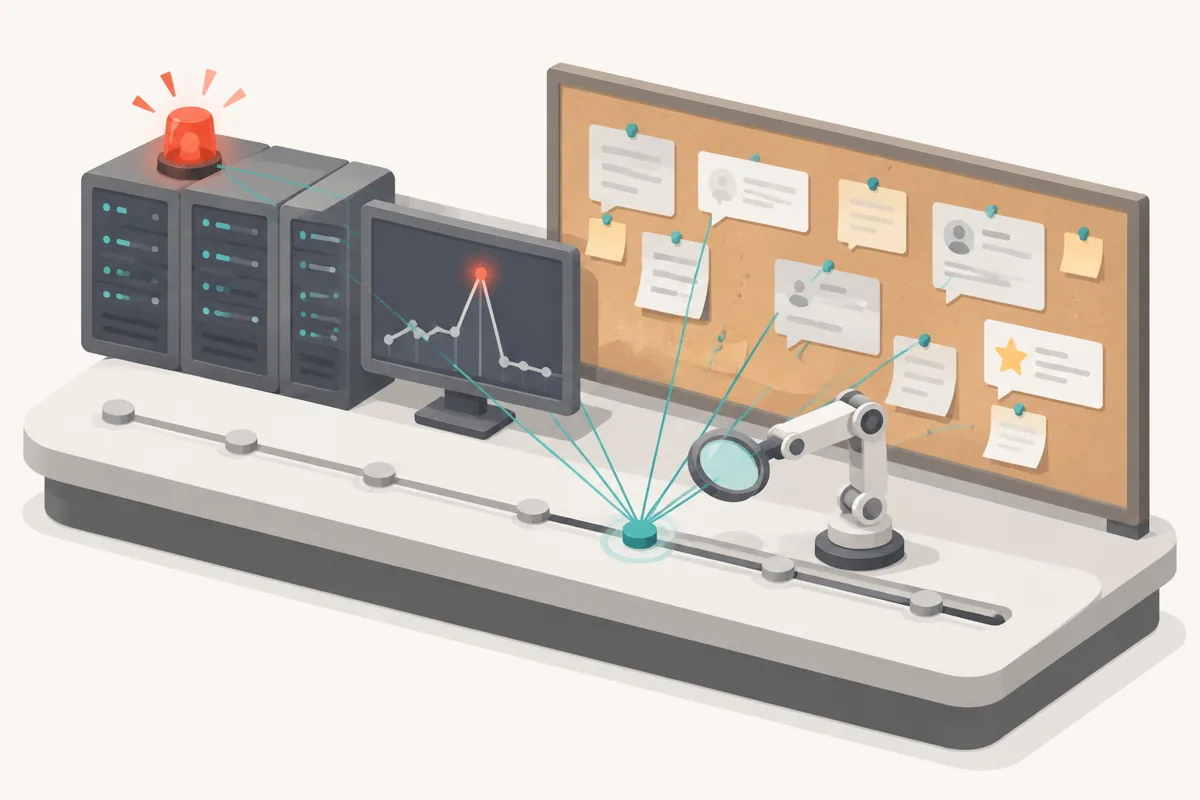
What changed in AWS DevOps Agent in November
AWS DevOps Agent is an AWS operations agent that reads metrics, logs, deployment records and code when an alarm comes in. Then it gives a root cause and a mitigation plan. It became generally available in March 2026. The launch post quotes preview customers. They report up to 75% lower MTTR and 80% faster investigations, with 94% root-cause accuracy (AWS: Announcing General Availability of AWS DevOps Agent). The sample and method are not public, so we use these numbers as background only.
We read every entry in the release history (AWS DevOps Agent: What's new) and kept the entries that matter for external data. The monthly blog puts the November changes in five groups: faster investigations, quality checks, memory, extensibility and governance across accounts. For external data, the extensibility group matters most. It includes partner-managed connectors (November 16) and the Sandbox in all commercial Regions (November 21).
| Date (2026) | Change | Why it matters for external data | Source |
|---|---|---|---|
| Nov 11 | Slack code channels, one channel per investigation | Where the findings go | What's New |
| Nov 13 | GovCloud (US-West); custom memories can import postmortems | Past incidents can feed memory | What's New |
| Nov 15 | Nine investigation metrics in the AWS/AIDevOps CloudWatch namespace | You can alarm on time to root cause | Vended Logs and Metrics |
| Nov 16 | Partner-managed connectors, Skills Catalog, Replay, automatic Reviews | Fewer fields to fill for third-party MCP | Using partner-managed connectors |
| Nov 19 | Connect whole AWS Organizations by organizational unit | Less setup for many accounts | Connecting your AWS organization |
| Nov 20 | Write actions in GitHub, GitLab, ServiceNow and PagerDuty | Each write needs approval | Working with directed actions |
| Nov 21 | Sandbox in all commercial Regions, also for custom agents | Python in a sandbox can call HTTP APIs | Set up a Sandbox |
The monthly blog page shows no publish date. The What's New posts that it links are all from November, and the newest release-history entry is November 22. That entry says automatic Reviews sample at most 10% during preview. The monthly blog says the Sandbox preview is in four Regions. The release history entry of November 21 says all commercial Regions. The two pages disagree, and we follow the newer release history.
The tools repository announcement of November 16 lists partners with connectors. Examples are Honeycomb, Elastic, Sumo Logic, Coralogix and ClickHouse (What's New: community and partner tools repository). All of them give data from inside the system, such as observability, feature flags and security scans. None gives public user feedback.
Can AWS DevOps Agent use an external MCP server?
Yes. The page "Connecting MCP Servers" says external MCP servers add data from "external observability tools, custom monitoring systems, and operational data sources" (Connecting MCP Servers). There are three hard conditions. First, the transport must be Streamable HTTP. This is the remote server type in the MCP specification, with one HTTPS endpoint for POST and GET (MCP specification: Transports).
A local stdio server on your laptop does not qualify. Second, the authentication must be OAuth 2.0, an API key, up to three custom headers, or AWS SigV4. Third, a tool name can have 64 characters at most, and each Agent Space can allow 500 MCP tools in total. You cannot raise that quota (Quotas).
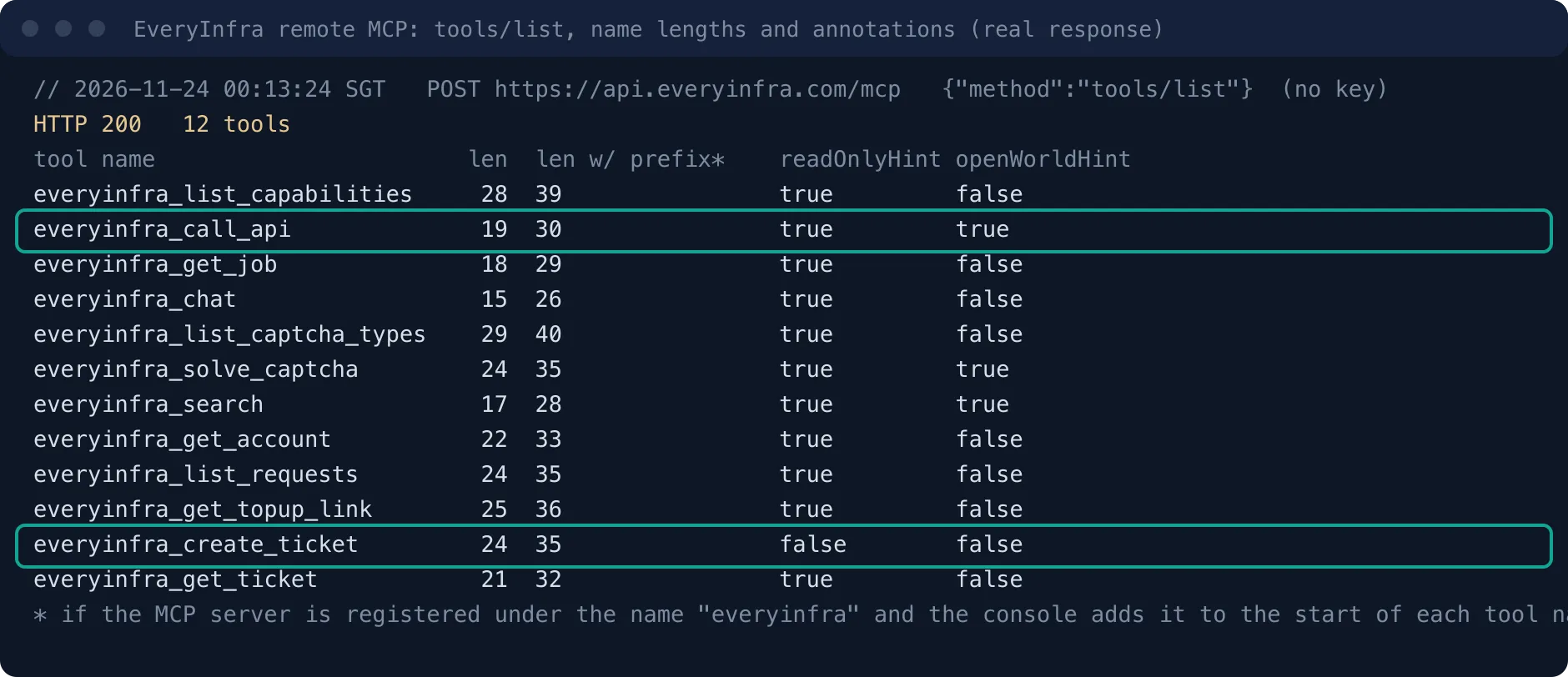
The EveryInfra remote MCP endpoint is https://api.everyinfra.com/mcp. At 00:13:24 Singapore time we sent tools/list without a key. The server returned 12 tools. The longest name is everyinfra_list_captcha_types, with 29 characters. The connector page adds a detail: the console puts the registration name in front of each tool name (Using partner-managed connectors).
That sentence is on the partner connector page. The documentation does not say if the same prefix applies to servers that you register yourself. Plan as if it does. If the registration name is everyinfra (10 characters), the longest tool name becomes 40 characters with the prefix and separator. A long name such as everyinfra-public-feedback-prod pushes the longest tool to 61 characters.
Next, look at how AWS splits read-only tools and write actions. Tools that you register through the API without toolDetails are read-only by default. The agent calls them without an approval step. Tools that change external systems are "directed actions". They are off by default, and each one needs approval (Working with directed actions).
EveryInfra sends the MCP annotations field for each tool (MCP specification: Tools). Eleven of the 12 tools have readOnlyHint set to true. The only exception is everyinfra_create_ticket, which opens a support ticket with us. An investigation does not need it, so do not allow it. The same AWS page recommends that you allow only read-only tools and give only read-only credentials.
Our key cannot write to your systems, but it can spend money. Allow as few tools as possible.
| Condition | AWS DevOps Agent requirement | EveryInfra remote MCP, measured |
|---|---|---|
| Transport | Streamable HTTP only | POST https://api.everyinfra.com/mcp, HTTP 200 |
| Authentication | OAuth 2.0, API key, up to 3 custom headers, SigV4 | Only Authorization: Bearer <key>; an X-API-Key header or a value without Bearer gets "unauthorized" |
| Tool name length | 64 characters at most | 29 characters at most |
| Tools per Agent Space | 500, not adjustable | 12 in total; allow 3 |
| Read-only split | Undeclared tools default to read-only | 11 with readOnlyHint true, 1 false |
| Data leaves the Region | Requests to an external MCP server leave the Agent Space Region | Requests go to api.everyinfra.com |
We tested the authentication row at 00:35 Singapore time with the free tool everyinfra_get_account. With Authorization: Bearer <key>, the account data came back. With X-API-Key: <key>, or with Authorization: <key> and no Bearer, the server answered unauthorized: no API key provided. The message says to use the Bearer form.
It also says that a client that cannot set headers can connect to /mcp/all and sign in with OAuth. So in the AWS console, pick an option that sends the header with Bearer.
Think about where the key lives. When you register in the console, DevOps Agent stores the secret, and you cannot read it back elsewhere. In the Sandbox route, you inject the key yourself. AWS recommends Secrets Manager for this, with a call at run time and no key in the code (What is AWS Secrets Manager?). An EveryInfra key can spend money. Create a separate key for investigations, keep its balance small, and revoke only that key if something goes wrong.
Why user feedback belongs in an investigation
The Google SRE book splits monitoring in two. White-box monitoring reads internal metrics. Black-box monitoring tests visible behavior from outside, as a user does. The book says to alert on symptoms where possible, because users feel symptoms and humans find causes (Google SRE Book: Monitoring Distributed Systems).
App store complaints, Reddit threads and "is it down?" posts on X are the cheapest black-box signal. You deploy no probe, because users write the posts.
Pages 4 and 5 of the Microsoft preliminary report list actions by the minute. At 01:07, an automatic failover moved Teams traffic onto gateway front ends that Exchange also uses. At 16:03, a connectivity monitor found more end-user connection problems.
At 16:20, a high-priority alert came in, and the team opened EX1550543 on the Service Health Dashboard. At 16:33, the first related customer ticket came in. The report says user reports on third-party outage sites started to accumulate at that time. At 18:27, the team opened MO1550821 for other affected services (Microsoft preliminary PIR).
So inside Microsoft, the monitor came 30 minutes before the first ticket. Microsoft has very full monitoring. With thinner monitoring, the order may be reversed: users notice first, and monitors react later.
Page 4 records more steps after 16:20. At 16:17, automation started to move traffic to other healthy endpoints. At 16:25, the team confirmed problems with Outlook, Outlook on the web, Exchange ActiveSync and the REST APIs. At 17:03, the monitor saw a further increase in connection problems. At 17:32, recovery automation still moved traffic, but more Regions degraded. At 17:45, the team found connection errors in part of the infrastructure that handles user access requests.
Page 3 gives the mechanism. Redirected traffic made the same defect more likely on the remaining servers. In less than two hours, the defect spread across the fleet, and at the lowest point more than 80% of servers did not respond. Page 2 gives the main impact: most users could not open their mailbox in Outlook or other mail clients, and mail delivery was late.
On the App Store side, "Won't let me send" at 17:37 and "email won't send or receive" at 19:52 both fall after the 17:03 increase, and both describe send and receive failures. "Slow and unresponsive" at 16:46 falls after the 16:25 confirmation. The times and symptoms agree, but a review does not prove any step in the report.
User feedback helps an investigation in three ways. It confirms impact: an alarm shows a higher error rate, and user posts show which clients and countries cannot work. It narrows the root-cause search: "broke after the update" points to the release record, and "mail does not arrive" points to the delivery queue. It also shows when your status page should have posted first.
Configuration example 1: register the EveryInfra remote MCP endpoint
These steps come from the AWS documentation. We did not run them in an AWS account. You register the server once per account. Then each Agent Space picks the tools that it allows (Connecting MCP Servers).
- In the AWS DevOps Agent console, open the Capability Providers page. Under Available, find MCP Server and choose Register.
- For Name, enter
everyinfra. A short name leaves room for the tool prefix. - For Endpoint URL, enter
https://api.everyinfra.com/mcp. Do not select Dynamic Client Registration. - For authentication, choose Multi auth headers. Add one header named
Authorizationwith the secretBearer <your EveryInfra key>. - Choose Review and submit. The console tests the connection.
- In the Agent Space, open Capabilities, find MCP Servers, choose Add and then Select specific tools.
- Allow three tools:
everyinfra_list_capabilities,everyinfra_call_apiandeveryinfra_get_job. Leave the other nine off.
Why Multi auth headers in step 4? The documentation is clearest for this option. Authorization is an allowed header name, and the console sends the value as written. The API Key option may also work with the same header, but the documentation does not say if it adds a prefix. Each option has a cost, as the table shows. Pick one and write it in your runbook.
| Option | Header sent | Rotate the key in place | Change the endpoint | Status for EveryInfra |
|---|---|---|---|---|
| Multi auth headers | Authorization: Bearer <key>, value up to 4,096 ASCII characters | No: remove, deregister, register again | Yes, with a new registration | Recommended; not run in AWS |
| API Key | Header name and value that you enter | Yes | No | Should work; prefix handling not documented |
OAuth 3LO through /mcp/all | Token from the sign-in flow | Handled by the flow | No | Option to test |
| Sandbox allowlist | Your own code sets the header | Yes, in Secrets Manager | Not applicable | Configuration example 2 |
Why only three tools in step 7? Extra tools only give the model more chances to pick the wrong one. Here are all twelve:
| Tool | What it does | Cost | Allow for investigations |
|---|---|---|---|
everyinfra_list_capabilities | Returns parameters and prices | Free | Yes |
everyinfra_call_api | Fetches the data | Catalog price | Yes |
everyinfra_get_job | Reads an async job result; no per-minute cost | Free | Yes |
everyinfra_chat | Chat | Per call | No |
everyinfra_create_ticket | Opens a support ticket; not read-only | Free | No |
everyinfra_solve_captcha, everyinfra_get_topup_link and five more | Account, captcha and catalog helpers | Varies | No |
You may not want a long-lived key in AWS. The EveryInfra error message names another route: connect to /mcp/all and sign in with OAuth. The AWS registration page supports OAuth 3LO and dynamic client registration, so the pieces seem to fit. We did not try this route in the AWS console. Treat it as an option to test.
Configuration example 2: skip MCP and call HTTP from the Sandbox
Since November 21, you can turn on the Sandbox in every commercial Region. It gives each investigation its own Linux environment. By default, it can reach only AWS service endpoints. To reach another host, you add entries to a network allowlist, each with a host, HTTP methods and paths (Set up a Sandbox).
So the second route is this: allow only POST /api/v1/social and GET /api/v1/jobs/* on api.everyinfra.com. Put the calling script in a skill, and the agent runs it in the Sandbox. The documentation says that with the Sandbox on, skills can contain executable code.
# skill: user-feedback-timeline / scripts/pull.py (configuration example; not run in an AWS Sandbox)
import json, os, time, urllib.request

API = "https://api.everyinfra.com/api/v1/social"
KEY = os.environ["EVERYINFRA_API_KEY"]  # inject from Secrets Manager; never store it in the skill

def call(platform, action, params, mode="sync"):
    body = {"platform": platform, "action": action, "params": params}
    if mode == "async":
        body["mode"] = "async"
    req = urllib.request.Request(API, data=json.dumps(body).encode(),
                                 headers={"Authorization": f"Bearer {KEY}",
                                          "Content-Type": "application/json"})
    try:
        with urllib.request.urlopen(req, timeout=95) as r:
            return json.load(r)
    except urllib.error.HTTPError as e:
        err = json.load(e)
        if e.code == 429:  # wait for retry_after; do not retry at once
            time.sleep(err["error"].get("retry_after", 25))
            return call(platform, action, params, mode)
        return err      # 422 and 503 are not charged; let the agent decide

def window(start_epoch, end_epoch, phrase):
    q = f'("{phrase}") since_time:{start_epoch} until_time:{end_epoch}'
    return call("twitter", "search", {"keyword": q, "sort": "latest", "limit": 60}, mode="async")
The Sandbox route has one advantage: you do not register an MCP server for the account, and the scope stays in one Agent Space. It also has costs: you manage the key yourself, and you write the retry and polling code. The documentation says the Sandbox proxies AWS calls as read-only. Outbound HTTP is limited only by the allowlist, so write exact paths and never **.
An AWS blog post gives the split between the extension types. Skills tell the agent what to do. MCP servers let it get the data. Custom agents wrap both in a repeatable flow (AWS: Extending AWS DevOps Agent with Skills, MCP Servers, Custom Agents and Connectors).
To get user feedback, we prefer MCP plus one skill. MCP gets the data. The skill says when to get it and which time windows to use.
Live test: the November 12, 2026 Microsoft 365 outage
The incident happened 11 days before our test (in UTC). Microsoft published a preliminary report with a minute-level timeline, and @MSFT365Status posted updates through the whole incident.
Microsoft's own documentation tells admins to check the Service health page in the admin center first. If they cannot sign in, they check the public status page. The same page suggests that people follow @MSFT365Status on X for information on some events. The Service health history keeps resolved issues for 7 or 30 days (Microsoft Learn: How to check Microsoft 365 service health). So @MSFT365Status is the public timeline that Microsoft itself points to. Tenant notices in the admin center are visible only to tenant admins, so the comparison leaves them out.
First, Microsoft's side. At 00:13:29 Singapore time we called twitter/search with from:MSFT365Status since:2026-11-12 until:2026-11-15. It returned 37 posts and charged $0.000792. X post IDs are snowflake IDs, and the high bits hold a millisecond timestamp (X Developer Platform: X IDs).
We decoded every ID. The decoded times differ from the returned posted_at by 0.997 seconds at most, so the time field is reliable. The first three posts cover a separate North America Teams incident (TM1550488). It started at 15:40 and was marked resolved at 17:09.
The first Exchange post came at 17:54:26 (@MSFT365Status, 17:54 post). From there to the final recovery post on November 14 at 06:09 (@MSFT365Status, final post), there are 33 posts. The median gap between two posts is 46.8 minutes.
Next, the user side. We called reddit/search twice. The keyword outlook down, sorted by top, returned 7 threads, and 6 were about this incident. The earliest two, in r/technology and r/Lawyertalk, came at 18:55 and 18:56. The second one has an all-caps title: "OUTLOOK IS DOWN.
I REPEAT OUTLOOK IS DOWN" (r/Lawyertalk thread). The keyword exchange online outage, sorted by relevance, returned 19 threads. The earliest was "Exchange Online Be Buggin" in r/sysadmin at 18:28 (r/sysadmin thread). A comment in that thread linked an older thread. We fetched it with reddit/post_detail.
It is "Office/Outlook outage right now ? LatAm only ?", posted at 18:20, with 200 comments (r/sysadmin thread). Another comment in the same thread said there were already 25 threads about the outage. Search returns only the top results for a keyword and sort order. So 18:20 is the earliest thread that we found, not the first thread on Reddit.
For the App Store, we called app_store/reviews once: Outlook, app ID 951937596, US store, newest first, limit 500. It returned 500 reviews and charged $0.001389. Among 1-star and 2-star reviews on November 12 (UTC), one came in the 16:00 hour. Its title is "Slow and unresponsive". Another came at 17:37 with the title "Won't let me send".
At 18:20, a 5-star review had the sarcastic title "oh when outlook is down". The API returns times with a fixed -07:00 offset. In November, US Pacific time is -08:00. If Apple gives Pacific clock time but labels it -07:00, every review time moves 1 hour later. We cannot check this from outside, so the chart and table use the returned values.
Posts from ordinary X users are not in this comparison. The unquoted query outlook down for 15:30 to 17:30 UTC returned 15 posts, and all of them were finance posts (see "Limits and cautions").
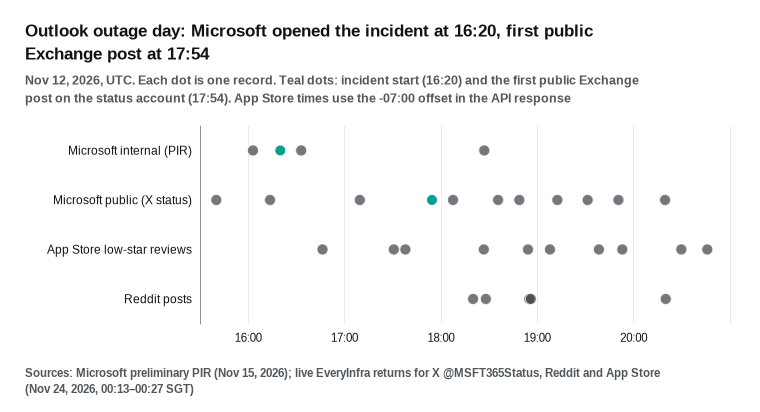
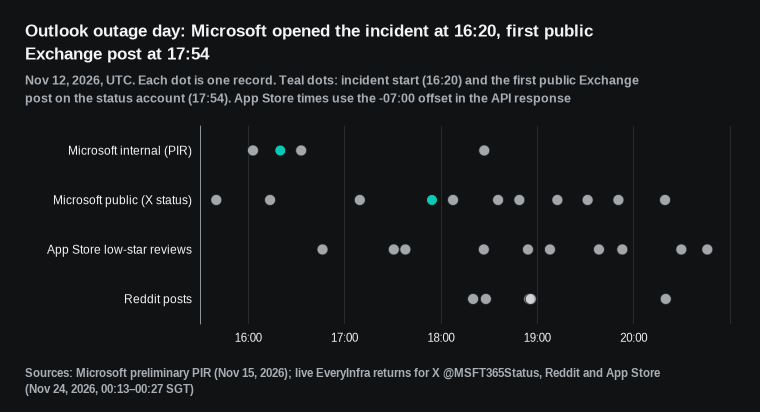
The "minutes from opening" column uses 16:20 as zero. A negative number means earlier.
| UTC time | Microsoft side | User side | Minutes from opening | Source |
|---|---|---|---|---|
| 15:40 | X status account: North America Teams issue (TM1550488) | −40 | twitter/search | |
| 16:03 | Internal connectivity monitor finds more user connection problems | −17 | Report | |
| 16:20 | High-priority alert; EX1550543 opened on the Service Health Dashboard | 0 | Report | |
| 16:33 | First customer ticket | Report: user reports start to accumulate on outage sites | 13 | Report |
| 16:46 | App Store 1 star: "Slow and unresponsive" | 26 | app_store/reviews | |
| 17:37 | App Store 1 star: "Won't let me send" | 77 | app_store/reviews | |
| 17:54 | First Exchange post on the X status account | 94 | twitter/search | |
| 18:07 | X status account: users in any region may be affected | 107 | twitter/search | |
| 18:20 | r/sysadmin: "LatAm only ?" | 120 | reddit/post_detail | |
| 18:27 | MO1550821 opened; Teams, Copilot and Defender affected | 127 | Report | |
| 18:28 | r/sysadmin: "Exchange Online Be Buggin"; 16 comments in 15 minutes | 128 | reddit/search, reddit/comments | |
| 18:55 | r/technology news thread, later 974 comments | 155 | reddit/search | |
| 19:31 | X status account: load rise is not from traffic; servers became unavailable | 191 | twitter/search | |
| 19:52 | App Store 2 stars: "App stopped working email won't send or receive" | 212 | app_store/reviews |
The comparison gives three points, and each has limits. First, the App Store review at 16:46 came 68 minutes before the first public Exchange post. One review alone proves nothing. Its text is a general "slow and unresponsive", which users also write on normal days. The daily count in the next section decides if the volume was unusual.
Second, the earliest Reddit thread that we found came 120 minutes after the incident opened and 26 minutes after the first public post. That does not match the idea that communities always notice first. Search may return only some threads. Also, the Service Health Dashboard showed the incident to tenant admins from 16:20, so r/sysadmin readers may have checked it first. Third, before 17:54, all three posts on the status account were about Teams, and they said "resolved" at 17:09.
The report says the failure chain started with the Teams traffic failover at 01:07. From outside, this looks like a resolved prelude. We do not claim a cause. We only note that the two events were 45 minutes apart on the same account.
Can App Store review counts work as an alarm?
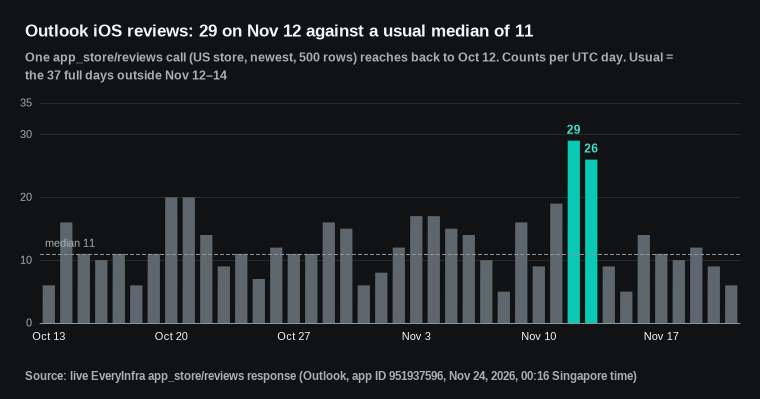
One bad review means little. A daily review count, however, has a baseline that you can compute. The 500 Outlook iOS reviews run from October 12 to November 22. We counted them per UTC day. We removed November 12 to 14 and the incomplete first and last days.
That leaves 37 full days with a median of 11 reviews. November 12 had 29 reviews, and November 13 had 26. That is 2.6 and 2.4 times the median. On November 14, the count fell back to 9.
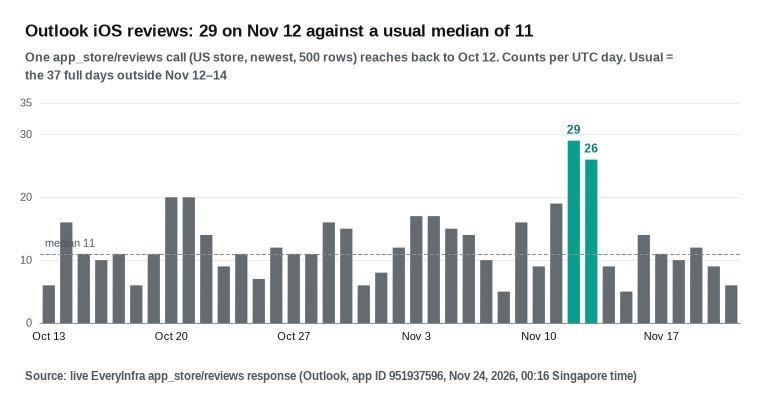
The count is the first layer. We also wrote one fixed keyword rule. It flags 1-star to 3-star reviews with outage words in the title or text. The words include down, outage, not working, stopped working, won't send, can't access, unable, crash and server. The rule lives in our recompute script, analysis.py, which we keep with the raw responses.
On the 37 normal days, it flags 0.27 reviews per day on average. It flags 8 on November 12 and 10 on November 13. The rule is rough. It misses the 17:37 review "Won't let me send", because the word form does not match.
It also flags "crashes after the update", which has nothing to do with servers. But 8 flagged reviews on November 12 is about 30 times the normal 0.27, and a rough rule is enough to show that. The agent can read the text for finer labels.
The share of 1-star and 2-star reviews also moved. Across all 500 reviews, it is 23%. On November 12, it is 51.7%. Both numbers come from the same call. By hour, each of the 7 hours from 16:00 to 22:59 on November 12 had 1 to 3 low-star reviews.
That is too few to cross an hourly threshold. By day, the change is clear. So app store reviews work as a 24-hour confirmation signal. They do not work as a first alarm at minute level.
| Metric (Outlook iOS, US store) | Normal (37 full days) | Nov 12 | Nov 13 |
|---|---|---|---|
| Reviews per day | Median 11 | 29 | 26 |
| Outage-type low-star reviews (rule) | Mean 0.27 | 8 | 10 |
| Share of 1-star and 2-star | 23% of all 500 | 51.7% | Not computed |
When do reviews become visible? Store publication delay
We counted those reviews 11 days later, so we saw complete days. During an incident, the picture is different. We compared the call time with the newest review in each response. At 00:16:48 Singapore time (16:16 UTC on November 23), we called app_store/reviews. The newest review was from 01:46 UTC on November 22, 38.5 hours earlier.
At 00:27:38, we called google_play/reviews. The newest review was from 16:18 UTC on November 22, 24.2 hours earlier. Outlook gets about ten reviews a day in the US. More than a day with zero new reviews is unlikely. A publication delay is the more likely reason.
Google explains the delay in its Play Console help. To detect suspicious ratings and reviews, Google holds new reviews for about 24 hours before they become public. Developers can see and reply to them in the console before that (Play Console Help: View and analyze your app's ratings and reviews). Our 24.2 hours matches that statement.
Apple's App Store Connect help explains how developers filter their own reviews by country, version and rating. It says nothing about a publication delay (App Store Connect Help: View ratings and reviews). If the -07:00 label should be -08:00, each review is one hour later, and the App Store gap is 37.5 hours. That is still longer than Google's.
This changes the role of each source. X and Reddit work at minute level, so you can pull them while the incident runs. Store reviews appear one to two days later. Use them in the postmortem to confirm impact, or as evidence for the next day's automatic review. Do not use them as a signal in the first hour.
If you build the app, App Store Connect and Play Console show your own reviews earlier. That route needs team access and covers only your own app. Public review data helps on the other side. When a service that you depend on fails, such as Outlook in this example, you have no access to its console. Public data is all you have.
| Source | Call time (UTC) | Newest item in response (UTC) | Gap | What the platform says |
|---|---|---|---|---|
| App Store (US) | Nov 23, 16:16 | Nov 22, 01:46 | 38.5 hours | Help page names no delay |
| Google Play (US English) | Nov 23, 16:27 | Nov 22, 16:18 | 24.2 hours | New reviews held about 24 hours |
| Reddit comments | Nov 23, 16:24 | Thread 11 days old | Not applicable | Public when posted |
| X search | Nov 23, 16:13 | Any window set with since_time | Not applicable | Public when posted |
One real MCP round trip: what the agent sends and gets
In AWS DevOps Agent, the agent calls an MCP tool with a standard tools/call. We sent the same request from our own machine to the EveryInfra remote MCP endpoint at 00:24:23 Singapore time. It returned after 12.1 seconds. The request reads comments under the r/sysadmin thread from 18:28.
{"jsonrpc":"2.0","id":1,"method":"tools/call",
 "params":{"name":"everyinfra_call_api",
  "arguments":{"platform":"reddit","action":"comments",
   "params":{"url":"https://www.reddit.com/r/sysadmin/comments/1xukjq3/exchange_online_be_buggin/","limit":100}}}}
The response has JSON in result.content[0].text. The count is 38, and billing.charged_usd is 0.000792. Each row in results has id, text, author_username, like_count, community, url and posted_at. These match the response_fields of reddit/comments in the catalog (reddit/comments capability page). Sorted by posted_at, the first comment came at 18:28:46, 25 seconds after the thread.
There were 16 comments in the first 15 minutes. One said the admin portal and the service health page also failed to load. Another linked the LatAm thread from 18:20. With this data, the agent can note that the service health page itself was affected. Microsoft's timeline does not mention that.
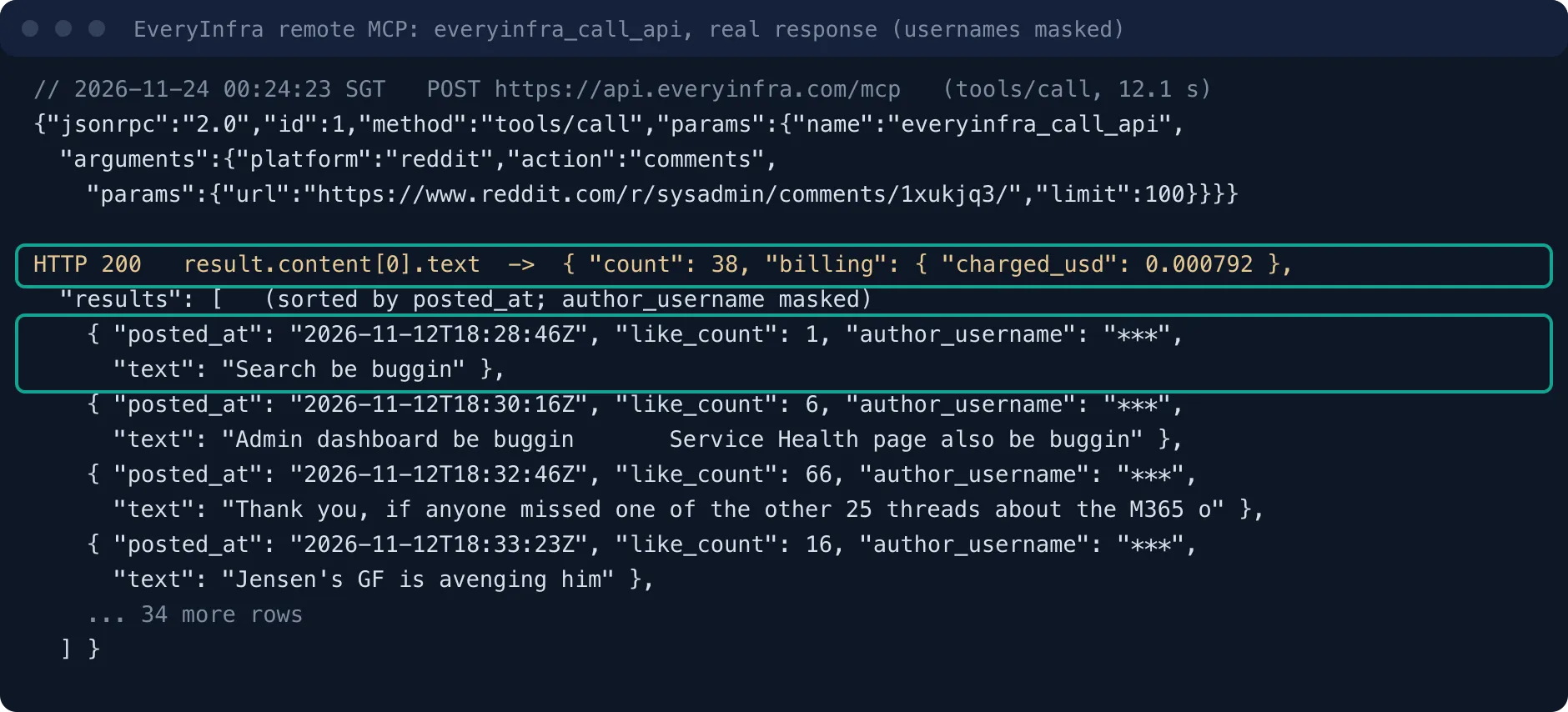
Tell the agent about two fields. First, posted_at includes a time zone. Reddit and X return +00:00. App Store returns -07:00. Google Play returns +00:00.
Convert all of them to UTC before you merge them on one timeline. Second, like_count on a Reddit comment is the current value, not the value during the incident. Later pulls show higher numbers. Do not use it to estimate how many people agreed at the time.
How far back can each source reach?
We pulled the Microsoft data 11 days after the outage. The four sources reach back very different distances. One App Store call with the 500 newest reviews reached October 12, about 40 days. Reddit search has a fixed window of the last month, and the catalog says so (reddit/search capability page). X search accepts since_time: and until_time: in the keyword, so you can set any window.
We got a two-hour window from 11 days earlier without trouble. One Google Play call for Outlook English reviews returned 200 rows. The catalog notes that US English requests can return at most 100 per call, but this call returned 200. They covered only November 21 at 00:12 to November 22 at 16:18, about 40 hours, with no next-page token.
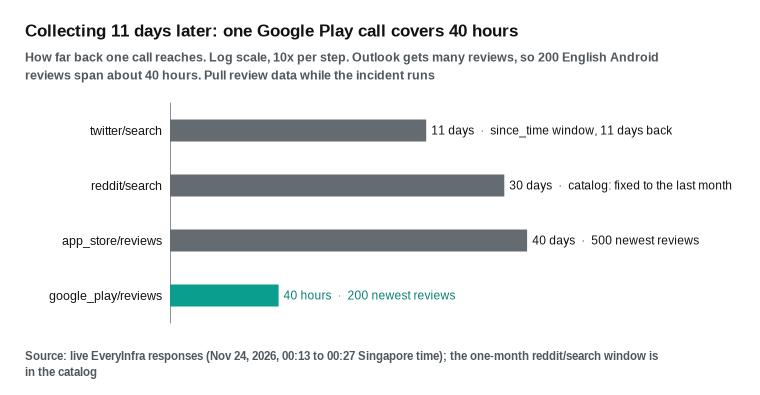
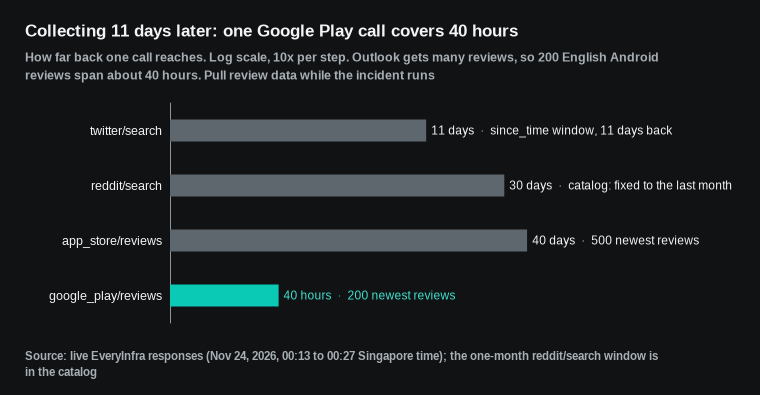
So pull user feedback while the incident runs, or save a copy every day. AWS DevOps Agent can replay a finished investigation. The documentation itself warns that a replay queries the environment as it is now, and the old data may be gone (Replaying investigations). For a busy app, Google Play reviews from two days ago are already out of reach.
A replay would give the agent a different set of reviews. Do you plan to improve a skill with replays and automatic reviews? Then save the raw responses to S3 during the investigation. Then let the replay read the saved copy.
| Source | Capability | How far one call reached (our calls) | Time window query | Unit price (catalog) |
|---|---|---|---|---|
| X | twitter/search | Any window; 11 days back worked | since_time and until_time | $0.000792 |
| reddit/search | Fixed to the last month | No | $0.000792 | |
| App Store | app_store/reviews | 500 reviews, about 40 days | No; newest first only | $0.001389 |
| Google Play | google_play/reviews | 200 reviews, about 40 hours | No; a page token when present | $0.001389 |
Latency, rate limits and async: where the agent waits
These are the calls that returned data, in Singapore time on November 24:
| SGT | Capability | HTTP | Seconds | Charged |
|---|---|---|---|---|
| 00:13:29 | twitter/search (status account) | 200 | 11.9 | $0.000792 |
| 00:16:48 | app_store/reviews | 200 | 3.6 | $0.001389 |
| 00:17:02 | twitter/search (time window, async submit) | 202 | 2.2 | $0.000792 (refunded if the job fails) |
| 00:21:36 | reddit/search | 200 | 4.9 | $0.000792 |
| 00:24:23 | reddit/comments through MCP | 200 | 12.1 | $0.000792 |
| 00:24:40 | reddit/post_detail | 200 | 58.4 | $0.000556 |
| 00:27:38 | google_play/reviews | 200 | 6.6 | $0.001389 |
AWS charges for agent work by the second, so the wait for each tool call shows up on the bill. Here is the time of each synchronous call (curl time_total). App Store took 3.6 seconds, Reddit search 4.9, Google Play 6.6, X search 11.9, and Reddit comments through MCP 12.1. The reddit/post_detail call took 58.4 seconds, the slowest of the synchronous calls.
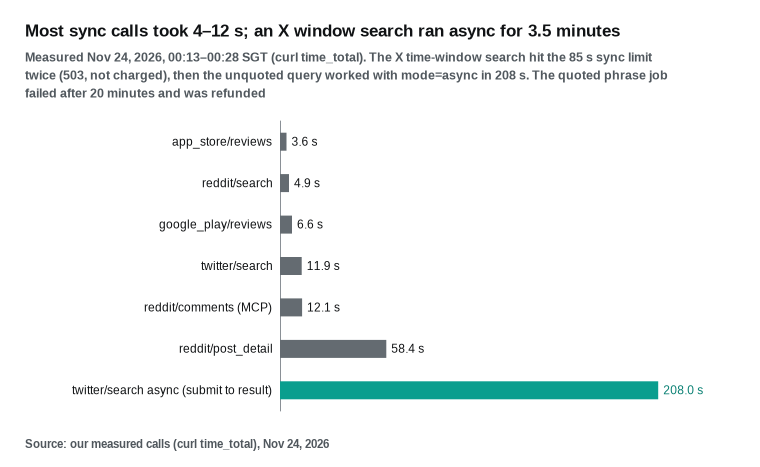
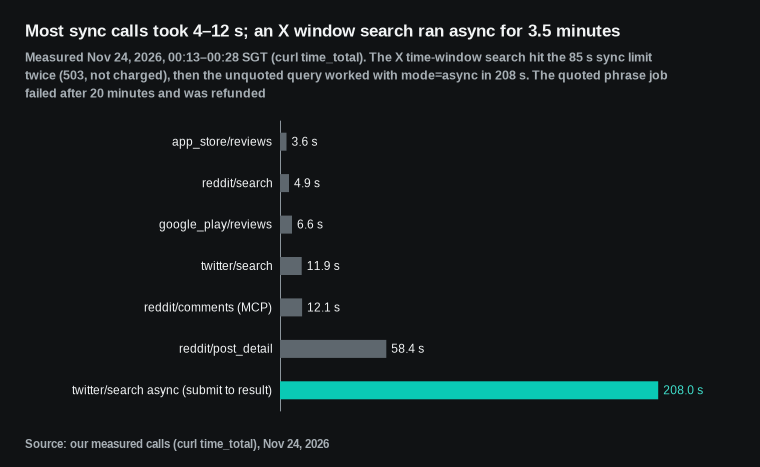
An X time-window search with a wide window and a high limit may not finish in synchronous mode. Then it returns 503 with code set to timeout and charged_usd set to 0. The error says to switch to mode=async or lower the limit.
In async mode, you get 202 and a job_id at once. Our async job from 00:17:02 returned its result at 00:20:30, about 208 seconds after the submit. For the skill, this means a deadline for X window searches, for example 5 minutes. If no result arrives in time, the agent writes its finding from Reddit and store data and adds X later.
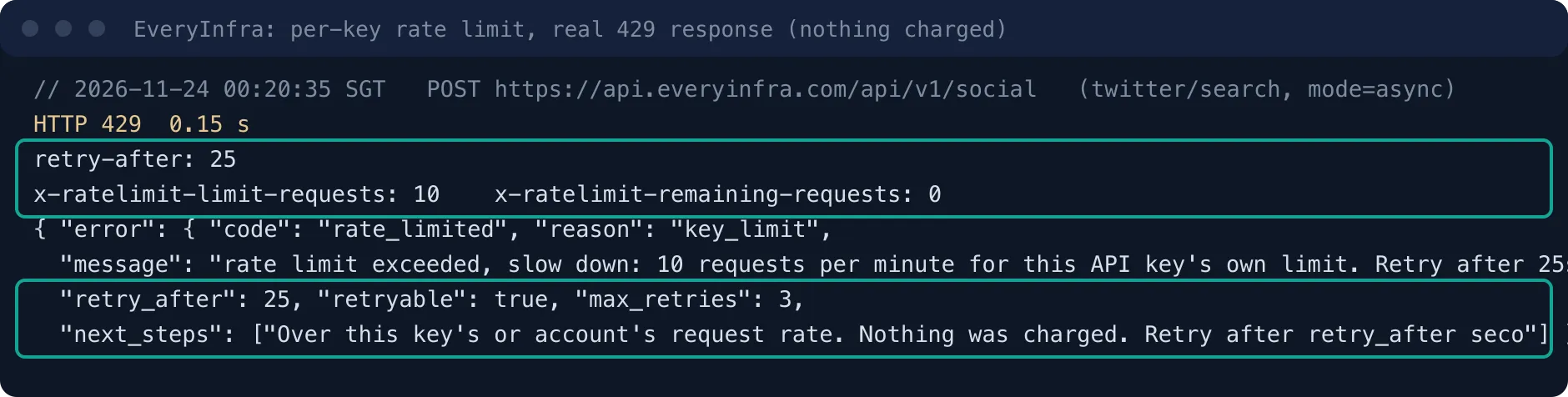
Count the rate limit too. Each EveryInfra key has a per-minute request limit. The x-ratelimit-limit-requests header gives the current value, and the key in the screenshot allows 10. Each Agent Space runs 3 investigations at the same time by default (Quotas). A large outage fires several alarms. If several investigations pull user feedback together, they can reach the limit.
Then the API returns 429 with retry_after set to 25 seconds, and nothing is charged. EveryInfra sends seconds in the header and repeats retry_after in the JSON body. The agent reads the body more easily, so write three rules in the skill. On 429, wait for the retry_after value in the body. Use async for X time-window searches. Poll with the free everyinfra_get_job.
If several Agent Spaces share one key, they use the same per-minute count. One key per Agent Space makes each limit easier to trace.
The cost of feedback data per investigation
Here is a fixed data pack for one investigation. X search runs 4 times: the status account once and three time windows for user complaints. Reddit search runs twice, for two keywords. Reddit comments run twice, for the two earliest threads. App Store and Google Play reviews run once each.
That is 10 calls in total. Unit prices come from the catalog that we read at 00:13 (EveryInfra catalog). Failures, timeouts and empty results are not charged. If an async job fails, the charge from the submit comes back.
| Call | Count | Unit price | Subtotal |
|---|---|---|---|
| twitter/search | 4 | $0.000792 | $0.003168 |
| reddit/search | 2 | $0.000792 | $0.001584 |
| reddit/comments | 2 | $0.000792 | $0.001584 |
| app_store/reviews | 1 | $0.001389 | $0.001389 |
| google_play/reviews | 1 | $0.001389 | $0.001389 |
| Total | 10 | $0.009114 |
On the AWS side, the pricing page charges $0.0083 per agent-second for investigations, evaluations and on-demand tasks. Its example uses 8 minutes per investigation, which is $3.98 (AWS DevOps Agent Pricing). New customers get a two-month trial after general availability, with 20 investigation hours per month. Customers with AWS Support get monthly credits worth 30%, 75% or 100% of their support charge. The data fee is about 1/437 of one 8-minute investigation.
The second cost is the wait. With our measured times, the 10 calls take about 92 seconds. If that wait counts as agent work, it costs about $0.77, which is more than 80 times the data fee. The pricing page does not say if tool waits count as agent time. We used the upper bound.
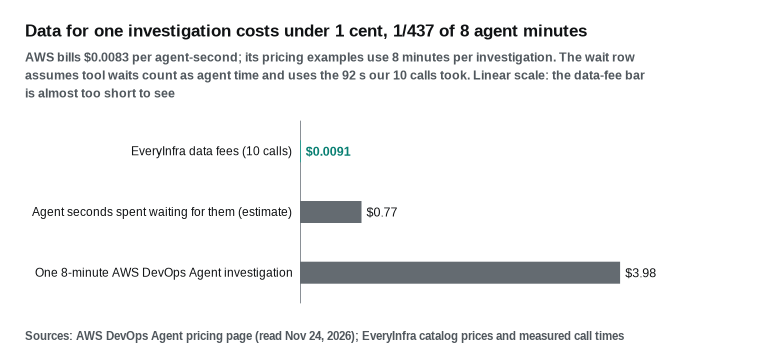
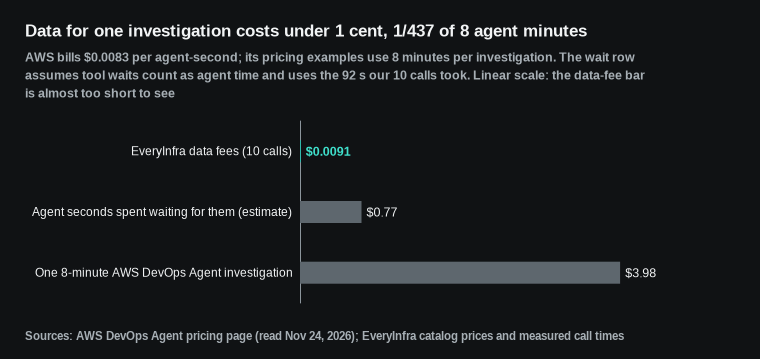
So the savings come from shorter waits. Send the 10 requests in parallel within your per-minute limit. Submit X window searches early as async jobs, and ask for enough rows to avoid paging. At 20 investigations per month, the data fee is about $0.18.
Write a skill that says when to check user feedback
AWS recommends that you write investigation steps as a skill. Write the description from the point of view of the agent. Attach the skill only to the agent types that need it (AWS: Extending AWS DevOps Agent). The example below is for Incident RCA and Incident Triage. We did not upload it to AWS.
---
name: user-feedback-timeline
description: Use when an alarm or ticket suggests users cannot reach a customer-facing app
  (login, send, load, pay). Pull public user feedback for the incident window and place it
  on the same UTC timeline as alarms and deploys.
---
## Steps
1. Window = alarm start - 60 min .. now. Convert every posted_at to UTC first.
2. everyinfra_call_api twitter/search, mode=async:
   ("<app> down" OR "<app> not working") since_time:<start> until_time:<end>, limit 60.
   Poll with everyinfra_get_job (free, no rate cost).
3. everyinfra_call_api reddit/search "<app> down", sort=newest, limit 25;
   reddit/comments on the 2 earliest posts.
4. everyinfra_call_api app_store/reviews (app_id, country, sort=newest, limit 500)
   and google_play/reviews (package, language, sort=newest, limit 200).
5. Count 1-3 star reviews per UTC day; compare with the median of the other days.
## Rules
- On HTTP 429 wait retry_after seconds. 503 and 422 are not charged; do not loop.
- If the X job has no result after 5 minutes, write the timeline without it and add X later.
- Quote at most 3 user posts; never copy usernames into the report.
- Treat feedback as symptoms. It confirms impact; it does not prove a root cause.
The thread at 18:20 asked "LatAm only?", but the status account had said at 18:07 that users in any region could be affected. User feedback answers "is anyone affected, and what were they trying to do?" It does not answer "why?"
The other direction: let a feedback spike start an investigation
So far, the alarm comes first and the agent then checks user feedback. If your monitoring has gaps, reverse the order: a feedback spike starts the investigation. AWS DevOps Agent can start an investigation from a webhook. Datadog, Splunk, ServiceNow and other integrations bring their own webhooks.
You can also create a generic webhook on the Capabilities tab of an Agent Space, with HMAC or API key authentication. Each Agent Space can have one HMAC webhook and one API key webhook. The console shows the secret only once (Invoking DevOps Agent through Webhook). The page compares the two methods, and it recommends HMAC for generic webhooks.
| HMAC | Bearer token | |
|---|---|---|
| Setup | The client signs each request with the timestamp and payload | A fixed token in the Authorization header |
| Payload integrity | Checked | Not checked |
| Replay protection | Built in, through the timestamp | None; a captured token works until rotation |
| Secret exposure | Lower; only the signature travels | Higher; the token travels with every request |
One design is a scheduled Lambda function that runs every 10 minutes. It calls reddit/search for your app name plus "down", sorted by newest. It calls twitter/search for a phrase match over the last 15 minutes. Then it counts new posts. If the count is above your threshold, it signs a webhook call with HMAC.
A threshold could be 3 times the median of the same time slot over the past 7 days. The description includes the links and times of those posts. At catalog prices, two calls every 10 minutes means 288 calls per day, about $0.23. Store reviews arrive one to two days late, so keep them out of this trigger. Use them in the next day's review instead.
After the investigation ends, AWS can grade it. A Review does not run the investigation again. It reads the investigation record and gives pass or fail on five criteria. One of them checks if the evidence supports the conclusion.
Automatic Reviews are on by default. During the preview, they sample 1% to 10% of investigations, with 10% as the default (Reviewing investigations). If the investigation record has links and times for user posts, the evidence criterion has something to check.
What the videos show and the documentation does not
We used youtube/search for "aws devops agent mcp" and took the top three relevant videos. Then we used youtube/transcript to get English captions, at $0.000556 per transcript. The first is "Is AWS DevOps Agent Worth It? Real Demo with Intentional Production Bug" from a personal AWS teaching channel (YouTube). The second is "AWS DevOps Agent 201" from the AWS User Group Perth (YouTube). The third is an introduction from Aviz Academy (YouTube).
| Video | What it shows | Detail missing from the docs | User feedback |
|---|---|---|---|
| Personal AWS channel | Latency added to API Gateway, Lambda and DynamoDB; CloudWatch alarm at 1,000 ms | The agent finds 31 resource types but sees no code without a repository | Not shown |
| AWS User Group Perth | 5,311 resource relationships in the topology | "About 50 cents a minute" ($0.0083 × 60 = $0.498); Slack not tried | Not shown |
| Aviz Academy | Custom agents and private connections | MCP named only briefly | Not shown |
The pricing remark matches the AWS pricing page. All three videos use CloudWatch and observability data only. None connects user feedback or any public outside data.
Limits and cautions
We saw the first four traps in our own calls:
| Trap | What we saw | Fix |
|---|---|---|
| Search is a sample | Search returns top results only; a comment named 25 threads, and we found a few | Try several keywords and windows; state the sampling method |
| Time offsets | Times use the RFC 3339 format, but App Store sends a fixed -07:00 while November Pacific time is -08:00 | Convert to UTC; check X times against the post ID (ours matched within 1 second) |
| Keyword noise | outlook down without quotes returned 15 finance posts about a forecast going down | Write quoted phrases with OR in the skill, and include the app name |
| Data leaves AWS | Requests to an external MCP server leave the Agent Space Region; no private connections in GovCloud (Supported Regions) | You send only a query and an app ID; check your own data rules for this |
Reddit posted_at is the time of the post, not the time when the user hit the problem. Keep that in mind when you read the gaps in the timeline.
Prompt injection is a risk. Anyone can write a user review. The AWS security page warns that custom MCP servers bring prompt injection risk (AWS DevOps Agent Security). The monthly blog says Agent Spaces have content safety checks on by default, based on Bedrock Guardrails.
Guardrails can block prompt attacks according to the policies that you set (Amazon Bedrock Guardrails). We suggest that you allow only read-only tools and give this Agent Space no directed write actions. Then a review that says "roll back production" cannot cause a rollback.
Audit records matter too. The MCP server endpoint URL appears in CloudTrail events, so do not put the key in a URL query string (AWS CloudTrail User Guide). Use a header. AWS also offers private connections through VPC Lattice for MCP servers inside your VPC (Connecting to privately hosted tools). EveryInfra is a public service, and the connection uses plain HTTPS.
We did not register an MCP server, upload a skill or run an investigation in an AWS account. Every AWS step is a configuration example from the documentation. We also did not measure if user feedback improves root-cause accuracy. That needs replays and automatic reviews on real incidents.
Recent changes
- Nov 12, 2026: a global Microsoft 365 outage. The preliminary report says it lasted 23 hours 50 minutes. A gateway defect deployed in July met a load shift and a 14% capacity gap (Ars Technica). For you: the first public post came 94 minutes after the incident opened.
- Nov 16, 2026: AWS DevOps Agent added partner-managed connectors. The first partners are observability and security vendors (What's New). For you: public user feedback still needs a self-registered MCP server or the Sandbox.
- Nov 17, 2026: Apple Pay, iCloud, AppleCare and other Apple services went down. Apple named an internal update as the cause. Downdetector reports rose sharply from about 11:40 US Eastern time (TIME). For you: two large companies blamed internal changes in one week.
- Nov 17, 2026: Code Change Risk Analysis entered preview. It was previously called release readiness review. It checks changes in GitHub and GitLab pull requests against your standards, cross-repository dependencies and production environments (Code Change Risk Analysis). For you: when user posts say "after the update", the agent can compare them with that pre-release risk report.
- Nov 20, 2026: AWS DevOps Agent added write actions in GitHub, GitLab, ServiceNow and PagerDuty, with approval for each one (What's new). For you: keep the Agent Space that reads outside data apart from the one that can write.
- Nov 21, 2026: the Sandbox reached all commercial Regions and custom agents (What's new). For you: if you do not want an account-level MCP server, you can call HTTP through an allowlist.
- Dec 1, 2026: release testing will be removed (Supported Regions). For you: if you use it to verify releases, move to Code Change Risk Analysis.
FAQ
How is AWS DevOps Agent billed, and is there a free tier? AWS charges by agent-second. Investigations, evaluations and on-demand tasks cost $0.0083 per second, and idle time is free. The pricing example puts one 8-minute investigation at $3.98. New customers get a two-month trial after general availability.
Each month includes 20 investigation hours, 15 evaluation hours and 20 hours of on-demand tasks. Customers with AWS Support get monthly credits worth 30%, 75% or 100% of their support charge (AWS DevOps Agent Pricing). The EveryInfra data fee is separate, about $0.0091 per investigation with the 10-call pack.
Can I connect my own MCP server to AWS DevOps Agent? Yes. Register it on the Capability Providers page. It must use Streamable HTTP and a supported authentication method. Each Agent Space allows 500 tools in total (Connecting MCP Servers). AWS DevOps Agent also has its own remote MCP endpoint. Clients such as Kiro and Claude Code use it to call the agent (Accessing DevOps Agent).
Custom MCP server or partner connector: what is the difference? A partner connector has a fixed endpoint, authentication method and OAuth scopes. You add only your credentials. You can also install the skills that the partner recommends. With a custom MCP server, you enter the endpoint and authentication yourself. It works with any server that meets the conditions (Using partner-managed connectors). EveryInfra has not published a connector, so you use the custom route.
Can an AWS DevOps Agent skill contain code? Without the Sandbox, an uploaded skill can contain Markdown, PDF, images and data files only. With the Sandbox on, a skill can contain executable code, and the agent runs it in the Sandbox (Set up a Sandbox). Since November 16, the console also has a Skills Catalog for adding public skills in one step (Skills Catalog).
Can AWS DevOps Agent read Reddit discussions? Reddit is not one of its built-in data sources. To read Reddit, connect an MCP server that can fetch Reddit data, or call an API from the Sandbox. With the EveryInfra remote MCP endpoint, the agent finds threads with reddit/search and reads comments with reddit/comments. Each call costs $0.000792 (reddit/search capability page).
Get started
- Get a key from the quickstart. Call
GET /api/v1/social/catalogonce with curl. - Check that
availableis true forapp_store/reviews,reddit/searchandtwitter/search. - Follow the remote MCP guide and connect any MCP client to
https://api.everyinfra.com/mcp. - Run
tools/listand oneeveryinfra_call_apicall. Check that the Bearer header works. - In the AWS DevOps Agent console, register the server as in configuration example 1. Allow only three tools.
- Change the SKILL.md above to your app name and app ID, and upload it to the Agent Space.
- Replay a finished incident. Compare the root cause and timeline with and without user feedback. Prices are on the pricing page.
For the same data in other AI platforms, read AgentCore Gateway with MCP: response format and bill. Also see VS Code Copilot app review triage and review alerts by SMS. For refunds after failed calls, see failure refund reconciliation. Each platform page lists its capabilities: X Scraper API, Reddit Scraper API, App Store Scraper API, Google Play Scraper API.
References
- This Month in AWS DevOps Agent: November 2026, AWS Cloud Operations Blog, November 2026.
- AWS DevOps Agent: What's new, AWS documentation, newest entry 2026-11-22.
- Connecting MCP Servers, AWS documentation, read 2026-11-24.
- Using partner-managed connectors, AWS documentation, published 2026-11-16.
- Quotas, AWS documentation, read 2026-11-24.
- Supported Regions, AWS documentation, read 2026-11-24.
- AWS DevOps Agent Pricing, AWS, read 2026-11-24.
- Set up a Sandbox, AWS documentation, updated 2026-11-21.
- Accessing DevOps Agent, AWS documentation, read 2026-11-24.
- Extending AWS DevOps Agent with Skills, MCP Servers, Custom Agents and Connectors, AWS Cloud Operations Blog, 2026-11-02.
- Announcing General Availability of AWS DevOps Agent, AWS Cloud Operations Blog, March 2026.
- AWS DevOps Agent adds community and partner tools repository, AWS What's New, 2026-11-16.
- AWS DevOps Agent is now available in AWS GovCloud (US-West), AWS What's New, 2026-11-16.
- AWS DevOps Agent now supports Slack code channels and Microsoft Teams two-way conversations, AWS What's New, November 2026.
- Vended Logs and Metrics, AWS documentation, updated 2026-11-15.
- Working with directed actions, AWS documentation, updated 2026-11-20.
- Replaying investigations, AWS documentation, published 2026-11-16.
- AWS DevOps Agent Security, AWS documentation, read 2026-11-24.
- Skills Catalog, AWS documentation, published 2026-11-16.
- MCP specification: Transports, Model Context Protocol, version 2025-06-18.
- MCP specification: Tools, Model Context Protocol, version 2025-06-18.
- Preliminary Post Incident Report for Microsoft 365 (EX1550543/MO1550821), Microsoft, 2026-11-15 (ISMG archive copy).
- @MSFT365Status: first Exchange post, Microsoft 365 Status, 2026-11-12 17:54 UTC.
- @MSFT365Status: recovery post, Microsoft 365 Status, 2026-11-14 06:09 UTC.
- X IDs, X Developer Platform, read 2026-11-24.
- Three small failures combined to take down Microsoft 365, Ars Technica, November 2026.
- The Great Exchange Online Outage of November 2026, Office 365 for IT Pros, 2026-11-16.
- r/sysadmin: Office/Outlook outage right now ? LatAm only ?, Reddit, 2026-11-12 18:20 UTC.
- r/sysadmin: Exchange Online Be Buggin, Reddit, 2026-11-12 18:28 UTC.
- r/Lawyertalk: OUTLOOK IS DOWN, Reddit, 2026-11-12 18:56 UTC.
- Monitoring Distributed Systems, Google SRE Book.
- What to Know About the Apple Outage, TIME, 2026-11-17.
- Is AWS DevOps Agent Worth It? Real Demo with Intentional Production Bug, personal YouTube channel.
- AWS DevOps Agent 201, AWS User Group Perth, YouTube, 2026-09-06.
- AWS DevOps Agent: Every Cloud Engineer Should Know This, Aviz Academy, YouTube, 2026-07-09.
- aws/tools-for-devops-agent, GitHub, read 2026-11-24.
- EveryInfra catalog, EveryInfra, read 2026-11-24 00:13 Singapore time.
- Invoking DevOps Agent through Webhook, AWS documentation, read 2026-11-24.
- Reviewing investigations, AWS documentation, updated 2026-11-22.
- Connecting to privately hosted tools, AWS documentation, read 2026-11-24.
- Connecting your AWS organization, AWS documentation, published 2026-11-19.
- Code Change Risk Analysis, AWS documentation, published 2026-11-17.
- What is AWS Secrets Manager?, AWS documentation, read 2026-11-24.
- Amazon Bedrock Guardrails, AWS documentation, read 2026-11-24.
- AWS CloudTrail User Guide, AWS documentation, read 2026-11-24.
- RFC 3339: Date and Time on the Internet: Timestamps, IETF, July 2002.
- How to check Microsoft 365 service health, Microsoft Learn, read 2026-11-24.
- View and analyze your app's ratings and reviews, Play Console Help, read 2026-11-24.
- View ratings and reviews, App Store Connect Help, read 2026-11-24.
Reference BL-223