Amazon Ads MCP Server plus competitor data: bids, negatives and main images
Amazon Ads MCP Server reads your own ad account, not your rivals. We ran 6 live calls on a 40 oz bottle market: 50 ASINs checked weekly cost $0.29.

The Amazon Ads MCP Server went into open beta on February 2, 2026. It lets assistants such as Claude and ChatGPT read reports, change budgets and build Sponsored Products campaigns (Amazon Ads open beta announcement). Every tool works on ad accounts that you already have access to. The docs list no tool for rival prices, rival organic ranks or monthly keyword volume (Amazon Ads MCP overview).
On November 19, 2026, between 00:16 and 00:27 Singapore time, we made 6 live calls to the EveryInfra data API and remote MCP. The target was one search results page for a 40 oz insulated water bottle. We got 107 rows of public data back, and the total charge was $0.049681.
From those unit prices we built a plan for a weekly check of 50 competitor ASINs. It takes 73 calls a week and costs $0.2879 in API fees. Pulling the full ranked keyword list for the same 50 ASINs one by one costs $14.00, which is 48.6 times more. The live calls also showed a fact that matters for bids.
Two products shared 14 ranked keywords. The bottle that we treated as "our" product ranked ahead of Owala on only 4 of them. 3 of those 4 are generic terms with no brand name at all.
Our example uses a 40 oz stainless steel bottle. That results page holds big brands such as Owala, Stanley and HydroJug next to more than a dozen unbranded bottles under $20.
Price gaps and rank gaps are easy to see there. We wrote the Amazon side as a setup example that follows Amazon's documentation. We do not have Amazon Ads API credentials, so we did not test that side. Every number on the EveryInfra side comes from a live call.
What the Amazon Ads MCP Server is: from the February beta to the Lite version
Amazon Ads made the announcement on February 2, 2026. The MCP Server connects Amazon Ads API features to AI assistants. Amazon describes its job as translating natural-language prompts into structured API calls. One integration can serve a custom agent and platforms such as Claude, ChatGPT and Gemini (Amazon Ads open beta announcement). The announcement lists campaign creation, updates and deletion, performance and report queries, account settings, and billing data. The open beta is global and is for Amazon Ads partners with active API credentials.
MediaPost reported the same day that the news came during a keynote at the IAB ALM conference. Paula Despins, VP of ads measurement at Amazon Ads, gave that keynote (MediaPost, 2026-02-02). The tools come in two kinds. The overview table says that standard tools do defined actions.
Examples are a budget change, or a full Sponsored Products campaign that one tool builds from several API calls. Expert tools add reasoning. They read the request, apply Amazon's own knowledge and return a finished output (Amazon Ads MCP overview).
The first expert tool is the AMC SQL Generator. It turns natural language into SQL for Amazon Marketing Cloud. Its page says the tool is in closed beta. Applicants need an active AMC instance, a developer account and Amazon Ads API access (AMC SQL Generator documentation).
MediaPost added two details on September 29. The tool entered closed beta in the US that day, and broader availability is planned for early 2027. Since the February launch, the MCP Server has had more than 700 external connections, mostly for campaign management and reporting (MediaPost, 2026-09-29).
At unBoxed on September 29, 2026, Amazon announced the Amazon Ads MCP Server (Lite). Amazon says it starts with three core tools and lets an agent discover and call the other features on demand (unBoxed 2026 news roundup). The agent does not need to load every tool at the start. The Lite setup page gives more detail.
The three meta-tools are amazon_ads_mcp-search_tools, amazon_ads_mcp-describe_tools and amazon_ads_mcp-invoke_tool. The agent searches, reads the parameters, and then calls the tool. Lite has the same features as the regular server, and its path is /mcp/lite (Lite setup page).
| Item | What Amazon's text says (read 2026-11-19) | Effect on a competitor check |
|---|---|---|
| Beta scope | Partners with active API credentials, global | You need Amazon Ads API approval first |
| Tool count | The workshop says 50+ tools; the Amazon Quick page says 100+ | Loading all tools takes context; Lite shows 3 |
| Tool names | <tool_group>-<tool_name>, e.g. campaign_management-create_campaign | You can filter by group name |
| Endpoints | One each for North America, Europe and Far East | Connect each account to its own region |
| Sign-in | Login with Amazon; a public OAuth 2.1 client token lasts 1 hour | Scheduled runs need a private client |
| Write actions | Create, update and delete campaigns | Turn off delete tools with disabledTools |
| Rival data | No listed tool for rival prices, organic ranks or keyword volume | Add a second MCP for public data |
Different pages give different tool counts. Module 7 of Amazon's own workshop says the server provides "50+ tools". It shows how to keep only the account_management, campaign_management and reporting groups with TOOL_FILTER (workshop module 7). The Amazon Quick page says the regular server has more than 100 tools. That is above the Quick limit of 100 tools per connection, so Quick can only use Lite (Amazon Quick setup page).
Pacvue, an ad software company, gave a third figure on September 29. It says the regular server keeps more than 115 tools in memory. It also says Lite cuts the agent's context from about 98,000 tokens to under 5,000 (Pacvue unBoxed analysis). That token figure comes from a partner article, and we did not find the same number on an Amazon page. The three counts come from different pages and dates, and we cannot tell which one is current. One point is certain from the Quick page: the regular server is above the limit of 100 tools per Quick connection. In a chat that already has another MCP attached, Lite shows only 3 meta-tools, so it fits better next to a competitor data tool.
What the Amazon Ads MCP can see, and what it cannot
For bids and negative keywords, the most useful ad report is the search term report. The Amazon Ads API reporting docs say this report only includes impressions that led to at least 1 ad click. One request covers up to 31 days. Sponsored Products data stays for 65 days, and rows are grouped by searchTerm (search term report docs). The ad console help page is more direct.
You can use the report to find strong customer search terms and add weak terms as negative keywords. Some rows look like "b00ipgvvz4". Those rows mean your ad showed on a product detail page, and the value is an ASIN (search term report help).
The same docs set the limits of this report. The reporting FAQ lists them as follows (reporting FAQ).
| Limit in the reporting FAQ | What it means for a weekly check |
|---|---|
| The console report has all terms with impressions; the API report only has terms with clicks | Row counts differ between the two |
| Click and impression data is ready within 12 hours and can shift for three days | Do not judge last night's data |
| Conversions get a first value within 24 hours and are restated on days 1, 7 and 28 | A "no conversions" term can still convert |
| One report can take up to three hours to generate | Request the report early, then wait |
| 1 to 2 requests per report type per advertiser per day | Run the check once, at a fixed hour |
In an AI chat, these limits become three rules. First, yesterday's conversions can still go up, so do not mark a term as "no conversions" too early. Second, terms with impressions but no clicks are not in the API report, so negative keyword lists can only come from clicked terms. Third, reports take time, so run the weekly check at a fixed hour.
The report shows nothing about other sellers. It tells you how much you spent on "insulated water bottle 40 oz", how many clicks you got and how many orders followed. It does not tell you Owala's rank for that term or how many searches the term gets each month. It also does not tell you whether the bottle above yours sells for $19.99 or $39.99.
Amazon's seller API, SP-API, has a Product Pricing API that reads offer data. The docs say it is for automated repricing tools, and the availability column says "Sellers only" (Product Pricing API docs). If you are a seller with SP-API access, you can get competing offers on your own listings from there. That is Amazon's own route. Organic ranks, shared keywords and search volume still need a tool that reads public results pages and third-party keyword data.
| Question | Amazon Ads MCP Server (per docs) | EveryInfra remote MCP (live calls in this test) |
|---|---|---|
| What did I spend on a term, and what did it convert? | Search term report, clicked terms only | Not provided |
| Change a bid or add a negative keyword | campaign_management tool group | Not provided, read-only |
| Where does a rival rank for a term? | Not listed | amazon/keyword_intersections gives each ASIN's rank |
| How many terms put a rival in the top 10? | Not listed | amazon/rank_overview, 20 ASINs per call |
| How many searches does a term get per month? | Not listed | amazon/bulk_search_volume, 20 terms per call |
| Rival price, list price, ratings, category rank | SP-API pricing (sellers only) | amazon/search, amazon/profile |
| Rival reviews | Not provided | amazon/reviews covers 11 sites; the US site is not available |
Connect the amazon ads mcp server in Claude and ChatGPT (setup example)
On the Amazon side, you need Amazon Ads API access first. The onboarding page says that you must apply and get approval before you use the Amazon Ads API. Direct advertisers, partners and integrators can apply. After approval, you create a Login with Amazon app to hold the client credentials (Amazon Ads API onboarding). In the Login with Amazon authorization code flow, the browser goes to Amazon's consent page. After the user agrees, the client trades the code for an access token and a refresh token (LwA authorization code grant).
With credentials ready, the OAuth 2.1 setup page gives steps for Claude Code, Claude Desktop and ChatGPT (OAuth 2.1 setup page). The table shows the four points that matter most. In Claude Desktop, open "Customize > Connectors", click the plus button and select "Add custom connector". Enter the name and the URL, and then enter the client ID and secret in the advanced settings. In ChatGPT, go to Settings, then Apps, click Create app next to Advanced settings, and switch to "User-Defined OAuth client" in Advanced OAuth settings. OpenAI's help page also warns you to connect only servers that you trust (ChatGPT custom MCP help).
| Point | What Amazon's page says |
|---|---|
| Callback URL | Add it to "Allowed Return URLs" in the Login with Amazon security profile. Claude Desktop: https://claude.ai/api/mcp/auth_callback. ChatGPT: https://chatgpt.com/connector/oauth/<APP_ID>. A missing URL gives a redirect mismatch error |
| Public or private client | A public client has only a client ID, and its token expires after 1 hour. A private client also has a secret and keeps the refresh token in the system keychain |
| Scope | advertising::campaign_management |
| Claude Code | The private client mode works only with the claude mcp add command |
The block below adds both servers to Claude Code. The first command follows Amazon's docs. We have no credentials, so we did not run it. The second command is the EveryInfra remote MCP with an API key in the request header. Our MCP live call in this article used that URL.
# Amazon Ads MCP Server (North America, Lite; setup example from Amazon's OAuth 2.1 page)
claude mcp add --transport http amzn-ads-mcp-lite https://advertising-ai.amazon.com/mcp/lite \
  --client-id <your-lwa-client-id> --client-secret --callback-port 8001

# EveryInfra remote MCP (read-only public data; key from an environment variable)
claude mcp add --transport http everyinfra https://api.everyinfra.com/mcp \
  --header "Authorization: Bearer ${EVERYINFRA_API_KEY}"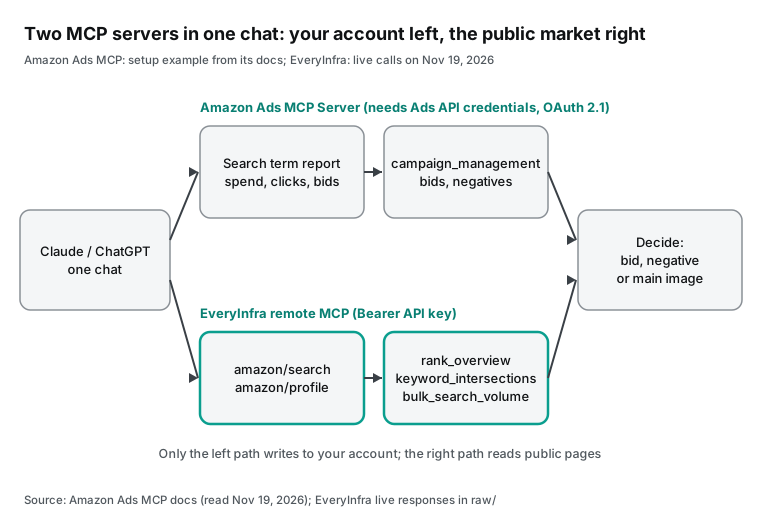
At setup time, turn off the delete tools on the Amazon side. Amazon's regular setup page shows how to turn off two of them with disabledTools: campaign_management-delete_campaign and campaign_management-delete_ad (regular setup page). Claude's help page also warns about permissions. A custom connector lets Claude access, and possibly change, data in that service as you (custom connectors help).
The EveryInfra MCP returns 12 tools in tools/list. This article only uses everyinfra_call_api. It reads public pages and does not change any of your Amazon settings. Its tool annotations are readOnlyHint: false and destructiveHint: true, because each call is charged; the description states the price range and that failed calls and empty results leave no final charge. everyinfra_list_capabilities and everyinfra_get_job carry readOnlyHint: true. If you sort tools by their annotations, you can let those two read-only tools run without a prompt and keep everyinfra_call_api in the tier that asks first.
Live test: a competitor check for one 40 oz bottle
Before the calls, we wrote three test rules. First, "our" product is the POWCAN 40 oz bottle B0CQCS5329. It appears on page one with 13,742 ratings and a mid-range price. This choice is only for the demo, and we have no tie to the brand. The big-brand comparison is Owala FreeSip B0B6DCN2CJ, which has the most ratings on that page.
Second, every result must be reproducible from the raw API responses. The recompute script ships with the article package, and when the data cannot answer a question, we say so. Third, the cost is the sum of charged_usd from each response, with a cap of $0.08 for this test. The five sections below follow the call order. All times are Singapore time on November 19, 2026.
Test 1: `amazon/search` returns 50 rows and 37 distinct products
At 00:16:02 Singapore time, we called amazon/search for "insulated water bottle 40 oz" with limit 50. It returned 50 rows in 11 seconds and charged $0.002236. The request ID is req_08580329b7424432. The request body is one line:
{"platform": "amazon", "action": "search", "params": {"keyword": "insulated water bottle 40 oz", "limit": 50}}Prices in the 50 rows went from $7.43 to $49.95, with a median of $23.745. 19 rows were under $20, and 5 rows were at $40 or more. When we grouped rows by rating_count, the 50 rows matched only 37 groups of variants that share one rating count (we call each group a rating pool). 7 pools had more than one row. Owala FreeSip had 3 colors in 3 rows, and each showed 146,254 ratings. A second Owala product on the same page, the FreeSip Sway, had 4 colors, each with 14,664 ratings. Stanley Quencher H2.0 had 3 colors, each with 207,914 ratings. A pool can also span sizes: the two rows with 1,870 ratings are a 40oz bottle and a 64oz bottle with one shared set of reviews.
Amazon often shows each color of one product as a separate result. So when you measure competition, remove duplicates by rating pool. A row count makes big brands with many variants look larger than they are. 17 of the rating pools had more than 10,000 ratings.
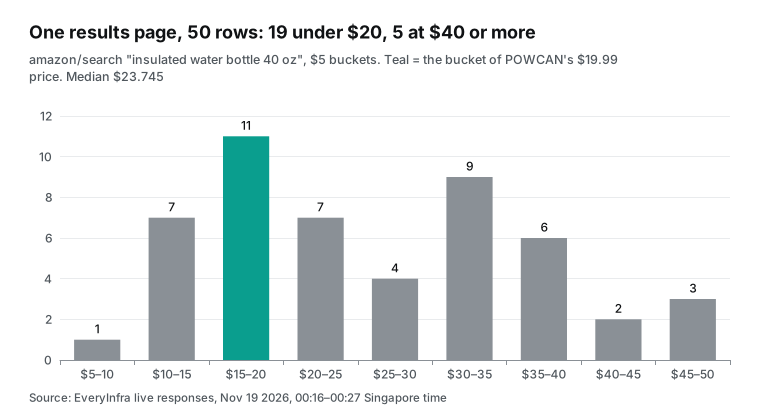
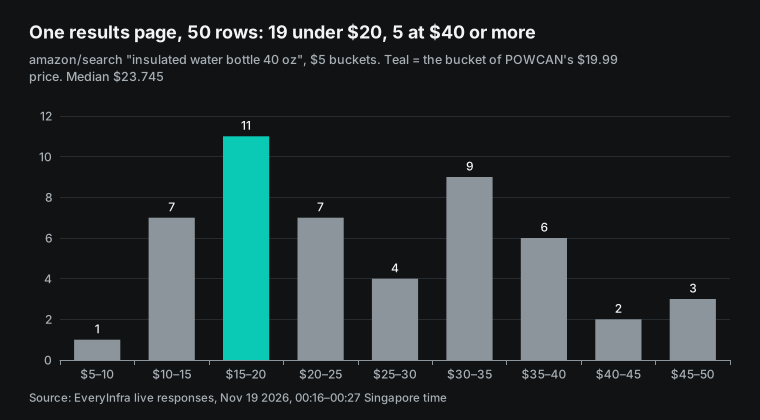
The price chart shows two clusters. The largest group, 11 rows, sits between $15 and $20, which is where POWCAN's $19.99 price falls. The second cluster runs from $30 to $40, with 15 rows in two buckets: 5 from Owala, 3 from Stanley and 3 from HydroJug. The big-brand bottle closest to POWCAN in price is the Stanley Quencher H2.0 at $22.50, in 3 colors. None of the 7 Owala rows (FreeSip and FreeSip Sway) is below $36.
This matters for the main image. A buyer who compares bottles near $20 sees a group of unbranded bottles and one Stanley, so your image must stand out in that group. Against an Owala at $36 or more, the image can do little, because the main gap is price.
This response had fewer fields than the catalog lists. The catalog notes say that some amazon.com requests are limited to 20 rows. In those cases, fields such as brand, in_stock, category, seller_name and bestseller_ranks are missing (EveryInfra catalog). Our call returned 50 rows, but none of them had brand or bestseller_ranks. Also, is_amazon_choice was false in every row.
We could only read brands from titles. 7 titles contained Owala, 6 contained Stanley, 4 contained POWCAN and 3 contained HydroJug. Of the 4 POWCAN rows, 3 colors from one rating pool sat at positions 6, 10 and 44, and a different push-button model, B0FD3BCV96, sat at position 40. Your own variants take several slots on one page, so merge them by rating pool when you count your own exposure. Test 5 shows that the same POWCAN product has is_amazon_choice set to true on its detail page. So in this test, the search field was not a reliable signal for the Amazon's Choice badge.
Test 2: `amazon/rank_overview` for the organic rank of 20 ASINs
At 00:18:03 Singapore time, we called amazon/rank_overview with the first 20 ASINs from Test 1, after we removed duplicate rating pools. It charged $0.011514, and the request ID is req_8a92ed9392aa4299. The first request, at 00:17:39, got a 429. The response said the key allows 10 requests per minute, that nothing was charged, and that retry_after was 35 seconds. The retry at 00:18:03 worked. On a 429, wait for retry_after and send the same request again.
In the 20 rows, organic_keywords was 48 to 50, and 15 ASINs had exactly 50. The catalog notes say that keyword counts and volumes may only cover each ASIN's top 50 keywords by volume. So this column hit its cap here. Do not use it to decide who ranks for "more terms".
Use the top-10 count and the volume sum instead. organic_top10_keywords went from 6 to 32, with a median of 13.5. Owala B0B6DCN2CJ had 32, Stanley B0CRMP3RQT had 31, and POWCAN B0CQCS5329 had only 6. organic_search_volume went from 3,984 to 1,120,525, a 281x gap. POWCAN had 40,261. The top-3 count shows the gap more clearly: Owala B0B6DCN2CJ and Stanley B0CRMP3RQT had 12 each, and POWCAN had 1. 7 of the 20 ASINs had no keyword at rank 1.
The ASIN with the most rank-1 terms was the unbranded bottle in position 1 of the search results, B0F2FJS99B, with 5. But the total volume of all its ranked terms was only 4,799. Owala B0B6DCN2CJ had only 4 rank-1 terms, with a total volume of 910,705. Many rank-1 terms can just mean a few long-tail terms that almost nobody searches, so read that column next to volume.
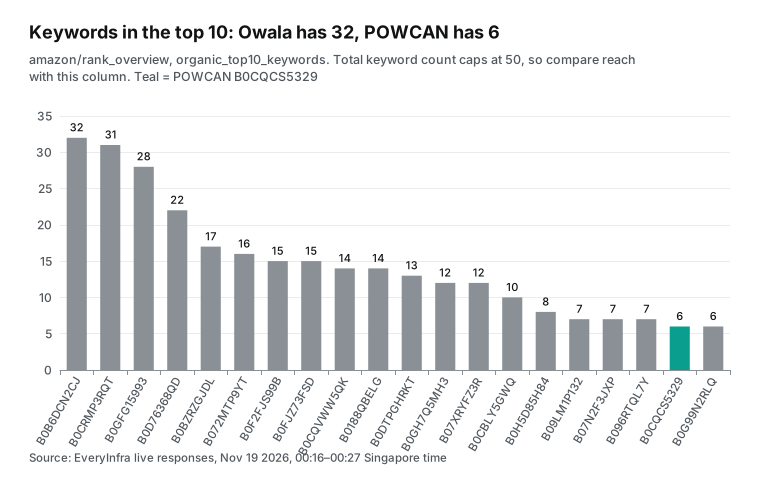
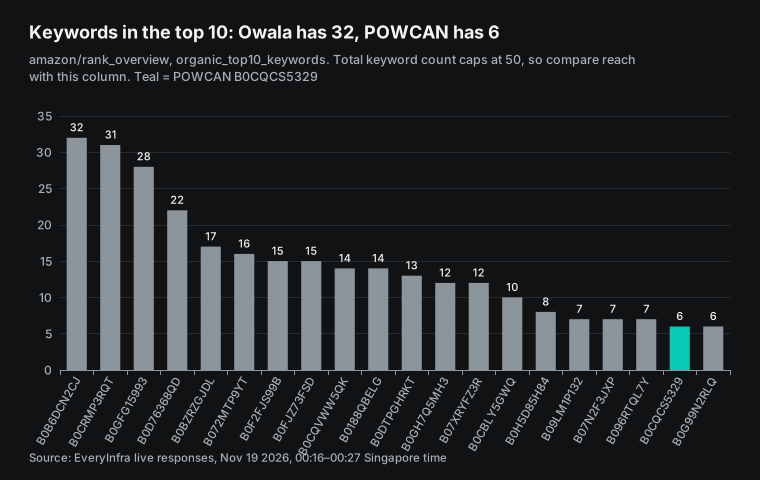
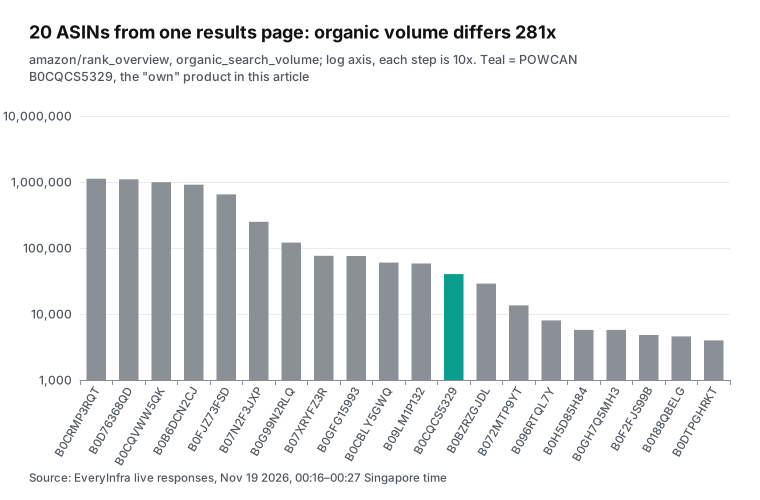
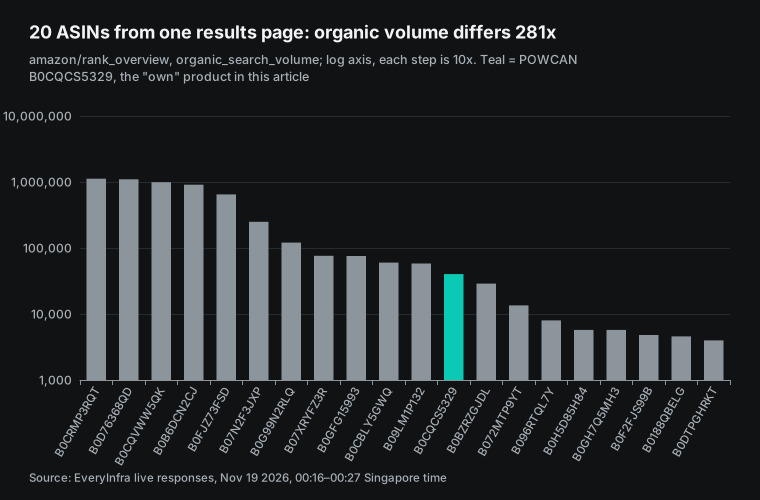
These numbers split the page into tiers, and the tiers matter for bids. The top 5 ASINs each have more than 600,000 in organic keyword volume. The last 8 each have less than 30,000. POWCAN sits in the middle.
A middle-tier product cannot catch up on big terms in organic results soon. Its ad budget works better on terms where its organic rank is already fair and rivals do not hold the top spots. Test 3 looks for those terms. None of the 20 rows had any sponsored_* fields, and the catalog notes say this group is usually missing.
So this call cannot show where rivals buy ad slots. The 11 fields that amazon/search returned in this test had no ad label either, so the 50 rows do not show which results were ads.
Test 3: `amazon/keyword_intersections` with 4 ASINs returns 2 rows, with 2 ASINs it returns 14
At 00:22:03 Singapore time, we called amazon/keyword_intersections with 4 ASINs: POWCAN, Owala, IRON °FLASK (B07N2F3JXP) and HydroJug (B0CQVWW5QK). It charged $0.011514 and returned only 2 rows: "hydroflask 40 oz water bottle" and "insulated water bottle 40 oz". The catalog notes say the tool only looks for shared terms inside each ASIN's top 200 keywords. So more products give a smaller overlap.
At 00:24:03, we called it again with only POWCAN and Owala. It charged the same $0.011514 and returned 14 rows. Per row, the 4-ASIN call cost $0.005757 and the 2-ASIN call cost $0.000822, a 7x gap. Pairwise comparisons cost less than one large group.
The 2 rows from the 4-ASIN call are still useful. POWCAN is last or second to last of the 4 products on both terms, and the leader of the 4 on the core term is IRON °FLASK, at rank 14.
| Keyword | Monthly volume | POWCAN | Owala | IRON °FLASK | HydroJug |
|---|---|---|---|---|---|
| insulated water bottle 40 oz | 149 | 29 | 21 | 14 | 38 |
| hydroflask 40 oz water bottle | 299 | 46 | 20 | 34 | 26 |
The same response also carried a price and rating count for each ASIN, but those are values from the time of the rank snapshot. Owala showed $33.95 with 144,500 ratings in one row and $39.87 with 133,900 in the other, while Test 1 read $39.99 and 146,254 that day. POWCAN also showed $19.99 in one row and $20.89 in the other. Take price and ratings from amazon/search or amazon/profile on the day, and use only the ranks from the overlap call.
The table shows the ranks for all 14 shared keywords. Every row has a ranked_at value of 2026-11-03 (UTC), 16 days before our call.
| Keyword | Monthly volume | POWCAN rank | Owala rank | Rank gap |
|---|---|---|---|---|
| owala water bottle 40 oz | 1,009 | 42 | 1 | +41 |
| owala 40 oz water bottle | 336 | 56 | 1 | +55 |
| hydroflask 40 oz water bottle | 299 | 46 | 20 | +26 |
| large insulated water bottle | 187 | 28 | 47 | −19 |
| gym bottle | 149 | 39 | 16 | +23 |
| insulated water bottle 40 oz | 149 | 29 | 21 | +8 |
| water bottle 40 oz | 149 | 26 | 1 | +25 |
| owala water bottle 40oz | 112 | 42 | 1 | +41 |
| stainless steel waterbottle | 112 | 49 | 10 | +39 |
| water bottle big | 112 | 46 | 9 | +37 |
| large stainless steel water bottle | 74 | 21 | 38 | −17 |
| life is good water bottle 32 oz | 74 | 68 | 48 | +20 |
| tal water bottle 40 oz | 74 | 27 | 33 | −6 |
| water gym | 74 | 37 | 60 | −23 |
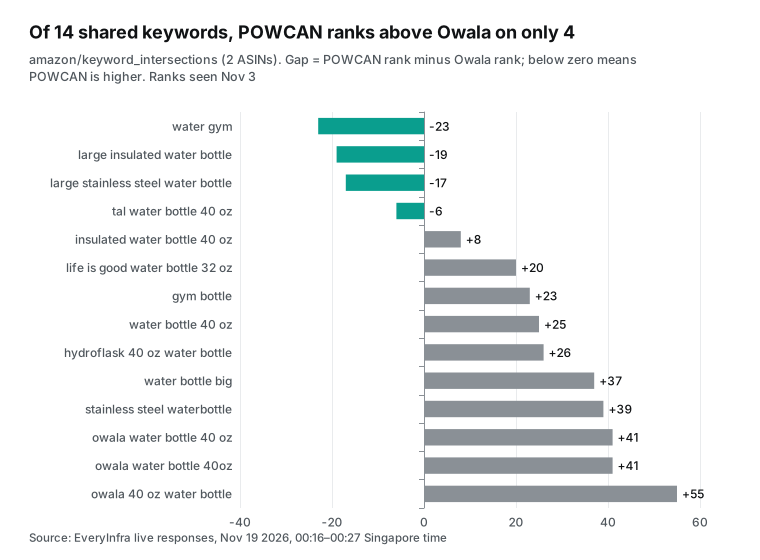
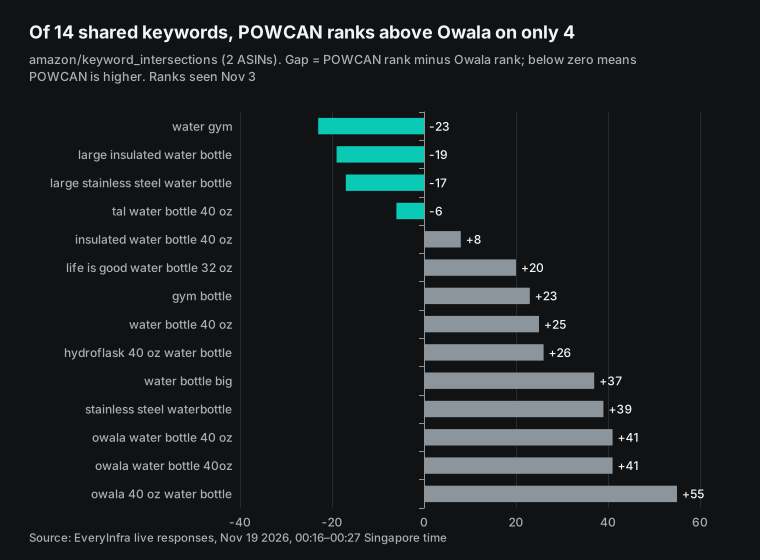
POWCAN was not in the top 10 for any of the 14 terms. Its best rank was 21 for "large stainless steel water bottle", and its worst was 68 for "life is good water bottle 32 oz". Owala was at rank 1 on 4 terms, and 3 of those contain its own brand name. POWCAN was ahead on "water gym", "large insulated water bottle", "large stainless steel water bottle" and "tal water bottle 40 oz". The first three are generic terms, and the fourth contains another brand, Tal.
Match the table to your own search term report. Suppose "large insulated water bottle" has clicks in your report and its ACOS (ad spend as a share of ad sales) is within target. Your organic rank is also 19 places better than Owala's. That term is a candidate for a higher bid.
Now suppose "owala water bottle 40 oz" spends a lot in your report with few orders. Your organic rank is 42, and the rival is at 1. Here your ad money goes toward taking the rival's brand searches. Lower that bid, or move the term into exact match with its own budget. The ranks are 16 days old, and the volumes are estimates. Use both to sort terms, not to predict orders.
Test 4: `amazon/bulk_search_volume` for 20 candidate terms
At 00:25:03 Singapore time, we called amazon/bulk_search_volume with 20 terms. 13 came from the shared keywords in Test 3. We left out "owala water bottle 40oz" because it differs from "owala water bottle 40 oz" by one space. We added 7 common terms in this category. They may not match the product's size or use: "stanley cup 40 oz", "insulated water bottle with straw", "64 oz water bottle", "kids water bottle", "glass water bottle", "water bottle with handle" and "owala freesip".
The call charged $0.011514 and returned all 20 terms, or $0.000576 per term. The request ID is req_aa9ed904128b498d. Per the catalog notes, search_volume is a monthly estimate for the US site. It is demand for the whole term, not traffic to one product.
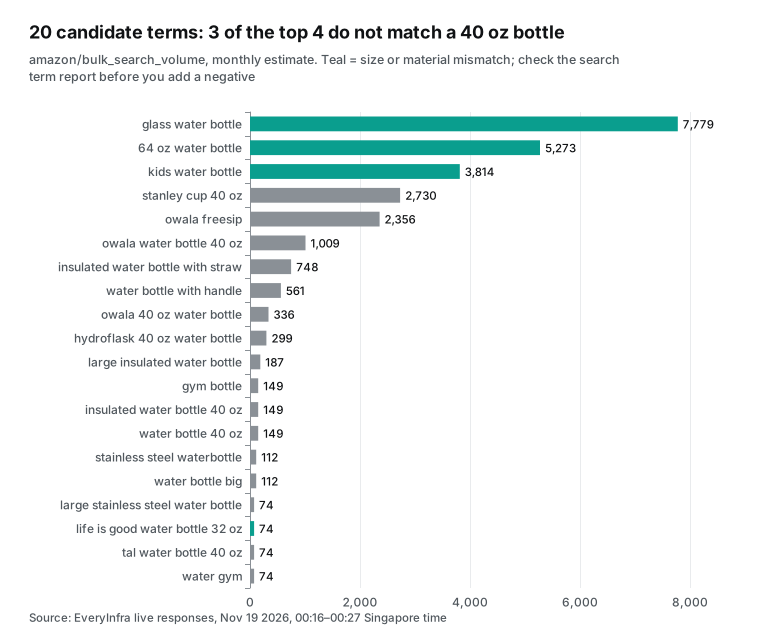
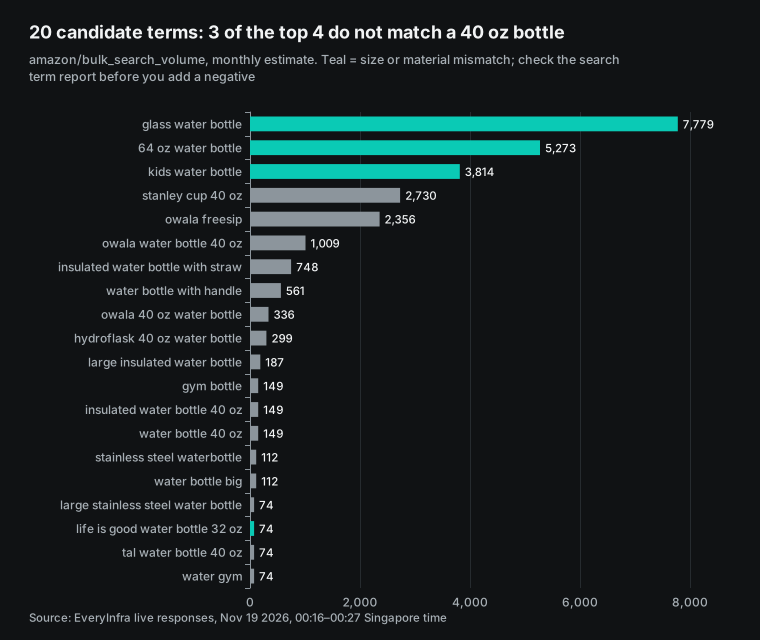
Three of the four highest-volume terms do not match a 40 oz stainless steel bottle. "glass water bottle" has 7,779 (different material), "64 oz water bottle" has 5,273 (different size) and "kids water bottle" has 3,814 (different user). The fourth, "stanley cup 40 oz" with 2,730, is a rival brand with the same size. Suppose these terms appear in your auto campaign's search term report with many clicks and few orders. Then they are the first negative keyword candidates, and high volume means they also spend money fast.
Rival brand terms also have far more volume than the core term. "stanley cup 40 oz" is 18 times the core term, and "owala freesip", at 2,356, is 16 times. Neither is among the 14 terms that POWCAN and Owala share, so this test has no POWCAN rank for them. Before you bid on terms like these, run one overlap call or one amazon/ranked_keywords call for that rival first.
The other side of the chart is just as useful. The closest term to this product, "insulated water bottle 40 oz", gets only 149 searches a month. "water bottle 40 oz" also gets 149. That is more than 50 times lower than "glass water bottle".
Two use-case terms sit in the middle. "insulated water bottle with straw" has 748 and "water bottle with handle" has 561, which is 5 times and 3.8 times the core term. The second POWCAN bullet is about its 2-in-1 straw and spout lid, so the straw term is one to check first for clicks and orders in your report. None of the 5 bullets mentions a handle, so if the handle term shows many clicks and few orders, the product itself does not fit.
If you split budget only by how well a term fits the product, the money goes to terms that few people search. The volume column tells you to check demand first. Then decide whether a term needs its own exact match ad group.
Take extra care with terms such as "64 oz" and "kids" before you make them negative. Some people who search for a bigger size may still buy a 40 oz bottle. Some parents may search "kids" and buy a large bottle for a child. So search volume alone is not a reason to add a negative keyword. The test is always the clicks and orders for that term in your search term report. The teal marks in the chart are our manual call based on size and material, and the chart note says so.
Test 5: `amazon/profile` through MCP, one real round trip
At 00:27:13 Singapore time, we sent tools/call in an MCP session. The tool was everyinfra_call_api, with amazon/profile and the POWCAN product URL as arguments. It returned in 10.8 seconds and charged $0.001389. The request ID is req_6938c4cee7e44009. The screenshot shows the request and part of the response. Teal boxes mark two areas: the Amazon's Choice field and the billing field.
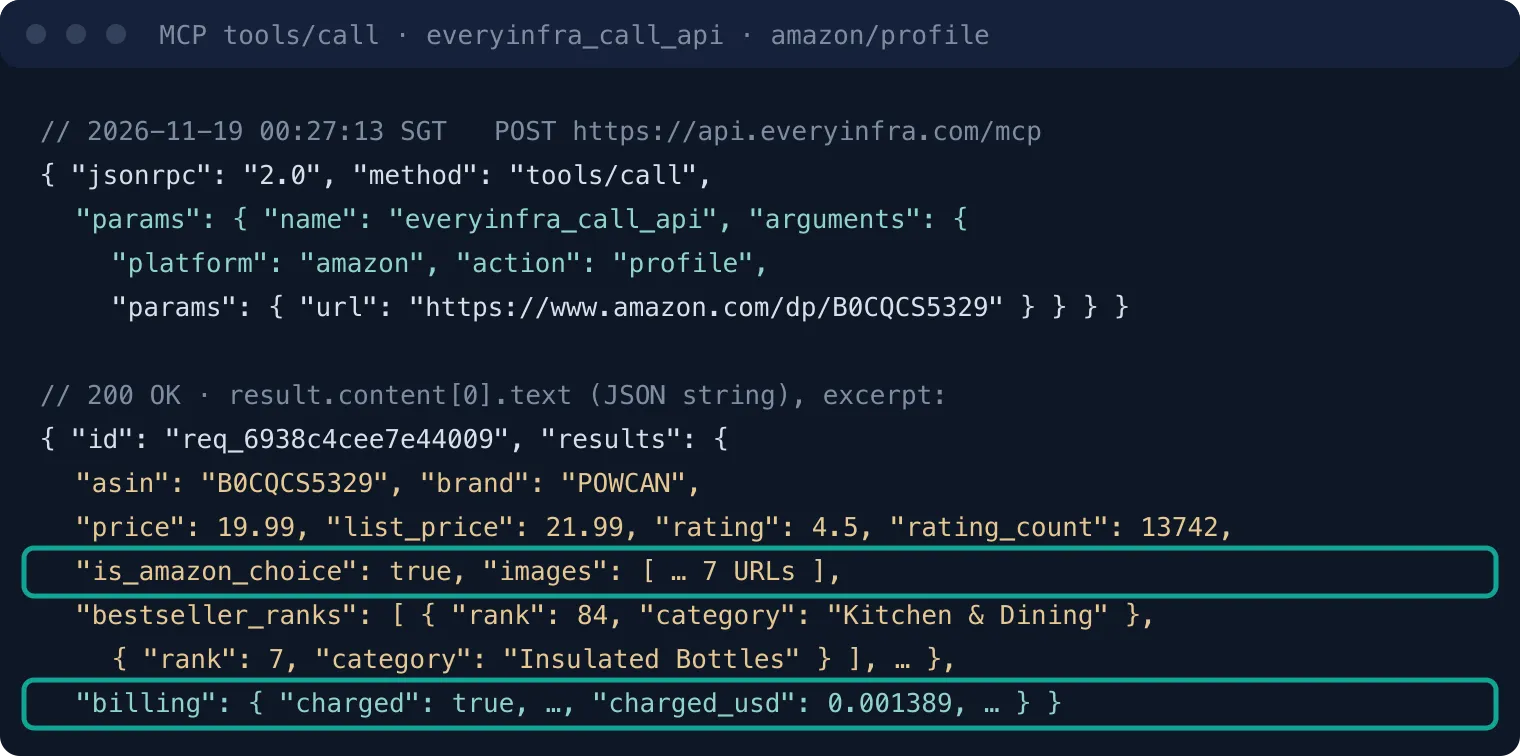
The detail page filled in the fields that search results lacked: brand, in_stock, seller_name and the full category path. It also has more of what you need for price and image decisions. The current price is $19.99 and the list price is $21.99, a 9.1% discount. There are 7 product images, 5 feature bullets and two category ranks: 84 in Kitchen & Dining and 7 in Insulated Bottles. is_amazon_choice is true. The category rank and the keyword ranks measure different things. POWCAN is 7th in Insulated Bottles, which reflects sales. In Test 3 its best rank across 14 shared terms was 21, which reflects position under a given term. The first alone overstates its place in the search box, and the second alone understates its sales. The fourth bullet says "40 oz does not fit in standard car cup holders".
That line matters for negative keywords. Suppose your search term report shows terms like "car cup holder water bottle". The product's own bullets already say it is a poor fit, so those clicks will rarely convert. The line also matters for the main image. On the same results page, 3 bottles put cup holder fit in their titles: Takeya Actives says "Fits Most Cup Holders", BrüMate Era Flip says "Cup Holder Friendly" and SENDESTAR says "Fit in Any Car Cup Holder". The HydroJug Traveler title in the Test 3 response also says "cup holder friendly". Buyers see these lines on the same screen, so this is a weak point for POWCAN. Whether to add a size comparison, or lead with another selling point, depends on whether you can win back ground on cold hours or the 2-in-1 lid.
Test 6: `amazon/reviews` returned 503 three times, with no charge
Reviews are another kind of evidence for a main image change. The catalog notes say amazon/reviews covers 11 sites. US reviews need a sign-in, so the catalog says that site is not available and those requests are free. The other 10 sites work as normal. When the same product also sells on another site, you can pass that site's domain instead.
That is what we did. We tried Owala B0B6DCN2CJ three times: amazon.ca at 00:26:04, amazon.co.uk (async) at 00:27:03, and amazon.co.uk again at 00:29:19 Singapore time. All three returned 503 unavailable. This is not the US limit. The response said "service temporarily unavailable", with fault set to service. It said the capability had failed 11 times in 10 minutes with no charge, and that if another target failed the same way, the problem was on EveryInfra's side. charged_usd was 0, the refund status was succeeded, and retry_after was 60 seconds. So this test has no review data because of a service outage at that time, not because the Canada or UK site is unavailable. You can retry review analysis later after retry_after.
Unit cost of the six successful calls: a 129x spread per row
| SGT time | Capability | Entry | Rows | charged_usd | Per 1,000 rows |
|---|---|---|---|---|---|
| 00:16:02 | amazon/search | REST | 50 | 0.002236 | $0.04 |
| 00:18:03 | amazon/rank_overview | REST | 20 | 0.011514 | $0.58 |
| 00:22:03 | amazon/keyword_intersections (4 ASINs) | REST | 2 | 0.011514 | $5.76 |
| 00:24:03 | amazon/keyword_intersections (2 ASINs) | REST | 14 | 0.011514 | $0.82 |
| 00:25:03 | amazon/bulk_search_volume | REST | 20 | 0.011514 | $0.58 |
| 00:27:13 | amazon/profile | MCP | 1 | 0.001389 | $1.39 |
| Total | 107 | 0.049681 |
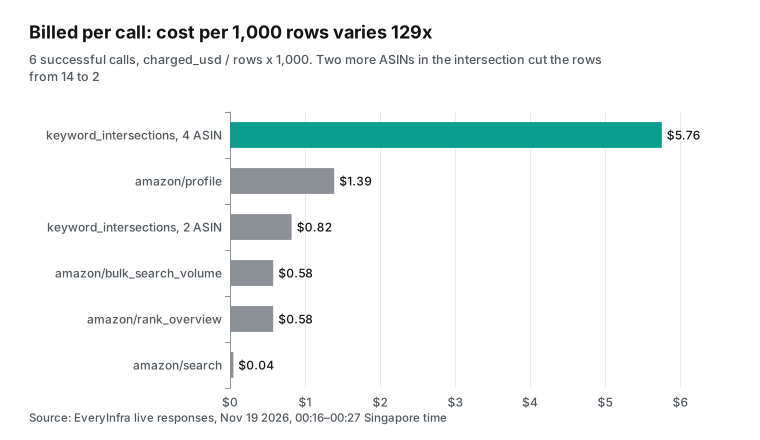
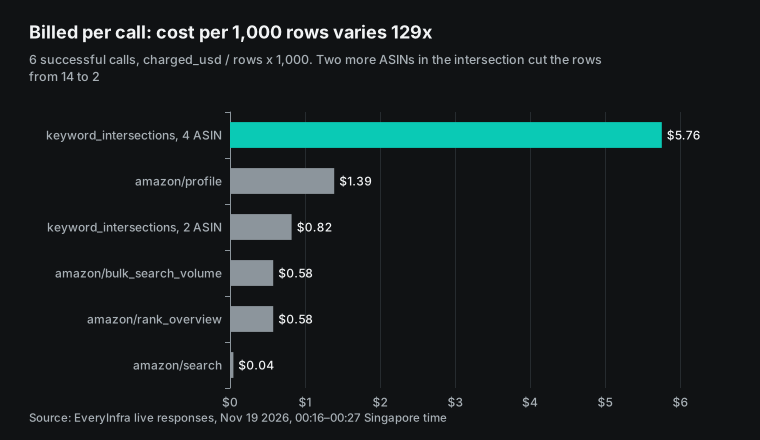
EveryInfra charges per call. The unit price is price_usd in the catalog, and the actual charge for each request is billing.charged_usd in the response. Failed calls and empty results are free, and any charge for them goes back under the same charge_id (pricing page). The per-row gap comes from how many rows each call returns.
For the same $0.011514, rank_overview gives 20 rows, and the 4-ASIN intersection gives 2. A model that puts every rival into one call gets a bill several times higher. It also gets less data than with pairwise calls.
Put both sides in one chat: bids, negatives and main images
After you connect both servers, you can write the weekly check as one fixed prompt. The model reads your report first, then reads rival data, and then applies rules. It gives suggestions and waits for a person to approve them. Below is a setup example. The Amazon tool names follow the naming pattern in the docs. Use the real names that search_tools returns.
Run every Monday at 09:00 Singapore time:
1. With the Amazon Ads MCP, pull the Sponsored Products search term report (spSearchTerm, SUMMARY) for the 7 days from 21 to 15 days ago. List terms with 10 or more clicks, with spend, orders and ACOS. Use only an orders column whose attribution window has closed.
2. With everyinfra_call_api, call amazon/bulk_search_volume for all terms from step 1 (20 terms per call).
3. Call amazon/keyword_intersections to compare our ASIN B0CQCS5329 with Owala B0B6DCN2CJ, then with Stanley B0CRMP3RQT, one pair at a time.
4. Call amazon/profile for both rivals to read price, list price, rating count and is_amazon_choice.
5. Apply these three rules. List suggestions only. Do not run them.
   - Bid-up candidate: ACOS below target, and our organic rank is ahead of the rival.
   - Negative candidate: 10 or more clicks, 0 orders, and the size, material or user in the term does not match the product.
   - Main image flag: a rival price is 10% or more below ours, or a rival has Amazon's Choice and we do not.
6. Output one table. After each suggestion, write the numbers and the tool that support it.
Replace the thresholds with your own. We did not set a target ACOS for any store, and "10 or more clicks" is only a placeholder. We tried the main image rule on this test's data. 11 of the 50 rows in Test 1 are 10% or more below POWCAN's $19.99, that is, under $17.99. None of them is Owala, Stanley or HydroJug; all are small brands priced from $7.43 to $16.99. Without a fixed list of rivals, this rule fires every week, which is why step 4 reads only the two named rivals. Put the rules in the prompt or in a Skill, so that the model uses the same rules every week. Public videos use the same approach.
Xnurta showed a demo on November 9, 2026. Its last step saves the report as a Skill that runs every Monday (Xnurta video, 2026-11-09). Atom11 posted a video on November 12, 2026. Its second half covers scheduled runs, delivery to Slack and email, and a Claude Skill (Atom11 video, 2026-11-12).
Keep a person between a suggestion and an action. On Reddit, the head of a small agency described their process. Search term harvesting and negatives moved from once a week on Friday to almost daily. Bid changes became smaller and more frequent. Changes above a set bid or budget limit still need human approval (r/FulfillmentByAmazon thread).
Another reply in that thread suggests a gate based on the largest spend that one error could cause in 24 hours. Actions that you can undo, such as negatives or pausing zero-conversion terms, can run on their own. Actions with uneven risk, such as bid or budget increases, always need a person, whatever their size. In a second thread, a user who installed the Amazon Ads MCP on a real account said it helped with reports and prototype code.
He would not let a model manage bids. A reply wanted to test one risk. Does the model mark a term as "no conversions" too early, while conversions still come in? (r/MCPAgents thread).
That risk is the same point as the reporting FAQ's note that conversions are restated on days 1, 7 and 28. Data from 3 days ago still changes on day 7 and day 28, so a 3-day delay does not avoid it. To judge a term as zero-conversion, use only data whose attribution window has closed. With 7-day attribution, look only at dates more than 7 days back; with 14-day attribution, more than 14 days back. Name the attribution column in the prompt. The day-28 restatement can still change numbers a little, so note that in the suggestion table. Step 1 of the prompt above uses the week from 21 to 15 days ago for this reason.
| Decision | What to check in your report | What to check in rival data (capabilities used in this test) | When not to decide from this |
|---|---|---|---|
| Bid up | ACOS and orders for the term | Organic rank gap (amazon/keyword_intersections), volume (amazon/bulk_search_volume) | Rank data is too old; monthly volume is very low |
| Negative keyword | Many clicks, few orders | Term volume; product bullets that rule out this need (amazon/profile) | Only because volume is high or the size differs |
| Bid on a rival brand term | Spend and ACOS | The rival's rank for that term (Owala is at 1 on 4 terms) | Your own rank is past 40 and you hope ads will win the term |
| Change main image | Click-through rate falls | Rival price, list price, ratings, Amazon's Choice (amazon/search, amazon/profile) | is_amazon_choice from search results was unreliable in this test |
| Measure competition | Nothing | Product count after removing duplicate rating pools (amazon/search) | A row count double-counts big brands with many variants |
What bid and negative changes look like on the Amazon side
After the model makes a suggestion, a few Amazon Ads API request types do the actual account change. Their docs show where a person needs to watch. Start with bids. The theme-based bid suggestion endpoint /sp/targets/bid/recommendations returns low, median and high bids for each keyword. The values come from a group of recent winning bids for similar products and get regular updates (theme-based bid suggestions quick start).
To get impact metrics for keywords, each ad group must send at least 5 keywords. The impact metrics are past weekly clicks and orders for similar products. The docs say clearly that they are not estimates of your own results, and that they assume your budget does not run out. In a weekly check, the two sources answer different questions.
Amazon's suggested bid shows what similar products pay to win a slot. Rival data shows the organic rank gap between you and a rival for this term. With both numbers in view, the model does not keep raising a bid only because Amazon's suggestion is higher.
Bid strategy can also make a change larger. Amazon's bulksheets docs list three bid strategies (Sponsored Products bulksheets docs). The table below copies the dynamic increase and decrease columns from that doc. The doc gives one 100% figure and does not split it by placement. The same page says placement adjustments (top of search, product pages, rest of search) can go up to 900%, and its example adds 35% for top of search. We checked only this doc, not what the ad console help says about each placement, so we do not give a dollar figure. Tell the model to read each campaign's bid strategy and placement adjustments first, then work out the highest possible bid from both and list it in the suggestion table next to the bid you set.
| Bid strategy | What Amazon does with your bid | Dynamic increase | Dynamic decrease |
|---|---|---|---|
| Fixed bid | Uses your exact bid and any placement changes you set | 0 | 0 |
| Dynamic bids - down only | Lowers the bid when a sale is less likely | 0 | up to 100% |
| Dynamic bids - up and down | Moves the bid up or down in real time | up to 100% | up to 100% |
For negatives, Amazon's negative keyword docs say you can add them at the campaign level or the ad group level. A campaign-level negative applies to all ad groups under it. The new API creates them with /adsApi/v1/create/targets, with negative set to true and the match type inside keywordTarget. A good response returns 207 with both a success array and an error array (negative keyword docs).
With a 207, if for example 2 of 10 negatives fail, the HTTP status still looks like a success. A model that only reads the status code will report "all added". The bulksheets docs list only two negative match types, negativeExact and negativePhrase, and no broad negative.
A phrase negative on "glass water bottle" also blocks "glass water bottle with straw". An exact negative blocks only that one term. Your choice depends on whether this kind of search has ever converted in your report.
The MCP protocol also has rules for write actions like these. The tools chapter of the spec says that clients should ask the user to confirm sensitive operations. They should show tool inputs to the user before they call the server, and log tool calls for audits. When a tool fails, the result carries isError: true, apart from protocol-level errors (MCP tools spec).
In this test, the EveryInfra MCP handshake returned protocolVersion 2025-06-18. The amazon/profile result was one text item holding JSON, with no isError, so the charge has to be read from billing.charged_usd inside that JSON. Claude and ChatGPT both show the tool name and arguments before a call. For negatives and bid changes, read the arguments before you approve. That takes less time than a search through the ad console for the wrong change later.
API cost of a weekly check of 50 competitor ASINs
What does a weekly check of 50 competitor ASINs cost in API fees? From the unit prices and row counts in this test, we built a full plan and a lean plan. The full plan runs these calls each week. amazon/search runs once for each of 5 core terms, to find new products on page one.
amazon/profile runs once for each of 50 rivals, for price, list price, ratings, images and Amazon's Choice. amazon/rank_overview takes 20 ASINs per call, so it runs 3 times. amazon/keyword_intersections compares your ASIN with each of the 10 rivals with the most ratings, so it runs 10 times. amazon/bulk_search_volume checks 100 terms from your search term report, 20 per call, so it runs 5 times.
| Capability | Calls per week | Unit price (price_usd) | Per week |
|---|---|---|---|
amazon/search | 5 | 0.002236 | $0.0112 |
amazon/profile | 50 | 0.001389 | $0.0695 |
amazon/rank_overview | 3 | 0.011514 | $0.0345 |
amazon/keyword_intersections | 10 | 0.011514 | $0.1151 |
amazon/bulk_search_volume | 5 | 0.011514 | $0.0576 |
| Total | 73 | $0.2879 |
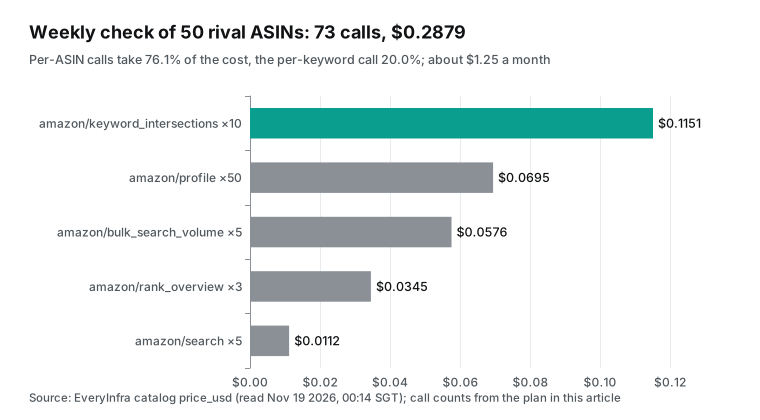
The full plan costs $0.2879 a week. Over 52 weeks, that is about $1.2475 a month and $14.97 a year. Split by input type, the three per-ASIN call types (amazon/profile, amazon/rank_overview and amazon/keyword_intersections) cost $0.2191 together, or 76.1%. The only per-keyword call, amazon/bulk_search_volume, costs $0.0576, or 20.0%. amazon/search scans core terms for $0.0112, or 3.9%.
So one more rival costs more than one more keyword. Each extra rival adds one detail page ($0.001389) and 1/20 of an overview call ($0.000576), or $0.001965. If it also gets a pairwise comparison with your ASIN, add $0.011514. Each extra term from your report adds only 1/20 of a volume call, or $0.000576. The weekly cost is: 0.002236 × core terms + 0.001389 × rivals + 0.011514 × ⌈rivals ÷ 20⌉ + 0.011514 × pairwise comparisons + 0.011514 × ⌈report terms ÷ 20⌉.
| Case | Core terms | Rivals | Pairwise | Report terms | Per week | vs full plan |
|---|---|---|---|---|---|---|
| Full plan in this article | 5 | 50 | 10 | 100 | $0.2879 | — |
| Twice the rivals, same pairs | 5 | 100 | 10 | 100 | $0.3804 | +32.1% |
| Twice the rivals, twice the pairs | 5 | 100 | 20 | 100 | $0.4955 | +72.1% |
| Twice the report terms | 5 | 50 | 10 | 200 | $0.3455 | +20.0% |
| No pairwise comparisons | 5 | 50 | 0 | 100 | $0.1727 | −40.0% |
Every row comes from the formula and the catalog prices above, with no extra live calls.
The lean plan keeps only 5 searches, 3 amazon/rank_overview calls and 5 amazon/bulk_search_volume calls. That is 13 calls and $0.1033 a week, or about $0.4476 a month. It suits a store that only wants to know who moved up and which terms changed in volume.
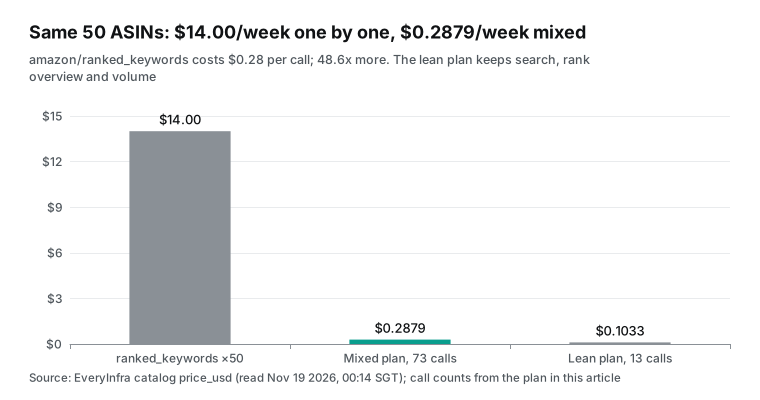
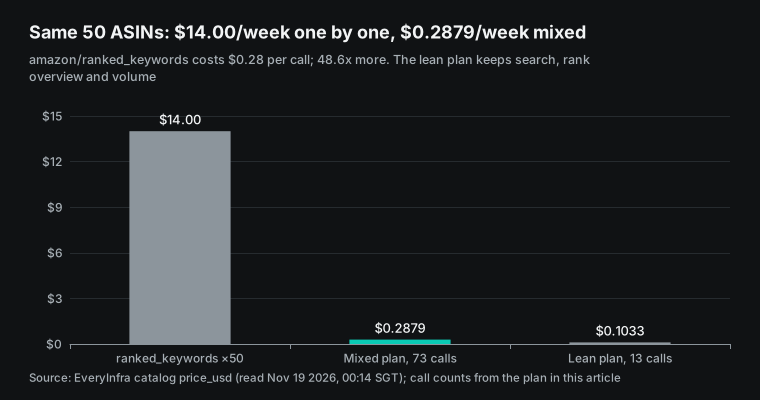
The catalog also has amazon/ranked_keywords at $0.28 per call. One call returns all the terms that one ASIN ranks for, up to 100 rows. One call per rival per week for 50 rivals costs $14.00, which is 48.6 times the combined plan. It works best for a first deep look.
Call it once for each of two or three main rivals to see their full keyword lists. Then use the lower-cost overlap and overview calls each week to follow changes. At the 10 calls per minute that we hit in this test, 73 calls take about 8 minutes. The console shows the limit for your own key. For slow calls, add "mode":"async" to the request body to get a job_id first, then read the result with everyinfra_get_job. Per the tool description, that read is free and does not count against the per-minute limit.
The order of the calls can also save money. The reporting FAQ suggests only 1 to 2 requests per report type per day, and a report can take up to three hours. So split the Monday flow into two parts. In the morning, request last week's search term report. When the report is ready, call the rival data. Then the model has two data sets from the same period.
The age of the rank snapshot also needs care. All 14 overlap rows in this test have a ranked_at value of November 3. If you call again next week, you may get the same snapshot. In that case, an unchanged rank does not mean that the competition did not change.
It only means that the data has no update yet. Add one rule to the prompt. When ranked_at is the same for two weeks, skip the rank comparison and compare only fields read live, such as price, ratings and Amazon's Choice. Then you can also run amazon/keyword_intersections every two weeks, which brings the full plan from $0.2879 to about $0.23 a week.
Limits and points to watch
Our own side has limits, and the table lists all seven that this test found. The most important one is the age of the data: ranks and volumes are snapshots. You can use them to sort terms, but not to predict how many orders a term brings.
| Limit | What we saw in this test | What to do |
|---|---|---|
| Rank snapshots | Every overlap row has ranked_at 2026-11-03, 16 days before the call | Use ranks to sort terms only |
| Volume estimates | search_volume is a monthly US estimate | Do not convert it into orders |
| Keyword count cap | 15 of 20 ASINs had exactly 50 in amazon/rank_overview | Compare reach with organic_top10_keywords |
| No ad slot ranks | sponsored_* fields were missing in all 20 rows, and all 28 overlap ranks are organic | Find rival ad terms another way |
| Search fields | amazon.com search rows had no brand or category rank, and is_amazon_choice did not match | Use amazon/profile for the badge |
| Reviews | amazon/reviews does not cover the US site; our CA and UK calls hit a temporary service outage and returned 503 with no charge | Retry after retry_after |
| Scope | One category and one core term; amazon/product_competitors is available=false | Recalculate cost with your own terms |
The Amazon side has points to watch too. The release notes dated November 10, 2026 say that queries with a global account ID for campaigns, ad groups, ads and targets need care. If marketplaceScopeFilter is not set to GLOBAL, only queries by ID are supported. From November 18, other requests return 400 (Amazon Ads release notes). If your weekly prompt asks the model to "list all campaigns" and your account uses a global account ID, that step may now fail.
For rate limits, the Amazon Ads API changes its limits with system load. A 429 response carries Retry-After, and Amazon recommends exponential backoff (rate limiting docs). Both sides have rate limits. Add one line to the prompt. On a 429, the model waits for the time in the response, then retries with the same arguments. That line saves many duplicate calls.
You do not need EveryInfra in every case. Maybe you only manage bids and budgets in your own account and do not look at rivals. Then the Amazon Ads MCP Server and your ad reports are enough. If you are a seller with SP-API access, you can get competing offers from the Product Pricing API. If your ad software already includes keyword rank data, you can use only its MCP.
Several ad software products offer an MCP of this kind. Ad Badger's page says it is read-only by default. After you allow changes, it can adjust bids and add negatives, and it asks before each change (Ad Badger MCP page). DataDoe says it puts ad data next to Seller Central data and product costs, with write actions off by default (DataDoe MCP page).
The open source Openbridge server is on Docker Hub and covers most Amazon Ads API endpoints (Openbridge image page). All of these read and write your own account. Competitor data is a different kind of input, and the two can work side by side.
Industry updates
Five recent changes affect a weekly check like this one. The table lists each one with its date, its source, and what it means for you. Two of them come from the Amazon Ads release notes, which are worth a read once a month (Amazon Ads release notes).
| Date | Change | What it means for you |
|---|---|---|
| November 16, 2026 | Review Requests beta in the US asks verified buyers for reviews. You pay only for a rating or review, and only products with fewer than 1,000 reviews qualify (Review Requests get started) | Grow the review count before you change the main image; a rival's rating_count shows the gap |
| November 2, 2026 | AI migration Skills scan code and suggest changes for Amazon Ads API v1 (AI migration Skills docs) | An assistant can update old calls in your own check script |
| October 30, 2026 | Three audience discovery tools: get_audience, list_audiences, list_audience_categories (audience discovery docs) | Audiences in your own account only, not rivals |
| September 29, 2026 | unBoxed 2026: Amazon Ads Agent, Full-Funnel Campaigns, DVA+, MCP Server Lite and the AMC expert tool (unBoxed 2026 news roundup) | Your own check data is a way to verify Amazon's automation |
| December 8, 2026 (announced) | Support for MCP protocol 2026-07-28, which drops sessions and the initialize handshake (MCP 2026-07-28 changes) | Current setups need no change; custom clients should retest tools/list and tools/call |
Futurum's analysis on October 27 adds a caution about the unBoxed numbers. It notes that the results came from hand-picked test clients. Full-Funnel results were compared with blended averages, not with a control group (Futurum analysis). Read launch numbers as claims to test with your own data, not as a forecast for your account.
FAQ
Does the amazon ads mcp cost money?
Amazon's MCP docs list no separate fee, but you need approval for the Amazon Ads API first (Amazon Ads API onboarding). Ads still cost money per click as usual. Pacvue says the AMC SQL Generator will have cost-based pricing after its general release in 2027 (Pacvue unBoxed analysis); we could not confirm that point on an Amazon page. The AI assistant charges for its own plan, and Claude Pro is $17 a month billed yearly (Claude pricing page, read 2026-11-19). EveryInfra charges per call for rival data, and the weekly check of 50 ASINs in this article costs about $0.29.
How do I connect the amazon ads mcp to Claude?
Amazon's OAuth 2.1 page gives the steps. In Claude Desktop, add a custom connector in "Customize > Connectors" with the URL https://advertising-ai.amazon.com/mcp. Enter the LwA client ID and secret in the advanced settings. Add https://claude.ai/api/mcp/auth_callback to the return URLs in the security profile. In Claude Code, use claude mcp add --transport http with --client-id and --callback-port (OAuth 2.1 setup page).
Which amazon ads mcp tools are there?
Amazon's workshop page lists the tool groups account_management, reporting, campaign_management and locale_expansion, with names in the form <tool_group>-<tool_name> (workshop module 7). On October 30, Amazon added the audience_discovery group. With Lite, amazon_ads_mcp-search_tools also returns the other tools in the same group.
Who can use the amazon ads mcp beta?
The announcement says Amazon Ads partners with active API credentials, in a global open beta (Amazon Ads open beta announcement). The AMC SQL Generator needs a separate closed beta application and an active AMC instance (AMC SQL Generator documentation).
Can the Amazon Ads MCP check rival prices and ranks?
Every tool in Amazon's docs works on accounts that you have access to. None covers rival prices, organic ranks or keyword volume. You need another tool for those. This article uses the EveryInfra capabilities amazon/keyword_intersections, amazon/rank_overview, amazon/bulk_search_volume and amazon/profile (Amazon Ads MCP overview).
Get started
- Create an API key in the EveryInfra docs quickstart. Then read the free catalog at
GET /api/v1/social/catalogfor Amazon parameters andprice_usd. - Open the Amazon platform page. Run your own core term once in the
amazon/searchplayground to see which rivals are on page one. - Follow the MCP setup guide to add
https://api.everyinfra.com/mcpto Claude or ChatGPT. Ask "list the available Amazon capabilities and prices" to test the connection. - Apply for Amazon Ads API access, or reuse your access. Add the Amazon Ads MCP Server from Amazon's OAuth 2.1 page, start with Lite, and turn off the delete tools.
- Put your own ASINs and thresholds into the weekly prompt above. Let it make suggestions only for two weeks. Then decide which actions can run on their own.
For more Amazon data examples, read why Amazon price tracking gives false alerts and proxy traffic for 40 Amazon product pages. For Meta and Google ad libraries, read the Claude ads connector: check rival ads before you launch. That article looks at what ad creative rivals run. This one looks at rival ranks and prices in Amazon search results, so you can use them one after the other. The same method also works for Walmart, where you can read search result prices and ratings in a chat too.
References
- Amazon Ads MCP overview, Amazon Ads, read 2026-11-19, <https://advertising.amazon.com/API/docs/en-us/mcp/mcp-overview>
- Introducing the Amazon Ads MCP Server, Amazon Ads, 2026-02-02, <https://advertising.amazon.com/library/news/amazon-ads-mcp-server-open-beta>
- unBoxed 2026 news: Explore the latest advertising announcements, Amazon Ads, 2026-09-29, <https://advertising.amazon.com/library/news/unboxed-2026-news-announcements>
- Amazon Ads advanced tools release notes, Amazon Ads, read 2026-11-19, <https://advertising.amazon.com/API/docs/en-us/release-notes/index>
- Connecting to the Amazon Ads MCP Server, Amazon Ads, read 2026-11-19, <https://advertising.amazon.com/API/docs/en-us/mcp/get-started>
- Connecting to the Amazon Ads MCP Server (Lite), Amazon Ads, read 2026-11-19, <https://advertising.amazon.com/API/docs/en-us/mcp/get-started-lite>
- Connecting to the Ads MCP Server using OAuth 2.1, Amazon Ads, read 2026-11-19, <https://advertising.amazon.com/API/docs/en-us/mcp/oauth>
- AMC SQL Generator, Amazon Ads, read 2026-11-19, <https://advertising.amazon.com/API/docs/en-us/mcp/amc-sql-generator>
- audience_discovery (v1), Amazon Ads, 2026-10-30, <https://advertising.amazon.com/API/docs/en-us/mcp/audience-discovery>
- AI Migration Skills, Amazon Ads, 2026-11-02, <https://advertising.amazon.com/API/docs/en-us/mcp/ai-migration-skills>
- Module 7: Connect to Amazon Ads MCP Server, Amazon Ads, read 2026-11-19, <https://advertising.amazon.com/API/docs/en-us/knowledge-hub/hands-on-workshops/amazon-ads-mcp-server/07-connect-ads-mcp-server>
- Connecting Amazon Quick to the Amazon Ads MCP Server (Lite), Amazon Ads, read 2026-11-19, <https://advertising.amazon.com/API/docs/en-us/mcp/connect-quick>
- Search term reports, Amazon Ads API, read 2026-11-19, <https://advertising.amazon.com/API/docs/en-us/guides/reporting/v3/report-types/search-term>
- Sponsored ads reporting FAQ (version 3), Amazon Ads API, read 2026-11-19, <https://advertising.amazon.com/API/docs/en-us/guides/reporting/v3/faq>
- Search term report for Sponsored Products, Amazon Ads help center, 2026-05-18, <https://advertising.amazon.com/help/G3HEFZYWZF84NPS9>
- Rate limiting, Amazon Ads API, read 2026-11-19, <https://advertising.amazon.com/API/docs/en-us/reference/concepts/rate-limiting>
- Get started with Review Requests, Amazon Ads API, 2026-11-16, <https://advertising.amazon.com/API/docs/en-us/guides/review-requests/get-started>
- Amazon Ads API Onboarding Overview, Amazon Ads, read 2026-11-19, <https://advertising.amazon.com/API/docs/en-us/guides/onboarding/overview>
- Authorization Code Grant, Login with Amazon, read 2026-11-19, <https://developer.amazon.com/docs/login-with-amazon/authorization-code-grant.html>
- Now Available: Local MCP for SP-API, Amazon Selling Partner Developer Services (GitHub), 2026-05, <https://github.com/amzn/selling-partner-api-samples/discussions/382>
- Product Pricing API, Amazon SP-API docs, read 2026-11-19, <https://developer-docs.amazon.com/sp-api/docs/product-pricing-api>
- Amazon Ads Unveils New AI Tools, MediaPost, 2026-09-29, <https://www.mediapost.com/publications/article/418355/amazon-ads-unveils-new-ai-tools.html>
- Amazon Ads MCP Server Moves To Open Beta, MediaPost, 2026-02-02, <https://www.mediapost.com/publications/article/412481/amazon-ads-mcp-server-moves-to-open-beta.html>
- Amazon unBoxed 2026: What Amazon's Push Into Agentic Commerce Means for Advertisers, Pacvue, 2026-09-29, <https://pacvue.com/blog/amazon-unboxed-2026-what-amazons-push-into-agentic-commerce-means-for-advertisers/>
- Amazon Ads unBoxed 2026: Amazon Positions Its Ad Business Around Agents, Futurum Group, 2026-10-27, <https://futurumgroup.com/insights/amazon-ads-unboxed-2026-amazon-positions-its-ad-business-around-agents/>
- Amazon's $78bn ad machine now sets the defaults agencies buy inside, PPC Land, 2026-11-14, <https://ppc.land/amazons-78bn-ad-machine-now-sets-the-defaults-agencies-buy-inside/>
- Amazon unBoxed 2026 Recap, Atom11, 2026-10, <https://www.atom11.co/blog/amazon-unboxed-2026-recap>
- AI agents cut Amazon ad analysis from weeks to hours, Ad Age, 2026-11-12, <https://adage.com/technology/ai/aa-hills-pet-nutrition-agentic-retail-media-network/>
- Amazon Ads MCP: Connect Claude and ChatGPT, Ad Badger, read 2026-11-19, <https://www.adbadger.com/amazon-ads-mcp/>
- Amazon Ads MCP Server for Claude and ChatGPT, DataDoe, 2026-10-20, <https://www.datadoe.com/amazon-ads-mcp>
- openbridge/amazon-ads-mcp, Docker Hub, read 2026-11-19, <https://hub.docker.com/r/openbridge/amazon-ads-mcp>
- I set up Amazon's new Amazon Ads MCP so you don't have to, Reddit r/MCPAgents, 2026, <https://www.reddit.com/r/MCPAgents/comments/1qvvv1a/i_set_up_amazons_new_amazon_ads_mcp_so_you_dont/>
- Anyone else's agency or in-house team moving to MCP-based PPC automation?, Reddit r/FulfillmentByAmazon, 2026, <https://www.reddit.com/r/FulfillmentByAmazon/comments/1ti5a9c/anyone_elses_agency_or_inhouse_team_moving_to/>
- Amazon Ads MCP Explained: 5 Checks Before You Trust AI With Your Ad Account, Atom11 (YouTube), 2026-11-12, <https://www.youtube.com/watch?v=r2SagQtdDog>
- How Agencies, Brand Managers & Leaders Use AI With Amazon Ads, Xnurta (YouTube), 2026-11-09, <https://www.youtube.com/watch?v=OICobC13tPI>
- Amazon Ads MCP + SP-API MCP: Full Claude Setup in 8 Minutes, Databaaba (YouTube), 2026-08-25, <https://www.youtube.com/watch?v=0dGZ1G6-0vc>
- Get started with custom connectors using remote MCP, Anthropic help center, read 2026-11-19, <https://support.claude.com/en/articles/11175166-get-started-with-custom-connectors-using-remote-mcp>
- Plans and pricing, Anthropic, read 2026-11-19, <https://claude.com/pricing>
- How do usage and length limits work?, Anthropic help center, read 2026-11-19, <https://support.claude.com/en/articles/11647753-how-do-usage-and-length-limits-work>
- IP addresses, Claude Platform docs, read 2026-11-19, <https://platform.claude.com/docs/en/api/ip-addresses>
- Connect Claude Code to tools via MCP, Claude Code docs, read 2026-11-19, <https://code.claude.com/docs/en/mcp>
- Connecting custom MCP servers in ChatGPT, OpenAI help center, read 2026-11-19, <https://help.openai.com/en/articles/12584461-developer-mode-apps-and-full-mcp-connectors-in-chatgpt-beta>
- Architecture overview, Model Context Protocol, read 2026-11-19, <https://modelcontextprotocol.io/docs/learn/architecture>
- Key Changes (2026-07-28), Model Context Protocol, read 2026-11-19, <https://modelcontextprotocol.io/specification/2026-07-28/changelog>
- Understanding Authorization in MCP, Model Context Protocol, read 2026-11-19, <https://modelcontextprotocol.io/docs/tutorials/security/authorization>
- RFC 9728: OAuth 2.0 Protected Resource Metadata, IETF, 2025-04, <https://datatracker.ietf.org/doc/html/rfc9728>
- EveryInfra data catalog (free), EveryInfra, read 2026-11-19 00:14, <https://api.everyinfra.com/api/v1/social/catalog>
- EveryInfra remote MCP, EveryInfra, called 2026-11-19 00:27, <https://api.everyinfra.com/mcp>
- Theme-based bid suggestions - Quick-start guide, Amazon Ads API, read 2026-11-19, <https://advertising.amazon.com/API/docs/en-us/guides/sponsored-products/bid-suggestions/theme-based-bid-suggestions-quickstart-guide>
- How to create Sponsored Products campaigns with bulksheets, Amazon Ads API, read 2026-11-19, <https://advertising.amazon.com/API/docs/en-us/no-code-tools/bulksheets/sp/sp-examples/create-sp-campaign>
- Negative keyword targeting, Amazon Ads API, read 2026-11-19, <https://advertising.amazon.com/API/docs/en-us/guides/sponsored-products/negative-targeting/keywords>
- Product Pricing API (v2022-05-01) use case guide, Amazon SP-API docs, updated 2026-07-29, <https://developer-docs.amazon.com/sp-api/docs/product-pricing-api-v2022-05-01-use-case-guide>
- @amazon-sp-api-release/sp-api-dev-mcp, npm, read 2026-11-19, <https://www.npmjs.com/package/@amazon-sp-api-release/sp-api-dev-mcp>
- Tools, Model Context Protocol specification (2025-06-18), read 2026-11-19, <https://modelcontextprotocol.io/specification/2025-06-18/server/tools>
Reference BL-188