AdMob MCP and Ask AdMob: read the store reviews before you change ad settings
58.3% of 1–2 star US App Store reviews for Block Blast! complain about in-app ads. Line up both stores with AdMob by version for $0.015 a week.
On November 25, 2026, between 00:14 and 00:27 Singapore time, we pulled 1,230 recent store reviews of the puzzle game Block Blast! through the EveryInfra data API. In the US App Store sample, 35 of the 60 reviews with one or two stars complain about in-app ads. That is 58.3%.
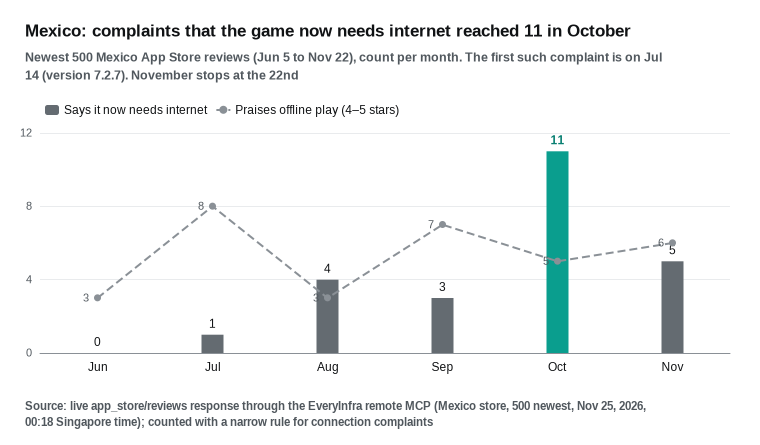
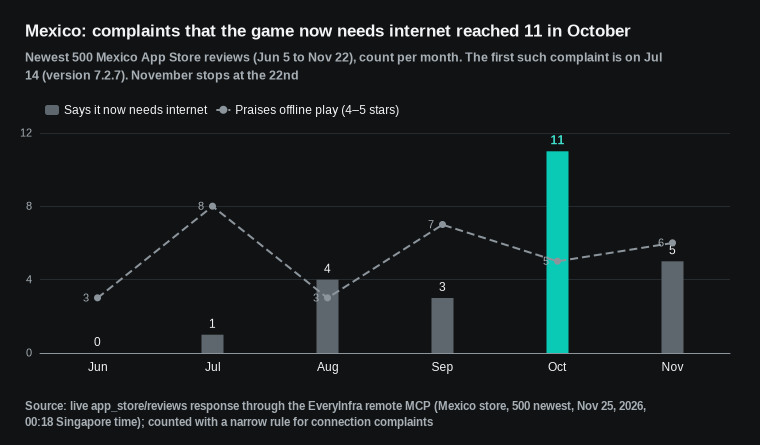
The Mexico App Store sample reaches back 171 days, from June 5 to November 22 (Pacific time). In it, complaints that the game "now needs internet" first appear on July 14 (version 7.2.7). In October alone there are 11.
Google announced Ask AdMob and an AdMob MCP server on November 16, 2026. Both look at fill rate, revenue and mediation inside your AdMob account (Google blog, 2026-11-16). The announcement says nothing about what players write in the stores. Before you change interstitial frequency or rewarded video settings, the same AI session can call app_store/reviews and google_play/reviews. Then it can line up the complaints with AdMob reports by app version. A weekly check for one app in one country costs $0.015 in data fees.
Only one of the three new Google tools is usable today: the agent skills for coding assistants. Ask AdMob starts testing in the next few months. The MCP server is in early testing and will reach more developers early in 2027. So the AdMob side here comes from public documentation and AdMob API report fields. We did not run anything in an AdMob account, and we mark those parts as "configuration example". Every EveryInfra number comes from the raw responses of the 11 calls we made on November 25.

What Google announced on November 16: Ask AdMob, agent skills and the AdMob MCP server
Google's November 16 post introduces three products at once (Google blog: New Google AdMob AI tools help app creators build, fix, and grow faster). Ask AdMob is a conversational assistant built with Gemini that lives in your AdMob account. The post lists three uses. It finds setup anomalies and SDK integration problems in a troubleshooting hub. It uses peer benchmarks to recommend SDK bidders with a predicted revenue uplift. It also lets you write brand safety rules in natural language instead of editing block lists by hand.
Ask AdMob will also check third-party network settings for typos and floor price mismatches. Google says testing starts "over the next few months". Features that act on your behalf come later in 2027. You review and approve each recommendation before it applies.
The second product is AdMob agent skills. These are ready-made playbooks for coding assistants that support skills, such as Claude Code, Codex, Cursor and Antigravity. The developer guide lists six skills, all starting with google-mobile-ads. They cover setup, banners, interstitials, rewarded ads, migration from the legacy Android SDK, and validation. One command installs them: npx skills add google/skills/skills/ads (AdMob docs: Use agent skills, updated 2026-11-23). The source files sit in the skills/ads folder of the google/skills repository on GitHub (google/skills, ads folder).
The third product is the AdMob MCP server. The post says that "soon" your AI agent will read account data, write new ad units and manage mediation settings. You approve the changes before they reach production. The server is in early testing and will expand to more developers early next year. The public pages we read on November 25 list no tools, no sign-up form, no auth method and no price. Press coverage matches the post: Search Engine Land calls it an "upcoming integration" (Search Engine Land, 2026-11-19). PPC Land prints a status table for all three tools (PPC Land, 2026-11-16).
We also checked what videos say about the launch. At 00:16 Singapore time on November 25 we ran youtube/search for "admob mcp ask admob" and pulled transcripts of the top three related videos with youtube/transcript.
A 3:53 video from November 23, 2026 by an independent creator adds a date that the blog post leaves out (YouTube video FXvZtMmoKBM). Versions 24 and 25 of the legacy Android Mobile Ads SDK lose technical support on June 30, 2027. They reach sunset a year later. The AdMob deprecation page, updated on November 23, confirms both dates for v24 and v25 (AdMob docs: Deprecation and sunset). None of the three transcripts mentions store reviews or player feedback.
| Product | What it does (Google's words) | Status on Nov 25, 2026 | Touches account data? | Source |
|---|---|---|---|---|
| Ask AdMob | Troubleshooting, bidder suggestions with predicted uplift, third-party network checks, natural-language brand safety | Testing starts in the coming months; actions on your behalf later in 2027 | Reads the account; you approve each change | Google blog, Nov 16 |
| AdMob agent skills | Six coding playbooks: setup, banner, interstitial, rewarded, migration, validation | Available now | No; edits code only | Developer docs, Nov 23 |
| AdMob MCP server | Read account data, write ad units, manage mediation | Early testing; wider access early 2027 | Reads and writes; human approval | Google blog, Nov 16 |
| AdMob API (existing) | Network and mediation reports; v1beta ad unit creation (limited access) | Generally available | Reads reports; writes need access | AdMob API reference |
The fourth item is the AdMob API, which already exists. Until the MCP server opens, you can use it to let an AI read AdMob revenue. The accounts.networkReport.generate method returns reports by date, app, country, ad format and app version. The OAuth scopes are admob.readonly or admob.report (AdMob API: networkReport.generate; Get started with the AdMob API). The adUnits.create method is in v1beta and has limited access. If you get a 403 error, the docs tell you to contact your account manager (AdMob API v1beta: adUnits.create).
Each of the three layers sees a different part of the problem. The google-mobile-ads-validate skill checks your integration before release, for example test ad units in a production build. Ask AdMob checks account settings and revenue. Store reviews show how players react after release.
Suppose a release has a bug that shows two interstitials after each round. Code checks and account settings can both miss it, but players write about it, and their reviews carry the version number. In our US sample, all 450 reviews have an app_version.
Why read store reviews in the same session
AdMob tells you how many ad requests you got, the match rate, the impressions and the earnings per thousand impressions. Its report dimensions include APP_VERSION_NAME and FORMAT, so you can split revenue by version and ad format. AdMob cannot tell you how many stars players gave because of those ads, or whether they deleted the game. The peer benchmarks in Ask AdMob are revenue benchmarks too: which bidder to add and how much more you might earn.
Suppose your next change moves interstitials from once every three rounds to once every two rounds. The revenue report shows the extra earnings a few days later. The review section shows the extra "too many ads" complaints a few days after that.
Store reviews are public and cheap to collect. Their weak point is noise and bias. Few players write reviews, and those who do tend to be very happy or very angry.
So the method here has four parts. Pull the reviews through an API. Classify them with fixed rules. Check the error rate of the rules by hand. Then align them with AdMob reports by version and date.
Our sample app is Block Blast!, a free block puzzle game from Hungry Studio. We called google_play/profile at 00:14 Singapore time on November 25, 2026. Google Play shows 1,000,000,000+ installs, a 4.84 score from 5.96 million ratings, contains_ads: true and offers_iap: true. The Play version is 11.0.5, updated on November 20, 2026. The app_store/profile call shows a 4.87 rating from 2.88 million ratings in the US store, version 7.6.4, updated on November 23, 2026.
The game has many reviews, many ads, and frequent updates on both stores. That makes it a good test case for "ad complaints by version". We have no relationship with Hungry Studio and no access to its AdMob account. So every revenue item below shows how to write the report, not the studio's real numbers.
| Field | App Store (US) | Google Play (US) |
|---|---|---|
| Current version | 7.6.4 (updated 2026-11-23) | 11.0.5 (updated 2026-11-20) |
| Rating / number of ratings | 4.87 / 2,876,284 | 4.84 / 5,963,815 |
| Written reviews | Not in the response | 80,027 |
| Content rating | 12+ | Everyone |
| Ads, in-app purchases | Not in the response | contains_ads=true, offers_iap=true |
| Does the summary mention offline play? | No (US summary) | "offline games anytime, no WiFi needed" |
The US Google Play summary says you can play without WiFi. The US App Store summary does not mention network access at all. The two stores also run different version lines: 7.6.4 on the App Store and 11.0.5 on Play. So check the Mexico complaints about "now needs internet" inside the same store. All of them come from the Mexico App Store.
In the 80 newest Mexico Spanish Google Play reviews, 5 mention the network. Four are 4–5 star reviews that praise offline play. One says the game works less well without WiFi. None says that the game now needs internet. We do not judge what changed in which store's build. We treat it as a question for the session to check.
| Mexico Spanish Play review (Nov 23 UTC) | Stars | Version | What it says about the network |
|---|---|---|---|
| Page 1, 15:54 | 4 | 11.0.5 | The game does not use internet |
| Page 1, 11:47 | 5 | 11.0.0 | You can play on a trip with no internet |
| Page 1, 05:23 | 5 | None | You can play without a connection |
| Page 1, 03:52 | 5 | 11.0.5 | No internet needed, so no worries |
| Page 2, 00:41 | 4 | None | Has ads, works less well without WiFi |
Collect the data: one curl call and one MCP round trip
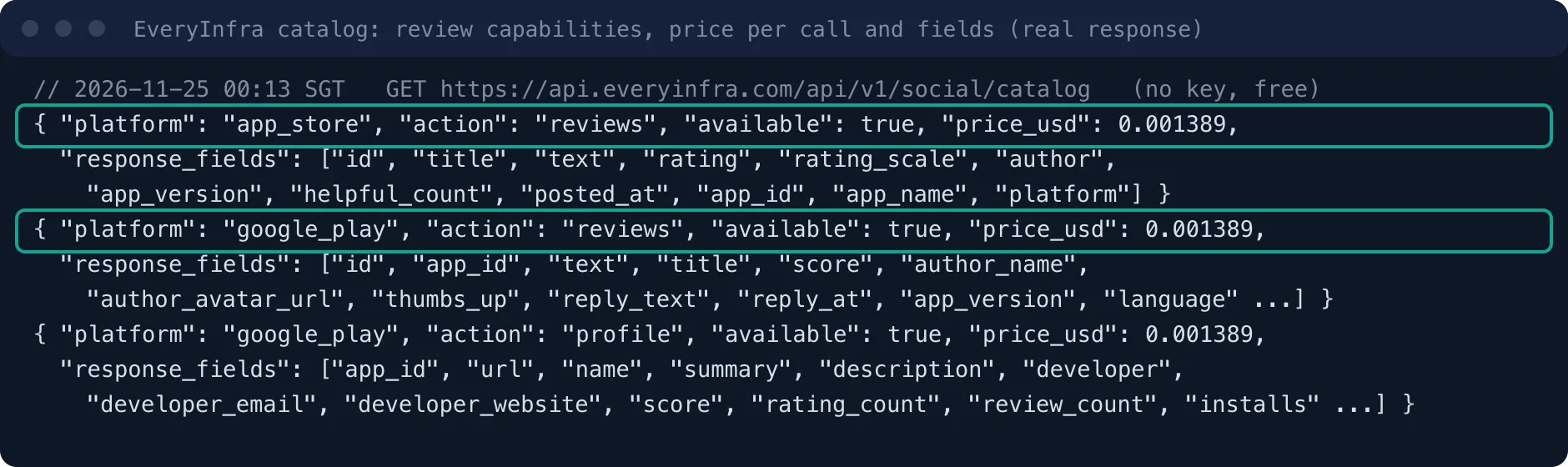
In the catalog, app_store/reviews and google_play/reviews each cost $0.001389 per call, and both have available: true (EveryInfra catalog, read at 00:13 on November 25). App Store takes a numeric app_id, country, sort and limit. Google Play takes the package name as app_id, plus language, country, sort and page_token for paging.
The fields differ. App Store rows carry title, text, rating, app_version and posted_at. Google Play rows carry text, score, thumbs_up, app_version, language and posted_at, and some requests also return the developer reply in reply_text. The field lists are on the App Store reviews page and the Google Play reviews page.
# Newest US App Store reviews (Block Blast!, app_id 1617391485)
curl -s https://api.everyinfra.com/api/v1/social \
  -H "Authorization: Bearer $EVERYINFRA_API_KEY" \
  -H "Content-Type: application/json" \
  -d '{"platform":"app_store","action":"reviews",
       "params":{"app_id":"1617391485","country":"us","sort":"newest","limit":500}}'

# Newest US English Google Play reviews (package com.block.juggle)
curl -s https://api.everyinfra.com/api/v1/social \
  -H "Authorization: Bearer $EVERYINFRA_API_KEY" \
  -H "Content-Type: application/json" \
  -d '{"platform":"google_play","action":"reviews",
       "params":{"app_id":"com.block.juggle","language":"en","country":"us","sort":"newest","limit":200}}'
Every review call on November 25 (Singapore time) returned HTTP 200, and each billing.charged_usd was 0.001389.
| Time | Capability, market | Route | Rows | Seconds |
|---|---|---|---|---|
| 00:14:32 | app_store/reviews, US | REST | 450 (asked 500) | 6.0 |
| 00:14:38 | google_play/reviews, US English | REST | 200 | 8.0 |
| 00:18:02 | app_store/reviews, Mexico | Remote MCP | 500 | 3.2 |
| 00:18:14 | google_play/reviews, Mexico Spanish, page 1 | REST | 40 | 35.5 |
| 00:27:00 | google_play/reviews, Mexico Spanish, page 2 | REST | 40 | 6.0 |
For Mexico we used the remote MCP server. We sent a tools/call to https://api.everyinfra.com/mcp with the tool name everyinfra_call_api and the same parameters as REST. The result.content[0].text field holds the same JSON. Here is the real round trip, with author names masked.
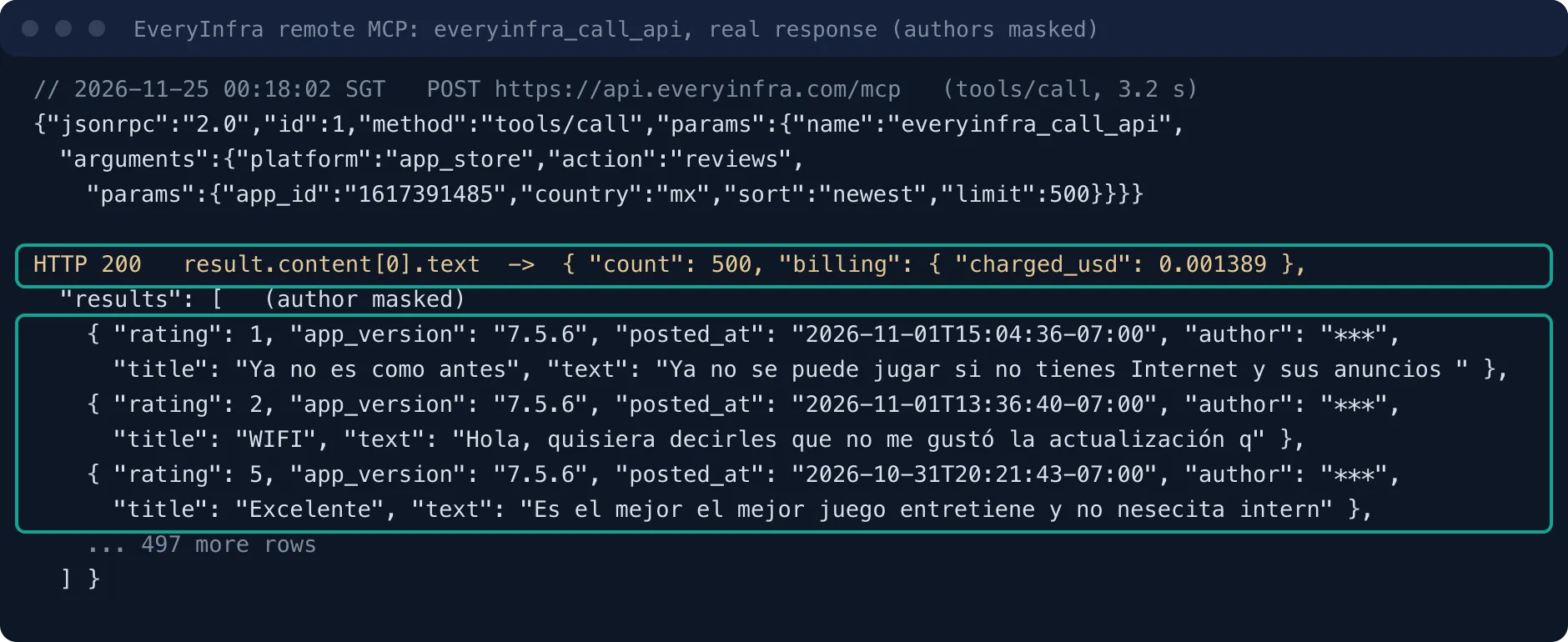
The remote MCP server uses Streamable HTTP. Each request sends Authorization: Bearer plus your API key (EveryInfra remote MCP guide; MCP spec: Transports; RFC 6750). A tools/list call without a key at 00:18 returned 12 tools. Data collection needs only two of them: everyinfra_list_capabilities and everyinfra_call_api. In an AI session, the model first uses the list tool to see what app_store offers, then uses the call tool to fetch the data. You do not paste reviews into the chat.
US App Store: 58.3% of 1–2 star reviews complain about in-app ads
The rules are fixed keyword lists. First, a review counts as "mentions ads" if it contains words such as ad, ads, advert or commercial. Spanish rules use anuncio, publicidad, comercial and propaganda. Then keyword rules sort the ad-mentioning reviews into nine classes. One review can fall into several classes.
Reviews that only say "no ads" or "ads don't bother me" count as neutral, not as complaints. These are sample words for each class:
| Class | Sample words in the English rules | Sample words in the Spanish rules |
|---|---|---|
| Too many or too often | too many, after every, ad after ad, full of ads | demasiados, cada vez, lleno de anuncios |
| General annoyance | annoying, hate, ruin, tired of | molesto, fastidio, odio, harto |
| Now needs internet | wifi, internet, offline, no connection | internet, wifi, conexión, datos, modo avión |
| Watch an ad to continue | watch an ad to continue, second chance, rigged | para continuar, otra oportunidad, vidas |
| Misleading marketing ads | false advertising, misleading, saw an ad | no es como el anuncio, falso, engaño |
| Too long or no skip | unskippable, can't skip, 30 seconds | largo, no se puede quitar, 30 seg |
| Shown without asking | forced, without asking, pop up, interrupt | en medio, a media partida, sin preguntar |
| Wants a paid ad-free option | remove ads, ad-free, would pay, premium | quitar los anuncios, versión de paga, pagar |
| Inappropriate content | inappropriate, explicit, sexual | inapropiado, sexual, grosero |
The misleading marketing class is counted on its own, outside "in-app ad complaints". These players saw a Block Blast! promo on TikTok or in another app, and the game did not match it. That is a user acquisition issue. It has nothing to do with the ads that AdMob shows inside the game.
Rules make mistakes. We drew 30 English reviews that the rules marked as complaints, with a fixed random seed, and read each one. Two were wrong.
A 4-star review said "won't update and add fun skins", and the rule read the verb "add" as an ad. Another 4-star review disliked the AI-generated videos that promote the game. By our own definition that is a misleading marketing complaint, but the rules marked it as "watch an ad to continue" and general annoyance. In a Spanish sample of 20, two were wrong. One 5-star review said there are no ads offline, and another 5-star review told readers to switch off the network to avoid ads.
The error rate is 6.7% in the English check and 10% in the Spanish check. So the shares below carry an error of a few points. They also describe the sample, not all players.
| Hand check | Reviews read | Wrong labels | Error rate | Example of a miss |
|---|---|---|---|---|
| English (US App Store and US Play) | 30 | 2 | 6.7% | "add fun skins" read as an ad |
| Spanish (Mexico App Store) | 20 | 2 | 10.0% | A 5-star tip to go offline to skip ads |
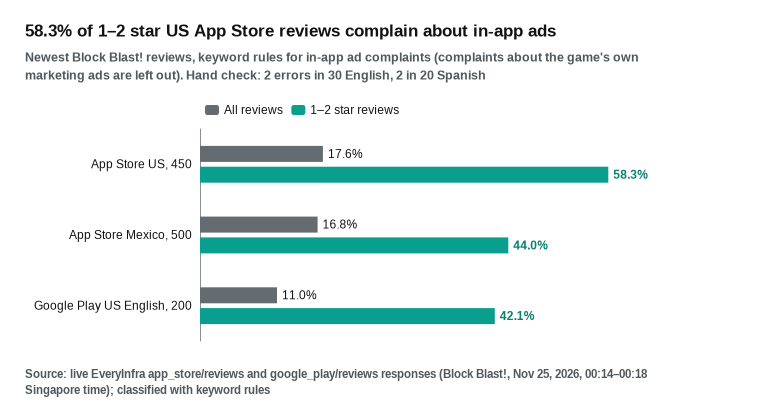
The 450 newest US reviews run from November 18, 01:10 UTC to November 23, 10:35 UTC, which is 5.4 days. 98 of them mention ads (21.8%) and 79 complain about in-app ads (17.6%). By star rating, 333 reviews have five stars (74.0%), which fits the 4.87 rating on the store page. Only 60 reviews have one or two stars, and 35 of those complain about ads.
In the same 60 low-star reviews, 40 mention ads and 11 mention WiFi or the internet. Eight use the words rigged, impossible or unfair about the blocks. 17 five-star reviews also complain about ads, usually as "great game, too many ads". Those reviews do not pull the rating down, but they report the same problem.
| Topic in the 60 US low-star reviews | Words we searched | Reviews |
|---|---|---|
| Mentions ads | ad, ads, advert, commercial | 40 |
| Complains about in-app ads | the nine class rules | 35 |
| Mentions WiFi or the internet | wifi, internet, offline, network, connection | 11 |
| Says the blocks are unfair | rigged, impossible, unfair | 8 |
The 200 US English Google Play reviews run from November 22, 16:05 UTC to November 23, 16:01 UTC, which is only 23.9 hours.
26 mention ads and 22 complain (11.0%). Of the 38 reviews with one or two stars, 16 complain about ads (42.1%). The share is lower than on the App Store. But the time windows differ by a factor of five, and 57 Play reviews (28.5%) have no version number. We do not compare the two stores directly. Taken together, both stores point the same way: four to six out of ten low-star reviews involve ads.
| Sample | Rows | Window (UTC) | Mention ads | In-app ad complaints | 1–2 star | Of those, ad complaints |
|---|---|---|---|---|---|---|
| App Store US | 450 | Nov 18–23, 5.4 days | 98 (21.8%) | 79 (17.6%) | 60 | 35 (58.3%) |
| App Store Mexico | 500 | Jun 5–Nov 23, 171 days | 109 (21.8%) | 84 (16.8%) | 109 | 48 (44.0%) |
| Google Play US English | 200 | Nov 22–23, 23.9 hours | 26 (13.0%) | 22 (11.0%) | 38 | 16 (42.1%) |
| Google Play Mexico Spanish (2 pages) | 80 | Nov 22–23 | Page 1: 2 | Page 1: 1 | — | — |
Can the daily count of ad complaints work as an early warning?
We split the 450 US reviews by the date in posted_at, which uses Pacific time (-07:00). In Pacific time the sample starts on November 17 at 18:10 (November 18, 01:10 UTC) and ends on November 23 at 03:35. November 17 and 23 are partial days, so we leave them out.
| Day (date in `posted_at`, 2026) | Reviews | In-app ad complaints | Share |
|---|---|---|---|
| November 18 | 79 | 19 | 24.1% |
| November 19 | 66 | 10 | 15.2% |
| November 20 | 84 | 14 | 16.7% |
| November 21 | 82 | 13 | 15.9% |
| November 22 | 128 | 20 | 15.6% |
November 18 sits seven to eight points above the other four days. That day has more reviews about "a video says the developers farm ads" and "the algorithm makes you lose".
A one-day jump can come from a viral video, a new release, or random noise in a small sample. Five days of data cannot tell these apart. If you want a warning, write the rule before you see the data. One workable rule: for one country and one rule set, compute the daily complaint share for 14 days. Take the median and the interquartile range. Flag a day when the share is above the median plus two times the interquartile range and the day has at least 50 reviews.
The minimum count keeps out days like November 23 in our sample, with one review and a share that can only be 0% or 100%. We have only five full days, which is not enough to set the threshold. So we give the method and no number.
The order is "reviews first, then the report". On a day when the share jumps, the session pulls the AdMob report for that day by version and format. It checks whether interstitial or rewarded impressions changed at the same time.
If the report shows no change, the rise more likely comes from outside talk or a gameplay change, and ad settings will not fix it. Google Play gets more than 200 English reviews a day for this game. You get a bigger sample there, but each call covers only a day. So you need a daily scheduled call and de-duplication by review id.
Complaint class by version: which class maps to which setting
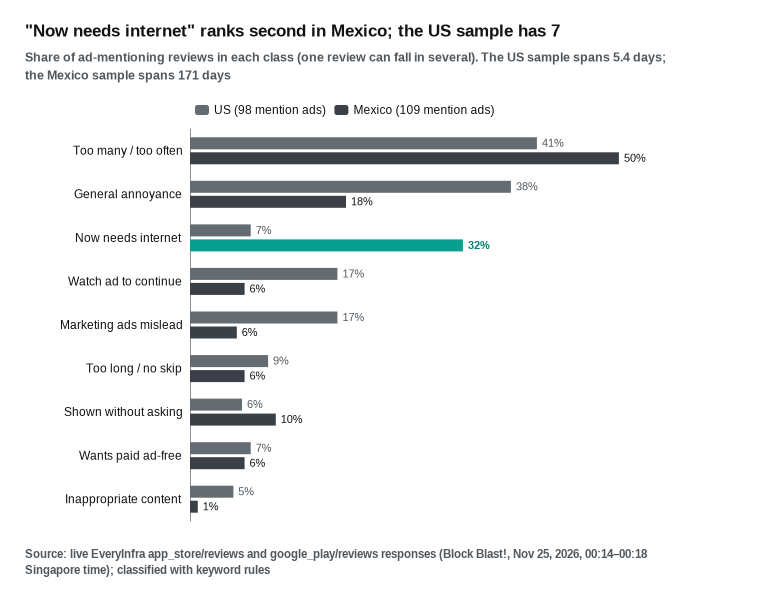
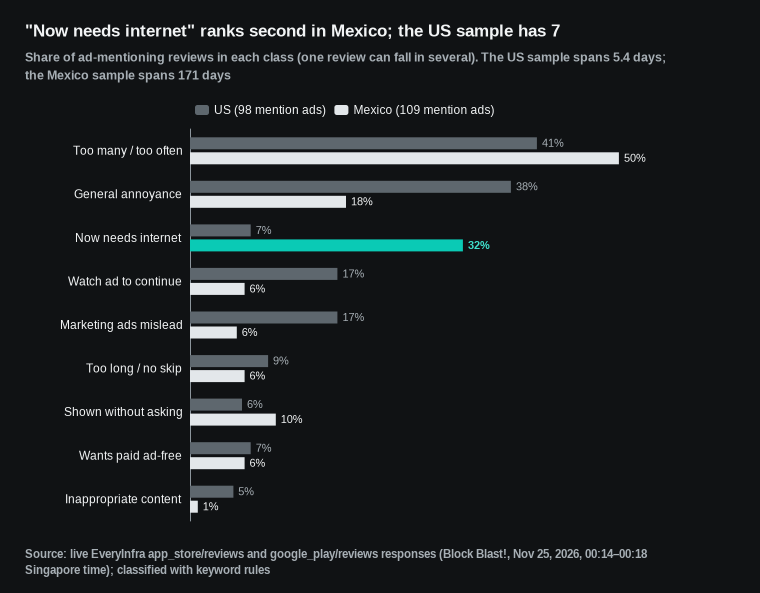
Among the 98 US reviews that mention ads, 40 (41%) say "too many or too often". 37 show general annoyance. 17 talk about watching ads to continue, and 17 attack misleading marketing ads. 9 say the ads are too long or cannot be skipped. "Now needs internet" and "wants a paid ad-free option" have 7 each. "Shown without asking" has 6, and "inappropriate content" has 5.
The last class is the smallest, but it matters. One parent writes that a child plays the game and the ads are explicit. Another player reports an indecent ad with a lemon. This class maps to AdMob blocking controls, not to frequency.
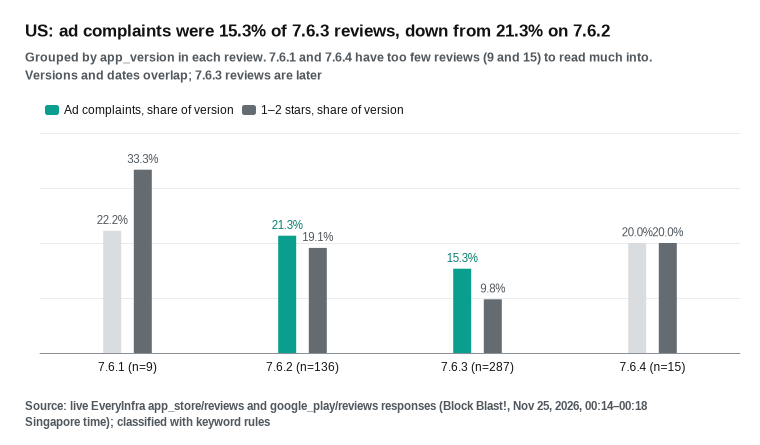
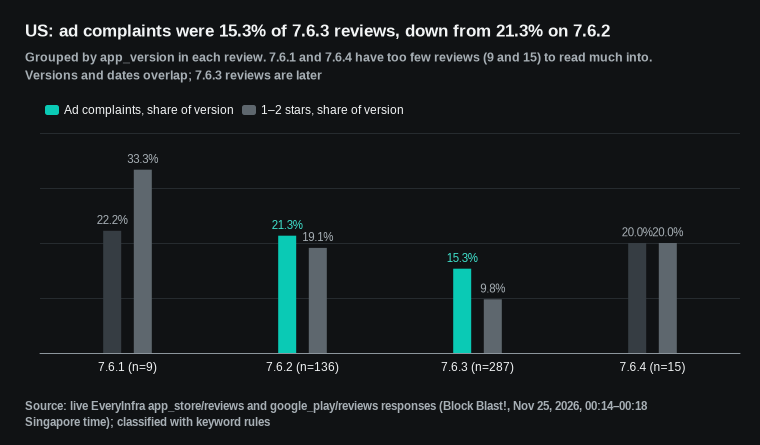
The reviews carry an app_version field. Most US rows fall on 7.6.2 (136 reviews) and 7.6.3 (287 reviews). For 7.6.2, 21.3% of the reviews complain about in-app ads. For 7.6.3, the share drops to 15.3%, and the 1–2 star share drops from 19.1% to 9.8%. By class, misleading marketing complaints fall from 11 to 6. Complaints about watching ads to continue rise from 4 to 13.
The 7.6.3 reviews are later than the 7.6.2 reviews, so version and date overlap. We cannot tell if the version changed something, or if a wave of videos about "the algorithm makes you lose to show you ads" spread around November 18. Several reviews mention such a video directly.
| Complaint class | 7.6.2 (136 reviews) | 7.6.3 (287 reviews) | Possible AdMob setting | What reviews can and cannot show |
|---|---|---|---|---|
| Too many / too often | 13 | 24 | App or ad unit frequency cap | Players feel there are many; not the real count per round |
| General annoyance | 10 | 23 | — | Strength of feeling; no clear action |
| Watch ad to continue | 4 | 13 | Rewarded reward, ad pods | Players link losing with ads; not the block logic |
| Misleading marketing ads | 11 | 6 | None (marketing creative) | AdMob settings cannot fix it |
| Too long / no skip | 5 | 4 | High-engagement ads setting | "Cannot skip"; not which ad source |
| Now needs internet | 3 | 4 | None (product choice) | Few in the US, many in Mexico |
| Shown without asking | 4 | 2 | Interstitial placement and timing | May be an interstitial, or a rewarded ad that players misread |
| Wants paid ad-free | 1 | 6 | None (in-app purchase design) | A sign of willingness to pay |
| Inappropriate content | 4 | 0 | Blocking controls, sensitive categories, ad review center | One review is enough to check |
The "Possible AdMob setting" column shows the settings that might match, based on AdMob Help Center pages. The reviews cannot prove which setting caused a complaint. You can set a frequency cap for an app or for one ad unit. The cap limits impressions for one user over a number of minutes, hours or days, and it applies to Google demand and third-party sources.
The Help Center also says a cap change can take up to 24 hours to take effect. A slight server delay can sometimes push a user over the cap (AdMob Help: Set frequency caps).
On Google Play, the Play Console Help Center says new ratings usually become public after about 24 hours. A cap change can also need 24 hours. So wait two to three days before Play reviews can show any effect. We found no Apple statement about a delay for App Store reviews. On that side, use the review dates that you actually get.
"Too long or no skip" maps to the high-engagement ads setting. With the setting on, interstitials become skippable after 12 seconds at most. The limit is 60 seconds for rewarded ads and 5 seconds for app open ads. Exit can take up to three steps. With the setting off, the limits are 5 seconds, 30 seconds, 2 seconds and two steps. The setting is on by default for standard ad units (AdMob Help: Enable high-engagement ads setting).
One US player writes that each round ends with an unskippable ad of "15 seconds to 10 minutes". We cannot check the 10 minutes. But when "cannot skip" complaints grow, the state of this switch is a concrete thing to check.
"Shown without asking" maps to interstitial placement and timing. The AdMob Help Center allows no more than one interstitial after every two user actions (AdMob Help: Disallowed interstitial implementations). The Back button counts as an action. The official Google AdMob channel posted an interstitial policy video on May 5, 2026 (YouTube: Overview of interstitial ad policies). It says to use natural breaks such as the gap between levels. It also says not to show one during gameplay or right after another one closes.
The US sample has 6 "shown without asking" reviews and Mexico has 11. One US player writes that an ad jumps in as soon as you make the first move. Reviews like that point to the moment an interstitial appears, so check that trigger against the two-action rule.
"Watch an ad to continue" maps to rewarded ads. The Help Center says rewarded ads show only after the user chooses to watch them in exchange for a reward. The countdown runs between 5 and 30 seconds, depending on the creative. Ad pods, which play two videos back to back in one impression, are on by default. You can turn them off in the ad unit's advanced settings (AdMob Help: Overview of rewarded ad units).
In 7.6.3 this class grows from 4 to 13 reviews. Nearly all say the same thing: "when I am close to my best score, the game gives me blocks that do not fit, then asks me to watch an ad". That is about the block logic, which ad settings cannot change. But it shows that players now tie rewarded ads to losing in this game.
Why misleading marketing ads need their own class
Seventeen US App Store reviews, six Mexico reviews and four US Play reviews say the same thing. A promo video for Block Blast! showed color changes, photo uploads, "no ads" or "no WiFi needed", and the game did not match.
One 1-star review lists three problems at once. Near a high score the game gives pieces that do not fit. Saying no to an ad still leads to an ad. The color feature from the promo is not in the game.
All these reviews contain the word "ad". Without a separate class, they would count as "too many ads", and you would expect a frequency change to fix them. This class belongs to the user acquisition team's creatives and the store listing text. Google Play puts deceptive promotion in a separate App Promotion section of its policy (Google Play policy: Ads). The person who handles it is usually not the person who manages AdMob.
With a separate class and a separate summary, the frequency decision looks only at the classes that relate to frequency. Of the 17 US reviews in this class, 11 also fall into an in-app ad class, and 6 talk only about the promo videos. Without the split, those 6 would count as in-app ad complaints, and no AdMob setting would change them.
Mexico: "now needs internet" starts on July 14
In the Mexico store, the complaint mix is different. The 500 newest Mexico App Store reviews run from June 5 to November 22, which is 171 days. This market gets far fewer reviews than the US, so 500 reviews reach half a year back. 109 reviews mention ads and 84 complain (16.8%), close to the US figure of 17.6%.
The difference is in the classes. Under the broad rule used for classification, the "now needs internet" class has 35 reviews, or 32% of the reviews that mention ads. In the US it is 7%. The broad rule counts every ad complaint that mentions the network, including "on WiFi the ads never stop", so we counted again with a narrow rule. A 1-star review from November 4, version 7.5.8, has the title "Ahora no puedes jugar sin internet", which means "now you can't play without internet". Some players say they can no longer play on the subway or in places with a weak signal.
The narrow rule looks only at network mentions, with or without ads. Of the 500 reviews, 101 mention the network (internet, wifi, conexión, datos, modo avión). Of those, 24 say clearly that the game "now" or "already" needs internet. Another 32 are 4–5 star reviews that praise offline play.
The first "now needs internet" review is on July 14, with version 7.2.7. The 11 October reviews sit on versions 7.5.0 to 7.5.6.
| Month (2026) | "Now needs internet" complaints | 4–5 star reviews that praise offline play |
|---|---|---|
| June | 0 | 3 |
| July | 1 | 8 |
| August | 4 | 3 |
| September | 3 | 7 |
| October | 11 | 5 |
| November (to the 22nd) | 5 | 6 |
Network access and ads are directly linked. Without a network the game cannot request ads, so it earns no ad revenue. Some reviews teach other players to use airplane mode to avoid ads, and some 5-star reviews say "no internet, no ads". The reviews cannot tell why Hungry Studio now requires a connection. It may be ads, cloud saves, anti-cheat or something else.
The session can put two things side by side by date. One is the July 14 start of the "needs internet" complaints. The other is the Mexico request volume and match rate in the AdMob report. If requests rise in the same period while low-star "needs internet" reviews rise too, a product owner has a trade-off to decide. Ask AdMob's revenue advice will not show that side.
The Google Play Mexico Spanish sample gives a contrast. Page 1 has 40 reviews from November 23, 2026, 03:51 to 16:01 UTC. Only 2 mention ads: one complains, and one says the promo did not match the game.
Page 2, fetched with page_token, has 40 more reviews back to November 22, 23:14 UTC. One day of Spanish Play reviews has very little ad talk, far below the 21.8% in six months of Mexico App Store reviews. Play reviews in Mexico may be shorter, or one day may be too small a sample. To compare the two stores for Mexican players, collect at least two weeks of Play data first.
This is also why you collect by country. If you look only at the US, the network issue has 7 reviews and seems minor. In Mexico it is the second largest class. The AdMob COUNTRY dimension matches the country parameter of the review API one to one. A check should cover at least your two or three biggest revenue countries, plus one smaller market where one call reaches further back.
Align reviews with AdMob reports by version: the report request
The AdMob network report supports dimensions such as DATE, APP, COUNTRY, FORMAT, PLATFORM and APP_VERSION_NAME. Metrics include AD_REQUESTS, MATCH_RATE, IMPRESSIONS, SHOW_RATE, IMPRESSION_RPM and ESTIMATED_EARNINGS. For APP_VERSION_NAME, the docs say Android uses versionName from PackageInfo and iOS uses CFBundleShortVersionString. That is the same version string as app_version in store reviews.
The timeZone parameter accepts only America/Los_Angeles at the moment (AdMob API: networkReport.generate, updated 2026-10-13). Here is a request body for the last 14 days by version and format. We have no AdMob account to run it, so this is a configuration example.
{
  "reportSpec": {
    "dateRange": {
      "startDate": {"year": 2026, "month": 11, "day": 10},
      "endDate":   {"year": 2026, "month": 11, "day": 23}
    },
    "dimensions": ["DATE", "PLATFORM", "APP_VERSION_NAME", "FORMAT", "COUNTRY"],
    "metrics": ["AD_REQUESTS", "MATCH_RATE", "IMPRESSIONS", "SHOW_RATE",
                "IMPRESSION_RPM", "ESTIMATED_EARNINGS"],
    "dimensionFilters": [
      {"dimension": "COUNTRY", "matchesAny": {"values": [{"value": "US"}, {"value": "MX"}]}}
    ],
    "timeZone": "America/Los_Angeles",
    "localizationSettings": {"currencyCode": "USD"}
  }
}
Time zones cause the most alignment errors. App Store reviews carry a -07:00 offset in posted_at, which is Pacific daylight time. The AdMob report uses Los Angeles time only. Google Play reviews use UTC. Convert all three to one time zone before you group by day.
There is one more catch. US Pacific time went back to -08:00 on November 1, but the App Store reviews we got in November still show -07:00. Daily totals can be off by an hour, and a review posted just after midnight can land on the previous day.
After alignment, the session can ask three concrete questions. First, how did interstitial impressions and RPM change from 7.6.2 to 7.6.3? Did the drop in ad complaints from 21.3% to 15.3% follow a drop in impressions? Second, did rewarded impressions rise in 7.6.3, in step with the rise of "watch an ad to continue" complaints from 4 to 13? Third, did Mexico request volume step up after mid-July?
Each answer needs both data sets.
| Alignment item | Store reviews (EveryInfra) | AdMob report | How to handle it |
|---|---|---|---|
| Version | app_version; 28.5% empty on Play | APP_VERSION_NAME | Use empty-version reviews for date analysis only |
| Time | App Store -07:00; Play UTC | Only America/Los_Angeles | Convert to Los Angeles time, then group by day |
| Country | country parameter | COUNTRY dimension | Collect and compare each country on its own |
| Ad format | Guessed from text only | FORMAT dimension | Treat complaint classes as "possible match" only |
| Delay | New Play ratings public after about 24 hours; no Apple statement | Cap changes take up to 24 hours | On Play, wait 2–3 days after a change before you read reviews |
Check a change after you make it
Suppose you change the app-level interstitial cap from "1 per 3 minutes" to "1 per 5 minutes". Look at three time periods. From the change day to the next day, the cap may not be active yet, because the Help Center allows up to 24 hours. Ignore reviews and reports for that period.
From day two to day four, the report should move first: interstitial impressions should drop. If they do not drop, the cap is not active, or another ad unit is outside the cap. Check the settings first and leave the reviews alone. From day four onward, Google Play reviews start to reflect the change, because new Play ratings usually take about 24 hours to become public. For the App Store we found no statement about a delay, so compare the reviews whose posted_at falls after the change took effect.
On the review side, compare two periods of the same length before and after the change. Use the same country and the same rules, and add up "too many or too often" plus "shown without asking". In the US sample, the daily ad complaint share moved between 15.2% and 24.1% from November 18, 2026 to November 22, 2026. Daily noise alone is seven to eight points. So compare two periods of at least 7 days each.
On the revenue side, compare interstitial impressions, RPM and estimated earnings for the same two periods. Filter on APP_VERSION_NAME so that you look only at the version that runs after the change. If the cap change and an app release fall in the same week, you cannot separate their effects. It is safer to change server-side settings such as caps in a week with no release.
Write both results into one change log. Record what changed and the date it took effect. Add the change in impressions and in complaint share, and the keep-or-revert decision. The next time Ask AdMob or another tool suggests "add a bidder" or "raise the floor", this log helps you judge the advice.
Connect both in one session: MCP configuration example
In Claude Code, you add a remote MCP server with the http type and can pass a Bearer header. In .mcp.json, an entry with a url must also have a type, or Claude Code treats it as a local process and skips it. The value streamable-http works as an alias for http. .mcp.json also supports environment variable expansion (Claude Code docs: Connect Claude Code to tools via MCP).
Here is a project .mcp.json as a configuration example. The EveryInfra URL and Bearer header are the same ones we used for the real remote MCP call at 00:18. We did not load this file in Claude Code. Add the AdMob entry from Google's docs when its MCP server opens. Until then, use the AdMob API report or your own report export.
{
  "mcpServers": {
    "everyinfra": {
      "type": "http",
      "url": "https://api.everyinfra.com/mcp",
      "headers": { "Authorization": "Bearer ${EVERYINFRA_API_KEY}" }
    }
  }
}
With this entry, one weekly check can be a single instruction. For example: "Use everyinfra_call_api to get app_store/reviews (app_id 1617391485, country us and mx, limit 500) and google_play/reviews (com.block.juggle, en/us). Classify them with the keyword rules I gave you and make a table by app_version. Then read the last 14 days of the AdMob report I exported and align interstitial and rewarded impressions by version. List three decisions for me." The tools/call format is the same as in the round trip in the screenshot above. The response is JSON, and the charge is in billing.charged_usd.
Google's own Google Ads MCP server is a useful reference. Its developer guide, updated on November 19, 2026, describes read access plus partial writes. Writes use propose-and-confirm checks, and you can also set a read-only mode. It runs over local stdio or Streamable HTTP on Cloud Run (Google Ads API: MCP server developer guide).
The AdMob post describes the same idea: you approve before production. If the AdMob server also offers read-only mode, a monitoring session needs only that. Leave setting changes to a person.
Each extra MCP server in a session also adds risk from tampered tool descriptions. A YouTube daily news episode from November 17 names this "tool poisoning" in its transcript (YouTube video Ssufp7BF0Q0). Connect only the servers that the check needs, and keep the rule file local.
How far back store reviews reach, and how often to check
For the same game and the same API, one call covers very different time spans. In the Mexico App Store, 500 reviews cover 170.8 days. In the US App Store, 450 reviews cover 5.4 days.
In US English Google Play, 200 reviews cover 23.9 hours. That response has an empty next_page_token and pagination.stop_reason: depth_limit, so you cannot page further. Mexico Spanish Google Play returns 40 reviews per page. Page 1 covers 12.2 hours and says has_more: true. We fetched page 2 at 00:27 with page_token, and it went back another 4.5 hours.
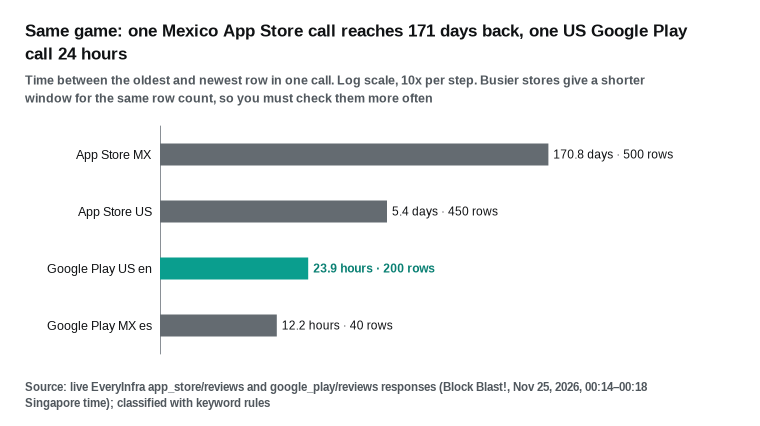
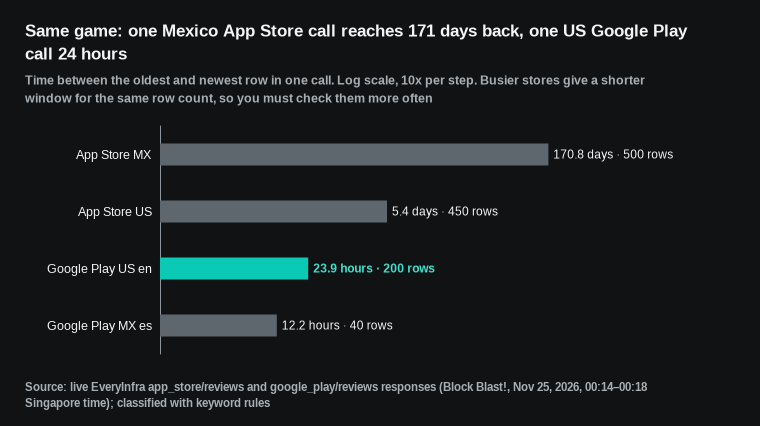
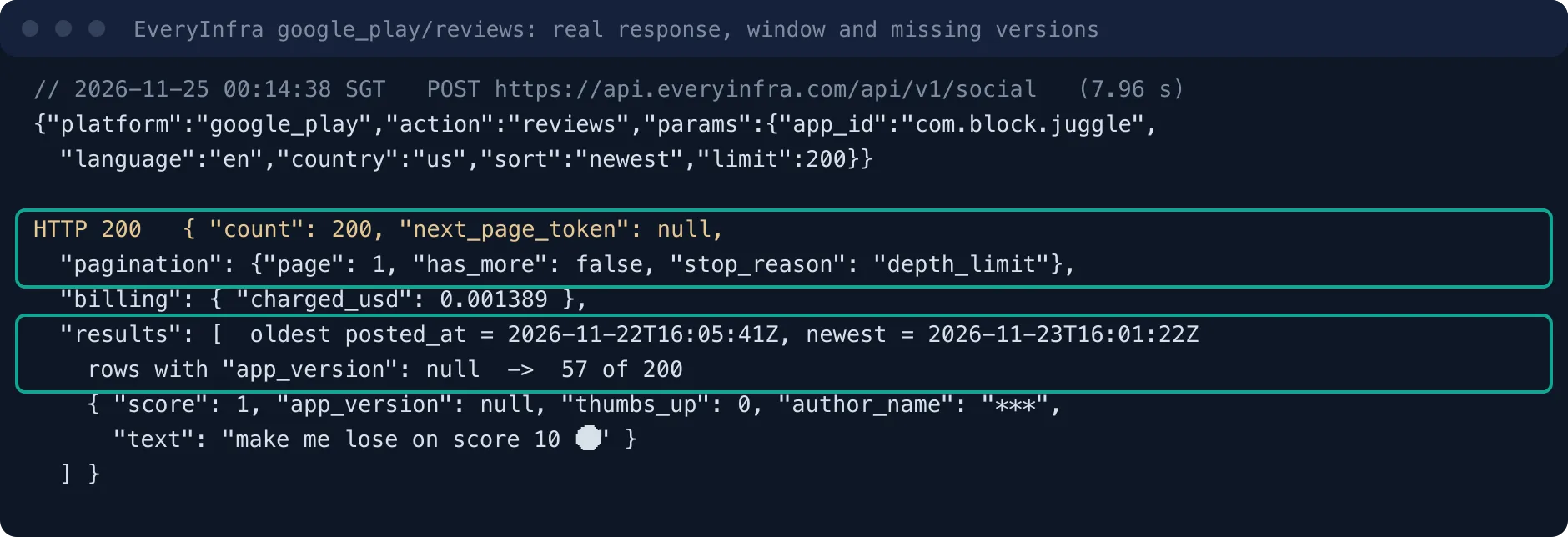
There is also a gap: how old the newest review in our sample was at call time. For Google Play it is 24.2 to 24.3 hours in both countries. The Play Console Help Center says new ratings are generally held back for around 24 hours before they become public. Developers can see and reply to them first (Play Console Help: View and analyze your app's ratings and reviews). The two numbers agree.
For the App Store the gap is 29.7 hours in the US and 36.8 hours in Mexico. Do not read these as Apple's publication delay. The Mexico store gets fewer than 3 reviews a day, so the newest review can easily be more than a day old. The US store gets more than 80 a day, and no new review showed up in 29.7 hours. That hints at some processing time, but we found no Apple statement about it, and one sample cannot separate sparse reviews from processing time.
The official APIs have windows too. The Google Play Developer API's Reply to Reviews returns only reviews created or changed in the last week. It includes only reviews with text, and reads have a quota of 200 per hour. For the full history you download a CSV from Play Console (Google Play Developer API: Reply to Reviews).
The App Store Connect API can list all customer reviews for an app (App Store Connect API: List all customer reviews for an app). You must be the developer of that app. Both official APIs cover your own apps only. For competitors or similar games, you read the public store pages.
| Source | Rows per call | Reach (our test or docs) | Newest row age at call | Competitor apps? |
|---|---|---|---|---|
EveryInfra app_store/reviews, US | Asked 500, got 450 | 5.4 days | 29.7 hours | Yes |
EveryInfra app_store/reviews, Mexico | 500 | 170.8 days | 36.8 hours | Yes |
EveryInfra google_play/reviews, US English | 200, no paging | 23.9 hours | 24.2 hours | Yes |
EveryInfra google_play/reviews, Mexico Spanish | 40 per page, with paging | Page 1: 12.2 hours | 24.3 hours | Yes |
| Google Play Reply to Reviews API | Paged | Last week | Visible to the developer first | Own apps only |
| App Store Connect API | Paged | All | — | Own apps only |
The window sets the check frequency. For a big game like Block Blast!, one missed day on Google Play leaves a gap, so call it daily. The US App Store covers more than five days per call, so twice a week is enough. In Mexico one call reaches back 171 days, so one call a week is enough, and each new call adds only about 20 reviews. For a small app it is the other way round: one call a week covers both stores.
What a weekly check costs
At the catalog prices read on November 25, app_store/reviews, google_play/reviews, app_store/profile and google_play/profile each cost $0.001389 per call. For video research, youtube/search costs $0.000778 and youtube/transcript costs $0.000556. Failed calls and empty results are not charged.
For one app in one country, a week has 11 calls. There are 2 App Store review calls and 7 Google Play review calls. Each store also gets 1 profile call for version and rating. The total is $0.015279 a week, or about $0.0662 a month at 4.33 weeks per month. For 10 apps in 3 countries each, a week costs $0.4584, about $1.98 a month. A small app needs 1 review call per store plus 2 profile calls, which is $0.005556 a week.
| Case | Calls per week | Cost per week | Per month (×4.33) |
|---|---|---|---|
| 1 busy app × 1 country | App Store 2, Google Play 7, profiles 2 | $0.015279 | $0.0662 |
| 1 small app × 1 country | App Store 1, Google Play 1, profiles 2 | $0.005556 | $0.0241 |
| 10 busy apps × 3 countries | 330 calls | $0.4584 | $1.98 |
| All test calls on Nov 25 (once) | 11 calls, incl. 4 for video research | $0.012169 | — |
We made 11 paid calls on November 25. They were 2 profile calls, 2 review calls, 1 Mexico MCP call, 2 Mexico Play pages, 1 YouTube search and 3 transcripts. We also made one free tools/list call. The total was $0.012169.
Model costs for the AI session are separate and depend on your client and model. The cost to watch is the number of reviews the session reads. 1,000 English reviews add up to a few hundred thousand characters. Let the model read the class counts and a few examples, not every review.
Limits and things to watch
Keyword rules are a first pass only. The hand check found 2 errors in 30 English reviews and 2 in 20 Spanish reviews. The samples are small, so the error range is wide. Sarcasm, typos such as "adds" for "ads", and star-only ratings without text slip through. Use rule counts for trends and comparisons, not as absolute figures. For better accuracy, the model in the session can re-check the rule candidates. Keep the rule results for comparison and check the model's labels by hand.
Store reviews are a self-selected sample. Few people write them, and those who do are often at the extremes. In the US App Store sample, 74.0% have five stars. A 1-star "too many ads" review cannot tell you how many players deleted the game without a word. The data can compare the ad complaint share between two setting changes. Keep the game, the country and the rules the same.
| Limit | Effect | What to do |
|---|---|---|
| AdMob MCP server not open, no public tool list | AdMob side needs the API or an export | Use networkReport.generate now, switch later |
| Busy apps get only 24 hours per Google Play call | Gaps | Call daily on a schedule, de-duplicate by id |
| 28.5% of Play reviews have no version | Smaller version sample | Use empty-version rows for date analysis only |
| App Store still shows -07:00 in November | Daily totals off by an hour | Use Los Angeles time; check post-midnight reviews |
| Reviews and settings show correlation only | Cannot prove which change caused it | Change one setting at a time; log the date |
| Misleading marketing mixed into ad complaints | Overstates what AdMob settings can do | Keep it as its own class |
Reviews contain player nicknames and avatar links. A monitoring report needs only rating, version, date and text. You can drop the author field before the data enters the session. Our screenshots and charts keep no nicknames. When you paste review text into an internal ticket, paste only the text and the review link. Keep nicknames in the raw file so you can check for repeat posters later.
We describe data methods only. We do not interpret AdMob policy or predict revenue results for any change. For caps, skip times and blocked categories, follow the AdMob Help Center and the Google Play ads policy.
The Play policy says ads in an app must suit the app's content rating. Ads that interfere with normal use must be easy to dismiss (Google Play policy: Ads). The 5 US "inappropriate content" reviews are about the ad creatives themselves. AdMob blocking controls offer general categories, sensitive categories and the ad review center (AdMob Help: Ad blocking options for your apps). Check the Play policy and the Help Center text yourself for the exact rules.
Recent changes
On November 16, 2026, Google announced Ask AdMob, AdMob agent skills and the AdMob MCP server (Google blog). What it means for you: coding assistants can change ad code with Google's playbooks today, and account-level AI actions wait until 2027.
On November 19, 2026, Google updated the Google Ads MCP server developer guide. It describes read access, partial writes, propose-and-confirm and an optional read-only mode (Google Ads API docs). What it means for you: the AdMob server will likely use a similar permission model, and a monitoring session can stay read-only.
On November 23, 2026, the AdMob Android deprecation page was updated. Legacy SDK v24 and v25 are deprecated on June 30, 2027 (AdMob deprecation page). What it means for you: after you ship the Next-Gen SDK, version-split reviews can show if the migration brought crashes or ad problems.
On November 23, 2026, the AdMob agent skills page was updated and lists Antigravity, Claude Code, Codex and Cursor (AdMob developer docs). What it means for you: more ad code changes will come from coding assistants, and a version-split review check gives those changes an outside test.
FAQ
Does Google have an official AdMob MCP server, and can I use it now? Yes, Google announced it on November 16. It is in early testing and will reach more developers early in 2027. The public pages we read on November 25 list no sign-up and no tools (Google blog). This question comes from the Google autocomplete terms "admob mcp server" and "google admob mcp", and a Reddit r/mcp user asked for recommendations too (Reddit r/mcp). Until it opens, use the AdMob API reports.
GitHub also has community MCP servers from individual developers that wrap the same AdMob API. On November 25 we found two, each with a single-digit star count and a last push in August. Both need your own OAuth credentials. We did not install them or review their code.
What can I ask Ask AdMob? Is it the same as the AdMob support forum? No, it is a Gemini assistant inside your AdMob account. The blog post says it troubleshoots setups, recommends bidders, checks third-party network settings and turns plain-language rules into brand safety settings. Testing starts in the coming months.
The support forum is a human community. This question comes from the autocomplete terms "ask admob support" and "ask admob api forum". Ask AdMob reads account data, and its description does not mention store reviews.
My AdMob frequency cap does not seem to work. Why? The Help Center says a change can take up to 24 hours. A slight server delay can sometimes push a user over the cap. The app-level or unit-level cap that is reached first applies (AdMob Help).
On Stack Overflow, one developer set "no more than 10 impressions per user per hour" and still saw an ad on every request (Stack Overflow 77141887). Another developer saw two ads within a 3-minute cap after a switch to the Next-Gen SDK preloading API. That question has no answer yet (Stack Overflow 80015990). On Google Play, the review share of "too many or too often" two to three days after a cap change is one outside check.
Interstitials bring bad reviews. Should I remove them? In Reddit r/androiddev, one developer reported a few negative reviews and 1-star ratings about irritating interstitials. The post asked for opinions (Reddit r/androiddev).
Removing them is a revenue and experience trade-off, and we do not make that call for you. Measure first. Split "too many or too often" and "shown without asking" by version, and compare them with interstitial impressions in the AdMob report. Then check placement against the Help Center rule of at most one interstitial per two actions.
Can an MCP server read app store reviews directly? Google's description of the AdMob MCP server covers AdMob account data, not store reviews. The Google Play Developer API can read your own app's reviews from the last week. The App Store Connect API can read your own app's reviews too. You may want public reviews of your own and competing apps in one session. Then connect the EveryInfra remote MCP and use app_store/reviews and google_play/reviews at $0.001389 per call. This question comes from the same r/mcp post, where the author says the agent "starts searching the web" whenever a question comes up.
Get started
- Get an API key from the quickstart. Call
GET /api/v1/social/catalogonce without a key, check thatapp_store/reviewsandgoogle_play/reviewshaveavailable: true, and note theprice_usd. - Add
https://api.everyinfra.com/mcpto your AI client as shown in the remote MCP guide. Run onetools/listand oneeveryinfra_call_apicall for 50 reviews of your own app. - Adapt the keyword rules to your game: level names, item names, local slang. Hand-check 30 reviews to get the error rate, and put the rules in the session instructions.
- Export the last 14 days from AdMob, or pull them with the AdMob API, split by
APP_VERSION_NAME,FORMATandCOUNTRY. Align them with reviews by version. Change one ad setting at a time, log the date, and run the check again two to three days later. Prices are on the pricing page.
Other AI tools can use the same review data. See VS Code Copilot sorts app store complaints every day and a weekly app review report with Codex cloud tasks. For MCP on the ad buying side, see the Amazon Ads MCP server test. Capability lists are on the App Store scraper API, Google Play scraper API and YouTube scraper API pages. App profile fields are on the Google Play app profile page, and video transcripts on the YouTube transcript page.
References
- New Google AdMob AI tools help app creators build, fix, and grow faster, Google blog, 2026-11-16.
- Use agent skills (GMA Next-Gen SDK for Android), Google for Developers, updated 2026-11-23.
- google/skills: skills/ads folder, GitHub, read 2026-11-25.
- Method: accounts.networkReport.generate, AdMob API, updated 2026-10-13.
- Method: accounts.mediationReport.generate, AdMob API, updated 2026-10-13.
- Method: accounts.adUnits.create (v1beta), AdMob API, updated 2026-02-19.
- Get started with the AdMob API, Google for Developers, read 2026-11-25.
- Set frequency caps for apps or ad units, AdMob Help Center, read 2026-11-25.
- Enable high-engagement ads setting, AdMob Help Center, read 2026-11-25.
- Disallowed interstitial implementations, AdMob Help Center, read 2026-11-25.
- Recommended interstitial implementations, AdMob Help Center, read 2026-11-25.
- Overview of rewarded ad units, AdMob Help Center, read 2026-11-25.
- Create an app open ad unit, AdMob Help Center, read 2026-11-25.
- Ad blocking options for your apps, AdMob Help Center, read 2026-11-25.
- Ads (Google Play Developer Policy), Play Policy Center, read 2026-11-25.
- View and analyze your app's ratings and reviews, Play Console Help, read 2026-11-25.
- Reply to Reviews, Google Play Developer API, read 2026-11-25.
- List all customer reviews for an app, App Store Connect API, read 2026-11-25.
- View ratings and reviews, App Store Connect Help, read 2026-11-25.
- Deprecation and sunset (Android), AdMob developer docs, updated 2026-11-23.
- Set up GMA Next-Gen SDK, AdMob developer docs, read 2026-11-25.
- Google Ads MCP server: Developer integration guide, Google Ads API, updated 2026-11-19.
- Google Ads Developer Blog: November 2026, Google, 2026-11-10.
- Connect Claude Code to tools via MCP, Claude Code docs, read 2026-11-25.
- MCP specification: Transports, Model Context Protocol, version 2025-06-18.
- MCP specification: Authorization, Model Context Protocol, version 2025-06-18.
- RFC 6750: Bearer Token Usage, IETF, 2012.
- Antigravity: Skills, Google Antigravity docs, read 2026-11-25.
- Block Blast! (US App Store), Apple, read 2026-11-25.
- Block Blast! (Google Play), Google Play, read 2026-11-25.
- AdMob Agent Skills and Ask AdMob: What App Teams Can Use Today, YouTube, 2026-11-23.
- Overview of interstitial ad policies, Google AdMob on YouTube, 2026-05-05.
- Daily Vibe, November 17, 2026, YouTube, 2026-11-17.
- Google AdMob introduces AI tools to automate monetization and ad management, Search Engine Land, 2026-11-19.
- Google to test Gemini agent that flags AdMob setup errors, PPC Land, 2026-11-16.
- Google Unveils Ask AdMob and AI Agent Tools for App Monetization, Unite.AI, 2026-11-17.
- Google's AdMob agent skills are usable now; the MCP server is still in testing, SoyJB, 2026-11-16.
- Google to test Gemini assistant for AdMob app developers, Tech in Asia, 2026-11-17.
- Google forces Android developers off legacy Mobile Ads SDK by 2028, PPC Land, 2026-07-12.
- MCP recommendations for AdMob, Reddit r/mcp, read 2026-11-25.
- Interstitial ad frequency capping not working as expected, Stack Overflow, read 2026-11-25.
- Did Admob NextGen preloading API break frequency cap?, Stack Overflow, read 2026-11-25.
- What is your opinion on full-screen Interstitial Ads?, Reddit r/androiddev, read 2026-11-25.
- EveryInfra data catalog, EveryInfra, read 2026-11-25 00:13 Singapore time.
Reference BL-228