TikHub API Token and the API Helper Skill: An AI Agent Test
The community TikHub API Helper ships a stale snapshot: 25.7% of its paths are gone. We test token setup, rate limits, AI agent calls and price.
The Claude Code skill that ranks first for "tikhub api helper" is not a TikHub product. It is a community project that one developer keeps in a personal GitHub account. Below, we call it community repo A. We checked it file by file in the early hours of 2026-11-06 (Singapore time, SGT, UTC+8). Its endpoint snapshot has 1,120 paths, and 288 of them (25.7%) are no longer in the TikHub documentation of that day. Three of the four example calls in its SKILL.md use parameter names that the current documentation does not have. The skill tells you to set TIKHUB_TOKEN, but its code reads TIKHUB_API_TOKEN.
A larger problem is the HTTP client. The skill sends requests with Python's built-in urllib and the default User-Agent. We ran two rounds of tests from Singapore at 00:20 and 00:25 SGT. Every request with that default header to api.tikhub.io and api.tikhub.dev got HTTP 403 and "error code: 1010".
Even the health check, which needs no token, failed. For the same 1,000 TikTok or Douyin requests, TikHub's public price is $1.00. Our three live calls cost $0.000556 each, so 1,000 calls cost $0.556, and TikHub costs 1.8 times as much. TikHub only matches us at about 117,900 calls a day on one endpoint, after its daily volume discount.
This article answers one narrow question for people who search "tikhub api token", "tikhub api helper" or "api tikhub io". You have a token. Now you want an AI agent to find endpoints, call them and handle errors by itself.
Where do you keep the token, and how do you control it? How do rate limits work? Can you use the community Helper as it is? On the TikHub side, we used only public material: the docs, the API files, the pricing pages and public GitHub repositories.
We did not sign up for TikHub. We did not use anyone's token to call its paid endpoints. On the EveryInfra side, every number comes from live calls on the same night, and the text gives the time of each read and call.
How to create a tikhub api token: permissions, expiry and status
You create a TikHub token in the user center. The "Get API Token" section at the end of the README - English on its docs site lists four steps. You sign up and log in. You open the API token menu in the user center and create a token.
You copy it into the request header. You keep it secret and use it only in the header. The Chinese README says the same. The tutorials and FAQ page adds that each user can create up to 100 API keys, which makes one key per project easy.
So far, this matches what our article TikHub API key, docs and GitHub, tested already covers. This article goes one step further. After you create the token, can you limit it to some endpoints? Can you set an expiry date? Can you turn it off for a while? These three controls decide whether you can safely give the token to an AI agent that makes its own decisions.
We did not find instructions for these three controls in TikHub's current public documentation. The current README and the openapi.json on api.tikhub.io (read at 00:16 SGT on 2026-11-06) mention them only in the status code notes. The six reasons for a 401 include "API token has expired" and "status is invalid or not activated". The reasons for a 403 include "API token lacks required permissions". So the three states exist, but the documentation does not say how to set them.
We found the setup text in an older source. The PyPI page for version 1.13.0 of the TikHub Python SDK was released on 2024-12-05. It says you can set custom Scopes for a token, set an Expire Date, and turn the token off by hand with Status. It also strongly recommends one token per project, with the matching Scopes, or requests fail for lack of permission. In version 2.2.0 (2026-10-03), that section is gone. The new text only says to copy your API key from the dashboard and set it as TIKHUB_API_KEY.
We did not log in to the TikHub user center, so we cannot confirm that the three controls are still in the dashboard today. Here is what we can say. The old documentation said you can set them. The current documentation does not say how. The status code notes still list all three states.
On EveryInfra, all three controls are in the account section of /docs. In the console, under "API Keys → Permissions", you can turn off a product for each key. A call to a product that is off returns 403 capability_denied. A call with a disabled key returns 401. Three write permissions are off by default: key management, account settings, and support tickets. Only a person in the console can turn them on.
A key can create other keys, but only 20 a day. Some actions are console-only, always. These include viewing or rotating a full key, changing permissions and the IP allowlist, enabling a key again, and payment. We made these choices on purpose. When an AI agent has a key, the main risk is not one wrong call. The main risk is that the agent changes the account or spends money that it should not spend.
The table below shows the two sides. "Not documented" on the TikHub side means we found no setup instructions in the current public docs. It does not mean that the feature is missing.
| Action | TikHub (public docs, read 2026-11-06) | EveryInfra (/docs, read 2026-11-06) |
|---|---|---|
| Create a token | User center → API token → create; up to 100 per user | Console → API Keys → create; the full key shows once |
| Limit what it can call | 2024 docs: Scopes; today only "token lacks permissions" in 403 notes | Turn off a product; returns 403 capability_denied |
| Expiry | 2024 docs: Expire Date; today only "token has expired" in 401 notes | No expiry; disable or rotate instead |
| Turn off for a while | 2024 docs: Status; today "status invalid or not activated" in 401 notes | Disabled key returns 401; enable again only in the console |
| Can an agent change the account | Not documented | Write permissions off by default; keys created by a key: 20 a day |
| Environment variable name | TikHub SDK and TikHub plugin: TIKHUB_API_KEY | EVERYINFRA_API_KEY |
The second row matters most. An agent that picks its own endpoints will sooner or later pick one that you did not plan for. For example, you want it to read TikTok profiles, but it calls a Douyin Xingtu endpoint at $0.02 per call. If TikHub still supports Scopes, select only the platforms you need when you create the token.
If your dashboard no longer has that option, you have two remaining controls. Use one token per agent, and keep only the money you need in the balance. Our product-level switch is less fine-grained than a per-endpoint scope. The benefit is that one switch turns off a whole product, such as CAPTCHA solving or proxies, that has nothing to do with data collection.
Rate limits: TikHub counts per endpoint per second, we count per account per minute
After you give the token to an agent, rate limits are the next common problem. Agents like parallel calls, and a dozen requests at once is normal. TikHub's openapi.json starts with "QPS: 10/Second". The FAQ on the pricing page gives more detail. The limit applies per endpoint, not per account.
The default of 10 requests per second applies to each API path on its own, so you can call different endpoints in parallel. For a higher rate, you can buy an RPS plan in the RPS panel. It is a monthly charge, separate from request fees. The 2024 docs were a little different. They said the limit is per endpoint for each token owner's email, in most cases 5 per second.
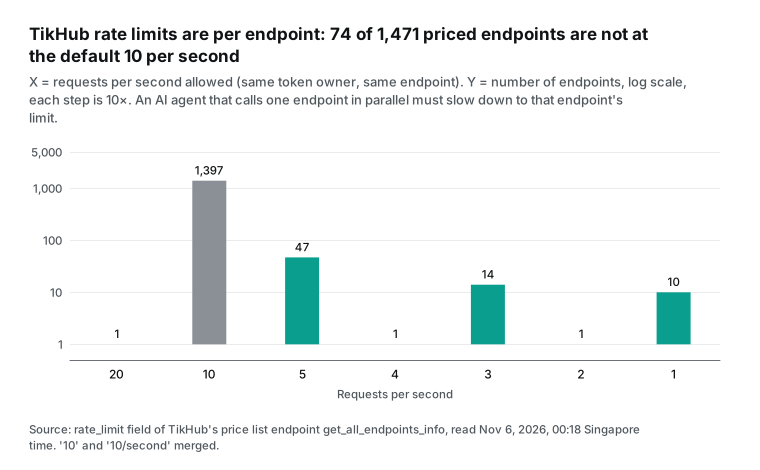
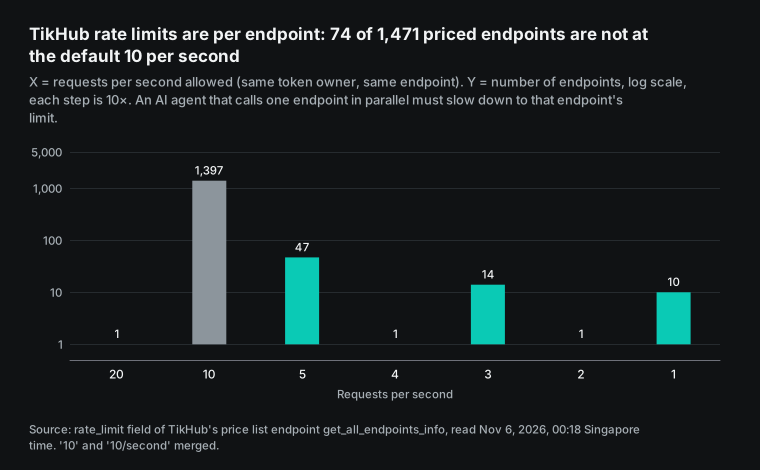
The docs say "default 10". The real number for each endpoint is in the price-list endpoint, which you can read without a token. At 00:18:13 SGT, we read 1,471 priced endpoints and counted the rate_limit field. 1,397 endpoints allow 10 per second.
47 allow 5, 14 allow 3, and 10 allow 1. One endpoint each allows 20, 4 and 2. So 74 endpoints are not at the default. An agent that runs at the default rate will get repeated 429 responses on an endpoint that allows only 1 per second.
EveryInfra counts the limit per account, not per endpoint. Our pricing page says the default is 60 requests per minute for all keys in the account together. More keys do not add more capacity. For more speed, you can buy a speed pack for 30 days: 180 per minute for $10, or 600 per minute for $30.
You also get higher limits at higher total top-up levels. Over the limit, you get 429 rate_limited with a Retry-After header that tells you how many seconds to wait. The 429 code and Retry-After come from section 4 of RFC 6585, and both services use them.
Each approach has costs and benefits. TikHub's per-endpoint limit gives high total throughput when you call many endpoints at once. Its 10 per second is also much faster than our default of 60 per minute. Our per-account limit means that an agent does not need to remember 1,471 separate limits. It only needs to know one number.
| Rate limit | TikHub | EveryInfra |
|---|---|---|
| What it counts | Each endpoint on its own (same token owner) | The whole account, all keys together |
| Default | Mostly 10 per second; 74 endpoints lower or higher | 60 per minute |
| More speed | RPS plan, bought in the RPS panel, monthly | Speed pack from $10 for 30 days, or top-up level |
| Over the limit | 429 "Request too fast" | 429 rate_limited with Retry-After |
| What the agent must know | The limit of each endpoint (rate_limit in the price list) | One account limit |
One more detail about the community Helper. Its SKILL.md says "QPS 10 per second per endpoint, timeout 30 to 60 seconds, up to 3 retries on errors". These lines come from the start of TikHub's openapi.json. But the Helper client has no retry code.
Its timeout is fixed at 30 seconds. On a 429, it only passes "HTTP 429" back to the model. The model reads SKILL.md and thinks that the client retries for it.
Who made the tikhub api helper, and what is in it
When you search "tikhub api helper", the top results are a GitHub repository named tikhub_api_skill (community repo A) and pages in skill directories that list it. Examples are the LobeHub skills marketplace and Shyft. The repository owner is a personal account. It is not in TikHub's GitHub organization. The repository description calls it "a Codex/Claude Code Agent Skill" for the TikHub API. It does not say that TikHub made it.
At 00:14 SGT, the GitHub API showed 129 stars and a page count of 17 forks. The repository was created on 2026-01-08, the last push was on 2026-07-08, and it has no license. So the correct description is this: it is a community project, and TikHub has no skill called "API Helper". TikHub's own product is tikhub-plugin, a Claude Code plugin. Its last release is v1.1.0 from 2026-06-15, with 18 skills and MCP settings for 7 platforms.
The Helper has a simple layout: four files under .claude/skills/tikhub-api-helper/. SKILL.md is 5,850 bytes. It tells the model to search for an endpoint, read its parameters, and then call it. api_searcher.py searches a local openapi.json by keyword. api_client.py sends the requests. openapi.json is an endpoint snapshot of 2,997,476 bytes.
The idea is sound. TikHub's API file is about 840,000 tokens, so you cannot give all of it to a model. A local search that passes only the matches to the model saves a lot of context. The Claude Code skills documentation agrees. The skill body loads only when you use it, and large reference files take almost no context until then. The problems are in the details, and the next sections cover them one by one.
This is not the only community skill. The TypingMind skill directory also lists another community skill, tikhub-skill (community repo B). It is part of the open-source project OpenCompany, and it works in a different way. It has no endpoint snapshot. Instead, it turns the methods of TikHub's Python SDK into one tool. Here are the three approaches side by side.
| Approach | Made by | How it finds endpoints | Where it reads the token | Problems we found |
|---|---|---|---|---|
| tikhub_api_skill (API Helper) | Community repo A (one developer) | Local snapshot of 1,120 paths, substring search | Code: TIKHUB_API_TOKEN; docs: TIKHUB_TOKEN | 25.7% of snapshot gone; urllib blocked; wrong example parameters |
| OpenCompany tikhub-skill | Community repo B | Method names of the TikHub Python SDK | Not checked | Not checked file by file |
| tikhub-plugin | TikHub | 18 skills plus one MCP server per platform | TIKHUB_API_KEY | Checked in our earlier test article: 237 of 1,109 paths in its code are gone from the docs |
Our article TikHub API key, docs and GitHub, tested already checked TikHub's own plugin. This article focuses on the community Helper for two reasons. It is the result that people open most for this search. And people copy it as it is. In the token section below, you will see that a fix in the original repository cannot reach the copies that already exist.
The endpoint snapshot is out of date: 288 of 1,120 paths are gone
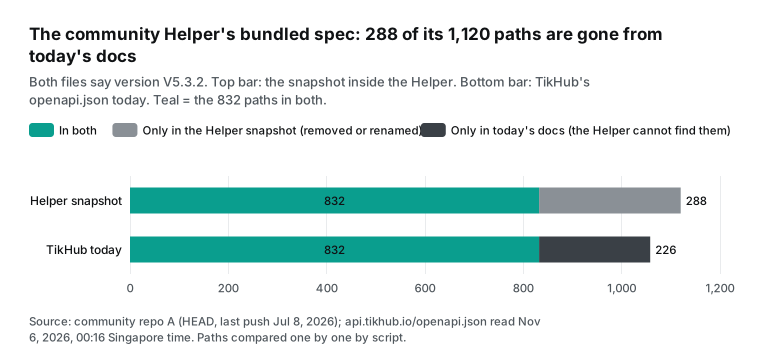
The Helper's openapi.json is a copy that the author downloaded from TikHub in January 2026. It changed only once after that, in May. We compared it path by path with TikHub's openapi.json as read at 00:16:44 SGT on 2026-11-06. Both files say info.version V5.3.2, so the version number suggests that nothing changed. In fact, only 832 of the 1,120 snapshot paths are still in today's documentation. 288 paths (25.7%) are gone.
It also works the other way. Of the 1,058 paths in today's file, 226 (21.4%) are not in the snapshot, so an agent that uses the Helper can never find them. Among the 832 shared endpoints, 59 have different query parameters. For example, the Kuaishou user search dropped page and added pcursor plus three filters.
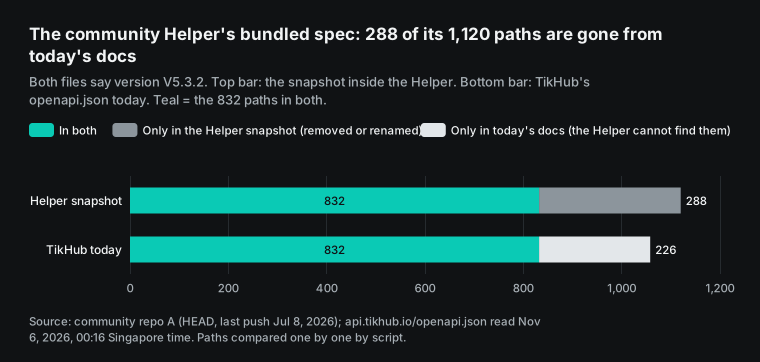
The changes come from a few groups. The new groups are the endpoints that people in influencer marketing and ad analysis want most.
| Gone from the docs (of 288) | Paths | New in the docs (of 226) | Paths |
|---|---|---|---|
| LinkedIn (two groups) | 77 | Bilibili Huahuo | 45 |
| TikTok Ads | 23 | Douyin Xingtu V2 | 29 |
| Douyin Web | 20 | Xiaohongshu Pugongying | 20 |
| Xiaohongshu Web V2 | 18 | Douyin DOU+ | 17 |
| TikTok App V3 / Sora2 | 17 each | — | — |
| Xiaohongshu Web (first group) | 15, all of it | — | — |
There is one more point. 201 of the 288 missing paths still appear in the price list, with prices. In TikHub API key, docs and GitHub, tested, we also found 433 paths in the price list that are not in the docs. This suggests that TikHub removes an endpoint from the docs first and leaves it in the price list. For an agent, a price-list entry is not proof that an endpoint still works.
The platform table in SKILL.md also shows the time gap. It says Xiaohongshu Web has 26 endpoints. The snapshot has 15, and today's docs have 0. It says YouTube Web has 16, and today there are 8.
It says TikTok App has 76, and today there are 58. The numbers in the table match neither the snapshot that ships with it nor today's docs.
| Group | SKILL.md says | Today's docs |
|---|---|---|
| Xiaohongshu Web | 26 (snapshot: 15) | 0 |
| YouTube Web | 16 | 8 |
| TikTok App | 76 | 58 |
An agent that plans with this table will think that Xiaohongshu Web has many endpoints. Then its search returns only paths that are already gone.
Searching the way SKILL.md says: why multi-word queries often return 0
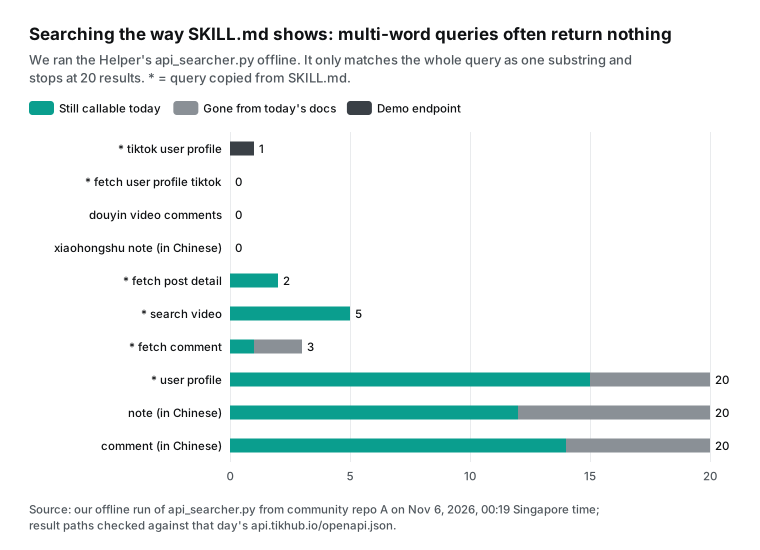
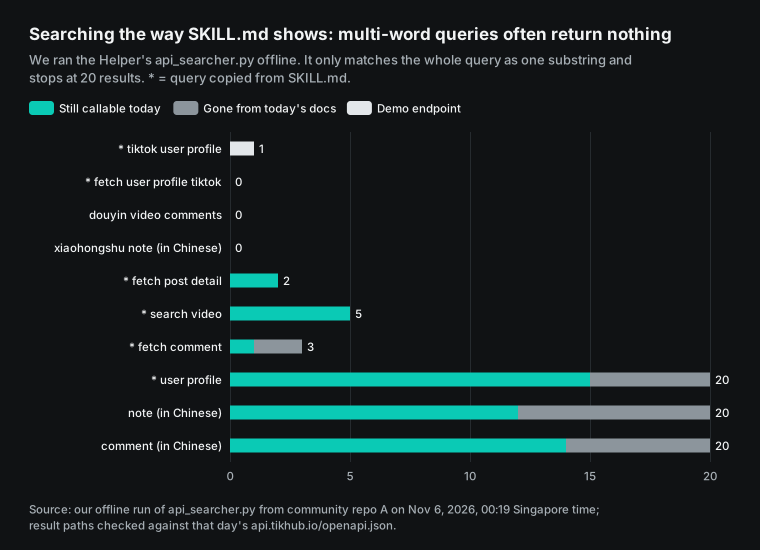
The Helper workflow has three steps: search, read details, then call. At 00:19 SGT, we ran its api_searcher.py offline on our own machine. We ran each query that appears in SKILL.md as it is, and four more queries in Chinese and with several words. The chart below shows the results.
"tiktok user profile" is the first step of the example workflow in SKILL.md. It finds 1 result, and that result is a demo endpoint that takes no parameters. "fetch user profile tiktok", from the "common use" section, finds 0. "douyin video comments" finds 0, and the Chinese query for "Xiaohongshu notes" also finds 0.
| Query (* = as written in SKILL.md) | Results | Still in today's docs |
|---|---|---|
| tiktok user profile * | 1 | Demo endpoint only |
| fetch user profile tiktok * | 0 | — |
| douyin video comments | 0 | — |
| Xiaohongshu notes (Chinese) | 0 | — |
| fetch post detail * | 2 | 2 |
| search video * | 5 | 5 |
| fetch comment * | 3 | 1 |
| user profile * | 20 | 15 |
| notes (Chinese) | 20 | 12 |
| comments (Chinese) | 20 | 14 |
The cause is in the search script. It treats the whole query as one substring. It looks for that substring in a joined string of "path + summary + description + operationId", and it stops at 20 results. A query with several words matches only when the words appear together in that exact order. TikHub summaries look like "Get user profile", so the three words "tiktok user profile" never appear together.
The script does contain a suggest_api function with a keyword map. It can expand "user profile" into fetch_user_profile. But the command-line entry point never calls it. Single words do find results, but they fill all 20 slots at once, and the script cuts the list in file order. Of the 20 results for the Chinese word for "notes", 8 are already gone. The first results are not always for the platform that you want.
The second step, "read details", has a problem too. The SKILL.md example is detail:tiktok_web_fetch_user_profile_get. We ran it as written and got "No API found". The real operationId in the snapshot is fetch_user_profile_api_v1_tiktok_web_fetch_user_profile_get. With that name, we got 1,970 bytes of parameter details.
For the last step, the call, SKILL.md gives four different example calls. We compared each one with the parameters in today's docs.
| SKILL.md example | Parameter in the example | Parameters in today's docs | Result |
|---|---|---|---|
tiktok/web/fetch_user_profile | sec_user_id | uniqueId or secUid | Parameter does not exist |
tiktok/web/fetch_post_detail | post_id | itemId (required), region | Parameter does not exist; required parameter missing |
tiktok/web/fetch_post_comment | post_id | aweme_id (required), cursor, count, current_region | Parameter does not exist; required parameter missing |
tiktok/web/fetch_search_video | keyword | keyword (required), count, offset, search_id, cookie | Matches |
An agent that learns from these examples will send sec_user_id on its first profile call, and the server does not know that parameter. TikHub endpoints use FastAPI. In today's openapi.json, 973 endpoints declare a 422 validation error. The response body has the standard fields loc, msg and type. It tells you which required parameter is missing. It does not tell you that your post_id should be itemId.
On the profile endpoint, both parameters are optional. Will the server ignore an unknown parameter without a word, and will it charge for the call? We have no account, so we did not test this, and we must mark it as unknown. The section "What happens when you get it wrong" below shows how our API responds to the same mistakes.
Where to keep the token: three variable names and a hardcoded token
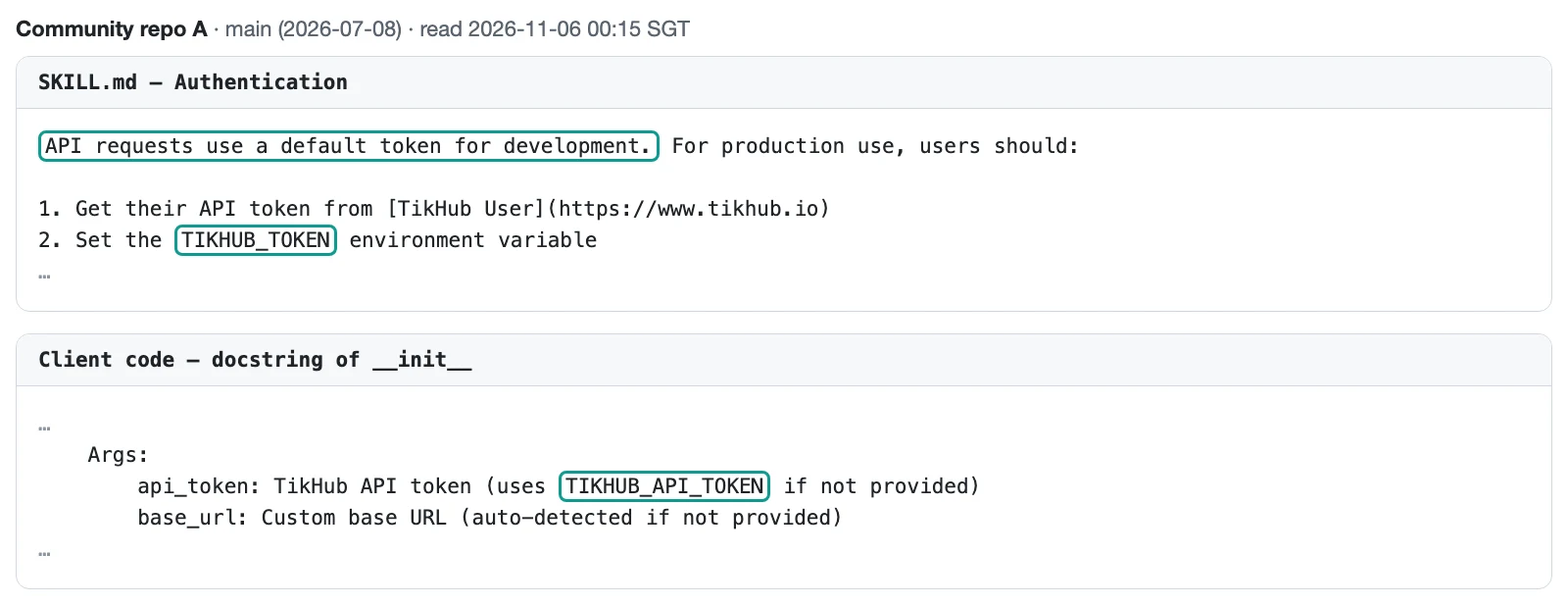
Start with the easiest mistake: the environment variable name. The Authentication section of SKILL.md tells you to set TIKHUB_TOKEN. But api_client.py reads TIKHUB_API_TOKEN. TikHub's Python SDK and TikHub's plugin use a third name, TIKHUB_API_KEY, and that name appears 83 times in the plugin settings.
We set only TIKHUB_TOKEN on our machine and left the other two unset. Then we created the Helper client. It read a token of length 0. The request header became the scheme name, then a space, then nothing. So a user who follows SKILL.md exactly sends every request without a token and gets only 401 responses.
| Where | Variable name | Result if it is the only one set |
|---|---|---|
Helper SKILL.md | TIKHUB_TOKEN | Token length 0, empty Bearer header, 401 |
Helper api_client.py | TIKHUB_API_TOKEN | Works (with the User-Agent fix) |
| TikHub SDK and plugin | TIKHUB_API_KEY | Works for the SDK and plugin |
The first teal box in the screenshot says "API requests use a default token for development". That line comes from an early version of the Helper. The early version had a token written directly into the code.
Later, another contributor sent a fix. It changed the code to read the token only from an environment variable, and the change was merged into the main branch. The fix itself is correct. But it did not update SKILL.md. So today, SKILL.md still tells the model that requests use a default token, while the code has no default. A model that reads this line expects calls to work without the variable, and it gets only 401 responses.
The forks are a bigger concern. We used the GitHub API to read the forks of the repository one by one. We compared only hashes of the string, and we did not copy or test the value. Our finding is one sentence: some forks still contain the early hardcoded token, and we recommend that the author rotate it.
We did not test whether the token still works, and we should not. A call with a leaked token spends someone else's money. For Helper users, the lesson is the other side: a version that you installed from a fork or a copy may not be the fixed version from the original repository.
| Your situation | What to do |
|---|---|
| You use the current main branch of the original repository | Set TIKHUB_API_TOKEN, not TIKHUB_TOKEN, and add a User-Agent |
| You installed the Helper from a fork or a copy | Search your copy for a hardcoded token, delete it, and read the token from a variable |
| You maintain the repository or a fork | Revoke and rotate the early token; a change to history does not reach other copies |
GitHub's documentation is clear about this case. If you leak a credential such as a password or token, the first step is to revoke or rotate it. After you revoke it, nobody can use it, and you often do not need to rewrite history. If you only rewrite history and force-push, people can still get the old commits from any clone or fork. They can also get them from GitHub's cached views by hash and from pull requests that refer to them. Only the fork owner can remove the copy in a fork.
In other words, the fix in the original repository protects the future only. It cannot fix the copies that are already out. The step that works is to revoke the token.

If you installed the Helper from a fork or a copy, search your local copy for a long hardcoded string. If you find one, delete it, read the token from an environment variable, and never use a token that someone else left behind. On our side, refer to ${EVERYINFRA_API_KEY} in your MCP settings and nowhere else. The Claude Code MCP documentation says that .mcp.json supports this kind of variable expansion. Your team can share the settings file without sharing the key.
api tikhub io and api.tikhub.dev: why Python's urllib cannot connect
People who search "api tikhub io" often saw the domain in code or in an error message. api.tikhub.io is TikHub's main domain. Its root path is a Swagger page where you can enter a token and try calls in the browser. There is also api.tikhub.dev. The Helper calls it a "China domain to get around network limits".
TikHub's README says something else in its domain and connection notes. It asks you to use api.tikhub.io and to avoid api.tikhub.dev, which can be slower. If a request takes more than 30 seconds, it suggests that you set up your own proxy.
The domain is not what blocks the Helper. The request header is. The Helper's api_client.py sends requests with Python's standard urllib.request and sets no User-Agent. So it uses the default value from the Python documentation: "Python-urllib/" plus the version. At 00:20:21 SGT, we used the Helper as it is to call the health check endpoint /api/v1/health/check, which needs no token. It returned "HTTP 403: Forbidden".
Then we sent requests to the same address with different headers. The table and the chart below show the results. Each 403 body was one line, "error code: 1010", with the response header server: cloudflare.
| User-Agent | api.tikhub.io | api.tikhub.dev |
|---|---|---|
| Python-urllib/3.15 (Helper default) | 403, 1010 (2 of 2) | 403, 1010 (2 of 2) |
| python-requests/2.32.3 | 200 (2 of 2) | 200 (1 of 1) |
| python-httpx/0.28.1 | 200 (1 of 1) | not tested |
| curl/8.7.1 | 200 (1 of 1) | 200 (1 of 1) |
| Browser header | 200 (1 of 1) | not tested |
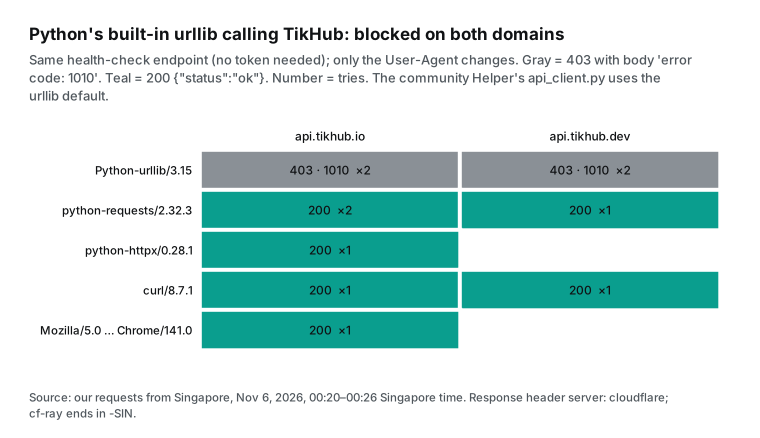
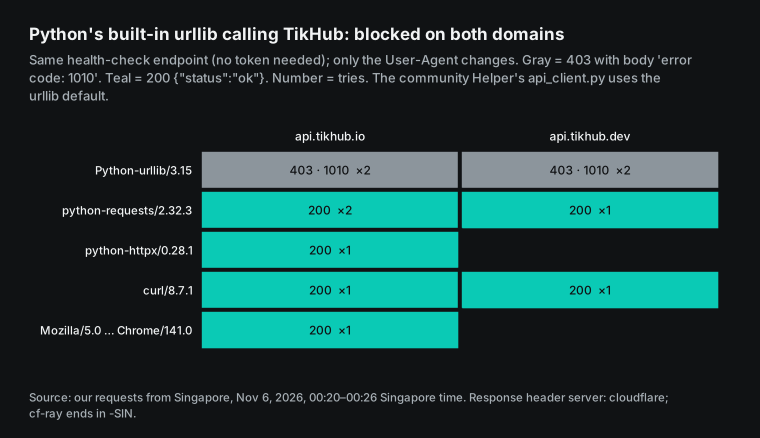
1010 is a Cloudflare error code. The Cloudflare page for this error says that the site owner blocked access based on your browser signature. Its list of common causes names "the default Python urllib user agent". Cloudflare's Browser Integrity Check is on by default, and it blocks requests with no User-Agent or an unusual one. The fix that Cloudflare gives is to send a User-Agent that says who you are, such as "my-app/1.0". You do not need to pretend to be a browser.
This result has limits. We tested from one network in Singapore, at two times only. TikHub sets its own Cloudflare rules, so results can change with region and time. But both rounds and both domains gave the same result.
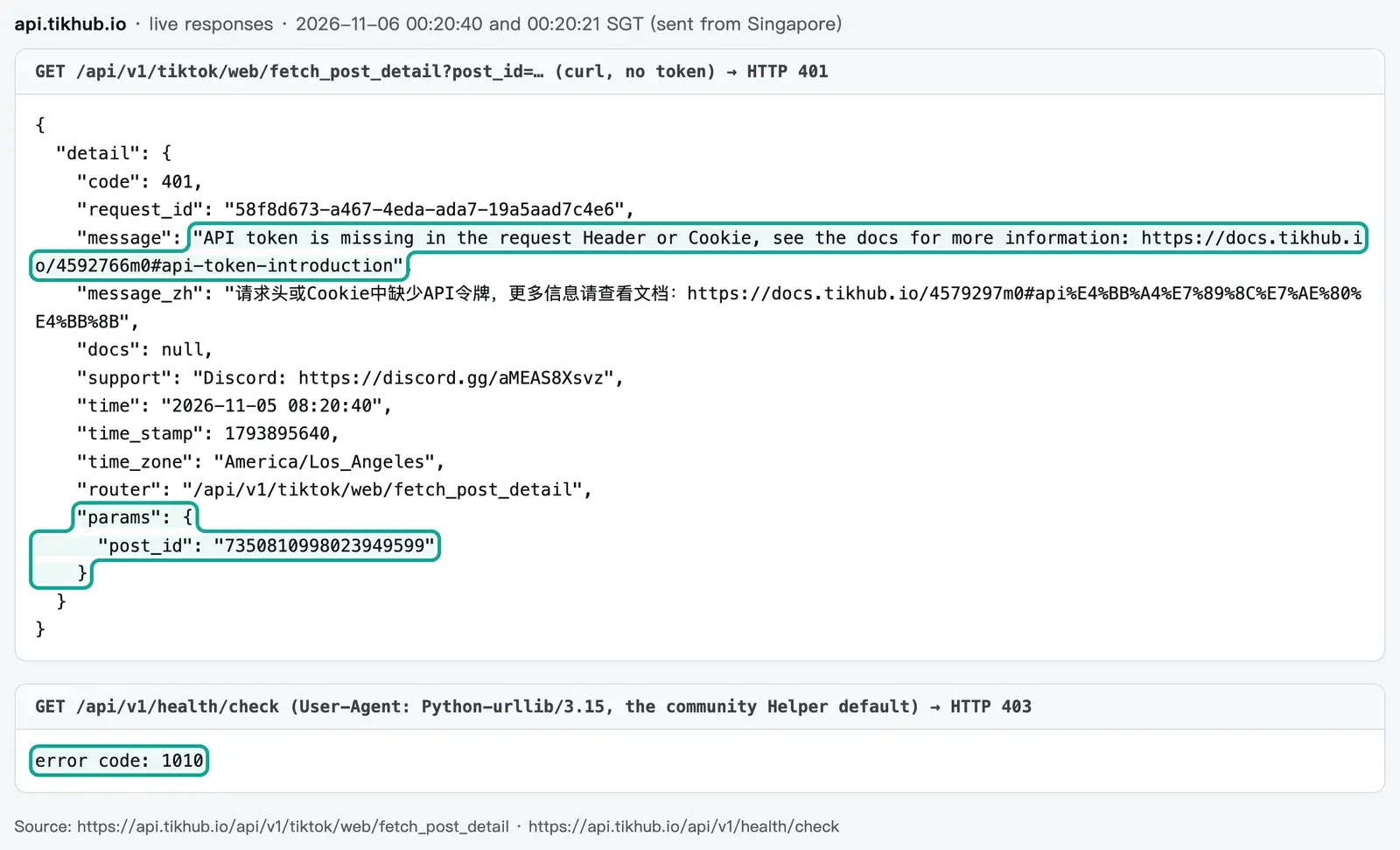
For an AI agent, this 403 is harder to handle than a 401. When the Helper gets a 403 with a body that is not JSON, it returns only {"error": "HTTP 403: Forbidden", "status_code": 403}. The key clue, "1010", is lost. The error table in SKILL.md lists only four cases: 401, 429, connection errors, and missing parameters. It has no row for 403.
TikHub's README gives four reasons for a 403. The token has no permission for the route, the account is suspended, the email is not verified, or the token lacks permissions. A model that reads the docs carefully will almost always treat this 403 as a token problem. It will tell you to check your email verification or create a new token. The real fix is one line in the header. Add a User-Agent line to _build_headers:
# _build_headers in api_client.py: add only the User-Agent line, keep the rest
def _build_headers(self, content_type: str = "application/json"):
    return {
        "Authorization": f"Bearer {self.api_token}",
        "Content-Type": content_type,
        "User-Agent": "my-tikhub-agent/1.0",  # without this line, Cloudflare blocks the default urllib header with 1010
    }
We also tested EveryInfra with the same Python-urllib header. At 00:26:04 SGT we read the TikTok capability catalog, and at 00:26:05 we requested the MCP tool list. Both returned 200. The same plain Python code runs on one side and is blocked on the other. Many scripts that agents write are exactly this kind of code, with no extra libraries.
How many steps one call takes: the Helper, TikHub MCP and EveryInfra remote MCP
Now put the sections above together. Take one task: an agent must get the profile data of one TikTok account. Here is how many steps each approach takes. For the Helper, we assume the best case, after you fix the variable name and the header. For TikHub MCP, we use the settings on its MCP page. For EveryInfra, we use our live calls from the same night.
| Step | Community Helper (after fixes) | TikHub MCP | EveryInfra remote MCP |
|---|---|---|---|
| Setup | Clone the repo, set TIKHUB_API_TOKEN, fix the header | Install Node.js; add one npx mcp-remote entry per platform | One HTTP entry; the key comes from a variable |
| Find the endpoint | api_searcher.py; multi-word queries often return 0 | TikTok server lists 163 tools, Douyin 319 | Call the free everyinfra_list_capabilities, or read the catalog |
| Read parameters | detail: plus the full operationId | Parameters are in each tool description | Each catalog entry lists required and optional parameters, response_fields and price |
| Call | api_client.py GET path params | Call the matching tool | everyinfra_call_api with platform, action, params |
| On a mistake | Only the HTTP status and raw body | TikHub 401 or 422 response | 400 or 422 with did_you_mean and example, no charge |
| Total | At least 4 tool calls, more when search fails | 1 call after the tool descriptions load | 2 calls (catalog + call), 1 after the agent learns the names |
TikHub MCP has one server per platform. You can read the platform list without a token. TikTok has 163 tools, Douyin 319, Instagram 93, and Xiaohongshu 45. Each endpoint is one tool, so the model can pick one directly. The cost is that a connection to the Douyin server loads 319 tool descriptions.
The TikHub settings example uses npx mcp-remote to turn the remote HTTP server into a local process. The authentication goes in a --header argument. TikHub's plugin settings refer to the environment variable with ${TIKHUB_API_KEY}. Below, the TikHub example (with the key changed to a variable reference) and our example are side by side. Check the exact fields in the documentation of your own client.
{
  "mcpServers": {
    "tikhub-tiktok": {
      "command": "npx",
      "args": ["-y", "mcp-remote", "https://mcp.tikhub.io/tiktok/mcp",
               "--header", "Authorization: Bearer ${TIKHUB_API_KEY}"]
    },
    "everyinfra": {
      "type": "http",
      "url": "https://api.everyinfra.com/mcp",
      "headers": { "Authorization": "Bearer ${EVERYINFRA_API_KEY}" }
    }
  }
}
We have one address: https://api.everyinfra.com/mcp. At 00:21:08 SGT, we requested its tool list without a key. It returned 12 tools in 16,247 bytes. Another 12 account tools (usage, billing, keys and more) are at the full address /mcp/all, so there are 24 tools in total. See /mcp-server. Data capabilities do not get one tool each. All of them go through everyinfra_call_api, and two parameters, platform and action, select the capability, for example tiktok/profile.
The benefit is a small tool list, and new capabilities need no settings change. The cost is that the model must read the catalog first to learn the action names. The catalog needs no key. GET /api/v1/social/catalog?platform=tiktok&compact=1 returns only TikTok. At 00:18:12 SGT it was 6,835 bytes, with the parameters, prices and field names of all TikTok capabilities.
The MCP specification allows both designs. The authorization section of the 2026-07-28 specification says that authorization is optional. Neither service uses OAuth. Both send the key in a request header, which follows the Bearer header format in RFC 6750.
What happens when you get it wrong: 400, 422 and did_you_mean, tested
The most common agent mistake is to use the naming style of another service. We copied the behavior of an agent that just used TikHub. At 00:21:08 SGT, we sent one request with action in TikHub style, fetch_user_profile, and the parameter uniqueId. Then we sent a second request with the correct capability name but the Helper example parameter sec_user_id.
The first request returned 400 unknown_capability. Its did_you_mean was profile, and allowed listed all 24 TikTok data capabilities (a different 24 from the 24 MCP tools above). Its next_steps said to send again with profile and that nothing was charged. The second request returned 422 missing_param.
Its next_steps said to add the required username and that sec_user_id is not a parameter here. It also included an example that you can run as it is. Neither request cost anything.
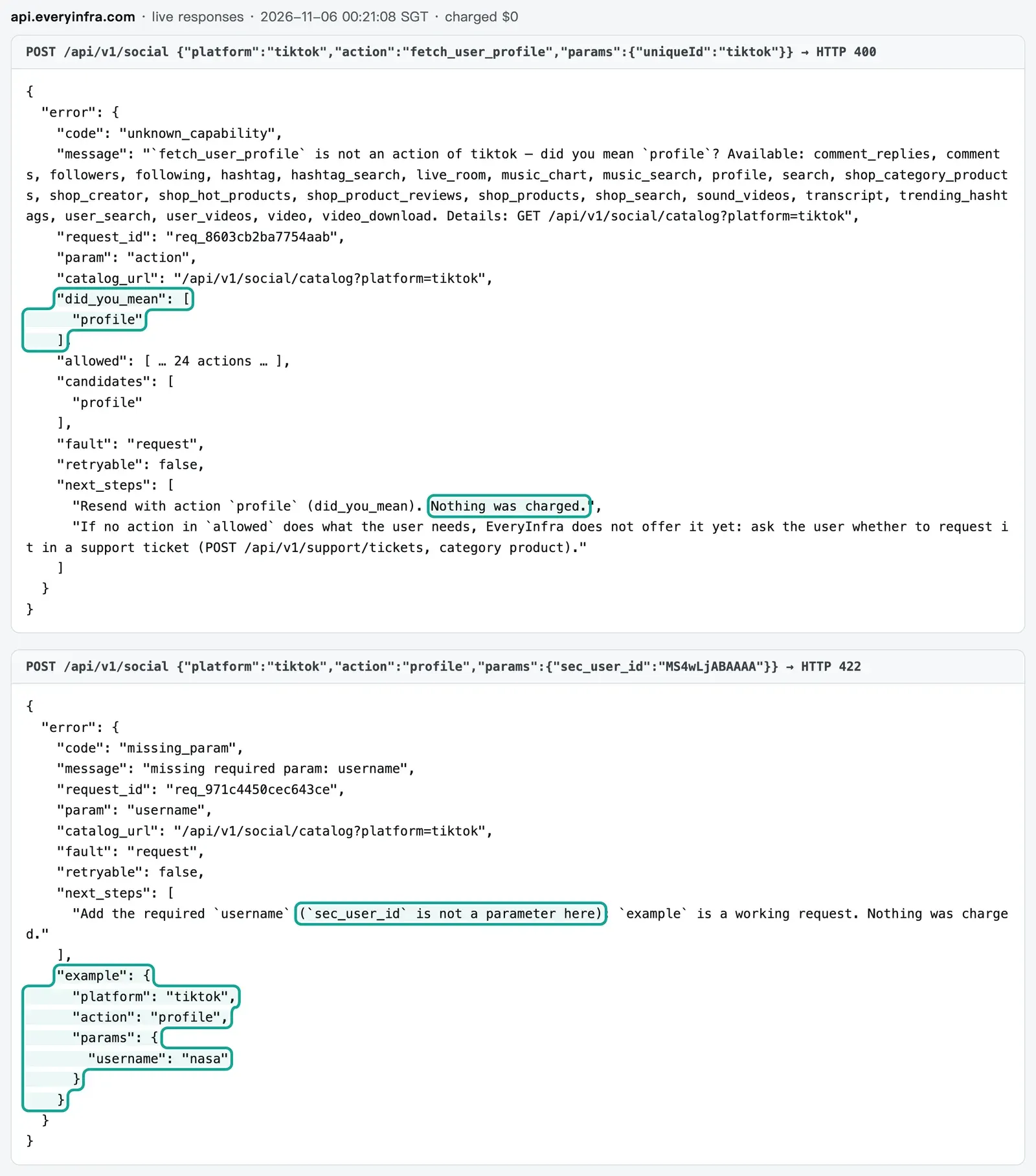
Compare TikHub. Without a token, it checks authentication first. At 00:20:40 SGT, we called the post detail endpoint with the wrong parameter post_id and no token. It returned 401.
The body echoed the route and the parameters, but it did not point out the wrong parameter. With a token, its openapi.json says that a missing required parameter returns a FastAPI 422. That response names the missing field but does not suggest the right name.
Our order is also authentication first, then parameter checks. Without a key, you get 401, so a request without authentication cannot learn the shape of our API. With a key, an unknown parameter or a bad value returns 422 with the supported parameters, the allowed values and did_you_mean. The purpose of this rule is to let the caller's AI fix its own mistake. A wrong call should not cost money each time.
Three live calls: one through MCP, two with curl
Now the real calls. We chose three capabilities at $0.000556 each, on two platforms, with two ways to call. For each call, we recorded the SGT time, the number of items and charged_usd.
| Time (SGT) | Capability | Method | Duration | Result | Charge |
|---|---|---|---|---|---|
| 00:21:20 | tiktok/profile, username=tiktok | Remote MCP everyinfra_call_api | 30.2 s | 1 account: 96,600,000 followers, 1,513 videos | $0.000556 |
| 00:21:56 | tiktok/user_videos, username=tiktok | curl | 38.3 s | 10 videos | $0.000556 |
| 00:22:42 | douyin/comments, one Douyin video link | curl | 19.4 s | 20 comments | $0.000556 |
The three calls cost $0.001668 in total. We must be honest about time. The calls took 30, 38 and 19 seconds. That is the time to wait for a synchronous result.
It suits an agent that works in the background, not a person who watches a page. We have no TikHub account, so we could not measure its speed. Its README says to set a timeout of 30 to 60 seconds.
The response_fields in the catalog define the returned fields. The profile capability returns 16 fields, such as follower_count and video_count. The videos capability returns more than 30 fields. The comments capability includes like_count, reply_count, ip_location and next_page_token for the next page. Here is the curl request for the second call. The key comes only from an environment variable.
curl -s https://api.everyinfra.com/api/v1/social \
  -H "Authorization: Bearer $EVERYINFRA_API_KEY" \
  -H "Content-Type: application/json" \
  -d '{"platform":"tiktok","action":"user_videos","params":{"username":"tiktok"}}'
# returns count: 10, billing.charged_usd: 0.000556
Price: the same 1,000 TikTok and Douyin requests
This price section is short on purpose. For the full breakdown, see TikHub pricing explained. For TikHub, we used the price list read at 00:18:13 SGT and the pricing page read at 00:16 SGT. The endpoints that match our calls are the TikTok profile fetch_user_profile, TikTok videos fetch_user_post, and Douyin comments fetch_video_comments.
Each costs $0.001 per call. TikTok and Douyin have 658 priced endpoints in total, and 529 of them cost $0.001. For EveryInfra, we used the charged_usd from the three live calls above, $0.000556 each.
| Case (1,000 requests each) | TikHub public price | EveryInfra, measured | Ratio |
|---|---|---|---|
| TikTok profile | $1.00 ($0.001 × 1,000) | $0.556 | 1.8 |
| TikTok videos | $1.00; 15 items per page by default, about $0.067 per 1,000 items | $0.556; 10 items per call, $0.0556 per 1,000 items | 1.8 per call, 1.2 per item |
| Douyin comments | $1.00; 20 items per page by default, $0.05 per 1,000 items | $0.556; 20 items per call, $0.0278 per 1,000 items | 1.8 per call, 1.8 per item |
| Free credit | $0.05 at sign-up, about 50 calls; some endpoints are free | $1 for a GitHub star, valid for 24 hours | — |
| Minimum top-up | $5 | From the $10 level | TikHub is lower |
Two notes on the per-item numbers. You can raise the count parameter on the TikHub videos endpoint. More items per page make the per-item price lower, and we could not test the maximum. Our tiktok/user_videos returns 10 items per call, so the per-item gap is only 1.2 times.
TikHub also has a daily volume discount. On one endpoint, after the first 1,000 calls of a day, the unit price steps down to $0.0009, then $0.0008, and reaches $0.0005 after 30,000. We turned these steps into an average price per 1,000 calls for N calls a day. At 10,000 calls a day, the average is $0.86.
At 50,000, it is $0.632. Only at about 117,900 calls a day does it fall to our $0.556. Above that, TikHub is cheaper.
The discount applies only to endpoints that allow it. Of the 529 TikTok and Douyin endpoints at $0.001, 52.0% allow the discount. The Douyin single-video endpoint fetch_one_video, for example, does not.
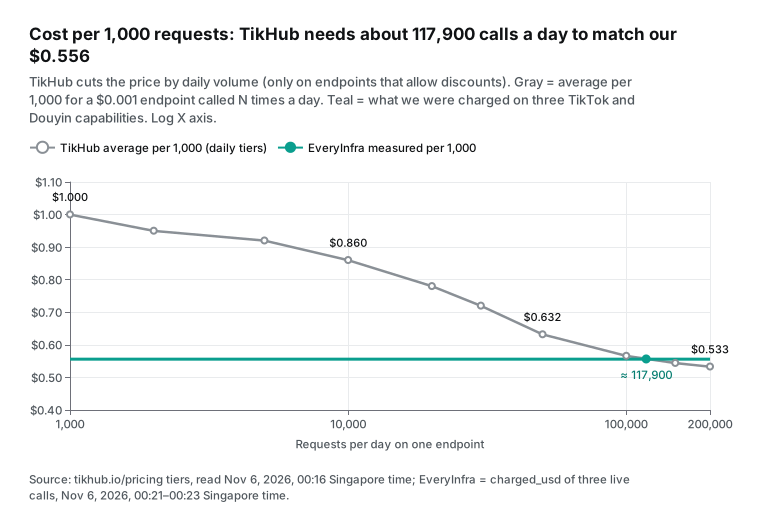
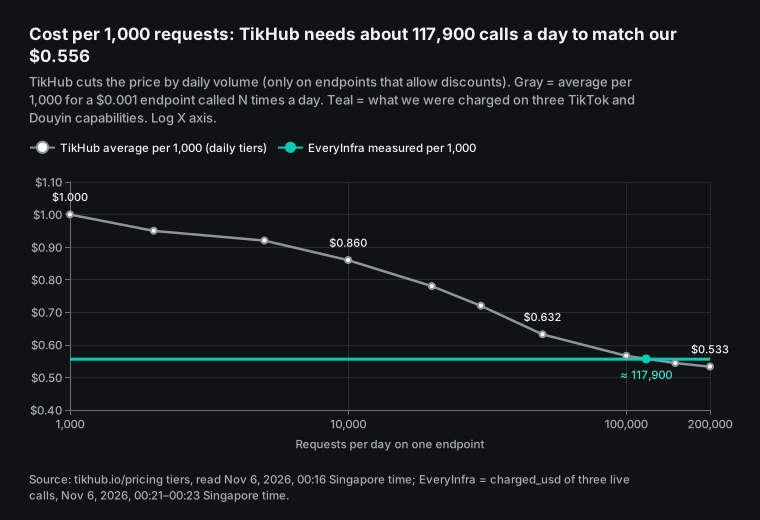
So the answer depends on volume. An agent that makes a few thousand or tens of thousands of calls a day on one endpoint pays less with EveryInfra. At more than about 118,000 calls a day on one endpoint that allows the discount, TikHub's volume price is lower. Our prices also have discount levels for monthly top-ups, and the pricing page has the details.
The TikHub pricing page also says that calls through MCP and the browser extension cost the same as direct API calls. The same is true for us. MCP, the SDK and curl all charge the same charged_usd, and failed calls and empty results cost nothing.
Before you give a token to an AI agent: six checks
Here are the sections above as one checklist. Whether you choose TikHub or EveryInfra, do these six checks before the first live call from an agent. Each check includes a way to verify it.
First, give each agent its own token. TikHub allows up to 100 per user. On our side, a key can create at most 20 keys a day. Keys that you create in the console do not count toward that limit.
With separate tokens, the usage records show which agent spent what and which agent hit a rate limit. If one agent's settings file goes into a public repository by mistake, you disable only that one token. To verify, make sure that each token appears in the environment of one project only.
Second, keep the token in an environment variable only. Do not put it in a skill file, and do not put it in plain text in a settings file. TikHub's plugin and our plugin both refer to the variable with ${...} in their settings, and that is the right pattern. The Helper's history shows the opposite case.
The token that went into the code in an early version was later removed from the original repository, but some forks still contain it. To verify, search your project folder for "Bearer" and for the first few characters of your token. The only results must be variable names.
Third, use the variable name that your running code reads. This sounds obvious, but the Helper uses three different names. SKILL.md says TIKHUB_TOKEN, the code reads TIKHUB_API_TOKEN, and the TikHub SDK and plugin use TIKHUB_API_KEY. If you set only the name from SKILL.md, requests go out with an empty Bearer header.
TikHub returns 401, and the model will probably think that the token is wrong and tell you to make a new one. To verify, print the length of the token before the call, not the value. A length of 0 means that the variable name is wrong.
Fourth, run one free request first. TikHub's health check and price list need no token. EveryInfra's catalog and MCP tool list need no key. Send one request with the same HTTP client that your agent will use. This separates three kinds of problems: a blocked header (1010), failed authentication (401), and wrong parameters (422). This step is how we found that the default urllib header cannot reach either TikHub domain, while curl and requests work.
Fifth, put the rate limit in the agent's instructions. TikHub counts per endpoint. 74 endpoints are not at the default of 10 per second, and the lowest is 1 per second. We count per account, with a default of 60 per minute.
Agents run in parallel by default, so tell the agent clearly to wait after a 429. Our response has Retry-After, so the agent waits that number of seconds. TikHub's 429 note says only "Request too fast", and the public docs do not say how long to wait. We suggest a wait of 1 second, doubled after each new 429.
Sixth, set a limit on the balance, and find the most expensive call first. Of TikHub's 1,471 priced endpoints, most cost $0.001 per call. But of the 78 Douyin Xingtu endpoints with "xingtu" in the path, 19 cost $0.02 per call. Douyin general search v2 costs $0.01.
On one token, prices differ by 20 times. On our side, each capability's price is in the catalog, and the agent can read it before a call. To verify, ask the agent to list the endpoints and prices before it calls them, and approve the list. Keep only enough money in the balance for that run.
| Check | How to verify | Who does it on EveryInfra |
|---|---|---|
| 1. One token per agent | Each token is in one project only | You |
| 2. Token only in a variable | Search for "Bearer"; only variable names | You |
| 3. Correct variable name | Token length is not 0 | One name only: EVERYINFRA_API_KEY |
| 4. One free request first | Separate 1010, 401 and 422 | Free catalog and tool list |
| 5. Rate limit in the instructions | Agent waits after 429 | Retry-After gives the wait |
| 6. Balance limit and top price | Agent lists prices first | Prices are in the catalog |
The free data-analysis Skills are not the same thing as the Helper
Many people who search "tikhub api helper" want one thing: install a skill, and let the AI get the data and analyze it. There are two kinds of skills here. The Helper is a "how to call the API" guide. It tells the model where to find endpoints and how to build requests. It does not analyze data.
EveryInfra also has data-analysis Skills. They are free to download, and you use them with your own AI tools and models. Version v0.4.1, released on 2026-10-15, has four: e-commerce product analysis, social content performance, content tagging, and review insights. They do not collect data. You collect the data with the EveryInfra API, and collection is billed per call. Our article one SKILL.md for four AI tools shows how to use them.
The API side is in our plugin repository. Version v0.4.0 came out on 2026-10-21, and its settings refer to ${EVERYINFRA_API_KEY}. On 2026-11-01 we also released everyinfra 0.3.0 on PyPI, with a command-line tool and price estimates.
A split between collection and analysis also helps with token management. The analysis skills need no key at all. Only the API step needs one. You can run the analysis locally and give the collection step one key with tight permissions.
When TikHub is the better choice
Here is where TikHub does better than us. First, endpoint coverage. Its docs today have 1,058 paths. For influencer marketing and ad platform data, such as Douyin Xingtu, DOU+, Xiaohongshu Pugongying and Bilibili Huahuo, it has many detailed endpoints. For these back-office marketing endpoints, it has more than we do.
Second, price at high volume. At more than about 118,000 calls a day on one endpoint that allows the discount, its volume price is lower than ours. Third, the entry cost. Its minimum top-up is $5, lower than our $10 level, and its $0.05 free credit has no time limit. Fourth, raw fields.
It returns the platform's own data structure. In TikHub API key, docs and GitHub, tested, for example, it gave the exact TikTok follower count, while we give a rounded number. Fifth, the number of keys. Each user can have 100, which makes per-project accounting easy. The description of its Python SDK 2.2.0 says that the SDK covers 1,048 endpoints and has an async client.
The snapshot comparison above also shows the direction. Almost all of the 226 new endpoints are for influencer marketing and ad platforms. If your work is to find creators for brands and read rate cards and ad data, TikHub goes much deeper than we do. Check the price of those endpoints one by one, because many do not cost $0.001.
If you already use TikHub and want to stay, this article helps in three ways. Use TikHub's plugin or SDK, not the out-of-date community Helper. Set the variable name that your running code reads. Set a User-Agent in your own Python scripts.
If you are connecting an AI agent to social data for the first time, other things may matter more. These include errors that the agent can fix, no charge for failures, and one address for all platforms. They also include the cost at a few thousand to tens of thousands of calls a day. In that case, EveryInfra is the simpler choice.
Our other TikHub articles cover different ground. TikHub API key, docs and GitHub, tested covers the key, the size of the docs, and the state of the TikHub SDK. TikHub pricing explained breaks down more than a thousand price lines. TikHub alternatives and /alternatives/tikhub give the full comparison.
Industry news
- On 2026-10-22, Anthropic donated the Agent Skills standard to the Agentic AI Foundation. The Linux Foundation announcement of the same day says that more than 70 agent platforms support it. It also reports 1 million published skills and almost 280 million installs. What it means for you: more tools will read each
SKILL.md, so wrong variable names and endpoint names in a skill also travel further through forks and copies, as with the community Helper in this article. - On 2026-10-24, Cloudflare updated its 1010 error page, which names the default Python urllib User-Agent. What it means for you: set a User-Agent in agent scripts with no extra libraries before you use them in production.
- On 2026-10-27, Google Cloud released IAM Helper. It uses Agent Skills and MCP tools to let agents investigate 403 errors and request one-hour temporary access, with human approval before a permission change. What it means for you: agents will more often answer a 403 by asking for more access. If the 403 is really a 1010 header block, more access does not help. Read the response body first to find where the 403 comes from.
- On 2026-10-28, GitHub connected AI-based secret detection to push protection, in public preview and off by default. What it means for you: it can stop future pushes with hardcoded tokens, but not the copies already in forks.
FAQ
Where do I create a tikhub api token?
(Source: Google autocomplete for "tikhub api token", read 2026-11-06.) Log in to the TikHub user center. Open the API token menu and create a token. Put it in the Authorization: Bearer header. The "Get API Token" section at the end of the docs site README has the original text, and each user can have up to 100.
The old docs said that you can set scopes, an expiry date and a manual on/off status. The current public docs do not say how, and these states appear only in the 401 and 403 reasons. For AI agents, give each agent its own token.
Is the tikhub api helper made by TikHub?
(Source: Google autocomplete for "tikhub api helper", read 2026-11-06.) No. The top result, tikhub_api_skill, belongs to a personal account, and its description does not claim that TikHub made it. TikHub's own products are tikhub-plugin in the TikHub GitHub organization (v1.1.0, 18 skills) and the TikHub Python SDK. 25.7% of the community Helper snapshot is gone, and its default urllib header gets blocked. Use TikHub's plugin instead, or make the two fixes in this article first.
What do I do when api tikhub io does not open or returns 403?
(Source: Google autocomplete for "api tikhub io" and "https api tikhub io", read 2026-11-06.) Read the response body first. If it says "error code: 1010", Cloudflare blocked your request header. Set a User-Agent in your client, and the problem goes away. It has nothing to do with the token. If the JSON body says that the token lacks permissions or the email is not verified, it is an account problem. TikHub asks you to use api.tikhub.io and to set up your own proxy if requests take more than 30 seconds. api.tikhub.dev can be slower.
Are a tikhub api key and a token the same thing?
(Source: Google autocomplete for "tikhub api key" and "tikhub api token", read 2026-11-06.) Yes. TikHub uses both words in different places. The docs site says "API Token". The tutorials page and the new Python SDK say "API key", and the environment variable is TIKHUB_API_KEY.
The variable name is the confusing part. The community Helper code reads TIKHUB_API_TOKEN, but its SKILL.md says TIKHUB_TOKEN. TikHub's AI agent service also has separate keys that do not work with the data API.
Can I install the TikHub skills on GitHub as they are?
(Source: Google autocomplete for "tikhub github", read 2026-11-06.) You can install TikHub's tikhub-plugin as a Claude Code plugin, and its settings use ${TIKHUB_API_KEY}. You can install the community Helper, but do three things first. Set the correct variable name. Add a User-Agent in api_client.py. Search your local copy for a hardcoded token. A fork or a copy can still contain the early hardcoded token, and you must not use it.
What is the tikhub ai api, and does it use the same key?
(Source: Google autocomplete for "tikhub ai api", read 2026-11-06.) TikHub has a separate AI agent service in testing. According to TikHub's own docs, which TikHub API key, docs and GitHub, tested cited, you sign up on a separate site and get a separate key. That key does not work with the social data API. In this article, "token" means only the data API token. One EveryInfra key can call data, search and CAPTCHA solving, and you can turn off each product for each key in the console.
Getting started
- Open /docs, sign up, and create a key in the console. Set it as the environment variable
EVERYINFRA_API_KEY. For credit before a top-up, follow /pricing and get $1 of trial credit for a GitHub star. - Read the catalog without a key:
GET https://api.everyinfra.com/api/v1/social/catalog?platform=tiktok&compact=1. It shows the capabilities and prices for TikTok and Douyin. - Add MCP to your AI tool. The address is
https://api.everyinfra.com/mcp, and the auth header refers to the environment variable. See /mcp-server for the settings. - Ask the agent to call
everyinfra_list_capabilitiesfirst. Then it calls a capability such astiktok/profilewitheveryinfra_call_api. On a mistake, it followsdid_you_meanandexamplein the response, at no charge.
References
- README - English (API Token Introduction, HTTP Status Codes), TikHub docs, read 2026-11-06, https://docs.tikhub.io/4592766m0
- README - Chinese, TikHub docs, read 2026-11-06, https://docs.tikhub.io/4579297m0
- llms.txt (docs site index), TikHub, read 2026-11-06, https://docs.tikhub.io/llms.txt
- TikHub API Swagger page, TikHub, read 2026-11-06, https://api.tikhub.io/
- openapi.json (V5.3.2, 1,058 paths), TikHub, read 2026-11-06 00:16 SGT, https://api.tikhub.io/openapi.json
- get_all_endpoints_info price list (1,471 priced endpoints, rate_limit field), TikHub, read 2026-11-06 00:18 SGT, https://api.tikhub.io/api/v1/tikhub/user/get_all_endpoints_info
- health/check endpoint, TikHub, requested 2026-11-06 00:20–00:26 SGT, https://api.tikhub.io/api/v1/health/check
- Pricing (volume discount, RPS plans, minimum top-up), TikHub, read 2026-11-06, https://tikhub.io/pricing
- Tutorials & FAQ (up to 100 keys per user, status codes), TikHub, read 2026-11-06, https://tikhub.io/tutorials
- Getting Started, TikHub, read 2026-11-06, https://tikhub.io/getting-started
- MCP Integration Guide, TikHub, read 2026-11-06, https://tikhub.io/mcp
- MCP platforms (tool count per platform), TikHub, read 2026-11-06, https://mcp.tikhub.io/platforms
- llms.txt (main site), TikHub, read 2026-11-06, https://tikhub.io/llms.txt
- tikhub 2.2.0, PyPI, released 2026-10-03, https://pypi.org/project/tikhub/
- tikhub 1.13.0 (Scopes, Expire Date, Status text), PyPI, released 2024-12-05, https://pypi.org/project/tikhub/1.13.0/
- TikHub-API-Python-SDK, GitHub TikHub, read 2026-11-06, https://github.com/TikHub/TikHub-API-Python-SDK
- tikhub-plugin (v1.1.0), GitHub TikHub, released 2026-06-15, https://github.com/TikHub/tikhub-plugin
- tikhub-plugin .mcp.json, GitHub TikHub, read 2026-11-06, https://github.com/TikHub/tikhub-plugin/blob/main/.mcp.json
- tikhub_api_skill repository, GitHub liangdabiao, read 2026-11-06, https://github.com/liangdabiao/tikhub_api_skill
- SKILL.md (95b2a10), GitHub liangdabiao, version of 2026-07-08, https://github.com/liangdabiao/tikhub_api_skill/blob/95b2a10199b77d461a2108785eb2c03569bc28c9/.claude/skills/tikhub-api-helper/SKILL.md
- api_client.py (95b2a10), GitHub liangdabiao, version of 2026-07-08, https://github.com/liangdabiao/tikhub_api_skill/blob/95b2a10199b77d461a2108785eb2c03569bc28c9/.claude/skills/tikhub-api-helper/api_client.py
- api_searcher.py (95b2a10), GitHub liangdabiao, version of 2026-07-08, https://github.com/liangdabiao/tikhub_api_skill/blob/95b2a10199b77d461a2108785eb2c03569bc28c9/.claude/skills/tikhub-api-helper/api_searcher.py
- tikhub-api-helper, LobeHub Skills Marketplace, read 2026-11-06, https://lobehub.com/skills/liangdabiao-tikhub_api_skill-tikhub-api-helper
- TikHub API Skill, Shyft, read 2026-11-06, https://shyft.ai/skills/tikhub-api-skill
- Tikhub Skill by zeenie-ai, TypingMind, read 2026-11-06, https://www.typingmind.com/skills/zeenie-ai-tikhub-skill
- OpenCompany tikhub-skill source, GitHub zeenie-ai, read 2026-11-06, https://github.com/zeenie-ai/OpenCompany/tree/main/server/skills/web_agent/tikhub-skill
- Extend Claude with skills, Claude Code docs, read 2026-11-06, https://code.claude.com/docs/en/skills
- Connect Claude Code to tools via MCP, Claude Code docs, read 2026-11-06, https://code.claude.com/docs/en/mcp
- Donating Agent Skills to the Agentic AI Foundation, Anthropic, 2026-10-22, https://www.anthropic.com/news/donating-agent-skills-to-the-agentic-ai-foundation
- Agentic AI Foundation Announces Four New Projects, Linux Foundation, 2026-10-22, https://www.linuxfoundation.org/press/agentic-ai-foundation-announces-four-new-projects-agent-skills-open-responses-openenv-and-opensandbox
- Authorization (2026-07-28 version), Model Context Protocol specification, read 2026-11-06, https://modelcontextprotocol.io/specification/2026-07-28/basic/authorization
- RFC 6750 The OAuth 2.0 Authorization Framework: Bearer Token Usage, IETF, 2012-10, https://datatracker.ietf.org/doc/html/rfc6750
- RFC 6585 Additional HTTP Status Codes (429), IETF, 2012-04, https://datatracker.ietf.org/doc/html/rfc6585
- Error 1010, Cloudflare docs, updated 2026-10-24, https://developers.cloudflare.com/support/troubleshooting/http-status-codes/cloudflare-1xxx-errors/error-1010/
- Browser Integrity Check, Cloudflare docs, read 2026-11-06, https://developers.cloudflare.com/waf/tools/browser-integrity-check/
- urllib.request, Python docs, read 2026-11-06, https://docs.python.org/3/library/urllib.request.html
- Removing sensitive data from a repository, GitHub docs, read 2026-11-06, https://docs.github.com/en/authentication/keeping-your-account-and-data-secure/removing-sensitive-data-from-a-repository
- Push protection beyond predefined secret patterns, GitHub Changelog, 2026-10-28, https://github.blog/changelog/2026-10-28-push-protection-beyond-predefined-secret-patterns/
- Scale agents securely with IAM Helper Agent Skills and MCP Tools, Google Cloud, 2026-10-27, https://cloud.google.com/blog/products/identity-security/scale-agents-securely-with-iam-helper-agent-skills-and-mcp-tools
- EveryInfra capability catalog (TikTok, compact), EveryInfra, read 2026-11-06 00:18 SGT, https://api.everyinfra.com/api/v1/social/catalog?platform=tiktok&compact=1
- EveryInfra llms.txt, EveryInfra, read 2026-11-06, https://api.everyinfra.com/llms.txt
- everyinfra-agent-plugins (v0.4.0), GitHub everyinfra, released 2026-10-21, https://github.com/everyinfra/everyinfra-agent-plugins
- analysis-skills v0.4.1, GitHub everyinfra, released 2026-10-15, https://github.com/everyinfra/analysis-skills/releases/tag/v0.4.1
- everyinfra 0.3.0, PyPI, released 2026-11-01, https://pypi.org/project/everyinfra/
Reference BL-98