Muse Wonder API for Creator Due Diligence: Live Data Test and Cost Estimate
Build a TikTok and YouTube creator vetting agent on Meta's Muse Wonder API: tools JSON, a live data round trip, and the cost of a 10-creator list.
On November 4, 2026, from 11:18 to 11:42 ET (00:18 to 00:42 SGT on November 5), we ran a creator check on three brand accounts: NASA, National Geographic and Notion. We used EveryInfra's TikTok and YouTube endpoints and sent 36 requests. Thirty requests were billed, for a total of $0.01668. The most useful number surprised us. National Geographic has 9.7 million TikTok followers, but its median video gets 22,600 views, a reach of 0.23%. That is the lowest of the six account and platform pairs we checked.
The same account still gets strong engagement from the people who do watch. Its median (likes + comments + shares) per view is 8.15%, close to NASA's 8.97%, and NASA has a reach of 13.25%. National Geographic posted 50 TikToks in 30 days, so each video reaches a smaller slice of its followers. An agent that only looks at reach would flag a healthy account as "inflated." That is the kind of mistake this article is about.
The question this article answers
A brand team or an agency has a list of creators. Before anyone signs a contract, they want an AI pass that answers four questions for each name. Are the followers real? Do viewers react? Did the creator post in the last 30 days? What do people talk about in the comments? This guide builds that agent with Meta's new Muse Wonder model and EveryInfra data endpoints: tiktok/profile, tiktok/user_videos, youtube/profile, youtube/user_posts and two comment endpoints.
We do not have a Meta key on this machine. So the Meta side (tools JSON, agent loop and report schema) is an example setup. Every price, parameter and rule on that side links to a Meta page with the date we read it. The EveryInfra side is live. Every number in the tables below comes from the raw responses of that run, and you can recompute each one. Where a number is an estimate, we say so and list the inputs.
Here is the result first. The table applies our four rules to three accounts on two platforms. The section on metric rules explains each formula, and the live results section shows where each number comes from.
| Account and platform | Followers or subscribers | Reach (median views / followers) | Median engagement per view | Posts in last 30 days | Comment mix (rule-based) |
|---|---|---|---|---|---|
| NASA, TikTok | 2,200,000 | 13.25% | 8.97% | 9, longest gap 6.0 days | 16 of 50 are questions |
| NASA, YouTube | 15,100,000 | 1.80% (latest 10) | 1.41% (4 videos) | 2 certain | Not retrieved (2 failures, not billed) |
| National Geographic, TikTok | 9,700,000 | 0.23% | 8.15% | 50, longest gap 3.1 days | 31 on topic, 15 of 3 words or less |
| National Geographic, YouTube | 26,600,000 | 0.75% | 0.61% (4 videos) | 21 certain, 1 maybe | 44 of 50 on topic |
| Notion, TikTok | 143,700 | 9.05% (latest 15) | 1.48% | 0, newest is 161.7 days old | 31 on topic, 2 emoji only |
| Notion, YouTube | 350,000 | 0.91% | 0.60% (4 videos) | 7 certain, 1 maybe | Only 2 comments, no verdict |
None of these three verified brand accounts looks suspicious. Still, each one has a metric that would mislead a simple rule. NASA's TikTok account shows a created_at of July 20, 2026, and it has 2.2 million followers. A growth rule might call that too fast, but NASA has the highest reach of all six pairs.
Notion's TikTok reach of 9.05% looks great, but its newest video is from May 26, 2026. Under a 30-day rule, Notion's TikTok is dormant. The fix is the same in each case: write the rule down first, then let the model read the numbers.
What the Muse Wonder API is: 10 facts from Meta's own pages
Meta announced Muse Wonder and Muse Wonder Full on October 12, 2026. Meta said Muse Wonder was available that day through Meta Model API and Muse Code (Meta Newsroom, October 12, 2026). The research blog from the same day calls it a frontier model for personal and professional agents. It highlights Active Memory and Active Focus, which is Meta's name for staying on task and recovering from errors (Meta research blog). The product page describes hours-long tasks where the model plans, hands parts to sub-agents and calls tools in parallel (Muse Wonder product page).
Product copy is one thing. A developer needs the parameters that the docs actually fix. We read the dev.meta.ai docs, help center and legal pages on November 5, 2026. The table below lists only facts that Meta states in writing.
| Fact | What Meta's page says | Source (read November 5, 2026) |
|---|---|---|
| Model ID | muse-wonder-1.0. The docs home says "Muse Wonder is in preview" | Overview |
| Context | 1,048,576 tokens. Input can be text, image, video, audio or PDF | Models |
| Reasoning | reasoning.effort goes from minimal to max. max does not switch you to Wonder Full | Models |
| Wonder Full | Only in Muse Code subscriptions, on the Power Usage and Maximum Usage plans | Models |
| API formats | Responses, Chat Completions and Anthropic Messages, with the same price and auth | Overview |
| Tool calling | You define and run the functions. tool_choice supports only auto. A function name can have at most one dot | Tool calling |
| Long jobs | background: true runs async, up to 600 new jobs per team per minute. Long non-streaming calls can return 504 | Responses API |
| Rate limits | 3,000 requests and 4 million tokens per minute for muse-wonder-1.0, per team, not per key | Pricing and rate limits |
| Regions | China, Hong Kong and Macau are restricted. Muse Wonder is also not available in South Korea | Geographic Use Policy |
| Training use | Standard mode does not train on your content. Wonder has no Contributor mode on pay-as-you-go | Models |
Two rows shape the design of a vetting agent. The first is tool_choice. Meta's guidelines say that "none", "required" and a named function all return HTTP 400 (Tool calling guidelines). You cannot force the model to call a tool on a given turn. Your loop must handle two outcomes on every turn: a tool call, or plain text. Your own code should also check that each creator has all four data points, and it should send another turn when one is missing.
The second row is about regions. Meta's policy restricts use in China, Hong Kong and Macau. It also bans offering an integrated product to users there, or routing around the block (Geographic Use Policy, sections 2.1 and 3). Most US teams will not hit this. A US agency with staff or clients in Hong Kong should check it before it picks this model.
Muse Wonder API key: four steps and three traps
Meta's AI Developer help center explains how to get a key in four steps. We did not create a Meta account, so the table follows the help center text, not a screen recording.
| Step | What the help center says | Source |
|---|---|---|
| 1. Sign up | Click "Start building" on the Model API site. Choose Individual, then sign in with email, phone, Facebook, Google or GitHub. You must be 18 or older and in a supported region | How do I sign up |
| 2. Add billing | An admin adds a payment method on the Billing page, plus a legal name and address | Set up billing |
| 3. Create the key | On the API keys page, click "Create API key," name it and copy it. The key belongs to the team | Create an API key |
| 4. Set an environment variable | Use export MODEL_API_KEY="..." and read it in code. Do not put it in front-end code or commit it | Quickstart |
The first trap is that spend has no hard cap. The help center says Meta Model API does not offer a spend limit that stops usage. You can only set a monthly alert email, and you still pay for usage past it (Spend limit alert). An agent calls tools in a loop, so a bug can keep it running all night. Our loop code below sets its own turn limit and token budget for that reason.
The second trap is billing timing and refunds. Meta charges your card when usage reaches a payment threshold, and it charges the rest on the first of each month (How am I billed). The help center also says Model API does not give refunds (Refunds). Test with two creators before you run a full list.
The third trap matters most to agencies. Keys belong to a team, and the help center says that sharing a key outside your team violates the terms (Can I share my API key). Section 10.1 of the Model API Terms of Service also bans resale of the service to third parties without written permission from Meta. This includes keys and model access (Terms of Service, updated October 9, 2026). If you vet creators for several brand clients, keep the key inside your team. Your clients get reports, not keys.
On the EveryInfra side, sign up through the quickstart and create a key in the console. Keep it in an environment variable too. The two keys have separate jobs. The Meta key calls the model, and the EveryInfra key fetches data. Your tool code runs on your server, so the model never sees either key.
Meta Muse Wonder API pricing: $4 and $20, plus three more prices
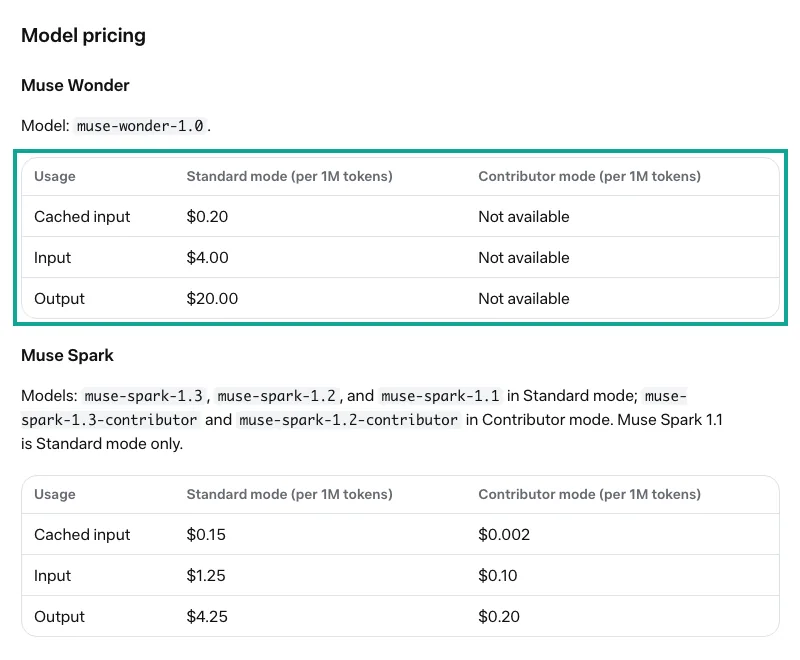
Meta's pricing page lists three numbers for Muse Wonder per million tokens: $4.00 input, $0.20 cached input and $20.00 output. The Contributor mode column says "Not available" (Pricing and rate limits). The Meta for Developers launch post on October 12, 2026 gives the same "$4/$20 per million tokens" figure (Meta for Developers post).
A vetting agent can run into three more prices. The first is web search. The built-in web_search tool costs an extra $2.50 per 1,000 searches. It searches web pages and cannot return per-video data, so we leave it off (Search grounding).
The second is Muse Spark. The muse-spark-1.3 model costs $1.25 input and $4.25 output per million tokens. Its Contributor version costs $0.10 and $0.20, but Contributor mode uses your content to train Meta's models. Section 6.2 of the terms also bans sending sensitive, confidential or personal information to Contributor services (Terms of Service, section 6). Our input includes comment text from ordinary users, so we use Standard mode only.
The third is caching. Meta caches identical prompt prefixes on its own, and cached tokens cost $0.20 per million (Prompt caching). Put the system prompt and tool definitions first and change only the creator list at the end. In a batch of 10 creators, most of the fixed prefix then hits the cache.
| Item | Muse Wonder | Muse Spark 1.3 | Muse Spark 1.3 Contributor |
|---|---|---|---|
| Input (per million tokens) | $4.00 | $1.25 | $0.10 |
| Cached input | $0.20 | $0.15 | $0.002 |
| Output | $20.00 | $4.25 | $0.20 |
| Trains on your content | No (Standard) | No (Standard) | Yes |
| Requests and tokens per minute, per team | 3,000 and 4 million | 3,000 and 4 million | 150 and 3 million |
| Good fit in a vetting agent | Main loop: read, compare, write the report | Side jobs such as comment labels | Not for jobs with comment text |
The rate limits come from the same page. Meta counts limits per team, so all keys in a team share one budget, and each model has its own budget (Rate limits). A 10-creator list will not come close to 3,000 requests per minute. The real speed limit is on the data side. Our test key allows 10 requests per minute, and the live results section shows what that does to total run time.
Why only TikTok and YouTube: scope and Muse's usage terms
Brands usually work with two kinds of creators: short-video creators and long-video creators. This guide uses one platform for each. TikTok stands for short video, and YouTube stands for long video.
The data from the two platforms looks very different. TikTok's feed shows videos to people who do not follow the account, so views can pass a tenth of followers. A large YouTube channel keeps many subscribers from past years, so its reach is usually low. Together, the two platforms show a point that this guide makes again and again: compare metrics inside one platform only. Other platforms are out of scope. You can use the same four rules and the same tool pattern, but check the fields against each endpoint first.
The model side also has rules about the data that you send to it. This section quotes only Muse's own legal pages (dev.meta.ai/legal). It is not legal advice. Read the terms yourself, and check your local law and your agreements with each data platform.
Under Section 4.1 of the Meta Model API Terms of Service (updated October 9, 2026), you are responsible for the data that you give to the service. That includes its accuracy and validity. Item (vii) of Section 10.1 bans use of the service to infringe or otherwise violate third-party rights. Section 10.3 says that Meta may monitor your use through automated or human review (Terms of Service). The Data Commitments page says that Meta does not use content from Standard services to train its models. Meta may still process that content to find and respond to violations of the usage policy or the terms (Data Commitments).
| Rule | Scope | Key text (paraphrased) | Effect on a vetting agent |
|---|---|---|---|
| Model API Terms 4.1 | Data that you send | You are responsible for the accuracy and validity of the data | Each number must trace back to a raw response |
| Model API Terms 10.1 (vii) and 10.3 | How you use the service | No use that violates third-party rights. Meta may monitor use | Read the terms first. Confirm your data sources and purpose |
| Data Commitments | Content in Standard services | Not used for training. Can be processed to handle violations | Send comment text through Standard mode only |
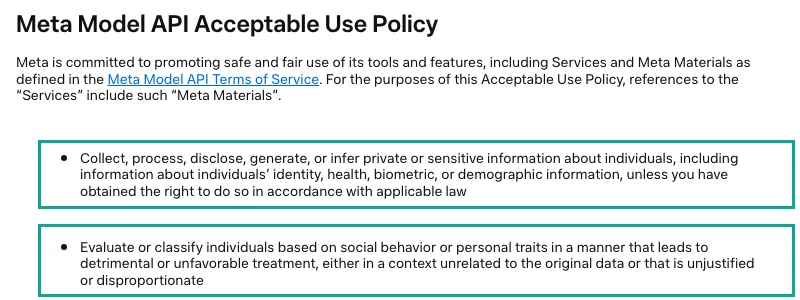
| Model API Acceptable Use Policy | Output and purpose | No inference of sensitive personal traits. No scoring people on social behavior that leads to harm | Score the account's business data, never the person |
The last row is easy to miss. The Meta Model API Acceptable Use Policy (updated October 12, 2026) has two items that apply directly to scoring creators. One bans collecting, processing, disclosing, generating or inferring private or sensitive information about people without a legal right. Examples are identity, health, biometric or demographic data. The other bans evaluating or classifying people by social behavior or personal traits in two cases. One case is when it leads to detrimental treatment, and the other is use out of context (Acceptable Use Policy).
Creator vetting is a normal step before a paid deal. A brand looks at the account as a media channel. Are views steady? Does engagement match the follower count? Does the creator post on a schedule? Do the comments discuss the content? These are business numbers about the account.
The risky questions are different. One is asking the model to guess a creator's age, ethnicity, health or politics. Another is using comments from ordinary users to label a person.
Our tool code does two things to stay on the right side. It sends the model only the comment text, like count, reply count and time, with no commenter username. The system prompt also tells the model to judge content performance only and to infer no personal traits. This makes the report more credible, because it states only what the data can prove.
The four metrics: fix the rules first, then let the model read
The worst problem in a vetting report is a word that means different things to different people. Some people divide engagement by followers, and others divide by views. Some judge "real followers" from comments, and others use likes per follower. Change the formula, and the verdict can flip. So we put the four formulas into the system prompt before we fetch any data. The model reads numbers, compares them and writes the verdict. It does not invent the method.
| Metric | Formula in this guide | Fields used | What it can and cannot show |
|---|---|---|---|
| Follower authenticity (proxy) | Reach = median views of non-pinned videos posted 3 to 30 days ago, divided by followers. Also mean-to-median ratio and top video share | follower_count, view_count, posted_at, is_pinned | Shows how many followers still watch. Cannot prove any single follower is fake |
| Engagement rate | Per video, (likes + comments + shares) / views, then the median. TikTok uses the same sample as reach (non-pinned videos posted 3 to 30 days ago). YouTube uses (likes + comments) / views | like_count, comment_count, share_count, view_count | Shows whether viewers react. Cannot tell people from paid engagement |
| 30-day posting cadence | Non-pinned videos in 30 days, longest gap, median gap, days since the newest video | posted_at | Shows whether the account is active. Says nothing about quality |
| Comment mix | Each comment gets one of five rule labels: on topic (4+ words), question, 3 words or less, emoji only, no text. Exact duplicates are counted too | text, is_reply | Shows whether comments respond to the video. Says nothing about who wrote them |
Why use reach instead of a "fake follower percentage"? Public data cannot tell you whether a given follower is a person, and a follower list is not something a vetting job should touch. What you can measure is the gap between followers and current views. Reach means something only when you compare accounts of similar size on the same platform, so this guide sets no fixed pass line.
All metrics use medians, because a few hit videos can pull the mean up. TechBullion reported a small study of 675 videos from 52 TikTok creators. For 73% of those creators, mean views were at least 1.5 times the median (TechBullion, October 2026). That is a secondary report with a small sample. We use it only to show that the mean can mislead, not as a scale.
We divide engagement by views, not followers, because the follower version mixes reach into it. An account with many followers and low reach looks weak per follower and may look normal per view. The two versions answer two questions. One asks whether followers are still there. The other asks whether viewers care. We report both separately.
YouTube needs two notes. Public share counts are not available, so YouTube engagement uses likes and comments only. YouTube also changed public view counts on August 27, 2026. A view now counts from the first frame of playback, while monetization and most analytics still use engaged views (YouTube Data API revision history; YouTube Help). Do not compare views from before and after that date directly.
Tool definitions: the JSON for five tools
Meta's help center says that Model API supports tool calling, so the model can call external tools and data sources that you define (Can the models call tools?).
The format looks much like OpenAI's. Meta recommends the Responses API, with flat function fields at the top level of each tool: type, name, description, parameters and an optional strict (Tool calling). strict defaults to false, which accepts the schema as is. With true, the server checks the schema against a strict subset. Every property must be in required, and the object needs "additionalProperties": false, or the call returns HTTP 400 (Strict tool schemas). All five of our tools use strict: true, because they have few parameters and catch schema mistakes before launch.
The real design question is how to split the tools. The simplest option is one generic tool with platform, action and params, like everyinfra_call_api in the EveryInfra MCP server. The model can then call any endpoint, but it must build the parameters every time, and each mistake costs a turn. A vetting job has fixed steps, so we use five narrow tools, one per endpoint. Each description names a trap, such as "pinned videos come first, drop them before you compute medians."
Function names use underscores, not dots. Meta allows at most one dot in a function name, and two dots return 400. MCP-style names with several parts must use a namespace tool instead (Function name rules). Five tools do not need Meta's tool search. That feature is for agents with hundreds of tools. It holds back parameter schemas until the model needs them, which saves input tokens and keeps the cache prefix intact (Tool search).
[
  {
    "type": "function",
    "name": "tiktok_videos",
    "description": "List the newest public videos of one TikTok account with views, likes, comments, shares, saves, posted_at, is_pinned and is_ad. Calls EveryInfra tiktok/user_videos. Pinned videos come first; drop them before you compute medians.",
    "strict": true,
    "parameters": {
      "type": "object",
      "properties": {
        "username": { "type": "string", "description": "TikTok handle without @" },
        "limit": { "type": "integer", "description": "1 to 50. Use 50 for a 30-day window." }
      },
      "required": ["username", "limit"],
      "additionalProperties": false
    }
  },
  {
    "type": "function",
    "name": "video_comments",
    "description": "Read public comments of one video. Returns comment text, like and reply counts and time only, never the commenter's name. Calls EveryInfra tiktok/comments or youtube/comments.",
    "strict": true,
    "parameters": {
      "type": "object",
      "properties": {
        "platform": { "type": "string", "enum": ["tiktok", "youtube"] },
        "video_url": { "type": "string", "description": "Full URL of one video" },
        "limit": { "type": "integer", "description": "1 to 50" }
      },
      "required": ["platform", "video_url", "limit"],
      "additionalProperties": false
    }
  }
]
The block shows two of the five tools. The other three are tiktok_profile for tiktok/profile, youtube_channel for youtube/profile and youtube_videos for youtube/user_posts. We checked each one against the response_fields in that day's catalog. The last column lists the subset that our tool code sends back to the model, not the full response. A raw TikTok video has 34 fields, including the cover image, music and author bio. A vetting job does not need them, and they cost tokens, so the code drops them.
| Tool | Endpoint | List price per call | Fields sent back to the model |
|---|---|---|---|
tiktok_profile | tiktok/profile | $0.000556 | username, display_name, follower_count, following_count, like_count, video_count, is_verified, created_at |
tiktok_videos | tiktok/user_videos | $0.000556 | id, url, posted_at, view_count, like_count, comment_count, share_count, collect_count, is_pinned, is_ad, duration_sec |
youtube_channel | youtube/profile | $0.000556 | name, url, subscriber_count, video_count, view_count, is_verified, created_at |
youtube_videos | youtube/user_posts | $0.000556 | id, url, title, posted_at, view_count, like_count, comment_count, duration, is_paid_partnership |
video_comments | tiktok/comments or youtube/comments | $0.000556 | text (cut to 200 characters), like_count, reply_count, is_reply, posted_at |
The agent loop: Meta's pattern plus three changes
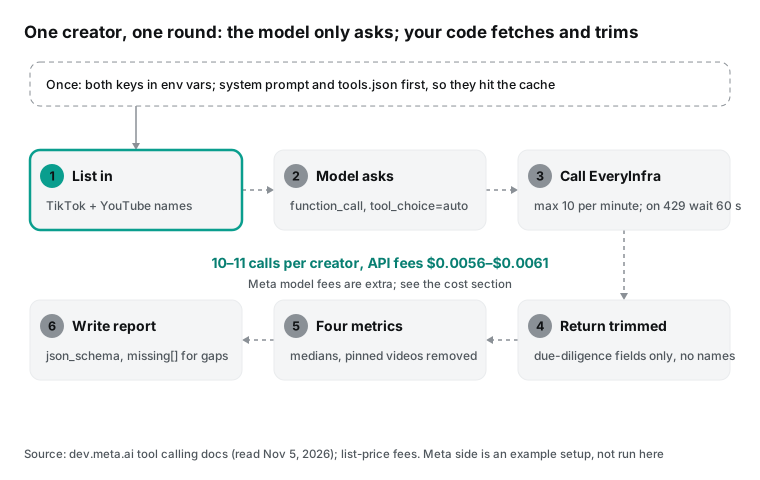
Meta's tool calling docs show a minimal loop. You send a request with tools and look for function_call items in output. You run each one and send back a function_call_output with previous_response_id, and the server keeps the history (Tool calling). We kept that pattern and made three changes. The code below is an example setup, and we did not run the Meta side.
# Example setup: Muse Wonder (Responses API) + EveryInfra tools. The Meta side was not run here.
import json, os
from openai import OpenAI
from ei_tools import run  # tool layer: calls EveryInfra, trims the response

meta = OpenAI(base_url="https://api.meta.ai/v1", api_key=os.environ["MODEL_API_KEY"])
TOOLS = json.load(open("tools.json"))
SYSTEM = open("system_prompt.txt").read()   # fixed prefix first, so it hits the cache
MAX_TURNS, MAX_TOKENS = 40, 400_000          # Meta has no hard spend cap; set your own

def due_diligence(creators: list[dict]) -> str:
    resp = meta.responses.create(model="muse-wonder-1.0", reasoning={"effort": "medium"},
                                 instructions=SYSTEM, tools=TOOLS, input=json.dumps(creators))
    used = resp.usage.total_tokens
    for _ in range(MAX_TURNS):
        calls = [i for i in resp.output if i.type == "function_call"]
        if not calls:                     # tool_choice is auto only: the model may just answer
            return resp.output_text
        outputs = []
        for c in calls:                   # one turn can hold several parallel calls
            body, code, raw, secs, out = run(c.name, json.loads(c.arguments))
            outputs.append({"type": "function_call_output", "call_id": c.call_id,
                            "output": json.dumps(out, ensure_ascii=False)})
        resp = meta.responses.create(model="muse-wonder-1.0", previous_response_id=resp.id,
                                     tools=TOOLS, input=outputs)
        used += resp.usage.total_tokens
        if used > MAX_TOKENS:
            raise RuntimeError(f"token budget exceeded: {used}")
    raise RuntimeError("too many turns")
The first change handles several calls per turn. Meta's guidelines say the model can return more than one tool call in a turn, and you must answer each one. parallel_tool_calls defaults to true (Guidelines). Ten creators with five calls each can produce a dozen calls at once. Your tool layer must queue them, because our EveryInfra test key allows 10 requests per minute.
The second change adds your own limits. max_tool_calls limits only built-in tools such as web_search, so it cannot stop your own functions. Meta suggests parallel_tool_calls: false or a turn limit in your loop. Combined with the missing spend cap, that means you need both a turn limit and a token budget.
The third change trims results before they go back. Everything in function_call_output counts as input tokens on the next turn. The trim ratio is the largest variable in the cost estimate, so it gets its own section below.
Lock the report format with structured output. Meta's docs say that with json_schema, decoding itself follows the schema, so the output always matches it (Structured output). In the Responses API, you set it in text.format, and it works together with tool calls.
Our schema has one row per creator. Each row holds the four metric values, the sample size behind each value and a one-line verdict. It also has a missing array that lists any number the agent could not fetch or that came back rounded. With that array, the model has no reason to invent a number to fill a field.
Long jobs: use background mode for a 50-creator list
A 10-creator list finishes in a few minutes, and normal requests are fine. For 50 creators, or for several pages of videos per creator, use Meta's pattern for long jobs. The Responses API docs list three limits (Responses API). A non-streaming request has a server time limit and returns 504 if it runs too long.
With background: true, the call returns status: "queued" right away, and you can poll by ID, stream the result or cancel. A background request body can be at most 1 MiB, and a larger one returns 413. The pricing page adds that each team can create up to 600 background jobs per minute (Background responses).
The 1 MiB cap is a real limit for this job. In our live run, the raw response for 50 TikTok videos from one account was about 114 to 116 KB. Put raw JSON for ten accounts into one background request, and you pass the cap. When the tool layer trims first, that problem disappears.
EveryInfra has its own async mode. Add "mode": "async" to any request body, and the response returns a job_id right away. Then read the result with GET /api/v1/jobs/{job_id}. The sync budget is 85 seconds, and the catalog's async_mode column has the current value. The safest design uses async on both sides. The model sends calls, and your code queues them and fetches at the allowed rate. The code sends the results back only when all of them are in.
Watch one more setting. If your team turns on zero data retention (ZDR), Meta's help center says several features are rejected. These include stateful requests that refer to an earlier response, background requests, file uploads and web search (ZDR help article). Our loop uses previous_response_id. With ZDR on, you must send the full conversation each turn, which adds many tokens.
The other path: Claude Agent SDK on Muse Wonder with the EveryInfra MCP server
You can skip the custom tool layer. Meta documents a second path, in which the Claude Agent SDK runs the agent loop and points at Meta's model. The agent frameworks page says the SDK connects to Model API through the Anthropic Messages format. Set ANTHROPIC_BASE_URL to https://api.meta.ai (no /v1) and put your Meta key in ANTHROPIC_AUTH_TOKEN. The main loop uses muse-wonder-1.0, and subagents can drop to the cheaper muse-spark-1.3. The same page warns you to declare only MCP servers you trust (Agent frameworks).
With that setup, you can attach the EveryInfra remote MCP server. The MCP spec says servers list tools with tools/list and run them with tools/call (MCP specification: Tools). The model then sees ready-made tools such as everyinfra_call_api, and you write no tools JSON.
# Example setup: Claude Agent SDK with Muse Wonder as the model and the EveryInfra remote MCP server. Not run here.
import os, anyio
from claude_agent_sdk import query, ClaudeAgentOptions, ResultMessage

options = ClaudeAgentOptions(
    model="muse-wonder-1.0",
    system_prompt=open("system_prompt.txt").read(),
    mcp_servers={"everyinfra": {"type": "http", "url": "https://api.everyinfra.com/mcp",
                                "headers": {"Authorization": f"Bearer {os.environ['EVERYINFRA_API_KEY']}"}}},
    allowed_tools=["mcp__everyinfra__everyinfra_call_api", "mcp__everyinfra__everyinfra_get_job"],
    setting_sources=[],
    env={**os.environ,
         "ANTHROPIC_BASE_URL": "https://api.meta.ai",
         "ANTHROPIC_AUTH_TOKEN": os.environ["MODEL_API_KEY"],
         "ANTHROPIC_MODEL": "muse-wonder-1.0",
         "ANTHROPIC_DEFAULT_OPUS_MODEL": "muse-wonder-1.0",
         "ANTHROPIC_DEFAULT_SONNET_MODEL": "muse-spark-1.3",
         "ANTHROPIC_DEFAULT_HAIKU_MODEL": "muse-spark-1.3",
         "CLAUDE_CODE_SUBAGENT_MODEL": "muse-spark-1.3"},
)

async def main():
    async for m in query(prompt="Review these creators: natgeo, nasa, notionhq", options=options):
        if isinstance(m, ResultMessage):
            print(m.result, m.usage)

anyio.run(main)
The tradeoff is simple. A custom tools JSON lets you control what the model reads: which fields, how long the text is and whether commenter names go in. The MCP path saves code. Its cost is that everyinfra_call_api returns the full response, so a TikTok video brings all 34 fields into context. Commenter usernames go in too. We measured that in one live MCP call, and the numbers are in the round trip section.
allowed_tools lists only the fetch tool and the job tool, which follows Meta's advice to give an agent only the tools it needs. The EveryInfra MCP server also has tools for support tickets and account data, and a vetting agent does not need them.
One live round trip: the model asks, our code fetches
The tools JSON and the loop above are an example setup. This section covers the half that we actually ran. We wrote the tool layer as its own file. It takes the same function_call arguments that Muse Wonder would send and maps each function name to an EveryInfra endpoint. It then sends the request, keeps the needed fields, drops commenter names and wraps the result as a function_call_output.
The model side only ever sends a function name and a JSON string. Our side receives the same input, so the fetch and the result are the same as with Muse Wonder in the loop.
Here are four calls for NASA in time order. Each row is one real request. Time is when the request left, in SGT, with US Eastern time beside it. Duration runs from send to last byte. "Raw" is the response body size, and "To model" is the size after the tool layer trims it.
| Time (SGT, November 5) | Time (ET, November 4) | Tool and endpoint | Duration | Raw | To model | Billed |
|---|---|---|---|---|---|---|
| 00:18 SGT | 11:18 ET | tiktok_profile, tiktok/profile | 11.35 s | 1,587 B | 287 B | $0.000556 |
| 00:22 SGT | 11:22 ET | tiktok_videos, tiktok/user_videos (50 videos) | 35.81 s | 116,106 B | 14,206 B | $0.000556 |
| 00:25 SGT | 11:25 ET | youtube_channel, youtube/profile | 8.96 s | 1,797 B | 299 B | $0.000556 |
| 00:28 SGT | 11:28 ET | video_comments, tiktok/comments (50 comments) | 58.22 s | 16,761 B | 7,805 B | $0.000556 |
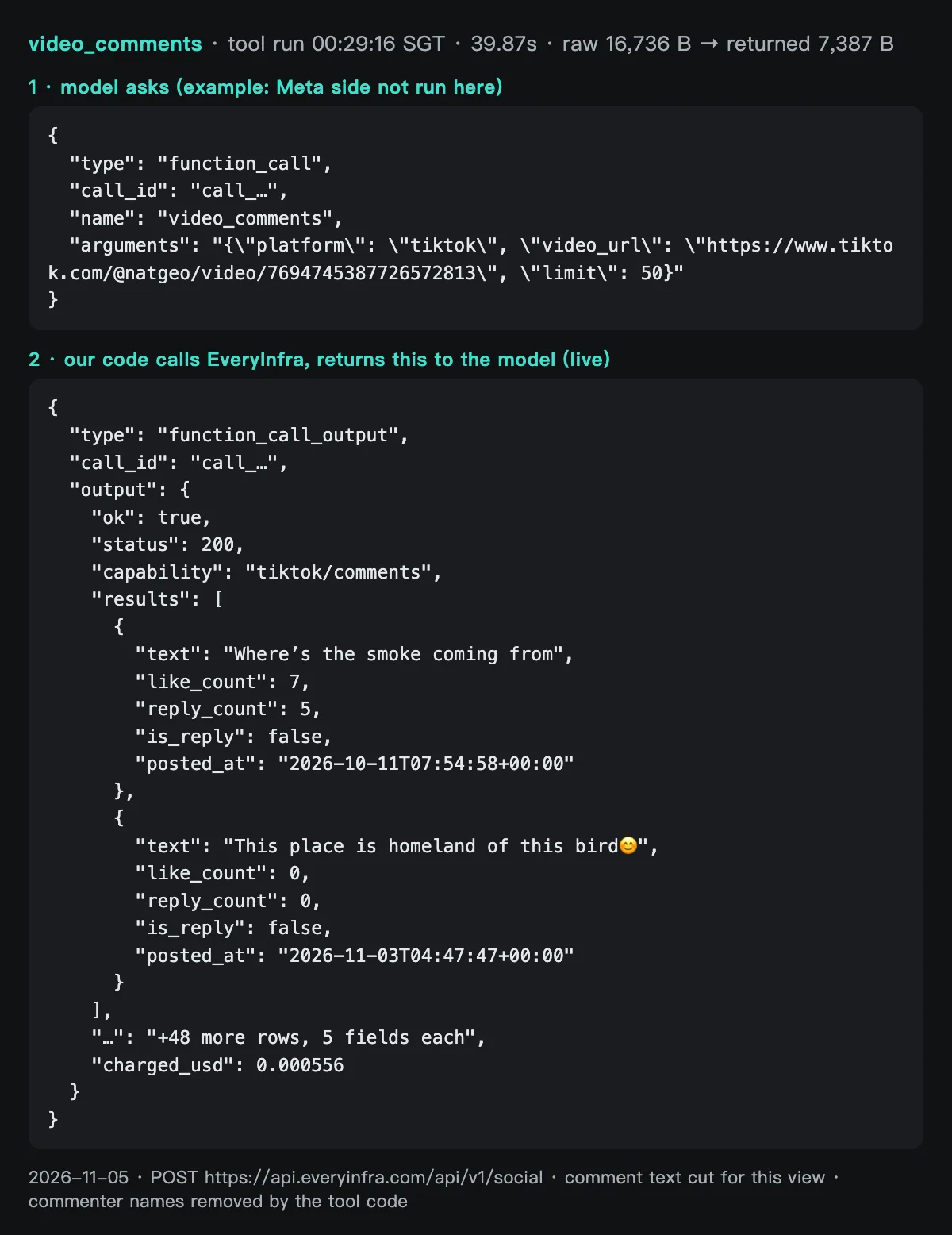
This is the request and response for the first call. We removed one long field, the avatar URL, and left the rest as it came. follower_count looks exact at 2,200,000, but it is a rounded value, as the results section explains.
POST https://api.everyinfra.com/api/v1/social
{"platform":"tiktok","action":"profile","params":{"username":"nasa"}}

200 OK, 00:18:46 SGT, 11.35 s, billed $0.000556
{"user_id":"7664638705177150477","username":"nasa","display_name":"NASA",
 "bio":"Making the seemingly impossible, possible.✨","url":"https://www.tiktok.com/@nasa",
 "follower_count":2200000,"following_count":23,"like_count":11500000,"video_count":62,
 "friend_count":17,"is_verified":true,"is_private":false,
 "created_at":"2026-07-20T15:55:49+00:00","platform":"tiktok"}
The model's copy keeps 8 fields and takes 287 bytes. Trimming a profile saves little. The big saving is in the video list. Fifty raw TikTok videos take 116,106 bytes, with 34 fields each, including covers, music, author data and several URLs. The vetting job needs 11 of those fields, so the trimmed copy takes 14,206 bytes, about one eighth of the raw size.
The image below shows the comment round trip side by side. The top block is the call that the model would send, with arguments taken from the live run. The bottom block shows the first two of 50 comments on one National Geographic TikTok video, exactly as our tool layer returned them. We cut the comment text for the image, and the tool code had already removed commenter names.
The same data costs about twice as many tokens over MCP. At 00:38 SGT (11:38 ET), we used everyinfra_call_api on the EveryInfra remote MCP server to fetch 50 comments from one National Geographic YouTube video. The call took 16.74 seconds and was billed $0.000556. The text that it hands to the model is 18,198 bytes, with 8 fields per comment, including author_name. Our field whitelist would trim the same 50 comments to 9,516 bytes, with no names.
MCP saves you code, but it doubles the tokens per call. You also cannot remove commenter names before the model reads them. For a report that a client will read, the second point matters more, because the usage policy above covers inferences about people.
We logged the failures too. NASA's YouTube comments returned 503 twice, at 00:37 and 00:40 SGT. The error body said retryable: true and retry_after: 20, with billing.charged set to false and a refund status of succeeded.
On the third failure of that endpoint within 10 minutes, the message changed. It told the caller to send the example request once, and it said a working example means the problem is with the target. That is the error style our tool layer wants. The model can read how long to wait, whether to retry and what to check next.
On the Notion side, our first pick was a video from October 27, 2026 with a comment_count of 0. The endpoint returned 200 with an empty array and the reason empty_result_refunded, so it cost nothing. We switched to a video from October 23, 2026 with 5 comments and got 2 back. Six requests in the run returned no data: 2 hit 429, 3 hit 503 and 1 was empty. None of them was billed.
Live results: four metrics on three accounts, and six data traps
This section opens up each metric. Every chart comes from the same raw responses and uses the rules table above. After the numbers, we list the traps we hit. Those traps belong in your system prompt.
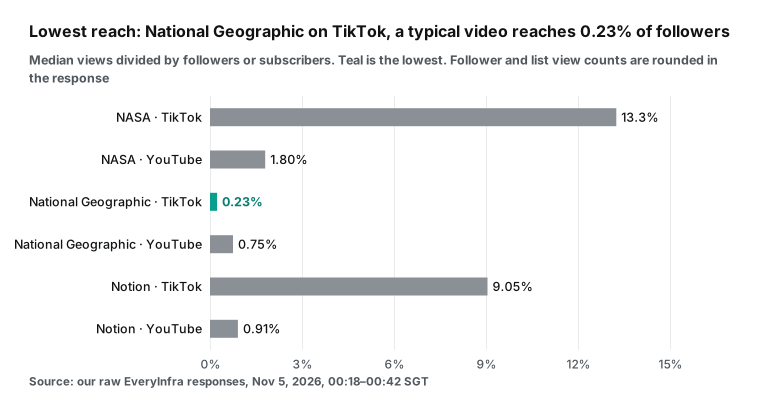
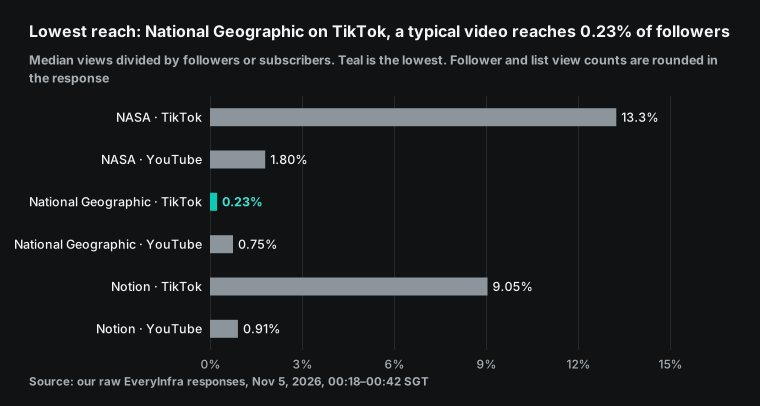
Do not compare reach across TikTok and YouTube. TikTok's feed pushes videos to people who do not follow you, so views can pass a tenth of followers. A large YouTube channel has many subscribers from years ago who rarely watch now, so its reach is low. Compare inside one platform only. On TikTok, NASA has 13.25%, Notion has 9.05% and National Geographic has 0.23%, a gap of more than 50 times. On reach alone, an agent would write "followers and views do not match."
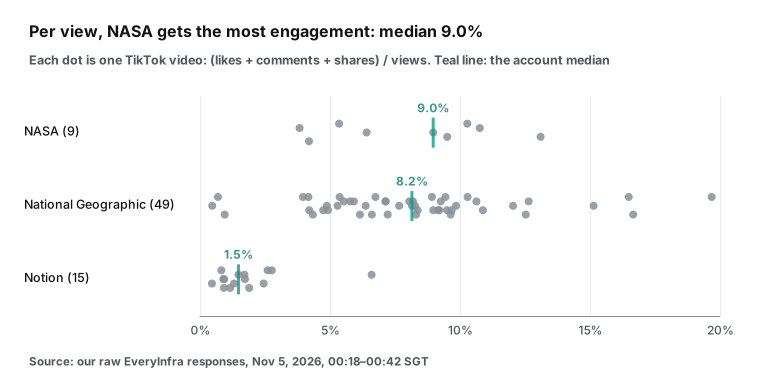
The engagement chart reverses half of that verdict. National Geographic's median engagement per view is 8.15%, within one point of NASA's 8.97%. Notion is at 1.48%. People who see a National Geographic video like and share it about as often as people who see a NASA video.
Low reach with normal engagement points to an account that posts a lot, so each video reaches part of its audience. It does not point to bought followers. Bought followers do not watch or like, so both numbers would drop together.
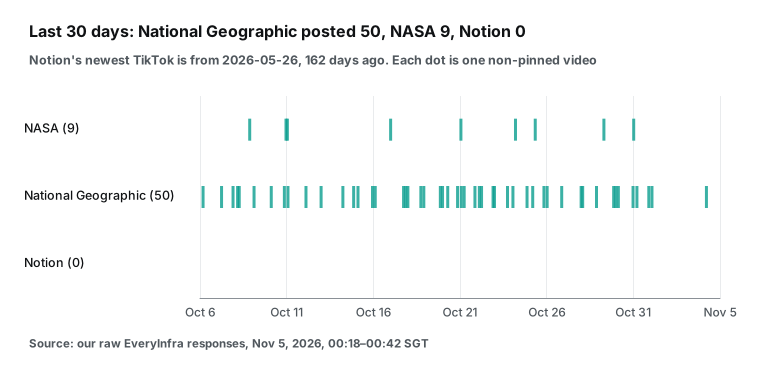
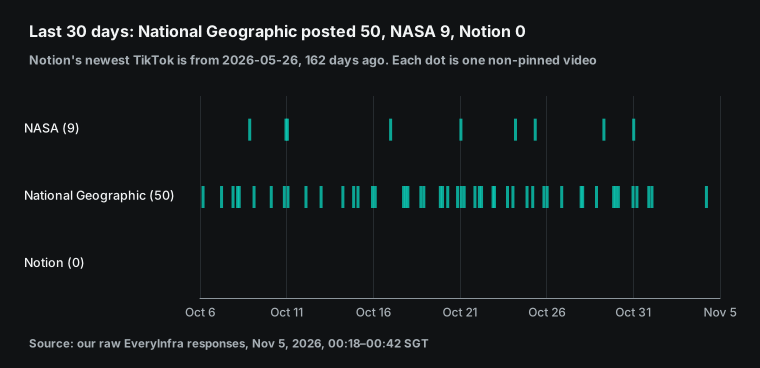
Cadence explains the pattern. National Geographic posted 50 non-pinned TikToks in 30 days, and its newest one is from November 3, 2026. The median gap is 0.62 days, and the longest gap is 3.1 days. NASA posted 9. Its newest one is from October 30, 2026, its median gap is 2.62 days, and its longest gap is 6.0 days.
When the same followers get one or two new videos a day, each video gets a smaller share of them. If the agent reads cadence and reach together, it can write the accurate line: "posts often, low reach per video, normal engagement."
Notion's row is empty. Its newest TikTok is from May 26, 2026, which was 161.7 days old at the time of our pull. Its 9.05% reach comes from the latest 15 old videos. For a decision about a deal next month, that number tells you nothing.
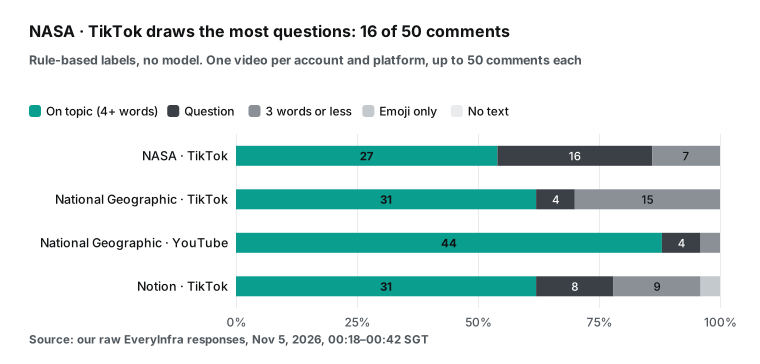
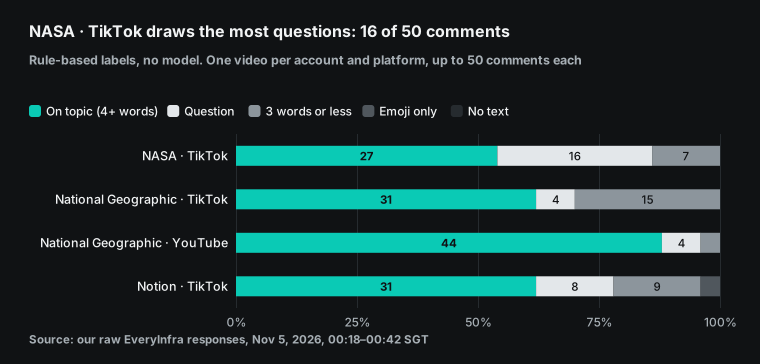
We did not use the model to label comments. We used five fixed rules: no text, emoji or punctuation only, a question mark, 3 words or less, and on topic for everything else. The rules are rough, but anyone can recompute them, and they never read a comment in a creative way.
NASA's TikTok comments include 16 questions, mostly about what the video shows, which is a good sign for a science creator. National Geographic's TikTok comments include 15 short ones and 16 with non-English letters or accents, which suggests a global audience. On YouTube, 44 of the brand's 50 comments are on topic, with a median length of 77 characters. Compare comment quality inside one platform only.
One more comment type needs attention. On September 30, 2026, YouTube Data API added snippet.imageUrl to comments, so a comment can carry an image or GIF. Access opens to all users in November 2026 (YouTube Data API revision history). A text-only reader misses image-only comments, so our rules count no-text comments on their own.
| # | Trap | What we saw | What the agent should do |
|---|---|---|---|
| 1 | TikTok counts are rounded | Every video with 10,000 or more views has a view count that is a multiple of 100. Follower counts are 2,200,000, 9,700,000 and 143,700 | Write "about" in the report. Avoid two decimals on small samples |
| 2 | 50 videos may not cover 30 days | National Geographic's first page of 50 covered only 28.8 days. A second page with until filled the window | Check the oldest date. Fetch another page when it is under 30 days |
| 3 | Pinned videos come first | NASA and National Geographic each have one pinned video, much older than the rest | Drop is_pinned items before medians and gaps |
| 4 | YouTube lists use relative dates | youtube/user_posts returns "2w ago" or "1mo ago," views rounded to thousands, and no likes or comments | Call youtube/video for videos near the 30-day edge to get exact time and views |
| 5 | YouTube likes are rounded too | A NASA video from October 14, 2026 has 684,881 views and 11,000 likes. All 4 NASA videos show comment_count 0 | Mark likes as rounded. Skip the comment verdict when the count is 0 |
| 6 | A new account is not fake growth | NASA's TikTok created_at is July 20, 2026, with 2.2 million followers, yet its reach of 13.25% is the highest of the six | Read growth with reach and engagement. Never judge on one number |
Traps 2 and 4 cost the most calls. A busy TikTok account needs two video calls to cover 30 days. A YouTube channel needs a few single-video calls after the list to get likes and exact dates. We fetched 4 videos per channel, as a balance between a usable median and the extra cost. Those 4 calls cost $0.0022, which is 40% of one creator's data fee. If your list is mostly TikTok creators, you can skip them and judge YouTube on subscribers and cadence only.
Trap 5 has one more detail. YouTube changed its view count on August 27, 2026. All 12 single videos that we checked were posted after that date, so our YouTube engagement numbers do not cross it. If a creator's recent videos span that date, the report should say so.
Muse Wonder API cost: the bill for a 10-creator list
This section answers one question: what does a 10-creator list cost? The bill has two parts. EveryInfra data fees are list price times calls, so that part is exact. Meta model fees are list price times tokens. We had no Meta key and did not run the model, so that part is an estimate. We list every input so you can swap in your own.
| Calls per creator | Count | List price | Subtotal |
|---|---|---|---|
TikTok profile, tiktok/profile | 1 | $0.000556 | $0.000556 |
TikTok videos, tiktok/user_videos (second page for busy accounts) | 1 to 2 | $0.000556 | $0.000556 to $0.001112 |
TikTok comments, tiktok/comments | 1 | $0.000556 | $0.000556 |
YouTube channel, youtube/profile | 1 | $0.000556 | $0.000556 |
YouTube video list, youtube/user_posts | 1 | $0.000556 | $0.000556 |
YouTube single video, youtube/video | 4 | $0.000556 | $0.002224 |
YouTube comments, youtube/comments | 1 | $0.000556 | $0.000556 |
| Total | 10 to 11 | $0.00556 to $0.00612 |
Ten creators means 100 to 110 calls and $0.0556 to $0.0612 in data fees. Failures, timeouts and empty results are not billed, so that is a ceiling. In our run, 30 of 36 requests were billed. Prices follow that day's catalog (pricing page), and you can read the catalog for free with no key.
The model estimate uses four assumptions. First, each creator gets its own conversation with 3 turns. Turn 1 sends 4 data calls, turn 2 sends the comment calls and turn 3 writes the report. Second, the fixed prefix (system prompt plus five tool definitions) is 1,500 tokens.
Third, tool results convert at bytes divided by 4. Meta's help center says a token is about 3 to 4 characters of English text, and other languages and code use more (How am I billed). So 4 is a low estimate. Each later turn reads earlier results again. Fourth, output plus reasoning is 4,000 tokens per creator.
In our live data, the trimmed results per creator average 30,541 bytes, and the raw results average 154,694 bytes.
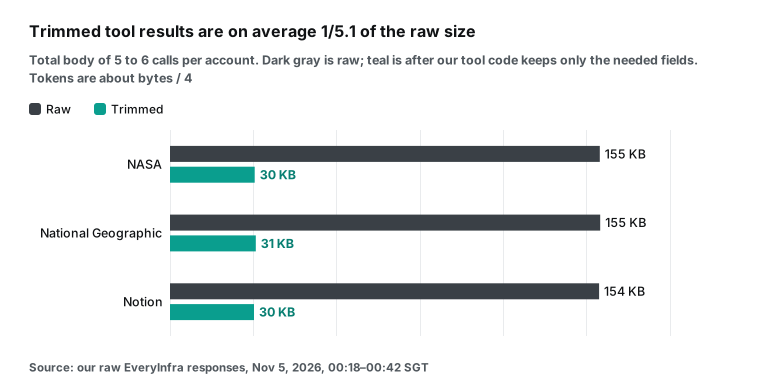
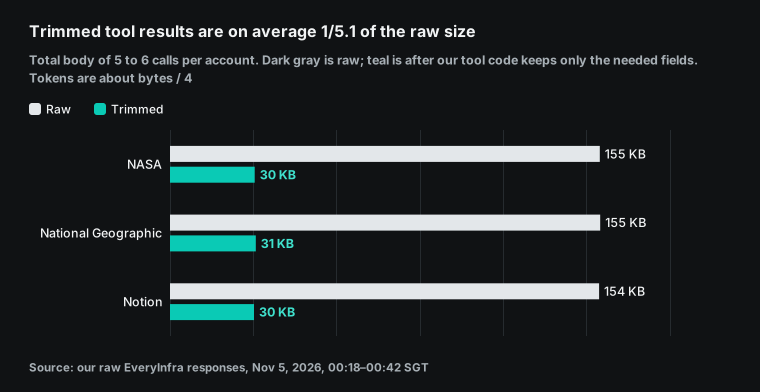
With those inputs, each creator's three turns add up to about 18,243 input tokens when trimmed, or 74,112 when raw. At Muse Wonder prices, a trimmed run with no cache costs $0.153 per creator, and $0.08 of that is output. A trimmed run with cache hits on reread tokens costs $0.118 per creator. A raw run with no cache costs $0.376. Multiply by 10 to get the three totals in the chart.
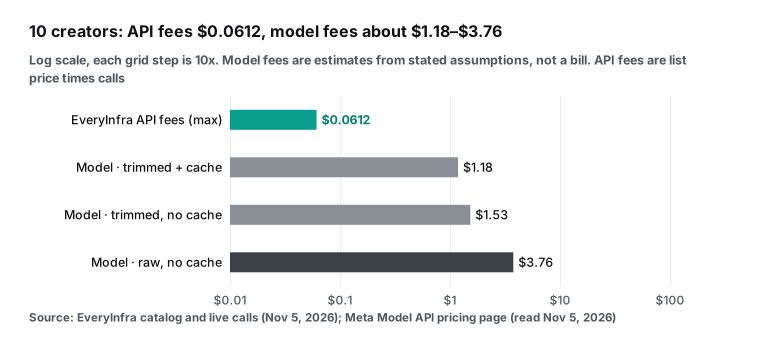
| 10-creator list | Data fees | Model fees (estimate) | Total | Model fees / data fees |
|---|---|---|---|---|
| Trimmed with cache | $0.0612 | $1.18 | $1.25 | 19x |
| Trimmed, no cache | $0.0612 | $1.53 | $1.59 | 25x |
| Raw, no cache | $0.0612 | $3.76 | $3.82 | 61x |
The table makes two points. First, the savings are on the model side, not the data side. Data fees are the same in all three rows, and model fees differ by more than three times because of result size.
Second, after trimming, output becomes the largest cost. Of $0.118 per creator in the cheapest row, $0.08 is the 4,000 output tokens. Muse Wonder output costs five times as much as input, and reasoning tokens bill as output. So you do not need high reasoning for this report. Meta lets you set effort from minimal to max, and medium or low is enough to read numbers, compare them and write four lines.
Before a real run, you can count tokens with Meta's POST /v1/responses/input_tokens. The docs say it only tokenizes, does not generate and does not record usage. Meta says to use it to check context fit, not to estimate billing (Token counting). During the run, read usage from each turn and replace our estimates with the real token counts.
Time matters too. Muse Wonder allows 3,000 requests per minute, so the model side will not slow you down. The data side will. Our test key allows 10 requests per minute and was shared with other jobs. Our 36 requests ran from 00:18:46 to 00:42:08 SGT (11:18 to 11:42 ET), which is 23 minutes and 22 seconds. Two requests got a 429 response and waited 60 seconds each.
A 10-creator list with 110 calls takes at least 11 minutes at 10 per minute. Across the 30 billed calls, the median took 22.2 seconds and the slowest took 78.2 seconds. With the six calls that returned no data, the slowest took 89.6 seconds. Your tool layer should queue calls and run a few at once without passing the per-minute limit.
Limits of this test
| Limit | Effect | How to close the gap |
|---|---|---|
| We did not run the Meta side | The tools JSON, loop and schema follow Meta's docs. We did not measure how the model splits calls or how many reasoning tokens it uses | Run two creators first and read usage |
| Only three brand accounts | All are large verified brands and do not represent small creators | Add two or three creators you know well as a control |
| Model fees are estimates | Bytes divided by 4, 3 turns and 4,000 output tokens are assumptions | Recompute with real usage |
| One video's comments per platform | The comment mix describes one video | Sample two or three more videos for key creators |
| Rule-based comment labels | Sarcasm and mixed-language comments may land in "on topic" | Use the rules as a first pass and review flagged items |
| YouTube comment gaps | NASA failed twice and Notion returned only 2 comments | Record gaps in missing and never judge from empty data |
The second limit is the one most likely to change a verdict. All three brands have more than 100,000 followers, so rounding to hundreds or thousands has little effect on them. With an 8,000-follower creator, rounding, small samples and one viral video all matter more. Add one rule to the system prompt for small samples. The rule: with fewer than 5 videos in the window or fewer than 10,000 followers, report the four numbers and give no verdict.
FAQ
What does the Muse Wonder API cost, and how is it billed?
It bills by token, with no monthly fee or minimum: $4.00 input, $0.20 cached input and $20.00 output per million tokens. Reasoning tokens count as output (Pricing and rate limits; Quickstart). Meta also says its injected system and steering content is not billed and does not appear in usage. A vetting run has two bills: Meta's model fee and EveryInfra's per-call data fee. The cost section above estimates both for 10 creators.
Where do I get a Muse Wonder API key, and can a colleague use it?
Sign up on the Model API site and open the API keys page. Then click the Create API key button. The key belongs to your team, so anyone on the team can use it (Create an API key). People outside the team cannot. The help center says that sharing a key outside your team violates the terms (Can I share my API key).
Check your region before you sign up. The help center says that Model API is available in most places where Meta AI and billing are available. The region policy is the final source (Supported countries). China, Hong Kong and Macau are restricted (Geographic Use Policy).
Can I call Muse Wonder Full through the API?
No. Meta's models page says Wonder Full is only in Muse Code subscriptions on the Power Usage and Maximum Usage plans. Setting reasoning effort to max on the API does not switch to Full (Models). A Hacker News commenter made the same point on launch day. In that view, the Full model that leads the benchmarks is for subscribers, and the API only has Muse Wonder (Hacker News comment). A Muse Code subscription works only in its own command-line tool, not for API calls (Muse Code subscriptions).
Some developers say the Muse Wonder API fails at times. How should a vetting agent cope?
Soon after launch, a Hacker News commenter called it close to the best but too expensive, and said the API fails now and then (Hacker News comment). That is one person's report, and we did not reproduce it. Meta's error docs list retryable errors. A model output parse failure returns 500. A busy backend returns service_overloaded with Retry-After: 60, and a 429 should back off per Retry-After (Error handling).
Put retries in two layers. On the Meta layer, back off as the docs say. On the EveryInfra layer, failures and empty results are not billed, and on a 429 our tool code waits 60 seconds.
Getting started: from zero to your first vetting report
Each platform has an overview page with all endpoints and current prices: the TikTok API and the YouTube API. On the EveryInfra side, you need three steps. First, sign up through the quickstart and create a key. Next, check in the catalog that tiktok/user_videos, tiktok/comments and youtube/comments are available that day. Then run the tool code on one account you know and check its follower and view counts against the app.
The catalog is free to read with no key: GET /api/v1/social/catalog. To try calls in a browser, use the test console in the data market. To connect an AI tool directly, see the remote MCP setup guide. For refunds and reconciliation on failed or empty calls, see failure refund reconciliation. To let an agent fix its own parameters after a 422 error, see self-healing API errors.
On the Meta side, you need four steps: sign up, add billing, create a key and set the environment variable, as the key section explains. Put tools.json and the system prompt in your project. To try the tools without code, open the Playground, go to Advanced and then Tools, and select Add tool. Paste each definition from tools.json. In the Playground, the model decides when to call a tool (Using tools in the Playground). Run two creators first, then scale to ten. After the run, read usage from each turn and replace our estimates with real token counts.
References
- Introducing Muse Wonder and Muse Wonder Full: Frontier Models for Agents, Meta Newsroom, October 12, 2026, <https://about.fb.com/news/2026/10/introducing-muse-wonder-models/>
- Muse Wonder: A Frontier Model For Personal & Professional AI Agents, Meta research blog, October 12, 2026, <https://research.meta.ai/blog/muse-wonder>
- Muse Wonder product page, Meta, read November 5, 2026, <https://dev.meta.ai/models/muse-wonder>
- Get started with Meta Model API and Muse Code, Meta developer docs, read November 5, 2026, <https://dev.meta.ai/docs/overview>
- Models, Meta developer docs, read November 5, 2026, <https://dev.meta.ai/docs/models>
- Pricing and rate limits, Meta developer docs, read November 5, 2026, <https://dev.meta.ai/docs/pricing-rate-limits>
- Quickstart, Meta developer docs, read November 5, 2026, <https://dev.meta.ai/docs/quickstart>
- Tool calling, Meta developer docs, read November 5, 2026, <https://dev.meta.ai/docs/tool-calling>
- Responses API, Meta developer docs, read November 5, 2026, <https://dev.meta.ai/docs/protocols/responses>
- Structured output, Meta developer docs, read November 5, 2026, <https://dev.meta.ai/docs/structured-output>
- Prompt caching, Meta developer docs, read November 5, 2026, <https://dev.meta.ai/docs/prompt-caching>
- Tool search, Meta developer docs, read November 5, 2026, <https://dev.meta.ai/docs/tool-search>
- Agent frameworks, Meta developer docs, read November 5, 2026, <https://dev.meta.ai/docs/agent-frameworks>
- Error handling, Meta developer docs, read November 5, 2026, <https://dev.meta.ai/docs/error-handling>
- Muse Code subscriptions, Meta developer docs, read November 5, 2026, <https://dev.meta.ai/docs/muse-code/subscriptions>
- Search grounding, Meta developer docs, read November 5, 2026, <https://dev.meta.ai/docs/search-grounding>
- How do I sign up for Model API?, Meta AI Developer help center, read November 5, 2026, <https://dev.meta.ai/help/accounts-and-login/sign-up>
- How do I create an API key?, Meta AI Developer help center, read November 5, 2026, <https://dev.meta.ai/help/api-keys/create-api-key>
- Can I share my API key?, Meta AI Developer help center, read November 5, 2026, <https://dev.meta.ai/help/api-keys/sharing-api-keys>
- How can I set up billing for Meta Model API?, Meta AI Developer help center, read November 5, 2026, <https://dev.meta.ai/help/billing/set-up-billing>
- How am I billed for Model API?, Meta AI Developer help center, read November 5, 2026, <https://dev.meta.ai/help/billing/api-bill>
- How do I set a spend limit alert?, Meta AI Developer help center, read November 5, 2026, <https://dev.meta.ai/help/billing/spend-limit-alert>
- How do I request a refund for Meta Model API?, Meta AI Developer help center, read November 5, 2026, <https://dev.meta.ai/help/billing/refunds>
- Does Model API support Zero Data Retention (ZDR)?, Meta AI Developer help center, read November 5, 2026, <https://dev.meta.ai/help/policies-and-privacy/zero-data-retention>
- Meta Model API Terms of Service, Meta, updated October 9, 2026, <https://dev.meta.ai/legal/terms-of-service>
- Meta Model API Acceptable Use Policy, Meta, updated October 12, 2026, <https://dev.meta.ai/legal/acceptable-use-policy>
- Meta Model API Model Designation and Geographic Use Policy, Meta, updated October 12, 2026, <https://dev.meta.ai/legal/geographic-use-policy>
- Muse Wonder is available today on Meta Model API and in Muse Code, Meta for Developers (Facebook post), October 12, 2026, <https://www.facebook.com/MetaforDevelopers/posts/muse-wonder-is-available-today-on-meta-model-api-and-in-muse-code-and-muse-wonde/1552628546897475/>
- YouTube Data API Revision History, Google for Developers, updated November 3, 2026, <https://developers.google.com/youtube/v3/revision_history>
- Understand your YouTube content performance, YouTube Help, read November 5, 2026, <https://support.google.com/youtube/answer/12220281>
- Tools, Model Context Protocol specification (2025-06-18), <https://modelcontextprotocol.io/specification/2025-06-18/server/tools>
- The Average Views Lie: What We Learned From 675 TikTok Creator Videos, TechBullion, October 2026, <https://techbullion.com/average-views-lie-learned-675-tiktok-creator-videos/>
- Comment in the Hacker News thread on Muse Wonder (username hidden), Hacker News, October 2026, <https://news.ycombinator.com/item?id=50065098>
- Comment in the Hacker News thread on Muse Wonder (username hidden), Hacker News, October 2026, <https://news.ycombinator.com/item?id=50061435>
- EveryInfra data catalog (free to read), EveryInfra, read November 5, 2026, <https://api.everyinfra.com/api/v1/social/catalog>
- Token counting, Meta developer docs, read November 5, 2026, <https://dev.meta.ai/docs/token-counting>
- Meta Model API Data Commitments, Meta, read November 5, 2026, <https://dev.meta.ai/legal/commitments>
- What countries and territories is Model API available in?, Meta AI Developer help center, read November 5, 2026, <https://dev.meta.ai/help/accounts-and-login/supported-countries>
- Can the models call tools?, Meta AI Developer help center, read November 5, 2026, <https://dev.meta.ai/help/about-model-api/tool-calling>
- How do I use tools in the Playground?, Meta AI Developer help center, read November 5, 2026, <https://dev.meta.ai/help/playground/using-tools-in-the-playground>
Reference BL-89