DeepSeek Search API plus in-platform data from Chinese social apps
DeepSeek Search API costs $0.75 per 1,000 calls and returns no likes or comments. Add Xiaohongshu, Zhihu and Weibo data: 8 live calls cost $0.014.

DeepSeek opened two new endpoints, Search and Fetch, to all API users on October 17, 2026. Each costs $0.75 per 1,000 successful requests. A Search result has a title, a URL, two summaries, the page text, a site name, a date and two scores. It has no likes, no comments and no saves (DeepSeek Search and Fetch guide).
We ran EveryInfra xiaohongshu/search, zhihu/search and weibo/search on one topic, "robot vacuum", between 00:15 and 00:19 SGT on November 3. All 98 rows had a like count, a comment count and a post time. On Xiaohongshu, 12 of 33 rows also carried a flag for paid brand content. A brand team that asks "what do Chinese buyers complain about" needs exactly these fields, and web results do not have them.
The cost has one clear driver. One Xiaohongshu search page costs $0.005556, which is 7.4 times one DeepSeek Search call. With the call limits in this article, the data cost per 1,000 questions goes down from $20.89 to $4.53.
This article is for teams outside China that sell into China, or that compete with Chinese brands. Typical examples are a European appliance brand, a US robot vacuum maker, or an agency that tracks Chinese consumer talk for a client. You want a small assistant that answers a product question with sources. DeepSeek now has its own web search endpoint, so the open web part is easy. This article shows what that endpoint does, what it does not return, and how to add data from inside three Chinese apps. It also shows what each call costs.
Every DeepSeek fact here comes from api-docs.deepseek.com, read on November 3, 2026. We do not have a DeepSeek API key. So the DeepSeek side of the setup is a configuration example, not a test. Every EveryInfra number comes from a raw response of a live call.
We wrote an earlier article, DeepSeek V4 with Claude Code for comment cleaning. It used DeepSeek as the model in Claude Code and measured the cost of comment cleaning. It had only one short section on Search and Fetch. This article starts from the Search endpoint itself and asks how it should share the work with in-platform data.

What the DeepSeek web search API does, from the docs read on November 3
You need a clear picture of the DeepSeek side before you divide the work. The Search and Fetch guide calls both endpoints "raw JSON APIs". They use the same API key as the chat models, with Authorization: Bearer. Search takes one query and returns structured web results from DeepSeek's own search engine.
Fetch takes one URL and returns the page body as Markdown. Neither endpoint goes through a model, so neither is billed by tokens. We checked every row of the table below against the Search API reference and the Fetch API reference.
| Item | Search | Fetch |
|---|---|---|
| Endpoint (host api.deepseek.com) | POST /v1/tools/search | POST /v1/tools/fetch |
| Request fields | query (1 to 128 characters, with site:, lang:, after:, before: and more), count (1 to 50, default 10), ori_question, localization (an IP address), need_content | url (up to 8,192 characters, http or https, no user name or password) |
| Response | a results array; each result has 10 fields: rerank_score, title, url, snippet, summary, content, site_name, site_icon, date, authority | title, content (Markdown) |
| Price | $0.75 per 1,000 successful requests; count does not change the price | same |
| Not billed | failures, an empty results array, timeouts | failures, no page content, timeouts |
| Rate limit | 100 requests per second per account | 25 requests per second per account, plus a limit per target domain |
Three details matter for developers. First, summary is a long summary written for a model, usually 600 to 800 characters. snippet is a short one for a user interface, 100 to 200 characters. Ten results with full summaries add 6,000 to 8,000 characters to the context for each search.
Second, date is the publish time of the page, in UTC, and it is null when unknown. authority is a grade from 0 to 4, with -1 for unknown. rerank_score is a relevance score from 0 to 3, and the guide calls 1.5 or more a good result.
Third, Search passes query to the search service as it is. So you can write site:xiaohongshu.com in a query. But the number of hits depends on how many pages of that site are in DeepSeek's index. Also, the index holds each page as it was at crawl time. The section "Snapshot time and call time" below shows why this matters for app content.
The guide also explains errors clearly. The format matches the OpenAI error format, and the param field is always null. You can retry 408, 429 and 5xx errors after a wait. A 402 means that your balance is too low.
You should not retry other 4xx errors without a change to the request. EveryInfra works in a similar way. A wrong value returns a 422 that names the wrong field and lists the allowed values. The section "One real round trip" shows a real example.
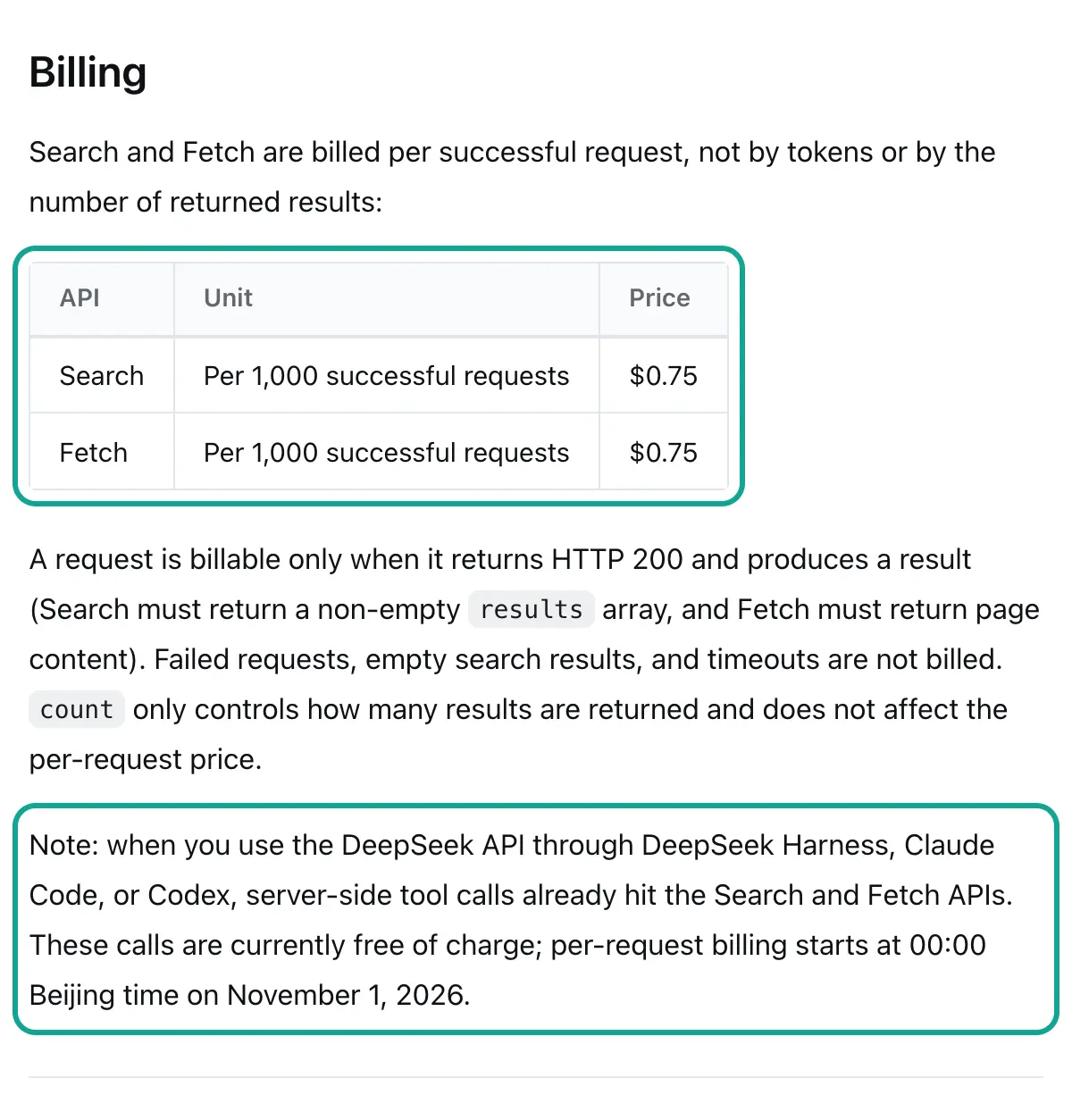
DeepSeek Search API pricing: what started to cost money on November 1
The price itself is simple. Search and Fetch cost $0.75 per 1,000 successful requests on the English pricing page. The Chinese page lists 5 yuan for the same unit. count changes only the number of results, not the price. So one request for 50 results costs the same as one request for 10 results. Per 1,000 results, that is $0.015 at count=50 and $0.075 at count=10.
One sentence in the release note of October 17 is easy to miss. Claude Code, Codex and DeepSeek Harness already call Search and Fetch through server-side tools when they use the DeepSeek API. Those calls were free, and per-request billing starts at 16:00 UTC on October 31, 2026. That is 00:00 on November 1 in Beijing and also in Singapore.
On November 3, the pricing page and the guide still used the words "currently free of charge" next to that date. The date has passed, so these calls are now in the billed period. If your team uses DeepSeek inside Claude Code (DeepSeek's Claude Code guide), each web lookup now adds $0.75 per 1,000 to the token cost.
You should also look at model prices, because the search results go into a model. On the same pricing page, deepseek-flash now points to DeepSeek-V4.1-Flash-1017. At peak hours, input with a cache miss costs $0.30 per million tokens and output costs $1.20. Off-peak prices are half.
Peak hours are 01:00 to 04:00 and 06:00 to 10:00 UTC on weekdays. For a team in London, that is the early morning and late morning. For a team in New York, peak hours fall in the night. The context length is 1M tokens, and both models support tool calls and JSON output.
| Item | Unit | USD (English page) | Read on |
|---|---|---|---|
| Search | per 1,000 successful requests | $0.75 | 2026-11-03 |
| Fetch | per 1,000 successful requests | $0.75 | 2026-11-03 |
| deepseek-flash input (cache miss, peak) | per 1M tokens | $0.30 | 2026-11-03 |
| deepseek-flash output (peak) | per 1M tokens | $1.20 | 2026-11-03 |
EveryInfra zhihu/search | per 1,000 successful requests | $0.556 | 2026-11-03 |
EveryInfra weibo/search | per 1,000 successful requests | $0.806 | 2026-11-03 |
EveryInfra xiaohongshu/search | per 1,000 successful requests | $5.556 | 2026-11-03 |
The three EveryInfra prices come from the price_usd field of the free catalog. The rule is the same as DeepSeek's: failures and empty results are free.
Web results versus in-platform data in the DeepSeek Search API: a field table
The best way to see the difference is to put the fields side by side. A DeepSeek Search result has 10 fields. They help you find a page, give a model a summary and show a result to a user. Results from a search inside an app are made for a different question: how did people on this app react to this post? They also have a title, a text, a link and a post time.
In addition, they have likes, comments, saves and shares, plus author and content flags. The left column below follows the DeepSeek docs. The other three columns show fields that were present in our live responses on November 3.
| Question | DeepSeek Search (doc fields) | `xiaohongshu/search` | `zhihu/search` | `weibo/search` |
|---|---|---|---|---|
| What does the post say? | title, summary, content | title, text (about 60 characters) | title, text | text |
| Where can I open it? | url | url (with an access token) | url | url |
| When was it posted? | date (may be null) | posted_at, updated_at | posted_at | posted_at |
| How many people liked or saved it? | none | like_count, collect_count | like_count, collect_count | like_count |
| How active is the discussion? | none | comment_count, share_count | comment_count | comment_count, repost_count |
| Who said it? | site_name, authority | author_name, author_id | author_name, author_follower_count, badge text | author_follower_count, author_verified, verified reason |
| Is it paid brand content? | none | is_cooperation_note, is_goods_note | none | none (use the verified reason) |
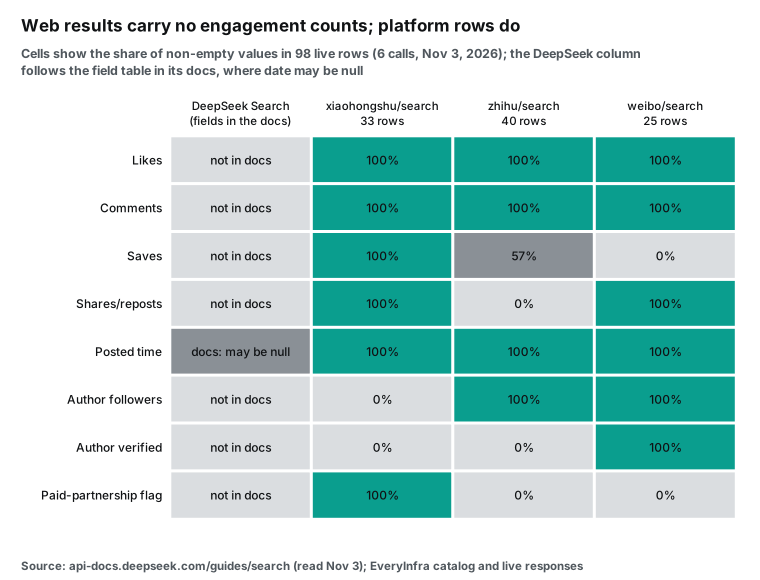
There are two limits to this chart. First, "not in docs" does not mean DeepSeek can never see these numbers. Its content field is the page body. If a page body says "12,000 likes", a model can read that text.
But it is text from a page, not a field that you can sort or add up. It is also a value from the time of the crawl. Second, a 0% in an app column has two causes. Some fields are not in the catalog for that capability, such as shares for Zhihu search.
Other fields are in the catalog but did not come back this time. The catalog lists author_is_verified for Xiaohongshu search, but none of our 33 rows had it. So write your code against the catalog's response_fields, and accept missing fields in any row.
Snapshot time and call time: the numbers on one note change
There is also a difference in time. A web search returns pages from its index, so each page is as it was at crawl time. The DeepSeek docs list 10 result fields. One of them is date, the publish time. No field gives the crawl time, so you cannot see the day of the snapshot.
A search inside the app gives the values at the time of your call. Likes, comments and saves are the current counts. Xiaohongshu also returns updated_at. The catalog calls it the last edit time of the note.
This difference is large for product topics. We looked at the 20 Xiaohongshu notes for complaints, sorted by most likes. For 13 of them, the last edit was more than 30 days after the post. For 5, it was more than one year after. One note had an edit 1,154 days after its post date.
| Gap from post to last edit | Notes (of 20) |
|---|---|
| Less than 30 days | 7 |
| 30 to 365 days | 8 |
| More than 365 days | 5 |
Authors often go back to a note. They fix the text, add a follow-up or change the model name. If a web snapshot is from before the edit, the model reads the old version. The dust bag note in the screenshot below had 992 likes and 571 comments. At our call, it was only about one week old. If people still like and comment on it, an older snapshot shows lower counts.
Weibo is even more current. All 25 posts in our two searches were from the 4 days before the call. For a question such as "is there a new after-sales issue this week", the answer is in those posts.
So you can split the work by time. Use web search for content that changes slowly: brand spec pages, media reviews, manuals and press releases. A crawl every few weeks is good enough for these pages. Use the in-app search for content that changes fast. Examples are complaints from the last week, after-sales issues that grow, and notes with counts that still go up. The in-app search also gives sort orders that only the app can apply: newest, most likes and most comments.
The reverse is true as well. A search inside an app cannot replace a web search. Brand sites, spec pages, media reviews and forums outside these apps are not in it. For a Western brand, the web side also covers English and European sources, such as a review in a German magazine. The two kinds of data share the work. Neither one replaces the other.
The criteria we wrote before the test
We wrote these criteria before the live calls, so that we could not change them after we saw the results. They decide whether each conclusion below holds.
| Criterion | Pass | Fail |
|---|---|---|
| Does in-platform data add fields that web results lack? | likes, comments and post time present in at least 90% of rows on all three apps | below 90% on any app |
| Do all three apps answer within 85 seconds, with no switch to an async job? | all 6 calls return 200 | a timeout or a 503 |
| Can a model fix a wrong value by itself? | the 422 names the field and lists allowed values, and nothing is charged | a vague error, or a charge |
| Can we control the Xiaohongshu cost? | one plan brings the data cost below $5 per 1,000 questions | the only control is to ask fewer questions |
| Can rows go straight into the answer as "buyer voice"? | at most 20% of rows need a filter | more than 20% on any app (we expected a fail here) |
Here is the result in advance. The first four criteria pass. The fifth fails on all three apps, so a later section explains the filters.
The flow: one product question, two data routes


The flow has four steps, and step two is the key. The DeepSeek model does not run any function. It returns tool_calls, which say "call this function with these arguments". Your code makes the real calls to DeepSeek Search and to EveryInfra.
The DeepSeek tool calls guide says the same: the user supplies the function, and the model does not run it. The benefit is that both API keys stay on your server, and the model never sees them. The cost is that you write the loop yourself. The next sections give a full configuration example.
In step one, the user asks a question. In step two, the model reads the question and the four function descriptions. It decides what to search, and it can send four calls at once: one web search and three app searches. In step three, your code calls both endpoints. It returns the raw JSON, or a reduced version, in a role: tool message with the matching tool_call_id.
In step four, the model reads all the results and writes the answer. The system prompt tells it to add the source URL, the like count and the post date after each claim. A follow-up question, such as "what do people say about brand A versus brand B", starts a new round of calls. The loop stops when the model returns no tool_calls.
In this flow, each data route has a clear job. Web search finds brand sites, spec pages, media reviews and news. It answers "what does this model do, and what does the brand say?" In-platform data finds what real users say on Xiaohongshu, Zhihu and Weibo. It answers "how do buyers rate it, and which problems come up again and again?" With both kinds of sources in the answer, a reader sees the brand's claims and the buyers' reports side by side. Where the two do not match, you often find the most useful conclusion.
Tool definitions: four functions in full JSON (configuration example)
Below are the four functions for the DeepSeek model. For the three app functions, every parameter name, enum value and description comes from the param_meanings and allowed_values fields in the EveryInfra catalog. The web search function follows the DeepSeek Search API reference. We use strict mode. The DeepSeek tool calls guide says that strict mode needs the beta base URL (api.deepseek.com/beta with an https prefix). Every property of each object must be in required, and additionalProperties must be false.
So an optional parameter cannot simply be left out. We handle that in two ways. For an enum with a default, we put the default into the enum and let the model choose it. Examples are relevance for sort and any_time for date_range. For a string with no default, such as a page token, we use anyOf with null.
[
  {
    "type": "function",
    "function": {
      "name": "web_search",
      "strict": true,
      "description": "Search the open web with DeepSeek Search. Use for brand sites, spec pages, media reviews and news. Returns title, url, summary and date; no likes or comments.",
      "parameters": {
        "type": "object",
        "properties": {
          "query": {"type": "string", "description": "1-128 characters. Supports site:, -site:, lang:, after:, before:."},
          "count": {"type": "integer", "minimum": 1, "maximum": 50, "description": "Results to return. Price per call does not change with count."}
        },
        "required": ["query", "count"],
        "additionalProperties": false
      }
    }
  },
  {
    "type": "function",
    "function": {
      "name": "xiaohongshu_search",
      "strict": true,
      "description": "Search Xiaohongshu notes. One page = 20 rows = USD 0.005556. Rows include like_count, collect_count, comment_count, share_count, posted_at, is_cooperation_note. text is a ~60-char excerpt.",
      "parameters": {
        "type": "object",
        "properties": {
          "keyword": {"type": "string", "description": "Note search keyword in Chinese, e.g. a product name plus a pain point."},
          "sort": {"type": "string", "enum": ["relevance", "newest", "most_liked", "most_commented", "most_collected"]},
          "date_range": {"type": "string", "enum": ["any_time", "last_24_hours", "last_7_days", "last_30_days", "last_6_months", "last_1_year"]},
          "content_type": {"type": "string", "enum": ["all", "image", "video"]},
          "page_token": {"anyOf": [{"type": "string"}, {"type": "null"}], "description": "next_page_token from the previous page, or null for page 1."}
        },
        "required": ["keyword", "sort", "date_range", "content_type", "page_token"],
        "additionalProperties": false
      }
    }
  },
  {
    "type": "function",
    "function": {
      "name": "zhihu_search",
      "strict": true,
      "description": "Search Zhihu answers, articles and videos. USD 0.000556 per call, up to 20 rows by default. Rows include like_count, comment_count, posted_at, author_follower_count.",
      "parameters": {
        "type": "object",
        "properties": {
          "keyword": {"type": "string"},
          "content_type": {"type": "string", "enum": ["all", "answer", "article", "video"]},
          "sort": {"type": "string", "enum": ["general", "upvote_count_descending", "time_descending"]}
        },
        "required": ["keyword", "content_type", "sort"],
        "additionalProperties": false
      }
    }
  },
  {
    "type": "function",
    "function": {
      "name": "weibo_search",
      "strict": true,
      "description": "Search public Weibo posts. USD 0.000806 per call, up to 20 rows by default. Rows include like_count, comment_count, repost_count, posted_at, author_verified, author_verified_reason.",
      "parameters": {
        "type": "object",
        "properties": {"keyword": {"type": "string"}},
        "required": ["keyword"],
        "additionalProperties": false
      }
    }
  }
]
Why put the price into the description? Because the model reads description. Write "one page = USD 0.005556" in the Xiaohongshu function. Then write "at most one Xiaohongshu page per question, try Zhihu and Weibo first" in the system prompt.
Now the model has cost information when it picks a function. This is not a hard limit. The hard limit belongs in your loop code, which the next section shows.
One more detail matters for a team outside China. The keyword for the three app functions should be in Chinese, because the posts are in Chinese. The description says so. A model such as deepseek-flash writes good Chinese keywords from an English question, so your users can ask in English. We checked the enums above against the catalog of November 3 with a script.
| Function parameter | Catalog `allowed_values` | Enum in the tool definition | Match |
|---|---|---|---|
xiaohongshu_search.sort | 5: relevance, newest, most_liked, most_commented, most_collected | same 5 | yes |
xiaohongshu_search.date_range | 6: any_time to last_1_year | same 6 | yes |
xiaohongshu_search.content_type | 3: all, image, video | same 3 | yes |
zhihu_search.content_type | 4: all, answer, article, video | same 4 | yes |
zhihu_search.sort | 3: general, upvote_count_descending, time_descending | same 3 | yes |
web_search.count | DeepSeek docs: 1 to 50 | minimum 1, maximum 50 | yes |
Why does this table matter? A wrong enum gets a 422 from EveryInfra, and nothing is charged. But the model needs one more round to fix it. With correct enums in the definition, you save one round trip and its tokens.
The catalog is free to read at any time, for example the Xiaohongshu catalog entry. When a capability changes, you can generate the definitions again. The Xiaohongshu search capability page explains the fields too.
The Zhihu catalog entry and the Weibo catalog entry list the parameters and fields for the other two. Weibo search has only one parameter, keyword, so its function is the shortest. A model almost never gets it wrong.
The loop code: DeepSeek tool_calls in Python (configuration example)
The Python code below uses the OpenAI Python SDK, from the openai package on PyPI. The DeepSeek chat API uses the OpenAI format, and the OpenAI function calling guide describes the same tools structure. Both data endpoints use requests with a 90-second timeout, because EveryInfra has an 85-second budget for a synchronous call. Before results go back to the model, we keep 12 fields. ensure_ascii=False keeps Chinese characters as they are (Python json docs). Escaped characters would use several times more tokens.
import json, os, requests
from openai import OpenAI

ds = OpenAI(api_key=os.environ["DEEPSEEK_API_KEY"], base_url="https://api.deepseek.com/beta")
EI = "https://api.everyinfra.com/api/v1/social"
KEEP = ["url", "title", "text", "like_count", "comment_count", "collect_count", "share_count",
        "repost_count", "posted_at", "author_follower_count", "author_verified", "is_cooperation_note"]
BUDGET = {"xiaohongshu_search": 1}          # at most 1 Xiaohongshu page per question

def web_search(query, count):
    r = requests.post("https://api.deepseek.com/v1/tools/search", timeout=60,
                      headers={"Authorization": f"Bearer {os.environ['DEEPSEEK_API_KEY']}"},
                      json={"query": query, "count": count})
    r.raise_for_status()
    hits = r.json()["results"]
    return [{k: x.get(k) for k in ("title", "url", "summary", "date", "site_name")} for x in hits]

def social(platform, params):
    params = {k: v for k, v in params.items() if v is not None}
    r = requests.post(EI, timeout=90, json={"platform": platform, "action": "search", "params": params},
                      headers={"Authorization": f"Bearer {os.environ['EVERYINFRA_API_KEY']}"})
    body = r.json()
    if r.status_code != 200:                  # a 422 has param, allowed, did_you_mean: give it to the model
        return {"error": body.get("error", body)}
    rows = body["results"]
    return [{k: x[k] for k in KEEP if x.get(k) is not None} for x in rows]

def run(question, tools):
    used = {}
    msgs = [{"role": "system", "content": "Answer in English. After each claim, give the source url, like count and post date. "
                                          "Search Zhihu and Weibo first; use Xiaohongshu only when needed. Keywords for the apps in Chinese."},
            {"role": "user", "content": question}]
    while True:
        m = ds.chat.completions.create(model="deepseek-flash", messages=msgs, tools=tools,
                                       extra_body={"thinking": {"type": "enabled"}}).choices[0].message
        msgs.append(m)                        # keeps reasoning_content; required when tools are present
        if not m.tool_calls:
            return m.content
        for c in m.tool_calls:
            a = json.loads(c.function.arguments)
            used[c.function.name] = used.get(c.function.name, 0) + 1
            if used[c.function.name] > BUDGET.get(c.function.name, 99):
                out = {"error": "budget reached for this question; answer with what you have"}
            elif c.function.name == "web_search":
                out = web_search(**a)
            else:
                out = social(c.function.name.removesuffix("_search"), a)
            msgs.append({"role": "tool", "tool_call_id": c.id, "content": json.dumps(out, ensure_ascii=False)})
Two points follow the DeepSeek docs. First, thinking mode is on by default. The thinking mode guide says that a request with tools must send back the reasoning_content of every earlier turn. If it does not, the API returns a 400.
The line msgs.append(m) does that. Second, strict mode works only on the beta base URL. On the normal URL, the strict field has no effect, and a model can sometimes leave out an argument. EveryInfra then returns a 422, and the model adds the argument in the next round.
The budget check sits in the loop, not in the prompt. A prompt can only ask the model to save money. Code can make sure that one question never spends more than a fixed amount. For a brand team that runs hundreds of questions a day, that difference shows up on the monthly bill.
One real round trip: what the model sends and what comes back
We did not run the model side, because we have no DeepSeek key. Take the question "Buying a robot vacuum for 11.11: what do buyers complain about most?" From the tool definitions, a model could send a Xiaohongshu call with a Chinese keyword for "robot vacuum complaints". The other arguments are sort set to most_liked, date_range set to any_time, content_type set to all and page_token set to null. The loop drops the null value and sends the request below to EveryInfra. This call is real.
curl -s https://api.everyinfra.com/api/v1/social \
  -H "Authorization: Bearer $EVERYINFRA_API_KEY" \
  -H "Content-Type: application/json" \
  -d '{"platform":"xiaohongshu","action":"search","params":{"keyword":"扫地机器人 吐槽","sort":"most_liked"}}'
The request at 00:17:22 SGT on November 3, 2026 returned 200 with 20 rows. The body was 36,627 bytes, and billing.charged_usd was 0.005556. In the same minute, we sent the call again with sort set to hot on purpose. It returned a 422 with code set to invalid_value and did_you_mean set to most_liked.
The allowed field listed the 5 valid values. The first item in next_steps said: "Change only sort to a value in allowed, then resend. Nothing was charged." A model that gets this role: tool message changes only sort in the next round. No person needs to step in.
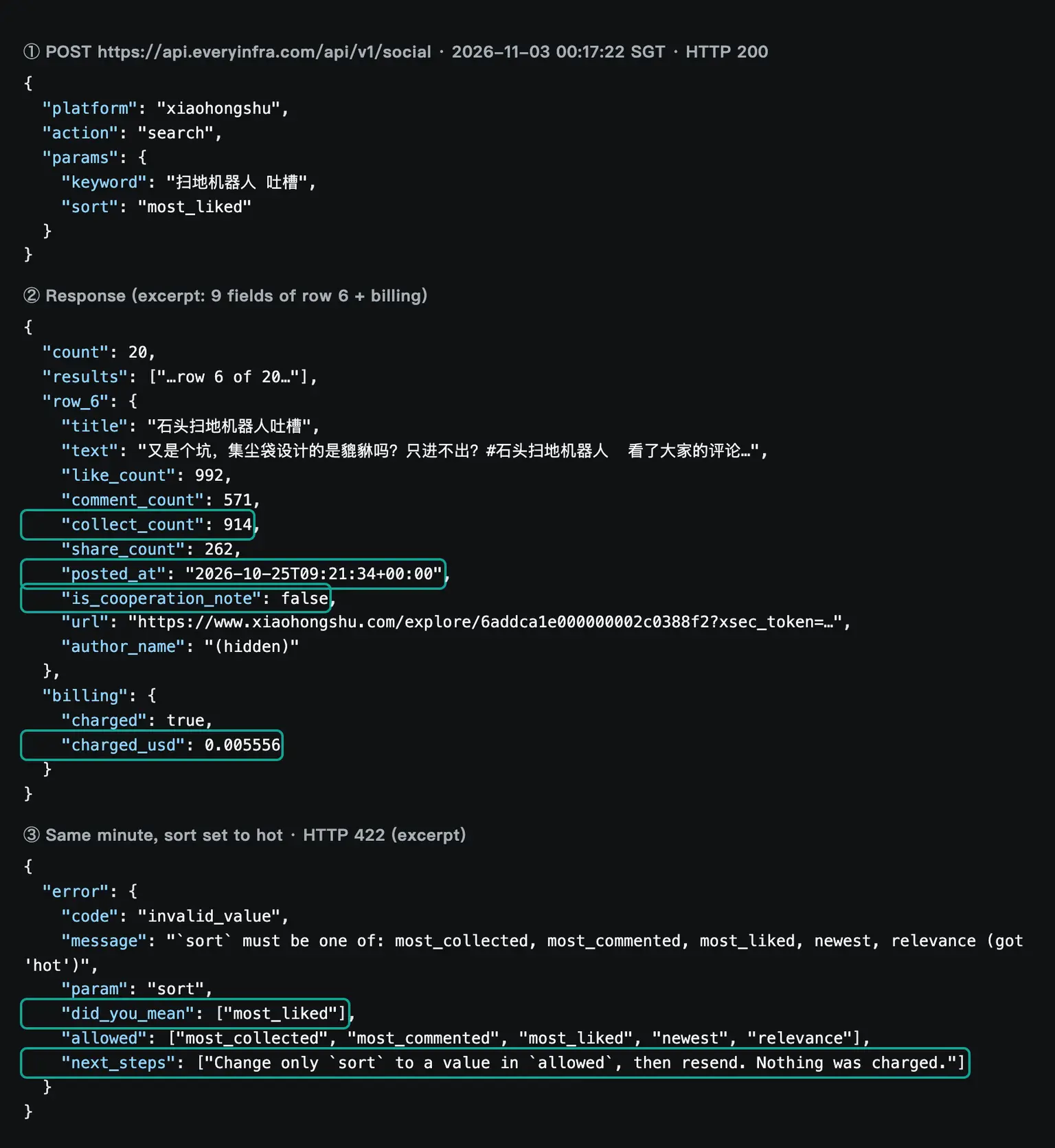
Row 6 in the screenshot is a note from October 25. Its title says it is a complaint about one robot vacuum brand. The text says the dust bag design "only takes in and never lets out", which points at the cost of spare bags. It has 992 likes, 571 comments and 914 saves.
The comment count is more than half the like count, so the note started a real discussion. That is the signal you want for "top complaints". In a web search result, a model sees at most the title and a summary of this note.
To see what the comments argue about, you can call xiaohongshu/note with the url of this row for the full text. A comments call is also possible. Each call costs $0.005556 as well, so the same budget logic applies.
Test 1: what each app returned
Between 00:15 and 00:19 SGT, we made 8 calls on the topic "robot vacuum". Six calls were two per app. One more was for the Reddit comparison below, and one had a wrong value on purpose. All calls answered synchronously, and none needed an async job.
| SGT | Capability | Parameters | Rows | charged_usd |
|---|---|---|---|---|
| 00:15:57 | zhihu/search | robot vacuum recommendation, answers only | 20 | $0.000556 |
| 00:16:17 | weibo/search | robot vacuum | 13 | $0.000806 |
| 00:16:32 | xiaohongshu/search | robot vacuum, most comments, last 30 days | 13 | $0.005556 |
| 00:17:22 | xiaohongshu/search | sort set to hot | 422 | $0 |
| 00:17:22 | xiaohongshu/search | robot vacuum complaints, most likes | 20 | $0.005556 |
| 00:18:26 | zhihu/search | robot vacuum downsides, most upvotes | 20 | $0.000556 |
| 00:18:31 | weibo/search | robot vacuum after-sales service | 12 | $0.000806 |
| 00:18:53 | reddit/search | robot vacuum, top | 5 | $0.000556 |
| Total | 103 rows | $0.014392 |
The three Chinese apps gave very different content. The Xiaohongshu search for complaints, sorted by most likes, returned 20 notes. Most titles are about real use and things to avoid. They cover dust bag design, a robot that fell into a pit after its no-go zone failed, problems with pet detection, and "an appliance that is a tax on the naive". Eight of the 20 carry the paid content flag, and they are brand reviews and buying guides.
One row matters for Western brands in particular. A note from December 16, 2025 has a title that tells people not to buy a Dyson robot vacuum. It has 1,444 likes and 53 comments. The text says the product is not bad but that its value for money is too low. A Western brand that sells in China can find this kind of note only inside the app.
The table below shows five rows from that search, with our English summary of each title. They show what the engagement fields add: you can see at once which complaint started the most discussion.
| Posted | Title, summarized in English | Likes | Comments | Paid flag |
|---|---|---|---|---|
| 2026-10-16 | A feared accident still happened with a pet-friendly robot | 3,710 | 183 | false |
| 2023-09-17 | The robot ignored its no-go zone for a month, then fell into a pit | 3,445 | 1,937 | false |
| 2025-12-16 | Do not buy the Dyson robot vacuum | 1,444 | 53 | false |
| 2026-10-25 | Complaint about one brand's dust bag design | 992 | 571 | false |
| 2026-07-06 | An appliance that is a tax on the naive | 553 | 973 | false |
The Zhihu search for recommendations returned 20 answers, mostly buying guides and model lists. The Weibo searches returned 25 posts, all from the week before November 2. They were the most mixed. Some users asked for advice. One user said that a machine broke after two years and that the brand had no spare parts. There were also brand campaign posts and shopping guide posts.
Each kind of content has its own use. For specific defects that people raise again and again, Xiaohongshu sorted by likes or comments is the most focused. For expert analysis of what to buy, long Zhihu answers carry the most information. For new after-sales issues this week, Weibo is the most current. An assistant that uses web search only will find it hard to get all three views. It will not get the engagement counts that show which post is typical, either.
The Reddit call is a useful contrast for an English-speaking team. The top 5 results for "robot vacuum" were posted between October 7 and October 22. They came from humor and off-topic communities. The top three were a video post in r/TikTokCringe with 6,551 likes and a "robot vacuum garage" in r/homeassistant with 3,076 likes. Third was a robot vacuum dressed as a cartoon character in r/futurama, with 2,998 likes. None was a buyer complaint.
| Posted | Community | Title | Likes | Comments |
|---|---|---|---|---|
| 2026-10-20 | r/TikTokCringe | State of the art Japanese robot vacuum | 6,551 | 107 |
| 2026-10-16 | r/homeassistant | Robot vacuum garage | 3,076 | 176 |
| 2026-10-14 | r/futurama | My robot vacuum as Scruffy the Janitor and Wash Bucket | 2,998 | 76 |
| 2026-10-07 | r/Perfectfit | The way my robot vacuum fits under the TV rack | 1,773 | 16 |
| 2026-10-22 | r/BORUpdates | AITAH for refusing to share with my cousin-in-law? (off topic) | 1,102 | 222 |
So "top" on any app shows what is popular, not what is useful. Sort and keyword choice matter on Western apps too. The Reddit search capability page lists the options.
Test 2: sorted by upvotes, 0 of 20 Zhihu rows were recent
"New" is where product questions go wrong most often. Robot vacuums change several times a year, and a buying guide from two years ago may no longer apply. We used posted_at to count, per call, the rows from the last 30 days, after October 4, 2026. The six app searches were very different.
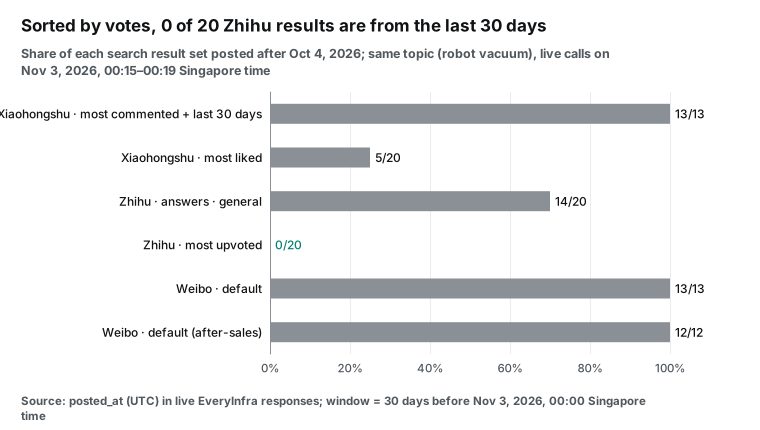
The extreme case is the Zhihu search sorted by most upvotes. Of 20 rows, 18 were posted before 2026, and the oldest is from 2015. The titles are more striking. Nine of the 20 titles mention 2026.
Eight of these nine were posted before 2026. The oldest was posted on April 12, 2018, but its title promises a 2026 buying guide. These are evergreen answers whose authors update the text and the year each year. The body may be new, but a reader or a model that looks only at the title will think it is from this year.
Can a web result's date catch this case? That depends on which date the page showed at crawl time. The DeepSeek docs say only that date is null when unknown. In-platform data gives the post time that the app itself records. You can compare it with the title directly.
The fix is simple. For "recent" questions, use date_range=last_30_days with sort=most_commented on Xiaohongshu, and sort=time_descending on Zhihu. Weibo returns recent posts by default. For "long-term reputation" questions, sort by likes, and tell the model to give the post year of each source.
There is also a cost detail. The Xiaohongshu call with last_30_days returned only 13 rows. The catalog says that this filter can return fewer than 20 rows on a page, and a page with results is billed as one page. So the price per 1,000 results for that call was $0.427, which is 54% more than $0.278 for a full page.
Test 3: rows to filter first
We expected the fifth criterion to fail, and it did. Each app has one kind of row that gives a wrong picture of "buyer voice" if you use it as is.
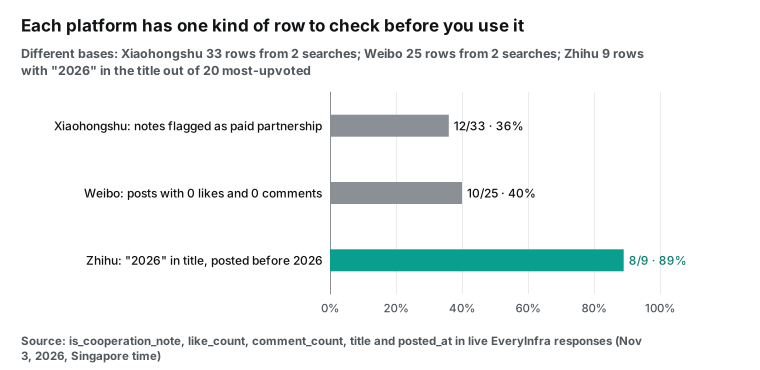
On Xiaohongshu, is_cooperation_note is the most direct field. It was true for 12 of 33 rows. The call for most comments in the last 30 days had 4 of 13. The call for complaints sorted by likes had 8 of 20. A paid note is not always false.
But for "what do buyers complain about", it shows the message that a brand wants you to see. So put these rows in their own group, or mark them in the answer. Only in-platform data has this field. Web results have no matching field.
The Xiaohongshu search for most comments in the last 30 days had a second kind of noise. Its top rows were a lost robot meme with 14,963 likes, a fitness video, and a horror game clip. These are popular posts that use the hashtag, not buyer reports. So use a keyword with a pain point, such as "complaints" or "downsides", when you want buyer problems.
On Weibo, the problem is noise. Of 25 rows, 10 had no likes and no comments. Nine came from verified accounts, and 8 came from accounts with 100,000 followers or more. Among them were brand campaign posts and shopping guide posts.
One brand livestream notice had 2,435 likes and 421 comments. These posts have high engagement but are not buyer complaints. You can find them with author_verified_reason and the product links in the text.
The useful posts are often from accounts with tens or hundreds of followers. They name a brand and a defect. A post from November 2 says that a robot vacuum bought in March 2024 broke after about two years. After-sales told the owner that the model was discontinued and had no parts, and offered only a trade-in worth 200 yuan.
That post had 0 likes and 1 comment. It is still a real after-sales signal. So a filter cannot simply drop rows with low engagement.
After the filter, sort the rows. On all three apps, a few rows hold most of the engagement.
The Xiaohongshu call for most comments in the last 30 days had 13 notes with 124,557 likes in total, and the top 3 had 49%. The call for complaints had 20 notes with 23,938 likes, and the top 3 had 48%. The Zhihu call for recommendations had 20 answers with only 1,151 upvotes. The top 3 had 75%, and the median was 11. The Weibo after-sales call had 12 posts with 2,290 likes. One post had 2,288 of them, and the other 11 posts had 2 in total.
| Call | Rows | Total likes or upvotes | Share of the top 3 rows |
|---|---|---|---|
xiaohongshu/search, most comments, last 30 days | 13 | 124,557 | 49% |
xiaohongshu/search, complaints, most likes | 20 | 23,938 | 48% |
zhihu/search, recommendations, answers only | 20 | 1,151 | 75% |
weibo/search, after-sales | 12 | 2,290 | 100% |
If you send 20 rows to the model in the order that the app returns, the "majority view" can come from two or three popular rows. A better method is to sort the rows by engagement in the loop code, and remove duplicates by author_id. Then send the counts with each row. The model can then tell the reader "this note has 992 likes" or "this post has 0 likes but gives specific facts".
Python can do this with no extra library. Sort with sorted() and a key function on like_count (Python sorting guide). Keep the authors that you already used in a set. This step costs no extra call.
What the answer looks like: a format sample built from real rows
We did not run the model, so we have no answer written by DeepSeek. But you can still see the format. We wrote the start of an answer by hand from the real rows above. This is a format sample, not model output. Each number matches a raw response. The links carry access tokens, so we write "link omitted".
The first group of complaints is about the dust bag and spare parts. A Xiaohongshu note from October 25 says that one brand's dust bag "only takes in and never lets out", with 992 likes, 571 comments and 914 saves (link omitted; not paid content). The second group is about after-sales service. On November 2, a Weibo user with 124 followers said that a machine bought in March 2024 broke after two years. The brand said the model was discontinued and offered only a 200-yuan trade-in (link omitted; 0 likes, 1 comment). On Zhihu, most of the top buying guides by upvotes were posted between 2018 and 2022, although their titles say 2026. Check the post year before you rely on them.
Each claim in the sample has its app, date, engagement counts and paid content flag. A system prompt can ask the model for this format.
We also found a detail while we wrote the sample. Two authors each had 3 of the 20 Zhihu rows. One author's 3 answers start with almost the same words, have 0 upvotes each, and point to the same article. The other author wrote 3 answers in two days, and all three recommend models from one brand. If you count them as 20 independent voices, you overrate that brand.
So remove duplicates by author_id before the rows go back to the model. Keep only the row with the most engagement for each author. All three apps return this field. The code takes a few lines, and it is more reliable than a prompt that asks the model to "watch for repeat authors".
Test 4: how many tokens you save before the model
The cheapest step in this flow is to remove fields before the results go back to the model. We estimated tokens for three searches in two forms: the raw response, and only the 13 fields that matter. We used the ratios in the DeepSeek token usage guide: about 0.3 tokens per English character and 0.6 tokens per Chinese character. These are estimates. The real count is in the usage field of each response.
| Search | Raw characters | Raw tokens (est.) | Characters with 13 fields | Tokens after (est.) |
|---|---|---|---|---|
xiaohongshu/search complaints, most likes | 33,905 | 10,549 | 7,302 | 2,542 |
zhihu/search downsides, most upvotes | 15,459 | 5,696 | 7,356 | 3,162 |
weibo/search after-sales | 10,786 | 3,624 | 3,873 | 1,458 |
| Total | 60,150 | 19,869 | 18,531 | 7,162 |
The reduced form is 64% smaller. Xiaohongshu saves the most, because its raw rows have image lists, avatars, video links, widths and heights. None of these help an answer. At the deepseek-flash peak input price of $0.30 per million tokens, 19,869 tokens cost $0.0060 and 7,162 tokens cost $0.0021. For one call, the difference is small.
In a tool-call loop, though, the earlier results go back with every new request. With more rounds, the difference grows. DeepSeek has a context cache, and input that hits the cache costs $0.006 per million tokens at peak on the English pricing page. So the real cost of the resent part is much lower, but only when the cache hits.
The DeepSeek context caching guide says that a request hits the cache only when its prefix fully matches a stored prefix unit. The chat API is stateless, so each round must send all earlier messages again (multi-round conversation guide). This gives two rules for the loop code.
First, do not edit or reorder tool results in later rounds, and keep the system prompt and tool definitions first and unchanged. Second, remove fields, sort and remove duplicates before the first time that you send the results. Then, from the second round on, the earlier part bills at the cache price. Only the new round bills at the cache-miss price.
Still, a smaller context also helps the model focus, as the research in the "Recent changes" section suggests.
Cost: DeepSeek Search API at $0.75 per 1,000, Xiaohongshu at $0.005556 per call
When you put the prices side by side, the result is clear. Web search is cheap. Zhihu and Weibo cost about the same as web search. Xiaohongshu costs about ten times more.
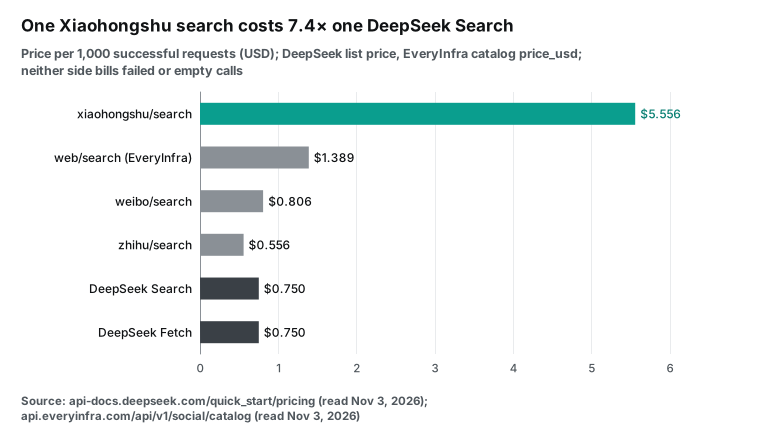
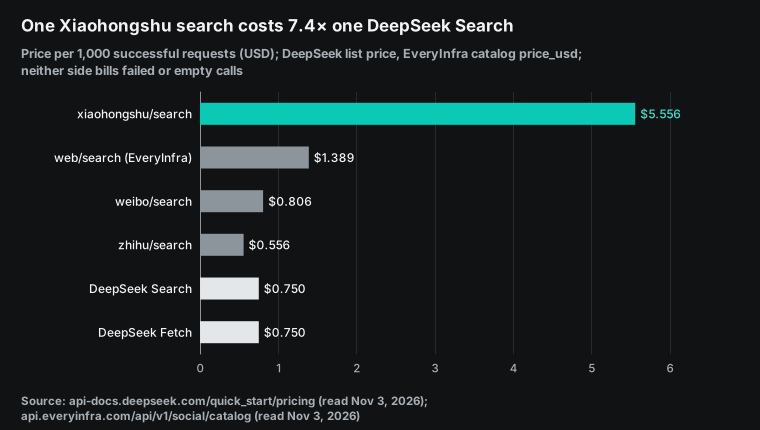
We should say one thing plainly. For general web search only, DeepSeek Search at $0.75 per 1,000 is cheaper than EveryInfra's own web/search at $1.389 per 1,000. It also returns up to 50 results per call. So in this flow, DeepSeek should handle web search, and EveryInfra should handle in-platform data only. Per 1,000 results, the gap is larger.
DeepSeek costs $0.015 at count=50. Zhihu costs $0.028 per 1,000 results, Weibo $0.062 to $0.067, and Xiaohongshu $0.278 to $0.427. But you cannot compare these two kinds of results by row count. A web result and an app post with engagement counts answer different questions.
| Calls per question | Unit price | Calls | Subtotal |
|---|---|---|---|
| DeepSeek Search | $0.00075 | 2 | $0.0015 |
xiaohongshu/search | $0.005556 | 1 | $0.005556 |
zhihu/search | $0.000556 | 1 | $0.000556 |
weibo/search | $0.000806 | 1 | $0.000806 |
| Data cost (plan B) | 5 | $0.008418 | |
| Model cost (estimate, peak, about 16,000 input tokens and 1,500 output tokens) | about $0.0066 |
The model estimate has a wide margin. Input counts 7,162 tokens of reduced app data and about 8,400 tokens of web summaries from two searches, with 10 results each. Output counts 1,500 tokens. The estimate does not include resent context or cache hits. The data cost is exact, because it is the catalog price times the number of calls. One question costs about 1.5 US cents in total, and Xiaohongshu alone is 66% of the data cost.
How to limit Xiaohongshu calls: three plans
At $0.005556 per page, Xiaohongshu is the cost to manage. The goal is not to use Xiaohongshu less. The goal is to use it only when it adds something. We set three plans. Each plan has two DeepSeek searches per question.
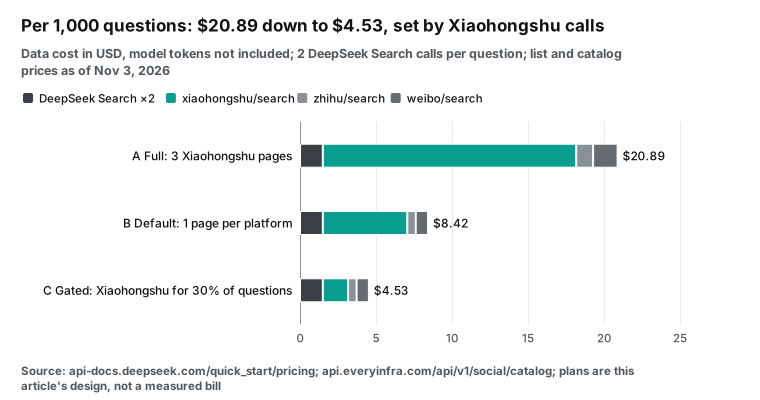
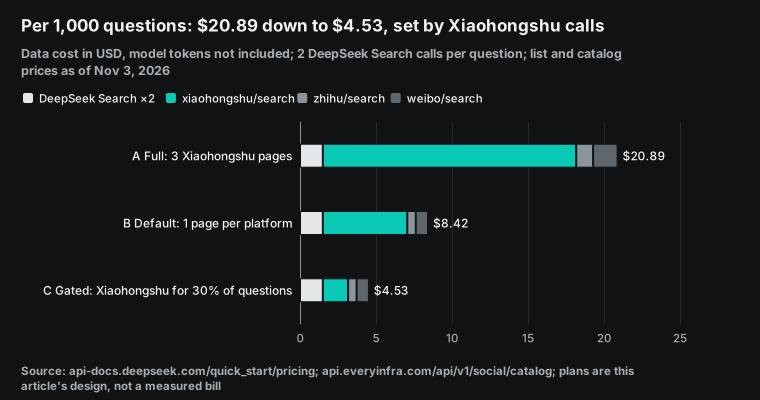
| Plan | Xiaohongshu | Zhihu | Per question | Per 1,000 questions | Xiaohongshu share | |
|---|---|---|---|---|---|---|
| A, full | 3 pages | 2 calls | 2 calls | $0.0209 | $20.89 | 80% |
| B, default | 1 page | 1 call | 1 call | $0.0084 | $8.42 | 66% |
| C, on demand | 1 page for 30% of questions | 1 call | 1 call | $0.0045 | $4.53 | 37% |
We chose the 30% in plan C. It is not a measured rate. There are three ways to decide when Xiaohongshu is needed, from easy to hard. First, use the product category.
Query Xiaohongshu for beauty, personal care, baby, home and small appliances, where Xiaohongshu talk is dense. Skip it for parts or industrial goods. Second, try the cheap apps first. If Zhihu and Weibo already return enough recent rows that name specific models, skip Xiaohongshu.
Third, let the model decide, but set a limit in the loop, like BUDGET in the code above. When the model asks for a second page, return "budget reached". Also, do not use last_30_days when you want a full page. Test 2 showed that it can return 13 rows and still cost one page. For "latest" questions, sort=newest returns a full page. The catalog note on date_range gives the same advice.
Another route: DeepSeek Harness with a remote MCP server (configuration example)
Maybe you do not write your own loop. If you use DeepSeek Harness, the open-source agent from DeepSeek (quick start), you can skip the tool definitions. Connect the EveryInfra remote MCP server instead. The Harness MCP client README uses one entry per MCP server. A remote server uses the streamable-http transport and can send headers. Its tools appear to the model as mcp__<serverName>__<tool>, and the default timeout per call is 60 seconds.
- id: mcp-everyinfra
  name: '@deepseek-ai/dsh-mcp-client'
  config:
    serverName: everyinfra
    transport: streamable-http
    url: https://api.everyinfra.com/mcp
    headers:
      Authorization: !!js '`Bearer ${process.env.EVERYINFRA_API_KEY}`'
    toolCallTimeoutMs: 90000
We raise toolCallTimeoutMs from 60 to 90 seconds for the same reason as the requests timeout above. The EveryInfra MCP server follows the MCP 2026-07-28 specification and its Streamable HTTP transport. A tools/list call without a key on November 3 showed 12 tools. For app data, the tool is everyinfra_call_api, with platform, action and params. The MCP server page explains authentication.
The authorization section of the MCP specification makes authorization optional. When a server uses an HTTP-based transport, it should follow that section. EveryInfra takes an API key in a request header, so the Harness entry needs only headers and no browser sign-in.
Harness has its own web search. The dsh-tool-web package adds web_search and web_fetch. By default, it returns up to 8 sources, sends up to 4 queries, and cuts each summary to 800 characters. Its README says that the DeepSeek search back end does not appear in the tool list when the current model has no credentials. With this setup, one Harness session uses DeepSeek for web search and MCP for app data. The split is the same as in the function version, but Harness runs the loop.
How do you choose between the two? The MCP route needs no code, and the model sees new capabilities in the catalog by itself. But the model sees one general tool, everyinfra_call_api, and must read the catalog first to learn the parameters. That adds one or two rounds. The function route needs you to maintain the definitions.
In return, each description, enum and price is fixed, the model chooses better, and your code can enforce a budget. For one fixed product flow, use functions. For an open assistant for your team, use MCP. Our article on Claude strict tool use with a data API compares the same trade-off.
What does not work, and what to watch
First, we did not call the DeepSeek Search endpoint. So we have no measured number for how many Xiaohongshu notes a DeepSeek search for "robot vacuum" finds. Everything about DeepSeek here comes from its docs. We did not measure how much app content is in the DeepSeek index, or how often it is refreshed. The section "Snapshot time and call time" covers only the app side.
Second, the Xiaohongshu search text is an excerpt of about 60 characters. For the full text, you need a note detail call at $0.005556. Comments are billed separately too. Third, all three apps return public content only. Private messages, posts for followers only, and deleted posts are not available. For paid Zhihu content, you get a summary only.
Paging has two details that can catch you in the loop code. A Xiaohongshu search page always has 20 rows, and limit has no effect. For more rows, use next_page_token from the last page. That token is valid for 24 hours only. If you save a conversation and continue the next day, the old token fails.
The search starts again from page 1, and you pay again. Zhihu returns 20 rows by default and up to 100. Weibo returns 20 by default and up to 50. For these two, a larger row count is cheaper than paging, because the price is per call.
Fourth, there are two compliance points. First, app data contains names and profiles of private users. Quote content and links only. Do not collect or show a private user's personal details. An arXiv paper from October 22 (Social-HUMINT) studies the risk of using LLMs to infer personal traits from public social data.
For product topics, stay at the topic level. Second, an assistant that serves the public in mainland China falls under China's interim measures for generative AI services. The measures for labeling AI-generated content apply from September 1, 2025. This is not legal advice. Ask your legal team about your duties.
Fifth, rate limits differ. An EveryInfra account has 60 calls per minute by default. Our test key had a special limit of 10 per minute. DeepSeek Search allows 100 per second. With high traffic, add a queue for the EveryInfra side in your loop.
Recent changes
October 17, 2026: DeepSeek opened Search and Fetch. On the same day, the model moved to DeepSeek-V4.1-Flash-1017. The weights are on Hugging Face. For you, this means one DeepSeek key now covers web search. You do not need a separate search service.
November 1, 2026, 00:00 Beijing time: server-side search in clients became billable. Do you use DeepSeek through Claude Code, Codex or Harness? Then search fees now appear on your monthly bill. Check the usage page in the DeepSeek console.
October 13, 2026: a paper on AI shopping agents reached version 5. This arXiv paper (Does Rank Still Matter?) studied 7,000 sessions. AI agents looked at more results than people, but results in the middle positions were the least likely to be seen.
For you, this means that more rows are not always better. Sort rows by engagement or time before they go to the model. That is more reliable than 50 unsorted rows. The engagement data in Test 3 points to the same step.
Around October 25, 2026: the DeepSeek Harness MCP client docs changed. Harness supports MCP version 2026-07-28 (MCP client README). Remote servers use Streamable HTTP (MCP packages README). For you, this means that you can add app data to a DeepSeek agent with no code.
FAQ
Does DeepSeek API support web search?
The chat API does not search the web by itself. You have two ways. First, call the Search endpoint (POST /v1/tools/search) yourself and give the results to the model as tool results. Second, use a client such as DeepSeek Harness, Claude Code or Codex.
These call Search and Fetch through server-side tools, billed per request since November 1, 2026. (Question source: search suggestion "does deepseek api support web search". Basis: DeepSeek Search and Fetch guide.)
What is the DeepSeek Search API pricing, and is there a free tier?
It costs $0.75 per 1,000 successful requests. Failed, empty and timed-out requests are free, and count does not change the price. We saw no separate free search quota on the pricing page or in the guide. Granted balance and topped-up balance both pay for usage, and granted balance is used first. (Question source: search suggestions "deepseek search api pricing" and "deepseek search api free tier". Basis: DeepSeek pricing page.)
Is the DeepSeek Search API key the same as the model key?
Yes. The guide says that Search and Fetch use the same Bearer authentication as the DeepSeek API. You create keys on the DeepSeek platform. Rate limits apply per account, not per key. (Question source: search suggestion "deepseek search api key". Basis: DeepSeek Search and Fetch guide and rate limit page.)
DeepSeek Search Fetch API: what is the difference, and when should I use Fetch?
Search returns several results for a query. Fetch returns one full page as Markdown for a URL. Search can already return page text with need_content. So use Fetch when you already have a link and need the full text, for example a brand site link from app data.
Fetch depends on the target site's access policy. When it gets no content, it returns a 404, and you pay nothing. (Question source: search suggestion "deepseek search fetch api". Basis: Fetch API reference.)
DeepSeek Harness search API: can Harness use a different search provider?
Yes. Harness adds web search as a plugin. The web_search tool comes from the dsh-tool-web plugin, and you can change its back end to another search plugin. App data connects through the MCP client as a remote server. (Question source: search suggestion "deepseek harness search provider". Basis: dsh-tool-web README and the Harness repository.)
Does DeepSeek API function calling support strict mode?
Yes. Use the beta base URL (api.deepseek.com/beta with an https prefix) and set strict: true on every function. List every property in required and set additionalProperties to false. minLength, maxLength, minItems and maxItems are not supported.
Strict mode works in thinking and non-thinking mode. (Question source: search suggestion "deepseek api function calling". Basis: DeepSeek tool calls guide.)
How to start
First, create an API key in the EveryInfra quick start. Read the catalog for free, and check the parameters and prices of xiaohongshu/search, zhihu/search and weibo/search. The platform overviews are the Xiaohongshu data API, the Zhihu data API and the Weibo data API. All prices are on the pricing page.
Second, copy the four tool definitions and the loop code from this article. Put in your two keys and run one question end to end. Third, pick a plan from the cost section that fits your question volume, and set the limit in BUDGET. Two articles show the same idea with other tools. One is Claude Code dynamic workflows for Xiaohongshu comments. The other is Gemini Deep Research with a remote MCP server. For comment data, Weibo comments work the same way as Xiaohongshu comments.
References
- Search & Fetch, DeepSeek API Docs, read 2026-11-03, https://api-docs.deepseek.com/guides/search
- Search API reference, DeepSeek API Docs, read 2026-11-03, https://api-docs.deepseek.com/api/search
- Fetch API reference, DeepSeek API Docs, read 2026-11-03, https://api-docs.deepseek.com/api/fetch
- Models & Pricing, DeepSeek API Docs, read 2026-11-03, https://api-docs.deepseek.com/quick_start/pricing
- DeepSeek-V4.1-Flash-1017 release note, DeepSeek, 2026-10-17, https://api-docs.deepseek.com/news/news261017
- Tool Calls, DeepSeek API Docs, read 2026-11-03, https://api-docs.deepseek.com/guides/tool_calls
- Thinking Mode, DeepSeek API Docs, read 2026-11-03, https://api-docs.deepseek.com/guides/thinking_mode
- Rate Limit & Isolation, DeepSeek API Docs, read 2026-11-03, https://api-docs.deepseek.com/quick_start/rate_limit
- Token & Token Usage, DeepSeek API Docs, read 2026-11-03, https://api-docs.deepseek.com/quick_start/token_usage
- Integrate with Claude Code, DeepSeek API Docs, read 2026-11-03, https://api-docs.deepseek.com/quick_start/agent_integrations/claude_code
- API keys page, DeepSeek Platform, read 2026-11-03, https://platform.deepseek.com/api_keys
- DeepSeek-V4.1-Flash-1017 model card, Hugging Face, read 2026-11-03, https://huggingface.co/deepseek-ai/DeepSeek-V4.1-Flash-1017
- DeepSeek Harness repository, GitHub, read 2026-11-03, https://github.com/deepseek-ai/deepseek-harness
- DeepSeek Harness quick start, read 2026-11-03, https://deepseek-harness.github.io/deepseek-harness/en/guide/quickstart
- dsh-tool-web README, GitHub, read 2026-11-03, https://github.com/deepseek-ai/deepseek-harness/blob/master/packages/web/tool-web/README.md
- dsh-mcp-client README, GitHub, read 2026-11-03, https://github.com/deepseek-ai/deepseek-harness/blob/master/packages/mcp/mcp-client/README.md
- Harness MCP packages README, GitHub, read 2026-11-03, https://github.com/deepseek-ai/deepseek-harness/blob/master/packages/mcp/README.md
- openai-python, GitHub, read 2026-11-03, https://github.com/openai/openai-python
- openai, PyPI, read 2026-11-03, https://pypi.org/project/openai/
- Function calling, OpenAI developer docs, read 2026-11-03, https://platform.openai.com/docs/guides/function-calling
- Advanced Usage (timeouts), Requests docs, read 2026-11-03, https://requests.readthedocs.io/en/latest/user/advanced/
- json, JSON encoder and decoder, Python docs, read 2026-11-03, https://docs.python.org/3/library/json.html
- MCP Specification 2026-07-28, Model Context Protocol, read 2026-11-03, https://modelcontextprotocol.io/specification/2026-07-28
- Transports, MCP 2026-07-28, read 2026-11-03, https://modelcontextprotocol.io/specification/2026-07-28/basic/transports
- Tools, MCP 2026-07-28, read 2026-11-03, https://modelcontextprotocol.io/specification/2026-07-28/server/tools
- Authorization, MCP 2026-07-28, read 2026-11-03, https://modelcontextprotocol.io/specification/2026-07-28/basic/authorization
- Weibo open platform API list, read 2026-11-03, https://open.weibo.com/wiki/API
- Network Data Security Management Regulations, Government of China, 2024-09-30, https://www.gov.cn/zhengce/content/202409/content_6977766.htm
- Interim Measures for the Management of Generative AI Services, Cyberspace Administration of China, 2023-07-13, https://www.cac.gov.cn/2023-07/13/c_1690898327029107.htm
- Measures for Labeling AI-Generated Synthetic Content, Cyberspace Administration of China and others, 2025-03-14, https://www.cac.gov.cn/2025-03/14/c_1743654684782215.htm
- Does Rank Still Matter? Position Bias When AI Agents Shop on Our Behalf, arXiv:2608.22697v5, 2026-10-13, https://arxiv.org/abs/2608.22697
- Social-HUMINT: An LLM-Augmented Unified Framework for Measuring Social Media Exposure, arXiv:2610.31573, 2026-10-22, https://arxiv.org/abs/2610.31573
- EveryInfra data catalog, read 00:13 SGT 2026-11-03, https://api.everyinfra.com/api/v1/social/catalog
- EveryInfra Xiaohongshu catalog, read 2026-11-03, https://api.everyinfra.com/api/v1/social/catalog?platform=xiaohongshu
- EveryInfra Zhihu catalog, read 2026-11-03, https://api.everyinfra.com/api/v1/social/catalog?platform=zhihu
- EveryInfra Weibo catalog, read 2026-11-03, https://api.everyinfra.com/api/v1/social/catalog?platform=weibo
- Context Caching, DeepSeek API docs, read 2026-11-03, https://api-docs.deepseek.com/guides/kv_cache
- Multi-round Conversation, DeepSeek API docs, read 2026-11-03, https://api-docs.deepseek.com/guides/multi_round_chat
- Sorting Techniques, Python docs, read 2026-11-03, https://docs.python.org/3/howto/sorting.html
- Built-in Types: set, Python docs, read 2026-11-03, https://docs.python.org/3/library/stdtypes.html#set-types-set-frozenset
Reference BL-73