Claude Code dynamic workflows for Xiaohongshu comments: API test and script example
Claude Code dynamic workflows sort Xiaohongshu comments in parallel. Our test: 4 of 8 pages had 10 rows, one post was 96% noise, 500 comments cost $0.222.
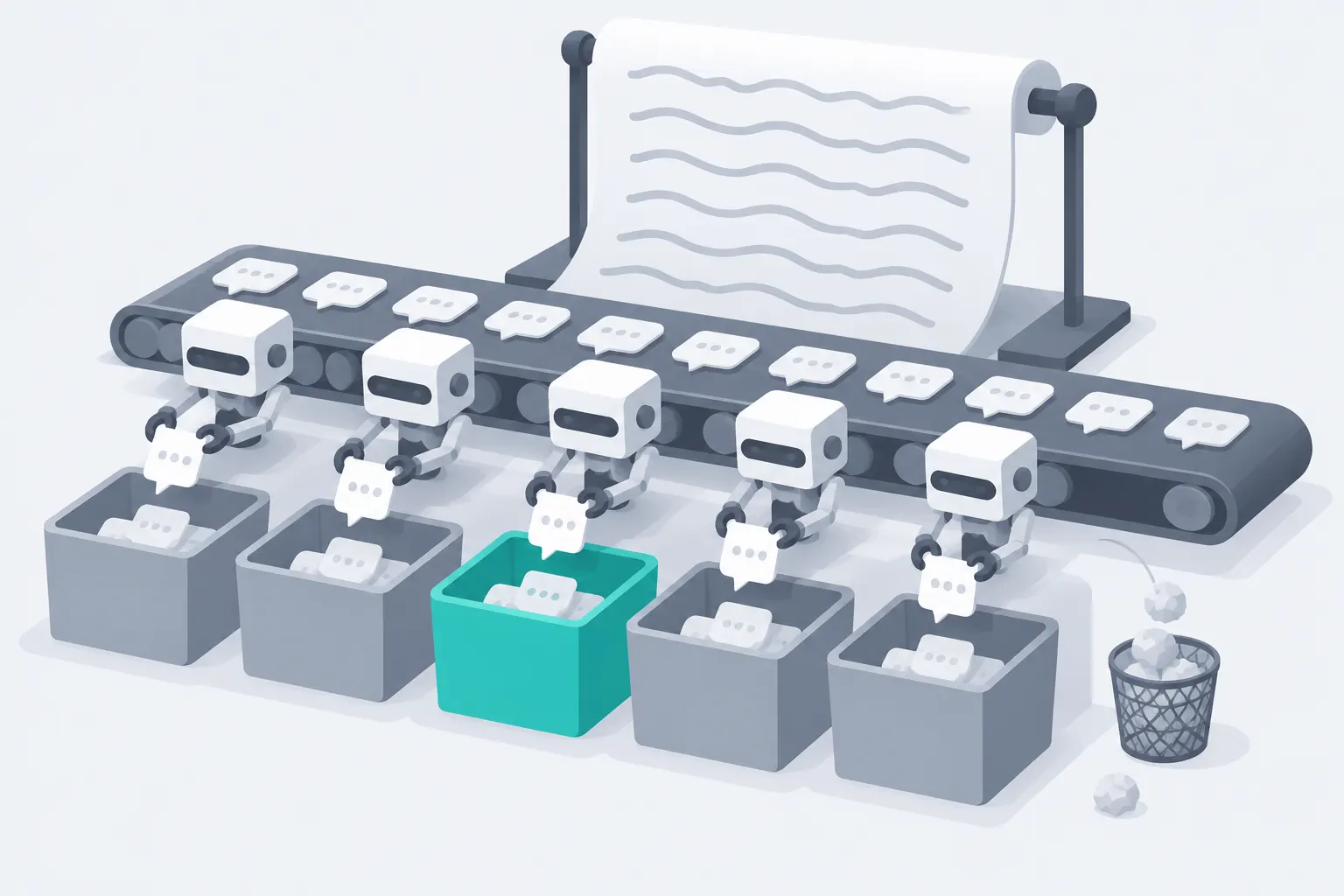
On Nov 2, 2026, from 00:14 to 00:22 Singapore time (SGT), we made 10 billed calls to the EveryInfra API. They returned 100 top-level comments from 6 Xiaohongshu (RedNote) posts about robot vacuums, for $0.066671 in total. On one post, 24 of 25 comments said only "join the group", "count me in" or "join" in Chinese. The catalog says xiaohongshu/comments returns 15 rows per page, but 4 of our 8 pages returned 10.
That changes the budget for a Claude Code dynamic workflow. At the catalog page size, 500 comments need 34 calls and cost $0.189. At our measured mean of 12.5 rows per page, they need 40 calls and cost $0.222. If you also drop the 25% noise and still want 500 useful comments, you need 54 calls and $0.300.
A fourth result matters for reruns. We sent the same request three times, and the first page changed by 7 comments in 6 minutes. Each of the three calls was billed.
This article answers one practical question. You have a product keyword and you want Claude Code to write a parallel program. The program pulls Xiaohongshu comments, sorts them into four groups (need, complaint, price, praise) and writes one summary table. Which feature do you use, what does the script look like, and how do you connect the data?
How many calls does it take for 500 comments, and what breaks under rate limits and retries? Every Claude Code fact below comes from the Claude Code workflows page or the changelog. We did not run a workflow on our machine, so the Claude Code parts are configuration examples. Every EveryInfra number comes from a raw API response.

The job: 500 Xiaohongshu comments, four groups, one table
We define the job first, because every number later depends on it. The input is one keyword. We used the Chinese word for "robot vacuum", because the category has many "which one should I buy" and "this broke" threads around the November 11 sales. The output is one table. It shows the count and share of each group and three example comments per group. It also shows the API cost and the agreement rate from a spot check.
Three stages do the work. xiaohongshu/search finds posts. xiaohongshu/comments and xiaohongshu/sub_comments pull comments and replies. A model then labels each comment. The script defines the four groups.
A need asks which model to buy or asks for a link. A complaint reports a problem with a product or a service. A price comment talks about cost, cheaper copies or where to buy. Praise comes from a person who uses the product and recommends it. All other comments go to "other".
Why use a parallel program for this job? It meets three conditions. First, the posts are independent, so post A does not need the result from post B. Second, the input is much larger than the output. One comment returns about 1,445 bytes of JSON, but its text is about 95 bytes. Third, the labeling rule is fixed, so a small model can do it.
Anthropic published a guide on Oct 22, 2026 that asks most agent builders to use fewer subagents (Anthropic article). The same guide keeps subagents for one case. That case is several tasks that need fresh, separate contexts in parallel. Comment sorting is that case.
We pulled 6 posts. First we searched with sort=most_commented and got 20 posts. Then we picked 6 posts with different topics. The table below shows them with English summaries of their titles. Ten of the 20 search results had is_cooperation_note set to true. On Xiaohongshu, these are sponsored posts that go through the Pugongying platform.
That platform reviews a sponsored post before it goes live. The brand must accept or reject it within 72 hours (Pugongying help center, page dated 2026-10-22; Pugongying home). None of our 6 posts was sponsored. Keep that in mind when you read the praise numbers.
| Post (our code) | Title, summarized in English | Comments shown in search | Top-level comments we pulled |
|---|---|---|---|
| A | "Do not buy a robot vacuum yet, see the Singles' Day test first" | 2,069 | 25 (2 pages) |
| B | A complaint thread about a Roborock vacuum | 570 | 30 (2 pages) |
| C | "2026 robot vacuum buying guide" | 377 | 10 |
| D | A short comedy video about a "strong" vacuum | 3,278 | 10 |
| E | "A waste-of-money appliance: the useless robot vacuum" | 973 | 15 |
| F | A first-time buyer asks for advice | 487 | 10 |
What Claude Code dynamic workflows are, in the words of the docs
The Claude Code docs define a dynamic workflow as a JavaScript script that orchestrates many subagents at once. Claude writes the script for your task. A runtime executes it in the background while your session stays responsive (workflows page). The feature first shipped in v2.1.154 on May 28, 2026. The changelog says that Claude "orchestrates work across tens to hundreds of agents in the background" and that /workflows shows your runs (changelog).
The launch article now says that dynamic workflows are generally available. It lists the CLI, the Desktop app and the VS Code extension. It lists Pro, Max, Ultra, Team and Enterprise plans, plus the Claude API, Amazon Bedrock, Vertex AI and Microsoft Foundry (Anthropic launch article).
The docs show a saved script. It starts with export const meta = { name, description }. The body is plain JavaScript with top-level await. agent() starts one subagent.
pipeline() runs one chain per item in a list. parallel() runs a set of tasks at the same time and waits for all of them. phase() groups the next agents under a title, log() prints a line, and args holds the input (workflows page, "What the saved script looks like").
When you pass a schema to agent(), the subagent returns an object that matches that JSON Schema. If the output fails validation five times, the call fails. MAX_STRUCTURED_OUTPUT_RETRIES changes that count (same page). This is exactly what the labeling stage needs. Each labeling agent returns an array of {id, label} objects, and the script counts them directly.
There are four ways to start a workflow (workflows page, "Have Claude write a workflow"; commands page).
| How you start it | Who decides to use a workflow | Note |
|---|---|---|
Type the keyword ultracode in the prompt | You, for this prompt | Only in a prompt that you type |
| Ask for "a workflow" in your own words | You, for this prompt | Claude writes the script for this task |
Run /effort ultracode or claude --effort ultracode | Claude, for each task | The flag also sets effort to xhigh |
Run a saved workflow command, such as /deep-research | You | Reuses a run that worked |
The keyword works only in a prompt that a person types. It does not work in a prompt passed with -p (headless docs). It also does not work in a scheduled task prompt, a webhook or a pull request comment. So for a weekly comment report, save one good run as a command first. Then call that command from the scheduled task.
| Subagents | Skills | Agent teams | Workflows | |
|---|---|---|---|---|
| What it is | A worker Claude starts | Instructions Claude follows | A lead agent with peer sessions | A script the runtime runs |
| Who decides the next step | Claude, turn by turn | Claude, from the prompt | The lead agent | The script |
| Where results live | Claude's context | Claude's context | A shared task list | Script variables |
| What you can repeat | The worker definition | The instructions | The team definition | The orchestration |
| Scale | A few tasks per turn | Same as subagents | A few long-running peers | Dozens to hundreds of agents |
| After an interruption | The turn restarts | The turn restarts | Teammates keep running | Resumable in the same session |
The table follows the comparison in the "When to use a workflow" section of the workflows page. The third row matters most here. With subagents, each post summary lands in the main conversation. With a workflow, the 100 comments, the labels and the spot-check results stay in script variables.
The conversation gets only the final table. Agent teams are still experimental and need CLAUDE_CODE_EXPERIMENTAL_AGENT_TEAMS=1 (agent teams docs), so we do not use them here.
Dynamic workflows vs subagents: the plan lives in code, not in the chat
The real difference is not parallelism. The difference is who holds the plan. With subagents, Claude decides each turn whom to start next. Every result must come back to its context before it can decide. The subagent docs say that at 20 running subagents, the next Agent call fails with an error that tells Claude not to retry. CLAUDE_CODE_MAX_CONCURRENT_SUBAGENTS changes that number (subagents docs, "Concurrent subagent limit").
With a workflow, the loops, branches and retry counts are fixed in the script. Claude does not decide again for each post, so early results cannot change how later posts are handled. For labeling, that is a good property. Every post gets the same prompt and the same schema, so you can compare the results across posts.
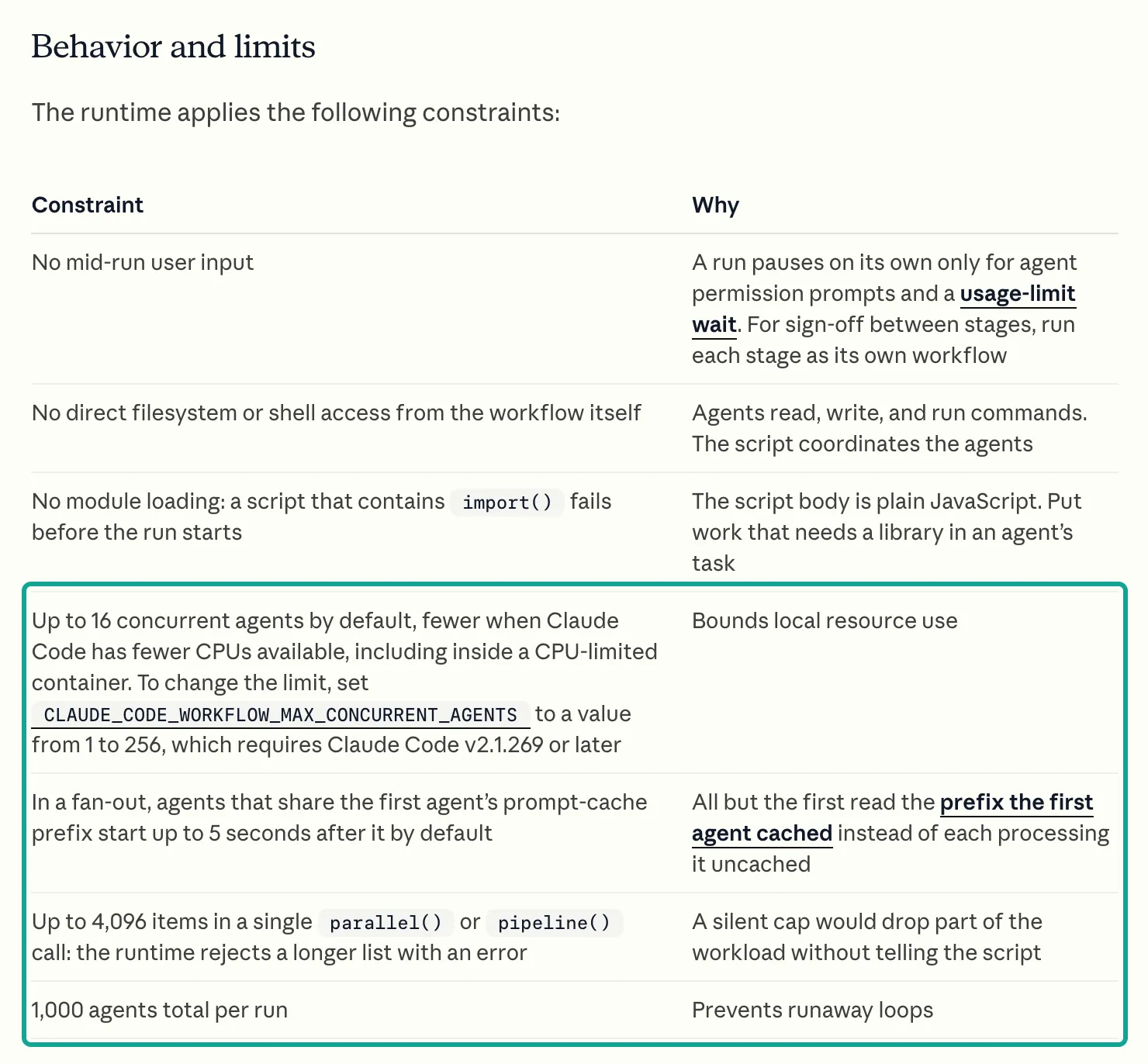
The runtime has hard limits. The screenshot below is from the Claude Code docs. The teal box marks the three limits that matter most here. By default, up to 16 agents run at once, and fewer on machines with fewer CPUs.
CLAUDE_CODE_WORKFLOW_MAX_CONCURRENT_AGENTS sets a value from 1 to 256, from v2.1.269. One parallel() or pipeline() call accepts up to 4,096 items and rejects a longer list with an error. One run starts at most 1,000 agents.
Three other limits also matter. A run cannot ask you for input in the middle. The script cannot read files or run shell commands by itself. A script that contains import() fails before it starts.
The rule that the script cannot touch files or commands decides how data comes in. The script cannot call fetch or curl. So the agents must call EveryInfra. An agent can use the MCP tools that the session has connected. It can also run Bash if your permissions allow it.
The bundled workflow-authoring reference adds one more fact. Workflow agents can reach every MCP tool that the session connects, but servers that need an interactive sign-in can be missing in headless runs. That reference is the /workflow-authoring skill, which needs v2.1.248 or later (workflows page, "Edit a saved script"; skills docs). The EveryInfra remote MCP server uses a key in a request header, not an interactive sign-in. So it also works in headless runs.
One more rule is about time. Inside the script, Date.now(), Math.random() and new Date() without an argument throw an error. A resumed run must repeat the same agent() calls, and timestamps or random values would break that (workflows page). If you need a date, pass it in through args. For "comments from the last 24 hours", use the API filter instead. xiaohongshu/search accepts date_range=last_24_hours.
Versions and switches: which behavior starts in which release
Dynamic workflows changed a lot between May and November 2026. Many tutorials describe old behavior. The table lists only the entries that matter for this job. Versions and dates come from the Claude Code changelog, which mirrors the CHANGELOG.md on GitHub. Rows marked "docs" come from version notes on the workflows page.
| Version | Date | Change | Effect on comment sorting |
|---|---|---|---|
| 2.1.154 | 2026-05-28 | Dynamic workflows and /workflows ship | Starting point |
| 2.1.157 | 2026-05-29 | A setting turns off the keyword trigger | Typing "workflow" no longer starts a run by accident |
| 2.1.269 | docs | CLAUDE_CODE_WORKFLOW_MAX_CONCURRENT_AGENTS | Limit API-calling agents to 2 or 3 |
| 2.1.271 | docs | Runs pause at a usage limit; Pro default size is small | Long runs do not fail halfway |
| 2.1.296 | 2026-10-09 | CLAUDE_CODE_WORKFLOW_SUBAGENT_MODEL | One variable puts every agent on Haiku |
| 2.1.299 | 2026-10-14 | /usage warns about workflows | You can see where tokens went |
| 2.1.301 | 2026-10-15 | Fix: agents skipped a step and the run still reported success | A skipped labeling step no longer looks like success |
| 2.1.305 | 2026-10-20 | Fix: resume reran completed pipeline() and parallel() agents | Resume no longer pays twice for comments |
| 2.1.311 | 2026-10-26 | Fix: subagents missed MCP servers that connected late | A slow remote MCP connect no longer hides tools |
| 2.1.316 | 2026-10-31 | CLAUDE_CODE_SUBAGENT_EFFORT | Set low effort for all labeling agents at once |
The 2.1.269 and 2.1.271 rows come from the "Behavior and limits", "When a run hits your usage limit" and "Set a size guideline" sections of the workflows page. The size guideline has four values. unrestricted means no guideline, small means fewer than 5 agents, medium means fewer than 10, and large means fewer than 50. Claude treats the value as advice, not as a cap. The hard cap is still 1,000 agents. You can also set workflowSizeGuideline in any settings file (settings reference).
For 500 comments, medium is enough. You need 1 search agent, a few fetch agents, the same number of labeling agents, 1 spot-check agent and 1 report agent. A later section shows how a batch call cuts the fetch agents to 1 or 2.
There are two ways to turn on ultracode, and they have different effects. In a session, /effort ultracode turns on ultracode only and does not change the effort level, from v2.1.284. /effort ultracode off turns it off.
Before v2.1.284, /effort ultracode set the session to xhigh effort, and /effort ultracode off failed with Invalid argument. The launch flag claude --effort ultracode (v2.1.203 or later) works in a different way. It turns on ultracode and also sets effort to xhigh (model configuration docs; workflows page). With ultracode on, the "Large workflow" warning does not appear and the subagent concurrency limit is not enforced. For jobs that call a paid API, we suggest that you keep ultracode off. Ask for a workflow in one prompt instead, so that you see the plan before it runs.
Connect the data: remote MCP or POST /api/v1/social
A workflow can use the data API in two ways. An agent can call EveryInfra as a remote MCP server, or it can run curl against POST https://api.everyinfra.com/api/v1/social. The Claude Code MCP docs add a remote HTTP server with claude mcp add --transport http <name> <url>. For Bearer auth, you add --header (MCP docs).
Our remote MCP server uses the Streamable HTTP transport from the MCP spec (MCP spec 2025-11-25, transports). In the spec, a tool call is a tools/call request, and the result is in a content array (MCP spec 2025-11-25, tools). Our tools/list call returned 12 tools. Three of them matter here: everyinfra_list_capabilities, everyinfra_call_api and everyinfra_get_job.
# Configuration example. Keep the key in an environment variable, never in a file.
export EVERYINFRA_API_KEY="<your key>"
claude mcp add --transport http everyinfra https://api.everyinfra.com/mcp \
  --header "Authorization: Bearer ${EVERYINFRA_API_KEY}"

# Fewer approval prompts: add these to permissions.allow in .claude/settings.json
#   "Workflow", "mcp__everyinfra__everyinfra_call_api", "mcp__everyinfra__everyinfra_get_job"
# Keep at most 3 agents running, so a 10-per-minute key is not saturated
export CLAUDE_CODE_WORKFLOW_MAX_CONCURRENT_AGENTS=3
The permission lines have three sources. In claude -p and in the Agent SDK, Claude Code never shows the workflow approval prompt. To let a run start, add Workflow to your allow rules. For one saved workflow, add Workflow(<name>) (workflows page, "Approve the plan before it runs").
The launch article suggests auto mode for workflows. In auto mode, a classifier reviews each call (permission modes docs). A PreToolUse hook can also return allow for the call (hooks docs).
MCP allow rules use the form mcp__<server>__<tool>. A glob is valid only after the server name, as in mcp__everyinfra__* (permissions docs). The subagents of a workflow use your permission rules. The docs suggest that you allow the tools that agents need before a long run, so the run does not stop for approvals.
Which method should you use? For read-only labeling with a known number of calls, we use MCP. The table compares the two methods. The sandbox row comes from the sandboxing docs, which start with no allowed network domains.
| Question | Remote MCP | curl to `POST /api/v1/social` |
|---|---|---|
| Does the agent need Bash? | No | Yes, plus a sandbox network rule |
| Does the agent know billing and paging? | Yes, from the tool description | Only from your prompt |
Error fields such as retry_after and did_you_mean | In the tool result | In the response body |
| Raw JSON on disk for an audit | No | Yes, the agent writes the file |
| Best for | Labeling with a known call count | Jobs that must keep every raw file |
With curl, the fetch agent writes each raw file and returns only {id, text, like_count} to the script.
Know one size limit before you start. Claude Code warns when an MCP tool output passes 10,000 tokens and caps it at 25,000 tokens by default. MAX_MCP_OUTPUT_TOKENS changes the cap. A successful text result longer than 50,000 characters goes to a file (MCP docs, "MCP output limits and warnings").
One page of 15 comments over MCP was 16,892 bytes. One search page of 20 posts was 34,991 bytes. Both are below the line.
A comments_batch call for 3 posts was 42,991 bytes. At that rate, 20 posts give about 280,000 bytes. That result will go to a file, and the agent must read the file in a second step. This does not change the result. It only adds a step. To keep the result inside the agent's context, request 3 or 4 posts per call.
One real round trip: what the agent sends and what the API returns
At 00:17:55 SGT on Nov 2, 2026, we sent the tools/call request below over MCP. It is the same JSON-RPC request that a Claude Code agent sends when it calls mcp__everyinfra__everyinfra_call_api. The target was post F, the first-time buyer, sorted by likes. The result sits in result.content[0].text as JSON text. We show the first comment, the billing field and nothing else. We removed the query string from the post URL, and author names and IDs are hidden.
{"jsonrpc":"2.0","id":2,"method":"tools/call","params":{"name":"everyinfra_call_api",
 "arguments":{"platform":"xiaohongshu","action":"comments",
  "params":{"url":"https://www.xiaohongshu.com/explore/692b0d81000000001d03ea4c","sort":"most_liked"}}}}

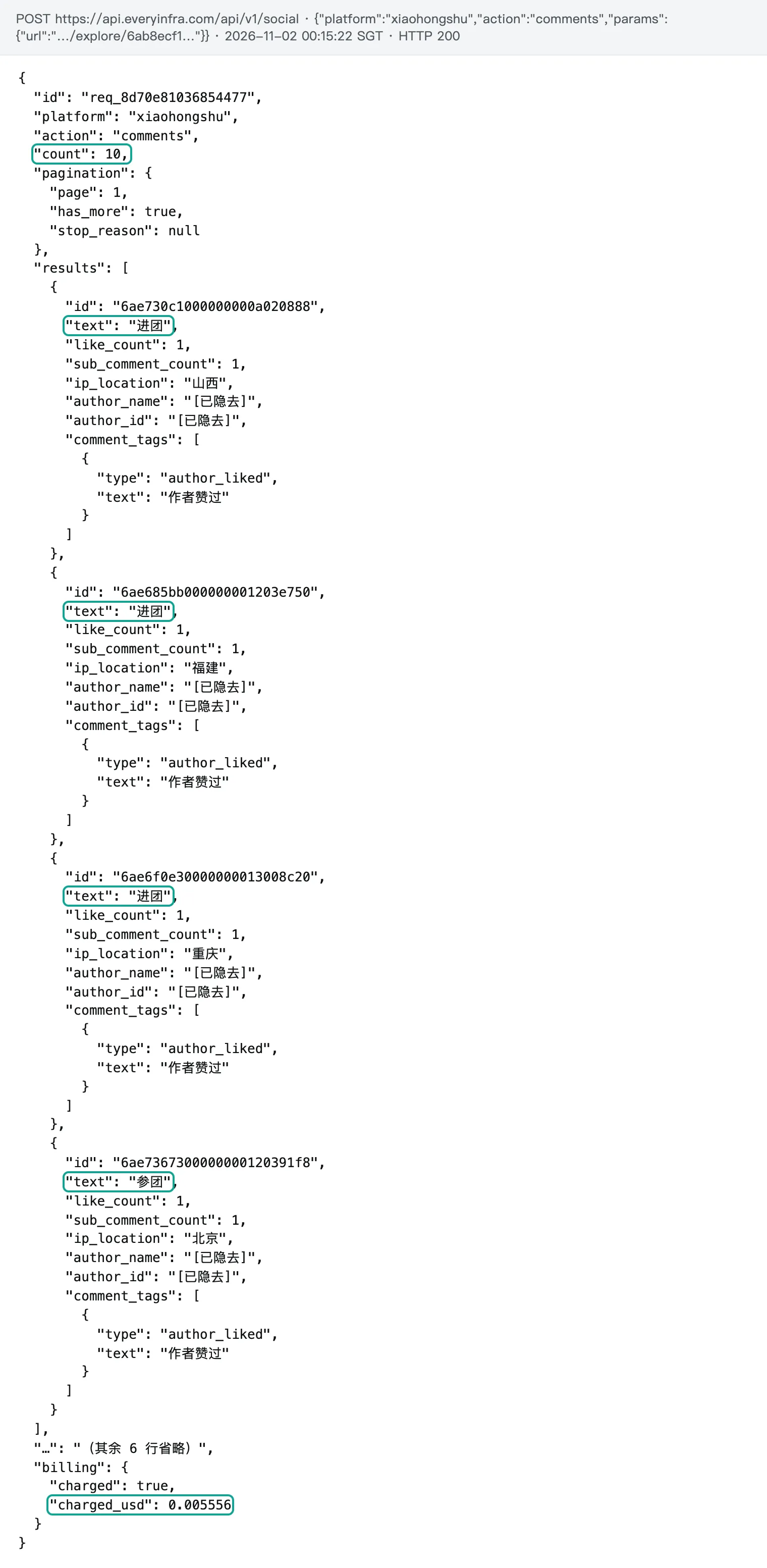
{"id":"req_b7efc0a2e4784211","platform":"xiaohongshu","action":"comments","count":10,
 "pagination":{"page":1,"has_more":true,"stop_reason":null},
 "results":[{"id":"693ab483000000001702fef1","text":"(Chinese) How is the DJI one? I hear its obstacle avoidance is strong",
   "like_count":3,"author_name":"[hidden]","author_id":"[hidden]","sub_comment_count":0}],
 "billing":{"charged":true,"charged_usd":0.005556}}
Eight of these 10 comments are clear needs. Almost every one gives the floor area, a budget, pets and the floor type. One example, translated: "140 square meters, carpets, no pets, tiles everywhere, lots of hair, budget 3,000 yuan, which one?" This type of comment is useful for product and support teams. It is also well structured, so a model can extract budget, area and pets as fields.
The returned fields match the 20 response_fields for xiaohongshu/comments in the catalog. The table shows which ones the fetch agent keeps.
| Field | What it holds | Keep for labeling? |
|---|---|---|
id, text, like_count | Comment ID, text and likes | Yes |
sub_comment_count | Number of replies | Yes, to pick threads for replies |
comment_tags | "Liked by the author", "pinned", poll answers | Optional, helps the noise filter |
posted_at, ip_location | Time and IP region | Only for time or region reports |
author_name, author_id, avatar | Who wrote it | No, and do not put them in reports |
note_url, next_page_token, sub_comments | Paging and the first reply | Only inside the fetch agent |
The script skeleton: discover, fetch, filter, label, check, report (example)
We wrote the skeleton below from the script API in the docs. We did not run it, so treat it as a configuration example. It has five phase() calls but six stops. The filter is not an agent. It is one regex in the script, and it costs no tokens.
Each design choice follows from a measurement in this article. Fetch agents return only id, text and like_count, not author data and 30 other fields. Labeling agents use a schema with five fixed labels. The spot check uses a different model to relabel 10% of the comments, and it does not see the first labels.


export const meta = {
  name: 'xhs-comment-triage',
  description: 'Pull Xiaohongshu comments for a keyword, drop noise, label need/complaint/price/praise, write a table',
  whenToUse: 'You have a product keyword and want to know what the comment sections ask and complain about',
  phases: [
    { title: 'Discover', detail: '1 agent searches posts' },
    { title: 'Fetch', detail: '1 agent per post pulls 2 pages' },
    { title: 'Classify', detail: '1 agent per post labels comments' },
    { title: 'Verify', detail: 'another model relabels 10%' },
    { title: 'Report', detail: '1 agent writes the table' },
  ],
}

const KEYWORD = (args && args.keyword) || 'robot vacuum (Chinese keyword)'
const NOTE_COUNT = (args && args.notes) || 20
const TOOL = 'mcp__everyinfra__everyinfra_call_api'
const LABELS = ['need', 'complaint', 'price', 'praise', 'other']
const NOISE = /^(进团|参团|进|\s*)$|^(\[[^\]]+R\]|\s)*$/   // "join the group" replies, empty text, emoji only

const NOTES = { type: 'object', required: ['notes'], properties: { notes: { type: 'array', items: {
  type: 'object', required: ['url', 'title'],
  properties: { url: { type: 'string' }, title: { type: 'string' }, comment_count: { type: 'integer' } } } } } }
const COMMENTS = { type: 'object', required: ['comments', 'calls', 'charged_usd'], properties: {
  calls: { type: 'integer' }, charged_usd: { type: 'number' },
  comments: { type: 'array', items: { type: 'object', required: ['id', 'text'],
    properties: { id: { type: 'string' }, text: { type: 'string' }, like_count: { type: 'integer' } } } } } }
const LABELED = { type: 'object', required: ['items'], properties: { items: { type: 'array', items: {
  type: 'object', required: ['id', 'label'],
  properties: { id: { type: 'string' }, label: { type: 'string', enum: LABELS } } } } } }

phase('Discover')
const found = await agent(
  `Use ${TOOL} with platform=xiaohongshu, action=search, params={keyword:"${KEYWORD}", sort:"most_commented"}. ` +
  `Follow next_page_token until you have ${NOTE_COUNT} posts. Keep each url exactly as returned, with xsec_token.`,
  { schema: NOTES, model: 'haiku', effort: 'low', label: 'search' })

const results = await pipeline(found.notes.slice(0, NOTE_COUNT),
  (note) => agent(
    `Use ${TOOL} for xiaohongshu/comments with params={url:"${note.url}"}, then fetch page 2 with next_page_token. ` +
    `On 429, wait error.retry_after seconds and retry, at most 3 times. On 422, do not retry; report it. ` +
    `Keep only id, text and like_count. Sum billing.charged_usd into charged_usd.`,
    { schema: COMMENTS, model: 'haiku', effort: 'low', phase: 'Fetch', label: note.title.slice(0, 12) }),
  (r) => ({ ...r, kept: r.comments.filter((c) => !NOISE.test(c.text.trim())),
            dropped: r.comments.filter((c) => NOISE.test(c.text.trim())).length }),
  (r) => agent(
    `Label each Xiaohongshu comment as one of ${LABELS.join(', ')}. need = asks which model to buy or for a link; ` +
    `complaint = a product or service problem; price = cost, cheaper copies or where to buy; ` +
    `praise = the writer uses it and recommends it; other = jokes or off-topic.\n` +
    JSON.stringify(r.kept.map((c) => ({ id: c.id, text: c.text }))),
    { schema: LABELED, model: 'haiku', effort: 'low', phase: 'Classify', label: 'classify' })
    .then((l) => ({ ...r, labels: l ? l.items : [] })),
)

const ok = results.filter(Boolean)
const all = ok.flatMap((r) => r.labels.map((x) => ({ ...x, text: (r.kept.find((c) => c.id === x.id) || {}).text })))
const sample = all.filter((_, i) => i % 10 === 0)
log(`Fetched ${ok.length}/${found.notes.length} posts; filter dropped ${ok.reduce((s, r) => s + r.dropped, 0)} comments`)

phase('Verify')
const second = await agent(
  `Label these comments on your own. Labels: ${LABELS.join(', ')}.\n` + JSON.stringify(sample.map(({ id, text }) => ({ id, text }))),
  { schema: LABELED, model: 'sonnet', effort: 'medium', label: 'relabel-10pct' })
const agree = sample.filter((s) => ((second && second.items.find((y) => y.id === s.id)) || {}).label === s.label).length

phase('Report')
const counts = {}
for (const x of all) counts[x.label] = (counts[x.label] || 0) + 1
return await agent(
  `Write a Markdown table with count and share per label and 3 example comments per label, translated to English. ` +
  `End with API cost $${ok.reduce((s, r) => s + r.charged_usd, 0).toFixed(4)} and spot-check agreement ${agree}/${sample.length}.\n` +
  JSON.stringify({ counts, examples: all.slice(0, 150) }),
  { model: 'sonnet', effort: 'low', label: 'report' })
Some parts of this skeleton are easy to get wrong, and the docs cover each of them. meta must be the first statement and a plain object literal. If it contains a variable, a function call or a spread, /<name> drops out of autocomplete (workflows page, "Edit a saved script"). The titles in phases must match the phase() arguments exactly, or the progress view gets an extra group.
When one agent inside pipeline() fails, its slot becomes null, so the script calls filter(Boolean). When an agent that you await directly fails, the whole run ends ("When an agent stalls and restarts", same page). The fetch and label stages use haiku. The check and the report use sonnet.
Claude Code picks a model for workflow agents in the same order as for subagents. A model named in the script is the per-call model. With no model, the agent uses the session model (workflows page, "Cost"; the subagents docs list the aliases sonnet, opus, haiku and fable).
Why does the filter live in the script and not in a model? The script is plain JavaScript, so a regex, a filter and a count cost no tokens. The filter removes "join the group" replies, empty text and emoji-only comments. None of these needs understanding.
The next section shows that they were 25 of our 100 comments. The bundled authoring reference also says that a workflow should log() what it drops when it limits coverage. Without that line, a reader assumes full coverage. The log() line in the skeleton does that job.
Test 1: the catalog says 15 rows per page; 4 of 8 pages had 10
For xiaohongshu/comments, the catalog says page_size is 15 and limit_ignored is true. So the page size is fixed and a limit value has no effect. xiaohongshu/sub_comments has 10, xiaohongshu/search has 20, and comments_batch has 15 per post. Before the tests, we wrote down the hypothesis "every page has 15 rows". The data rejected it.
At 00:15:22 SGT, the first page of post A had 10 rows, and its second page at 00:15:49 had 15. At 00:17:38, one comments_batch call for 3 posts returned 10 rows for C, 10 for D and 15 for E. At 00:17:55, post F over MCP returned 10. The mean of the 8 pages is 12.5 rows.
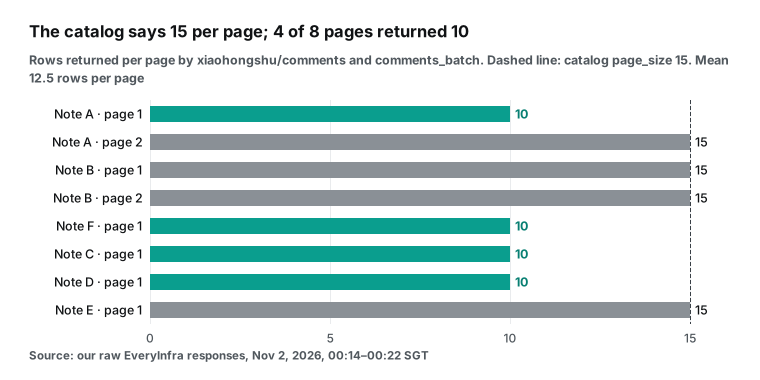
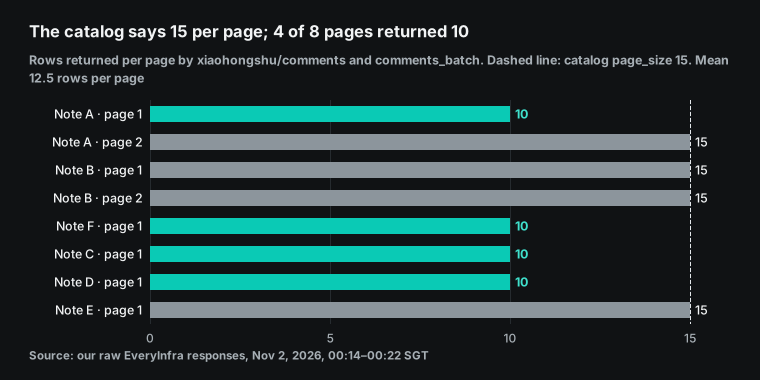
A short page does not mean the end. For posts A and F, pagination.has_more was true on the short page. For posts C and D in the batch result, every row had a next_page_token. Page 2 of post A was back to 15 rows. We guess that the platform treats the first page differently, for example for pinned or poll comments. We have no more evidence, so we report only what we saw.
The practical point is about the stop rule. With a variable page size, "target count divided by 15" does not give the call count. The correct stop rule is "I have enough rows" or "has_more is false". It is not "I fetched N pages".
Replies behave the same way. One comment on post B had sub_comment_count 52. At 00:17:17 SGT we called xiaohongshu/sub_comments for it. Page 1 returned 5 rows, not 10, and 2 of them had empty text, probably images or stickers.
So replies cost more per useful row. A top-level page gave 12.5 rows on average for $0.005556, but this reply page gave 3 rows with text. For labeling, we suggest that you skip replies by default. Pull them only for a comment that the model marks as a complaint and that has many replies.
| Capability | Catalog page_size | Rows per page we saw | Price per call | Cost per useful row |
|---|---|---|---|---|
xiaohongshu/search | 20 | 20 (1 page) | $0.005556 | about $0.00028 per post |
xiaohongshu/comments | 15 | 10 to 15, mean 12.5 (8 pages) | $0.005556 | about $0.00044 per comment |
xiaohongshu/comments_batch | 15 per post | 10 to 15 per post (3 posts) | $0.005556 per post | same as a single post |
xiaohongshu/sub_comments | 10 | 5, of which 2 had no text (1 page) | $0.005556 | about $0.0019 per reply |
Test 2: what a rule filter removes, and what it cannot do
Our third hypothesis was "comments can go straight to the model". The pass mark was less than 30% noise on every post. Post A failed it badly. Of its 25 comments on two pages, 24 said only "join the group" (17), "count me in" (6) or "join" (1) in Chinese. The screenshot shows that most of them carry the "liked by the author" tag, and some carry a poll answer tag. Each has sub_comment_count 1.
Our reading is that the author organized a group buy in the comments, and users replied to be added. These comments say nothing about what users want, but they fill billed pages. Among the other 5 posts, only post D had 1 noise row, which was an empty comment.
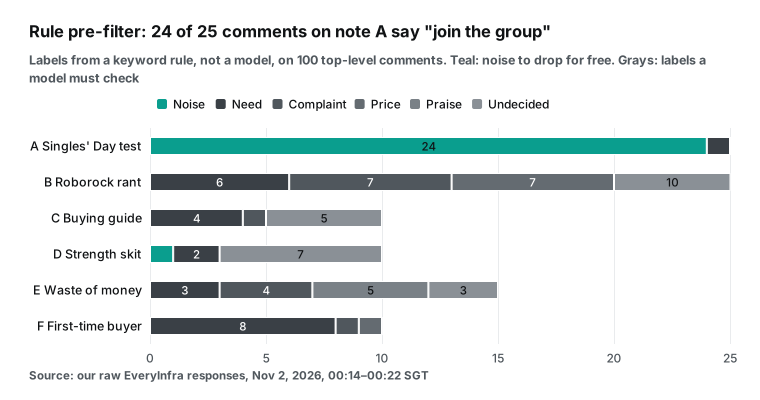
To see what one regex can do, we wrote a keyword rule classifier as a baseline. First the rule marks noise: text that is only "join the group", only emoji, or empty. Then it checks complaint words (smell, return, waste of money, tangles), then need words (recommend, which one, question marks), then price words (price, yuan, cheaper copy, budget), then praise words (works well, clean, saves time). A comment that matches nothing is "undecided".
This is not a model result. It shows which parts a rule can do and which parts need a model. Across 100 comments, the rule gave noise 25, need 24, complaint 13, price 8, praise 5 and undecided 25.
| The rule got it right | The rule got it wrong or could not decide |
|---|---|
| All 25 "join the group" replies matched exactly and were removed | "So the ghost hid in our house for four days...?" is a joke, but the question mark made it a need |
| "3 yuan each, lasts a month" became price | "My budget Xiaomi does not tangle hair" is praise, but the word "tangle" made it a complaint |
| "140 square meters... budget 3,000, which one?" became need | "I only learned from the comments that the dust bag is single-use" is new knowledge, so it stayed undecided |
| "The dock exhaust smells bad, how do I fix it?" became complaint | "Do you stand next to the washing machine for 30 minutes?" is rhetorical, but it became a need |
The table explains why the script has two stages. The rule only removes noise. Noise looks the same every time, and a wrong drop costs almost nothing. The four intents go to a model, because one question mark can be a request, a rhetorical question or a joke.
Post C has "buying guide" in its title and post D has "robot vacuum" in its title. But their comment sections talk mostly about the creator's comedy plot and fitness. Seven or more of those rows are jokes that both a rule and a model should mark as "other". If you pick posts by title only, you overestimate useful comments. So we suggest that the discover agent also gets is_cooperation_note, the comment count and the title. It can then skip clear comedy posts first.
Research on text labeling with models helps to set the spot check. One study found that zero-shot labels beat crowd workers on most tasks (arXiv 2303.15056). Another found large variation across models and tasks (arXiv 2311.05769), and a methods paper lists rigorous validation as a required step (Sociologica, 2024). For this job, that means three rules. Do not skip the spot check. Use a different model that does not see the first labels. Set a pass mark in advance, for example 80% agreement. If the run is below it, change the label definitions and relabel the whole batch.
Test 3: the same page three times gave 7 new comments, and each call was billed
This test answers a workflow question: what happens when an agent fails and runs again? We fetched the first page of post B at 00:15:33 SGT. We sent the same request body again at 00:21:35 and at 00:21:55. The second response shared only 8 of 15 comments with the first.
The third shared 13 with the first and 10 with the second. Together, the three calls returned 22 distinct comments. Each call cost $0.005556, and the identical request did not make it free.
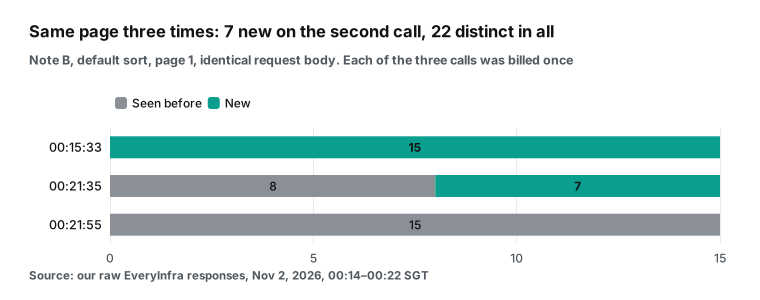
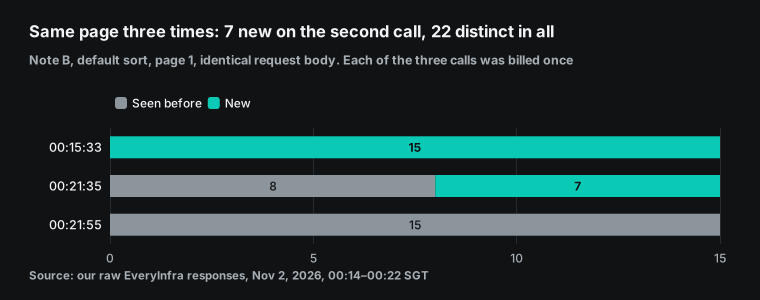
So the default sort is not a stable order. It changes with time and with the platform's ranking. In a workflow, this adds to the resume rules. The docs are clear. On resume, completed agents return their saved results.
But the first agent whose prompt changed runs again, and so does every agent after it. A failed agent runs again, and so does every agent that the script starts after it, even completed ones. The docs give an example. A script starts A, B, C and D, and B fails. On resume, A comes from the cache, and B, C and D run again (workflows page, "Which agents run again").
v2.1.305 on Oct 20, 2026 fixed a related problem. Before that fix, an unedited script on resume could rerun completed agents in pipeline() and parallel() (changelog 2.1.305).
Put the two facts together. When a fetch agent runs again, it calls the API again and you pay again. The comments that come back can differ, so the labels that later agents already made may not match. We suggest three rules outside the skeleton.
First, split fetching and labeling into two workflows. The first workflow only fetches and writes files. When the data looks right, the second workflow reads the files and labels them. A failure in the labeling run then never touches the API.
Second, fetch with sort=newest or sort=most_liked, which are much more stable than the default. Do not change the sort while you page, because the catalog says that an old next_page_token stops working. Third, deduplicate labels by comment id before you count, because one comment can appear in two fetches.
Stalls cause another kind of rerun. If an agent produces no output for long enough, it starts over from the same prompt, up to five times. Files that it already changed stay changed, and its tokens stay in the run total (workflows page, "When an agent stalls and restarts"). Time spent waiting on its own tool calls does not count, so a 2.5-second API call does not trigger a stall.
A different failure happens when a response stream goes silent. A streaming idle watchdog ends it, and CLAUDE_STREAM_IDLE_TIMEOUT_MS sets that timeout (network configuration docs). If an agent waits a long time after a 429 and shows no output, it can be treated as stalled and start again. Then it repeats calls that you already paid for.
Our 429 asked for a 1-second wait, so the risk was small. On a busy shared key, waits get longer. In that case, give fetch agents their own stallMs, for example agent(prompt, { stallMs: 600000 }).
Parallel rate limits: 16 agents against a 10-per-minute key
A workflow runs 16 agents at once by default. Our key has its own limit of 10 requests per minute, and other programs shared the same key at the same time. We called about every 10 seconds, which should be well below the limit. But the x-ratelimit-remaining-requests header read 5, 5, 2 and 0.
At 00:15:59 SGT, a call returned 429. After that the header read 8, 3, 6, 5 and 1. This is what a shared key looks like. You cannot see when others call, so you can only read the header and the 429s. If only your program uses a key, the remaining count should go down with each of your calls and not jump up and down. The jumps here come from the shared key, and you will not see them on a key of your own.
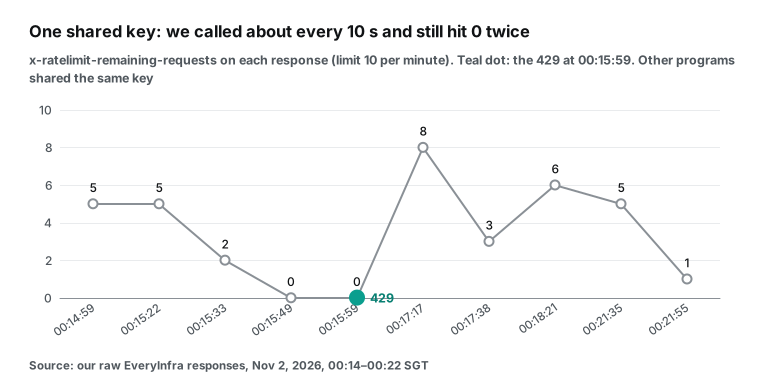
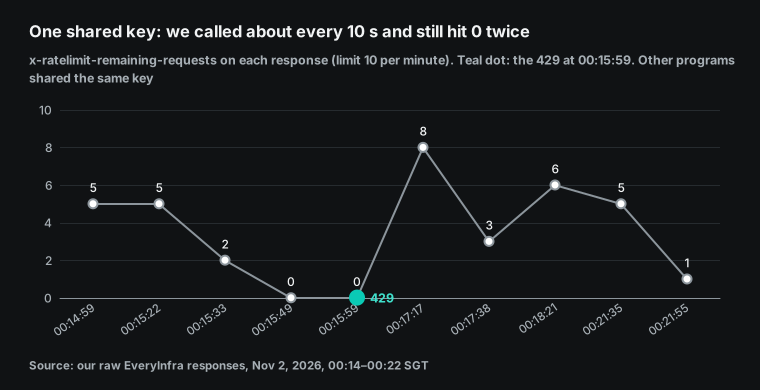
An agent can read the 429 body directly. The text was "rate limit exceeded, slow down: 10 requests per minute for this API key's own limit. Retry after 1s.". The body also had retry_after: 1, retryable: true, max_retries: 3 and the sentence "Nothing was charged". We waited more than 60 seconds to be safe and got a 200 at 00:17:17.
The 429 cost nothing, and it is not in our billed total. The fetch prompt in the skeleton uses the same rule: on 429, wait error.retry_after seconds and retry, at most 3 times. The Anthropic API also returns 429 with a retry-after header when you go too fast (Anthropic rate limits docs). One prompt rule can cover both.
{"error":{"code":"rate_limited",
  "message":"rate limit exceeded, slow down: 10 requests per minute for this API key's own limit. Retry after 1s.",
  "reason":"key_limit","retry_after":1,"limit":10,"fault":"account","retryable":true,"max_retries":3,
  "next_steps":["Over this key's or account's request rate. Nothing was charged. Retry after retry_after seconds, or ask the user to raise the limit."]}}
Retries are a passive defense. There are two active ones. The first is lower concurrency. Set CLAUDE_CODE_WORKFLOW_MAX_CONCURRENT_AGENTS to 2 or 3.
A fetch agent that pulls two pages needs about 5 seconds of API time plus its own thinking time. With 3 agents, the request rate is close to 10 per minute, and retries cover the rest. This variable applies to the whole run, so it also slows the labeling agents. If total time matters, split fetching and labeling into two workflows, and do not limit the labeling run.
The second active defense is the batch call. xiaohongshu/comments_batch takes up to 20 posts per request and bills per post. At 00:17:38 SGT we fetched 3 posts in one request. It returned 35 comments and cost $0.016667, which is $0.005556 per post, the same as xiaohongshu/comments. The request took 3.28 seconds, and a single-post call took about 2.4 seconds.
| First pages of 40 posts | Requests | Minimum minutes at 10 per minute | API cost |
|---|---|---|---|
One xiaohongshu/comments call per post | 40 | 4 | $0.22224 |
xiaohongshu/comments_batch, 20 posts per call | 2 | 1 | $0.22224 |
The batch call changes the request count, not the cost. For a shared key and a workflow, the request count is the real bottleneck. 40 requests on a 10-per-minute key need at least 4 minutes. 2 requests finish in seconds. So a better skeleton uses 1 or 2 agents to call comments_batch for every first page after discovery. Then it pages further only on posts with many comments.
Every row in a batch result has a next_page_token, so you can continue with xiaohongshu/comments. The catalog has one warning: when some posts fail, check partial and missed in the response. Do not treat a missing post as a post without comments. Put that sentence in the fetch prompt.
Async mode is also available. The catalog says that any capability accepts "mode":"async" in the body. You get a 202 and a job_id at once, and then you poll GET /api/v1/jobs/{job_id}. At 00:18:21 SGT we used async mode for page 2 of post B. The 202 already showed status succeeded.
At 00:18:30 the poll returned 15 rows. Polls are free and do not count toward the per-minute limit, as the everyinfra_get_job tool description says. Comments return in 2 to 3 seconds, so they do not need async mode. But if the same workflow also calls slow capabilities, async mode and polling keep agents from waiting on open requests.
Failures, retries and billing: what can make you pay twice
The table puts our observations next to workflow behavior. The "Workflow behavior" column comes from the workflows page. The "API billing" column comes from our raw responses.
| Event | Workflow behavior | API billing | Defense in the script |
|---|---|---|---|
| 429 rate limit | The agent handles it | Not billed ("Nothing was charged") | Retry after retry_after, at most 3 times |
422 bad value, such as sort=hottest | The agent handles it | Not billed | Do not retry; report the message |
| Agent stalls | Restarts from the same prompt, up to 5 times | Successful calls run and bill again | Set stallMs on fetch agents |
| Resume after a failed agent | That agent and all later agents run again | Rerun fetches bill again | Split fetch and label into two workflows |
| Same request within 6 minutes | Not applicable | Billed each time, and content changes | Deduplicate by comment id |
| Label output fails the schema | Retries, fails after five attempts | No API call | Keep the schema small |
| Subscription usage limit | Pauses until reset, from v2.1.271, if conditions hold | No API call | Test on a small slice first |
For the usage-limit row, the session itself can also wait for a reset (interactive mode docs). The 422 test ran at 00:16:07 SGT, with sort set to hottest on purpose. The response said `"sort must be one of: default, most_liked, newest (got 'hottest')". It also gave the allowed list and did_you_mean: ["most_liked"]`, and it said that nothing was charged.
This kind of error suits a workflow. A fetch agent can read it, change one value and continue without a question to you. In our strict tool use article, we showed that strict tool definitions block bad enum values on the model side. In a workflow, a simpler fix is to hard-code the sort value in the fetch prompt.
The bill: how many calls and how much for 500 comments
The API has one unit price for this job. We read the catalog at 00:14 SGT on Nov 2, 2026. xiaohongshu/search, xiaohongshu/comments, xiaohongshu/sub_comments and xiaohongshu/comments_batch each cost $0.005556 per call (per post for the batch). Failed calls and empty results are free. For a paged capability, the call count is the row target divided by the rows per page, rounded up.
The three methods below count only comment pages. Search returns 20 posts per page. 500 comments usually need 20 to 40 posts, which adds 1 or 2 calls, $0.0056 to $0.0111.
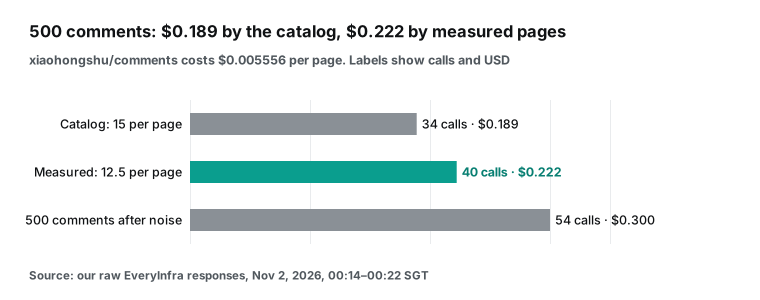
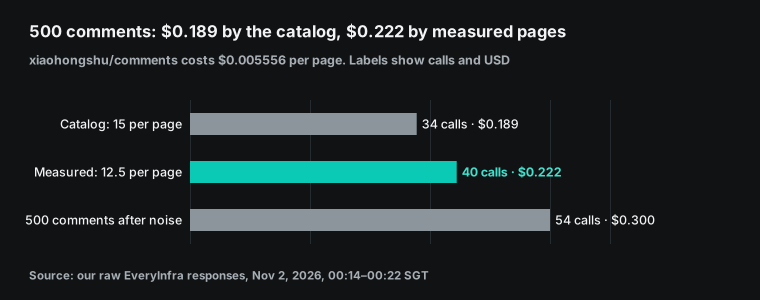
| Method | Rows per page | Calls | API cost |
|---|---|---|---|
| Catalog value | 15 | 34 | $0.188904 |
| Our measured mean | 12.5 | 40 | $0.22224 |
| 500 useful comments after 25% noise | 12.5 | 54 (pull 667 first) | $0.300024 |
| What this article spent: 10 billed requests, 12 billed units | n/a | 10 | $0.066671 |
The next table lists every request in this test, in SGT on Nov 2, 2026. The 429, the 422 and the job poll were free.
| Time (SGT) | Request | HTTP | Rows | Billed |
|---|---|---|---|---|
| 00:14:59 | xiaohongshu/search | 200 | 20 posts | $0.005556 |
| 00:15:22 | xiaohongshu/comments, post A page 1 | 200 | 10 | $0.005556 |
| 00:15:33 | xiaohongshu/comments, post B page 1 | 200 | 15 | $0.005556 |
| 00:15:49 | xiaohongshu/comments, post A page 2 | 200 | 15 | $0.005556 |
| 00:15:59 | xiaohongshu/sub_comments, post B | 429 | 0 | $0 |
| 00:16:07 | xiaohongshu/comments with sort=hottest | 422 | 0 | $0 |
| 00:17:17 | xiaohongshu/sub_comments, post B | 200 | 5 | $0.005556 |
| 00:17:38 | xiaohongshu/comments_batch, posts C, D, E | 200 | 35 | $0.016667 |
| 00:17:55 | MCP everyinfra_call_api, post F | 200 | 10 | $0.005556 |
| 00:18:21 | xiaohongshu/comments async, post B page 2 | 202 | 15 at poll | $0.005556 |
| 00:21:35 | xiaohongshu/comments, post B page 1 again | 200 | 15 | $0.005556 |
| 00:21:55 | xiaohongshu/comments, post B page 1 again | 200 | 15 | $0.005556 |
The third method needs a caution. The 25% noise share comes from our 6 posts, and almost all of it came from post A. With another keyword, the share can be 0 or much higher. So run the workflow on 3 to 5 posts first.
Read the filter count in the log() line, and then decide how many posts to pull. The docs give the same advice about cost. Run a small slice first. Watch each agent's tokens in /workflows, and stop the run if necessary (workflows page, "Cost").
We did not measure the Claude side, so we give only the parts that you can check. The Anthropic pricing page, read on Nov 2, 2026, lists these prices per million tokens. Haiku 5.5 is $0.10 input and $0.50 output for prompts up to 100,000 tokens. Sonnet 5.5 is $2 and $10. Opus 5.5 is $4 and $20.
Text-only, 500 comments are about 12,000 tokens by the page's rule of thumb (10 kB is about 2,500 tokens). Haiku input for that text costs less than $0.002. Most of the cost is elsewhere. Each agent carries a system prompt, tool definitions and its own reasoning, and that size depends on your version and your MCP tools. We did not measure it, so check /workflows for your numbers.
On a subscription, workflow usage counts toward your plan limits. The costs docs say that every subagent and every workflow agent sends its own requests. On the Reddit launch thread, one user said that one prompt used 700,000 tokens and 36% of a Max plan's usage. Another said that the first try used 1.2 million tokens (Reddit launch thread). These are user reports that we cannot verify. They still show why a small first test matters.
Context and tokens: why the fetch stage must slim the data
One comment returns about 1,445 bytes of JSON on average, and its text alone is about 95 bytes. That is about 15 times smaller. The raw JSON has the author name, avatar URL, IP region, tags, the first reply and a post URL with xsec_token, among 20 fields. Almost none of them help with labeling.
By the pricing page's rough ratio, one raw comment is about 361 tokens and its text is about 24 tokens. Chinese text uses a different ratio in practice. For exact numbers, use the token counting endpoint with your model.
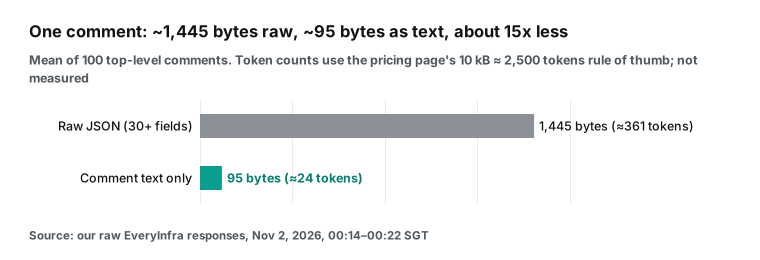
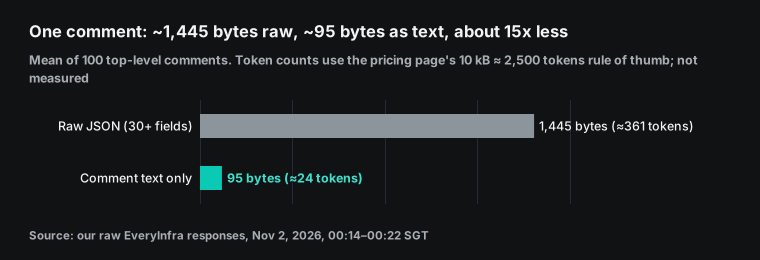
This difference matters in two places. The first is the input to labeling agents. If fetch agents return raw JSON, each labeling agent reads 10,000 to 30,000 tokens of JSON per post. If they return text, it reads a few hundred tokens.
The second is prompt caching. The docs say that agents in one run with the same model, effort level, agent type, tools, output schema and working directory share a prefix. A later agent can read the earlier agent's cache. Workflow agents keep their cache for 5 minutes by default.
subagentPromptCacheTtl set to 1h keeps it for an hour, at a higher write price (workflows page, "Prompt caching in a fan-out"; prompt caching docs). In the skeleton, all fetch agents use the same haiku model, low effort and COMMENTS schema, so they can share that prefix. If you give each post a different model, you lose the shared cache.
The labeling stage: schema, label definitions and agreement
The labeling schema has two fields: id and label, with label limited to five values. Fewer fields mean fewer errors and fewer schema retries. If you also want budget, floor area and pets, add a separate extraction stage. Run it only on comments that the model labeled as a need. Do not add many optional fields to the labeling schema.
The Anthropic API constrains output with a json_schema in output_config.format (structured outputs docs). The workflow schema option does the same job inside Claude Code. The return value is already an object, so the script does not parse text.
Write each label definition so that a person can apply it. All four errors in our rule baseline came from vague definitions. A rhetorical question and a joke looked like needs. A comparison ("my budget model does not tangle hair") looked like a complaint. So the skeleton defines what each label means, not which words it contains. The examples are translated comments from our 6 posts.
| Label | Definition | Example from our data |
|---|---|---|
| need | Asks which model to buy or asks for a link | "140 square meters, tiles, lots of hair, budget 3,000, which one?" |
| complaint | Reports a product or service problem | "The dock exhaust smells bad, how do I fix it?" |
| price | Talks about cost, cheaper copies or where to buy | "3 yuan each, lasts a month" |
| praise | The writer uses the product and recommends it | "My budget Xiaomi does not tangle hair" |
| other | Jokes, plot talk, off-topic | "So the ghost hid in our house for four days...?" |
What about a comment that is both a need and a price comment, such as "budget 3,000, which one?"? We label by what the writer wants, so this one is a need. If your team cares more about price bands, put price before need and state that order in the prompt.
The spot check borrows from the adversarial review that the workflows docs describe. Independent agents challenge each other's findings before the run reports them (workflows page, "When to use a workflow"). Labeling is not bug hunting, so our check agent does not try to refute the first labels. It labels the sample again without seeing them. Then the script computes the agreement rate. A different model (Sonnet in the skeleton) lowers the chance that both agents make the same mistake.
Agreement is only a lower bound. If both models call a joke a need, agreement is high but the label is wrong. So, for a new keyword, read 20 sampled comments yourself on the first run. Add the disagreements and the clear errors to the label definitions. Then relabel the whole batch.
Limits and cautions
The table lists seven limits and what to do about each. The first two rows come from the workflows page, "Behavior and limits".
| Limit | Effect | What to do |
|---|---|---|
| The script cannot go online | Every API call happens inside an agent, which can make one extra call | Return calls and charged_usd through the schema and check the total |
| A run cannot ask you for input | No review between fetch and label | One workflow per stage |
| A run stops when you exit | Running agents start over on relaunch | Relaunch from saved results |
Comment URLs need xsec_token | A "cleaned" URL fails | Keep the URL exactly as returned |
| Only public comments | Hidden or folded comments are missing | Expect fewer negative views |
| Our labels are a rule baseline | The counts are not model output | Run the spot check on your own data |
| Versions differ | Old behavior in many tutorials | Run claude --version; this article uses 2.1.316 |
A run does not continue by itself after you background or exit the session. Claude must relaunch it from the saved results, and agents that were still running start over and spend tokens again (agent view docs).
The catalog asks for the full comment URL from a recent search result, with its query string. Page tokens last 24 hours, so a resume on the next day must start over. The 500-comment numbers come from the unit price and measured page sizes, and we did not pull 500 comments. This article uses the docs read on Nov 2, 2026.
Comment data includes IP regions and display names. Put only labels, counts and quotes without names in the report. Before you send or publish comment quotes, make sure that your use follows local law and the platform's terms. This article describes a data method and gives no legal advice.
FAQ
claude code workflows vs agent teams: which one fits comment sorting?
Agent teams are a lead agent with a few long-running peer sessions and a shared task list. They are experimental and need a flag (agent teams docs). A workflow is a script that starts dozens or hundreds of short agents. For hundreds of independent comments, a workflow fits better. For a few posts that you want to steer turn by turn, plain subagents fit better, as in our Claude Code subagents article. (Source of the question: the autocomplete suggestion "claude code workflows vs agent teams".)
claude code workflows vs skills: do I need both?
A skill is a set of instructions that Claude follows in the conversation. A workflow is a script that a runtime executes (workflows page). They work together. Put the label definitions in a skill, and let the workflow's agents load that skill. Then the definitions stay in one place. (Source of the question: the suggestion "claude code workflows vs skills".)
How many tokens does one Claude Code dynamic workflows run use?
The docs give no fixed number. They say that a run can use much more than the same work in a conversation. They suggest a small first slice and a look at /workflows (workflows page, "Cost"). Reddit users reported 700,000 to 1.2 million tokens for one prompt (Reddit). The API cost for this job is separate: about $0.222 for 500 comments. (Source of the question: the suggestion "claude code workflows cost", which has ten variants, such as "cost per token" and "cost reddit".)
What is ultracode, and should I turn it on?
Ultracode is a Claude Code switch. When it is on, Claude decides for each substantive task whether to write a workflow. It is not an effort level.
In a session, /effort ultracode (v2.1.284 or later) turns on the switch only and keeps the effort level. Only the launch flag claude --effort ultracode also sets effort to xhigh (model configuration docs). With it on, the "Large workflow" warning does not appear. For jobs that call a paid API, we suggest that you keep it off and ask for a workflow in one prompt. (Source of the question: the suggestions "ultracode claude" and "ultracode claude reddit".)
How do I make a workflow stop for a human review?
The docs answer that a run cannot ask for input, so a sign-off needs separate workflows (workflows page, "Behavior and limits"). You can also select a run in /workflows and press x to stop it, and completed agents keep their results. A Hacker News thread raised the same concern: the hard part is adding human judgment to long runs (Hacker News, 2026-05-28). (Source of the question: a commenter on the Reddit launch thread asked which signals stop subagents before they continue past a bad branch.)
How to start
- Get a key from the EveryInfra quickstart, then read the free catalog for
xiaohongshu/searchandxiaohongshu/comments. - Add the remote MCP server to Claude Code with the command above. See remote MCP setup and the MCP server page.
- Ask Claude Code for a workflow that follows the skeleton on 5 posts. Read the plan, then select "Yes, run it".
- After the run, check tokens in
/workflowsand compare the API cost with the pricing page. Save a good run as a command withs.
The same skeleton works on other platforms if you change the capability names. See the Xiaohongshu data API, with comments, replies and batch comments. For other Chinese platforms, see the Douyin data API and the Weibo data API. To clean comments before labeling, read DeepSeek V4 in Claude Code for comment cleaning.
References
- Orchestrate subagents at scale with dynamic workflows. Anthropic, Claude Code docs. Read 2026-11-02. https://code.claude.com/docs/en/workflows
- Claude Code changelog. Anthropic. Latest entry 2.1.316, 2026-10-31. https://code.claude.com/docs/en/changelog
- CHANGELOG.md. anthropics/claude-code on GitHub. Read 2026-11-02. https://github.com/anthropics/claude-code/blob/main/CHANGELOG.md
- Introducing dynamic workflows. Anthropic. 2026-05-28. https://claude.com/resources/articles/introducing-dynamic-workflows-in-claude-code
- Claude Code Adds Dynamic Workflows for Parallel Agent Coordination. InfoQ. June 2026. https://www.infoq.com/news/2026/06/dynamic-workflows-claude-code/
- Building agents: When to fold subagents into your main agent loop. Anthropic. 2026-10-22. https://claude.com/resources/articles/building-agents-when-to-fold-subagents-into-your-main-agent-loop
- Create custom subagents. Anthropic, Claude Code docs. Read 2026-11-02. https://code.claude.com/docs/en/sub-agents
- Run agents in parallel. Anthropic, Claude Code docs. Read 2026-11-02. https://code.claude.com/docs/en/agents
- Agent teams. Anthropic, Claude Code docs. Read 2026-11-02. https://code.claude.com/docs/en/agent-teams
- Skills. Anthropic, Claude Code docs. Read 2026-11-02. https://code.claude.com/docs/en/skills
- Settings reference. Anthropic, Claude Code docs. Read 2026-11-02. https://code.claude.com/docs/en/settings-reference
- Model configuration. Anthropic, Claude Code docs. Read 2026-11-02. https://code.claude.com/docs/en/model-config
- Environment variables. Anthropic, Claude Code docs. Read 2026-11-02. https://code.claude.com/docs/en/env-vars
- Agent SDK reference, TypeScript. Anthropic. Read 2026-11-02. https://code.claude.com/docs/en/agent-sdk/typescript
- Connect Claude Code to tools via MCP. Anthropic. Read 2026-11-02. https://code.claude.com/docs/en/mcp
- Manage costs. Anthropic, Claude Code docs. Read 2026-11-02. https://code.claude.com/docs/en/costs
- Configure permissions. Anthropic, Claude Code docs. Read 2026-11-02. https://code.claude.com/docs/en/permissions
- Permission modes. Anthropic, Claude Code docs. Read 2026-11-02. https://code.claude.com/docs/en/permission-modes
- Prompt caching in Claude Code. Anthropic. Read 2026-11-02. https://code.claude.com/docs/en/prompt-caching
- Run Claude Code programmatically. Anthropic. Read 2026-11-02. https://code.claude.com/docs/en/headless
- Hooks reference. Anthropic, Claude Code docs. Read 2026-11-02. https://code.claude.com/docs/en/hooks
- Sandboxing. Anthropic, Claude Code docs. Read 2026-11-02. https://code.claude.com/docs/en/sandboxing
- Plugin manifest reference. Anthropic. Read 2026-11-02. https://code.claude.com/docs/en/plugins/manifest-reference
- Agent view. Anthropic, Claude Code docs. Read 2026-11-02. https://code.claude.com/docs/en/agent-view
- Claude Code on the web. Anthropic. Read 2026-11-02. https://code.claude.com/docs/en/claude-code-on-the-web
- Remote Control. Anthropic, Claude Code docs. Read 2026-11-02. https://code.claude.com/docs/en/remote-control
- Interactive mode. Anthropic, Claude Code docs. Read 2026-11-02. https://code.claude.com/docs/en/interactive-mode
- Network configuration. Anthropic, Claude Code docs. Read 2026-11-02. https://code.claude.com/docs/en/network-config
- Scheduled tasks. Anthropic, Claude Code docs. Read 2026-11-02. https://code.claude.com/docs/en/scheduled-tasks
- Commands. Anthropic, Claude Code docs. Read 2026-11-02. https://code.claude.com/docs/en/commands
- Pricing. Anthropic, Claude platform docs. Read 2026-11-02. https://platform.claude.com/docs/en/about-claude/pricing
- Structured outputs. Anthropic, Claude platform docs. Read 2026-11-02. https://platform.claude.com/docs/en/build-with-claude/structured-outputs
- Rate limits. Anthropic, Claude platform docs. Read 2026-11-02. https://platform.claude.com/docs/en/api/rate-limits
- Token counting. Anthropic, Claude platform docs. Read 2026-11-02. https://platform.claude.com/docs/en/build-with-claude/token-counting
- Transports, specification 2025-11-25. Model Context Protocol. Read 2026-11-02. https://modelcontextprotocol.io/specification/2025-11-25/basic/transports
- Tools, specification 2025-11-25. Model Context Protocol. Read 2026-11-02. https://modelcontextprotocol.io/specification/2025-11-25/server/tools
- Xiaohongshu capability catalog. EveryInfra. Read 2026-11-02 00:14 SGT. https://api.everyinfra.com/api/v1/social/catalog?platform=xiaohongshu
- Content review rules. Xiaohongshu Pugongying help center. Page dated 2026-10-22. https://pgy.xiaohongshu.com/help/detail?id=6495c527d1eedeeb48fb18b1f875650e&userType=4
- Pugongying home page. Xiaohongshu. Read 2026-11-02. https://pgy.xiaohongshu.com/
- ChatGPT Outperforms Crowd-Workers for Text-Annotation Tasks. Gilardi, Alizadeh, Kubli. arXiv 2303.15056, v2 2023-07-19. https://arxiv.org/abs/2303.15056
- Are Chatbots Reliable Text Annotators? Sometimes. Kristensen-McLachlan and others. arXiv 2311.05769, v2 2025-02-25. https://arxiv.org/abs/2311.05769
- Best Practices for Text Annotation with Large Language Models. Petter Törnberg. Sociologica, 2024. https://sociologica.unibo.it/article/view/19461
- Introducing dynamic workflows in Claude Code, discussion thread. r/ClaudeAI. May 2026. https://www.reddit.com/r/ClaudeAI/comments/1tq9ofy/introducing_dynamic_workflows_in_claude_code/
- Dynamic Workflows in Claude Code, discussion. Hacker News. 2026-05-28. https://news.ycombinator.com/item?id=48311705
Reference BL-64