claude cowork scheduled tasks: A Monday Competitor Price and Review Table
Use claude cowork scheduled tasks and a custom MCP connector to track Amazon and Walmart competitor prices and reviews each Monday, for $0.0147 a week.

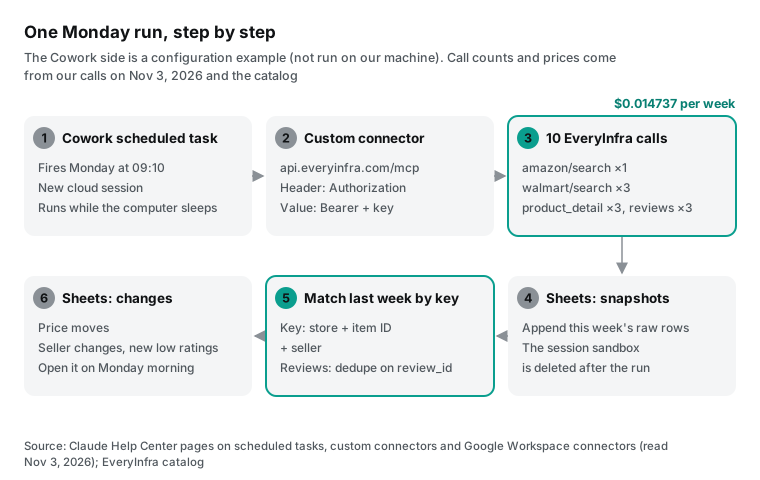
If you manage a small-appliance line on Amazon and Walmart, you probably check competitor prices by hand. You open six product pages, copy the numbers into a sheet, and compare them with last week. This article replaces that hour with a Claude Cowork scheduled task. The task runs in the cloud every Monday, calls a data API through a custom connector, and writes a change table to Google Sheets. We tested the data side with real calls on November 3, 2026. We did not run the Cowork side, so every Cowork step here is a configuration example with a link to the Anthropic source.
The most useful finding came from Walmart. The same Walmart item, a Ninja Crispi glass air fryer, showed two sellers and two prices for two search keywords. With "ninja air fryer 4 quart", the seller was Patent Paid at $135. With "ninja crispi glass air fryer", the seller was Mercshop at $134.50. About an hour later, at 01:13:54 and 01:14:03 Singapore time, we ran both searches again, 9 seconds apart. Each keyword still showed its own seller and price.
So the difference follows the keyword, not the clock. If your weekly task changes the keyword, the table can report a $0.50 price cut that is only a different seller. So each item gets one fixed keyword, and each row stores the seller next to the price.
The job: a Monday competitor price and review table
We define the job first, because all the numbers below depend on it. The input is a short list of competitors. Each competitor has one product on Amazon, identified by its ASIN, and one product on Walmart, identified by its item ID. Our example uses three 4-quart air fryers: the Ninja basic model, the Ninja Crispi 4-in-1 glass model and the Instant Vortex mini. We picked air fryers because both stores sell many of them and prices move often.
The timing also matters. Walmart announced three holiday deal events from November 12 to December 2, 2026. That is 14 days of events, compared with 10 days in 2025 (Walmart press release; Retail Dive). The next five weeks are the weeks when a brand manager most needs a weekly price check.
The output is one table. It has one row for each competitor on each store. The first columns are this week's price, list price, discount, seller, rating, and rating or review count. The next columns show the price change from last week and the review count change. Two more columns give the number of new 1–2 star reviews and a short note on them. The last column is a one-line decision: act now, watch, or ignore.
This job fits a scheduled task for three reasons. First, it repeats on a fixed day. Second, it only reads data. It does not change prices, place orders or send messages, so an error costs you a wrong cell, not money. Third, it must compare with the previous run. That third point is where Cowork needs the most care, and a later section covers it.
Why not use the seller tools? They show your own listings, not your competitors. The Walmart Seller Center ratings page shows only feedback from customers who bought your offer. Reviews for other sellers' offers do not appear there (Walmart Marketplace Learn).
The Walmart pricing insights dashboard compares your price with the Buy Box winner, again for your own items (Walmart Buy Box guide). To see competitors, you read public product pages. That is what the Amazon data API and the Walmart data API do.
Your competitor list should come from a person, not from the model. Write it once in a config sheet. For each competitor, record the Amazon ASIN, which is the 10 characters after /dp/ in the product URL. Record the Walmart item ID, which is the last number after /ip/ in the product URL. For example, the pink Crispi is https://www.walmart.com/ip/20370717802. Add one search keyword per product, so the task can find that ID in the top 20 search results.
Do not let the model pick "the same product" again each week. Search rankings change every week. A product at position 6 this week can drop to position 25 next week. If the model chooses a new "match", your table compares two different models and the change column means nothing. A fixed ID list prevents this.
What claude cowork scheduled tasks can do today
Anthropic added scheduled tasks to Cowork on February 25, 2026. The release note said you could create recurring and on-demand tasks in Cowork (Claude release notes). At first the tasks ran on your own computer. If the desktop app was closed or the computer was asleep, nothing ran.
That was the most common complaint. One Reddit user wrote that a schedule that runs only while the machine is on defeats the point (Reddit thread). This changed in October.
The help center now says scheduled tasks are available on all paid plans: Pro, Max, Ultra, Team and Enterprise. Tasks run remotely, so they run on schedule when your computer is asleep or the desktop app is closed. Each run is its own Cowork session. A run can use the connectors, skills and plugins that you set up in Cowork (Schedule recurring tasks in Claude Cowork).
A second help article gives the date of the change. Starting October 6, 2026, new Cowork tasks on Pro, Max and Ultra run in the cloud. The "Only on your computer" setting was removed, and you cannot switch back. Scheduled tasks that ran on your computer before October 6 keep running there. New scheduled tasks run in the cloud (Use Claude Cowork on web, desktop, and mobile).
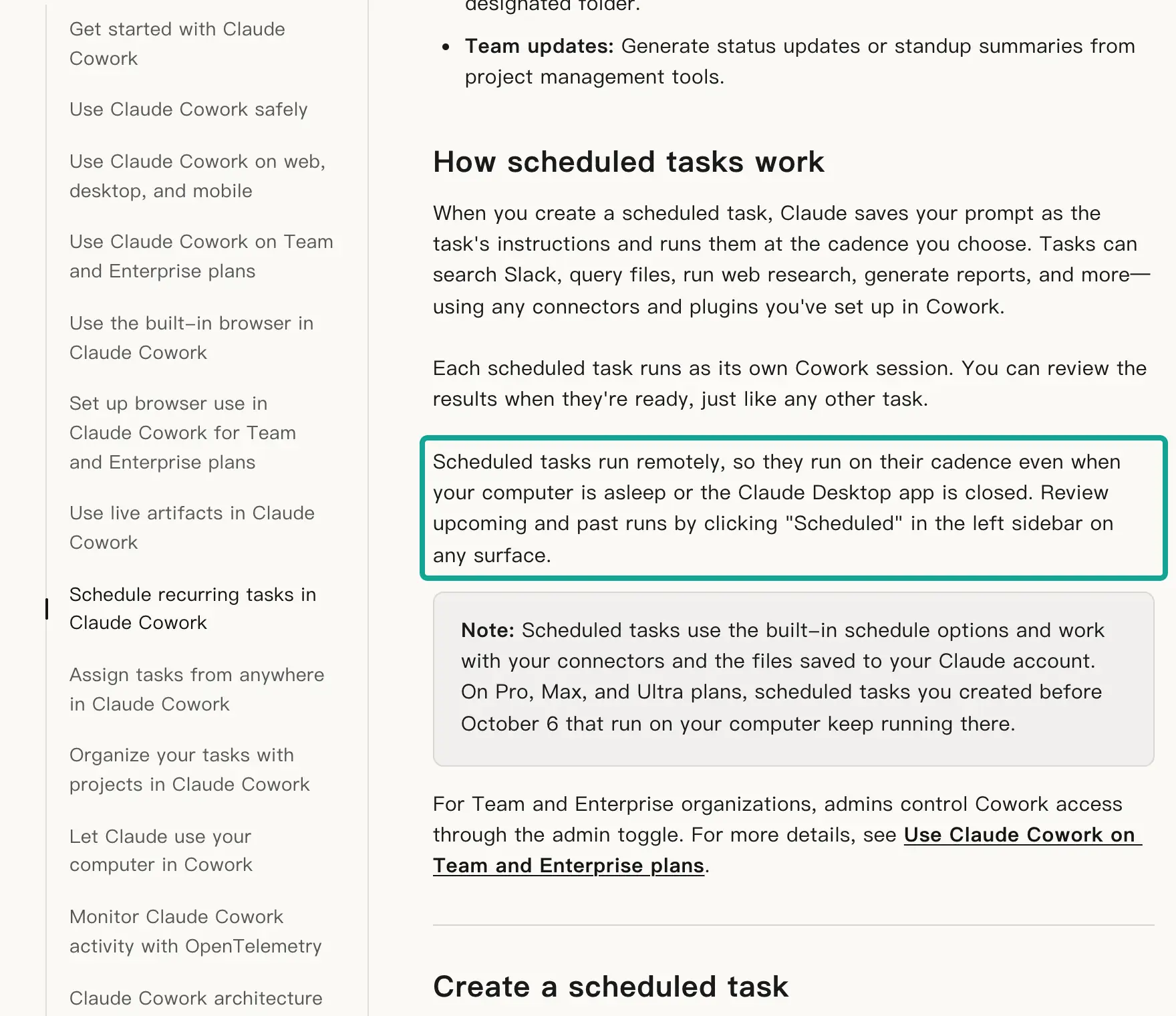
When you set up a task manually, the form has six fields. They are a name, a prompt, an approval mode, a frequency, an optional model and an optional working folder. The frequency options are hourly, daily, weekly, on weekdays, or manual only. The same article has a short note that is easy to miss.
If a scheduled task needs local files or apps, it runs only on your computer (same help article). So design the price table to need no local files. Read data through a connector and write results through a connector. Then the task can really run while your laptop sleeps.
The entry point may also look different for you. On September 16, 2026, Anthropic started to merge Cowork and chat into one experience for Pro, Max and Ultra. If your message box no longer shows "Chat" and "Cowork" options, you have the new experience. In that case, you can type a request such as "Every Monday at 9 AM, do X" in any conversation. Claude shows the name, schedule and instructions, and you click "Schedule" to confirm (Claude Cowork and chat are one Claude).
| Item | Help center text (read November 3, 2026) | What it means for the price table |
|---|---|---|
| Plans | Pro, Max, Ultra, Team, Enterprise | Free has no scheduled tasks; Pro at $20 a month is enough (pricing) |
| Where it runs | Remotely; new tasks after October 6 run in the cloud | You do not need to turn on a computer on Monday |
| Frequency | Hourly, daily, weekly, weekdays, manual | Choose weekly, Monday morning |
| Tools | Connectors, skills, plugins | A custom connector can reach the data API |
| Local files | Tasks that need local files or apps run only locally | Do not store snapshots in a local folder |
| Controls | Scheduled sidebar: view, pause, resume, delete, run now | Use Run now once to answer approval prompts |
How Cowork scheduled tasks differ from Claude Code scheduled tasks
On November 1 we published a guide to Claude Code scheduled tasks that read Reddit pain points every night. That article used Claude Code cloud scheduled tasks, which Anthropic formerly called routines. Both products use the name "scheduled tasks". Both run in the cloud, and both count against your subscription usage. But they suit different work.
A Claude Code cloud scheduled task is a saved Claude Code setup. It has a prompt, one or more repositories and a set of connectors. It can start on a schedule, on an API call or on a GitHub event. Each run is a full Claude Code session that can run shell commands, edit code and open pull requests (Automate work with scheduled tasks).
A Cowork scheduled task has no repository. It is for knowledge work such as reports, briefs and file clean-up. Its output is a Cowork session and the files in it.
| Cowork scheduled task | Claude Code cloud scheduled task | |
|---|---|---|
| Triggers | A frequency (hourly, daily, weekly, weekdays) or manual | Schedule, API call, GitHub event, in any mix |
| Attached to | Connectors, skills, plugins | Repositories, a cloud environment, connectors |
| Custom schedule | Five preset options in the help center; we found no cron text | Cron expression, at most once per hour |
| Run limit | No public number found | 100 scheduled runs per hour per account |
| Where last week's data lives | A sheet or document in a connector | Files committed to the repository |
| Good fit | Weekly competitor table, morning brief, inbox summary | Nightly code review, backlog triage, pull requests |
The Claude Code column comes from the usage and trigger sections of the same documentation page (Claude Code cloud scheduled tasks). For the Cowork column, we read four help articles: scheduled tasks, Team and Enterprise, safety and architecture. None of them gives a maximum number of scheduled tasks or runs per hour. A Reddit user asked the same question and got no number from Anthropic (Reddit thread). So we write "no public number found" and do not guess.
For a brand manager, the choice is simple. The price table needs no repository and no code changes. It is a sheet for a merchandising team. Cowork fits better.
Choose Claude Code only if your team already keeps data and scripts in Git. Then the weekly history can live in commit logs. Both setups can use the same remote MCP address, so you can copy the connector setup from one to the other.
Add EveryInfra as a custom connector
Cowork reaches outside data through custom connectors. The help center says custom connectors that use remote MCP work in Claude, Cowork and Claude Desktop. They are available on Free, Pro, Max, Ultra, Team and Enterprise. Free users can add only one (Get started with custom connectors using remote MCP).
On a personal plan, go to Customize > Connectors. Click "+ Add", then "Add custom connector". Enter a name and the remote MCP server URL.
Authentication is the first place where setups fail. The EveryInfra remote MCP server uses an API key, not OAuth. The initialize and tools/list methods work without a key. A tool call needs the header Authorization: Bearer followed by your key (EveryInfra MCP setup page). The MCP specification makes authorization optional, and its OAuth flow applies only when a server supports it (MCP specification: Authorization). The Authorization: Bearer header format comes from the OAuth bearer token standard (RFC 6750).
At 00:47 Singapore time on November 3, we sent one tools/call with no key. The server answered in 0.09 seconds with unauthorized: no API key provided, and the next text block said "Nothing was charged."
Anthropic's documentation says what to do for API-key servers. Under Authentication, select "No sign-in". Then add the key under Request headers. Claude encrypts the value, does not show it again, and sends it with each request. Claude sends the value exactly as you type it and adds no prefix. So the Authorization value must be the word Bearer, a space, and then the key (Add a connector that isn't in the directory).
Configuration example (Customize > Connectors > + Add > Add custom connector).
Field names follow the Anthropic documentation. We did not run this on our machine.
Name:            EveryInfra
MCP server URL:  https://api.everyinfra.com/mcp
Authentication:  No sign-in
Request headers: Authorization = Bearer <your EveryInfra API key>
Advanced > Transport: keep the default (the URL does not end in /sse, so it uses Streamable HTTP)
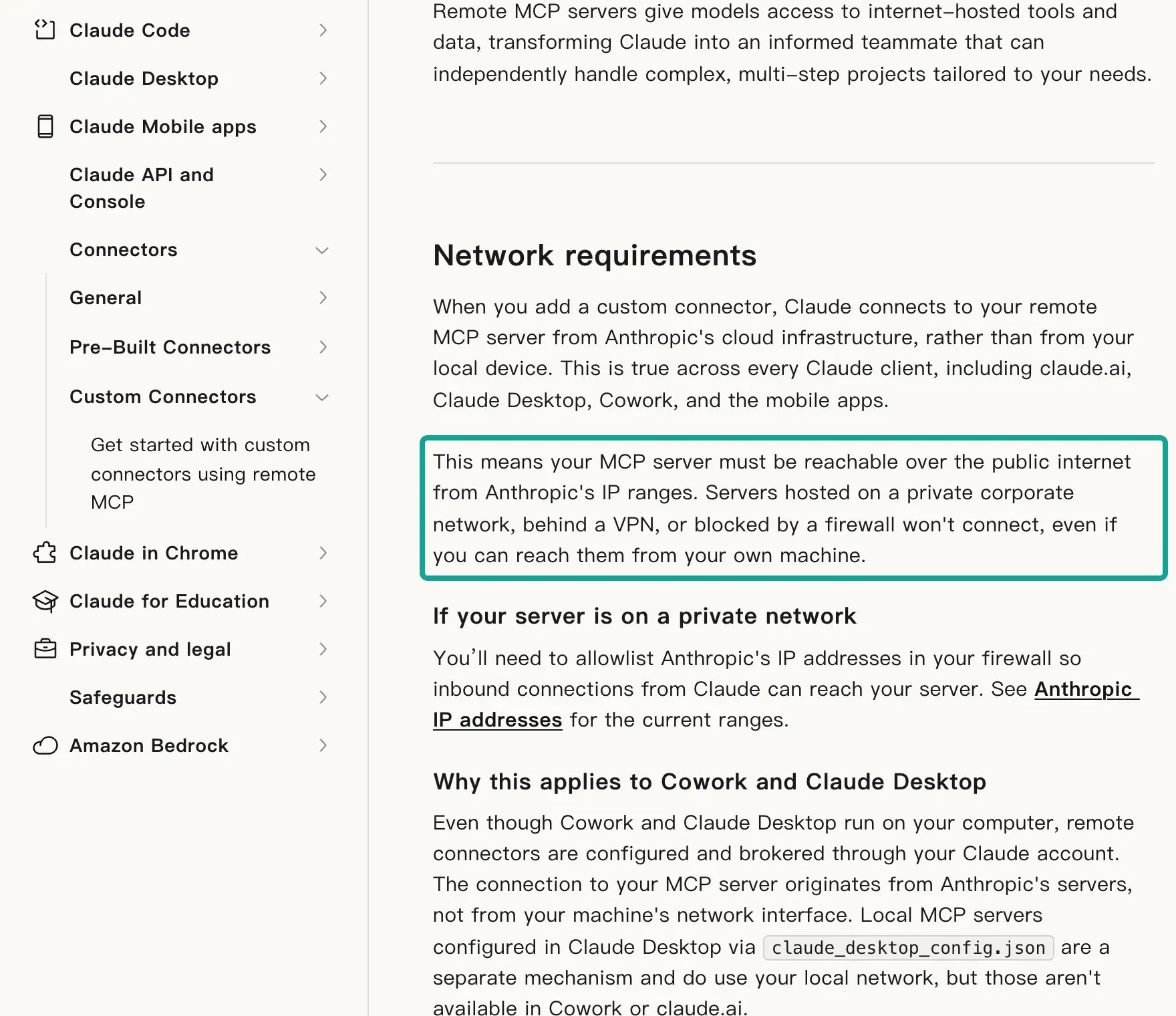
The second problem is the network. The help center has a section called "Network requirements". When you add a custom connector, Claude connects to your MCP server from Anthropic's cloud, not from your computer. This is true for claude.ai, Claude Desktop, Cowork and the mobile apps. The server must be reachable over the public internet from Anthropic's IP ranges.
A server on a company network, behind a VPN or behind a firewall cannot connect. This is true even if your own computer can reach it (help center). Anthropic lists 160.79.104.0/21 as its outbound address range for calls to external MCP tools (IP addresses). The EveryInfra address is public, so this rule does not block it. But if your IT team puts a company gateway in front of it, they must allow that range.
The third problem is shared credentials on Team and Enterprise. On a Team plan, only Owners and Primary Owners can add a custom connector to the organization. On Enterprise, custom roles with a permission to manage the library can also do it. After an owner adds the connector, each member goes to Customize > Connectors and clicks "Connect".
The help center explains the design. Claude can reach only what each member can reach, unless the connector uses a shared credential such as an API key. On Team and Enterprise, every member who uses that connector uses the same credential. So give that credential only the access that members need (help center).
For EveryInfra, a shared key means every member's scheduled tasks charge the same account. We recommend one separate key for Cowork, with a lower per-minute limit. Then a bad prompt that loops on API calls hits that key's limit and stops. You also cannot edit authentication settings after you add a connector. To change the key, remove the connector and add it again, and members must connect again (Anthropic documentation).
Anthropic also reviews request header names. A header name that it has not approved causes an error when you save. EveryInfra uses only the standard Authorization header. It also accepts the key as a ?key= URL parameter, but URLs appear in more logs, so we do not recommend that for Cowork.
Tool approvals: run the task once by hand
A scheduled task runs when nobody watches. So approval prompts are the most common reason for an empty result. The safety article lists three approval modes. "Automatically approve" runs a safety check before each action and then continues. "Skip all approvals" does no checks.
"Manually approve" asks you at each step (Use Claude Cowork safely). The same article tells you to start with low-risk tasks such as summaries. It also tells you not to schedule tasks that send messages or make purchases. A read-only competitor table is the kind of task it recommends.
All 12 EveryInfra MCP tools carry the tool annotations from the MCP specification. We read tools/list on November 3. The catalog tool everyinfra_list_capabilities and the job reader everyinfra_get_job have readOnlyHint: true. The data tool everyinfra_call_api has readOnlyHint: false and destructiveHint: true, because it spends money.
The MCP specification calls these values hints. A client can use them to decide whether to ask a person first. A tool with no annotations is treated as possibly destructive (MCP specification: Tools; MCP blog on tool annotations).
This matters most on Team and Enterprise. The Team help article describes an organization setting called "Allow 'Always allow' for connector tools". It is off by default. While it is off, members cannot choose "Allow for all tasks" in the Cowork approval prompt.
Old "always allow" choices also stop working for tools that write. Only tools that the connector marks as read-only skip the prompt (Use Claude Cowork on Team and Enterprise plans). Under that rule, everyinfra_call_api asks for approval in each task with default settings.
We have no Team organization, so we could not test whether the scheduled run waits or skips that step. Here is the safe path. Ask an Owner to turn on that setting, or set the task's approval mode to "Automatically approve". After you create the task, click "Run now" once. When an approval prompt appears, choose "Allow for all tasks".
One recent update also touches approvals. Desktop app v3.6556.1 on October 22 changed MCP tools that their server marks as needing a person. Those tools now ask only on the in-app card, and the notification has no Allow button. Scheduled tasks go on without those calls (Claude Desktop changelog). EveryInfra tools do not use that marker. They use only the four standard annotations.
We did not test in Cowork how the approval prompt appears in a scheduled run, or whether the run stops. That is why you click "Run now" once: you see this step yourself.
This rule covers Cowork's built-in web fetch, not MCP tools. But it shows that Anthropic still adjusts what scheduled tasks can do week by week. A prompt that names the exact tools and parameters is more stable than a prompt that asks the model to find its own way.
One real round trip: what the model sends and what comes back
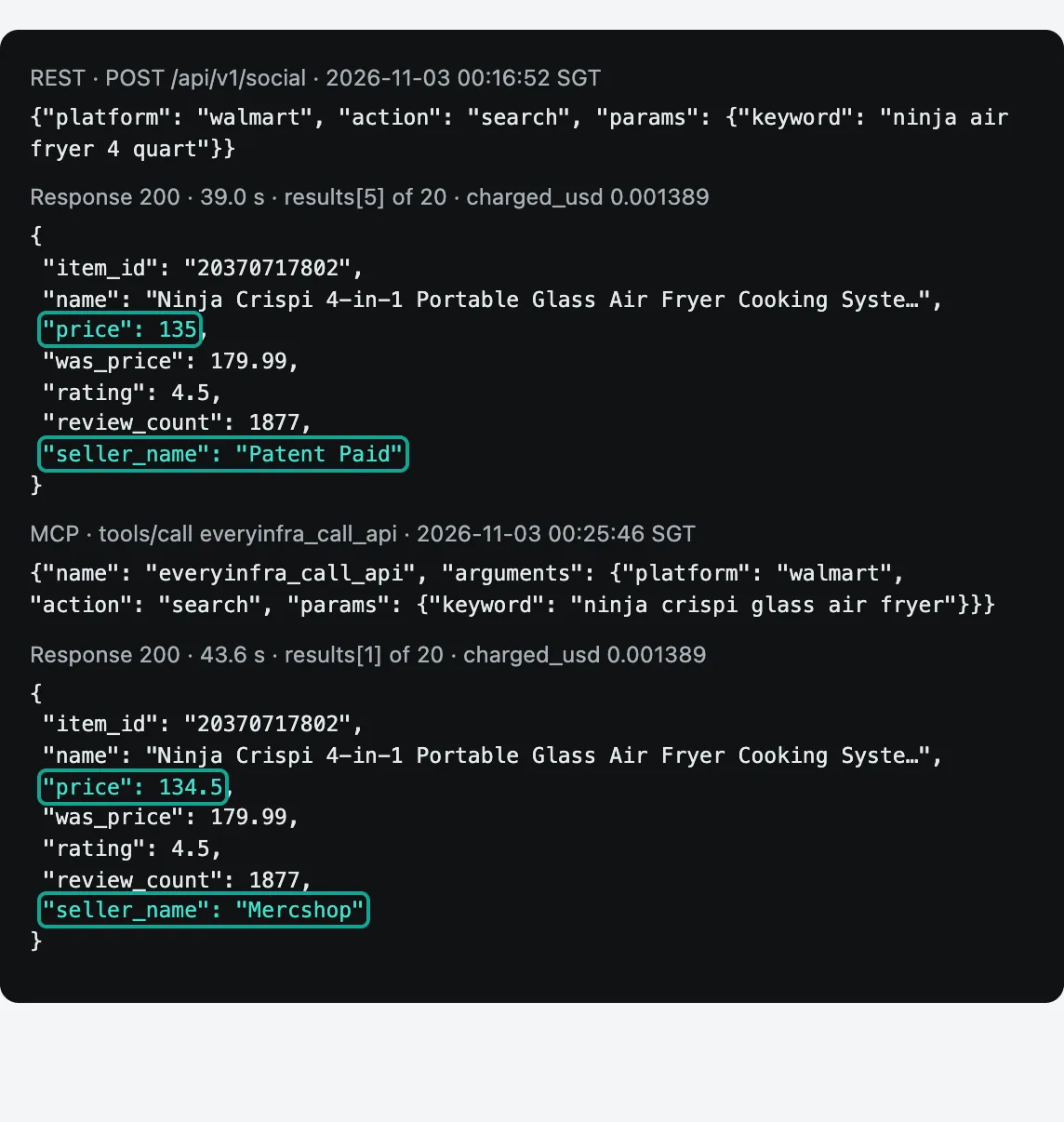
We did not run Cowork. But what the model sends through the connector is a standard MCP tools/call request. To show the real shape, we sent the same request with curl to https://api.everyinfra.com/mcp at 00:25:46 Singapore time on November 3, 2026. We used a test key and called walmart/search for "ninja crispi glass air fryer".
After 43.6 seconds the server returned HTTP 200. The result held one text block of 13,115 characters with 20 products. The charge was $0.001389.
// Request: the tools/call that the model sends through the connector
// (November 3, 2026, 00:25:46 Singapore time; real request; the key is in the header and not shown)
{"jsonrpc":"2.0","id":8,"method":"tools/call",
 "params":{"name":"everyinfra_call_api",
           "arguments":{"platform":"walmart","action":"search",
                        "params":{"keyword":"ninja crispi glass air fryer"}}}}

// Response: JSON inside result.content[0].text (result 2, unchanged)
{"item_id": "20370717802",
 "name": "Ninja Crispi 4-in-1 Portable Glass Air Fryer Cooking System FN101PK1, ...",
 "price": 134.5, "was_price": 179.99, "currency": "USD",
 "rating": 4.5, "rating_scale": 5, "review_count": 1877,
 "in_stock": true, "seller_name": "Mercshop", ...}
// Billing in the same response: {"charged": true, "charged_usd": 0.001389, ...}
The same session also had a failed round trip, and we report it as it happened. At 00:24:06 Singapore time we called amazon/reviews through MCP for the Ninja AF101 (ASIN B07FDJMC9Q). After 88.8 seconds it returned isError: true. The reason was that this item's review page needs a login or is restricted. The call was refunded, charged_usd was 0, and the response added that a retry right away is unlikely to help. The catalog already says that amazon/reviews returns only the featured reviews on the product page, usually about a dozen per item (EveryInfra catalog).
So our Amazon rows do not read review text. They use the rating and rating count from amazon/search as the review signal. Review text comes from Walmart. Is Amazon review text important for your category? Then test amazon/reviews on your own ASINs first.
Test 1: the price gap between two stores
The first snapshot ran from 00:15:54 to 00:26:55 Singapore time. We called amazon/search once for "ninja air fryer 4 quart". It returned 20 results in 36.8 seconds and cost $0.002236. We called walmart/search three times, once each for the Ninja 4-quart, the Ninja Crispi and the Instant Vortex mini, at $0.001389 each. Each number in the table below comes straight from those responses (Amazon search API; Walmart search API).
| Competitor | Amazon model, price | Amazon list price, discount | Amazon rating count | Walmart model, price | Walmart was price, discount | Walmart reviews, seller | Gap (Amazon − Walmart) |
|---|---|---|---|---|---|---|---|
| Ninja basic | AF101, $119.99 | none | 59,532 | AF100WM, $59.00 | $89.00, 33.7% | 12,571, Walmart.com | $60.99 (different models) |
| Ninja Crispi | FN101ST, $149.00 | $179.99, 17.2% | 8,426 (shared by 4 variants) | FN101PK1, $134.50 | $179.99, 25.3% | 1,877, Mercshop | $14.50 |
| Instant Vortex mini | 4 Qt, $69.95 | $89.99, 22.3% | 36,519 (shared by 3 variants) | 4 Qt, $69.99 | $89.99, 22.2% | 108, Instant Pot | −$0.04 |
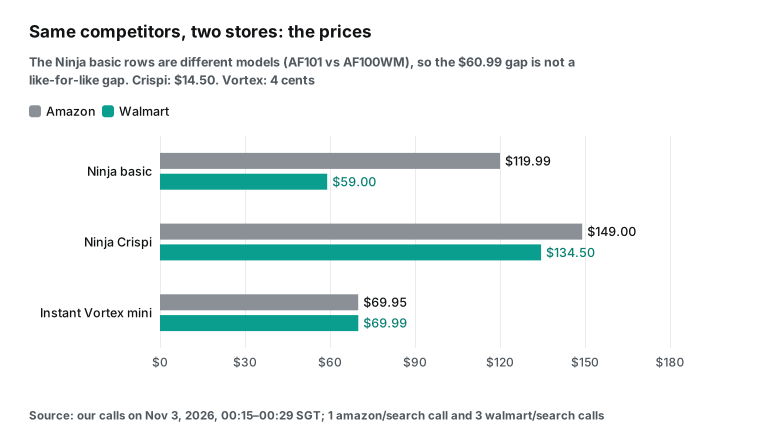
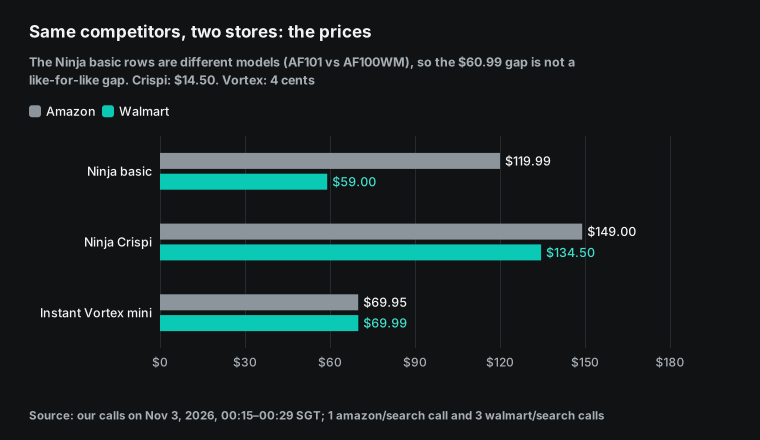
Look at the first row with care. The gap of $60.99 looks large, but the AF101 and the AF100WM are different models. The Walmart title of the AF100WM says "3 Functions", and the AF101 is "4-in-1". Retailer-specific models are common in small appliances.
If you match products by brand and size, your table shows a large gap every week that means nothing. So match competitors by model number. If the models do not match, mark the row and do not compute a gap.
Discounts need the same care. In the same Amazon search, 15 of 20 results showed a list price, and the discounts ran from 8.0% to 44.4%. Each listing chooses its own list price, so a 40% discount on one product and a 20% discount on another tell you little. Track the final price, and use the discount only to compare one listing with itself week by week.
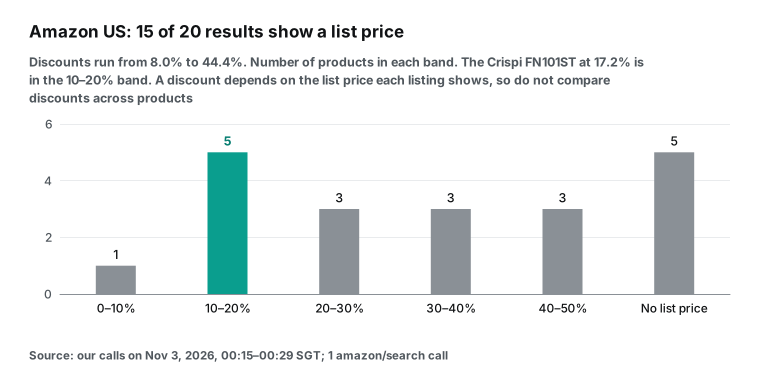
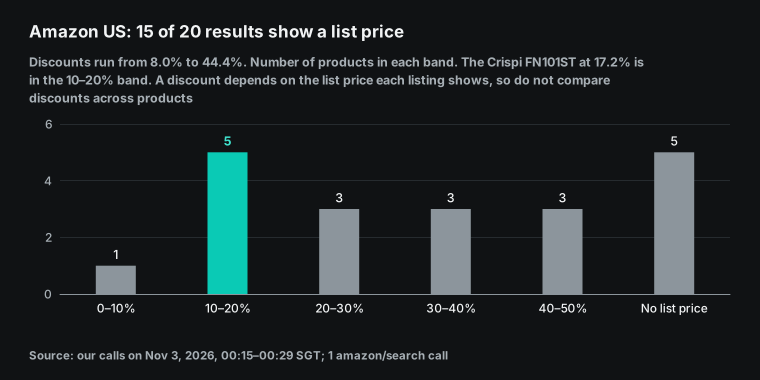
The Walmart search results have a upc field. The catalog says UPC is the most accurate way to match the same product across stores. The same note says the field can be missing when the main source is not available. None of our three walmart/search responses had a upc value. So a person should build the match list once, and the task should read the same IDs each week. Do not ask the model to guess the match each week.
The second finding is that Amazon rating counts are shared across variants. In the same search, three Instant Pot Vortex ASINs (B08R6KMBQT, B0F9B4YCZF, B0F9B48Q1B) all had 36,519 ratings. Four Ninja Crispi ASINs (three colors of the FN101 and one FN103) all had 8,426. The colors and model suffixes differ, but the counts are the same, so they share one count as a variation family. One of the four Crispi listings is even the 5-in-1 FN103, which has different functions from the 4-in-1 FN101.
If you read "Amazon ratings went up by 200 this week" as a sales signal for one color, you credit that color with the whole family's reviews. We label this number "family rating count" in the table and list the ASINs that share it.
Test 2: one item, two keywords, two sellers
In the walmart/search call at 00:16:52 for "ninja air fryer 4 quart", the Crispi FN101PK1 (item 20370717802) was result 6. The price was $135, the was price was $179.99, and the seller was Patent Paid. In the MCP walmart/search call at 00:25:46 for "ninja crispi glass air fryer", the same item was result 2. The price was $134.50, the was price did not change, and the seller was Mercshop. The two calls were about nine minutes apart, so at first we read this as a seller change within nine minutes.
The second snapshot, about an hour later, showed that this reading was wrong. At 01:13:54 Singapore time, the first keyword again showed the Crispi at result 6, Patent Paid, $135. At 01:14:03, nine seconds later, the second keyword again showed result 2, Mercshop, $134.50. The difference follows the keyword, not the time.
Walmart's own rules explain this. One item page can have offers from several sellers. The seller above the Add to cart button wins the Buy Box. Walmart picks the winner from price, shipping fee, delivery speed, seller performance and the customer's location (Walmart Buy Box guide). The same guide suggests that sellers turn on the Walmart Repricer to change prices automatically.
The pricing rules page adds a second control. Walmart automatically unpublishes offers that are priced far above recent prices on Walmart.com or on other sites. In milder cases, Walmart removes the Add to cart button and the price from the item page (Walmart pricing rules). So an item with many third-party sellers has several offers behind one item ID. But these rules do not explain why two keywords showed two sellers at the same moment. We do not know the cause, so we only record what we saw.
This is why each row stores the seller next to the price. We use three rules. Each item has one fixed keyword in the config tab, and the task uses it every week. The row key is store plus item ID plus seller name. If the seller changed, the row gets the flag "seller change", and the task does not report a price change.
The review data shows how many sellers an item has. Of the 100 Crispi reviews, 30 named a seller, and those 30 came from 7 sellers. Walmart.com had 11, Shark Ninja Store had 10, SDG Distribution had 4, and four other sellers had 1 or 2 each. For the Ninja basic AF100WM, 98 of 100 reviews named Walmart.com. More sellers means more offers that a table can mix up.
Test 3: reviews, where part of the low ratings are about delivery
At 00:19:07 Singapore time we read 100 reviews for the Ninja AF100WM with a synchronous walmart/reviews call. It returned in 66.1 seconds. At 00:22:20 we sent the same call for the Crispi FN101PK1 in async mode and got the result at 00:23:49. Each call cost $0.001389 (Walmart reviews API).
| Metric | Ninja AF100WM | Ninja Crispi FN101PK1 |
|---|---|---|
| Reviews returned | 100 | 100 |
| 5 / 4 / 3 / 2 / 1 stars | 70 / 12 / 6 / 3 / 9 | 63 / 10 / 7 / 6 / 14 |
| Share of 1–2 stars | 12.0% | 20.0% |
| 1–2 star reviews about delivery | 5 of 12 | 6 of 20 |
| Verified purchase flag | 99 have it, 1 has no such field | 55 have it, 45 have no such field (not flagged as unverified) |
| Oldest and newest review | 2025-07-17 and 2026-10-30 | 2025-08-20 and 2026-10-30 |
| Product rating and total reviews (from the reviews call) | 4.7, with three values in one response: 12,562, 12,571 and 12,573 | 4.5 and 1,877 (the same in all 100) |
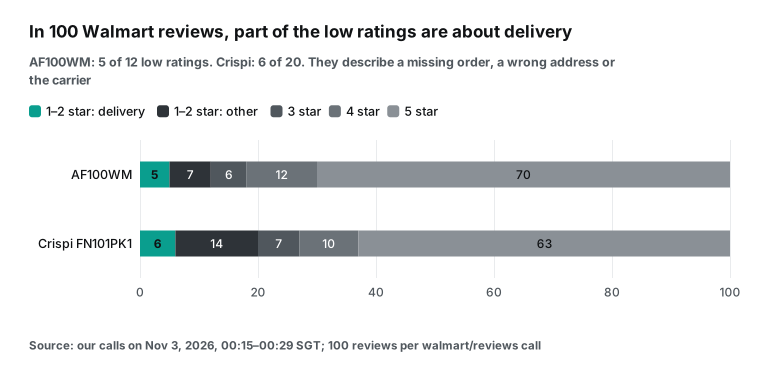
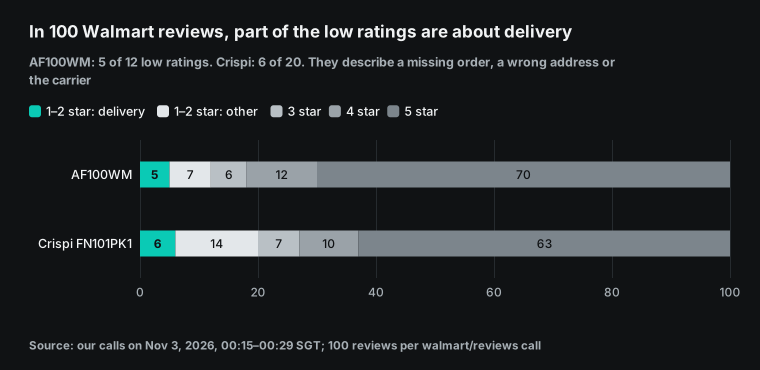
The most useful number here is how many low ratings have nothing to do with the product. We used a simple keyword rule. A review counts as "delivery" if it contains a word such as receive, deliver, ship, arrive, package, address, DHL or "never got". By that rule, 5 of 12 low ratings for the AF100WM and 6 of 20 for the Crispi were about delivery. Short examples are "Never got it", "Delivered to wrong address" and a complaint that DHL orders never arrive.
Walmart's review guidelines say that a product review should focus on the product and your experience with it (Walmart review terms). In practice, delivery complaints still appear and still lower the stars. For a brand manager, this has two results. A competitor with a high low-star share does not always have a weak product, because its third-party sellers can ship badly. And if your own low ratings are mostly about delivery, a product change will not fix them. That is why the table splits low ratings into two columns, product and delivery or seller.
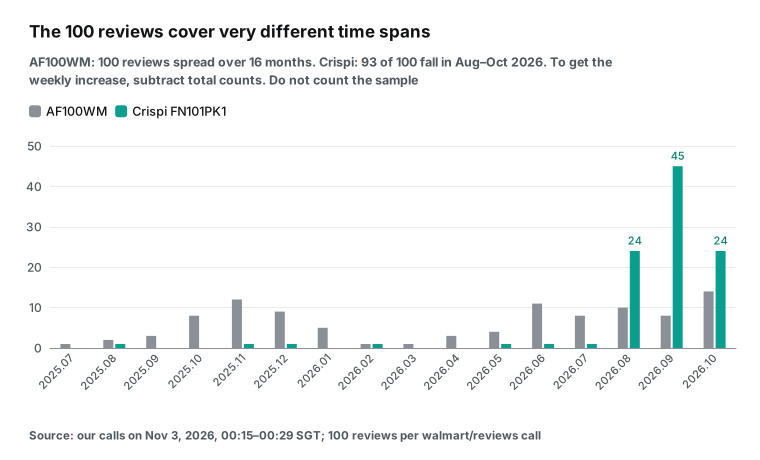
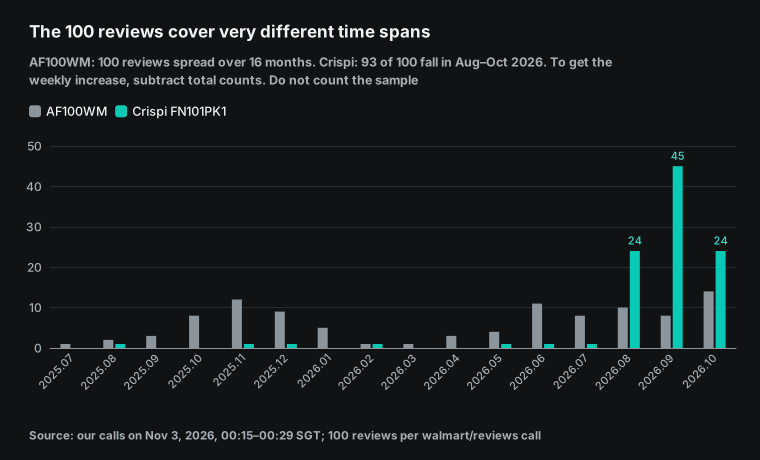
The second thing to watch is the time span of the 100 reviews. The AF100WM reviews run from July 2025 to October 2026. For the Crispi, 93 of 100 fall between August and October 2026. The order is not strictly newest first.
The first 30 AF100WM reviews mix June, September and October dates. So you cannot count "new reviews this week" from this sample. In the sample, 5 AF100WM reviews fall in October 27 to November 2, and 4 fall in the week before. Those are sample counts, not totals.
Do not simply subtract last week's total review count from this week's total. Test 4 shows why. For new low ratings, keep the review_id values from last week, and count only IDs that you have not seen before.
There is also a delay to plan for. Walmart says new reviews take 5 to 7 business days to appear on the site (Walmart review terms). Walmart emails Marketplace customers a review request seven days after delivery or pickup. If the customer does not open it, Walmart sends a second email 28 days later (Walmart Marketplace Learn).
So the "new low ratings" on Monday mostly come from orders two or three weeks old. If a competitor cut its price last week to push volume, the review effect reaches your table two or three weeks later. We use this delay in the decision column. A price change triggers a note in the same week. A review change needs at least two weeks before you act.
Test 4: one number, three values in one response
A weekly comparison fails if the number itself is not stable. In one session, we read the AF100WM review count from three tools. The walmart/search call at 00:16:52 gave 12,571. The walmart/product_detail job sent at 00:21:10 and read at 00:22:03 also gave 12,571.
The walmart/reviews call at 00:19:07 returned 100 reviews. Each review has a product_review_count field for the total. In that one response, the field had three values: 12,562 in 40 reviews, 12,571 in 40 reviews and 12,573 in 20 reviews. About one hour later, a second call returned the same 100 review_id values. This time the split was 12,562 in 20, 12,571 in 40 and 12,573 in 40.
One response can differ from itself by 11 reviews. So do not read only the first review, and do not subtract two weekly totals to get new reviews.
The weekly table uses three rules. First, read each metric from the same tool every week. Second, take the highest product_review_count in the 100 reviews. The most common value is not stable: in the first response, 12,562 and 12,571 tie at 40 each.
We ran Python on both raw responses. statistics.multimode() gives two values for the first response. statistics.mode() takes the first value it finds in a tie, so it gives 12,562 the first time and 12,571 the second time. The table then reports 9 new reviews that do not exist (statistics documentation). The highest value was 12,573 both times.
Third, if the total differs from last week by 15 or fewer, record "no change". We set the 15-review limit from the 11-review spread in our two samples. It is not a platform rule. After a few weeks, adjust it to your own data.
The second surprise is that walmart/product_detail has no price. Both detail responses held only these fields: id, url, name, text, brand, rating, rating_scale, review_count, image_url and platform. The catalog lists price, original_price, in_stock and seller_name for this action, but none of them appeared (Walmart product detail API). We built the table around this.
Price, was price and seller come from walmart/search. The detail call fills in rating and review count when an item drops out of the top 20 search results. It also helps you check the model text.
Our first synchronous detail call returned HTTP 503 after 88.0 seconds and cost nothing. With "mode":"async", the job ID came back in 2.0 seconds, and the result was ready about 53 seconds later.
| Capability | Slowest call in this test | Result | Charge |
|---|---|---|---|
amazon/search (20 results) | 36.8 s | 200 | $0.002236 |
walmart/search (20 results) | 43.6 s (through MCP) | 200 | $0.001389 |
walmart/reviews (100 reviews, sync) | 66.1 s | 200 | $0.001389 |
walmart/product_detail (sync) | 88.0 s | 503 timeout | $0 |
walmart/product_detail (async) | 2.0 s to submit, ready in about 53 s | 200 | $0.001389 |
amazon/reviews (through MCP) | 88.8 s | could not open, refunded | $0 |
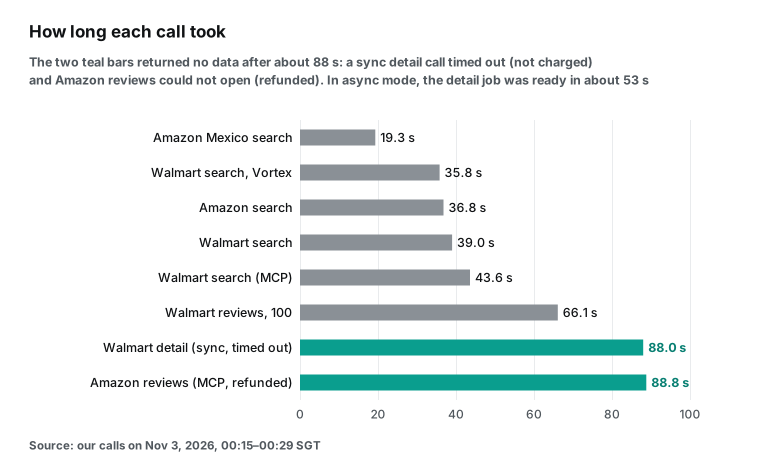
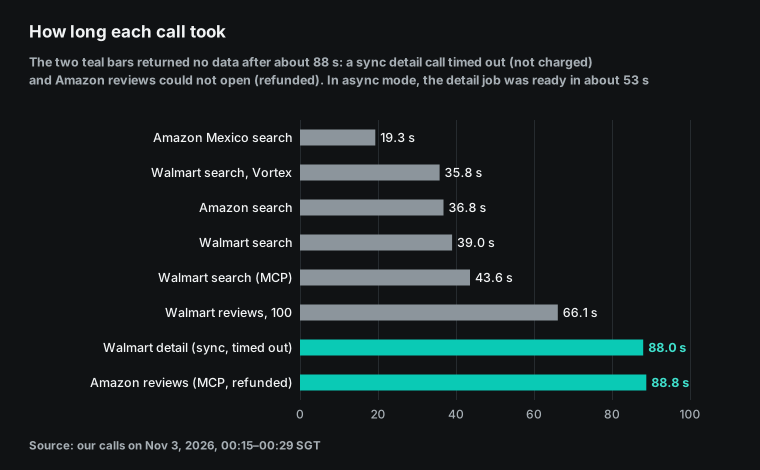
What do these times mean for a scheduled task? One weekly run makes 10 calls. Run one after another, they take seven to eight minutes, and the reviews and detail calls are the slowest. In the prompt, tell the task to send detail and reviews calls in async mode. It then reads each result with everyinfra_get_job. The tool description says that reading a job is free and does not count against the per-minute limit.
Do not resend a synchronous call that timed out. The 503 response said "Not charged". It suggested a retry after 20 seconds, at most 2 retries, and it recommended async mode. A Reddit user described the main risk of unattended runs.
After a 429 error or a network blip, the agent does not retry cleanly. It tries more and more creative workarounds. The fix is to write "if X fails, stop and report, do not try to fix it yourself" in the task (Reddit thread).
Compare this week with last week: where the data lives
This is the largest difference between a Cowork scheduled task and a normal chat. The architecture article says that in a cloud session, Claude's loop and code run in an isolated, temporary sandbox that Anthropic hosts. Each session gets its own sandbox. The sandbox is created when the session starts and destroyed when it ends, and sandboxes share no state (Claude Cowork architecture overview). So a CSV that this Monday's run creates is not visible to next Monday's run.
Cloud sessions can read and write folders that you connected on your computer. But they can do this only while the desktop app is open (Use Claude Cowork on web, desktop, and mobile). That brings back the old problem of a computer that must stay on.
| Storage | Works while the computer sleeps? | Strength | Watch out for |
|---|---|---|---|
| Google Sheets (Google connectors) | Yes, through the connector | Can create and edit sheets, and the team sees them | Name "Google Sheets" in the prompt, or Claude makes a local file |
| OneDrive or SharePoint (Microsoft 365 connector) | Yes, through the connector | Can create and update files after write tools are on | An admin must turn on write tools |
| A connected folder on your computer | No, the desktop app must be open | Simplest setup | Tasks that need local files run only locally |
| Files inside the session | The next session cannot read them (we found no text that says otherwise) | One archive copy per week | Good for people to read, not for comparison |
We recommend Google Sheets. The help center says the Google Sheets connector can create new spreadsheets and edit them. The Google Drive connector handles search, upload and sharing. The same article warns that a request for a generic "doc" without the word Google creates a local file instead (Use Google Workspace connectors).
Teams on Microsoft 365 can turn on the connector's write tools. These tools create and update files in OneDrive and SharePoint (Set up the Microsoft 365 connector). Two tabs are enough. The snapshots tab gets new raw rows each week, and the changes tab gets the comparison each week.
The key decides whether the comparison is correct. For the week, use the year and week number from Python's date.isocalendar(). Then year and month boundaries cause no errors (datetime documentation). Monday, November 2, 2026 is in week 2026-W45, and Monday, November 9 is in 2026-W46.
The row key is store plus item ID plus seller. Reviews use review_id to remove duplicates.
# Comparison logic example. It runs in the Cowork session's code tool.
# We ran it on our machine with two real snapshots.
def key(r):  # store + item ID + seller
    return (r["store"], r["item_id"], r.get("seller_name") or "-")

def diff(last_week, this_week):
    prev = {key(r): r for r in last_week}
    prev_item = {(r["store"], r["item_id"]): r for r in last_week}
    out = []
    for r in this_week:
        p = prev.get(key(r))
        if p is None and (r["store"], r["item_id"]) in prev_item:
            out.append({**r, "flag": "seller change", "seller_before": prev_item[(r["store"], r["item_id"])].get("seller_name")})
        elif p is None:
            out.append({**r, "flag": "new"})
        else:
            out.append({**r, "price_change": round((r["price"] or 0) - (p["price"] or 0), 2),
                        "count_change": (r.get("review_count") or 0) - (p.get("review_count") or 0),
                        "flag": "price change" if r["price"] != p["price"] else ""})
    return out
A real comparison with two snapshots
To test the comparison code on real data, we took a second snapshot about one hour after the first. It ran from 01:12:58 to 01:15:52 Singapore time on November 3, 2026, with the same parameters. It made 5 calls: 1 amazon/search, 3 walmart/search and 1 async walmart/reviews for the AF100WM. The charge was $0.007792.
We then passed both snapshots to the diff() function above, keyed on store, item ID and seller. A real report compares two weeks. Here the gap is one hour, so the test shows the method and the fields that move by themselves.
| Store, item ID | Seller | First price | Second price | Price change | Count change | Flag |
|---|---|---|---|---|---|---|
| Amazon, B07FDJMC9Q (AF101) | none | $119.99 | $119.99 | 0 | 0 (59,532) | none |
| Walmart, 844320666 (AF100WM) | Walmart.com | $59.00 | $59.00 | 0 | 0 (12,571) | none |
| Amazon, B0DJFBDFZK (Crispi) | none | $149.00 | $149.00 | 0 | 0 (8,426) | none |
| Walmart, 20370717802 (Crispi) | Mercshop | $134.50 | $134.50 | 0 | 0 (1,877) | none |
| Amazon, B0F9B4YCZF (Vortex) | none | $69.95 | $69.95 | 0 | 0 (36,519) | none |
| Walmart, 17316906990 (Vortex) | Instant Pot | $69.99 | $69.99 | 0 | 0 (108) | none |
In one hour, none of the six tracked rows changed price, seller, rating count or review count. The second AF100WM reviews call returned the same 100 review_id values in the same order. So the new review count was 0. The product_review_count field still had the same three values. Only the split changed, from 40/40/20 to 20/40/40. The highest value was 12,573 both times, so the rule records "no change".
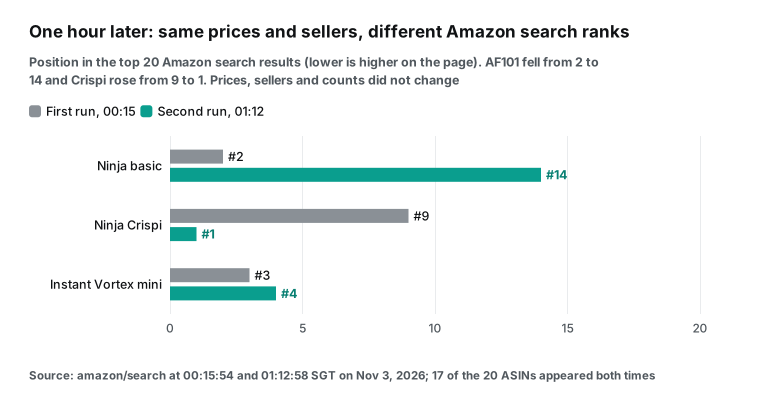
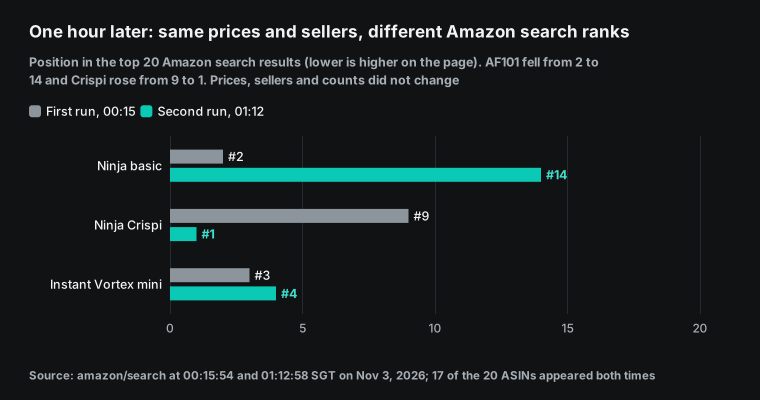
The Amazon search ranks did change. In the top 20 results for the same keyword, 17 ASINs appeared both times and 3 were new. The AF101 fell from position 2 to position 14. The Crispi rose from 9 to 1, and the Vortex moved from 3 to 4.
This is why the task reads fixed ASINs and does not pick "the top results". Ranks can move a lot in one hour while prices stay the same. A table that matches products by rank shows many false changes.
We also used the same code to test a keyword change. We replaced the second Crispi row with the result from "ninja air fryer 4 quart", which shows Patent Paid at $135. The diff() output did not say "price up $0.50". It said "seller change, before: Mercshop". That is the job of the seller in the key. This is the exact diff() output for that row:
{"store": "walmart.com", "item_id": "20370717802", "seller_name": "Patent Paid", "price": 135, "review_count": 1877, "flag": "seller change", "seller_before": "Mercshop"}The three walmart/search calls in the second snapshot took 5.9 to 8.7 seconds, against 35.8 to 43.6 seconds in the first. The responses have no field that says whether a result came from a cache. So judge change by the snapshot fields, not by how long a call took.
The prompt and the output table
A Cowork scheduled task is a saved prompt that runs the same way each time. The help center describes "Create with Claude". Claude asks a few multiple-choice questions. Then it shows the name, schedule and steps for you to confirm (Schedule recurring tasks in Claude Cowork). We suggest "Set up manually" and the prompt below. A fixed list of tools, parameters and failure rules is more stable than a prompt that the model rethinks each week.
Choose "Weekly" and a Monday morning time. The model field is optional in the manual form. A Reddit user also found the model setting on the task's edit page (Reddit thread). This task mostly calls tools and fills tables, so a lower-cost model is enough.
Configuration example: scheduled task prompt
(Set up manually. Frequency: weekly, Monday 09:10. Approval mode: Automatically approve.)

You are a competitor report assistant. Read only. Do not order, change prices or send messages.
Use only the EveryInfra connector and the Google Sheets connector.
1. Open the Google Sheets file "Competitor weekly" (create it if missing).
   Read all rows in the snapshots tab for the previous ISO week (for example 2026-W45).
2. Read the config tab. One row per competitor: key, amazon_asin, walmart_item_id, walmart_keyword, model.
3. Call everyinfra_call_api: platform=amazon, action=search,
   params={keyword: "ninja air fryer 4 quart", limit: 20}.
   Keep only ASINs from config. Record price, list_price, rating, rating_count (label it family rating count).
4. For each competitor:
   a. platform=walmart, action=search, params={keyword: walmart_keyword}.
      Find walmart_item_id. Record price, was_price, seller_name, rating, review_count.
   b. If step a did not find the ID: platform=walmart, action=product_detail,
      params={url: "https://www.walmart.com/ip/<ID>"}, mode=async. Record rating and review_count only.
   c. platform=walmart, action=reviews, params={url: same, limit: 100}, mode=async.
      Read the result with everyinfra_get_job. Keep only review_id values not seen last week.
      Split new 1-2 star reviews into "product" and "delivery or seller". Write one sentence for each.
5. If a call fails: record the error and request_id, skip that item, retry at most once, do not try other methods.
6. Append this week's rows to snapshots. Key: week + store + item ID + seller.
7. Compare with last week on that key. Append to changes: price change, seller change,
   review count change, new low ratings and summary, action.
8. At the end, show this week's changes rows in the session, sorted by action.
State how many API calls ran and how many failed.| Column | Source | Note |
|---|---|---|
| week | Run date | ISO week, for example 2026-W45 |
| store, item_id, seller | Search results | The key; a new seller gets the flag "seller change" |
| price, list_price, discount_pct | amazon/search, walmart/search | Discount = 1 − price ÷ list price |
| rating, count | Search; detail if the item drops out of the top 20 | Amazon: family rating count |
| price_change, count_change | This week minus last week, same key | Always read from the same tool |
| new_low_star, themes | walmart/reviews | Dedupe on review_id; split product and delivery |
| action | Rules | Price change: note this week. Review change: wait two weeks |
Weekly and monthly API cost
Here is the cost at catalog prices. amazon/search costs $0.002236 per call ($2.236 per 1,000). walmart/search, walmart/product_detail and walmart/reviews cost $0.001389 per call ($1.389 per 1,000). We read these price_usd values from the free catalog at 00:15 Singapore time on November 3, 2026. Failed calls and empty results are not charged, and reading an async job is free. A script computed each number below from those prices (pricing).
| Plan | Calls per week | Per week | Per month (52 weeks ÷ 12) | Per year |
|---|---|---|---|---|
| 3 competitors, weekly | 1 + 3 + 3 + 3 = 10 | $0.014737 | $0.0639 | $0.77 |
| 10 competitors, weekly | 2 + 10 + 10 + 10 = 32 | $0.046142 | $0.1999 | $2.40 |
| 3 competitors, daily | 70 | $0.103159 | $0.447 | $5.36 |
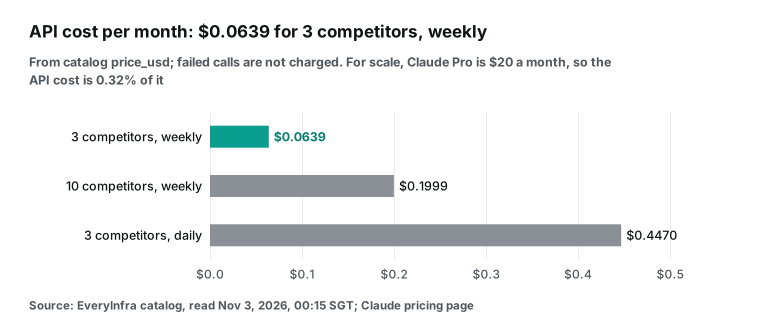
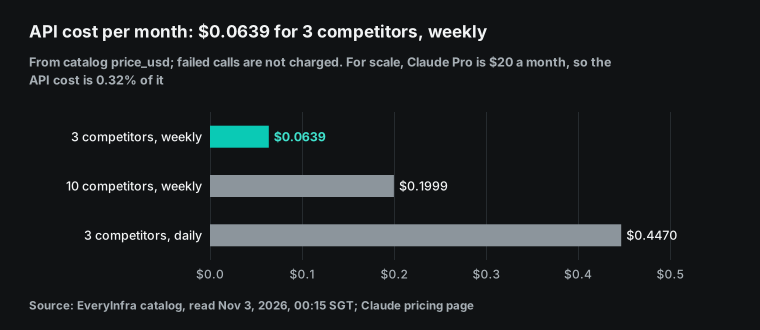
Compared with the subscription, the API cost is small. Three competitors once a week cost $0.0639 a month, which is 0.32% of Claude Pro at $20 a month (Claude pricing). The real cost is Claude usage. The help center says Cowork handles complex, multi-step tasks (Get started with Claude Cowork). Usage on claude.ai, Claude Code and Claude Desktop counts toward one shared limit. Paid plans have a session limit that resets every five hours and a weekly limit (How do usage and length limits work).
Each scheduled run takes from that budget. One Amazon search with 20 results is 71,614 bytes, and 100 reviews are about 60,000 bytes. If the model reads all of it, the run uses a lot of that budget. So the prompt tells it to keep only the IDs in the config tab and to read only new reviews.
Limits and open points
| Item | Status in this test | What to do |
|---|---|---|
| Amazon review text | amazon/reviews could not open the AF101 and was refunded | Use the rating count from search |
Price in walmart/product_detail | Missing for both products | Take the price from walmart/search |
| Temu | temu/search is paused (available: false) | Not in this version |
| Cowork side | Not run by us | Follow the steps as an example and test with "Run now" |
| Cause of the keyword-dependent seller | Unknown | Fix one keyword per item |
First, we did not get Amazon review text in this test. amazon/reviews for the AF101 returned "needs a login or is restricted" and was refunded. Even when it works, the catalog says it returns only the dozen or so featured reviews on the product page. So the Amazon side of the table has price, list price, rating and family rating count only.
Second, walmart/product_detail returned no price, stock or seller for either product in this test. Prices must come from walmart/search. Search returns one page of 20 results. If a competitor drops out of the top 20, use a more exact keyword.
Third, many brand managers also track Temu. But temu/search is paused in the catalog (available: false). A call returns 503 and is not charged, so this version of the table does not include it.
Fourth, we did not test the Cowork side. Approvals, the connector, Google Sheets writes and model choice all follow Anthropic's help center and documentation. We could not test what a scheduled run does on Team when "Always allow" is off.
Fifth, use this table only for your own pricing and product decisions. The FTC rule from August 2024 bans the sale and purchase of fake reviews. It also bans payment for positive or negative reviews and the suppression of negative reviews (FTC press release; 16 CFR Part 465). If a competitor gets many low ratings, improve your own product and shipping. Do not try to influence their reviews. This article describes a data method and is not legal advice.
Recent changes
- October 6, 2026: New Cowork tasks and scheduled tasks on Pro, Max and Ultra run in the cloud, and "Only on your computer" is gone (help center). For you, this means the table no longer needs a computer that is on, and it cannot use a local folder for snapshots.
- October 22, 2026: Desktop app v3.6556.1 lets scheduled tasks continue without MCP tools that need a person. It also fixes plugins and skills that scheduled tasks could not find (changelog). For you, this means a run that finishes with a missing part may have skipped a tool.
- October 26, 2026: Walmart announced three holiday events from November 12 to December 2. That is 14 days in total, up from 10 days in 2025 (Walmart press release; Retail Dive). For you, this means prices move most in the next five weeks. You can switch to a daily run, which costs $0.10 a week for 3 competitors.
- October 27, 2026: v4.29.0 limits web fetch in scheduled tasks outside the two automatic modes. The URL must be in the instructions or come from a search (changelog). For you, this means reading product pages with Cowork's own web fetch gets harder, and a connector is more stable.
FAQ
What to do when claude cowork scheduled tasks are not working?
This question comes from the search suggestions "claude cowork scheduled tasks not working" and "claude cowork scheduled tasks connector not working". First find which layer failed. For Cowork itself, one macOS user could not create tasks and got "Invalid file path: path traversal detected" (Reddit thread). A related GitHub issue says that remote sessions do not get the tools that manage local scheduled tasks (GitHub issue #76968).
The October 22 update also fixed scheduled tasks that could not find plugins and skills, so update the desktop app first (changelog). For the connector, check that the header value is Bearer plus the key, that the server is public, and that approvals are allowed. For EveryInfra, call everyinfra_list_requests with the request_id to see the status and charge. It is free.
This table lists the symptoms that we saw in our calls and in the threads above, with the layer where the problem usually is.
| Symptom | Likely layer | What to check |
|---|---|---|
| "Failed to create scheduled task: Invalid file path" | Cowork app | Update the app; see the Reddit thread and issue #76968 |
| The run finishes, but a part is missing | Approvals | Click "Run now" once and choose "Allow for all tasks" |
unauthorized: no API key provided | Connector header | The value must be Bearer, a space and the key; to change it, remove and add the connector again |
| The connector does not connect | Network | The server must be public and accept 160.79.104.0/21 |
| 503 timeout on detail | Sync call | Use "mode":"async" and read with everyinfra_get_job |
amazon/reviews: "needs a login or is restricted" | Restricted item | The call is refunded; use the rating count from search |
| A price drop that is really a new seller | Table key | The key must include the seller |
What is the claude cowork scheduled tasks limit?
This question comes from the search suggestion "claude cowork scheduled tasks limit". A Reddit user asked how many scheduled tasks you can create, and nobody gave a number from Anthropic (Reddit thread). We read four related help articles and found no limit on the number of Cowork scheduled tasks or runs. What is certain is that runs use your subscription usage, with the five-hour and weekly limits (usage limits). For comparison, Claude Code cloud scheduled tasks allow 100 scheduled runs per hour per account (documentation). On the EveryInfra side, the limit is requests per minute per key, which you can lower in the console.
Should I use claude cowork scheduled tasks or Claude Code routines?
This question comes from the search suggestion "claude cowork scheduled tasks vs claude code routines". Decide by where your data and results live. Is the result a sheet or document for business users? Then use Cowork with a Google Sheets or Microsoft 365 connector. Are your data and scripts in a Git repository?
Then use Claude Code cloud scheduled tasks, formerly routines, and keep the history in commits. They can also start on API calls and GitHub events (Claude Code documentation). Both can use the same EveryInfra MCP address. Our Claude Code scheduled tasks guide shows the other setup.
Do claude cowork scheduled tasks run in the cloud when my computer is off?
This question comes from the search suggestion "claude cowork scheduled tasks cloud". Yes. The help center says scheduled tasks run remotely, so they run while your computer sleeps or the app is closed. New tasks after October 6 run in the cloud (help center).
The exceptions are tasks that need local files or apps, and older tasks that already ran on your computer before October 6. One Reddit user could not find a cloud option (Reddit thread). A reply in that thread said that the cloud option was rolling out by plan. The help center now says new tasks on Pro, Max and Ultra run in the cloud from October 6.
Can I choose the model for a scheduled task?
This question comes from a Reddit post that asked how to set the model for scheduled tasks (Reddit thread). Yes. In the manual setup form, the model is an optional field (help center). A reply in the post also showed the model setting on the task's edit page. The price table mostly calls tools and fills a sheet, so a lower-cost model is enough. Keep the saved usage for tasks that need judgment.
Why did my scheduled task not start on time?
This question comes from a Reddit reply that said the remote scheduler drifts, sometimes by about 10 minutes (Reddit thread). The Cowork help center does not describe timing accuracy. The Claude Code cloud documentation says a run set exactly on the hour can start several minutes late. It suggests a few minutes past the hour, for example 9:07 (documentation). A weekly price table does not need exact timing. Our example uses 09:10 for the same reason.
Get started
- Create a free EveryInfra account and make an API key only for Cowork. Follow the quickstart and call
walmart/searchonce with curl. - In Claude, open Customize > Connectors and add a custom connector. Use the URL
https://api.everyinfra.com/mcp, choose No sign-in, and set the headerAuthorization = Bearer <key>. The MCP setup page has the full steps. - Turn on the Google Sheets connector. Create a "Competitor weekly" spreadsheet and fill the config tab with your competitor IDs.
- In Scheduled, choose Set up manually and paste the prompt above. Choose Weekly. Click Run now once and answer the approval prompts.
- Next Monday, open the changes tab.
For related methods, read price monitoring as a subscription product. Also read Amazon price tracking with comparable offers and competitor review analysis with Agent Skills.
References
- Schedule recurring tasks in Claude Cowork, Claude Help Center, read 2026-11-03.
- Get started with custom connectors using remote MCP, Claude Help Center, read 2026-11-03.
- Add a connector that isn't in the directory, Anthropic documentation, read 2026-11-03.
- Claude Cowork and chat are one Claude, Claude Help Center, read 2026-11-03.
- Use Claude Cowork on web, desktop, and mobile, Claude Help Center, read 2026-11-03.
- Use Claude Cowork safely, Claude Help Center, read 2026-11-03.
- Use Claude Cowork on Team and Enterprise plans, Claude Help Center, read 2026-11-03.
- Get started with Claude Cowork, Claude Help Center, read 2026-11-03.
- How do usage and length limits work?, Claude Help Center, read 2026-11-03.
- Release notes, Claude Help Center, entries from 2026-02-25 to 2026-10-21.
- Claude Desktop changelog, Anthropic, v3.6556.1 (2026-10-22) to v4.4212.0 (2026-10-29).
- Plans and pricing, Anthropic, read 2026-11-03.
- IP addresses, Anthropic documentation, read 2026-11-03.
- Claude Cowork architecture overview, Claude Help Center, read 2026-11-03.
- Automate work with scheduled tasks, Claude Code documentation, read 2026-11-03.
- Run prompts on a schedule, Claude Code documentation, read 2026-11-03.
- Use Google Workspace connectors, Claude Help Center, read 2026-11-03.
- Set up the Microsoft 365 connector, Claude Help Center, read 2026-11-03.
- Tools, Model Context Protocol specification 2025-11-25.
- Transports, Model Context Protocol specification 2025-11-25.
- Tool Annotations as Risk Vocabulary, MCP blog, 2026-03-16.
- Issue #76968, GitHub anthropics/claude-code, follow-up 2026-09-14.
- Anyone else unable to create or edit scheduled tasks in Claude Cowork, Reddit r/ClaudeAI.
- Scheduled tasks / Routines: what's actually holding up for you?, Reddit r/ClaudeAI.
- Using claude.ai scheduled tasks to trigger the 5h window, Reddit r/ClaudeAI.
- I can't create scheduled tasks on remote (cloud), Reddit r/ClaudeCowork.
- Cowork mode: any way to set which model scheduled tasks run on?, Reddit r/Anthropic.
- EveryInfra data capability catalog, EveryInfra, read 2026-11-03 00:15 Singapore time.
- Product detail page: the Buy Box, Walmart Marketplace Learn.
- Pricing rules, Walmart Marketplace Learn, updated 2025-12-12.
- Marketplace reviews overview, Walmart Marketplace Learn.
- Ratings, Reviews, Question, and Answer Terms of Use, Walmart Help.
- Walmart Unwraps Three Major Holiday Shopping Events, Walmart, 2026-10-26.
- Walmart debuts longer Black Friday, Cyber Monday sales events, Retail Dive, 2026-10-26.
- FTC Announces Final Rule Banning Fake Reviews and Testimonials, Federal Trade Commission, 2024-08-14.
- 16 CFR Part 465, eCFR.
- datetime: Basic date and time types, Python documentation.
- Authorization, Model Context Protocol specification 2025-11-25.
- RFC 6750: The OAuth 2.0 Authorization Framework: Bearer Token Usage, IETF, 2012-10.
- statistics: Mathematical statistics functions, Python documentation.
Reference BL-71