Yuanbao Search API and the Chinese platform data it does not return
Tencent opened the Yuanbao Search API and MCP on October 20 with 2,000 free calls a month, but no likes or comments. 10 live calls on 4 apps cost $0.0286.

On October 20, 2026, Tencent opened Yuanbao Search to outside developers through Tencent Cloud. It comes as an API, an MCP server and a Skill, with 2,000 free calls each month (MyDrivers report, October 20). Its SearchPro results carry a title, a date, a link, a summary, a site name and a relevance score.
They carry no likes, comments, saves, views or follower counts. The Tencent Cloud FAQ also excludes WeChat public account articles (SearchPro API reference, Yuanbao Search FAQ).
We ran one product query on Xiaohongshu, Douyin, Bilibili and WeChat through EveryInfra between 00:17 and 00:20 Singapore time on November 6, 2026. The 6 billed calls cost $0.028557. Every Xiaohongshu, Douyin and Bilibili row came back with likes, comments and a post time. WeChat articles can return read counts through a second call. SearchPro returns none of these numbers, so an agent that uses Yuanbao also needs an in-app data API. EveryInfra has no partnership with Tencent, and the two are separate services.
This article is for teams outside China that build AI agents and need Chinese consumer data. A typical request is "what do Chinese buyers complain about in down jackets this winter". A Western search API is a weak tool for that question.
Two of the main Chinese apps block most foreign crawlers. On the other two, a web search returns a different set of videos from the ones the app ranks highest, and with no counts. Tencent's new search API is a good tool for the Chinese public web and Tencent's own news content. It does not return what happens inside the apps. Below we show both sides with data and give a config that puts both in one agent.
Every fact about Yuanbao Search comes from the Chinese-language docs on cloud.tencent.com and from press reports dated October 20 to 22. We give the date we read each one. We did not open a Tencent Cloud account, so every Yuanbao request and config below is a configuration example that we did not run. Every EveryInfra number comes from live responses on November 6. Our earlier article, DeepSeek Search API plus in-platform data, covers a different search API and a different set of apps. A later section lists the differences.
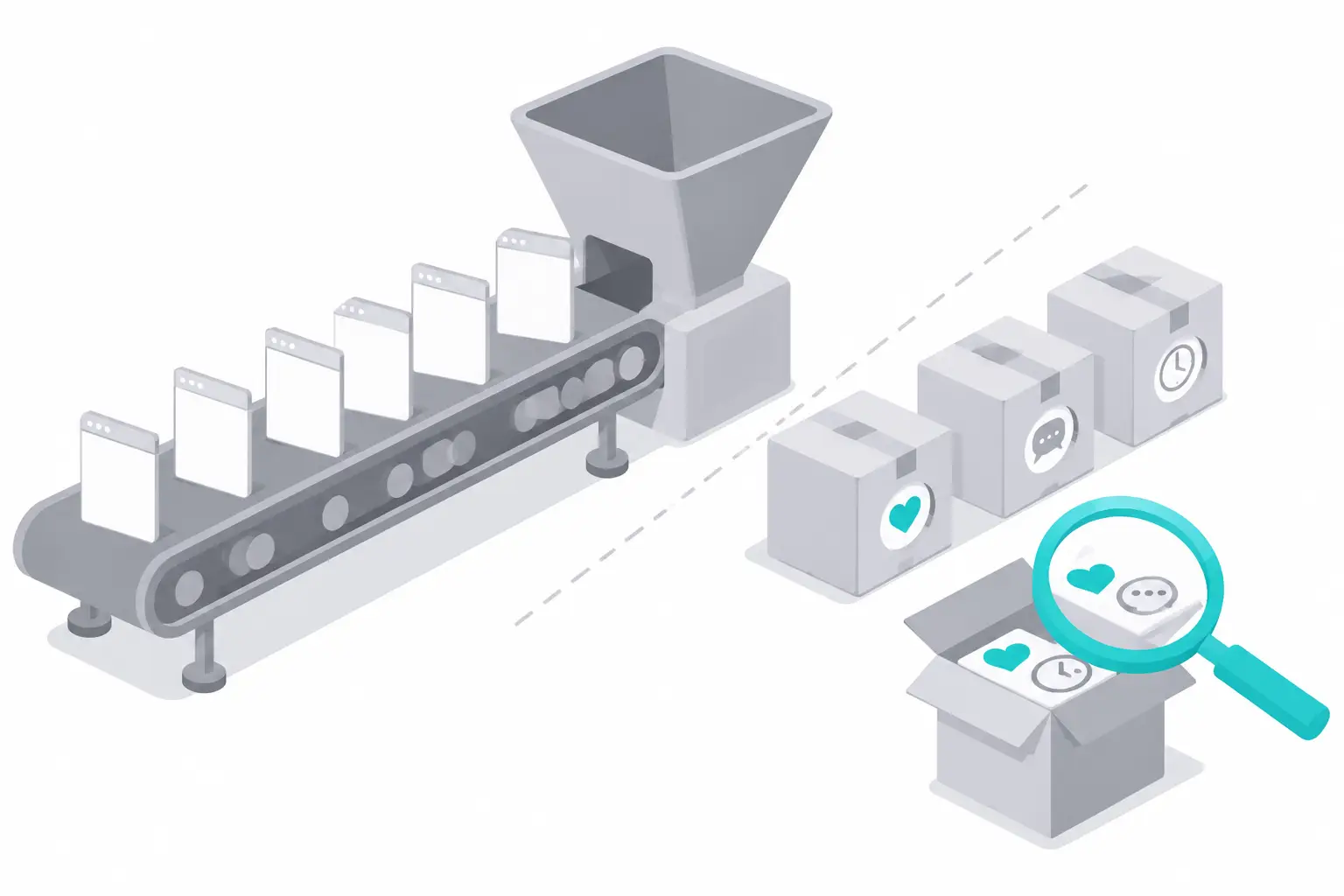
Why Chinese app data is hard to reach from a Western search API
Most of the Chinese consumer conversation happens inside four apps. Xiaohongshu (RedNote) is a note app for product tips and reviews. Douyin is the Chinese version of TikTok. Bilibili is a video site with long reviews and live comments on the video. WeChat public accounts publish long articles inside WeChat. Each app decides which crawlers can read its pages, and each one writes that choice in its robots.txt file.
| App | What it is | Best for | EveryInfra search capability and price per call |
|---|---|---|---|
| Xiaohongshu (RedNote) | Notes with photos or short videos | Product tips, first-hand reviews | xiaohongshu/search, $0.005556 |
| Douyin | Short video, the Chinese version of TikTok | Viral product videos, reach | douyin/search, $0.008333 |
| Bilibili | Long video with on-screen comments | Side-by-side tests, comment threads | bilibili/search, $0.000556 |
| WeChat public accounts | Long articles inside WeChat | In-depth reviews, read counts | wechat_oa/article_search, $0.008 |
We read the four robots.txt files at 00:23 Singapore time on November 6. The Xiaohongshu robots.txt gives Googlebot Disallow: /, and the wildcard group is also Disallow: /. It lets the Sogou web and mobile crawlers into /explore and the note sitemaps. Sogou belongs to Tencent. The WeChat public account robots.txt lets all crawlers read only a short list of paths, and the article path is not on that list. The Douyin robots.txt and the Bilibili robots.txt block only a few paths, so their video pages are open to search engines.
| Site | Key robots.txt rules, read 2026-11-06 | What it means for web search |
|---|---|---|
| www.xiaohongshu.com | Googlebot Disallow: /. Sogou web and mobile crawlers may read /explore, the home page and note sitemaps. Wildcard group Disallow: / | Coverage depends on the search engine |
| www.douyin.com | Named search engines and AI crawlers are blocked from a few paths only. No wildcard group | Video pages are open. This week's videos show up, but not the same set the app returns |
| www.bilibili.com | Wildcard group blocks a few list pages and language home pages | Video pages are open. This week's videos show up, but not the same set the app returns |
| mp.weixin.qq.com | Wildcard group allows the home page, Q&A pages and mini program landing pages, and blocks the rest | Article pages are closed to all crawlers |
Open robots rules do not tell you which videos a web search returns. We wanted to measure that, so we built a small probe. We did not have a Yuanbao key, so the probe uses a public web search engine (Google, with region China and language Chinese), not Yuanbao. For each row from our live calls, we searched the first 18 characters of the title in quotes, plus site: for that app. A hit means the same note or video ID appears in the top 10 links.
We tested the method first. We picked 6 Douyin and Bilibili pages that we knew were indexed, and the probe found all 6. Our first method searched the bare ID, and it found 0 of those 6 known pages. We dropped that first method and did not use its results.
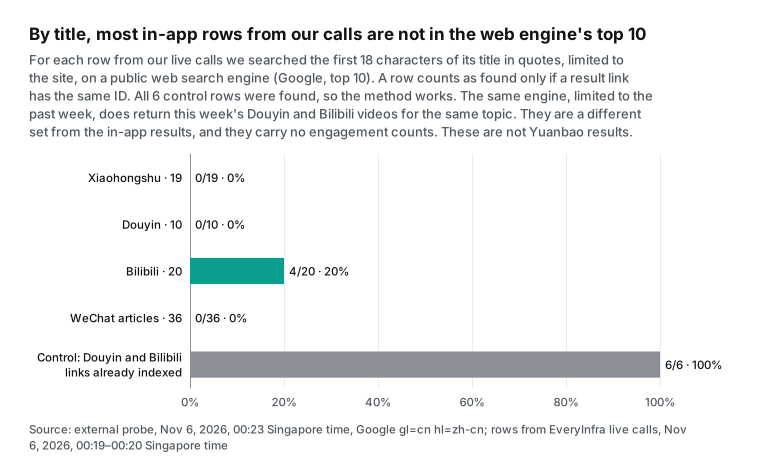
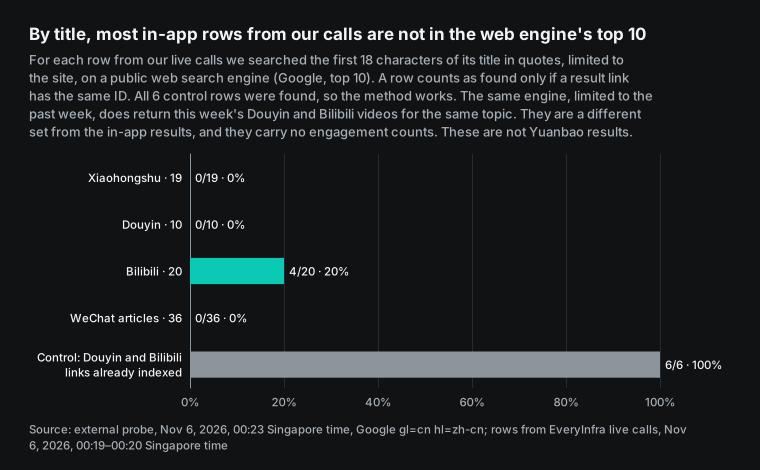
The probe found 0 of 19 Xiaohongshu notes, 0 of 10 Douyin videos, 4 of 20 Bilibili videos and 0 of 36 WeChat articles. The control group scored 6 of 6. The zeros for Xiaohongshu and WeChat follow from robots.txt. The file is a request to crawlers, not an access control, and its format is in RFC 9309. At the same time we also searched the topic itself with site: on the same engine. For Xiaohongshu and WeChat it returned 0 results, with or without a one-week limit.
The Douyin and Bilibili zeros do not mean that new videos are indexed late. Our own control data rules that out. Both sites let search engines read video pages. Limited to the past week, the same engine returned 10 Bilibili videos for the topic, all down jacket reviews, labeled from "12 hours ago" to "6 days ago". It returned 9 Douyin videos labeled from "1 day ago" to "6 days ago", though only 1 of their titles was about down jackets. The control group also held new videos: one Douyin video labeled "1 day ago" and one Bilibili video labeled "6 days ago", and the probe found both by title.
So the data shows one thing only. The rows the apps returned for "most liked" or default order were not in the web engine's top 10. On Bilibili, the 4 hits were 16.1, 1,070.6, 1,386.1 and 2,113.4 days old. None of the 13 videos from the last 7 days was found. That points to a different ranking, not to slow indexing.
For an agent, two points follow. You cannot control which videos a web search returns, and they will not match the app's own "most liked" or "newest" order. The videos it does return carry no like, comment or save counts.
| Same engine, topic search with `site:` (00:22 Singapore time) | No time limit | Past week | Newest result in the past week |
|---|---|---|---|
| Xiaohongshu | 0 | 0 | None |
| Douyin | 10 | 9 (1 title about down jackets) | 1 day ago |
| Bilibili | 10 | 10 (all down jacket reviews) | 12 hours ago |
| WeChat public accounts | 0 | 0 | None |
Do not read this result as a test of Yuanbao. Yuanbao uses a different index, and Tencent says it updates within minutes (Yuanbao Search product overview). The app pages it holds and the order it ranks them in may differ from Google. Because Xiaohongshu admits the Sogou crawler, Yuanbao may hold some Xiaohongshu note pages.
We could not measure how many. Two points are firm. First, even an indexed page comes back without like or comment counts. Second, Tencent itself says WeChat public account articles are out of scope.
What the Yuanbao Search API is, from the docs read on November 6
Yuanbao Search is the product name. Its code in the Tencent Cloud API is wsa. The product updates page says it launched on 2025-07-01 under the name "web search API". A lite edition came on 2026-01-21 and a flagship edition on 2026-05-29. The rename to Yuanbao Search came on 2026-10-09. The October 20 launch opened an existing internal service to outside users.
Phoenix Tech reported on October 20 that the index holds hundreds of billions of pages. The service takes several hundred million calls per day and serves more than 50 Tencent products. The list includes WorkBuddy, ima, Tencent Financial Technology and Tencent Video. The same report says it connects 157 trusted sources in 13 fields such as finance, health, law and travel. The table below lists the facts we checked. We read each page between 00:13 and 00:41 Singapore time on November 6.
| Fact | What the source says (summary) | Source and page update date |
|---|---|---|
| Editions | Lite, Standard and Flagship. Flagship is for business accounts only | Product overview, updated 2026-10-26 |
| Results per call | 5 to 10 by default. Standard and Flagship can return up to 50 | Same page |
| Content sources | Public web, plus Tencent content such as Tencent News, Sogou Baike and Penguin accounts | Same page |
| WeChat articles | Not supported "because of content copyright" | FAQ, updated 2026-10-09 |
| Latency and rate | 600 to 800 ms average, P99 about 1,200 ms. 20 QPS for Lite and Standard, 5 QPS for Flagship | Same page |
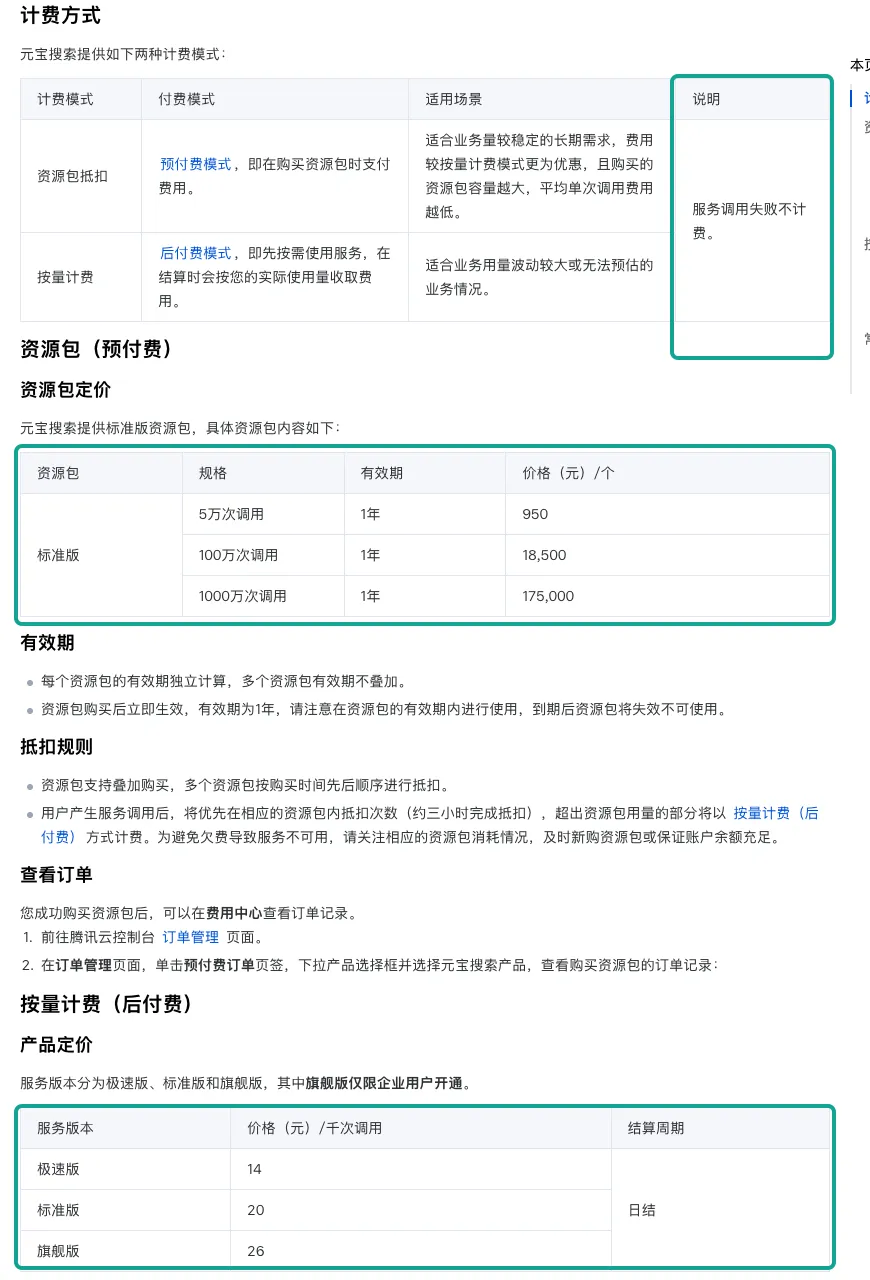
| Pay-as-you-go | 14, 20 and 26 yuan per 1,000 calls, billed daily | Billing overview, updated 2026-10-09 |
| Prepaid packs | Standard only: 50,000 calls for 950 yuan, 1 million for 18,500 yuan, 10 million for 175,000 yuan, valid 1 year | Same page |
| Failed calls | "Failed service calls are not billed" | Same page |
| Refunds | Unused part of a pack can be refunded within its year. Pay-as-you-go charges cannot be refunded | Refund rules, updated 2026-10-09 |
| API | Action SearchPro, version 2025-05-08, host wsa.tencentcloudapi.com | SearchPro API reference, updated 2026-10-27 |
| API key mode | POST to api.wsa.cloud.tencent.com/SearchPro with a Bearer header | API key guide, updated 2026-10-09 |
| MCP | Endpoint /Mcp, JSON-RPC 2.0 over Streamable HTTP, protocol 2025-06-18, one tool named SearchPro | Yuanbao MCP page |
| Free quota | 2,000 calls a month across Skill, MCP and API. Up to 6,000 a month with an invite code in October and November | MyDrivers, Eastmoney, October 22 |
Some points are not in the docs, and we do not fill them in. The billing page says failed calls are free. It does not say whether a call with 0 results counts as a success. The billing and refund pages do not mention the free quota at all.
The MCP page sends you to an "activity" page in the console for the current rules. The 2,000 and 6,000 numbers come from press reports. The product overview names three Tencent content sources and says nothing about Xiaohongshu, Douyin or Bilibili. Finally, the billing page has one unit, "per 1,000 calls", and does not say whether 50 results cost more than 10.
How to sign up for the Yuanbao Search API, and what it costs in dollars
The API key guide lists four steps. You register a Tencent Cloud account and pass personal or business real-name verification. You open the service in the Yuanbao Search console. You create an API key. You then send requests to the SearchPro endpoint. All the docs we read are on the Chinese-language site, and we did not test sign-up from outside mainland China.
The same page sets two limits. Each account or sub-account can hold at most 3 API keys at a time. The plain-text key appears only once, when you create it, so you must save it then. A sub-account needs read and write access to the service from the main account before it can create keys. The FAQ adds that an account in arrears cannot open the service.
The free quota needs care. MyDrivers reported at 15:55 on October 20 that each month includes 2,000 free calls. A second MyDrivers report at 18:15 the same day calls it a limited-time offer, with no end date.
An Eastmoney post on October 22 says an invite code raises the quota to 6,000 a month in October and November. The Tencent docs do not say whether the three access methods share one quota. A Zhihu column says they do. Treat the free quota as room for testing, not as part of your long-term budget.
To compare prices in dollars, we used the central parity rate for 2026-11-05 from the State Administration of Foreign Exchange. The rate was 6.7156 yuan per dollar. All dollar values for Yuanbao are approximate.
| Yuanbao Search | List price | About USD per 1,000 calls | About USD per call |
|---|---|---|---|
| Lite, pay-as-you-go | 14 yuan per 1,000 | $2.085 | $0.002085 |
| Standard, pay-as-you-go | 20 yuan per 1,000 | $2.978 | $0.002978 |
| Flagship, pay-as-you-go, business only | 26 yuan per 1,000 | $3.872 | $0.003872 |
| Standard pack, 50,000 calls | 950 yuan | $2.829 | $0.002829 |
| Standard pack, 1 million calls | 18,500 yuan | $2.755 | $0.002755 |
| Standard pack, 10 million calls | 175,000 yuan | $2.606 | $0.002606 |
The refund rules are short. You can refund the unused share of a pack inside its one-year term, minus any coupon value. Pay-as-you-go charges are final. For an agent project, start with the free quota and pay-as-you-go, measure your monthly volume, and buy a pack only after the volume is stable. The 1 million pack is about 7.5% cheaper per call than pay-as-you-go.
What the Yuanbao Search API returns: web fields, no engagement counts
SearchPro puts its results in a Pages array. Each element is a JSON string, so your client must parse it a second time (SearchPro API reference). The editions return different fields. The image field is pics in the API reference and images in the example on the API key guide. We saw both names, so check a real response before you map the field.
| Field | Meaning in the docs | Lite | Standard | Flagship |
|---|---|---|---|---|
title | Result title | Yes | Yes | Yes |
date | Publish time of the page | Yes | Yes | Yes |
url | Source URL | Yes | Yes | Yes |
passage | Standard summary | Yes | Yes | Yes |
content | Dynamic summary | No | Yes | Yes |
site | Site name, can be empty | Yes | Yes | Yes |
score | Relevance from 0 to 1 | No | Yes | Yes |
authority_level | Authority from 0 to 5 | No | No | Yes |
pics | Up to 10 images per result | No | Yes | Yes |
favicon | Site icon link | Yes | Yes | Yes |
deeplinks | Up to 10 sub-links, needs Deeplinks | No | No | Yes |
The request side is flexible. The table lists each parameter from the API reference. Lite does not accept Mode, Cnt or Industry.
| Parameter | Values in the docs |
|---|---|
Query | Required, up to 1,500 UTF-8 bytes |
Mode | 0 web pages, 1 trusted vertical cards such as weather or stock prices, 2 both |
Site | One domain, or exclude: with up to 5 domains |
Cnt | 10, 20, 30, 40 or 50 |
Industry | gov, news, acad or finance |
Freshness | Last N days (1 to 30), months (1 to 12) or years (1 to 5), one date, or a date range |
These options suit background research. An agent can ask for news from the last 7 days, or search one brand's site for an official statement. They do not help with the question "how many people liked this review". The chart below puts the Yuanbao field list next to our live rows. The Yuanbao column has a post time and nothing else from our list. The Xiaohongshu, Douyin and Bilibili columns have likes, comments, saves and post time in every row.
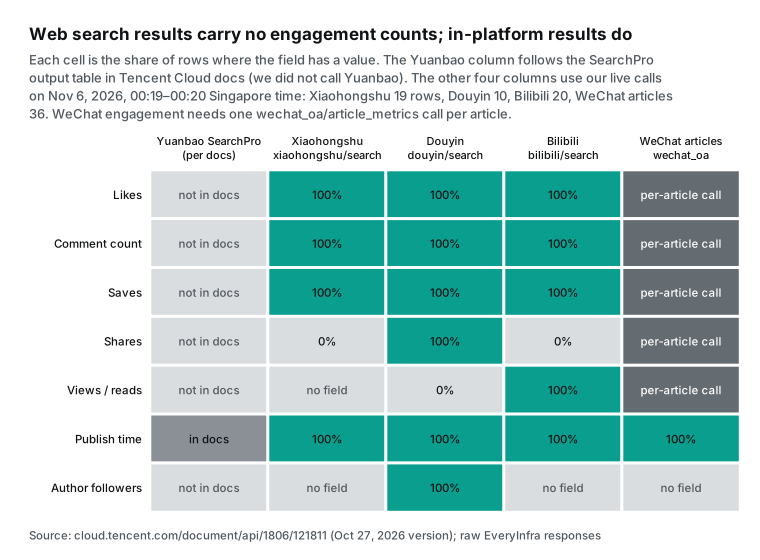
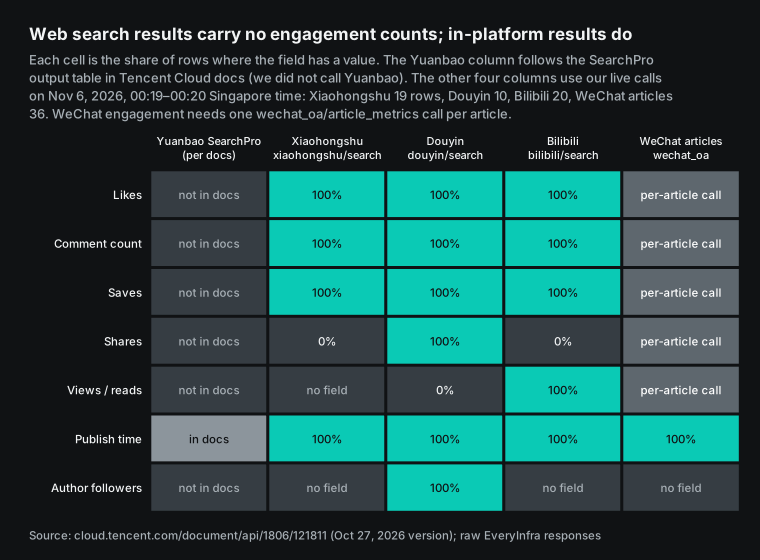
The field names on the EveryInfra side come from the response_fields list in each catalog. The Xiaohongshu catalog lists like_count, collect_count, comment_count, share_count, posted_at and is_cooperation_note for sponsored notes. The Douyin catalog adds author_follower_count, view_count and is_ad. The Bilibili catalog has view_count, danmaku_count for on-screen comments, favorite_count and coin_count.
Two cells in the chart need a note. The Xiaohongshu share_count was empty in all 19 rows this time, and Bilibili shares were also empty. So do not treat shares as a common metric across the three apps.
The Douyin view_count was empty in all 10 rows, so get Douyin view counts from a different call. The Xiaohongshu sponsored flag and both verified flags were false in every row, and the Douyin ad flag was empty. We ran one query only, so we cannot tell whether these are real values or defaults. We do not use them to filter ads.
Test 1: one query on four Chinese apps
All calls went to POST /api/v1/social between 00:17 and 00:20 Singapore time on November 6. The query was the Chinese phrase for "down jacket review". Two calls hit the limit of this test key, 10 calls per minute, and returned 429 with no charge. One Xiaohongshu call sorted by most liked in the last 30 days returned 0 rows, and the system refunded the hold. One Douyin call used a wrong sort value on purpose and returned 422. The 6 billed calls cost $0.028557 in total.
| Singapore time | Capability | Parameters | HTTP | Rows | charged_usd |
|---|---|---|---|---|---|
| 00:17:30 | xiaohongshu/search | most_liked, last_30_days | 200 | 0 | 0, empty result refunded |
| 00:17:52 | xiaohongshu/search | newest | 429 | 0 | 0 |
| 00:17:59 | douyin/search | most_liked, one_week | 429 | 0 | 0 |
| 00:19:06 | xiaohongshu/search | newest, last_30_days | 200 | 19 | 0.005556 |
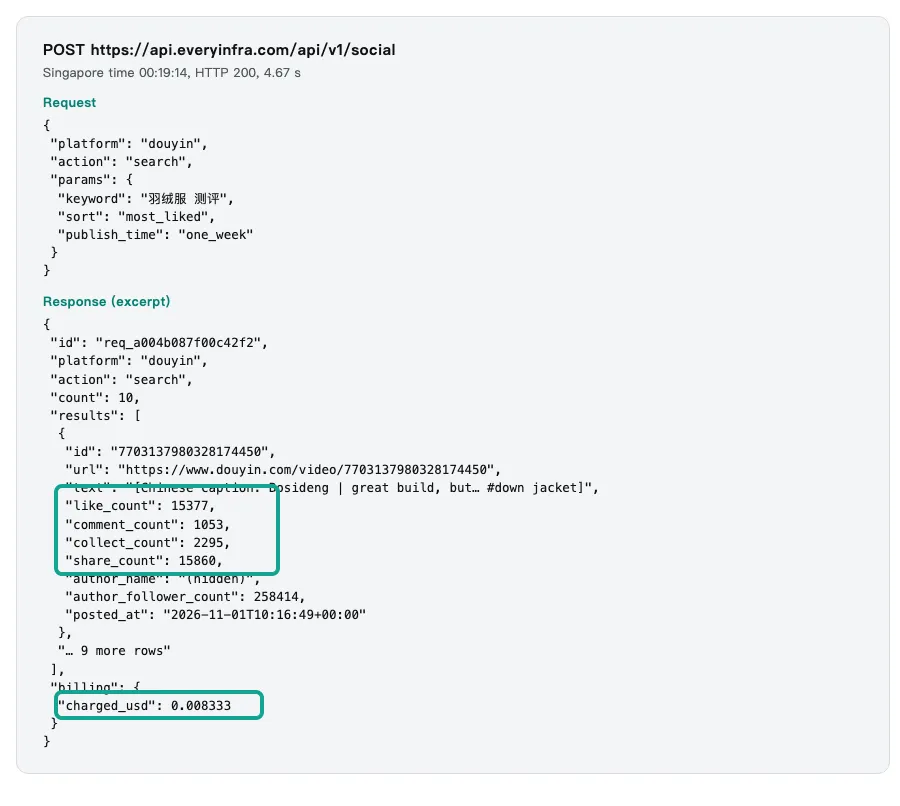
| 00:19:14 | douyin/search | most_liked, one_week | 200 | 10 | 0.008333 |
| 00:19:27 | bilibili/search | default sort | 200 | 20 | 0.000556 |
| 00:19:37 | wechat_oa/article_search | same query | 200 | 36 | 0.008 |
| 00:19:57 | douyin/search | sort=hot | 422 | 0 | 0 |
| 00:20:16 | wechat_oa/article_metrics | one review from 2025-11-19 | 200 | 1 | 0.005556 |
| 00:20:26 | bilibili/comments | the most viewed video | 200 | 3 | 0.000556 |
Xiaohongshu returned 19 video notes posted between 2026-11-02 and 2026-11-05. The median note had 9 likes. The top note had 334 likes, 14 comments and 101 saves, and 6 of the 19 notes had no comments yet. A "newest" sort returns posts that are hours old, so the counts are low. This view answers "which brands are people testing this week", not "which review is most popular". Our first call sorted by most liked returned 0 rows, and the response gave empty_result_refunded as the reason.
Douyin returned 10 videos for "most liked, last week". Likes ranged from 1,507 to 17,048, with a median of 4,896.5, and the 10 videos had 4,501 comments in total. The top video had 17,048 likes, 853 comments, 6,699 saves and 3,674 shares. The second video was about the Bosideng brand and had 15,377 likes and 15,860 shares. Author follower counts ranged from 137 to 464,930. The account with 137 followers still had 8,217 likes and 1,433 comments, so a follower filter would drop a viral video.
Bilibili returned 20 videos in default order, with views from 0 to 1,695,719 and a median of 1,047.5. The 20 videos had 3,447 on-screen comments in total, and 4 were more than a year old. The top video was a side-by-side test from a review creator, posted on 2023-12-01, with 1,695,719 views, 44,806 likes and 3,678 comments. We then pulled its top comments with bilibili/comments. The 3 top comments had 3,999, 1,843 and 1,831 likes, and the first was a viewer's short summary of the test. A web search can find the video page, but it cannot rank the comments under it.
Test 2: how fresh in-app results are
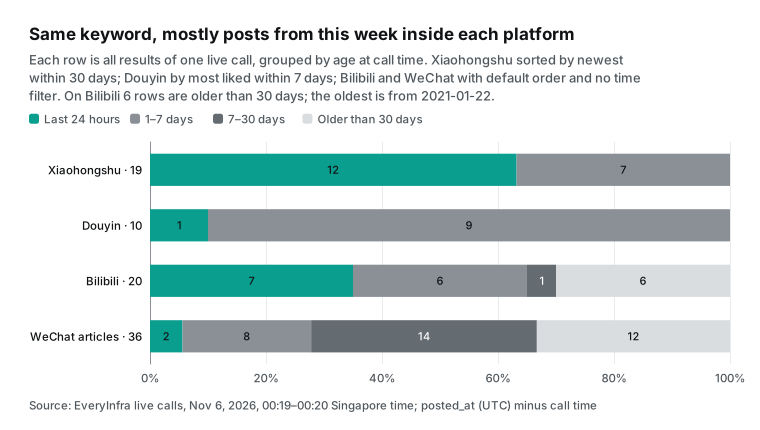
Product questions depend on time. A review from last winter tells you less than a complaint from this week. We measured the age of each row at the call time, 2026-11-05T16:19:30Z. The four bands are under 1 day, 1 to 7 days, 7 to 30 days and over 30 days. All 19 Xiaohongshu notes were under 7 days old, 12 of them under 1 day, with a median age of 0.47 days. All 10 Douyin videos were under 7 days old, because we sent publish_time=one_week, and the median was 2.56 days.
The other two apps mix new and old. Bilibili's default order gave 13 videos under 7 days and 6 videos over 30 days, and the oldest dates from 2021-01-22. WeChat gave 24 articles from the last 30 days and 12 older ones, and the oldest dates from 2024-12-18. An agent must filter these rows by posted_at before it sends them to the model. If it does not, the model can present a 2021 review as this year's view.
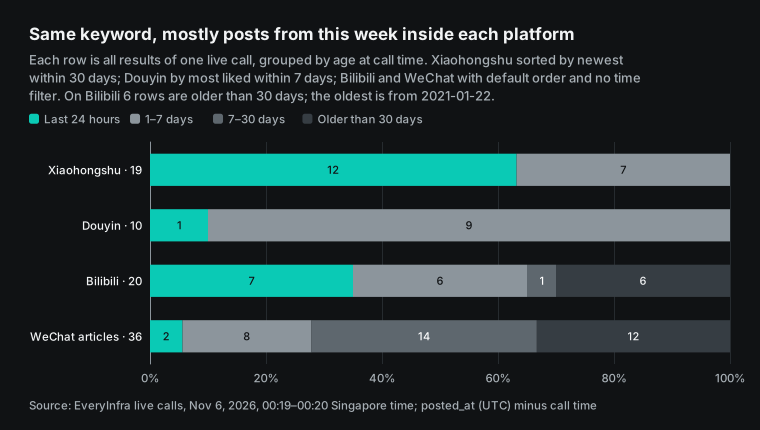
Yuanbao has its own time filter, Freshness, which limits web results to the last N days. That filter and the in-app date_range and publish_time options do a similar job. There is one difference. The Yuanbao date is the publish time of a web page. The in-app posted_at is the time the note or video itself went up. The two times can differ on reposts and aggregator pages, so label each time with its source.
The WeChat gap: the one source Yuanbao rules out
The Yuanbao FAQ has one direct question: does it include WeChat public account content? The answer is no, "because of content copyright" (Yuanbao Search FAQ). This is the only content source that the docs exclude by name. For product research, WeChat is where many long reviews appear. Our query returned 36 articles from 25 accounts, and the oldest was from 2024-12-18.
Two EveryInfra capabilities cover this gap. wechat_oa/article_search searches articles by keyword and returns title, summary, link, account name and post time. It returned 36 articles in one call for $0.008. wechat_oa/article_metrics takes one article link and returns read count, likes, the "wow" count, shares, saves and comments, for $0.005556 per article. The platform overview is on the WeChat public account API page.
We tested it on a review that the consumer testing account Laoba Pingce posted on 2025-11-19. It tested 14 down jackets. The call returned read_count 100001, like_count 2763, watching_count 1455, share_count 7763, collect_count 932 and comment_count 94. WeChat shows "100,000+" on popular articles, so 100001 most likely stands for that display and is a lower bound. We found no doc that says so. In an answer, write "over 100,000 reads".
The article had 7,763 shares and only 2,763 likes. The Bosideng video on Douyin showed the same pattern, with more shares than likes. Review content travels by forwarding more than by likes. An agent that ranks reviews by likes alone will underrate this kind of post. Use shares and saves as well, and the ranking will be closer to real reader behavior.
Yuanbao MCP server next to the EveryInfra MCP server in one agent (configuration example)
Both services are remote MCP servers. Both use Streamable HTTP, and both read a Bearer token from the Authorization header. The Yuanbao server has one tool, SearchPro (Yuanbao MCP page). The EveryInfra server returned 12 tools in tools/list at 00:24 Singapore time on November 6. The main three are everyinfra_list_capabilities, a free list of apps and capabilities, everyinfra_call_api, which runs a capability, and everyinfra_get_job, which reads an async result.
The transport is defined in the Transports section of the MCP 2025-06-18 spec. A client first sends initialize to agree on a protocol version, as the Lifecycle section describes. It then uses tools/list and tools/call, as the Tools section describes. Over HTTP, the client must send an MCP-Protocol-Version header on each request after initialize. Most clients add this header for you.


The block below is a .mcp.json file for the root of a Claude Code project. It lists the two servers side by side and reads both keys from environment variables. Tencent's sample uses "type": "streamableHttp". The Claude Code MCP docs, updated on 2026-11-02, say that type accepts http, with streamable-http as an alias. The camel-case form is not in that list, so use http in Claude Code. For Cursor and other clients, follow the client's own docs.
{
  "mcpServers": {
    "yuanbao-websearch-mcp": {
      "type": "http",
      "url": "https://api.wsa.cloud.tencent.com/Mcp",
      "headers": {
        "Authorization": "Bearer ${WSA_API_KEY}"
      }
    },
    "everyinfra": {
      "type": "http",
      "url": "https://api.everyinfra.com/mcp",
      "headers": {
        "Authorization": "Bearer ${EVERYINFRA_API_KEY}"
      }
    }
  }
}
After you connect, run tools/list once and read the SearchPro input schema. The Tencent MCP page is not consistent. Its parameter table lists Query, Site, Mode, Freshness, Cnt and Industry. The tool definition embedded in the same page uses FromTime and ToTime as Unix timestamps instead of Freshness, and it types Mode as a string. Your own tools/list result is the only reliable answer. MCP Inspector shows the tool lists of both servers without any code.
Both servers use a static Bearer key, not the OAuth flow in the MCP spec. The Bearer header format comes from RFC 6750. If you call an MCP endpoint from your own script, send the MCP-Protocol-Version header on every request after initialization. The 2025-06-18 release added that rule (2025-06-18 changelog). The Tencent page writes the version as "2025-6-18", which is the same release. Clients such as Claude Code and Cursor send the header for you.
Yuanbao Search also ships as a Skill on the SkillHub page for Yuanbao Search. Before each run, the Skill checks for the environment variable TENCENTCLOUD_WSA_APIKEY. It then runs scripts/websearch.py with a --query value and an optional --site value. The Skill and the MCP server call the same SearchPro API with the same key. Use the Skill in agent tools that load Skills, and the MCP server in clients that load MCP servers.
With two servers in place, the agent needs a routing rule in its system prompt. Route by what the question needs, not by app name. The table below is the rule we suggest. Yuanbao answers "what is it and where is the source". The in-app calls answer "how many people say it, what they say and since when".
| What the question needs | Call first | Call next, if needed |
|---|---|---|
| News, notices, policy text, official brand statements | Yuanbao SearchPro with Industry=news or Site= the brand site | None |
| What buyers say: complaints, tips, review verdicts | xiaohongshu/search and douyin/search | Comments on the top rows |
| Side-by-side videos and comment threads | bilibili/search | bilibili/comments |
| Long-form reviews and their reach | wechat_oa/article_search | wechat_oa/article_metrics |
| Live cards such as weather, gold or stock prices | Yuanbao SearchPro with Mode=1 | None |
The web search step does not have to be Yuanbao. EveryInfra also has a web search capability, web/search. Its catalog price is $0.001389 per call, or $1.389 per 1,000 calls (read November 6, 2026). Tencent's billing page lists Yuanbao Standard at 20 yuan per 1,000 calls. At the 2026-11-05 central parity of 6.7156 yuan per dollar, that is about $2.978. Lite costs 14 yuan, about $2.085.
The two suit different jobs. Yuanbao adds Tencent News, Sogou Baike and Penguin accounts to the public web. It has Industry filters, Mode=1 live cards, up to 50 rows per call on Standard and a limited free quota. Use it for Chinese news, reference and policy questions.
web/search returns up to 10 rows per call with title, link, snippet, rank and publish date, and takes optional country and language values. It uses the same key, bill and MCP server as the in-app capabilities. It suits a team that does not want a Tencent Cloud account. We did not call web/search in this test, so its fields and price come from the catalog.
| Item | Yuanbao Standard | EveryInfra `web/search` |
|---|---|---|
| Price per 1,000 calls (read 2026-11-06) | 20 yuan, about $2.978 at 6.7156 yuan per dollar | $1.389 |
| Rows per call | Up to 50 | Up to 10 |
| Filters | Freshness, Site, Industry, Mode | country, language |
| Content | Public web plus Tencent News, Sogou Baike, Penguin accounts; no WeChat articles | Public web results with rank and publish date |
| Account and key | Tencent Cloud account with identity check | The same key and bill as the in-app capabilities |
Plain HTTP: two curl requests
You can skip MCP and call both services over HTTP. The Yuanbao API key mode needs a Bearer header only, with no Tencent Cloud API 3.0 signature (API key guide). For the signed mode, use the Tencent Cloud SDKs, which have a wsa package. Start with the Python client and its models.py. Other languages live in the matching TencentCloud SDK repos under a wsa/v20250508 path, for example Go and Node.js.
The first request below is a Yuanbao configuration example that we did not run. The second is the request we sent at 00:19:14 Singapore time. The Chinese query is written as JSON escape sequences, so you can paste it into any shell. The server decodes the escapes as normal Chinese text.
# Configuration example, not run: Yuanbao Standard, last 7 days, 20 results
curl -s https://api.wsa.cloud.tencent.com/SearchPro \
  -H "Authorization: Bearer $WSA_API_KEY" \
  -H "Content-Type: application/json" \
  -d '{"Query":"羽绒服 测评","Freshness":"d7","Cnt":20}'
# Each item in Pages is a JSON string: parse it again

# Real request: EveryInfra Douyin search, most liked, last week
curl -s https://api.everyinfra.com/api/v1/social \
  -H "Authorization: Bearer $EVERYINFRA_API_KEY" \
  -H "Content-Type: application/json" \
  -d '{"platform":"douyin","action":"search","params":{"keyword":"羽绒服 测评","sort":"most_liked","publish_time":"one_week"}}'
# Returns count, results[] (like_count, comment_count, collect_count, share_count, posted_at) and billing.charged_usd
The EveryInfra response is a plain JSON object. results is an array, and each row has the fields in the catalog's response_fields. billing.charged_usd is the amount charged for this call. pagination.has_more tells you if there is another page, and you pass next_page_token back as page_token to get it.
For slow calls, add "mode":"async" to the body. You get HTTP 202 and a job_id at once, and you poll /api/v1/jobs/{job_id}. A synchronous call has 85 seconds. You can read the catalog for free.
Errors and billing on both sides
Agents retry, so learn the billing rules before you connect one. The Yuanbao billing page says failed calls are free. The API reference lists six error codes. InternalError and InvalidParameter are general.
RequestLimitExceeded means too many requests. ResourceNotFound means the service is not open, and the MCP page says activation takes a few minutes. ResourceUnavailable usually means the account is in arrears. UnauthorizedOperation means a wrong or deleted key. EveryInfra keeps no charge for a failed or empty call, and it stops a call with a bad parameter before any charge.
| Case | Yuanbao Search, per docs | EveryInfra, per live responses and catalog notes |
|---|---|---|
| Bad parameter | InvalidParameter. Billing not stated, failed calls are free | HTTP 422 invalid_value with did_you_mean and allowed, and the text "Nothing was charged" |
| Rate limit | RequestLimitExceeded. 20 QPS for Lite and Standard, 5 for Flagship | HTTP 429 rate_limited, no charge |
| No results | Not stated | HTTP 200, 0 rows, empty_result_refunded, hold refunded |
| Bad key or service not open | UnauthorizedOperation, ResourceNotFound | HTTP 401 (per docs, not tested here) |
| Account in arrears | ResourceUnavailable. An account in arrears cannot open the service | No call starts when the balance is too low (per docs, not tested here) |
Our test call at 00:19:57 Singapore time sent sort=hot on purpose. The error said that sort must be most_liked, newest or relevance, and did_you_mean suggested most_liked. The first next_steps line said to change only sort, send again, and that nothing was charged.
A model can read that message and fix the call by itself. HTTP 429 is defined in RFC 6585, and the right response is to wait, not to retry at once.
Our two 429 responses came on the Xiaohongshu and Douyin calls. They had retry_after values of 8 and 1 seconds and the reason key_limit, which means this test key's own limit. Have your retry logic wait for retry_after and then send again. We resent both calls about 74 seconds later, and both returned results. The general status code rules are in RFC 9110.
Cost per 1,000 questions
Per 1,000 calls, Yuanbao Standard costs about $2.978. EveryInfra web/search costs $1.389. bilibili/search costs $0.556, which is cheaper than Yuanbao. xiaohongshu/search costs $5.556, about 1.9 times Yuanbao Standard. wechat_oa/article_search costs $8.0, and douyin/search costs $8.333, about 2.8 times.
Per 1,000 rows, the order changes. Xiaohongshu gave 19 rows per call, about $0.2924 per 1,000 rows. Douyin gave 10 rows, about $0.8333. Bilibili gave 20 rows, about $0.0278. WeChat gave 36 rows, about $0.2222.
Each price is also on the pricing page. The capability pages show it too, for example Xiaohongshu search, Douyin search and Bilibili search.
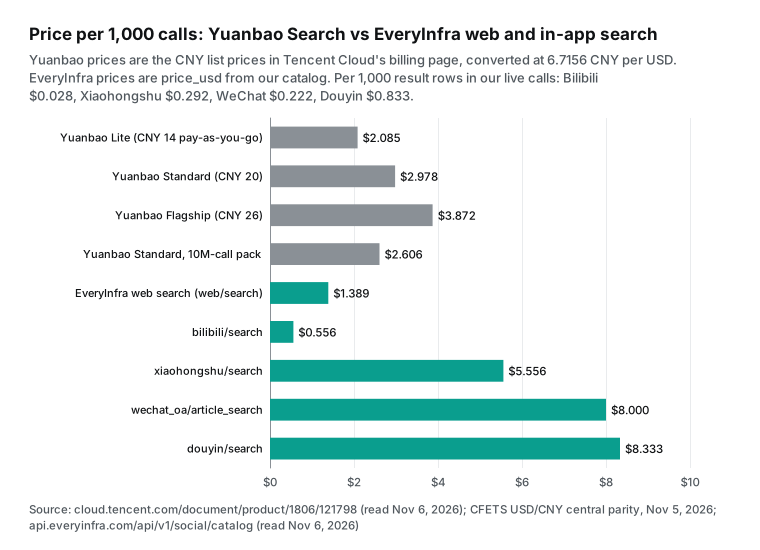
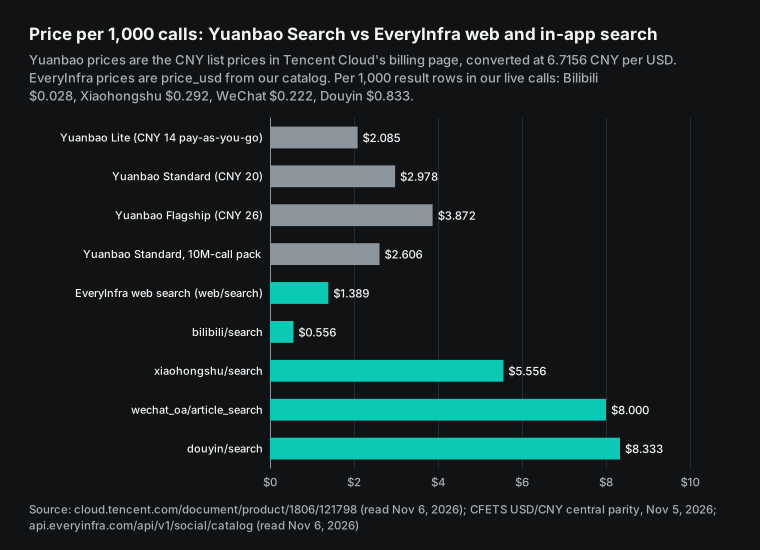
Next, the mix. We priced three plans per 1,000 questions. Plan A uses Yuanbao Standard once per question, for $2.978.
Plan B calls Yuanbao and all four apps on every question, for $25.423. Plan C calls Yuanbao and Bilibili on every question, Xiaohongshu on 40% of questions, and Douyin and WeChat on 20% each, for $9.023. The 40% and 20% shares are our assumptions, not measured values. Your real shares depend on how many questions ask "what do people say".
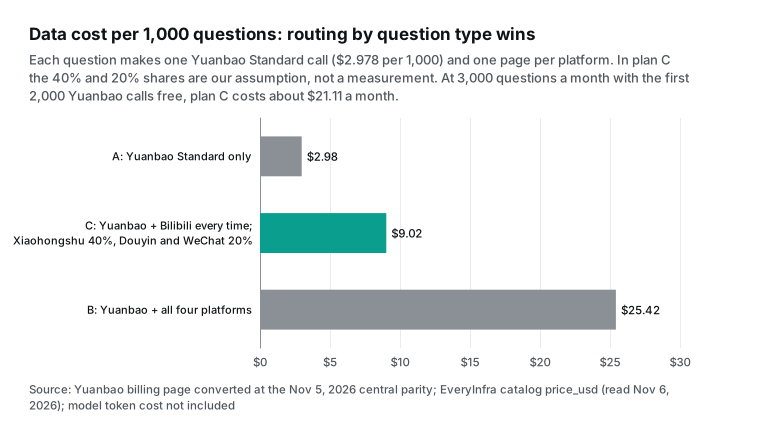
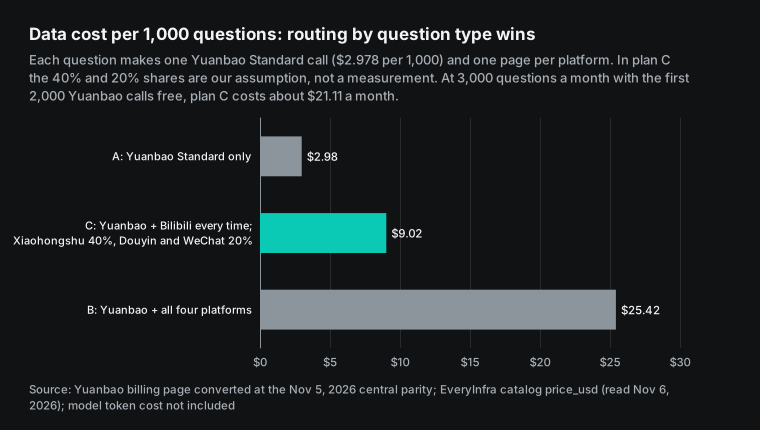
| Plan | Yuanbao | Bilibili | Xiaohongshu | Douyin | Per 1,000 questions | |
|---|---|---|---|---|---|---|
| A, web search only | $2.978 | 0 | 0 | 0 | 0 | $2.978 |
| C, apps on demand | $2.978 | $0.556 | $2.222 | $1.667 | $1.600 | $9.023 |
| B, all apps every time | $2.978 | $0.556 | $5.556 | $8.333 | $8.000 | $25.423 |
C2, apps on demand, web step on web/search | $1.389 (web/search) | $0.556 | $2.222 | $1.667 | $1.600 | $7.434 |
For 3,000 questions a month on Plan C, 2,000 Yuanbao calls fall in the free quota. The other 1,000 cost about $2.978. The in-app calls cost 3 times $6.045, which is $18.135.
The total is about $21.113. The free quota is a limited offer, so also price the month without it. Then 3,000 Yuanbao calls cost about $8.934 and the total is about $27.069. With web/search as the web step, 3,000 calls cost $4.167 and the total is about $22.302.
While the free quota lasts, almost all the cost is on the app side. The best saving is to call the two most expensive capabilities, Douyin search and WeChat search, only when a question needs them. Bilibili search is cheap enough to call every time.
How the answer should cite its sources
When web results and app data share one answer, readers must see which line came from news and which came from users. We built a format sample from our live rows. The Yuanbao part was not run, so it shows a placeholder. The first paragraph gives background, such as changes in down jacket standards or prices. It cites Yuanbao web results with the site name and date for each line.
The second paragraph gives the user voice. Among the 10 most liked Douyin videos of the last week, one about Bosideng build quality had 15,377 likes and 15,860 shares. The most viewed Bilibili test had 1,695,719 views, and its top comment had 3,999 likes. Each line names the app, the post date and the time we read the data. The third paragraph covers long reviews, for example the Laoba Pingce article from 2025-11-19 with over 100,000 reads and 1,455 "wow" clicks. The last line says "app data as of 00:20 SGT, 2026-11-06", because the counts change on the next call.
This format has two benefits. Every number traces back to one call, so a reader or reviewer can open the link and check it. The model also needs only the title, link, a few counts and the post time for each row.
It does not need the full page, so the input stays short. Yuanbao passage and content summaries fit the background paragraph. App rows fit the evidence paragraphs. Once the slots are fixed, the model writes answers with a stable structure.
How this differs from our DeepSeek Search article
Our DeepSeek Search API article from November 3 starts from the same point: a web search API does not return engagement counts. The two articles differ in three ways. First, the search API. That article covers DeepSeek Search and Fetch, opened on October 17 at 5 yuan per 1,000 successful requests. This one covers Tencent's Yuanbao Search, which adds Tencent News, Sogou Baike and Penguin accounts and excludes WeChat, so WeChat gets its own section here.
Second, the integration. That article writes four function definitions and a tool_calls loop for an OpenAI-style chat API. This article puts two remote MCP servers side by side, with no dispatch code.
Third, the apps. That article covers Xiaohongshu, Zhihu and Weibo, which are mostly text and Q&A. This one covers Xiaohongshu, Douyin, Bilibili and WeChat. Douyin and Bilibili are video apps, so this article adds views, on-screen comments, shares and follower counts.
Read both if you build for China. Maybe your agent runs on a DeepSeek model and you want full control of each step. Then use the function pattern from the DeepSeek article. If you use Claude Code, Cursor or another MCP client, use the side-by-side config here. You can also attach both search APIs and route by price and content source.
Limits and caveats
We did not call Yuanbao Search. Everything we say about it comes from its docs and from press reports, and every Yuanbao request and config here is a configuration example. The docs have small conflicts.
The MCP page table and its embedded tool schema differ on the time filter. The image field is images in one example and pics in the reference. The press reports give two recall rates, 94% in MyDrivers and 93% in Eastmoney. The free quota is a limited offer from press reports, not from the billing page, so check it again after November.
On the EveryInfra side, we ran one query. The field coverage and freshness numbers are one snapshot, not a rule for all topics. The sponsored and verified flags were all false and the Douyin ad flag was empty, so they do not show the real share of ads. The WeChat read count of 100001 is most likely a lower bound. Douyin search did not return view counts. In-app counts change between calls, so every answer must state when the data was read.
For compliance, follow the rules where you operate and where your users are. In mainland China, the Network Data Security Management Regulations took effect on January 1, 2025. A public generative AI service in mainland China must also follow the Interim Measures for Generative AI Services. The Measures for Labeling AI-Generated Content also apply, in force since September 1, 2025. When an answer quotes user comments, hide personal nicknames and keep only brand and institution account names.
Each app also runs an open platform, but for other jobs. The Xiaohongshu open platform serves shops and e-commerce tools. The Douyin open platform serves apps and sites that connect Douyin accounts.
The Bilibili open platform serves creators and service providers. The WeChat developer docs cover the public account you own. None of them offers keyword search across all public notes and videos. For more on official platforms versus third-party APIs, read our Xiaohongshu API comparison.
Recent changes
On 2026-10-09, the "web search API" was renamed Yuanbao Search (product updates). What it means for you: older guides and SDK packages still use the wsa name for the same service.
On 2026-10-17, DeepSeek opened its Search and Fetch APIs at 5 yuan per 1,000 successful requests (DeepSeek news, DeepSeek search guide). What it means for you: there are now two pay-per-call Chinese web search APIs. Yuanbao Standard costs 4 times as much per call, but it has a free monthly quota and Tencent content.
On 2026-10-20, Tencent opened Yuanbao Search to outside developers with 2,000 free calls a month (MyDrivers). What it means for you: Chinese web search for an agent now needs only one key. The free quota is enough for a first test.
On 2026-10-27, Tencent updated the SearchPro API reference, including the Freshness syntax (SearchPro API reference). What it means for you: the time filter is still changing, so trust your own tools/list output.
On 2026-11-02, the Claude Code MCP docs were updated and state that streamable-http is an alias for http. What it means for you: check the spelling of type when you copy a vendor's config.
On 2026-11-04, Tencent updated its AI tool access page, which lists MCP, Skill and a self-hosted MCP server built from source. What it means for you: a team that does not want to send traffic to a remote MCP endpoint can run its own server.
Other vendors move the same way. Kimi and Zhipu document web search tools on their developer platforms, and the Anthropic web search tool costs $10 per 1,000 searches. Web search is becoming a standard part of model platforms. In-app data still needs its own connection.
FAQ
Is the Yuanbao Search API free, and how many calls do I get?
There is a limited free quota. Press reports from October 20 say 2,000 calls a month, shared by Skill, MCP and API. An invite code gives up to 6,000 a month in October and November.
The Tencent billing page does not mention the quota. After the quota, pay-as-you-go is 14, 20 or 26 yuan per 1,000 calls. (Question source: search suggestions for "yuanbao search free" and "tencent yuanbao api". Basis: MyDrivers, Eastmoney, billing overview.)
How do I add the Yuanbao MCP server to Claude Code or Cursor?
The endpoint is api.wsa.cloud.tencent.com/Mcp over HTTPS, with your Yuanbao API key in an Authorization: Bearer header. Cursor and similar clients can use Tencent's sample config. In Claude Code, set type to http. The camel-case value in the sample is not in the Claude Code list. Run tools/list after you connect. (Question source: search suggestion "tencent yuanbao mcp". Basis: Yuanbao MCP page, Claude Code MCP docs.)
Can I use the Yuanbao Search API from outside China?
The docs we read are only on the Chinese-language Tencent Cloud site, and sign-up needs personal or business real-name verification. We did not test sign-up from outside mainland China, so we cannot confirm it. The API itself is plain HTTPS with a Bearer key. (Question source: search suggestion "tencent yuanbao api". Basis: API key guide.)
How many Xiaohongshu notes does one API call return?
xiaohongshu/search returns pages of 20 rows, and you use page_token for the next page. One call costs $0.005556. Our "newest, last 30 days" call returned 19 notes, each with likes, comments, saves and post time. (Question source: search suggestion for Xiaohongshu API note volume. Basis: Xiaohongshu catalog.)
Is there a free Chinese search engine API?
Yuanbao Search has a limited free quota of 2,000 calls a month. DeepSeek Search costs 5 yuan per 1,000 successful requests, and we saw no separate free search quota in its docs. The EveryInfra catalog and the MCP tools/list are free to read. Calls are billed per call, and failed or empty calls keep no charge. (Question source: search suggestion "free search engine api". Basis: MyDrivers, DeepSeek search guide, Bilibili catalog.)
How to start
First, create an API key in the EveryInfra quickstart. Read the catalog for free. Check the parameters and prices of xiaohongshu/search, douyin/search, bilibili/search and bilibili/comments. The app overviews are on the Xiaohongshu API, Douyin API and Bilibili API pages. The MCP setup is on the MCP server page.
Second, open Yuanbao Search on Tencent Cloud and create an API key. Put both keys in environment variables, and copy the .mcp.json above into your project root. Third, add the routing table to your system prompt and test it with one question. Then estimate your monthly cost from your question volume. To see a similar setup in another agent tool, read WorkBuddy connectors for Xiaohongshu, Douyin and JD.
References
- Yuanbao Search product overview (in Chinese), Tencent Cloud docs, updated 2026-10-26, read 2026-11-06, https://cloud.tencent.com/document/product/1806/121794
- Yuanbao Search billing overview (in Chinese), Tencent Cloud docs, updated 2026-10-09, read 2026-11-06, https://cloud.tencent.com/document/product/1806/121798
- Yuanbao Search refund rules (in Chinese), Tencent Cloud docs, updated 2026-10-09, read 2026-11-06, https://cloud.tencent.com/document/product/1806/121801
- Yuanbao Search product updates (in Chinese), Tencent Cloud docs, updated 2026-10-09, read 2026-11-06, https://cloud.tencent.com/document/product/1806/121792
- Yuanbao Search FAQ (in Chinese), Tencent Cloud docs, updated 2026-10-09, read 2026-11-06, https://cloud.tencent.com/document/product/1806/121804
- SearchPro API reference (in Chinese), Tencent Cloud API docs, updated 2026-10-27, read 2026-11-06, https://cloud.tencent.com/document/api/1806/121811
- Yuanbao Search API key guide (in Chinese), Tencent Cloud docs, updated 2026-10-09, read 2026-11-06, https://cloud.tencent.com/document/product/1806/130615
- Yuanbao Search AI tool access (in Chinese), Tencent Cloud docs, updated 2026-11-04, read 2026-11-06, https://cloud.tencent.com/document/product/1806/140541
- Yuanbao MCP server page (in Chinese), Tencent Cloud developer MCP directory, read 2026-11-06, https://cloud.tencent.com/developer/mcp/server/11764
- Yuanbao Search Skill (in Chinese), SkillHub, read 2026-11-06, https://skillhub.cn/skills/tencent-yuanbao-standard-search
- tencentcloud-sdk-python wsa_client.py, TencentCloud on GitHub, read 2026-11-06, https://github.com/TencentCloud/tencentcloud-sdk-python/blob/master/tencentcloud/wsa/v20250508/wsa_client.py
- tencentcloud-sdk-python wsa models.py, TencentCloud on GitHub, read 2026-11-06, https://github.com/TencentCloud/tencentcloud-sdk-python/blob/master/tencentcloud/wsa/v20250508/models.py
- tencentcloud-sdk-go wsa client.go, TencentCloud on GitHub, read 2026-11-06, https://github.com/TencentCloud/tencentcloud-sdk-go/blob/master/tencentcloud/wsa/v20250508/client.go
- tencentcloud-sdk-nodejs wsa_client.ts, TencentCloud on GitHub, read 2026-11-06, https://github.com/TencentCloud/tencentcloud-sdk-nodejs/blob/master/src/services/wsa/v20250508/wsa_client.ts
- Tencent opens Yuanbao Search to outside users, with 2,000 free calls a month (in Chinese), MyDrivers, 2026-10-20, https://news.mydrivers.com/1/1158/1158971.htm
- Tencent upgrades Yuanbao Search and opens it through Tencent Cloud (in Chinese), MyDrivers, 2026-10-20, https://news.mydrivers.com/1/1159/1159052.htm
- Tencent Yuanbao Search opens to outside users (in Chinese), Phoenix Tech, 2026-10-20, https://tech.ifeng.com/c/8xNUpH50e2g
- Tencent Cloud fully opens the Yuanbao Search API (in Chinese), Eastmoney Caifuhao, 2026-10-22, https://caifuhao.eastmoney.com/news/20261022114426222792250
- Tencent Cloud announces Yuanbao Search for outside users (in Chinese), Zhihu column, read 2026-11-06, https://zhuanlan.zhihu.com/p/2096309245318787504
- DeepSeek news, 2026-10-17 release (in Chinese), DeepSeek API docs, read 2026-11-06, https://api-docs.deepseek.com/zh-cn/news/news261017
- Web search and fetch guide (in Chinese), DeepSeek API docs, read 2026-11-06, https://api-docs.deepseek.com/zh-cn/guides/search
- robots.txt, Xiaohongshu, read 2026-11-06 00:23 SGT, https://www.xiaohongshu.com/robots.txt
- robots.txt, Douyin, read 2026-11-06 00:23 SGT, https://www.douyin.com/robots.txt
- robots.txt, Bilibili, read 2026-11-06 00:23 SGT, https://www.bilibili.com/robots.txt
- robots.txt, WeChat public accounts platform, read 2026-11-06 00:23 SGT, https://mp.weixin.qq.com/robots.txt
- RMB central parity rates (in Chinese), State Administration of Foreign Exchange, data for 2026-11-05, https://www.safe.gov.cn/safe/rmbhlzjj/index.html
- Network Data Security Management Regulations (in Chinese), Chinese government portal, published 2024-09-30, https://www.gov.cn/zhengce/content/202409/content_6977766.htm
- Interim Measures for the Management of Generative AI Services (in Chinese), Cyberspace Administration of China, 2023-07-13, https://www.cac.gov.cn/2023-07/13/c_1690898327029107.htm
- Measures for Labeling AI-Generated Synthetic Content (in Chinese), Cyberspace Administration of China, 2025-03-14, https://www.cac.gov.cn/2025-03/14/c_1743654684782215.htm
- RFC 9309: Robots Exclusion Protocol, RFC Editor, 2022-09, https://www.rfc-editor.org/rfc/rfc9309.html
- Transports (2025-06-18), Model Context Protocol specification, read 2026-11-06, https://modelcontextprotocol.io/specification/2025-06-18/basic/transports
- Lifecycle (2025-06-18), Model Context Protocol specification, read 2026-11-06, https://modelcontextprotocol.io/specification/2025-06-18/basic/lifecycle
- Tools (2025-06-18), Model Context Protocol specification, read 2026-11-06, https://modelcontextprotocol.io/specification/2025-06-18/server/tools
- Authorization (2025-06-18), Model Context Protocol specification, read 2026-11-06, https://modelcontextprotocol.io/specification/2025-06-18/basic/authorization
- Key Changes (2025-06-18), Model Context Protocol specification, read 2026-11-06, https://modelcontextprotocol.io/specification/2025-06-18/changelog
- MCP Inspector, modelcontextprotocol on GitHub, read 2026-11-06, https://github.com/modelcontextprotocol/inspector
- Connect Claude Code to tools via MCP, Claude Code docs, updated 2026-11-02, https://code.claude.com/docs/en/mcp
- Web search tool, Claude docs, read 2026-11-06, https://docs.claude.com/en/docs/agents-and-tools/tool-use/web-search-tool
- Use web search (in Chinese), Kimi developer platform docs, read 2026-11-06, https://platform.moonshot.cn/docs/guide/use-web-search
- Web search tool (in Chinese), Zhipu developer platform docs, read 2026-11-06, https://docs.bigmodel.cn/cn/guide/tools/web-search
- Xiaohongshu open platform (in Chinese), Xiaohongshu, read 2026-11-06, https://open.xiaohongshu.com/
- Bilibili open platform (in Chinese), Bilibili, read 2026-11-06, https://open.bilibili.com/
- Douyin open platform overview (in Chinese), Douyin open platform, read 2026-11-06, https://developer.open-douyin.com/docs/resource/zh-CN/dop/overview/introduction
- WeChat developer docs (in Chinese), WeChat, read 2026-11-06, https://developers.weixin.qq.com/doc/
- RFC 6585: Additional HTTP Status Codes, RFC Editor, 2012-04, https://www.rfc-editor.org/rfc/rfc6585.html
- RFC 6750: OAuth 2.0 Bearer Token Usage, RFC Editor, 2012-10, https://www.rfc-editor.org/rfc/rfc6750.html
- RFC 9110: HTTP Semantics, RFC Editor, 2022-06, https://www.rfc-editor.org/rfc/rfc9110.html
- Xiaohongshu capability catalog, EveryInfra API, read 2026-11-06, https://api.everyinfra.com/api/v1/social/catalog?platform=xiaohongshu
- Douyin capability catalog, EveryInfra API, read 2026-11-06, https://api.everyinfra.com/api/v1/social/catalog?platform=douyin
- Bilibili capability catalog, EveryInfra API, read 2026-11-06, https://api.everyinfra.com/api/v1/social/catalog?platform=bilibili
- WeChat public account capability catalog, EveryInfra API, read 2026-11-06, https://api.everyinfra.com/api/v1/social/catalog?platform=wechat_oa
- Web search capability catalog, EveryInfra API, read 2026-11-06, https://api.everyinfra.com/api/v1/social/catalog?platform=web
Reference BL-96