Serper API Alternative: Pricing, Free Tier, Real Tests
Serper API pricing vs EveryInfra: $1.00 vs $0.694 per 1,000 searches, 6-month credit expiry, free tier, and 35 live calls with refunds for empty results.
For 1,000 web searches, Serper's entry Starter pack lists $1.00. EveryInfra charged $0.694 per 1,000 in our test: 35 live calls on October 26, 2026, 13:37–13:43 Singapore time, 29 of them billed. That is 1.44x cheaper. Serper credits expire after six months and the smallest pack is $50, so at 1,000 searches a month you really pay $8.33 per 1,000, 12x our price. All of this holds only below about 300,000 searches a month. Above that line, Serper's two big packs cost less than we do.
In this article, a "Serper API alternative" means a pay-per-call API that takes a keyword and returns a page of web search results. A result has a title, a link, a snippet and a rank. Most APIs of this type also return news, places, shopping, images and scholar results. We compare four things only. They are the price per 1,000 calls and how each side counts a call.
They are also the cost of failed or empty calls, and the steps to start. We do not compare the field names of the two responses. Our fields are in our own search tool catalog.


The short answer: one table
The table has two kinds of numbers. The first kind is Serper's public prices and rules from the pricing section of serper.dev. We read it on October 26, 2026, at 13:32 Singapore time, and we keep a copy of the page text on file.
The second kind is what our own API returned in live calls on the same day. We did not open a Serper account, buy credits or use a Serper key. When a rule is visible only after login, the table says "not on the page".
| Item | Serper (public page) | EveryInfra (measured) |
|---|---|---|
| Price per 1,000 calls | $1.00 / $0.75 / $0.50 / $0.30 by pack | $0.694, one tier |
| Smallest payment | $50 (Starter, 50,000 credits) | $10 (smallest top-up) |
| Expiry | Credits valid for 6 months | Balance does not expire |
| Free use | 2,500 queries, no credit card | $1 trial credit (about 1,440 searches), valid 24 hours, claimed with a GitHub star |
| More than 10 results in one call | 2 credits, per user reports | Up to 10 per page, one call per page; use page for more |
| When you pay | On each successful response | Only when results come back; empty results are refunded |
| 401, 422, 429 | Not on the page | Not billed; the response says "Nothing was charged" |
| Refunds | Full refund within 7 days of the first purchase if less than 20% is used | Balance stays; no expiry to refund |
| Result types | Search, Images, News, Maps, Places, Videos, Shopping, Scholar, Patents, Autocomplete | web, news, places, shopping, media (images and videos), scholar (papers and patents), suggest and 10 more |
| Speed limit | 50 per second on Starter, up to 300 per second on Ultimate | 10 per minute on our test key; limits depend on the account |
| MCP | No first-party server on the page; third-party servers on GitHub | First-party remote MCP endpoint with one tool, everyinfra_search |
Two rows in this table do not show up in the price column, but they decide your real bill. They are the expiry row and the "more than 10 results" row. The next sections take Serper's price apart, then show where our price comes from, and then check each cell with five sets of live calls.
Serper API pricing: four prepaid packs, valid six months
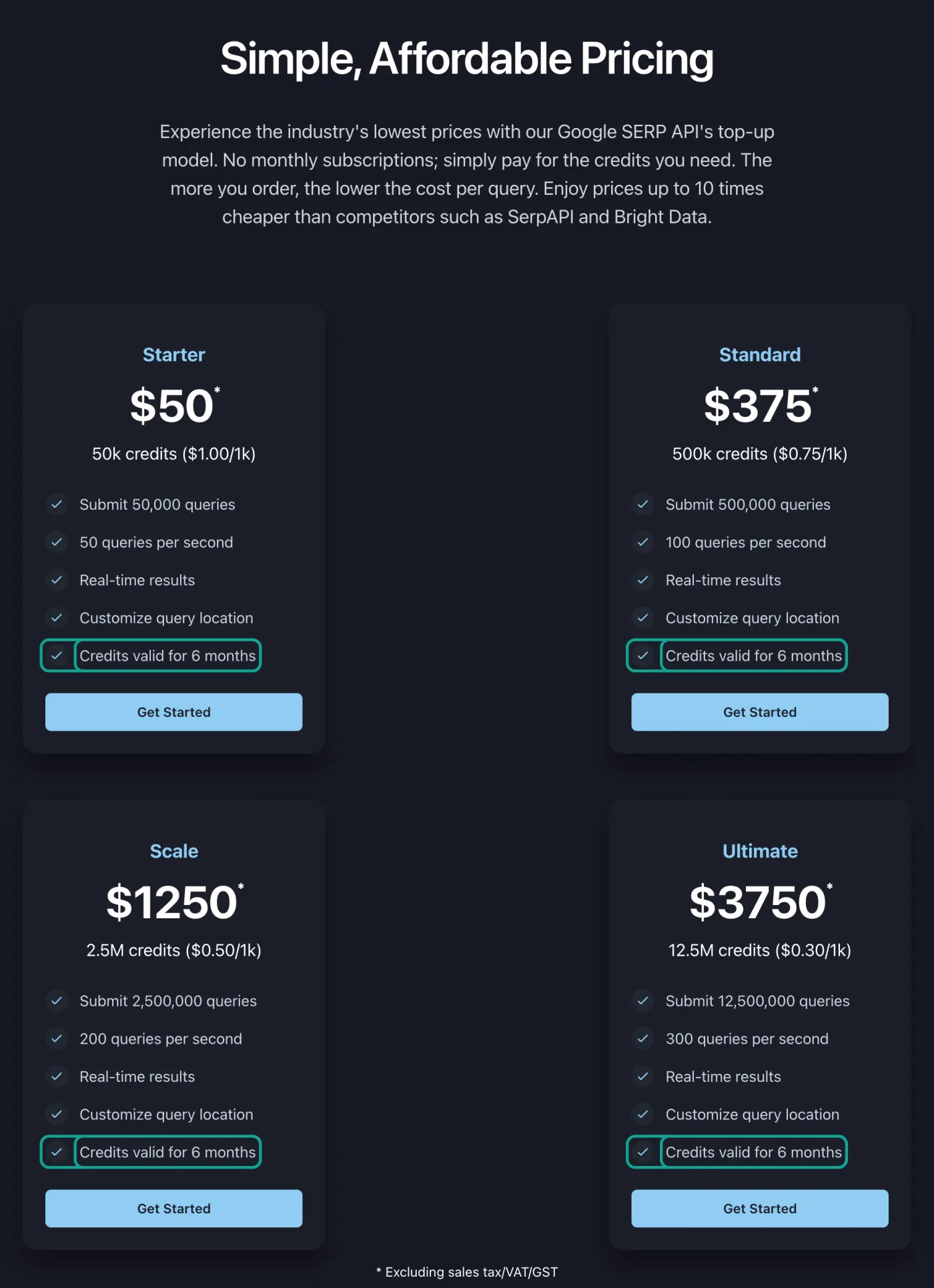
Serper sells prepaid packs. The page says "No monthly subscriptions; simply pay for the credits you need." There are four packs. Starter is $50 for 50,000 credits, or $1.00 per 1,000, at 50 queries per second. Standard is $375 for 500,000 credits, or $0.75 per 1,000, at 100 queries per second. Scale is $1,250 for 2.5 million credits, or $0.50 per 1,000, at 200 per second. Ultimate is $3,750 for 12.5 million credits, or $0.30 per 1,000, at 300 per second.
Each of the four cards ends with the same line: "Credits valid for 6 months". A note under the cards says the prices exclude sales tax, VAT and GST. The screenshot below shows the four cards with that line marked.
The FAQ on the same page gives three more rules about money. First, when credits go: "Every time you receive successful responses to queries, we will deduct credits from your account balance." When the balance reaches zero, Serper stops new queries. Second, refunds: you get a full refund within 7 days of your first purchase if you used less than 20% of the credits. The terms of service say the same in their Refund Policy section, and the terms page shows an update date of May 29, 2024. Third, payment: Visa, Mastercard, American Express, Discover and PayPal.
One rule is not on the pricing cards, but users repeat it often. A call that asks for more than 10 results costs 2 credits. A user on Hacker News wrote that Serper counts "10 results to be 1 credit, and 20 to 100 results to be 2 credits" (Hacker News thread). So 10 results per call cost $1 per 1,000 calls, and 100 results per call cost $2. We have no Serper account, so we cannot check this rule today. In this article it is a user report, and the charts mark it apart from the prices on the page.
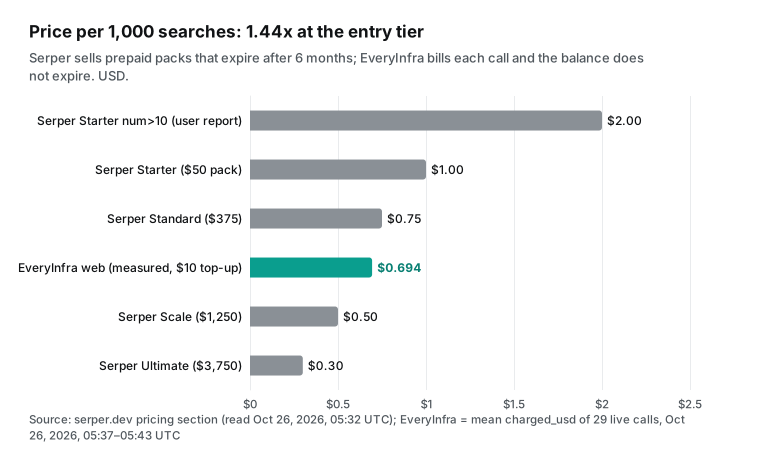
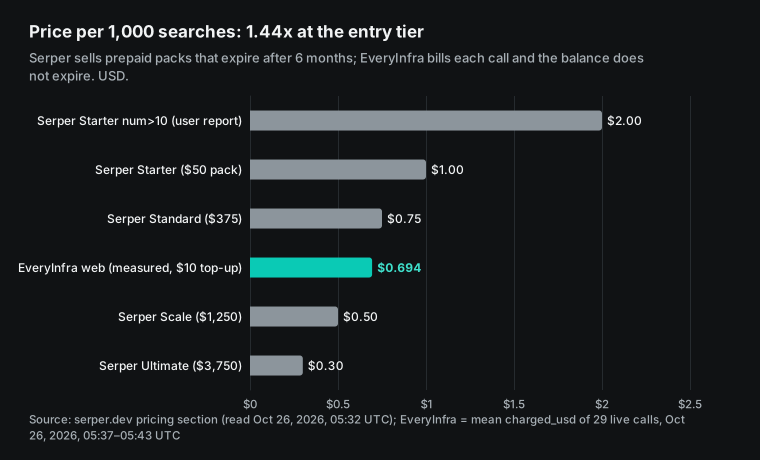
So Serper's real price per 1,000 has three inputs. They are the pack you buy, the share you use within six months, and the number of results per call. The pricing cards show only the first input. The second input is the small last line on each card. The third input lives in forums. A user in a Reddit thread about SERP APIs put it this way: Serper "looks cheap until you map credits to your real workload" (r/WebScrapingInsider thread).
How much does expiry add? Real price by monthly volume
This section is our own calculation. Say you run V searches a month. Serper credits expire after six months, so every six months you must buy at least 6V credits. We try every mix of the four packs, take the cheapest one, and divide its cost by 6V.
That gives the price you really pay per 1,000. EveryInfra does not expire, so our price stays at $0.694. Our script reads the four prices from the saved page text, so no number is typed by hand. We keep the script and the page text on file.
The table shows the result. A small project at 1,000 searches a month still needs one Starter pack. It uses 6,000 credits in six months, and 44,000 credits expire. That is $8.33 per 1,000.
At 5,000 a month the real price is $1.67. Only at exactly 8,333 a month, when you use one full Starter pack in six months, do you pay the $1.00 on the card. At about 83,000 a month you use one full Standard pack, at $0.75, which is still 8% more than our price. The two sides meet at 300,000 a month, when you use one full $1,250 Scale pack in six months.
| Searches per month | Needed in 6 months | Cheapest Serper packs | Serper real price per 1,000 | EveryInfra per 1,000 | Serper ÷ EveryInfra |
|---|---|---|---|---|---|
| 1,000 | 6,000 | 1 Starter ($50) | $8.33 | $0.694 | 12.0x |
| 5,000 | 30,000 | 1 Starter ($50) | $1.67 | $0.694 | 2.4x |
| 20,000 | 120,000 | 3 Starter ($150) | $1.25 | $0.694 | 1.8x |
| 83,333 | about 500,000 | 1 Standard ($375) | $0.75 | $0.694 | 1.08x |
| 300,000 | 1.8 million | 1 Scale ($1,250) | $0.694 | $0.694 | 1.0x |
| 500,000 | 3 million | Standard + Scale ($1,625) | $0.54 | $0.694 | 0.78x |
| 2,083,333 | 12.5 million | 1 Ultimate ($3,750) | $0.30 | $0.694 | 0.43x |
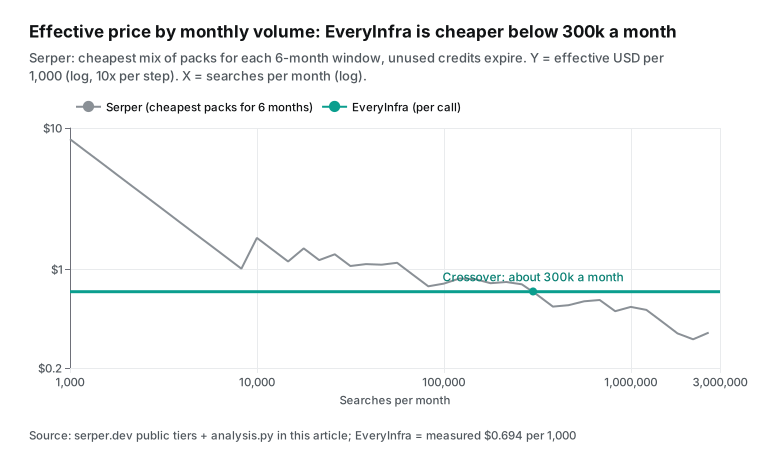
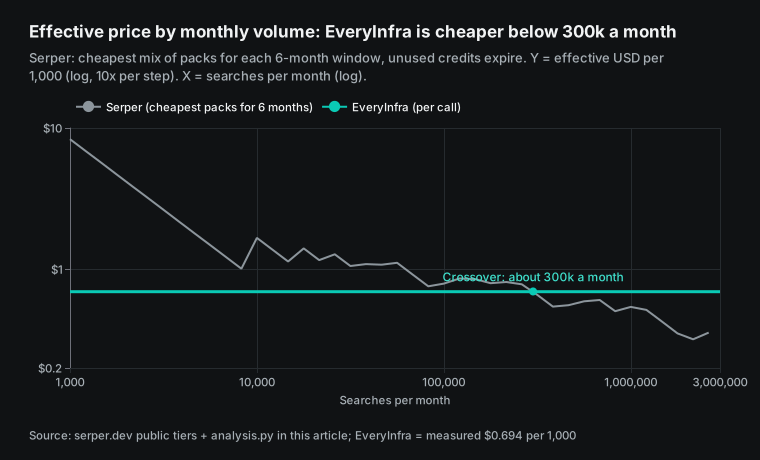
This calculation has three limits. First, it assumes you buy once every six months. If you buy a Starter pack every month instead, a 1,000-a-month project pays $50 each month, and the real price goes up, not down. Second, it uses only the four public prices. It does not include private prices that Serper may give to large customers, and it does not include tax.
Third, the crossover comes from the Scale price. $1,250 divided by our $0.000694 per call is 1.8 million calls in six months, or 300,000 a month. Ultimate needs 5.4 million calls in six months to beat us. Standard and Starter never beat us, because their card prices, $0.75 and $1.00, are already above $0.694.
Where the EveryInfra price comes from
EveryInfra bills search per call. The price is in the public search tool catalog, which you can read without a key. Its billing.tiers list has three tiers. Standard is $0.000694 per call, or $0.694 per 1,000, and almost every search tool is in it.
Deep is $0.001389 per call, for the deep mode of semantic search. Cross-check is $0.002778 per call, because it runs several searches at the same time. The web tool is in the standard tier. The same price is on our pricing page and our search product page.


We do not stop at the catalog number. We check it against live responses. Every billed response has a billing object with charged and charged_usd. In our test, all 29 billed calls had charged_usd equal to 0.000694.
The mean times 1,000 is $0.694, the same as the catalog. A fixed price per call lets you work out the bill before you run anything. One round of 10 keywords costs $0.00694. A round of 10,000 keywords costs $6.94.
Here is the request. The key comes from an environment variable and is never written to a file.
curl -s https://api.everyinfra.com/api/v1/search \
  -H "Authorization: Bearer $EVERYINFRA_API_KEY" \
  -H "Content-Type: application/json" \
  -d '{"tool":"web","params":{"q":"best running shoes 2026","num":10}}'
The web tool has 7 parameters. q is the query. site limits results to one domain, the same as site: in the query. location is a region: a country name or a two-letter country code, and a city counts as its country. after and before keep results after or before a date.
page is the result page, from 1. num is the number of results per page, up to 10, with 10 as the default. A larger value returns 10 and does not raise an error. Each result has title, url and snippet, plus published when a date is known. The catalog also gives each tool units: 1 and price_usd: 0.000694. One request is one billing unit, whatever num you send.
If you need finer control of country and language, our data catalog also has a web/search capability. It takes country and language parameters and costs $0.001389 per call, the standard data tier. You can see it in the data catalog. It is a second way in, next to the web search tool, and it suits jobs that must filter results by language.
Per 1,000 calls or per 1,000 results?
So far we have counted calls. Many teams care more about results. A rank tracker wants the top 30. A research team wants the top 50. The number of results in one call sets the bill, and the search engine itself limits that number.
In our test, the EveryInfra web tool returned 9.3 results per call on average. That is $0.0746 per 1,000 results, or $0.0694 with full pages of 10. On the Serper side there are two cases, and we show both. In the first case, one call still returns about 10 results, as it does after Google dropped num=100.
Then the Starter pack costs $0.10 per 1,000 results, or $0.20 with num=100 at 2 credits. That is 1.3x to 2.7x our price. In the second case, Serper really returns 100 results for num=100. Then the price is $0.02 per 1,000 results, which is 3.7x cheaper than us.
We cannot tell which case is true today, because we have no Serper account. The Hacker News comment above dates from before the Google change. If your work needs deep results for each keyword, test this first. Use Serper's free credits, call once with num=100, and count the organic results and the credits used.
The test costs nothing, and it turns a guess into a fact. Our side of the answer is in the next section. A page holds up to 10 results and bills one call, and more results need more pages with page.
The five test sets at a glance
| Set | Time (Singapore) | Tools | Calls | Billed | Main result |
|---|---|---|---|---|---|
| 1. num and page | 13:37–13:42 | web | 5 | 5 | 9–10 results per page, up to 10 |
| 2. Country, site, date | 13:38–13:40 | web | 5 | 5 | Local sites per country; site gave 3 results |
| 3. Rank check | 13:41–13:43 | web | 10 | 10 | 96 results, $0.00694, median 2.07 s |
| 4. Result types | 13:39–13:40 | 8 other tools | 9 | 9 | 10 results each; read gave 1 page |
| 5. Billing edge cases | 13:38–13:41 | web | 6 | 0 | Empty, 422, 401 and 3 × 429, all free |
The counts add up to 35 calls and 29 billed calls. Three calls got a 429 first and we sent them again. The retries count in sets 2, 3 and 4, and the three 429s count in set 5. We logged every call with its time, status, seconds, results and charge, and we keep the log on file.
Test 1: num and page, results per call and calls billed
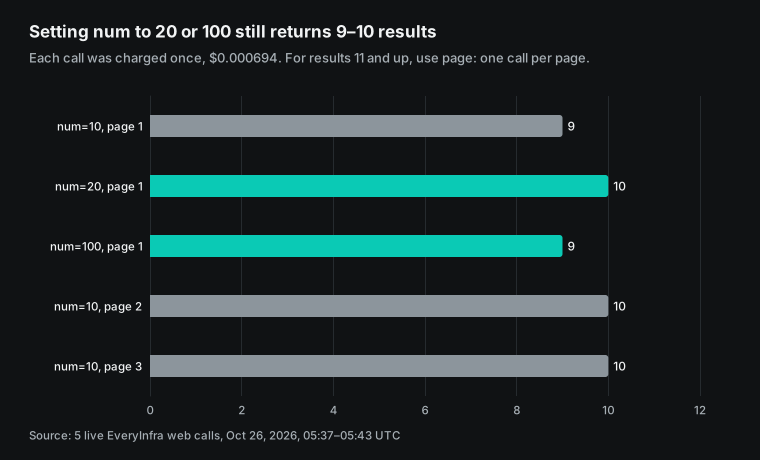
We start with the parameters that set the price per result. On October 26, 2026, at 13:37, 13:38 and 13:42 Singapore time, we sent five calls. num=10, num=100 and page 2 used the query "best running shoes 2026". num=20 and page 3 used "best crm software for small business" from Test 3. Here is what came back. A page holds up to 10 results. num=10 returned 9 and num=20 returned 10.
num=100 returned the same single page, the 9 URLs from num=10. Page 2 and page 3 each returned 10, and none of them repeated a page 1 result for the same query. Each of the five calls was billed once, at $0.000694. Our catalog now also lists 10 as the num maximum for web (news, scholar and forum are also 10, places 20, shopping 40). At 16:04 SGT we checked again: num=100 returned 9 results with no error, and page=2 returned 10, with no URL repeated across the two pages.
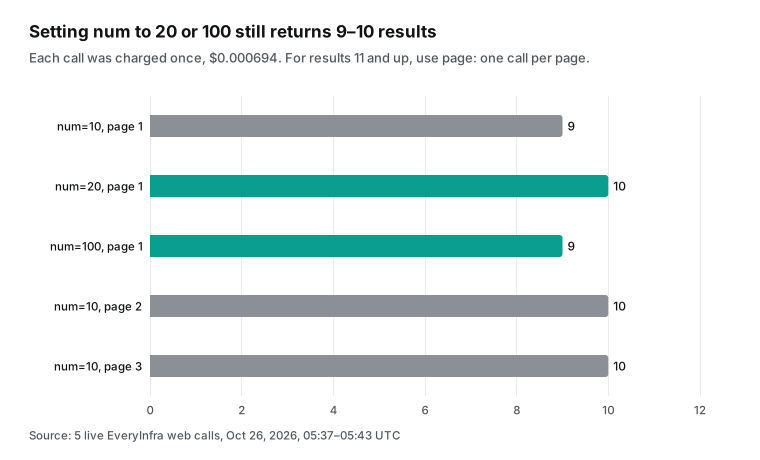
Why is a page capped at 10 results? The search engine changed. In September 2025, Google stopped showing 100 results per page through a URL parameter. A Google spokesperson told Search Engine Land that the parameter "is not something that we formally support" (Search Engine Land, September 18, 2025). Google's own Custom Search JSON API also limits num to values from 1 to 10. Today, almost every API needs pages to go past result 10.
This matters for the price. Say Serper still bills 2 credits above 10 results, and a page holds only about 10. Then a num=100 call pays double for about the same results. We cannot test that on Serper.
Our side is clear: a page holds up to 10 results and bills one call. For 30 results you send 3 pages and pay 3 times, $0.002083 in total. Across the 20 billed web calls in this test, we got 186 results, or 9.3 per call: $0.0746 per 1,000 results, or $0.0694 with full pages.
Test 2: country and local results
The second set tests the region parameter. We wrote each query in the local language and set location to the matching country. "beste laufschuhe 2026" went to Germany at 13:38 Singapore time. "mejores tenis para correr 2026" went to Mexico at 13:38.
A Chinese query for running shoe advice went to Taiwan at 13:38. The German call returned 9 results with German media such as stern.de and faz.net, and German shops such as alltricks.de and sport-conrad.com. The Taiwan call returned adidas.com.tw, salomon.com.tw and some Hong Kong media. The Mexico call mixed English sites such as runnersworld.com with Spanish sites such as runnea.com and sprintersports.com.
So the region parameter changes the results, but it is a preference and not a filter. The catalog says it plainly: location affects where results come from, but it does not promise that every result is in that country. Serper's page says you can set the search location by country and language. The LangChain wrapper code shows the parameters people use. They are gl for country, hl for language, tbs for time range and type for the result type.
The defaults are gl=us and hl=en. Our web tool has no separate interface-language parameter. You set the language through the query and the country through location. When you must filter by language, use web/search from the section above.
We also tested site and date limits in this set. At 13:38 Singapore time, site=serper.dev with the query "pricing" returned only 3 results, all from serper.dev. The first snippet listed the four pack prices, the same as our saved copy of the page. At 13:40, after=2026-10-01 with "search api pricing" returned 10 results.
All 9 results with a date were from October. The oldest was October 6, 2026, and the newest said "3 days ago", which is October 23, 2026, counted from the test day. So site and after really narrow the set; they do not only reorder it. Fewer results is the proof. For monitoring, after keeps only new pages, which costs less than pulling everything and removing duplicates yourself.
| Task | Serper parameter (from public wrappers) | EveryInfra search tool | Note |
|---|---|---|---|
| Results for one country | gl | location (country name or two-letter code) | Both are a preference, not a filter |
| Results in one language | hl | Not in web; language in data catalog web/search | Language tags follow RFC 5646 |
| A time window | tbs | after, before (dates) | Plain dates, no short codes |
| One website only | site: in the query | site parameter or site: | site=serper.dev returned 3 results |
| Next page | page | page | One call per page |
| Results per call | num (2 credits above 10, per user reports) | Up to 10 per page, one call per page, page for more | About 9–10 per page in our test |
Test 3: a 10-keyword rank check, cost and speed
The third set copies the most common job. A content or SEO team checks the top 10 for a list of keywords every day. On October 26, 2026, from 13:41 to 13:43 Singapore time, we checked 10 English keywords with location set to the US. They went from "best crm software for small business" to "best air purifier". All 10 calls worked. They returned 96 results in total, cost $0.00694, and had a median time of 2.07 seconds.
The 96 results also show something SEO teams care about. They came from 64 different domains, and 58 had a date. reddit.com was in the top 10 for all 10 keywords: third place for 9 of them and second for the other. nytimes.com and youtube.com each showed up for 5 keywords. The 10 first-place URLs came from 10 different sites, mostly product sites or review sites. So for "best + category" queries, a forum thread holds a top-3 slot almost every time. If you track ranks, your own position is not enough; also count how many slots forums and videos take on the same page, because they push organic results down. One check a day for these 10 keywords is 300 calls a month, $0.21.
Now scale the round up. Say you check 500 keywords a day, first page only. That is 15,000 calls a month. On EveryInfra the bill is 15,000 × $0.000694 = $10.42. On Serper you need 90,000 credits in six months.
The cheapest buy is 2 Starter packs, $100, which is $16.67 a month or $1.11 per 1,000. Now say you want the top 30 for each keyword. On our side you send 3 pages, so 45,000 calls a month and $31.25. On Serper, if you send num=30 once and it costs 2 credits as users report, you need 30,000 credits a month and 180,000 in six months. The cheapest buy is 4 Starter packs, $200, about $33.33 a month.
The two sides are close. The lesson is not that one side always wins. Write down your exact query pattern first, and then compare.
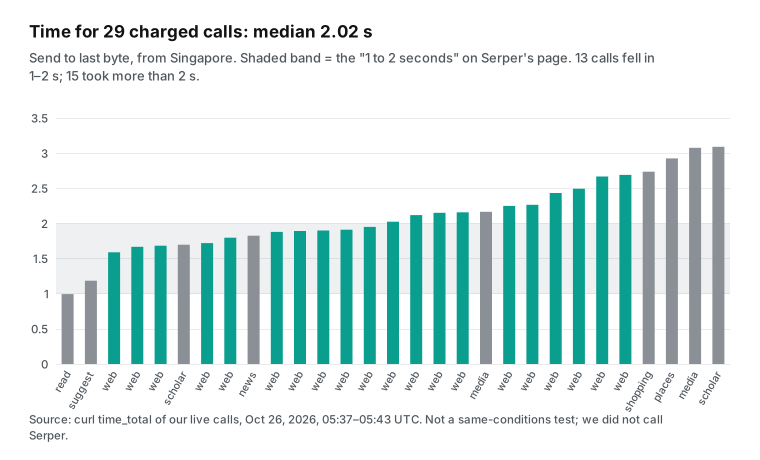
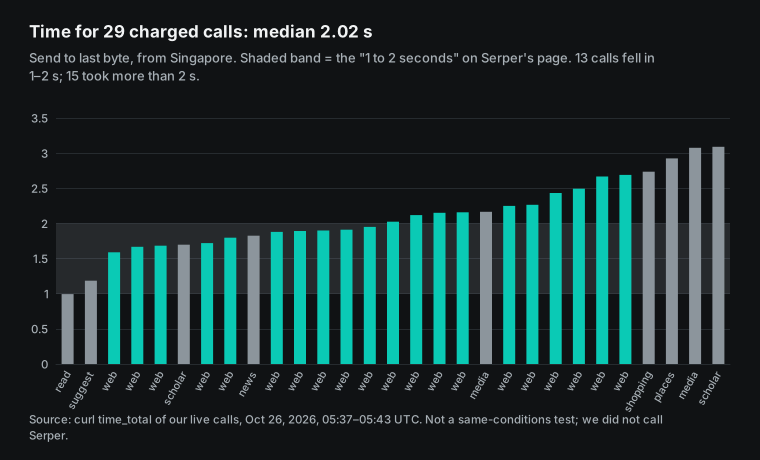
We report speed as we measured it. For the 29 billed calls, from send to last byte, the median was 2.02 seconds and the 90th percentile was 2.77 seconds. The fastest call took 0.99 seconds and the slowest took 3.09 seconds. 15 calls took more than 2 seconds. We measured from a machine in Singapore, so the times include the network trip.
Serper's page says results return "in 1 to 2 seconds", and 2 to 4 seconds when a retry is needed. We did not call Serper, so this is not a same-conditions test. Does your app wait for search inside a chat reply? Then test both sides with 50 of your own queries first.
Three real users, three monthly bills
The curve above uses an abstract "V searches a month". Here are three real jobs instead. One function makes every number in the table. EveryInfra is the number of billed calls times $0.000694. Serper is the cheapest mix of the four public packs for six months of use, divided by six.
| Job | Calls per month | EveryInfra per month | Serper per month (cheapest packs) | Ratio |
|---|---|---|---|---|
| A solo developer's AI assistant, about 100 web searches a day | 3,000 | $2.08 | $8.33 (1 Starter, 36% used in 6 months) | 4.0x |
| A content team checks page 1 for 500 keywords a day | 15,000 | $10.42 | $16.67 (2 Starter) | 1.6x |
| The same team, top 30 for each keyword (3 pages) | 45,000 | $31.25 | $50.00 (6 Starter) | 1.6x |
| Brand monitoring, with 15% empty results as an assumption | 200,000 | $118.05 | $158.33 (4 Starter + 2 Standard) | 1.34x |
| The same, with no empty results | 200,000 | $138.89 | $158.33 | 1.14x |
The first row tells the most. A solo AI assistant that searches about 100 times a day needs 3,000 calls a month. On EveryInfra that is just over $2 a month. On Serper, the smallest pack is $50.
In six months you use 18,000 credits, and 32,000 expire, so you pay $8.33 a month. For this user the pain is not the unit price. It is paying $50 and then watching the credits expire. Serper's 2,500 free queries cover the first few weeks, but the first payment after that is $50.
The "15% empty" in the fourth row is our assumption, not a measurement. In our 35 calls, only 1 was empty, and we made that one on purpose. Brand monitoring tracks new brand names, product codes and niche topics, so it finds nothing far more often than everyday search does. We refund empty results, so 15% empty calls cut the bill from $138.89 to $118.05.
Serper's page says credits go on "successful responses". It does not say whether an empty response counts as successful. So the table bills every call on the Serper side, which is the upper limit. If Serper does not bill empty results, the fourth row goes back to the 1.14x of the fifth row.
Rows two and three have the same ratio, because both sit inside Serper's Starter tier: three times the calls, three times the packs. Only two things change the ratio. One is crossing the line to a bigger pack. The other is whether you use the credits within six months. So before you choose, use the last three months of your logs to find your monthly volume and how much it moves. That tells you more than any price table.
Test 4: news, places, shopping, images, scholar and other result types
When you pick a search API, web results are not the only question. You also need the other result types your product uses. The table groups them by result type. The "Listed by Serper" column only says whether that type is in the result list on Serper's home page. The last three columns are our own calls, one per type with the EveryInfra tool, between 13:39 and 13:40 Singapore time. Each call was billed $0.000694.
| Result you need | Listed by Serper | EveryInfra tool | Results | What came back |
|---|---|---|---|---|
| Web | Yes | web | 9–10 | Title, URL, snippet, date |
| News | Yes | news | 10 | Stories about the DeepSeek search API; the newest was 1 day old |
| Places and maps | Yes | places | 10 | Singapore coffee shops with rating, rating count, address, phone, latitude, longitude and opening hours |
| Shopping | Yes | shopping | 10 | Running shoes with price, merchant and rating |
| Images | Yes | media (kind=image) | 10 | Image titles and URLs |
| Videos | Yes | media (kind=video) | 10 | Video titles and URLs |
| Papers | Yes | scholar | 10 | Paper titles, URLs and snippets |
| Patents | Yes | scholar (kind=patents) | 10 | Patent titles, URLs and snippets |
| Autocomplete | Yes | suggest | 10 | 10 suggestions for "serper api" |
| Page text | Not in its result list | read | 1 | The text of one URL |
Places needs one more note. The first places result was a Singapore coffee shop rated 4.7 by 2,324 people, with address, phone and coordinates. If you need every review for one place, a search tool is not enough. Use google_maps_reviews/search and the review capabilities in our data catalog, at $0.001389 per call in the standard data tier. The platform page is the Google Maps reviews API. For local results in Korea and Russia, use naver/search and yandex/search.
Two calls in this set helped us write this article. The first was suggest. At 13:40 Singapore time we asked it about "serper api" and got 10 suggestions, including "serper api pricing", "serper api free tier" and "serper api key free". They matched the suggestions we had found with another tool before writing, and they set the title and the FAQ of this article.
The second was news, for "DeepSeek search API". The 10 stories were between 1 day and 1 week old, which matched DeepSeek's launch on October 17, 2026. We followed those stories to the first item in the "What changed recently" section.
The shopping call is worth a look too. All 10 running shoes came with price, merchant and rating. The first was a Nike Revolution 8 from DICK'S Sporting Goods at $74.99. But its url points to the search engine's own product page, not to the shop.
If you build price comparison, note this. When you need stock, sizes and reviews from the shop page, read the product page with an e-commerce capability from the data catalog. Do not rely on the price in a search result alone.
Test 5: empty results, rate limits, bad parameters, no key
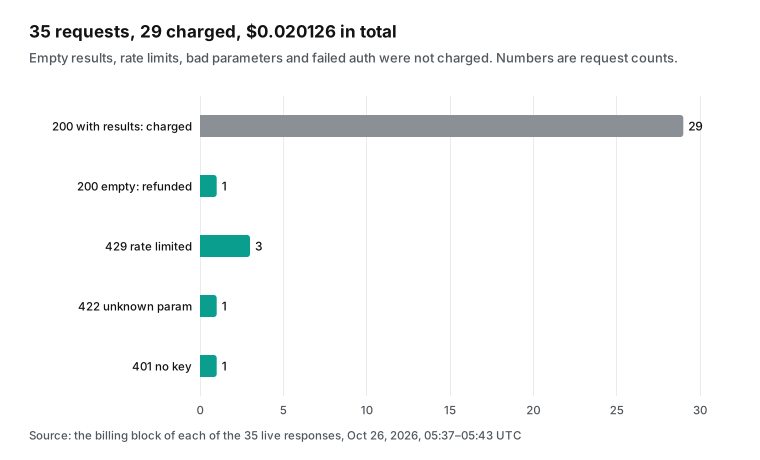
This is where the two sides differ most. Serper's page says credits go on each "successful response". It does not define success. Is a 200 response with zero results a success? The page does not say. On our side the rule is in every response, and here is what we measured.
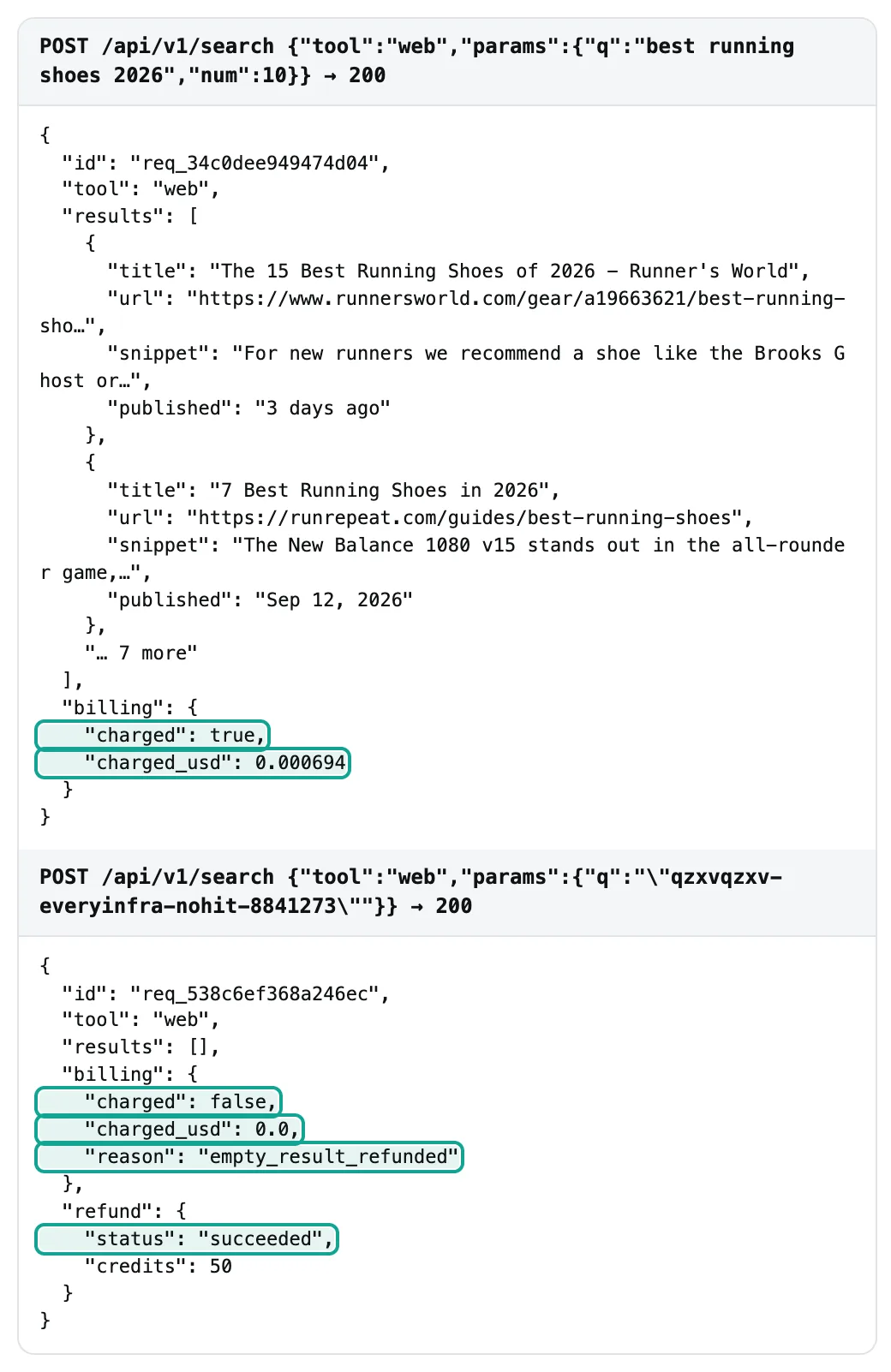
On October 26, 2026, at 13:40 Singapore time, we searched for a phrase that does not exist. The response was 200 with no results. Its billing said charged: false, charged_usd: 0.0 and reason: empty_result_refunded, and refund.status was succeeded. In the same minute we sent gl, a parameter that web does not take.
The response was 422. The message listed the 7 parameters that web takes and ended with "Nothing was charged". A call with no key returned 401, and it also said nothing was charged.
We also hit one limit by accident. Our test key allows 10 calls per minute, and we got a 429 at 13:38, 13:39 and 13:41 Singapore time. The response said "10 requests per minute for this API key's own limit. Retry after 7s", and again "Nothing was charged".
RFC 6585 defines 429 as too many requests in a given time. RFC 9110 defines 401. We copied the body of one 429 response from the terminal and keep it on file.
Why compare this row on its own? After Google closed the Custom Search JSON API to new customers, a user on r/googlecloud asked for a replacement for 60,000 calls a month. One reply came from someone who said they run a similar search API. The advice: ask each vendor how it counts a request, and whether retries, empty results and extra pages are billable, "because that changes your real cost".
Empty results are common in monitoring. A new brand name, a rare keyword or a tight date range can all return nothing. In our own 35 calls, 6 were not billed, which is 17%.
Getting started: from sign-up to the first result
| Step | Serper | EveryInfra |
|---|---|---|
| 1 | Sign up at serper.dev and get 2,500 free queries, no credit card | Sign up at everyinfra.com for free |
| 2 | Copy the API key from the dashboard | Copy the API key from the console; for the trial, star everyinfra-agent-plugins on GitHub and claim $1 |
| 3 | After the free queries, buy at least the $50 Starter pack | Top up at least $10; the balance does not expire |
| 4 | Send the key in the X-API-KEY header (see LangChain and other wrappers) | Send Authorization: Bearer to /api/v1/search |
| 5 | Connect AI tools through LangChain, CrewAI or Haystack wrappers, or a third-party MCP server | Connect AI tools through the first-party MCP endpoint with one config block |
Serper's free tier is larger, and 2,500 queries are enough to test a new idea. That is a real strength. Our $1 trial is about 1,440 searches and must be used within 24 hours. It suits "make one run work today" more than "use it for a month". To see results in the browser first, use the one-click trial on the web search tool page, with sample parameters already filled in. The full steps are in the quickstart, and every capability and price is in the market.
| Free offer | Serper | EveryInfra |
|---|---|---|
| Amount | 2,500 queries | $1 credit, about 1,440 searches |
| Valid for | Not on the page | 24 hours |
| Card needed | No | No |
| Best use | Weeks inside a real product | One afternoon of tests across tools and errors |
The two free offers suit different tests. Serper's 2,500 queries let you run it in a real product for a few weeks: at 50 searches a day they last 50 days. Our $1 lets you try every tool and every error case in one afternoon: our 35 calls cost $0.020126, so $1 covers the same test almost 50 times. Do not use either free offer for load tests, because test keys and free accounts have lower rate limits.
After the free use, the first payment differs even more. On Serper it is at least $50, and what you do not use in six months expires. On EveryInfra it is at least $10, and the balance stays. For a team that still tests an idea, this means you can add $10, run for a month, see your real volume, and then decide.
You do not need to guess six months of use. For a large, stable team the difference is small, and the unit price is what counts. In that case, go back to the monthly volume table and see which side of the crossover you are on.
Switching from Serper: four changes in your code
If you use Serper now, a move to EveryInfra needs four changes. For each one, here is why and what you see if you get it wrong.
| Change | From (Serper wrappers) | To (EveryInfra) | If you get it wrong |
|---|---|---|---|
| Endpoint and key | One URL per type, X-API-KEY | /api/v1/search, Authorization: Bearer | 401, not billed |
| Parameters | gl, hl, tbs, type | location, after, before, tool | 422 with the allowed list, not billed |
| Results | Vendor fields | title, url, snippet, published | Parse errors in your code |
| Billing and retries | Credits stop at zero | charged_usd per call, retry_after on 429 | More 429s if you retry at once |
The first change is the endpoint and the key. Serper wrappers put the key in an X-API-KEY header and use one URL per result type.
We have one URL, /api/v1/search, and the key goes in Authorization: Bearer. The result type goes in the tool field of the request body. If the key is in the wrong header, you get a 401, you pay nothing, and the error message tells you what is missing.
The second change is parameter names. gl becomes location. tbs becomes two dates, after and before. type=news becomes tool: "news", and type=places becomes tool: "places". The usual mistake is to keep an old parameter, for example gl.
We do not drop it quietly and bill the call anyway. We return 422, list the 7 parameters that web takes, and say that nothing was charged. Call 17 in this test was that mistake, on purpose. This helps AI agents most: the model reads the allowed values in the error and fixes its next call by itself.
The third change is how you read results. Each of our results has title, url and snippet, and sometimes published. places adds rating, address, coordinates and more. The search tool catalog lists every field.
We suggest one layer of your own data types in your code. Convert every vendor's response into that layer before your other code reads it. Then you can change vendors later without touching the rest of your code. The Cloudflare item in the "What changed recently" section points the same way.
The fourth change is billing and retry logic. Serper stops new queries when the balance reaches zero. We also stop when the balance is too low, but the balance never expires. Every response from us has charged_usd, so you can log each charge and match the total to your invoice at month end.
When you get a 429, wait for the number of seconds in retry_after and then retry. Do not send again at once, or you get more 429s. After these four changes, run 20 of your real queries on both sides. Compare result counts and times before you move everything.
Connecting AI tools: MCP, LangChain, n8n
Serper has many ready wrappers in AI frameworks, and this is another real strength. LangChain, the CrewAI SerperDevTool and the Haystack SerperDevWebSearch all include it, and one environment variable is enough to start. For MCP, the serper.dev page shows no first-party server. GitHub has third-party servers such as mcp-server-serper and serper-mcp-server, which you run on your own machine.
EveryInfra runs a first-party remote MCP endpoint. It follows the MCP specification for Streamable HTTP, so you install nothing locally. If MCP is new to you, the MCP introduction explains the parts. Search is one tool, everyinfra_search.
It takes tool and params, exactly like the REST API. Its description also says that failed or empty searches leave no final charge. In clients that support remote MCP, such as Claude and Cursor, the config is:
{
  "mcpServers": {
    "everyinfra": {
      "url": "https://api.everyinfra.com/mcp",
      "headers": { "Authorization": "Bearer ${env:EVERYINFRA_API_KEY}" }
    }
  }
}
After you connect, ask the client to "use everyinfra_search with the web tool for best crm software, US, page 2". The client sends the same request as the curl above. To choose a search tool in code, see our guide to search tool selection for agents. To let an AI fix its own parameters from error codes, see self-healing API errors.
To match refunds to charges, see failure refund reconciliation. In n8n, if there is no ready node, send the same JSON with the HTTP Request node. The n8n docs for its SerpApi tool node show a similar parameter layout.
Test it yourself in one afternoon
A price table can only narrow your list. The final choice should come from your own queries. We suggest three steps, each with a clear pass rule that you write down before you see the results. Step one: take 50 real queries at random from your logs. Cover the countries, languages and result types you use most. Do not pick only popular words, because rare and long queries show empty results and region drift best.
Step two: run the 50 queries on both sides. Record the time, the number of results, whether the call was billed, and how much. On Serper, the 2,500 free queries are more than enough. On our side, the $1 trial covers it, and 50 calls cost $0.035. Step three: compare by your own rules, not by any vendor's marketing.
For example, count how many of the top 10 match what you see by hand in a browser. Note the 90th percentile time. Count empty results and whether each one was billed. Add up the cost. Write the pass rules first, for example "at least 7 of 10 match, 90th percentile under 3 seconds, empty results free", and do not change them after you see the data.
This Python script runs our side. It prints the result count, the time and the charge for each call, and it reads the key from an environment variable:
import json, os, time, urllib.request

def search(q, **params):
    body = json.dumps({"tool": "web", "params": {"q": q, **params}}).encode()
    req = urllib.request.Request(
        "https://api.everyinfra.com/api/v1/search", data=body, method="POST",
        headers={"Authorization": "Bearer " + os.environ["EVERYINFRA_API_KEY"],
                 "Content-Type": "application/json", "User-Agent": "price-test/1.0"})
    t0 = time.time()
    with urllib.request.urlopen(req, timeout=60) as r:
        d = json.load(r)
    return len(d.get("results", [])), round(time.time() - t0, 2), d["billing"]["charged_usd"]

for q in ["best crm software for small business", "best air purifier"]:
    print(q, search(q, num=10, location="us"))
    time.sleep(7)  # the test key allows 10 calls per minute
We ran this script as written on October 26, 2026, at 14:00 Singapore time. Each query returned 10 results, in 2.84 and 2.02 seconds, and each was billed $0.000694. These two calls are not part of the 35 above; we logged them separately. Note the User-Agent header.
Python's default request is sometimes blocked by site protection, and the 403 that comes back does not mean the key is bad. The 7-second sleep keeps the test key under 10 calls a minute. Your own account limit may be higher; check it in the console.
When Serper is the better choice
Here are five cases where Serper fits better, stated plainly. First, very large volume. Say you run more than 300,000 searches every month and use your credits within six months. Then Serper Scale at $0.50 and Ultimate at $0.30 cost 28% to 57% less than our $0.694. The more you search, the bigger the gap.
Second, high concurrency. Serper's Ultimate pack allows 300 queries per second by default, and the page says that means 15,000 to 18,000 searches a minute. Our limits depend on the account, and our test key allowed only 10 calls a minute. For big batch jobs, check your limit in the console first.
Third, you already use the ready wrappers in LangChain, CrewAI or Haystack, and your code depends on Serper's parameters and response shape. Any move means new code and new parsing. If you spend only tens of dollars a month, the work to move may cost more than you save. The wrappers themselves are changing, though. The Haystack SerperDevWebSearch source says the component leaves the main package in Haystack 3.0 and moves to a separate serperdev-haystack package. The crewAI-tools repository that held CrewAI's SerperDevTool was archived on November 10, 2025. When you have to touch those dependencies anyway, it is a good time to compare prices. Fourth, you need fine control of the interface language. Serper has hl. Our web search tool has no separate language parameter, so you need web/search from the data catalog, which costs twice as much per call.
Fifth, you need the extra blocks on a results page. Serper's sample response on its home page has a knowledge graph (knowledgeGraph), "people also ask" (peopleAlsoAsk) and related searches (relatedSearches) next to the organic results. In our test, our web tool returned only the title, URL, snippet and date of organic results. Suggestions need a separate suggest call, and news, places and shopping each have their own tool. Some products need all of those blocks in one call, for example a full snapshot of a results page. For them, an API like Serper is more direct.
Two more paths sit outside these two vendors. One is to host your own, for example SearXNG, an open-source metasearch engine (source on GitHub). It has no per-call fee, but you run the server and you handle blocks and unstable results yourself.
The other path is vendors that count results differently. In the same Hacker News thread, another user wrote that Bright Data bills a 100-result request as one request, at $1.5 per 1,000. The Bright Data FAQ also explains how it bills after Google removed the num parameter. Each vendor counts "one call" in its own way, and that is where most price comparisons go wrong.
EveryInfra fits better in other cases. You run fewer than 300,000 searches a month. Your volume moves up and down, and you do not want prepaid credits to expire. Many of your queries find nothing.
You want to connect AI tools over remote MCP. Or you also need platform data with the same key. Next to the web search API, that includes Google Maps reviews, Naver and Yandex. We also have comparison pages for SerpApi and DataForSEO.
Other options: public prices per 1,000
Serper is not the only choice. Here are the public prices we read on October 26, 2026, all as USD per 1,000 requests. The units are not the same everywhere. The search tools of model vendors also bill the search content as tokens.
Exa bills extra above 10 results. SerpApi is a monthly plan. So read this table for the order of size, not as a like-for-like list.
| Service | Per 1,000 (USD) | Billing terms (key points from the source) |
|---|---|---|
| Serper Ultimate / Scale / Standard / Starter | $0.30 / $0.50 / $0.75 / $1.00 | Prepaid, valid 6 months |
EveryInfra web (measured) | $0.694 | Per call, only with results, no expiry |
| DeepSeek Search API | $0.75 | Billed only on 200 with results; empty results and timeouts free |
| Exa Lite Search | $4 | Up to 10 results; $1 per 1,000 extra above that |
| Google Custom Search JSON API | $5 | Existing customers only; ends January 1, 2027 |
| OpenAI web search tool | $10 | Plus search content tokens at model rates |
| Claude web search tool | $10 | Not billed on error; plus tokens |
| Gemini grounding with Google Search | $14 | First 5,000 a month free |
| SerpApi Starter | $25 | $25 a month for 1,000 searches |
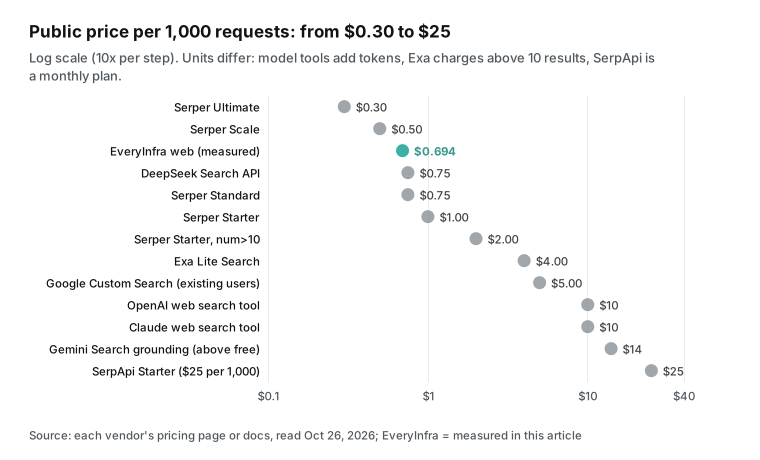
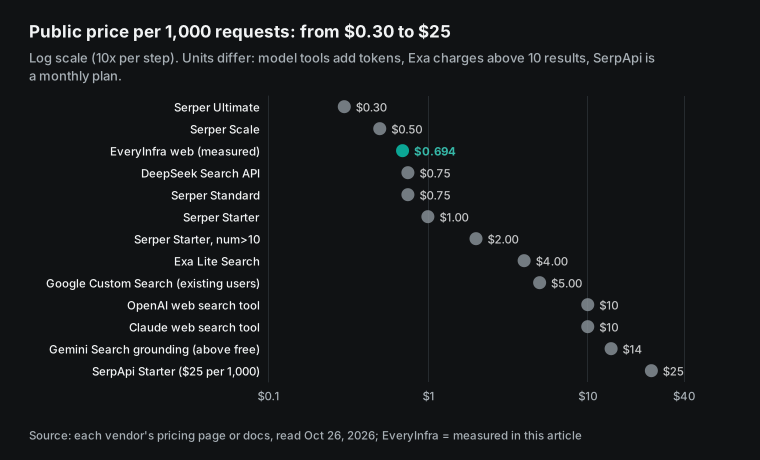
For a Serper decision, the most useful row is DeepSeek: the search API it opened on October 17, 2026, also bills nothing for empty results and timeouts, at $0.75 per 1,000 (DeepSeek release notes, October 17, 2026). Use it as another point of comparison.
What changed recently
| Date | Event | What it means for you |
|---|---|---|
| October 2, 2026 | Cloudflare Web Search API in AI Gateway | Search providers are becoming swappable parts |
| October 13, 2026 | SerpApi Extract API | Compare page reading prices too |
| October 17, 2026 | DeepSeek Search API at $0.75 per 1,000 | Free empty results are becoming the norm |
| January 1, 2027 | Google Custom Search JSON API ends | Expect migrations before the end of the year |
DeepSeek opened its search API (October 17, 2026). The DeepSeek Search & Fetch guide sets $0.75 per 1,000 successful requests. The count parameter changes only the number of results, not the price. Search Engine Journal reported on October 19, 2026 that each result also carries a page authority tier. PPC Land reports that DeepSeek searches from Claude Code and Codex stay free until October 31, 2026.
Its source is the DeepSeek guide above. What it means for you: low prices and billing only for calls with results are becoming the basic standard. Ask every vendor about both.
Cloudflare launched a Web Search API (October 2, 2026). The Cloudflare developer docs say one parameter in AI Gateway switches between several search providers. Each search draws from your AI Gateway credit at the provider's list price, with no markup. What it means for you: search APIs are becoming parts you can swap. Keep your code tied to your own layer, not to one vendor's response shape.
SerpApi launched an Extract API (October 13, 2026). In its blog post, SerpApi said it now also fetches any public web page, not only results pages. The docs say crawl mode bills one credit per page it extracts. What it means for you: search and page reading are merging into one product, so compare the price of reading pages too. The EveryInfra read tool is also $0.000694 per call.
Google Custom Search JSON API ends on January 1, 2027. Google's overview page says the API takes no new customers. Current customers must move by January 1, 2027. For them, the first 100 queries a day are free, and then it costs $5 per 1,000. Before that, Microsoft retired the Bing Search APIs on August 11, 2025 (Microsoft Learn).
Its suggested replacement is Grounding with Bing Search inside Azure agents, which does not give developers the raw results. What it means for you: neither big search engine sells raw results directly now, so third-party APIs are the main choice left. Expect a wave of moves before the end of the year.
Limits: when these results do not hold
First, the sample is small. We sent 35 calls across 10 tools and 4 countries. That is enough to check prices and billing rules, but not enough to judge result quality or long-term stability. The 29 time values come from one afternoon on one machine in Singapore.
Second, everything on the Serper side comes from public pages and user posts. "2 credits above 10 results" is a user report. Where the page is silent, for example on empty results, we did not guess.
Third, we compare list prices without tax. Serper's page says its prices exclude sales tax, VAT and GST, and our top-up page has its own note. Fourth, our rate limits depend on the account. The 10 calls a minute in this article is the setting of our test key only. Fifth, prices change.
We read Serper's four prices on October 26, 2026, at 13:32 Singapore time, and our price comes from our catalog on the same day. If either side changes its price, the ratios and the crossover need a new run. That takes two steps: read the serper.dev page and our search tool catalog again, then put the new pack prices and unit price into the method from the expiry section. Every number in the tables and charts follows. We will read both prices again before we publish.
One more point: this article does not compare the rankings the two sides return for the same keyword. We compared prices, billing, result types and setup steps. To compare results, run 50 of your own real queries on both sides and read the raw responses.
FAQ
How big is the Serper API free tier, and does it expire?
This question comes from the Google suggestions "serper api free tier" and "serper dev free tier". The Serper home page says "Get 2,500 free queries" with no credit card. The page does not give an expiry for the free queries. Paid credits are valid for 6 months. The EveryInfra trial is $1, about 1,440 searches, which you claim after you star our GitHub repository. It is valid for 24 hours.
How does Serper API pricing work? Does asking for 100 results cost double?
This question comes from the suggestions "serper api pricing" and "serper dev pricing". You prepay one of four packs, $50, $375, $1,250 or $3,750, which is $1.00 to $0.30 per 1,000, valid for 6 months. The "2 credits above 10 results" rule comes from a Hacker News user and is not on the pricing cards. On EveryInfra a page holds up to 10 results and bills one call; use page for more.
Is there a cheaper alternative to Serper for Google search results?
This question comes from the suggestions "serper api alternative free" and "serper alternatives". It depends on volume. Below 300,000 searches a month, count the 6-month expiry. Then the EveryInfra price of $0.694 per 1,000 is lower than what you really pay on Serper.
The smaller your volume, the bigger the gap. Above 300,000 a month, Serper Scale and Ultimate cost less. DeepSeek, at $0.75 per 1,000, is in the same range.
What is the difference between Serper and SerpApi?
This question comes from the suggestion "serper api vs serpapi". From the two public pages: Serper sells prepaid credits at $0.30 to $1.00 per 1,000. SerpApi sells monthly plans; Starter is $25 a month for 1,000 searches, with more engines and result types and a U.S. legal coverage term. Our SerpApi comparison page has a longer table.
Does Serper have a rate limit?
This question comes from the suggestion "serper dev rate limit". Yes, by pack: 50 per second on Starter, 100 on Standard, 200 on Scale and 300 on Ultimate. The page says you can ask for more. EveryInfra limits depend on the account. Too many calls return 429 with retry_after, and you pay nothing.
Do failed calls, empty results or retries cost money?
This question comes from a reply, by someone who said they run a similar API, in the r/googlecloud thread. Serper says credits go on each "successful response". In our test, EveryInfra returned charged: false for an empty result and refunded it, and 401, 422 and 429 responses all said "Nothing was charged".
What can replace the Google Custom Search API?
This question comes from the same r/googlecloud post. The poster runs 40,000 to 60,000 calls a month and budgeted about $5 per 1,000. With the numbers in this article, 60,000 calls cost $41.67 a month on EveryInfra. On Serper, 360,000 calls in six months fit one Standard pack at $375, which is $62.50 a month.
References
- Serper home page (pricing section and FAQ), serper.dev, read October 26, 2026. https://serper.dev/
- Serper Terms of Service (Refund Policy), serper.dev, updated May 29, 2024. https://serper.dev/terms
- Thread on Serper result counts and credits, Hacker News. https://news.ycombinator.com/item?id=43921687
- "Picking ONE Google SERP API in 2026", Reddit r/WebScrapingInsider. https://www.reddit.com/r/WebScrapingInsider/comments/1sesvvq/picking_one_google_serp_api_in_2026_feels_less/
- "Google Custom Search API is closing", Reddit r/googlecloud. https://www.reddit.com/r/googlecloud/comments/1qp4mlz/google_custom_search_api_is_closing_need/
- Custom Search JSON API overview, Google for Developers. https://developers.google.com/custom-search/v1/overview
- Method: cse.list, Google for Developers. https://developers.google.com/custom-search/v1/reference/rest/v1/cse/list
- Bing Search APIs retiring on August 11, 2025, Microsoft Learn. https://learn.microsoft.com/en-us/lifecycle/announcements/bing-search-api-retirement
- Grounding with Bing Search, Microsoft Learn. https://learn.microsoft.com/en-us/azure/ai-foundry/agents/how-to/tools/bing-grounding
- Search & Fetch guide, DeepSeek API Docs. https://api-docs.deepseek.com/guides/search
- DeepSeek-V4.1-Flash-1017 release with the Search and Fetch API, DeepSeek, October 17, 2026. https://api-docs.deepseek.com/news/news261017
- "DeepSeek Opens Its In-House Search Engine To Developers", Search Engine Journal, October 19, 2026. https://www.searchenginejournal.com/deepseek-opens-its-in-house-search-engine-to-developers/593526/
- "DeepSeek prices web search for AI agents at $0.75 per 1,000 calls", PPC Land (secondary; source in item 11). https://ppc.land/deepseek-prices-web-search-for-ai-agents-at-0-75-per-1-000-calls/
- Cloudflare Web Search API docs, Cloudflare, updated October 2, 2026. https://developers.cloudflare.com/web-search/
- "Introducing the SerpApi Extract API", SerpApi blog, October 13, 2026. https://serpapi.com/blog/introducing-extract-api/
- Extract API docs, SerpApi. https://serpapi.com/extract-api
- SerpApi pricing, serpapi.com. https://serpapi.com/pricing
- "Google Search confirms it does not support the results per page parameter", Search Engine Land, September 18, 2025. https://searchengineland.com/google-search-confirms-it-does-not-support-the-results-per-page-parameter-462244
- Exa pricing, exa.ai. https://exa.ai/pricing
- Pricing, OpenAI platform docs. https://platform.openai.com/docs/pricing
- Web search tool, Claude docs. https://docs.claude.com/en/docs/agents-and-tools/tool-use/web-search-tool
- Gemini Developer API pricing, Google AI for Developers. https://ai.google.dev/gemini-api/docs/pricing
- GoogleSerperAPIWrapper, LangChain Reference. https://reference.langchain.com/python/langchain-community/utilities/google_serper/GoogleSerperAPIWrapper
- google_serper.py source, langchain-community, GitHub. https://github.com/langchain-ai/langchain-community/blob/main/libs/community/langchain_community/utilities/google_serper.py
- SerperDevTool, CrewAI docs. https://docs.crewai.com/v1.15.28/en/tools/search-research/serperdevtool
- SerperDev, Haystack docs. https://docs.haystack.deepset.ai/reference/integrations-serperdev
- mcp-server-serper, GitHub. https://github.com/marcopesani/mcp-server-serper
- serper-mcp-server, GitHub. https://github.com/garylab/serper-mcp-server
- Model Context Protocol specification 2025-11-25. https://modelcontextprotocol.io/specification/2025-11-25
- Introduction to MCP, modelcontextprotocol.io. https://modelcontextprotocol.io/docs/getting-started/intro
- EveryInfra search tool catalog (no key needed), read October 26, 2026. https://api.everyinfra.com/api/v1/search/tools
- EveryInfra data capability catalog (no key needed), read October 26, 2026. https://api.everyinfra.com/api/v1/social/catalog
- RFC 6585: Additional HTTP Status Codes (429), IETF. https://www.rfc-editor.org/rfc/rfc6585
- RFC 9110: HTTP Semantics (401, 422), IETF. https://www.rfc-editor.org/rfc/rfc9110
- RFC 5646: Tags for Identifying Languages, IETF. https://datatracker.ietf.org/doc/html/rfc5646
- SearXNG documentation. https://docs.searxng.org/
- SearXNG, GitHub. https://github.com/searxng/searxng
- SERP API FAQs, Bright Data docs. https://docs.brightdata.com/scraping-automation/serp-api/faqs
- SerpApi Tool node, n8n docs. https://docs.n8n.io/integrations/builtin/cluster-nodes/sub-nodes/n8n-nodes-langchain.toolserpapi/
- SerperDevWebSearch source, Haystack, GitHub. https://github.com/deepset-ai/haystack/blob/main/haystack/components/websearch/serper_dev.py
- serper_dev_tool.py (crewAI-tools, archived November 10, 2025), GitHub. https://github.com/crewAIInc/crewAI-tools/blob/main/crewai_tools/tools/serper_dev_tool/serper_dev_tool.py
Reference BL-48