Kimi K3.1 Pro Research: Check Weibo Sentiment Against Earnings
How to cross-check Weibo and Reddit posts against Tesla and BYD earnings filings with Kimi K3.1 Pro: comment timing, line checks, MCP setup and cost.

Tesla reported its third quarter on October 21, 2026. Eleven days later, at 00:18 SGT on November 2, we searched Weibo for Tesla earnings posts. We got 17 posts back. Only 3 of them were about Tesla earnings.
Only 1 was from before October 22. The same search on Reddit put 7 of 8 posts inside October 21 and 22. That gap is the first lesson. A social search shows the hour that you run it, not the earnings window.
The second lesson came from BYD, the Chinese carmaker that reported on October 29. Under one popular Weibo post about the BYD report, we pulled 31 comments. Their likes add up to zero, and eleven of them arrived inside the same 18 seconds. A second long post about the same report had 36 comments. They spread over more than two days, with no more than 1 in any 20 seconds.
The third lesson is that the discussion and the filing look at different numbers. Three lines changed most in the BYD filing since the start of the year. Inventory rose 60.08%, receivables rose 52.61% and cash fell 58.92%.
The filing explains each change, for example more stock for overseas car sales. No comment in the set mentions these lines. That does not show who is right. It shows that a research summary cannot rely on the comments alone.
This article shows how to build that cross-check with Kimi K3.1 Pro from Moonshot AI. The model reads the social posts and the financial tables in one long context. It writes a one-page summary with a source for each line. EveryInfra supplies the raw data through weibo/search, weibo/comments, yahoo_finance/financials and other capabilities. Your own code does the counting before the model starts to write.
This article is about data methods and tool setup. It is not investment advice. It does not say that any stock is a buy or a sell. Financial numbers appear only to show how to check a social claim against a primary source. The result of each check says only whether a number appears in the discussion, not whether it is good or bad.
The EveryInfra team wrote this article. Scripts did all the counts, and no licensed financial analyst reviewed it. For any view on a company, rely on its filings and on licensed professionals.
We did not have a Kimi key, so we did not run Kimi. All Kimi code here is a configuration example based on the Moonshot documents that we read on November 2, 2026. All EveryInfra numbers come from real requests and their raw responses.
The task: a one-page social and earnings cross-check
We start with a clear task, because all setup and cost numbers below depend on it. The input is one listed company and the date of its latest earnings report. The data step collects four things. These are Weibo posts about the report and the comments under the most active posts. They also include recent quarterly tables and daily prices near the report date. The output is a one-page summary with a fixed structure.
The summary answers five questions. What do the social posts claim? What does the filing say about each claim? Which claims do not match?
Which posts or comments do not look like natural discussion? What are the limits of this summary? Every answer must point to a raw field or a page in the filing. A reader can then check each line without trust in the model.
This task suits a long-context model with tool calls for three reasons. First, the raw material has four different shapes. Posts, comments, financial tables and price rows do not line up by hand. A model can read all of them at once and write in one format. Second, the cross-check rule is easy to state.
For each financial claim in a comment, find the matching field in the table, or mark it as not found. This is line-by-line work, which long-context models do well. Third, the final judgment stays with a person. The model makes a sourced table, not a trade decision.
Moonshot says K3.1 Pro gained 11.6 points over K3 on an internal Financial Research test. Moonshot describes that test as research that must be auditable under evidence and date limits (Kimi K3.1 Pro tech blog). Auditable is the right word for this task. Each line in the summary must lead back to raw data.
We used Tesla as the main example for English readers and BYD as the second example. Tesla filed its third-quarter update with the SEC on October 21, 2026 (Tesla 8-K exhibit 99.1). BYD filed on October 29, 2026, after the mainland market closed (BYD 2026 Q3 report on CNINFO). When we pulled data on November 2, the BYD discussion on Weibo was still active. The Tesla discussion was 11 days old. That difference made the two cases useful together.
| Input or output | Content | Capability | Catalog price |
|---|---|---|---|
| Weibo posts | Keyword search, up to 50 posts | weibo/search | $0.000806 per call |
| Topic reach | Reads and posts per hashtag topic | weibo/topic_search | $0.000806 per call |
| Comments | Up to 50 comments under one post | weibo/comments | $0.000556 per call |
| Financial tables | Annual and quarterly income, balance sheet, cash flow | yahoo_finance/financials | $0.001389 per call |
| Prices | Daily price rows | yahoo_finance/history | $0.001389 per call |
| Analyst view | Rating counts and rating changes | yahoo_finance/analyst | $0.001389 per call |
| Output | One-page summary as JSON and Markdown | Kimi K3.1 Pro | Priced by token |
We read these prices from the free catalog at 00:13 SGT on November 2, 2026. The field is price_usd (Weibo catalog, Yahoo Finance catalog). Field lists are on the Weibo scraper API and Yahoo Finance data API pages. Each capability has its own page too. These are Weibo search, Weibo comments, Weibo topic search, financials, price history and analyst ratings.
What kimi k3.1 pro is: version, price and the parts that matter here
The task named Kimi K3.1 Pro, so we first checked that the model exists and how Moonshot names it. It exists. Moonshot released it on October 23, 2026, as the first model of the K3.1 series. Moonshot calls it a 3T-class model with a 1M-token context.
It says the model is much better at coding, 3D work, financial research and long agent tasks. A Highspeed version runs two to three times faster. Moonshot says it will publish the full weights by November 4 (K3.1 Pro quickstart).
The model names differ by product, so use the right one. In the Kimi API, the IDs are kimi-k3.1-pro and kimi-k3.1-pro-highspeed. In Kimi Code, the ID is k3.1-pro. The Kimi Code page warns about one trap. A mistyped model ID falls back to K2.8 Preview without thinking (Kimi Code model configuration). You get no error, only a weaker model.
The table below lists the settings that matter for this task. We read each line on November 2, 2026.
| Item | What the source says | What it means for this task | Source |
|---|---|---|---|
| Context | 1,048,576 tokens, one price at all lengths | Data for dozens of companies fits in one request | Pricing |
| Price | $2.00 input, $10.00 output, $2.00 cache write, $0.20 cache hit per million tokens | Long input is cheap, thinking and output cost more | Kimi API Platform |
| Highspeed | $4.00 input, $20.00 output, $0.20 cache hit | Speed costs double | Kimi API Platform |
| Thinking | Always on, reasoning_effort low, high or max, default max | The API default is the most costly level | Reasoning effort |
| Output limit | max_completion_tokens default 131,072, max 1,048,576 | Output uses part of the context | Quickstart |
| Fixed settings | temperature, top_p and similar are fixed, so leave them out | You cannot lower temperature for a calmer summary | Quickstart |
| Structured output | json_schema with strict: true, parse only message.content | The summary can have fixed fields | Structured output |
| Batch | 60% of the standard price, with a completion_window | A nightly batch saves 40% | Batch pricing |
| Access | Opens after a top-up, minimum $1 | Top up before you call the flagship model | Recharge and limits |
| Web search | Being updated, not advised for production now | Do not rely on the model to search for data | Quickstart |
The last line needs a short note. The model cannot see Weibo comments or financial tables by itself. The easy idea is to turn on its built-in web search. But the quickstart lists web search under important limits and says that you should not use it in production flows for now.
Even when it works, web search returns page summaries. It does not return a clean list of comments or a quarterly table. A line-by-line cross-check needs raw data as tool results.
One more note on sources: two Moonshot pages give different numbers for the same hallucination stress test. The tech blog says K3.1 Pro fell to 8.3%, and the quickstart says 6.85%. Both say that the test uses hard prompts on purpose.
Even the vendor's own numbers need a check against the source, and a research summary needs it more.
Can you attach a remote MCP server? Not in the three Kimi APIs
EveryInfra runs a remote MCP server at https://api.everyinfra.com/mcp. Its tool names start with everyinfra_. Clients like Claude and Cursor can use it with only the URL. The setup is on the MCP server page and in our remote MCP setup test.
Many people expect the Kimi API to accept a remote MCP URL in the request. We checked each Kimi API reference. It does not.
The Responses API reference is the clearest. The tools field supports four types only: function, namespace, custom (only apply_patch) and web_search. Your side runs the first three. The model returns a call, you run it, and you send the result back (Responses API reference).
Chat Completions uses standard function calls (tool calls guide). The Messages API follows the Anthropic format. It supports tools, thinking and structured output, but its reference has no remote MCP parameter (Messages API reference).
The Playground has MCP, with one limit. It only syncs MCP servers that you host on ModelScope, through a ModelScope API token (Playground ModelScope MCP). We wrote about that route in ModelScope MCP for Xiaohongshu and Douyin data.
| Kimi surface | Remote MCP URL? | How to connect EveryInfra | Good for |
|---|---|---|---|
| Chat Completions API | No, function tools only | Define one function, your code calls REST | Your own code, batch runs |
| Responses API | No, MCP is not one of the four tool types | Same, or group functions with namespace | Projects on the Responses format |
| Messages API | No | Same | Projects with Anthropic SDK code |
| Playground | Only ModelScope-hosted MCP | Host on ModelScope, then sync | Manual tests |
| Kimi Code CLI | Yes, url in mcp.json | Put the URL, keep the key in an env var | Developers in a terminal |
| Kimi Work desktop | Yes, through a personal plugin | Give the MCP URL to Plugin Builder | Analysts who do not write code |
| kimi.com web app | Plugins can carry MCP and Skills | Use a listed or company plugin | Normal chat |
So there are two routes. For code and batch runs, use the Kimi API with a function tool. Your code calls the EveryInfra REST API and cleans the data first. For no-code work, use Kimi Code CLI or Kimi Work.
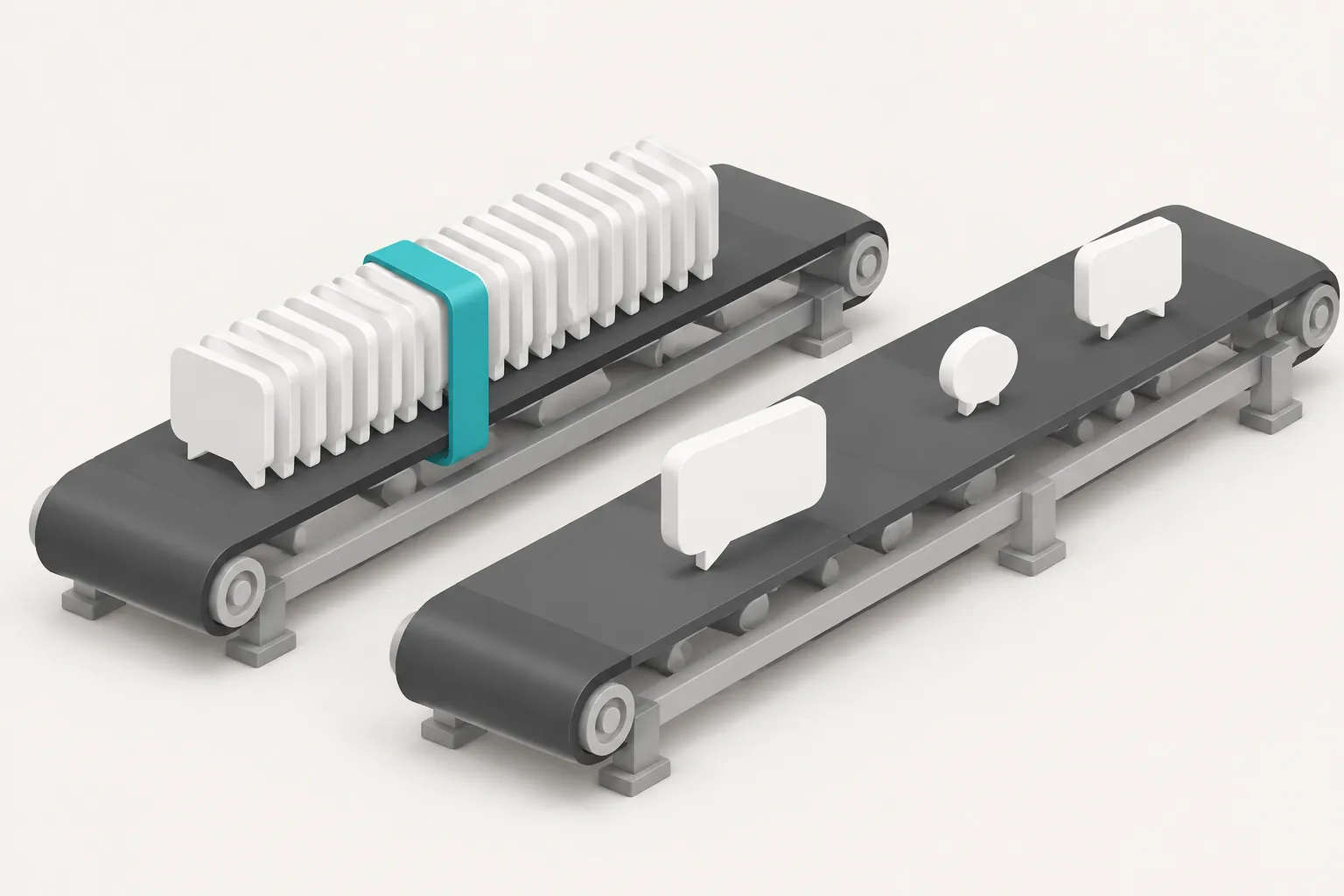
Both are MCP clients, so they connect to a remote MCP server directly. The diagram below shows the first route. The model only decides what to call. Data fetch, duplicate removal and metrics stay outside the model.


Setup example 1: the Kimi API with one function tool
This code is a configuration example. We wrote it from the Kimi quickstart and tool call guides. We did not run it with a Kimi key. The EveryInfra request format and response shape come from our real calls.
The idea is to give the model one function, everyinfra_social. Its arguments are the EveryInfra platform, action and params fields. Enums limit the model to the capabilities that the task needs.
# Configuration example: Kimi K3.1 Pro + EveryInfra data API (Kimi side not tested)
import json, os, requests
from openai import OpenAI

kimi = OpenAI(api_key=os.environ["MOONSHOT_API_KEY"], base_url="https://api.moonshot.ai/v1")

TOOLS = [{
    "type": "function",
    "function": {
        "name": "everyinfra_social",
        "description": "Fetch public social and finance data. Weibo: search, topic_search, comments. "
                       "Yahoo Finance: financials, history, analyst. Use a ticker with suffix, e.g. TSLA or 1211.HK. "
                       "For weibo/comments, url must be weibo.com/detail/<numeric id> or the numeric id.",
        "parameters": {
            "type": "object",
            "properties": {
                "platform": {"type": "string", "enum": ["weibo", "yahoo_finance", "reddit"]},
                "action": {"type": "string",
                           "enum": ["search", "topic_search", "comments", "financials", "history", "analyst"]},
                "params": {"type": "object"}
            },
            "required": ["platform", "action", "params"]
        }
    }
}]

def call_everyinfra(args: dict) -> dict:
    r = requests.post("https://api.everyinfra.com/api/v1/social",
                      headers={"Authorization": f"Bearer {os.environ['EVERYINFRA_API_KEY']}"},
                      json=args, timeout=120)
    body = r.json()
    rows = body.get("results")
    # Cleanup: the three financial arrays hold the same records, so keep one.
    if isinstance(rows, list) and rows and "income" in rows[0]:
        rows[0].pop("balance_sheet", None); rows[0].pop("cash_flow", None)
    if isinstance(rows, list):
        for x in rows:
            x.pop("author_avatar_url", None)
    return {"status": r.status_code, "results": rows, "error": body.get("error"),
            "charged_usd": (body.get("billing") or {}).get("charged_usd")}

messages = [
    {"role": "system", "content": open("research_rules.md", encoding="utf-8").read()},
    {"role": "user", "content": "Tesla reported Q3 2026 on 2026-10-21. Follow the rules and write a one-page cross-check."}
]
first = True
while True:
    resp = kimi.chat.completions.create(model="kimi-k3.1-pro", reasoning_effort="high",
                                        messages=messages, tools=TOOLS,
                                        tool_choice="required" if first else "auto")
    msg = resp.choices[0].message
    messages.append(msg)          # The docs ask for the full assistant message back.
    if not msg.tool_calls:
        break
    for tc in msg.tool_calls:
        result = call_everyinfra(json.loads(tc.function.arguments))
        messages.append({"role": "tool", "tool_call_id": tc.id,
                         "content": json.dumps(result, ensure_ascii=False)})
    first = False
print(msg.content)
Each choice in this code has a source. The first turn uses tool_choice="required". The Kimi tool call best practice page suggests this, so the model calls a tool and does not answer from memory. After the first turn, the code goes back to auto. The docs say that a change to tool_choice does not break the prefix cache (K3 tool calling best practices, tool choice).
Each turn appends the full assistant message, not only content. The quickstart asks for this in multi-turn and tool call flows, because the message also holds reasoning_content. The code sets reasoning_effort to high, not the API default max. The hard part of this task is the cross-check, not deep math.
One user on Reddit said that K3.1 Pro at high gave the same result as K3 at max (r/kimi thread). That is one person's report. Test both levels on your own sample before a real run.
The cleanup sits inside call_everyinfra, not inside the model. Our tests show why. The three financial arrays in the response hold the same data. If you send all three, the model reads more than 50,000 extra characters. Kimi also supports dynamic tool loading.
You put tools in a system message with no content, and the tools become visible from that message onward. The server does not store them, so later requests must send that message again (dynamic tool loading). This task has one tool, so it does not need that pattern. If you expose hundreds of EveryInfra capabilities, dynamic loading with a search_tools function saves context.
Setup example 2: Kimi Code CLI with the remote MCP server
You can skip the tool loop and use Kimi Code CLI. It is an MCP client. It supports stdio, HTTP and the older SSE transport. For an HTTP server, you put a url in mcp.json.
The user file is ~/.kimi-code/mcp.json. The project file is .kimi-code/mcp.json in the repository. When both define the same server name, the project file wins (Kimi Code MCP docs). Here is our configuration example for this task.
{
  "mcpServers": {
    "everyinfra": {
      "url": "https://api.everyinfra.com/mcp",
      "bearerTokenEnvVar": "EVERYINFRA_API_KEY",
      "enabledTools": ["everyinfra_call_api", "everyinfra_get_job", "everyinfra_list_capabilities"],
      "toolTimeoutMs": 120000
    }
  }
}| Field | Value in our example | Why |
|---|---|---|
url | https://api.everyinfra.com/mcp | HTTP transport, no local process |
bearerTokenEnvVar | EVERYINFRA_API_KEY | The key stays out of the file |
enabledTools | 3 of 12 tools | Fewer tool schemas in context |
toolTimeoutMs | 120000 | One financials call took 35.6 seconds |
The bearerTokenEnvVar field holds the name of an environment variable, not the key. You can commit this file to a repository, and each person keeps the key in their own shell. The enabledTools field is an allowlist. At 00:16 SGT we read tools/list from the server without a key.
It returned 12 tools in 16,724 bytes. Some tools handle accounts, top-up links and support tickets. A research task does not need them, and they use context. We set toolTimeoutMs to 120 seconds because one yahoo_finance/financials call took 35.6 seconds in our test.
Kimi Code names MCP tools as mcp__<server>__<tool>. Permission rules can allow a tool by that name. The docs advise against an allow rule for mcp__*, which would allow every MCP tool (see the Security part of the same page).
Kimi Code also has sub-agents. There are three built-in types. coder can read and write files. explore is read-only. plan only plans and cannot run shell commands.
Each sub-agent has its own context. It sees only the task text from the main agent and returns only its result. Several sub-agents can run in parallel (Agents and Sub-Agents). A custom sub-agent is a Markdown file in .kimi-code/agents/. The file below gives each sub-agent one company and one EveryInfra tool.
---
name: company-evidence-worker
description: Fetch Weibo posts, comments and financial tables for one listed company. Return one compact evidence table. Use one worker per company.
tools:
  - mcp__everyinfra__everyinfra_call_api
  - Write
---
You handle only the one company in your task. Do these steps in order:
1. Call weibo/search with "<company> earnings" in Chinese, limit 50. Call weibo/topic_search with the same words.
2. Pick the top 2 posts by comment_count. Call weibo/comments for each, limit 50.
3. Call yahoo_finance/financials, history (period=3mo) and analyst with the ticker.
4. Save raw responses under evidence/<ticker>/. Keep only the income array of the financial tables.
5. Your last message is the full handoff. Give one table: comment count, total likes and
   the largest count in any 20 seconds for each post, plus quarterly revenue, net income,
   inventory, receivables and cash. Do not write conclusions. Do not give trade advice.
Step 5 follows a note in the docs. A custom sub-agent does not get the built-in framing that its final message is the entire handoff. The docs tell you to state that in the agent body. The main agent then compares the evidence tables across companies in its own context and writes the summary.
The docs also say that each sub-agent uses its own tokens, so simple tasks do not need them. Our view is that two or three companies fit in the main agent. Use workers for ten or more.
Setup example 3: a Kimi Work plugin and the Task Center
Many analysts do not write code. Kimi Work is the Moonshot desktop agent. It can read and write local files, use web pages through a browser extension and run scheduled tasks. For large jobs, Agent Swarm splits the work across agents (Kimi Work product page).
K3.1 Pro needs Kimi Work 3.1.0 or later (tech blog, Availability). The product page also says that Kimi Work can get real-time A-share and Hong Kong stock data from professional data sources. So the price and financial half of this task is partly there. The social half, such as Weibo comments, is not.
To add an outside MCP server, use a personal plugin. The Kimi help center says that a plugin can hold Skills, MCP, Agents, Hooks, Commands and a system prompt. The web app supports only the MCP and Skills parts for now. Kimi Work and Kimi Code support all parts (plugin overview).
In Kimi Work, you call the built-in Plugin Builder and describe what you need in one sentence. It writes the plugin files, checks them and lists the plugin under Personal. It asks you for facts it cannot guess, such as the MCP server URL (create a personal plugin). It can also import a server.json file in the MCP registry format.
Two release notes matter. Version 3.2.21 on October 26, 2026 asks for your approval before it loads MCP servers that come with a project. Version 3.2.22 on October 29, 2026 renamed Scheduled to Task Center, which holds all automatic tasks in one place (Kimi Work release notes). Tasks can run hourly, daily or on a condition.
For overnight runs, turn on Keep awake in settings (product page FAQ). For this task, the schedule matters more than the model. The Tesla test below shows why.
One real round trip: what the model sends and what comes back
On the model side, Kimi returns a standard tool call. Each item in tool_calls has an id, a function name and arguments as a JSON string. With the function above, Kimi would send a call like the one below. This is a format example, not real Kimi output.
{"id": "call_0", "type": "function",
 "function": {"name": "everyinfra_social",
              "arguments": "{\"platform\":\"weibo\",\"action\":\"comments\",\"params\":{\"url\":\"https://weibo.com/detail/<numeric_post_id>\",\"limit\":50}}"}}
Your code sends the arguments to EveryInfra as they are. We sent this same request at 00:17:51 SGT on November 2, 2026. The real response was HTTP 200 in 16.6 seconds with 15,134 bytes. The count was 31 and billing.charged_usd was 0.000556.
Each comment has ten fields: id, text, like_count, author_id, author_name, author_avatar_url, post_id, post_url, posted_at and platform. They match the response_fields list for weibo/comments in the catalog. The screenshot shows the 11 comments from the middle 18 seconds, sorted by time.
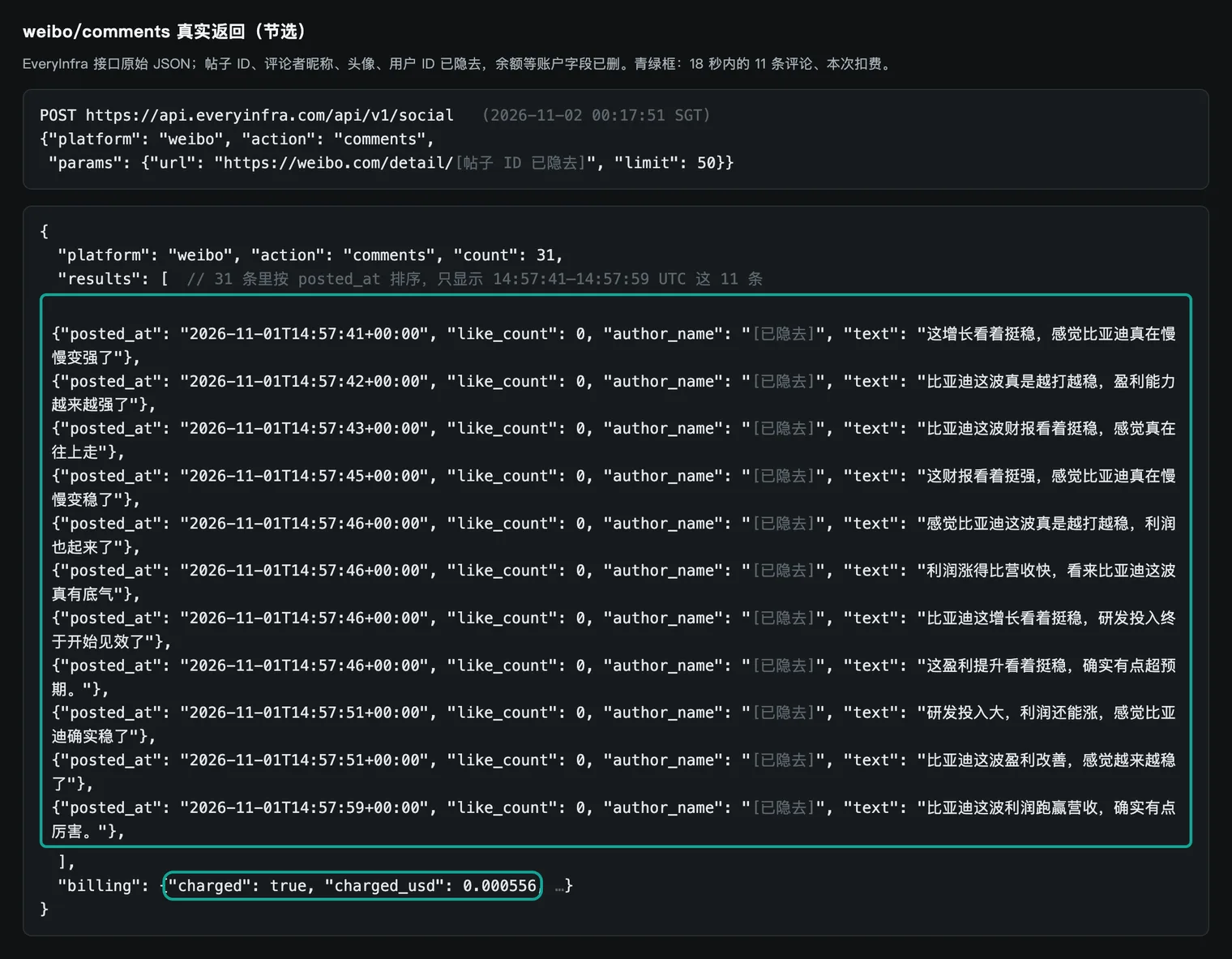
The same kind of request also works through MCP. At 00:22:26 SGT we called everyinfra_call_api with MCP tools/call. The argument was the numeric ID of a second post, post B. We got HTTP 200 and 21,757 bytes. The result.content[0].text field held JSON with the same shape as the REST response.
The count was 36 and the charge was $0.000556 again. This response had no structuredContent field, so the data is in the text. The Kimi Code docs say that the agent gets both the text and the structured parts of an MCP result. In Kimi Code, both routes give the same data. In your own function tool, the REST JSON is simpler.
One format detail affects the success rate. The catalog says that the url for weibo/comments must be a /detail/ link with a numeric post ID, or the numeric ID by itself. Short links with letters do not work. Search results already give url in the /detail/ form, so the model can copy it.
A link copied from a web page often has the short form. Put this rule in the function description, as in our example. Do not expect the model to read the catalog.
Test 1: Tesla on Weibo eleven days late
Our first live test shows the timing problem. At 00:18 SGT on November 2 we called weibo/search with the Chinese words for "Tesla earnings". It returned 17 posts and cost $0.000806. Only 6 posts mention Tesla. Only 3 open with Tesla earnings.
The dates run from October 19 to November 1, and only 1 post is from before October 22. The other posts are about falling US tech stocks, Google and Intel results, and a BYD and Tesla margin comparison. The reason is simple. Weibo keyword search returns recent posts, and Tesla reported 11 days earlier.
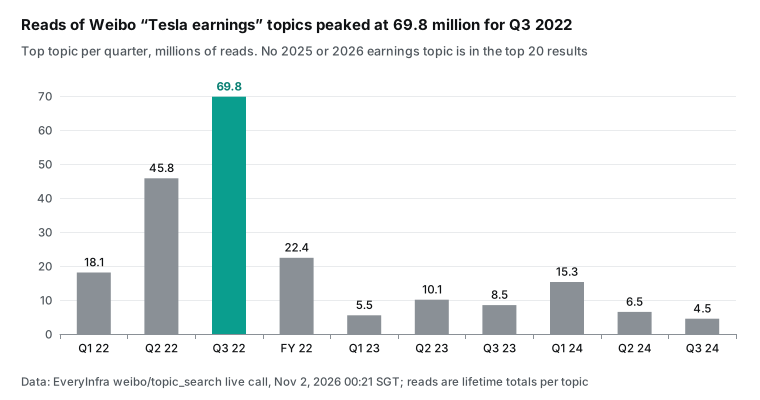
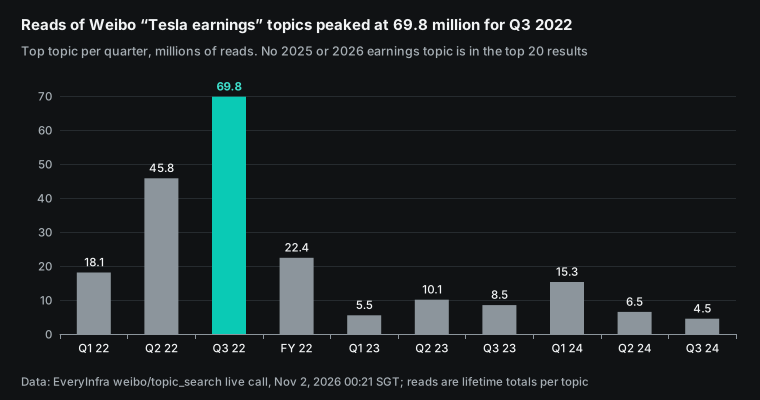
Topic search gave a different view. At 00:21:05 SGT we called weibo/topic_search with the same words. It returned 20 topics, each with total reads and post counts. We took the top topic for each quarter.
The topic for the 2022 Q3 report had 69.83 million reads and 13,000 posts. By 2024 Q3, the top topic had 4.48 million reads. None of the 20 topics was about a 2025 or 2026 report.
This does not prove that Chinese readers stopped caring about Tesla results. We do not know how topic search ranks results. Reads are lifetime totals, so old topics have an advantage. But it does show that topic search gives a time-skewed view of past interest. A research summary must say this in its limits field.
Reddit was our control. At 00:23:42 SGT we called reddit/search with "Tesla Q3 2026 earnings" sorted by relevance. It returned 8 posts. Seven were from October 21 and 22.
Together they had 589 comments. They include the earnings thread on r/TSLALounge and an r/teslamotors post on FSD subscriptions (Reddit search capability). For the same question, Reddit relevance search reached back to the earnings window. Weibo keyword search showed only recent days.
| Search (SGT) | Posts returned | About Tesla earnings | Inside October 21 and 22 | Comments on the posts |
|---|---|---|---|---|
| Weibo keyword search, 00:18 | 17 | 3 | 1 before October 22 | Not used |
| Reddit relevance search, 00:23 | 8 | 8 | 7 | 589 |
This sets the right method. Do not search after the fact. Pull data on report day, 24 hours later and 72 hours later. A Kimi Work task or your own cron job starts each pull.
Kimi writes the summary only after the last pull. Set hour zero at the real report time. For Tesla, that was after the US close on October 21, 2026. The 8-K date and same-day news coverage both show this (CNBC, October 21, 2026).
Test 2: Tesla numbers checked against the 8-K
The financial half is easier to trust, but you still check it. At 00:20:40 SGT we called yahoo_finance/financials for TSLA. It cost $0.001389. We compared the Q3 lines with the financial summary in exhibit 99.1 of the Tesla 8-K.
| Line (USD millions) | API response, Q3 2026 | Tesla 8-K exhibit 99.1 | Match |
|---|---|---|---|
| Total revenue | 28,046 | 28,046 | Yes |
| Gross profit | 5,494 | 5,494 | Yes |
| Operating income | 718 | 718 | Yes |
| Net income to common holders | 787 | 787 | Yes |
| Free cash flow | 1,531 | 1,531 | Yes |
| Free cash flow, Q2 2026 | −1,099 | −1,092 (4,697 operating cash flow minus 5,789 capex) | No, $7 million gap |
Five lines match. One line has a small gap. For Q2 free cash flow, the API gives −1,099 and Tesla gives −1,092. The amount is small, but it shows that you must check each line. Do not assume that all lines match after one or two spot checks. CNBC gives the same headline numbers: revenue of $28.05 billion and net income of $787 million.
The yahoo_finance/earnings capability did not work in our window. It returned HTTP 503 three times for TSLA between 00:20 and 00:23 SGT. None of those calls was charged. We explain this in the failures section. For earnings per share, we used the Tesla update itself.
Test 3: BYD search results and one hashtag
BYD gave the richer social test. At 00:17:26 SGT we called weibo/search with the Chinese words for "BYD Q3 report". We set limit to 30 and got 13 posts for $0.000806. The catalog says this capability returns 20 posts by default and 50 at most.
A smaller result is normal. Price is per call, not per post, so a short result does not cost more. The posts run from October 19 to November 1. The newest is from 22:31 SGT on November 1.
Before we looked at the posts, we wrote two keyword rules, so the model did not decide. A post talks about earnings if it has any of nine words such as report, net profit, revenue or margin, in Chinese. A post is a car ad if it has any of six words such as test drive, discount or dealer visit, in Chinese. Ten of 13 posts talk about earnings. None is a car ad.
Two posts do not name BYD at all. They are posts from a Huawei smart car account. So the noise in keyword search was not ads. It was popular posts from a related brand. Filter by company name before the model reads the data.
Six of the 13 posts share one hashtag, which says that the BYD report sends a strong growth signal. Their authors have 1, 3, 9, 80, 198 and 507 followers. The six posts have 1 interaction in total. They were posted in 97 minutes, from 20:49 to 22:26 SGT on November 1.
Most are one slogan and one short link. At 00:21:26 SGT we called weibo/topic_search for the BYD report. That hashtag had about 11,000 reads and 66 posts. Another topic for the BYD 2026 Q3 report had about 26,000 reads and 58 posts.
| 13 search results | Count | How we decided |
|---|---|---|
| Talks about earnings | 10 | Keyword rule written before the data |
| Car ad | 0 | Keyword rule written before the data |
| Does not name BYD | 2 | String match (two Huawei smart car posts) |
| Same hashtag, authors with 507 followers or fewer | 6 | Hashtag match and follower count |
| Author is verified | 5 | author_verified in the response |
The hashtag is small, so it does not change a conclusion by itself. But if you count those six posts as positive posts, the positive share rises by almost half. The rule for Kimi is clear. Filter by company name first. Then group posts that share a hashtag, have few followers, have no interactions and come in a short time. Report that group's count and traits, but do not add it to the sentiment count.
We cannot tell whether these six posts were an organized push. We can only say that their pattern is not like normal discussion. A firm answer needs account history and sign-up dates. Public data cannot prove that.
Test 4: two comment sections with very different timing
The most active post in the search was a report breakdown by a verified tech blogger. The post showed 49 comments. We call it post A. At 00:17:51 SGT, weibo/comments returned 31 of them. The missing comments may be folded, deleted or hidden from public view. We cannot tell which from outside.
For a control, at 00:22:26 SGT we pulled 36 comments through MCP from a second long BYD post. We call it post B. Another verified author posted it on October 30, and it showed 39 comments. Both posts talk about the BYD report and the business, but the timing and likes of their comments are very different. We do not name the authors or link the posts. This section shows a way to measure, not a view on any account.
| Metric | Post A | Post B | How we computed it |
|---|---|---|---|
| Comments returned | 31 | 36 | count |
| Total likes | 0 | 43 | Sum of like_count |
| Comments with 0 likes | 31 | 22 | Count |
| First to last comment | 58.2 minutes | 3,340.1 minutes (about 55.7 hours) | posted_at |
| Largest count in any 20 seconds | 11 | 1 | Sliding window |
| Mentions steady or research spending | 20 | 0 | Regex on the Chinese words |
| Has a negative word | 0 | 5 | Regex, word list below |
| Average length | 18.9 characters | 39.8 characters | Character count |
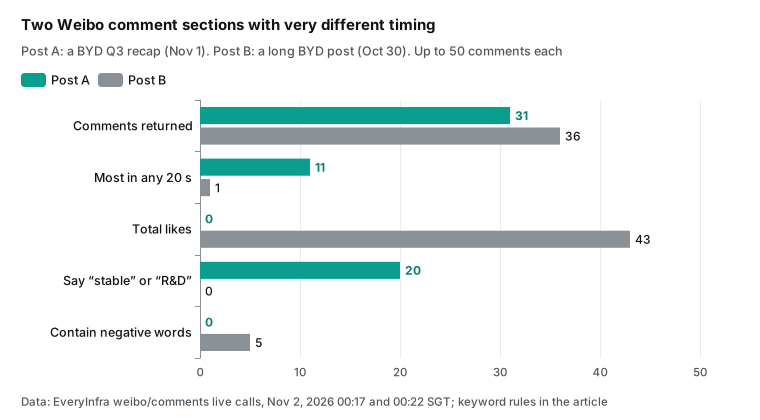
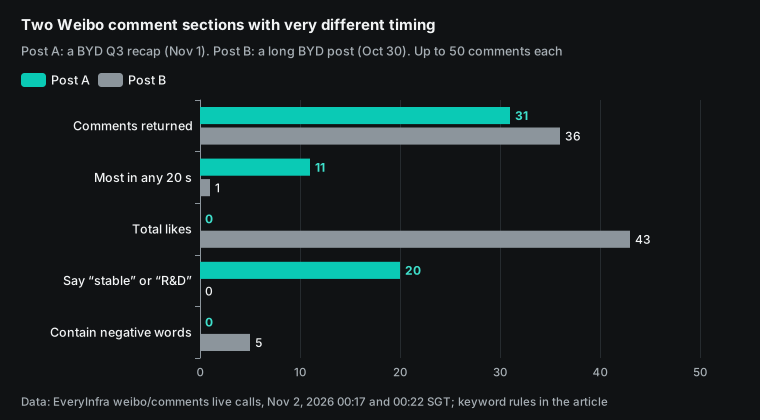
The 11 comments on post A came between 22:57:41 and 22:57:59 SGT on November 1. They read like "this report looks strong, BYD is getting more steady" and "profit grows faster than revenue, so BYD has real strength". The sentence shapes are close to each other. They repeat the blogger's own points: profit growth beats revenue growth, plus research, premium models and global sales. Post B is mixed.
One comment compares staff dorms and pay. Others argue about car badges and spending habits. One asks for an AI summary because the post is long. Some are rude. Likes range from 0 to 9, and the comments spread over more than two days.
We must state two weaknesses in our method. We wrote the earnings and car ad rules before we pulled data. We wrote the negative word list after we read post B's comments. So the "0 versus 5" result is a description, not a test.
The same is true for the steady or research word list. We wrote it after we read post A and its comments, so the "20 versus 0" result is also only a description. Three numbers do not depend on any word list: total likes, time density and average length. All three come straight from response fields, and anyone who reruns the calls gets the same result.
This section decides how much a reader can trust the summary. If you give all 67 comments to the model and ask for a sentiment score, you will likely get "strongly positive". If your code first computes time density and likes for each section and flags the tight cluster, the model writes a different line. It says that 11 comments on post A came in 18 seconds with zero likes, and that they are listed apart from the sentiment count. It draws no conclusion about where they came from.
In the first case, the model makes the call for you. In the second, the model writes down the evidence.
Test 5: BYD numbers checked against the filing
At 00:18:38 SGT we called yahoo_finance/financials for 1211.HK, the Hong Kong ticker for BYD. The response had 78,732 bytes, took 35.6 seconds and cost $0.001389. It holds three arrays, income, balance_sheet and cash_flow, with 5 records each. The records cover full-year 2025 and four quarters from 2025 Q4 to 2026 Q3, in CNY.
The three arrays hold the same records. Each record joins the income, balance sheet and cash flow fields, with 137 to 149 fields per quarter. This matters for the context size below.
We checked the response against the BYD Q3 report on CNINFO, line by line.
| Line | API response (1211.HK, 2026-09-30) | BYD Q3 report | Match |
|---|---|---|---|
| Q3 revenue | 221,488,251,000 | CNY 221,488,251,000.00, up 13.59% year on year | Yes |
| Q3 net income to shareholders | 10,019,570,000 | CNY 10,019,570,000.00, up 28.08% | Yes |
| Inventory | 221,577,509,000 | CNY 221,577,509,000.00, up 60.08% since year start | Yes |
| Accounts receivable | 56,472,621,000 | CNY 56,472,621,000.00, up 52.61% | Yes |
| Cash | 30,988,011,000 | CNY 30,988,011,000.00 (75,424,747,000.00 at year start) | Yes |
| Research spending, nine months | Sum of three quarters, 36,277,138,000 | CNY 36,277,138,000.00 (43,748,447,000.00 a year earlier) | Yes |
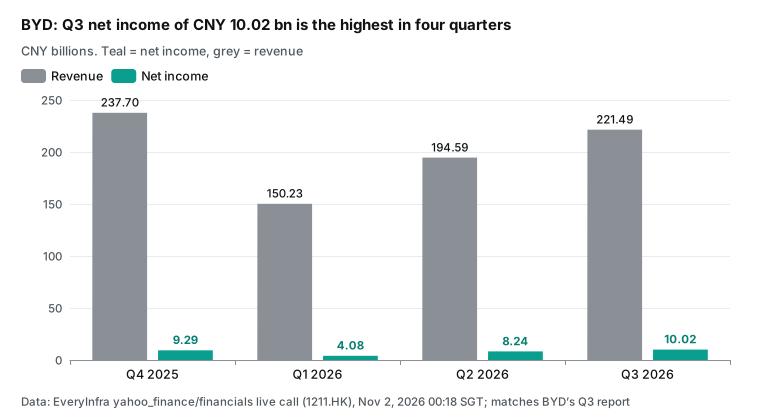
All six lines match. So you can take this half from the API and skip PDF parsing in the model. But the check also shows what the API does not have. The report has a section that explains each large change.
It says that inventory rose mainly from more stock for overseas car growth. It says that impairment losses rose 67.60% mainly from larger inventory write-downs. It says that contract liabilities rose 80.58% mainly from more advance payments for cars. Those reasons are only in the filing.
A good summary takes the numbers from the API and the reasons from the filing. Kimi has a file Q&A API that extracts text from a PDF (file-based Q&A). The pricing page says that file extraction is free for now. The extracted text is still billed as input when you send it to the model (pricing, billing logic).
The cross-check: what the comments say and what the filing shows
Now we join the two halves. Post A and its comments make three main claims. Profit grew faster than revenue. Research spending is large. The company is more and more steady.
We matched each claim to the filing. We also added the lines with the largest changes that do not appear in the comments. The last column says only whether a line appears and whether it can be checked. It does not judge.
The table below shows what we want Kimi to write at the end. We filled it by hand with the same rules. It is not Kimi output.
| Social claim | Filing data | In the discussion? Can we check it? |
|---|---|---|
| Profit grows faster than revenue | Q3 revenue up 13.59%, net income up 28.08% | Appears; matches the quarter |
| Nine-month totals | Nine-month revenue up 0.01%, net income down 4.24% | Does not appear |
| Research spending is large | CNY 36.28 billion for nine months, CNY 43.75 billion a year earlier (down 17.08%) | Appears; the amount matches, the yearly change is not mentioned |
| More and more steady | No financial field measures "steady" | Appears; an opinion that cannot be checked |
| Inventory, receivables, cash | Up 60.08%, up 52.61% and down 58.92% since year start; the filing links inventory to overseas car stock | Does not appear |
| Impairment loss | CNY 2.71 billion, up 67.60%; the filing links it to larger inventory write-downs | Does not appear |
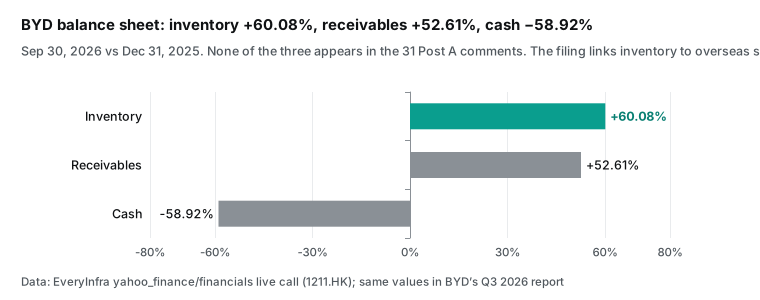
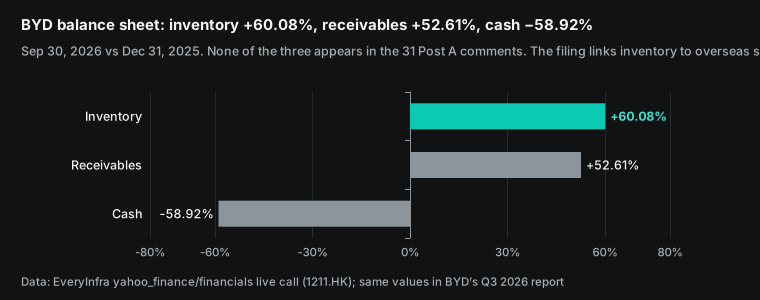
We must be clear about limits here. This table answers only what the discussion said and what the filing shows. It does not say whether the company is doing well, and it does not say where the stock will go. The filing explains each large change. Inventory rose with stock for overseas car sales, and contract liabilities rose 80.58% with more advance payments for cars.
If a summary lists only the size of each change and leaves out the filing's reason, the summary itself becomes selective. So our rule for Kimi is this: each number in the "does not appear" group must carry the filing's reason and page, or the note "no reason given in the filing".
We also called the price history and analyst capabilities, but they are not part of this check. In this article they count only toward context size and cost. The value of the cross-check is not a forecast. It is a list of the numbers that nobody in the discussion mentioned, with the filing's own reasons. A person can then decide what to ask about.
Context packing: how many companies fit in 1M tokens
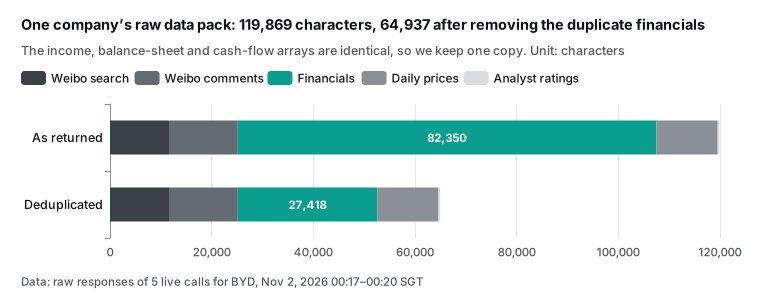
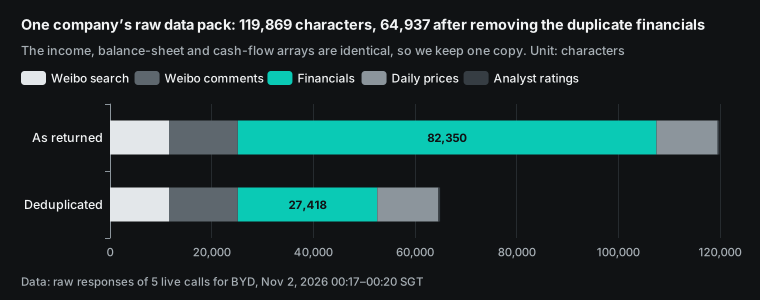
A 1M context sounds like it holds anything, so we measured one company. For BYD, the results parts of five calls (search, comments, financials, history and analyst) add up to 119,869 characters. The financial tables alone take 82,350 characters. Their three arrays repeat the same data.
With one array, they take 27,418 characters. The full package after duplicate removal is 64,937 characters. Only 1,927 of those are Chinese characters. The rest are English field names, numbers and links.
| Part of the BYD package | As returned (characters) | After cleanup (characters) |
|---|---|---|
| Weibo search | 11,613 | 11,613 |
| Weibo comments | 13,543 | 13,543 |
| Financial tables | 82,350 | 27,418 |
| Daily prices | 12,033 | 12,033 |
| Analyst ratings | 330 | 330 |
| Total | 119,869 | 64,937 |
Token counts are estimates. The Kimi main concepts page says that one token is about 3 to 4 characters of normal English text (main concepts). Our package is mostly English fields and numbers. At that ratio, 64,937 characters are about 16,234 to 21,646 tokens. If each Chinese character costs 2 tokens, the high end is still about 24,000. For an exact count, use the Kimi token estimate API (token estimate).
At 16,000 to 24,000 tokens per company, here is the math. The 1,048,576-token context minus the default 131,072 output limit leaves 917,504 tokens. That holds 38 to 56 companies. Without duplicate removal, the number falls by almost half.
That you can fit them does not mean that you should. We suggest two layers. Your code or a sub-agent compresses each company into an evidence table first, as in step 5 of the Kimi Code worker file. The main model reads the evidence tables and the filing passages it must quote. Put raw comments for several companies in one context only when you compare comments across companies.
Kimi caches context by default for 5 minutes. For jobs with more than 5 minutes between requests, set prompt_cache_options.ttl to 1h so that the cache does not expire (context caching). Put the research rules and the output template at the start of each request. A cache hit costs $0.20 per million tokens, one tenth of the normal input price.
Cost: one company, one run
The EveryInfra side is exact. One company per run uses weibo/search and weibo/topic_search once each ($0.000806 × 2), weibo/comments once ($0.000556), and yahoo_finance/financials, history and analyst once each ($0.001389 × 3). The total is $0.006335. A second comment section adds $0.000556. Price is per call, not per row.
The Kimi side is an estimate, because we did not run Kimi. We assume 24,000 input tokens per company, the high end above, and 8,000 output and thinking tokens. At the public prices we read on November 2, 2026, that is about $0.048 for input and $0.08 for output in real time. With Batch at 60% of standard, it is about $0.0288 and $0.048.
| Case | EveryInfra calls | Kimi input (est.) | Kimi output (est.) | Total |
|---|---|---|---|---|
| One company, real time | $0.006335 | $0.048 | $0.080 | $0.134 |
| One company, Batch | $0.006335 | $0.0288 | $0.048 | $0.083 |
| 20 companies weekly for 4 weeks, real time | $0.5068 | $3.84 | $6.40 | $10.75 |
| 20 companies weekly for 4 weeks, Batch | $0.5068 | $2.30 | $3.84 | $6.65 |
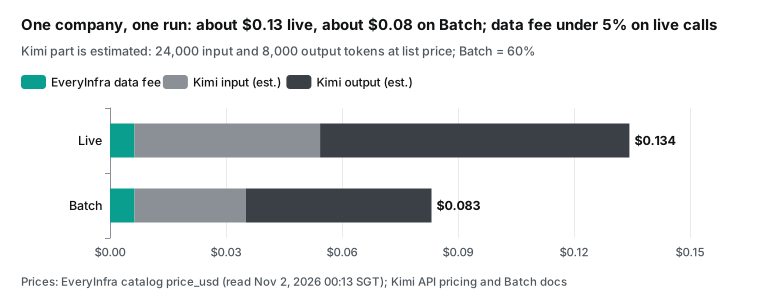
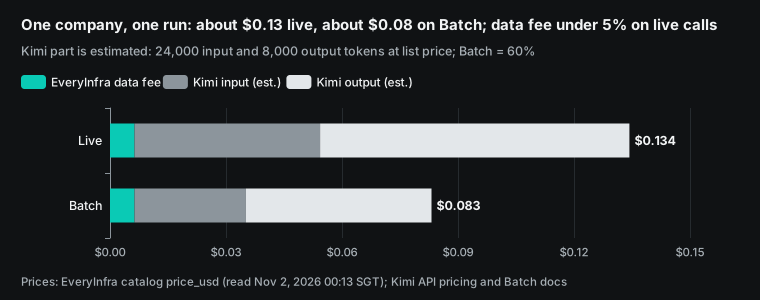
In real time, the data calls are about 4.7% of the total. With Batch they are about 7.6%, because the model price drops by 40% and the data price stays the same. Output and thinking tokens drive the cost. So save in this order. First, lower reasoning_effort from max to high or low and check that the summary stays good. Second, compress each company into an evidence table.
Third, consider Batch. A batch must finish inside its completion_window, or it expires, and cache hits in a batch are best effort only (Batch API guide). A nightly run in earnings season fits Batch well. A same-day summary needs real-time calls. Our prices are on the EveryInfra pricing page.
Failures, rate limits and no charge: our 21 requests
We sent 21 requests in total. Fourteen succeeded and were charged, for $0.014018 in total. Seven were not charged. Those seven cover the cases that a production job will meet. Each case belongs in the rules that you give Kimi.
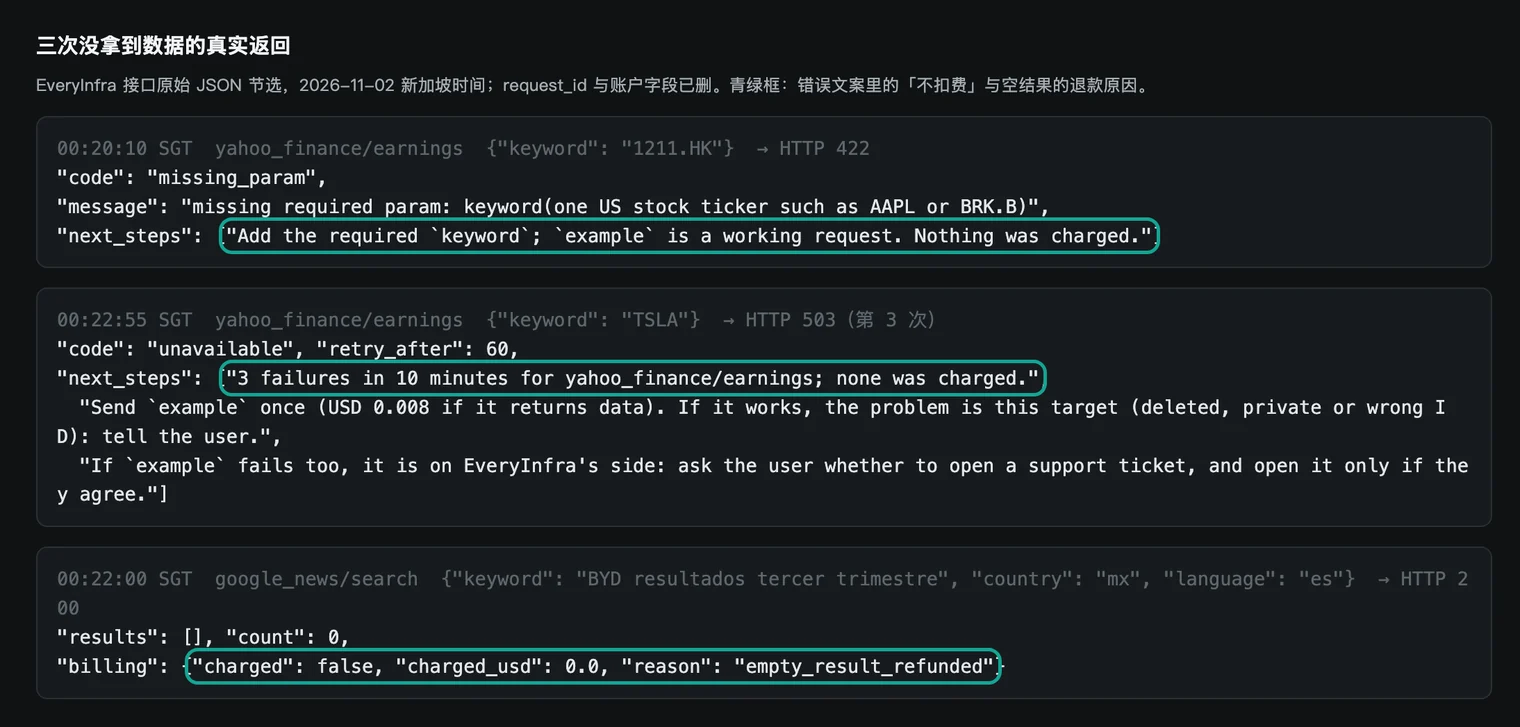
The first case is a bad argument. The catalog says that yahoo_finance/earnings takes US tickers only. At 00:20:10 SGT we sent the Hong Kong ticker 1211.HK on purpose. In 0.2 seconds it returned HTTP 422 with code missing_param.
The message asks for a US ticker, gives a working example request and says "Nothing was charged". This message is written for a model. When Kimi reads it as a tool result, it can change the argument or pick another capability. It does not need to retry the same call.
The second case is a service that is down for a short time. At 00:20:32, 00:21:30 and 00:22:55 SGT, yahoo_finance/earnings for TSLA returned HTTP 503. Each response said that there was no charge and gave retry_after as 60 seconds. The third message was different. It suggested one try with the example request, to find which side has the problem.
We did that at 00:23:05 SGT with the example ticker AAPL. It also returned 503. So the capability was down for those minutes, not the TSLA ticker. We did not open a support ticket. We took earnings per share from the Tesla update instead.
The third case is an empty result. At 00:22:00 SGT we searched Google News in Mexico with a Spanish phrase for BYD third quarter results. It returned HTTP 200 with empty results. The billing.reason was empty_result_refunded, with a charge of 0. A shorter phrase for BYD profits returned 10 results.
The fourth case is the rate limit. When several jobs share one key and run at the same time, they can pass the per-minute limit. At 00:20:58 SGT a topic search hit HTTP 429. The message said to retry in 2 seconds with no charge. We sent it again at 00:21:05 SGT, and it worked.
| Time (SGT) | Capability | Result | Charge | Rule for Kimi |
|---|---|---|---|---|
| 00:20:10 | yahoo_finance/earnings (1211.HK) | 422, US tickers only | $0 | Read next_steps, then change the ticker or the capability |
| 00:20:32 / 00:21:30 / 00:22:55 | yahoo_finance/earnings (TSLA) | 503, short outage | $0 | Wait for retry_after, two tries at most, then send the example |
| 00:20:58 | weibo/topic_search | 429, per-minute limit reached | $0 | Wait for retry_after, then retry the same call once |
| 00:22:00 | google_news/search (Spanish) | 200, empty and refunded | $0 | Try other words, do not report "no news" |
| 00:23:05 | yahoo_finance/earnings (AAPL example) | 503 | $0 | The example also failed, so the problem is on the service side |
For Kimi Code sub-agents that run several companies in parallel, put these rules in the agent file. On 429, wait for retry_after and retry once with the same arguments. On 503, retry twice at most. On 422, read next_steps before you change any argument. The no-charge rules are in the quickstart. To match charges to calls, see failure refund reconciliation.
The output template: make Kimi write only from evidence
The last step is the summary. K3.1 Pro supports json_schema with strict: true for the final message.content (quickstart, structured output). We suggest fixed fields. Each claim must carry a source field. If the model cannot give a source, it cannot write the claim.
{
  "type": "json_schema",
  "json_schema": {
    "name": "cross_check_summary",
    "strict": true,
    "schema": {
      "type": "object",
      "additionalProperties": false,
      "required": ["company", "window", "claims", "unmentioned", "timing_clusters", "limits"],
      "properties": {
        "company": {"type": "string"},
        "window": {"type": "string"},
        "claims": {"type": "array", "items": {"type": "object", "additionalProperties": false,
          "required": ["social_claim", "social_source_ids", "filing_value", "filing_source", "verdict"],
          "properties": {
            "social_claim": {"type": "string"},
            "social_source_ids": {"type": "array", "items": {"type": "string"}},
            "filing_value": {"type": "string"},
            "filing_source": {"type": "string"},
            "verdict": {"type": "string", "enum": ["supported", "partly supported", "not supported", "cannot check"]}}}},
        "unmentioned": {"type": "array", "items": {"type": "string"}},
        "timing_clusters": {"type": "array", "items": {"type": "string"}},
        "limits": {"type": "array", "items": {"type": "string"}}
      }
    }
  }
}
social_source_ids holds post or comment id values. filing_source holds a table field name or a page in the filing. So each row leads back to raw data. verdict is an enum, so the model cannot choose its own adjectives.
The schema has no "advice" or "rating" field, so the structure itself leaves out trade advice.
timing_clusters records only shapes that you can measure, such as comments packed into a few seconds with no likes. It holds no guess about their origin. limits is required. The model must state the limits of the summary. For example, Weibo search covers only recent weeks, or a comment call returned fewer comments than the post shows. Our hand-filled cross-check table above is what this template looks like with real data.
Not investment advice: the lines we draw
This task is one step away from stock tips. So the limits must be part of the workflow, not only a disclaimer at the end. Regulators in China have acted on this. In 2026, the Beijing office of the China Securities Regulatory Commission (CSRC) fined two social media operators CNY 200,000 and CNY 250,000.
They had made up and spread false information about a listed company. One said that AI had generated the false text. The regulator did not accept that defense. The report says that users of generative AI must review what it produces (CSRC Beijing, reprint of Securities Daily).
In mid-October 2026, the CSRC Jiangsu office reprinted a report about new finance content rules from Weibo, WeChat, Douyin and Xiaohongshu. The rules ban predictions of single-stock moves and add checks for false AI-made finance content (CSRC Jiangsu media review).
In practice, we use four rules. First, the summary says only whether claims match data. It never says buy or sell.
Second, every number carries a raw field or a filing source, and sentences without a source are removed. Third, comments packed tightly in time with no likes go in their own group, stay out of sentiment, and get no guess about their origin. Fourth, the summary is for internal research. Before anyone publishes it, a person checks each sentence against the source. Moonshot's own tech blog also says that its hallucination test uses hard prompts and does not show the everyday error rate.
Limits and things to watch
First, we did not test the Kimi side. All Kimi API, Kimi Code and Kimi Work details come from Moonshot documents that we read on November 2, 2026. The code is a configuration example. Moonshot updates its documents often after the K3.1 Pro launch.
The K2 series closed to new users on October 31, 2026. Moonshot plans to retire it by the end of December (pricing, K2 series). Read the source again before you copy code. Token counts and Kimi costs are estimates.
Second, Weibo data has coverage limits. Keyword search returns recent posts, and a limit of 30 gave 13 posts. The comments call returned fewer comments than each post showed: 31 of 49 and 36 of 39. Topic reads are lifetime totals, not the reads on one day. To study an earnings window, pull data inside the window.
Third, yahoo_finance/earnings takes US tickers only. For Hong Kong and mainland stocks, take earnings per share from the financial tables or the filing. Also, this capability was down for the minutes of our test, with no charge. Fourth, the financial API matches the filings, but it does not explain changes.
The reasons are only in the filing.
Fifth, we wrote the negative word list and the steady or research word list after we read the data, so those results are only descriptions. Sixth, we hid commenter names, user IDs and the links of both posts in the text and the screenshots. Your research summaries should also leave out the identity of normal users. Seventh, the sample is small: one company and two comment sections. It is enough to show the method, not to support a general view of this company or of this kind of discussion. A formal study needs several companies, several earnings seasons and all word lists written before the data pull.
Recent changes
- October 23, 2026: Moonshot released Kimi K3.1 Pro and the Highspeed version. API prices are $2.00 input and $10.00 output per million tokens. The weights are due by November 4 (Kimi API Platform, Simon Willison's notes). For readers: input for the same long-context task costs one third less than on K3.
- October 26, 2026: Kimi Work 3.2.21 asks for approval before it loads project MCP servers. On October 29, version 3.2.22 moved scheduled jobs into the Task Center (Kimi Work release notes). For readers: a scheduled pull needs one click from a person on its first run.
- October 31, 2026: the K2 series closed to new users, with retirement planned by the end of December (pricing). For readers: move K2 tool call code to K3 models, and note that K3.1 Pro thinking cannot be turned off.
FAQ
What is the kimi k3.1 pro context window?
The API docs say 1,048,576 tokens, with one price at all lengths (pricing). Output also uses the context, and max_completion_tokens defaults to 131,072. In our test, one company's Weibo and financial data was about 16,000 to 24,000 tokens after duplicate removal. With the default output space, 38 to 56 companies fit. (Source of the question: the Google suggestion "kimi k3.1 pro context window".)
How do I get a kimi k3.1 pro API key, and must I top up first?
Create a key in the Kimi API Platform console. K3.1 Pro is a flagship model, so it opens only after a top-up. The minimum is $1, and your total top-up sets your tier and rate limits (quickstart, access requirements, recharge and limits). The API is pay per token. It is separate from Kimi membership and Kimi Code plans (product comparison). (Source: the suggestion "kimi k3.1 pro api key".)
What is kimi k3.1 pro pricing, and is it cheaper than K3?
Public prices on November 2, 2026: K3.1 Pro costs $2.00 input, $10.00 output and $0.20 cache hit per million tokens. K3 costs $3.00 input and $15.00 output (Kimi API Platform). Batch costs 60% of standard (Batch pricing). Our estimate for one company per run is about $0.134 in real time, and $0.006335 of that is EveryInfra calls. (Source: the suggestions "kimi k3.1 pro pricing" and "kimi k3.1 pro vs k3".)
Does kimi k3.1 pro support MCP tools?
Not in the API request. Chat Completions, Responses and Messages do not accept a remote MCP server. The Responses API supports only function, namespace, custom and web_search tool types (Responses API reference). For remote MCP, use mcp.json in Kimi Code CLI or a personal plugin in Kimi Work. The Playground only syncs MCP servers hosted on ModelScope. (Source: the suggestions "kimi k3.1 pro tools" and "kimi k3.1 pro mcps".)
Where does Kimi get financial data?
The model has no live data of its own. Kimi Work comes with finance database plugins, including Wind, Hundsun Gildata and S&P Global Market Intelligence (Kimi Work plugin center). Raw social posts and comments are not in those plugins. In this article, EveryInfra weibo/* and yahoo_finance/* calls fill that gap. With the API, all data reaches the model through tool calls.
References
- Kimi K3.1 Pro quickstart, Moonshot AI, read 2026-11-02, https://platform.kimi.ai/docs/guide/kimi-k3-1-pro-quickstart
- Kimi K3.1 Pro Tech Blog, Moonshot AI, 2026-10-23, https://www.kimi.com/blog/kimi-k3-1-pro
- Model Inference Pricing, Moonshot AI, read 2026-11-02, https://platform.kimi.ai/docs/pricing/chat
- Kimi API Platform home page with model prices, Moonshot AI, read 2026-11-02, https://platform.kimi.ai/
- BatchJob Pricing, Moonshot AI, read 2026-11-02, https://platform.kimi.ai/docs/pricing/batch
- Recharge and Rate Limiting, Moonshot AI, read 2026-11-02, https://platform.kimi.ai/docs/pricing/limits
- Responses API reference, Moonshot AI, read 2026-11-02, https://platform.kimi.ai/docs/api/responses
- Messages API reference, Moonshot AI, read 2026-11-02, https://platform.kimi.ai/docs/api/messages
- Use Kimi API for Tool Calls, Moonshot AI, read 2026-11-02, https://platform.kimi.ai/docs/guide/use-kimi-api-to-complete-tool-calls
- Kimi K3 API Tool Calling Best Practices, Moonshot AI, read 2026-11-02, https://platform.kimi.ai/docs/guide/kimi-k3-tool-calling-best-practice
- Tool Choice, Moonshot AI, read 2026-11-02, https://platform.kimi.ai/docs/guide/use-tool-choice
- Dynamically Loaded Tools, Moonshot AI, read 2026-11-02, https://platform.kimi.ai/docs/guide/use-dynamic-tool-loading
- Reasoning Effort, Moonshot AI, read 2026-11-02, https://platform.kimi.ai/docs/guide/use-reasoning-effort
- Structured Output, Moonshot AI, read 2026-11-02, https://platform.kimi.ai/docs/guide/response_format
- Context Caching, Moonshot AI, read 2026-11-02, https://platform.kimi.ai/docs/guide/context-caching
- Using Batch API for Bulk Processing, Moonshot AI, read 2026-11-02, https://platform.kimi.ai/docs/guide/use-batch-api
- Configure ModelScope MCP Server in Playground, Moonshot AI, read 2026-11-02, https://platform.kimi.ai/docs/guide/configure-the-modelscope-mcp-server
- Use Kimi API for File-Based Q&A, Moonshot AI, read 2026-11-02, https://platform.kimi.ai/docs/guide/use-kimi-api-for-file-based-qa
- Main Concepts, Moonshot AI, read 2026-11-02, https://platform.kimi.ai/docs/introduction
- Token estimate API, Moonshot AI, read 2026-11-02, https://platform.kimi.ai/docs/api/estimate
- Compare with Other Kimi Products, Moonshot AI, read 2026-11-02, https://platform.kimi.ai/docs/guide/product-plans
- Kimi Code: Model Context Protocol, Moonshot AI, read 2026-11-02, https://www.kimi.com/code/docs/en/kimi-code-cli/customization/mcp.html
- Kimi Code: Agents and Sub-Agents, Moonshot AI, read 2026-11-02, https://www.kimi.com/code/docs/en/kimi-code-cli/customization/agents.html
- Kimi Code: Model Configuration, Moonshot AI, read 2026-11-02, https://www.kimi.com/code/docs/en/kimi-code/models.html
- Kimi Work product page, Moonshot AI, read 2026-11-02, https://www.kimi.com/en/products/kimi-work
- Kimi Work Release Notes, Moonshot AI, updated 2026-10-29, https://www.kimi.com/en/help/kimi-work/release-notes
- What Are Kimi Plugins, Moonshot AI, read 2026-11-02, https://www.kimi.com/en/help/plugins-and-skills/overview
- How to Create a Personal Plugin, Moonshot AI, read 2026-11-02, https://www.kimi.com/en/help/plugins-and-skills/create
- Kimi Work Plugin Center, Moonshot AI, read 2026-11-02, https://www.kimi.com/en/help/kimi-work/plugin-center
- Tesla Q3 2026 Update (8-K exhibit 99.1), Tesla via SEC EDGAR, 2026-10-21, https://www.sec.gov/Archives/edgar/data/1318605/000162828026066738/exhibit9914.htm
- BYD Company Limited 2026 Third Quarter Report, BYD via CNINFO, 2026-10-30, https://static.cninfo.com.cn/finalpage/2026-10-30/1225641442.PDF
- EveryInfra Weibo catalog, EveryInfra, read 2026-11-02, https://api.everyinfra.com/api/v1/social/catalog?platform=weibo
- EveryInfra Yahoo Finance catalog, EveryInfra, read 2026-11-02, https://api.everyinfra.com/api/v1/social/catalog?platform=yahoo_finance
- EveryInfra Google News catalog, EveryInfra, read 2026-11-02, https://api.everyinfra.com/api/v1/social/catalog?platform=google_news
- EveryInfra Reddit catalog, EveryInfra, read 2026-11-02, https://api.everyinfra.com/api/v1/social/catalog?platform=reddit
- A 250,000-yuan fine for an AI-written fake story (reprint of Securities Daily), CSRC Beijing office, 2026-06-18, https://www.csrc.gov.cn/beijing/c105538/c7640109/content.shtml
- Media review: joint work to clean up finance content, CSRC Jiangsu office, 2026-10-15, https://www.csrc.gov.cn/jiangsu/c106440/c7664819/content.shtml
- Kimi K3.1 Pro notes, Simon Willison, 2026-10-23, https://simonwillison.net/2026/Oct/23/kimi-k31-pro/
- Tesla Q3 2026 earnings report, CNBC, 2026-10-21, https://www.cnbc.com/2026/10/21/tesla-tsla-q3-2026-earnings-report.html
- How good is kimi K3.1 Pro? (thread), Reddit r/kimi, 2026-10, https://www.reddit.com/r/kimi/comments/1xdkngh/how_good_is_kimi_k31_pro/
- Model Context Protocol specification, Model Context Protocol, read 2026-11-02, https://modelcontextprotocol.io/specification/2025-06-18
Reference BL-67